Ad Extensions as a Lever for Powerful Text Ads
Stefan Stopper | Account Strategist
Session Outcomes
In this session, you will get...
● Actionable best practice tips for ad extensions
What has worked and what hasn't, why a love for detail matters
● Reporting tips
How to get detailed insights into your ad extensions
● A script
For automatically adding product-specific sitelinks to your campaigns
About me
Stefan Stopper
Account strategist @ smec (Austria)
PPC enthusiast
Programmatic advertising specialist
Agenda
I. Fundamentals
1. Overview of existing ad extensions
2. Performance measurement
3. Use cases from various industries/verticals
II. Hands-On: Inventory-based ad extensions on ad group level with a script
1. Exploration
2. Creation
III. Summary
I. Fundamentals
Overview
How many different ad extensions
are currently available?
10!
Overview
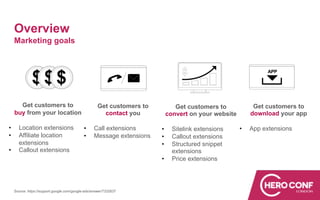
Marketing goals
Get customers to
buy from your location
• Location extensions
• Affiliate location
extensions
• Callout extensions
Get customers to
contact you
• Call extensions
• Message extensions
Get customers to
convert on your website
• Sitelink extensions
• Callout extensions
• Structured snippet
extensions
• Price extensions
Get customers to
download your app
• App extensions
Source: https://support.google.com/google-ads/answer/7332837
Overview
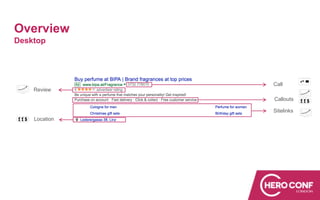
Desktop
Sitelinks
Review
Location
Call
Callouts
Overview
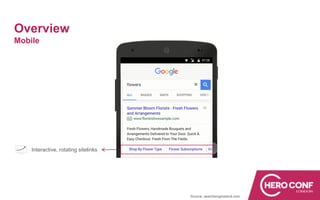
Mobile
Source: searchengineland.com
Interactive, rotating sitelinks
Overview
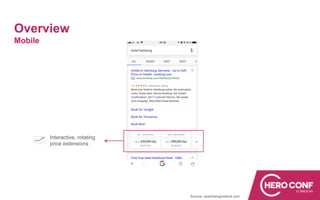
Mobile
Source: searchengineland.com
Interactive, rotating
price extensions
Fundamentals:
Performance measurement
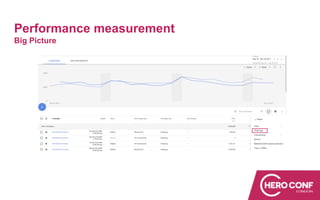
Big Picture
Performance measurement
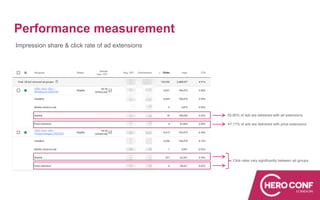
55.80% of ads are delivered with ad extensions
47,11% of ads are delivered with price extensions
Click rates vary significantly between ad groups
Impression share & click rate of ad extensions
Performance measurement
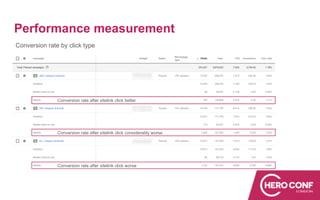
Conversion rate by click type
Conversion rate after sitelink click better
Conversion rate after sitelink click considerably worse
Conversion rate after sitelink click worse
Performance measurement
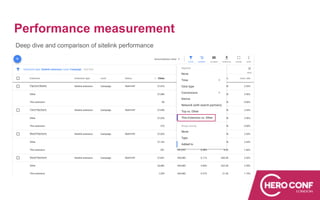
Deep dive and comparison of sitelink performance
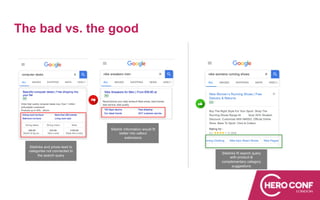
The bad vs. the good
Sitelinks and prices lead to
categories not connected to
the search query
Sitelink information would fit
better into callout
extensions
Sitelinks fit search query
with product &
complementary category
suggestions
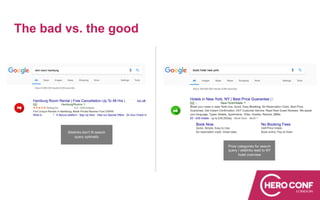
The bad vs. the good
Sitelinks don't fit search
query optimally
Price categories for search
query / sitelinks lead to NY
hotel overview
Fundamentals:
Use Cases
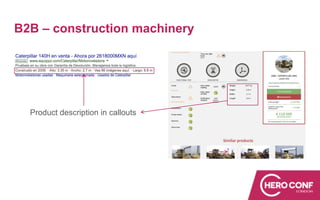
B2B – construction machinery
Product description in callouts
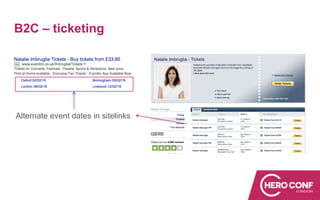
B2C – ticketing
Alternate event dates in sitelinks
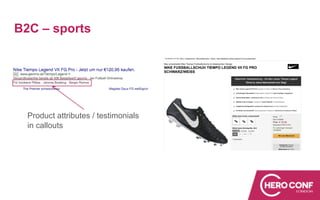
B2C – sports
Product attributes / testimonials
in callouts
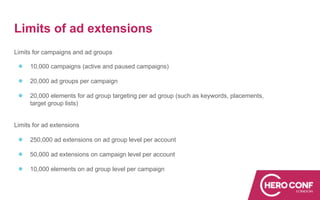
Limits of ad extensions
Limits for campaigns and ad groups
● 10,000 campaigns (active and paused campaigns)
● 20,000 ad groups per campaign
● 20,000 elements for ad group targeting per ad group (such as keywords, placements,
target group lists)
Limits for ad extensions
● 250,000 ad extensions on ad group level per account
● 50,000 ad extensions on campaign level per account
● 10,000 elements on ad group level per campaign
Fundamentals:
Summary
Summary
● At the moment there are 10 ad extensions available
● Irrelevant ad extensions can have a negative impact on click rates and
conversion rates
● Using ad extensions on ad group level allows for a more granular approach =
better response to user needs / search intent
II. Hands-On
Inventory-based ad extensions on ad group level
Backstory
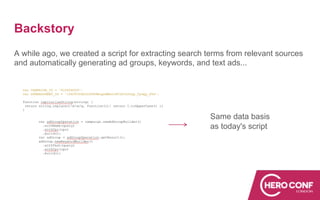
A while ago, we created a script for extracting search terms from relevant sources
and automatically generating ad groups, keywords, and text ads...
Same data basis
as today's script
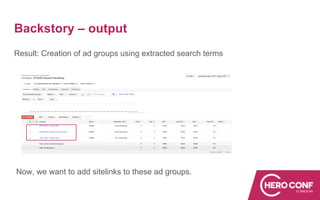
Backstory – output
Result: Creation of ad groups using extracted search terms
Now, we want to add sitelinks to these ad groups.
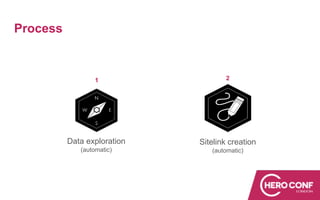
Process
1 2
Data exploration
(automatic)
Sitelink creation
(automatic)
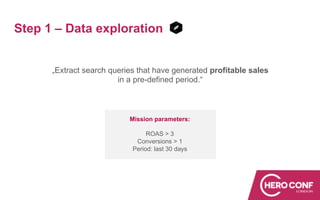
Step 1 – Data exploration
„Extract search queries that have generated profitable sales
in a pre-defined period.“
Mission parameters:
ROAS > 3
Conversions > 1
Period: last 30 days
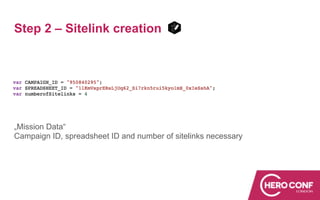
Step 2 – Sitelink creation
„Mission Data“
Campaign ID, spreadsheet ID and number of sitelinks necessary
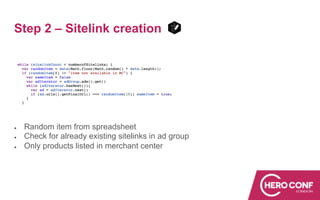
Step 2 – Sitelink creation
● Random item from spreadsheet
● Check for already existing sitelinks in ad group
● Only products listed in merchant center
Step 2 – Sitelink creation
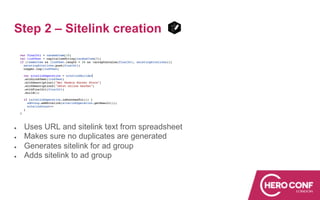
● Uses URL and sitelink text from spreadsheet
● Makes sure no duplicates are generated
● Generates sitelink for ad group
● Adds sitelink to ad group
III. Summary / Action Items
Action Items
● Ad extensions are gaining importance, especially on mobile devices
● They are an effective tool to push click rates by highlighting individuality
● Scripts are a good way of generating sitelinks on ad group level and keeping
them up to date
Questions?
Don't hesitate to get in touch:
stefan.stopper@smarter-ecommerce.com

Ad Extensions as a Lever for Powerful Text Ads

  • 1.
    Ad Extensions asa Lever for Powerful Text Ads Stefan Stopper | Account Strategist
  • 2.
    Session Outcomes In thissession, you will get... ● Actionable best practice tips for ad extensions What has worked and what hasn't, why a love for detail matters ● Reporting tips How to get detailed insights into your ad extensions ● A script For automatically adding product-specific sitelinks to your campaigns
  • 3.
    About me Stefan Stopper Accountstrategist @ smec (Austria) PPC enthusiast Programmatic advertising specialist
  • 4.
    Agenda I. Fundamentals 1. Overviewof existing ad extensions 2. Performance measurement 3. Use cases from various industries/verticals II. Hands-On: Inventory-based ad extensions on ad group level with a script 1. Exploration 2. Creation III. Summary
  • 5.
  • 6.
    How many differentad extensions are currently available? 10!
  • 7.
    Overview Marketing goals Get customersto buy from your location • Location extensions • Affiliate location extensions • Callout extensions Get customers to contact you • Call extensions • Message extensions Get customers to convert on your website • Sitelink extensions • Callout extensions • Structured snippet extensions • Price extensions Get customers to download your app • App extensions Source: https://support.google.com/google-ads/answer/7332837
  • 8.
  • 9.
  • 10.
  • 11.
  • 12.
  • 13.
    Performance measurement 55.80% ofads are delivered with ad extensions 47,11% of ads are delivered with price extensions Click rates vary significantly between ad groups Impression share & click rate of ad extensions
  • 14.
    Performance measurement Conversion rateby click type Conversion rate after sitelink click better Conversion rate after sitelink click considerably worse Conversion rate after sitelink click worse
  • 15.
    Performance measurement Deep diveand comparison of sitelink performance
  • 16.
    The bad vs.the good Sitelinks and prices lead to categories not connected to the search query Sitelink information would fit better into callout extensions Sitelinks fit search query with product & complementary category suggestions
  • 17.
    The bad vs.the good Sitelinks don't fit search query optimally Price categories for search query / sitelinks lead to NY hotel overview
  • 18.
  • 19.
    B2B – constructionmachinery Product description in callouts
  • 20.
    B2C – ticketing Alternateevent dates in sitelinks
  • 21.
    B2C – sports Productattributes / testimonials in callouts
  • 22.
    Limits of adextensions Limits for campaigns and ad groups ● 10,000 campaigns (active and paused campaigns) ● 20,000 ad groups per campaign ● 20,000 elements for ad group targeting per ad group (such as keywords, placements, target group lists) Limits for ad extensions ● 250,000 ad extensions on ad group level per account ● 50,000 ad extensions on campaign level per account ● 10,000 elements on ad group level per campaign
  • 23.
  • 24.
    Summary ● At themoment there are 10 ad extensions available ● Irrelevant ad extensions can have a negative impact on click rates and conversion rates ● Using ad extensions on ad group level allows for a more granular approach = better response to user needs / search intent
  • 25.
    II. Hands-On Inventory-based adextensions on ad group level
  • 26.
    Backstory A while ago,we created a script for extracting search terms from relevant sources and automatically generating ad groups, keywords, and text ads... Same data basis as today's script
  • 27.
    Backstory – output Result:Creation of ad groups using extracted search terms Now, we want to add sitelinks to these ad groups.
  • 28.
  • 29.
    Step 1 –Data exploration „Extract search queries that have generated profitable sales in a pre-defined period.“ Mission parameters: ROAS > 3 Conversions > 1 Period: last 30 days
  • 30.
    Step 2 –Sitelink creation „Mission Data“ Campaign ID, spreadsheet ID and number of sitelinks necessary
  • 31.
    Step 2 –Sitelink creation ● Random item from spreadsheet ● Check for already existing sitelinks in ad group ● Only products listed in merchant center
  • 32.
    Step 2 –Sitelink creation ● Uses URL and sitelink text from spreadsheet ● Makes sure no duplicates are generated ● Generates sitelink for ad group ● Adds sitelink to ad group
  • 33.
    III. Summary /Action Items
  • 34.
    Action Items ● Adextensions are gaining importance, especially on mobile devices ● They are an effective tool to push click rates by highlighting individuality ● Scripts are a good way of generating sitelinks on ad group level and keeping them up to date
  • 35.
    Questions? Don't hesitate toget in touch: stefan.stopper@smarter-ecommerce.com