Active Directory
Password Policies
Prevent Account Lockout Issues
in Enterprise Environments
Overview
• Most Enterprise administrators and security teams will
recommend that account and password policies are
implemented to help safeguard passwords and protect the
network.
• There are multiple components within the policies that when
combined will provide protection and deterrence in different
ways, each can be tuned to provide the optimal balance
between security, user inconvenience, and support costs.
• There is no substitute for user education – providing clear
guidance on how to create a decent password will help users
not only on the corporate network, but also with their
personal systems such as Twitter and Facebook
Common Causes
• Cached Credentials:
– When a user has to change their password (due to expiry
or forgotten), it is highly likely that their old passwords will
be stored on their mobile/smartphone, iPad or other
system. If that system continues to attempt authentication
with the old credentials the account will be locked out.
• System Error:
– Many modern systems are programmed to attempt
authentication 3 or more times in rapid succession (these
show in the logs as occurring within a few seconds) –
quicker than a user could do manually. This results in the
account locking out with only a few attempts by the user.
Common Causes
• Account/Password Expiry:
– Accounts and passwords can be set to expire at a certain
date. If the user does not request an extension, or reset
the password before expiration, the account will fail to
authenticate until this action is taken.
• User Error:
– There is no getting away from the fact that users will make
errors. I’ve done this by leaving the Cap Lock on, forgetting
the password after a long holiday, or mixing up passwords
between different systems.
Password Policy
Password
Policy
Explanation Low
Security, Low
Cost
High
Security, High
Cost
Balanced
View
Pwd History Determines how many old passwords are remembered
Used to prevent users re-using old passwords
0 24 24
Max pwd
age (days)
Maximum number of since last password change. 30 90 60
Min pwd
age (days)
Determines how old the password must be before the
user can change it again. When combined with Pwd
History, this deters re-use of old passwords.
0 1 0
Min pwd
length
8 is a bare minimum, combined with complexity
settings.
8 15+ 10
Complexity The default policy will ensure 3 out of 5 categories are
use:
1.Uppercase Characters: A-Z
2.Lowercase Characters: a-z
3.Numerics: 0-9
4.Special Characters: !"£$%^&*() etc.
5.Unicode Characters
An enhanced filter can be applied to ensure this is
more complex
Enabled Enhanced Enhanced
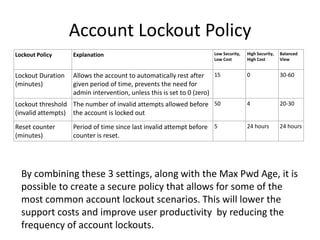
Account Lockout Policy
Lockout Policy Explanation Low Security,
Low Cost
High Security,
High Cost
Balanced
View
Lockout Duration
(minutes)
Allows the account to automatically rest after
given period of time, prevents the need for
admin intervention, unless this is set to 0 (zero)
15 0 30-60
Lockout threshold
(invalid attempts)
The number of invalid attempts allowed before
the account is locked out
50 4 20-30
Reset counter
(minutes)
Period of time since last invalid attempt before
counter is reset.
5 24 hours 24 hours
By combining these 3 settings, along with the Max Pwd Age, it is
possible to create a secure policy that allows for some of the
most common account lockout scenarios. This will lower the
support costs and improve user productivity by reducing the
frequency of account lockouts.
Account Policy Variables
As this chart shows, if you increase the Reset Counter, you reduce the number of
attempts on bad passwords, I recommend 24 hours for better security
This in turn allows for an increase in the Bad Pwd Attempts threshold, to
something more reasonable for a modern day infrastructure, I recommend 20-50
Number of possible Attempts in 24 hours
Note: an attacker would not be able to reach these limits without locking the account out, so would be one less than the actual threshold
Reset: 5 min 10 min 20 min 1 hr 2 hrs 4 hrs 8 hrs 24 hrs
Threshold 5 10 20 60 120 240 480 1440
5 1,440 720 360 120 60 30 15 5
10 2,880 1,440 720 240 120 60 30 10
20 5,760 2,880 1,440 480 240 120 60 20
30 8,640 4,320 2,160 720 360 180 90 30
40 11,520 5,760 2,880 960 480 240 120 40
50 14,400 7,200 3,600 1,200 600 300 150 50
100 28,800 14,400 7,200 2,400 1,200 600 300 100
Account Policy Variables
Compare this chart to
the previous
one, adjusting for the
number of days set as
your Max Pwd Age
Number of possible attempts in x Days
Max Pwd Age: 30 Days 60 Days 90 Days
Attempts in 24 hrs 30 60 90
5
150 300 450
10
300 600 900
20
600 1,200 1,800
50
1,500 3,000 4,500
100
3,000 6,000 9,000
500
15,000 30,000 45,000
1,000
30,000 60,000 90,000
5,000
150,000 300,000 450,000
10,000
300,000 600,000 900,000
15,000
450,000 900,000 1,350,000
50,000
1,500,000 3,000,000 4,500,000
Myth 1
Theory:
The more complex the password, and the more often a user
changes their password, the less likely an attacker will crack their
password
Reality:
When a user is forced to create complex passwords, and change
them too often they eventually forget them and end up writing
them down
Myth 2
Theory:
The lowest threshold for bad password attempts (3-6) is more
secure than a higher threshold (20-50)
Reality:
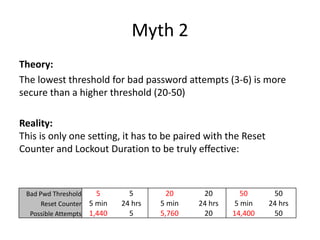
This is only one setting, it has to be paired with the Reset
Counter and Lockout Duration to be truly effective:
Bad Pwd Threshold 5 5 20 20 50 50
Reset Counter 5 min 24 hrs 5 min 24 hrs 5 min 24 hrs
Possible Attempts 1,440 5 5,760 20 14,400 50
Summary
You should be able to compare your current settings with the
information in this presentation. Use this to guide your decision on
how best to adjust your policies.
If you are experiencing a high volume of account lockouts, this is the
first, and quickest, step in resolving those issues. If you can increase
the number of lockouts to between 20 and 50, then any remaining
problems you experience will be few enough to allow you get detailed
scenario and technical information to troubleshoot and diagnose (start
by using the AccountLockout tools from Microsoft.
I hope this information is useful to you, if you have any question please
feel free to contact me: http://about.me/rdiver

Active directory account lockouts

  • 1.
    Active Directory Password Policies PreventAccount Lockout Issues in Enterprise Environments
  • 2.
    Overview • Most Enterpriseadministrators and security teams will recommend that account and password policies are implemented to help safeguard passwords and protect the network. • There are multiple components within the policies that when combined will provide protection and deterrence in different ways, each can be tuned to provide the optimal balance between security, user inconvenience, and support costs. • There is no substitute for user education – providing clear guidance on how to create a decent password will help users not only on the corporate network, but also with their personal systems such as Twitter and Facebook
  • 3.
    Common Causes • CachedCredentials: – When a user has to change their password (due to expiry or forgotten), it is highly likely that their old passwords will be stored on their mobile/smartphone, iPad or other system. If that system continues to attempt authentication with the old credentials the account will be locked out. • System Error: – Many modern systems are programmed to attempt authentication 3 or more times in rapid succession (these show in the logs as occurring within a few seconds) – quicker than a user could do manually. This results in the account locking out with only a few attempts by the user.
  • 4.
    Common Causes • Account/PasswordExpiry: – Accounts and passwords can be set to expire at a certain date. If the user does not request an extension, or reset the password before expiration, the account will fail to authenticate until this action is taken. • User Error: – There is no getting away from the fact that users will make errors. I’ve done this by leaving the Cap Lock on, forgetting the password after a long holiday, or mixing up passwords between different systems.
  • 5.
    Password Policy Password Policy Explanation Low Security,Low Cost High Security, High Cost Balanced View Pwd History Determines how many old passwords are remembered Used to prevent users re-using old passwords 0 24 24 Max pwd age (days) Maximum number of since last password change. 30 90 60 Min pwd age (days) Determines how old the password must be before the user can change it again. When combined with Pwd History, this deters re-use of old passwords. 0 1 0 Min pwd length 8 is a bare minimum, combined with complexity settings. 8 15+ 10 Complexity The default policy will ensure 3 out of 5 categories are use: 1.Uppercase Characters: A-Z 2.Lowercase Characters: a-z 3.Numerics: 0-9 4.Special Characters: !"£$%^&*() etc. 5.Unicode Characters An enhanced filter can be applied to ensure this is more complex Enabled Enhanced Enhanced
  • 6.
    Account Lockout Policy LockoutPolicy Explanation Low Security, Low Cost High Security, High Cost Balanced View Lockout Duration (minutes) Allows the account to automatically rest after given period of time, prevents the need for admin intervention, unless this is set to 0 (zero) 15 0 30-60 Lockout threshold (invalid attempts) The number of invalid attempts allowed before the account is locked out 50 4 20-30 Reset counter (minutes) Period of time since last invalid attempt before counter is reset. 5 24 hours 24 hours By combining these 3 settings, along with the Max Pwd Age, it is possible to create a secure policy that allows for some of the most common account lockout scenarios. This will lower the support costs and improve user productivity by reducing the frequency of account lockouts.
  • 7.
    Account Policy Variables Asthis chart shows, if you increase the Reset Counter, you reduce the number of attempts on bad passwords, I recommend 24 hours for better security This in turn allows for an increase in the Bad Pwd Attempts threshold, to something more reasonable for a modern day infrastructure, I recommend 20-50 Number of possible Attempts in 24 hours Note: an attacker would not be able to reach these limits without locking the account out, so would be one less than the actual threshold Reset: 5 min 10 min 20 min 1 hr 2 hrs 4 hrs 8 hrs 24 hrs Threshold 5 10 20 60 120 240 480 1440 5 1,440 720 360 120 60 30 15 5 10 2,880 1,440 720 240 120 60 30 10 20 5,760 2,880 1,440 480 240 120 60 20 30 8,640 4,320 2,160 720 360 180 90 30 40 11,520 5,760 2,880 960 480 240 120 40 50 14,400 7,200 3,600 1,200 600 300 150 50 100 28,800 14,400 7,200 2,400 1,200 600 300 100
  • 8.
    Account Policy Variables Comparethis chart to the previous one, adjusting for the number of days set as your Max Pwd Age Number of possible attempts in x Days Max Pwd Age: 30 Days 60 Days 90 Days Attempts in 24 hrs 30 60 90 5 150 300 450 10 300 600 900 20 600 1,200 1,800 50 1,500 3,000 4,500 100 3,000 6,000 9,000 500 15,000 30,000 45,000 1,000 30,000 60,000 90,000 5,000 150,000 300,000 450,000 10,000 300,000 600,000 900,000 15,000 450,000 900,000 1,350,000 50,000 1,500,000 3,000,000 4,500,000
  • 9.
    Myth 1 Theory: The morecomplex the password, and the more often a user changes their password, the less likely an attacker will crack their password Reality: When a user is forced to create complex passwords, and change them too often they eventually forget them and end up writing them down
  • 10.
    Myth 2 Theory: The lowestthreshold for bad password attempts (3-6) is more secure than a higher threshold (20-50) Reality: This is only one setting, it has to be paired with the Reset Counter and Lockout Duration to be truly effective: Bad Pwd Threshold 5 5 20 20 50 50 Reset Counter 5 min 24 hrs 5 min 24 hrs 5 min 24 hrs Possible Attempts 1,440 5 5,760 20 14,400 50
  • 11.
    Summary You should beable to compare your current settings with the information in this presentation. Use this to guide your decision on how best to adjust your policies. If you are experiencing a high volume of account lockouts, this is the first, and quickest, step in resolving those issues. If you can increase the number of lockouts to between 20 and 50, then any remaining problems you experience will be few enough to allow you get detailed scenario and technical information to troubleshoot and diagnose (start by using the AccountLockout tools from Microsoft. I hope this information is useful to you, if you have any question please feel free to contact me: http://about.me/rdiver

Editor's Notes

  • #6 see Password Filters (http://go.microsoft.com/fwlink/?LinkId=205613).