





Amazon Elastic Map Reduce:
the concepts
Julien Simon, AI Evangelist, EMEA
@julsimon
What to expect
• Amazon EMR
• Amazon S3 as HDFS
• Core node and Task nodes
• Elastic clusters
• Beyond Map Reduce: Spark
• Q&A
Semi-structured/unstructured data
Disparate Data Sets
ETL at scale
Batch Analytics
Log Processing & Aggregation
What Hadoop is good at
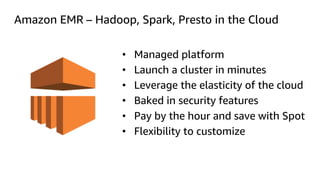
Amazon EMR – Hadoop, Spark, Presto in the Cloud
• Managed platform
• Launch a cluster in minutes
• Leverage the elasticity of the cloud
• Baked in security features
• Pay by the hour and save with Spot
• Flexibility to customize
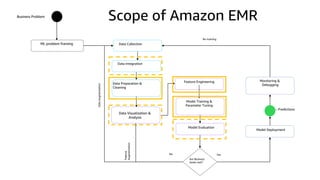
Data Visualization &
Analysis
Business Problem
ML problem framing Data Collection
Data Integration
Data Preparation &
Cleaning
Feature Engineering
Model Training &
Parameter Tuning
Model Evaluation
Are Business
Goals met?
Model Deployment
Monitoring &
Debugging
– Predictions
YesNo
DataAugmentation
Feature
Augmentation
Re-training
Scope of Amazon EMR
Amazon S3 as HDFS
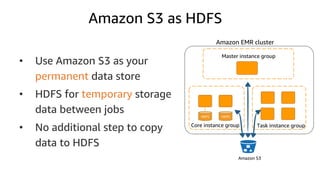
Amazon S3 as HDFS
• Use Amazon S3 as your
permanent data store
• HDFS for temporary storage
data between jobs
• No additional step to copy
data to HDFS
Amazon EMR cluster
Task instance groupCore instance group
HDFS HDFS
Amazon S3
Master instance group
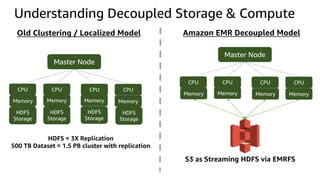
Understanding Decoupled Storage & Compute
Master Node
CPU
Memory
HDFS
Storage
CPU
Memory
HDFS
Storage
CPU
Memory
HDFS
Storage
CPU
Memory
HDFS
Storage
Master Node
CPU
Memory
CPU
Memory
CPU
Memory
CPU
Memory
S3 as Streaming HDFS via EMRFS
Old Clustering / Localized Model Amazon EMR Decoupled Model
HDFS = 3X Replication
500 TB Dataset = 1.5 PB cluster with replication
Master Node
CPU
Memory
HDFS
Storage
CPU
Memory
HDFS
Storage
CPU
Memory
HDFS
Storage
CPU
Memory
HDFS
Storage
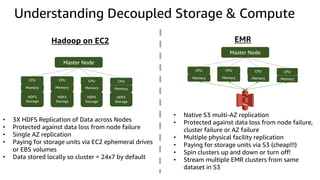
Hadoop on EC2 EMR
Master Node
CPU
Memory
CPU
Memory
CPU
Memory
CPU
Memory
• 3X HDFS Replication of Data across Nodes
• Protected against data loss from node failure
• Single AZ replication
• Paying for storage units via EC2 ephemeral drives
or EBS volumes
• Data stored locally so cluster = 24x7 by default
• Native S3 multi-AZ replication
• Protected against data loss from node failure,
cluster failure or AZ failure
• Multiple physical facility replication
• Paying for storage units via S3 (cheap!!!)
• Spin clusters up and down or turn off!
• Stream multiple EMR clusters from same
dataset in S3
Understanding Decoupled Storage & Compute
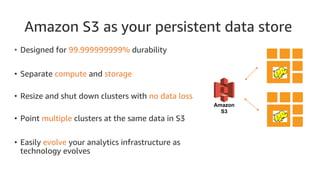
Amazon S3 as your persistent data store
• Designed for 99.999999999% durability
• Separate compute and storage
• Resize and shut down clusters with no data loss
• Point multiple clusters at the same data in S3
• Easily evolve your analytics infrastructure as
technology evolves
EMR
EMR
Amazon
S3
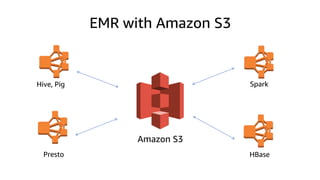
EMR with Amazon S3
Hive, Pig Spark
Presto HBase
Amazon S3
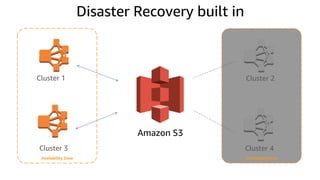
Disaster Recovery built in
Cluster 1 Cluster 2
Cluster 3 Cluster 4
Amazon S3
Availability Zone Availability Zone
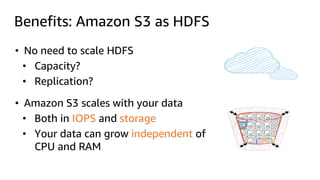
Benefits: Amazon S3 as HDFS
• No need to scale HDFS
• Capacity?
• Replication?
• Amazon S3 scales with your data
• Both in IOPS and storage
• Your data can grow independent of
CPU and RAM
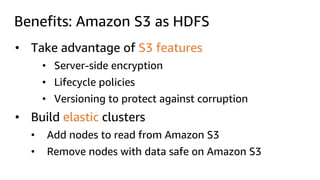
Benefits: Amazon S3 as HDFS
• Take advantage of S3 features
• Server-side encryption
• Lifecycle policies
• Versioning to protect against corruption
• Build elastic clusters
• Add nodes to read from Amazon S3
• Remove nodes with data safe on Amazon S3
Core nodes and task nodes
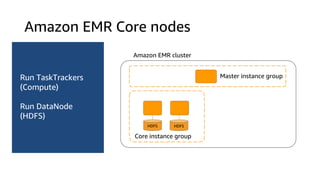
Amazon EMR Core nodes
Master instance group
HDFS HDFS
Run TaskTrackers
(Compute)
Run DataNode
(HDFS)
Core instance group
Amazon EMR cluster
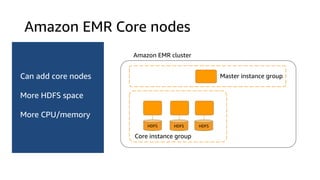
Amazon EMR Core nodes
Can add core nodes
More HDFS space
More CPU/memory
Amazon EMR cluster
HDFS HDFS HDFS
Core instance group
Master instance group
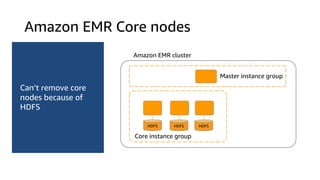
Amazon EMR Core nodes
Can’t remove core
nodes because of
HDFS
HDFS HDFS HDFS
Amazon EMR cluster
Core instance group
Master instance group
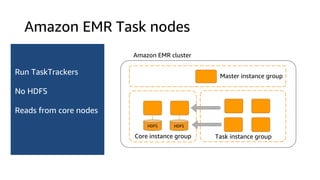
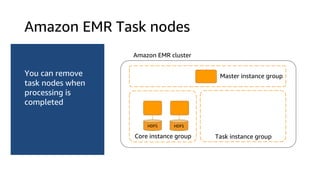
Amazon EMR Task nodes
Run TaskTrackers
No HDFS
Reads from core nodes
HDFS HDFS
Amazon EMR cluster
Task instance group
Master instance group
Core instance group
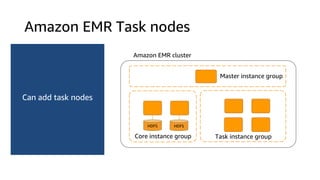
Amazon EMR Task nodes
Can add task nodes
HDFS HDFS
Amazon EMR cluster
Task instance group
Master instance group
Core instance group
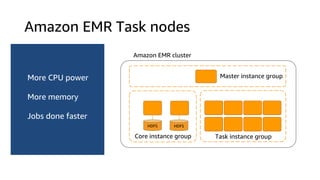
Amazon EMR Task nodes
More CPU power
More memory
Jobs done faster
HDFS HDFS
Task instance group
Amazon EMR cluster
Master instance group
Core instance group
Amazon EMR Task nodes
You can remove
task nodes when
processing is
completed
HDFS HDFS
Task instance group
Amazon EMR cluster
Master instance group
Core instance group
Elastic clusters
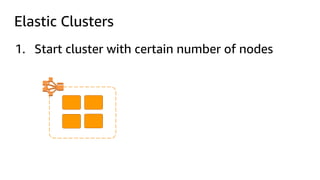
Elastic Clusters
1. Start cluster with certain number of nodes
Elastic Clusters
2. Set Auto-Scaling policies in CloudWatch
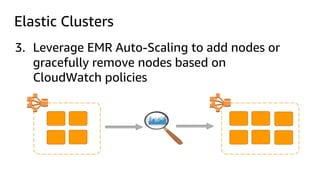
Elastic Clusters
3. Leverage EMR Auto-Scaling to add nodes or
gracefully remove nodes based on
CloudWatch policies
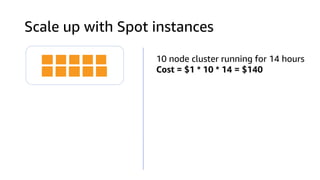
Scale up with Spot instances
10 node cluster running for 14 hours
Cost = $1 * 10 * 14 = $140
Resize nodes with Spot instances
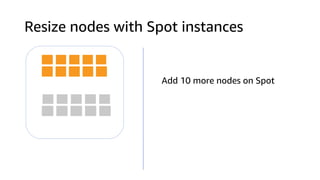
Add 10 more nodes on Spot
Resize nodes with Spot instances
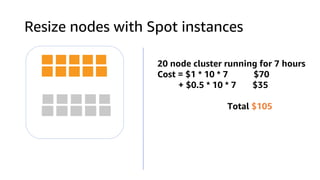
20 node cluster running for 7 hours
Cost = $1 * 10 * 7 $70
+ $0.5 * 10 * 7 $35
Total $105
Resize nodes with Spot instances
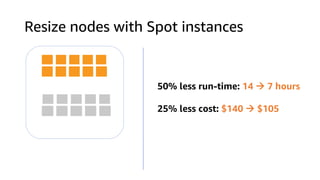
50% less run-time: 14 à 7 hours
25% less cost: $140 à $105
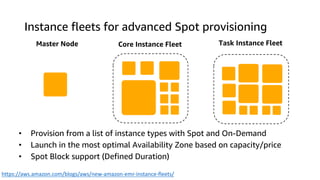
Instance fleets for advanced Spot provisioning
Master Node Core Instance Fleet Task Instance Fleet
• Provision from a list of instance types with Spot and On-Demand
• Launch in the most optimal Availability Zone based on capacity/price
• Spot Block support (Defined Duration)
https://aws.amazon.com/blogs/aws/new-amazon-emr-instance-fleets/
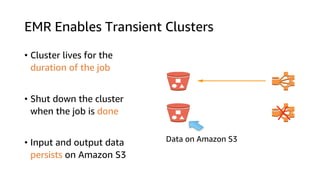
EMR Enables Transient Clusters
• Cluster lives for the
duration of the job
• Shut down the cluster
when the job is done
• Input and output data
persists on Amazon S3
Data on Amazon S3
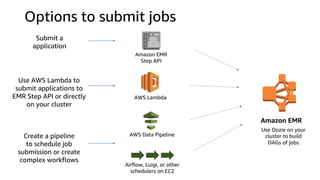
Options to submit jobs
Amazon EMR
Step API
Submit a
application
Amazon EMR
AWS Data Pipeline
Airflow, Luigi, or other
schedulers on EC2
Create a pipeline
to schedule job
submission or create
complex workflows
AWS Lambda
Use AWS Lambda to
submit applications to
EMR Step API or directly
on your cluster
Use Oozie on your
cluster to build
DAGs of jobs
Beyond Map Reduce: Spark
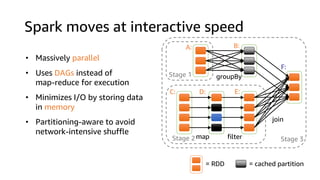
Spark moves at interactive speed
join
filter
groupBy
Stage 3
Stage 1
Stage 2
A: B:
C: D: E:
F:
= cached partition= RDD
map
• Massively parallel
• Uses DAGs instead of
map-reduce for execution
• Minimizes I/O by storing data
in memory
• Partitioning-aware to avoid
network-intensive shuffle
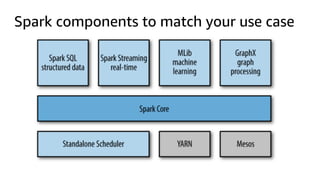
Spark components to match your use case
Spark speaks your language
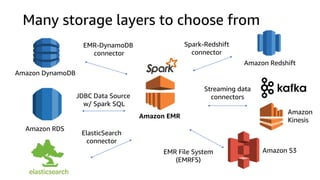
Many storage layers to choose from
Amazon DynamoDB
EMR-DynamoDB
connector
Amazon RDS
Amazon
Kinesis
Streaming data
connectorsJDBC Data Source
w/ Spark SQL
ElasticSearch
connector
Amazon Redshift
Spark-Redshift
connector
EMR File System
(EMRFS)
Amazon S3
Amazon EMR
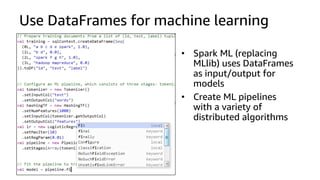
Use DataFrames for machine learning
• Spark ML (replacing
MLlib) uses DataFrames
as input/output for
models
• Create ML pipelines
with a variety of
distributed algorithms
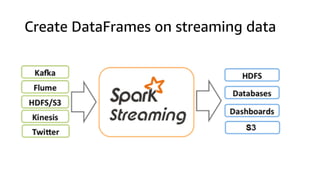
Create DataFrames on streaming data
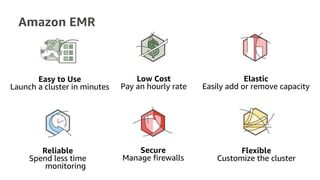
Amazon EMR
Easy to Use
Launch a cluster in minutes
Low Cost
Pay an hourly rate
Elastic
Easily add or remove capacity
Reliable
Spend less time
monitoring
Secure
Manage firewalls
Flexible
Customize the cluster
© 2017, Amazon Web Services, Inc. or its Affiliates. All rights reserved.
Resources
https://aws.amazon.com/emr/
https://aws.amazon.com/blogs/bigdata
https://aws.amazon.com/whitepapers/
https://medium.com/@julsimon
Thank you!
Julien Simon, AI Evangelist, EMEA
@julsimon

Amazon Elastic Map Reduce: the concepts

  • 1.
    Amazon Elastic MapReduce: the concepts Julien Simon, AI Evangelist, EMEA @julsimon
  • 2.
    What to expect •Amazon EMR • Amazon S3 as HDFS • Core node and Task nodes • Elastic clusters • Beyond Map Reduce: Spark • Q&A
  • 3.
    Semi-structured/unstructured data Disparate DataSets ETL at scale Batch Analytics Log Processing & Aggregation What Hadoop is good at
  • 4.
    Amazon EMR –Hadoop, Spark, Presto in the Cloud • Managed platform • Launch a cluster in minutes • Leverage the elasticity of the cloud • Baked in security features • Pay by the hour and save with Spot • Flexibility to customize
  • 5.
    Data Visualization & Analysis BusinessProblem ML problem framing Data Collection Data Integration Data Preparation & Cleaning Feature Engineering Model Training & Parameter Tuning Model Evaluation Are Business Goals met? Model Deployment Monitoring & Debugging – Predictions YesNo DataAugmentation Feature Augmentation Re-training Scope of Amazon EMR
  • 6.
  • 7.
    Amazon S3 asHDFS • Use Amazon S3 as your permanent data store • HDFS for temporary storage data between jobs • No additional step to copy data to HDFS Amazon EMR cluster Task instance groupCore instance group HDFS HDFS Amazon S3 Master instance group
  • 8.
    Understanding Decoupled Storage& Compute Master Node CPU Memory HDFS Storage CPU Memory HDFS Storage CPU Memory HDFS Storage CPU Memory HDFS Storage Master Node CPU Memory CPU Memory CPU Memory CPU Memory S3 as Streaming HDFS via EMRFS Old Clustering / Localized Model Amazon EMR Decoupled Model HDFS = 3X Replication 500 TB Dataset = 1.5 PB cluster with replication
  • 9.
    Master Node CPU Memory HDFS Storage CPU Memory HDFS Storage CPU Memory HDFS Storage CPU Memory HDFS Storage Hadoop onEC2 EMR Master Node CPU Memory CPU Memory CPU Memory CPU Memory • 3X HDFS Replication of Data across Nodes • Protected against data loss from node failure • Single AZ replication • Paying for storage units via EC2 ephemeral drives or EBS volumes • Data stored locally so cluster = 24x7 by default • Native S3 multi-AZ replication • Protected against data loss from node failure, cluster failure or AZ failure • Multiple physical facility replication • Paying for storage units via S3 (cheap!!!) • Spin clusters up and down or turn off! • Stream multiple EMR clusters from same dataset in S3 Understanding Decoupled Storage & Compute
  • 10.
    Amazon S3 asyour persistent data store • Designed for 99.999999999% durability • Separate compute and storage • Resize and shut down clusters with no data loss • Point multiple clusters at the same data in S3 • Easily evolve your analytics infrastructure as technology evolves EMR EMR Amazon S3
  • 11.
    EMR with AmazonS3 Hive, Pig Spark Presto HBase Amazon S3
  • 12.
    Disaster Recovery builtin Cluster 1 Cluster 2 Cluster 3 Cluster 4 Amazon S3 Availability Zone Availability Zone
  • 13.
    Benefits: Amazon S3as HDFS • No need to scale HDFS • Capacity? • Replication? • Amazon S3 scales with your data • Both in IOPS and storage • Your data can grow independent of CPU and RAM
  • 14.
    Benefits: Amazon S3as HDFS • Take advantage of S3 features • Server-side encryption • Lifecycle policies • Versioning to protect against corruption • Build elastic clusters • Add nodes to read from Amazon S3 • Remove nodes with data safe on Amazon S3
  • 15.
    Core nodes andtask nodes
  • 16.
    Amazon EMR Corenodes Master instance group HDFS HDFS Run TaskTrackers (Compute) Run DataNode (HDFS) Core instance group Amazon EMR cluster
  • 17.
    Amazon EMR Corenodes Can add core nodes More HDFS space More CPU/memory Amazon EMR cluster HDFS HDFS HDFS Core instance group Master instance group
  • 18.
    Amazon EMR Corenodes Can’t remove core nodes because of HDFS HDFS HDFS HDFS Amazon EMR cluster Core instance group Master instance group
  • 19.
    Amazon EMR Tasknodes Run TaskTrackers No HDFS Reads from core nodes HDFS HDFS Amazon EMR cluster Task instance group Master instance group Core instance group
  • 20.
    Amazon EMR Tasknodes Can add task nodes HDFS HDFS Amazon EMR cluster Task instance group Master instance group Core instance group
  • 21.
    Amazon EMR Tasknodes More CPU power More memory Jobs done faster HDFS HDFS Task instance group Amazon EMR cluster Master instance group Core instance group
  • 22.
    Amazon EMR Tasknodes You can remove task nodes when processing is completed HDFS HDFS Task instance group Amazon EMR cluster Master instance group Core instance group
  • 23.
  • 24.
    Elastic Clusters 1. Startcluster with certain number of nodes
  • 25.
    Elastic Clusters 2. SetAuto-Scaling policies in CloudWatch
  • 26.
    Elastic Clusters 3. LeverageEMR Auto-Scaling to add nodes or gracefully remove nodes based on CloudWatch policies
  • 27.
    Scale up withSpot instances 10 node cluster running for 14 hours Cost = $1 * 10 * 14 = $140
  • 28.
    Resize nodes withSpot instances Add 10 more nodes on Spot
  • 29.
    Resize nodes withSpot instances 20 node cluster running for 7 hours Cost = $1 * 10 * 7 $70 + $0.5 * 10 * 7 $35 Total $105
  • 30.
    Resize nodes withSpot instances 50% less run-time: 14 à 7 hours 25% less cost: $140 à $105
  • 31.
    Instance fleets foradvanced Spot provisioning Master Node Core Instance Fleet Task Instance Fleet • Provision from a list of instance types with Spot and On-Demand • Launch in the most optimal Availability Zone based on capacity/price • Spot Block support (Defined Duration) https://aws.amazon.com/blogs/aws/new-amazon-emr-instance-fleets/
  • 32.
    EMR Enables TransientClusters • Cluster lives for the duration of the job • Shut down the cluster when the job is done • Input and output data persists on Amazon S3 Data on Amazon S3
  • 33.
    Options to submitjobs Amazon EMR Step API Submit a application Amazon EMR AWS Data Pipeline Airflow, Luigi, or other schedulers on EC2 Create a pipeline to schedule job submission or create complex workflows AWS Lambda Use AWS Lambda to submit applications to EMR Step API or directly on your cluster Use Oozie on your cluster to build DAGs of jobs
  • 34.
  • 35.
    Spark moves atinteractive speed join filter groupBy Stage 3 Stage 1 Stage 2 A: B: C: D: E: F: = cached partition= RDD map • Massively parallel • Uses DAGs instead of map-reduce for execution • Minimizes I/O by storing data in memory • Partitioning-aware to avoid network-intensive shuffle
  • 36.
    Spark components tomatch your use case
  • 37.
  • 38.
    Many storage layersto choose from Amazon DynamoDB EMR-DynamoDB connector Amazon RDS Amazon Kinesis Streaming data connectorsJDBC Data Source w/ Spark SQL ElasticSearch connector Amazon Redshift Spark-Redshift connector EMR File System (EMRFS) Amazon S3 Amazon EMR
  • 39.
    Use DataFrames formachine learning • Spark ML (replacing MLlib) uses DataFrames as input/output for models • Create ML pipelines with a variety of distributed algorithms
  • 40.
    Create DataFrames onstreaming data
  • 41.
    Amazon EMR Easy toUse Launch a cluster in minutes Low Cost Pay an hourly rate Elastic Easily add or remove capacity Reliable Spend less time monitoring Secure Manage firewalls Flexible Customize the cluster
  • 42.
    © 2017, AmazonWeb Services, Inc. or its Affiliates. All rights reserved. Resources https://aws.amazon.com/emr/ https://aws.amazon.com/blogs/bigdata https://aws.amazon.com/whitepapers/ https://medium.com/@julsimon
  • 43.
    Thank you! Julien Simon,AI Evangelist, EMEA @julsimon