C © 2014 B. 1
1
Module Objectives
• Upon completing this module, you will be able to:
– Understand the process to create Purchase Order.
– Create stock purchase order & Consumption
purchase order.
– Configuration setting for Purchase order
C © 2014 B. 2
• Introduction to Purchase Order
• Pre-requisites & Important Terms & Conditions
• Various methods to create Purchase Order
• Overview and Conceptual understanding of
Account assigned PO
• Differences between Purchase orders for stock and
Account assigned.
• Customization settings for PO
• Customization settings for Account Assignment
Agenda
C © 2014 B. 3
• Introduction to Purchase Order
• Pre-requisites & Important Terms & Conditions
• Various methods to create Purchase Order
• Overview and Conceptual understanding of
Account assigned PO
• Differences between Purchase orders for stock and
Account assigned.
• Customization settings for PO
• Customization settings for Account Assignment
Agenda
C © 2014 B.
4
Introduction to Purchase Orders
• It represents the formal and final confirmation to the vendor to supply material
or service.
• Its an external document created with ref to PR / RFQ/PO/Outline agreement by
the Purchasing group as per the agreed terms & conditions.
C © 2014 B.
Purpose of Purchase Orders
• The purchase order can be used for a variety of procurement purposes.
• You can procure materials for direct consumption or for stock. You can also
procure services.
• Furthermore, the special procurement types "subcontracting", "third-party"
(involving triangular business deals and direct-to-customer shipments) and
"consignment" are possible.
• You can use purchase orders to cover your requirements using external
sources (i.e. a vendor supplies a material or performs a service).
5
C © 2014 B.
Purpose of Purchase Order(contd..)
• You can also use a purchase order to procure a material that is needed in one
of your plants from an internal source, i.e. from another plant. Such
transactions involve longer-distance stock transfers.
• You can use purchase orders for once-only procurement transactions. If, for
example, you wish to procure a material from a vendor only once, you create a
purchase order.
• If you are thinking of entering into a longer-term supply relationship with this
vendor, it is advisable to set up a so-called outline agreement, since this
usually results in more favorable conditions of purchase.
6
C © 2014 B. 7
• Introduction to Purchase Order
• Pre-requisites & Important Terms & Conditions
• Various methods to create Purchase Order
• Overview and Conceptual understanding of
Account assigned PO
• Differences between Purchase orders for stock and
Account assigned.
• Customization settings for PO
• Customization settings for Account Assignment
Agenda
C © 2014 B.
Pre requisites for creating Purchase
Orders
• Before we create a PO, we need the following details to be configured:
– Valid Vendor Master created
– Purchase Organization
– Company Code
– Purchasing Groups
– Plants assigned to the company code being used
– Material Master record(optional)
– Quantity and price for the goods to be procured.
– Account Assignment Category and Item Category should be configured
correctly for the PO document type.
8
C © 2014 B.
Structure of a PO
9
C © 2014 B.
Structure of a PO
• A purchase order (PO) consists of a document header and a number of items.
• The information shown in the header relates to the entire PO. For example, the
terms of payment and the delivery terms are defined in the header.
• The Items can further have details maintained for them e.g. different weights,
delivery schedules etc.
10
C © 2014 B.
11
Important Data for Purchase order
• Prerequisites required for maintaining purchase order are as follows.
Header data Item data
• Vendor
• Order(doc.) type
• Purchase organization
• Purchase group
• Company code
• The terms of payment
• Material no.
• Plant no.
• Quantity
• Delivery date
• Price
C © 2014 B.
12
• Item category
• Item category controls the procurement process and defines whether an
item requires material number, account assignment, goods receipt, and/or
invoice receipt.
• Standard Item categories
• Standard
• Subcontracting
• Third Party
• Consignment
• Stock Transport Order
Important Data for Purchase order
C © 2014 B.
13
Important Data for Purchase order
• Account Assignment Category
• It determines the nature of account assignment and accounts to be charged
when the incoming invoice or goods receipt is posted.
• Standard Account assignment categories :
• Asset
• Order
• Production Order
• Cost Center
• Project
• Unknown
• Sales order
C © 2014 B.
14
Document type
• The purchasing documents are differentiated via document type, also
determines which is the relevant number ranges and which field should be
offered during maintenance purposes.
• Document Type of PO controls:
• Screen Layout of the PO: This will determine which fields are mandatory,
optional, read only or hidden.
• Allowed Item Categories
• Number ranges for the PO
• PR document types allowed for the item categories
• PO release strategy can also be configured based on the PO document
type.
C © 2014 B. 15
• Introduction to Purchase Order
• Pre-requisites & Important Terms & Conditions
• Various methods to create Purchase Order
• Overview and Conceptual understanding of Account
assigned PO
• Differences between Purchase orders for stock and
Account assigned.
• Customization settings for PO
• Customization settings for Account Assignment
Agenda
C © 2014 B.
Purchase order creation process
• Purchase order can be created by following methods:
1. Manual purchase order: In this case you need to enter all the required
details in purchase order.
2. Automatic purchase order: It can be created with reference to purchase
requisition
16
C © 2014 B.
Various Methods to Create a PO
• Vendor known(ME21N)
– We can use this procedure if you know which vendor is to receive the order.
• Vendor unknown(ME25)
– We can use this procedure if you want the system to select and suggest
possible vendors.
– These suggestions are then made on the basis of sources of supply that
have been predefined in the system.
– Note: the term "source" covers outline purchase agreements, info records,
and source lists).
• Creation of POs from assigned requisitions(ME58,ME59,ME59N)
– We can use this procedure to list the requisitions for your purchasing group
that have already been assigned to a vendor (that is, those requisitions
containing a vendor, outline agreement, or info record as a procurement
option). POs can be generated from these requisitions automatically.
• Stock transfer(ME21N)
– Choose this procedure if you wish to order not from a vendor but from one
of your plants.
17
C © 2014 B.
18
Process flow
•Purchase Order
With ref.to PR With ref. to Outline
Agree.
With ref.to RFQ
C © 2014 B.
ME21N
19
C © 2014 B.
ME25
20
C © 2014 B.
ME58
21
C © 2014 B.
ME59N
22
C © 2014 B.
Creating STO- ME21N
23
C © 2014 B.
24
Demo1_Creating a Purchase Order
Objective To create a Purchase Order
C © 2014 B. 25
• Introduction to Purchase Order
• Pre-requisites & Important Terms & Conditions
• Overview and Conceptual understanding of Account
assigned PO
• Differences between Purchase orders for stock and
Account assigned.
• Customization settings for PO
• Customization settings for Account Assignment
Agenda
C © 2014 B.
Account Assignment
• Specification of the objects (e.g. cost center, sales order, project) that are
charged in the case of a purchase order for a material that is intended for
direct usage or consumption.
• Use:
– We can specify one account assignment for an item, or several account
assignment for several items.
– Multiple account assignment allows you to apportion the cost of a material
covered by a PO among your own cost center and several others.
26
C © 2014 B.
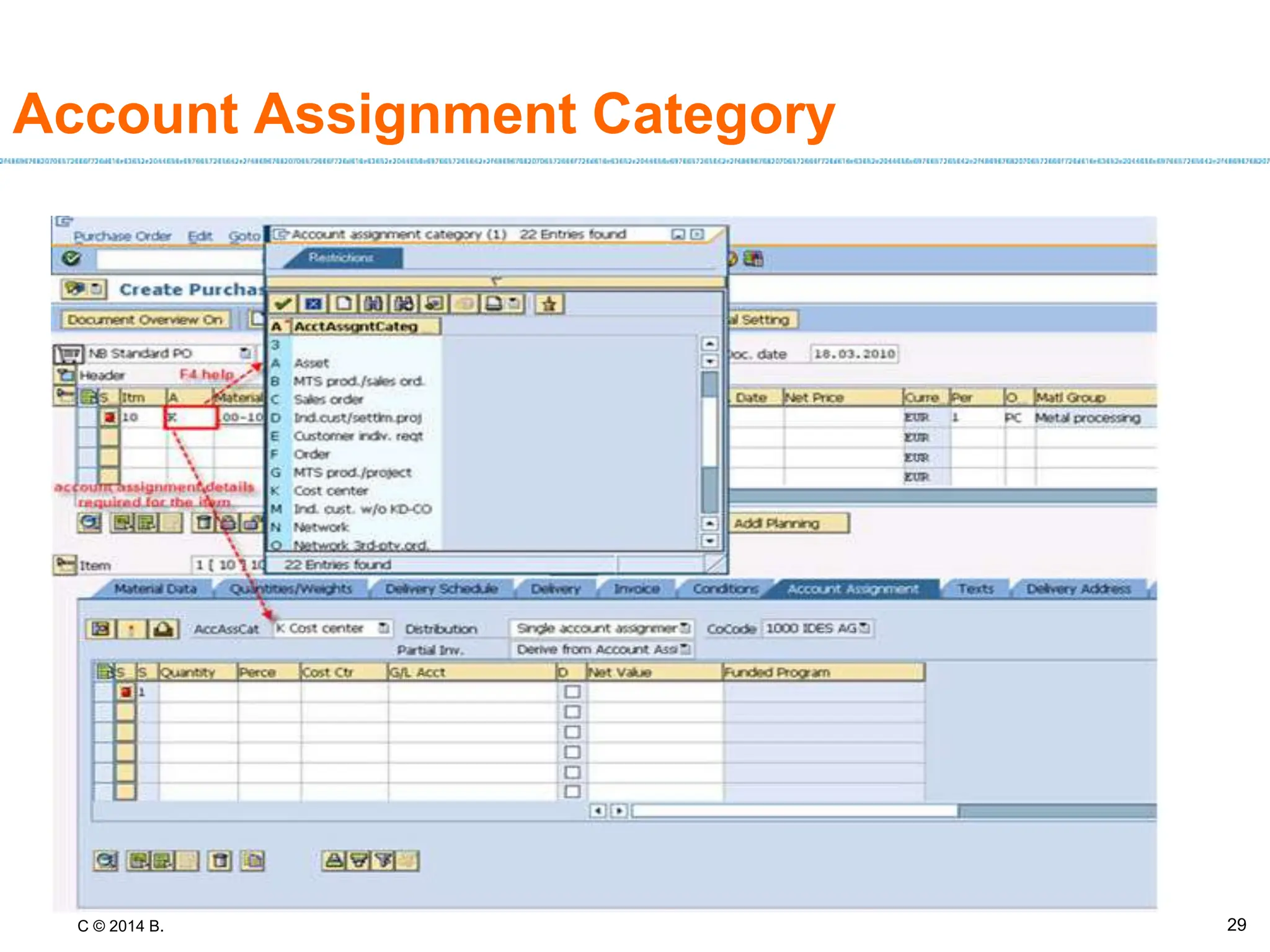
Account Assignment Category
• You specify which account assignment object is to be charged via the account
assignment category.
• The account assignment category can be entered for each line item of the PO.
• The account assignment category determines:
– The nature of the account assignment (cost center, sales order, and so on)
– Which accounts are to be charged when the incoming invoice or goods
receipt is posted
– Which account assignment data you must provide
27
C © 2014 B.
Account Assignment Category
Description Required account assignment data
Asset Main asset number and sub-number
Order Order and G/L account number
Production order Production order number
Business process Business process and G/L account number
Cost center Cost center and G/L account number
Sales order Sales order and G/L account number
Individual
customer
requirement
Sales order and G/L account number
Project Project and G/L account number
Unknown None
28
C © 2014 B.
Account Assignment Category
29
C © 2014 B.
Features of Account Assigned POs
• Account assignment category will be entered on the PO items
• Based on the selected category, cost object needs to be entered on the PO
• When GR is done for the PO item, stock will not increase in the system, but it
will be directly consumed against the cost object.
• One exception to this rule is account assignment category Q(Project made to
Order) for which the stock will be displayed under Project Stock.
• If Unknown account assignment is used on the PO, system will ask for the
details of account assignment while posting the Goods Receipt for the PO.
30
C © 2014 B. 31
• Introduction to Purchase Order
• Pre-requisites & Important Terms & Conditions
• Overview and Conceptual understanding of Account
assigned PO
• Differences between Purchase orders for stock and
Account assigned.
• Customization settings for PO
• Customization settings for Account Assignment
Agenda
C © 2014 B.
Procurement for Stock & Consumption
Sr No Purchase Orders for Stock
Account Assigned Purchase
Orders
1
Account Assignment Category
will be blank
Account Assignment Category
will be entered on the PO
2
Cost Object is not required while
creating the PO
Cost Object is mandatory while
creating the PO except for
Unknown account assignment
3
Posting the GR will increase the
stock in the system
Posting the GR will result in
consumption of goods against
the Cost Object. Stock will not
increase
32
C © 2014 B. 33
• Introduction to Purchase Order
• Pre-requisites & Important Terms & Conditions
• Overview and Conceptual understanding of Account
assigned PO
• Differences between Purchase orders for stock and
Account assigned.
• Customization settings for PO
• Customization settings for Account Assignment
Agenda
C © 2014 B.
34
Demo2_Customizing Settings
• Define document type
• Define number ranges
• Define screen layout
• Set tolerance limit for price variance
• Account Assignment Category
C © 2014 B.
35
Demo2_Customizing Settings
•1. Select the document Type(NB)
•2. Click on “Allowed Item categories”- here you can see Item categories allowed for the document type
•3. further to that Select option “Item category & click on Link purchase requisition - document type”
• It will display allowed reference document types & item categories
Objective To Define the document type purchase order document.
C © 2014 B.
36
Demo2_Customizing Settings
Objective To Define the number ranges for purchase order document.
C © 2014 B.
37
•Select the field ME21
and double click.
Demo2_Customizing Settings
Objective To change the screen layout for Purchase Order
C © 2014 B.
38
Demo2_Customizing Settings
•Mark the check box as
Per requirement
Objective To change the screen layout for Purchase Order
C © 2014 B.
39
Demo2_Customizing Settings
•Click on radio button as per
requirement and enter the
% also
Objective To change the tolerance settings
C © 2014 B. 40
• Introduction to Purchase Order
• Pre-requisites & Important Terms & Conditions
• Overview and Conceptual understanding of Account
assigned PO
• Differences between Purchase orders for stock and
Account assigned.
• Customization settings for PO
• Customization settings for Account Assignment
Agenda
C © 2014 B.
Account assignment category
41
•Field selection for account
assignment category
Objective Field selection for Account Assignment Category
C © 2014 B. 42
Quiz/Check point
• Questions/Discussions :
• What is the purpose to create Purchase
Order?
• What is Stock Purchase Order?
• What is Consumption Purchase Order?
• What is the transaction code to create
Purchase Order?
C © 2014 B. 43
Questions and Comments
• What questions or comments
do you have?
C © 2014 B.
Exercise
Exercise 9: Create a Manual Purchase Order (60 min.)
44

Account assignment in SAP Materials management Module

  • 1.
    C © 2014B. 1 1 Module Objectives • Upon completing this module, you will be able to: – Understand the process to create Purchase Order. – Create stock purchase order & Consumption purchase order. – Configuration setting for Purchase order
  • 2.
    C © 2014B. 2 • Introduction to Purchase Order • Pre-requisites & Important Terms & Conditions • Various methods to create Purchase Order • Overview and Conceptual understanding of Account assigned PO • Differences between Purchase orders for stock and Account assigned. • Customization settings for PO • Customization settings for Account Assignment Agenda
  • 3.
    C © 2014B. 3 • Introduction to Purchase Order • Pre-requisites & Important Terms & Conditions • Various methods to create Purchase Order • Overview and Conceptual understanding of Account assigned PO • Differences between Purchase orders for stock and Account assigned. • Customization settings for PO • Customization settings for Account Assignment Agenda
  • 4.
    C © 2014B. 4 Introduction to Purchase Orders • It represents the formal and final confirmation to the vendor to supply material or service. • Its an external document created with ref to PR / RFQ/PO/Outline agreement by the Purchasing group as per the agreed terms & conditions.
  • 5.
    C © 2014B. Purpose of Purchase Orders • The purchase order can be used for a variety of procurement purposes. • You can procure materials for direct consumption or for stock. You can also procure services. • Furthermore, the special procurement types "subcontracting", "third-party" (involving triangular business deals and direct-to-customer shipments) and "consignment" are possible. • You can use purchase orders to cover your requirements using external sources (i.e. a vendor supplies a material or performs a service). 5
  • 6.
    C © 2014B. Purpose of Purchase Order(contd..) • You can also use a purchase order to procure a material that is needed in one of your plants from an internal source, i.e. from another plant. Such transactions involve longer-distance stock transfers. • You can use purchase orders for once-only procurement transactions. If, for example, you wish to procure a material from a vendor only once, you create a purchase order. • If you are thinking of entering into a longer-term supply relationship with this vendor, it is advisable to set up a so-called outline agreement, since this usually results in more favorable conditions of purchase. 6
  • 7.
    C © 2014B. 7 • Introduction to Purchase Order • Pre-requisites & Important Terms & Conditions • Various methods to create Purchase Order • Overview and Conceptual understanding of Account assigned PO • Differences between Purchase orders for stock and Account assigned. • Customization settings for PO • Customization settings for Account Assignment Agenda
  • 8.
    C © 2014B. Pre requisites for creating Purchase Orders • Before we create a PO, we need the following details to be configured: – Valid Vendor Master created – Purchase Organization – Company Code – Purchasing Groups – Plants assigned to the company code being used – Material Master record(optional) – Quantity and price for the goods to be procured. – Account Assignment Category and Item Category should be configured correctly for the PO document type. 8
  • 9.
    C © 2014B. Structure of a PO 9
  • 10.
    C © 2014B. Structure of a PO • A purchase order (PO) consists of a document header and a number of items. • The information shown in the header relates to the entire PO. For example, the terms of payment and the delivery terms are defined in the header. • The Items can further have details maintained for them e.g. different weights, delivery schedules etc. 10
  • 11.
    C © 2014B. 11 Important Data for Purchase order • Prerequisites required for maintaining purchase order are as follows. Header data Item data • Vendor • Order(doc.) type • Purchase organization • Purchase group • Company code • The terms of payment • Material no. • Plant no. • Quantity • Delivery date • Price
  • 12.
    C © 2014B. 12 • Item category • Item category controls the procurement process and defines whether an item requires material number, account assignment, goods receipt, and/or invoice receipt. • Standard Item categories • Standard • Subcontracting • Third Party • Consignment • Stock Transport Order Important Data for Purchase order
  • 13.
    C © 2014B. 13 Important Data for Purchase order • Account Assignment Category • It determines the nature of account assignment and accounts to be charged when the incoming invoice or goods receipt is posted. • Standard Account assignment categories : • Asset • Order • Production Order • Cost Center • Project • Unknown • Sales order
  • 14.
    C © 2014B. 14 Document type • The purchasing documents are differentiated via document type, also determines which is the relevant number ranges and which field should be offered during maintenance purposes. • Document Type of PO controls: • Screen Layout of the PO: This will determine which fields are mandatory, optional, read only or hidden. • Allowed Item Categories • Number ranges for the PO • PR document types allowed for the item categories • PO release strategy can also be configured based on the PO document type.
  • 15.
    C © 2014B. 15 • Introduction to Purchase Order • Pre-requisites & Important Terms & Conditions • Various methods to create Purchase Order • Overview and Conceptual understanding of Account assigned PO • Differences between Purchase orders for stock and Account assigned. • Customization settings for PO • Customization settings for Account Assignment Agenda
  • 16.
    C © 2014B. Purchase order creation process • Purchase order can be created by following methods: 1. Manual purchase order: In this case you need to enter all the required details in purchase order. 2. Automatic purchase order: It can be created with reference to purchase requisition 16
  • 17.
    C © 2014B. Various Methods to Create a PO • Vendor known(ME21N) – We can use this procedure if you know which vendor is to receive the order. • Vendor unknown(ME25) – We can use this procedure if you want the system to select and suggest possible vendors. – These suggestions are then made on the basis of sources of supply that have been predefined in the system. – Note: the term "source" covers outline purchase agreements, info records, and source lists). • Creation of POs from assigned requisitions(ME58,ME59,ME59N) – We can use this procedure to list the requisitions for your purchasing group that have already been assigned to a vendor (that is, those requisitions containing a vendor, outline agreement, or info record as a procurement option). POs can be generated from these requisitions automatically. • Stock transfer(ME21N) – Choose this procedure if you wish to order not from a vendor but from one of your plants. 17
  • 18.
    C © 2014B. 18 Process flow •Purchase Order With ref.to PR With ref. to Outline Agree. With ref.to RFQ
  • 19.
    C © 2014B. ME21N 19
  • 20.
    C © 2014B. ME25 20
  • 21.
    C © 2014B. ME58 21
  • 22.
    C © 2014B. ME59N 22
  • 23.
    C © 2014B. Creating STO- ME21N 23
  • 24.
    C © 2014B. 24 Demo1_Creating a Purchase Order Objective To create a Purchase Order
  • 25.
    C © 2014B. 25 • Introduction to Purchase Order • Pre-requisites & Important Terms & Conditions • Overview and Conceptual understanding of Account assigned PO • Differences between Purchase orders for stock and Account assigned. • Customization settings for PO • Customization settings for Account Assignment Agenda
  • 26.
    C © 2014B. Account Assignment • Specification of the objects (e.g. cost center, sales order, project) that are charged in the case of a purchase order for a material that is intended for direct usage or consumption. • Use: – We can specify one account assignment for an item, or several account assignment for several items. – Multiple account assignment allows you to apportion the cost of a material covered by a PO among your own cost center and several others. 26
  • 27.
    C © 2014B. Account Assignment Category • You specify which account assignment object is to be charged via the account assignment category. • The account assignment category can be entered for each line item of the PO. • The account assignment category determines: – The nature of the account assignment (cost center, sales order, and so on) – Which accounts are to be charged when the incoming invoice or goods receipt is posted – Which account assignment data you must provide 27
  • 28.
    C © 2014B. Account Assignment Category Description Required account assignment data Asset Main asset number and sub-number Order Order and G/L account number Production order Production order number Business process Business process and G/L account number Cost center Cost center and G/L account number Sales order Sales order and G/L account number Individual customer requirement Sales order and G/L account number Project Project and G/L account number Unknown None 28
  • 29.
    C © 2014B. Account Assignment Category 29
  • 30.
    C © 2014B. Features of Account Assigned POs • Account assignment category will be entered on the PO items • Based on the selected category, cost object needs to be entered on the PO • When GR is done for the PO item, stock will not increase in the system, but it will be directly consumed against the cost object. • One exception to this rule is account assignment category Q(Project made to Order) for which the stock will be displayed under Project Stock. • If Unknown account assignment is used on the PO, system will ask for the details of account assignment while posting the Goods Receipt for the PO. 30
  • 31.
    C © 2014B. 31 • Introduction to Purchase Order • Pre-requisites & Important Terms & Conditions • Overview and Conceptual understanding of Account assigned PO • Differences between Purchase orders for stock and Account assigned. • Customization settings for PO • Customization settings for Account Assignment Agenda
  • 32.
    C © 2014B. Procurement for Stock & Consumption Sr No Purchase Orders for Stock Account Assigned Purchase Orders 1 Account Assignment Category will be blank Account Assignment Category will be entered on the PO 2 Cost Object is not required while creating the PO Cost Object is mandatory while creating the PO except for Unknown account assignment 3 Posting the GR will increase the stock in the system Posting the GR will result in consumption of goods against the Cost Object. Stock will not increase 32
  • 33.
    C © 2014B. 33 • Introduction to Purchase Order • Pre-requisites & Important Terms & Conditions • Overview and Conceptual understanding of Account assigned PO • Differences between Purchase orders for stock and Account assigned. • Customization settings for PO • Customization settings for Account Assignment Agenda
  • 34.
    C © 2014B. 34 Demo2_Customizing Settings • Define document type • Define number ranges • Define screen layout • Set tolerance limit for price variance • Account Assignment Category
  • 35.
    C © 2014B. 35 Demo2_Customizing Settings •1. Select the document Type(NB) •2. Click on “Allowed Item categories”- here you can see Item categories allowed for the document type •3. further to that Select option “Item category & click on Link purchase requisition - document type” • It will display allowed reference document types & item categories Objective To Define the document type purchase order document.
  • 36.
    C © 2014B. 36 Demo2_Customizing Settings Objective To Define the number ranges for purchase order document.
  • 37.
    C © 2014B. 37 •Select the field ME21 and double click. Demo2_Customizing Settings Objective To change the screen layout for Purchase Order
  • 38.
    C © 2014B. 38 Demo2_Customizing Settings •Mark the check box as Per requirement Objective To change the screen layout for Purchase Order
  • 39.
    C © 2014B. 39 Demo2_Customizing Settings •Click on radio button as per requirement and enter the % also Objective To change the tolerance settings
  • 40.
    C © 2014B. 40 • Introduction to Purchase Order • Pre-requisites & Important Terms & Conditions • Overview and Conceptual understanding of Account assigned PO • Differences between Purchase orders for stock and Account assigned. • Customization settings for PO • Customization settings for Account Assignment Agenda
  • 41.
    C © 2014B. Account assignment category 41 •Field selection for account assignment category Objective Field selection for Account Assignment Category
  • 42.
    C © 2014B. 42 Quiz/Check point • Questions/Discussions : • What is the purpose to create Purchase Order? • What is Stock Purchase Order? • What is Consumption Purchase Order? • What is the transaction code to create Purchase Order?
  • 43.
    C © 2014B. 43 Questions and Comments • What questions or comments do you have?
  • 44.
    C © 2014B. Exercise Exercise 9: Create a Manual Purchase Order (60 min.) 44