ERP COM BD
10
ExitProgram
09
Report
04
Vendor
Management
07
Product PO
03
Target and
Condition Setup
06
Product PR
05
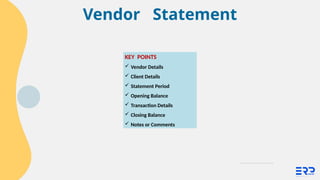
Vendor
Statement
01
Dashboard
02
Purchase Quotation
(Special)
08
Approve PO
KEY FEATURES
3.
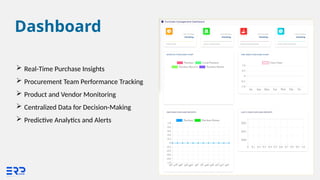
Dashboard
Real-Time PurchaseInsights
Procurement Team Performance Tracking
Product and Vendor Monitoring
Centralized Data for Decision-Making
Predictive Analytics and Alerts
4.
Purchase Quotation (Special)
KEYINFORMATION
Purchase Quotation
Unfinished Entry
Quotation Status
Quotation Approval (CS)
Quotation Comparison
PQ to PO
5.
Cont.
1. PURCHASE QUOTATION
Formal request for supplier pricing.
Ensures competitive pricing through multiple quotes.
Aligns procurement with business budgets.
Supports vendor negotiations for better terms.
2. UNFINISHED ENTRY
Save partially completed purchase records.
Prevents data loss, ensuring continuity.
Allows team flexibility during high workloads.
Reduces errors by enabling review before submission.
6.
Cont.
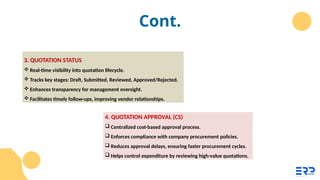
3. QUOTATION STATUS
Real-time visibility into quotation lifecycle.
Tracks key stages: Draft, Submitted, Reviewed, Approved/Rejected.
Enhances transparency for management oversight.
Facilitates timely follow-ups, improving vendor relationships.
4. QUOTATION APPROVAL (CS)
Centralized cost-based approval process.
Enforces compliance with company procurement policies.
Reduces approval delays, ensuring faster procurement cycles.
Helps control expenditure by reviewing high-value quotations.
7.
Cont.
5. QUOTATION COMPARISON
Compare multiple vendor quotes side by side.
Evaluate based on price, delivery time, and quality.
Enables informed decision-making for cost optimization.
Supports strategic supplier selection to meet business goals.
6. PQ TO PO
Seamless conversion of approved quotations into purchase orders.
Reduces manual effort, saving time and resources.
Ensures accuracy and consistency in procurement records.
Accelerates order placement, supporting timely fulfillment of business needs.
Vendor Management
1. VENDORCATEGORY
Food and Beverage
Retail and Products
Service Providers
Construction and Industrial
Technology and Software
Healthcare and Wellness
Transportation and Logistics
Artisan and Crafts
2. VENDOR INFO
Business Name
Contact Details
Products/Services Offered
Pricing and Payment Terms
Delivery and Lead Times
Contracts and Agreements
References or Reviews
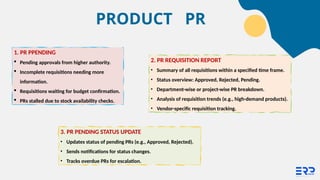
1. PR PPENDING
Pending approvals from higher authority.
Incomplete requisitions needing more
information.
Requisitions waiting for budget confirmation.
PRs stalled due to stock availability checks.
3. PR PENDING STATUS UPDATE
• Updates status of pending PRs (e.g., Approved, Rejected).
• Sends notifications for status changes.
• Tracks overdue PRs for escalation.
2. PR REQUISITION REPORT
• Summary of all requisitions within a specified time frame.
• Status overview: Approved, Rejected, Pending.
• Department-wise or project-wise PR breakdown.
• Analysis of requisition trends (e.g., high-demand products).
• Vendor-specific requisition tracking.
PRODUCT PR
13.
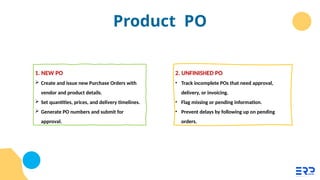
Product PO
1. NEWPO
Create and issue new Purchase Orders with
vendor and product details.
Set quantities, prices, and delivery timelines.
Generate PO numbers and submit for
approval.
2. UNFINISHED PO
• Track incomplete POs that need approval,
delivery, or invoicing.
• Flag missing or pending information.
• Prevent delays by following up on pending
orders.
14.
Cont.
3. PO STATUS
Monitor real-time PO progress (e.g., Pending,
Approved, Delivered).
Update PO status and notify stakeholders.
Track order lifecycle and ensure timely execution.
4. PO TERMS & CONDITIONS
PO Terms and Conditions
Define key contract details (e.g., payment terms, delivery dates).
Include legal clauses (e.g., return policies, warranties).
Customize terms for specific vendors or products.
15.
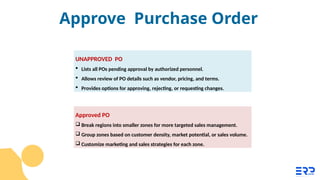
Approved PO
Breakregions into smaller zones for more targeted sales management.
Group zones based on customer density, market potential, or sales volume.
Customize marketing and sales strategies for each zone.
UNAPPROVED PO
Lists all POs pending approval by authorized personnel.
Allows review of PO details such as vendor, pricing, and terms.
Provides options for approving, rejecting, or requesting changes.
Approve Purchase Order
16.
PO REPORTS
a. PurchaseOrder Details (1): Provides a detailed breakdown of all Purchase
Orders.
b. Present Stock Summary (1005): Summarizes current inventory levels.
c. Purchase Receive Report (PO Wise) (5): Tracks goods received against Purchase
Orders.
d. Requisition vs Purchase vs Receive Report (1007): Compares requisitions,
purchase orders, and received goods.
Report
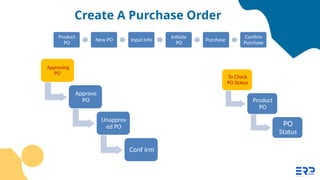
Create A PurchaseOrder
Product
PO
New PO Input Info
Initiate
PO
Purchase
Confirm
Purchase
To Check
PO Status
Product
PO
PO
Status
Approving
PO
Approve
PO
Unapprov
ed PO
Conf irm