ESSENTIAL DATABASE ADMINISTRATION SKILLS FOR
SHAREPOINT PROFESSIONALS
Thomas Vochten
@thomasvochten
♡ DIAMOND AND PLATINUM SPONSORS ♡
Thomas Vochten
Microsoft MVP. Technical Evangelist.
Solution advisor.
@thomasvochten
https://thomasvochten.com
mail@thomasvochten.com
I’m not a real DBA
Meet the
Involuntary DBA
Someone who is made to assume a DBA role or take
on DBA responsibilities, usually against their will
Paul Randal
SharePoint makes DBA’s cry
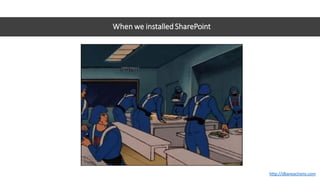
When we installed SharePoint
http://dbareactions.com
When I tell my junior
DBA, “You’d get
valuable experience if
you took over the
Sharepoint project.”
http://dbareactions.com
When I tell my new junior DBA he’ll be taking over the SharePoint databases
http://dbareactions.com
When the project manager says, “Can we put the SharePoint databases on your server?”
http://dbareactions.com
When I get a quarter-million-dollar budget for a new project, and it’s a Microsoft SharePoint project
http://dbareactions.com
When a user comes into my cube and starts complaining about SharePoint performance
http://dbareactions.com
When Microsoft tells me to set MAXDOP to 1 for SharePoint
http://dbareactions.com
Agenda
• Essential tools for the involuntary DBA
• SharePoint & SQL Server
• Frequent operational problems
• Platform setup and configuration tips
Your primary responsibilities as DBA
• Backups
• Reliability
• Performance
Show me some tools!
Let’s skip the manual…
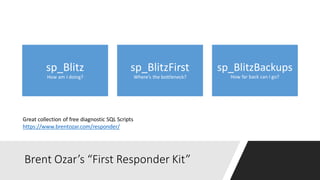
Brent Ozar’s “First Responder Kit”
sp_Blitz
How am I doing?
sp_BlitzFirst
Where’s the bottleneck?
sp_BlitzBackups
How far back can I go?
Great collection of free diagnostic SQL Scripts
https://www.brentozar.com/responder/
Brent Ozar’s First Responder Kit
Leverage the power of the SQL community
DEMO
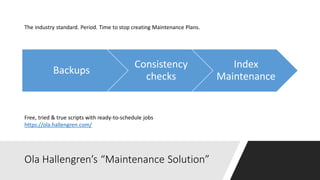
Ola Hallengren’s “Maintenance Solution”
Backups
Consistency
checks
Index
Maintenance
Free, tried & true scripts with ready-to-schedule jobs
https://ola.hallengren.com/
The industry standard. Period. Time to stop creating Maintenance Plans.
Ola Hallengren’s Maintenance Scripts
Leverage the power of the SQL community
DEMO
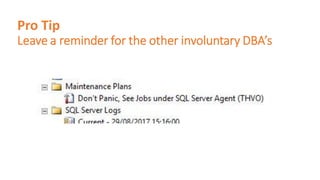
Pro Tip
Leave a reminder for the other involuntary DBA’s
Free, community-driven, contributions welcome
https://dbatools.io
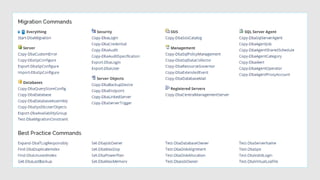
PowerShell Module with hundreds of cmdlets
dbatools to the rescue
Leverage the power of the SQL community
DEMO
Glenn Berry’s “Diagnostic Scripts”
Free SQL Scripts available for every SQL Server release
http://sqlserverperformance.wordpress.com
If you need to dig in deeper…
Glenn Berry’s Diagnostic Scripts
Leverage the power of the SQL community
DEMO
Essential Resources
Where do I go for SQL help?
• Paul Randal (blog | twitter)
• Kimberly Tripp (blog| twitter)
• Brent Ozar (blog| twitter)
• Glenn Berry (blog| twitter)
Get Help - Fast!
#sqlhelp on Twitter
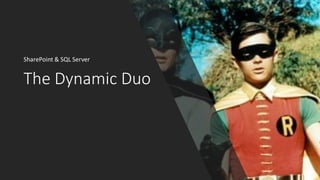
The Dynamic Duo
SharePoint & SQL Server
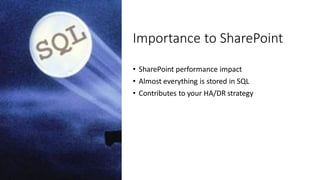
Importance to SharePoint
• SharePoint performance impact
• Almost everything is stored in SQL
• Contributes to your HA/DR strategy
SharePoint makes DBA’s cry
• The support policies
• The strange schema
• The database settings
• The default database names
• The server rights we ask for
• The unconventional maintenance practices
• SharePoint likes to create its databases all by itself
• …
More frustrations…
• Auto Create Statistics = off
• Auto Update Statistics = off
• GUIDS as clustered indexes
• No real referential integrity
• Model Database is not used by SharePoint
consistently
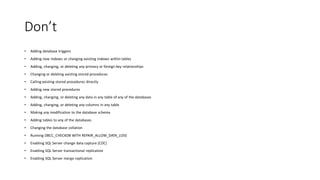
Don’t
• Adding database triggers
• Adding new indexes or changing existing indexes within tables
• Adding, changing, or deleting any primary or foreign key relationships
• Changing or deleting existing stored procedures
• Calling existing stored procedures directly
• Adding new stored procedures
• Adding, changing, or deleting any data in any table of any of the databases
• Adding, changing, or deleting any columns in any table
• Making any modification to the database schema
• Adding tables to any of the databases
• Changing the database collation
• Running DBCC_CHECKDB WITH REPAIR_ALLOW_DATA_LOSS
• Enabling SQL Server change data capture (CDC)
• Enabling SQL Server transactional replication
• Enabling SQL Server merge replication
Do
• Use the GUI
• Use PowerShell
• Use the API’s
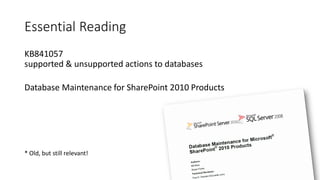
Essential Reading
KB841057
supported & unsupported actions to databases
Database Maintenance for SharePoint 2010 Products
* Old, but still relevant!
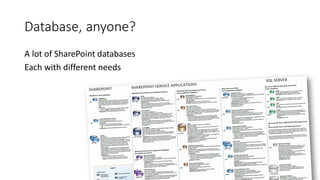
Database, anyone?
A lot of SharePoint databases
Each with different needs
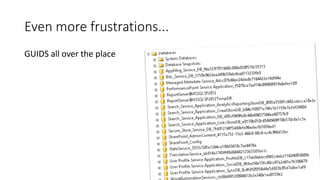
Even more frustrations...
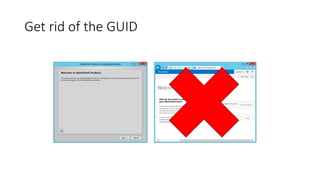
GUIDS all over the place
Get rid of the GUID
Grey wizard
GOOD
White wizard
BAD
PowerShell to the rescue
Always script farm configuration
Use any script you like,
but know what it does!
Frequent operational problems
Recovery Models
Essential reading:
Understanding Logging & Recovery
http://technet.microsoft.com/en-us/magazine/2009.02.logging.aspx
• Simple recovery model - last full backup
• Full recovery model - up to the minute restore
“Why does this log file keeps on growing?”
DEMO
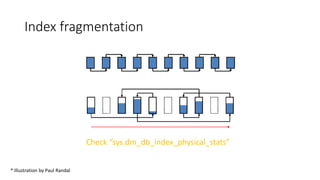
Index fragmentation
Check “sys.dm_db_index_physical_stats”
Illustration by Paul Randal
* Illustration by Paul Randal
Reducing fragmentation
• SharePoint Health Analyzer
• Perform index maintenance manually (Ola Hallengren)
Consider rebuilding indexes when fragmented
over 30% (for content databases)
Only shrink files when needed
Just because you can, doesn’t mean you should
• Causes massive fragmentation
• Autoshrink is the root of all evil!
• Rebuild indexes & keep free space
Can be considered after special SharePoint operations like moving a site
from one database to another
DEMO
Platform setup and configuration tips
General considerations
• SQL is all about mem/disk IO/cpu
• Dedicate a SQL instance to SharePoint
• Go ahead and virtualize – if you know what you’re doing
Plan your disks
Differentiate & prioritize based on IO needs
• tempdb
• logs
• search
• other databases
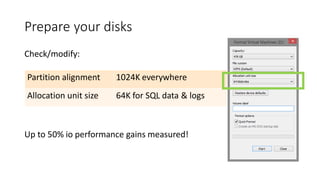
Prepare your disks
Check/modify:
Up to 50% io performance gains measured!
Partition alignment 1024K everywhere
Allocation unit size 64K for SQL data & logs
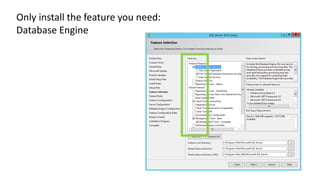
Only install the feature you need:
Database Engine
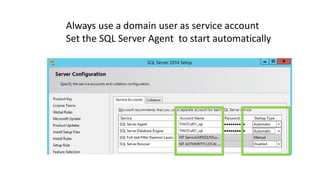
Always use a domain user as service account
Set the SQL Server Agent to start automatically
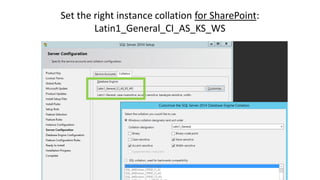
Set the right instance collation for SharePoint:
Latin1_General_CI_AS_KS_WS
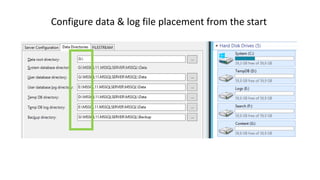
Configure data & log file placement from the start
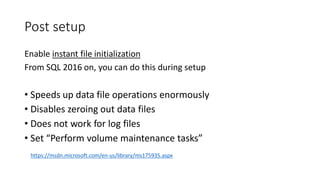
Post setup
Enable instant file initialization
From SQL 2016 on, you can do this during setup
• Speeds up data file operations enormously
• Disables zeroing out data files
• Does not work for log files
• Set “Perform volume maintenance tasks”
https://msdn.microsoft.com/en-us/library/ms175935.aspx
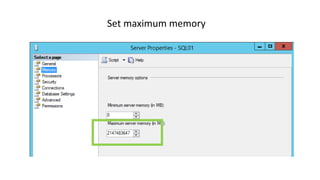
Set maximum memory
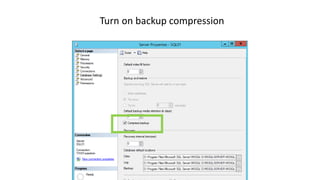
Turn on backup compression
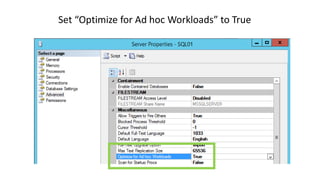
Set “Optimize for Ad hoc Workloads” to True
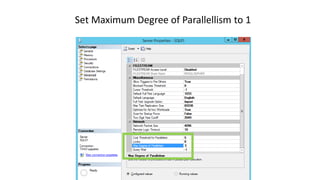
Set Maximum Degree of Parallellism to 1
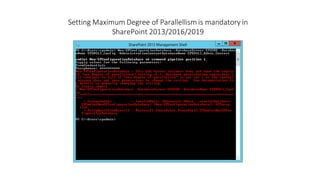
Setting Maximum Degree of Parallellism is mandatory in
SharePoint 2013/2016/2019
Database level settings
• Consider multiple data files
• Tune autogrowth settings (no %)
• Presize databases
• Don’t forget TempDB!
From SQL 2016 on, you can do this during setup
SQL Aliases
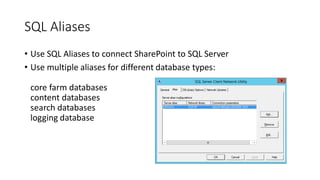
• Use SQL Aliases to connect SharePoint to SQL Server
• Use multiple aliases for different database types:
core farm databases
content databases
search databases
logging database
Resources
Best practices for SQL Server in a SharePoint Server farm
https://docs.microsoft.com/en-us/SharePoint/administration/best-practices-for-sql-server-in-a-sharepoint-server-farm
Storage and SQL Server capacity planning and configuration for SharePoint Server
https://docs.microsoft.com/en-us/SharePoint/administration/storage-and-sql-server-capacity-planning-and-configuration
Overview of SQL Server in SharePoint Server 2016 and 2019 environments
https://docs.microsoft.com/en-us/sharepoint/administration/overview-of-sql-server-in-sharepoint-server-2016-and-2019-environments
Support for changes to the databases that are used by SharePoint
http://support.microsoft.com/kb/841057
Database maintenance for SharePoint
https://docs.microsoft.com/en-us/previous-versions/office/sharepoint-server-2010/cc262731(v=office.14)
Supported high availability and disaster recovery options for SharePoint databases
https://docs.microsoft.com/en-us/SharePoint/administration/supported-high-availability-and-disaster-recovery-options-for-sharepoint-databas
Key Takeaways
• Leverage the power of free community tools
• Backups, backups, backups (and restores)
• Learn about what is supported and what not
• Understand how logging & recovery works
• Don’t shrink unless you know what you’re doing
• Learn about fundamental instance & database level settings
thank you
questions?
HTTPS://THOMASVOCHTEN.COM@THOMASVOCHTEN
ECS19 - Thomas Vochten - ESSENTIAL DATABASE ADMINISTRATION SKILLS FOR SHAREPOINT PROFESSIONALS

ECS19 - Thomas Vochten - ESSENTIAL DATABASE ADMINISTRATION SKILLS FOR SHAREPOINT PROFESSIONALS

  • 2.
    ESSENTIAL DATABASE ADMINISTRATIONSKILLS FOR SHAREPOINT PROFESSIONALS Thomas Vochten @thomasvochten
  • 3.
    ♡ DIAMOND ANDPLATINUM SPONSORS ♡
  • 4.
    Thomas Vochten Microsoft MVP.Technical Evangelist. Solution advisor. @thomasvochten https://thomasvochten.com mail@thomasvochten.com
  • 5.
    I’m not areal DBA
  • 6.
    Meet the Involuntary DBA Someonewho is made to assume a DBA role or take on DBA responsibilities, usually against their will Paul Randal
  • 8.
  • 11.
    When we installedSharePoint http://dbareactions.com
  • 12.
    When I tellmy junior DBA, “You’d get valuable experience if you took over the Sharepoint project.” http://dbareactions.com
  • 13.
    When I tellmy new junior DBA he’ll be taking over the SharePoint databases http://dbareactions.com
  • 14.
    When the projectmanager says, “Can we put the SharePoint databases on your server?” http://dbareactions.com
  • 15.
    When I geta quarter-million-dollar budget for a new project, and it’s a Microsoft SharePoint project http://dbareactions.com
  • 16.
    When a usercomes into my cube and starts complaining about SharePoint performance http://dbareactions.com
  • 17.
    When Microsoft tellsme to set MAXDOP to 1 for SharePoint http://dbareactions.com
  • 18.
    Agenda • Essential toolsfor the involuntary DBA • SharePoint & SQL Server • Frequent operational problems • Platform setup and configuration tips
  • 19.
    Your primary responsibilitiesas DBA • Backups • Reliability • Performance
  • 20.
    Show me sometools! Let’s skip the manual…
  • 21.
    Brent Ozar’s “FirstResponder Kit” sp_Blitz How am I doing? sp_BlitzFirst Where’s the bottleneck? sp_BlitzBackups How far back can I go? Great collection of free diagnostic SQL Scripts https://www.brentozar.com/responder/
  • 22.
    Brent Ozar’s FirstResponder Kit Leverage the power of the SQL community DEMO
  • 23.
    Ola Hallengren’s “MaintenanceSolution” Backups Consistency checks Index Maintenance Free, tried & true scripts with ready-to-schedule jobs https://ola.hallengren.com/ The industry standard. Period. Time to stop creating Maintenance Plans.
  • 24.
    Ola Hallengren’s MaintenanceScripts Leverage the power of the SQL community DEMO
  • 25.
    Pro Tip Leave areminder for the other involuntary DBA’s
  • 26.
    Free, community-driven, contributionswelcome https://dbatools.io PowerShell Module with hundreds of cmdlets
  • 28.
    dbatools to therescue Leverage the power of the SQL community DEMO
  • 29.
    Glenn Berry’s “DiagnosticScripts” Free SQL Scripts available for every SQL Server release http://sqlserverperformance.wordpress.com If you need to dig in deeper…
  • 30.
    Glenn Berry’s DiagnosticScripts Leverage the power of the SQL community DEMO
  • 31.
    Essential Resources Where doI go for SQL help? • Paul Randal (blog | twitter) • Kimberly Tripp (blog| twitter) • Brent Ozar (blog| twitter) • Glenn Berry (blog| twitter)
  • 32.
    Get Help -Fast! #sqlhelp on Twitter
  • 33.
  • 34.
    Importance to SharePoint •SharePoint performance impact • Almost everything is stored in SQL • Contributes to your HA/DR strategy
  • 35.
    SharePoint makes DBA’scry • The support policies • The strange schema • The database settings • The default database names • The server rights we ask for • The unconventional maintenance practices • SharePoint likes to create its databases all by itself • …
  • 36.
    More frustrations… • AutoCreate Statistics = off • Auto Update Statistics = off • GUIDS as clustered indexes • No real referential integrity • Model Database is not used by SharePoint consistently
  • 37.
    Don’t • Adding databasetriggers • Adding new indexes or changing existing indexes within tables • Adding, changing, or deleting any primary or foreign key relationships • Changing or deleting existing stored procedures • Calling existing stored procedures directly • Adding new stored procedures • Adding, changing, or deleting any data in any table of any of the databases • Adding, changing, or deleting any columns in any table • Making any modification to the database schema • Adding tables to any of the databases • Changing the database collation • Running DBCC_CHECKDB WITH REPAIR_ALLOW_DATA_LOSS • Enabling SQL Server change data capture (CDC) • Enabling SQL Server transactional replication • Enabling SQL Server merge replication
  • 38.
    Do • Use theGUI • Use PowerShell • Use the API’s
  • 39.
    Essential Reading KB841057 supported &unsupported actions to databases Database Maintenance for SharePoint 2010 Products * Old, but still relevant!
  • 40.
    Database, anyone? A lotof SharePoint databases Each with different needs
  • 41.
  • 42.
    Get rid ofthe GUID Grey wizard GOOD White wizard BAD
  • 43.
    PowerShell to therescue Always script farm configuration Use any script you like, but know what it does!
  • 44.
  • 45.
    Recovery Models Essential reading: UnderstandingLogging & Recovery http://technet.microsoft.com/en-us/magazine/2009.02.logging.aspx • Simple recovery model - last full backup • Full recovery model - up to the minute restore
  • 46.
    “Why does thislog file keeps on growing?”
  • 47.
  • 48.
  • 49.
    Reducing fragmentation • SharePointHealth Analyzer • Perform index maintenance manually (Ola Hallengren) Consider rebuilding indexes when fragmented over 30% (for content databases)
  • 50.
    Only shrink fileswhen needed Just because you can, doesn’t mean you should • Causes massive fragmentation • Autoshrink is the root of all evil! • Rebuild indexes & keep free space Can be considered after special SharePoint operations like moving a site from one database to another
  • 51.
  • 52.
    Platform setup andconfiguration tips
  • 53.
    General considerations • SQLis all about mem/disk IO/cpu • Dedicate a SQL instance to SharePoint • Go ahead and virtualize – if you know what you’re doing
  • 54.
    Plan your disks Differentiate& prioritize based on IO needs • tempdb • logs • search • other databases
  • 55.
    Prepare your disks Check/modify: Upto 50% io performance gains measured! Partition alignment 1024K everywhere Allocation unit size 64K for SQL data & logs
  • 56.
    Only install thefeature you need: Database Engine
  • 57.
    Always use adomain user as service account Set the SQL Server Agent to start automatically
  • 58.
    Set the rightinstance collation for SharePoint: Latin1_General_CI_AS_KS_WS
  • 59.
    Configure data &log file placement from the start
  • 60.
    Post setup Enable instantfile initialization From SQL 2016 on, you can do this during setup • Speeds up data file operations enormously • Disables zeroing out data files • Does not work for log files • Set “Perform volume maintenance tasks” https://msdn.microsoft.com/en-us/library/ms175935.aspx
  • 61.
  • 62.
    Turn on backupcompression
  • 63.
    Set “Optimize forAd hoc Workloads” to True
  • 64.
    Set Maximum Degreeof Parallellism to 1
  • 65.
    Setting Maximum Degreeof Parallellism is mandatory in SharePoint 2013/2016/2019
  • 66.
    Database level settings •Consider multiple data files • Tune autogrowth settings (no %) • Presize databases • Don’t forget TempDB! From SQL 2016 on, you can do this during setup
  • 67.
    SQL Aliases • UseSQL Aliases to connect SharePoint to SQL Server • Use multiple aliases for different database types: core farm databases content databases search databases logging database
  • 68.
    Resources Best practices forSQL Server in a SharePoint Server farm https://docs.microsoft.com/en-us/SharePoint/administration/best-practices-for-sql-server-in-a-sharepoint-server-farm Storage and SQL Server capacity planning and configuration for SharePoint Server https://docs.microsoft.com/en-us/SharePoint/administration/storage-and-sql-server-capacity-planning-and-configuration Overview of SQL Server in SharePoint Server 2016 and 2019 environments https://docs.microsoft.com/en-us/sharepoint/administration/overview-of-sql-server-in-sharepoint-server-2016-and-2019-environments Support for changes to the databases that are used by SharePoint http://support.microsoft.com/kb/841057 Database maintenance for SharePoint https://docs.microsoft.com/en-us/previous-versions/office/sharepoint-server-2010/cc262731(v=office.14) Supported high availability and disaster recovery options for SharePoint databases https://docs.microsoft.com/en-us/SharePoint/administration/supported-high-availability-and-disaster-recovery-options-for-sharepoint-databas
  • 69.
    Key Takeaways • Leveragethe power of free community tools • Backups, backups, backups (and restores) • Learn about what is supported and what not • Understand how logging & recovery works • Don’t shrink unless you know what you’re doing • Learn about fundamental instance & database level settings
  • 70.