Accelerate Business Agility with PaaS
David S. Linthicum
And
Chris Haddad
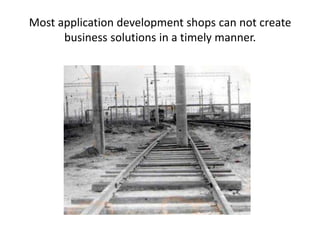
Most application development shops can not create
business solutions in a timely manner.
Thus, many clouds are not meeting expectations.
Business agility is still elusive.
The results:
Application backlogs
Missed business opportunities
Increase in complexity
Increase in latency
Lack of elasticity
Lagging time-to-market
Lack of business agility
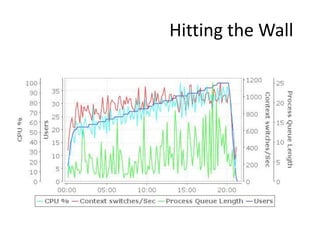
Hitting the Wall
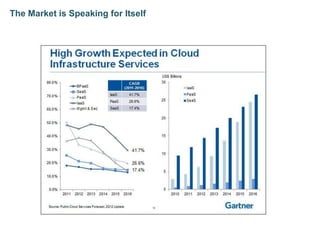
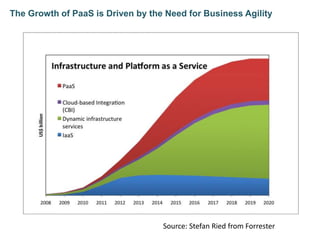
The Market is Speaking for Itself
The Growth of PaaS is Driven by the Need for Business Agility
Source: Stefan Ried from Forrester
“Research firm Gartner predicts that worldwide
platform as a service (PaaS) is set to reach a high of
$1.2 billion in 2012, as compared to $900 million in
2011.
Market revenue is expected to increase as the
years come with a total of $1.5 billion in 2013, and
growing to $2.9 billion in 2016, according to the
Gartner report entitled, ‘Market Trends: Platform
as Service, Worldwide, 2012-2016, 2H12 Update.’”
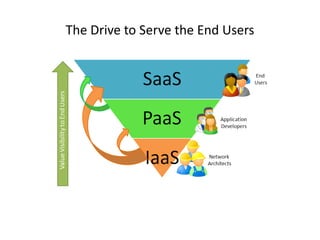
The Drive to Serve the End Users
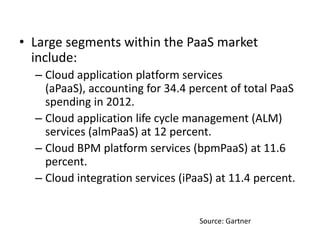
• Large segments within the PaaS market
include:
– Cloud application platform services
(aPaaS), accounting for 34.4 percent of total PaaS
spending in 2012.
– Cloud application life cycle management (ALM)
services (almPaaS) at 12 percent.
– Cloud BPM platform services (bpmPaaS) at 11.6
percent.
– Cloud integration services (iPaaS) at 11.4 percent.
Source: Gartner
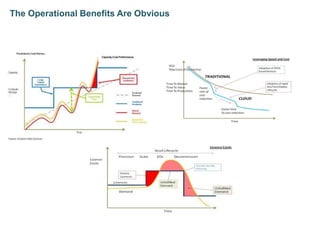
The Operational Benefits Are Obvious
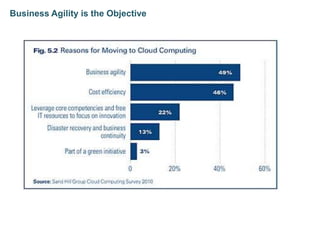
Business Agility is the Objective
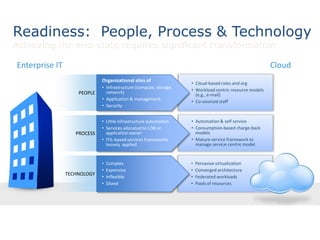
• Cloud-based roles and org
• Workload centric resource models
(e.g., e-mail)
• Co-sourced staff
• Automation & self service
• Consumption-based charge-back
models
• Mature service framework to
manage service-centric model
• Pervasive virtualization
• Converged architecture
• Federated workloads
• Pools of resources
Readiness: People, Process & Technology
Achieving the end-state requires significant transformation
Enterprise IT Cloud
TECHNOLOGY
• Complex
• Expensive
• Inflexible
• Siloed
PROCESS
• Little infrastructure automation
• Services allocated to LOB or
application owner
• ITIL-based services frameworks
loosely applied
PEOPLE
Organizational silos of
• Infrastructure (compute, storage,
network)
• Application & management
• Security
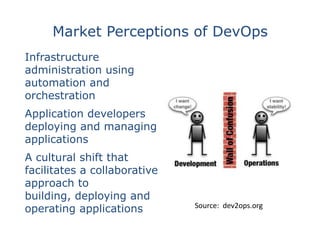
Market Perceptions of DevOps
Infrastructure
administration using
automation and
orchestration
Application developers
deploying and managing
applications
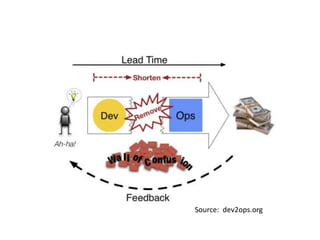
A cultural shift that
facilitates a collaborative
approach to
building, deploying and
operating applications Source: dev2ops.org
Source: dev2ops.org
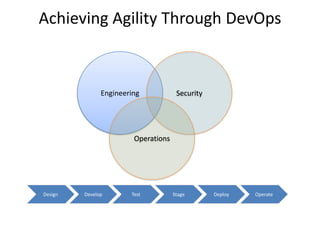
Achieving Agility Through DevOps
Engineering Security
Operations
Develop Test Stage Deploy OperateDesign
• Good
– Budget - It’s cheap.
– Power - It scales.
– Development – It’s productive.
• Bad
– Limitations - Can only use what’s there.
– Standards - Few exist.
PaaS in the Real World
• Make sure to consider the target
application.
– Static application requirements
often lead to PaaS not being a fit.
• Make sure to consider resources required.
– PaaS clouds limit use of resources, or
they become too expensive quickly.
• Make sure to consider data persistence.
– Data support varies greatly.
• Make sure not to get religious around the
languages.
– “We’ll do it in any language as long as
it’s Python.”
• Make sure to consider leveraging the
outside world.
– Need to interact with other
clouds, and on-premise systems.
• Make sure to consider staging and testing.
Real World Advice
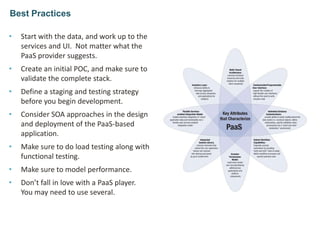
• Start with the data, and work up to the
services and UI. Not matter what the
PaaS provider suggests.
• Create an initial POC, and make sure to
validate the complete stack.
• Define a staging and testing strategy
before you begin development.
• Consider SOA approaches in the design
and deployment of the PaaS-based
application.
• Make sure to do load testing along with
functional testing.
• Make sure to model performance.
• Don’t fall in love with a PaaS player.
You may need to use several.
Best Practices
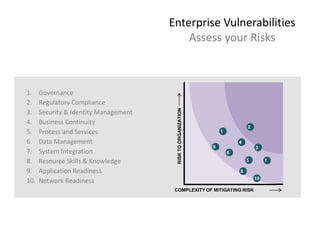
Enterprise Vulnerabilities
Assess your Risks
1. Governance
2. Regulatory Compliance
3. Security & Identity Management
4. Business Continuity
5. Process and Services
6. Data Management
7. System Integration
8. Resource Skills & Knowledge
9. Application Readiness
10. Network Readiness
COMPLEXITY OF MITIGATING RISK
RISKTOORGANIZATION
1
2
5
3
4
6
7
8
9
10
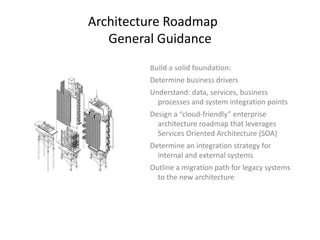
Architecture Roadmap
General Guidance
Build a solid foundation:
Determine business drivers
Understand: data, services, business
processes and system integration points
Design a “cloud-friendly” enterprise
architecture roadmap that leverages
Services Oriented Architecture (SOA)
Determine an integration strategy for
internal and external systems
Outline a migration path for legacy systems
to the new architecture
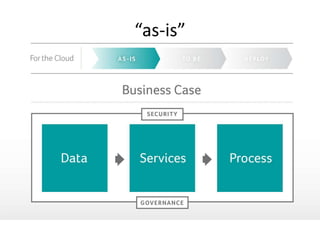
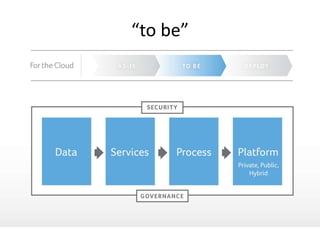
“as-is”
“to be”
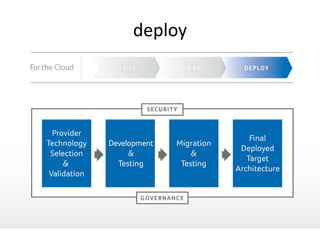
deploy
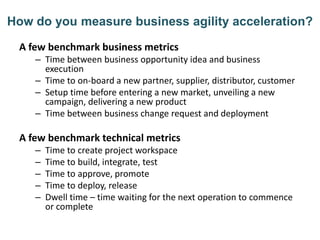
How do you measure business agility acceleration?
A few benchmark business metrics
– Time between business opportunity idea and business
execution
– Time to on-board a new partner, supplier, distributor, customer
– Setup time before entering a new market, unveiling a new
campaign, delivering a new product
– Time between business change request and deployment
A few benchmark technical metrics
– Time to create project workspace
– Time to build, integrate, test
– Time to approve, promote
– Time to deploy, release
– Dwell time – time waiting for the next operation to commence
or complete
5/15/2013 27
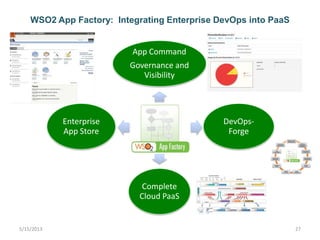
WSO2 App Factory: Integrating Enterprise DevOps into PaaS
WSO2
App
Factory
App Command
Governance and
Visibility
DevOps-
Forge
Complete
Cloud PaaS
Enterprise
App Store
5/15/2013 28
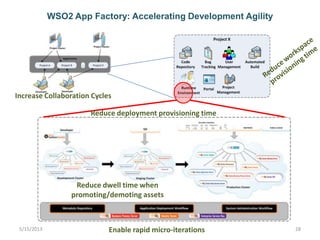
WSO2 App Factory: Accelerating Development Agility
Reduce deployment provisioning time
Reduce dwell time when
promoting/demoting assets
Increase Collaboration Cycles
Enable rapid micro-iterations
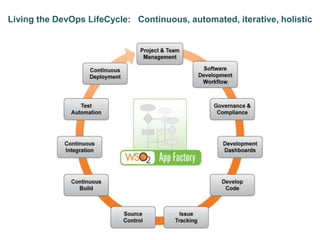
Living the DevOps LifeCycle: Continuous, automated, iterative, holistic
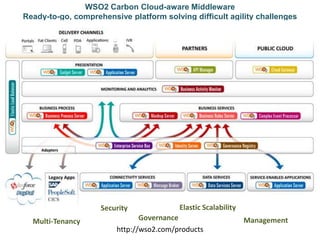
WSO2 Carbon Cloud-aware Middleware
Ready-to-go, comprehensive platform solving difficult agility challenges
http://wso2.com/products
Multi-Tenancy
Security
Governance
Elastic Scalability
Management
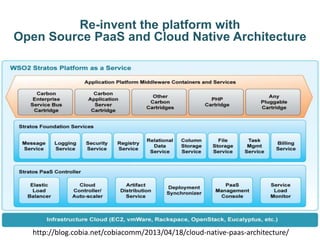
Re-invent the platform with
Open Source PaaS and Cloud Native Architecture
http://blog.cobia.net/cobiacomm/2013/04/18/cloud-native-paas-architecture/
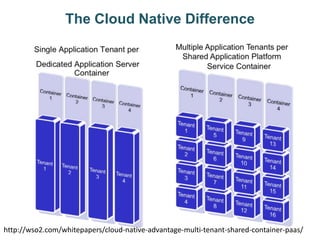
The Cloud Native Difference
http://wso2.com/whitepapers/cloud-native-advantage-multi-tenant-shared-container-paas/
Hit the Accelerator
• Read more about The Path to Responsive IT
• Adopt DevOps practices with WSO2 App Factory
– http://appfactorypreview.wso2.com
• Reduce time to market with WSO2 StratosLive
Public PaaS
– http://wso2.com/cloud/stratoslive/
• Transform your infrastructure into a Private PaaS
with WSO2 Stratos
– http://wso2.com/cloud/stratos/
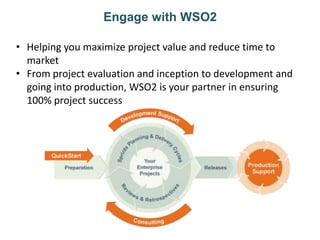
Engage with WSO2
• Helping you maximize project value and reduce time to
market
• From project evaluation and inception to development and
going into production, WSO2 is your partner in ensuring
100% project success
Join hundreds of WSO2 support customers and
Accelerate Your Business Agility

Accelerate Business Agility with PaaS

  • 1.
    Accelerate Business Agilitywith PaaS David S. Linthicum And Chris Haddad
  • 2.
    Most application developmentshops can not create business solutions in a timely manner.
  • 4.
    Thus, many cloudsare not meeting expectations. Business agility is still elusive.
  • 5.
    The results: Application backlogs Missedbusiness opportunities Increase in complexity Increase in latency Lack of elasticity Lagging time-to-market Lack of business agility
  • 6.
  • 7.
    The Market isSpeaking for Itself
  • 8.
    The Growth ofPaaS is Driven by the Need for Business Agility Source: Stefan Ried from Forrester
  • 9.
    “Research firm Gartnerpredicts that worldwide platform as a service (PaaS) is set to reach a high of $1.2 billion in 2012, as compared to $900 million in 2011. Market revenue is expected to increase as the years come with a total of $1.5 billion in 2013, and growing to $2.9 billion in 2016, according to the Gartner report entitled, ‘Market Trends: Platform as Service, Worldwide, 2012-2016, 2H12 Update.’”
  • 10.
    The Drive toServe the End Users
  • 11.
    • Large segmentswithin the PaaS market include: – Cloud application platform services (aPaaS), accounting for 34.4 percent of total PaaS spending in 2012. – Cloud application life cycle management (ALM) services (almPaaS) at 12 percent. – Cloud BPM platform services (bpmPaaS) at 11.6 percent. – Cloud integration services (iPaaS) at 11.4 percent. Source: Gartner
  • 12.
  • 13.
    Business Agility isthe Objective
  • 14.
    • Cloud-based rolesand org • Workload centric resource models (e.g., e-mail) • Co-sourced staff • Automation & self service • Consumption-based charge-back models • Mature service framework to manage service-centric model • Pervasive virtualization • Converged architecture • Federated workloads • Pools of resources Readiness: People, Process & Technology Achieving the end-state requires significant transformation Enterprise IT Cloud TECHNOLOGY • Complex • Expensive • Inflexible • Siloed PROCESS • Little infrastructure automation • Services allocated to LOB or application owner • ITIL-based services frameworks loosely applied PEOPLE Organizational silos of • Infrastructure (compute, storage, network) • Application & management • Security
  • 15.
    Market Perceptions ofDevOps Infrastructure administration using automation and orchestration Application developers deploying and managing applications A cultural shift that facilitates a collaborative approach to building, deploying and operating applications Source: dev2ops.org
  • 16.
  • 17.
    Achieving Agility ThroughDevOps Engineering Security Operations Develop Test Stage Deploy OperateDesign
  • 18.
    • Good – Budget- It’s cheap. – Power - It scales. – Development – It’s productive. • Bad – Limitations - Can only use what’s there. – Standards - Few exist. PaaS in the Real World
  • 19.
    • Make sureto consider the target application. – Static application requirements often lead to PaaS not being a fit. • Make sure to consider resources required. – PaaS clouds limit use of resources, or they become too expensive quickly. • Make sure to consider data persistence. – Data support varies greatly. • Make sure not to get religious around the languages. – “We’ll do it in any language as long as it’s Python.” • Make sure to consider leveraging the outside world. – Need to interact with other clouds, and on-premise systems. • Make sure to consider staging and testing. Real World Advice
  • 20.
    • Start withthe data, and work up to the services and UI. Not matter what the PaaS provider suggests. • Create an initial POC, and make sure to validate the complete stack. • Define a staging and testing strategy before you begin development. • Consider SOA approaches in the design and deployment of the PaaS-based application. • Make sure to do load testing along with functional testing. • Make sure to model performance. • Don’t fall in love with a PaaS player. You may need to use several. Best Practices
  • 21.
    Enterprise Vulnerabilities Assess yourRisks 1. Governance 2. Regulatory Compliance 3. Security & Identity Management 4. Business Continuity 5. Process and Services 6. Data Management 7. System Integration 8. Resource Skills & Knowledge 9. Application Readiness 10. Network Readiness COMPLEXITY OF MITIGATING RISK RISKTOORGANIZATION 1 2 5 3 4 6 7 8 9 10
  • 22.
    Architecture Roadmap General Guidance Builda solid foundation: Determine business drivers Understand: data, services, business processes and system integration points Design a “cloud-friendly” enterprise architecture roadmap that leverages Services Oriented Architecture (SOA) Determine an integration strategy for internal and external systems Outline a migration path for legacy systems to the new architecture
  • 23.
  • 24.
  • 25.
  • 26.
    How do youmeasure business agility acceleration? A few benchmark business metrics – Time between business opportunity idea and business execution – Time to on-board a new partner, supplier, distributor, customer – Setup time before entering a new market, unveiling a new campaign, delivering a new product – Time between business change request and deployment A few benchmark technical metrics – Time to create project workspace – Time to build, integrate, test – Time to approve, promote – Time to deploy, release – Dwell time – time waiting for the next operation to commence or complete
  • 27.
    5/15/2013 27 WSO2 AppFactory: Integrating Enterprise DevOps into PaaS WSO2 App Factory App Command Governance and Visibility DevOps- Forge Complete Cloud PaaS Enterprise App Store
  • 28.
    5/15/2013 28 WSO2 AppFactory: Accelerating Development Agility Reduce deployment provisioning time Reduce dwell time when promoting/demoting assets Increase Collaboration Cycles Enable rapid micro-iterations
  • 29.
    Living the DevOpsLifeCycle: Continuous, automated, iterative, holistic
  • 30.
    WSO2 Carbon Cloud-awareMiddleware Ready-to-go, comprehensive platform solving difficult agility challenges http://wso2.com/products Multi-Tenancy Security Governance Elastic Scalability Management
  • 31.
    Re-invent the platformwith Open Source PaaS and Cloud Native Architecture http://blog.cobia.net/cobiacomm/2013/04/18/cloud-native-paas-architecture/
  • 32.
    The Cloud NativeDifference http://wso2.com/whitepapers/cloud-native-advantage-multi-tenant-shared-container-paas/
  • 33.
    Hit the Accelerator •Read more about The Path to Responsive IT • Adopt DevOps practices with WSO2 App Factory – http://appfactorypreview.wso2.com • Reduce time to market with WSO2 StratosLive Public PaaS – http://wso2.com/cloud/stratoslive/ • Transform your infrastructure into a Private PaaS with WSO2 Stratos – http://wso2.com/cloud/stratos/
  • 34.
    Engage with WSO2 •Helping you maximize project value and reduce time to market • From project evaluation and inception to development and going into production, WSO2 is your partner in ensuring 100% project success
  • 35.
    Join hundreds ofWSO2 support customers and Accelerate Your Business Agility

Editor's Notes

  • #27 n the abstract, business agility can be defined as your ability to rapidly change business vectors. A business vector is your business speed and direction.  The direction may lead into new markets and new products, or engaging with new participants.  Reducing time to IT solution delivery increases your team’s ability to adjust the business vector and match business opportunity.With adequate instrumentation, IT delivery agility can be quantified.  Consider the following agility metric recommendations:Time to create project workspaceTime to build, integrate, testTime to approve, promoteTime to deploy, releaseDwell time – time waiting for the next operation to commence or completeAfter application project inception and before coding commences, systems administrators must create project workspaces.   How long does your team wait before gaining access to source code management repositories, requirement management projects, and defect tracking projects?Moving code through build, integration, and test tools is often a time and labor-intensive process.  The entire team waits while applications assets are built, integrated, and tested.  When teams use iterative development processes, the wait time aggregates over several hundred or thousands cycles.  How long does your team wait during build, integration, and test phases?When one team member finishes a task and the work enters an approval phase, how long does the team wait?  After the work is approved to move through phase gate, how long before the project is promoted into the next phase?
  • #28 Need social networkingApp Factory ComponentsAppCommand: Enhance team collaboration and project visibility. Has two aspects to it – per application view and all projects view.DevOps-Forge: Reduce time to market, increase consistency, share software development environment across partnersCloud PaaS: Rapidly deploy applications into Cloud run-time, share infrastructure across multiple development teamsAppStore: Enable application users to find, subscribe, and personalize the application
  • #30 Agile and DevOps principles must be applied across a cross-functional team and the entire lifecycle (e.g. project inception, design, development, deployment, and management).Operations activities related to deployment and release management often hinders agility and time-to-market.   The level of effort required to deploy a real-world application is often non-trivial.  Continuous deployment technology automates operations activities and replaces manual intervention.While dwell time sounds cozy and refreshing, excessive wait states and downtime between activities diminishes team efficiency and engagement.  Automated notifications eliminate dwell time between hand-offs.  Automated project workspace creation, Cloud environment provisioning, and on-demand self-service access reduces wait time between software development phases.A DevOps focus on continuous activity execution (e.g. continuous build, continuous integration, continuous test, continuous delivery) creates a ‘no wait’ environment.   Teams do not have to wait for the next script to run or for the next activity to commence.  By incorporating automation into developer and operations processes, teams bypass time consuming manual tasks and gain faster phase execution.  Both DevOps and PaaS promote simple, on-demand self-service environments that shield team members from complexity and reduce skill hurdles.  By offering on-demand self-service access, rapid business innovation and experimentation is possible. By reducing complexity, team members are not required to obtain special training and skills before consuming IT services and infrastructure.To read more about Enterprise DevOps PaaS accelerating team agility, read a recent blog post.
  • #32 Cloud platforms exhibiting Cloud Native PaaS architecture provide an opportunity to increase business innovation and creativity.   Cloud native platform solutions shield teams from infrastructure details and inject new behavior into the application.Cloud native PaaS architecture requires infrastructure innovation in provisioning, service governance, management, deployment, load-balancing, policy enforcement, and tenancy.  Cloud native, innovative provisioning infrastructure increases tenant density and streamlines code deployment and synchronization. Multi-tenancy within middleware containers enables teams to customize applications and services per consumer by changing run-time configuration settings instead of provisioning new instances.A Cloud platform may automate governance and enforce policies (i.e. security, service level management, usage) through enterprise PaaS services.  Cloud provisioning may fulfill enterprise deployment requirements across all service providers and technologies used by solution delivery teams.To re-invent the platform and achieve benefits, new Cloud Native platform architectural components and services are required.   Traditional client-server and N-tier web application architectures do not exhibit requisite cloud characteristics (i.e. elastic scalability, multi-tenancy, resource pooling, or self-service).  Figure 1 below depicts the new Cloud Platform architectural components and services.   The PaaS controller layer deploys, scales, monitors, and manages an elastic middleware Cloud. PaaS Foundation services provide common solution building blocks.  A complete, comprehensive, and Cloud-aware middleware container layer delivers new cloud-aware capabilities to business applications.The middleware container layer should not be tightly coupled to the PaaS foundation.  Acartridge or droplet pattern is used to support running any application or service container on the PaaS.   By providing a cartridge plug-point, Cloud Native PaaS environments can run any language, framework, or server (after appropriate integration via the cartridge API and agents).Elastic Load BalancerElastic Load Balancer (ELB) balances load across cloud service instances on-premise or in the cloud. The ELB should provide multi-tenancy, fail-over, and auto-scaling of services in line with dynamically changing load characteristics.   Cloud Native Elastic Load Balancers are tenant-aware, service-aware, partition-aware, and region-aware.  They can direct traffic based on the consuming tenant or target service.   Cloud Native Elastic Load Balancers manage traffic across diverse topologies (i.e. private partitions, shared partitions, hybrid cloud), and direct traffic according to performance, cost, and resource pooling policies.   A Cloud Native ELB is tightly integrated with the Service Load monitor component and dynamically adjusts to topology changes. Service Load MonitorThe Service Load Monitor component acquires load information from multiple sources (e.g. app servers, load balancers) and communicates utilization and performance information to an Elastic Load Balancer responsible for distributing requests to the optimal instances, based on tenant association, load balancing policies, service level agreements, and partitioning policies. When the level of abstraction is raised above Infrastructure as a Service (IaaS) instances, Teams no longer have direct access to specific virtual machines.  New Cloud Native components are required to flexibly distribute applications, services, and APIs across a dynamic topology.  A Cloud Controller, Artifact Distribution Server, and Deployment Synchronizer perform DevOp activities (i.e. continuous deployment, instance provisioning, automated scaling) without requiring a hard, static binding to run-time instances.Cloud ControllerA Cloud Native Cloud Controller (or auto-scaler) component creates and removes cloud instances (virtual machines or Linux containers) based on input from the Load Monitor component.   The Cloud Controller right-sizes the instance number to satisfy shifting demand, and conforms instance scaling with quota and reservation thresholds (i.e. minimum instance count, maximum instance count).   The Cloud Native Cloud Controller may provision instances on top of bare metal machines, hypervisors, or Infrastructure as a Service offerings (e.g. Amazon EC2, OpenStack, Eucalyptus).Artifact Distribution ServerThe Artifact Distribution Server takes complete applications (i.e. application code, services, mediation flows, business rules, and APIs) and breaks the composite bundle into per-instance components, which are then loaded into instances by a Deployment Synchronizer.  The Artifact Distribution Server maintains a versioned repository of run-time artifacts and their association with Cloud service definitions.Deployment SynchronizerThe Deployment Synchronizer checks out and deploys the right code for each Cloud application platform instance (e.g. application server, Enterprise Service Bus, API Gateway).   With infrastructure and servers abstracted and encapsulated by the Cloud, a Cloud Native PaaS Management Console allows control of tenant partitions, services, quality of service, and code deployment by either Web UI or command-line tooling.Cloud Native PaaS Architecture Business BenefitsCloud Native PaaS architecture accelerates innovation, increases operational efficiency, and reduces cost.The traditional, keep-the-lights-on, operational run-rate consumes precious resources and limits innovative new projects.  By optimizing project footprint across pooled resources on a shared Cloud Native PaaS infrastructure, Responsive IT can reduce operational spend, improve total cost of ownership (TCO), and make more projects financially viable.   Multi-tenant delivery models create an efficient delivery environment and significant lower solution deployment cost. For more information on the financial benefits of multi-tenant, Cloud Native platforms, read the white paper.By building a Cloud Native PaaS environment, you provide your teams with a platform to rapidly develop solutions that address connected business use cases (i.e. contextual business delivery, ecosystem development, mobile interactions). Recommended ReadingA Path to Responsive ITPaaS ServicesDoes your PaaS architecture show a paradigm shift?Cloud-aware Applications and PaaS Architecture