User manual
P/n: RAB042FEN
HORIBA ABX
Rue du caducée - Parc Euromédecine
34184 MONTPELLIER Cedex 4 - FRANCE
ABX Micros 60
ABX Micros 60
2 - RAB042FEN - User Manual - ABX Micros 60
Introduction
1. Revisions
◆ This document applies to the latest higher software version.
◆ When a subsequent software version changes the information in this document, a new issue will
be released.
HORIBA ABX
B.P. 7290
Rue du caducée
Parc Euromédecine
34184 MONTPELLIER Cedex 04 - FRANCE
Tel: (33) 4 67 14 15 16
Fax: (33) 4 67 14 15 17
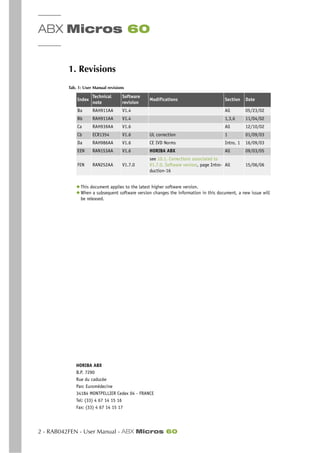
Tab. 1: User Manual revisions
Index
Technical
note
Software
revision
Modifications Section Date
Ba RAH911AA V1.4 All 05/23/02
Bb RAH911AA V1.4 1,3,6 11/04/02
Ca RAH939AA V1.6 All 12/10/02
Cb ECR1354 V1.6 UL correction 1 01/09/03
Da RAH986AA V1.6 CE IVD Norms Intro, 1 16/09/03
EEN RAN153AA V1.6 HORIBA ABX All 09/03/05
FEN RAN252AA V1.7.0
see 10.1. Corrections associated to
V1.7.0. Software version, page Intro-
duction-16
All 15/06/06
Introduction
ABX Micros 60 - User Manual - RAB042FEN - 3
1.1. Declaration of conformity
◆ Latest version of the CE declaration of conformity for this instrument is available on www.horiba-
abx.com
1.2. Notice of liability
The information in this manual is distributed on an "As Is" basis, without warranty. While every pre-
caution has been taken in the preparation of this manual, HORIBA ABX will not assume any liability
to any persons or entities with respect to loss or damage, caused or alleged to be caused directly or
indirectly by not following the instructions contained in this manual, or by using the computer soft-
ware and hardware products described herein in a manner inconsistent with our product labeling.
1.3. Trademarks
Other product names mentioned within this publication may be trademarks or registered trademarks
of other companies.
1.4. Copyright ® 2005 by HORIBA ABX
All rights reserved. No part of this book may be reproduced or transmitted in any form or by any
means, electronic, mechanical, photocopying, recording, or otherwise, without the prior written per-
mission of HORIBA ABX.
1.5. Potential hazards
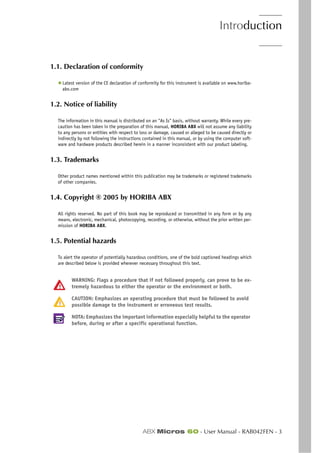
To alert the operator of potentially hazardous conditions, one of the bold captioned headings which
are described below is provided wherever necessary throughout this text.
WARNING: Flags a procedure that if not followed properly, can prove to be ex-
tremely hazardous to either the operator or the environment or both.
CAUTION: Emphasizes an operating procedure that must be followed to avoid
possible damage to the instrument or erroneous test results.
NOTA: Emphasizes the important information especially helpful to the operator
before, during or after a specific operational function.
ABX Micros 60
4 - RAB042FEN - User Manual - ABX Micros 60
2. Warning and precautions
◆ Work safety reliability and general characteristics are guaranteed by HORIBA ABX under the fol-
lowing conditions:
- User manual must be enterely read and personnel trained by HORIBA ABX before attempting
to operate instrument.
- The user always operates with full knowledge and appreciation of instrument warnings, alarms
and flags.
- Always refer to labeling and HORIBA ABX instructions in order to avoid to compromise system
integrity.
◆ The instrument must be operated as instructed in the user manual. Any other use might compro-
mise system integrity and might be hazardous for the operator.
◆The reagents and accessoiries stipulated by HORIBA ABX have been validated
in accordance with the European Directive for in-vitro medical devices (98/
79/CE).
◆The use of any other reagents and accessoiries may place at risk the perfor-
mance of the instrument, engaging the users responsability. In this case,
HORIBA ABX takes no responsability for the device nor for the results ren-
dered.
◆Disposal gloves, eyes protection and lab coat must be worn by the operator.
◆Local or national regulations must be applied in all the operations.
◆Portable/mobile telephones should not be used in proximity of the instru-
ment.
◆All peripheral devices should be IEC compatible.
2.1. Limited guarantee
The duration of guarantee is stipulated in the sales conditions associated with the purchase of this
instrument. To validate the guarantee, ensure the following is adhered to:
1- The system is operated under the instructions of this manual.
2- Only software or hardware specified by HORIBA ABX is installed on the instrument. This software
must be the original copyrighted version.
3- Services and repairs are provided by a HORIBA ABX authorized technician, using only HORIBA
ABX approved spare parts.
4- The electrical supply of the laboratory adheres to national or international regulations.
5- Specimens are collected and stored in normal conditions.
6- Reagents used are those specified in this user manual.
7- Proper tools are used when maintenance or troubleshooting operations are performed.
If this instrument has been supplied to you by anyone other than HORIBA ABX
or an authorised representative, HORIBA ABX cannot guarantee this product in
terms of specification, latest revision and latest documentation. Further infor-
mation may be obtained from your authorised representative.
Introduction
Working conditions
ABX Micros 60 - User Manual - RAB042FEN - 5
2.2. Safety Precautions
Electronic and moving parts:
The following parts must not be handled or checked by the user:
- Electrical power supply.
- Electronic circuit boards.
◆Operator injury may occur from an electric shock. Electronic components can
shock and injure the user. Do not tamper with the instrument and do not re-
move any components (covers, doors, panels and so on) unless otherwise in-
structed within this document.
◆Moving parts: It is strictly forbidden to disable sensors as it may cause op-
erator injuries. Protection covers must not be opened during instrument op-
erations.
◆The battery may explode if it is not replaced correctly! Replace only with the
same or equivalent type recommanded by the manufacturer. Dispose of used
batteries according to the manufacturer’s instructions.
2.3. Biological risks
Consider all specimens, reagents, calibrators, controls, etc… that contain hu-
man blood or serum as potentially infectious ! Use established, good laborato-
ry working practices when handling specimens. Wear protective gear, gloves,
lab coats, safety glasses and/or face shields, and follow other bio-safety prac-
tices as specified in OSHA Blood Borne Pathogens Rule (29 CFR part 1910.
1030) or equivalent bio-safety procedures.
HORIBA ABX uses disinfectant product for instrument decontamination and highly recommends it
to decontaminate your instrument (See Section 6, 1.1.3. General Cleaning of the Instrument,
page 6-3)
3. Working conditions
3.1. Environment
◆ The operation of the ABX Micros 60 should be restricted to indoor location use only. Op-
eration of the instrument at altitudes of over 2000 Meters (6000 feet) is not recommended.
◆ The ABX Micros 60 is designed for safety from voltages surges according to INSTALLATION
CATEGORY II and POLLUTION DEGREE 2 (IEC 61010-1) Please contact your local HORIBA ABX rep-
resentative for information regarding operation locations, when it does not comply with the rec-
ommended specifications.
3.2. Location
◆ The ABX Micros 60 should be placed on a clean and leveled table or workbench.
◆ Please note that the ABX Micros 60, printer and reagents weigh approximately 30 kilo-
grams (66 lbs).
◆ Avoid exposure to sunlight.
◆ Place your instrument where it is not exposed to water or vapor.
ABX Micros 60
6 - RAB042FEN - User Manual - ABX Micros 60
◆ Place your instrument where it is free from vibration or shock
◆ Place your instrument where an independent power receptacle can be used.
◆ Use a receptacle different from the one used by a device that easily generate noise such as a cen-
trifuge, etc...
◆ Provide a space of at least 20 cm (8 inches) at the back of the instrument for arranging the power
cable and tubings.
The power switch and input voltage supply connection should always be acces-
sible. When positioning the system for operational use, leave the required
amount of space for easy accessibility to these items
3.3. Grounding
Proper grounding is required when installing the system. Check the wall outlet ground (earth) for
proper grounding to the facilities electrical ground. If you are unsure of the outlet grounding, con-
tact your facilities engineer to verify the proper outlet ground.
3.4. Humidity/temperature conditions
The ABX Micros 60 must operate between temperatures of 18 to 32°C (65 to 90°F). Maxi-
mum relative humidity 80% for temperatures up to 31°C (88°F). If it is stored at a temperature less
than 10°C (50°F), the instrument should stand for 1 hour at the correct room temperature before
use.
3.5. Electromagnetic environment check
◆ The ABX Micros 60 has been designed to produce less than the accepted level of electro-
magnetic interference in order to operate in conformity with its destination, allowing the correct
operation of other instruments also in conformity with their destination.
◆ In case of suspected electromagnetic noise, check that the instrument has not been placed in the
proximity of electromagnetic fields or short wave emissions, (i. e. Radar, X-rays, Scanners, Cell
phones, etc...)
3.6. Environmental protection
3.6.1. Disposal used accessories and consumables:
Must be collected by a laboratory specialized in elimination and recycling of this kind of material
according to the local legislation.
3.6.2. Disposal ABX Micros 60 instrument:
It should be disposed of, in accordance with local legislation, and should be treated as being con-
taminated with blood. The appropriate biological precautions should be taken.
If any doubt, please contact your HORIBA ABX representative service depart-
ment.
Introduction
Working conditions
ABX Micros 60 - User Manual - RAB042FEN - 7
▼ European Legislation
In accordance with the European Directive (2002/96/CE, known also as W.E.E.E) instruments having
the above symbol, and sold into a European country by HORIBA ABX or an authorised representative
must be disposed of and recycled correctly at the end of its useful life.
Due to the local changing regulations in each country, please contact your local representative for de-
tailed and upto date information on how to appropriately dispose of the instrument.
3.7. Transportation and storage conditions
◆ Condition for storage and transportation: Temperature from -20°C to +50°C
Prior to the shipping of an instrument by transporter, whatever the destina-
tion, an external decontamination of the instrument must be carried out.
ABX Micros 60
8 - RAB042FEN - User Manual - ABX Micros 60
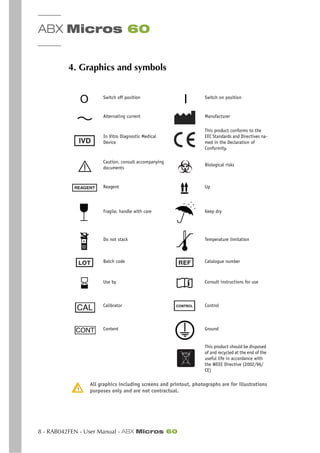
4. Graphics and symbols
All graphics including screens and printout, photographs are for illustrations
purposes only and are not contractual.
Switch off position Switch on position
Alternating current Manufacturer
In Vitro Diagnostic Medical
Device
This product conforms to the
EEC Standards and Directives na-
med in the Declaration of
Conformity.
Caution, consult accompanying
documents
Biological risks
Reagent Up
Fragile, handle with care Keep dry
Do not stack Temperature limitation
Batch code Catalogue number
Use by Consult instructions for use
Calibrator Control
Content Ground
This product should be disposed
of and recycled at the end of the
useful life in accordance with
the WEEE Directive (2002/96/
CE)
Introduction
Labels
ABX Micros 60 - User Manual - RAB042FEN - 9
5. Labels
5.1. Main power label
In order to replace the 2x1A Fuses located under the power plug connection on the back of the an-
alyzer, carry out the following procedure:
- Do Not remove the instrument protection cover.
- Power OFF the analyzer.
- Disconnect the main power cable from the back power cord receptacle on the analyzer.
- Pull the little flap marked «250V fuse».
- Remove the fuses from their holding receptacle
- Check for the correct ohms on each fuse.
- Use only «Slow-blow» internal fuses.
- Use only fuses having the following characteristics:
◆ for 100/120Vac supply:1A 250V SB
◆ for 220/240Vac supply:1A 250V SB
5.2. Input/Output Label
Waste: Connect the waste output line to the (Waste position) fitting. Note the Waste label for Waste
output «Only»
Diluent: Connect the Diluent input line to the (Diluent position) fitting. Note the Diluent label for
Diluent input «Only»
Lyse: Connect the Clear tubing marked with a «MINILYSE» label to a straw and place it into the Lyse
reagent container.
Miniclean: Connect the Blue tubing marked with a «MINICLEAN» label to a straw and place it into
the Miniclean reagent container.
RS-232 output connection: Used only by HORIBA ABX qualified Engineers.
Printer connection: Do not connect any printer which has not been recommended by a HORIBA ABX
qualified Engineer.
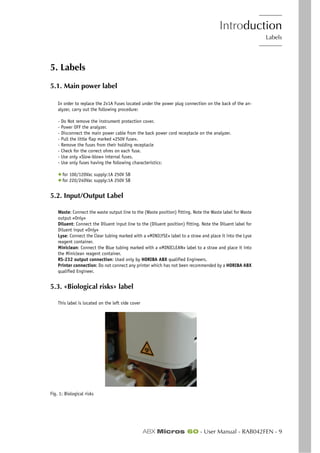
5.3. «Biological risks» label
This label is located on the left side cover
Fig. 1: Biological risks
ABX Micros 60
10 - RAB042FEN - User Manual - ABX Micros 60
Consider all specimens, reagents, calibrators, controls, etc… that contain hu-
man blood or serum as potentially infectious ! Use established, good laborato-
ry working practices when handling specimens. Wear protective gear, gloves,
lab coats, safety glasses and/or face shields, and follow other bio-safety prac-
tices as specified in OSHA Blood Borne Pathogens Rule (29 CFR part 1910.
1030) or equivalent bio-safety procedures.
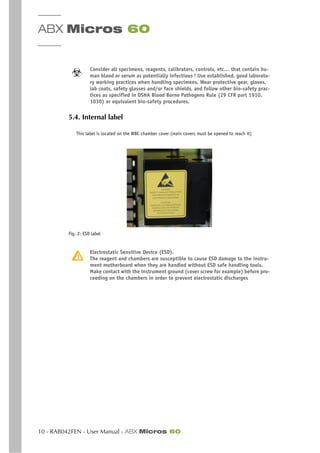
5.4. Internal label
This label is located on the WBC chamber cover (main covers must be opened to reach it)
Fig. 2: ESD label
Electrostatic Sensitive Device (ESD).
The reagent and chambers are susceptible to cause ESD damage to the instru-
ment motherboard when they are handled without ESD safe handling tools.
Make contact with the instrument ground (cover screw for example) before pro-
ceeding on the chambers in order to prevent electrostatic discharges
Introduction
Intended use
ABX Micros 60 - User Manual - RAB042FEN - 11
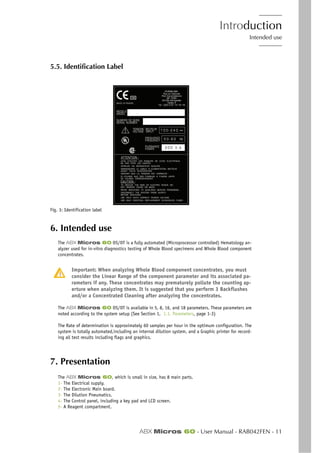
5.5. Identification Label
Fig. 3: Identification label
6. Intended use
The ABX Micros 60 OS/OT is a fully automated (Microprocessor controlled) Hematology an-
alyzer used for in-vitro diagnostics testing of Whole Blood specimens and Whole Blood component
concentrates.
Important: When analyzing Whole Blood component concentrates, you must
consider the Linear Range of the component parameter and its associated pa-
rameters if any. These concentrates may prematurely pollute the counting ap-
erture when analyzing them. It is suggested that you perform 3 Backflushes
and/or a Concentrated Cleaning after analyzing the concentrates.
The ABX Micros 60 OS/OT is available in 5, 8, 16, and 18 parameters. These parameters are
noted according to the system setup (See Section 1, 1.1. Parameters, page 1-3)
The Rate of determination is approximately 60 samples per hour in the optimum configuration. The
system is totally automated,including an internal dilution system, and a Graphic printer for record-
ing all test results including flags and graphics.
7. Presentation
The ABX Micros 60, which is small in size, has 8 main parts.
1- The Electrical supply.
2- The Electronic Main board.
3- The Dilution Pneumatics.
4- The Control panel, including a key pad and LCD screen.
5- A Reagent compartment.
ABX Micros 60
12 - RAB042FEN - User Manual - ABX Micros 60
6- A Printer that prints out results and Distribution curves.
7- A Smart Card Reader (optional) for Quality Control result records and Patient result records.
8- A Barcode reader (optional) for a direct entry of the Alphanumerical identifications.
ABX Micros 60 Models Available:
This instrument is available in the following different models:
◆ TheABX Micros 60-OT: This model is an «Open Tube» unit «Without» a Smart Card reader.
The operator must remove the cap from the blood collection tube before analyzing any sample.
◆ The ABX Micros 60-OS: This model is an «Open Tube» unit «With» a Smart Card reader.
The Smart Card reader gives the operator the ability to record results and perform automated Qual-
ity Control. The operator must remove the cap from the blood collection tube before analyzing any
sample.
OT and OS are indicated in the instrument serial number that identifies the
unit and model.
Introduction
Installation
ABX Micros 60 - User Manual - RAB042FEN - 13
8. Installation
An HORIBA ABX representative will install your instrument, software, and printer.
8.1. Package contents
A thorough inspection is carried out on the ABX Micros 60 before sending it. We, nev-
ertheless, recommend checking the total system as soon as it is received to report any anomalies to
the carrier.
Verify that all of the parts from the package list are present:
The ABX Micros 60-OS/OT boxes contain the following parts :
◆ Instrument
◆ Printer
◆ User manual CDROM: RAX056A
◆ Reagents, controls & calibrators CD ROM: RAX055A
◆ Daily guide : RAB180
◆ Power cable (european) : DAC011A or power cable (US) : DAC012A
◆ Installation kit (Bottle or Pack)
8.1.1. «Bottle» Installation kit
The ABX Micros 60-OT «bottle» installation kit (XEA 314 B) includes :
8.1.2. «Pack» installation kit
The ABX Micros 60-OT «pack» installation kit (XEA 332 B) includes :
Tab. 2: Bottle installation kit
DESIGNATION PART NUMBER QTY
Reagent straw L=270 mm XEA017A 3
Sampling needle GBC069AS 1
Diluent/Waste male connector EAC019A 2
Cristal tube 3x6 EAE011A 4
O’ ring 6x1.5 FAA036A 1
O’ ring 1.4x1.25 FAA0053A 2
Rubber stopper 2 holes FBL001A 1
Reagent bottle stopper XDA566A 2
Common installation kit XEA312B 1
Tab. 3: Pack installation kit
DESIGNATION PART NUMBER QTY
Sampling needle MICROS 60-CT GBC069AS 1
O’ ring 6x1.5 FAA036A 2
O’ring 0.74x1.02 FAA053A 2
Common installation kit XEA312B 1
ABX Micros 60
14 - RAB042FEN - User Manual - ABX Micros 60
8.2. Reagent connections
(See Section 6, 1.2. Reagent connections, page 6-4)
Introduction
User manual contents
ABX Micros 60 - User Manual - - 15
9. User manual contents
Introduction .............................................................. Introduction-2
Warning and precautions.......................................................................... Introduction-4
Working conditions ................................................................................. Introduction-5
Graphics and symbols .............................................................................. Introduction-8
Labels ................................................................................................... Introduction-9
Intended use........................................................................................ Introduction-11
Presentation ........................................................................................ Introduction-11
Installation.......................................................................................... Introduction-13
User manual contents............................................................................ Introduction-15
User manual modifications ..................................................................... Introduction-16
Section 1. Specifications .............................................................1-1
Technical Specifications (V1.7.0)............................................................................... 1-3
Physical Specifications............................................................................................. 1-6
Summary of Performance Data .................................................................................. 1-8
Limitations .......................................................................................................... 1-13
Reagent Specifications........................................................................................... 1-19
Reagent Consumption............................................................................................ 1-20
Waste Handling Procedure...................................................................................... 1-20
Section 2. Description & technology ..............................................2-1
Description ............................................................................................................ 2-2
Technology ........................................................................................................... 2-3
Section 3. Workflow ....................................................................3-1
Startup checks........................................................................................................ 3-2
Daily Quality Control & Calibration verification ........................................................... 3-4
Sample selection and identification .......................................................................... 3-5
Running Samples ................................................................................................... 3-7
Results ................................................................................................................. 3-9
Flags................................................................................................................... 3-14
Section 4. Quality Assurance ........................................................4-1
Quality Control ...................................................................................................... 4-2
Calibration .......................................................................................................... 4-11
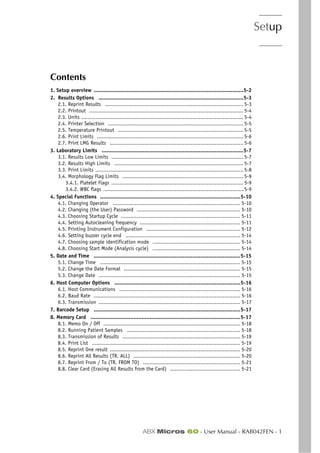
Section 5. Setup .........................................................................5-1
Setup overview ....................................................................................................... 5-2
Results Options ..................................................................................................... 5-3
Laboratory Limits ................................................................................................... 5-7
Special Functions ................................................................................................. 5-10
Date and Time ..................................................................................................... 5-14
Host Computer Options ......................................................................................... 5-15
Barcode Setup ..................................................................................................... 5-17
Memory Card ....................................................................................................... 5-17
Section 6. Maintenance & Troubleshooting .....................................6-1
Maintenance .......................................................................................................... 6-2
Troubleshooting.................................................................................................... 6-18
Menu/Overview..................................................................................................... 6-25
ABX Micros 60
16 - RAB042FEN - User Manual - ABX Micros 60
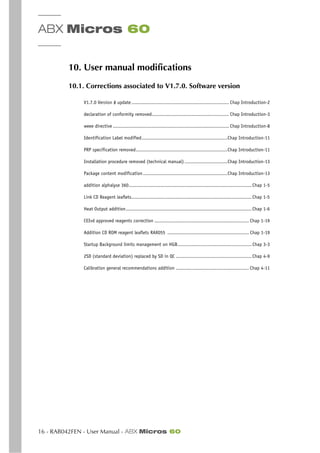
10. User manual modifications
10.1. Corrections associated to V1.7.0. Software version
V1.7.0 Version # update .................................................................... Chap Introduction-2
declaration of conformity removed...................................................... Chap Introduction-3
weee directive ................................................................................. Chap Introduction-8
Identification Label modified............................................................Chap Introduction-11
PRP specification removed................................................................Chap Introduction-11
Installation procedure removed (technical manual) ..............................Chap Introduction-13
Package content modification...........................................................Chap Introduction-13
addition alphalyse 360......................................................................................Chap 1-5
Link CD Reagent leaflets....................................................................................Chap 1-5
Heat Output addition........................................................................................Chap 1-6
CEIvd approved reagents correction .................................................................. Chap 1-19
Addition CD ROM reagent leaflets RAX055 ......................................................... Chap 1-19
Startup Background limits management on HGB....................................................Chap 3-3
2SD (standard deviation) replaced by SD in QC .....................................................Chap 4-9
Calibration general recommendations addition ................................................... Chap 4-11
Specifications
ABX Micros 60 - User Manual - RAB042FEN - 1
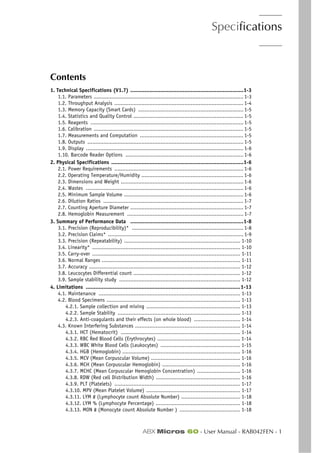
Section 1. Specifications
Contents
1. Technical Specifications (V1.7) .......................................................................1-3
1.1. Parameters .............................................................................................. 1-3
1.2. Throughput Analysis ................................................................................. 1-4
1.3. Memory Capacity (Smart Cards) .................................................................. 1-5
1.4. Statistics and Quality Control ..................................................................... 1-5
1.5. Reagents ................................................................................................ 1-5
1.6. Calibration .............................................................................................. 1-5
1.7. Measurements and Computation ................................................................. 1-5
1.8. Outputs .................................................................................................. 1-5
1.9. Display ................................................................................................... 1-6
1.10. Barcode Reader Options .......................................................................... 1-6
2. Physical Specifications ...................................................................................1-6
2.1. Power Requirements ................................................................................. 1-6
2.2. Operating Temperature/Humidity ................................................................ 1-6
2.3. Dimensions and Weight ............................................................................. 1-6
2.4. Wastes ................................................................................................... 1-6
2.5. Minimum Sample Volume ........................................................................... 1-6
2.6. Dilution Ratios ........................................................................................ 1-7
2.7. Counting Aperture Diameter ....................................................................... 1-7
2.8. Hemoglobin Measurement ......................................................................... 1-7
3. Summary of Performance Data .......................................................................1-8
3.1. Precision (Reproducibility)* ...................................................................... 1-8
3.2. Precision Claims* ..................................................................................... 1-9
3.3. Precision (Repeatability) ......................................................................... 1-10
3.4. Linearity* ............................................................................................. 1-10
3.5. Carry-over ............................................................................................. 1-11
3.6. Normal Ranges ....................................................................................... 1-11
3.7. Accuracy ............................................................................................... 1-12
3.8. Leucocytes Differential count ................................................................... 1-12
3.9. Sample stability study ............................................................................ 1-12
4. Limitations .................................................................................................1-13
4.1. Maintenance ......................................................................................... 1-13
4.2. Blood Specimens .................................................................................... 1-13
4.2.1. Sample collection and mixing ........................................................... 1-13
4.2.2. Sample Stability ............................................................................. 1-13
4.2.3. Anti-coagulants and their effects (on whole blood) ............................. 1-14
4.3. Known Interfering Substances .................................................................. 1-14
4.3.1. HCT (Hematocrit) ........................................................................... 1-14
4.3.2. RBC Red Blood Cells (Erythrocytes) .................................................... 1-14
4.3.3. WBC White Blood Cells (Leukocytes) .................................................. 1-15
4.3.4. HGB (Hemoglobin) .......................................................................... 1-16
4.3.5. MCV (Mean Corpuscular Volume) ........................................................ 1-16
4.3.6. MCH (Mean Corpuscular Hemoglobin) ................................................. 1-16
4.3.7. MCHC (Mean Corpuscular Hemoglobin Concentration) ........................... 1-16
4.3.8. RDW (Red cell Distribution Width) ..................................................... 1-16
4.3.9. PLT (Platelets) ............................................................................... 1-17
4.3.10. MPV (Mean Platelet Volume) ........................................................... 1-17
4.3.11. LYM # (Lymphocyte count Absolute Number) ..................................... 1-18
4.3.12. LYM % (Lymphocyte Percentage) ..................................................... 1-18
4.3.13. MON # (Monocyte count Absolute Number ) ...................................... 1-18
ABX Micros 60
2 - RAB042FEN - User Manual - ABX Micros 60
4.3.14. MON % (Monocyte Percentage) ........................................................1-18
4.3.15. GRA # (Granulocyte count Absolute Number) .....................................1-18
4.3.16. GRA % (Granulocyte Percentage ) ....................................................1-18
5. Reagent Specifications ................................................................................. 1-19
6. Reagent Consumption .................................................................................. 1-20
7. Waste Handling Procedure ............................................................................ 1-20
Specifications
Technical Specifications (V1.7.0)
ABX Micros 60 - User Manual - RAB042FEN - 3
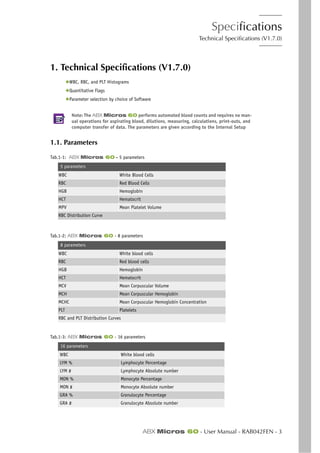
1. Technical Specifications (V1.7.0)
◆WBC, RBC, and PLT Histograms
◆Quantitative Flags
◆Parameter selection by choice of Software
Note: The ABX Micros 60 performs automated blood counts and requires no man-
ual operations for aspirating blood, dilutions, measuring, calculations, print-outs, and
computer transfer of data. The parameters are given according to the Internal Setup
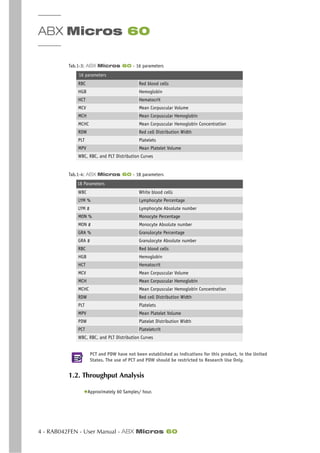
1.1. Parameters
Tab.1-1: ABX Micros 60 - 5 parameters
5 parameters
WBC White Blood Cells
RBC Red Blood Cells
HGB Hemoglobin
HCT Hematocrit
MPV Mean Platelet Volume
RBC Distribution Curve
Tab.1-2: ABX Micros 60 - 8 parameters
8 parameters
WBC White blood cells
RBC Red blood cells
HGB Hemoglobin
HCT Hematocrit
MCV Mean Corpuscular Volume
MCH Mean Corpuscular Hemoglobin
MCHC Mean Corpuscular Hemoglobin Concentration
PLT Platelets
RBC and PLT Distribution Curves
Tab.1-3: ABX Micros 60 - 16 parameters
16 parameters
WBC White blood cells
LYM % Lymphocyte Percentage
LYM # Lymphocyte Absolute number
MON % Monocyte Percentage
MON # Monocyte Absolute number
GRA % Granulocyte Percentage
GRA # Granulocyte Absolute number
ABX Micros 60
4 - RAB042FEN - User Manual - ABX Micros 60
PCT and PDW have not been established as indications for this product, in the United
States. The use of PCT and PDW should be restricted to Research Use Only.
1.2. Throughput Analysis
◆Approximately 60 Samples/ hour.
RBC Red blood cells
HGB Hemoglobin
HCT Hematocrit
MCV Mean Corpuscular Volume
MCH Mean Corpuscular Hemoglobin
MCHC Mean Corpuscular Hemoglobin Concentration
RDW Red cell Distribution Width
PLT Platelets
MPV Mean Platelet Volume
WBC, RBC, and PLT Distribution Curves
Tab.1-4: ABX Micros 60 - 18 parameters
18 Parameters
WBC White blood cells
LYM % Lymphocyte Percentage
LYM # Lymphocyte Absolute number
MON % Monocyte Percentage
MON # Monocyte Absolute number
GRA % Granulocyte Percentage
GRA # Granulocyte Absolute number
RBC Red blood cells
HGB Hemoglobin
HCT Hematocrit
MCV Mean Corpuscular Volume
MCH Mean Corpuscular Hemoglobin
MCHC Mean Corpuscular Hemoglobin Concentration
RDW Red cell Distribution Width
PLT Platelets
MPV Mean Platelet Volume
PDW Platelet Distribution Width
PCT Plateletcrit
WBC, RBC, and PLT Distribution Curves
Tab.1-3: ABX Micros 60 - 16 parameters
16 parameters
Specifications
Technical Specifications (V1.7.0)
ABX Micros 60 - User Manual - RAB042FEN - 5
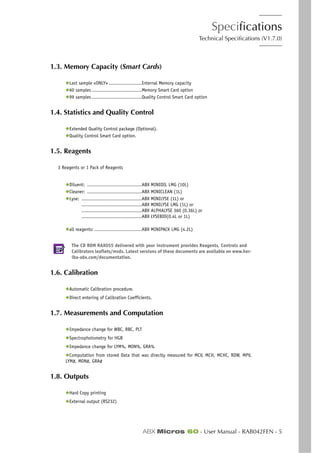
1.3. Memory Capacity (Smart Cards)
◆Last sample «ONLY» .......................Internal Memory capacity
◆60 samples...................................Memory Smart Card option
◆99 samples...................................Quality Control Smart Card option
1.4. Statistics and Quality Control
◆Extended Quality Control package (Optional).
◆Quality Control Smart Card option.
1.5. Reagents
3 Reagents or 1 Pack of Reagents
◆Diluent: ......................................ABX MINIDIL LMG (10L)
◆Cleaner: ......................................ABX MINICLEAN (1L)
◆Lyse: ..........................................ABX MINILYSE (1L) or
..........................................ABX MINILYSE LMG (1L) or
..........................................ABX ALPHALYSE 360 (0.36L) or
..........................................ABX LYSEBIO(0.4L or 1L)
◆all reagents: .................................ABX MINIPACK LMG (4.2L)
The CD ROM RAX055 delivered with your instrument provides Reagents, Controls and
Calibrators leaflets/msds. Latest versions of these documents are available on www.hor-
iba-abx.com/documentation.
1.6. Calibration
◆Automatic Calibration procedure.
◆Direct entering of Calibration Coefficients.
1.7. Measurements and Computation
◆Impedance change for WBC, RBC, PLT
◆Spectrophotometry for HGB
◆Impedance change for LYM%, MON%, GRA%
◆Computation from stored Data that was directly measured for MCV, MCH, MCHC, RDW, MPV,
LYM#, MON#, GRA#
1.8. Outputs
◆Hard Copy printing
◆External output (RS232)
ABX Micros 60
6 - RAB042FEN - User Manual - ABX Micros 60
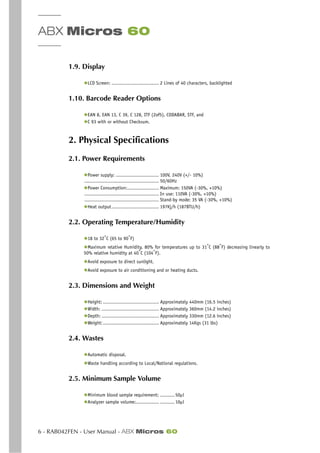
1.9. Display
◆LCD Screen: ................................. 2 Lines of 40 characters, backlighted
1.10. Barcode Reader Options
◆EAN 8, EAN 13, C 39, C 128, ITF (2of5), CODABAR, STF, and
◆C 93 with or without Checksum.
2. Physical Specifications
2.1. Power Requirements
◆Power supply: .............................. 100V, 240V (+/- 10%)
.................................................... 50/60Hz
◆Power Consumption:...................... Maximum: 150VA (-30%, +10%)
.................................................... In use: 110VA (-30%, +10%)
.................................................... Stand-by mode: 35 VA (-30%, +10%)
◆Heat output................................. 197Kj/h (187BTU/h)
2.2. Operating Temperature/Humidity
◆18 to 32°
C (65 to 90°
F)
◆Maximum relative Humidity, 80% for temperatures up to 31°C (88°F) decreasing linearly to
50% relative humidity at 40°
C (104°
F).
◆Avoid exposure to direct sunlight.
◆Avoid exposure to air conditioning and or heating ducts.
2.3. Dimensions and Weight
◆Height: ....................................... Approximately 440mm (16.5 inches)
◆Width: ........................................ Approximately 360mm (14.2 inches)
◆Depth: ........................................ Approximately 330mm (12.6 inches)
◆Weight:....................................... Approximately 14Kgs (31 lbs)
2.4. Wastes
◆Automatic disposal.
◆Waste handling according to Local/National regulations.
2.5. Minimum Sample Volume
◆Minimum blood sample requirement:. .......... 50µl
◆Analyzer sample volume:................. .......... 10µl
Specifications
Physical Specifications
ABX Micros 60 - User Manual - RAB042FEN - 7
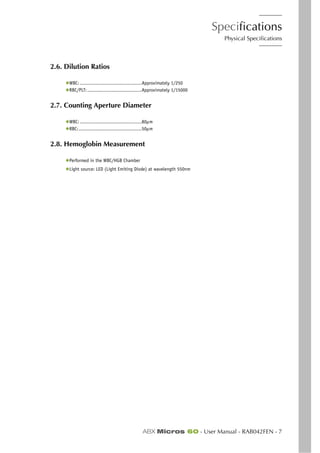
2.6. Dilution Ratios
◆WBC: ...........................................Approximately 1/250
◆RBC/PLT:......................................Approximately 1/15000
2.7. Counting Aperture Diameter
◆WBC: ...........................................80µm
◆RBC:............................................50µm
2.8. Hemoglobin Measurement
◆Performed in the WBC/HGB Chamber
◆Light source: LED (Light Emiting Diode) at wavelength 550nm
ABX Micros 60
8 - RAB042FEN - User Manual - ABX Micros 60
3. Summary of Performance Data
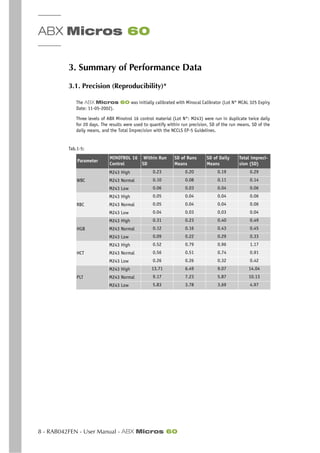
3.1. Precision (Reproducibility)*
The ABX Micros 60 was initially calibrated with Minocal Calibrator (Lot N° MCAL 325 Expiry
Date: 11-05-2002).
Three levels of ABX Minotrol 16 control material (Lot N°: M243) were run in duplicate twice daily
for 20 days. The results were used to quantify within run precision, SD of the run means, SD of the
daily means, and the Total Imprecision with the NCCLS EP-5 Guidelines.
.
Tab.1-5:
Parameter
MINOTROL 16
Control
Within Run
SD
SD of Runs
Means
SD of Daily
Means
Total impreci-
sion (SD)
M243 High 0.23 0.20 0.19 0.29
WBC M243 Normal 0.10 0.08 0.11 0.14
M243 Low 0.06 0.03 0.04 0.06
M243 High 0.05 0.04 0.04 0.06
RBC M243 Normal 0.05 0.04 0.04 0.06
M243 Low 0.04 0.03 0.03 0.04
M243 High 0.31 0.23 0.40 0.49
HGB M243 Normal 0.12 0.16 0.43 0.45
M243 Low 0.09 0.22 0.29 0.33
M243 High 0.52 0.79 0.96 1.17
HCT M243 Normal 0.56 0.51 0.74 0.91
M243 Low 0.26 0.26 0.32 0.42
M243 High 13.71 6.49 9.07 14.04
PLT M243 Normal 9.17 7.23 5.87 10.13
M243 Low 5.83 3.78 3.69 4.97
Specifications
Summary of Performance Data
ABX Micros 60 - User Manual - RAB042FEN - 9
Evaluation of Precision Performance of Clinical Chemistry Devices; Approved Guidelines, NCCLS doc-
ument EP-5 (ISBN 1-56238-145-8) 1999
*Source 510K submission # K030799
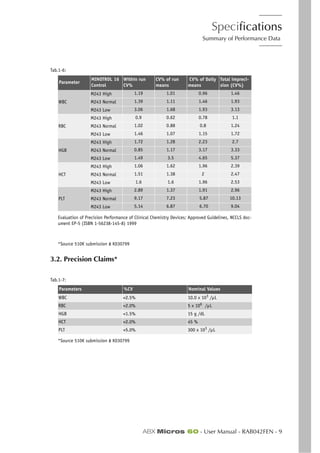
3.2. Precision Claims*
*Source 510K submission # K030799
Tab.1-6:
Parameter
MINOTROL 16
Control
Within run
CV%
CV% of run
means
CV% of Daily
means
Total impreci-
sion (CV%)
M243 High 1.19 1.01 0.96 1.46
WBC M243 Normal 1.39 1.11 1.46 1.93
M243 Low 3.06 1.68 1.93 3.13
M243 High 0.9 0.62 0.78 1.1
RBC M243 Normal 1.02 0.88 0.8 1.24
M243 Low 1.46 1.07 1.15 1.72
M243 High 1.72 1.28 2.23 2.7
HGB M243 Normal 0.85 1.17 3.17 3.33
M243 Low 1.49 3.5 4.65 5.37
M243 High 1.06 1.62 1.96 2.39
HCT M243 Normal 1.51 1.38 2 2.47
M243 Low 1.6 1.6 1.96 2.53
M243 High 2.89 1.37 1.91 2.96
PLT M243 Normal 9.17 7.23 5.87 10.13
M243 Low 5.14 6.87 6.70 9.04
Tab.1-7:
Parameters %CV Nominal Values
WBC <2.5% 10.0 x 10³ /µL
RBC <2.0% 5 x 10⁶ /µL
HGB <1.5% 15 g /dL
HCT <2.0% 45 %
PLT <5.0% 300 x 103
/µL
ABX Micros 60
10 - RAB042FEN - User Manual - ABX Micros 60
3.3. Precision (Repeatability)
Based on 20 consecutive samplings from 1 Fresh Normal Whole Blood, without any alarms.
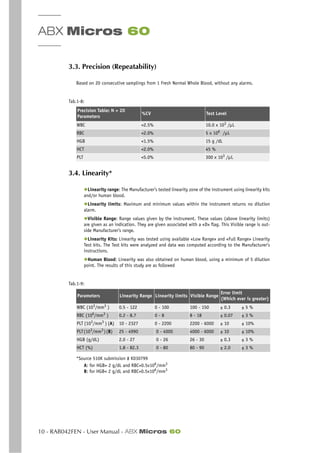
3.4. Linearity*
◆Linearity range: The Manufacturer’s tested linearity zone of the instrument using linearity kits
and/or human blood.
◆Linearity limits: Maximum and minimum values within the instrument returns no dilution
alarm.
◆Visible Range: Range values given by the instrument. These values (above linearity limits)
are given as an indication. They are given associated with a «D» flag. This Visible range is out-
side Manufacturer’s range.
◆Linearity Kits: Linearity was tested using available «Low Range» and «Full Range» Linearity
Test kits. The Test kits were analyzed and data was computed according to the Manufacturer’s
instructions.
◆Human Blood: Linearity was also obtained on human blood, using a minimum of 5 dilution
point. The results of this study are as followed
*Source 510K submission # K030799
A: for HGB> 2 g/dL and RBC>0.5x10⁶/mm3
B: for HGB< 2 g/dL and RBC>0.5x10⁶
/mm3
Tab.1-8:
Precision Table: N = 20
Parameters
%CV Test Level
WBC <2.5% 10.0 x 10³
/µL
RBC <2.0% 5 x 10⁶
/µL
HGB <1.5% 15 g /dL
HCT <2.0% 45 %
PLT <5.0% 300 x 103
/µL
Tab.1-9:
Parameters Linearity Range Linearity limits Visible Range
Error limit
(Which ever is greater)
WBC (103/mm3 ) 0.5 - 122 0 - 100 100 - 150 ± 0.3 ± 5 %
RBC (106/mm3 ) 0.2 - 8.7 0 - 8 8 - 18 ± 0.07 ± 3 %
PLT (103
/mm3
) (A) 10 - 2327 0 - 2200 2200 - 6000 ± 10 ± 10%
PLT(103
/mm3
)(B) 25 - 4990 0 - 4000 4000 - 6000 ± 10 ± 10%
HGB (g/dL) 2.0 - 27 0 - 26 26 - 30 ± 0.3 ± 3 %
HCT (%) 1.8 - 82.3 0 - 80 80 - 90 ± 2.0 ± 3 %
Specifications
Summary of Performance Data
ABX Micros 60 - User Manual - RAB042FEN - 11
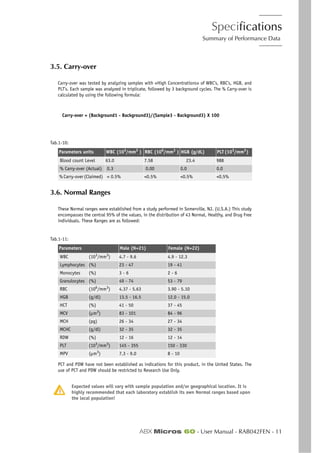
3.5. Carry-over
Carry-over was tested by analyzing samples with «High Concentrations» of WBC’s, RBC’s, HGB, and
PLT’s. Each sample was analyzed in triplicate, followed by 3 background cycles. The % Carry-over is
calculated by using the following formula:
Carry-over = (Background1 - Background3)/(Sample3 - Background3) X 100
Parame
3.6. Normal Ranges
These Normal ranges were established from a study performed in Somerville, NJ. (U.S.A.) This study
encompasses the central 95% of the values, in the distribution of 43 Normal, Healthy, and Drug Free
individuals. These Ranges are as followed:
)
PCT and PDW have not been established as indications for this product, in the United States. The
use of PCT and PDW should be restricted to Research Use Only.
Expected values will vary with sample population and/or geographical location. It is
highly recommended that each laboratory establish its own Normal ranges based upon
the local population!
Tab.1-10:
Parameters units WBC (103
/mm3
) RBC (106
/mm3
) HGB (g/dL) PLT(103
/mm3
)
Blood count Level 63.0 7.58 23.4 988
% Carry-over (Actual) 0.3 0.00 0.0 0.0
% Carry-over (Claimed) < 0.5% <0.5% <0.5% <0.5%
Tab.1-11:
Parameters Male (N=21) Female (N=22)
WBC (103/mm3) 4.7 - 9.6 4.9 - 12.3
Lymphocytes (%) 23 - 47 19 - 41
Monocytes (%) 3 - 6 2 - 6
Granulocytes (%) 49 - 74 53 - 79
RBC (106/mm3) 4.37 - 5.63 3.90 - 5.10
HGB (g/dl) 13.5 - 16.5 12.0 - 15.0
HCT (%) 41 - 50 37 - 45
MCV (µm3) 83 - 101 84 - 96
MCH (pg) 26 - 34 27 - 34
MCHC (g/dl) 32 - 35 32 - 35
RDW (%) 12 - 16 12 - 14
PLT (103
/mm3
) 145 - 355 150 - 330
MPV (µm3
) 7.3 - 9.0 8 - 10
ABX Micros 60
12 - RAB042FEN - User Manual - ABX Micros 60
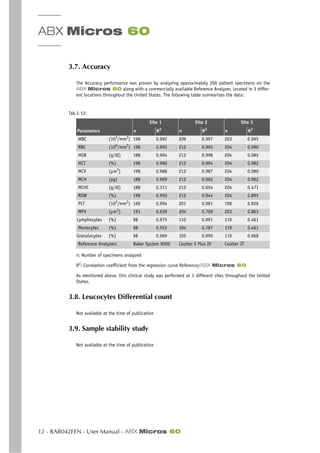
3.7. Accuracy
The Accuracy performance was proven by analyzing approximately 200 patient specimens on the
ABX Micros 60 along with a commercially available Reference Analyzer, located in 3 differ-
ent locations throughout the United States. The following table summarizes the data:
n: Number of specimens analyzed
R2
: Correlation coefficient from the regression curve Reference/ABX Micros 60
As mentioned above, this clinical study was performed at 3 different sites throughout the United
States.
3.8. Leucocytes Differential count
Not available at the time of publication
3.9. Sample stability study
Not available at the time of publication
Tab.1-12:
Site 1 Site 2 Site 3
Parameters n R2
n R2
n R2
WBC (103
/mm3
) 198 0.992 209 0.997 203 0.995
RBC (106
/mm3
) 198 0.995 212 0.995 204 0.990
HGB (g/dl) 188 0.994 212 0.998 204 0.985
HCT (%) 198 0.980 212 0.994 204 0.982
MCV (µm3
) 198 0.988 212 0.987 204 0.980
MCH (pg) 188 0.969 212 0.962 204 0.962
MCHC (g/dl) 188 0.311 212 0.654 204 0.471
RDW (%) 198 0.950 212 0.944 204 0.895
PLT (103/mm3) 169 0.994 201 0.981 198 0.926
MPV (µm3) 191 0.639 204 0.709 203 0.863
Lymphocytes (%) 98 0.975 110 0.991 119 0.461
Monocytes (%) 98 0.552 104 0.787 119 0.461
Granulocytes (%) 98 0.969 105 0.990 119 0.968
Reference Analyzers Baker System 9000 Coulter S Plus IV Coulter JT
Specifications
Limitations
ABX Micros 60 - User Manual - RAB042FEN - 13
4. Limitations
Whilst every effort is taken by HORIBA ABX to investigate and indicate all known inter-
ference’s, it is by no means possible to guarantee that all interference’s have been iden-
tified. At all times, results should be validated and communicated only once all
information relating to the patient has been assessed and taken into account.
4.1. Maintenance
In this Manual, specific Start-up, Shutdown, and Maintenance procedures are listed. The Mainte-
nance procedures listed in this manual are mandatory for the proper use and operation of the ABX
Micros 60.
Failure to execute any of these maintenance procedures may result in «Decreased Reli-
ability» of the system. High emphasis on maintaining the system is strongly suggested.
4.2. Blood Specimens
All Blood samples should be collected using proper technique.
Consider all Specimens, Reagents, Calibrators, Controls, etc... that contain Human blood
or serum as potentially infectious.
Use established, good laboratory working practices when handling specimens. Wear pro-
tective gear, gloves, lab coats, safety glasses or face shields, and follow other biosafety
practices as specified in OSHA Bloodborne Pathogen Rule (29 CFR Part 1910, 1030) or
other equivalent biosafety procedures.
4.2.1. Sample collection and mixing
When collecting blood specimens, venous blood is recommended, but arterial blood may also be used
in extreme cases. Blood collection must be placed in vacuum or atmospheric sample collection tubes.
(For USA Only). For additional information on collecting venous and capillary samples,
refer to NCCLS document H3-A4 and NCCLS document H4-A4 (sept.1999).
The sample collection tube must be filled to the exact quantity of blood indicated on
the tube itself. Any incorrectly measured blood sample collections will show a variation
in results.
4.2.2. Sample Stability
Fresh Whole Blood specimens are recommended. The ICSH (International Committee for Standardiza-
tion in Hematology) defines a Fresh blood specimen as «One processed within 4 hours after
collection».
Well mixed Whole Blood specimens, collected in EDTA anti-coagulant and run within eight hours af-
ter collection, provide the most accurate results for all parameters. The white cell size distribution
may shift when specimens are assayed between 5 and 20 Minutes after collection and more than 8
hours after collection.
ABX Micros 60
14 - RAB042FEN - User Manual - ABX Micros 60
4.2.3. Anti-coagulants and their effects (on whole blood)
This is a list of commonly used anti-coagulants used for whole blood collections:
◆Heparin: Causes an increase in cell clumping, (WBC’s and PLT’s) and modifies cytoplasmic color
with Romanowsky staining (Blue background). An increase in HCT and MCV with high heparin
concentrations > 7.5UL /capillary tube.
◆Trisodium Citrate: Because the anti-coagulant is liquid, it includes a dilution estimated at
10/11 when filling 5ml tubes with whole blood. This anti-coagulant is used in coagulation. It
is sometimes used in hematology when an EDTA - induced Pseudothrombocytopenia is suspected.
◆Acid Citrate Dextrose (ACD) and Citrate Phosphate Dextrose with Adenine (CPDA): The
most commonly used anti-coagulants for cell concentrates (in particular Platelet concentrates)
is normally not used for cell counting. There is no seriously known interference.
Anti-Coagulants used in blood collection may vary in the effects of changing the char-
acteristics of the blood components. Caution is advised when selecting an anti-coagu-
lant for analysis on the ABX Micros 60.
◆EDTA: Amoung the EDTA salts, EDTA K2 (USA and Japan), EDTA K3 (USA and Europe), and some-
times NA2 EDTA are used. EDTA K2 and EDTA K3 are the most frequently used anti-coagulants for
Hematology testing Worldwide. Mainly because they have been recommended by ICSH since
1993. The other EDTA salts are acceptable as well. EDTA can include Pseudothrombocytopenia (es-
timated frequency: 1/800) through Platelet clumping.
◆Fluoride: Was used before EDTA replaced it. No side affects as known so far.
4.3. Known Interfering Substances
Verification of any «Abnormal» test result, (including Flagged results or results Outside
their normal range) should be performed using reference methods or other standard lab-
oratory procedures for the conclusive verification of these abnormal results. The section
below starts the list of the known limitations of automated blood cell counters which
use the principle of impedance.
4.3.1. HCT (Hematocrit)
Red Blood cell Agglutination - May produce erroneous HCT and MCV values. Red blood cells agglu-
tination may be detected by observing abnormal MCH and MCHC values, as well as examination of a
stained blood smear in such cases. Manual Laboratory methods may be required to obtain an accu-
rate HCT value.
4.3.2. RBC Red Blood Cells (Erythrocytes)
The Red blood cell dilution contains all the formed elements in the blood: Erythrocytes, Leukocytes,
and Platelets. During the counting of the RBC’s, Platelets are below the RBC size minimum threshold,
therefore they are not counted as RBC’s.
Leukocytes - (White Blood cells) on the other hand, are included in the RBC count.However,since
the normal ratio between Red blood cells and White blood cells is so extreme, the influence of count-
ing the WBC’s during the RBC count is negligible.
High WBC’s - In rare cases where the WBC’s are extremely high, the RBC count may be corrected,
especially if the RBC count is extremely low in comparison to the high WBC count.
Specifications
Limitations
ABX Micros 60 - User Manual - RAB042FEN - 15
Agglutinated Red Blood cells - May cause a falsely low RBC count. Blood samples containing the
agglutinated Red blood cells may be identified by observing abnormal MCH and MCHC values, as well
as examination of a stained blood smear.
Cold Agglutinins - IgM Immunoglobulins which are elevated in Cold Agglutinins disease, may lower
RBC and PLT counts and increase the MCV.
4.3.3. WBC White Blood Cells (Leukocytes)
WBC results that exceed the linearity limits of the system will require a Dilution of the blood sample.
Re-assaying the diluted blood sample will help to obtain the correct assay value. As in some Leuke-
mia patients.
NRBC - Immature (Nucleated Red Blood Cells) will be counted in the WBC (White Blood Cell) param-
eter. If the number of Nucleated Red Blood cells is sufficient enough to activate an «L1 Alarm», such
interference will be detected. However, a Manual differential white blood cell count, performed on
a stained blood smear, will confirm the presence of NRBC’s.
When NRBC’s are present in the WBC count, the formula for correcting the WBC parameter is as
followed:
Corrected WBC = (Counted WBC’s x 100) / [100 + (# of NRBC’s/100 WBC)]
Non-lysed Red Cells - In particularly rare instances, the erythrocytes in the blood sample may not
completely lyse when lysing reagent is added in the WBC Chamber. These non-lysed Red blood cells
may be detected on the WBC Histogram with an «L1 Alarm» or as an elevated baseline on the (Left
leading edge) of the Lymphocytes population in the WBC Histogram. Non-lysed erythrocytes will also
cause a falsely elevated WBC count.
Following the Manual differential white blood cell count, the WBC assay value «Must be corrected to
subtract the NRBC’s from the total white blood cell count. This will give a true and correct count of
the actual WBC’s.
Multiple Myeloma - The precipitation of proteins in Multiple Myeloma patients may give elevated
WBC counts.
Hemolysis - Hemolyzed specimens contain Red cell Stroma which may elevate WBC counts.
Leukemia - A very low WBC count may result in this disease state because of possible increased
fragility of the leukocytes leading to some destruction of these cells during counting. These white
cell fragments will also interfere with the white cell partial differential parameters: LYM % and #,
MON % and #, GRA % and #. A suspiciously low WBC count may also be seen in patients with Lym-
phocytic Leukemias due to the presence of abnormally «Small» lymphocytes which may not be
counted by the instrument.
Chemotherapy - Cytotoxins and Immunosuppressive drugs may increase the fragility of the leuko-
cytes which may cause low WBC counts.
Cryoglobulins - Increased levels of Cryoglobulins that may be associated with Myeloma, Carcinoma,
Leukemia, Macroglobulineima, Lymphoproliferative disorders, Mestastic turmors, Auto-immune dis-
orders, Infections, Idiopathic disease, Aneurism, Pregnancy, Thromboembolic phenomena, Diabetes,
.......etc, which can elevate the WBC, RBC, and PLT counts along with the HGB value. The specimen
can be warmed up to 37O
C and re-analyzed immediately. If warming the specimen has no effect on
the count, a Manual WBC, RBC,and or PLT count can be performed.
Increased Turbidity - may also be seen in cases where the red blood cells are resistant to the lysing
action. This condition will cause a falsely elevated Hemoglobin result, but may be detected by ob-
serving the abnormal MCH and MCHC values, also the increased baseline on the (Left leading edge)
of the WBC histogram. Erroneous Hemoglobin results will also cause the results of the MCH and MCHC
to be erroneous as well.
ABX Micros 60
16 - RAB042FEN - User Manual - ABX Micros 60
4.3.4. HGB (Hemoglobin)
Turbidity of the Blood sample - Any number of physiologic and/or theraputic factors may produce
falsely elevated Hemoglobin results. To obtain accurate HGB results when increased turbidity of the
blood sample occurs, determine the cause of the turbidity and follow the appropriate Method below:
1- Elevated WBC: An extremely elevated WBC will cause excessive light scatter from the L.E.D. In
these cases, use Reference (Manual) methods. The Diluted sample should be Centrifuged, and the
Supernatant fluid measured with a Spectrophotometer.
2- Elevated Lipids: Elevated Lipids in the blood will give the plasma a «milky» appearance. This
condition can occur with Hyperlipidemia, Hyperproteinemia(as in gammapathies), and Hyperbiliru-
binemia. Accurate Hemoglobin measurement can be achieved by using reference (Manual) methods
and a plasma blank
Increase in Turbidity may also be seen in cases where the Red blood cells are resistant to the Lysing
action. This condition will cause a falsely elevated HGB result, but may be detected by observing
the abnormal MCH and MCHC values, and the increased baseline on the (Left leading edge) of the
WBC Histogram. Erroneous HGB results will cause the results of the MCH and MCHC to be erroneous
as well.
Fetal Bloods - The mixing of fetal and maternal bloods may produce a Falsely elevated Hemoglobin
value.
4.3.5. MCV (Mean Corpuscular Volume)
Red Blood cell Agglutination - May produce an erroneous MCV value. Red blood cell agglutination
may be detected by observing abnormal MCH and MCHC values, as well as examination of a stained
blood smear. In such cases, Manual methods may be required to obtain an accurate MCV value.
Excessive Numbers of Large Platelets - and /or the presence of an excessively High WBC count may
interfere with the accurate determination of the MCV value. Careful examination of a stained blood
smear may reveal the error.
4.3.6. MCH (Mean Corpuscular Hemoglobin)
The MCH is determined, according to the HGB value and the RBC count. The Limitations listed for
HGB and RBC will have an effect on the MCH and may cause erroneous values.
4.3.7. MCHC (Mean Corpuscular Hemoglobin Concentration)
The MCHC is determined, according to the HGB and HCT values. The Limitations listed for HGB and
HCT will have an effect on the MCHC and may cause erroneous values.
4.3.8. RDW (Red cell Distribution Width)
The Red blood cell distribution width is determined, according to the RBC count. The red blood cells
pass through a Micro-aperture that will generate electronic pulses, as the cells pass through it. These
pulses are then Grouped according to size, Thresholded, and calculated to form a Histogram (Distri-
bution curve). This distribution curve is then used to calculate the distribution of the Red blood
cells as a percentage of the curve. This curve is then used in determining the RBC size abnormalities
as in Anisocytosis.
Agglutinated Red Blood cells - May cause a falsely low RBC count and erroneous RDW’s. Blood sam-
ples containing the agglutinated RBC’s may be detected by observing abnormal MCH and MCHC
values, as well as examination of a stained blood smear.
Specifications
Limitations
ABX Micros 60 - User Manual - RAB042FEN - 17
Nutritional Deficiency or Blood Transfusion - May cause elevated RDW results due to Iron, Vitamin
B12, or Folate conditions. High RDW’s may also be present from Bi-modal RBC distribution from
Transfused Blood. This will be detected by the RBC Histogram showing 2 distinctive peaks on the
distribution curve.
4.3.9. PLT (Platelets)
Very Small Erythrocytes - Microcytes, Erythrocyte’s fragments - Schistocytes, and WBC fragments
may interfere with the proper counting of Platelets, and cause elevated Platelet counts.
Agglutinated Red Blood cells - May trap platelets, causing an erroneously Low platelet count. The
presence of agglutinated RBC’s may be detected by observing abnormal MCH and MCHC values, and
by careful exmination of a stained blood smear.
Giant Platelets in Excessive Numbers - May cause an erroneously low platelet count since these
Large platelets may exceed the Upper Threshold limit for platelets, and are not counted as platelets.
Chemotherapy - Cytotoxic and Immunosuppressive drugs may increase the fragility of these cells
which may cause Low platelet counts. Reference (Manual) methods may be necessary to obtain an
accurate platelet count.
Hemolysis - Hemolyzed specimens contain Red blood cell Stroma which may cause elevated platelet
counts.
A.C.D. Blood - Blood anti-coagulated with Acid-Citrate-Dextrose may contain Platelet Aggregates
which could give falsely low platelet counts.
RBC Inclusions - Erythrocyte inclusions such as Howell-Jolly bodies, Heinz bodies, Siderotic and Ba-
sophilic granules,........etc, may produce considerably elevated platelet counts.
Platelet Agglutination - Clumped Platelets due to poor collection techniques or platelet satellitosis
caused by EDTA activation of Immunoglobulins may cause a Low platelet count and/or an elevated
WBC count.
These types of specimens should be re-collected in Sodium-citrate anticoagulant and re-analyzed
«For Platelets Only»!
4.3.10. MPV (Mean Platelet Volume)
Giant Platelets - that exceed the upper thresholding of the platelet channels, may not be counted
as platelets. consequently, these larger platelets will not be included in the instrument’s calculations
of the mean platelet volume.
Blood Samples collected in EDTA will not maintain a stable Mean Platelet Volume. Plate-
lets collected in EDTA will swell with time and temperature
Agglutinated Red Blood cells - May trap Platelets, causing an erroneous MPV result. The presence
of Aggultinated erythrocytes may be detected by observing abnormal MCH and MCHC values, and by
careful examination of a stained blood smear.
Very Small Erythrocytes - Microcytes, Erythrocyte fragments - Schistocytes, and White Blood cell
fragments may interfere with the proper sizing and counting of the Platelets.
Chemotherapy - May also affect the Sizing of Platelets.
ABX Micros 60
18 - RAB042FEN - User Manual - ABX Micros 60
4.3.11. LYM # (Lymphocyte count Absolute Number)
The Lymphocyte count is derived from the WBC count. The presence of Nucleated Red Blood cells
(NRBC), certain Parasites, and erythrocytes that are resistant to the Lysing action, may interfer with
an accurate LYM # count. Limitations listed for the WBC count pertain to the LYM # count as well.
4.3.12. LYM % (Lymphocyte Percentage)
The Lymphocyte percentage is determined, according to the WBC count and the number of Lympho-
cytes. The presence of NRBC’s, certain parasites, and erythrocytes that are resistant to the Lysing
action, may interfere with an accurate LYM % count. Limitations listed for the WBC count pertain to
the LYM % count as well.
4.3.13. MON # (Monocyte count Absolute Number )
The Mononuclear cell count is derived from the WBC count. The percentage of Large Lymphocytes,
Atypical Lymphocytes, Lymphoblasts, and an excessive number of Basophils may interfer with an
accurate Monocyte count.
4.3.14. MON % (Monocyte Percentage)
The Monocyte percentage is determined, according to the WBC count and the number of Monocytes.
The presence of Large Lymphocytes, Atypical Lymphocytes, Lymphoblasts, and an excessive number
of Basophils may interfere with an accurate Monocyte % count.
4.3.15. GRA # (Granulocyte count Absolute Number)
The Granulocyte cell count is derived from the WBC count. The excessive presence of Eosinophils,
Metamyelocytes, Myelocytes, Promyelocytes, Myeloblasts, and Plasma cells may interfere with an ac-
curate Granulocyte # count.
4.3.16. GRA % (Granulocyte Percentage )
The Granulocyte percentage is determined, according to the WBC count and the number of Granulo-
cytes. The excessive presence of Eosinophils, Metamyelocytes, Myelocytes, Promyelocytes,
Myeloblasts, and Plasma cells may interfere with an accurate Granulocyte % count.
Specifications
Reagent Specifications
ABX Micros 60 - User Manual - RAB042FEN - 19
5. Reagent Specifications
Do not use the instrument operational caps when reagents are left off the instrument.
HORIBA ABX Manufactures and Markets Reagents, Calibrators, and Quality Control
bloods specially designed for use with the ABX Micros 60 analyzers. The use of
products not recommended by HORIBA ABX may give erroneous results or instrument
operation problems. Contact your local HORIBA ABX center for all information regarding
the recommended products.
The HORIBA ABX reagents specified for this instrument have been approved in accordance with the
European Directive 98/79/CE (Annex III) for in-vitro medical devices.
Refer to Reagent Leaflets for all reagent specifications.
The CD ROM RAX055 delivered with your instrument provides reagents, controls and cal-
ibrators leaflets/msds. Latest versions of these documents are available on www.horiba-
abx.com/documentation
◆Allow your reagents to return to room temperature before use, to avoid gas bubble emissions.
◆Never pour the remaining quantity of a reagent previously being used into the new reagent
replacing it. This will eliminate any cross contamination to the new Reagent.
◆Never leave a reagent container open during use. Use the appropriate caps provided with the
instrument. Order new reagent caps if lost or misplaced.
◆Check with your shipping company and verify that your reagent shipment has not encountered
important temperature differences during transportation.
◆Clean any reagent spillage with water as soon as possible in order to prevent Crystallization
of the reagent and Oxidation of the metal parts of the instrument.
◆Never pour reagents into the laboratory waste water drainage system. Follow Local/National
regulations for chemical waste disposal. Apply neutralization procedures when necessary.
◆It is necessary to flush the reagent lines with distilled water, then dry them when the instru-
ment is going to be shipped to any location or will be left without operating for an extended
period of time. Contact your Local HORIBA ABX SERVICE CENTER for more information about this
procedure.
◆These reagents are used for Invitro, out side the body, diagnostics.
ABX Micros 60
20 - RAB042FEN - User Manual - ABX Micros 60
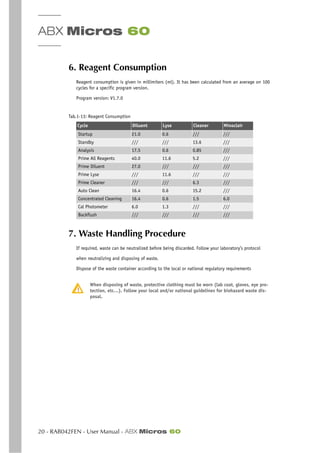
6. Reagent Consumption
Reagent consumption is given in millimiters (ml). It has been calculated from an average on 100
cycles for a specific program version.
Program version: V1.7.0
Consumption(ml per cycleCycleMinidilLyse Miniclean Minoclair
7. Waste Handling Procedure
If required, waste can be neutralized before being discarded. Follow your laboratory’s protocol
when neutralizing and disposing of waste.
Dispose of the waste container according to the local or national regulatory requirements
When disposing of waste, protective clothing must be worn (lab coat, gloves, eye pro-
tection, etc…). Follow your local and/or national guidelines for biohazard waste dis-
posal.
Tab.1-13: Reagent Consumption
Cycle Diluent Lyse Cleaner Minoclair
Startup 21.0 0.6 /// ///
Standby /// /// 13.6 ///
Analysis 17.5 0.6 0.85 ///
Prime All Reagents 40.0 11.6 5.2 ///
Prime Diluent 27.0 /// /// ///
Prime Lyse /// 11.6 /// ///
Prime Cleaner /// /// 6.3 ///
Auto Clean 16.4 0.6 15.2 ///
Concentrated Cleaning 16.4 0.6 1.5 6.0
Cal Photometer 6.0 1.3 /// ///
Backflush /// /// /// ///
Description & Technology
ABX Micros 60 - User Manual - RAB042FEN - 1
Section 2. Description & technology
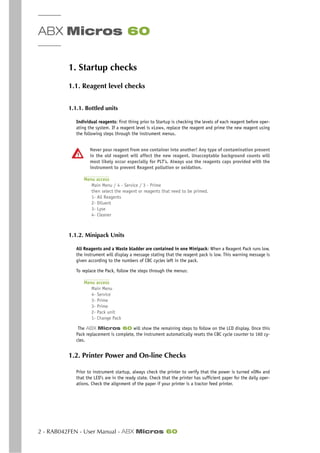
Contents
1. Description ...................................................................................................2-2
1.1. Overview ................................................................................................ 2-2
1.2. Front view (covers opened) ....................................................................... 2-2
1.3. Left side view (covers opened) ................................................................... 2-3
2. Technology ...................................................................................................2-3
2.1. Sampling ............................................................................................... 2-3
2.2. Dilutions ................................................................................................ 2-4
2.2.1. WBC/HGB ........................................................................................ 2-4
2.2.2. RBC/PLT .......................................................................................... 2-4
2.3. CBC Measurement Principles ..................................................................... 2-5
2.3.1. RBC/PLT ......................................................................................... 2-5
2.3.2. HGB .............................................................................................. 2-7
2.3.3. HCT ............................................................................................... 2-8
2.3.4. MCV, MCH & MCHC ........................................................................... 2-8
2.3.5. RDW .............................................................................................. 2-8
2.3.6. MPV ............................................................................................... 2-8
2.3.7. PCT ............................................................................................... 2-8
2.3.8. PDW .............................................................................................. 2-8
2.3.9. WBC .............................................................................................. 2-9
ABX Micros 60
2 - RAB042FEN - User Manual - ABX Micros 60
1. Description
1.1. Overview
1.2. Front view (covers opened)
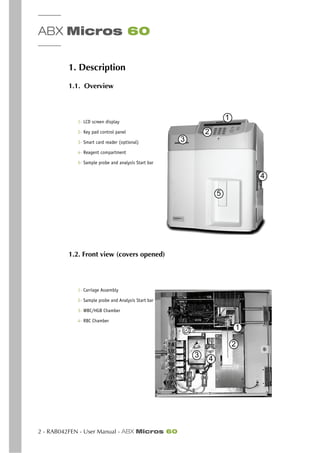
1- LCD screen display
2- Key pad control panel
3- Smart card reader (optional)
4- Reagent compartment
5- Sample probe and analysis Start bar
1- Carriage Assembly
2- Sample probe and Analysis Start bar
3- WBC/HGB Chamber
4- RBC Chamber
1
3
2
4
5
1
2
3 4
Description & Technology
Technology
ABX Micros 60 - User Manual - RAB042FEN - 3
1.3. Left side view (covers opened)
2. Technology
2.1. Sampling
1- Blood Collection tube cap is removed
2- The Tube is placed beneath the sample probe.
3- The Tube is move upwards and the sample probe enters into the blood.
4- The Manual sample bar is pressed and aspiration of 10µl of Blood occurs.
5- Needle Carriage assembly moves to the Left, over the WBC/HGB Chamber.
6- The External Sample probe rinses.
7- Blood sample is delivered into the WBC Chamber for the First dilution.
8- Aspiration of 28.3µl of diluted blood from the WBC Chamber.
9- Needle Carriage assembly moves to the Right, over the RBC/PLT Chamber.
10- The External Sample probe rinses.
11- Diluted Blood sample is delivered into the RBC Chamber for the RBC/PLT measurement
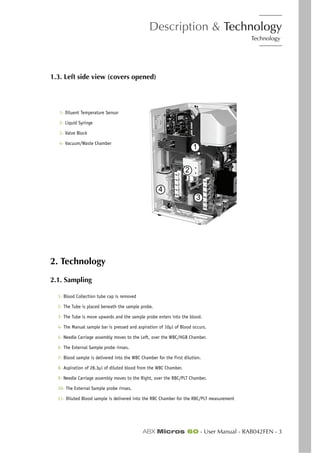
1- Diluent Temperature Sensor
2- Liquid Syringe
3- Valve Block
4- Vacuum/Waste Chamber
1
2
3
4
ABX Micros 60
4 - RAB042FEN - User Manual - ABX Micros 60
2.2. Dilutions
2.2.1. WBC/HGB
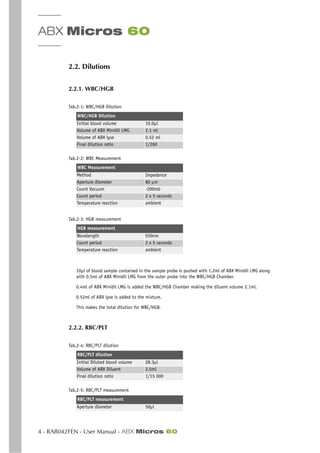
10µl of blood sample contained in the sample probe is pushed with 1.2ml of ABX Minidil LMG along
with 0.5ml of ABX Minidil LMG from the outer probe into the WBC/HGB Chamber.
0.4ml of ABX Minidil LMG is added the WBC/HGB Chamber making the diluent volume 2.1ml.
0.52ml of ABX lyse is added to the mixture.
This makes the total dilution for WBC/HGB.
2.2.2. RBC/PLT
Tab.2-1: WBC/HGB Dilution
WBC/HGB Dilution
Initial blood volume 10.0µl
Volume of ABX Minidil LMG 2.1 ml
Volume of ABX lyse 0.52 ml
Final dilution ratio 1/260
Tab.2-2: WBC Measurement
WBC Measurement
Method Impedance
Aperture diameter 80 µm
Count Vacuum -200mb
Count period 2 x 5 seconds
Temperature reaction ambient
Tab.2-3: HGB measurement
HGB measurement
Wavelength 550nm
Count period 2 x 5 seconds
Temperature reaction ambient
Tab.2-4: RBC/PLT dilution
RBC/PLT dilution
Initial Diluted blood volume 28.3µl
Volume of ABX Diluent 2.5ml
Final dilution ratio 1/15 000
Tab.2-5: RBC/PLT measurement
RBC/PLT measurement
Aperture diameter 50µl
Description & Technology
Technology
ABX Micros 60 - User Manual - RAB042FEN - 5
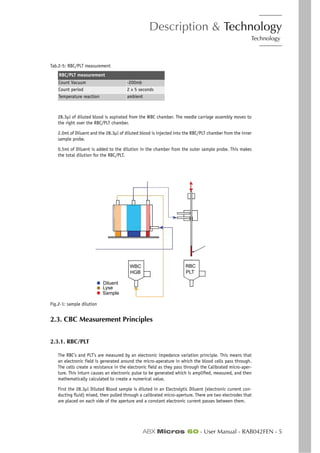
28.3µl of diluted blood is aspirated from the WBC chamber. The needle carriage assembly moves to
the right over the RBC/PLT chamber.
2.0ml of Diluent and the 28.3µl of diluted blood is injected into the RBC/PLT chamber from the inner
sample probe.
0.5ml of Diluent is added to the dilution in the chamber from the outer sample probe. This makes
the total dilution for the RBC/PLT.
Fig.2-1: sample dilution
2.3. CBC Measurement Principles
2.3.1. RBC/PLT
The RBC’s and PLT’s are measured by an electronic impedance variation principle. This means that
an electronic field is generated around the micro-aperature in which the blood cells pass through.
The cells create a resistance in the electronic field as they pass through the Calibrated micro-aper-
ture. This inturn causes an electronic pulse to be generated which is amplified, measured, and then
mathematically calculated to create a numerical value.
First the 28.3µl Diluted Blood sample is diluted in an Electrolytic Diluent (electronic current con-
ducting fluid) mixed, then pulled through a calibrated micro-aperture. There are two electrodes that
are placed on each side of the aperture and a constant electronic current passes between them.
Count Vacuum -200mb
Count period 2 x 5 seconds
Temperature reaction ambient
Tab.2-5: RBC/PLT measurement
RBC/PLT measurement
Diluent
Lyse
Sample
WBC
HGB
RBC
PLT
ABX Micros 60
6 - RAB042FEN - User Manual - ABX Micros 60
As the blood cells pass through the aperture, they create resistance (Impedence) in the electronic
field between the two electrodes. Since the current is constant and remains unchanged, the larger
the cell is, the «more» resistance it has. The smaller the cell is, the «less» resistance it has. The
voltage which measures the cells is proportional to the cell size. The larger the cell, the higher the
voltage will be. The smaller the cell, the lower the voltage will be.
These electronic voltages vary in pulse size as cells pass through the aperture. The pulses are then
channeled according to pulse size. The pulses are then thresholded, grouped, then mathematically
calculated to create a numerical value for the determination of RBC’s and PLT’s.
2.3.1.1. Results
A certain amount of cells will pass through the Calibrated Micro-aperture within a specific time
frame. They are then measured by pulse height, Thresholded, grouped by size, and Mathematically
calculated along with the Calibration Coefficient to give a final numerical value for both RBC’s and
PLT’s.
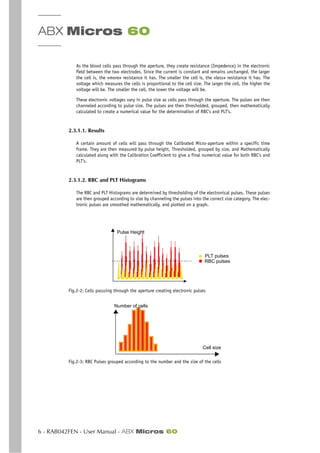
2.3.1.2. RBC and PLT Histograms
The RBC and PLT Histograms are determined by thresholding of the electronical pulses. These pulses
are then grouped according to size by channeling the pulses into the correct size category. The elec-
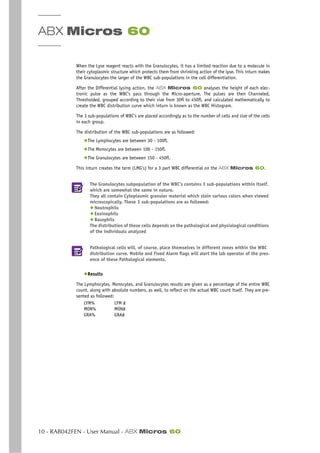
tronic pulses are smoothed mathematically, and plotted on a graph.
Fig.2-2: Cells passsing through the aperture creating electronic pulses
Fig.2-3: RBC Pulses grouped according to the number and the size of the cells
Pulse Height
PLT pulses
RBC pulses
Cell size
Number of cells
Description & Technology
Technology
ABX Micros 60 - User Manual - RAB042FEN - 7
Fig.2-4: RBC Pulses electronically calculated and smoothed: RBC Distribution curve
Fig.2-5: PLT pulses electronically calculated and smoothed: PLT distribution curve
RBC Histogram: is an electronic Distribution and mathematical calculation of the RBC’s placed into
256 Channels of volumetric sizing from 30fl to 300fl.
PLT Histogram: is an electronic distribution and mathematical calculation of the PLT’s placed into
128 channels of volumetric sizing from 2fl to a mobile threshold between the high end platelets to
the Low end Red Blood Cell Thresholds.
(fl = fentaliters) A microscopic volumetric unit of measurement. This is a 3-dimentional measurement
used to determine the volume of Microscopic particles.
2.3.2. HGB
The Hemoglobin measurement is based on a Startup cycle. This cycle includes a Hemoglobin Blank
test sequence which includes 2 Hemoglobin blank measurements. Each analysis cycle run after Start-
up also has a Hgb Blank measurement which is compared to the initial Start-up Hgb Blank. Each
analysis cycle run thereafter compares the Hgb Blank reading to the previous cycle Hgb Blank read-
ing.
During the WBC analysis cycle, 0.52ml of Lyse Reagent is added to 2.05ml of diluted blood in the
WBC Chamber. The Lyse reagent contains potassium ferricyanide [Fe(Cn)]K, and potassium cyanide
[KCN]. This lysing reagent breaks down the RBC Cell membrane and releases the Hemoglobin within
the RBC.
The Hemoglobin then combines with the potassium cyanide to form a chromogenous cyanmethemo-
globin compound. This chemical compound is measured by Spectrophotometry, through the optical
pathway in the WBC chamber. The light wavelength of measurement is at 550nm.
HGB using ABX Lysebio : Reagent for erythrocyte lysis and cyanide-free determination of hemoglo-
bin. All the heme iron is oxidized and stabilized producing chromogenic species for quantitation by
spectrophotometry at a wavelength of 550nm.
Results, The Hgb results are given as such:
HGB = Log(blank value/Sample value) x the Calibration Coefficient.
Number of cells
Cell size
Number of cells
Cell size
ABX Micros 60
8 - RAB042FEN - User Manual - ABX Micros 60
2.3.3. HCT
The Hematocrit is a combination measurement of electronic pulses and mathematical calculations.
All the RBC pulses are grouped into various sizes. Each group pulse height is then averaged. all the
pulse height averages are then averaged one final time for a mean average of all the RBC pulse
heights. This is a function of the numeric integration of the MCV. Results are given as a percentage
of this integration.
2.3.4. MCV, MCH & MCHC
◆ MCV (Mean Cell Volume), is calculated directly from the entire RBC histogram.
◆ MCH (Mean Cell Hemoglobin), is calculated from the Hemoglobin value and the RBC count.
Calculations are as followed:
MCH (pg) =HGB/RBC x 10
(pg): Picograms
◆ MCHC (Mean Corpuscular Hemoglobin Concentration), is calculated according to the Hemo-
globin and Hematocrit values. Calculations are as followed:
MCHC (g/dl) = HGB/HCT X 100
2.3.5. RDW
The RDW (Red cell Distribution Width) is used to determine erythrocyte abnormalities linked to
Anisocytosis. The RDW will enable you to follow the evolution of the width of the RBC Histogram in
relation to the number of cells and their average volume. This is also a calculation of the RBC His-
togram.
Calculations are as followed:
RDW (%) = K SD/MCV
K : ..........Calibration Coefficient for RDW.
SD : .........Standard Deviation according to statistical studies on cell distribution.
MCV : .......(Mean Cell Volume) of the erythrocytes.
2.3.6. MPV
The MPV (Mean Platelet Volume), is directly calculated from the Platelet histogram distribution
curve. This calculation is almost the same as the MCV.
2.3.7. PCT
Thrombocrit (Plateletcrit), is calculated according to the formula:
PCT % = PLT (103/mm3) x MPV (µm3) / 10 000
Description & Technology
Technology
ABX Micros 60 - User Manual - RAB042FEN - 9
2.3.8. PDW
The PDW (Platelet Distribution Width) is calculated from the Platelet Histogram/ Distribution curve.
The PDW is represented by the width of the curve between 15% of the number of platelets starting
from the Low Threshold 2fl (S1) and 15% of the number of platelets begining with the Variable High
Threshold (S2). The PDW determination area is shown by the distribution curve below.
Fig.2-6: Platelet distribution curve
PCT and PDW are not available in the United States. These parameters are strictly used
for research and investigational purposes «Only».
2.3.9. WBC
The WBC Measurement principles are based upon the same as the RBC/PLT measuring principles. The
WBC count is performed in the WBC/HGB Chamber. The electronic signal processing device places
and electronic threshold between the WBC’s and the PLT’s. The electronic pulses are then placed into
256 Channels according to pulse size. The pulses are then Thresholded, grouped, then mathemati-
cally calculated to create a numerical value for the determination of WBC’s.
2.3.9.1. WBC Histogram
The WBC Histogram is a distribution study that reveals the following 3 types of White blood cell sub-
populations: (Lymphocytes, Monocytes, and Granulocytes). The Diluent and Lyse of the ABX Mi-
cros 60 play a very important part when sizing the WBC subpopulations in the WBC
distribution curve.
2.3.9.2. Differential Measuring principles
◆Diluent and Lysing action:
The Diluent preserves and prepares the WBC cell membrane for the differential reaction. The Lysing
reagent has a differential mode of action on the WBC cytoplasmic membranes.
When the Lyse reacts with the Lymphocyte cytoplasmic membrane, it allows the release of water
soluble cytoplasm and shrinks the membrane around the nucleous.
When the Lyse reagent reacts with the Monocyte cytoplasmic membrane, it has an intermediate re-
action which keeps the cell somewhat stable, maintaining its large size in comparison to the
lymphocytes.
S1 S2
ABX Micros 60
10 - RAB042FEN - User Manual - ABX Micros 60
When the Lyse reagent reacts with the Granulocytes, it has a limited reaction due to a molecule in
their cytoplasmic structure which protects them from shrinking action of the lyse. This inturn makes
the Granulocytes the larger of the WBC sub-populations in the cell differentiation.
After the Differential lysing action, the ABX Micros 60 analyses the height of each elec-
tronic pulse as the WBC’s pass through the Micro-aperture. The pulses are then Channeled,
Thresholded, grouped according to their size from 30fl to 450fl, and calculated mathematically to
create the WBC distribution curve which inturn is known as the WBC Histogram.
The 3 sub-populations of WBC’s are placed accordingly as to the number of cells and size of the cells
in each group.
The distribution of the WBC sub-populations are as followed:
◆The Lymphocytes are between 30 - 100fl.
◆The Monocytes are between 100 - 150fl.
◆The Granulocytes are between 150 - 450fl.
This inturn creates the term (LMG’s) for a 3 part WBC differential on the ABX Micros 60.
The Granulocytes subpopulation of the WBC’s contains 3 sub-populations within itself,
which are somewhat the same in nature.
They all contain Cytoplasmic granuler material which stain various colors when viewed
microscopically. These 3 sub-populations are as followed:
◆ Neutrophils
◆ Eosinophils
◆ Basophils
The distribution of these cells depends on the pathological and physiological conditions
of the individuals analyzed
Pathological cells will, of course, place themselves in different zones within the WBC
distribution curve. Mobile and Fixed Alarm flags will alert the lab operator of the pres-
ence of these Pathological elements.
◆Results
The Lymphocytes, Monocytes, and Granulocytes results are given as a percentage of the entire WBC
count, along with absolute numbers, as well, to reflect on the actual WBC count itself. They are pre-
sented as followed:
LYM% LYM #
MON% MON#
GRA% GRA#
Workflow
ABX Micros 60 - User Manual - RAB042FEN - 1
Section 3. Workflow
Contents
1. Startup checks ...............................................................................................3-2
1.1. Reagent level checks ............................................................................... 3-2
1.1.1. Bottled units ................................................................................... 3-2
1.1.2. Minipack Units ................................................................................. 3-2
1.2. Printer Power and On-line Checks .............................................................. 3-2
1.3. Instrument Startup .................................................................................. 3-2
1.4. Blood Sample Collection ........................................................................... 3-3
2. Daily Quality Control & Calibration verification ...............................................3-4
3. Sample selection and identification ...............................................................3-5
3.1. Sample identification modes ...................................................................... 3-5
3.1.1. US Mode ........................................................................................ 3-5
3.1.2. Standard Mode ................................................................................ 3-5
3.2. Sample Tube holder selection .................................................................... 3-6
4. Running Samples ..........................................................................................3-7
4.1. Preliminaries .......................................................................................... 3-7
4.2. US mode ................................................................................................. 3-7
4.3. Standard mode ........................................................................................ 3-7
4.4. Automatic Cleaning Cycle ......................................................................... 3-7
4.5. End of the day rinsing ............................................................................. 3-8
5. Results ........................................................................................................3-9
5.1. ABX Micros 60 CS/CT8 ..................................................................... 3-9
5.1.1. Displayed Results ............................................................................. 3-9
5.1.2. Identification ................................................................................. 3-9
5.1.3. Flags ............................................................................................. 3-9
5.1.4. Results Printout ............................................................................. 3-10
5.2. ABX Micros 60 CS/CT16 ................................................................. 3-12
5.2.1. Displayed Results ........................................................................... 3-12
5.2.2. Identification ............................................................................... 3-12
5.2.3. Flags ........................................................................................... 3-12
5.2.4. Result printout (US mode example) ................................................... 3-13
5.3. ABX Micros 60 CS/CT18 ................................................................ 3-14
6. Flags ...........................................................................................................3-14
6.1. Normal Limits ........................................................................................ 3-14
6.2. Flags causing analysis reject .................................................................... 3-14
6.2.1. Results Exceeding Linear range ........................................................ 3-14
6.2.2. Results Rejected ............................................................................ 3-15
6.2.3. Results Comparable ........................................................................ 3-15
6.2.4. HGB Blank Reference ...................................................................... 3-15
6.3. Morphology Flags .................................................................................. 3-16
6.3.1. Flags on PLT Distribution curve ........................................................ 3-16
6.3.2. Flags on WBC Distribution curve ....................................................... 3-16
ABX Micros 60
2 - RAB042FEN - User Manual - ABX Micros 60
1. Startup checks
1.1. Reagent level checks
1.1.1. Bottled units
Individual reagents: first thing prior to Startup is checking the levels of each reagent before oper-
ating the system. If a reagent level is «Low», replace the reagent and prime the new reagent using
the following steps through the instrument menus.
Never pour reagent from one container into another! Any type of contamination present
in the old reagent will affect the new reagent. Unacceptable background counts will
most likely occur especially for PLT’s. Always use the reagents caps provided with the
instrument to prevent Reagent pollution or oxidation.
Menu access
Main Menu / 4 - Service / 3 - Prime
then select the reagent or reagents that need to be primed.
1- All Reagents
2- Diluent
3- Lyse
4- Cleaner
1.1.2. Minipack Units
All Reagents and a Waste bladder are contained in one Minipack: When a Reagent Pack runs low,
the instrument will display a message stating that the reagent pack is low. This warning message is
given according to the numbers of CBC cycles left in the pack.
To replace the Pack, follow the steps through the menus:
Menu access
Main Menu
4- Service
3- Prime
3- Prime
2- Pack unit
1- Change Pack
The ABX Micros 60 will show the remaining steps to follow on the LCD display. Once this
Pack replacement is complete, the instrument automatically resets the CBC cycle counter to 160 cy-
cles.
1.2. Printer Power and On-line Checks
Prior to instrument startup, always check the printer to verify that the power is turned «ON» and
that the LED’s are in the ready state. Check that the printer has sufficient paper for the daily oper-
ations. Check the alignment of the paper if your printer is a tractor feed printer.
Workflow
Startup checks
ABX Micros 60 - User Manual - RAB042FEN - 3
1.3. Instrument Startup
Power «ON» the instrument by pressing the ON/ OFF switch, located on the back, lower center of the
rear panel. The LCD display will show the following:
Screen display
Please wait for 3 Min
This indicates an instrument warm-up period for the internal electronics.
Once the instrument warm-up phase is complete, the front panel L.E.D. will turn from «Red» to
«Green» indicating that the initialization phase is complete. The ABX Micros 60 will now
automatically run a STARTUP cycle, if and only if the instrument has been programmed for an Auto-
Startup cycle (see Section 5, 4.3. Choosing Startup Cycle, page 5-11)
If the ABX Micros 60 does not automatically run a Startup cycle after the initialization
phase is complete, press the «Startup» key on the instrument front panel to initiate the cycle.
The ABX Micros 60 will perform a Startup cycle which primes all the reagents, checks the
electronics, and mechanical movements. Then the instrument will perform a blank cycle for a Back-
ground count (an analysis cycle based on reagents without any blood sample). The instrument then
prints out the blank cycle results.
Background Limits
Check and verify that the Background counts do not exceed the following parameter limits:
WBC 0.3 103/ mm3
RBC 0.02 106
/ mm3
HGB 0.3 g/dl
PLT 10 103/ mm3
If the Background count is above any of the parameter limits, the ABX Micros 60 will au-
tomatically perform another STARTUP cycle.
If the Problem persists after 3 consecutive cycles, a message will be printed out stating «Startup
Failed»
Refer to the «Maintenance and Troubleshooting» (See Section 6, 2. Troubleshooting, page 6-18) for
identifying and resolving the problem in question.
If the HGB blank test is unacceptable during the first Startup cycle, 2 more startup cy-
cles will be performed. If all 3 startup cycles fail the HGB blanck test, an error message
will be printed out stating «startup failed, HGB reference failed»
If any analysis cycles are run prior to a Startup cycle, a message will be displayed on
the LCD and printed out stating: «Startup cycle not initiated»
When the ABX Micros 60 has not been used within 4 hours of the last cycle, it is necessary
to perform a STARTUP cycle before running an analysis cycle.
1.4. Blood Sample Collection
Refer to Section 1, 4.2. Blood Specimens, page 1-13. for collection requirements. Blood samples
must be gently and thoroughly mixed with a rocking or tilting motion just before placing the sample
into the tube holder for the analysis cycle.
ABX Micros 60
4 - RAB042FEN - User Manual - ABX Micros 60
2. Daily Quality Control & Calibration verification
Before analyzing any patient blood samples, it is recommended that the Operator performs Quality
Control analysis on 3 levels of Control Blood Material, (Low, Normal, and High), to verify that the
ABX Micros 60 is performing within the specified ranges of the Quality control material.
Please refer to Section 4, 1. Quality Control , page 4-2 in order to perform the Control sample run.
General recommendations on calibration
The calibration on HORIBA ABX instruments is an exceptional procedure, which must be
carried out particularly in case of certain technical interventions (installation, mainte-
nance, service intervention). The calibration should not be carried out to compensate a
drift on a result due for example to a clogging of the instrument.
Running control blood
Mix the sample gently and thoroughly.
Remove the cap from the sample tube.
Place the sample beneath the sample probe.
Raise up the tube so that the sample probe lowers into the blood, and press the manual sam-
ple bar or press the «Startup» key.
The analysis cycle will begin.
If any results are out of their acceptable ranges, perform the following steps:
1- Rerun the Control blood.
2- Clean the system, see Section 6, 1.3.6. Concentrated Cleaning, page 6-11. Re-run the sample.
3- Open a new vial of control material.
4- Call your local HORIBA ABX Technical support representative before re-Calibrating the system.
Workflow
Sample selection and identification
ABX Micros 60 - User Manual - RAB042FEN - 5
3. Sample selection and identification
3.1. Sample identification modes
3.1.1. US Mode
The Sample Identification modes are selected from the Setup menu in the system con-
figuration (see Section 5, 4.7. Choosing sample identification mode , page 5-14 for se-
lecting the Mode for your daily operations).
This mode requires a patient identification on each analysis run, this mode also allows the use of a
barcode reader if applicable.
3.1.1.1. US mode «Without» barcode reader
Entering Identification
Press the «ID» key on the front panel to enter the sample ID (13 alphanumeric Numbers and/
or Letters characters are available)
Letters can be entered by using the front panel «Up» and «Down» arrow keys.
Press the «Enter» key after each Alpha character entry.
The Number keys can be used up to 13 consecutive characters if No alpha characters are used
before, pressing the «Enter» key.
The sample Identification will be held in Memory until the cycle is complete.
3.1.1.2. US mode «With» barcode reader
Entering Identification
Press the «ID» key.
Place the sample in front of the reader so that the Label can be identified. When the reading
is complete, a «Beep» tone is heard and the label identification will be displayed on the LCD
screen.
Press the «Enter» key to save the current identification.
Or press the «Esc» key to display the previous identification.
The barcode reader is a special setup function in the system configuration. Before using
this setup, the Barcode Reader must be configured on the main circuit board of the ABX
Micros 60. If you require a barcode reader for sample identification, please con-
tact your local HORIBA ABX Service Representative for installation and setup of this de-
vice.
3.1.2. Standard Mode
If the Standard Mode identification has been selected from the setup menu (see Section 3,
3.1. Sample identification modes, page 3-5), proceed as follows:
Entering Identification
Press the «ID» key to enter the sample «Run #»
Use the Number keys only. Enter a run number from 1 to 99999.
Press the «Enter» key to save the current Run #
Or press the «Esc» key to display the previous Run #.
ABX Micros 60
6 - RAB042FEN - User Manual - ABX Micros 60
Once the Identification has been entered, a message will appear on the LCD display stating «Press
the sampling bar», press the manual sampling bar or press the «Startup» key on the front panel of
the ABX Micros 60 to start the analysis cycle.
Workflow
Running Samples
ABX Micros 60 - User Manual - RAB042FEN - 7
4. Running Samples
4.1. Preliminaries
1- Run the Quality Control blood, all 3 levels and verify that the results are within their specified
limits (see Section 4, 1. Quality Control , page 4-2).
2- Mix the blood sample gently and thoroughly.
4.2. US mode
Running analysis
Press the «ID» key and enter the patient Identification (See “3.1.1. US Mode , page 5”).
Remove the cap from the sample tube.
Place the sample beneath the sample probe, raise the sample tube upwards so that the sam-
ple probe enters into the blood.
Press the manual sample bar and analysis will begin. Press the «Startup» key on the front
panel if the system does not respond to the Manual sample bar.
4.3. Standard mode
Running analysis
Press the «ID» key and enter the Run # (See “3.1.2. Standard Mode , page 5”).
Remove the cap from the sample tube.
Place the sample beneath the sample probe, raise the sample tube upwards so that the sam-
ple probe enters into the blood.
Press the manual sample bar and analysis will begin. Press the «Startup» key on the front
panel if the system does not respond to the Manual sample bar.
If the instrument has not been in operation for 1/2 hour and an analysis cycle is initi-
ated, the ABX Micros 60 will start a HGB Reference cycle. The message «Please
wait» will be displayed on the LCD screen. Once the HGB reference cycle is complete,
the message «Press the sampling bar» will appear.
4.4. Automatic Cleaning Cycle
The ABX Micros 60 will perform an automatic cleaning cycle once the analysis cycles have
reached the programmed cycle limit set in the Setup Menu (see Section 5, 4.4. Setting Autocleaning
frequency , page 5-11).
When an Automatic cleaning cycle begins a message will appear on the screen.
A Manual cleaning can be requested at any time by the operator:
Manual Autoclean
Main Menu
4- Service
8- Auto Clean
ABX Micros 60
8 - RAB042FEN - User Manual - ABX Micros 60
4.5. End of the day rinsing
It is necessary to run a Standby/Shutdown cycle at the end of each day.
Shutdown cycle
Press the «Standby» key on the front panel
The ABX Micros 60 performs a complete cleaning with the enzymatic detergent (Miniclean)
and puts the system into a Standby mode.
The ABX Micros 60 can then be switched «OFF» at the end of the working day or left in this
Standby mode until the next working day. It also may be left in the Standby mode between long
breaks during the day.
When the ABX Micros 60 is left in the standby mode, it is mandatory to perform
a «STARTUP» cycle before returning to any analysis cycles
Workflow
Results
ABX Micros 60 - User Manual - RAB042FEN - 9
5. Results
When an analysis cycle has been complete, results are displayed and printed out according to the
Setup of the Instrument.
5.1. ABX Micros 60 OS/OT8
5.1.1. Displayed Results
The Parameter results are displayed on the LCD screen once the analysis cycle is complete.
5.1.2. Identification
The sample identification can be reviewed on the LCD screen
5.1.2.1. US Mode
Sample identification review
«Results» menu
«Up» or «Down» Arrow keys
5.1.2.2. Standard Mode
Run# identification review
«Results» menu
«Up» or «Down» Arrow keys
5.1.3. Flags
The PLT flags can be reviewed on the LCD screen
PLT flag review
«Results» menu
«Up» or «Down» Arrow keys
The Last sample result run can be displayed again at any time before running the next
analysis (results, identification, flags):
Last Run results review
Main Menu
1- Results
«Up» or «Down»
ABX Micros 60
10 - RAB042FEN - User Manual - ABX Micros 60
5.1.4. Results Printout
5.1.4.1. US Mode
Fig.3-1: US mode printout
Printed information is as follows:
1- The «Date» the sample was analyzed
2- The «Time» the sample was analyzed
3- The Sample «Identification» that the Operator had entered either (Manually or Barcode).
4- The «Sequence» number of the sample run
5- The Instrument «STARTUP» status.
6- The «PLT flags» if any were reported
7- The 8 Parameter CBC results with Limit flags and units.
The sequence number is updated to the number «1» each calendar day. the number in-
creases by increments of 1 each analysis cycle sequentially. this sequential number can
not be modified by the operator.
RESULTS
DATE : 01/20/2006 TIME : 09:25
ID : SMITH_1234567
SEQ. # : 27
STARTUP PASSED
Plt Flags :
WBC : 10.0 103
/ mm3
RBC : 4.90 106
/ mm3
HGB : 15.0 g/dl
HCT : 43.9 %
MCV :90 µm3
MCH : 30.6 Pg
MCHC : 34.1 g/dl
PLT : 287 103/mm3
Workflow
Results
ABX Micros 60 - User Manual - RAB042FEN - 11
5.1.4.2. Standard Mode
Printed information printed is as followed:
1- The «Date» the sample was analyzed
2- The «Time» the sample was analyzed
3- The Sample «RUN #» that was entered by the Operator
4- The «Sequence» number of the sample run
5- The «PLT flags» if any were reported
6- The 8 Parameter CBC results with Limit flags and units.
The sequence number is updated to the number «1» each calendar day. the number in-
creases by increments of 1 each analysis cycle sequentially. this sequential number can
not be modified by the operator.
RESULTS
DATE : 01/20/2006 TIME : 09:25
RUN # : 12345
SEQ. # : 27
STARTUP PASSED
Plt Flags :
WBC : 10.0 103
/ mm3
RBC : 4.90 106
/ mm3
HGB : 15.0 g/dl
HCT : 43.9 %
MCV :90 µm3
MCH : 30.6 Pg
MCHC : 34.1 g/dl
PLT : 287 103
/mm3
ABX Micros 60
12 - RAB042FEN - User Manual - ABX Micros 60
5.2. ABX Micros 60 OS/OT16
5.2.1. Displayed Results
The first group of Parameter results are as displayed on the LCD screen once the analysis cycle is
complete. The second group of parameter results can be displayed as follows:
Parameter results review
«RESULTS» menu
«Up» or «Down» Arrow keys
5.2.2. Identification
The sample identification can be reviewed on the LCD screen
5.2.2.1. US Mode
Sample identification review
«RESULTS» menu
«Up» or «Down» Arrow keys
5.2.2.2. Standard Mode
Run# identification review
«RESULTS» menu
«Up» or «Down» Arrow keys
5.2.3. Flags
The PLT and WBC flags can be reviewed on the LCD screen:
PLT and WBC flags review
«RESULTS» menu
«Up» or «Down» Arrow keys
Workflow
Results
ABX Micros 60 - User Manual - RAB042FEN - 13
5.2.4. Result printout (US mode example)
Printed information printed is as followed:
1- The «Date» the sample was analyzed
2- The «Time» the sample was analyzed
3- The Sample «Identification» that was entered by the Operator (Run# if Standard mode)
4- The «Sequence» number of the sample run
5- The Instrument «STARTUP» status (none in Standard mode)
6- The «PLT flags» if any were reported
7- The 16 Parameter CBC results with limit flags and units.
8- The «WBC flags» if any were reported
9- The 3 part Differential LMG results
10- The WBC, RBC, and PLT Histograms.
The sequence number is updated to the number «1» each calendar day. the number in-
creases by increments of 1 each analysis cycle sequentially. this sequential number can
not be modified by the operator.
RESULTS
DATE : 01/20/2002
ID : SMITH_1234567
SEQ. # : 27
STARTUP PASSED
PLT Flags :
TIME : 09:25
WBC :
RBC :
HGB :
HCT :
PLT :
7.5 103
/ mm3
4.90 106
/ mm3
15.0 g/dl
43.9 %
287 103
/ mm3
(3.5-10.0)
(3.80-5.80)
(11.0-16.5)
(35.0-50.0)
(150-390)
MCV
MCH
MCHC
RDW
MPV
90 µm3
30.6 Pg
34.1 g/dl
13.0 %
8.8 µm3
(80-100)
(26.5-35.5)
(31.5-33.5)
(11.0-16.0)
(6.5-11.0)
WBC Flags :
%LYM :
%MON :
%GRA :
39.3 %
7.3 %
53.4 %
(20.0-45.0)
(4.0-10.0)
(43.0-76.0)
#LYM
#MON
#GRA
2.2 103
/ mm3
0.4 103/ mm3
3.0 103
/ mm3
(1.2-3.2)
(0.3-0.8)
(1.2-6.8)
10050 300250 450
WBC
23030 100
RBC PLT
105 20 30
ABX Micros 60
14 - RAB042FEN - User Manual - ABX Micros 60
5.3. ABX Micros 60 OS/OT18
The ABX Micros 60 OS/OT18 has all the same characteristics as the ABX Micros 60
OS/OT16 with the exception of 2 parameters, PCT and PDW which are reported on the ABX Mi-
cros 60 OS/OT18 results
6. Flags
These Instrument flags and alarms can be classified in 5 different groups:
1- Results exceeding normal limits: See “6.1. Normal Limits, page 14”.
2- Flags linked to results that exceed the linear range of the instrument or leading to «Rejected
Analysis» See “6.2. Flags causing analysis reject, page 14”
3- Flags and alarms linked to the morphology of a blood cell population See “6.3. Morphology Flags
, page 16”
6.1. Normal Limits
◆ The «H» flag located next to a parameter result indicates that the value is «Above»the Upper
limit set by the operator. Section 5, 3. Laboratory Limits , page 5-7
◆ The «L» flag located next to a parameter result indicates that the value is «Below» the Lower
limit set by the operator.
6.2. Flags causing analysis reject
These flags are shown in different ways as indicated:
◆“6.2.1. Results Exceeding Linear range , page 14”
◆ Results associated with an Asterisk (*): “6.2.2. Results Rejected , page 15”
◆,Dollar sign ($): “6.2.3. Results Comparable , page 15”
◆or Exclamation mark for HGB (!): “6.2.4. HGB Blank Reference , page 15”
6.2.1. Results Exceeding Linear range
:
Tab.3-1: Displayed results on screen
Parameters
Linearity
limits
Visible Range > Visible Range
WBC(x103
/mm3
) «result» «result»+ «D» DIL
RBC(x106
/mm3
) «result» «result»+ «D» DIL
PLT(x103
/mm3
) HGB>2g/dL
PLT(x103/mm3) HGB<2g/dL
«result»
«result»
«result»+ «D»
«result»+ «D»
DIL
DIL
HGB(g/dL) «result» «result»+ «D» DIL
HCT(%) «result» «result»+ «D» DIL
Workflow
Flags
ABX Micros 60 - User Manual - RAB042FEN - 15
:
Whole Blood parameter results within visible range will still give a result value with a
«D» indication. These results require a dilution (or PRP analysis for PLT) of the sample.
6.2.2. Results Rejected
A «Reject» flag, shown by an asterisk (*) following the Parameters WBC, RBC, HCT, or PLT indicates
that the ABX Micros 60 has analyzed that parameter for a maximum of 3 counts. All 3
counts were outside the system precision limits for that specific parameter.
The results should be verified by re-running the sample.
6.2.3. Results Comparable
A reportable result shown by a Dollar sign ($) following the parameters WBC, RBC, HCT, or PLT indi-
cates that the ABX Micros 60 has analyzed that parameter for a maximum of 3 counts. Two
out of three counts were within the system precision limits for that specific parameter. The results
can be reported, but the parameter should be monitored for the next sample analyzed.
6.2.4. HGB Blank Reference
A suspicious flag, shown by an Exclamation (!) located next to the Hemoglobin result shows that
the HGB Blank carried out during the analysis differs from the previous cycle’s HGB Blank. This (!)
means that both HGB blanks were outside the Instrument precision limits.
This result can be reported, but the parameter should be monitored for the next sample analyzed.
The MCH and MCHC may also be affected by this (!) flag depending on the severity of the results.
If the Exclamation (!) flag occurs more than 3 consecutive sample runs, troubleshoot
the HGB parameter in the following section of this manual. Section 6,
2. Troubleshooting, page 6-18.
Tab.3-2: Printed and host transmitted results
Parameters
Linearity
limits
Visible Range > Visible Range
WBC(x103
/mm3
) «result» «result»+ «D» --.-- + D
--.-- + O
RBC(x106
/mm3
) «result» «result»+ «D» --.-- + D
--.-- + O
PLT(x103
/mm3
) HGB>2g/dL
PLT(x103
/mm3
) HGB<2g/dL
«result»
«result»
«result»+ «D»
«result»+ «D»
--.-- + D
--.-- + O
--.-- + D
--.-- + O
HGB(g/dL) «result» «result»+ «D» --.-- + D
--.-- + O
HCT(%) «result» «result»+ «D» --.-- + D
--.-- + O
ABX Micros 60
16 - RAB042FEN - User Manual - ABX Micros 60
6.3. Morphology Flags
6.3.1. Flags on PLT Distribution curve
The PLT Histogram has 128 channels between 2fl and 30fl. A mobile Threshold (Positioned to 25fl
by default) moves according to the Microcyte population present in the Platelet analysis area.
The PLT flags are as followed:
1- An excessive presences of cells to the right of the Threshold area (25fl) will trigger the «MIC»
(Microcytes) flag. The Mobile threshold looks for a valley between the (25fl standard value) and 18fl.
2- When there is No valley between PLT and RBC populations, a reject PLT (*) flag is triggered. PLT
results are not reliable and must be verified by a Manual Platelet Count.
3- If the number of particles between 18fl and 25fl are too high, the «SCH» (Schizocytes) flag will
be triggered. Suspected abnormalities include:
◆Presence of Schizocytes
◆Presence of Platelet aggregates: Verify the Platelet results on a stained blood smear.
4- The «SCL» (Small cells) flag indicates the presence of small cells in the 2fl to 3fl zone. The PLT
results may be reported as (---) and there may also be no PLT Histogram.
6.3.2. Flags on WBC Distribution curve
The ABX Micros 60 OS/OT16 and OS/OS18 has a system of WBC Differential flags alerting
the operator to the possible presence of pathological cells, abnormal volume distribution histo-
grams, or abnormal elevated populations such as the excessive presence of Eosinophils and
Basophils.
1- Flag «L1» indicates an abnormal number of cells, in comparison with the Lymphocytes, in the
(30fl to 60fl zone). The pathological elements which may be found in this area will include:
◆Platelet aggregates
◆Nucleated Red blood cells
◆Atypical Lymphocytes
This flag corresponds to the number of cells counted in the first (5) channels, out of the total num-
ber of Lymphocytes.
2- The «M2» flag indicates an excessive number of cells in the (130fl to 160fl zone). The Patholog-
ical elements which may be found in this area will include:
◆Lymphoblasts
◆Myelocytes
◆Abnormal Lymphocytes
◆Basophilia (too many basophils)
This flag corresponds to the number of cells counted in the detection zone in comparison to the
total number of Granulocytes.
3- The «G1» flag indicates an excessive number of cells in the (160fl to 220fl zone). The patholog-
ical elements which may be found in this area will include:
◆Eosinophilia (too many Eosinophils)
◆Myelocytes
Workflow
Flags
ABX Micros 60 - User Manual - RAB042FEN - 17
◆Neutrophil polynucleose
This flag corresponds to the number of cells counted in the detection zone in comparison to the
total number of Granulocytes.
4- The «G2» flag indicates an excessive number of cells in the (220fl to 250fl zone). This flag makes
it possible to follow an abnormal Granulocyte peak displacement. Some of the cell variances will
include:
◆Anomalies in the cell membrane of the Granulocytes
◆Possible Lyse flow error
◆Fluidic errors
◆Old blood (after 6 to 8 hours) unrefrigerated
◆Granulocyte cell size less than 250fl.
5- The «G3» flag indicates an excessive number of cells larger than 400fl. The pathological elements
which may be found in this area will include:
◆Metamyelocytes
◆Many types of Large Immature Cells
This flag corresponds to the number of cells counted in the detection zone in comparison to the
total number of Granulocytes. This cell count will be higher than the set level.
All Anomalies and/or Abnormal distribution flags given by the ABX Micros 60
should be Manually verified by the examination of a stained peripheral blood smear for
the presence of pathological elements. As a result of the differential resistance of cy-
toplasmic membranes in the different cell types, pathological elements can be found in
a number of different zones. This also applies to presence of Normal or nonpathological
cells that have been subjected to Chemotherapy or some other form of treatment which
affects the alarm zones. These types of treatments will result in «False» alarms.
ABX Micros 60
18 - RAB042FEN - User Manual - ABX Micros 60
Quality Assurance
ABX Micros 60 - User Manual - RAB042FEN - 1
Section 4. Quality Assurance
Contents
1. Quality Control ............................................................................................4-2
1.1. Functions ............................................................................................... 4-2
1.2. Q.C - Automatic (With Q.C. Smart Card) ...................................................... 4-2
1.2.1. QC Smart card messages ................................................................... 4-3
1.2.2. Select Operator ............................................................................... 4-3
1.2.3. Select commercial control level .......................................................... 4-3
1.2.4. Running Control blood ...................................................................... 4-4
1.2.5. QC results ........................................................................................ 4-5
1.2.6. Accepting or Rejecting QC Results ...................................................... 4-5
1.3. Q.C. Analysis (Without Q.C. Smart Card) ..................................................... 4-7
1.4. Q.C. print targets (only with Q.C. smart card) .............................................. 4-7
1.5. Q.C. statistics (only with Q.C. smart card) ................................................... 4-8
1.6. Q.C. Graphs (Only with Q.C. smart card) ...................................................... 4-9
2. Calibration .................................................................................................4-11
2.1. General recommendations ....................................................................... 4-11
2.1.1. Preliminaries .................................................................................. 4-11
2.1.2. Calibration procedure ...................................................................... 4-11
2.2. Calibration function ............................................................................... 4-11
2.2.1. Change lot number ......................................................................... 4-12
2.2.2. Change Expiration date ................................................................... 4-12
2.2.3. Changing the target value ................................................................ 4-12
2.2.4. Change number of calibration samples ............................................. 4-12
2.2.5. Running calibrator ......................................................................... 4-13
2.2.6. Calibration Results .......................................................................... 4-13
2.2.7. Verify Calibration ........................................................................... 4-14
2.2.8. Calibration Passed ......................................................................... 4-15
2.2.9. Calibration Failed ........................................................................... 4-16
2.2.10. RDW Calibration ........................................................................... 4-17
2.2.11. RDW calibration using a Quality Control Standard .............................. 4-17
2.2.12. Calibration coefficients .................................................................. 4-18
2.2.13. Changing Calibration Coefficients ................................................... 4-18
2.2.14. Calibration Coefficient limits ........................................................ 4-19
ABX Micros 60
2 - RAB042FEN - User Manual - ABX Micros 60
1. Quality Control
1.1. Functions
It is highly recommended that you use the ABX MINOTROL Quality Control blood product
when running Q.C. on the ABX Micros 60 analyzer. This product is specifically
designed for use with the ABX Micros 60 analyzers. Call your local HORIBA ABX
Customer Service Representative for information and ordering of this specialized prod-
uct.
The ABX Micros 60 0S/0T Quality Control program contains 5 different functions in its
menu:
Quality Control overview
1- Automatic: to analyze commercial control bloods and store results on the Quality Control
smart card (see“1.2. Q.C - Automatic (With Q.C. Smart Card) , page 2”)
2- Analysis: to analyze commercial control blood with fixed WBC Thresholds specifically for
use «Without» a Smart Card (see “1.3. Q.C. Analysis (Without Q.C. Smart Card) , page 7”)
3- Print Targets: to print QC product target values fromthe QC Smart Card «Only» (see
“1.4. Q.C. print targets (only with Q.C. smart card) , page 8”)
4- Statistics: to print the cumulative statistics for commercial control bloods from the QC
Smart Card «Only» (see “1.5. Q.C. statistics (only with Q.C. smart card) , page 8”)
5- Graphs: to print the Levey Jennings graphs of the commercial Control blood products from
the QC Smart Card «Only» (see “1.6. Q.C. Graphs (Only with Q.C. smart card) , page 9”)
When running Quality Control «Without» the use of a Smart Card, pay close attention
to the Result parameter Limits, if the system was programmed to print out the limits.
These limits «Are not» Quality Control limits. These limits are the ones that were es-
tablished in the setup menu «See Section 5, 3. Laboratory Limits , page 5-7». Verify
your control results with the Assay sheet that comes with the control material. Verify
that each Control level parameter is within its assayed limits!
1.2. Q.C - Automatic (With Q.C. Smart Card)
1- Remove the Quality Control blood from the refrigerator and bring it to room temperature.
Entering QC Automatic
Main Menu
2- QC
1- Automatic
This menu will move the operator through the automatic quality control process once the Smart Card
is inserted. Operator selection, Lot # identification, Expiration date, .......etc. will be displayed be-
tween each step of the process.
2- Insert the Quality Control Smart Card into the card reader with a firm push until you hear it «click»
into place.
The ABX Micros 60 will only accept the Quality Control Smart Card while in the
Q.C. program! It will not accept:
1 - A Q.C. card that has expired
2 - A Memory Card
If you have the correct card and have error messages, contact your local HORIBA ABX
Technical Support Representative for further instructions regarding this issue.
Quality Assurance
Quality Control
ABX Micros 60 - User Manual - RAB042FEN - 3
The ABX Micros 60 will automatically read the card and display the Lot # and Expiration
date of the current card.
It is mandatory to verify that the Quality Control Smart card being used matches the
instrument type (ABX Micros 60) the Lot #, and expiration date of the Quality
Control material being used for this program!
1.2.1. QC Smart card messages
«NO SMART CARD... INSERT NEW CARD»: means that card has not been inserted, or incorrectly, or
there is technical failure with the reader.
«NEW QC» means that this card is being used for the very first time.
«XX QC RUN» When the card already has Q.C. data on it, the display will show the next sample run
for Quality control, i.e. 18 QC RUN inplace of new QC. This number indicates the next Q.C. run after
the stored runs.
For example: 1 complete QC RUN contains all 3 levels of controls, Low, Normal, and High analyzed 1
time each.
«QC DIFF» means that there is a difference between the QC index in the ABX Micros 60 and
the QC index on the QC Smart card. This usually occurs when there is confusion between 2 QC Smart
cards. If the operator presses the «Enter» key, the analyzer accepts the differences and automatically
equals the indexes. If the operator presses the «Esc» key, the analyzer requests a new card, reads
the new card information, and displays it.
«SMART CARD FULL» means that the QC Smart Card has reached its limit on stored QC data and
cannot store anymore on that specific card. A Maximum of 33 QC runs can be stored on QC Smart
Card. 1 complete QC RUN contains all 3 levels of controls, Low, Normal, and High, analyzed 1 time
each. When the card is full, you must insert a New Card and press the «Enter» key to accept the new
card information.
1.2.2. Select Operator
Once you have accepted the QC Smart card information, the display will prompt you to select an
Operator (OP):
Selecting operator
«Up» & «Down» arrow key to select one of 4 operators.
Press «Enter» key: The chosen operator is shown by a star (*).
1.2.3. Select commercial control level
Select level of commercial control you would like to analyze first. The display is as indicated:
Selecting Level
«Up» & «Down» arrow key to select one of 3 levels (Low, Normal or High).
Press «Enter» key to accept this level.
A message «LOADING LEVEL PLEASE WAIT» will be displayed. The information on the QC Smart card
is read at this time.
After the information is read off of the card, ABX Micros 60 will ask if you want to run the
level of commercial control selected as indicated on the display.
ABX Micros 60
4 - RAB042FEN - User Manual - ABX Micros 60
1.2.4. Running Control blood
3- Verify that the lot number on the screen matches the lot # on the Commercial control blood.
4- Once the Control blood has equilibrated to room temperature, Gently and thoroughly mix the lev-
el. Follow the product instructions that come with the control kit for proper mixing.
5- Remove the cap and place the vial beneath the sample probe, raise the vial upwards so that the
sample probe enters into the blood.
6- Press the «Start» key (or the Manual Sample Bar) on the front panel to start the cycle.
Quality Assurance
Quality Control
ABX Micros 60 - User Manual - RAB042FEN - 5
1.2.5. QC results
When the control analysis cycle is complete, the results are displayed.
QC results review
Use the «Up» and «Down» arrow keys to scroll through the results.
The control results are printed out as indicated:
Fig.4-1: QC results printout
Printed results may vary on the amount of data displayed on the printout. Limits, LMG’s,
histograms, and parameters are all dependant upon the initial instrument setup. See
Section 5, 2.7. Print LMG Results , page 5-6S.
1.2.6. Accepting or Rejecting QC Results
The results from the control blood are compared to Assayed ranges stored on the Quality Control
smart card:
◆If any of the parameter results are «Out of Range», an «H»(High) or «L»(Low) will be shown
on the display and on the printout as well.
QC
DATE : 01/20/2006 TIME : 09:25
LOT # : M211 LOW
EXP DATE : 03/20/2006
OPERATOR : OP. 1 Q.C. : 02
SEQ. # : 1
STARTUP PASSED
WBC : 2.3 103
/mm3 (1.7 - 2.5) MCV : 67 µm3
(63 - 71)
RBC : 2.36 106
/mm3
(2.27 - 2.57) MCH : 23.6 Pg (23.6 - 27.6)
HGB : 5.6 L g/dl (5.7 - 6.7) MCHC : 35.2 g/dl (35.2 - 41.2)
HCT : 15.9 % (14.2 - 18.2) RDW : 12.7 % (9.9 - 15.9)
PLT : 70 103
/ mm3
(52 - 92) MPV : 9.4 µm3 (7.4 - 11.4)
DIFF :
%LYM : 59.6 % (52.7 - 66.7) #LYM : 1.3 103/ mm3 (0.9 - 1.7)
%MON : 14.2 % (7.4 - 19.4) #MON : 0.3 103
/ mm3 (0.1 - 0.5)
%GRA : 26.2 % (19.9 - 33.9) #GRA : 0.7 103
/ mm3 (0.2 - 1.0)
10050 300250 450
WBC
23030 100
RBC PLT
105 20 30
ABX Micros 60
6 - RAB042FEN - User Manual - ABX Micros 60
◆If a third counting sequence is initiated during the analysis cycle, and a specific parameter is
in question, a dollar sign ($) or a star (*) will be shown on the display next to the parameter
and the run will automatically be Rejected. You «MUST» rerun the control blood if the display
indicates: «RUN REJECTED. PRESS A KEY TO CONTINUE»
◆If the HGB Blank is not within acceptable limits, an Exclamation (!) is displayed next to HGB
and the run will automatically be rejected.
1.2.6.1. Accepting results
Accepting QC results
Results are within acceptable limits
No alarm has been triggered out
Press the «Esc» key
«Valid Low?» is displayed
Press «Enter» key to valid.
If the operator «Accepts» the results by pressing the «Enter» key, they will be stored on the QC Smart
card and the display will return to SELECT LEVEL as described in “1.2.3. Select commercial control
level , page 3”. Use the «Up» or «Down» arrow keys to select the next control level for analysis.
7- Once the next level has been selected, Press the «Enter» key to load that control level.
8- Gently and thoroughly mix the next control level blood. Repeat steps ”5” through “ Accepting QC
results, page 6”.
9- After accepting the second control level results, the ABX Micros 60 automatically loads
the last control level without returning to the SELECT LEVEL display.
10- Gently and thoroughly mix the next control level blood. Repeat steps ”5” through “ Accepting
QC results, page 6”.
11- Once the last control level has been accepted, the display will indicate:
Storing QC results
«Valid QC?» message is displayed
Press «Enter» key
«QC Stored» message is displayed
Press the «Esc» key to exit QC menu
If the QC is accepted and validated, the index is increased on the QC Smart card and the
ABX Micros 60 internal index is increased as well.
1.2.6.2. Rejecting Results
Error flags such as (H, L,*, $, and ! for HGB) on control results are NON-valid results!
The parameters with these specific flags should be reviewed and questioned before con-
tinuing with the next level of control blood.
Accepting QC results
Results are not within acceptable limits
Alarms have been triggered out
Press the «Esc» key
«Valid Low?» is displayed
Press the «Esc» key to reject.
you have the option of re-running that same control level again or selecting another level. No results
will be stored on the QC smart card.
Quality Assurance
Quality Control
ABX Micros 60 - User Manual - RAB042FEN - 7
1.2.6.3. Exiting Q.C. Automatic
If the operator needs to Exit Q.C. at any time before all levels of control bloods are analyzed, it is
possible to do so by following these simple steps:
1- Wait until the cycle of the control level blood being analyzed is complete.
Exiting QC automatic
Press the «Esc» key
«Valid?» message is displayed
Press the «Esc» key
The display returns to «Start QC» message
Press the «Esc» key
«Exit QC?» message is displayed
Press the «Enter» key
«QC not valid» message is displayed (QC not stored on the Smart card)
The display returns to the QC menu.
1.3. Q.C. Analysis (Without Q.C. Smart Card)
1- Remove the Quality Control blood from the refrigerator and bring it to room temperature.
Entering QC Automatic
Main Menu
2- QC
2- Analysis
This menu will allow the operator to run a control level blood as a normal analysis cycle «Without»
the use of a Smart Card, but with specific LMG Thresholds for control level bloods. (Independant from
the Temperature)
Identification of the control blood
«Lot#:_» message is displayed
Enter a Lot number (from 1 to 10 Alphanumeric characters). Use the Number keys to enter
the numbers directly. Use the «Up» or «Down» arrow keys to select each Alpha character,
Press «Enter» key after each Alpha entry.
Press the «Enter» key to accept it.
A brief HGB Blank reference measurement is performed before the analysis cycle. When the HGB
Blank reference measurement is complete, a message is displayed as indicated:
2- Once the Control blood has equilibrated to room temperature, Gently and thoroughly mix the level
of control blood to be analyzed . Follow the product instructions that come with the control kit for
proper mixing.
3- Remove the cap and place the vial beneath the sample probe, raise the vial upwards so that the
sample probe enters into the blood.
4- Press the «Start» key (or the Manual Sample Bar) on the front panel to start the cycle.
When the analysis cycle is complete, the results are displayed and printed out as shown “Fig.4-1: QC
results printout, page 5”.
1.4. Q.C. print targets (only with Q.C. smart card)
This Q.C. sub-menu allows you to print out the Assay ranges of all 3 levels of control blood from the
Q.C. Smart Card.
ABX Micros 60
8 - RAB042FEN - User Manual - ABX Micros 60
1- Insert the Q.C. Smart Card into the reader with a firm push until it «clicks» into place.
Printing targets
Main Menu
2- QC
3- Print targets
«Lot#» and «Exp Date» are displayed
Press «Enter» key
The printout will show Low limit and High limit for each parameter, for each assayed level of control.
HIGH, NORMAL,and LOW.
1.5. Q.C. statistics (only with Q.C. smart card)
This Q.C. sub-menu allows the operator to print out all the stored cumulative data for all 3 levels on
the control blood. The information printed out will contain all the necessary statistical data for each
level. The levels can be selected individually or all at once.
It is highly recommended to print out all Quality Control Statistical data at the end of
each month for hard copy verification of control data.
Each File printout contains the following information: File Name (Blood Level), Lot # of the Control,
Expiration date of the control, Date and Time of the print data request, Date and Time of each control
run, Operator and Parameter results of each control run, the Reference Assay Mean, Upper, and Lower
limits, the Actual Mean results of the total control runs, the Standard Deviation value, and the Per-
cent Coefficient of Variation.
Printing Statistics:
Selecting Statistics
Main Menu
2- QC
4- Statistics. Press «Enter» key
Use the «Up» & «Down» arrow key to select one of the 3 levels to be printed out
Or select «ALL» to print out the 3 levels (a star * shows the current selection)
Press «Enter» key to print out the statistical data
Quality Assurance
Quality Control
ABX Micros 60 - User Manual - RAB042FEN - 9
Maintain a copy of these results each month for Quality Control Analysis verification.
Fig.4-2: QC Statistics printout
1.6. Q.C. Graphs (Only with Q.C. smart card)
The ABX Micros 60 plots Levey-Jennings charts for each parameter of the Quality Control
files stored on the Q.C. Smart card. Each Levey-Jennings chart will plot 1 data point per parameter,
per control run, for every control data point stored.
Printing Graphs:
Selecting Graphs
Main Menu
2- QC
5- Graphs. Press «Enter» key
Use the «Up» & «Down» arrow key to select one of the 3 levels
Or select «ALL» to select the 3 Levels
Press «Enter» key to printout the Graphs
The parameter charts are determined by the internal software setup. See Section 1, 1.1. Parameters,
page 1-3 for the parameters that are printed out on the Levey-Jennings charts.
Q.C.
NORMAL
LOT#: M211 TIME: 07:31
EXP DATE :02/20/06 DATE: 03/01/06
No DATE TIME OP WBC RBC HGB HCT MCV MCH MCHC PLT
1 01/03/06 09:57 OP. 2 7.4 4.58 13.6 36.3 79 29.7 37.5 279
2 01/04/06 08:23 OP. 1 7.3 4.52 13.2 35.3 78 29.2 37.4 247
3 01/05/06 10:57 OP. 3 7.3 4.47 13.4 35.2 79 29.9 38.0 254
-- --------- ------ ------ ---- ----- ----- ----- ---- ----- ----- -----
-- --------- ------ ------ ---- ----- ----- ----- ---- ----- ----- -----
ETC.....
REFERENCE:
WBC RBC HGB HCT MCV MCH MCHC PLT
MEAN 7.4 4.52 13.4 35.7 79 29.6 37.5 249
LOW 6.8 4.34 12.8 33.7 75 27.6 34.5 219
HIGH 8.0 4.70 14.0 37.7 83 31.6 40.5 279
ACTUAL:
WBC RBC HGB HCT MCV MCH MCHC PLT
MEAN 7.4 4.54 13.3 35.5 78 29.4 37.5 252
SD 0.13 0.06 0.16 0.59 0.63 0.43 0.53 11.22
CV 1.70 1.37 1.18 1.67 0.80 1.46 1.40 4.45
ETC...
ABX Micros 60
10 - RAB042FEN - User Manual - ABX Micros 60
Levey-Jennings charts are printed out with the following information included: File Name (Blood
Level), Lot # of the Control, Expiration date of the control, Date and Time of the print data request,
the Parameter Name, and the Parameter graph with 40 total data points. Below each graph, the Ref-
erence Assay Mean, Upper, and Lower limits, the Actual Mean results of the total control runs, the
Standard Deviation value, and the Percent Coefficient of Variation.
Fig.4-3: QC Graphs printout
QC
NORMAL
LOT # : M211 TIME: 10:07
EXP DATE: 02/20/06 DATE: 01/20/06
WBC
5 10 15 20 25 30 35 40
REFERENCE :
MEAN : 7.4 LOW 6.8 HIGH 8.0
ACTUAL :
MEAN : 7.4 SD 0.13 CV 1.70
RBC
5 10 15 20 25 30 35 40
REFERENCE :
MEAN : 4.52 LOW 4.34 HIGH 4.70
ACTUAL :
MEAN : 4.54 SD 0.06 CV 1.37
ETC........
Quality Assurance
Calibration
ABX Micros 60 - User Manual - RAB042FEN - 11
2. Calibration
2.1. General recommendations
The calibration on HORIBA ABX instruments is an exceptional procedure, which must be carried out
particularly in case of certain technical interventions (installation, maintenance, service interven-
tion). The calibration should not be carried out to compensate a drift on a result due for example
to a clogging of the instrument.
2.1.1. Preliminaries
Before carrying out a calibration, it is essential to make sure that the instrument is in perfect con-
dition of operation, and to follow the following steps:
1- Carry out a Concentrated cleaning procedure see (See Section 6, 1.3.6. Concentrated Cleaning,
page 6-11).
2- Perform two blank cycles to check the cleanliness of the instrument.
3- Check the repeatability of the instrument by running 6 times a normal human blood without tak-
ing account of the first result.
4- Check that the CV obtained on the other 5 results are lower than: WBC: 2%, RBC: 2%, HGB: 1%,
HCT: 1%, PLA: 5%
5- Run a control blood and check that the values are within the acceptable limits. If not, run a new
control blood.
If the values are still out of the acceptable limits and instrument is clean (blank cycles in conformity
with the values given in the manual) and repeatability is correct (Acceptable CV values), carry out the
calibration as described in “2.1.2. Calibration procedure, page 11”.
2.1.2. Calibration procedure
1- Run at least 4 times Calibrator without taking the values of the first result into account (see
“2.2.5. Running calibrator , page 13”).
2- Calibrate the instrument on the average of the last three results according to indications of the
manual See “2.2.8. Calibration Passed , page 15”
3- Run 3 times again Calibrator to check the values.
4- Confirm the calibration while passing a control blood, the values have to be returned within ac-
ceptable limits.
5- After about thirty numerations analyses of the day, check that values of MCV, MCH and MCHC are
in conformity with the usual values of the laboratory.
2.2. Calibration function
The ABX Micros 60 Calibration can be achieved in 2 different ways.
1- Calibration is performed using a Calibrator Blood sample.
2- Known Calibration Coefficients can be directly entered by selecting a Calibration Menu option.
ABX Micros 60
12 - RAB042FEN - User Manual - ABX Micros 60
Accessing the calibration function
Main Menu
3- Calibration
1- Autocalibration
Select one of the 4 operators (O.P) defined in Section 5, 4.1. Changing Operator , page 5-10
Press «Enter» Key
2.2.1. Change lot number
From the previous screen (See “2.2. Calibration function, page 11” ) proceed as follows to change
the calibrator lot number:
Changing lot number
«Insert new card» message is displayed
Press the «Esc» key in order to edit all the calibration information Manually.
Press the «Enter» key to enter the new lot number of the calibrator material.
«Lot# ?» message is displayed
Enter the new «Lot#» of the current calibrator
Use the «Up» and «Down» arrow keys to enter the Alpha characters.
Use the Numeric keys to enter the Numbers.
Press the «Enter» key to save the new lot number
2.2.2. Change Expiration date
From the previous screen (See “2.2.1. Change lot number, page 12” ) proceed as follows to modify
the Expiration date:
Changing Expiration date
«Change Exp date?» message is displayed
Press the «Enter» key
Enter the new expiration date from the Calibration Assay sheet.
Use the arrow keys after entering the Month.
Use the arrows key after the Day.
Press the «Enter» key to save the new expiration date
2.2.3. Changing the target value
From the previous screen (See “2.2.2. Change Expiration date, page 12” ) proceed as follows to mod-
ify the target values:
Changing target values
«Change target WBC?» message is displayed
Press the «Enter» key
Enter the new target value for WBC from the Calibration Assay sheet.
Press the «Enter» key to save and move to the next entry
The next screen will indicate changing the RBC target value. Repeat the same steps for RBC, HGB,
HCT, PLT, and MPV.
2.2.4. Change number of calibration samples
From the previous screen (See “2.2.3. Changing the target value, page 12” ) proceed as follows to
modify the number of samples to be run for calibration:
Quality Assurance
Calibration
ABX Micros 60 - User Manual - RAB042FEN - 13
Changing sample number
«Change sample # ?» message is displayed
Press the «Enter» key
Enter the number of samples you wish to run for calibration or press the «Esc» key.
The number of samples you can run for calibration is a Minimum of 3 and a Maximum
of 11. In order for the instrument to provide the best mathematical data for a good cal-
ibration, a Minimum of 6 sample runs is highly recommended for quality statistical cal-
ibration data.
2.2.5. Running calibrator
From the previous screen (See “2.2.4. Change number of calibration samples , page 12” ) proceed as
follows to run an analysis on calibrator:
Running calibrator sample
«Run Cal ?» message is displayed
Press the «Enter» key (a prime cycle is launched first)
1- Now gently and thoroughly mix the Calibrator material as indicated on the Instruction sheet that
comes with the calibrator.
2- Place the calibrator beneath the sample probe, and raise the vial upwards so that the sample
probe enters into the blood.
3- Press the «Start» key on the front panel to initiate the cycle of the first sample, or press the man-
ual sample bar. The cycle will begin and the sample will be aspirated.
Wipe any excess blood from the cap and threads of the calibrator vial with a lint-free
tissue to prevent any dried blood from reentering into the calibrator material. Dried
Blood re-entering into the vial may give error flags and reject the sample runs.
2.2.6. Calibration Results
Validating results
Verify that the results are within 20% of each parameter target value.
Press the «Enter» key to continue.
«Valid calibration #1/6» message is displayed
Press «Enter» to valid («Esc» to reject and to return to the first run)
«Start calibration #2/6» message is displayed
Calibration results having Error flags such as ( $, *, or ! for HGB) will automatically be
rejected! The system will automatically re-set itself to rerun that sample. If you acquire
3 rejects continuously on the same number sample, abort calibration and contact your
local HORIBA ABX Technical Support representative!
4- Place the cap back onto the vial, gently and thoroughly mix the material for the next calibration
sample run.
5- Run the remaining calibrator samples, as described in “2.2.5. Running calibrator , page 13”.
When the last sample result has been validated, the ABX Micros 60 calculates the statistical
calibration factors for each parameter. These statistical calculations include the Mean, Target, Coef-
ficient of Variation, Percent difference between the Target value and the Mean, Previous Calibration
coefficients, and the New Calibration Coefficients. The Status will indicate on the printout if a pa-
rameter has Passed or Failed Calibration.
ABX Micros 60
14 - RAB042FEN - User Manual - ABX Micros 60
2.2.7. Verify Calibration
1- Once the calibration is complete and has Passed the Calibration criteria, Press the «Esc» key until
you have returned to the Main Menu.
2- Run the remaining Calibrator material 3 times as a regular patient analysis. (Remember to gently
and thoroughly mix the material between each sample run.)
3- When each cycle is complete, record the results. Calculate the Total and Mean values for each
parameter listed. Now compare the Mean value for each parameter to the Assay Mean values and
ranges listed for the ABX Micros 60. Verify that all the calculated parameters fall within the
specific parameter Ranges on the Assay sheet. If all parameters are within their specified ranges,
Calibration is complete.
4- Run Quality Control and verify that all 3 levels of control results are within their specified ranges.
Verify that all control parameter results are without Flags (H, L, *, $, and ! for HGB).
Quality Assurance
Calibration
ABX Micros 60 - User Manual - RAB042FEN - 15
2.2.8. Calibration Passed
In order for ABX Micros 60 to «Pass» Calibration, the data must meet the statistical criteria
which contain 2 conditions.
1- The Coefficient of Variations must be within their limits as indicated “Tab.4-1: Coefficient of vari-
ation limits, page 15”.
2- The difference between the «Target value» and the «Mean» for each parameter calibrated, must
be less than 20%.
«Passed» calibration is as follows:
Fig.4-4: Passed Calibration printout
The «P» to the right of RUN # 1 indicates that the first calibration sample is not includ-
ed in the statistical calculations. This first sample is considered as a Calibrator material
prime.
The instrument wait for the operator to press any key to return to the MAIN MENU.
Tab.4-1: Coefficient of variation limits
Parameters WBC RBC HGB HCT PLT MPV
CV% < 2.5 < 2.0 < 1.5 < 2.0 < 5.0 < 3.0
CALIBRATION
DATE : 01/10/2006 TIME : 09:48
OPERATOR : ABC
LOT # : MCAL212
RUN WBC RBC HGB HCT PLT MPV
1 P 10.2 4.50 14.0 38.0 242 7.6
2 9.9 4.45 14.0 37.4 246 7.9
3 9.7 4.41 14.0 37.2 237 7.7
4 10.0 4.51 14.2 37.9 251 7.7
5 9.9 4.43 14.1 37.2 254 7.5
6 9.8 4.38 14.1 36.8 248 7.5
MEAN 9.9 4.44 14.1 37.3 247 7.7
TARGET 9.9 4.54 13.5 37.2 260 7.7
CV 1.0 1.0 0.7 1.0 2.3 1.8
% CHG 0.0 2.25 5.74 0.73 5.26 0.0
OLD CAL. 1.09 0.89 1.11 1.08 1.20 0.94
CURRENT 1.09 0.91 1.07 1.08 1.26 0.94
STATUS OK OK OK OK OK OK
ABX Micros 60
16 - RAB042FEN - User Manual - ABX Micros 60
2.2.9. Calibration Failed
In order for ABX Micros 60 to «Fail» Calibration, the data must meet the statistical criteria
which contain 2 conditions.
1- The Coefficient of Variations are out of thier specified limits as indicated in “Tab.4-1: Coefficient
of variation limits, page 15”.
2- The difference between the «Target value» and the «Mean» for each parameter that failed cali-
bration, is greater than 20%.
When ABX Micros 60 «Fails calibration», the results will be printed out, the Calibration co-
efficients are «Rejected», and the previous coefficients will remain unchanged in memory and the
screen will indicate: «CALIBRATION FAILED !»
When the Calibration STATUS indicates «FAILED» on one or more parameters, even
though stating «OK» on the other parameters, Calibration will not take place.
When the calibration fails, the operator may restart the calibration again or call your
local HORIBA ABX Technical Support representative for further instructions.
On the screen display: Rejected and saved coefficients can be displayed by using the «Up» and
«Down» arrow keys on the front panel. Press the «Esc» key to return to Main Menu.
«Failed» Calibration printout is as follows:
Fig.4-5: Failed Calibration printout
CALIBRATION
DATE : 01/10/2006 TIME : 09:48
CALIBRATION FAILED
OPERATOR : ABC
LOT # : MCAL212
RUN WBC RBC HGB HCT PLT MPV
1 P 10.2 4.50 14.0 38.0 242 7.6
2 9.9 4.45 14.0 37.4 246 7.9
3 9.7 4.41 14.0 37.2 237 7.7
4 10.0 4.51 14.2 37.9 251 7.7
5 9.9 3.65 14.1 31.8 254 7.5
6 9.8 4.38 14.1 36.8 248 7.5
MEAN 9.9 4.32 14.1 36.5 247 7.7
TARGET 9.9 4.54 13.5 37.2 260 7.7
CV 1.0 7.7 0.7 6.3 2.3 1.8
% CHG 0.0 5.09 5.74 1.92 5.26 0.0
REJ. COEFF 1.09 0.89 1.11 1.08 1.20 0.94
CURRENT 1.09 1.05 1.07 1.02 1.26 0.94
STATUS OK FAILED OK FAILED OK OK
Quality Assurance
Calibration
ABX Micros 60 - User Manual - RAB042FEN - 17
2.2.10. RDW Calibration
The RDW calibration is a separate calibration outside the Auto-calibration menu.
The RDW calibration coefficient default value is normally set at 1.00.
RDW coefficient editing
Main Menu
3- Calibration
2- Coefficients
1- Calib. Coeff./ password 123 or the one defined by the operator in the setup menu.
(See Section 5, 4.2. Changing (the User) Password , page 5-10).
Press «Enter» key
Select the # 7 key or use the «Down» arrow key to select the RDW coefficient
Press «Enter» key to edit the coefficient
Enter the RDW coefficient value which has been calculated from the comparison study.
Press «Enter» key to accept the new value
Return to Main menu pressing the «Esc» key
The RDW calibration is normally performed by taking blood samples from 100 healthy,
normal, and drugfree individuals. These blood samples are then analyzed on instrument
that has been calibrated for RDW determination. The Mean and Standard Deviation are
then calculated from that population analyzed. The same 100 samples are then analyzed
on the ABX Micros 60. A population Mean is calculated and then compared to
the known calculated Mean from the comparison instrument. The RDW calibration coef-
ficient for the ABX Micros 60 is then calculated from the difference of the two
Mean values.
Expected RDW values may vary with sample population and/or geographical location. it
is highly recommended that each laboratory establish its own normal ranges based on
the local population.
2.2.11. RDW calibration using a Quality Control Standard
The RDW may also be calibrated by using a known Quality Control Standard.
DEFINITION: A Quality Control Standard is defined as a Commercial blood product which
has been specifically developed and Assayed with set parameter Target values and rang-
es. This product is designed to precisely measure the accuracy and linearity of the ana-
lyzer.
1- Take the controls and bring them to room temperature. Gently and thoroughly mix the control
material as indicated on the instruction sheet that comes with the control kit.
2- Run the Normal Level control 6 times, as a regular patient analysis. When the cycles are complete,
note only the RDW results. Write down these results for future reference use.
3- Calculate the Mean value for all 6 results and write it down for future reference use.
4- Take the Control Assay sheet that comes with the control kit and note «Only», the Normal Control
Mean Assay value for RDW.
Calculate the new RDW coefficient as followed:
5- Take the Normal Control Mean Assay value for RDW, Divide it by the Mean value of the Normal
control ran 6 times as a sample, times the current RDW calibration coefficient, This will equal the
New RDW Calibration coefficient.
6- Proceed as described in “ RDW coefficient editing, page 17” to enter this new value.
ABX Micros 60
18 - RAB042FEN - User Manual - ABX Micros 60
7- Now take all 3 levels of controls, LOW, NORMAL, HIGH, and run them 1 time each as a regular
patient analysis. When the cycles are complete, note only the RDW results and compare them to the
control Assay values for RDW, on the Assay sheet. Verify that the RDW results are somewhat close to
the Mean Assay values and within the ranges as specified for all 3 Levels.
8- The RDW calibration is now complete. Be sure to monitor your RDW results and verify that they
fall within your patient population.
9- Verify that Normal RDW results will be within the established ranges set in the setup menu. See
Section 5, 3. Laboratory Limits , page 5-7.
Certain Pathological conditions will affect the RDW results. See (See Section 1,
4.3. Known Interfering Substances, page 1-14)
2.2.12. Calibration coefficients
The operator has the option of either «Editing» the current calibration coefficients or «Printing» the
current calibration coefficients.
The ABX Micros 60 is an accurate and reliable instrument when properly main-
tained. Should any variation of Quality Control results outside the Assayed ranges occur
after calibration, it is Highly suggested that you contact your local HORIBA ABX Tech-
nical Support Representative before Manually editing the calibration coefficients!
2.2.13. Changing Calibration Coefficients
Editing calibration coefficients
Main menu
3- Calibration
2- Coefficients
1- Calib. Coeff.
Enter password 123 or the one defined by the operator in the setup menu. See Section 5,
4.2. Changing (the User) Password , page 5-10
Press «Enter» key
Press «Up» or «Down» arrow keys to select the coefficient to be edited.
Press «Enter» key and enter new coefficient derived from using the below formula:
Press «Enter» key to accept the coefficient.
Continue to use the «Up» or «Down» arrow keys to select the next coefficient to be edited.
Use the same formula below to calculate the remaining coefficients.
Press the «Esc» key until you return to the Main Menu
◆New coefficient calculation
(Parameter target value/parameter mean value) x Current parameter coeff. = New parameter coeff.
After manually editing the calibration coefficients, it is highly recommended to run
Quality Control. Verify that all levels of control material are within their specified pa-
rameter ranges. Verify that there are no error flags (H, L, *, $, ! for HGB) associated
with all levels of Quality control results.
Calibration Coefficients are as listed:
WBC
RBC
HGB
HCT
Quality Assurance
Calibration
ABX Micros 60 - User Manual - RAB042FEN - 19
PLT
MPV
RDW COEFF.
PDW COEFF.
PCT and PDW are not available in the United States. These parameters are strictly used
for research and investigational purposes only.
2.2.13.1. Print Coefficients
Printing calibration coefficients
Main menu
3- Calibration
2- Coefficients
2- Print Coeff.
The current calibration coefficients will automatically printout as indicated:
Fig.4-6: Calibration Coefficients printout
2.2.14. Calibration Coefficient limits
After any calibration has been performed on the ABX Micros 60, Verify that all parameter
calibration coefficients are within their specified ranges as indicated:
If any of the calibration coefficients are out of their specified ranges after calibrating the ABX Mi-
cros 60, contact your local HORIBA ABX Technical Support Representative.
COEFFICIENTS
DATE : 01/20/2002 TIME : 14:26
WBC RBC HGB HCT PLT MPV
CURRENT 0.97 0.88 1.13 1.08 0.95 0.92
RDW COEFF
PDW COEFF
: 1.00
: 1.00
Tab.4-2: Calibration Coefficient limits
Parameters WBC RBC HGB HCT PLT MPV RDW PDW
Coefficient limits
Minimum 0.89 0.73 0.83 0.87 0.99 0.75 0.75 0.75
Target 1.09 0.89 1.11 1.08 1.20 0.94 1.00 1.00
Maximum 1.29 1.05 1.39 1.29 1.41 1.13 1.25 1.25
ABX Micros 60
20 - RAB042FEN - User Manual - ABX Micros 60
Setup
ABX Micros 60 - User Manual - RAB042FEN - 1
Section 5. Setup
Contents
1. Setup overview ..............................................................................................5-2
2. Results Options ...........................................................................................5-3
2.1. Reprint Results ....................................................................................... 5-3
2.2. Printout ................................................................................................. 5-4
2.3. Units ...................................................................................................... 5-4
2.4. Printer Selection ..................................................................................... 5-5
2.5. Temperature Printout ............................................................................... 5-5
2.6. Print Limits ............................................................................................ 5-6
2.7. Print LMG Results .................................................................................... 5-6
3. Laboratory Limits .........................................................................................5-7
3.1. Results Low Limits ................................................................................... 5-7
3.2. Results High Limits ................................................................................. 5-7
3.3. Print Limits ............................................................................................. 5-8
3.4. Morphology Flag Limits ............................................................................ 5-9
3.4.1. Platelet Flags ................................................................................... 5-9
3.4.2. WBC flags ........................................................................................ 5-9
4. Special Functions ........................................................................................5-10
4.1. Changing Operator ................................................................................ 5-10
4.2. Changing (the User) Password ................................................................. 5-10
4.3. Choosing Startup Cycle ........................................................................... 5-11
4.4. Setting Autocleaning frequency ............................................................... 5-11
4.5. Printing Instrument Configuration ........................................................... 5-12
4.6. Setting buzzer cycle end ........................................................................ 5-14
4.7. Choosing sample identification mode ....................................................... 5-14
4.8. Choosing Start Mode (Analysis cycle) ....................................................... 5-14
5. Date and Time ............................................................................................5-15
5.1. Change Time ........................................................................................ 5-15
5.2. Change the Date Format ......................................................................... 5-15
5.3. Change Date ......................................................................................... 5-15
6. Host Computer Options ...............................................................................5-16
6.1. Host Communications ............................................................................ 5-16
6.2. Baud Rate ............................................................................................ 5-16
6.3. Transmission ......................................................................................... 5-17
7. Barcode Setup ............................................................................................5-17
8. Memory Card ..............................................................................................5-17
8.1. Memo On / Off ...................................................................................... 5-18
8.2. Running Patient Samples ....................................................................... 5-18
8.3. Transmission of Results .......................................................................... 5-19
8.4. Print List ............................................................................................. 5-19
8.5. Reprint One result .................................................................................. 5-20
8.6. Reprint All Results (TR. ALL) ................................................................... 5-20
8.7. Reprint From / To (TR. FROM TO) ............................................................. 5-21
8.8. Clear Card (Erasing All Results from the Card) ............................................ 5-21
ABX Micros 60
2 - RAB042FEN - User Manual - ABX Micros 60
1. Setup overview
The ABX Micros 60 has several operator options in this section.
◆Specific Laboratory limits (see “3. Laboratory Limits , page 7”)
◆Date and time formats (see “5. Date and Time , page 15”)
◆Results format (see “2. Results Options , page 3”)
◆RS 232 options (see “6. Host Computer Options , page 16”)
◆Special functions (see “4. Special Functions , page 10”)
These options can be configured according to the operator’s needs, through the «SETUP» Menu func-
tions.
Accessing Setup Menu
Main menu
5- Setup
Menu overview
Tab.5-1: MenuSetup overview
SETUP
1- Results 1- Reprint results
2- Printout < >
1- with histo
2- without histo
3- Histo. w/o RBC
3- Units
1- Standard
2- SI
3- Inter 1
4- Inter 2
4- Printer
1- Reserved 1
2- Reserved 2
3- Reserved 3
4- Standard
5- None
5- Print temp. y/n
6- Print limits y/n
7- Print LMG y/n
2- Chg lab limits 1- Low limits
2- High limits
3- Print limits
4- Flag limits
1- SCL
2- SCH
3- MIC
4- L1
5- M2
6- G1
7- G3
3- Special 1- Chg OP.
2- Chg Password
3- Startup cycle
1- Auto
2- Manual
4- Clean Freq.0
5- Print Config.
6- Buzzer yes/no
7- ID mode
1- Std
2- Us
Setup
Results Options
ABX Micros 60 - User Manual - RAB042FEN - 3
2. Results Options
This sub-menu will allow the operator to access and edit some of the following sub-menu functions,
such as:
◆Reprint the result of the last sample in the system Memory (“2.1. Reprint Results , page 3”)
◆To select the Histograms to printed out (“2.2. Printout , page 4”)
◆To select the Unit of Measurement type (“2.3. Units, page 4”)
◆To select the type of printer (“2.4. Printer Selection , page 5”)
◆To select the Temperature to be printed out (“2.5. Temperature Printout , page 5”)
◆To select the Patient Parameter limits to be printed out (“2.6. Print Limits , page 6”)
◆To select the LMG’s (Lymphocytes, Monocytes, and Granulocytes) to be printed out (Available
only for ABX Micros 60-0S/0T16 or 0S/0T18 parameter analyzers)“2.7. Print LMG Re-
sults , page 6”
2.1. Reprint Results
Reprinting last results
Main menu
5- Setup
1- Results
1- Reprint results
The ABX Micros 60 will only hold 1 result in the system memory. This result is
usually the very last sample analyzed, either a patient sample or a quality control level
blood only. A calibrator blood result is stored in an entirely different system format.
4- Date Time 1- Chg time
2- Date format
3- Chg date
5- Host options 1- Host comm.
1- Format Argos
2- Format R&D
3- Format ABX
4- TR off
2- Baud rate
1- 300
2- 1200
3- 2400
4- 4800
5- 9600
3- Transmission
6- Barcode Checksum y/n
7- Memo card Memo card off
Memo card on 1- Memo
2- transmission
1- Printer
2- Host Comp.
3- Print list
4- Reprint one
5- Reprint all
6- Print from-to
1- Begin
2- End
3- Reprint results
7- Clear card
Tab.5-1: MenuSetup overview
ABX Micros 60
4 - RAB042FEN - User Manual - ABX Micros 60
The last results in memory will automatically printout with the following information:
◆Date and Time,
◆the associated Identification,
◆Sample run and Sequence Number,
◆Possible flags if any,
◆the Histograms (if selected in the setup).
2.2. Printout
This function will disable/enable the printout of the WBC, RBC, and PLT Histograms.
Selecting histograms for printout
Main menu
5- Setup
1- Results
2- Printout
Use «Up» or «Down» arrow key, to select one of the 3 options as follows:
1- results printed out with histograms
2- results printed out without histograms
3- results printed out without RBC histogram
Press the «Enter» key to confirm.
2.3. Units
This sub-menu allows the operator to select between 4 different Units of Measurement. These units
vary from country to country and are designed for international applications.
Choosing system units
Main menu
5- Setup
1- Results
3- Units
Use «Up» or «Down» arrow key, to choose one of the 4 system units as follows:
1- Standard
2- SI
3- International 1
4- International 2
Press the «Enter» key to confirm
Available units are detailed in “Tab.5-2: System units, page 4”
.
Tab.5-2: System units
Parameters Standard SI International 1 International 2
WBC 103
/ mm3
109
/L 103
/ mm3
109
/L
RBC 106
/ mm3
1012
/L 106
/ mm3
1012
/L
HGB g/dl mmol/L g/dl g/L
HCT % I/L % I/L
PLT 103
/ mm3
109
/L 103
/ mm3
109
/L
MCV µm3
fl fl fl
MCH pg fmol pg pg
MCHC g/dl mmol/L g/dl g/L
Setup
Results Options
ABX Micros 60 - User Manual - RAB042FEN - 5
2.4. Printer Selection
This sub-menu allows the selection of the printer to be used along with the ABX Micros 60.
4 basic different model types of printers specifically designed to operate with the ABX Micros
60 analyzer.
Selecting printer
Main menu
5- Setup
1- Results
4- Printer
Use «Up» or «Down» arrow key, to choose one of the 5 printer as follows:
1- Reserved 1, for Epson LX series printers
2- Reserved 2, for Star printers
3- Reserved 3, for Seiko Thermal printers
4- Standard, for Citizen Dot Matrix printers
5- None, for Use with External Computers
Press the «Enter» key to confirm
The «5- None» printer selection is used for an External Computer that is specifically
use as an Extended Q.C. Package or/and L.I.S. connection. This selection is also used if
a printer is not going to be used in conjunction with the ABX Micros 60 analyzer.
Once the Printer type has been selected, verify that a result will print from your selection: proceed
as described in “2.1. Reprint Results , page 3”.
Now verify that the last result ran will transmit to the printer and printout from the printer selection
previously made.
2.5. Temperature Printout
This sub-menu allows the operator to have visual confirmation of the diluent temperature displayed
on the results printout.
The operating temperature of the Diluent during analysis must remain between
the specified limits (18O
C - 32O
C) or (65O
F to 85O
F). Results obtained in tem-
peratures outside these limits are questionable and may not be valid.
MPV µm3
fl fl fl
LYM % % % % %
LYM # # # # #
MON % % % % %
MON # # # # #
GRA % % % % %
GRA # # # # #
Tab.5-2: System units
Parameters Standard SI International 1 International 2
ABX Micros 60
6 - RAB042FEN - User Manual - ABX Micros 60
Printing diluent temperature
Main menu
5- Setup
1- Results
5- Print temp. y/n
Press the «Enter» key
Use the «Up» or «Down» arrow keys to select:
1- Yes, Print with Temperature
2- No, Print without Temperature
Press the «Enter» key: a ( * ) indicates the current state
2.6. Print Limits
This sub-menu will enable/disable the printing of the Laboratory Limits defined as described in
“3. Laboratory Limits , page 7” on the results printout.
Printing Laboratory limits
Main menu
5- Setup
1- Results
6- Print Limits
Use the «Up» or «Down» arrow keys to select:
1- Yes, Print with with Limits
2- No, Print without Limits
Press the «Enter» key: a ( * ) indicates the current state
2.7. Print LMG Results
This sub-menu will enable/disable the printing of the 3 part Differential parameters on the results
printout.
This Menu function is available «Only» on ABX Micros 60-16 and 18 parameter
systems.
Printing LMG results
Main menu
5- Setup
1- Results
7- Print LMG results
Use the «Up» or «Down» arrow keys to select:
1- Yes, Print with LMG results
2- No, Print without LMG results
Press the «Enter» key: a ( * ) indicates the current state
Setup
Laboratory Limits
ABX Micros 60 - User Manual - RAB042FEN - 7
3. Laboratory Limits
Laboratory Limits are commonly known as normal patient ranges. These Limits will vary with popu-
lation and/or geographical location. The default limits set on the ABX Micros 60 are based
on a study of normal, healthy, and drugfree individuals. Your limits may vary based upon the appli-
cations for intended use.
Available functions in this menu:
◆Changing the Low parameter Laboratory limits (see “3.1. Results Low Limits, page 7”)
◆Changing the High parameter Laboratory limits (see “3.2. Results High Limits , page 7”)
◆Printing the Current Laboratory limits (see “3.3. Print Limits, page 8”)
◆Changing all Morphology Flag limits (see “3.4. Morphology Flag Limits , page 9”)
Changing Laboratory limits
Main menu
5- Setup
2- Chg Lab Limits
Use the «Up» or «Down» arrow keys to select either:
1- Low Limits (step to “3.1. Results Low Limits, page 7”)
2- High Limits (step to “3.2. Results High Limits , page 7”)
3.1. Results Low Limits
Editing Low limits
1- Low Limits
1-WBC Low
Press the «Enter» key
Enter new value. Use the key «.» for placing the decimal point in the correct order.
Press the «Enter» key
Select the next parameter to edit using «Up» or «Down» arrow key.
Repeat the same steps to modify values.
Press the «ESC» to return to the «Chg Lab Limits» Menu
3.2. Results High Limits
Editing High limits
2- High Limits
1-WBC High
Press the «Enter» key
Enter new value. Use the key «.» for placing the decimal point in the correct order.
Press the «Enter» key
Select the next parameter to edit using «Up» or «Down» arrow key.
Repeat the same steps to modify values.
Press the «ESC» to return to the «Chg Lab Limits» Menu
ABX Micros 60
8 - RAB042FEN - User Manual - ABX Micros 60
3.3. Print Limits
This Chg Lab Limits sub-menu allows the operator to print out the current Laboratory Limits and
Morphology Flag values.
Changing Laboratory limits
Main menu
5- Setup
2- Chg Lab Limits
3- Prt Limits
Press the «Enter» Key
The current Laboratory Limits will automatically print out as shown in “Fig.5-1: Laboratory limits
printout, page 8”
Fig.5-1: Laboratory limits printout
Verify your entries. Check each parameter to make sure that you have entered the correct number
and placement of the decimal point.
PCT and PDW are not available in the United States. These parameters are strictly used
for research and investigational purposes Only.
L I M I T S
DATE : 01/20/2002 TIME : 10:54
LOW HIGH
WBC : 3.5 10.0 103
/ mm3
RBC : 3.80 5.80 106
/ mm3
HGB : 11.0 16.5 g/dl
HCT : 35.0 50.0 %
MCV : 80 97 µm3
MCH : 26.5 33.5 pg
MCHC : 31.5 35.0 g/dl
PLT : 150 390 103
/ mm3
MPV : 6.5 11.0 µm3
RDW : 10.0 15.0 %
%LYM : 17.0 48.0 %
%MON : 4.0 10.0 %
%GRA : 43.0 76.0 %
#LYM : 1.2 3.2 103
/ mm3
#MON : 0.3 0.8 103/ mm3
#GRA : 1.2 6.8 103/ mm3
PLT Flags :
SCL% : 8.0
SCH% : 8.0
MIC% : 8.0
WBC Flags :
L1% : 8.0
M2% : 8.0
G1% : 15.0
G3% : 8.0
Setup
Laboratory Limits
ABX Micros 60 - User Manual - RAB042FEN - 9
3.4. Morphology Flag Limits
The factory «default» flag values programmed on the ABX Micros 60 were set,
based on a study of normal cell populations. These Default values can be adjusted to
accommodate specific populations and/or geographical locations based on those spe-
cific studies. It is highly recommended to maintain the default values unless population
and/or geographical location studies are known.
Numerous factors can contribute to constant Morphology flagging. If you are experienc-
ing constant flagging, Section 6, 2.3.1. Problems on all Parameters, page 6-20. Also see
Section 1, 4.3. Known Interfering Substances, page 1-14.
This sub-menu allows the operator to adjust the Morphology flag percentages to the specific needs
of the population and/or geographical location. All the Morphology flag percentages can be adjusted
from 0.01% to 25.00%.
◆If you «Lower» the present Default percentages of the flags, you will make the flagging criteria
«More Sensitive» and may increase your flagging alarms on sample analysis.
◆If you «Raise» the present Default percentages of the flags, you will make the flagging criteria
«Less Sensitive» and may decrease your flagging alarms on sample analysis.
3.4.1. Platelet Flags
Factory Default adjustment values are as follows:
Editing Flag values (Plt and WBC)
Main menu
5- Setup
2- Chg Lab Limits
4- Flag Limits. Press the «Enter» Key
Choose the flag to edit using «Up» or «Down» arrow key
Press the «Enter» key
Enter new value. Use the key «.» for placing the decimal point in the correct order.
Press the «Enter» key
Select the next flag value to edit using «Up» or «Down» arrow key.
Repeat the same steps to modify values.
Press the «ESC» to return to the «Chg Lab Limits» Menu
3.4.2. WBC flags
Factory Default adjustment values are as
SCL : 8.00
SCH : 8.00
MIC : 8.00
L1 : 8.00
M2 : 8.00
G1 : 15.00
G3 : 8.00
ABX Micros 60
10 - RAB042FEN - User Manual - ABX Micros 60
4. Special Functions
The «Special» sub-menu will allow the operator to access and edit some of the following sub-menu
functions, such as:
◆“4.1. Changing Operator , page 10”
◆“4.2. Changing (the User) Password , page 10”
◆“4.3. Choosing Startup Cycle, page 11”
◆“4.4. Setting Autocleaning frequency , page 11”
◆“4.5. Printing Instrument Configuration , page 12”
◆“4.6. Setting buzzer cycle end , page 14”
◆“4.7. Choosing sample identification mode , page 14”
4.1. Changing Operator
4 Operator Identifications are available and can be modified.
Changing operator
Main Menu
5- Setup
3- Special
Press the «Enter» key
Enter system default Password <123> (or the one defined by the operator).
Press the «Enter» key
Select 1- Chg. Op. Press the «Enter» key.
Select one of any 4 operator ID’s to be edited. 4 Alphanumeric characters can be typed in:
Use the «Number keys» to enter up to 4 numbers or use the «Up» or «Down» arrow
keys to enter Alphabetical characters.
Press the «Enter» key
Use the «Up» or «Down» arrow keys to select the next operator ID to be edited.
Repeat the same steps through to edit the remaining operator ID’s.
4.2. Changing (the User) Password
The use of this password allows the operator to:
◆Change the Calibration Coefficients.
◆Enter the Special functions menu.
◆Change the «Password» itself.
Changing operator
Main Menu
5- Setup
3- Special
Press the «Enter» key
Enter system default Password <123> (or the one defined by the operator).
Press the «Enter» key
2- Chg. Password then press the «Enter» key
Use the «Number» keys to enter any combination of 3 numbers
Press the «Enter» key to accept the password change. Press the «Esc» key to save the previ-
ous password.
Setup
Special Functions
ABX Micros 60 - User Manual - RAB042FEN - 11
4.3. Choosing Startup Cycle
The «Startup» cycle is used daily, prior to any normal operation to ensure that detergent from the
«Standby» cycle is completely rinsed out of the system.
It includes a Background count which must be verified prior to any analysis of samples. This is nec-
essary to ensure that there are «No» extraneous interferences that may be detected as background
noise which will affect the cell count. See Section 3, 1.3. Instrument Startup , page 3-3 for more
information regarding Startup.
This Special functions sub-menu will allow the operator to choose between an Automatic or a Manual
Startup.
«1- Auto», will automatically run a Startup after the instrument warmup period, once the ABX Mi-
cros 60 has been powered «ON».
«2 - Manual», will allow the operator to Manually press the «Startup» key to initiate the Instrument
Startup cycle after instrument warmup.
Choosing Startup cycle
Main Menu
5- Setup
3- Special
Press the «Enter» key
Enter system default Password <123> (or the one defined by the operator).
Press the «Enter» key
3- Startup
Select between:
1- Auto
2- Manual
Press the «Enter» key to accept the change once you have made your selection.
The * indicates the current selection
4.4. Setting Autocleaning frequency
This sub-menu allows the operator to change the cycle frequency of the automatic cleaning cycle
which occurs when the cycle number programmed, has been reached.
The Default Cleaning cycle number is factory set to 50 analysis cycles. The user has the option of
changing this number from 1 to 99,999.
This Automatic Cleaning cycle involves the use of the solution ABX Miniclean which is an enzymatic
cleaner. This solution breaks down protein buildup in the counting chambers and apertures.
If the message «STARTUP CYCLE NOT INITIATED» appears on the display after selecting
the mode for startup, press the «Esc» key until you return to the Main Menu then press
the «Startup» key to initiate the Startup cycle. This will prevent the «STARTUP CYCLE
NOT INITIATED» message from appearing on the printout of any analysis cycle run prior
to instrument Startup.
ABX Micros 60
12 - RAB042FEN - User Manual - ABX Micros 60
Setting Autocleaning frequency
Main Menu
5- Setup
3- Special
Press the «Enter» key
Enter system default Password <123> (or the one defined by the operator).
Press the «Enter» key
4- Clean freq
Enter the number of the analysis cycles to be run before cleaning
Press the «Enter» key to save or press the «Esc» key to abort.
4.5. Printing Instrument Configuration
This sub-menu allows the operator to print out the internal Instrument settings from all the menus
which allow user intervention.
Printing Instrument Configuration
Main Menu
5- Setup
3- Special
Press the «Enter» key
Enter system default Password <123> (or the one defined by the operator).
Press the «Enter» key
5- Print Config
Press the «Enter» key to run the printout of the internal setup
The following information will be printed out as noted:
Setup
Special Functions
ABX Micros 60 - User Manual - RAB042FEN - 13
Fig.5-2: internal setup printout
Date and Time of print request.
Laboratory Limits and Flag values.
Instrument Configuration heading.
Date and Time of print request.
Last operator to use Quality Control.
Latest Calibration Lot Number
The most current Calibration Coefficients and last calibrator Target values
The most current RDW calibration coeff.
Most current instrument software version.
Type of analyzer
Open or Closed tube system
Reagent Pack, Yes or No,
«Yes» for Reagent pack. «No» for separate Reagents.
Startup mode
Number of parameters that the instrument reports.
Cycle alarm On or Off (audible tone)
Type of Unit Measurements.
Type of printer selected.
Result printout options with or without histograms.
Print out the LMG’s, Yes or No.
Print the Laboratory limits with the results, Yes or No.
Type of Host Computer communications.
Barcode reader, Yes or No.
Checksum with barcode reader, Yes or No.
The date format MM-DD-YY or DD-MM-YY
Sample Identification mode
Smart Card reader, Yes or No.
The Memo card option, On or Off.
The Instrument Run mode set for USER and USER «Only»!
The Cycle Start mode, Auto or Manual.
The temperature of the Diluent
The last (5) digits of the Instrument serial number. Complete number is on
the back panel of the unit.
The Number of Startup cycles run.
The Number of Standby cycles run.
The number of CBC cycles run.
The number of cycles to be run before the cleaning cycle starts.
The User Password.
The Number of samples to be run during calibration.
Stepper motor steps.
4 operator ID’s
ABX Micros 60
14 - RAB042FEN - User Manual - ABX Micros 60
4.6. Setting buzzer cycle end
This sub-menu allows the operator to set an audible tone «Beep» when the analysis cycle is
complete:
Setting buzzer
Main Menu
5- Setup
3- Special
Press the «Enter» key
Enter system default Password <123> (or the one defined by the operator).
Press the «Enter» key
6- Buzzer yes/no
4.7. Choosing sample identification mode
This sub-menu will allow the operator to select as to how they want to identify their blood samples.
2 options are available in this submenu.
1- US Mode: allows the operator to type in up to 13 Alphanumeric characters for a blood sample
identification. See Section 3, 3.1. Sample identification modes, page 3-5 for details.
2- Standard Mode: allows the operator to enter numbers «Only» from 1 to 99999. See Section 3,
3.1. Sample identification modes, page 3-5 for details.
Choosing sample identification
Main Menu
5- Setup
3- Special
Press the «Enter» key
Enter system default Password <123> (or the one defined by the operator).
Press the «Enter» key
7- ID mode
Select a mode of sample identification
Press the «Enter» key to accept the mode.
Startup results will be printed out in the «US Mode» Only. If «STANDARD Mode» is se-
lect for sample identification, the startup results will not be printed out nor will it print
out the startup status unless startup has failed.
5. Date and Time
This Setup sub-menu will allow the operator to change time (see “5.1. Change Time , page 15”),
date format (see “5.2. Change the Date Format , page 15”), and date (see “5.3. Change Date ,
page 15”) on the instrument to accommodate different time zones and geographical locations when
needed.
Setup
Host Computer Options
ABX Micros 60 - User Manual - RAB042FEN - 15
5.1. Change Time
Changing time
Main Menu
5- Setup
4- Date and Time
1- Chg. Time
Enter the Hours (set for 24 hr.) then press the Decimal ( . ) key.
Now enter the Minutes.
Press the «Enter» key to save.
5.2. Change the Date Format
This sub-menu will allow the operator to change to format of the date according the Country’s spec-
ifications.
Changing date format
Main Menu
5- Setup
4- Date and Time
2- Date Format
Select one of the 4 formats below
1- Month, Day, Year (MM-DD-YY)
2- Day, Month, Year (DD-MM-YY)
3- Year, Month, Day (YY-MM-DD)
4- Year, Day, Month (YY-DD-MM)
Press the «Enter» key to accept that specific date format.
5.3. Change Date
This sub-menu allows the operator to change the actual date once the correct format has been se-
lected.
Changing date
Main Menu
5- Setup
4- Date and Time
3- Chg. Date
Enter the first 2 numbers then press the Decimal (.) key.
Enter the second 2 numbers then press the decimal (.) key again.
Now enter the last 2 numbers and press the «Enter» key to save the new date
Press the «Esc» key to exit the Date Time Menu.
6. Host Computer Options
The ABX Micros 60 is capable of transmitting data to an external computer via the RS-232
interface connection, on the back panel of the analyzer.
ABX Micros 60
16 - RAB042FEN - User Manual - ABX Micros 60
6.1. Host Communications
4 different Output formats are available:
1- Format ARGOS, No character identifiers
2- Format R&D, No character identifiers
3- Format ABX, with character identifiers
4- TR OFF, Transmission Off.
Setting output format
Main Menu
5- Setup
6- Host options
1- Host Comm.
Select between the 4 above formats
Press the «Enter» key to accept that specific output format.
6.2. Baud Rate
This sub-menu allows the operator to select the rate of transmitted data to the host computer. There
are 5 different rates to select from:
1- 300
2- 1200
3- 2400
4- 4800
5- 9600
Setting Baud rate
Main Menu
5- Setup
6- Host options
2- Baud rate.
Select between the 5 above rate
Press the «Enter» key to accept that specific rate.
6.3. Transmission
This sub-menu will allow the operator to send the last sample results in memory to the Host com-
puter as a transmission acceptance verification. This function is mainly used to verify transmission
from the ABX Micros 60 to a host computer.
Setting Baud rate
Main Menu
5- Setup
6- Host options
3- Transmission
Press the «Enter» key to send the last sample results to the Host computer.
Setup
Barcode Setup
ABX Micros 60 - User Manual - RAB042FEN - 17
7. Barcode Setup
This sub-menu will allow the operator to select the types of Barcode labels to be read by the reader.
Turning the Checksum «ON» or «OFF» gives the operator this capability once the Barcode reader has
been installed correctly.
Setting Barcode
Main Menu
5- Setup
7- Barcode
Press the «Enter» key to access the CHECKSUM Yes or No sub-menu.
8. Memory Card
This menu will allow the operator to have the option of storing Patient samples on a Memory card
or having the Memory card function turned «Off». This Memory card option allows the operator to
store up to 60 patient results on the card if the instrument has a card reader installed.
Remember, the ABX Micros 60 will only hold the «last sample analyzed» in the Internal
memory.
The Memory Card option will allow the operator to perform the following tasks from the memory card:
◆It will allow the operator to turn the memory card function «On or Off» (“8.1. Memo On / Off
, page 18”)
◆Print a list of all the sample Identifications that have been stored on the card (“8.4. Print List
, page 19”)
◆Select one sample result to Print (“8.5. Reprint One result, page 20”)
◆Select all sample results to Print (“8.6. Reprint All Results (TR. ALL) , page 20”)
◆To select from a specific number of samples to be printed (“8.7. Reprint From / To (TR. FROM
TO) , page 21”)
◆The ability to erase all the samples stored and re-use the card if necessary (“8.8. Clear Card
(Erasing All Results from the Card) , page 21”
◆To transmit your results from the memory card to a printer or to a host computer
(“8.3. Transmission of Results , page 19”)
8.1. Memo On / Off
Turning Memo Card On/off
Main menu
5- Setup
7- Memo Card
1- Memo
Select either:
1- Memo-ON to enable the use of the Memory card for sample results storage
or 2- Memo-OFF to disable the card.
Press the «Enter» key to confirm the selection.
1- If you choose 1- MEMO-ON and are not using the memory card, a message «NO SMART
CARD» will appear on the display when you start a sample analysis cycle. You must
use a memory card when analyzing samples. If you do not want to use a memory card,
ABX Micros 60
18 - RAB042FEN - User Manual - ABX Micros 60
make sure that the Memo card sub-menu is selected for 2 - MEMO-OFF.
2- If the STANDARD ID Mode (see “4.7. Choosing sample identification mode ,
page 14”) was previously selected before turning the memo card function «On», the
ID mode will automatically change to US mode
8.2. Running Patient Samples
1- Place the sample beneath the sample probe and press the manual sample bar to start the cycle
(or press the «Start» key to start the cycle).
Entering sample identification
Enter the sample identification (Up to 13 Alphanumeric characters).
Use the «Number» keys to enter the numbers directly.
Use the «Up» and «Down» arrow keys to select each alpha character
Press the «Enter» key after each alphabetical selection.
Then the analyzer checks to see if there is a memory card present in the card reader.
If the memory card has not been inserted, a message will appear on the display as indicated: Insert
the memory card and press the Enter key.
If a wrong card is inserted instead of a memory card, a message will appear on the display as indi-
cated: Remove the card, insert a memord card and press the Enter key.
If the operator inserts the memory card in the wrong way, a message will appear on the display as
indicated: Remove the memory card, place the chip in the Up position and forward to the point of
insertion. Insert the card and press the Enter key.
If the memory card is full, insert a new memory card, and press the «Enter» key or print out all the
results of the full card, clear these results from the card, and re-insert the memory card, then press
the «Enter» key.
The Memory card can store up to 60 results. When the card is «Full», it is highly sug-
gested to print out «All» the stored results from the card before using a new card or
clearing the full card.
8.3. Transmission of Results
This sub-menu allows the operator to select as to where they want the results from the memory card
to be transmitted to. Printer or External computer? The Memo functions for both printer and external
computer include:
◆Print list of sample ID’s to Printer or Computer “8.4. Print List , page 19”
◆Print one result to Printer or Computer
◆Print all results to Printer or Computer
◆Print specific numbers of sample results to Printer or Computer.
Setup
Memory Card
ABX Micros 60 - User Manual - RAB042FEN - 19
Choosing transmission mode
Main menu
5- Setup
7- Memo Card
2- Transmission.
Select: 1- Printer in order to transmit the memory card results to the connected printer
or 2- Host comp. in order to send the results to the external host computer via RS232 port
Press the «Enter» key
8.4. Print List
This Memory card sub-menu allows the operator to print out a complete list of all the sample Iden-
tification numbers on the card. This Sample Identifictaion list will include the following information:
◆MEMO Number in sequence.
◆The date of the analysis.
◆The Time of the analysis.
◆The Sample Identification number entered by the operator.
Printing list
Main menu
5- Setup
7- Memo Card
3- Print List
Press the «Enter» key
Fig.5-3: Printing list example
8.5. Reprint One result
This Memory card sub-menu allows the operator to select one specific sample results from the card
to be printed out. That one sample results will be printed out according to the Results printout op-
tions from the RESULTS Menu such as:
◆PRINTOUT, With Histograms, Without Histograms, Without RBC Histogram «Only»
◆UNITS, Standard, SI, Inter-1, Inter-2
P R T. L I S T
MEMO DATE TIME NAME
1 07/21/1999 11:45 12
2 07/21/1999 11:47 456
3 07/21/1999 11:48 675
4 07/21/1999 11:53 984
5 07/21/1999 11:55 R456
6 07/21/1999 13:34 ABC123
etc..........
ABX Micros 60
20 - RAB042FEN - User Manual - ABX Micros 60
◆PRINT LIMITS, Yes or No
◆PRINT LMG’s, Yes or No
Proceed as follows:
1- Place the Memory card in the reader.
Printing One Result
Main menu
5- Setup
7- Memo Card
4- TR. One
Press the «Enter» key
Enter the MEMO number next to the sample ID number of the sample results to print
(the MEMO number must be known previously)
Press the «Enter» key
8.6. Reprint All Results (TR. ALL)
This Memory card sub-menu will allow the operator to select all the results on the card to be printed
out.
Verify that you have a sufficient quantity of paper in the printer for this function. Each individual
results will be printed out on a separate sheet of paper.
1- Place the Memory card in the reader.
Printing All Results
Main menu
5- Setup
7- Memo Card
5- TR. All
Press the «Enter» key
If you selected «5. TR ALL» by error, remove the memory card from the reader and press
the «Esc» key. Wait until the printer has stopped before continuing through the sub-
menu.
8.7. Reprint From / To (TR. FROM TO)
This memory card sub-menu will allow the operator to print out a specified group of sample results
starting from a specified number and ending with a specified number.
1- Place the Memory card in the reader.
Setup
Memory Card
ABX Micros 60 - User Manual - RAB042FEN - 21
Printing from to
Main menu
5- Setup
7- Memo Card
6- TR. From To
1- Begin and press the «Enter» key
Enter the wished starting Memo Number
Press the «Enter» key
2- End and press the «Enter» key
Enter the Ending Memo Number
Press the «Enter» key
3- Send Result and press the «Enter» key to send the specific group of results to the printer
and/or the host computer
The specific group of sample results will now print out individually on separate sheets of paper.
8.8. Clear Card (Erasing All Results from the Card)
This Memory card sub-menu will allow the operator to delete all the Patient sample results from the
card.
1- Place the Memory card in the reader.
Erasing All results
Main menu
5- Setup
7- Memo Card
7- Clear Card
Press the «Enter»
Press the «Esc» key until you return to the MAIN MENU.
It is highly recommended to print out all the complete results from the card before per-
forming this function. This clear card function deletes all results, no partial clearing.
These results can not be retrieved at any time.
ABX Micros 60
22 - RAB042FEN - User Manual - ABX Micros 60
Maintenance & Troubleshooting
ABX Micros 60 - User Manual - RAB042FEN - 1
Section 6. Maintenance & Troubleshooting
Contents
1. Maintenance ..................................................................................................6-2
1.1. Daily Maintenance .................................................................................... 6-2
1.1.1. Startup and Standby Cycles ................................................................ 6-2
1.1.2. Automatic Cleaning ........................................................................... 6-2
1.1.3. General Cleaning of the Instrument ..................................................... 6-3
1.2. Reagent connections ................................................................................ 6-4
1.2.1. Bottle connections ........................................................................... 6-4
1.2.2. Alphalyse 360 .................................................................................. 6-4
1.2.3. Reagent pack connection ................................................................... 6-5
1.2.4. Diluent & Waste connection ............................................................... 6-7
1.2.5. Reagent priming ............................................................................... 6-7
1.3. Service Functions ..................................................................................... 6-8
1.3.1. Menu Service overview ...................................................................... 6-8
1.3.2. Cover dismantling ............................................................................. 6-8
1.3.3. Backflush ........................................................................................ 6-9
1.3.4. Drain Chambers .............................................................................. 6-10
1.3.5. Prime Reagents .............................................................................. 6-10
1.3.6. Concentrated Cleaning ..................................................................... 6-11
1.3.7. Mechanical Checks .......................................................................... 6-12
1.4. Instrument Cycles .................................................................................. 6-13
1.5. Technician Functions .............................................................................. 6-14
1.6. Automatic Cleaning ................................................................................ 6-14
1.7. Manual Probe Cleaning ............................................................................ 6-14
1.7.1. Unblocking the Sample Probe ........................................................... 6-15
1.7.2. Replacing the Sample Probe ............................................................. 6-16
1.8. Extended Concentrated Cleaning .............................................................. 6-16
2. Troubleshooting ...........................................................................................6-18
2.1. Overview ............................................................................................... 6-18
2.2. Problem Identification ............................................................................ 6-18
2.2.1. System Operations .......................................................................... 6-18
2.2.2. Reagents ....................................................................................... 6-18
2.2.3. Precision ....................................................................................... 6-19
2.2.4. Calibration .................................................................................... 6-19
2.3. Troubleshooting Parameters ..................................................................... 6-19
2.3.1. Problems on all Parameters .............................................................. 6-20
2.3.2. Problems on RBC/PLT parameters only ............................................... 6-21
2.3.3. Problems on WBC/HGB parameters only .............................................. 6-22
2.4. Troubleshooting System Operations .......................................................... 6-23
2.5. Troubleshooting Specific ERROR Messages .................................................. 6-24
3. Menu/Overview ............................................................................................6-25
ABX Micros 60
2 - RAB042FEN - User Manual - ABX Micros 60
1. Maintenance
One of the principle factors contributing to accurate and reliable results is a well-maintained instru-
ment. The ABX Micros 60 is designed to keep this maintenance automatically to a minimum
providing that the operator is aware of its schedule. This section of the manual will describe the
daily and periodic maintenance procedures.
1.1. Daily Maintenance
These cleaning procedures are required daily to maintain optimum performance of your ABX Mi-
cros 60.
Failure to perform any of these recommended cleaning procedures can result in de-
creased reliability of your system. It is important that you monitor your analyzer for the
types of specimens that may cause pre-mature cleaning other than routine.
1.1.1. Startup and Standby Cycles
At the beginning of each business day, a Startup cycle must be performed. This can be done either
automatically or or manually which ever the system has been set up for (See Section 5,
4.3. Choosing Startup Cycle, page 5-11).
Running manually a Startup cycle
Press the «Startup» key of the front panel
At the end of each business day, a Standby cycle should be performed. Once the Standby cycle is
complete you may power off the instrument or leave it in the standby mode overnight.
Running manually a Startup cycle
Press the «Standby» key of the front panel
The Standby mode introduces MINICLEAN into the chambers for the enzymatic cleaning
of Protein build-up on the counting chambers and apertures. This Standby cycle is a very
important step in daily maintenance.
1.1.2. Automatic Cleaning
This Automatic cleaning cycle is automatically performed when the number of analysis cycles has
been reached to initiate the auto-clean cycle. This cleaning frequency cycle can be programmed by
the operator according to the workload of the Laboratory (See Section 5, 4.4. Setting Autocleaning
frequency , page 5-11).
Maintenance & Troubleshooting
Maintenance
ABX Micros 60 - User Manual - RAB042FEN - 3
Running an automatic cleaning
Main menu
4- Service
8- Auto clean
Press the «Enter» key
1.1.3. General Cleaning of the Instrument
1.1.3.1. External cleaning
The external surfaces of the instrument must be decontaminated considering the biological
environment.
◆ Never spill liquids on the instrument.
◆ Never use disinfectant product that contains alcohol
◆ Never use solvants or abrasive materials.
◆ Wipe off any trace of blood spillage as soon as possible.
◆ Always disconnect the main electrical supply before cleaning the exterior of the an-
alyzer. Make sure that the instrument is completely dry before re-connecting the elec-
trical power.
▼ All contaminated surfaces
Slightly wet a sponge with disinfectant product* and wipe the dirty surfaces.
▼ Stainless steel
Slightly wet a sponge with disinfectant product* and wipe the dirty surfaces. Dry with a soft cloth.
* Products having the following microbiological properties:
- Bactericidal
- Fungicidal
- Active on Aspergillus fumigatus
- Active on Mycobacterium tuberculosis (B.K)
- Antiviral (VIH, HBV and rotavirus)
Product Example validated by HORIBA ABX:
ANIOS detergent disinfectant ; WIP’ANIOS ; ref: 1316.424
Please also refer to the W.H.O (World Health Organization) guidelines: «Labo-
ratory Biosafety Manual, 2nd edition», for further information.
1.1.3.2. Instrument internal cleaning
▼ Concentrated cleaning
Counting chambers and hydraulics parts are decontaminated by using the «Concentrated cleaning»
function as described in “1.3.6. Concentrated Cleaning, page 11”.
▼ Sampling probe
Sampling probe must be decontaminated as follows:
1- Prepare a solution of Sodium Hypochlorite to 100ml/l.
2- Fill a 5ml tube with this solution.
3- Run 5 analyses on bleach
ABX Micros 60
4 - RAB042FEN - User Manual - ABX Micros 60
Please also refer to the W.H.O (World Health Organization) guidelines: «Labo-
ratory Biosafety Manual, 2nd edition», for further information.
1.2. Reagent connections
1.2.1. Bottle connections
Lyse and cleaning reagents are placed inside the reagent compartment (see “Fig.6-1: Reagent
bottles, page 4”).
Install the reagent straws and the bottle stoppers.
Connect the blue tube to the MINICLEAN bottle and the white tube to the LYSE bottle.
Close the compartment cover.
Fig.6-1: Reagent bottles
1 - When the ABX Micros 60 is set up with the 16 or 18 parameters mode, it is
mandatory to use specific LYSE LMG and MINIDIL LMG reagents.
2 - The Diluent container will be located on the bench at the same level than the instru-
ment.
1.2.2. Alphalyse 360
Open the pack pulling the flap A and open the level window B (see “Fig.6-2: Opening, page 5”).
Maintenance & Troubleshooting
Maintenance
ABX Micros 60 - User Manual - RAB042FEN - 5
Fig.6-2: Opening
Install the Alphalyse 360 as shown on “Fig.6-3: Alphalyse 360 installation, page 5”.
Fig.6-3: Alphalyse 360 installation
1.2.3. Reagent pack connection
Remove the reagent output protections, as well as the waste input protection (“Fig.6-4: Protections,
page 6”).
A B
ABX Micros 60
6 - RAB042FEN - User Manual - ABX Micros 60
Fig.6-4: Protections
Install the pack into the compartment of the instrument (“Fig.6-5: Pack installation, page 6”).
Push the pack down in order to plug correctly the pack on the male connectors.
Fig.6-5: Pack installation
The free male connector must be plugged on the pack upper valve in order to receive the waste liq-
uids (“Fig.6-6: Waste connector, page 6”).
Fig.6-6: Waste connector
Maintenance & Troubleshooting
Maintenance
ABX Micros 60 - User Manual - RAB042FEN - 7
In order to avoid leak problems it is recommended not to unplug several times the same
reagent pack.
1.2.4. Diluent & Waste connection
Connect the diluent container using the diluent straw and a 3 x 6 cristal tube (1 meter maximum)
on the diluent input located at the bottom of the instrument rear panel.
Connect the waste container using the cristal tube 3 x 6 on the waste output, and place the waste
container below the instrument level (under the bench).
Fig.6-7: Rear connections
Always follow the recommended procedures for waste disposal. Never connect the in-
strument wastes directly to the laboratory drain pipes.
1.2.5. Reagent priming
1.2.5.1. Bottles and containers set
Step to “1.3.5. Prime Reagents, page 10” to run the priming of the replaced reagent.
1.2.5.2. Reagent pack
Step to “1.3.5. Prime Reagents, page 10” to run the priming after the pack replacement.
It is recommended not to remove the pack several times before the reagents are totally
used in order to avoid leak problems.
ABX Micros 60
8 - RAB042FEN - User Manual - ABX Micros 60
1.3. Service Functions
Several service functions are available for the operator to clean and check the instrument.
1.3.1. Menu Service overview
1.3.2. Cover dismantling
Using the key from the installation kit, turn the locker (“Fig.6-8: Door, page 9”) to open the pneu-
matic protection door.
Tab.6-1: MenuService overview
SERVICE
1- Backflush
2- Drain chambers
3- Prime Bottle Unit 1- All reagents
2- Diluent
3- Lyse
4- Cleaner
Pack unit 1- Chg. Pack
2- Capacity
3- Prime Pack
4- Concentrated Cleaning
5- Mechanic 1- Check sensors
2- Needle U/D
3- Carriage L/R
4- Liquid syringe
5- Pressure syringe
6- Valves
7- Chg. Contrast
8- Park
6- Cycle # 1- Startup
2- Standby
3- CBC
7- Technician
8- Autoclean
Maintenance & Troubleshooting
Maintenance
ABX Micros 60 - User Manual - RAB042FEN - 9
Fig.6-8: Door
Unscrew the 3 cover fixation screws (A) and loosen the 2 screws (B) under the reagent flap (“Fig.6-
9: Cover, page 9”).
Remove the cover: pull it backward and lift it up to the rear of the instrument.
Fig.6-9: Cover
1.3.3. Backflush
This service function will allow the operator to clean the counting chamber apertures in case of
blockage.
Performing a backflush cycle
Main menu
4- Service
1- Backflush
Press the «Enter» key
Open the instrument door and verify that liquid is being pulled through the apertures. watch for few
micro-bubbles in the count tubing, coming from the count head. When the backflushing starts, verify
that liquid is being pushed back through the apertures (watch for few micro-bubbles coming into
the chambers through the count head).
A B
ABX Micros 60
10 - RAB042FEN - User Manual - ABX Micros 60
If you cannot see any micro-bubbles moving through tubing or in the chambers, the aperture may
still be blocked. In this case, perform a Concentrated Cleaning Section 6, 1.3.6. Concentrated Clean-
ing, page 6-11.
1.3.4. Drain Chambers
This service function will allow the operator to check for proper chamber draining and to maintain
some of the parts of the hydraulic manifold as it flushes waste out of the instrument.
Draining chambers
Main menu
4- Service
2- Drain chambers
Press the «Enter» key
Verify the proper draining of the waste through the waste tubing located on the back of the instru-
ment. if it is not flushing waste sufficiently, check the waste tubing connection and verify that there
is no blockage or crimping of the tubing. Verify that both the WBC and RBC chambers are draining
properly, not slow but fairly rapid. If not, view the troubleshooting Section 6, 2. Troubleshooting,
page 6-18.
1.3.5. Prime Reagents
This service function will allow the operator to prime reagents either individually or all at once, de-
pending on the type of system you have (Separate Reagents or Minipack).
1.3.5.1. Bottle unit
Priming reagents
Main menu
4- Service
3- Prime
1- Bottle Unit
Select 1- All Reagents or 2, 3, 4 according to reagent to prime
Press the «Enter» key to start the priming
1.3.5.2. Pack unit
If the current Minipack is low, proceed as described in “1.2.3. Reagent pack connection, page 5” to
replace the Minipack and perform the following (step by step instructions will be given on the dis-
play when installing a Minipack)
Replacing Pack
Main menu
4- Service
3- Prime
2- Pack unit
1- Change Pack
Press the «Enter» key to start priming
The «2- Pack Unit » menu provides two more functions:
Select «2- Capacity» to display the analyses # left with the current pack
Select «3- Prime Reagents» to run a priming cycle at any time.
Maintenance & Troubleshooting
Maintenance
ABX Micros 60 - User Manual - RAB042FEN - 11
When priming reagents or pack, verify that Reagent is being primed. View the Chambers
for reagent priming. Verfiy that reagent is coming in and draining out of the chambers
when a cycle is initiated. Verify that there are No Air Bubbles in the reagent lines when
priming.
1.3.6. Concentrated Cleaning
This service function allows the operator to perform a very strong cleaning of the WBC and RBC
counting chambers and apertures.
This service function is used when frequent parameter and/or morphology flags are present on nor-
mal patient results.
1- Prepair the following solutions: Minoclair or bleach containing 12% active chlorine.
Running concentrated cleaning
Main menu
4- Service
4- Concentrated Cleaning
Press the «Enter» key and follow the steps that appear on screen
2- Follow the steps that appear on the displays indicated:
3- Open the main cover door of the instrument as described in “1.3.2. Cover dismantling, page 8”
«Pour 3ml of cleaner in the WBC chamber press a key to continue...»
4- Dispense the bleach solution you choose into the WBC chamber (or into the hole on the top of
the cover so that it goes into the chamber).
«Pour 3ml of cleaner in the RBC chamber press a key to continue...»
5- Dispense the bleach solution you have chosen into the RBC chamber (or into the hole on the top
of the cover so that it goes into the chamber).
After the solution has been added to both chambers, press any key to continue. The cleaning cycle
will begin and a cleaning time will be displayed.
This concentrated cleaning cycle involves different cycles, backflush, aspiration, rinsing, which al-
low a good cleaning of the chambers and apertures. After this procedure is complete, perform a
«STARTUP» cycle to verify that the background parameters are within their limits.
Once the Startup cycle has passed, sample analysis may begin.
1.3.7. Mechanical Checks
This service function will allow the operator to move through a sub-menu full of mechanical move-
ments that will allow them to select a specific mechanism for function verification. If the operator
suspects a specific mechanical failure, they may then verify it in this menu.
If needed, dismantle the covers as described in “1.3.2. Cover dismantling, page 8”
Running mechanical checks
Main menu
4- Service
5- Mechanic
Select between the 9 below functions:
ABX Micros 60
12 - RAB042FEN - User Manual - ABX Micros 60
1- Check Sensors: Needle and Carriage. This allows the operator to check the homing sensors
of the sample probe and the sample carriage “1.3.7.1. Check sensors test, page 12”
2- Needle U/D: This allows the operator to check the Up and Down movement of the sample
probe.
3- Carriage L/R: This allows the operator to check the Left to Right movement of the sample
carriage.
4- Liquid Syringe: This allows the operator to check syringe block that moves Sample, Di-
luent, and Lyse into the chambers.
5- Pressure Syringe: This allows the operator to check the Vacuum/Waste syringe for com-
plete movement up and down.
6- Valves: This allows the operator to operate all valves on the analyzer in a sequencial order
from 1 to 13.
7- Chg. Contrast: This allows the operator to change the contrast of the LCD display.
8- Park: This allows the operator to place the Vacuum/Waste syringe in a position suitable
for long term storage of the analyzer.
1.3.7.1. Check sensors test
1- Once you have accessed to the «Check Sensors» Menu as described in “1.3.7. Mechanical Checks,
page 12”, press the «Enter» key. The display will indicate:
«Needle Sensor : 0
Carriage Sensor : 0»
Needle Sensor: Open The Main Door and move the sample needle upwards by the top support brack-
et. If the sensor is good, it turns from 0 to 1 followed by 10 stars.
Carriage Sensor: With the sample needle in the Up position, move the sample carriage towards the
right. If the sensor is good, it turns from 0 to 1 followed by 10 stars as indicated below:
«Needle Sensor : 1 **********
Carriage Sensor : 1 **********»
2- Press any key to exit the function.
If any of these sensors remain at 0 when the mechanism has been moved, call your local HORIBA
ABX Technical Support Representative for assistance with this issue.
1.3.7.2. LCD Contrast Adjustment
The LCD Contrast can be adjusted as followed:
1- Once you have accessed to the «Chg. Contrast» Menu as described in “1.3.7. Mechanical Checks,
page 12”, press the «Enter» key.
2- Press the «Up» arrow key to increase the contrast, or press the «Down» arrow key to reduce the
contrast.
3- When the contrast is set, press the «Enter» key to accept the change in contrast.
The Contrast Menu can be accessed at any time from any other menu: press and hold the
Delete «DEL» key and Period «.» key simultaneously.
Maintenance & Troubleshooting
Maintenance
ABX Micros 60 - User Manual - RAB042FEN - 13
1.4. Instrument Cycles
This Service function provides the number of cycles the ABX Micros 60 has run. This cycle
menu will contain 3 cycles to view as indicated:
1 - Startup: the number of Startup cycles that the instrument has ran.
2 - Standby: the number of Standby cycles that the instrument has ran.
3 - CBC: the number of analysis cycles that the instrument has ran.
Viewing cycles number
Main menu
4- Service
6- Cycles
Use the «Up» and «Down» arrows
1.5. Technician Functions
This Service function allows the operator to work with HORIBA ABX Technical Support in resolving,
checking, and/or adjusting some technical operations on ABX Micros 60.
This Service Menu is mainly used by the Engineers to make adjustment in the technical areas of the
analyzer.
This Menu can be accessed only by a special password. When troubleshooting your in-
strument in this area, call your local HORIBA ABX Technical Support Representative for
the special password and instructions in this menu area.
1.6. Automatic Cleaning
Provides an automatic Cleaning cycle to run at any time when the operator wishes to clean the
instrument.
Viewing cycle number
Main menu
4- Service
8- Autoclean
Press the «Enter» key
This Auto Clean cycle is a short cycle and may not provide enough cleaning action for
Fibrin clots in the apertures and/or chambers. If this is the case, a Concentrated Clean-
ing is highly recommended (see “1.3.6. Concentrated Cleaning, page 11”).
1.7. Manual Probe Cleaning
Concerns:
◆Unblocking Sample probe
◆Replacing Sample probe
Instrument Response/Problem type
◆Low results on all parameters in any analysis mode
ABX Micros 60
14 - RAB042FEN - User Manual - ABX Micros 60
◆No results on all parameters in any analysis mode
◆Possible high backgrounds on Startup
Required Tools
◆5ml or 10ml syringe
◆Absorbant paper
◆5 inch small diameter tubing
◆Small paper cup
Required Products
ABX MINOCLAIR 0.5L (P/n: 0401005), or bleach containing 12% active chlorine
Intervention time
Approximately 15 minutes
Frequency
◆As needed. In case of partially blocked probe
◆Bent probe
Specific Kits or Consumable products
Sample probe (p/n: GBC069AS)
1.7.1. Unblocking the Sample Probe
Procedure:
1- Enter the service Menu
Entering service menu
Main menu
4- Service
2- Open the main door of the ABX Micros 60 (see “1.3.2. Cover dismantling, page 8”).
3- Now press the «Esc» key to open the tube holder door.
4- Hold the Sample probe mounting bracket on the upper right edge and move the sample probe
Downwards until you can see the top of the probe and sample tubing.
5- Remove the tubing from the top of the sample probe.
6- Place the Small paper cup just below the end of the sample probe.
7- Connect a piece of tubing to the tip of the syringe and aspirate the Minoclair.
8- Place the free end of the syringe tubing on the top end of the sample probe and flush the probe.
Verify that the solution is flowing directly into the paper cup.
If the Sample probe is free from blockage, the solution stream will appear to be straight
and «pole like». If a blockage is present, the solution stream will appear to be flared
and/or at an angle. Flush the probe until the stream is straight.
9- Once the sample probe is free from blockage, carefully remove the paper cup.
10- Re-connect the Sample tubing to the top of the probe so that it is air tight.
Maintenance & Troubleshooting
Maintenance
ABX Micros 60 - User Manual - RAB042FEN - 15
11- Hold the Sample probe mounting bracket on the upper right edge and move the sample probe
upwards until the tip of the sample probe is about 1 inch below the rinsing block.
12- Press the «Startup» key and verify that the background results are within their limits.
13- Re-run the Quality Controls to verify correct results.
1.7.2. Replacing the Sample Probe
Procedure:
1- Enter the service Menu
Entering service menu
Main menu
4- Service
2- Open the main door of the ABX Micros 60 (see “1.3.2. Cover dismantling, page 8”).
3- Now press the «Esc» key to open the tube holder door.
4- Hold the sample probe mounting bracket on the upper right edge and move the sample probe
Downwards until you can see the top of the probe and sample tubing.
5- Remove the tubing from the top of the sample probe.
6- Remove the sample probe Retaining Clip. (Pull the clip out horizontally towards the front of the
analyzer).
7- Hold the sample probe mounting bracket on the upper right edge and move the sample Upwards
until the top of the probe is just below the front panel.
8- Very carefully pull the sample probe slightly out of its retaining slot.
9- Now hold the sample probe around the retaining collar very carefully lift up the probe so that it
is free from the white needle guide.
The sample probe is fragile and may bend if not inserted into the needle guide correctly.
Be carefull when placing the probe. Try to maintain a vertical position of the probe when
inserting it into the white needle guide.
10- Place the new sample probe in the white needle guide.
11- Place the retaining collar of the probe into its slot.
12- Hold the Sample probe mounting bracket on the upper right edge and move the sample probe
upwards until the tip of the sample probe is about 1 inch below the rinsing block.
13- Re-connect the sample tubing to the top of the probe so that it is air tight.
14- Hold the Sample probe mounting bracket on the upper right edge and move the sample probe
upwards until the tip of the sample probe is about 1 inch below the rinsing block.
15- Press the «Startup» key and verify that the background results are within their limits.
16- Re-run the Quality Controls to verify correct results.
ABX Micros 60
16 - RAB042FEN - User Manual - ABX Micros 60
1.8. Extended Concentrated Cleaning
Concerns
◆RBC/PLT Chamber and Aperture cleaning
◆WBC/HGB Chamber and Aperture cleaning
Required Tools
5ml or 10ml syringe
Required Products
ABX MINOCLAIR 0.5L (P/n: 0401005), or bleach containing 12% active chlorine
Intervention Time
Approximately 30 minutes
Specific Kits or Consumable products
None
Procedure
1- Run a backflush sequence
Running Backflush
Main menu
4- Service
1- Backflush
1- Perform a Backflush cycle 2 more times.
2- Drain the chambers
Draining chambers
Main menu
4- Service
2- Drain chambers
3- Open the main door of the ABX Micros 60 (see “1.3.2. Cover dismantling, page 8”). .
4- Locate the opening on the top of the chamber (shield or not)
5- Fill both chambers with 5ml of the ABX MINOCLAIR.
6- Let the solution set for 10 minutes in the chambers.
7- After 10 minutes, run a Concentrated cleaning as described in “1.3.6. Concentrated Cleaning,
page 11”.
8- Once the cleaning cycle is complete, perform a Backflush cycle (see “1- Run a backflush se-
quence, page 17”)
9- Perform the Backflush (2) more times.
10- Press the «Esc» key until you return to the Main Menu.
11- Press the «Startup» key to run a startup. Verify that Background results are within their limits.
12- Re-run Quality Control and verify that the results are within the Assay limits listed on the control
Assay sheet that comes with the controls.
13- If the problem still persists, repeat steps ”1” through ”11” again.
Maintenance & Troubleshooting
Maintenance
ABX Micros 60 - User Manual - RAB042FEN - 17
14- If the problem still persists after the second cleaning, call your local HORIBA ABX Technical
Support Representative.
ABX Micros 60
18 - RAB042FEN - User Manual - ABX Micros 60
2. Troubleshooting
2.1. Overview
Your ABX Micros 60 may occasionally require troubleshooting if:
◆System operations are faulty.
◆ The Background count is unacceptably high.
◆ Your Quality Control values are out-of-range, or patient results are suspicious, e.g.(consistent-
ly high RBC counts, or the inability to verify results by manual methods).
◆ Precision is poor.
◆ Calibration is drifting.
2.2. Problem Identification
The first step in any troubleshooting session is to identify the source of the system malfunction.
◆System operation
◆ Precision
◆ Quality Control
◆ Calibration
These steps hould be carried out in sequence as described below
2.2.1. System Operations
The ABX Micros 60 software identifies most of the mechanical or hydraulic problems. A Me-
chanical problem gives an alarm message and stops the current cycle in progress.
A hydraulic problem can be noted by parameter and/or morphology flags. The Waste sensor also gives
an error message if a hydraulic problem exists.
◆If this is the case, Power OFF then ON the system, and run a Startup.
◆If the problem persists during or after startup, identify the source of the malfunction and ini-
tiate the appropriate troubleshooting procedures.
2.2.2. Reagents
If your Background count is unacceptable, Quality Control values are out-of-range, or your patient
results are suspicious, Reagent deterioration or contamination may be suspected.
◆Replace your reagents (see “1.2. Reagent connections, page 4”) and perform a Concentrated
Cleaning procedure (see “1.3.6. Concentrated Cleaning, page 11”).
If the background count is acceptable, but the Quality Control values are still out-of-range or patient
results are still suspicious, continue with the indentification procedure. If replacing the reagents
performing a concentrated cleaning procedure does not correct the background count problem, call
your local HORIBA ABX Technical Support Representative for further instructions.
Maintenance & Troubleshooting
Troubleshooting
ABX Micros 60 - User Manual - RAB042FEN - 19
2.2.3. Precision
◆In order to verify the precision of the instrument, it is recommended to run a Fresh, Normal
Whole blood sample (10) times, mixing between each analysis cycle.
◆After all 10 run are complete, calculate the Coefficient of Variation percentage (CV %).
◆Compare the CV % results with those listed (See Section 1, 3.3. Precision (Repeatability),
page 1-10).
If the precision of any parameter is not within these specifications, identify the out-of-range pa-
rameter(s) and initiate appropriate troubleshooting procedures.
Calculation factors for CV% determination
Definitions:
X = the calculated Mean
n = the total number of samples
Xi = the individual parameter value
SD = Standard Deviation
CV % = (SD x 100)/X
◆Once the CV%s have been calculated, compare them to the specified limits.
2.2.4. Calibration
If the system seems to be operating properly, fresh uncontaminated reagents are being used, and
the precision is within the specifications, the ABX Micros 60 may need calibration (See Sec-
tion 4, 2. Calibration , page 4-11)
2.3. Troubleshooting Parameters
The procedures described below should be performed whenever the precision of a parameter is not
within its CV specifications or the parameter is incorrect or suspicious.
When all parameters are affected, it is necessary to look for a common cause e.g.(Vacuum, pres-
sure,sample aspiration, chamber filling and draining correctly, common reagent pollution, etc....).
When only one parameter is affected, it is necessary to look for a cause in this specific area of anal-
ysis. The different tables listed, give the noted problems for the parameter in question, possible
cause of the problem, and the necessary user action to correct the problem.
X
xi
n
----∑=
SD
X Xi–〈 〉2
∑
n 1–
------------------------------=
ABX Micros 60
20 - RAB042FEN - User Manual - ABX Micros 60
2.3.1. Problems on all Parameters
Tab.6-2:
Problem Noted Possible Cause Corrective Action
Startup Failed
Out of Reagent(s)
Check and/or replace reagent(s) if
necessary
Contaminated Reagent(s)
Check and/or replace reagent(s) if
necessary
Possible dirty Apertures
Perform a concentrated cleaning
“1.3.6. Concentrated Cleaning,
page 11”, re-run startup
No results in analysis
Blocked sample probe
Remove and flush out sample probe as
descibed in Section 6, 1.7. Manual
Probe Cleaning, page 6-14
Possible defective Pre-amp on Main
Board
Call HORIBA ABX technical support for
Assistance
Suspicious patient results
Possible dirty Apertures
Perform a Concentrated cleaning
“1.3.6. Concentrated Cleaning,
page 11”, re-run sample
Possible partial blocked sample probe Remove and flush out sample probe
Possible leakage from syringe blocks
Check syringe block for leakage and call
HORIBA ABX Technical support
Possible Fibrin clot in «T» fitting be-
low WBC chamber
Call HORIBA ABX Technical support
Alarm flags on most parameters
Possible dirty Apertures
Perform a Concentrated cleaning
“1.3.6. Concentrated Cleaning,
page 11”, re-run Sample
Possible Fibrin clot in «T» fitting be-
low WBC chamber
call HORIBA ABX Technical support
QC outside acceptable limits
Possible dirty apertures
Perform a concentrated cleaning
“1.3.6. Concentrated Cleaning,
page 11”, re-run sample
Possible leakage from syringe block
Check syringe block for leakage and call
HORIBA ABX Technical support
Possible Fibrin clot in «T» fitting be-
low WBC chamber
Call HORIBA ABX Technical support
Poor calibration
Re-calibrate and rerun QC (See Section
4, 2. Calibration , page 4-11)
Poor repeatability
Possible dirty apertures
Perform a concentrated cleaning
“1.3.6. Concentrated Cleaning,
page 11”, re-run sample
Possible leakage from syringe block
Check syringe block for leakage and call
HORIBA ABX Technical support
Possible Fibrin clot in «T» fitting be-
low WBC chamber
Call HORIBA ABX Technical support
Poor calibration Call HORIBA ABX Technical support
Poor Chamber drainage
Possible Fibrin clot in «T» fitting be-
low WBC chamber
Call HORIBA ABX Technical support
Possible Vacuum/Waste syringe
malfunction
check syringe correct operation as de-
scribed in “1.3.7. Mechanical Checks,
page 12”
Maintenance & Troubleshooting
Troubleshooting
ABX Micros 60 - User Manual - RAB042FEN - 21
2.3.2. Problems on RBC/PLT parameters only
Tab.6-3:
Problem Noted Possible Cause Corrective Action
Startup Failed
Possible dirty aperture
Perform a concentrated cleaning
“1.3.6. Concentrated Cleaning,
page 11”, re-run sample
Possible partial blockage in sample
probe
Remove and flush out sample probe as
described in Section 6, 1.7. Manual
Probe Cleaning, page 6-14
Possible leakage from syringe block
Check syringe block for leakage and call
HORIBA ABX Technical support
Possible contaminated reagent(s)
Check and/or replace reagent(s) if
necessary
No results in analysis
Possible dirty apertures
Perform a concentrated cleaning
“1.3.6. Concentrated Cleaning,
page 11”, re-run sample
Has Diluent been delivered correctly
into RBC chamber?
Check for diluent delivering into cham-
ber, call HORIBA ABX Technical
support
Suspicious patient results
Possible dirty Aperture
Perform a Concentrated cleaning
“1.3.6. Concentrated Cleaning,
page 11”, re-run sample
Possible leakage from syringe blocks
Check syringe blocks for leakage and
call HORIBA ABX Technical support
Possible dirty chamber
Perform a Concentrated cleaning
“1.3.6. Concentrated Cleaning,
page 11”, re-run sample
QC outside acceptable limits
Possible dirty aperture
Perform a concentrated cleaning
“1.3.6. Concentrated Cleaning,
page 11”, re-run sample
Possible leakage from syringe blocks
Check syringe blocks for leakage and
call HORIBA ABX Technical support
Poor calibration
Re-calibrate and rerun QC (See Section
4, 2. Calibration , page 4-11)
Poor repeatability
Possible dirty apertures
Perform a concentrated cleaning
“1.3.6. Concentrated Cleaning,
page 11”, re-run sample
Possible leakage from syringe blocks
Check syringe blocks for leakage and
call HORIBA ABX Technical support
Possible dirty chamber
Perform a Concentrated cleaning
“1.3.6. Concentrated Cleaning,
page 11”, re-run sample
Incorrect sample mixing
Mix sample just before pressing the
Manual sample bar for each sample
ABX Micros 60
22 - RAB042FEN - User Manual - ABX Micros 60
2.3.3. Problems on WBC/HGB parameters only
Tab.6-4:
Problem Noted Possible Cause Corrective Action
Startup Failed
Possible dirty aperture
Perform a concentrated cleaning
“1.3.6. Concentrated Cleaning,
page 11”, re-run sample
Possible partial blockage in sample
probe
Remove and flush out sample probe as
described in Section 6, 1.7. Manual
Probe Cleaning, page 6-14
Possible leakage from syringe block
Check syringe block for leakage and call
HORIBA ABX Technical support
Possible contaminated reagent(s)
Check and/or replace reagent(s) if
necessary
Possible bad HGB blank reference
voltage
Call HORIBA ABX Technical support for
assistance
No results in analysis
Possible dirty apertures
Perform a concentrated cleaning
“1.3.6. Concentrated Cleaning,
page 11”, re-run sample
Has Diluent been delivered correctly
into WBC chamber?
Check for diluent delivering into cham-
ber, call HORIBA ABX Technical
support
Very high results on WBC/HGB
Possible lyse flow error Check and/or replace Lyse reagent
Possible Fibrin clot in «T» fitting be-
low WBC chamber
Call HORIBA ABX Technical support
Suspicious patient results
Possible dirty Aperture
Perform a Concentrated cleaning
“1.3.6. Concentrated Cleaning,
page 11”, re-run sample
Possible leakage from syringe blocks
Check syringe blocks for leakage and
call HORIBA ABX Technical support
Possible dirty chamber
Perform a Concentrated cleaning
“1.3.6. Concentrated Cleaning,
page 11”, re-run sample
QC outside acceptable limits
Possible dirty aperture
Perform a concentrated cleaning
“1.3.6. Concentrated Cleaning,
page 11”, re-run sample
Possible leakage from syringe blocks
Check syringe blocks for leakage and
call HORIBA ABX Technical support
Poor calibration
Re-calibrate and rerun QC (See Section
4, 2. Calibration , page 4-11)
Poor repeatability
Possible dirty apertures
Perform a concentrated cleaning
“1.3.6. Concentrated Cleaning,
page 11”, re-run sample
Possible leakage from syringe blocks
Check syringe blocks for leakage and
call HORIBA ABX Technical support
Possible dirty chamber
Perform a Concentrated cleaning
“1.3.6. Concentrated Cleaning,
page 11”, re-run sample
Incorrect sample mixing
Mix sample just before pressing the
Manual sample bar for each sample
Maintenance & Troubleshooting
Troubleshooting
ABX Micros 60 - User Manual - RAB042FEN - 23
2.4. Troubleshooting System Operations
Tab.6-5:
Problem Noted Possible Cause Corrective Action
No Power to the unit
Unit is powered Off and/or power
cord is disconnected from power
source
Power On unit and/or plug in power
cord to power source
Possible blown power fuses
Call HORIBA ABX Technical support for
assistance
No Display on LCD screen
Possible disconnection of cable to
display
Call HORIBA ABX Technical support for
instructions on re-connection of cable
Possible incorrect adjustment on LCD
contrast
Press DEL key and Period ( . ) key si-
multaneously, re-adjust contrast
Motor Errors on any motor
Possible Motor failure
Check motor operation using
“1.3.7. Mechanical Checks, page 12”
Possible disconnected cable to motor
on main board
Remove main cover of the unit, check
all connectors, call HORIBA ABX Tech-
nical support for assistance
ABX Micros 60
24 - RAB042FEN - User Manual - ABX Micros 60
2.5. Troubleshooting Specific ERROR Messages
Tab.6-6:
Error message Corrective Action
Startup Failed
Check and/or replace reagent(s)
Perform a concentrated cleaning “1.3.6. Concentrated
Cleaning, page 11”, re-run startup
Remove and flush out sample probe Section 6,
1.7. Manual Probe Cleaning, page 6-14. Re-run
startup
Check syringe block for leakage and call HORIBA ABX
Technical support
Possible electronic interferences. Call HORIBA ABX
Technical support for assistance
Startup Failed. HGB reference failed.
Check and/or replace reagent(s)
Perform a concentrated cleaning “1.3.6. Concentrated
Cleaning, page 11”, re-run startup
Possible bad HGB blank reference voltage. Call HORIBA
ABX Technical support for assistance
Pressure syringe motor error, «Pack» units
For Pack units, remove Waste line from pack, push down
on and hold in pack waste valve, push on side of pack
to force air out of waste badder. Reconnect waste line.
Pressure syringe motor error, «separate reagent» units
Check for obstruction or restriction of Waste line
Waste container must be vented
Possible defective motor, Call HORIBA ABX Technical
support for assistance.
Liquid syringe motor error
Check syringe block moving smoothly, call HORIBA ABX
Technical support
Possible disconnected cable from main board, remove
unit cover, check all connectors.
Possible defective motor, call HORIBA ABX Technical
support
Carriage motor error
Possible restriction of movement from the chambers to
home position, check for restriction
Possible defective carriage sensor. Proceed as described
in “1.3.7.1. Check sensors test, page 12”
Possible defective motor, call HORIBA ABX Technical
support
Needle motor error
Possible restriction of movement from the Down posi-
tion to Up home position, check for restriction
Possible defective needle sensor.Proceed as described
in “1.3.7.1. Check sensors test, page 12”
Possible defective motor, call HORIBA ABX Technical
support
Piercing motor error
Possible Micro-switch failure behind Piercing mecha-
nism, check switch contact with applicator stick, call
HORIBA ABX Technical support for assistance
Restriction of movement to Up piercing position, check
for restriction
Possible defective piercing motor, call HORIBA ABX
Technical support
Maintenance & Troubleshooting
Menu/Overview
ABX Micros 60 - User Manual - RAB042FEN - 25
Minimum and Maximum values are displayed with the corresponding error message! Cor-
rect your value to be within the specified ranges given. If unable to be within the range
specified, call your local HORIBA ABX Technical Support Representative.
3. Menu/Overview
No printer error
Printer is Off Line, reset printer (See Section 5,
2.1. Reprint Results , page 5-3)
Power On and/or reconnect printer to unit (See Section
5, 2.1. Reprint Results , page 5-3)
Printer not selected error
Incorrect printer setup (See Section 5, 2.4. Printer
Selection , page 5-5)
Bad Date, Try again! error
Use the Period ( . ) key between each group of numbers
when entering the date.
Possible wrong date format, check for the correct date
format, re-enter the date. Use the Period( . ) key be-
tween each group of numbers when entering the date.
Bad Time, Try again! error
Use the Period( . ) key between each group of numbers
when entering the time.
Startup cycle not initiated Press the «Startup» key to run a Startup.
Bad Value... MINI : XXX, MAXI : XXX error
◆ Enter correct value between (0 to 99,999) for sample
Run #
◆ Out of range Target value in Autocalibration. Enter
the correct target value
◆ Out of range run number in Autocalibration. Enter
the correct run number between (3 to 11)
◆ Cal coefficient out of range. Enter the coefficient
within the range specified in Calibration & Quality
Control section
Tab.6-7: Menu «RESULTS»
1- RESULTS
Parameters 1
Pat. ID / Run #
Flags
Parameters 2
Tab.6-8: Menu «QC»
2- QC
1- Automatic QC Smart card menu
Select OP.
lot #
Select level (1- Low, 2- Normal, 3- High)
2- Analysis
3- Print targets QC Smart card menu
Select OP.
lot #
Select level (1- Low, 2- Normal, 3- High)
Tab.6-6:
Error message Corrective Action
ABX Micros 60
26 - RAB042FEN - User Manual - ABX Micros 60
Menu «SERVICE» (see “1.3.1. Menu Service overview, page 8”)
Menu «SETUP» (See Section 5, 1. Setup overview, page 5-2)
4- Statistics QC Smart card menu
Select OP.
lot #
Select level (1- Low, 2- Normal, 3- High)
5- Graphs QC Smart card menu
Select OP.
lot #
Select level (1- Low, 2- Normal, 3- High)
Tab.6-9: Menu «CALIBRATION»
3- CALIBRATION
1- Autocalibration Calibrator Smart card menu
Select OP.
Chg. lot #
Chg. Exp. Date
Chg. Target
Chg. Sample Nb
Run Calibration
Start Calibration
Valid Calibration
2- Coefficients 1- Calibration coefficients Password
WBC
RBC
HGB
HCT
PLT
MPV
RDW COEFF
PDW COEFF
2- Print Coefficients
Tab.6-8: Menu «QC»

Abx micros 60 manual

  • 1.
    User manual P/n: RAB042FEN HORIBAABX Rue du caducée - Parc Euromédecine 34184 MONTPELLIER Cedex 4 - FRANCE ABX Micros 60
  • 2.
    ABX Micros 60 2- RAB042FEN - User Manual - ABX Micros 60 Introduction 1. Revisions ◆ This document applies to the latest higher software version. ◆ When a subsequent software version changes the information in this document, a new issue will be released. HORIBA ABX B.P. 7290 Rue du caducée Parc Euromédecine 34184 MONTPELLIER Cedex 04 - FRANCE Tel: (33) 4 67 14 15 16 Fax: (33) 4 67 14 15 17 Tab. 1: User Manual revisions Index Technical note Software revision Modifications Section Date Ba RAH911AA V1.4 All 05/23/02 Bb RAH911AA V1.4 1,3,6 11/04/02 Ca RAH939AA V1.6 All 12/10/02 Cb ECR1354 V1.6 UL correction 1 01/09/03 Da RAH986AA V1.6 CE IVD Norms Intro, 1 16/09/03 EEN RAN153AA V1.6 HORIBA ABX All 09/03/05 FEN RAN252AA V1.7.0 see 10.1. Corrections associated to V1.7.0. Software version, page Intro- duction-16 All 15/06/06
  • 3.
    Introduction ABX Micros 60- User Manual - RAB042FEN - 3 1.1. Declaration of conformity ◆ Latest version of the CE declaration of conformity for this instrument is available on www.horiba- abx.com 1.2. Notice of liability The information in this manual is distributed on an "As Is" basis, without warranty. While every pre- caution has been taken in the preparation of this manual, HORIBA ABX will not assume any liability to any persons or entities with respect to loss or damage, caused or alleged to be caused directly or indirectly by not following the instructions contained in this manual, or by using the computer soft- ware and hardware products described herein in a manner inconsistent with our product labeling. 1.3. Trademarks Other product names mentioned within this publication may be trademarks or registered trademarks of other companies. 1.4. Copyright ® 2005 by HORIBA ABX All rights reserved. No part of this book may be reproduced or transmitted in any form or by any means, electronic, mechanical, photocopying, recording, or otherwise, without the prior written per- mission of HORIBA ABX. 1.5. Potential hazards To alert the operator of potentially hazardous conditions, one of the bold captioned headings which are described below is provided wherever necessary throughout this text. WARNING: Flags a procedure that if not followed properly, can prove to be ex- tremely hazardous to either the operator or the environment or both. CAUTION: Emphasizes an operating procedure that must be followed to avoid possible damage to the instrument or erroneous test results. NOTA: Emphasizes the important information especially helpful to the operator before, during or after a specific operational function.
  • 4.
    ABX Micros 60 4- RAB042FEN - User Manual - ABX Micros 60 2. Warning and precautions ◆ Work safety reliability and general characteristics are guaranteed by HORIBA ABX under the fol- lowing conditions: - User manual must be enterely read and personnel trained by HORIBA ABX before attempting to operate instrument. - The user always operates with full knowledge and appreciation of instrument warnings, alarms and flags. - Always refer to labeling and HORIBA ABX instructions in order to avoid to compromise system integrity. ◆ The instrument must be operated as instructed in the user manual. Any other use might compro- mise system integrity and might be hazardous for the operator. ◆The reagents and accessoiries stipulated by HORIBA ABX have been validated in accordance with the European Directive for in-vitro medical devices (98/ 79/CE). ◆The use of any other reagents and accessoiries may place at risk the perfor- mance of the instrument, engaging the users responsability. In this case, HORIBA ABX takes no responsability for the device nor for the results ren- dered. ◆Disposal gloves, eyes protection and lab coat must be worn by the operator. ◆Local or national regulations must be applied in all the operations. ◆Portable/mobile telephones should not be used in proximity of the instru- ment. ◆All peripheral devices should be IEC compatible. 2.1. Limited guarantee The duration of guarantee is stipulated in the sales conditions associated with the purchase of this instrument. To validate the guarantee, ensure the following is adhered to: 1- The system is operated under the instructions of this manual. 2- Only software or hardware specified by HORIBA ABX is installed on the instrument. This software must be the original copyrighted version. 3- Services and repairs are provided by a HORIBA ABX authorized technician, using only HORIBA ABX approved spare parts. 4- The electrical supply of the laboratory adheres to national or international regulations. 5- Specimens are collected and stored in normal conditions. 6- Reagents used are those specified in this user manual. 7- Proper tools are used when maintenance or troubleshooting operations are performed. If this instrument has been supplied to you by anyone other than HORIBA ABX or an authorised representative, HORIBA ABX cannot guarantee this product in terms of specification, latest revision and latest documentation. Further infor- mation may be obtained from your authorised representative.
  • 5.
    Introduction Working conditions ABX Micros60 - User Manual - RAB042FEN - 5 2.2. Safety Precautions Electronic and moving parts: The following parts must not be handled or checked by the user: - Electrical power supply. - Electronic circuit boards. ◆Operator injury may occur from an electric shock. Electronic components can shock and injure the user. Do not tamper with the instrument and do not re- move any components (covers, doors, panels and so on) unless otherwise in- structed within this document. ◆Moving parts: It is strictly forbidden to disable sensors as it may cause op- erator injuries. Protection covers must not be opened during instrument op- erations. ◆The battery may explode if it is not replaced correctly! Replace only with the same or equivalent type recommanded by the manufacturer. Dispose of used batteries according to the manufacturer’s instructions. 2.3. Biological risks Consider all specimens, reagents, calibrators, controls, etc… that contain hu- man blood or serum as potentially infectious ! Use established, good laborato- ry working practices when handling specimens. Wear protective gear, gloves, lab coats, safety glasses and/or face shields, and follow other bio-safety prac- tices as specified in OSHA Blood Borne Pathogens Rule (29 CFR part 1910. 1030) or equivalent bio-safety procedures. HORIBA ABX uses disinfectant product for instrument decontamination and highly recommends it to decontaminate your instrument (See Section 6, 1.1.3. General Cleaning of the Instrument, page 6-3) 3. Working conditions 3.1. Environment ◆ The operation of the ABX Micros 60 should be restricted to indoor location use only. Op- eration of the instrument at altitudes of over 2000 Meters (6000 feet) is not recommended. ◆ The ABX Micros 60 is designed for safety from voltages surges according to INSTALLATION CATEGORY II and POLLUTION DEGREE 2 (IEC 61010-1) Please contact your local HORIBA ABX rep- resentative for information regarding operation locations, when it does not comply with the rec- ommended specifications. 3.2. Location ◆ The ABX Micros 60 should be placed on a clean and leveled table or workbench. ◆ Please note that the ABX Micros 60, printer and reagents weigh approximately 30 kilo- grams (66 lbs). ◆ Avoid exposure to sunlight. ◆ Place your instrument where it is not exposed to water or vapor.
  • 6.
    ABX Micros 60 6- RAB042FEN - User Manual - ABX Micros 60 ◆ Place your instrument where it is free from vibration or shock ◆ Place your instrument where an independent power receptacle can be used. ◆ Use a receptacle different from the one used by a device that easily generate noise such as a cen- trifuge, etc... ◆ Provide a space of at least 20 cm (8 inches) at the back of the instrument for arranging the power cable and tubings. The power switch and input voltage supply connection should always be acces- sible. When positioning the system for operational use, leave the required amount of space for easy accessibility to these items 3.3. Grounding Proper grounding is required when installing the system. Check the wall outlet ground (earth) for proper grounding to the facilities electrical ground. If you are unsure of the outlet grounding, con- tact your facilities engineer to verify the proper outlet ground. 3.4. Humidity/temperature conditions The ABX Micros 60 must operate between temperatures of 18 to 32°C (65 to 90°F). Maxi- mum relative humidity 80% for temperatures up to 31°C (88°F). If it is stored at a temperature less than 10°C (50°F), the instrument should stand for 1 hour at the correct room temperature before use. 3.5. Electromagnetic environment check ◆ The ABX Micros 60 has been designed to produce less than the accepted level of electro- magnetic interference in order to operate in conformity with its destination, allowing the correct operation of other instruments also in conformity with their destination. ◆ In case of suspected electromagnetic noise, check that the instrument has not been placed in the proximity of electromagnetic fields or short wave emissions, (i. e. Radar, X-rays, Scanners, Cell phones, etc...) 3.6. Environmental protection 3.6.1. Disposal used accessories and consumables: Must be collected by a laboratory specialized in elimination and recycling of this kind of material according to the local legislation. 3.6.2. Disposal ABX Micros 60 instrument: It should be disposed of, in accordance with local legislation, and should be treated as being con- taminated with blood. The appropriate biological precautions should be taken. If any doubt, please contact your HORIBA ABX representative service depart- ment.
  • 7.
    Introduction Working conditions ABX Micros60 - User Manual - RAB042FEN - 7 ▼ European Legislation In accordance with the European Directive (2002/96/CE, known also as W.E.E.E) instruments having the above symbol, and sold into a European country by HORIBA ABX or an authorised representative must be disposed of and recycled correctly at the end of its useful life. Due to the local changing regulations in each country, please contact your local representative for de- tailed and upto date information on how to appropriately dispose of the instrument. 3.7. Transportation and storage conditions ◆ Condition for storage and transportation: Temperature from -20°C to +50°C Prior to the shipping of an instrument by transporter, whatever the destina- tion, an external decontamination of the instrument must be carried out.
  • 8.
    ABX Micros 60 8- RAB042FEN - User Manual - ABX Micros 60 4. Graphics and symbols All graphics including screens and printout, photographs are for illustrations purposes only and are not contractual. Switch off position Switch on position Alternating current Manufacturer In Vitro Diagnostic Medical Device This product conforms to the EEC Standards and Directives na- med in the Declaration of Conformity. Caution, consult accompanying documents Biological risks Reagent Up Fragile, handle with care Keep dry Do not stack Temperature limitation Batch code Catalogue number Use by Consult instructions for use Calibrator Control Content Ground This product should be disposed of and recycled at the end of the useful life in accordance with the WEEE Directive (2002/96/ CE)
  • 9.
    Introduction Labels ABX Micros 60- User Manual - RAB042FEN - 9 5. Labels 5.1. Main power label In order to replace the 2x1A Fuses located under the power plug connection on the back of the an- alyzer, carry out the following procedure: - Do Not remove the instrument protection cover. - Power OFF the analyzer. - Disconnect the main power cable from the back power cord receptacle on the analyzer. - Pull the little flap marked «250V fuse». - Remove the fuses from their holding receptacle - Check for the correct ohms on each fuse. - Use only «Slow-blow» internal fuses. - Use only fuses having the following characteristics: ◆ for 100/120Vac supply:1A 250V SB ◆ for 220/240Vac supply:1A 250V SB 5.2. Input/Output Label Waste: Connect the waste output line to the (Waste position) fitting. Note the Waste label for Waste output «Only» Diluent: Connect the Diluent input line to the (Diluent position) fitting. Note the Diluent label for Diluent input «Only» Lyse: Connect the Clear tubing marked with a «MINILYSE» label to a straw and place it into the Lyse reagent container. Miniclean: Connect the Blue tubing marked with a «MINICLEAN» label to a straw and place it into the Miniclean reagent container. RS-232 output connection: Used only by HORIBA ABX qualified Engineers. Printer connection: Do not connect any printer which has not been recommended by a HORIBA ABX qualified Engineer. 5.3. «Biological risks» label This label is located on the left side cover Fig. 1: Biological risks
  • 10.
    ABX Micros 60 10- RAB042FEN - User Manual - ABX Micros 60 Consider all specimens, reagents, calibrators, controls, etc… that contain hu- man blood or serum as potentially infectious ! Use established, good laborato- ry working practices when handling specimens. Wear protective gear, gloves, lab coats, safety glasses and/or face shields, and follow other bio-safety prac- tices as specified in OSHA Blood Borne Pathogens Rule (29 CFR part 1910. 1030) or equivalent bio-safety procedures. 5.4. Internal label This label is located on the WBC chamber cover (main covers must be opened to reach it) Fig. 2: ESD label Electrostatic Sensitive Device (ESD). The reagent and chambers are susceptible to cause ESD damage to the instru- ment motherboard when they are handled without ESD safe handling tools. Make contact with the instrument ground (cover screw for example) before pro- ceeding on the chambers in order to prevent electrostatic discharges
  • 11.
    Introduction Intended use ABX Micros60 - User Manual - RAB042FEN - 11 5.5. Identification Label Fig. 3: Identification label 6. Intended use The ABX Micros 60 OS/OT is a fully automated (Microprocessor controlled) Hematology an- alyzer used for in-vitro diagnostics testing of Whole Blood specimens and Whole Blood component concentrates. Important: When analyzing Whole Blood component concentrates, you must consider the Linear Range of the component parameter and its associated pa- rameters if any. These concentrates may prematurely pollute the counting ap- erture when analyzing them. It is suggested that you perform 3 Backflushes and/or a Concentrated Cleaning after analyzing the concentrates. The ABX Micros 60 OS/OT is available in 5, 8, 16, and 18 parameters. These parameters are noted according to the system setup (See Section 1, 1.1. Parameters, page 1-3) The Rate of determination is approximately 60 samples per hour in the optimum configuration. The system is totally automated,including an internal dilution system, and a Graphic printer for record- ing all test results including flags and graphics. 7. Presentation The ABX Micros 60, which is small in size, has 8 main parts. 1- The Electrical supply. 2- The Electronic Main board. 3- The Dilution Pneumatics. 4- The Control panel, including a key pad and LCD screen. 5- A Reagent compartment.
  • 12.
    ABX Micros 60 12- RAB042FEN - User Manual - ABX Micros 60 6- A Printer that prints out results and Distribution curves. 7- A Smart Card Reader (optional) for Quality Control result records and Patient result records. 8- A Barcode reader (optional) for a direct entry of the Alphanumerical identifications. ABX Micros 60 Models Available: This instrument is available in the following different models: ◆ TheABX Micros 60-OT: This model is an «Open Tube» unit «Without» a Smart Card reader. The operator must remove the cap from the blood collection tube before analyzing any sample. ◆ The ABX Micros 60-OS: This model is an «Open Tube» unit «With» a Smart Card reader. The Smart Card reader gives the operator the ability to record results and perform automated Qual- ity Control. The operator must remove the cap from the blood collection tube before analyzing any sample. OT and OS are indicated in the instrument serial number that identifies the unit and model.
  • 13.
    Introduction Installation ABX Micros 60- User Manual - RAB042FEN - 13 8. Installation An HORIBA ABX representative will install your instrument, software, and printer. 8.1. Package contents A thorough inspection is carried out on the ABX Micros 60 before sending it. We, nev- ertheless, recommend checking the total system as soon as it is received to report any anomalies to the carrier. Verify that all of the parts from the package list are present: The ABX Micros 60-OS/OT boxes contain the following parts : ◆ Instrument ◆ Printer ◆ User manual CDROM: RAX056A ◆ Reagents, controls & calibrators CD ROM: RAX055A ◆ Daily guide : RAB180 ◆ Power cable (european) : DAC011A or power cable (US) : DAC012A ◆ Installation kit (Bottle or Pack) 8.1.1. «Bottle» Installation kit The ABX Micros 60-OT «bottle» installation kit (XEA 314 B) includes : 8.1.2. «Pack» installation kit The ABX Micros 60-OT «pack» installation kit (XEA 332 B) includes : Tab. 2: Bottle installation kit DESIGNATION PART NUMBER QTY Reagent straw L=270 mm XEA017A 3 Sampling needle GBC069AS 1 Diluent/Waste male connector EAC019A 2 Cristal tube 3x6 EAE011A 4 O’ ring 6x1.5 FAA036A 1 O’ ring 1.4x1.25 FAA0053A 2 Rubber stopper 2 holes FBL001A 1 Reagent bottle stopper XDA566A 2 Common installation kit XEA312B 1 Tab. 3: Pack installation kit DESIGNATION PART NUMBER QTY Sampling needle MICROS 60-CT GBC069AS 1 O’ ring 6x1.5 FAA036A 2 O’ring 0.74x1.02 FAA053A 2 Common installation kit XEA312B 1
  • 14.
    ABX Micros 60 14- RAB042FEN - User Manual - ABX Micros 60 8.2. Reagent connections (See Section 6, 1.2. Reagent connections, page 6-4)
  • 15.
    Introduction User manual contents ABXMicros 60 - User Manual - - 15 9. User manual contents Introduction .............................................................. Introduction-2 Warning and precautions.......................................................................... Introduction-4 Working conditions ................................................................................. Introduction-5 Graphics and symbols .............................................................................. Introduction-8 Labels ................................................................................................... Introduction-9 Intended use........................................................................................ Introduction-11 Presentation ........................................................................................ Introduction-11 Installation.......................................................................................... Introduction-13 User manual contents............................................................................ Introduction-15 User manual modifications ..................................................................... Introduction-16 Section 1. Specifications .............................................................1-1 Technical Specifications (V1.7.0)............................................................................... 1-3 Physical Specifications............................................................................................. 1-6 Summary of Performance Data .................................................................................. 1-8 Limitations .......................................................................................................... 1-13 Reagent Specifications........................................................................................... 1-19 Reagent Consumption............................................................................................ 1-20 Waste Handling Procedure...................................................................................... 1-20 Section 2. Description & technology ..............................................2-1 Description ............................................................................................................ 2-2 Technology ........................................................................................................... 2-3 Section 3. Workflow ....................................................................3-1 Startup checks........................................................................................................ 3-2 Daily Quality Control & Calibration verification ........................................................... 3-4 Sample selection and identification .......................................................................... 3-5 Running Samples ................................................................................................... 3-7 Results ................................................................................................................. 3-9 Flags................................................................................................................... 3-14 Section 4. Quality Assurance ........................................................4-1 Quality Control ...................................................................................................... 4-2 Calibration .......................................................................................................... 4-11 Section 5. Setup .........................................................................5-1 Setup overview ....................................................................................................... 5-2 Results Options ..................................................................................................... 5-3 Laboratory Limits ................................................................................................... 5-7 Special Functions ................................................................................................. 5-10 Date and Time ..................................................................................................... 5-14 Host Computer Options ......................................................................................... 5-15 Barcode Setup ..................................................................................................... 5-17 Memory Card ....................................................................................................... 5-17 Section 6. Maintenance & Troubleshooting .....................................6-1 Maintenance .......................................................................................................... 6-2 Troubleshooting.................................................................................................... 6-18 Menu/Overview..................................................................................................... 6-25
  • 16.
    ABX Micros 60 16- RAB042FEN - User Manual - ABX Micros 60 10. User manual modifications 10.1. Corrections associated to V1.7.0. Software version V1.7.0 Version # update .................................................................... Chap Introduction-2 declaration of conformity removed...................................................... Chap Introduction-3 weee directive ................................................................................. Chap Introduction-8 Identification Label modified............................................................Chap Introduction-11 PRP specification removed................................................................Chap Introduction-11 Installation procedure removed (technical manual) ..............................Chap Introduction-13 Package content modification...........................................................Chap Introduction-13 addition alphalyse 360......................................................................................Chap 1-5 Link CD Reagent leaflets....................................................................................Chap 1-5 Heat Output addition........................................................................................Chap 1-6 CEIvd approved reagents correction .................................................................. Chap 1-19 Addition CD ROM reagent leaflets RAX055 ......................................................... Chap 1-19 Startup Background limits management on HGB....................................................Chap 3-3 2SD (standard deviation) replaced by SD in QC .....................................................Chap 4-9 Calibration general recommendations addition ................................................... Chap 4-11
  • 17.
    Specifications ABX Micros 60- User Manual - RAB042FEN - 1 Section 1. Specifications Contents 1. Technical Specifications (V1.7) .......................................................................1-3 1.1. Parameters .............................................................................................. 1-3 1.2. Throughput Analysis ................................................................................. 1-4 1.3. Memory Capacity (Smart Cards) .................................................................. 1-5 1.4. Statistics and Quality Control ..................................................................... 1-5 1.5. Reagents ................................................................................................ 1-5 1.6. Calibration .............................................................................................. 1-5 1.7. Measurements and Computation ................................................................. 1-5 1.8. Outputs .................................................................................................. 1-5 1.9. Display ................................................................................................... 1-6 1.10. Barcode Reader Options .......................................................................... 1-6 2. Physical Specifications ...................................................................................1-6 2.1. Power Requirements ................................................................................. 1-6 2.2. Operating Temperature/Humidity ................................................................ 1-6 2.3. Dimensions and Weight ............................................................................. 1-6 2.4. Wastes ................................................................................................... 1-6 2.5. Minimum Sample Volume ........................................................................... 1-6 2.6. Dilution Ratios ........................................................................................ 1-7 2.7. Counting Aperture Diameter ....................................................................... 1-7 2.8. Hemoglobin Measurement ......................................................................... 1-7 3. Summary of Performance Data .......................................................................1-8 3.1. Precision (Reproducibility)* ...................................................................... 1-8 3.2. Precision Claims* ..................................................................................... 1-9 3.3. Precision (Repeatability) ......................................................................... 1-10 3.4. Linearity* ............................................................................................. 1-10 3.5. Carry-over ............................................................................................. 1-11 3.6. Normal Ranges ....................................................................................... 1-11 3.7. Accuracy ............................................................................................... 1-12 3.8. Leucocytes Differential count ................................................................... 1-12 3.9. Sample stability study ............................................................................ 1-12 4. Limitations .................................................................................................1-13 4.1. Maintenance ......................................................................................... 1-13 4.2. Blood Specimens .................................................................................... 1-13 4.2.1. Sample collection and mixing ........................................................... 1-13 4.2.2. Sample Stability ............................................................................. 1-13 4.2.3. Anti-coagulants and their effects (on whole blood) ............................. 1-14 4.3. Known Interfering Substances .................................................................. 1-14 4.3.1. HCT (Hematocrit) ........................................................................... 1-14 4.3.2. RBC Red Blood Cells (Erythrocytes) .................................................... 1-14 4.3.3. WBC White Blood Cells (Leukocytes) .................................................. 1-15 4.3.4. HGB (Hemoglobin) .......................................................................... 1-16 4.3.5. MCV (Mean Corpuscular Volume) ........................................................ 1-16 4.3.6. MCH (Mean Corpuscular Hemoglobin) ................................................. 1-16 4.3.7. MCHC (Mean Corpuscular Hemoglobin Concentration) ........................... 1-16 4.3.8. RDW (Red cell Distribution Width) ..................................................... 1-16 4.3.9. PLT (Platelets) ............................................................................... 1-17 4.3.10. MPV (Mean Platelet Volume) ........................................................... 1-17 4.3.11. LYM # (Lymphocyte count Absolute Number) ..................................... 1-18 4.3.12. LYM % (Lymphocyte Percentage) ..................................................... 1-18 4.3.13. MON # (Monocyte count Absolute Number ) ...................................... 1-18
  • 18.
    ABX Micros 60 2- RAB042FEN - User Manual - ABX Micros 60 4.3.14. MON % (Monocyte Percentage) ........................................................1-18 4.3.15. GRA # (Granulocyte count Absolute Number) .....................................1-18 4.3.16. GRA % (Granulocyte Percentage ) ....................................................1-18 5. Reagent Specifications ................................................................................. 1-19 6. Reagent Consumption .................................................................................. 1-20 7. Waste Handling Procedure ............................................................................ 1-20
  • 19.
    Specifications Technical Specifications (V1.7.0) ABXMicros 60 - User Manual - RAB042FEN - 3 1. Technical Specifications (V1.7.0) ◆WBC, RBC, and PLT Histograms ◆Quantitative Flags ◆Parameter selection by choice of Software Note: The ABX Micros 60 performs automated blood counts and requires no man- ual operations for aspirating blood, dilutions, measuring, calculations, print-outs, and computer transfer of data. The parameters are given according to the Internal Setup 1.1. Parameters Tab.1-1: ABX Micros 60 - 5 parameters 5 parameters WBC White Blood Cells RBC Red Blood Cells HGB Hemoglobin HCT Hematocrit MPV Mean Platelet Volume RBC Distribution Curve Tab.1-2: ABX Micros 60 - 8 parameters 8 parameters WBC White blood cells RBC Red blood cells HGB Hemoglobin HCT Hematocrit MCV Mean Corpuscular Volume MCH Mean Corpuscular Hemoglobin MCHC Mean Corpuscular Hemoglobin Concentration PLT Platelets RBC and PLT Distribution Curves Tab.1-3: ABX Micros 60 - 16 parameters 16 parameters WBC White blood cells LYM % Lymphocyte Percentage LYM # Lymphocyte Absolute number MON % Monocyte Percentage MON # Monocyte Absolute number GRA % Granulocyte Percentage GRA # Granulocyte Absolute number
  • 20.
    ABX Micros 60 4- RAB042FEN - User Manual - ABX Micros 60 PCT and PDW have not been established as indications for this product, in the United States. The use of PCT and PDW should be restricted to Research Use Only. 1.2. Throughput Analysis ◆Approximately 60 Samples/ hour. RBC Red blood cells HGB Hemoglobin HCT Hematocrit MCV Mean Corpuscular Volume MCH Mean Corpuscular Hemoglobin MCHC Mean Corpuscular Hemoglobin Concentration RDW Red cell Distribution Width PLT Platelets MPV Mean Platelet Volume WBC, RBC, and PLT Distribution Curves Tab.1-4: ABX Micros 60 - 18 parameters 18 Parameters WBC White blood cells LYM % Lymphocyte Percentage LYM # Lymphocyte Absolute number MON % Monocyte Percentage MON # Monocyte Absolute number GRA % Granulocyte Percentage GRA # Granulocyte Absolute number RBC Red blood cells HGB Hemoglobin HCT Hematocrit MCV Mean Corpuscular Volume MCH Mean Corpuscular Hemoglobin MCHC Mean Corpuscular Hemoglobin Concentration RDW Red cell Distribution Width PLT Platelets MPV Mean Platelet Volume PDW Platelet Distribution Width PCT Plateletcrit WBC, RBC, and PLT Distribution Curves Tab.1-3: ABX Micros 60 - 16 parameters 16 parameters
  • 21.
    Specifications Technical Specifications (V1.7.0) ABXMicros 60 - User Manual - RAB042FEN - 5 1.3. Memory Capacity (Smart Cards) ◆Last sample «ONLY» .......................Internal Memory capacity ◆60 samples...................................Memory Smart Card option ◆99 samples...................................Quality Control Smart Card option 1.4. Statistics and Quality Control ◆Extended Quality Control package (Optional). ◆Quality Control Smart Card option. 1.5. Reagents 3 Reagents or 1 Pack of Reagents ◆Diluent: ......................................ABX MINIDIL LMG (10L) ◆Cleaner: ......................................ABX MINICLEAN (1L) ◆Lyse: ..........................................ABX MINILYSE (1L) or ..........................................ABX MINILYSE LMG (1L) or ..........................................ABX ALPHALYSE 360 (0.36L) or ..........................................ABX LYSEBIO(0.4L or 1L) ◆all reagents: .................................ABX MINIPACK LMG (4.2L) The CD ROM RAX055 delivered with your instrument provides Reagents, Controls and Calibrators leaflets/msds. Latest versions of these documents are available on www.hor- iba-abx.com/documentation. 1.6. Calibration ◆Automatic Calibration procedure. ◆Direct entering of Calibration Coefficients. 1.7. Measurements and Computation ◆Impedance change for WBC, RBC, PLT ◆Spectrophotometry for HGB ◆Impedance change for LYM%, MON%, GRA% ◆Computation from stored Data that was directly measured for MCV, MCH, MCHC, RDW, MPV, LYM#, MON#, GRA# 1.8. Outputs ◆Hard Copy printing ◆External output (RS232)
  • 22.
    ABX Micros 60 6- RAB042FEN - User Manual - ABX Micros 60 1.9. Display ◆LCD Screen: ................................. 2 Lines of 40 characters, backlighted 1.10. Barcode Reader Options ◆EAN 8, EAN 13, C 39, C 128, ITF (2of5), CODABAR, STF, and ◆C 93 with or without Checksum. 2. Physical Specifications 2.1. Power Requirements ◆Power supply: .............................. 100V, 240V (+/- 10%) .................................................... 50/60Hz ◆Power Consumption:...................... Maximum: 150VA (-30%, +10%) .................................................... In use: 110VA (-30%, +10%) .................................................... Stand-by mode: 35 VA (-30%, +10%) ◆Heat output................................. 197Kj/h (187BTU/h) 2.2. Operating Temperature/Humidity ◆18 to 32° C (65 to 90° F) ◆Maximum relative Humidity, 80% for temperatures up to 31°C (88°F) decreasing linearly to 50% relative humidity at 40° C (104° F). ◆Avoid exposure to direct sunlight. ◆Avoid exposure to air conditioning and or heating ducts. 2.3. Dimensions and Weight ◆Height: ....................................... Approximately 440mm (16.5 inches) ◆Width: ........................................ Approximately 360mm (14.2 inches) ◆Depth: ........................................ Approximately 330mm (12.6 inches) ◆Weight:....................................... Approximately 14Kgs (31 lbs) 2.4. Wastes ◆Automatic disposal. ◆Waste handling according to Local/National regulations. 2.5. Minimum Sample Volume ◆Minimum blood sample requirement:. .......... 50µl ◆Analyzer sample volume:................. .......... 10µl
  • 23.
    Specifications Physical Specifications ABX Micros60 - User Manual - RAB042FEN - 7 2.6. Dilution Ratios ◆WBC: ...........................................Approximately 1/250 ◆RBC/PLT:......................................Approximately 1/15000 2.7. Counting Aperture Diameter ◆WBC: ...........................................80µm ◆RBC:............................................50µm 2.8. Hemoglobin Measurement ◆Performed in the WBC/HGB Chamber ◆Light source: LED (Light Emiting Diode) at wavelength 550nm
  • 24.
    ABX Micros 60 8- RAB042FEN - User Manual - ABX Micros 60 3. Summary of Performance Data 3.1. Precision (Reproducibility)* The ABX Micros 60 was initially calibrated with Minocal Calibrator (Lot N° MCAL 325 Expiry Date: 11-05-2002). Three levels of ABX Minotrol 16 control material (Lot N°: M243) were run in duplicate twice daily for 20 days. The results were used to quantify within run precision, SD of the run means, SD of the daily means, and the Total Imprecision with the NCCLS EP-5 Guidelines. . Tab.1-5: Parameter MINOTROL 16 Control Within Run SD SD of Runs Means SD of Daily Means Total impreci- sion (SD) M243 High 0.23 0.20 0.19 0.29 WBC M243 Normal 0.10 0.08 0.11 0.14 M243 Low 0.06 0.03 0.04 0.06 M243 High 0.05 0.04 0.04 0.06 RBC M243 Normal 0.05 0.04 0.04 0.06 M243 Low 0.04 0.03 0.03 0.04 M243 High 0.31 0.23 0.40 0.49 HGB M243 Normal 0.12 0.16 0.43 0.45 M243 Low 0.09 0.22 0.29 0.33 M243 High 0.52 0.79 0.96 1.17 HCT M243 Normal 0.56 0.51 0.74 0.91 M243 Low 0.26 0.26 0.32 0.42 M243 High 13.71 6.49 9.07 14.04 PLT M243 Normal 9.17 7.23 5.87 10.13 M243 Low 5.83 3.78 3.69 4.97
  • 25.
    Specifications Summary of PerformanceData ABX Micros 60 - User Manual - RAB042FEN - 9 Evaluation of Precision Performance of Clinical Chemistry Devices; Approved Guidelines, NCCLS doc- ument EP-5 (ISBN 1-56238-145-8) 1999 *Source 510K submission # K030799 3.2. Precision Claims* *Source 510K submission # K030799 Tab.1-6: Parameter MINOTROL 16 Control Within run CV% CV% of run means CV% of Daily means Total impreci- sion (CV%) M243 High 1.19 1.01 0.96 1.46 WBC M243 Normal 1.39 1.11 1.46 1.93 M243 Low 3.06 1.68 1.93 3.13 M243 High 0.9 0.62 0.78 1.1 RBC M243 Normal 1.02 0.88 0.8 1.24 M243 Low 1.46 1.07 1.15 1.72 M243 High 1.72 1.28 2.23 2.7 HGB M243 Normal 0.85 1.17 3.17 3.33 M243 Low 1.49 3.5 4.65 5.37 M243 High 1.06 1.62 1.96 2.39 HCT M243 Normal 1.51 1.38 2 2.47 M243 Low 1.6 1.6 1.96 2.53 M243 High 2.89 1.37 1.91 2.96 PLT M243 Normal 9.17 7.23 5.87 10.13 M243 Low 5.14 6.87 6.70 9.04 Tab.1-7: Parameters %CV Nominal Values WBC <2.5% 10.0 x 10³ /µL RBC <2.0% 5 x 10⁶ /µL HGB <1.5% 15 g /dL HCT <2.0% 45 % PLT <5.0% 300 x 103 /µL
  • 26.
    ABX Micros 60 10- RAB042FEN - User Manual - ABX Micros 60 3.3. Precision (Repeatability) Based on 20 consecutive samplings from 1 Fresh Normal Whole Blood, without any alarms. 3.4. Linearity* ◆Linearity range: The Manufacturer’s tested linearity zone of the instrument using linearity kits and/or human blood. ◆Linearity limits: Maximum and minimum values within the instrument returns no dilution alarm. ◆Visible Range: Range values given by the instrument. These values (above linearity limits) are given as an indication. They are given associated with a «D» flag. This Visible range is out- side Manufacturer’s range. ◆Linearity Kits: Linearity was tested using available «Low Range» and «Full Range» Linearity Test kits. The Test kits were analyzed and data was computed according to the Manufacturer’s instructions. ◆Human Blood: Linearity was also obtained on human blood, using a minimum of 5 dilution point. The results of this study are as followed *Source 510K submission # K030799 A: for HGB> 2 g/dL and RBC>0.5x10⁶/mm3 B: for HGB< 2 g/dL and RBC>0.5x10⁶ /mm3 Tab.1-8: Precision Table: N = 20 Parameters %CV Test Level WBC <2.5% 10.0 x 10³ /µL RBC <2.0% 5 x 10⁶ /µL HGB <1.5% 15 g /dL HCT <2.0% 45 % PLT <5.0% 300 x 103 /µL Tab.1-9: Parameters Linearity Range Linearity limits Visible Range Error limit (Which ever is greater) WBC (103/mm3 ) 0.5 - 122 0 - 100 100 - 150 ± 0.3 ± 5 % RBC (106/mm3 ) 0.2 - 8.7 0 - 8 8 - 18 ± 0.07 ± 3 % PLT (103 /mm3 ) (A) 10 - 2327 0 - 2200 2200 - 6000 ± 10 ± 10% PLT(103 /mm3 )(B) 25 - 4990 0 - 4000 4000 - 6000 ± 10 ± 10% HGB (g/dL) 2.0 - 27 0 - 26 26 - 30 ± 0.3 ± 3 % HCT (%) 1.8 - 82.3 0 - 80 80 - 90 ± 2.0 ± 3 %
  • 27.
    Specifications Summary of PerformanceData ABX Micros 60 - User Manual - RAB042FEN - 11 3.5. Carry-over Carry-over was tested by analyzing samples with «High Concentrations» of WBC’s, RBC’s, HGB, and PLT’s. Each sample was analyzed in triplicate, followed by 3 background cycles. The % Carry-over is calculated by using the following formula: Carry-over = (Background1 - Background3)/(Sample3 - Background3) X 100 Parame 3.6. Normal Ranges These Normal ranges were established from a study performed in Somerville, NJ. (U.S.A.) This study encompasses the central 95% of the values, in the distribution of 43 Normal, Healthy, and Drug Free individuals. These Ranges are as followed: ) PCT and PDW have not been established as indications for this product, in the United States. The use of PCT and PDW should be restricted to Research Use Only. Expected values will vary with sample population and/or geographical location. It is highly recommended that each laboratory establish its own Normal ranges based upon the local population! Tab.1-10: Parameters units WBC (103 /mm3 ) RBC (106 /mm3 ) HGB (g/dL) PLT(103 /mm3 ) Blood count Level 63.0 7.58 23.4 988 % Carry-over (Actual) 0.3 0.00 0.0 0.0 % Carry-over (Claimed) < 0.5% <0.5% <0.5% <0.5% Tab.1-11: Parameters Male (N=21) Female (N=22) WBC (103/mm3) 4.7 - 9.6 4.9 - 12.3 Lymphocytes (%) 23 - 47 19 - 41 Monocytes (%) 3 - 6 2 - 6 Granulocytes (%) 49 - 74 53 - 79 RBC (106/mm3) 4.37 - 5.63 3.90 - 5.10 HGB (g/dl) 13.5 - 16.5 12.0 - 15.0 HCT (%) 41 - 50 37 - 45 MCV (µm3) 83 - 101 84 - 96 MCH (pg) 26 - 34 27 - 34 MCHC (g/dl) 32 - 35 32 - 35 RDW (%) 12 - 16 12 - 14 PLT (103 /mm3 ) 145 - 355 150 - 330 MPV (µm3 ) 7.3 - 9.0 8 - 10
  • 28.
    ABX Micros 60 12- RAB042FEN - User Manual - ABX Micros 60 3.7. Accuracy The Accuracy performance was proven by analyzing approximately 200 patient specimens on the ABX Micros 60 along with a commercially available Reference Analyzer, located in 3 differ- ent locations throughout the United States. The following table summarizes the data: n: Number of specimens analyzed R2 : Correlation coefficient from the regression curve Reference/ABX Micros 60 As mentioned above, this clinical study was performed at 3 different sites throughout the United States. 3.8. Leucocytes Differential count Not available at the time of publication 3.9. Sample stability study Not available at the time of publication Tab.1-12: Site 1 Site 2 Site 3 Parameters n R2 n R2 n R2 WBC (103 /mm3 ) 198 0.992 209 0.997 203 0.995 RBC (106 /mm3 ) 198 0.995 212 0.995 204 0.990 HGB (g/dl) 188 0.994 212 0.998 204 0.985 HCT (%) 198 0.980 212 0.994 204 0.982 MCV (µm3 ) 198 0.988 212 0.987 204 0.980 MCH (pg) 188 0.969 212 0.962 204 0.962 MCHC (g/dl) 188 0.311 212 0.654 204 0.471 RDW (%) 198 0.950 212 0.944 204 0.895 PLT (103/mm3) 169 0.994 201 0.981 198 0.926 MPV (µm3) 191 0.639 204 0.709 203 0.863 Lymphocytes (%) 98 0.975 110 0.991 119 0.461 Monocytes (%) 98 0.552 104 0.787 119 0.461 Granulocytes (%) 98 0.969 105 0.990 119 0.968 Reference Analyzers Baker System 9000 Coulter S Plus IV Coulter JT
  • 29.
    Specifications Limitations ABX Micros 60- User Manual - RAB042FEN - 13 4. Limitations Whilst every effort is taken by HORIBA ABX to investigate and indicate all known inter- ference’s, it is by no means possible to guarantee that all interference’s have been iden- tified. At all times, results should be validated and communicated only once all information relating to the patient has been assessed and taken into account. 4.1. Maintenance In this Manual, specific Start-up, Shutdown, and Maintenance procedures are listed. The Mainte- nance procedures listed in this manual are mandatory for the proper use and operation of the ABX Micros 60. Failure to execute any of these maintenance procedures may result in «Decreased Reli- ability» of the system. High emphasis on maintaining the system is strongly suggested. 4.2. Blood Specimens All Blood samples should be collected using proper technique. Consider all Specimens, Reagents, Calibrators, Controls, etc... that contain Human blood or serum as potentially infectious. Use established, good laboratory working practices when handling specimens. Wear pro- tective gear, gloves, lab coats, safety glasses or face shields, and follow other biosafety practices as specified in OSHA Bloodborne Pathogen Rule (29 CFR Part 1910, 1030) or other equivalent biosafety procedures. 4.2.1. Sample collection and mixing When collecting blood specimens, venous blood is recommended, but arterial blood may also be used in extreme cases. Blood collection must be placed in vacuum or atmospheric sample collection tubes. (For USA Only). For additional information on collecting venous and capillary samples, refer to NCCLS document H3-A4 and NCCLS document H4-A4 (sept.1999). The sample collection tube must be filled to the exact quantity of blood indicated on the tube itself. Any incorrectly measured blood sample collections will show a variation in results. 4.2.2. Sample Stability Fresh Whole Blood specimens are recommended. The ICSH (International Committee for Standardiza- tion in Hematology) defines a Fresh blood specimen as «One processed within 4 hours after collection». Well mixed Whole Blood specimens, collected in EDTA anti-coagulant and run within eight hours af- ter collection, provide the most accurate results for all parameters. The white cell size distribution may shift when specimens are assayed between 5 and 20 Minutes after collection and more than 8 hours after collection.
  • 30.
    ABX Micros 60 14- RAB042FEN - User Manual - ABX Micros 60 4.2.3. Anti-coagulants and their effects (on whole blood) This is a list of commonly used anti-coagulants used for whole blood collections: ◆Heparin: Causes an increase in cell clumping, (WBC’s and PLT’s) and modifies cytoplasmic color with Romanowsky staining (Blue background). An increase in HCT and MCV with high heparin concentrations > 7.5UL /capillary tube. ◆Trisodium Citrate: Because the anti-coagulant is liquid, it includes a dilution estimated at 10/11 when filling 5ml tubes with whole blood. This anti-coagulant is used in coagulation. It is sometimes used in hematology when an EDTA - induced Pseudothrombocytopenia is suspected. ◆Acid Citrate Dextrose (ACD) and Citrate Phosphate Dextrose with Adenine (CPDA): The most commonly used anti-coagulants for cell concentrates (in particular Platelet concentrates) is normally not used for cell counting. There is no seriously known interference. Anti-Coagulants used in blood collection may vary in the effects of changing the char- acteristics of the blood components. Caution is advised when selecting an anti-coagu- lant for analysis on the ABX Micros 60. ◆EDTA: Amoung the EDTA salts, EDTA K2 (USA and Japan), EDTA K3 (USA and Europe), and some- times NA2 EDTA are used. EDTA K2 and EDTA K3 are the most frequently used anti-coagulants for Hematology testing Worldwide. Mainly because they have been recommended by ICSH since 1993. The other EDTA salts are acceptable as well. EDTA can include Pseudothrombocytopenia (es- timated frequency: 1/800) through Platelet clumping. ◆Fluoride: Was used before EDTA replaced it. No side affects as known so far. 4.3. Known Interfering Substances Verification of any «Abnormal» test result, (including Flagged results or results Outside their normal range) should be performed using reference methods or other standard lab- oratory procedures for the conclusive verification of these abnormal results. The section below starts the list of the known limitations of automated blood cell counters which use the principle of impedance. 4.3.1. HCT (Hematocrit) Red Blood cell Agglutination - May produce erroneous HCT and MCV values. Red blood cells agglu- tination may be detected by observing abnormal MCH and MCHC values, as well as examination of a stained blood smear in such cases. Manual Laboratory methods may be required to obtain an accu- rate HCT value. 4.3.2. RBC Red Blood Cells (Erythrocytes) The Red blood cell dilution contains all the formed elements in the blood: Erythrocytes, Leukocytes, and Platelets. During the counting of the RBC’s, Platelets are below the RBC size minimum threshold, therefore they are not counted as RBC’s. Leukocytes - (White Blood cells) on the other hand, are included in the RBC count.However,since the normal ratio between Red blood cells and White blood cells is so extreme, the influence of count- ing the WBC’s during the RBC count is negligible. High WBC’s - In rare cases where the WBC’s are extremely high, the RBC count may be corrected, especially if the RBC count is extremely low in comparison to the high WBC count.
  • 31.
    Specifications Limitations ABX Micros 60- User Manual - RAB042FEN - 15 Agglutinated Red Blood cells - May cause a falsely low RBC count. Blood samples containing the agglutinated Red blood cells may be identified by observing abnormal MCH and MCHC values, as well as examination of a stained blood smear. Cold Agglutinins - IgM Immunoglobulins which are elevated in Cold Agglutinins disease, may lower RBC and PLT counts and increase the MCV. 4.3.3. WBC White Blood Cells (Leukocytes) WBC results that exceed the linearity limits of the system will require a Dilution of the blood sample. Re-assaying the diluted blood sample will help to obtain the correct assay value. As in some Leuke- mia patients. NRBC - Immature (Nucleated Red Blood Cells) will be counted in the WBC (White Blood Cell) param- eter. If the number of Nucleated Red Blood cells is sufficient enough to activate an «L1 Alarm», such interference will be detected. However, a Manual differential white blood cell count, performed on a stained blood smear, will confirm the presence of NRBC’s. When NRBC’s are present in the WBC count, the formula for correcting the WBC parameter is as followed: Corrected WBC = (Counted WBC’s x 100) / [100 + (# of NRBC’s/100 WBC)] Non-lysed Red Cells - In particularly rare instances, the erythrocytes in the blood sample may not completely lyse when lysing reagent is added in the WBC Chamber. These non-lysed Red blood cells may be detected on the WBC Histogram with an «L1 Alarm» or as an elevated baseline on the (Left leading edge) of the Lymphocytes population in the WBC Histogram. Non-lysed erythrocytes will also cause a falsely elevated WBC count. Following the Manual differential white blood cell count, the WBC assay value «Must be corrected to subtract the NRBC’s from the total white blood cell count. This will give a true and correct count of the actual WBC’s. Multiple Myeloma - The precipitation of proteins in Multiple Myeloma patients may give elevated WBC counts. Hemolysis - Hemolyzed specimens contain Red cell Stroma which may elevate WBC counts. Leukemia - A very low WBC count may result in this disease state because of possible increased fragility of the leukocytes leading to some destruction of these cells during counting. These white cell fragments will also interfere with the white cell partial differential parameters: LYM % and #, MON % and #, GRA % and #. A suspiciously low WBC count may also be seen in patients with Lym- phocytic Leukemias due to the presence of abnormally «Small» lymphocytes which may not be counted by the instrument. Chemotherapy - Cytotoxins and Immunosuppressive drugs may increase the fragility of the leuko- cytes which may cause low WBC counts. Cryoglobulins - Increased levels of Cryoglobulins that may be associated with Myeloma, Carcinoma, Leukemia, Macroglobulineima, Lymphoproliferative disorders, Mestastic turmors, Auto-immune dis- orders, Infections, Idiopathic disease, Aneurism, Pregnancy, Thromboembolic phenomena, Diabetes, .......etc, which can elevate the WBC, RBC, and PLT counts along with the HGB value. The specimen can be warmed up to 37O C and re-analyzed immediately. If warming the specimen has no effect on the count, a Manual WBC, RBC,and or PLT count can be performed. Increased Turbidity - may also be seen in cases where the red blood cells are resistant to the lysing action. This condition will cause a falsely elevated Hemoglobin result, but may be detected by ob- serving the abnormal MCH and MCHC values, also the increased baseline on the (Left leading edge) of the WBC histogram. Erroneous Hemoglobin results will also cause the results of the MCH and MCHC to be erroneous as well.
  • 32.
    ABX Micros 60 16- RAB042FEN - User Manual - ABX Micros 60 4.3.4. HGB (Hemoglobin) Turbidity of the Blood sample - Any number of physiologic and/or theraputic factors may produce falsely elevated Hemoglobin results. To obtain accurate HGB results when increased turbidity of the blood sample occurs, determine the cause of the turbidity and follow the appropriate Method below: 1- Elevated WBC: An extremely elevated WBC will cause excessive light scatter from the L.E.D. In these cases, use Reference (Manual) methods. The Diluted sample should be Centrifuged, and the Supernatant fluid measured with a Spectrophotometer. 2- Elevated Lipids: Elevated Lipids in the blood will give the plasma a «milky» appearance. This condition can occur with Hyperlipidemia, Hyperproteinemia(as in gammapathies), and Hyperbiliru- binemia. Accurate Hemoglobin measurement can be achieved by using reference (Manual) methods and a plasma blank Increase in Turbidity may also be seen in cases where the Red blood cells are resistant to the Lysing action. This condition will cause a falsely elevated HGB result, but may be detected by observing the abnormal MCH and MCHC values, and the increased baseline on the (Left leading edge) of the WBC Histogram. Erroneous HGB results will cause the results of the MCH and MCHC to be erroneous as well. Fetal Bloods - The mixing of fetal and maternal bloods may produce a Falsely elevated Hemoglobin value. 4.3.5. MCV (Mean Corpuscular Volume) Red Blood cell Agglutination - May produce an erroneous MCV value. Red blood cell agglutination may be detected by observing abnormal MCH and MCHC values, as well as examination of a stained blood smear. In such cases, Manual methods may be required to obtain an accurate MCV value. Excessive Numbers of Large Platelets - and /or the presence of an excessively High WBC count may interfere with the accurate determination of the MCV value. Careful examination of a stained blood smear may reveal the error. 4.3.6. MCH (Mean Corpuscular Hemoglobin) The MCH is determined, according to the HGB value and the RBC count. The Limitations listed for HGB and RBC will have an effect on the MCH and may cause erroneous values. 4.3.7. MCHC (Mean Corpuscular Hemoglobin Concentration) The MCHC is determined, according to the HGB and HCT values. The Limitations listed for HGB and HCT will have an effect on the MCHC and may cause erroneous values. 4.3.8. RDW (Red cell Distribution Width) The Red blood cell distribution width is determined, according to the RBC count. The red blood cells pass through a Micro-aperture that will generate electronic pulses, as the cells pass through it. These pulses are then Grouped according to size, Thresholded, and calculated to form a Histogram (Distri- bution curve). This distribution curve is then used to calculate the distribution of the Red blood cells as a percentage of the curve. This curve is then used in determining the RBC size abnormalities as in Anisocytosis. Agglutinated Red Blood cells - May cause a falsely low RBC count and erroneous RDW’s. Blood sam- ples containing the agglutinated RBC’s may be detected by observing abnormal MCH and MCHC values, as well as examination of a stained blood smear.
  • 33.
    Specifications Limitations ABX Micros 60- User Manual - RAB042FEN - 17 Nutritional Deficiency or Blood Transfusion - May cause elevated RDW results due to Iron, Vitamin B12, or Folate conditions. High RDW’s may also be present from Bi-modal RBC distribution from Transfused Blood. This will be detected by the RBC Histogram showing 2 distinctive peaks on the distribution curve. 4.3.9. PLT (Platelets) Very Small Erythrocytes - Microcytes, Erythrocyte’s fragments - Schistocytes, and WBC fragments may interfere with the proper counting of Platelets, and cause elevated Platelet counts. Agglutinated Red Blood cells - May trap platelets, causing an erroneously Low platelet count. The presence of agglutinated RBC’s may be detected by observing abnormal MCH and MCHC values, and by careful exmination of a stained blood smear. Giant Platelets in Excessive Numbers - May cause an erroneously low platelet count since these Large platelets may exceed the Upper Threshold limit for platelets, and are not counted as platelets. Chemotherapy - Cytotoxic and Immunosuppressive drugs may increase the fragility of these cells which may cause Low platelet counts. Reference (Manual) methods may be necessary to obtain an accurate platelet count. Hemolysis - Hemolyzed specimens contain Red blood cell Stroma which may cause elevated platelet counts. A.C.D. Blood - Blood anti-coagulated with Acid-Citrate-Dextrose may contain Platelet Aggregates which could give falsely low platelet counts. RBC Inclusions - Erythrocyte inclusions such as Howell-Jolly bodies, Heinz bodies, Siderotic and Ba- sophilic granules,........etc, may produce considerably elevated platelet counts. Platelet Agglutination - Clumped Platelets due to poor collection techniques or platelet satellitosis caused by EDTA activation of Immunoglobulins may cause a Low platelet count and/or an elevated WBC count. These types of specimens should be re-collected in Sodium-citrate anticoagulant and re-analyzed «For Platelets Only»! 4.3.10. MPV (Mean Platelet Volume) Giant Platelets - that exceed the upper thresholding of the platelet channels, may not be counted as platelets. consequently, these larger platelets will not be included in the instrument’s calculations of the mean platelet volume. Blood Samples collected in EDTA will not maintain a stable Mean Platelet Volume. Plate- lets collected in EDTA will swell with time and temperature Agglutinated Red Blood cells - May trap Platelets, causing an erroneous MPV result. The presence of Aggultinated erythrocytes may be detected by observing abnormal MCH and MCHC values, and by careful examination of a stained blood smear. Very Small Erythrocytes - Microcytes, Erythrocyte fragments - Schistocytes, and White Blood cell fragments may interfere with the proper sizing and counting of the Platelets. Chemotherapy - May also affect the Sizing of Platelets.
  • 34.
    ABX Micros 60 18- RAB042FEN - User Manual - ABX Micros 60 4.3.11. LYM # (Lymphocyte count Absolute Number) The Lymphocyte count is derived from the WBC count. The presence of Nucleated Red Blood cells (NRBC), certain Parasites, and erythrocytes that are resistant to the Lysing action, may interfer with an accurate LYM # count. Limitations listed for the WBC count pertain to the LYM # count as well. 4.3.12. LYM % (Lymphocyte Percentage) The Lymphocyte percentage is determined, according to the WBC count and the number of Lympho- cytes. The presence of NRBC’s, certain parasites, and erythrocytes that are resistant to the Lysing action, may interfere with an accurate LYM % count. Limitations listed for the WBC count pertain to the LYM % count as well. 4.3.13. MON # (Monocyte count Absolute Number ) The Mononuclear cell count is derived from the WBC count. The percentage of Large Lymphocytes, Atypical Lymphocytes, Lymphoblasts, and an excessive number of Basophils may interfer with an accurate Monocyte count. 4.3.14. MON % (Monocyte Percentage) The Monocyte percentage is determined, according to the WBC count and the number of Monocytes. The presence of Large Lymphocytes, Atypical Lymphocytes, Lymphoblasts, and an excessive number of Basophils may interfere with an accurate Monocyte % count. 4.3.15. GRA # (Granulocyte count Absolute Number) The Granulocyte cell count is derived from the WBC count. The excessive presence of Eosinophils, Metamyelocytes, Myelocytes, Promyelocytes, Myeloblasts, and Plasma cells may interfere with an ac- curate Granulocyte # count. 4.3.16. GRA % (Granulocyte Percentage ) The Granulocyte percentage is determined, according to the WBC count and the number of Granulo- cytes. The excessive presence of Eosinophils, Metamyelocytes, Myelocytes, Promyelocytes, Myeloblasts, and Plasma cells may interfere with an accurate Granulocyte % count.
  • 35.
    Specifications Reagent Specifications ABX Micros60 - User Manual - RAB042FEN - 19 5. Reagent Specifications Do not use the instrument operational caps when reagents are left off the instrument. HORIBA ABX Manufactures and Markets Reagents, Calibrators, and Quality Control bloods specially designed for use with the ABX Micros 60 analyzers. The use of products not recommended by HORIBA ABX may give erroneous results or instrument operation problems. Contact your local HORIBA ABX center for all information regarding the recommended products. The HORIBA ABX reagents specified for this instrument have been approved in accordance with the European Directive 98/79/CE (Annex III) for in-vitro medical devices. Refer to Reagent Leaflets for all reagent specifications. The CD ROM RAX055 delivered with your instrument provides reagents, controls and cal- ibrators leaflets/msds. Latest versions of these documents are available on www.horiba- abx.com/documentation ◆Allow your reagents to return to room temperature before use, to avoid gas bubble emissions. ◆Never pour the remaining quantity of a reagent previously being used into the new reagent replacing it. This will eliminate any cross contamination to the new Reagent. ◆Never leave a reagent container open during use. Use the appropriate caps provided with the instrument. Order new reagent caps if lost or misplaced. ◆Check with your shipping company and verify that your reagent shipment has not encountered important temperature differences during transportation. ◆Clean any reagent spillage with water as soon as possible in order to prevent Crystallization of the reagent and Oxidation of the metal parts of the instrument. ◆Never pour reagents into the laboratory waste water drainage system. Follow Local/National regulations for chemical waste disposal. Apply neutralization procedures when necessary. ◆It is necessary to flush the reagent lines with distilled water, then dry them when the instru- ment is going to be shipped to any location or will be left without operating for an extended period of time. Contact your Local HORIBA ABX SERVICE CENTER for more information about this procedure. ◆These reagents are used for Invitro, out side the body, diagnostics.
  • 36.
    ABX Micros 60 20- RAB042FEN - User Manual - ABX Micros 60 6. Reagent Consumption Reagent consumption is given in millimiters (ml). It has been calculated from an average on 100 cycles for a specific program version. Program version: V1.7.0 Consumption(ml per cycleCycleMinidilLyse Miniclean Minoclair 7. Waste Handling Procedure If required, waste can be neutralized before being discarded. Follow your laboratory’s protocol when neutralizing and disposing of waste. Dispose of the waste container according to the local or national regulatory requirements When disposing of waste, protective clothing must be worn (lab coat, gloves, eye pro- tection, etc…). Follow your local and/or national guidelines for biohazard waste dis- posal. Tab.1-13: Reagent Consumption Cycle Diluent Lyse Cleaner Minoclair Startup 21.0 0.6 /// /// Standby /// /// 13.6 /// Analysis 17.5 0.6 0.85 /// Prime All Reagents 40.0 11.6 5.2 /// Prime Diluent 27.0 /// /// /// Prime Lyse /// 11.6 /// /// Prime Cleaner /// /// 6.3 /// Auto Clean 16.4 0.6 15.2 /// Concentrated Cleaning 16.4 0.6 1.5 6.0 Cal Photometer 6.0 1.3 /// /// Backflush /// /// /// ///
  • 37.
    Description & Technology ABXMicros 60 - User Manual - RAB042FEN - 1 Section 2. Description & technology Contents 1. Description ...................................................................................................2-2 1.1. Overview ................................................................................................ 2-2 1.2. Front view (covers opened) ....................................................................... 2-2 1.3. Left side view (covers opened) ................................................................... 2-3 2. Technology ...................................................................................................2-3 2.1. Sampling ............................................................................................... 2-3 2.2. Dilutions ................................................................................................ 2-4 2.2.1. WBC/HGB ........................................................................................ 2-4 2.2.2. RBC/PLT .......................................................................................... 2-4 2.3. CBC Measurement Principles ..................................................................... 2-5 2.3.1. RBC/PLT ......................................................................................... 2-5 2.3.2. HGB .............................................................................................. 2-7 2.3.3. HCT ............................................................................................... 2-8 2.3.4. MCV, MCH & MCHC ........................................................................... 2-8 2.3.5. RDW .............................................................................................. 2-8 2.3.6. MPV ............................................................................................... 2-8 2.3.7. PCT ............................................................................................... 2-8 2.3.8. PDW .............................................................................................. 2-8 2.3.9. WBC .............................................................................................. 2-9
  • 38.
    ABX Micros 60 2- RAB042FEN - User Manual - ABX Micros 60 1. Description 1.1. Overview 1.2. Front view (covers opened) 1- LCD screen display 2- Key pad control panel 3- Smart card reader (optional) 4- Reagent compartment 5- Sample probe and analysis Start bar 1- Carriage Assembly 2- Sample probe and Analysis Start bar 3- WBC/HGB Chamber 4- RBC Chamber 1 3 2 4 5 1 2 3 4
  • 39.
    Description & Technology Technology ABXMicros 60 - User Manual - RAB042FEN - 3 1.3. Left side view (covers opened) 2. Technology 2.1. Sampling 1- Blood Collection tube cap is removed 2- The Tube is placed beneath the sample probe. 3- The Tube is move upwards and the sample probe enters into the blood. 4- The Manual sample bar is pressed and aspiration of 10µl of Blood occurs. 5- Needle Carriage assembly moves to the Left, over the WBC/HGB Chamber. 6- The External Sample probe rinses. 7- Blood sample is delivered into the WBC Chamber for the First dilution. 8- Aspiration of 28.3µl of diluted blood from the WBC Chamber. 9- Needle Carriage assembly moves to the Right, over the RBC/PLT Chamber. 10- The External Sample probe rinses. 11- Diluted Blood sample is delivered into the RBC Chamber for the RBC/PLT measurement 1- Diluent Temperature Sensor 2- Liquid Syringe 3- Valve Block 4- Vacuum/Waste Chamber 1 2 3 4
  • 40.
    ABX Micros 60 4- RAB042FEN - User Manual - ABX Micros 60 2.2. Dilutions 2.2.1. WBC/HGB 10µl of blood sample contained in the sample probe is pushed with 1.2ml of ABX Minidil LMG along with 0.5ml of ABX Minidil LMG from the outer probe into the WBC/HGB Chamber. 0.4ml of ABX Minidil LMG is added the WBC/HGB Chamber making the diluent volume 2.1ml. 0.52ml of ABX lyse is added to the mixture. This makes the total dilution for WBC/HGB. 2.2.2. RBC/PLT Tab.2-1: WBC/HGB Dilution WBC/HGB Dilution Initial blood volume 10.0µl Volume of ABX Minidil LMG 2.1 ml Volume of ABX lyse 0.52 ml Final dilution ratio 1/260 Tab.2-2: WBC Measurement WBC Measurement Method Impedance Aperture diameter 80 µm Count Vacuum -200mb Count period 2 x 5 seconds Temperature reaction ambient Tab.2-3: HGB measurement HGB measurement Wavelength 550nm Count period 2 x 5 seconds Temperature reaction ambient Tab.2-4: RBC/PLT dilution RBC/PLT dilution Initial Diluted blood volume 28.3µl Volume of ABX Diluent 2.5ml Final dilution ratio 1/15 000 Tab.2-5: RBC/PLT measurement RBC/PLT measurement Aperture diameter 50µl
  • 41.
    Description & Technology Technology ABXMicros 60 - User Manual - RAB042FEN - 5 28.3µl of diluted blood is aspirated from the WBC chamber. The needle carriage assembly moves to the right over the RBC/PLT chamber. 2.0ml of Diluent and the 28.3µl of diluted blood is injected into the RBC/PLT chamber from the inner sample probe. 0.5ml of Diluent is added to the dilution in the chamber from the outer sample probe. This makes the total dilution for the RBC/PLT. Fig.2-1: sample dilution 2.3. CBC Measurement Principles 2.3.1. RBC/PLT The RBC’s and PLT’s are measured by an electronic impedance variation principle. This means that an electronic field is generated around the micro-aperature in which the blood cells pass through. The cells create a resistance in the electronic field as they pass through the Calibrated micro-aper- ture. This inturn causes an electronic pulse to be generated which is amplified, measured, and then mathematically calculated to create a numerical value. First the 28.3µl Diluted Blood sample is diluted in an Electrolytic Diluent (electronic current con- ducting fluid) mixed, then pulled through a calibrated micro-aperture. There are two electrodes that are placed on each side of the aperture and a constant electronic current passes between them. Count Vacuum -200mb Count period 2 x 5 seconds Temperature reaction ambient Tab.2-5: RBC/PLT measurement RBC/PLT measurement Diluent Lyse Sample WBC HGB RBC PLT
  • 42.
    ABX Micros 60 6- RAB042FEN - User Manual - ABX Micros 60 As the blood cells pass through the aperture, they create resistance (Impedence) in the electronic field between the two electrodes. Since the current is constant and remains unchanged, the larger the cell is, the «more» resistance it has. The smaller the cell is, the «less» resistance it has. The voltage which measures the cells is proportional to the cell size. The larger the cell, the higher the voltage will be. The smaller the cell, the lower the voltage will be. These electronic voltages vary in pulse size as cells pass through the aperture. The pulses are then channeled according to pulse size. The pulses are then thresholded, grouped, then mathematically calculated to create a numerical value for the determination of RBC’s and PLT’s. 2.3.1.1. Results A certain amount of cells will pass through the Calibrated Micro-aperture within a specific time frame. They are then measured by pulse height, Thresholded, grouped by size, and Mathematically calculated along with the Calibration Coefficient to give a final numerical value for both RBC’s and PLT’s. 2.3.1.2. RBC and PLT Histograms The RBC and PLT Histograms are determined by thresholding of the electronical pulses. These pulses are then grouped according to size by channeling the pulses into the correct size category. The elec- tronic pulses are smoothed mathematically, and plotted on a graph. Fig.2-2: Cells passsing through the aperture creating electronic pulses Fig.2-3: RBC Pulses grouped according to the number and the size of the cells Pulse Height PLT pulses RBC pulses Cell size Number of cells
  • 43.
    Description & Technology Technology ABXMicros 60 - User Manual - RAB042FEN - 7 Fig.2-4: RBC Pulses electronically calculated and smoothed: RBC Distribution curve Fig.2-5: PLT pulses electronically calculated and smoothed: PLT distribution curve RBC Histogram: is an electronic Distribution and mathematical calculation of the RBC’s placed into 256 Channels of volumetric sizing from 30fl to 300fl. PLT Histogram: is an electronic distribution and mathematical calculation of the PLT’s placed into 128 channels of volumetric sizing from 2fl to a mobile threshold between the high end platelets to the Low end Red Blood Cell Thresholds. (fl = fentaliters) A microscopic volumetric unit of measurement. This is a 3-dimentional measurement used to determine the volume of Microscopic particles. 2.3.2. HGB The Hemoglobin measurement is based on a Startup cycle. This cycle includes a Hemoglobin Blank test sequence which includes 2 Hemoglobin blank measurements. Each analysis cycle run after Start- up also has a Hgb Blank measurement which is compared to the initial Start-up Hgb Blank. Each analysis cycle run thereafter compares the Hgb Blank reading to the previous cycle Hgb Blank read- ing. During the WBC analysis cycle, 0.52ml of Lyse Reagent is added to 2.05ml of diluted blood in the WBC Chamber. The Lyse reagent contains potassium ferricyanide [Fe(Cn)]K, and potassium cyanide [KCN]. This lysing reagent breaks down the RBC Cell membrane and releases the Hemoglobin within the RBC. The Hemoglobin then combines with the potassium cyanide to form a chromogenous cyanmethemo- globin compound. This chemical compound is measured by Spectrophotometry, through the optical pathway in the WBC chamber. The light wavelength of measurement is at 550nm. HGB using ABX Lysebio : Reagent for erythrocyte lysis and cyanide-free determination of hemoglo- bin. All the heme iron is oxidized and stabilized producing chromogenic species for quantitation by spectrophotometry at a wavelength of 550nm. Results, The Hgb results are given as such: HGB = Log(blank value/Sample value) x the Calibration Coefficient. Number of cells Cell size Number of cells Cell size
  • 44.
    ABX Micros 60 8- RAB042FEN - User Manual - ABX Micros 60 2.3.3. HCT The Hematocrit is a combination measurement of electronic pulses and mathematical calculations. All the RBC pulses are grouped into various sizes. Each group pulse height is then averaged. all the pulse height averages are then averaged one final time for a mean average of all the RBC pulse heights. This is a function of the numeric integration of the MCV. Results are given as a percentage of this integration. 2.3.4. MCV, MCH & MCHC ◆ MCV (Mean Cell Volume), is calculated directly from the entire RBC histogram. ◆ MCH (Mean Cell Hemoglobin), is calculated from the Hemoglobin value and the RBC count. Calculations are as followed: MCH (pg) =HGB/RBC x 10 (pg): Picograms ◆ MCHC (Mean Corpuscular Hemoglobin Concentration), is calculated according to the Hemo- globin and Hematocrit values. Calculations are as followed: MCHC (g/dl) = HGB/HCT X 100 2.3.5. RDW The RDW (Red cell Distribution Width) is used to determine erythrocyte abnormalities linked to Anisocytosis. The RDW will enable you to follow the evolution of the width of the RBC Histogram in relation to the number of cells and their average volume. This is also a calculation of the RBC His- togram. Calculations are as followed: RDW (%) = K SD/MCV K : ..........Calibration Coefficient for RDW. SD : .........Standard Deviation according to statistical studies on cell distribution. MCV : .......(Mean Cell Volume) of the erythrocytes. 2.3.6. MPV The MPV (Mean Platelet Volume), is directly calculated from the Platelet histogram distribution curve. This calculation is almost the same as the MCV. 2.3.7. PCT Thrombocrit (Plateletcrit), is calculated according to the formula: PCT % = PLT (103/mm3) x MPV (µm3) / 10 000
  • 45.
    Description & Technology Technology ABXMicros 60 - User Manual - RAB042FEN - 9 2.3.8. PDW The PDW (Platelet Distribution Width) is calculated from the Platelet Histogram/ Distribution curve. The PDW is represented by the width of the curve between 15% of the number of platelets starting from the Low Threshold 2fl (S1) and 15% of the number of platelets begining with the Variable High Threshold (S2). The PDW determination area is shown by the distribution curve below. Fig.2-6: Platelet distribution curve PCT and PDW are not available in the United States. These parameters are strictly used for research and investigational purposes «Only». 2.3.9. WBC The WBC Measurement principles are based upon the same as the RBC/PLT measuring principles. The WBC count is performed in the WBC/HGB Chamber. The electronic signal processing device places and electronic threshold between the WBC’s and the PLT’s. The electronic pulses are then placed into 256 Channels according to pulse size. The pulses are then Thresholded, grouped, then mathemati- cally calculated to create a numerical value for the determination of WBC’s. 2.3.9.1. WBC Histogram The WBC Histogram is a distribution study that reveals the following 3 types of White blood cell sub- populations: (Lymphocytes, Monocytes, and Granulocytes). The Diluent and Lyse of the ABX Mi- cros 60 play a very important part when sizing the WBC subpopulations in the WBC distribution curve. 2.3.9.2. Differential Measuring principles ◆Diluent and Lysing action: The Diluent preserves and prepares the WBC cell membrane for the differential reaction. The Lysing reagent has a differential mode of action on the WBC cytoplasmic membranes. When the Lyse reacts with the Lymphocyte cytoplasmic membrane, it allows the release of water soluble cytoplasm and shrinks the membrane around the nucleous. When the Lyse reagent reacts with the Monocyte cytoplasmic membrane, it has an intermediate re- action which keeps the cell somewhat stable, maintaining its large size in comparison to the lymphocytes. S1 S2
  • 46.
    ABX Micros 60 10- RAB042FEN - User Manual - ABX Micros 60 When the Lyse reagent reacts with the Granulocytes, it has a limited reaction due to a molecule in their cytoplasmic structure which protects them from shrinking action of the lyse. This inturn makes the Granulocytes the larger of the WBC sub-populations in the cell differentiation. After the Differential lysing action, the ABX Micros 60 analyses the height of each elec- tronic pulse as the WBC’s pass through the Micro-aperture. The pulses are then Channeled, Thresholded, grouped according to their size from 30fl to 450fl, and calculated mathematically to create the WBC distribution curve which inturn is known as the WBC Histogram. The 3 sub-populations of WBC’s are placed accordingly as to the number of cells and size of the cells in each group. The distribution of the WBC sub-populations are as followed: ◆The Lymphocytes are between 30 - 100fl. ◆The Monocytes are between 100 - 150fl. ◆The Granulocytes are between 150 - 450fl. This inturn creates the term (LMG’s) for a 3 part WBC differential on the ABX Micros 60. The Granulocytes subpopulation of the WBC’s contains 3 sub-populations within itself, which are somewhat the same in nature. They all contain Cytoplasmic granuler material which stain various colors when viewed microscopically. These 3 sub-populations are as followed: ◆ Neutrophils ◆ Eosinophils ◆ Basophils The distribution of these cells depends on the pathological and physiological conditions of the individuals analyzed Pathological cells will, of course, place themselves in different zones within the WBC distribution curve. Mobile and Fixed Alarm flags will alert the lab operator of the pres- ence of these Pathological elements. ◆Results The Lymphocytes, Monocytes, and Granulocytes results are given as a percentage of the entire WBC count, along with absolute numbers, as well, to reflect on the actual WBC count itself. They are pre- sented as followed: LYM% LYM # MON% MON# GRA% GRA#
  • 47.
    Workflow ABX Micros 60- User Manual - RAB042FEN - 1 Section 3. Workflow Contents 1. Startup checks ...............................................................................................3-2 1.1. Reagent level checks ............................................................................... 3-2 1.1.1. Bottled units ................................................................................... 3-2 1.1.2. Minipack Units ................................................................................. 3-2 1.2. Printer Power and On-line Checks .............................................................. 3-2 1.3. Instrument Startup .................................................................................. 3-2 1.4. Blood Sample Collection ........................................................................... 3-3 2. Daily Quality Control & Calibration verification ...............................................3-4 3. Sample selection and identification ...............................................................3-5 3.1. Sample identification modes ...................................................................... 3-5 3.1.1. US Mode ........................................................................................ 3-5 3.1.2. Standard Mode ................................................................................ 3-5 3.2. Sample Tube holder selection .................................................................... 3-6 4. Running Samples ..........................................................................................3-7 4.1. Preliminaries .......................................................................................... 3-7 4.2. US mode ................................................................................................. 3-7 4.3. Standard mode ........................................................................................ 3-7 4.4. Automatic Cleaning Cycle ......................................................................... 3-7 4.5. End of the day rinsing ............................................................................. 3-8 5. Results ........................................................................................................3-9 5.1. ABX Micros 60 CS/CT8 ..................................................................... 3-9 5.1.1. Displayed Results ............................................................................. 3-9 5.1.2. Identification ................................................................................. 3-9 5.1.3. Flags ............................................................................................. 3-9 5.1.4. Results Printout ............................................................................. 3-10 5.2. ABX Micros 60 CS/CT16 ................................................................. 3-12 5.2.1. Displayed Results ........................................................................... 3-12 5.2.2. Identification ............................................................................... 3-12 5.2.3. Flags ........................................................................................... 3-12 5.2.4. Result printout (US mode example) ................................................... 3-13 5.3. ABX Micros 60 CS/CT18 ................................................................ 3-14 6. Flags ...........................................................................................................3-14 6.1. Normal Limits ........................................................................................ 3-14 6.2. Flags causing analysis reject .................................................................... 3-14 6.2.1. Results Exceeding Linear range ........................................................ 3-14 6.2.2. Results Rejected ............................................................................ 3-15 6.2.3. Results Comparable ........................................................................ 3-15 6.2.4. HGB Blank Reference ...................................................................... 3-15 6.3. Morphology Flags .................................................................................. 3-16 6.3.1. Flags on PLT Distribution curve ........................................................ 3-16 6.3.2. Flags on WBC Distribution curve ....................................................... 3-16
  • 48.
    ABX Micros 60 2- RAB042FEN - User Manual - ABX Micros 60 1. Startup checks 1.1. Reagent level checks 1.1.1. Bottled units Individual reagents: first thing prior to Startup is checking the levels of each reagent before oper- ating the system. If a reagent level is «Low», replace the reagent and prime the new reagent using the following steps through the instrument menus. Never pour reagent from one container into another! Any type of contamination present in the old reagent will affect the new reagent. Unacceptable background counts will most likely occur especially for PLT’s. Always use the reagents caps provided with the instrument to prevent Reagent pollution or oxidation. Menu access Main Menu / 4 - Service / 3 - Prime then select the reagent or reagents that need to be primed. 1- All Reagents 2- Diluent 3- Lyse 4- Cleaner 1.1.2. Minipack Units All Reagents and a Waste bladder are contained in one Minipack: When a Reagent Pack runs low, the instrument will display a message stating that the reagent pack is low. This warning message is given according to the numbers of CBC cycles left in the pack. To replace the Pack, follow the steps through the menus: Menu access Main Menu 4- Service 3- Prime 3- Prime 2- Pack unit 1- Change Pack The ABX Micros 60 will show the remaining steps to follow on the LCD display. Once this Pack replacement is complete, the instrument automatically resets the CBC cycle counter to 160 cy- cles. 1.2. Printer Power and On-line Checks Prior to instrument startup, always check the printer to verify that the power is turned «ON» and that the LED’s are in the ready state. Check that the printer has sufficient paper for the daily oper- ations. Check the alignment of the paper if your printer is a tractor feed printer.
  • 49.
    Workflow Startup checks ABX Micros60 - User Manual - RAB042FEN - 3 1.3. Instrument Startup Power «ON» the instrument by pressing the ON/ OFF switch, located on the back, lower center of the rear panel. The LCD display will show the following: Screen display Please wait for 3 Min This indicates an instrument warm-up period for the internal electronics. Once the instrument warm-up phase is complete, the front panel L.E.D. will turn from «Red» to «Green» indicating that the initialization phase is complete. The ABX Micros 60 will now automatically run a STARTUP cycle, if and only if the instrument has been programmed for an Auto- Startup cycle (see Section 5, 4.3. Choosing Startup Cycle, page 5-11) If the ABX Micros 60 does not automatically run a Startup cycle after the initialization phase is complete, press the «Startup» key on the instrument front panel to initiate the cycle. The ABX Micros 60 will perform a Startup cycle which primes all the reagents, checks the electronics, and mechanical movements. Then the instrument will perform a blank cycle for a Back- ground count (an analysis cycle based on reagents without any blood sample). The instrument then prints out the blank cycle results. Background Limits Check and verify that the Background counts do not exceed the following parameter limits: WBC 0.3 103/ mm3 RBC 0.02 106 / mm3 HGB 0.3 g/dl PLT 10 103/ mm3 If the Background count is above any of the parameter limits, the ABX Micros 60 will au- tomatically perform another STARTUP cycle. If the Problem persists after 3 consecutive cycles, a message will be printed out stating «Startup Failed» Refer to the «Maintenance and Troubleshooting» (See Section 6, 2. Troubleshooting, page 6-18) for identifying and resolving the problem in question. If the HGB blank test is unacceptable during the first Startup cycle, 2 more startup cy- cles will be performed. If all 3 startup cycles fail the HGB blanck test, an error message will be printed out stating «startup failed, HGB reference failed» If any analysis cycles are run prior to a Startup cycle, a message will be displayed on the LCD and printed out stating: «Startup cycle not initiated» When the ABX Micros 60 has not been used within 4 hours of the last cycle, it is necessary to perform a STARTUP cycle before running an analysis cycle. 1.4. Blood Sample Collection Refer to Section 1, 4.2. Blood Specimens, page 1-13. for collection requirements. Blood samples must be gently and thoroughly mixed with a rocking or tilting motion just before placing the sample into the tube holder for the analysis cycle.
  • 50.
    ABX Micros 60 4- RAB042FEN - User Manual - ABX Micros 60 2. Daily Quality Control & Calibration verification Before analyzing any patient blood samples, it is recommended that the Operator performs Quality Control analysis on 3 levels of Control Blood Material, (Low, Normal, and High), to verify that the ABX Micros 60 is performing within the specified ranges of the Quality control material. Please refer to Section 4, 1. Quality Control , page 4-2 in order to perform the Control sample run. General recommendations on calibration The calibration on HORIBA ABX instruments is an exceptional procedure, which must be carried out particularly in case of certain technical interventions (installation, mainte- nance, service intervention). The calibration should not be carried out to compensate a drift on a result due for example to a clogging of the instrument. Running control blood Mix the sample gently and thoroughly. Remove the cap from the sample tube. Place the sample beneath the sample probe. Raise up the tube so that the sample probe lowers into the blood, and press the manual sam- ple bar or press the «Startup» key. The analysis cycle will begin. If any results are out of their acceptable ranges, perform the following steps: 1- Rerun the Control blood. 2- Clean the system, see Section 6, 1.3.6. Concentrated Cleaning, page 6-11. Re-run the sample. 3- Open a new vial of control material. 4- Call your local HORIBA ABX Technical support representative before re-Calibrating the system.
  • 51.
    Workflow Sample selection andidentification ABX Micros 60 - User Manual - RAB042FEN - 5 3. Sample selection and identification 3.1. Sample identification modes 3.1.1. US Mode The Sample Identification modes are selected from the Setup menu in the system con- figuration (see Section 5, 4.7. Choosing sample identification mode , page 5-14 for se- lecting the Mode for your daily operations). This mode requires a patient identification on each analysis run, this mode also allows the use of a barcode reader if applicable. 3.1.1.1. US mode «Without» barcode reader Entering Identification Press the «ID» key on the front panel to enter the sample ID (13 alphanumeric Numbers and/ or Letters characters are available) Letters can be entered by using the front panel «Up» and «Down» arrow keys. Press the «Enter» key after each Alpha character entry. The Number keys can be used up to 13 consecutive characters if No alpha characters are used before, pressing the «Enter» key. The sample Identification will be held in Memory until the cycle is complete. 3.1.1.2. US mode «With» barcode reader Entering Identification Press the «ID» key. Place the sample in front of the reader so that the Label can be identified. When the reading is complete, a «Beep» tone is heard and the label identification will be displayed on the LCD screen. Press the «Enter» key to save the current identification. Or press the «Esc» key to display the previous identification. The barcode reader is a special setup function in the system configuration. Before using this setup, the Barcode Reader must be configured on the main circuit board of the ABX Micros 60. If you require a barcode reader for sample identification, please con- tact your local HORIBA ABX Service Representative for installation and setup of this de- vice. 3.1.2. Standard Mode If the Standard Mode identification has been selected from the setup menu (see Section 3, 3.1. Sample identification modes, page 3-5), proceed as follows: Entering Identification Press the «ID» key to enter the sample «Run #» Use the Number keys only. Enter a run number from 1 to 99999. Press the «Enter» key to save the current Run # Or press the «Esc» key to display the previous Run #.
  • 52.
    ABX Micros 60 6- RAB042FEN - User Manual - ABX Micros 60 Once the Identification has been entered, a message will appear on the LCD display stating «Press the sampling bar», press the manual sampling bar or press the «Startup» key on the front panel of the ABX Micros 60 to start the analysis cycle.
  • 53.
    Workflow Running Samples ABX Micros60 - User Manual - RAB042FEN - 7 4. Running Samples 4.1. Preliminaries 1- Run the Quality Control blood, all 3 levels and verify that the results are within their specified limits (see Section 4, 1. Quality Control , page 4-2). 2- Mix the blood sample gently and thoroughly. 4.2. US mode Running analysis Press the «ID» key and enter the patient Identification (See “3.1.1. US Mode , page 5”). Remove the cap from the sample tube. Place the sample beneath the sample probe, raise the sample tube upwards so that the sam- ple probe enters into the blood. Press the manual sample bar and analysis will begin. Press the «Startup» key on the front panel if the system does not respond to the Manual sample bar. 4.3. Standard mode Running analysis Press the «ID» key and enter the Run # (See “3.1.2. Standard Mode , page 5”). Remove the cap from the sample tube. Place the sample beneath the sample probe, raise the sample tube upwards so that the sam- ple probe enters into the blood. Press the manual sample bar and analysis will begin. Press the «Startup» key on the front panel if the system does not respond to the Manual sample bar. If the instrument has not been in operation for 1/2 hour and an analysis cycle is initi- ated, the ABX Micros 60 will start a HGB Reference cycle. The message «Please wait» will be displayed on the LCD screen. Once the HGB reference cycle is complete, the message «Press the sampling bar» will appear. 4.4. Automatic Cleaning Cycle The ABX Micros 60 will perform an automatic cleaning cycle once the analysis cycles have reached the programmed cycle limit set in the Setup Menu (see Section 5, 4.4. Setting Autocleaning frequency , page 5-11). When an Automatic cleaning cycle begins a message will appear on the screen. A Manual cleaning can be requested at any time by the operator: Manual Autoclean Main Menu 4- Service 8- Auto Clean
  • 54.
    ABX Micros 60 8- RAB042FEN - User Manual - ABX Micros 60 4.5. End of the day rinsing It is necessary to run a Standby/Shutdown cycle at the end of each day. Shutdown cycle Press the «Standby» key on the front panel The ABX Micros 60 performs a complete cleaning with the enzymatic detergent (Miniclean) and puts the system into a Standby mode. The ABX Micros 60 can then be switched «OFF» at the end of the working day or left in this Standby mode until the next working day. It also may be left in the Standby mode between long breaks during the day. When the ABX Micros 60 is left in the standby mode, it is mandatory to perform a «STARTUP» cycle before returning to any analysis cycles
  • 55.
    Workflow Results ABX Micros 60- User Manual - RAB042FEN - 9 5. Results When an analysis cycle has been complete, results are displayed and printed out according to the Setup of the Instrument. 5.1. ABX Micros 60 OS/OT8 5.1.1. Displayed Results The Parameter results are displayed on the LCD screen once the analysis cycle is complete. 5.1.2. Identification The sample identification can be reviewed on the LCD screen 5.1.2.1. US Mode Sample identification review «Results» menu «Up» or «Down» Arrow keys 5.1.2.2. Standard Mode Run# identification review «Results» menu «Up» or «Down» Arrow keys 5.1.3. Flags The PLT flags can be reviewed on the LCD screen PLT flag review «Results» menu «Up» or «Down» Arrow keys The Last sample result run can be displayed again at any time before running the next analysis (results, identification, flags): Last Run results review Main Menu 1- Results «Up» or «Down»
  • 56.
    ABX Micros 60 10- RAB042FEN - User Manual - ABX Micros 60 5.1.4. Results Printout 5.1.4.1. US Mode Fig.3-1: US mode printout Printed information is as follows: 1- The «Date» the sample was analyzed 2- The «Time» the sample was analyzed 3- The Sample «Identification» that the Operator had entered either (Manually or Barcode). 4- The «Sequence» number of the sample run 5- The Instrument «STARTUP» status. 6- The «PLT flags» if any were reported 7- The 8 Parameter CBC results with Limit flags and units. The sequence number is updated to the number «1» each calendar day. the number in- creases by increments of 1 each analysis cycle sequentially. this sequential number can not be modified by the operator. RESULTS DATE : 01/20/2006 TIME : 09:25 ID : SMITH_1234567 SEQ. # : 27 STARTUP PASSED Plt Flags : WBC : 10.0 103 / mm3 RBC : 4.90 106 / mm3 HGB : 15.0 g/dl HCT : 43.9 % MCV :90 µm3 MCH : 30.6 Pg MCHC : 34.1 g/dl PLT : 287 103/mm3
  • 57.
    Workflow Results ABX Micros 60- User Manual - RAB042FEN - 11 5.1.4.2. Standard Mode Printed information printed is as followed: 1- The «Date» the sample was analyzed 2- The «Time» the sample was analyzed 3- The Sample «RUN #» that was entered by the Operator 4- The «Sequence» number of the sample run 5- The «PLT flags» if any were reported 6- The 8 Parameter CBC results with Limit flags and units. The sequence number is updated to the number «1» each calendar day. the number in- creases by increments of 1 each analysis cycle sequentially. this sequential number can not be modified by the operator. RESULTS DATE : 01/20/2006 TIME : 09:25 RUN # : 12345 SEQ. # : 27 STARTUP PASSED Plt Flags : WBC : 10.0 103 / mm3 RBC : 4.90 106 / mm3 HGB : 15.0 g/dl HCT : 43.9 % MCV :90 µm3 MCH : 30.6 Pg MCHC : 34.1 g/dl PLT : 287 103 /mm3
  • 58.
    ABX Micros 60 12- RAB042FEN - User Manual - ABX Micros 60 5.2. ABX Micros 60 OS/OT16 5.2.1. Displayed Results The first group of Parameter results are as displayed on the LCD screen once the analysis cycle is complete. The second group of parameter results can be displayed as follows: Parameter results review «RESULTS» menu «Up» or «Down» Arrow keys 5.2.2. Identification The sample identification can be reviewed on the LCD screen 5.2.2.1. US Mode Sample identification review «RESULTS» menu «Up» or «Down» Arrow keys 5.2.2.2. Standard Mode Run# identification review «RESULTS» menu «Up» or «Down» Arrow keys 5.2.3. Flags The PLT and WBC flags can be reviewed on the LCD screen: PLT and WBC flags review «RESULTS» menu «Up» or «Down» Arrow keys
  • 59.
    Workflow Results ABX Micros 60- User Manual - RAB042FEN - 13 5.2.4. Result printout (US mode example) Printed information printed is as followed: 1- The «Date» the sample was analyzed 2- The «Time» the sample was analyzed 3- The Sample «Identification» that was entered by the Operator (Run# if Standard mode) 4- The «Sequence» number of the sample run 5- The Instrument «STARTUP» status (none in Standard mode) 6- The «PLT flags» if any were reported 7- The 16 Parameter CBC results with limit flags and units. 8- The «WBC flags» if any were reported 9- The 3 part Differential LMG results 10- The WBC, RBC, and PLT Histograms. The sequence number is updated to the number «1» each calendar day. the number in- creases by increments of 1 each analysis cycle sequentially. this sequential number can not be modified by the operator. RESULTS DATE : 01/20/2002 ID : SMITH_1234567 SEQ. # : 27 STARTUP PASSED PLT Flags : TIME : 09:25 WBC : RBC : HGB : HCT : PLT : 7.5 103 / mm3 4.90 106 / mm3 15.0 g/dl 43.9 % 287 103 / mm3 (3.5-10.0) (3.80-5.80) (11.0-16.5) (35.0-50.0) (150-390) MCV MCH MCHC RDW MPV 90 µm3 30.6 Pg 34.1 g/dl 13.0 % 8.8 µm3 (80-100) (26.5-35.5) (31.5-33.5) (11.0-16.0) (6.5-11.0) WBC Flags : %LYM : %MON : %GRA : 39.3 % 7.3 % 53.4 % (20.0-45.0) (4.0-10.0) (43.0-76.0) #LYM #MON #GRA 2.2 103 / mm3 0.4 103/ mm3 3.0 103 / mm3 (1.2-3.2) (0.3-0.8) (1.2-6.8) 10050 300250 450 WBC 23030 100 RBC PLT 105 20 30
  • 60.
    ABX Micros 60 14- RAB042FEN - User Manual - ABX Micros 60 5.3. ABX Micros 60 OS/OT18 The ABX Micros 60 OS/OT18 has all the same characteristics as the ABX Micros 60 OS/OT16 with the exception of 2 parameters, PCT and PDW which are reported on the ABX Mi- cros 60 OS/OT18 results 6. Flags These Instrument flags and alarms can be classified in 5 different groups: 1- Results exceeding normal limits: See “6.1. Normal Limits, page 14”. 2- Flags linked to results that exceed the linear range of the instrument or leading to «Rejected Analysis» See “6.2. Flags causing analysis reject, page 14” 3- Flags and alarms linked to the morphology of a blood cell population See “6.3. Morphology Flags , page 16” 6.1. Normal Limits ◆ The «H» flag located next to a parameter result indicates that the value is «Above»the Upper limit set by the operator. Section 5, 3. Laboratory Limits , page 5-7 ◆ The «L» flag located next to a parameter result indicates that the value is «Below» the Lower limit set by the operator. 6.2. Flags causing analysis reject These flags are shown in different ways as indicated: ◆“6.2.1. Results Exceeding Linear range , page 14” ◆ Results associated with an Asterisk (*): “6.2.2. Results Rejected , page 15” ◆,Dollar sign ($): “6.2.3. Results Comparable , page 15” ◆or Exclamation mark for HGB (!): “6.2.4. HGB Blank Reference , page 15” 6.2.1. Results Exceeding Linear range : Tab.3-1: Displayed results on screen Parameters Linearity limits Visible Range > Visible Range WBC(x103 /mm3 ) «result» «result»+ «D» DIL RBC(x106 /mm3 ) «result» «result»+ «D» DIL PLT(x103 /mm3 ) HGB>2g/dL PLT(x103/mm3) HGB<2g/dL «result» «result» «result»+ «D» «result»+ «D» DIL DIL HGB(g/dL) «result» «result»+ «D» DIL HCT(%) «result» «result»+ «D» DIL
  • 61.
    Workflow Flags ABX Micros 60- User Manual - RAB042FEN - 15 : Whole Blood parameter results within visible range will still give a result value with a «D» indication. These results require a dilution (or PRP analysis for PLT) of the sample. 6.2.2. Results Rejected A «Reject» flag, shown by an asterisk (*) following the Parameters WBC, RBC, HCT, or PLT indicates that the ABX Micros 60 has analyzed that parameter for a maximum of 3 counts. All 3 counts were outside the system precision limits for that specific parameter. The results should be verified by re-running the sample. 6.2.3. Results Comparable A reportable result shown by a Dollar sign ($) following the parameters WBC, RBC, HCT, or PLT indi- cates that the ABX Micros 60 has analyzed that parameter for a maximum of 3 counts. Two out of three counts were within the system precision limits for that specific parameter. The results can be reported, but the parameter should be monitored for the next sample analyzed. 6.2.4. HGB Blank Reference A suspicious flag, shown by an Exclamation (!) located next to the Hemoglobin result shows that the HGB Blank carried out during the analysis differs from the previous cycle’s HGB Blank. This (!) means that both HGB blanks were outside the Instrument precision limits. This result can be reported, but the parameter should be monitored for the next sample analyzed. The MCH and MCHC may also be affected by this (!) flag depending on the severity of the results. If the Exclamation (!) flag occurs more than 3 consecutive sample runs, troubleshoot the HGB parameter in the following section of this manual. Section 6, 2. Troubleshooting, page 6-18. Tab.3-2: Printed and host transmitted results Parameters Linearity limits Visible Range > Visible Range WBC(x103 /mm3 ) «result» «result»+ «D» --.-- + D --.-- + O RBC(x106 /mm3 ) «result» «result»+ «D» --.-- + D --.-- + O PLT(x103 /mm3 ) HGB>2g/dL PLT(x103 /mm3 ) HGB<2g/dL «result» «result» «result»+ «D» «result»+ «D» --.-- + D --.-- + O --.-- + D --.-- + O HGB(g/dL) «result» «result»+ «D» --.-- + D --.-- + O HCT(%) «result» «result»+ «D» --.-- + D --.-- + O
  • 62.
    ABX Micros 60 16- RAB042FEN - User Manual - ABX Micros 60 6.3. Morphology Flags 6.3.1. Flags on PLT Distribution curve The PLT Histogram has 128 channels between 2fl and 30fl. A mobile Threshold (Positioned to 25fl by default) moves according to the Microcyte population present in the Platelet analysis area. The PLT flags are as followed: 1- An excessive presences of cells to the right of the Threshold area (25fl) will trigger the «MIC» (Microcytes) flag. The Mobile threshold looks for a valley between the (25fl standard value) and 18fl. 2- When there is No valley between PLT and RBC populations, a reject PLT (*) flag is triggered. PLT results are not reliable and must be verified by a Manual Platelet Count. 3- If the number of particles between 18fl and 25fl are too high, the «SCH» (Schizocytes) flag will be triggered. Suspected abnormalities include: ◆Presence of Schizocytes ◆Presence of Platelet aggregates: Verify the Platelet results on a stained blood smear. 4- The «SCL» (Small cells) flag indicates the presence of small cells in the 2fl to 3fl zone. The PLT results may be reported as (---) and there may also be no PLT Histogram. 6.3.2. Flags on WBC Distribution curve The ABX Micros 60 OS/OT16 and OS/OS18 has a system of WBC Differential flags alerting the operator to the possible presence of pathological cells, abnormal volume distribution histo- grams, or abnormal elevated populations such as the excessive presence of Eosinophils and Basophils. 1- Flag «L1» indicates an abnormal number of cells, in comparison with the Lymphocytes, in the (30fl to 60fl zone). The pathological elements which may be found in this area will include: ◆Platelet aggregates ◆Nucleated Red blood cells ◆Atypical Lymphocytes This flag corresponds to the number of cells counted in the first (5) channels, out of the total num- ber of Lymphocytes. 2- The «M2» flag indicates an excessive number of cells in the (130fl to 160fl zone). The Patholog- ical elements which may be found in this area will include: ◆Lymphoblasts ◆Myelocytes ◆Abnormal Lymphocytes ◆Basophilia (too many basophils) This flag corresponds to the number of cells counted in the detection zone in comparison to the total number of Granulocytes. 3- The «G1» flag indicates an excessive number of cells in the (160fl to 220fl zone). The patholog- ical elements which may be found in this area will include: ◆Eosinophilia (too many Eosinophils) ◆Myelocytes
  • 63.
    Workflow Flags ABX Micros 60- User Manual - RAB042FEN - 17 ◆Neutrophil polynucleose This flag corresponds to the number of cells counted in the detection zone in comparison to the total number of Granulocytes. 4- The «G2» flag indicates an excessive number of cells in the (220fl to 250fl zone). This flag makes it possible to follow an abnormal Granulocyte peak displacement. Some of the cell variances will include: ◆Anomalies in the cell membrane of the Granulocytes ◆Possible Lyse flow error ◆Fluidic errors ◆Old blood (after 6 to 8 hours) unrefrigerated ◆Granulocyte cell size less than 250fl. 5- The «G3» flag indicates an excessive number of cells larger than 400fl. The pathological elements which may be found in this area will include: ◆Metamyelocytes ◆Many types of Large Immature Cells This flag corresponds to the number of cells counted in the detection zone in comparison to the total number of Granulocytes. This cell count will be higher than the set level. All Anomalies and/or Abnormal distribution flags given by the ABX Micros 60 should be Manually verified by the examination of a stained peripheral blood smear for the presence of pathological elements. As a result of the differential resistance of cy- toplasmic membranes in the different cell types, pathological elements can be found in a number of different zones. This also applies to presence of Normal or nonpathological cells that have been subjected to Chemotherapy or some other form of treatment which affects the alarm zones. These types of treatments will result in «False» alarms.
  • 64.
    ABX Micros 60 18- RAB042FEN - User Manual - ABX Micros 60
  • 65.
    Quality Assurance ABX Micros60 - User Manual - RAB042FEN - 1 Section 4. Quality Assurance Contents 1. Quality Control ............................................................................................4-2 1.1. Functions ............................................................................................... 4-2 1.2. Q.C - Automatic (With Q.C. Smart Card) ...................................................... 4-2 1.2.1. QC Smart card messages ................................................................... 4-3 1.2.2. Select Operator ............................................................................... 4-3 1.2.3. Select commercial control level .......................................................... 4-3 1.2.4. Running Control blood ...................................................................... 4-4 1.2.5. QC results ........................................................................................ 4-5 1.2.6. Accepting or Rejecting QC Results ...................................................... 4-5 1.3. Q.C. Analysis (Without Q.C. Smart Card) ..................................................... 4-7 1.4. Q.C. print targets (only with Q.C. smart card) .............................................. 4-7 1.5. Q.C. statistics (only with Q.C. smart card) ................................................... 4-8 1.6. Q.C. Graphs (Only with Q.C. smart card) ...................................................... 4-9 2. Calibration .................................................................................................4-11 2.1. General recommendations ....................................................................... 4-11 2.1.1. Preliminaries .................................................................................. 4-11 2.1.2. Calibration procedure ...................................................................... 4-11 2.2. Calibration function ............................................................................... 4-11 2.2.1. Change lot number ......................................................................... 4-12 2.2.2. Change Expiration date ................................................................... 4-12 2.2.3. Changing the target value ................................................................ 4-12 2.2.4. Change number of calibration samples ............................................. 4-12 2.2.5. Running calibrator ......................................................................... 4-13 2.2.6. Calibration Results .......................................................................... 4-13 2.2.7. Verify Calibration ........................................................................... 4-14 2.2.8. Calibration Passed ......................................................................... 4-15 2.2.9. Calibration Failed ........................................................................... 4-16 2.2.10. RDW Calibration ........................................................................... 4-17 2.2.11. RDW calibration using a Quality Control Standard .............................. 4-17 2.2.12. Calibration coefficients .................................................................. 4-18 2.2.13. Changing Calibration Coefficients ................................................... 4-18 2.2.14. Calibration Coefficient limits ........................................................ 4-19
  • 66.
    ABX Micros 60 2- RAB042FEN - User Manual - ABX Micros 60 1. Quality Control 1.1. Functions It is highly recommended that you use the ABX MINOTROL Quality Control blood product when running Q.C. on the ABX Micros 60 analyzer. This product is specifically designed for use with the ABX Micros 60 analyzers. Call your local HORIBA ABX Customer Service Representative for information and ordering of this specialized prod- uct. The ABX Micros 60 0S/0T Quality Control program contains 5 different functions in its menu: Quality Control overview 1- Automatic: to analyze commercial control bloods and store results on the Quality Control smart card (see“1.2. Q.C - Automatic (With Q.C. Smart Card) , page 2”) 2- Analysis: to analyze commercial control blood with fixed WBC Thresholds specifically for use «Without» a Smart Card (see “1.3. Q.C. Analysis (Without Q.C. Smart Card) , page 7”) 3- Print Targets: to print QC product target values fromthe QC Smart Card «Only» (see “1.4. Q.C. print targets (only with Q.C. smart card) , page 8”) 4- Statistics: to print the cumulative statistics for commercial control bloods from the QC Smart Card «Only» (see “1.5. Q.C. statistics (only with Q.C. smart card) , page 8”) 5- Graphs: to print the Levey Jennings graphs of the commercial Control blood products from the QC Smart Card «Only» (see “1.6. Q.C. Graphs (Only with Q.C. smart card) , page 9”) When running Quality Control «Without» the use of a Smart Card, pay close attention to the Result parameter Limits, if the system was programmed to print out the limits. These limits «Are not» Quality Control limits. These limits are the ones that were es- tablished in the setup menu «See Section 5, 3. Laboratory Limits , page 5-7». Verify your control results with the Assay sheet that comes with the control material. Verify that each Control level parameter is within its assayed limits! 1.2. Q.C - Automatic (With Q.C. Smart Card) 1- Remove the Quality Control blood from the refrigerator and bring it to room temperature. Entering QC Automatic Main Menu 2- QC 1- Automatic This menu will move the operator through the automatic quality control process once the Smart Card is inserted. Operator selection, Lot # identification, Expiration date, .......etc. will be displayed be- tween each step of the process. 2- Insert the Quality Control Smart Card into the card reader with a firm push until you hear it «click» into place. The ABX Micros 60 will only accept the Quality Control Smart Card while in the Q.C. program! It will not accept: 1 - A Q.C. card that has expired 2 - A Memory Card If you have the correct card and have error messages, contact your local HORIBA ABX Technical Support Representative for further instructions regarding this issue.
  • 67.
    Quality Assurance Quality Control ABXMicros 60 - User Manual - RAB042FEN - 3 The ABX Micros 60 will automatically read the card and display the Lot # and Expiration date of the current card. It is mandatory to verify that the Quality Control Smart card being used matches the instrument type (ABX Micros 60) the Lot #, and expiration date of the Quality Control material being used for this program! 1.2.1. QC Smart card messages «NO SMART CARD... INSERT NEW CARD»: means that card has not been inserted, or incorrectly, or there is technical failure with the reader. «NEW QC» means that this card is being used for the very first time. «XX QC RUN» When the card already has Q.C. data on it, the display will show the next sample run for Quality control, i.e. 18 QC RUN inplace of new QC. This number indicates the next Q.C. run after the stored runs. For example: 1 complete QC RUN contains all 3 levels of controls, Low, Normal, and High analyzed 1 time each. «QC DIFF» means that there is a difference between the QC index in the ABX Micros 60 and the QC index on the QC Smart card. This usually occurs when there is confusion between 2 QC Smart cards. If the operator presses the «Enter» key, the analyzer accepts the differences and automatically equals the indexes. If the operator presses the «Esc» key, the analyzer requests a new card, reads the new card information, and displays it. «SMART CARD FULL» means that the QC Smart Card has reached its limit on stored QC data and cannot store anymore on that specific card. A Maximum of 33 QC runs can be stored on QC Smart Card. 1 complete QC RUN contains all 3 levels of controls, Low, Normal, and High, analyzed 1 time each. When the card is full, you must insert a New Card and press the «Enter» key to accept the new card information. 1.2.2. Select Operator Once you have accepted the QC Smart card information, the display will prompt you to select an Operator (OP): Selecting operator «Up» & «Down» arrow key to select one of 4 operators. Press «Enter» key: The chosen operator is shown by a star (*). 1.2.3. Select commercial control level Select level of commercial control you would like to analyze first. The display is as indicated: Selecting Level «Up» & «Down» arrow key to select one of 3 levels (Low, Normal or High). Press «Enter» key to accept this level. A message «LOADING LEVEL PLEASE WAIT» will be displayed. The information on the QC Smart card is read at this time. After the information is read off of the card, ABX Micros 60 will ask if you want to run the level of commercial control selected as indicated on the display.
  • 68.
    ABX Micros 60 4- RAB042FEN - User Manual - ABX Micros 60 1.2.4. Running Control blood 3- Verify that the lot number on the screen matches the lot # on the Commercial control blood. 4- Once the Control blood has equilibrated to room temperature, Gently and thoroughly mix the lev- el. Follow the product instructions that come with the control kit for proper mixing. 5- Remove the cap and place the vial beneath the sample probe, raise the vial upwards so that the sample probe enters into the blood. 6- Press the «Start» key (or the Manual Sample Bar) on the front panel to start the cycle.
  • 69.
    Quality Assurance Quality Control ABXMicros 60 - User Manual - RAB042FEN - 5 1.2.5. QC results When the control analysis cycle is complete, the results are displayed. QC results review Use the «Up» and «Down» arrow keys to scroll through the results. The control results are printed out as indicated: Fig.4-1: QC results printout Printed results may vary on the amount of data displayed on the printout. Limits, LMG’s, histograms, and parameters are all dependant upon the initial instrument setup. See Section 5, 2.7. Print LMG Results , page 5-6S. 1.2.6. Accepting or Rejecting QC Results The results from the control blood are compared to Assayed ranges stored on the Quality Control smart card: ◆If any of the parameter results are «Out of Range», an «H»(High) or «L»(Low) will be shown on the display and on the printout as well. QC DATE : 01/20/2006 TIME : 09:25 LOT # : M211 LOW EXP DATE : 03/20/2006 OPERATOR : OP. 1 Q.C. : 02 SEQ. # : 1 STARTUP PASSED WBC : 2.3 103 /mm3 (1.7 - 2.5) MCV : 67 µm3 (63 - 71) RBC : 2.36 106 /mm3 (2.27 - 2.57) MCH : 23.6 Pg (23.6 - 27.6) HGB : 5.6 L g/dl (5.7 - 6.7) MCHC : 35.2 g/dl (35.2 - 41.2) HCT : 15.9 % (14.2 - 18.2) RDW : 12.7 % (9.9 - 15.9) PLT : 70 103 / mm3 (52 - 92) MPV : 9.4 µm3 (7.4 - 11.4) DIFF : %LYM : 59.6 % (52.7 - 66.7) #LYM : 1.3 103/ mm3 (0.9 - 1.7) %MON : 14.2 % (7.4 - 19.4) #MON : 0.3 103 / mm3 (0.1 - 0.5) %GRA : 26.2 % (19.9 - 33.9) #GRA : 0.7 103 / mm3 (0.2 - 1.0) 10050 300250 450 WBC 23030 100 RBC PLT 105 20 30
  • 70.
    ABX Micros 60 6- RAB042FEN - User Manual - ABX Micros 60 ◆If a third counting sequence is initiated during the analysis cycle, and a specific parameter is in question, a dollar sign ($) or a star (*) will be shown on the display next to the parameter and the run will automatically be Rejected. You «MUST» rerun the control blood if the display indicates: «RUN REJECTED. PRESS A KEY TO CONTINUE» ◆If the HGB Blank is not within acceptable limits, an Exclamation (!) is displayed next to HGB and the run will automatically be rejected. 1.2.6.1. Accepting results Accepting QC results Results are within acceptable limits No alarm has been triggered out Press the «Esc» key «Valid Low?» is displayed Press «Enter» key to valid. If the operator «Accepts» the results by pressing the «Enter» key, they will be stored on the QC Smart card and the display will return to SELECT LEVEL as described in “1.2.3. Select commercial control level , page 3”. Use the «Up» or «Down» arrow keys to select the next control level for analysis. 7- Once the next level has been selected, Press the «Enter» key to load that control level. 8- Gently and thoroughly mix the next control level blood. Repeat steps ”5” through “ Accepting QC results, page 6”. 9- After accepting the second control level results, the ABX Micros 60 automatically loads the last control level without returning to the SELECT LEVEL display. 10- Gently and thoroughly mix the next control level blood. Repeat steps ”5” through “ Accepting QC results, page 6”. 11- Once the last control level has been accepted, the display will indicate: Storing QC results «Valid QC?» message is displayed Press «Enter» key «QC Stored» message is displayed Press the «Esc» key to exit QC menu If the QC is accepted and validated, the index is increased on the QC Smart card and the ABX Micros 60 internal index is increased as well. 1.2.6.2. Rejecting Results Error flags such as (H, L,*, $, and ! for HGB) on control results are NON-valid results! The parameters with these specific flags should be reviewed and questioned before con- tinuing with the next level of control blood. Accepting QC results Results are not within acceptable limits Alarms have been triggered out Press the «Esc» key «Valid Low?» is displayed Press the «Esc» key to reject. you have the option of re-running that same control level again or selecting another level. No results will be stored on the QC smart card.
  • 71.
    Quality Assurance Quality Control ABXMicros 60 - User Manual - RAB042FEN - 7 1.2.6.3. Exiting Q.C. Automatic If the operator needs to Exit Q.C. at any time before all levels of control bloods are analyzed, it is possible to do so by following these simple steps: 1- Wait until the cycle of the control level blood being analyzed is complete. Exiting QC automatic Press the «Esc» key «Valid?» message is displayed Press the «Esc» key The display returns to «Start QC» message Press the «Esc» key «Exit QC?» message is displayed Press the «Enter» key «QC not valid» message is displayed (QC not stored on the Smart card) The display returns to the QC menu. 1.3. Q.C. Analysis (Without Q.C. Smart Card) 1- Remove the Quality Control blood from the refrigerator and bring it to room temperature. Entering QC Automatic Main Menu 2- QC 2- Analysis This menu will allow the operator to run a control level blood as a normal analysis cycle «Without» the use of a Smart Card, but with specific LMG Thresholds for control level bloods. (Independant from the Temperature) Identification of the control blood «Lot#:_» message is displayed Enter a Lot number (from 1 to 10 Alphanumeric characters). Use the Number keys to enter the numbers directly. Use the «Up» or «Down» arrow keys to select each Alpha character, Press «Enter» key after each Alpha entry. Press the «Enter» key to accept it. A brief HGB Blank reference measurement is performed before the analysis cycle. When the HGB Blank reference measurement is complete, a message is displayed as indicated: 2- Once the Control blood has equilibrated to room temperature, Gently and thoroughly mix the level of control blood to be analyzed . Follow the product instructions that come with the control kit for proper mixing. 3- Remove the cap and place the vial beneath the sample probe, raise the vial upwards so that the sample probe enters into the blood. 4- Press the «Start» key (or the Manual Sample Bar) on the front panel to start the cycle. When the analysis cycle is complete, the results are displayed and printed out as shown “Fig.4-1: QC results printout, page 5”. 1.4. Q.C. print targets (only with Q.C. smart card) This Q.C. sub-menu allows you to print out the Assay ranges of all 3 levels of control blood from the Q.C. Smart Card.
  • 72.
    ABX Micros 60 8- RAB042FEN - User Manual - ABX Micros 60 1- Insert the Q.C. Smart Card into the reader with a firm push until it «clicks» into place. Printing targets Main Menu 2- QC 3- Print targets «Lot#» and «Exp Date» are displayed Press «Enter» key The printout will show Low limit and High limit for each parameter, for each assayed level of control. HIGH, NORMAL,and LOW. 1.5. Q.C. statistics (only with Q.C. smart card) This Q.C. sub-menu allows the operator to print out all the stored cumulative data for all 3 levels on the control blood. The information printed out will contain all the necessary statistical data for each level. The levels can be selected individually or all at once. It is highly recommended to print out all Quality Control Statistical data at the end of each month for hard copy verification of control data. Each File printout contains the following information: File Name (Blood Level), Lot # of the Control, Expiration date of the control, Date and Time of the print data request, Date and Time of each control run, Operator and Parameter results of each control run, the Reference Assay Mean, Upper, and Lower limits, the Actual Mean results of the total control runs, the Standard Deviation value, and the Per- cent Coefficient of Variation. Printing Statistics: Selecting Statistics Main Menu 2- QC 4- Statistics. Press «Enter» key Use the «Up» & «Down» arrow key to select one of the 3 levels to be printed out Or select «ALL» to print out the 3 levels (a star * shows the current selection) Press «Enter» key to print out the statistical data
  • 73.
    Quality Assurance Quality Control ABXMicros 60 - User Manual - RAB042FEN - 9 Maintain a copy of these results each month for Quality Control Analysis verification. Fig.4-2: QC Statistics printout 1.6. Q.C. Graphs (Only with Q.C. smart card) The ABX Micros 60 plots Levey-Jennings charts for each parameter of the Quality Control files stored on the Q.C. Smart card. Each Levey-Jennings chart will plot 1 data point per parameter, per control run, for every control data point stored. Printing Graphs: Selecting Graphs Main Menu 2- QC 5- Graphs. Press «Enter» key Use the «Up» & «Down» arrow key to select one of the 3 levels Or select «ALL» to select the 3 Levels Press «Enter» key to printout the Graphs The parameter charts are determined by the internal software setup. See Section 1, 1.1. Parameters, page 1-3 for the parameters that are printed out on the Levey-Jennings charts. Q.C. NORMAL LOT#: M211 TIME: 07:31 EXP DATE :02/20/06 DATE: 03/01/06 No DATE TIME OP WBC RBC HGB HCT MCV MCH MCHC PLT 1 01/03/06 09:57 OP. 2 7.4 4.58 13.6 36.3 79 29.7 37.5 279 2 01/04/06 08:23 OP. 1 7.3 4.52 13.2 35.3 78 29.2 37.4 247 3 01/05/06 10:57 OP. 3 7.3 4.47 13.4 35.2 79 29.9 38.0 254 -- --------- ------ ------ ---- ----- ----- ----- ---- ----- ----- ----- -- --------- ------ ------ ---- ----- ----- ----- ---- ----- ----- ----- ETC..... REFERENCE: WBC RBC HGB HCT MCV MCH MCHC PLT MEAN 7.4 4.52 13.4 35.7 79 29.6 37.5 249 LOW 6.8 4.34 12.8 33.7 75 27.6 34.5 219 HIGH 8.0 4.70 14.0 37.7 83 31.6 40.5 279 ACTUAL: WBC RBC HGB HCT MCV MCH MCHC PLT MEAN 7.4 4.54 13.3 35.5 78 29.4 37.5 252 SD 0.13 0.06 0.16 0.59 0.63 0.43 0.53 11.22 CV 1.70 1.37 1.18 1.67 0.80 1.46 1.40 4.45 ETC...
  • 74.
    ABX Micros 60 10- RAB042FEN - User Manual - ABX Micros 60 Levey-Jennings charts are printed out with the following information included: File Name (Blood Level), Lot # of the Control, Expiration date of the control, Date and Time of the print data request, the Parameter Name, and the Parameter graph with 40 total data points. Below each graph, the Ref- erence Assay Mean, Upper, and Lower limits, the Actual Mean results of the total control runs, the Standard Deviation value, and the Percent Coefficient of Variation. Fig.4-3: QC Graphs printout QC NORMAL LOT # : M211 TIME: 10:07 EXP DATE: 02/20/06 DATE: 01/20/06 WBC 5 10 15 20 25 30 35 40 REFERENCE : MEAN : 7.4 LOW 6.8 HIGH 8.0 ACTUAL : MEAN : 7.4 SD 0.13 CV 1.70 RBC 5 10 15 20 25 30 35 40 REFERENCE : MEAN : 4.52 LOW 4.34 HIGH 4.70 ACTUAL : MEAN : 4.54 SD 0.06 CV 1.37 ETC........
  • 75.
    Quality Assurance Calibration ABX Micros60 - User Manual - RAB042FEN - 11 2. Calibration 2.1. General recommendations The calibration on HORIBA ABX instruments is an exceptional procedure, which must be carried out particularly in case of certain technical interventions (installation, maintenance, service interven- tion). The calibration should not be carried out to compensate a drift on a result due for example to a clogging of the instrument. 2.1.1. Preliminaries Before carrying out a calibration, it is essential to make sure that the instrument is in perfect con- dition of operation, and to follow the following steps: 1- Carry out a Concentrated cleaning procedure see (See Section 6, 1.3.6. Concentrated Cleaning, page 6-11). 2- Perform two blank cycles to check the cleanliness of the instrument. 3- Check the repeatability of the instrument by running 6 times a normal human blood without tak- ing account of the first result. 4- Check that the CV obtained on the other 5 results are lower than: WBC: 2%, RBC: 2%, HGB: 1%, HCT: 1%, PLA: 5% 5- Run a control blood and check that the values are within the acceptable limits. If not, run a new control blood. If the values are still out of the acceptable limits and instrument is clean (blank cycles in conformity with the values given in the manual) and repeatability is correct (Acceptable CV values), carry out the calibration as described in “2.1.2. Calibration procedure, page 11”. 2.1.2. Calibration procedure 1- Run at least 4 times Calibrator without taking the values of the first result into account (see “2.2.5. Running calibrator , page 13”). 2- Calibrate the instrument on the average of the last three results according to indications of the manual See “2.2.8. Calibration Passed , page 15” 3- Run 3 times again Calibrator to check the values. 4- Confirm the calibration while passing a control blood, the values have to be returned within ac- ceptable limits. 5- After about thirty numerations analyses of the day, check that values of MCV, MCH and MCHC are in conformity with the usual values of the laboratory. 2.2. Calibration function The ABX Micros 60 Calibration can be achieved in 2 different ways. 1- Calibration is performed using a Calibrator Blood sample. 2- Known Calibration Coefficients can be directly entered by selecting a Calibration Menu option.
  • 76.
    ABX Micros 60 12- RAB042FEN - User Manual - ABX Micros 60 Accessing the calibration function Main Menu 3- Calibration 1- Autocalibration Select one of the 4 operators (O.P) defined in Section 5, 4.1. Changing Operator , page 5-10 Press «Enter» Key 2.2.1. Change lot number From the previous screen (See “2.2. Calibration function, page 11” ) proceed as follows to change the calibrator lot number: Changing lot number «Insert new card» message is displayed Press the «Esc» key in order to edit all the calibration information Manually. Press the «Enter» key to enter the new lot number of the calibrator material. «Lot# ?» message is displayed Enter the new «Lot#» of the current calibrator Use the «Up» and «Down» arrow keys to enter the Alpha characters. Use the Numeric keys to enter the Numbers. Press the «Enter» key to save the new lot number 2.2.2. Change Expiration date From the previous screen (See “2.2.1. Change lot number, page 12” ) proceed as follows to modify the Expiration date: Changing Expiration date «Change Exp date?» message is displayed Press the «Enter» key Enter the new expiration date from the Calibration Assay sheet. Use the arrow keys after entering the Month. Use the arrows key after the Day. Press the «Enter» key to save the new expiration date 2.2.3. Changing the target value From the previous screen (See “2.2.2. Change Expiration date, page 12” ) proceed as follows to mod- ify the target values: Changing target values «Change target WBC?» message is displayed Press the «Enter» key Enter the new target value for WBC from the Calibration Assay sheet. Press the «Enter» key to save and move to the next entry The next screen will indicate changing the RBC target value. Repeat the same steps for RBC, HGB, HCT, PLT, and MPV. 2.2.4. Change number of calibration samples From the previous screen (See “2.2.3. Changing the target value, page 12” ) proceed as follows to modify the number of samples to be run for calibration:
  • 77.
    Quality Assurance Calibration ABX Micros60 - User Manual - RAB042FEN - 13 Changing sample number «Change sample # ?» message is displayed Press the «Enter» key Enter the number of samples you wish to run for calibration or press the «Esc» key. The number of samples you can run for calibration is a Minimum of 3 and a Maximum of 11. In order for the instrument to provide the best mathematical data for a good cal- ibration, a Minimum of 6 sample runs is highly recommended for quality statistical cal- ibration data. 2.2.5. Running calibrator From the previous screen (See “2.2.4. Change number of calibration samples , page 12” ) proceed as follows to run an analysis on calibrator: Running calibrator sample «Run Cal ?» message is displayed Press the «Enter» key (a prime cycle is launched first) 1- Now gently and thoroughly mix the Calibrator material as indicated on the Instruction sheet that comes with the calibrator. 2- Place the calibrator beneath the sample probe, and raise the vial upwards so that the sample probe enters into the blood. 3- Press the «Start» key on the front panel to initiate the cycle of the first sample, or press the man- ual sample bar. The cycle will begin and the sample will be aspirated. Wipe any excess blood from the cap and threads of the calibrator vial with a lint-free tissue to prevent any dried blood from reentering into the calibrator material. Dried Blood re-entering into the vial may give error flags and reject the sample runs. 2.2.6. Calibration Results Validating results Verify that the results are within 20% of each parameter target value. Press the «Enter» key to continue. «Valid calibration #1/6» message is displayed Press «Enter» to valid («Esc» to reject and to return to the first run) «Start calibration #2/6» message is displayed Calibration results having Error flags such as ( $, *, or ! for HGB) will automatically be rejected! The system will automatically re-set itself to rerun that sample. If you acquire 3 rejects continuously on the same number sample, abort calibration and contact your local HORIBA ABX Technical Support representative! 4- Place the cap back onto the vial, gently and thoroughly mix the material for the next calibration sample run. 5- Run the remaining calibrator samples, as described in “2.2.5. Running calibrator , page 13”. When the last sample result has been validated, the ABX Micros 60 calculates the statistical calibration factors for each parameter. These statistical calculations include the Mean, Target, Coef- ficient of Variation, Percent difference between the Target value and the Mean, Previous Calibration coefficients, and the New Calibration Coefficients. The Status will indicate on the printout if a pa- rameter has Passed or Failed Calibration.
  • 78.
    ABX Micros 60 14- RAB042FEN - User Manual - ABX Micros 60 2.2.7. Verify Calibration 1- Once the calibration is complete and has Passed the Calibration criteria, Press the «Esc» key until you have returned to the Main Menu. 2- Run the remaining Calibrator material 3 times as a regular patient analysis. (Remember to gently and thoroughly mix the material between each sample run.) 3- When each cycle is complete, record the results. Calculate the Total and Mean values for each parameter listed. Now compare the Mean value for each parameter to the Assay Mean values and ranges listed for the ABX Micros 60. Verify that all the calculated parameters fall within the specific parameter Ranges on the Assay sheet. If all parameters are within their specified ranges, Calibration is complete. 4- Run Quality Control and verify that all 3 levels of control results are within their specified ranges. Verify that all control parameter results are without Flags (H, L, *, $, and ! for HGB).
  • 79.
    Quality Assurance Calibration ABX Micros60 - User Manual - RAB042FEN - 15 2.2.8. Calibration Passed In order for ABX Micros 60 to «Pass» Calibration, the data must meet the statistical criteria which contain 2 conditions. 1- The Coefficient of Variations must be within their limits as indicated “Tab.4-1: Coefficient of vari- ation limits, page 15”. 2- The difference between the «Target value» and the «Mean» for each parameter calibrated, must be less than 20%. «Passed» calibration is as follows: Fig.4-4: Passed Calibration printout The «P» to the right of RUN # 1 indicates that the first calibration sample is not includ- ed in the statistical calculations. This first sample is considered as a Calibrator material prime. The instrument wait for the operator to press any key to return to the MAIN MENU. Tab.4-1: Coefficient of variation limits Parameters WBC RBC HGB HCT PLT MPV CV% < 2.5 < 2.0 < 1.5 < 2.0 < 5.0 < 3.0 CALIBRATION DATE : 01/10/2006 TIME : 09:48 OPERATOR : ABC LOT # : MCAL212 RUN WBC RBC HGB HCT PLT MPV 1 P 10.2 4.50 14.0 38.0 242 7.6 2 9.9 4.45 14.0 37.4 246 7.9 3 9.7 4.41 14.0 37.2 237 7.7 4 10.0 4.51 14.2 37.9 251 7.7 5 9.9 4.43 14.1 37.2 254 7.5 6 9.8 4.38 14.1 36.8 248 7.5 MEAN 9.9 4.44 14.1 37.3 247 7.7 TARGET 9.9 4.54 13.5 37.2 260 7.7 CV 1.0 1.0 0.7 1.0 2.3 1.8 % CHG 0.0 2.25 5.74 0.73 5.26 0.0 OLD CAL. 1.09 0.89 1.11 1.08 1.20 0.94 CURRENT 1.09 0.91 1.07 1.08 1.26 0.94 STATUS OK OK OK OK OK OK
  • 80.
    ABX Micros 60 16- RAB042FEN - User Manual - ABX Micros 60 2.2.9. Calibration Failed In order for ABX Micros 60 to «Fail» Calibration, the data must meet the statistical criteria which contain 2 conditions. 1- The Coefficient of Variations are out of thier specified limits as indicated in “Tab.4-1: Coefficient of variation limits, page 15”. 2- The difference between the «Target value» and the «Mean» for each parameter that failed cali- bration, is greater than 20%. When ABX Micros 60 «Fails calibration», the results will be printed out, the Calibration co- efficients are «Rejected», and the previous coefficients will remain unchanged in memory and the screen will indicate: «CALIBRATION FAILED !» When the Calibration STATUS indicates «FAILED» on one or more parameters, even though stating «OK» on the other parameters, Calibration will not take place. When the calibration fails, the operator may restart the calibration again or call your local HORIBA ABX Technical Support representative for further instructions. On the screen display: Rejected and saved coefficients can be displayed by using the «Up» and «Down» arrow keys on the front panel. Press the «Esc» key to return to Main Menu. «Failed» Calibration printout is as follows: Fig.4-5: Failed Calibration printout CALIBRATION DATE : 01/10/2006 TIME : 09:48 CALIBRATION FAILED OPERATOR : ABC LOT # : MCAL212 RUN WBC RBC HGB HCT PLT MPV 1 P 10.2 4.50 14.0 38.0 242 7.6 2 9.9 4.45 14.0 37.4 246 7.9 3 9.7 4.41 14.0 37.2 237 7.7 4 10.0 4.51 14.2 37.9 251 7.7 5 9.9 3.65 14.1 31.8 254 7.5 6 9.8 4.38 14.1 36.8 248 7.5 MEAN 9.9 4.32 14.1 36.5 247 7.7 TARGET 9.9 4.54 13.5 37.2 260 7.7 CV 1.0 7.7 0.7 6.3 2.3 1.8 % CHG 0.0 5.09 5.74 1.92 5.26 0.0 REJ. COEFF 1.09 0.89 1.11 1.08 1.20 0.94 CURRENT 1.09 1.05 1.07 1.02 1.26 0.94 STATUS OK FAILED OK FAILED OK OK
  • 81.
    Quality Assurance Calibration ABX Micros60 - User Manual - RAB042FEN - 17 2.2.10. RDW Calibration The RDW calibration is a separate calibration outside the Auto-calibration menu. The RDW calibration coefficient default value is normally set at 1.00. RDW coefficient editing Main Menu 3- Calibration 2- Coefficients 1- Calib. Coeff./ password 123 or the one defined by the operator in the setup menu. (See Section 5, 4.2. Changing (the User) Password , page 5-10). Press «Enter» key Select the # 7 key or use the «Down» arrow key to select the RDW coefficient Press «Enter» key to edit the coefficient Enter the RDW coefficient value which has been calculated from the comparison study. Press «Enter» key to accept the new value Return to Main menu pressing the «Esc» key The RDW calibration is normally performed by taking blood samples from 100 healthy, normal, and drugfree individuals. These blood samples are then analyzed on instrument that has been calibrated for RDW determination. The Mean and Standard Deviation are then calculated from that population analyzed. The same 100 samples are then analyzed on the ABX Micros 60. A population Mean is calculated and then compared to the known calculated Mean from the comparison instrument. The RDW calibration coef- ficient for the ABX Micros 60 is then calculated from the difference of the two Mean values. Expected RDW values may vary with sample population and/or geographical location. it is highly recommended that each laboratory establish its own normal ranges based on the local population. 2.2.11. RDW calibration using a Quality Control Standard The RDW may also be calibrated by using a known Quality Control Standard. DEFINITION: A Quality Control Standard is defined as a Commercial blood product which has been specifically developed and Assayed with set parameter Target values and rang- es. This product is designed to precisely measure the accuracy and linearity of the ana- lyzer. 1- Take the controls and bring them to room temperature. Gently and thoroughly mix the control material as indicated on the instruction sheet that comes with the control kit. 2- Run the Normal Level control 6 times, as a regular patient analysis. When the cycles are complete, note only the RDW results. Write down these results for future reference use. 3- Calculate the Mean value for all 6 results and write it down for future reference use. 4- Take the Control Assay sheet that comes with the control kit and note «Only», the Normal Control Mean Assay value for RDW. Calculate the new RDW coefficient as followed: 5- Take the Normal Control Mean Assay value for RDW, Divide it by the Mean value of the Normal control ran 6 times as a sample, times the current RDW calibration coefficient, This will equal the New RDW Calibration coefficient. 6- Proceed as described in “ RDW coefficient editing, page 17” to enter this new value.
  • 82.
    ABX Micros 60 18- RAB042FEN - User Manual - ABX Micros 60 7- Now take all 3 levels of controls, LOW, NORMAL, HIGH, and run them 1 time each as a regular patient analysis. When the cycles are complete, note only the RDW results and compare them to the control Assay values for RDW, on the Assay sheet. Verify that the RDW results are somewhat close to the Mean Assay values and within the ranges as specified for all 3 Levels. 8- The RDW calibration is now complete. Be sure to monitor your RDW results and verify that they fall within your patient population. 9- Verify that Normal RDW results will be within the established ranges set in the setup menu. See Section 5, 3. Laboratory Limits , page 5-7. Certain Pathological conditions will affect the RDW results. See (See Section 1, 4.3. Known Interfering Substances, page 1-14) 2.2.12. Calibration coefficients The operator has the option of either «Editing» the current calibration coefficients or «Printing» the current calibration coefficients. The ABX Micros 60 is an accurate and reliable instrument when properly main- tained. Should any variation of Quality Control results outside the Assayed ranges occur after calibration, it is Highly suggested that you contact your local HORIBA ABX Tech- nical Support Representative before Manually editing the calibration coefficients! 2.2.13. Changing Calibration Coefficients Editing calibration coefficients Main menu 3- Calibration 2- Coefficients 1- Calib. Coeff. Enter password 123 or the one defined by the operator in the setup menu. See Section 5, 4.2. Changing (the User) Password , page 5-10 Press «Enter» key Press «Up» or «Down» arrow keys to select the coefficient to be edited. Press «Enter» key and enter new coefficient derived from using the below formula: Press «Enter» key to accept the coefficient. Continue to use the «Up» or «Down» arrow keys to select the next coefficient to be edited. Use the same formula below to calculate the remaining coefficients. Press the «Esc» key until you return to the Main Menu ◆New coefficient calculation (Parameter target value/parameter mean value) x Current parameter coeff. = New parameter coeff. After manually editing the calibration coefficients, it is highly recommended to run Quality Control. Verify that all levels of control material are within their specified pa- rameter ranges. Verify that there are no error flags (H, L, *, $, ! for HGB) associated with all levels of Quality control results. Calibration Coefficients are as listed: WBC RBC HGB HCT
  • 83.
    Quality Assurance Calibration ABX Micros60 - User Manual - RAB042FEN - 19 PLT MPV RDW COEFF. PDW COEFF. PCT and PDW are not available in the United States. These parameters are strictly used for research and investigational purposes only. 2.2.13.1. Print Coefficients Printing calibration coefficients Main menu 3- Calibration 2- Coefficients 2- Print Coeff. The current calibration coefficients will automatically printout as indicated: Fig.4-6: Calibration Coefficients printout 2.2.14. Calibration Coefficient limits After any calibration has been performed on the ABX Micros 60, Verify that all parameter calibration coefficients are within their specified ranges as indicated: If any of the calibration coefficients are out of their specified ranges after calibrating the ABX Mi- cros 60, contact your local HORIBA ABX Technical Support Representative. COEFFICIENTS DATE : 01/20/2002 TIME : 14:26 WBC RBC HGB HCT PLT MPV CURRENT 0.97 0.88 1.13 1.08 0.95 0.92 RDW COEFF PDW COEFF : 1.00 : 1.00 Tab.4-2: Calibration Coefficient limits Parameters WBC RBC HGB HCT PLT MPV RDW PDW Coefficient limits Minimum 0.89 0.73 0.83 0.87 0.99 0.75 0.75 0.75 Target 1.09 0.89 1.11 1.08 1.20 0.94 1.00 1.00 Maximum 1.29 1.05 1.39 1.29 1.41 1.13 1.25 1.25
  • 84.
    ABX Micros 60 20- RAB042FEN - User Manual - ABX Micros 60
  • 85.
    Setup ABX Micros 60- User Manual - RAB042FEN - 1 Section 5. Setup Contents 1. Setup overview ..............................................................................................5-2 2. Results Options ...........................................................................................5-3 2.1. Reprint Results ....................................................................................... 5-3 2.2. Printout ................................................................................................. 5-4 2.3. Units ...................................................................................................... 5-4 2.4. Printer Selection ..................................................................................... 5-5 2.5. Temperature Printout ............................................................................... 5-5 2.6. Print Limits ............................................................................................ 5-6 2.7. Print LMG Results .................................................................................... 5-6 3. Laboratory Limits .........................................................................................5-7 3.1. Results Low Limits ................................................................................... 5-7 3.2. Results High Limits ................................................................................. 5-7 3.3. Print Limits ............................................................................................. 5-8 3.4. Morphology Flag Limits ............................................................................ 5-9 3.4.1. Platelet Flags ................................................................................... 5-9 3.4.2. WBC flags ........................................................................................ 5-9 4. Special Functions ........................................................................................5-10 4.1. Changing Operator ................................................................................ 5-10 4.2. Changing (the User) Password ................................................................. 5-10 4.3. Choosing Startup Cycle ........................................................................... 5-11 4.4. Setting Autocleaning frequency ............................................................... 5-11 4.5. Printing Instrument Configuration ........................................................... 5-12 4.6. Setting buzzer cycle end ........................................................................ 5-14 4.7. Choosing sample identification mode ....................................................... 5-14 4.8. Choosing Start Mode (Analysis cycle) ....................................................... 5-14 5. Date and Time ............................................................................................5-15 5.1. Change Time ........................................................................................ 5-15 5.2. Change the Date Format ......................................................................... 5-15 5.3. Change Date ......................................................................................... 5-15 6. Host Computer Options ...............................................................................5-16 6.1. Host Communications ............................................................................ 5-16 6.2. Baud Rate ............................................................................................ 5-16 6.3. Transmission ......................................................................................... 5-17 7. Barcode Setup ............................................................................................5-17 8. Memory Card ..............................................................................................5-17 8.1. Memo On / Off ...................................................................................... 5-18 8.2. Running Patient Samples ....................................................................... 5-18 8.3. Transmission of Results .......................................................................... 5-19 8.4. Print List ............................................................................................. 5-19 8.5. Reprint One result .................................................................................. 5-20 8.6. Reprint All Results (TR. ALL) ................................................................... 5-20 8.7. Reprint From / To (TR. FROM TO) ............................................................. 5-21 8.8. Clear Card (Erasing All Results from the Card) ............................................ 5-21
  • 86.
    ABX Micros 60 2- RAB042FEN - User Manual - ABX Micros 60 1. Setup overview The ABX Micros 60 has several operator options in this section. ◆Specific Laboratory limits (see “3. Laboratory Limits , page 7”) ◆Date and time formats (see “5. Date and Time , page 15”) ◆Results format (see “2. Results Options , page 3”) ◆RS 232 options (see “6. Host Computer Options , page 16”) ◆Special functions (see “4. Special Functions , page 10”) These options can be configured according to the operator’s needs, through the «SETUP» Menu func- tions. Accessing Setup Menu Main menu 5- Setup Menu overview Tab.5-1: MenuSetup overview SETUP 1- Results 1- Reprint results 2- Printout < > 1- with histo 2- without histo 3- Histo. w/o RBC 3- Units 1- Standard 2- SI 3- Inter 1 4- Inter 2 4- Printer 1- Reserved 1 2- Reserved 2 3- Reserved 3 4- Standard 5- None 5- Print temp. y/n 6- Print limits y/n 7- Print LMG y/n 2- Chg lab limits 1- Low limits 2- High limits 3- Print limits 4- Flag limits 1- SCL 2- SCH 3- MIC 4- L1 5- M2 6- G1 7- G3 3- Special 1- Chg OP. 2- Chg Password 3- Startup cycle 1- Auto 2- Manual 4- Clean Freq.0 5- Print Config. 6- Buzzer yes/no 7- ID mode 1- Std 2- Us
  • 87.
    Setup Results Options ABX Micros60 - User Manual - RAB042FEN - 3 2. Results Options This sub-menu will allow the operator to access and edit some of the following sub-menu functions, such as: ◆Reprint the result of the last sample in the system Memory (“2.1. Reprint Results , page 3”) ◆To select the Histograms to printed out (“2.2. Printout , page 4”) ◆To select the Unit of Measurement type (“2.3. Units, page 4”) ◆To select the type of printer (“2.4. Printer Selection , page 5”) ◆To select the Temperature to be printed out (“2.5. Temperature Printout , page 5”) ◆To select the Patient Parameter limits to be printed out (“2.6. Print Limits , page 6”) ◆To select the LMG’s (Lymphocytes, Monocytes, and Granulocytes) to be printed out (Available only for ABX Micros 60-0S/0T16 or 0S/0T18 parameter analyzers)“2.7. Print LMG Re- sults , page 6” 2.1. Reprint Results Reprinting last results Main menu 5- Setup 1- Results 1- Reprint results The ABX Micros 60 will only hold 1 result in the system memory. This result is usually the very last sample analyzed, either a patient sample or a quality control level blood only. A calibrator blood result is stored in an entirely different system format. 4- Date Time 1- Chg time 2- Date format 3- Chg date 5- Host options 1- Host comm. 1- Format Argos 2- Format R&D 3- Format ABX 4- TR off 2- Baud rate 1- 300 2- 1200 3- 2400 4- 4800 5- 9600 3- Transmission 6- Barcode Checksum y/n 7- Memo card Memo card off Memo card on 1- Memo 2- transmission 1- Printer 2- Host Comp. 3- Print list 4- Reprint one 5- Reprint all 6- Print from-to 1- Begin 2- End 3- Reprint results 7- Clear card Tab.5-1: MenuSetup overview
  • 88.
    ABX Micros 60 4- RAB042FEN - User Manual - ABX Micros 60 The last results in memory will automatically printout with the following information: ◆Date and Time, ◆the associated Identification, ◆Sample run and Sequence Number, ◆Possible flags if any, ◆the Histograms (if selected in the setup). 2.2. Printout This function will disable/enable the printout of the WBC, RBC, and PLT Histograms. Selecting histograms for printout Main menu 5- Setup 1- Results 2- Printout Use «Up» or «Down» arrow key, to select one of the 3 options as follows: 1- results printed out with histograms 2- results printed out without histograms 3- results printed out without RBC histogram Press the «Enter» key to confirm. 2.3. Units This sub-menu allows the operator to select between 4 different Units of Measurement. These units vary from country to country and are designed for international applications. Choosing system units Main menu 5- Setup 1- Results 3- Units Use «Up» or «Down» arrow key, to choose one of the 4 system units as follows: 1- Standard 2- SI 3- International 1 4- International 2 Press the «Enter» key to confirm Available units are detailed in “Tab.5-2: System units, page 4” . Tab.5-2: System units Parameters Standard SI International 1 International 2 WBC 103 / mm3 109 /L 103 / mm3 109 /L RBC 106 / mm3 1012 /L 106 / mm3 1012 /L HGB g/dl mmol/L g/dl g/L HCT % I/L % I/L PLT 103 / mm3 109 /L 103 / mm3 109 /L MCV µm3 fl fl fl MCH pg fmol pg pg MCHC g/dl mmol/L g/dl g/L
  • 89.
    Setup Results Options ABX Micros60 - User Manual - RAB042FEN - 5 2.4. Printer Selection This sub-menu allows the selection of the printer to be used along with the ABX Micros 60. 4 basic different model types of printers specifically designed to operate with the ABX Micros 60 analyzer. Selecting printer Main menu 5- Setup 1- Results 4- Printer Use «Up» or «Down» arrow key, to choose one of the 5 printer as follows: 1- Reserved 1, for Epson LX series printers 2- Reserved 2, for Star printers 3- Reserved 3, for Seiko Thermal printers 4- Standard, for Citizen Dot Matrix printers 5- None, for Use with External Computers Press the «Enter» key to confirm The «5- None» printer selection is used for an External Computer that is specifically use as an Extended Q.C. Package or/and L.I.S. connection. This selection is also used if a printer is not going to be used in conjunction with the ABX Micros 60 analyzer. Once the Printer type has been selected, verify that a result will print from your selection: proceed as described in “2.1. Reprint Results , page 3”. Now verify that the last result ran will transmit to the printer and printout from the printer selection previously made. 2.5. Temperature Printout This sub-menu allows the operator to have visual confirmation of the diluent temperature displayed on the results printout. The operating temperature of the Diluent during analysis must remain between the specified limits (18O C - 32O C) or (65O F to 85O F). Results obtained in tem- peratures outside these limits are questionable and may not be valid. MPV µm3 fl fl fl LYM % % % % % LYM # # # # # MON % % % % % MON # # # # # GRA % % % % % GRA # # # # # Tab.5-2: System units Parameters Standard SI International 1 International 2
  • 90.
    ABX Micros 60 6- RAB042FEN - User Manual - ABX Micros 60 Printing diluent temperature Main menu 5- Setup 1- Results 5- Print temp. y/n Press the «Enter» key Use the «Up» or «Down» arrow keys to select: 1- Yes, Print with Temperature 2- No, Print without Temperature Press the «Enter» key: a ( * ) indicates the current state 2.6. Print Limits This sub-menu will enable/disable the printing of the Laboratory Limits defined as described in “3. Laboratory Limits , page 7” on the results printout. Printing Laboratory limits Main menu 5- Setup 1- Results 6- Print Limits Use the «Up» or «Down» arrow keys to select: 1- Yes, Print with with Limits 2- No, Print without Limits Press the «Enter» key: a ( * ) indicates the current state 2.7. Print LMG Results This sub-menu will enable/disable the printing of the 3 part Differential parameters on the results printout. This Menu function is available «Only» on ABX Micros 60-16 and 18 parameter systems. Printing LMG results Main menu 5- Setup 1- Results 7- Print LMG results Use the «Up» or «Down» arrow keys to select: 1- Yes, Print with LMG results 2- No, Print without LMG results Press the «Enter» key: a ( * ) indicates the current state
  • 91.
    Setup Laboratory Limits ABX Micros60 - User Manual - RAB042FEN - 7 3. Laboratory Limits Laboratory Limits are commonly known as normal patient ranges. These Limits will vary with popu- lation and/or geographical location. The default limits set on the ABX Micros 60 are based on a study of normal, healthy, and drugfree individuals. Your limits may vary based upon the appli- cations for intended use. Available functions in this menu: ◆Changing the Low parameter Laboratory limits (see “3.1. Results Low Limits, page 7”) ◆Changing the High parameter Laboratory limits (see “3.2. Results High Limits , page 7”) ◆Printing the Current Laboratory limits (see “3.3. Print Limits, page 8”) ◆Changing all Morphology Flag limits (see “3.4. Morphology Flag Limits , page 9”) Changing Laboratory limits Main menu 5- Setup 2- Chg Lab Limits Use the «Up» or «Down» arrow keys to select either: 1- Low Limits (step to “3.1. Results Low Limits, page 7”) 2- High Limits (step to “3.2. Results High Limits , page 7”) 3.1. Results Low Limits Editing Low limits 1- Low Limits 1-WBC Low Press the «Enter» key Enter new value. Use the key «.» for placing the decimal point in the correct order. Press the «Enter» key Select the next parameter to edit using «Up» or «Down» arrow key. Repeat the same steps to modify values. Press the «ESC» to return to the «Chg Lab Limits» Menu 3.2. Results High Limits Editing High limits 2- High Limits 1-WBC High Press the «Enter» key Enter new value. Use the key «.» for placing the decimal point in the correct order. Press the «Enter» key Select the next parameter to edit using «Up» or «Down» arrow key. Repeat the same steps to modify values. Press the «ESC» to return to the «Chg Lab Limits» Menu
  • 92.
    ABX Micros 60 8- RAB042FEN - User Manual - ABX Micros 60 3.3. Print Limits This Chg Lab Limits sub-menu allows the operator to print out the current Laboratory Limits and Morphology Flag values. Changing Laboratory limits Main menu 5- Setup 2- Chg Lab Limits 3- Prt Limits Press the «Enter» Key The current Laboratory Limits will automatically print out as shown in “Fig.5-1: Laboratory limits printout, page 8” Fig.5-1: Laboratory limits printout Verify your entries. Check each parameter to make sure that you have entered the correct number and placement of the decimal point. PCT and PDW are not available in the United States. These parameters are strictly used for research and investigational purposes Only. L I M I T S DATE : 01/20/2002 TIME : 10:54 LOW HIGH WBC : 3.5 10.0 103 / mm3 RBC : 3.80 5.80 106 / mm3 HGB : 11.0 16.5 g/dl HCT : 35.0 50.0 % MCV : 80 97 µm3 MCH : 26.5 33.5 pg MCHC : 31.5 35.0 g/dl PLT : 150 390 103 / mm3 MPV : 6.5 11.0 µm3 RDW : 10.0 15.0 % %LYM : 17.0 48.0 % %MON : 4.0 10.0 % %GRA : 43.0 76.0 % #LYM : 1.2 3.2 103 / mm3 #MON : 0.3 0.8 103/ mm3 #GRA : 1.2 6.8 103/ mm3 PLT Flags : SCL% : 8.0 SCH% : 8.0 MIC% : 8.0 WBC Flags : L1% : 8.0 M2% : 8.0 G1% : 15.0 G3% : 8.0
  • 93.
    Setup Laboratory Limits ABX Micros60 - User Manual - RAB042FEN - 9 3.4. Morphology Flag Limits The factory «default» flag values programmed on the ABX Micros 60 were set, based on a study of normal cell populations. These Default values can be adjusted to accommodate specific populations and/or geographical locations based on those spe- cific studies. It is highly recommended to maintain the default values unless population and/or geographical location studies are known. Numerous factors can contribute to constant Morphology flagging. If you are experienc- ing constant flagging, Section 6, 2.3.1. Problems on all Parameters, page 6-20. Also see Section 1, 4.3. Known Interfering Substances, page 1-14. This sub-menu allows the operator to adjust the Morphology flag percentages to the specific needs of the population and/or geographical location. All the Morphology flag percentages can be adjusted from 0.01% to 25.00%. ◆If you «Lower» the present Default percentages of the flags, you will make the flagging criteria «More Sensitive» and may increase your flagging alarms on sample analysis. ◆If you «Raise» the present Default percentages of the flags, you will make the flagging criteria «Less Sensitive» and may decrease your flagging alarms on sample analysis. 3.4.1. Platelet Flags Factory Default adjustment values are as follows: Editing Flag values (Plt and WBC) Main menu 5- Setup 2- Chg Lab Limits 4- Flag Limits. Press the «Enter» Key Choose the flag to edit using «Up» or «Down» arrow key Press the «Enter» key Enter new value. Use the key «.» for placing the decimal point in the correct order. Press the «Enter» key Select the next flag value to edit using «Up» or «Down» arrow key. Repeat the same steps to modify values. Press the «ESC» to return to the «Chg Lab Limits» Menu 3.4.2. WBC flags Factory Default adjustment values are as SCL : 8.00 SCH : 8.00 MIC : 8.00 L1 : 8.00 M2 : 8.00 G1 : 15.00 G3 : 8.00
  • 94.
    ABX Micros 60 10- RAB042FEN - User Manual - ABX Micros 60 4. Special Functions The «Special» sub-menu will allow the operator to access and edit some of the following sub-menu functions, such as: ◆“4.1. Changing Operator , page 10” ◆“4.2. Changing (the User) Password , page 10” ◆“4.3. Choosing Startup Cycle, page 11” ◆“4.4. Setting Autocleaning frequency , page 11” ◆“4.5. Printing Instrument Configuration , page 12” ◆“4.6. Setting buzzer cycle end , page 14” ◆“4.7. Choosing sample identification mode , page 14” 4.1. Changing Operator 4 Operator Identifications are available and can be modified. Changing operator Main Menu 5- Setup 3- Special Press the «Enter» key Enter system default Password <123> (or the one defined by the operator). Press the «Enter» key Select 1- Chg. Op. Press the «Enter» key. Select one of any 4 operator ID’s to be edited. 4 Alphanumeric characters can be typed in: Use the «Number keys» to enter up to 4 numbers or use the «Up» or «Down» arrow keys to enter Alphabetical characters. Press the «Enter» key Use the «Up» or «Down» arrow keys to select the next operator ID to be edited. Repeat the same steps through to edit the remaining operator ID’s. 4.2. Changing (the User) Password The use of this password allows the operator to: ◆Change the Calibration Coefficients. ◆Enter the Special functions menu. ◆Change the «Password» itself. Changing operator Main Menu 5- Setup 3- Special Press the «Enter» key Enter system default Password <123> (or the one defined by the operator). Press the «Enter» key 2- Chg. Password then press the «Enter» key Use the «Number» keys to enter any combination of 3 numbers Press the «Enter» key to accept the password change. Press the «Esc» key to save the previ- ous password.
  • 95.
    Setup Special Functions ABX Micros60 - User Manual - RAB042FEN - 11 4.3. Choosing Startup Cycle The «Startup» cycle is used daily, prior to any normal operation to ensure that detergent from the «Standby» cycle is completely rinsed out of the system. It includes a Background count which must be verified prior to any analysis of samples. This is nec- essary to ensure that there are «No» extraneous interferences that may be detected as background noise which will affect the cell count. See Section 3, 1.3. Instrument Startup , page 3-3 for more information regarding Startup. This Special functions sub-menu will allow the operator to choose between an Automatic or a Manual Startup. «1- Auto», will automatically run a Startup after the instrument warmup period, once the ABX Mi- cros 60 has been powered «ON». «2 - Manual», will allow the operator to Manually press the «Startup» key to initiate the Instrument Startup cycle after instrument warmup. Choosing Startup cycle Main Menu 5- Setup 3- Special Press the «Enter» key Enter system default Password <123> (or the one defined by the operator). Press the «Enter» key 3- Startup Select between: 1- Auto 2- Manual Press the «Enter» key to accept the change once you have made your selection. The * indicates the current selection 4.4. Setting Autocleaning frequency This sub-menu allows the operator to change the cycle frequency of the automatic cleaning cycle which occurs when the cycle number programmed, has been reached. The Default Cleaning cycle number is factory set to 50 analysis cycles. The user has the option of changing this number from 1 to 99,999. This Automatic Cleaning cycle involves the use of the solution ABX Miniclean which is an enzymatic cleaner. This solution breaks down protein buildup in the counting chambers and apertures. If the message «STARTUP CYCLE NOT INITIATED» appears on the display after selecting the mode for startup, press the «Esc» key until you return to the Main Menu then press the «Startup» key to initiate the Startup cycle. This will prevent the «STARTUP CYCLE NOT INITIATED» message from appearing on the printout of any analysis cycle run prior to instrument Startup.
  • 96.
    ABX Micros 60 12- RAB042FEN - User Manual - ABX Micros 60 Setting Autocleaning frequency Main Menu 5- Setup 3- Special Press the «Enter» key Enter system default Password <123> (or the one defined by the operator). Press the «Enter» key 4- Clean freq Enter the number of the analysis cycles to be run before cleaning Press the «Enter» key to save or press the «Esc» key to abort. 4.5. Printing Instrument Configuration This sub-menu allows the operator to print out the internal Instrument settings from all the menus which allow user intervention. Printing Instrument Configuration Main Menu 5- Setup 3- Special Press the «Enter» key Enter system default Password <123> (or the one defined by the operator). Press the «Enter» key 5- Print Config Press the «Enter» key to run the printout of the internal setup The following information will be printed out as noted:
  • 97.
    Setup Special Functions ABX Micros60 - User Manual - RAB042FEN - 13 Fig.5-2: internal setup printout Date and Time of print request. Laboratory Limits and Flag values. Instrument Configuration heading. Date and Time of print request. Last operator to use Quality Control. Latest Calibration Lot Number The most current Calibration Coefficients and last calibrator Target values The most current RDW calibration coeff. Most current instrument software version. Type of analyzer Open or Closed tube system Reagent Pack, Yes or No, «Yes» for Reagent pack. «No» for separate Reagents. Startup mode Number of parameters that the instrument reports. Cycle alarm On or Off (audible tone) Type of Unit Measurements. Type of printer selected. Result printout options with or without histograms. Print out the LMG’s, Yes or No. Print the Laboratory limits with the results, Yes or No. Type of Host Computer communications. Barcode reader, Yes or No. Checksum with barcode reader, Yes or No. The date format MM-DD-YY or DD-MM-YY Sample Identification mode Smart Card reader, Yes or No. The Memo card option, On or Off. The Instrument Run mode set for USER and USER «Only»! The Cycle Start mode, Auto or Manual. The temperature of the Diluent The last (5) digits of the Instrument serial number. Complete number is on the back panel of the unit. The Number of Startup cycles run. The Number of Standby cycles run. The number of CBC cycles run. The number of cycles to be run before the cleaning cycle starts. The User Password. The Number of samples to be run during calibration. Stepper motor steps. 4 operator ID’s
  • 98.
    ABX Micros 60 14- RAB042FEN - User Manual - ABX Micros 60 4.6. Setting buzzer cycle end This sub-menu allows the operator to set an audible tone «Beep» when the analysis cycle is complete: Setting buzzer Main Menu 5- Setup 3- Special Press the «Enter» key Enter system default Password <123> (or the one defined by the operator). Press the «Enter» key 6- Buzzer yes/no 4.7. Choosing sample identification mode This sub-menu will allow the operator to select as to how they want to identify their blood samples. 2 options are available in this submenu. 1- US Mode: allows the operator to type in up to 13 Alphanumeric characters for a blood sample identification. See Section 3, 3.1. Sample identification modes, page 3-5 for details. 2- Standard Mode: allows the operator to enter numbers «Only» from 1 to 99999. See Section 3, 3.1. Sample identification modes, page 3-5 for details. Choosing sample identification Main Menu 5- Setup 3- Special Press the «Enter» key Enter system default Password <123> (or the one defined by the operator). Press the «Enter» key 7- ID mode Select a mode of sample identification Press the «Enter» key to accept the mode. Startup results will be printed out in the «US Mode» Only. If «STANDARD Mode» is se- lect for sample identification, the startup results will not be printed out nor will it print out the startup status unless startup has failed. 5. Date and Time This Setup sub-menu will allow the operator to change time (see “5.1. Change Time , page 15”), date format (see “5.2. Change the Date Format , page 15”), and date (see “5.3. Change Date , page 15”) on the instrument to accommodate different time zones and geographical locations when needed.
  • 99.
    Setup Host Computer Options ABXMicros 60 - User Manual - RAB042FEN - 15 5.1. Change Time Changing time Main Menu 5- Setup 4- Date and Time 1- Chg. Time Enter the Hours (set for 24 hr.) then press the Decimal ( . ) key. Now enter the Minutes. Press the «Enter» key to save. 5.2. Change the Date Format This sub-menu will allow the operator to change to format of the date according the Country’s spec- ifications. Changing date format Main Menu 5- Setup 4- Date and Time 2- Date Format Select one of the 4 formats below 1- Month, Day, Year (MM-DD-YY) 2- Day, Month, Year (DD-MM-YY) 3- Year, Month, Day (YY-MM-DD) 4- Year, Day, Month (YY-DD-MM) Press the «Enter» key to accept that specific date format. 5.3. Change Date This sub-menu allows the operator to change the actual date once the correct format has been se- lected. Changing date Main Menu 5- Setup 4- Date and Time 3- Chg. Date Enter the first 2 numbers then press the Decimal (.) key. Enter the second 2 numbers then press the decimal (.) key again. Now enter the last 2 numbers and press the «Enter» key to save the new date Press the «Esc» key to exit the Date Time Menu. 6. Host Computer Options The ABX Micros 60 is capable of transmitting data to an external computer via the RS-232 interface connection, on the back panel of the analyzer.
  • 100.
    ABX Micros 60 16- RAB042FEN - User Manual - ABX Micros 60 6.1. Host Communications 4 different Output formats are available: 1- Format ARGOS, No character identifiers 2- Format R&D, No character identifiers 3- Format ABX, with character identifiers 4- TR OFF, Transmission Off. Setting output format Main Menu 5- Setup 6- Host options 1- Host Comm. Select between the 4 above formats Press the «Enter» key to accept that specific output format. 6.2. Baud Rate This sub-menu allows the operator to select the rate of transmitted data to the host computer. There are 5 different rates to select from: 1- 300 2- 1200 3- 2400 4- 4800 5- 9600 Setting Baud rate Main Menu 5- Setup 6- Host options 2- Baud rate. Select between the 5 above rate Press the «Enter» key to accept that specific rate. 6.3. Transmission This sub-menu will allow the operator to send the last sample results in memory to the Host com- puter as a transmission acceptance verification. This function is mainly used to verify transmission from the ABX Micros 60 to a host computer. Setting Baud rate Main Menu 5- Setup 6- Host options 3- Transmission Press the «Enter» key to send the last sample results to the Host computer.
  • 101.
    Setup Barcode Setup ABX Micros60 - User Manual - RAB042FEN - 17 7. Barcode Setup This sub-menu will allow the operator to select the types of Barcode labels to be read by the reader. Turning the Checksum «ON» or «OFF» gives the operator this capability once the Barcode reader has been installed correctly. Setting Barcode Main Menu 5- Setup 7- Barcode Press the «Enter» key to access the CHECKSUM Yes or No sub-menu. 8. Memory Card This menu will allow the operator to have the option of storing Patient samples on a Memory card or having the Memory card function turned «Off». This Memory card option allows the operator to store up to 60 patient results on the card if the instrument has a card reader installed. Remember, the ABX Micros 60 will only hold the «last sample analyzed» in the Internal memory. The Memory Card option will allow the operator to perform the following tasks from the memory card: ◆It will allow the operator to turn the memory card function «On or Off» (“8.1. Memo On / Off , page 18”) ◆Print a list of all the sample Identifications that have been stored on the card (“8.4. Print List , page 19”) ◆Select one sample result to Print (“8.5. Reprint One result, page 20”) ◆Select all sample results to Print (“8.6. Reprint All Results (TR. ALL) , page 20”) ◆To select from a specific number of samples to be printed (“8.7. Reprint From / To (TR. FROM TO) , page 21”) ◆The ability to erase all the samples stored and re-use the card if necessary (“8.8. Clear Card (Erasing All Results from the Card) , page 21” ◆To transmit your results from the memory card to a printer or to a host computer (“8.3. Transmission of Results , page 19”) 8.1. Memo On / Off Turning Memo Card On/off Main menu 5- Setup 7- Memo Card 1- Memo Select either: 1- Memo-ON to enable the use of the Memory card for sample results storage or 2- Memo-OFF to disable the card. Press the «Enter» key to confirm the selection. 1- If you choose 1- MEMO-ON and are not using the memory card, a message «NO SMART CARD» will appear on the display when you start a sample analysis cycle. You must use a memory card when analyzing samples. If you do not want to use a memory card,
  • 102.
    ABX Micros 60 18- RAB042FEN - User Manual - ABX Micros 60 make sure that the Memo card sub-menu is selected for 2 - MEMO-OFF. 2- If the STANDARD ID Mode (see “4.7. Choosing sample identification mode , page 14”) was previously selected before turning the memo card function «On», the ID mode will automatically change to US mode 8.2. Running Patient Samples 1- Place the sample beneath the sample probe and press the manual sample bar to start the cycle (or press the «Start» key to start the cycle). Entering sample identification Enter the sample identification (Up to 13 Alphanumeric characters). Use the «Number» keys to enter the numbers directly. Use the «Up» and «Down» arrow keys to select each alpha character Press the «Enter» key after each alphabetical selection. Then the analyzer checks to see if there is a memory card present in the card reader. If the memory card has not been inserted, a message will appear on the display as indicated: Insert the memory card and press the Enter key. If a wrong card is inserted instead of a memory card, a message will appear on the display as indi- cated: Remove the card, insert a memord card and press the Enter key. If the operator inserts the memory card in the wrong way, a message will appear on the display as indicated: Remove the memory card, place the chip in the Up position and forward to the point of insertion. Insert the card and press the Enter key. If the memory card is full, insert a new memory card, and press the «Enter» key or print out all the results of the full card, clear these results from the card, and re-insert the memory card, then press the «Enter» key. The Memory card can store up to 60 results. When the card is «Full», it is highly sug- gested to print out «All» the stored results from the card before using a new card or clearing the full card. 8.3. Transmission of Results This sub-menu allows the operator to select as to where they want the results from the memory card to be transmitted to. Printer or External computer? The Memo functions for both printer and external computer include: ◆Print list of sample ID’s to Printer or Computer “8.4. Print List , page 19” ◆Print one result to Printer or Computer ◆Print all results to Printer or Computer ◆Print specific numbers of sample results to Printer or Computer.
  • 103.
    Setup Memory Card ABX Micros60 - User Manual - RAB042FEN - 19 Choosing transmission mode Main menu 5- Setup 7- Memo Card 2- Transmission. Select: 1- Printer in order to transmit the memory card results to the connected printer or 2- Host comp. in order to send the results to the external host computer via RS232 port Press the «Enter» key 8.4. Print List This Memory card sub-menu allows the operator to print out a complete list of all the sample Iden- tification numbers on the card. This Sample Identifictaion list will include the following information: ◆MEMO Number in sequence. ◆The date of the analysis. ◆The Time of the analysis. ◆The Sample Identification number entered by the operator. Printing list Main menu 5- Setup 7- Memo Card 3- Print List Press the «Enter» key Fig.5-3: Printing list example 8.5. Reprint One result This Memory card sub-menu allows the operator to select one specific sample results from the card to be printed out. That one sample results will be printed out according to the Results printout op- tions from the RESULTS Menu such as: ◆PRINTOUT, With Histograms, Without Histograms, Without RBC Histogram «Only» ◆UNITS, Standard, SI, Inter-1, Inter-2 P R T. L I S T MEMO DATE TIME NAME 1 07/21/1999 11:45 12 2 07/21/1999 11:47 456 3 07/21/1999 11:48 675 4 07/21/1999 11:53 984 5 07/21/1999 11:55 R456 6 07/21/1999 13:34 ABC123 etc..........
  • 104.
    ABX Micros 60 20- RAB042FEN - User Manual - ABX Micros 60 ◆PRINT LIMITS, Yes or No ◆PRINT LMG’s, Yes or No Proceed as follows: 1- Place the Memory card in the reader. Printing One Result Main menu 5- Setup 7- Memo Card 4- TR. One Press the «Enter» key Enter the MEMO number next to the sample ID number of the sample results to print (the MEMO number must be known previously) Press the «Enter» key 8.6. Reprint All Results (TR. ALL) This Memory card sub-menu will allow the operator to select all the results on the card to be printed out. Verify that you have a sufficient quantity of paper in the printer for this function. Each individual results will be printed out on a separate sheet of paper. 1- Place the Memory card in the reader. Printing All Results Main menu 5- Setup 7- Memo Card 5- TR. All Press the «Enter» key If you selected «5. TR ALL» by error, remove the memory card from the reader and press the «Esc» key. Wait until the printer has stopped before continuing through the sub- menu. 8.7. Reprint From / To (TR. FROM TO) This memory card sub-menu will allow the operator to print out a specified group of sample results starting from a specified number and ending with a specified number. 1- Place the Memory card in the reader.
  • 105.
    Setup Memory Card ABX Micros60 - User Manual - RAB042FEN - 21 Printing from to Main menu 5- Setup 7- Memo Card 6- TR. From To 1- Begin and press the «Enter» key Enter the wished starting Memo Number Press the «Enter» key 2- End and press the «Enter» key Enter the Ending Memo Number Press the «Enter» key 3- Send Result and press the «Enter» key to send the specific group of results to the printer and/or the host computer The specific group of sample results will now print out individually on separate sheets of paper. 8.8. Clear Card (Erasing All Results from the Card) This Memory card sub-menu will allow the operator to delete all the Patient sample results from the card. 1- Place the Memory card in the reader. Erasing All results Main menu 5- Setup 7- Memo Card 7- Clear Card Press the «Enter» Press the «Esc» key until you return to the MAIN MENU. It is highly recommended to print out all the complete results from the card before per- forming this function. This clear card function deletes all results, no partial clearing. These results can not be retrieved at any time.
  • 106.
    ABX Micros 60 22- RAB042FEN - User Manual - ABX Micros 60
  • 107.
    Maintenance & Troubleshooting ABXMicros 60 - User Manual - RAB042FEN - 1 Section 6. Maintenance & Troubleshooting Contents 1. Maintenance ..................................................................................................6-2 1.1. Daily Maintenance .................................................................................... 6-2 1.1.1. Startup and Standby Cycles ................................................................ 6-2 1.1.2. Automatic Cleaning ........................................................................... 6-2 1.1.3. General Cleaning of the Instrument ..................................................... 6-3 1.2. Reagent connections ................................................................................ 6-4 1.2.1. Bottle connections ........................................................................... 6-4 1.2.2. Alphalyse 360 .................................................................................. 6-4 1.2.3. Reagent pack connection ................................................................... 6-5 1.2.4. Diluent & Waste connection ............................................................... 6-7 1.2.5. Reagent priming ............................................................................... 6-7 1.3. Service Functions ..................................................................................... 6-8 1.3.1. Menu Service overview ...................................................................... 6-8 1.3.2. Cover dismantling ............................................................................. 6-8 1.3.3. Backflush ........................................................................................ 6-9 1.3.4. Drain Chambers .............................................................................. 6-10 1.3.5. Prime Reagents .............................................................................. 6-10 1.3.6. Concentrated Cleaning ..................................................................... 6-11 1.3.7. Mechanical Checks .......................................................................... 6-12 1.4. Instrument Cycles .................................................................................. 6-13 1.5. Technician Functions .............................................................................. 6-14 1.6. Automatic Cleaning ................................................................................ 6-14 1.7. Manual Probe Cleaning ............................................................................ 6-14 1.7.1. Unblocking the Sample Probe ........................................................... 6-15 1.7.2. Replacing the Sample Probe ............................................................. 6-16 1.8. Extended Concentrated Cleaning .............................................................. 6-16 2. Troubleshooting ...........................................................................................6-18 2.1. Overview ............................................................................................... 6-18 2.2. Problem Identification ............................................................................ 6-18 2.2.1. System Operations .......................................................................... 6-18 2.2.2. Reagents ....................................................................................... 6-18 2.2.3. Precision ....................................................................................... 6-19 2.2.4. Calibration .................................................................................... 6-19 2.3. Troubleshooting Parameters ..................................................................... 6-19 2.3.1. Problems on all Parameters .............................................................. 6-20 2.3.2. Problems on RBC/PLT parameters only ............................................... 6-21 2.3.3. Problems on WBC/HGB parameters only .............................................. 6-22 2.4. Troubleshooting System Operations .......................................................... 6-23 2.5. Troubleshooting Specific ERROR Messages .................................................. 6-24 3. Menu/Overview ............................................................................................6-25
  • 108.
    ABX Micros 60 2- RAB042FEN - User Manual - ABX Micros 60 1. Maintenance One of the principle factors contributing to accurate and reliable results is a well-maintained instru- ment. The ABX Micros 60 is designed to keep this maintenance automatically to a minimum providing that the operator is aware of its schedule. This section of the manual will describe the daily and periodic maintenance procedures. 1.1. Daily Maintenance These cleaning procedures are required daily to maintain optimum performance of your ABX Mi- cros 60. Failure to perform any of these recommended cleaning procedures can result in de- creased reliability of your system. It is important that you monitor your analyzer for the types of specimens that may cause pre-mature cleaning other than routine. 1.1.1. Startup and Standby Cycles At the beginning of each business day, a Startup cycle must be performed. This can be done either automatically or or manually which ever the system has been set up for (See Section 5, 4.3. Choosing Startup Cycle, page 5-11). Running manually a Startup cycle Press the «Startup» key of the front panel At the end of each business day, a Standby cycle should be performed. Once the Standby cycle is complete you may power off the instrument or leave it in the standby mode overnight. Running manually a Startup cycle Press the «Standby» key of the front panel The Standby mode introduces MINICLEAN into the chambers for the enzymatic cleaning of Protein build-up on the counting chambers and apertures. This Standby cycle is a very important step in daily maintenance. 1.1.2. Automatic Cleaning This Automatic cleaning cycle is automatically performed when the number of analysis cycles has been reached to initiate the auto-clean cycle. This cleaning frequency cycle can be programmed by the operator according to the workload of the Laboratory (See Section 5, 4.4. Setting Autocleaning frequency , page 5-11).
  • 109.
    Maintenance & Troubleshooting Maintenance ABXMicros 60 - User Manual - RAB042FEN - 3 Running an automatic cleaning Main menu 4- Service 8- Auto clean Press the «Enter» key 1.1.3. General Cleaning of the Instrument 1.1.3.1. External cleaning The external surfaces of the instrument must be decontaminated considering the biological environment. ◆ Never spill liquids on the instrument. ◆ Never use disinfectant product that contains alcohol ◆ Never use solvants or abrasive materials. ◆ Wipe off any trace of blood spillage as soon as possible. ◆ Always disconnect the main electrical supply before cleaning the exterior of the an- alyzer. Make sure that the instrument is completely dry before re-connecting the elec- trical power. ▼ All contaminated surfaces Slightly wet a sponge with disinfectant product* and wipe the dirty surfaces. ▼ Stainless steel Slightly wet a sponge with disinfectant product* and wipe the dirty surfaces. Dry with a soft cloth. * Products having the following microbiological properties: - Bactericidal - Fungicidal - Active on Aspergillus fumigatus - Active on Mycobacterium tuberculosis (B.K) - Antiviral (VIH, HBV and rotavirus) Product Example validated by HORIBA ABX: ANIOS detergent disinfectant ; WIP’ANIOS ; ref: 1316.424 Please also refer to the W.H.O (World Health Organization) guidelines: «Labo- ratory Biosafety Manual, 2nd edition», for further information. 1.1.3.2. Instrument internal cleaning ▼ Concentrated cleaning Counting chambers and hydraulics parts are decontaminated by using the «Concentrated cleaning» function as described in “1.3.6. Concentrated Cleaning, page 11”. ▼ Sampling probe Sampling probe must be decontaminated as follows: 1- Prepare a solution of Sodium Hypochlorite to 100ml/l. 2- Fill a 5ml tube with this solution. 3- Run 5 analyses on bleach
  • 110.
    ABX Micros 60 4- RAB042FEN - User Manual - ABX Micros 60 Please also refer to the W.H.O (World Health Organization) guidelines: «Labo- ratory Biosafety Manual, 2nd edition», for further information. 1.2. Reagent connections 1.2.1. Bottle connections Lyse and cleaning reagents are placed inside the reagent compartment (see “Fig.6-1: Reagent bottles, page 4”). Install the reagent straws and the bottle stoppers. Connect the blue tube to the MINICLEAN bottle and the white tube to the LYSE bottle. Close the compartment cover. Fig.6-1: Reagent bottles 1 - When the ABX Micros 60 is set up with the 16 or 18 parameters mode, it is mandatory to use specific LYSE LMG and MINIDIL LMG reagents. 2 - The Diluent container will be located on the bench at the same level than the instru- ment. 1.2.2. Alphalyse 360 Open the pack pulling the flap A and open the level window B (see “Fig.6-2: Opening, page 5”).
  • 111.
    Maintenance & Troubleshooting Maintenance ABXMicros 60 - User Manual - RAB042FEN - 5 Fig.6-2: Opening Install the Alphalyse 360 as shown on “Fig.6-3: Alphalyse 360 installation, page 5”. Fig.6-3: Alphalyse 360 installation 1.2.3. Reagent pack connection Remove the reagent output protections, as well as the waste input protection (“Fig.6-4: Protections, page 6”). A B
  • 112.
    ABX Micros 60 6- RAB042FEN - User Manual - ABX Micros 60 Fig.6-4: Protections Install the pack into the compartment of the instrument (“Fig.6-5: Pack installation, page 6”). Push the pack down in order to plug correctly the pack on the male connectors. Fig.6-5: Pack installation The free male connector must be plugged on the pack upper valve in order to receive the waste liq- uids (“Fig.6-6: Waste connector, page 6”). Fig.6-6: Waste connector
  • 113.
    Maintenance & Troubleshooting Maintenance ABXMicros 60 - User Manual - RAB042FEN - 7 In order to avoid leak problems it is recommended not to unplug several times the same reagent pack. 1.2.4. Diluent & Waste connection Connect the diluent container using the diluent straw and a 3 x 6 cristal tube (1 meter maximum) on the diluent input located at the bottom of the instrument rear panel. Connect the waste container using the cristal tube 3 x 6 on the waste output, and place the waste container below the instrument level (under the bench). Fig.6-7: Rear connections Always follow the recommended procedures for waste disposal. Never connect the in- strument wastes directly to the laboratory drain pipes. 1.2.5. Reagent priming 1.2.5.1. Bottles and containers set Step to “1.3.5. Prime Reagents, page 10” to run the priming of the replaced reagent. 1.2.5.2. Reagent pack Step to “1.3.5. Prime Reagents, page 10” to run the priming after the pack replacement. It is recommended not to remove the pack several times before the reagents are totally used in order to avoid leak problems.
  • 114.
    ABX Micros 60 8- RAB042FEN - User Manual - ABX Micros 60 1.3. Service Functions Several service functions are available for the operator to clean and check the instrument. 1.3.1. Menu Service overview 1.3.2. Cover dismantling Using the key from the installation kit, turn the locker (“Fig.6-8: Door, page 9”) to open the pneu- matic protection door. Tab.6-1: MenuService overview SERVICE 1- Backflush 2- Drain chambers 3- Prime Bottle Unit 1- All reagents 2- Diluent 3- Lyse 4- Cleaner Pack unit 1- Chg. Pack 2- Capacity 3- Prime Pack 4- Concentrated Cleaning 5- Mechanic 1- Check sensors 2- Needle U/D 3- Carriage L/R 4- Liquid syringe 5- Pressure syringe 6- Valves 7- Chg. Contrast 8- Park 6- Cycle # 1- Startup 2- Standby 3- CBC 7- Technician 8- Autoclean
  • 115.
    Maintenance & Troubleshooting Maintenance ABXMicros 60 - User Manual - RAB042FEN - 9 Fig.6-8: Door Unscrew the 3 cover fixation screws (A) and loosen the 2 screws (B) under the reagent flap (“Fig.6- 9: Cover, page 9”). Remove the cover: pull it backward and lift it up to the rear of the instrument. Fig.6-9: Cover 1.3.3. Backflush This service function will allow the operator to clean the counting chamber apertures in case of blockage. Performing a backflush cycle Main menu 4- Service 1- Backflush Press the «Enter» key Open the instrument door and verify that liquid is being pulled through the apertures. watch for few micro-bubbles in the count tubing, coming from the count head. When the backflushing starts, verify that liquid is being pushed back through the apertures (watch for few micro-bubbles coming into the chambers through the count head). A B
  • 116.
    ABX Micros 60 10- RAB042FEN - User Manual - ABX Micros 60 If you cannot see any micro-bubbles moving through tubing or in the chambers, the aperture may still be blocked. In this case, perform a Concentrated Cleaning Section 6, 1.3.6. Concentrated Clean- ing, page 6-11. 1.3.4. Drain Chambers This service function will allow the operator to check for proper chamber draining and to maintain some of the parts of the hydraulic manifold as it flushes waste out of the instrument. Draining chambers Main menu 4- Service 2- Drain chambers Press the «Enter» key Verify the proper draining of the waste through the waste tubing located on the back of the instru- ment. if it is not flushing waste sufficiently, check the waste tubing connection and verify that there is no blockage or crimping of the tubing. Verify that both the WBC and RBC chambers are draining properly, not slow but fairly rapid. If not, view the troubleshooting Section 6, 2. Troubleshooting, page 6-18. 1.3.5. Prime Reagents This service function will allow the operator to prime reagents either individually or all at once, de- pending on the type of system you have (Separate Reagents or Minipack). 1.3.5.1. Bottle unit Priming reagents Main menu 4- Service 3- Prime 1- Bottle Unit Select 1- All Reagents or 2, 3, 4 according to reagent to prime Press the «Enter» key to start the priming 1.3.5.2. Pack unit If the current Minipack is low, proceed as described in “1.2.3. Reagent pack connection, page 5” to replace the Minipack and perform the following (step by step instructions will be given on the dis- play when installing a Minipack) Replacing Pack Main menu 4- Service 3- Prime 2- Pack unit 1- Change Pack Press the «Enter» key to start priming The «2- Pack Unit » menu provides two more functions: Select «2- Capacity» to display the analyses # left with the current pack Select «3- Prime Reagents» to run a priming cycle at any time.
  • 117.
    Maintenance & Troubleshooting Maintenance ABXMicros 60 - User Manual - RAB042FEN - 11 When priming reagents or pack, verify that Reagent is being primed. View the Chambers for reagent priming. Verfiy that reagent is coming in and draining out of the chambers when a cycle is initiated. Verify that there are No Air Bubbles in the reagent lines when priming. 1.3.6. Concentrated Cleaning This service function allows the operator to perform a very strong cleaning of the WBC and RBC counting chambers and apertures. This service function is used when frequent parameter and/or morphology flags are present on nor- mal patient results. 1- Prepair the following solutions: Minoclair or bleach containing 12% active chlorine. Running concentrated cleaning Main menu 4- Service 4- Concentrated Cleaning Press the «Enter» key and follow the steps that appear on screen 2- Follow the steps that appear on the displays indicated: 3- Open the main cover door of the instrument as described in “1.3.2. Cover dismantling, page 8” «Pour 3ml of cleaner in the WBC chamber press a key to continue...» 4- Dispense the bleach solution you choose into the WBC chamber (or into the hole on the top of the cover so that it goes into the chamber). «Pour 3ml of cleaner in the RBC chamber press a key to continue...» 5- Dispense the bleach solution you have chosen into the RBC chamber (or into the hole on the top of the cover so that it goes into the chamber). After the solution has been added to both chambers, press any key to continue. The cleaning cycle will begin and a cleaning time will be displayed. This concentrated cleaning cycle involves different cycles, backflush, aspiration, rinsing, which al- low a good cleaning of the chambers and apertures. After this procedure is complete, perform a «STARTUP» cycle to verify that the background parameters are within their limits. Once the Startup cycle has passed, sample analysis may begin. 1.3.7. Mechanical Checks This service function will allow the operator to move through a sub-menu full of mechanical move- ments that will allow them to select a specific mechanism for function verification. If the operator suspects a specific mechanical failure, they may then verify it in this menu. If needed, dismantle the covers as described in “1.3.2. Cover dismantling, page 8” Running mechanical checks Main menu 4- Service 5- Mechanic Select between the 9 below functions:
  • 118.
    ABX Micros 60 12- RAB042FEN - User Manual - ABX Micros 60 1- Check Sensors: Needle and Carriage. This allows the operator to check the homing sensors of the sample probe and the sample carriage “1.3.7.1. Check sensors test, page 12” 2- Needle U/D: This allows the operator to check the Up and Down movement of the sample probe. 3- Carriage L/R: This allows the operator to check the Left to Right movement of the sample carriage. 4- Liquid Syringe: This allows the operator to check syringe block that moves Sample, Di- luent, and Lyse into the chambers. 5- Pressure Syringe: This allows the operator to check the Vacuum/Waste syringe for com- plete movement up and down. 6- Valves: This allows the operator to operate all valves on the analyzer in a sequencial order from 1 to 13. 7- Chg. Contrast: This allows the operator to change the contrast of the LCD display. 8- Park: This allows the operator to place the Vacuum/Waste syringe in a position suitable for long term storage of the analyzer. 1.3.7.1. Check sensors test 1- Once you have accessed to the «Check Sensors» Menu as described in “1.3.7. Mechanical Checks, page 12”, press the «Enter» key. The display will indicate: «Needle Sensor : 0 Carriage Sensor : 0» Needle Sensor: Open The Main Door and move the sample needle upwards by the top support brack- et. If the sensor is good, it turns from 0 to 1 followed by 10 stars. Carriage Sensor: With the sample needle in the Up position, move the sample carriage towards the right. If the sensor is good, it turns from 0 to 1 followed by 10 stars as indicated below: «Needle Sensor : 1 ********** Carriage Sensor : 1 **********» 2- Press any key to exit the function. If any of these sensors remain at 0 when the mechanism has been moved, call your local HORIBA ABX Technical Support Representative for assistance with this issue. 1.3.7.2. LCD Contrast Adjustment The LCD Contrast can be adjusted as followed: 1- Once you have accessed to the «Chg. Contrast» Menu as described in “1.3.7. Mechanical Checks, page 12”, press the «Enter» key. 2- Press the «Up» arrow key to increase the contrast, or press the «Down» arrow key to reduce the contrast. 3- When the contrast is set, press the «Enter» key to accept the change in contrast. The Contrast Menu can be accessed at any time from any other menu: press and hold the Delete «DEL» key and Period «.» key simultaneously.
  • 119.
    Maintenance & Troubleshooting Maintenance ABXMicros 60 - User Manual - RAB042FEN - 13 1.4. Instrument Cycles This Service function provides the number of cycles the ABX Micros 60 has run. This cycle menu will contain 3 cycles to view as indicated: 1 - Startup: the number of Startup cycles that the instrument has ran. 2 - Standby: the number of Standby cycles that the instrument has ran. 3 - CBC: the number of analysis cycles that the instrument has ran. Viewing cycles number Main menu 4- Service 6- Cycles Use the «Up» and «Down» arrows 1.5. Technician Functions This Service function allows the operator to work with HORIBA ABX Technical Support in resolving, checking, and/or adjusting some technical operations on ABX Micros 60. This Service Menu is mainly used by the Engineers to make adjustment in the technical areas of the analyzer. This Menu can be accessed only by a special password. When troubleshooting your in- strument in this area, call your local HORIBA ABX Technical Support Representative for the special password and instructions in this menu area. 1.6. Automatic Cleaning Provides an automatic Cleaning cycle to run at any time when the operator wishes to clean the instrument. Viewing cycle number Main menu 4- Service 8- Autoclean Press the «Enter» key This Auto Clean cycle is a short cycle and may not provide enough cleaning action for Fibrin clots in the apertures and/or chambers. If this is the case, a Concentrated Clean- ing is highly recommended (see “1.3.6. Concentrated Cleaning, page 11”). 1.7. Manual Probe Cleaning Concerns: ◆Unblocking Sample probe ◆Replacing Sample probe Instrument Response/Problem type ◆Low results on all parameters in any analysis mode
  • 120.
    ABX Micros 60 14- RAB042FEN - User Manual - ABX Micros 60 ◆No results on all parameters in any analysis mode ◆Possible high backgrounds on Startup Required Tools ◆5ml or 10ml syringe ◆Absorbant paper ◆5 inch small diameter tubing ◆Small paper cup Required Products ABX MINOCLAIR 0.5L (P/n: 0401005), or bleach containing 12% active chlorine Intervention time Approximately 15 minutes Frequency ◆As needed. In case of partially blocked probe ◆Bent probe Specific Kits or Consumable products Sample probe (p/n: GBC069AS) 1.7.1. Unblocking the Sample Probe Procedure: 1- Enter the service Menu Entering service menu Main menu 4- Service 2- Open the main door of the ABX Micros 60 (see “1.3.2. Cover dismantling, page 8”). 3- Now press the «Esc» key to open the tube holder door. 4- Hold the Sample probe mounting bracket on the upper right edge and move the sample probe Downwards until you can see the top of the probe and sample tubing. 5- Remove the tubing from the top of the sample probe. 6- Place the Small paper cup just below the end of the sample probe. 7- Connect a piece of tubing to the tip of the syringe and aspirate the Minoclair. 8- Place the free end of the syringe tubing on the top end of the sample probe and flush the probe. Verify that the solution is flowing directly into the paper cup. If the Sample probe is free from blockage, the solution stream will appear to be straight and «pole like». If a blockage is present, the solution stream will appear to be flared and/or at an angle. Flush the probe until the stream is straight. 9- Once the sample probe is free from blockage, carefully remove the paper cup. 10- Re-connect the Sample tubing to the top of the probe so that it is air tight.
  • 121.
    Maintenance & Troubleshooting Maintenance ABXMicros 60 - User Manual - RAB042FEN - 15 11- Hold the Sample probe mounting bracket on the upper right edge and move the sample probe upwards until the tip of the sample probe is about 1 inch below the rinsing block. 12- Press the «Startup» key and verify that the background results are within their limits. 13- Re-run the Quality Controls to verify correct results. 1.7.2. Replacing the Sample Probe Procedure: 1- Enter the service Menu Entering service menu Main menu 4- Service 2- Open the main door of the ABX Micros 60 (see “1.3.2. Cover dismantling, page 8”). 3- Now press the «Esc» key to open the tube holder door. 4- Hold the sample probe mounting bracket on the upper right edge and move the sample probe Downwards until you can see the top of the probe and sample tubing. 5- Remove the tubing from the top of the sample probe. 6- Remove the sample probe Retaining Clip. (Pull the clip out horizontally towards the front of the analyzer). 7- Hold the sample probe mounting bracket on the upper right edge and move the sample Upwards until the top of the probe is just below the front panel. 8- Very carefully pull the sample probe slightly out of its retaining slot. 9- Now hold the sample probe around the retaining collar very carefully lift up the probe so that it is free from the white needle guide. The sample probe is fragile and may bend if not inserted into the needle guide correctly. Be carefull when placing the probe. Try to maintain a vertical position of the probe when inserting it into the white needle guide. 10- Place the new sample probe in the white needle guide. 11- Place the retaining collar of the probe into its slot. 12- Hold the Sample probe mounting bracket on the upper right edge and move the sample probe upwards until the tip of the sample probe is about 1 inch below the rinsing block. 13- Re-connect the sample tubing to the top of the probe so that it is air tight. 14- Hold the Sample probe mounting bracket on the upper right edge and move the sample probe upwards until the tip of the sample probe is about 1 inch below the rinsing block. 15- Press the «Startup» key and verify that the background results are within their limits. 16- Re-run the Quality Controls to verify correct results.
  • 122.
    ABX Micros 60 16- RAB042FEN - User Manual - ABX Micros 60 1.8. Extended Concentrated Cleaning Concerns ◆RBC/PLT Chamber and Aperture cleaning ◆WBC/HGB Chamber and Aperture cleaning Required Tools 5ml or 10ml syringe Required Products ABX MINOCLAIR 0.5L (P/n: 0401005), or bleach containing 12% active chlorine Intervention Time Approximately 30 minutes Specific Kits or Consumable products None Procedure 1- Run a backflush sequence Running Backflush Main menu 4- Service 1- Backflush 1- Perform a Backflush cycle 2 more times. 2- Drain the chambers Draining chambers Main menu 4- Service 2- Drain chambers 3- Open the main door of the ABX Micros 60 (see “1.3.2. Cover dismantling, page 8”). . 4- Locate the opening on the top of the chamber (shield or not) 5- Fill both chambers with 5ml of the ABX MINOCLAIR. 6- Let the solution set for 10 minutes in the chambers. 7- After 10 minutes, run a Concentrated cleaning as described in “1.3.6. Concentrated Cleaning, page 11”. 8- Once the cleaning cycle is complete, perform a Backflush cycle (see “1- Run a backflush se- quence, page 17”) 9- Perform the Backflush (2) more times. 10- Press the «Esc» key until you return to the Main Menu. 11- Press the «Startup» key to run a startup. Verify that Background results are within their limits. 12- Re-run Quality Control and verify that the results are within the Assay limits listed on the control Assay sheet that comes with the controls. 13- If the problem still persists, repeat steps ”1” through ”11” again.
  • 123.
    Maintenance & Troubleshooting Maintenance ABXMicros 60 - User Manual - RAB042FEN - 17 14- If the problem still persists after the second cleaning, call your local HORIBA ABX Technical Support Representative.
  • 124.
    ABX Micros 60 18- RAB042FEN - User Manual - ABX Micros 60 2. Troubleshooting 2.1. Overview Your ABX Micros 60 may occasionally require troubleshooting if: ◆System operations are faulty. ◆ The Background count is unacceptably high. ◆ Your Quality Control values are out-of-range, or patient results are suspicious, e.g.(consistent- ly high RBC counts, or the inability to verify results by manual methods). ◆ Precision is poor. ◆ Calibration is drifting. 2.2. Problem Identification The first step in any troubleshooting session is to identify the source of the system malfunction. ◆System operation ◆ Precision ◆ Quality Control ◆ Calibration These steps hould be carried out in sequence as described below 2.2.1. System Operations The ABX Micros 60 software identifies most of the mechanical or hydraulic problems. A Me- chanical problem gives an alarm message and stops the current cycle in progress. A hydraulic problem can be noted by parameter and/or morphology flags. The Waste sensor also gives an error message if a hydraulic problem exists. ◆If this is the case, Power OFF then ON the system, and run a Startup. ◆If the problem persists during or after startup, identify the source of the malfunction and ini- tiate the appropriate troubleshooting procedures. 2.2.2. Reagents If your Background count is unacceptable, Quality Control values are out-of-range, or your patient results are suspicious, Reagent deterioration or contamination may be suspected. ◆Replace your reagents (see “1.2. Reagent connections, page 4”) and perform a Concentrated Cleaning procedure (see “1.3.6. Concentrated Cleaning, page 11”). If the background count is acceptable, but the Quality Control values are still out-of-range or patient results are still suspicious, continue with the indentification procedure. If replacing the reagents performing a concentrated cleaning procedure does not correct the background count problem, call your local HORIBA ABX Technical Support Representative for further instructions.
  • 125.
    Maintenance & Troubleshooting Troubleshooting ABXMicros 60 - User Manual - RAB042FEN - 19 2.2.3. Precision ◆In order to verify the precision of the instrument, it is recommended to run a Fresh, Normal Whole blood sample (10) times, mixing between each analysis cycle. ◆After all 10 run are complete, calculate the Coefficient of Variation percentage (CV %). ◆Compare the CV % results with those listed (See Section 1, 3.3. Precision (Repeatability), page 1-10). If the precision of any parameter is not within these specifications, identify the out-of-range pa- rameter(s) and initiate appropriate troubleshooting procedures. Calculation factors for CV% determination Definitions: X = the calculated Mean n = the total number of samples Xi = the individual parameter value SD = Standard Deviation CV % = (SD x 100)/X ◆Once the CV%s have been calculated, compare them to the specified limits. 2.2.4. Calibration If the system seems to be operating properly, fresh uncontaminated reagents are being used, and the precision is within the specifications, the ABX Micros 60 may need calibration (See Sec- tion 4, 2. Calibration , page 4-11) 2.3. Troubleshooting Parameters The procedures described below should be performed whenever the precision of a parameter is not within its CV specifications or the parameter is incorrect or suspicious. When all parameters are affected, it is necessary to look for a common cause e.g.(Vacuum, pres- sure,sample aspiration, chamber filling and draining correctly, common reagent pollution, etc....). When only one parameter is affected, it is necessary to look for a cause in this specific area of anal- ysis. The different tables listed, give the noted problems for the parameter in question, possible cause of the problem, and the necessary user action to correct the problem. X xi n ----∑= SD X Xi–〈 〉2 ∑ n 1– ------------------------------=
  • 126.
    ABX Micros 60 20- RAB042FEN - User Manual - ABX Micros 60 2.3.1. Problems on all Parameters Tab.6-2: Problem Noted Possible Cause Corrective Action Startup Failed Out of Reagent(s) Check and/or replace reagent(s) if necessary Contaminated Reagent(s) Check and/or replace reagent(s) if necessary Possible dirty Apertures Perform a concentrated cleaning “1.3.6. Concentrated Cleaning, page 11”, re-run startup No results in analysis Blocked sample probe Remove and flush out sample probe as descibed in Section 6, 1.7. Manual Probe Cleaning, page 6-14 Possible defective Pre-amp on Main Board Call HORIBA ABX technical support for Assistance Suspicious patient results Possible dirty Apertures Perform a Concentrated cleaning “1.3.6. Concentrated Cleaning, page 11”, re-run sample Possible partial blocked sample probe Remove and flush out sample probe Possible leakage from syringe blocks Check syringe block for leakage and call HORIBA ABX Technical support Possible Fibrin clot in «T» fitting be- low WBC chamber Call HORIBA ABX Technical support Alarm flags on most parameters Possible dirty Apertures Perform a Concentrated cleaning “1.3.6. Concentrated Cleaning, page 11”, re-run Sample Possible Fibrin clot in «T» fitting be- low WBC chamber call HORIBA ABX Technical support QC outside acceptable limits Possible dirty apertures Perform a concentrated cleaning “1.3.6. Concentrated Cleaning, page 11”, re-run sample Possible leakage from syringe block Check syringe block for leakage and call HORIBA ABX Technical support Possible Fibrin clot in «T» fitting be- low WBC chamber Call HORIBA ABX Technical support Poor calibration Re-calibrate and rerun QC (See Section 4, 2. Calibration , page 4-11) Poor repeatability Possible dirty apertures Perform a concentrated cleaning “1.3.6. Concentrated Cleaning, page 11”, re-run sample Possible leakage from syringe block Check syringe block for leakage and call HORIBA ABX Technical support Possible Fibrin clot in «T» fitting be- low WBC chamber Call HORIBA ABX Technical support Poor calibration Call HORIBA ABX Technical support Poor Chamber drainage Possible Fibrin clot in «T» fitting be- low WBC chamber Call HORIBA ABX Technical support Possible Vacuum/Waste syringe malfunction check syringe correct operation as de- scribed in “1.3.7. Mechanical Checks, page 12”
  • 127.
    Maintenance & Troubleshooting Troubleshooting ABXMicros 60 - User Manual - RAB042FEN - 21 2.3.2. Problems on RBC/PLT parameters only Tab.6-3: Problem Noted Possible Cause Corrective Action Startup Failed Possible dirty aperture Perform a concentrated cleaning “1.3.6. Concentrated Cleaning, page 11”, re-run sample Possible partial blockage in sample probe Remove and flush out sample probe as described in Section 6, 1.7. Manual Probe Cleaning, page 6-14 Possible leakage from syringe block Check syringe block for leakage and call HORIBA ABX Technical support Possible contaminated reagent(s) Check and/or replace reagent(s) if necessary No results in analysis Possible dirty apertures Perform a concentrated cleaning “1.3.6. Concentrated Cleaning, page 11”, re-run sample Has Diluent been delivered correctly into RBC chamber? Check for diluent delivering into cham- ber, call HORIBA ABX Technical support Suspicious patient results Possible dirty Aperture Perform a Concentrated cleaning “1.3.6. Concentrated Cleaning, page 11”, re-run sample Possible leakage from syringe blocks Check syringe blocks for leakage and call HORIBA ABX Technical support Possible dirty chamber Perform a Concentrated cleaning “1.3.6. Concentrated Cleaning, page 11”, re-run sample QC outside acceptable limits Possible dirty aperture Perform a concentrated cleaning “1.3.6. Concentrated Cleaning, page 11”, re-run sample Possible leakage from syringe blocks Check syringe blocks for leakage and call HORIBA ABX Technical support Poor calibration Re-calibrate and rerun QC (See Section 4, 2. Calibration , page 4-11) Poor repeatability Possible dirty apertures Perform a concentrated cleaning “1.3.6. Concentrated Cleaning, page 11”, re-run sample Possible leakage from syringe blocks Check syringe blocks for leakage and call HORIBA ABX Technical support Possible dirty chamber Perform a Concentrated cleaning “1.3.6. Concentrated Cleaning, page 11”, re-run sample Incorrect sample mixing Mix sample just before pressing the Manual sample bar for each sample
  • 128.
    ABX Micros 60 22- RAB042FEN - User Manual - ABX Micros 60 2.3.3. Problems on WBC/HGB parameters only Tab.6-4: Problem Noted Possible Cause Corrective Action Startup Failed Possible dirty aperture Perform a concentrated cleaning “1.3.6. Concentrated Cleaning, page 11”, re-run sample Possible partial blockage in sample probe Remove and flush out sample probe as described in Section 6, 1.7. Manual Probe Cleaning, page 6-14 Possible leakage from syringe block Check syringe block for leakage and call HORIBA ABX Technical support Possible contaminated reagent(s) Check and/or replace reagent(s) if necessary Possible bad HGB blank reference voltage Call HORIBA ABX Technical support for assistance No results in analysis Possible dirty apertures Perform a concentrated cleaning “1.3.6. Concentrated Cleaning, page 11”, re-run sample Has Diluent been delivered correctly into WBC chamber? Check for diluent delivering into cham- ber, call HORIBA ABX Technical support Very high results on WBC/HGB Possible lyse flow error Check and/or replace Lyse reagent Possible Fibrin clot in «T» fitting be- low WBC chamber Call HORIBA ABX Technical support Suspicious patient results Possible dirty Aperture Perform a Concentrated cleaning “1.3.6. Concentrated Cleaning, page 11”, re-run sample Possible leakage from syringe blocks Check syringe blocks for leakage and call HORIBA ABX Technical support Possible dirty chamber Perform a Concentrated cleaning “1.3.6. Concentrated Cleaning, page 11”, re-run sample QC outside acceptable limits Possible dirty aperture Perform a concentrated cleaning “1.3.6. Concentrated Cleaning, page 11”, re-run sample Possible leakage from syringe blocks Check syringe blocks for leakage and call HORIBA ABX Technical support Poor calibration Re-calibrate and rerun QC (See Section 4, 2. Calibration , page 4-11) Poor repeatability Possible dirty apertures Perform a concentrated cleaning “1.3.6. Concentrated Cleaning, page 11”, re-run sample Possible leakage from syringe blocks Check syringe blocks for leakage and call HORIBA ABX Technical support Possible dirty chamber Perform a Concentrated cleaning “1.3.6. Concentrated Cleaning, page 11”, re-run sample Incorrect sample mixing Mix sample just before pressing the Manual sample bar for each sample
  • 129.
    Maintenance & Troubleshooting Troubleshooting ABXMicros 60 - User Manual - RAB042FEN - 23 2.4. Troubleshooting System Operations Tab.6-5: Problem Noted Possible Cause Corrective Action No Power to the unit Unit is powered Off and/or power cord is disconnected from power source Power On unit and/or plug in power cord to power source Possible blown power fuses Call HORIBA ABX Technical support for assistance No Display on LCD screen Possible disconnection of cable to display Call HORIBA ABX Technical support for instructions on re-connection of cable Possible incorrect adjustment on LCD contrast Press DEL key and Period ( . ) key si- multaneously, re-adjust contrast Motor Errors on any motor Possible Motor failure Check motor operation using “1.3.7. Mechanical Checks, page 12” Possible disconnected cable to motor on main board Remove main cover of the unit, check all connectors, call HORIBA ABX Tech- nical support for assistance
  • 130.
    ABX Micros 60 24- RAB042FEN - User Manual - ABX Micros 60 2.5. Troubleshooting Specific ERROR Messages Tab.6-6: Error message Corrective Action Startup Failed Check and/or replace reagent(s) Perform a concentrated cleaning “1.3.6. Concentrated Cleaning, page 11”, re-run startup Remove and flush out sample probe Section 6, 1.7. Manual Probe Cleaning, page 6-14. Re-run startup Check syringe block for leakage and call HORIBA ABX Technical support Possible electronic interferences. Call HORIBA ABX Technical support for assistance Startup Failed. HGB reference failed. Check and/or replace reagent(s) Perform a concentrated cleaning “1.3.6. Concentrated Cleaning, page 11”, re-run startup Possible bad HGB blank reference voltage. Call HORIBA ABX Technical support for assistance Pressure syringe motor error, «Pack» units For Pack units, remove Waste line from pack, push down on and hold in pack waste valve, push on side of pack to force air out of waste badder. Reconnect waste line. Pressure syringe motor error, «separate reagent» units Check for obstruction or restriction of Waste line Waste container must be vented Possible defective motor, Call HORIBA ABX Technical support for assistance. Liquid syringe motor error Check syringe block moving smoothly, call HORIBA ABX Technical support Possible disconnected cable from main board, remove unit cover, check all connectors. Possible defective motor, call HORIBA ABX Technical support Carriage motor error Possible restriction of movement from the chambers to home position, check for restriction Possible defective carriage sensor. Proceed as described in “1.3.7.1. Check sensors test, page 12” Possible defective motor, call HORIBA ABX Technical support Needle motor error Possible restriction of movement from the Down posi- tion to Up home position, check for restriction Possible defective needle sensor.Proceed as described in “1.3.7.1. Check sensors test, page 12” Possible defective motor, call HORIBA ABX Technical support Piercing motor error Possible Micro-switch failure behind Piercing mecha- nism, check switch contact with applicator stick, call HORIBA ABX Technical support for assistance Restriction of movement to Up piercing position, check for restriction Possible defective piercing motor, call HORIBA ABX Technical support
  • 131.
    Maintenance & Troubleshooting Menu/Overview ABXMicros 60 - User Manual - RAB042FEN - 25 Minimum and Maximum values are displayed with the corresponding error message! Cor- rect your value to be within the specified ranges given. If unable to be within the range specified, call your local HORIBA ABX Technical Support Representative. 3. Menu/Overview No printer error Printer is Off Line, reset printer (See Section 5, 2.1. Reprint Results , page 5-3) Power On and/or reconnect printer to unit (See Section 5, 2.1. Reprint Results , page 5-3) Printer not selected error Incorrect printer setup (See Section 5, 2.4. Printer Selection , page 5-5) Bad Date, Try again! error Use the Period ( . ) key between each group of numbers when entering the date. Possible wrong date format, check for the correct date format, re-enter the date. Use the Period( . ) key be- tween each group of numbers when entering the date. Bad Time, Try again! error Use the Period( . ) key between each group of numbers when entering the time. Startup cycle not initiated Press the «Startup» key to run a Startup. Bad Value... MINI : XXX, MAXI : XXX error ◆ Enter correct value between (0 to 99,999) for sample Run # ◆ Out of range Target value in Autocalibration. Enter the correct target value ◆ Out of range run number in Autocalibration. Enter the correct run number between (3 to 11) ◆ Cal coefficient out of range. Enter the coefficient within the range specified in Calibration & Quality Control section Tab.6-7: Menu «RESULTS» 1- RESULTS Parameters 1 Pat. ID / Run # Flags Parameters 2 Tab.6-8: Menu «QC» 2- QC 1- Automatic QC Smart card menu Select OP. lot # Select level (1- Low, 2- Normal, 3- High) 2- Analysis 3- Print targets QC Smart card menu Select OP. lot # Select level (1- Low, 2- Normal, 3- High) Tab.6-6: Error message Corrective Action
  • 132.
    ABX Micros 60 26- RAB042FEN - User Manual - ABX Micros 60 Menu «SERVICE» (see “1.3.1. Menu Service overview, page 8”) Menu «SETUP» (See Section 5, 1. Setup overview, page 5-2) 4- Statistics QC Smart card menu Select OP. lot # Select level (1- Low, 2- Normal, 3- High) 5- Graphs QC Smart card menu Select OP. lot # Select level (1- Low, 2- Normal, 3- High) Tab.6-9: Menu «CALIBRATION» 3- CALIBRATION 1- Autocalibration Calibrator Smart card menu Select OP. Chg. lot # Chg. Exp. Date Chg. Target Chg. Sample Nb Run Calibration Start Calibration Valid Calibration 2- Coefficients 1- Calibration coefficients Password WBC RBC HGB HCT PLT MPV RDW COEFF PDW COEFF 2- Print Coefficients Tab.6-8: Menu «QC»