Average Active Sessions
John Beresniewicz, Oracle America
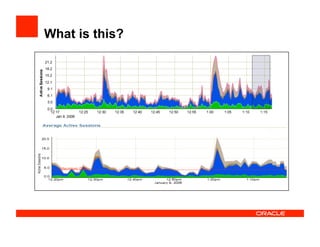
What is this?
Agenda
•  DB Time
•  Average Active Sessions
•  Performance Monitoring
•  Comparing Load
•  Diving Deep with ASH
•  Relationship to Queuing Theory
Database Time (DB Time)
•  Time spent in the database by foreground sessions
•  Includes CPU time, IO wait time and active wait time
•  Excludes idle wait time
Database time is total time spent by user processes
either actively working or actively waiting in a
database call.
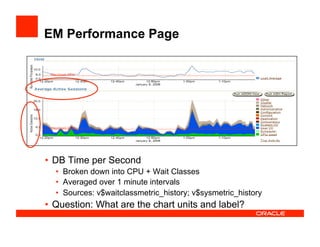
EM Performance Page
•  DB Time per Second
•  Broken down into CPU + Wait Classes
•  Averaged over 1 minute intervals
•  Sources: v$waitclassmetric_history; v$sysmetric_history
•  Question: What are the chart units and label?
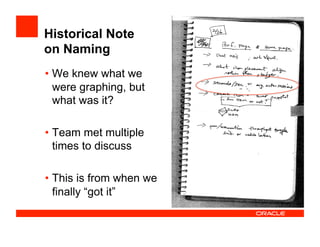
Historical Note
on Naming
• We knew what we
were graphing, but
what was it?
• Team met multiple
times to discuss
• This is from when we
finally “got it”
What Are the Units?
•  Time / time = unit-less (?)
•  DB time accumulates in micro, milli, or centi-seconds
•  Time-normalized sysmetrics are per second of elapsed
•  Centi-seconds (foreground time) per second (elapsed)
•  Centi-users per second
•  User seconds per elapsed second (normalize time units)
•  Active session seconds per second
•  Active sessions
Average Active Sessions
•  NOTE: Time units must synchronize
AAS = DB time / elapsed time
(during some workload)
Average Active Sessions
•  A time-based measure of “user load” on the database
•  Where the “time” is really user time…important
•  The derivative (calculus) of DB Time over time
•  This is why Top Activity and Perf Page are literal pictures of
DB Time
•  The “velocity” of DB Time accumulation in the
database
Performance Monitoring
•  DB Time increases when user load increases
•  Average Active Sessions measures the rate of increase
•  DB Time increases when performance degrades
•  Average Active Sessions captures the rate of
increase of DB Time over time
•  Therefore, AAS is the best single metric to monitor for
overall performance
Performance monitoring
•  Average Active Sessions captures both load and
performance
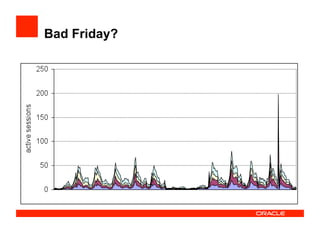
•  Severe performance degradation will spike the metric
•  Server-generated metrics for monitoring:
•  Database Time Per Sec (10g)
•  Average Active Sessions (11g)
•  Adaptive Thresholds technology
•  Set thresholds to high percentile (99th) values (unusual spike)
•  Moving window baseline and seasonality adjust to expected
load changes
Bad Friday?
Comparing Database Load
•  How to compare load on two different databases?
•  How to compare load on same database from two
different time periods?
•  Answer: normalize DB Time by time
•  That is, use Average Active Sessions!
•  Remember, DB Time is “user time”
•  It is “fungible”
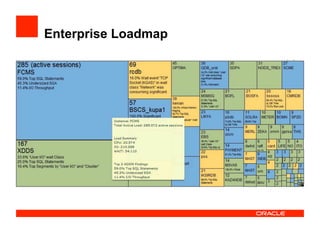
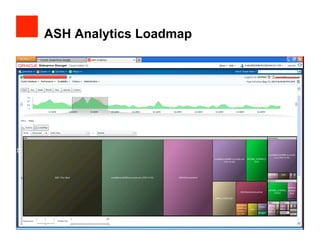
Enterprise Loadmap
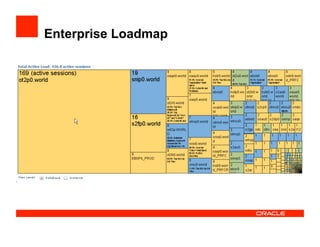
Enterprise Loadmap
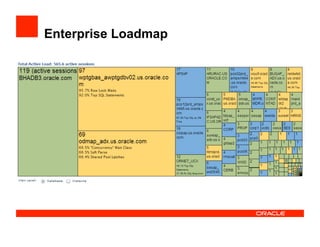
Enterprise Loadmap
Diving Deep with ASH
•  ASH is used to estimate DB Time accumulation over
some time interval, and thus also AAS
•  With ASH we can break down total AAS within a
Database across many dimensions of interest
•  Come to “ASH Deep-dive: Advanced Performance
Analysis Tips”
•  Wednesday 3:30 pm, Moscone South Room 104
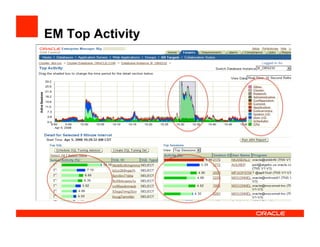
EM Top Activity
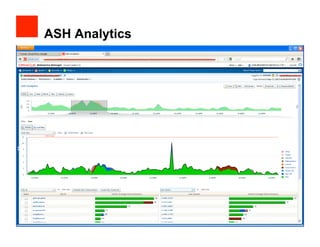
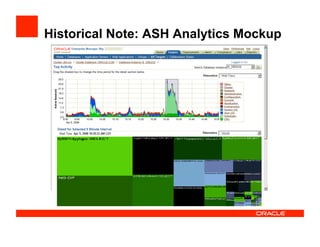
ASH Analytics
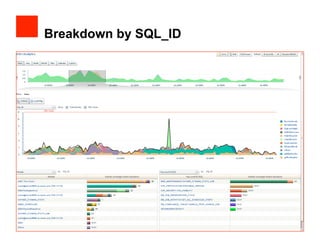
Breakdown by SQL_ID
Historical Note: ASH Analytics Mockup
ASH Analytics Loadmap
Relationship to Queuing Theory
•  Consider the Oracle database as a black-box service
center
•  User calls come in (SQL) from outside
•  Results computed inside and returned to user
•  What is the relationship of Average Active Sessions to
black-box queuing models?
•  Average Active Sessions measures an important queuing
theoretic concept
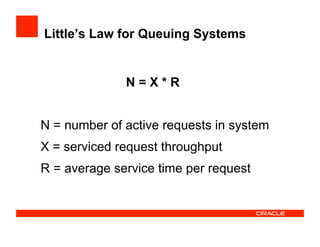
Little’s Law for Queuing Systems
N = X * R
N = number of active requests in system
X = serviced request throughput
R = average service time per request
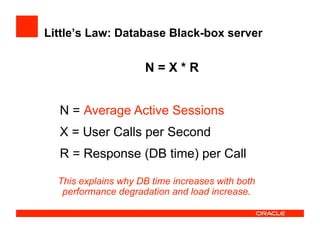
Little’s Law: Database Black-box server
N = X * R
N = ????
X = User Calls per Second
R = Response (DB time) per Call
Average Active Sessions
This explains why DB time increases with both
performance degradation and load increase.
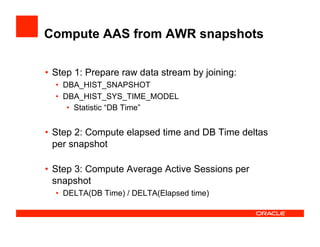
Compute AAS from AWR snapshots
•  Step 1: Prepare raw data stream by joining:
•  DBA_HIST_SNAPSHOT
•  DBA_HIST_SYS_TIME_MODEL
•  Statistic “DB Time”
•  Step 2: Compute elapsed time and DB Time deltas
per snapshot
•  Step 3: Compute Average Active Sessions per
snapshot
•  DELTA(DB Time) / DELTA(Elapsed time)
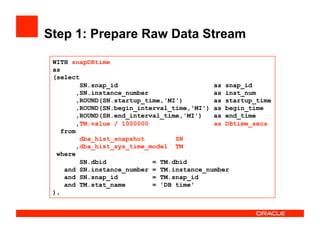
Step 1: Prepare Raw Data Stream
WITH snapDBtime
as
(select
SN.snap_id as snap_id
,SN.instance_number as inst_num
,ROUND(SN.startup_time,'MI') as startup_time
,ROUND(SN.begin_interval_time,'MI') as begin_time
,ROUND(SN.end_interval_time,'MI') as end_time
,TM.value / 1000000 as DBtime_secs
from
dba_hist_snapshot SN
,dba_hist_sys_time_model TM
where
SN.dbid = TM.dbid
and SN.instance_number = TM.instance_number
and SN.snap_id = TM.snap_id
and TM.stat_name = 'DB time'
),
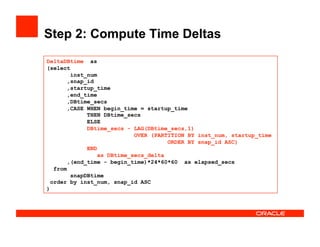
Step 2: Compute Time Deltas
DeltaDBtime as
(select
inst_num
,snap_id
,startup_time
,end_time
,DBtime_secs
,CASE WHEN begin_time = startup_time
THEN DBtime_secs
ELSE
DBtime_secs - LAG(DBtime_secs,1)
OVER (PARTITION BY inst_num, startup_time
ORDER BY snap_id ASC)
END
as DBtime_secs_delta
,(end_time - begin_time)*24*60*60 as elapsed_secs
from
snapDBtime
order by inst_num, snap_id ASC
)
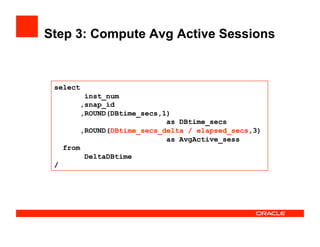
Step 3: Compute Avg Active Sessions
select
inst_num
,snap_id
,ROUND(DBtime_secs,1)
as DBtime_secs
,ROUND(DBtime_secs_delta / elapsed_secs,3)
as AvgActive_sess
from
DeltaDBtime
/
Average Active Sessions - OaktableWorld 2013

Average Active Sessions - OaktableWorld 2013

  • 1.
    Average Active Sessions JohnBeresniewicz, Oracle America
  • 2.
  • 3.
    Agenda •  DB Time • Average Active Sessions •  Performance Monitoring •  Comparing Load •  Diving Deep with ASH •  Relationship to Queuing Theory
  • 4.
    Database Time (DBTime) •  Time spent in the database by foreground sessions •  Includes CPU time, IO wait time and active wait time •  Excludes idle wait time Database time is total time spent by user processes either actively working or actively waiting in a database call.
  • 5.
    EM Performance Page • DB Time per Second •  Broken down into CPU + Wait Classes •  Averaged over 1 minute intervals •  Sources: v$waitclassmetric_history; v$sysmetric_history •  Question: What are the chart units and label?
  • 6.
    Historical Note on Naming • Weknew what we were graphing, but what was it? • Team met multiple times to discuss • This is from when we finally “got it”
  • 7.
    What Are theUnits? •  Time / time = unit-less (?) •  DB time accumulates in micro, milli, or centi-seconds •  Time-normalized sysmetrics are per second of elapsed •  Centi-seconds (foreground time) per second (elapsed) •  Centi-users per second •  User seconds per elapsed second (normalize time units) •  Active session seconds per second •  Active sessions
  • 8.
    Average Active Sessions • NOTE: Time units must synchronize AAS = DB time / elapsed time (during some workload)
  • 9.
    Average Active Sessions • A time-based measure of “user load” on the database •  Where the “time” is really user time…important •  The derivative (calculus) of DB Time over time •  This is why Top Activity and Perf Page are literal pictures of DB Time •  The “velocity” of DB Time accumulation in the database
  • 10.
    Performance Monitoring •  DBTime increases when user load increases •  Average Active Sessions measures the rate of increase •  DB Time increases when performance degrades •  Average Active Sessions captures the rate of increase of DB Time over time •  Therefore, AAS is the best single metric to monitor for overall performance
  • 11.
    Performance monitoring •  AverageActive Sessions captures both load and performance •  Severe performance degradation will spike the metric •  Server-generated metrics for monitoring: •  Database Time Per Sec (10g) •  Average Active Sessions (11g) •  Adaptive Thresholds technology •  Set thresholds to high percentile (99th) values (unusual spike) •  Moving window baseline and seasonality adjust to expected load changes
  • 12.
  • 13.
    Comparing Database Load • How to compare load on two different databases? •  How to compare load on same database from two different time periods? •  Answer: normalize DB Time by time •  That is, use Average Active Sessions! •  Remember, DB Time is “user time” •  It is “fungible”
  • 14.
  • 15.
  • 16.
  • 17.
    Diving Deep withASH •  ASH is used to estimate DB Time accumulation over some time interval, and thus also AAS •  With ASH we can break down total AAS within a Database across many dimensions of interest •  Come to “ASH Deep-dive: Advanced Performance Analysis Tips” •  Wednesday 3:30 pm, Moscone South Room 104
  • 18.
  • 19.
  • 20.
  • 21.
    Historical Note: ASHAnalytics Mockup
  • 22.
  • 23.
    Relationship to QueuingTheory •  Consider the Oracle database as a black-box service center •  User calls come in (SQL) from outside •  Results computed inside and returned to user •  What is the relationship of Average Active Sessions to black-box queuing models? •  Average Active Sessions measures an important queuing theoretic concept
  • 24.
    Little’s Law forQueuing Systems N = X * R N = number of active requests in system X = serviced request throughput R = average service time per request
  • 25.
    Little’s Law: DatabaseBlack-box server N = X * R N = ???? X = User Calls per Second R = Response (DB time) per Call Average Active Sessions This explains why DB time increases with both performance degradation and load increase.
  • 26.
    Compute AAS fromAWR snapshots •  Step 1: Prepare raw data stream by joining: •  DBA_HIST_SNAPSHOT •  DBA_HIST_SYS_TIME_MODEL •  Statistic “DB Time” •  Step 2: Compute elapsed time and DB Time deltas per snapshot •  Step 3: Compute Average Active Sessions per snapshot •  DELTA(DB Time) / DELTA(Elapsed time)
  • 27.
    Step 1: PrepareRaw Data Stream WITH snapDBtime as (select SN.snap_id as snap_id ,SN.instance_number as inst_num ,ROUND(SN.startup_time,'MI') as startup_time ,ROUND(SN.begin_interval_time,'MI') as begin_time ,ROUND(SN.end_interval_time,'MI') as end_time ,TM.value / 1000000 as DBtime_secs from dba_hist_snapshot SN ,dba_hist_sys_time_model TM where SN.dbid = TM.dbid and SN.instance_number = TM.instance_number and SN.snap_id = TM.snap_id and TM.stat_name = 'DB time' ),
  • 28.
    Step 2: ComputeTime Deltas DeltaDBtime as (select inst_num ,snap_id ,startup_time ,end_time ,DBtime_secs ,CASE WHEN begin_time = startup_time THEN DBtime_secs ELSE DBtime_secs - LAG(DBtime_secs,1) OVER (PARTITION BY inst_num, startup_time ORDER BY snap_id ASC) END as DBtime_secs_delta ,(end_time - begin_time)*24*60*60 as elapsed_secs from snapDBtime order by inst_num, snap_id ASC )
  • 29.
    Step 3: ComputeAvg Active Sessions select inst_num ,snap_id ,ROUND(DBtime_secs,1) as DBtime_secs ,ROUND(DBtime_secs_delta / elapsed_secs,3) as AvgActive_sess from DeltaDBtime /