Awesome Adwords
Seminar Series
Part 1
Chloë Thomas
Me and indium
● 6 years
● Effective Online
Marketing
● done for you
● Team of 5
Services:
● Adwords & Remarketing
● LinkedIn Pages & Ads
● Email
Awesome Adwords
Seminar Programme
1. Introduction - the changes and how to capitalise
Wed, Aug 7th @ 2pm
2. Bidding Options - get more quality traffic for less
Wed, Aug 14th @ 2pm
3. Remarketing - overlaying it with “normal” Adwords
Thur, Aug 22nd @ 2pm
4. Image and Video Ads - lower click costs, a different type of traffic
Wed, Aug 28th @ 2pm
http://indiumonline.co.uk/awesome-adwords
Introduction
the changes and how to capitalise
1. Google Adwords
2. Key Changes:
a. Enhanced Campaigns
b. Google Shopping
c. Endless Integration
3. Introducing the Adwords Layers
4. Capitalising on the Layers
5. Next Steps
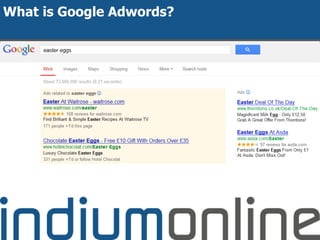
What is Google Adwords?
Lots of Changes:
● Enhanced Campaigns
● Google Shopping
● Endless Integrations
What are Enhanced Campaigns?
● Biggest change to Adwords ever
○ Definitely for 8 years!
● A new campaign format that affects
everything you do in Google Adwords
● But should streamline your activity
What's new and cool?
Bidding
● Change bid at campaign level as a %age
○ by device
○ by time
○ by location
What's new and cool?
Scheduling
● Turn on / off options for extensions and
promos
○ Start dates and end dates
○ times
○ day of week etc
○ and do this by device, not just at campaign level
● Target ads by time of day
What's new and cool?
● You can reach customers with fewer
campaigns:
○ No more managing 'duplicate' campaigns
○ eg in one campaign:
■ 50 locations
■ 2 day parts
■ 2 devices
● The streamlining opens up new testing and
audience areas
Introduction
the changes and how to capitalise
1. Google Adwords
2. Key Changes:
a. Enhanced Campaigns
b. Google Shopping
c. Endless Integration
3. Introducing the Adwords Layers
4. Capitalising on the Layers
5. Next Steps
Google Shopping / PLAs
● Product Listing Ads
● From Free ---> Paid
● Much better performance than keywords
● New visits 24% better
● Cost per Conversion down 14%
● Conversion Rate up 28%
● AOV up 38%
The Old World
The New World
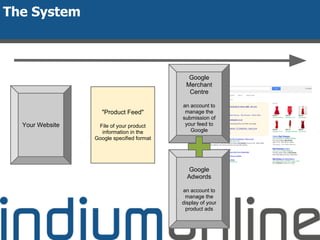
Your Website
"Product Feed"
File of your product
information in the
Google specified format
Google
Merchant
Centre
an account to
manage the
submission of
your feed to
Google
The System
Google
Adwords
an account to
manage the
display of your
product ads
Introduction
the changes and how to capitalise
1. Google Adwords
2. Key Changes:
a. Enhanced Campaigns
b. Google Shopping
c. Endless Integration
3. Introducing the Adwords Layers
4. Capitalising on the Layers
5. Next Steps
Endless Integration
● 6/2/13 - Enhanced Campaigns Announced
● Q2 2013 - Google Shopping Integrated
● 24/6/13 - Shopping Integrated with
Remarketing
● 25/6/13 - Remarketing Integrated with
Keywords
● 22/7/13 - Enhanced Campaigns Auto
Upgrade Begins
● 2/8/13 - Display Planner Launched
Endless Integration
1. Enhanced Bidding Optimisation
a. Device / Time / Geography
2. Google Shopping
a. balance with keywords / layer over with remarketing
3. Video Ads & Image Ads
a. balance with text ads
4. Remarketing
a. image, text etc / layer over keywords
Introduction
the changes and how to capitalise
1. Google Adwords
2. Key Changes:
a. Enhanced Campaigns
b. Google Shopping
c. Endless Integration
3. Introducing the Adwords Layers
4. Capitalising on the Layers
5. Next Steps
Adwords Layering
Text Ads
Video Ads
Image Ads
Remarketing
Enhanced
Bidding
Targeting
Method
Core Keywords PLAs Remarketing
Lists
Display
Advertising Lists
Adwords Layering by Network
Layer Search Network Display Network
Core Keywords Y Y
Product Listing Ads Y Y
(if with Remarketing)
Remarketing Y
(if used to target keywords)
Y
Display Advertising Y
Image Ads Y
Video Ads Y
Remarketing Layers
Silos are Dead
Core
Keywords
Google
Base/
Shopping
Remarketing
Display
Advertising
It’s all about Layers
1. Integrate your Thinking
2. Start Simple, and Build
How to Capitalise on Layers
And then try pure Display Advertising
Next Steps
1. Are your Enhanced Campaign settings right?
2. Audit which layers you are currently using?
3. Come along to the rest of the Seminars to
find out more about the Layers
4. Want help?
a. Free Adwords Clinics
http://indiumonline.co.uk/awesome-adwords
Next Seminar:
Bidding Options - get more quality
traffic for less
Wed, Aug 14th @ 2pm

Adwords Seminar 1: What the changes are, and how you can capitalise on them

  • 1.
  • 2.
    Me and indium ●6 years ● Effective Online Marketing ● done for you ● Team of 5 Services: ● Adwords & Remarketing ● LinkedIn Pages & Ads ● Email
  • 3.
    Awesome Adwords Seminar Programme 1.Introduction - the changes and how to capitalise Wed, Aug 7th @ 2pm 2. Bidding Options - get more quality traffic for less Wed, Aug 14th @ 2pm 3. Remarketing - overlaying it with “normal” Adwords Thur, Aug 22nd @ 2pm 4. Image and Video Ads - lower click costs, a different type of traffic Wed, Aug 28th @ 2pm http://indiumonline.co.uk/awesome-adwords
  • 4.
    Introduction the changes andhow to capitalise 1. Google Adwords 2. Key Changes: a. Enhanced Campaigns b. Google Shopping c. Endless Integration 3. Introducing the Adwords Layers 4. Capitalising on the Layers 5. Next Steps
  • 5.
  • 6.
    Lots of Changes: ●Enhanced Campaigns ● Google Shopping ● Endless Integrations
  • 7.
    What are EnhancedCampaigns? ● Biggest change to Adwords ever ○ Definitely for 8 years! ● A new campaign format that affects everything you do in Google Adwords ● But should streamline your activity
  • 8.
    What's new andcool? Bidding ● Change bid at campaign level as a %age ○ by device ○ by time ○ by location
  • 9.
    What's new andcool? Scheduling ● Turn on / off options for extensions and promos ○ Start dates and end dates ○ times ○ day of week etc ○ and do this by device, not just at campaign level ● Target ads by time of day
  • 10.
    What's new andcool? ● You can reach customers with fewer campaigns: ○ No more managing 'duplicate' campaigns ○ eg in one campaign: ■ 50 locations ■ 2 day parts ■ 2 devices ● The streamlining opens up new testing and audience areas
  • 11.
    Introduction the changes andhow to capitalise 1. Google Adwords 2. Key Changes: a. Enhanced Campaigns b. Google Shopping c. Endless Integration 3. Introducing the Adwords Layers 4. Capitalising on the Layers 5. Next Steps
  • 12.
    Google Shopping /PLAs ● Product Listing Ads ● From Free ---> Paid ● Much better performance than keywords ● New visits 24% better ● Cost per Conversion down 14% ● Conversion Rate up 28% ● AOV up 38%
  • 13.
  • 14.
    Your Website "Product Feed" Fileof your product information in the Google specified format Google Merchant Centre an account to manage the submission of your feed to Google The System Google Adwords an account to manage the display of your product ads
  • 15.
    Introduction the changes andhow to capitalise 1. Google Adwords 2. Key Changes: a. Enhanced Campaigns b. Google Shopping c. Endless Integration 3. Introducing the Adwords Layers 4. Capitalising on the Layers 5. Next Steps
  • 16.
    Endless Integration ● 6/2/13- Enhanced Campaigns Announced ● Q2 2013 - Google Shopping Integrated ● 24/6/13 - Shopping Integrated with Remarketing ● 25/6/13 - Remarketing Integrated with Keywords ● 22/7/13 - Enhanced Campaigns Auto Upgrade Begins ● 2/8/13 - Display Planner Launched
  • 17.
    Endless Integration 1. EnhancedBidding Optimisation a. Device / Time / Geography 2. Google Shopping a. balance with keywords / layer over with remarketing 3. Video Ads & Image Ads a. balance with text ads 4. Remarketing a. image, text etc / layer over keywords
  • 18.
    Introduction the changes andhow to capitalise 1. Google Adwords 2. Key Changes: a. Enhanced Campaigns b. Google Shopping c. Endless Integration 3. Introducing the Adwords Layers 4. Capitalising on the Layers 5. Next Steps
  • 19.
    Adwords Layering Text Ads VideoAds Image Ads Remarketing Enhanced Bidding Targeting Method Core Keywords PLAs Remarketing Lists Display Advertising Lists
  • 20.
    Adwords Layering byNetwork Layer Search Network Display Network Core Keywords Y Y Product Listing Ads Y Y (if with Remarketing) Remarketing Y (if used to target keywords) Y Display Advertising Y Image Ads Y Video Ads Y
  • 21.
  • 22.
  • 23.
  • 24.
    1. Integrate yourThinking 2. Start Simple, and Build How to Capitalise on Layers And then try pure Display Advertising
  • 25.
    Next Steps 1. Areyour Enhanced Campaign settings right? 2. Audit which layers you are currently using? 3. Come along to the rest of the Seminars to find out more about the Layers 4. Want help? a. Free Adwords Clinics http://indiumonline.co.uk/awesome-adwords Next Seminar: Bidding Options - get more quality traffic for less Wed, Aug 14th @ 2pm