



Awesome Adwords
Seminar Series
Part 2 - Bidding
Chloë Thomas
Me and indium
● 6 years
● Effective Online
Marketing
● done for you
● Team of 5
Services:
● Adwords & Remarketing
● LinkedIn Pages & Ads
● Email
Awesome Adwords
Seminar Programme
1. Introduction - the changes and how to capitalise
Available on the website
2. Bidding Options - get more quality traffic for less
Wed, Aug 14th @ 2pm
3. Product Listing Ads - how to do and optimise
Fri, Aug 16th @ 3pm
4. Remarketing - overlaying it with “normal” Adwords
Thur, Aug 22nd @ 2pm
5. Image and Video Ads - lower click costs, a different type of traffic
Wed, Aug 28th @ 2pm
http://indiumonline.co.uk/awesome-adwords
Enhanced Bidding
get more quality traffic for less
1. Layers recap
2. Bidding Layers
a. Display
b. Geographic
c. Time
d. Device
3. Bidding Warnings - Stacking
4. Next Steps
What is Google Adwords?
Lots of Changes:
● Enhanced Campaigns
● Google Shopping
● Endless Integrations
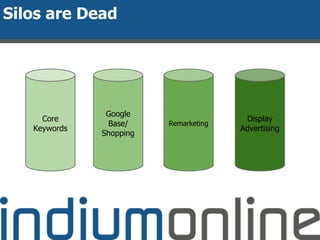
Silos are Dead
Core
Keywords
Google
Base/
Shopping
Remarketing
Display
Advertising
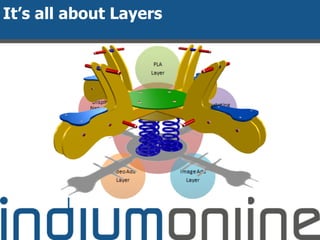
It’s all about Layers
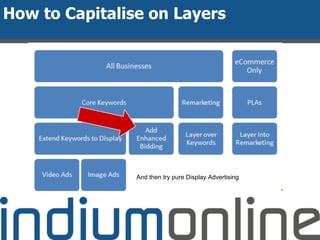
How to Capitalise on Layers
And then try pure Display Advertising
Enhanced Bidding
get more quality traffic for less
1. Layers recap
2. Bidding Layers
a. Display
b. Geographic
c. Time
d. Device
3. Bidding Warnings - Stacking
4. Next Steps
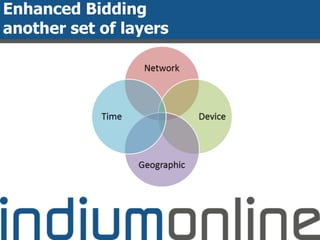
Enhanced Campaigns =>
Enhanced Bidding
● We have always been able to:
○ Manage Search Network and Display Network bids
separately
● We can now:
○ Manage multiple device types in one campaign
○ Manage multiple locations in one campaign
○ Manage multiple times in one campaign
● All using just one set of keywords
Enhanced Bidding
another set of layers
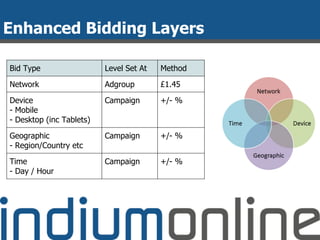
Enhanced Bidding Layers
Bid Type Level Set At Method
Network Adgroup £1.45
Device
- Mobile
- Desktop (inc Tablets)
Campaign +/- %
Geographic
- Region/Country etc
Campaign +/- %
Time
- Day / Hour
Campaign +/- %
Geographic Bidding Layer
● Targets:
○ UK, “Region” = Eng,Scot,Wal,N.Ire,Islands
○ UK, “City” = the cities, some boroughs too
○ Most Specific Location = all the above
○ UK - can’t do county
● THINK
○ Where are you? - head office, shops, etc
○ Where are your customers?
○ Where can you ship? (want to ship)
● Beware overlaps
Device Bidding Layer
● Targets:
○ Mobile
● Reporting:
○ Computers
○ Tablets
○ Mobile devices with full browsers
● THINK
○ Does your site work on mobiles?
○ When in buying process do they use mobiles?
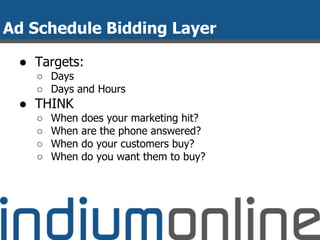
Ad Schedule Bidding Layer
● Targets:
○ Days
○ Days and Hours
● THINK
○ When does your marketing hit?
○ When are the phone answered?
○ When do your customers buy?
○ When do you want them to buy?
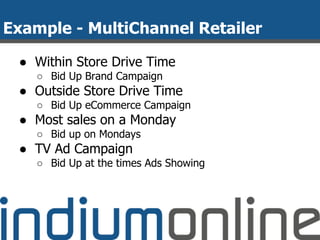
Example - MultiChannel Retailer
● Within Store Drive Time
○ Bid Up Brand Campaign
● Outside Store Drive Time
○ Bid Up eCommerce Campaign
● Most sales on a Monday
○ Bid up on Mondays
● TV Ad Campaign
○ Bid Up at the times Ads Showing
Enhanced Bidding
get more quality traffic for less
1. Layers recap
2. Bidding Layers
a. Display
b. Geographic
c. Time
d. Device
3. Bidding Warnings - Stacking
4. Next Steps
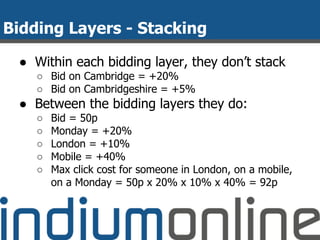
Bidding Layers - Stacking
● Within each bidding layer, they don’t stack
○ Bid on Cambridge = +20%
○ Bid on Cambridgeshire = +5%
● Between the bidding layers they do:
○ Bid = 50p
○ Monday = +20%
○ London = +10%
○ Mobile = +40%
○ Max click cost for someone in London, on a mobile,
on a Monday = 50p x 20% x 10% x 40% = 92p
Tracking Your Results
● Adwords - Conversion Tracking
○ Includes past performance
● Google Analytics
○ Adwords / Bid Adjustments - only tracks the
adjustments you set up
Next Steps
1. Check your existing bidding settings
2. THINK - and map out your plan
3. Come along to the rest of the Seminars to
find out more about the Layers
4. Want help?
a. Free Adwords Clinics
http://indiumonline.co.uk/awesome-adwords
Next Seminar:
PLAs - set up and optimisation
Fri, Aug 16th @ 3pm

Adwords Seminar 2: Get more quality traffic for less

  • 1.
    Awesome Adwords Seminar Series Part2 - Bidding Chloë Thomas
  • 2.
    Me and indium ●6 years ● Effective Online Marketing ● done for you ● Team of 5 Services: ● Adwords & Remarketing ● LinkedIn Pages & Ads ● Email
  • 3.
    Awesome Adwords Seminar Programme 1.Introduction - the changes and how to capitalise Available on the website 2. Bidding Options - get more quality traffic for less Wed, Aug 14th @ 2pm 3. Product Listing Ads - how to do and optimise Fri, Aug 16th @ 3pm 4. Remarketing - overlaying it with “normal” Adwords Thur, Aug 22nd @ 2pm 5. Image and Video Ads - lower click costs, a different type of traffic Wed, Aug 28th @ 2pm http://indiumonline.co.uk/awesome-adwords
  • 4.
    Enhanced Bidding get morequality traffic for less 1. Layers recap 2. Bidding Layers a. Display b. Geographic c. Time d. Device 3. Bidding Warnings - Stacking 4. Next Steps
  • 5.
  • 6.
    Lots of Changes: ●Enhanced Campaigns ● Google Shopping ● Endless Integrations
  • 7.
  • 8.
  • 9.
    How to Capitaliseon Layers And then try pure Display Advertising
  • 10.
    Enhanced Bidding get morequality traffic for less 1. Layers recap 2. Bidding Layers a. Display b. Geographic c. Time d. Device 3. Bidding Warnings - Stacking 4. Next Steps
  • 11.
    Enhanced Campaigns => EnhancedBidding ● We have always been able to: ○ Manage Search Network and Display Network bids separately ● We can now: ○ Manage multiple device types in one campaign ○ Manage multiple locations in one campaign ○ Manage multiple times in one campaign ● All using just one set of keywords
  • 12.
  • 13.
    Enhanced Bidding Layers BidType Level Set At Method Network Adgroup £1.45 Device - Mobile - Desktop (inc Tablets) Campaign +/- % Geographic - Region/Country etc Campaign +/- % Time - Day / Hour Campaign +/- %
  • 14.
    Geographic Bidding Layer ●Targets: ○ UK, “Region” = Eng,Scot,Wal,N.Ire,Islands ○ UK, “City” = the cities, some boroughs too ○ Most Specific Location = all the above ○ UK - can’t do county ● THINK ○ Where are you? - head office, shops, etc ○ Where are your customers? ○ Where can you ship? (want to ship) ● Beware overlaps
  • 15.
    Device Bidding Layer ●Targets: ○ Mobile ● Reporting: ○ Computers ○ Tablets ○ Mobile devices with full browsers ● THINK ○ Does your site work on mobiles? ○ When in buying process do they use mobiles?
  • 16.
    Ad Schedule BiddingLayer ● Targets: ○ Days ○ Days and Hours ● THINK ○ When does your marketing hit? ○ When are the phone answered? ○ When do your customers buy? ○ When do you want them to buy?
  • 17.
    Example - MultiChannelRetailer ● Within Store Drive Time ○ Bid Up Brand Campaign ● Outside Store Drive Time ○ Bid Up eCommerce Campaign ● Most sales on a Monday ○ Bid up on Mondays ● TV Ad Campaign ○ Bid Up at the times Ads Showing
  • 18.
    Enhanced Bidding get morequality traffic for less 1. Layers recap 2. Bidding Layers a. Display b. Geographic c. Time d. Device 3. Bidding Warnings - Stacking 4. Next Steps
  • 19.
    Bidding Layers -Stacking ● Within each bidding layer, they don’t stack ○ Bid on Cambridge = +20% ○ Bid on Cambridgeshire = +5% ● Between the bidding layers they do: ○ Bid = 50p ○ Monday = +20% ○ London = +10% ○ Mobile = +40% ○ Max click cost for someone in London, on a mobile, on a Monday = 50p x 20% x 10% x 40% = 92p
  • 20.
    Tracking Your Results ●Adwords - Conversion Tracking ○ Includes past performance ● Google Analytics ○ Adwords / Bid Adjustments - only tracks the adjustments you set up
  • 21.
    Next Steps 1. Checkyour existing bidding settings 2. THINK - and map out your plan 3. Come along to the rest of the Seminars to find out more about the Layers 4. Want help? a. Free Adwords Clinics http://indiumonline.co.uk/awesome-adwords Next Seminar: PLAs - set up and optimisation Fri, Aug 16th @ 3pm