Awesome Adwords
Seminar Series
Part 3 - PLAs
Chloë Thomas
Me and indium
● 6 years
● Effective Online
Marketing
● done for you
● Team of 5
Services:
● Adwords & Remarketing
● LinkedIn Pages & Ads
● Email
Awesome Adwords
Seminar Programme
1. Introduction - the changes and how to capitalise
Available on the website
2. Bidding Options - get more quality traffic for less
Available on the website
3. Product Listing Ads - how to do and optimise
Fri, Aug 16th @ 3pm
4. Remarketing - overlaying it with “normal” Adwords
Thur, Aug 22nd @ 2pm
5. Image and Video Ads - lower click costs, a different type of traffic
Wed, Aug 28th @ 2pm
http://indiumonline.co.uk/aa
PLAs
Setting up and optimising
1. Layers recap
2. Product Listing Ads
a. The Feed
b. Adwords Campaign Structure
c. Optimisation
3. Layering it Up
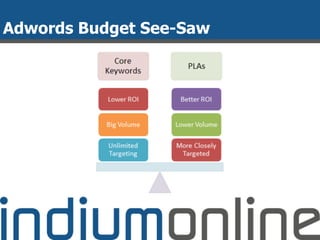
a. Keywords Budget Seesaw
b. Remarketing Laye
4. Next Steps
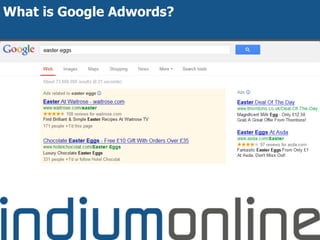
What is Google Adwords?
Lots of Changes:
● Enhanced Campaigns
● Google Shopping
● Endless Integrations
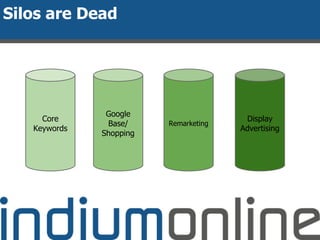
Silos are Dead
Core
Keywords
Google
Base/
Shopping
Remarketing
Display
Advertising
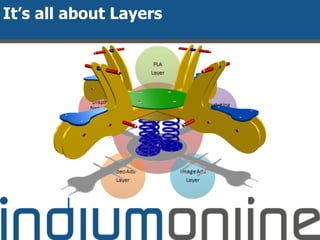
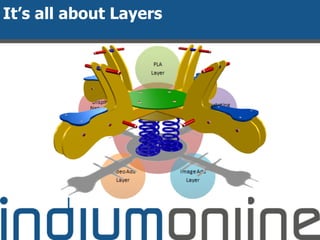
It’s all about Layers
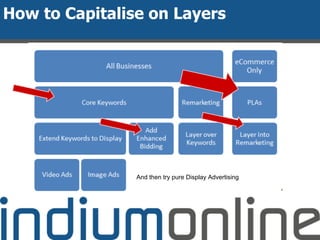
How to Capitalise on Layers
And then try pure Display Advertising
PLAs
Setting up and optimising
1. Layers recap
2. Product Listing Ads
a. The Feed
b. Adwords Campaign Structure
c. Optimisation
3. Layering it Up
a. Keywords Budget Seesaw
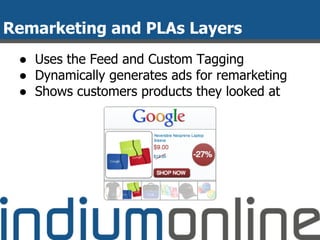
b. Remarketing Layer
4. Next Steps
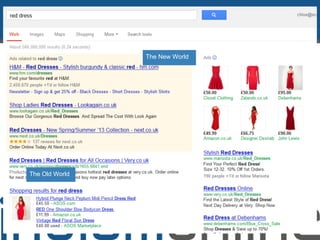
The Old World
The New World
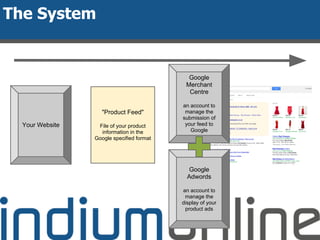
Your Website
"Product Feed"
File of your product
information in the
Google specified format
Google
Merchant
Centre
an account to
manage the
submission of
your feed to
Google
The System
Google
Adwords
an account to
manage the
display of your
product ads
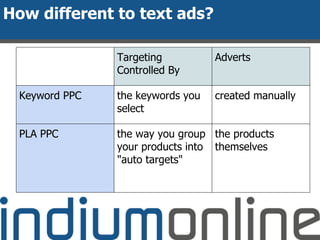
How different to text ads?
Targeting
Controlled By
Adverts
Keyword PPC the keywords you
select
created manually
PLA PPC the way you group
your products into
"auto targets"
the products
themselves
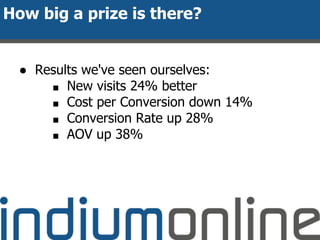
● Results we've seen ourselves:
■ New visits 24% better
■ Cost per Conversion down 14%
■ Conversion Rate up 28%
■ AOV up 38%
How big a prize is there?
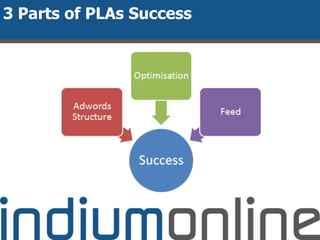
3 Parts of PLAs Success
The Feed
Attribute What it does Can Contain
adwords grouping
[adwords_grouping]
Usually lowest level category
Works in CPC and CPA bidding
Text
Only one per product
adwords labels [adwords_labels] Only works if you’re using CPC
(not CPA)
Can hold lots of values – so think
of like tagging the products inline
with likely searches
Eg
- Mens, blue, shirt, over 50gbp
Text string
As many as you like
adwords redirect
[adwords_redirect]
If you want to send to a different
URL for tracking purposes.
url – inc http etc
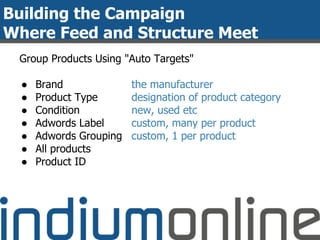
Building the Campaign
Where Feed and Structure Meet
Group Products Using "Auto Targets"
● Brand
● Product Type
● Condition
● Adwords Label
● Adwords Grouping
● All products
● Product ID
the manufacturer
designation of product category
new, used etc
custom, many per product
custom, 1 per product
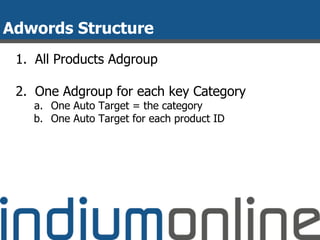
Adwords Structure
1. All Products Adgroup
2. One Adgroup for each key Category
a. One Auto Target = the category
b. One Auto Target for each product ID
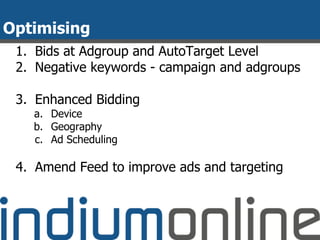
Optimising
1. Bids at Adgroup and AutoTarget Level
2. Negative keywords - campaign and adgroups
3. Enhanced Bidding
a. Device
b. Geography
c. Ad Scheduling
4. Amend Feed to improve ads and targeting
PLAs
Setting up and optimising
1. Layers recap
2. Product Listing Ads
a. The Feed
b. Adwords Campaign Structure
c. Optimisation
3. Layering it Up
a. Keywords Budget Seesaw
b. Remarketing Layer
4. Next Steps
It’s all about Layers
Adwords Budget See-Saw
Remarketing and PLAs Layers
● Uses the Feed and Custom Tagging
● Dynamically generates ads for remarketing
● Shows customers products they looked at
Next Steps
1. Sort out your feed
2. Build your Campaign
3. Come along to the rest of the Seminars to
find out more about the Layers
4. Want help?
a. Free Adwords Clinics
http://indiumonline.co.uk/awesome-adwords
Next Seminar:
Remarketing - how it works and
Layering
Thurs, Aug 22nd @ 2pm

Adwords Seminar 3: PLAs - How to do and Optimise

  • 1.
  • 2.
    Me and indium ●6 years ● Effective Online Marketing ● done for you ● Team of 5 Services: ● Adwords & Remarketing ● LinkedIn Pages & Ads ● Email
  • 3.
    Awesome Adwords Seminar Programme 1.Introduction - the changes and how to capitalise Available on the website 2. Bidding Options - get more quality traffic for less Available on the website 3. Product Listing Ads - how to do and optimise Fri, Aug 16th @ 3pm 4. Remarketing - overlaying it with “normal” Adwords Thur, Aug 22nd @ 2pm 5. Image and Video Ads - lower click costs, a different type of traffic Wed, Aug 28th @ 2pm http://indiumonline.co.uk/aa
  • 4.
    PLAs Setting up andoptimising 1. Layers recap 2. Product Listing Ads a. The Feed b. Adwords Campaign Structure c. Optimisation 3. Layering it Up a. Keywords Budget Seesaw b. Remarketing Laye 4. Next Steps
  • 5.
  • 6.
    Lots of Changes: ●Enhanced Campaigns ● Google Shopping ● Endless Integrations
  • 7.
  • 8.
  • 9.
    How to Capitaliseon Layers And then try pure Display Advertising
  • 10.
    PLAs Setting up andoptimising 1. Layers recap 2. Product Listing Ads a. The Feed b. Adwords Campaign Structure c. Optimisation 3. Layering it Up a. Keywords Budget Seesaw b. Remarketing Layer 4. Next Steps
  • 11.
  • 12.
    Your Website "Product Feed" Fileof your product information in the Google specified format Google Merchant Centre an account to manage the submission of your feed to Google The System Google Adwords an account to manage the display of your product ads
  • 13.
    How different totext ads? Targeting Controlled By Adverts Keyword PPC the keywords you select created manually PLA PPC the way you group your products into "auto targets" the products themselves
  • 14.
    ● Results we'veseen ourselves: ■ New visits 24% better ■ Cost per Conversion down 14% ■ Conversion Rate up 28% ■ AOV up 38% How big a prize is there?
  • 15.
    3 Parts ofPLAs Success
  • 16.
    The Feed Attribute Whatit does Can Contain adwords grouping [adwords_grouping] Usually lowest level category Works in CPC and CPA bidding Text Only one per product adwords labels [adwords_labels] Only works if you’re using CPC (not CPA) Can hold lots of values – so think of like tagging the products inline with likely searches Eg - Mens, blue, shirt, over 50gbp Text string As many as you like adwords redirect [adwords_redirect] If you want to send to a different URL for tracking purposes. url – inc http etc
  • 17.
    Building the Campaign WhereFeed and Structure Meet Group Products Using "Auto Targets" ● Brand ● Product Type ● Condition ● Adwords Label ● Adwords Grouping ● All products ● Product ID the manufacturer designation of product category new, used etc custom, many per product custom, 1 per product
  • 18.
    Adwords Structure 1. AllProducts Adgroup 2. One Adgroup for each key Category a. One Auto Target = the category b. One Auto Target for each product ID
  • 19.
    Optimising 1. Bids atAdgroup and AutoTarget Level 2. Negative keywords - campaign and adgroups 3. Enhanced Bidding a. Device b. Geography c. Ad Scheduling 4. Amend Feed to improve ads and targeting
  • 20.
    PLAs Setting up andoptimising 1. Layers recap 2. Product Listing Ads a. The Feed b. Adwords Campaign Structure c. Optimisation 3. Layering it Up a. Keywords Budget Seesaw b. Remarketing Layer 4. Next Steps
  • 21.
  • 22.
  • 23.
    Remarketing and PLAsLayers ● Uses the Feed and Custom Tagging ● Dynamically generates ads for remarketing ● Shows customers products they looked at
  • 24.
    Next Steps 1. Sortout your feed 2. Build your Campaign 3. Come along to the rest of the Seminars to find out more about the Layers 4. Want help? a. Free Adwords Clinics http://indiumonline.co.uk/awesome-adwords Next Seminar: Remarketing - how it works and Layering Thurs, Aug 22nd @ 2pm