SSIS	
  Parameters	
  vs.	
  
  Configura3ons	
  

   New	
  tricks	
  in	
  2012!	
  
SSIS	
  Parameters	
  vs.	
  Configura3ons	
  
•  Christmas	
  Past	
  –	
  SQL	
  2008	
  R2	
  	
  
    –  Configura3ons	
  
         •  Sta3c	
  
         •  Basic	
  SQL	
  table	
  
         •  Dynamic	
  
•  Christmas	
  Present	
  SQL	
  2012	
  	
  
    –  Parameters	
  
    –  Variables	
  
Allen	
  Smith	
  
  •  Business	
  Intelligence	
  developer	
  
  •  Cogni3ve	
  Informa3on,	
  Inc.	
  in	
  Edmond,	
  OK	
  
  •  Specialize	
  in	
  BI	
  and	
  Data	
  Warehousing	
  in	
  
     healthcare,	
  insurance	
  and	
  energy	
  industries.	
  
  •  Email:	
  	
  asmith@cogni3veinfo.com	


Twier:                                   	
  @Cogni3veBI	


3	
  	
  |	
  	
  	
   12/10/12	
  	
  |	
   Footer	
  Goes	
  Here	
  
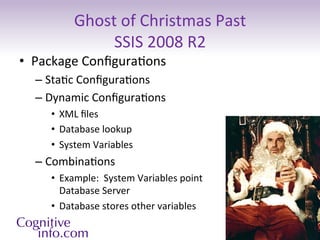
Ghost	
  of	
  Christmas	
  Past	
  	
  
                   SSIS	
  2008	
  R2	
  
•  Package	
  Configura3ons	
  
   –  Sta3c	
  Configura3ons	
  
   –  Dynamic	
  Configura3ons	
  
      •  XML	
  files	
  
      •  Database	
  lookup	
  
      •  System	
  Variables	
  	
  
   –  Combina3ons	
  
      •  Example:	
  	
  System	
  Variables	
  point	
  	
  
         Database	
  Server	
  
      •  Database	
  stores	
  other	
  variables	
  
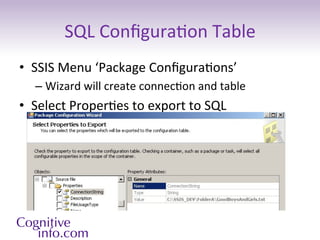
SQL	
  Configura3on	
  Table	
  
•  SSIS	
  Menu	
  ‘Package	
  Configura3ons’	
  
    –  Wizard	
  will	
  create	
  connec3on	
  and	
  table	
  
•  Select	
  Proper3es	
  to	
  export	
  to	
  SQL	
  
2008R2	
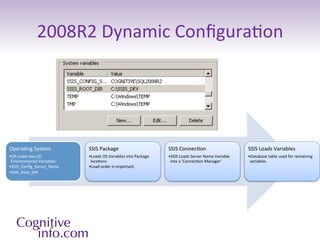
  Dynamic	
  Configura3on	


Opera3ng	
  System	
               SSIS	
  Package	
                                   SSIS	
  Connec3on	
                                 SSIS	
  Loads	
  Variables	
  
• OS	
  Loads	
  two	
  (2)	
      • Loads	
  OS	
  Variables	
  into	
  Package	
     • SSIS	
  Loads	
  Server	
  Name	
  Variable	
     • Database	
  table	
  used	
  for	
  remaining	
  
 Environmental	
  Variables:	
      loca3ons	
                                          into	
  a	
  ‘Connec3on	
  Manager’	
               variables.	
  
• SSIS_Config_Server_Name	
         • Load	
  order	
  is	
  important.	
  
• SSIS_Root_DIR	
  
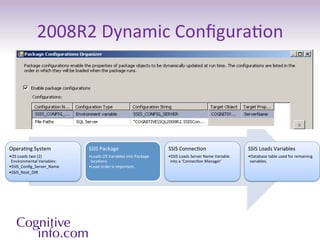
2008R2	
  Dynamic	
  Configura3on	


Opera3ng	
  System	
               SSIS	
  Package	
                                   SSIS	
  Connec3on	
                                 SSIS	
  Loads	
  Variables	
  
• OS	
  Loads	
  two	
  (2)	
      • Loads	
  OS	
  Variables	
  into	
  Package	
     • SSIS	
  Loads	
  Server	
  Name	
  Variable	
     • Database	
  table	
  used	
  for	
  remaining	
  
 Environmental	
  Variables:	
      loca3ons	
                                          into	
  a	
  ‘Connec3on	
  Manager’	
               variables.	
  
• SSIS_Config_Server_Name	
         • Load	
  order	
  is	
  important.	
  
• SSIS_Root_DIR	
  
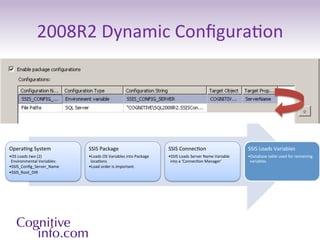
2008R2	
  Dynamic	
  Configura3on	


Opera3ng	
  System	
               SSIS	
  Package	
                                   SSIS	
  Connec3on	
                                 SSIS	
  Loads	
  Variables	
  
• OS	
  Loads	
  two	
  (2)	
      • Loads	
  OS	
  Variables	
  into	
  Package	
     • SSIS	
  Loads	
  Server	
  Name	
  Variable	
     • Database	
  table	
  used	
  for	
  remaining	
  
 Environmental	
  Variables:	
      loca3ons	
                                          into	
  a	
  ‘Connec3on	
  Manager’	
               variables.	
  
• SSIS_Config_Server_Name	
         • Load	
  order	
  is	
  important.	
  
• SSIS_Root_DIR	
  
2008R2	
  Dynamic	
  Configura3on	


Opera3ng	
  System	
               SSIS	
  Package	
                                   SSIS	
  Connec3on	
                                 SSIS	
  Loads	
  Variables	
  
• OS	
  Loads	
  two	
  (2)	
      • Loads	
  OS	
  Variables	
  into	
  Package	
     • SSIS	
  Loads	
  Server	
  Name	
  Variable	
     • Database	
  table	
  used	
  for	
  remaining	
  
 Environmental	
  Variables:	
      loca3ons	
                                          into	
  a	
  ‘Connec3on	
  Manager’	
               variables.	
  
• SSIS_Config_Server_Name	
         • Load	
  order	
  is	
  important.	
  
• SSIS_Root_DIR	
  
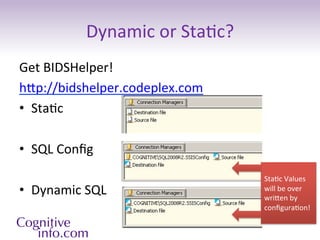
Dynamic	
  or	
  Sta3c?	
  
Get	
  BIDSHelper!	
  
hp://bidshelper.codeplex.com	
  
•  Sta3c	
  

•  SQL	
  Config	


                                              Sta3c	
  Values	
  
•  Dynamic	
  SQL	
                           will	
  be	
  over	
  
                                              wrien	
  by	
  
                                              configura3on!	


Demo	
  
SQL2008	
  R2	
  Summary	
  
•  Configura3ons	
  	
  
    –  Allow	
  flexible	
  deployment	
  
    –  Can	
  be	
  sta3c	
  or	
  dynamic	
  
    –  S3ll	
  supported	
  in	
  SQL	
  2012	
  	
  
•  Get	
  BIDS	
  Helper	
  to	
  quickly	
  	
  
iden3fy	
  dynamic	
  connec3ons.	
  
New	
  in	
  SSIS	
  2012	
  
•  Deployment	
  Op3ons	
  
•  Server	
  Management	
  
    –  Environments	
  
    –  SSISDB	
  Catalog	
  
•  Development	
  Environment	
  Enhancements	
  
    –  Parameters	
  
•  Performance	
  Improvements	
  
hp://msdn.microsoi.com/en-­‐us/library/bb522534.aspx	
  
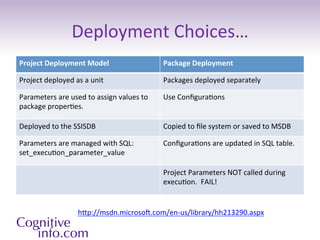
Deployment	
  Choices…	
  
Project	
  Deployment	
  Model	
                                Package	
  Deployment	
  

Project	
  deployed	
  as	
  a	
  unit	
                        Packages	
  deployed	
  separately	
  

Parameters	
  are	
  used	
  to	
  assign	
  values	
  to	
     Use	
  Configura3ons	
  
package	
  proper3es.	
  

Deployed	
  to	
  the	
  SSISDB	
                               Copied	
  to	
  file	
  system	
  or	
  saved	
  to	
  MSDB	
  

Parameters	
  are	
  managed	
  with	
  SQL:	
                  Configura3ons	
  are	
  updated	
  in	
  SQL	
  table.	
  
set_execu3on_parameter_value	
  

                                                                Project	
  Parameters	
  NOT	
  called	
  during	
  
                                                                execu3on.	
  	
  FAIL!	


                            hp://msdn.microsoi.com/en-­‐us/library/hh213290.aspx	
  	
  
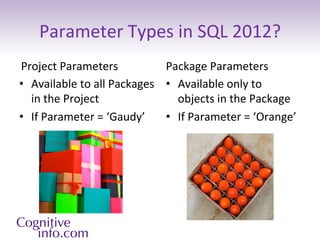
Parameter	
  Types	
  in	
  SQL	
  2012?	
  
Project	
  Parameters	
                   Package	
  Parameters	
  
•  Available	
  to	
  all	
  Packages	
   •  Available	
  only	
  to	
  
   in	
  the	
  Project	
                    objects	
  in	
  the	
  Package	
  
•  If	
  Parameter	
  =	
  ‘Gaudy’	
   •  If	
  Parameter	
  =	
  ‘Orange’	
  
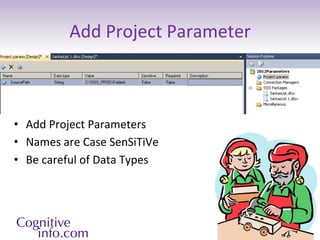
Add	
  Project	
  Parameter	


•  Add	
  Project	
  Parameters	
  
•  Names	
  are	
  Case	
  SenSiTiVe	
  
•  Be	
  careful	
  of	
  Data	
  Types	
  
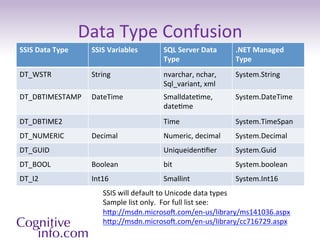
Data	
  Type	
  Confusion	
  
SSIS	
  Data	
  Type	
       SSIS	
  Variables	
     SQL	
  Server	
  Data	
     .NET	
  Managed	
  
                                                     Type	
  	
                  Type	
  
DT_WSTR	
                    String	
                nvarchar,	
  nchar,	
       System.String	
  
                                                     Sql_variant,	
  xml	
  
DT_DBTIMESTAMP	
             DateTime	
              Smalldate3me,	
             System.DateTime	
  
                                                     date3me	
  
DT_DBTIME2	
                                         Time	
                      System.TimeSpan	
  
DT_NUMERIC	
                 Decimal	
               Numeric,	
  decimal	
       System.Decimal	
  
DT_GUID	
                                            Uniqueiden3fier	
            System.Guid	
  
DT_BOOL	
                    Boolean	
               bit	
                       System.boolean	
  
DT_I2	
                      Int16	
                 Smallint	
                  System.Int16	
  
                                  SSIS	
  will	
  default	
  to	
  Unicode	
  data	
  types	
  
                                  Sample	
  list	
  only.	
  	
  For	
  full	
  list	
  see:	
  
                                  hp://msdn.microsoi.com/en-­‐us/library/ms141036.aspx	
  
                                  hp://msdn.microsoi.com/en-­‐us/library/cc716729.aspx	


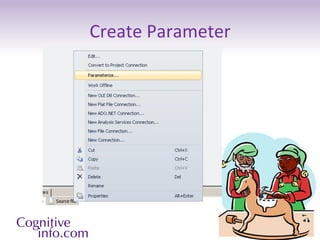
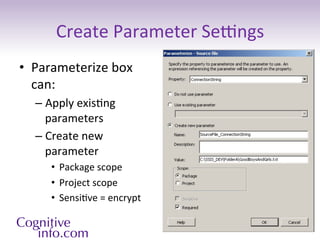
Create	
  Parameter	
  
Create	
  Parameter	
  Setngs	
  
•  Parameterize	
  box	
  
   can:	
  
   –  Apply	
  exis3ng	
  
      parameters	
  
   –  Create	
  new	
  
      parameter	
  
       •  Package	
  scope	
  
       •  Project	
  scope	
  
       •  Sensi3ve	
  =	
  encrypt	
  
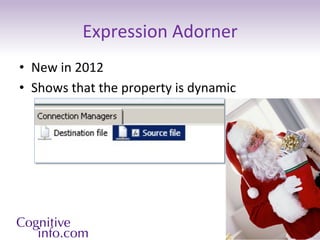
Expression	
  Adorner	
  
•  New	
  in	
  2012	
  
•  Shows	
  that	
  the	
  property	
  is	
  dynamic	
  
Christmas	
  Catalog!	
  
•  SSIS	
  Catalog	
  
    –  Must	
  be	
  created	
  
    –  Manage	
  and	
  query	
  with	
  T-­‐SQL	
  
        •  Projects	
  
             –  Project	
  versioning	
  
        •  Packages	
  
        •  Parameters	
  	
  
             –  can	
  be	
  encrypted	
  
        •  Environments	
  
    –  Objects	
  secured	
  in	
  folders	
  
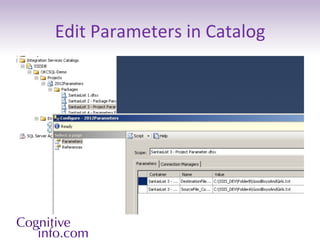
Edit	
  Parameters	
  in	
  Catalog	
  
Edit	
  Parameter	
  with	
  T-­‐SQL	
  
DECLARE	
  @var	
  sql_variant	
  =	
  N'C:SSIS_DEVFolderC
GoodBoysAndGirls.txt'	
  
EXEC	
  [SSISDB].[catalog].[set_object_parameter_value]	
  	
  
@object_type=30,	
  
@parameter_name=N'Des3na3onFile_Connec3onString’	
  
,@object_name=N'SantasList	
  3	
  -­‐	
  Project	
  Parameter.dtsx’	
  
,	
  @folder_name=N'OKCSQL-­‐Demo’	
  
,	
  @project_name=N'2012Parameters’	
  
,	
  @value_type=V	
  
,	
  @parameter_value=@var	
  
GO	


Environments,	
  Variables	
  &	
  Projects	
  
•  Create	
  Environments	
  
    –  Dev,	
  Test,	
  Prod,	
  etc.	
  
•  Create	
  Variables	
  in	
  each	
  
   Environment	
  
•  Configure	
  Project	
  References	
  to	
  
   Environments	
  
•  	
  Configure	
  Project	
  Parameter	
  to	
  
   use	
  Environment	
  Variable	
  
                                                    Huh?	


                                                    Demo	
  
                                                    Please	
  
SSIS	
  Parameter	
  Summary	
  
•  Parameters	
  vs.	
  Configura3ons	
  depends	
  on	
  
   deployment	
  decisions	
  
•  Parameter	
  Type	
  depends	
  on	
  deployment	
  
•  Be	
  careful	
  about	
  data	
  types!	
  
•  SSIS	
  Catalog	
  is	
  very	
  useful	
  
   and	
  powerful	
  
References	
  
•  Professional	
  Microsoi	
  SQL	
  Server	
  2012	
  Integra3on	
  Services	
  
     –  by	
  Brian	
  Knight,	
  Erik	
  Veerman,	
  Jessica	
  M.	
  Moss,	
  Mike	
  Davis,	
  Chris	
  Rock	
  	
  
•  2008R2	
  –	
  Defining	
  a	
  Configura3on	
  Approach	
  
     –  hp://msdn.microsoi.com/en-­‐us/library/cc671625.aspx	
  
•  2012	
  SSIS	
  Parameter	
  Basics	
  
     –  hp://msdn.microsoi.com/en-­‐us/library/hh213214.aspx	
  
•  2012	
  SSIS	
  Catalog	
  
     –  hp://msdn.microsoi.com/en-­‐us/library/hh479588.aspx	


•  Crea3ve	
  Commons	
  Aribu3ons:	
  	
  
   hp://www.flickr.com/photos/gazeronly/	
  
•  hp://www.flickr.com/photos/calsidyrose/	
  
Merry Christmas
      and
Happy New Year!

SSIS 2012: Parameters vs. Configurations

  • 1.
    SSIS  Parameters  vs.   Configura3ons   New  tricks  in  2012!  
  • 2.
    SSIS  Parameters  vs.  Configura3ons   •  Christmas  Past  –  SQL  2008  R2     –  Configura3ons   •  Sta3c   •  Basic  SQL  table   •  Dynamic   •  Christmas  Present  SQL  2012     –  Parameters   –  Variables  
  • 3.
    Allen  Smith   •  Business  Intelligence  developer   •  Cogni3ve  Informa3on,  Inc.  in  Edmond,  OK   •  Specialize  in  BI  and  Data  Warehousing  in   healthcare,  insurance  and  energy  industries.   •  Email:    asmith@cogni3veinfo.com   Twier:  @Cogni3veBI   3    |       12/10/12    |   Footer  Goes  Here  
  • 4.
    Ghost  of  Christmas  Past     SSIS  2008  R2   •  Package  Configura3ons   –  Sta3c  Configura3ons   –  Dynamic  Configura3ons   •  XML  files   •  Database  lookup   •  System  Variables     –  Combina3ons   •  Example:    System  Variables  point     Database  Server   •  Database  stores  other  variables  
  • 5.
    SQL  Configura3on  Table   •  SSIS  Menu  ‘Package  Configura3ons’   –  Wizard  will  create  connec3on  and  table   •  Select  Proper3es  to  export  to  SQL  
  • 6.
    2008R2  Dynamic  Configura3on   Opera3ng  System   SSIS  Package   SSIS  Connec3on   SSIS  Loads  Variables   • OS  Loads  two  (2)   • Loads  OS  Variables  into  Package   • SSIS  Loads  Server  Name  Variable   • Database  table  used  for  remaining   Environmental  Variables:   loca3ons   into  a  ‘Connec3on  Manager’   variables.   • SSIS_Config_Server_Name   • Load  order  is  important.   • SSIS_Root_DIR  
  • 7.
    2008R2  Dynamic  Configura3on   Opera3ng  System   SSIS  Package   SSIS  Connec3on   SSIS  Loads  Variables   • OS  Loads  two  (2)   • Loads  OS  Variables  into  Package   • SSIS  Loads  Server  Name  Variable   • Database  table  used  for  remaining   Environmental  Variables:   loca3ons   into  a  ‘Connec3on  Manager’   variables.   • SSIS_Config_Server_Name   • Load  order  is  important.   • SSIS_Root_DIR  
  • 8.
    2008R2  Dynamic  Configura3on   Opera3ng  System   SSIS  Package   SSIS  Connec3on   SSIS  Loads  Variables   • OS  Loads  two  (2)   • Loads  OS  Variables  into  Package   • SSIS  Loads  Server  Name  Variable   • Database  table  used  for  remaining   Environmental  Variables:   loca3ons   into  a  ‘Connec3on  Manager’   variables.   • SSIS_Config_Server_Name   • Load  order  is  important.   • SSIS_Root_DIR  
  • 9.
    2008R2  Dynamic  Configura3on   Opera3ng  System   SSIS  Package   SSIS  Connec3on   SSIS  Loads  Variables   • OS  Loads  two  (2)   • Loads  OS  Variables  into  Package   • SSIS  Loads  Server  Name  Variable   • Database  table  used  for  remaining   Environmental  Variables:   loca3ons   into  a  ‘Connec3on  Manager’   variables.   • SSIS_Config_Server_Name   • Load  order  is  important.   • SSIS_Root_DIR  
  • 10.
    Dynamic  or  Sta3c?   Get  BIDSHelper!   hp://bidshelper.codeplex.com   •  Sta3c   •  SQL  Config     Sta3c  Values   •  Dynamic  SQL   will  be  over   wrien  by   configura3on!    
  • 11.
  • 12.
    SQL2008  R2  Summary   •  Configura3ons     –  Allow  flexible  deployment   –  Can  be  sta3c  or  dynamic   –  S3ll  supported  in  SQL  2012     •  Get  BIDS  Helper  to  quickly     iden3fy  dynamic  connec3ons.  
  • 13.
    New  in  SSIS  2012   •  Deployment  Op3ons   •  Server  Management   –  Environments   –  SSISDB  Catalog   •  Development  Environment  Enhancements   –  Parameters   •  Performance  Improvements   hp://msdn.microsoi.com/en-­‐us/library/bb522534.aspx  
  • 14.
    Deployment  Choices…   Project  Deployment  Model   Package  Deployment   Project  deployed  as  a  unit   Packages  deployed  separately   Parameters  are  used  to  assign  values  to   Use  Configura3ons   package  proper3es.   Deployed  to  the  SSISDB   Copied  to  file  system  or  saved  to  MSDB   Parameters  are  managed  with  SQL:   Configura3ons  are  updated  in  SQL  table.   set_execu3on_parameter_value   Project  Parameters  NOT  called  during   execu3on.    FAIL!   hp://msdn.microsoi.com/en-­‐us/library/hh213290.aspx    
  • 15.
    Parameter  Types  in  SQL  2012?   Project  Parameters   Package  Parameters   •  Available  to  all  Packages   •  Available  only  to   in  the  Project   objects  in  the  Package   •  If  Parameter  =  ‘Gaudy’   •  If  Parameter  =  ‘Orange’  
  • 16.
    Add  Project  Parameter   •  Add  Project  Parameters   •  Names  are  Case  SenSiTiVe   •  Be  careful  of  Data  Types  
  • 17.
    Data  Type  Confusion   SSIS  Data  Type   SSIS  Variables   SQL  Server  Data   .NET  Managed   Type     Type   DT_WSTR   String   nvarchar,  nchar,   System.String   Sql_variant,  xml   DT_DBTIMESTAMP   DateTime   Smalldate3me,   System.DateTime   date3me   DT_DBTIME2   Time   System.TimeSpan   DT_NUMERIC   Decimal   Numeric,  decimal   System.Decimal   DT_GUID   Uniqueiden3fier   System.Guid   DT_BOOL   Boolean   bit   System.boolean   DT_I2   Int16   Smallint   System.Int16   SSIS  will  default  to  Unicode  data  types   Sample  list  only.    For  full  list  see:   hp://msdn.microsoi.com/en-­‐us/library/ms141036.aspx   hp://msdn.microsoi.com/en-­‐us/library/cc716729.aspx    
  • 18.
  • 19.
    Create  Parameter  Setngs   •  Parameterize  box   can:   –  Apply  exis3ng   parameters   –  Create  new   parameter   •  Package  scope   •  Project  scope   •  Sensi3ve  =  encrypt  
  • 20.
    Expression  Adorner   • New  in  2012   •  Shows  that  the  property  is  dynamic  
  • 21.
    Christmas  Catalog!   • SSIS  Catalog   –  Must  be  created   –  Manage  and  query  with  T-­‐SQL   •  Projects   –  Project  versioning   •  Packages   •  Parameters     –  can  be  encrypted   •  Environments   –  Objects  secured  in  folders  
  • 22.
  • 23.
    Edit  Parameter  with  T-­‐SQL   DECLARE  @var  sql_variant  =  N'C:SSIS_DEVFolderC GoodBoysAndGirls.txt'   EXEC  [SSISDB].[catalog].[set_object_parameter_value]     @object_type=30,   @parameter_name=N'Des3na3onFile_Connec3onString’   ,@object_name=N'SantasList  3  -­‐  Project  Parameter.dtsx’   ,  @folder_name=N'OKCSQL-­‐Demo’   ,  @project_name=N'2012Parameters’   ,  @value_type=V   ,  @parameter_value=@var   GO    
  • 24.
    Environments,  Variables  &  Projects   •  Create  Environments   –  Dev,  Test,  Prod,  etc.   •  Create  Variables  in  each   Environment   •  Configure  Project  References  to   Environments   •   Configure  Project  Parameter  to   use  Environment  Variable   Huh?     Demo   Please  
  • 25.
    SSIS  Parameter  Summary   •  Parameters  vs.  Configura3ons  depends  on   deployment  decisions   •  Parameter  Type  depends  on  deployment   •  Be  careful  about  data  types!   •  SSIS  Catalog  is  very  useful   and  powerful  
  • 26.
    References   •  Professional  Microsoi  SQL  Server  2012  Integra3on  Services   –  by  Brian  Knight,  Erik  Veerman,  Jessica  M.  Moss,  Mike  Davis,  Chris  Rock     •  2008R2  –  Defining  a  Configura3on  Approach   –  hp://msdn.microsoi.com/en-­‐us/library/cc671625.aspx   •  2012  SSIS  Parameter  Basics   –  hp://msdn.microsoi.com/en-­‐us/library/hh213214.aspx   •  2012  SSIS  Catalog   –  hp://msdn.microsoi.com/en-­‐us/library/hh479588.aspx     •  Crea3ve  Commons  Aribu3ons:     hp://www.flickr.com/photos/gazeronly/   •  hp://www.flickr.com/photos/calsidyrose/  
  • 27.
    Merry Christmas and Happy New Year!