Computer
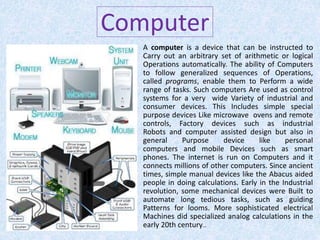
A computer is a device that can be instructed to
Carry out an arbitrary set of arithmetic or logical
Operations automatically. The ability of Computers
to follow generalized sequences of Operations,
called programs, enable them to Perform a wide
range of tasks. Such computers Are used as control
systems for a very wide Variety of industrial and
consumer devices. This Includes simple special
purpose devices Like microwave ovens and remote
controls, Factory devices such as industrial
Robots and computer assisted design but also in
general Purpose device like personal
computers and mobile Devices such as smart
phones. The internet is run on Computers and it
connects millions of other computers. Since ancient
times, simple manual devices like the Abacus aided
people in doing calculations. Early in the Industrial
revolution, some mechanical devices were Built to
automate long tedious tasks, such as guiding
Patterns for looms. More sophisticated electrical
Machines did specialized analog calculations in the
early 20th century..
Computer Parts
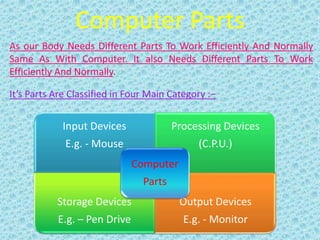
As our Body Needs Different Parts To Work Efficiently And Normally
Same As With Computer. It also Needs Different Parts To Work
Efficiently And Normally.
It’s Parts Are Classified in Four Main Category :−
Input Devices
E.g. - Mouse
Processing Devices
(C.P.U.)
Storage Devices
E.g. – Pen Drive
Output Devices
E.g. - Monitor
Computer
Parts
Input Devices
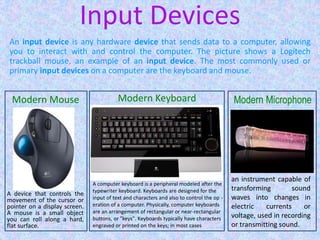
An input device is any hardware device that sends data to a computer, allowing
you to interact with and control the computer. The picture shows a Logitech
trackball mouse, an example of an input device. The most commonly used or
primary input devices on a computer are the keyboard and mouse.
A device that controls the
movement of the cursor or
pointer on a display screen.
A mouse is a small object
you can roll along a hard,
flat surface.
Modern Mouse
A computer keyboard is a peripheral modeled after the
typewriter keyboard. Keyboards are designed for the
input of text and characters and also to control the op -
eration of a computer. Physically, computer keyboards
are an arrangement of rectangular or near-rectangular
buttons, or "keys". Keyboards typically have characters
engraved or printed on the keys; in most cases
Modern Keyboard
an instrument capable of
transforming sound
waves into changes in
electric currents or
voltage, used in recording
or transmitting sound.
Modern Microphone
Processing Devices
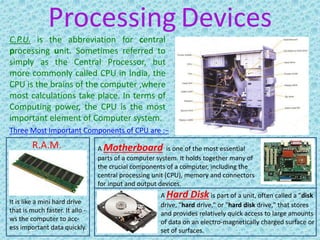
C.P.U. is the abbreviation for central
processing unit. Sometimes referred to
simply as the Central Processor, but
more commonly called CPU in India, the
CPU is the brains of the computer ,where
most calculations take place. In terms of
Computing power, the CPU is the most
important element of Computer system.
It is like a mini hard drive
that is much faster. It allo -
ws the computer to acc-
ess important data quickly.
Three Most Important Components of CPU are :−
R.A.M.
A Hard Disk is part of a unit, often called a "disk
drive, "hard drive," or "hard disk drive," that stores
and provides relatively quick access to large amounts
of data on an electro-magnetically charged surface or
set of surfaces.
A Motherboard is one of the most essential
parts of a computer system. It holds together many of
the crucial components of a computer, including the
central processing unit (CPU), memory and connectors
for input and output devices.
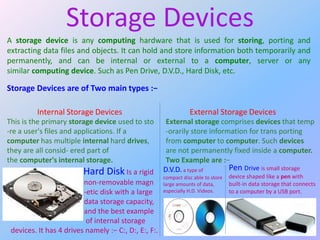
A storage device is any computing hardware that is used for storing, porting and
extracting data files and objects. It can hold and store information both temporarily and
permanently, and can be internal or external to a computer, server or any
similar computing device. Such as Pen Drive, D.V.D., Hard Disk, etc.
Storage Devices are of Two main types :−
Storage Devices
Internal Storage Devices
Hard Disk Is a rigid
non-removable magn
-etic disk with a large
data storage capacity,
and the best example
of internal storage
devices. It has 4 drives namely :− C:, D:, E:, F:.
This is the primary storage device used to sto
-re a user's files and applications. If a
computer has multiple internal hard drives,
they are all consid- ered part of
the computer's internal storage.
External Storage Devices
External storage comprises devices that temp
-orarily store information for trans porting
from computer to computer. Such devices
are not permanently fixed inside a computer.
Two Example are :−
D.V.D. a type of
compact disc able to store
large amounts of data,
especially H.D. Videos.
Pen Drive is small storage
device shaped like a pen with
built-in data storage that connects
to a computer by a USB port.
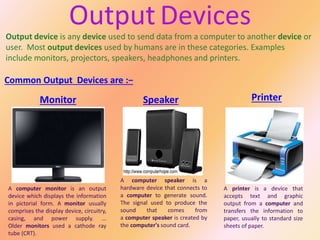
Output device is any device used to send data from a computer to another device or
user. Most output devices used by humans are in these categories. Examples
include monitors, projectors, speakers, headphones and printers.
Common Output Devices are :−
Output Devices
Monitor Speaker Printer
A brief basic description on Computer Parts

A brief basic description on Computer Parts

  • 1.
    Computer A computer isa device that can be instructed to Carry out an arbitrary set of arithmetic or logical Operations automatically. The ability of Computers to follow generalized sequences of Operations, called programs, enable them to Perform a wide range of tasks. Such computers Are used as control systems for a very wide Variety of industrial and consumer devices. This Includes simple special purpose devices Like microwave ovens and remote controls, Factory devices such as industrial Robots and computer assisted design but also in general Purpose device like personal computers and mobile Devices such as smart phones. The internet is run on Computers and it connects millions of other computers. Since ancient times, simple manual devices like the Abacus aided people in doing calculations. Early in the Industrial revolution, some mechanical devices were Built to automate long tedious tasks, such as guiding Patterns for looms. More sophisticated electrical Machines did specialized analog calculations in the early 20th century..
  • 2.
    Computer Parts As ourBody Needs Different Parts To Work Efficiently And Normally Same As With Computer. It also Needs Different Parts To Work Efficiently And Normally. It’s Parts Are Classified in Four Main Category :− Input Devices E.g. - Mouse Processing Devices (C.P.U.) Storage Devices E.g. – Pen Drive Output Devices E.g. - Monitor Computer Parts
  • 3.
    Input Devices An inputdevice is any hardware device that sends data to a computer, allowing you to interact with and control the computer. The picture shows a Logitech trackball mouse, an example of an input device. The most commonly used or primary input devices on a computer are the keyboard and mouse. A device that controls the movement of the cursor or pointer on a display screen. A mouse is a small object you can roll along a hard, flat surface. Modern Mouse A computer keyboard is a peripheral modeled after the typewriter keyboard. Keyboards are designed for the input of text and characters and also to control the op - eration of a computer. Physically, computer keyboards are an arrangement of rectangular or near-rectangular buttons, or "keys". Keyboards typically have characters engraved or printed on the keys; in most cases Modern Keyboard an instrument capable of transforming sound waves into changes in electric currents or voltage, used in recording or transmitting sound. Modern Microphone
  • 4.
    Processing Devices C.P.U. isthe abbreviation for central processing unit. Sometimes referred to simply as the Central Processor, but more commonly called CPU in India, the CPU is the brains of the computer ,where most calculations take place. In terms of Computing power, the CPU is the most important element of Computer system. It is like a mini hard drive that is much faster. It allo - ws the computer to acc- ess important data quickly. Three Most Important Components of CPU are :− R.A.M. A Hard Disk is part of a unit, often called a "disk drive, "hard drive," or "hard disk drive," that stores and provides relatively quick access to large amounts of data on an electro-magnetically charged surface or set of surfaces. A Motherboard is one of the most essential parts of a computer system. It holds together many of the crucial components of a computer, including the central processing unit (CPU), memory and connectors for input and output devices.
  • 5.
    A storage deviceis any computing hardware that is used for storing, porting and extracting data files and objects. It can hold and store information both temporarily and permanently, and can be internal or external to a computer, server or any similar computing device. Such as Pen Drive, D.V.D., Hard Disk, etc. Storage Devices are of Two main types :− Storage Devices Internal Storage Devices Hard Disk Is a rigid non-removable magn -etic disk with a large data storage capacity, and the best example of internal storage devices. It has 4 drives namely :− C:, D:, E:, F:. This is the primary storage device used to sto -re a user's files and applications. If a computer has multiple internal hard drives, they are all consid- ered part of the computer's internal storage. External Storage Devices External storage comprises devices that temp -orarily store information for trans porting from computer to computer. Such devices are not permanently fixed inside a computer. Two Example are :− D.V.D. a type of compact disc able to store large amounts of data, especially H.D. Videos. Pen Drive is small storage device shaped like a pen with built-in data storage that connects to a computer by a USB port.
  • 6.
    Output device isany device used to send data from a computer to another device or user. Most output devices used by humans are in these categories. Examples include monitors, projectors, speakers, headphones and printers. Common Output Devices are :− Output Devices Monitor Speaker Printer