10 IT, Term 4 2012

Mr. Miles

GAME DESIGN BRIEF
Student Name: Taylor Shirtliff

Information and Communication
Technologies
Semester 2 2006
Game Development
ICT GAME DEVELOPMENT
As part of your assessment for this unit of work you will need to complete a DESIGN
BRIEF. This can be done before you start the game development or as you go along but
must be handed in by 22nd November, 2012. Submit this to MyPLS
The ideas for your game should be original and of your own creation. You may use the
help manuals on the school network, online resources from
http://ictmindtools.net/gamemaker/ or http://www.yoyogames.com/make and any other
resources that you have access to. However, you should not get help from other students,
friends or teachers in the creation of your game.
The following sheets should be completed electronically as you go along and the checklist
completed before you hand everything in by the deadline.
You may use some of the objects from the libraries but must also have some elements
that you have designed yourself. The more original your designs the higher marks your
game will attract.
Examples could be
•

A murder mystery adventure set in a haunted house (quiz)

•

Find the treasure adventure set underwater (maze)

•

Eliminate and evade enemies (first person shooter)

•

Rescue the princess from the castle dungeon (platform)

Game Development
ICT GAME DEVELOPMENT

Game Ideas Planning
Select from the following (or add your own) to help get your creative juices flowing, and
then complete the tables that follow.
What challenges will your game have?:
•

Finding hidden objects

•

Fast reactions

•

Solving puzzles or problems

•

Mazes

•

Shoot at targets

•

Word games

•

Escape from or rescue
something

•

Memory
challenge

•

Coordination

•

Something else

Decide the environment in which you game will be played:
•

Underwater

•

School

•

Cave system

•

Fairground

•

Space

•

Factory

•

Moonscape

•

Village or town

•

Castle

•

City

•

Land or monsters

•

Forest

•

Ancient city

•

Somewhere else

Choose the characters you will have:
•

Pilot

•

Animals

•

Alien

•

Ghost

•

Monsters

•

Witches and
wizards

•

Dragons

•

Knights

•

Spaceships

•

Mythical creatures

•

Fantasy creates

•

Knights

•

Prince/princess

•

Soldiers

Game Development
ICT GAME DEVELOPMENT
My Game Ideas
Selections
Once you have decided on a game idea, describe what that is and list the different environments
your game will have; the characters and challenges associated with each in the fields below:
General Game Idea (not a Game Play)
(Describe briefly here)
A single commando (The player) fights endless hordes of enemy nazis.
Environment 1

Characters x2

1. Snow

1. Havok
2. Nazi Foot Soldier Level
1

Environment 2

Characters x3

Challenges x2
1. Kill the nazis
2. Reach the other end of the forest.

Challenges x2

1. Havok
1.
Forests/Jungles

Environment 3

2. Nazi Foot Soldier Level
1
3. Nazi Foot Soldier Level
2
4. Nazi Tank

3. Eliminate the Nazis

Characters x4

Challenges x2

4. Reach the objective

1. Havok
2. Nazi Foot Soldier Level
1
1. Wasteland
3. Nazi Foot Soldier Level
2
4. Nazi Tank
(add more rows if required)

Game Development

1. Eliminate the Nazi occupation forces
2. Reach the end objective
ICT GAME DEVELOPMENT

My Game Elements
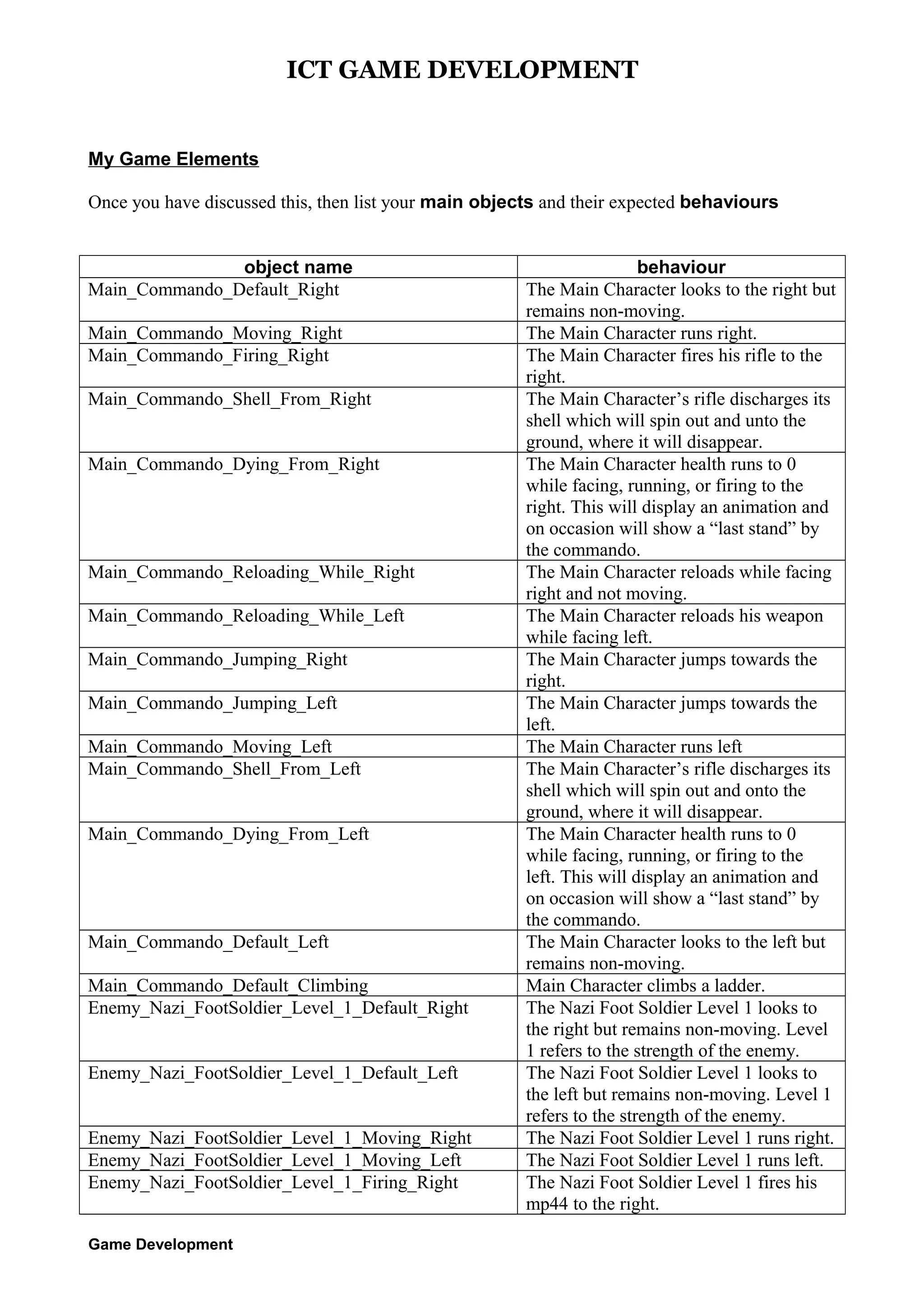
Once you have discussed this, then list your main objects and their expected behaviours
object name
Main_Commando_Default_Right
Main_Commando_Moving_Right
Main_Commando_Firing_Right
Main_Commando_Shell_From_Right
Main_Commando_Dying_From_Right

Main_Commando_Reloading_While_Right
Main_Commando_Reloading_While_Left
Main_Commando_Jumping_Right
Main_Commando_Jumping_Left
Main_Commando_Moving_Left
Main_Commando_Shell_From_Left
Main_Commando_Dying_From_Left

Main_Commando_Default_Left
Main_Commando_Default_Climbing
Enemy_Nazi_FootSoldier_Level_1_Default_Right
Enemy_Nazi_FootSoldier_Level_1_Default_Left
Enemy_Nazi_FootSoldier_Level_1_Moving_Right
Enemy_Nazi_FootSoldier_Level_1_Moving_Left
Enemy_Nazi_FootSoldier_Level_1_Firing_Right
Game Development

behaviour
The Main Character looks to the right but
remains non-moving.
The Main Character runs right.
The Main Character fires his rifle to the
right.
The Main Character’s rifle discharges its
shell which will spin out and unto the
ground, where it will disappear.
The Main Character health runs to 0
while facing, running, or firing to the
right. This will display an animation and
on occasion will show a “last stand” by
the commando.
The Main Character reloads while facing
right and not moving.
The Main Character reloads his weapon
while facing left.
The Main Character jumps towards the
right.
The Main Character jumps towards the
left.
The Main Character runs left
The Main Character’s rifle discharges its
shell which will spin out and onto the
ground, where it will disappear.
The Main Character health runs to 0
while facing, running, or firing to the
left. This will display an animation and
on occasion will show a “last stand” by
the commando.
The Main Character looks to the left but
remains non-moving.
Main Character climbs a ladder.
The Nazi Foot Soldier Level 1 looks to
the right but remains non-moving. Level
1 refers to the strength of the enemy.
The Nazi Foot Soldier Level 1 looks to
the left but remains non-moving. Level 1
refers to the strength of the enemy.
The Nazi Foot Soldier Level 1 runs right.
The Nazi Foot Soldier Level 1 runs left.
The Nazi Foot Soldier Level 1 fires his
mp44 to the right.
ICT GAME DEVELOPMENT
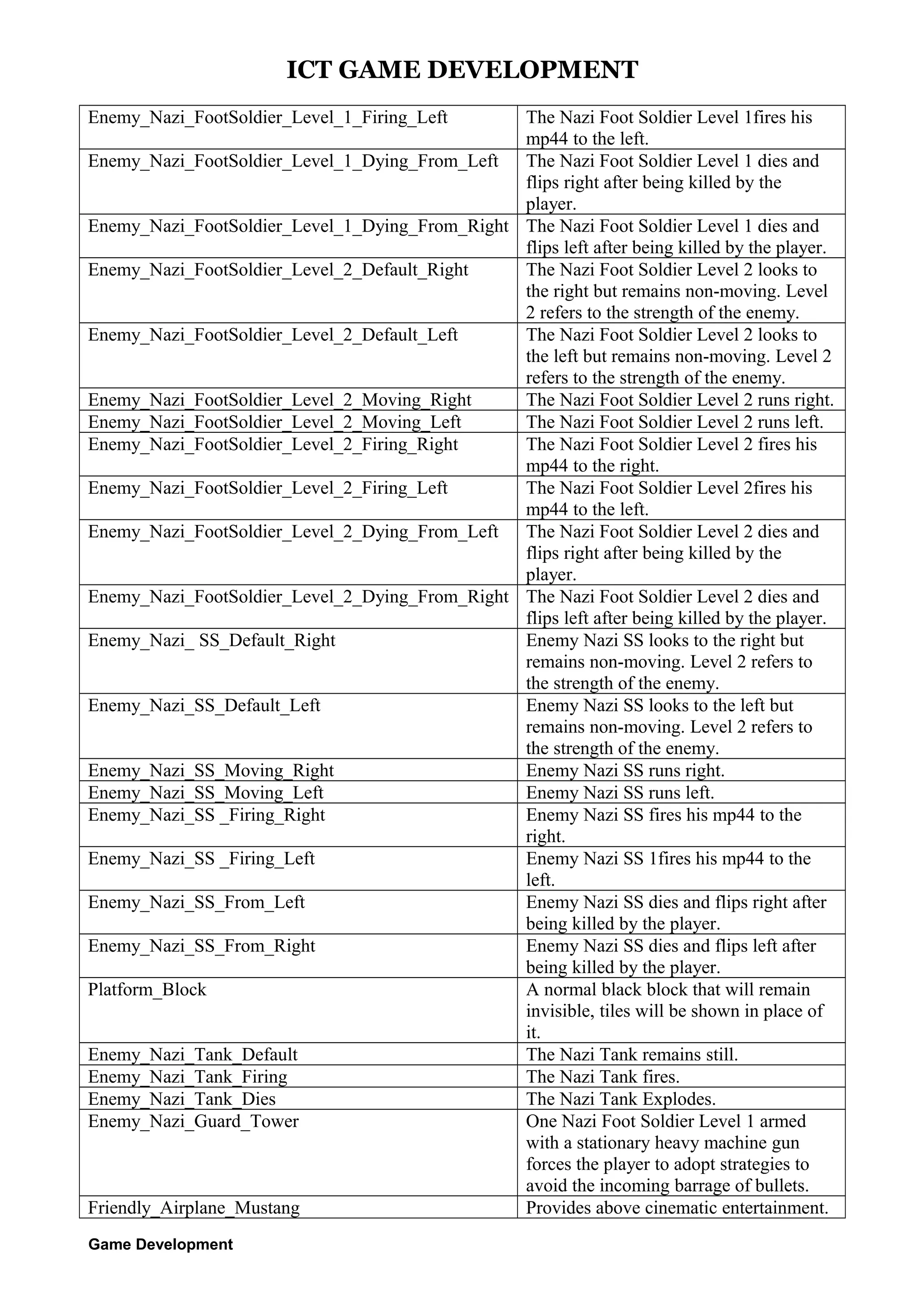
Enemy_Nazi_FootSoldier_Level_1_Firing_Left

The Nazi Foot Soldier Level 1fires his
mp44 to the left.
Enemy_Nazi_FootSoldier_Level_1_Dying_From_Left The Nazi Foot Soldier Level 1 dies and
flips right after being killed by the
player.
Enemy_Nazi_FootSoldier_Level_1_Dying_From_Right The Nazi Foot Soldier Level 1 dies and
flips left after being killed by the player.
Enemy_Nazi_FootSoldier_Level_2_Default_Right
The Nazi Foot Soldier Level 2 looks to
the right but remains non-moving. Level
2 refers to the strength of the enemy.
Enemy_Nazi_FootSoldier_Level_2_Default_Left
The Nazi Foot Soldier Level 2 looks to
the left but remains non-moving. Level 2
refers to the strength of the enemy.
Enemy_Nazi_FootSoldier_Level_2_Moving_Right
The Nazi Foot Soldier Level 2 runs right.
Enemy_Nazi_FootSoldier_Level_2_Moving_Left
The Nazi Foot Soldier Level 2 runs left.
Enemy_Nazi_FootSoldier_Level_2_Firing_Right
The Nazi Foot Soldier Level 2 fires his
mp44 to the right.
Enemy_Nazi_FootSoldier_Level_2_Firing_Left
The Nazi Foot Soldier Level 2fires his
mp44 to the left.
Enemy_Nazi_FootSoldier_Level_2_Dying_From_Left The Nazi Foot Soldier Level 2 dies and
flips right after being killed by the
player.
Enemy_Nazi_FootSoldier_Level_2_Dying_From_Right The Nazi Foot Soldier Level 2 dies and
flips left after being killed by the player.
Enemy_Nazi_ SS_Default_Right
Enemy Nazi SS looks to the right but
remains non-moving. Level 2 refers to
the strength of the enemy.
Enemy_Nazi_SS_Default_Left
Enemy Nazi SS looks to the left but
remains non-moving. Level 2 refers to
the strength of the enemy.
Enemy_Nazi_SS_Moving_Right
Enemy Nazi SS runs right.
Enemy_Nazi_SS_Moving_Left
Enemy Nazi SS runs left.
Enemy_Nazi_SS _Firing_Right
Enemy Nazi SS fires his mp44 to the
right.
Enemy_Nazi_SS _Firing_Left
Enemy Nazi SS 1fires his mp44 to the
left.
Enemy_Nazi_SS_From_Left
Enemy Nazi SS dies and flips right after
being killed by the player.
Enemy_Nazi_SS_From_Right
Enemy Nazi SS dies and flips left after
being killed by the player.
Platform_Block
A normal black block that will remain
invisible, tiles will be shown in place of
it.
Enemy_Nazi_Tank_Default
The Nazi Tank remains still.
Enemy_Nazi_Tank_Firing
The Nazi Tank fires.
Enemy_Nazi_Tank_Dies
The Nazi Tank Explodes.
Enemy_Nazi_Guard_Tower
One Nazi Foot Soldier Level 1 armed
with a stationary heavy machine gun
forces the player to adopt strategies to
avoid the incoming barrage of bullets.
Friendly_Airplane_Mustang
Provides above cinematic entertainment.
Game Development
ICT GAME DEVELOPMENT
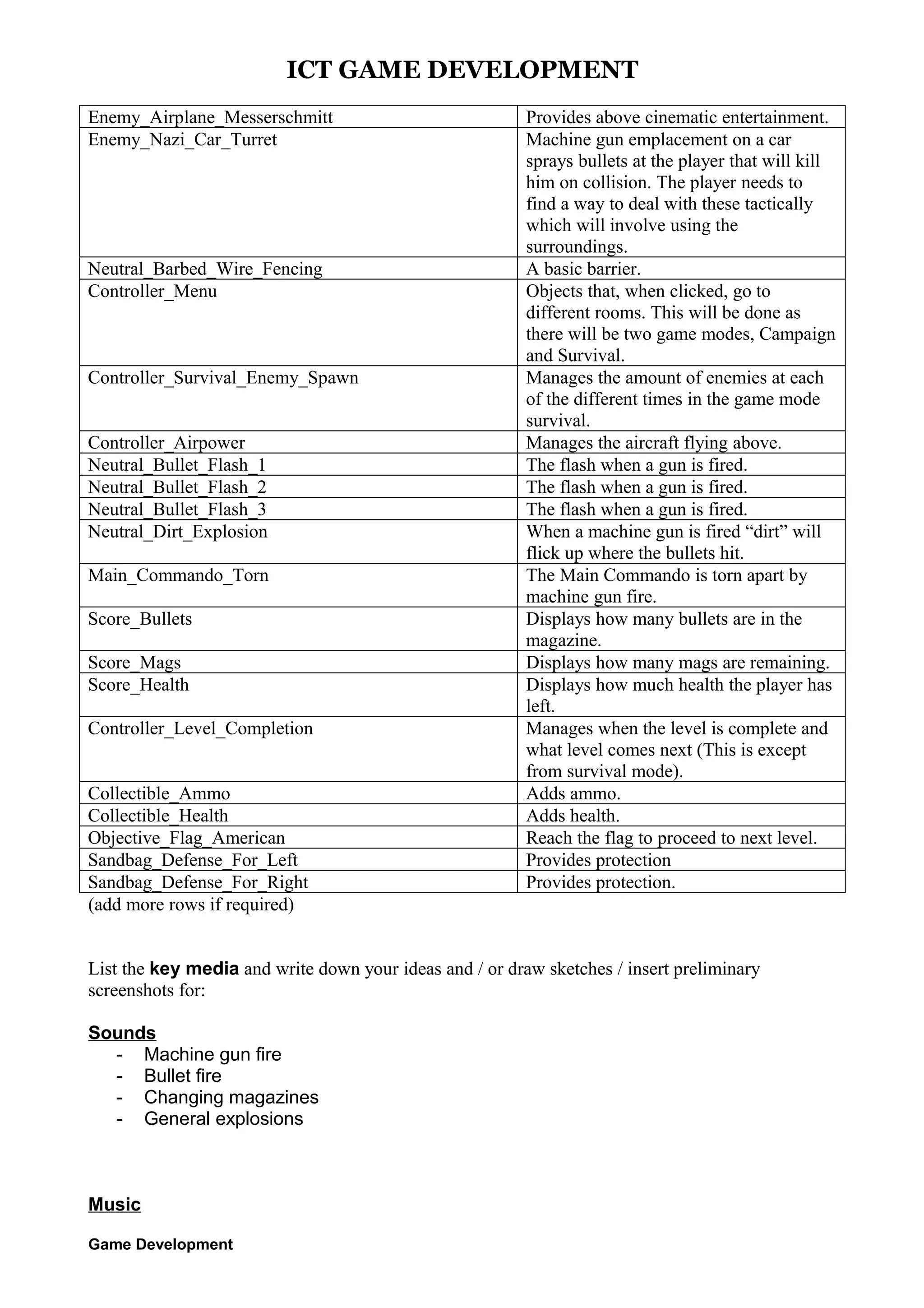
Enemy_Airplane_Messerschmitt
Enemy_Nazi_Car_Turret

Neutral_Barbed_Wire_Fencing
Controller_Menu

Controller_Survival_Enemy_Spawn
Controller_Airpower
Neutral_Bullet_Flash_1
Neutral_Bullet_Flash_2
Neutral_Bullet_Flash_3
Neutral_Dirt_Explosion
Main_Commando_Torn
Score_Bullets
Score_Mags
Score_Health
Controller_Level_Completion
Collectible_Ammo
Collectible_Health
Objective_Flag_American
Sandbag_Defense_For_Left
Sandbag_Defense_For_Right
(add more rows if required)

Provides above cinematic entertainment.
Machine gun emplacement on a car
sprays bullets at the player that will kill
him on collision. The player needs to
find a way to deal with these tactically
which will involve using the
surroundings.
A basic barrier.
Objects that, when clicked, go to
different rooms. This will be done as
there will be two game modes, Campaign
and Survival.
Manages the amount of enemies at each
of the different times in the game mode
survival.
Manages the aircraft flying above.
The flash when a gun is fired.
When a machine gun is fired “dirt” will
flick up where the bullets hit.
The Main Commando is torn apart by
machine gun fire.
Displays how many bullets are in the
magazine.
Displays how many mags are remaining.
Displays how much health the player has
left.
Manages when the level is complete and
what level comes next (This is except
from survival mode).
Adds ammo.
Adds health.
Reach the flag to proceed to next level.
Provides protection
Provides protection.

List the key media and write down your ideas and / or draw sketches / insert preliminary
screenshots for:
Sounds
- Machine gun fire
- Bullet fire
- Changing magazines
- General explosions

Music
Game Development
ICT GAME DEVELOPMENT
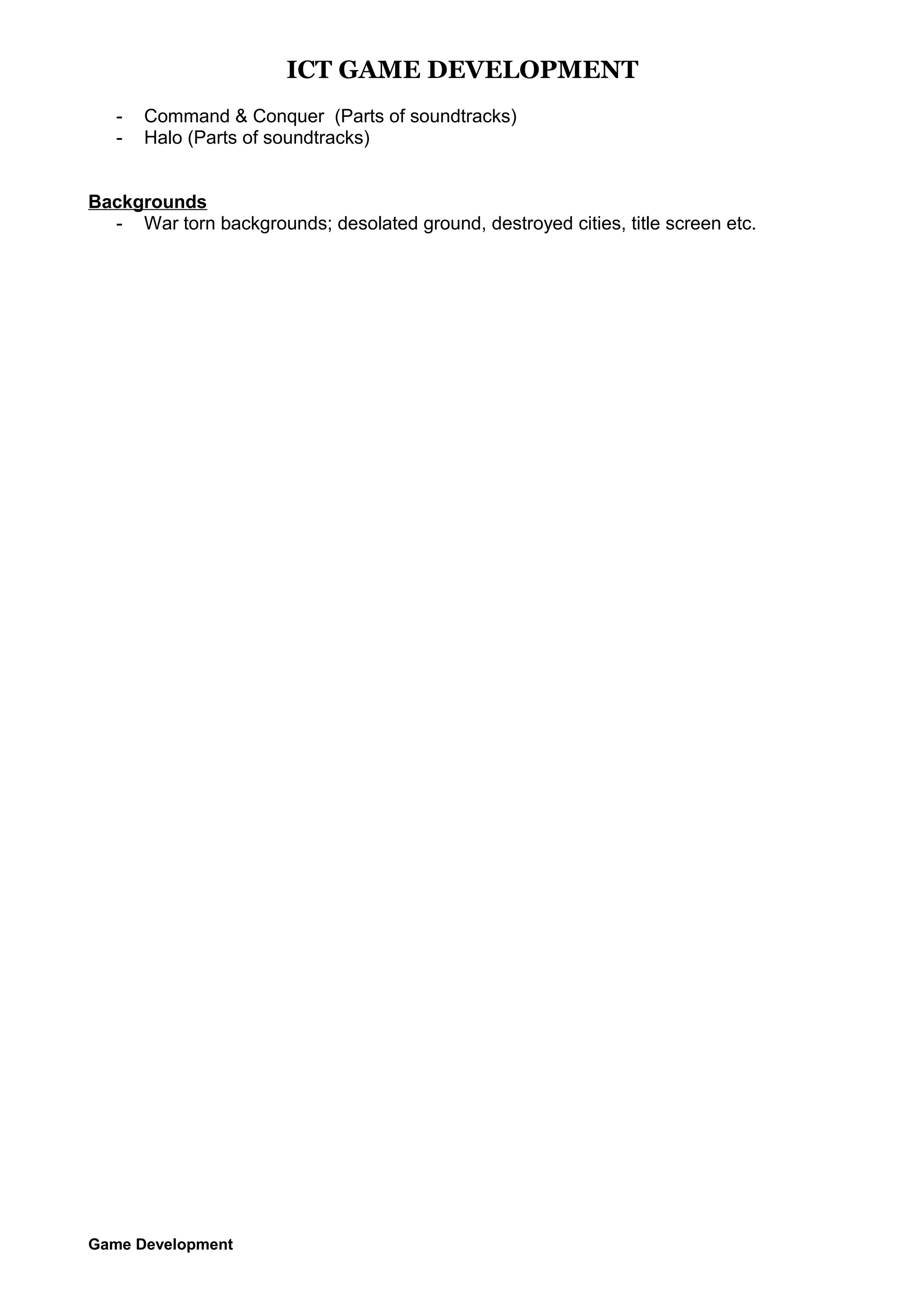
-

Command & Conquer (Parts of soundtracks)
Halo (Parts of soundtracks)

Backgrounds
- War torn backgrounds; desolated ground, destroyed cities, title screen etc.

Game Development
ICT GAME DEVELOPMENT

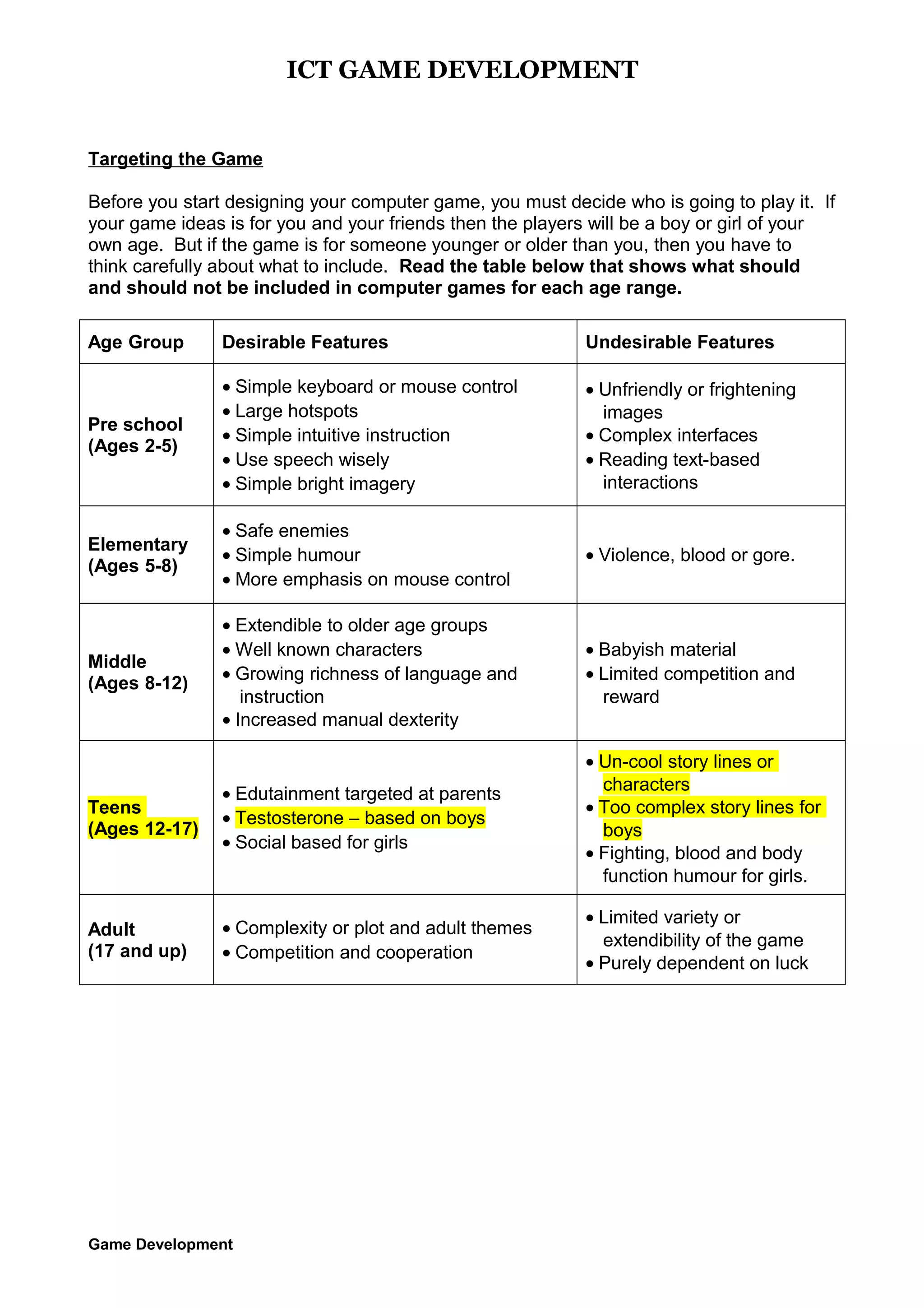
Targeting the Game
Before you start designing your computer game, you must decide who is going to play it. If
your game ideas is for you and your friends then the players will be a boy or girl of your
own age. But if the game is for someone younger or older than you, then you have to
think carefully about what to include. Read the table below that shows what should
and should not be included in computer games for each age range.
Age Group

Desirable Features

Undesirable Features

Pre school
(Ages 2-5)

• Simple keyboard or mouse control
• Large hotspots
• Simple intuitive instruction
• Use speech wisely
• Simple bright imagery

• Unfriendly or frightening
images
• Complex interfaces
• Reading text-based
interactions

Elementary
(Ages 5-8)

• Safe enemies
• Simple humour
• More emphasis on mouse control

• Violence, blood or gore.

Middle
(Ages 8-12)

• Extendible to older age groups
• Well known characters
• Growing richness of language and
instruction
• Increased manual dexterity

• Babyish material
• Limited competition and
reward

Teens
(Ages 12-17)

• Edutainment targeted at parents
• Testosterone – based on boys
• Social based for girls

• Un-cool story lines or
characters
• Too complex story lines for
boys
• Fighting, blood and body
function humour for girls.

Adult
(17 and up)

• Complexity or plot and adult themes
• Competition and cooperation

• Limited variety or
extendibility of the game
• Purely dependent on luck

Game Development
ICT GAME DEVELOPMENT
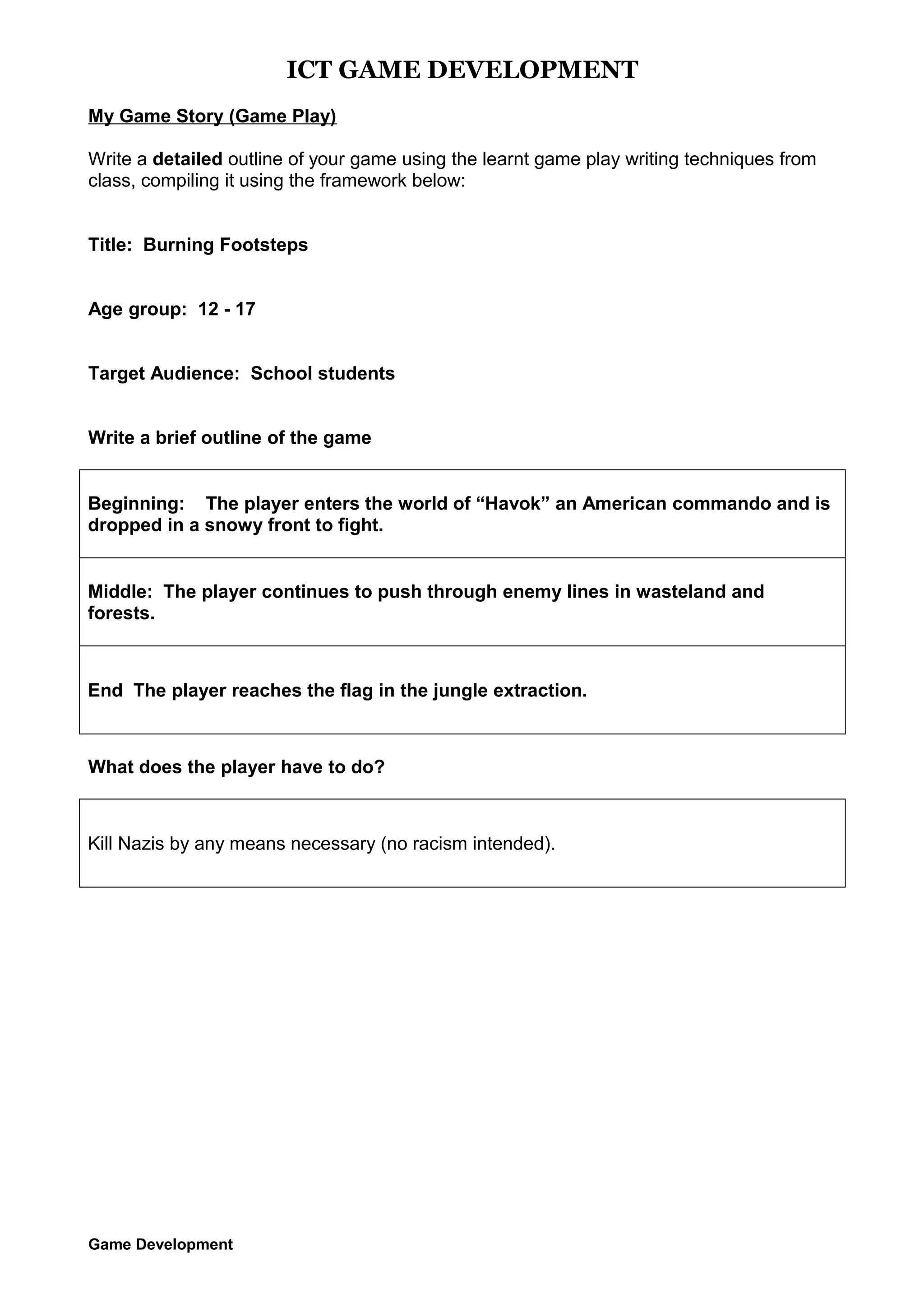
My Game Story (Game Play)
Write a detailed outline of your game using the learnt game play writing techniques from
class, compiling it using the framework below:
Title: Burning Footsteps
Age group: 12 - 17
Target Audience: School students
Write a brief outline of the game
Beginning: The player enters the world of “Havok” an American commando and is
dropped in a snowy front to fight.
Middle: The player continues to push through enemy lines in wasteland and
forests.

End The player reaches the flag in the jungle extraction.

What does the player have to do?

Kill Nazis by any means necessary (no racism intended).

Game Development
ICT GAME DEVELOPMENT
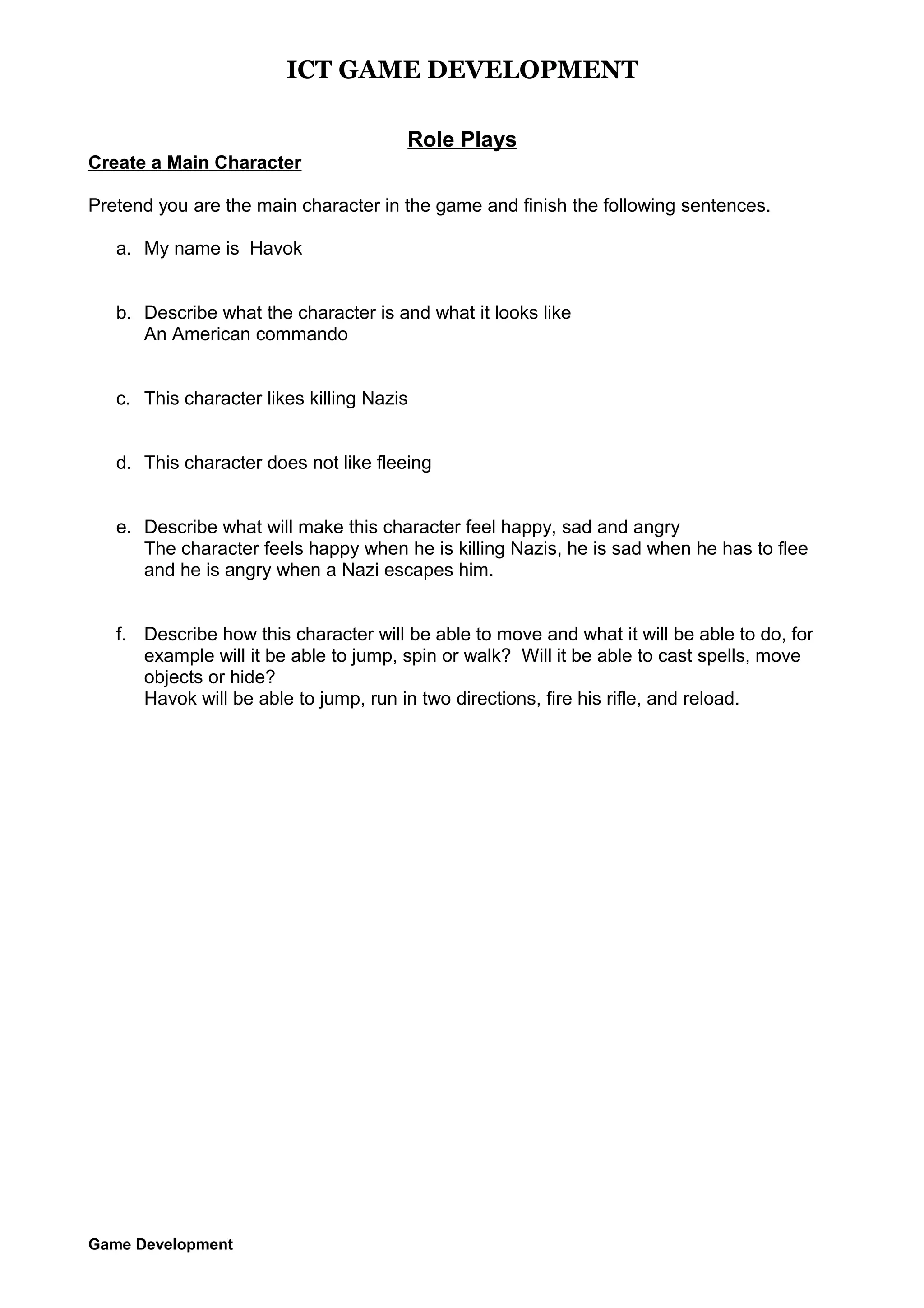
Role Plays
Create a Main Character
Pretend you are the main character in the game and finish the following sentences.
a. My name is Havok
b. Describe what the character is and what it looks like
An American commando
c. This character likes killing Nazis
d. This character does not like fleeing
e. Describe what will make this character feel happy, sad and angry
The character feels happy when he is killing Nazis, he is sad when he has to flee
and he is angry when a Nazi escapes him.
f. Describe how this character will be able to move and what it will be able to do, for
example will it be able to jump, spin or walk? Will it be able to cast spells, move
objects or hide?
Havok will be able to jump, run in two directions, fire his rifle, and reload.

Game Development
ICT GAME DEVELOPMENT
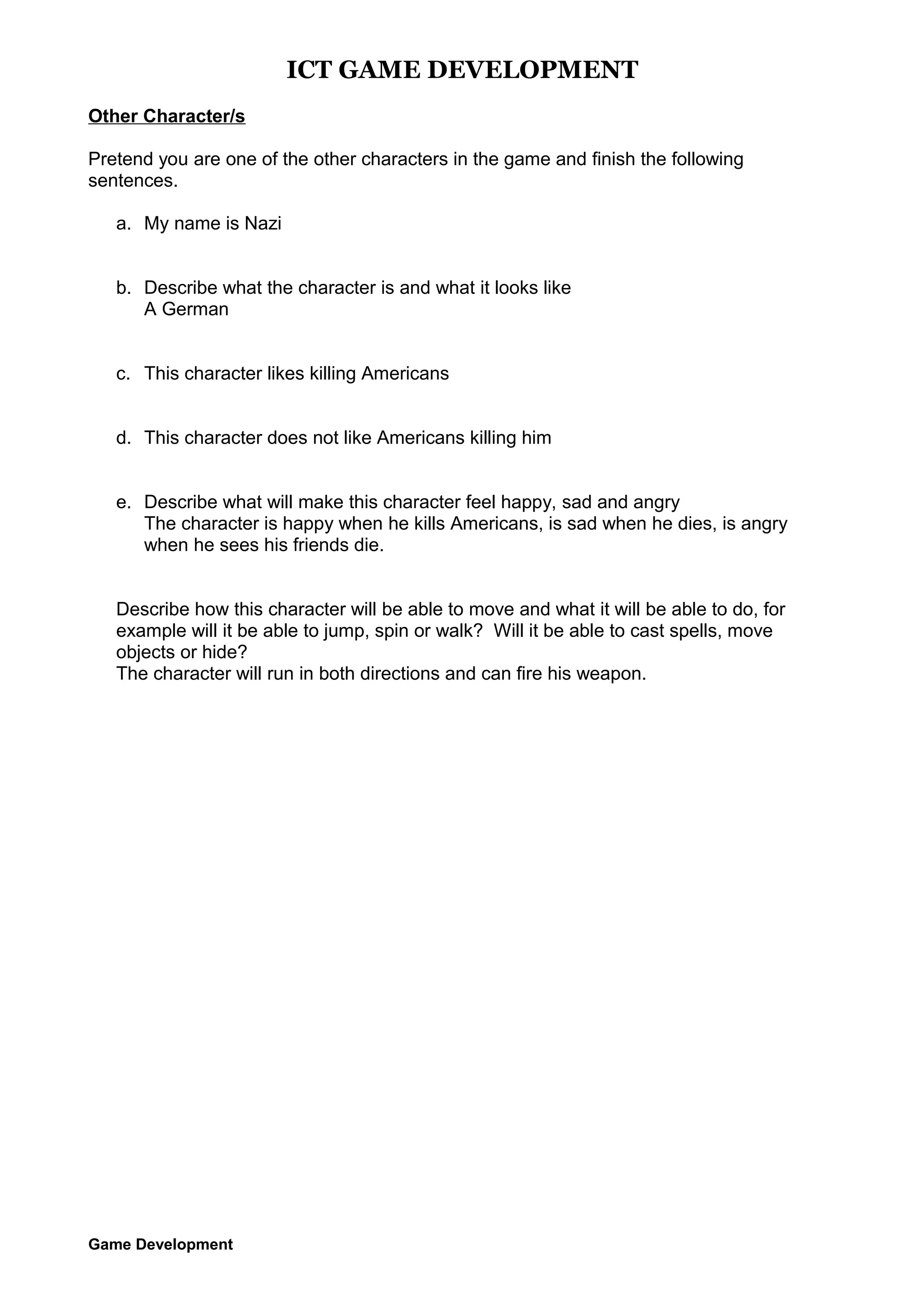
Other Character/s
Pretend you are one of the other characters in the game and finish the following
sentences.
a. My name is Nazi
b. Describe what the character is and what it looks like
A German
c. This character likes killing Americans
d. This character does not like Americans killing him
e. Describe what will make this character feel happy, sad and angry
The character is happy when he kills Americans, is sad when he dies, is angry
when he sees his friends die.
Describe how this character will be able to move and what it will be able to do, for
example will it be able to jump, spin or walk? Will it be able to cast spells, move
objects or hide?
The character will run in both directions and can fire his weapon.

Game Development
ICT GAME DEVELOPMENT
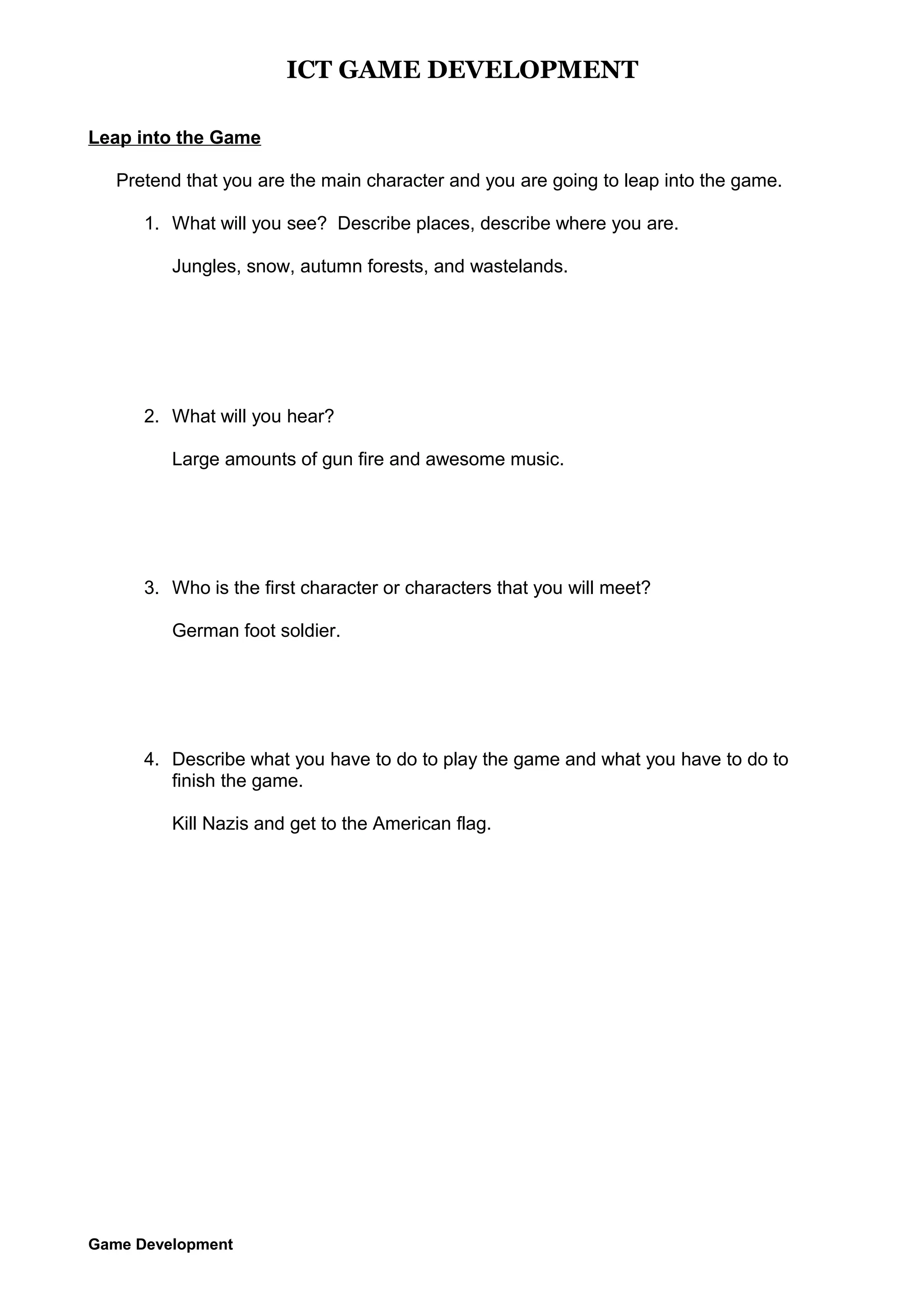
Leap into the Game
Pretend that you are the main character and you are going to leap into the game.
1. What will you see? Describe places, describe where you are.
Jungles, snow, autumn forests, and wastelands.

2. What will you hear?
Large amounts of gun fire and awesome music.

3. Who is the first character or characters that you will meet?
German foot soldier.

4. Describe what you have to do to play the game and what you have to do to
finish the game.
Kill Nazis and get to the American flag.

Game Development
ICT GAME DEVELOPMENT

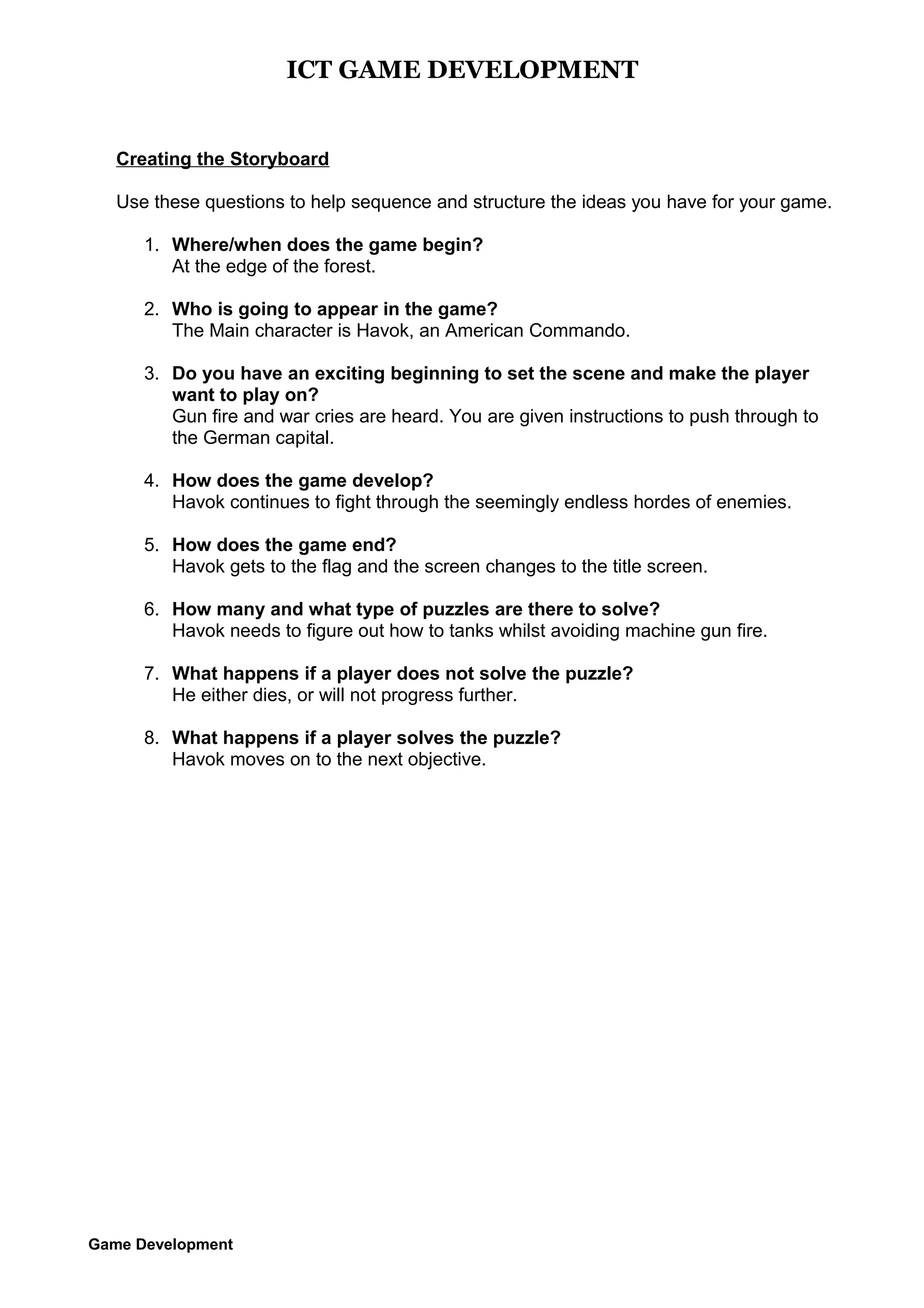
Creating the Storyboard
Use these questions to help sequence and structure the ideas you have for your game.
1. Where/when does the game begin?
At the edge of the forest.
2. Who is going to appear in the game?
The Main character is Havok, an American Commando.
3. Do you have an exciting beginning to set the scene and make the player
want to play on?
Gun fire and war cries are heard. You are given instructions to push through to
the German capital.
4. How does the game develop?
Havok continues to fight through the seemingly endless hordes of enemies.
5. How does the game end?
Havok gets to the flag and the screen changes to the title screen.
6. How many and what type of puzzles are there to solve?
Havok needs to figure out how to tanks whilst avoiding machine gun fire.
7. What happens if a player does not solve the puzzle?
He either dies, or will not progress further.
8. What happens if a player solves the puzzle?
Havok moves on to the next objective.

Game Development
ICT GAME DEVELOPMENT
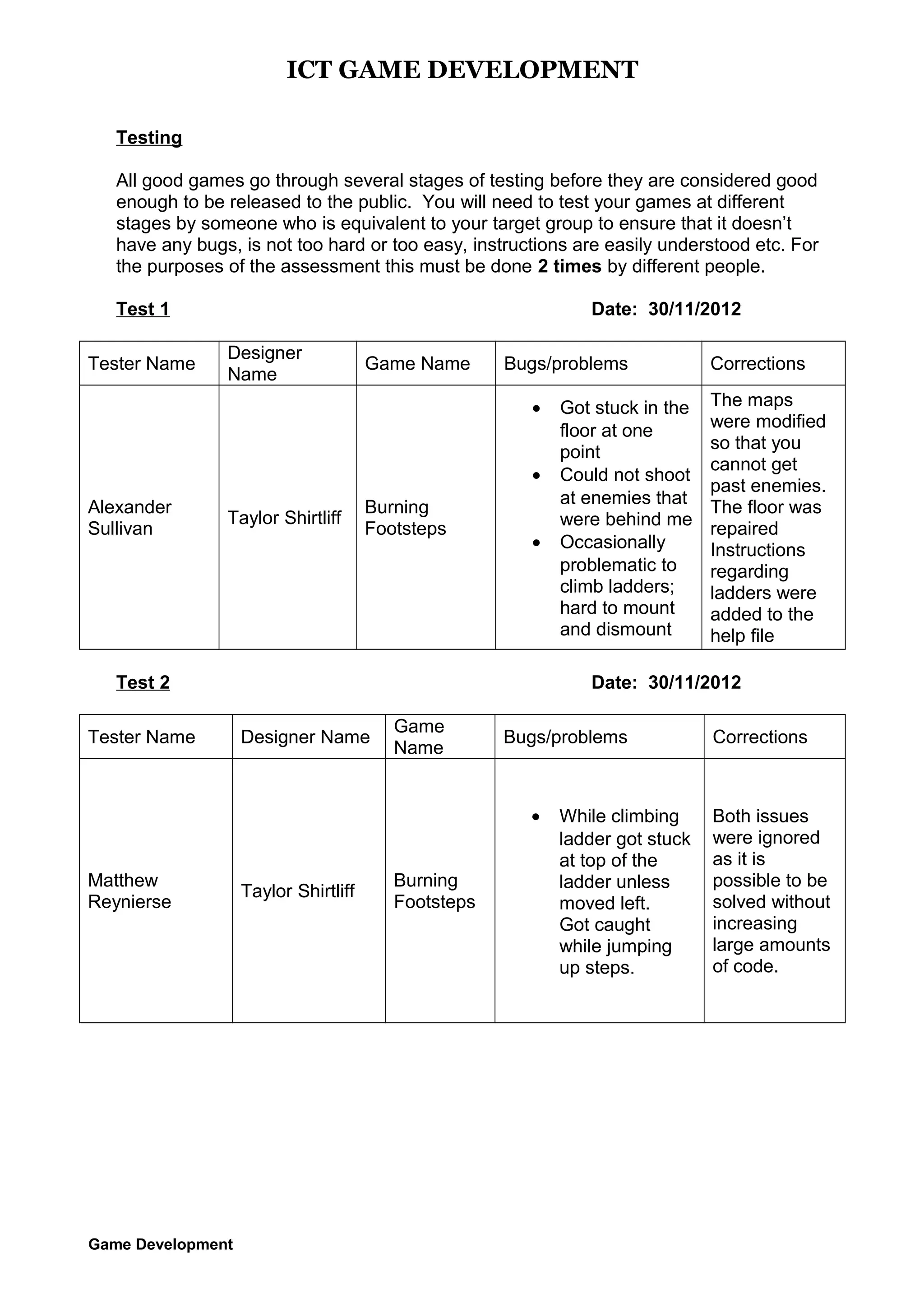
Testing
All good games go through several stages of testing before they are considered good
enough to be released to the public. You will need to test your games at different
stages by someone who is equivalent to your target group to ensure that it doesn’t
have any bugs, is not too hard or too easy, instructions are easily understood etc. For
the purposes of the assessment this must be done 2 times by different people.
Test 1
Tester Name

Date: 30/11/2012
Designer
Name

Game Name

Bugs/problems
•
•

Alexander
Sullivan

Taylor Shirtliff

Burning
Footsteps

•

Test 2
Tester Name

Game Development

The maps
were modified
so that you
cannot get
past enemies.
The floor was
repaired
Instructions
regarding
ladders were
added to the
help file

Date: 30/11/2012
Designer Name

Game
Name

Bugs/problems

•
Matthew
Reynierse

Got stuck in the
floor at one
point
Could not shoot
at enemies that
were behind me
Occasionally
problematic to
climb ladders;
hard to mount
and dismount

Corrections

Taylor Shirtliff

Burning
Footsteps

While climbing
ladder got stuck
at top of the
ladder unless
moved left.
Got caught
while jumping
up steps.

Corrections

Both issues
were ignored
as it is
possible to be
solved without
increasing
large amounts
of code.
ICT GAME DEVELOPMENT
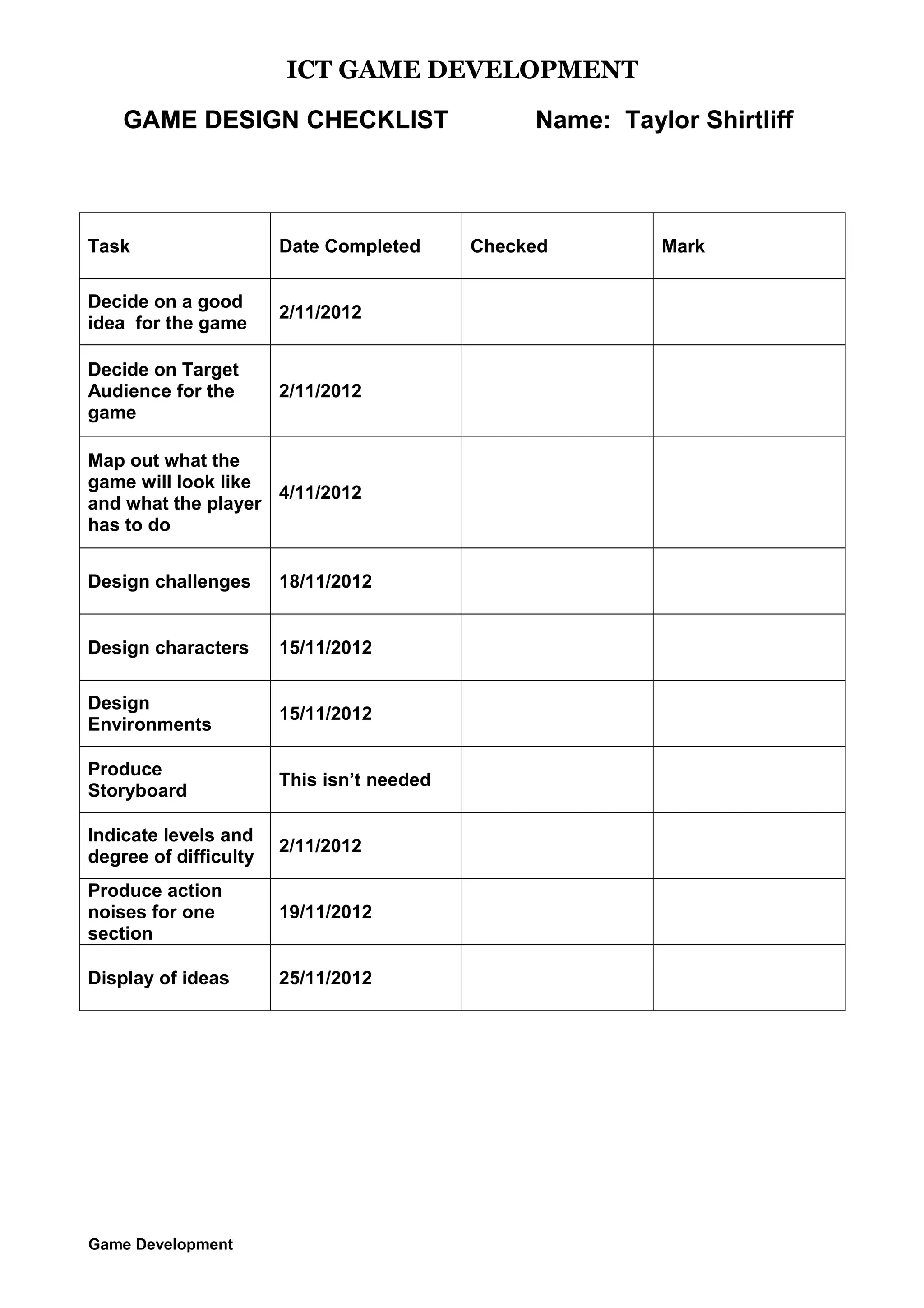
GAME DESIGN CHECKLIST

Name: Taylor Shirtliff

Task

Date Completed

Checked

Mark

Decide on a good
idea for the game

2/11/2012


Decide on Target
Audience for the
game

2/11/2012


Map out what the
game will look like
4/11/2012
and what the player
has to do


Design challenges

18/11/2012


Design characters

15/11/2012


Design
Environments

15/11/2012


Produce
Storyboard

This isn’t needed


Indicate levels and
degree of difficulty

2/11/2012


Produce action
noises for one
section

19/11/2012


Display of ideas

25/11/2012


Game Development

A

  • 1.
    10 IT, Term4 2012 Mr. Miles GAME DESIGN BRIEF Student Name: Taylor Shirtliff Information and Communication Technologies Semester 2 2006 Game Development
  • 2.
    ICT GAME DEVELOPMENT Aspart of your assessment for this unit of work you will need to complete a DESIGN BRIEF. This can be done before you start the game development or as you go along but must be handed in by 22nd November, 2012. Submit this to MyPLS The ideas for your game should be original and of your own creation. You may use the help manuals on the school network, online resources from http://ictmindtools.net/gamemaker/ or http://www.yoyogames.com/make and any other resources that you have access to. However, you should not get help from other students, friends or teachers in the creation of your game. The following sheets should be completed electronically as you go along and the checklist completed before you hand everything in by the deadline. You may use some of the objects from the libraries but must also have some elements that you have designed yourself. The more original your designs the higher marks your game will attract. Examples could be • A murder mystery adventure set in a haunted house (quiz) • Find the treasure adventure set underwater (maze) • Eliminate and evade enemies (first person shooter) • Rescue the princess from the castle dungeon (platform) Game Development
  • 3.
    ICT GAME DEVELOPMENT GameIdeas Planning Select from the following (or add your own) to help get your creative juices flowing, and then complete the tables that follow. What challenges will your game have?: • Finding hidden objects • Fast reactions • Solving puzzles or problems • Mazes • Shoot at targets • Word games • Escape from or rescue something • Memory challenge • Coordination • Something else Decide the environment in which you game will be played: • Underwater • School • Cave system • Fairground • Space • Factory • Moonscape • Village or town • Castle • City • Land or monsters • Forest • Ancient city • Somewhere else Choose the characters you will have: • Pilot • Animals • Alien • Ghost • Monsters • Witches and wizards • Dragons • Knights • Spaceships • Mythical creatures • Fantasy creates • Knights • Prince/princess • Soldiers Game Development
  • 4.
    ICT GAME DEVELOPMENT MyGame Ideas Selections Once you have decided on a game idea, describe what that is and list the different environments your game will have; the characters and challenges associated with each in the fields below: General Game Idea (not a Game Play) (Describe briefly here) A single commando (The player) fights endless hordes of enemy nazis. Environment 1 Characters x2 1. Snow 1. Havok 2. Nazi Foot Soldier Level 1 Environment 2 Characters x3 Challenges x2 1. Kill the nazis 2. Reach the other end of the forest. Challenges x2 1. Havok 1. Forests/Jungles Environment 3 2. Nazi Foot Soldier Level 1 3. Nazi Foot Soldier Level 2 4. Nazi Tank 3. Eliminate the Nazis Characters x4 Challenges x2 4. Reach the objective 1. Havok 2. Nazi Foot Soldier Level 1 1. Wasteland 3. Nazi Foot Soldier Level 2 4. Nazi Tank (add more rows if required) Game Development 1. Eliminate the Nazi occupation forces 2. Reach the end objective
  • 5.
    ICT GAME DEVELOPMENT MyGame Elements Once you have discussed this, then list your main objects and their expected behaviours object name Main_Commando_Default_Right Main_Commando_Moving_Right Main_Commando_Firing_Right Main_Commando_Shell_From_Right Main_Commando_Dying_From_Right Main_Commando_Reloading_While_Right Main_Commando_Reloading_While_Left Main_Commando_Jumping_Right Main_Commando_Jumping_Left Main_Commando_Moving_Left Main_Commando_Shell_From_Left Main_Commando_Dying_From_Left Main_Commando_Default_Left Main_Commando_Default_Climbing Enemy_Nazi_FootSoldier_Level_1_Default_Right Enemy_Nazi_FootSoldier_Level_1_Default_Left Enemy_Nazi_FootSoldier_Level_1_Moving_Right Enemy_Nazi_FootSoldier_Level_1_Moving_Left Enemy_Nazi_FootSoldier_Level_1_Firing_Right Game Development behaviour The Main Character looks to the right but remains non-moving. The Main Character runs right. The Main Character fires his rifle to the right. The Main Character’s rifle discharges its shell which will spin out and unto the ground, where it will disappear. The Main Character health runs to 0 while facing, running, or firing to the right. This will display an animation and on occasion will show a “last stand” by the commando. The Main Character reloads while facing right and not moving. The Main Character reloads his weapon while facing left. The Main Character jumps towards the right. The Main Character jumps towards the left. The Main Character runs left The Main Character’s rifle discharges its shell which will spin out and onto the ground, where it will disappear. The Main Character health runs to 0 while facing, running, or firing to the left. This will display an animation and on occasion will show a “last stand” by the commando. The Main Character looks to the left but remains non-moving. Main Character climbs a ladder. The Nazi Foot Soldier Level 1 looks to the right but remains non-moving. Level 1 refers to the strength of the enemy. The Nazi Foot Soldier Level 1 looks to the left but remains non-moving. Level 1 refers to the strength of the enemy. The Nazi Foot Soldier Level 1 runs right. The Nazi Foot Soldier Level 1 runs left. The Nazi Foot Soldier Level 1 fires his mp44 to the right.
  • 6.
    ICT GAME DEVELOPMENT Enemy_Nazi_FootSoldier_Level_1_Firing_Left TheNazi Foot Soldier Level 1fires his mp44 to the left. Enemy_Nazi_FootSoldier_Level_1_Dying_From_Left The Nazi Foot Soldier Level 1 dies and flips right after being killed by the player. Enemy_Nazi_FootSoldier_Level_1_Dying_From_Right The Nazi Foot Soldier Level 1 dies and flips left after being killed by the player. Enemy_Nazi_FootSoldier_Level_2_Default_Right The Nazi Foot Soldier Level 2 looks to the right but remains non-moving. Level 2 refers to the strength of the enemy. Enemy_Nazi_FootSoldier_Level_2_Default_Left The Nazi Foot Soldier Level 2 looks to the left but remains non-moving. Level 2 refers to the strength of the enemy. Enemy_Nazi_FootSoldier_Level_2_Moving_Right The Nazi Foot Soldier Level 2 runs right. Enemy_Nazi_FootSoldier_Level_2_Moving_Left The Nazi Foot Soldier Level 2 runs left. Enemy_Nazi_FootSoldier_Level_2_Firing_Right The Nazi Foot Soldier Level 2 fires his mp44 to the right. Enemy_Nazi_FootSoldier_Level_2_Firing_Left The Nazi Foot Soldier Level 2fires his mp44 to the left. Enemy_Nazi_FootSoldier_Level_2_Dying_From_Left The Nazi Foot Soldier Level 2 dies and flips right after being killed by the player. Enemy_Nazi_FootSoldier_Level_2_Dying_From_Right The Nazi Foot Soldier Level 2 dies and flips left after being killed by the player. Enemy_Nazi_ SS_Default_Right Enemy Nazi SS looks to the right but remains non-moving. Level 2 refers to the strength of the enemy. Enemy_Nazi_SS_Default_Left Enemy Nazi SS looks to the left but remains non-moving. Level 2 refers to the strength of the enemy. Enemy_Nazi_SS_Moving_Right Enemy Nazi SS runs right. Enemy_Nazi_SS_Moving_Left Enemy Nazi SS runs left. Enemy_Nazi_SS _Firing_Right Enemy Nazi SS fires his mp44 to the right. Enemy_Nazi_SS _Firing_Left Enemy Nazi SS 1fires his mp44 to the left. Enemy_Nazi_SS_From_Left Enemy Nazi SS dies and flips right after being killed by the player. Enemy_Nazi_SS_From_Right Enemy Nazi SS dies and flips left after being killed by the player. Platform_Block A normal black block that will remain invisible, tiles will be shown in place of it. Enemy_Nazi_Tank_Default The Nazi Tank remains still. Enemy_Nazi_Tank_Firing The Nazi Tank fires. Enemy_Nazi_Tank_Dies The Nazi Tank Explodes. Enemy_Nazi_Guard_Tower One Nazi Foot Soldier Level 1 armed with a stationary heavy machine gun forces the player to adopt strategies to avoid the incoming barrage of bullets. Friendly_Airplane_Mustang Provides above cinematic entertainment. Game Development
  • 7.
    ICT GAME DEVELOPMENT Enemy_Airplane_Messerschmitt Enemy_Nazi_Car_Turret Neutral_Barbed_Wire_Fencing Controller_Menu Controller_Survival_Enemy_Spawn Controller_Airpower Neutral_Bullet_Flash_1 Neutral_Bullet_Flash_2 Neutral_Bullet_Flash_3 Neutral_Dirt_Explosion Main_Commando_Torn Score_Bullets Score_Mags Score_Health Controller_Level_Completion Collectible_Ammo Collectible_Health Objective_Flag_American Sandbag_Defense_For_Left Sandbag_Defense_For_Right (addmore rows if required) Provides above cinematic entertainment. Machine gun emplacement on a car sprays bullets at the player that will kill him on collision. The player needs to find a way to deal with these tactically which will involve using the surroundings. A basic barrier. Objects that, when clicked, go to different rooms. This will be done as there will be two game modes, Campaign and Survival. Manages the amount of enemies at each of the different times in the game mode survival. Manages the aircraft flying above. The flash when a gun is fired. The flash when a gun is fired. The flash when a gun is fired. When a machine gun is fired “dirt” will flick up where the bullets hit. The Main Commando is torn apart by machine gun fire. Displays how many bullets are in the magazine. Displays how many mags are remaining. Displays how much health the player has left. Manages when the level is complete and what level comes next (This is except from survival mode). Adds ammo. Adds health. Reach the flag to proceed to next level. Provides protection Provides protection. List the key media and write down your ideas and / or draw sketches / insert preliminary screenshots for: Sounds - Machine gun fire - Bullet fire - Changing magazines - General explosions Music Game Development
  • 8.
    ICT GAME DEVELOPMENT - Command& Conquer (Parts of soundtracks) Halo (Parts of soundtracks) Backgrounds - War torn backgrounds; desolated ground, destroyed cities, title screen etc. Game Development
  • 9.
    ICT GAME DEVELOPMENT Targetingthe Game Before you start designing your computer game, you must decide who is going to play it. If your game ideas is for you and your friends then the players will be a boy or girl of your own age. But if the game is for someone younger or older than you, then you have to think carefully about what to include. Read the table below that shows what should and should not be included in computer games for each age range. Age Group Desirable Features Undesirable Features Pre school (Ages 2-5) • Simple keyboard or mouse control • Large hotspots • Simple intuitive instruction • Use speech wisely • Simple bright imagery • Unfriendly or frightening images • Complex interfaces • Reading text-based interactions Elementary (Ages 5-8) • Safe enemies • Simple humour • More emphasis on mouse control • Violence, blood or gore. Middle (Ages 8-12) • Extendible to older age groups • Well known characters • Growing richness of language and instruction • Increased manual dexterity • Babyish material • Limited competition and reward Teens (Ages 12-17) • Edutainment targeted at parents • Testosterone – based on boys • Social based for girls • Un-cool story lines or characters • Too complex story lines for boys • Fighting, blood and body function humour for girls. Adult (17 and up) • Complexity or plot and adult themes • Competition and cooperation • Limited variety or extendibility of the game • Purely dependent on luck Game Development
  • 10.
    ICT GAME DEVELOPMENT MyGame Story (Game Play) Write a detailed outline of your game using the learnt game play writing techniques from class, compiling it using the framework below: Title: Burning Footsteps Age group: 12 - 17 Target Audience: School students Write a brief outline of the game Beginning: The player enters the world of “Havok” an American commando and is dropped in a snowy front to fight. Middle: The player continues to push through enemy lines in wasteland and forests. End The player reaches the flag in the jungle extraction. What does the player have to do? Kill Nazis by any means necessary (no racism intended). Game Development
  • 11.
    ICT GAME DEVELOPMENT RolePlays Create a Main Character Pretend you are the main character in the game and finish the following sentences. a. My name is Havok b. Describe what the character is and what it looks like An American commando c. This character likes killing Nazis d. This character does not like fleeing e. Describe what will make this character feel happy, sad and angry The character feels happy when he is killing Nazis, he is sad when he has to flee and he is angry when a Nazi escapes him. f. Describe how this character will be able to move and what it will be able to do, for example will it be able to jump, spin or walk? Will it be able to cast spells, move objects or hide? Havok will be able to jump, run in two directions, fire his rifle, and reload. Game Development
  • 12.
    ICT GAME DEVELOPMENT OtherCharacter/s Pretend you are one of the other characters in the game and finish the following sentences. a. My name is Nazi b. Describe what the character is and what it looks like A German c. This character likes killing Americans d. This character does not like Americans killing him e. Describe what will make this character feel happy, sad and angry The character is happy when he kills Americans, is sad when he dies, is angry when he sees his friends die. Describe how this character will be able to move and what it will be able to do, for example will it be able to jump, spin or walk? Will it be able to cast spells, move objects or hide? The character will run in both directions and can fire his weapon. Game Development
  • 13.
    ICT GAME DEVELOPMENT Leapinto the Game Pretend that you are the main character and you are going to leap into the game. 1. What will you see? Describe places, describe where you are. Jungles, snow, autumn forests, and wastelands. 2. What will you hear? Large amounts of gun fire and awesome music. 3. Who is the first character or characters that you will meet? German foot soldier. 4. Describe what you have to do to play the game and what you have to do to finish the game. Kill Nazis and get to the American flag. Game Development
  • 14.
    ICT GAME DEVELOPMENT Creatingthe Storyboard Use these questions to help sequence and structure the ideas you have for your game. 1. Where/when does the game begin? At the edge of the forest. 2. Who is going to appear in the game? The Main character is Havok, an American Commando. 3. Do you have an exciting beginning to set the scene and make the player want to play on? Gun fire and war cries are heard. You are given instructions to push through to the German capital. 4. How does the game develop? Havok continues to fight through the seemingly endless hordes of enemies. 5. How does the game end? Havok gets to the flag and the screen changes to the title screen. 6. How many and what type of puzzles are there to solve? Havok needs to figure out how to tanks whilst avoiding machine gun fire. 7. What happens if a player does not solve the puzzle? He either dies, or will not progress further. 8. What happens if a player solves the puzzle? Havok moves on to the next objective. Game Development
  • 15.
    ICT GAME DEVELOPMENT Testing Allgood games go through several stages of testing before they are considered good enough to be released to the public. You will need to test your games at different stages by someone who is equivalent to your target group to ensure that it doesn’t have any bugs, is not too hard or too easy, instructions are easily understood etc. For the purposes of the assessment this must be done 2 times by different people. Test 1 Tester Name Date: 30/11/2012 Designer Name Game Name Bugs/problems • • Alexander Sullivan Taylor Shirtliff Burning Footsteps • Test 2 Tester Name Game Development The maps were modified so that you cannot get past enemies. The floor was repaired Instructions regarding ladders were added to the help file Date: 30/11/2012 Designer Name Game Name Bugs/problems • Matthew Reynierse Got stuck in the floor at one point Could not shoot at enemies that were behind me Occasionally problematic to climb ladders; hard to mount and dismount Corrections Taylor Shirtliff Burning Footsteps While climbing ladder got stuck at top of the ladder unless moved left. Got caught while jumping up steps. Corrections Both issues were ignored as it is possible to be solved without increasing large amounts of code.
  • 16.
    ICT GAME DEVELOPMENT GAMEDESIGN CHECKLIST Name: Taylor Shirtliff Task Date Completed Checked Mark Decide on a good idea for the game 2/11/2012             Decide on Target Audience for the game 2/11/2012             Map out what the game will look like 4/11/2012 and what the player has to do             Design challenges 18/11/2012             Design characters 15/11/2012             Design Environments 15/11/2012             Produce Storyboard This isn’t needed             Indicate levels and degree of difficulty 2/11/2012             Produce action noises for one section 19/11/2012             Display of ideas 25/11/2012             Game Development