Enhancing Independent Task Performance for MR Through Use of a Handheld Self-Directed Visual and Audio Prompting System
Outline Computer technology offers promising new approaches to reducing the dependence of people with mental retardation on others. A beta test of the utility of a Windows CE based multimedia palmtop computer program (Visual Assistant) for use in supporting individuals with mental retardation to more independently complete community-referenced vocational skills.
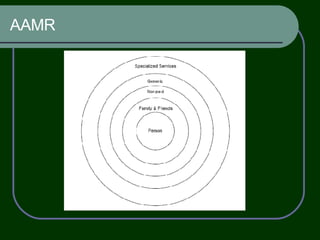
AAMR
Two principle barriers to multimedia computer-based training and support that must be addressed if people with MR are to benefit from such forms of support. First, there are limitations to use of such devices inherent (when the tasks that must be performed are away from the computer). Second, the most frequently used input devices (keyboard and mouse) are not easily mastered by people with MR Devices that operate the Windows CE operating system include an integrated touch screen for device operation and are specifically designed for portable use.
The training software developed for this platform involved using digital pictures of job tasks sequenced and linked with audio instructions. previously  to successfully teach MR the complex task of operating an automated teller machine perform various independent living and work tasks
One of the greatest advantages of using computer technology and multimedia for training is the ability to customize the training to meet the needs of the person. This system may allow individuals to learn more complex task sequences  Maximizing the advantages of individual control over the audio/picture sequences and the ability to repeat the training as many times as necessary to learn the task.
There are a number of parameters that need to be considered when examining the utility of computer assisted training and supports. Clear, uncluttered screens Consistent commands and features from screen to screen Appropriate sequencing and pacing A full range of appropriate examples Allow students to respond at a high rate Graphics and animation that contributes to, rather than distract from, learning Frequent, informative feedback Adequate number of opportunities for practice Multiple exposures to a word or a fact
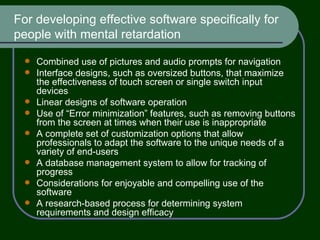
For developing effective software specifically for people with mental retardation Combined use of pictures and audio prompts for navigation Interface designs, such as oversized buttons, that maximize the effectiveness of touch screen or single switch input devices Linear designs of software operation Use of “Error minimization” features, such as removing buttons from the screen at times when their use is inappropriate A complete set of customization options that allow professionals to adapt the software to the unique needs of a variety of end-users A database management system to allow for tracking of progress Considerations for enjoyable and compelling use of the software A research-based process for determining system requirements and design efficacy
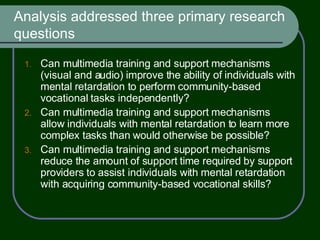
Analysis addressed three primary research questions Can multimedia training and support mechanisms (visual and audio) improve the ability of individuals with mental retardation to perform community-based vocational tasks independently?  Can multimedia training and support mechanisms allow individuals with mental retardation to learn more complex tasks than would otherwise be possible? Can multimedia training and support mechanisms reduce the amount of support time required by support providers to assist individuals with mental retardation with acquiring community-based vocational skills?
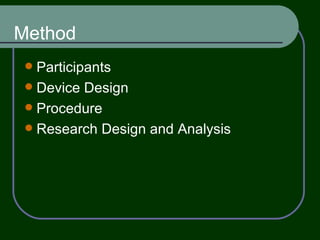
Method Participants Device Design Procedure Research Design and Analysis
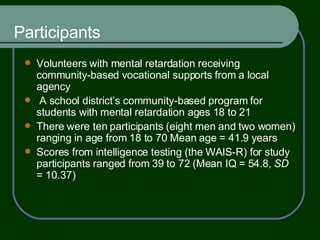
Participants Volunteers with mental retardation receiving community-based vocational supports from a local agency  A school district’s community-based program for students with mental retardation ages 18 to 21 There were ten participants (eight men and two women) ranging in age from 18 to 70 Mean age = 41.9 years Scores from intelligence testing (the WAIS-R) for study participants ranged from 39 to 72 (Mean IQ = 54.8,  SD  = 10.37)
Device Design Each task can be represented on the palmtop computer screen with an icon that users press to initiate task instructions the picture for the first step is displayed and the first audio instruction is played press a “Done” button after they complete the step loads the next step picture and the user presses a “Play” button to hear the associated audio instruction This sequence is followed until all steps have been completed and the task is finished
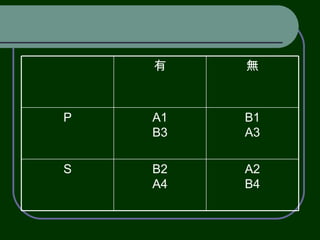
Procedure All participants received training on pizza box assembly. All participants received training on software packaging. All participants received training on using Visual Assistant. Half of the participants first completed the pizza task using the Visual Assistant, while the other half completed it without. During all tasks across all conditions, participants received prompts when needed and other supports necessary to successfully complete the task. Participants switched conditions (with Visual Assistant or without) and completed the software task. Participants completed the pizza task reversing conditions from first time with the same task (e.g., with or without Visual Assistant). Participants completed software task reversing conditions from the first time with the same task (e.g., with or without Visual Assistant).
A2 B4 B2 A4 S B1 A3 A1 B3 P 無 有
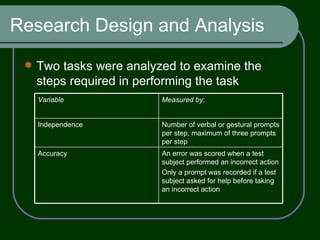
Research Design and Analysis Two tasks were analyzed to examine the steps required in performing the task An error was scored when a test subject performed an incorrect action  Only a prompt was recorded if a test subject asked for help before taking an incorrect action Accuracy Number of verbal or gestural prompts per step, maximum of three prompts per step Independence Measured by: Variable
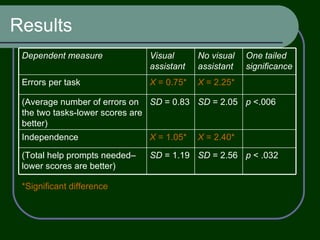
Results *Significant difference p  < .032 SD  = 2.56 SD  = 1.19 (Total help prompts needed–lower scores are better) X  = 2.40* X  = 1.05* Independence p  <.006 SD  = 2.05 SD  = 0.83 (Average number of errors on the two tasks-lower scores are better) X  = 2.25* X  = 0.75* Errors per task One tailed significance No visual assistant Visual assistant Dependent measure
Thank you

9.26

  • 1.
    Enhancing Independent TaskPerformance for MR Through Use of a Handheld Self-Directed Visual and Audio Prompting System
  • 2.
    Outline Computer technologyoffers promising new approaches to reducing the dependence of people with mental retardation on others. A beta test of the utility of a Windows CE based multimedia palmtop computer program (Visual Assistant) for use in supporting individuals with mental retardation to more independently complete community-referenced vocational skills.
  • 3.
  • 4.
    Two principle barriersto multimedia computer-based training and support that must be addressed if people with MR are to benefit from such forms of support. First, there are limitations to use of such devices inherent (when the tasks that must be performed are away from the computer). Second, the most frequently used input devices (keyboard and mouse) are not easily mastered by people with MR Devices that operate the Windows CE operating system include an integrated touch screen for device operation and are specifically designed for portable use.
  • 5.
    The training softwaredeveloped for this platform involved using digital pictures of job tasks sequenced and linked with audio instructions. previously to successfully teach MR the complex task of operating an automated teller machine perform various independent living and work tasks
  • 6.
    One of thegreatest advantages of using computer technology and multimedia for training is the ability to customize the training to meet the needs of the person. This system may allow individuals to learn more complex task sequences Maximizing the advantages of individual control over the audio/picture sequences and the ability to repeat the training as many times as necessary to learn the task.
  • 7.
    There are anumber of parameters that need to be considered when examining the utility of computer assisted training and supports. Clear, uncluttered screens Consistent commands and features from screen to screen Appropriate sequencing and pacing A full range of appropriate examples Allow students to respond at a high rate Graphics and animation that contributes to, rather than distract from, learning Frequent, informative feedback Adequate number of opportunities for practice Multiple exposures to a word or a fact
  • 8.
    For developing effectivesoftware specifically for people with mental retardation Combined use of pictures and audio prompts for navigation Interface designs, such as oversized buttons, that maximize the effectiveness of touch screen or single switch input devices Linear designs of software operation Use of “Error minimization” features, such as removing buttons from the screen at times when their use is inappropriate A complete set of customization options that allow professionals to adapt the software to the unique needs of a variety of end-users A database management system to allow for tracking of progress Considerations for enjoyable and compelling use of the software A research-based process for determining system requirements and design efficacy
  • 9.
    Analysis addressed threeprimary research questions Can multimedia training and support mechanisms (visual and audio) improve the ability of individuals with mental retardation to perform community-based vocational tasks independently? Can multimedia training and support mechanisms allow individuals with mental retardation to learn more complex tasks than would otherwise be possible? Can multimedia training and support mechanisms reduce the amount of support time required by support providers to assist individuals with mental retardation with acquiring community-based vocational skills?
  • 10.
    Method Participants DeviceDesign Procedure Research Design and Analysis
  • 11.
    Participants Volunteers withmental retardation receiving community-based vocational supports from a local agency A school district’s community-based program for students with mental retardation ages 18 to 21 There were ten participants (eight men and two women) ranging in age from 18 to 70 Mean age = 41.9 years Scores from intelligence testing (the WAIS-R) for study participants ranged from 39 to 72 (Mean IQ = 54.8, SD = 10.37)
  • 12.
    Device Design Eachtask can be represented on the palmtop computer screen with an icon that users press to initiate task instructions the picture for the first step is displayed and the first audio instruction is played press a “Done” button after they complete the step loads the next step picture and the user presses a “Play” button to hear the associated audio instruction This sequence is followed until all steps have been completed and the task is finished
  • 13.
    Procedure All participantsreceived training on pizza box assembly. All participants received training on software packaging. All participants received training on using Visual Assistant. Half of the participants first completed the pizza task using the Visual Assistant, while the other half completed it without. During all tasks across all conditions, participants received prompts when needed and other supports necessary to successfully complete the task. Participants switched conditions (with Visual Assistant or without) and completed the software task. Participants completed the pizza task reversing conditions from first time with the same task (e.g., with or without Visual Assistant). Participants completed software task reversing conditions from the first time with the same task (e.g., with or without Visual Assistant).
  • 14.
    A2 B4 B2A4 S B1 A3 A1 B3 P 無 有
  • 15.
    Research Design andAnalysis Two tasks were analyzed to examine the steps required in performing the task An error was scored when a test subject performed an incorrect action Only a prompt was recorded if a test subject asked for help before taking an incorrect action Accuracy Number of verbal or gestural prompts per step, maximum of three prompts per step Independence Measured by: Variable
  • 16.
    Results *Significant differencep < .032 SD = 2.56 SD = 1.19 (Total help prompts needed–lower scores are better) X = 2.40* X = 1.05* Independence p <.006 SD = 2.05 SD = 0.83 (Average number of errors on the two tasks-lower scores are better) X = 2.25* X = 0.75* Errors per task One tailed significance No visual assistant Visual assistant Dependent measure
  • 17.