mjhsrebels.org/registration
English
Math
Science
Social Studies
Wellness
 When registering, your student has
been recommended for 1 specific
class inside of each of these subjects.
You have to choose the one that has
been recommended.
 If you disagree with the
recommendation, go ahead and
choose it for registration, then follow
up with your child’s teacher to
discuss the placement before or
during the March 28-April 12
placement review window.
 mjhsrebels.org/registration
 Art
 Band
 Orchestra
 Chorus
 Computer Apps
 Drama
 French / Latin / Spanish
 Shop
 STEM
 Teen Living
 Learning Supports (rec. required)
 Academic Success (rec. required)
 Library Worker / Office Worker*
 Peer Tutoring*
 Yearbook*
 Computer Science Independent Study*
*application required (see next slide)
mjhsrebels.org/registration
Choose 2 Electives and 2 Alternates
(Electives and Alternates MUST be
different)
What if my student wants to take an elective that
requires an application?
 If your student wants to take an elective that
requires an application, it’s not on the list for
registration
 They must pick a different elective for registration. If
they are chosen for the application-based class, they
will be notified. All applications are due by March 15
at MJHS.
 Yearbook
 Computer Science Independent Study
 Peer Tutor
 Library Worker
 Office Worker
 mjhsrebels.org/registration
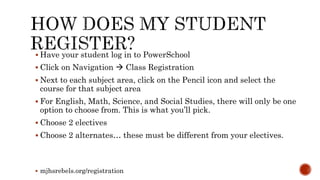
 Have your student log in to PowerSchool
 Click on Navigation  Class Registration
 Next to each subject area, click on the Pencil icon and select the
course for that subject area
 For English, Math, Science, and Social Studies, there will only be one
option to choose from. This is what you’ll pick.
 Choose 2 electives
 Choose 2 alternates… these must be different from your electives.
 mjhsrebels.org/registration
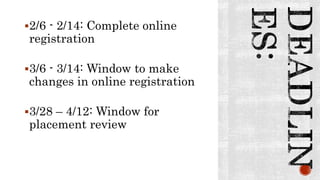
2/6 - 2/14: Complete online
registration
3/6 - 3/14: Window to make
changes in online registration
3/28 – 4/12: Window for
placement review
• www.mjhsrebels.org/register
• Call MJHS and ask to speak to a guidance
counselor … 983-2070
• Attend the Parent to Parent Breakfast on Feb.
3
• Attend the Registration Night on Feb. 7

8th Grade Registration: Simplified

  • 1.
  • 2.
    English Math Science Social Studies Wellness  Whenregistering, your student has been recommended for 1 specific class inside of each of these subjects. You have to choose the one that has been recommended.  If you disagree with the recommendation, go ahead and choose it for registration, then follow up with your child’s teacher to discuss the placement before or during the March 28-April 12 placement review window.  mjhsrebels.org/registration
  • 3.
     Art  Band Orchestra  Chorus  Computer Apps  Drama  French / Latin / Spanish  Shop  STEM  Teen Living  Learning Supports (rec. required)  Academic Success (rec. required)  Library Worker / Office Worker*  Peer Tutoring*  Yearbook*  Computer Science Independent Study* *application required (see next slide) mjhsrebels.org/registration Choose 2 Electives and 2 Alternates (Electives and Alternates MUST be different)
  • 4.
    What if mystudent wants to take an elective that requires an application?  If your student wants to take an elective that requires an application, it’s not on the list for registration  They must pick a different elective for registration. If they are chosen for the application-based class, they will be notified. All applications are due by March 15 at MJHS.  Yearbook  Computer Science Independent Study  Peer Tutor  Library Worker  Office Worker  mjhsrebels.org/registration
  • 5.
     Have yourstudent log in to PowerSchool  Click on Navigation  Class Registration  Next to each subject area, click on the Pencil icon and select the course for that subject area  For English, Math, Science, and Social Studies, there will only be one option to choose from. This is what you’ll pick.  Choose 2 electives  Choose 2 alternates… these must be different from your electives.  mjhsrebels.org/registration
  • 6.
    2/6 - 2/14:Complete online registration 3/6 - 3/14: Window to make changes in online registration 3/28 – 4/12: Window for placement review
  • 7.
    • www.mjhsrebels.org/register • CallMJHS and ask to speak to a guidance counselor … 983-2070 • Attend the Parent to Parent Breakfast on Feb. 3 • Attend the Registration Night on Feb. 7