




Habits Every Azure Admin Must Have
v0820
Wim Matthyssen
@wmatthyssen
Karel De Winter
@kareldewinter
Agenda
▪ Intro – fast forward
▪ 7 Oscars … Habits
▪ Key Takeaways
▪ Q&A A.K.A. your time on set
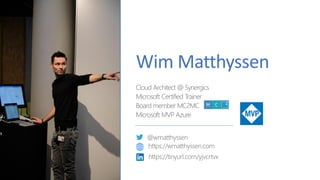
Wim Matthyssen
Cloud Architect @ Synergics
Microsoft Certified Trainer
Board member MC2MC
Microsoft MVP Azure
@wmatthyssen
https://wmatthyssen.com
https://tinyurl.com/yjvcrtvx
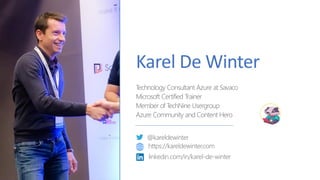
Karel De Winter
Technology Consultant Azure at Savaco
Microsoft Certified Trainer
Member of TechNine Usergroup
Azure Community and Content Hero
@kareldewinter
https://kareldewinter.com
linkedin.com/in/karel-de-winter
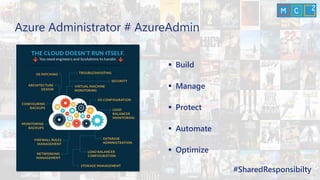
▪ Build
▪ Manage
▪ Protect
▪ Automate
▪ Optimize
#SharedResponsibilty
Azure Administrator # AzureAdmin
Azure Toolkit
Remain in control of your Azure resources from everywhere
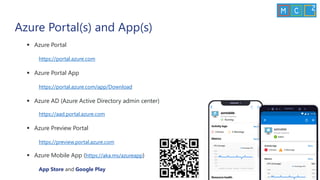
▪ Azure Portal
https://portal.azure.com
▪ Azure Portal App
https://portal.azure.com/app/Download
▪ Azure AD (Azure Active Directory admin center)
https://aad.portal.azure.com
▪ Azure Preview Portal
https://preview.portal.azure.com
▪ Azure Mobile App (https://aka.ms/azureapp)
App Store and Google Play
Azure Portal(s) and App(s)
▪ Azure Cloud Shell
▪ Microsoft Azure Storage Explorer / AzCopy v10
https://azure.microsoft.com/en-us/features/storage-explorer/
https://github.com/Azure/azure-storage-azcopy
▪ Windows Admin Center
▪ Visual Studio Code
https://code.visualstudio.com/
▪ Windows Terminal
Available in the Microsoft Store
Management tools
DEMO
“Yo!”
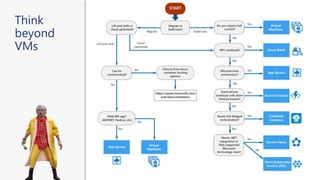
VMs?!? Where we're going, we (don’t) need VMs
Remain future proof and (try to) think beyond IaaS
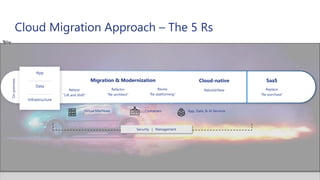
Cloud Migration Approach – The 5 Rs
SaaSCloud-native
Rehost
“Lift and Shift”
Refactor
“Re-architect”
Revise
“Re-platforming”
Rebuild/New Replace
“Re-purchase”
Migration & Modernization
On-premises
App
Data
Infrastructure
Security | Management
App, Data, & AI ServicesVirtual Machines Containers
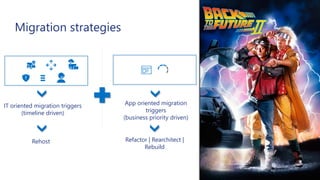
Migration strategies
IT oriented migration triggers
(timeline driven)
App oriented migration
triggers
(business priority driven)
Rehost Refactor | Rearchitect |
Rebuild
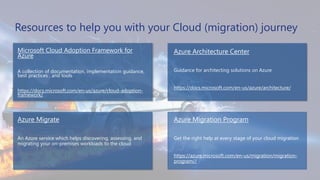
Resources to help you with your Cloud (migration) journey
Microsoft Cloud Adoption Framework for
Azure
A collection of documentation, implementation guidance,
best practices , and tools
https://docs.microsoft.com/en-us/azure/cloud-adoption-
framework/
Azure Architecture Center
Guidance for architecting solutions on Azure
https://docs.microsoft.com/en-us/azure/architecture/
Azure Migrate
An Azure service which helps discovering, assessing, and
migrating your on-premises workloads to the cloud
Azure Migration Program
Get the right help at every stage of your cloud migration
https://azure.microsoft.com/en-us/migration/migration-
program//
Think
beyond
VMs
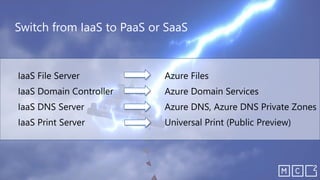
Switch from IaaS to PaaS or SaaS
Azure Governance
Remain in control of your Azure environment
Azure Governance you say?
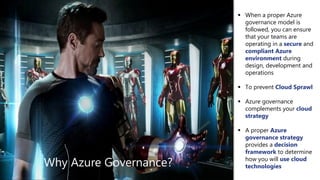
Why Azure Governance?
▪ When a proper Azure
governance model is
followed, you can ensure
that your teams are
operating in a secure and
compliant Azure
environment during
design, development and
operations
▪ To prevent Cloud Sprawl
▪ Azure governance
complements your cloud
strategy
▪ A proper Azure
governance strategy
provides a decision
framework to determine
how you will use cloud
technologies
What can we do with it?
ITIL Service Strategy
▪ Organize and structure your Azure environment(s)
▪ Standardize and define Azure resources
▪ Ensure transparency of Azure resources
▪ Control access
▪ Control and manage costs
▪ Enforce policies
▪ Query, explore and analyze Azure resources
Enforce compliance at scale and increase agility
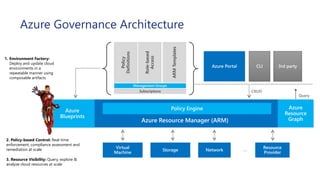
CRUD
Azure Resource Manager (ARM)
Query
2. Policy-based Control: Real-time
enforcement, compliance assessment and
remediation at scale
3. Resource Visibility: Query, explore &
analyze cloud resources at scale
1. Environment Factory:
Deploy and update cloud
environments in a
repeatable manner using
composable artifacts
Role-based
Access
Policy
Definitions
ARMTemplates
Management Groups
Subscriptions
Azure Governance Architecture
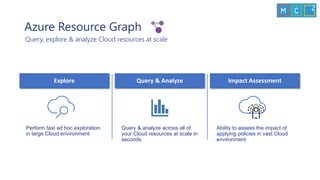
Azure Resource Graph
Query, explore & analyze Cloud resources at scale
Query & analyze across all of
your Cloud resources at scale in
seconds
Query & Analyze
Perform fast ad hoc exploration
in large Cloud environment
Explore
Ability to assess the impact of
applying policies in vast Cloud
environment
Impact Assessment
Query examples
▪ Count resources
▪ summarize count()
▪ VM’s by OS
▪ where type =~ 'Microsoft.Compute/virtualMachines' | summarize count() by
tostring(properties.storageProfile.osDisk.osType)
▪ VM’s by location
▪ where type =~ 'Microsoft.Compute/virtualMachines' | summarize count() by location
▪ VM’s that start with sazu
▪ where type =~ 'microsoft.compute/virtualmachines' and name matches regex
@'^sazu(.*)[0-9]+$' | project name | order by name asc
▪ VM’s with specific SKU
▪ where type =~ 'Microsoft.Compute/virtualMachines' and
properties.hardwareProfile.vmSize == 'Standard_B2s' | project name, resourceGroup
“We have a Hulk”
DEMO
Azure Cloud Sp€nd
Remain informed and in control of your cloud costs
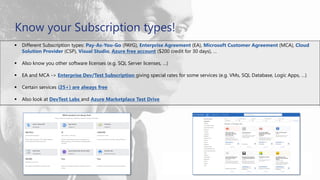
▪ Different Subscription types: Pay-As-You-Go (PAYG), Enterprise Agreement (EA), Microsoft Customer Agreement (MCA), Cloud
Solution Provider (CSP), Visual Studio, Azure free account ($200 credit for 30 days), …
▪ Also know you other software licenses (e.g. SQL Server licenses, …)
▪ EA and MCA -> Enterprise Dev/Test Subscription giving special rates for some services (e.g. VMs, SQL Database, Logic Apps, …)
▪ Certain services (25+) are always free
▪ Also look at DevTest Labs and Azure Marketplace Test Drive
Know your Subscription types!
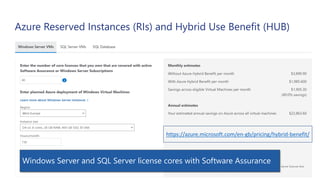
Azure Reserved Instances (RIs) and Hybrid Use Benefit (HUB)
Save up to 82% with RIs and HUBAzure Reservations not only for VMs
https://azure.microsoft.com/en-gb/pricing/hybrid-benefit/
Windows Server and SQL Server license cores with Software Assurance
Other ways to keep your costs down in Azure
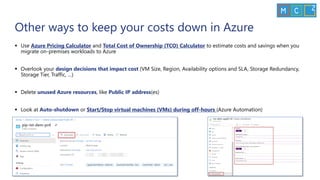
▪ Use Azure Pricing Calculator and Total Cost of Ownership (TCO) Calculator to estimate costs and savings when you
migrate on-premises workloads to Azure
▪ Overlook your design decisions that impact cost (VM Size, Region, Availability options and SLA, Storage Redundancy,
Storage Tier, Traffic, …)
▪ Delete unused Azure resources, like Public IP address(es)
▪ Look at Auto-shutdown or Start/Stop virtual machines (VMs) during off-hours (Azure Automation)
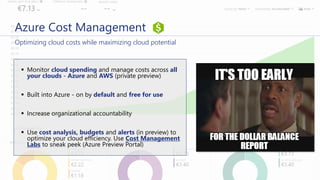
Azure Cost Management
Optimizing cloud costs while maximizing cloud potential
▪ Monitor cloud spending and manage costs across all
your clouds - Azure and AWS (private preview)
▪ Built into Azure - on by default and free for use
▪ Increase organizational accountability
▪ Use cost analysis, budgets and alerts (in preview) to
optimize your cloud efficiency. Use Cost Management
Labs to sneak peek (Azure Preview Portal)
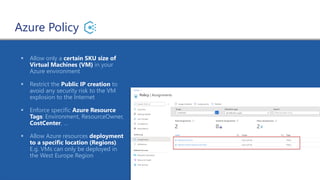
Azure Policy
▪ Allow only a certain SKU size of
Virtual Machines (VM) in your
Azure environment
▪ Restrict the Public IP creation to
avoid any security risk to the VM
explosion to the Internet
▪ Enforce specific Azure Resource
Tags: Environment, ResourceOwner,
CostCenter, …
▪ Allow Azure resources deployment
to a specific location (Regions).
E.g. VMs can only be deployed in
the West Europe Region
DEMO
“Grab the Cat!”
Azure Service Health and Azure Advisor
Remain informed about outages and best practice recommendations
▪ No additional cost – free Azure service
▪ Personalized guidance and support when
issues in Azure services affect you
▪ Notify and help you understand impact of
issues
▪ It keeps you updated when issues are
resolved
▪ Health history for up to 90 days
▪ Create and manage service health alerts
Azure Service Health
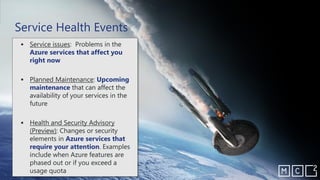
▪ Service issues: Problems in the
Azure services that affect you
right now
▪ Planned Maintenance: Upcoming
maintenance that can affect the
availability of your services in the
future
▪ Health and Security Advisory
(Preview): Changes or security
elements in Azure services that
require your attention. Examples
include when Azure features are
phased out or if you exceed a
usage quota
Service Health Events
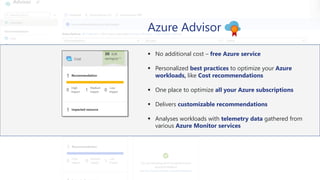
Azure Advisor
▪ No additional cost – free Azure service
▪ Personalized best practices to optimize your Azure
workloads, like Cost recommendations
▪ One place to optimize all your Azure subscriptions
▪ Delivers customizable recommendations
▪ Analyses workloads with telemetry data gathered from
various Azure Monitor services
Azure Advisor your free
personalized cloud consultant
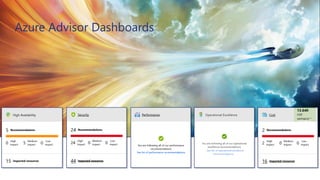
Azure Advisor Dashboards
DEMO
“Beam me up, Scotty”
Secure Hybrid Network Connection
Remain secured when connecting to your Azure environment
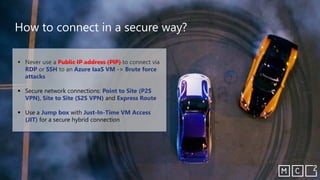
▪ Never use a Public IP address (PIP) to connect via
RDP or SSH to an Azure IaaS VM -> Brute force
attacks
▪ Secure network connections: Point to Site (P2S
VPN), Site to Site (S2S VPN) and Express Route
▪ Use a Jump box with Just-In-Time VM Access
(JIT) for a secure hybrid connection
How to connect in a secure way?
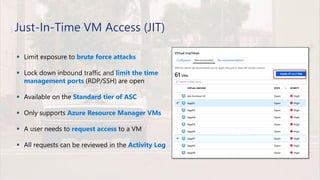
▪ Limit exposure to brute force attacks
▪ Lock down inbound traffic and limit the time
management ports (RDP/SSH) are open
▪ Available on the Standard tier of ASC
▪ Only supports Azure Resource Manager VMs
▪ A user needs to request access to a VM
▪ All requests can be reviewed in the Activity Log
Just-In-Time VM Access (JIT)
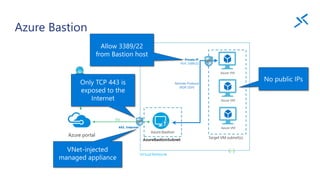
Azure Bastion
DEMO
“We talking or we racing?”
Azure Info and Skill set
Remain up-to-date and become a Jedi “Cloud” Master
Be informed (by Microsoft)
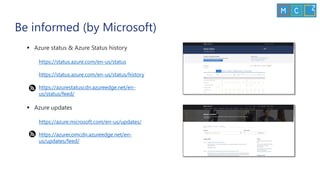
▪ Azure status & Azure Status history
https://status.azure.com/en-us/status
https://status.azure.com/en-us/status/history
https://azurestatuscdn.azureedge.net/en-
us/status/feed/
▪ Azure updates
https://azure.microsoft.com/en-us/updates/
https://azurecomcdn.azureedge.net/en-
us/updates/feed/
The community has you covered
Be informed (by the Community)
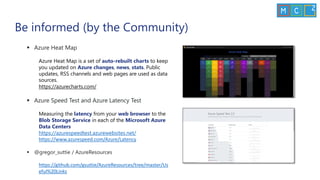
▪ Azure Heat Map
Azure Heat Map is a set of auto-rebuilt charts to keep
you updated on Azure changes, news, stats. Public
updates, RSS channels and web pages are used as data
sources.
https://azurecharts.com/
▪ Azure Speed Test and Azure Latency Test
Measuring the latency from your web browser to the
Blob Storage Service in each of the Microsoft Azure
Data Centers
https://azurespeedtest.azurewebsites.net/
https://www.azurespeed.com/Azure/Latency
▪ @gregor_suttie / AzureResources
https://github.com/gsuttie/AzureResources/tree/master/Us
eful%20Links
Learn
▪ Azure Architecture Center
https://docs.microsoft.com/en-us/azure/architecture/
▪ Microsoft Learn
https://docs.microsoft.com/en-us/learn/
▪ Azure role-based certifications
https://www.microsoft.com/en-us/learning/azure-exams.aspx
▪ Azure Quickstart Center and Global search in the Azure portal
Quickly start your projects in Azure with step-by-step guidance
Type in “how to …” to know how to do certain things
▪ Microsoft Tech Community, UGs (MC2MC, TechNine, …) blogs and
vlogs
DEMO
The force is strong in this one…
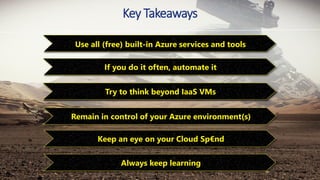
Key Takeaways
Always keep learning
Use all (free) built-in Azure services and tools
Try to think beyond IaaS VMs
Remain in control of your Azure environment(s)
Keep an eye on your Cloud Sp€nd
If you do it often, automate it
Q&A
(A.K.A. your time one set)
Thank you!
Wim Matthyssen
@wmatthyssen
Karel De Winter
@kareldewinter

7.habits.every.azure.admin.must.have.v082020

  • 1.
    Habits Every AzureAdmin Must Have v0820 Wim Matthyssen @wmatthyssen Karel De Winter @kareldewinter
  • 2.
    Agenda ▪ Intro –fast forward ▪ 7 Oscars … Habits ▪ Key Takeaways ▪ Q&A A.K.A. your time on set
  • 3.
    Wim Matthyssen Cloud Architect@ Synergics Microsoft Certified Trainer Board member MC2MC Microsoft MVP Azure @wmatthyssen https://wmatthyssen.com https://tinyurl.com/yjvcrtvx
  • 4.
    Karel De Winter TechnologyConsultant Azure at Savaco Microsoft Certified Trainer Member of TechNine Usergroup Azure Community and Content Hero @kareldewinter https://kareldewinter.com linkedin.com/in/karel-de-winter
  • 5.
    ▪ Build ▪ Manage ▪Protect ▪ Automate ▪ Optimize #SharedResponsibilty Azure Administrator # AzureAdmin
  • 7.
    Azure Toolkit Remain incontrol of your Azure resources from everywhere
  • 8.
    ▪ Azure Portal https://portal.azure.com ▪Azure Portal App https://portal.azure.com/app/Download ▪ Azure AD (Azure Active Directory admin center) https://aad.portal.azure.com ▪ Azure Preview Portal https://preview.portal.azure.com ▪ Azure Mobile App (https://aka.ms/azureapp) App Store and Google Play Azure Portal(s) and App(s)
  • 9.
    ▪ Azure CloudShell ▪ Microsoft Azure Storage Explorer / AzCopy v10 https://azure.microsoft.com/en-us/features/storage-explorer/ https://github.com/Azure/azure-storage-azcopy ▪ Windows Admin Center ▪ Visual Studio Code https://code.visualstudio.com/ ▪ Windows Terminal Available in the Microsoft Store Management tools
  • 10.
  • 12.
    VMs?!? Where we'regoing, we (don’t) need VMs Remain future proof and (try to) think beyond IaaS
  • 13.
    Cloud Migration Approach– The 5 Rs SaaSCloud-native Rehost “Lift and Shift” Refactor “Re-architect” Revise “Re-platforming” Rebuild/New Replace “Re-purchase” Migration & Modernization On-premises App Data Infrastructure Security | Management App, Data, & AI ServicesVirtual Machines Containers
  • 14.
    Migration strategies IT orientedmigration triggers (timeline driven) App oriented migration triggers (business priority driven) Rehost Refactor | Rearchitect | Rebuild
  • 15.
    Resources to helpyou with your Cloud (migration) journey Microsoft Cloud Adoption Framework for Azure A collection of documentation, implementation guidance, best practices , and tools https://docs.microsoft.com/en-us/azure/cloud-adoption- framework/ Azure Architecture Center Guidance for architecting solutions on Azure https://docs.microsoft.com/en-us/azure/architecture/ Azure Migrate An Azure service which helps discovering, assessing, and migrating your on-premises workloads to the cloud Azure Migration Program Get the right help at every stage of your cloud migration https://azure.microsoft.com/en-us/migration/migration- program//
  • 16.
  • 17.
    Switch from IaaSto PaaS or SaaS
  • 19.
    Azure Governance Remain incontrol of your Azure environment
  • 20.
  • 21.
    Why Azure Governance? ▪When a proper Azure governance model is followed, you can ensure that your teams are operating in a secure and compliant Azure environment during design, development and operations ▪ To prevent Cloud Sprawl ▪ Azure governance complements your cloud strategy ▪ A proper Azure governance strategy provides a decision framework to determine how you will use cloud technologies
  • 22.
    What can wedo with it? ITIL Service Strategy ▪ Organize and structure your Azure environment(s) ▪ Standardize and define Azure resources ▪ Ensure transparency of Azure resources ▪ Control access ▪ Control and manage costs ▪ Enforce policies ▪ Query, explore and analyze Azure resources Enforce compliance at scale and increase agility
  • 23.
    CRUD Azure Resource Manager(ARM) Query 2. Policy-based Control: Real-time enforcement, compliance assessment and remediation at scale 3. Resource Visibility: Query, explore & analyze cloud resources at scale 1. Environment Factory: Deploy and update cloud environments in a repeatable manner using composable artifacts Role-based Access Policy Definitions ARMTemplates Management Groups Subscriptions Azure Governance Architecture
  • 24.
    Azure Resource Graph Query,explore & analyze Cloud resources at scale Query & analyze across all of your Cloud resources at scale in seconds Query & Analyze Perform fast ad hoc exploration in large Cloud environment Explore Ability to assess the impact of applying policies in vast Cloud environment Impact Assessment
  • 25.
    Query examples ▪ Countresources ▪ summarize count() ▪ VM’s by OS ▪ where type =~ 'Microsoft.Compute/virtualMachines' | summarize count() by tostring(properties.storageProfile.osDisk.osType) ▪ VM’s by location ▪ where type =~ 'Microsoft.Compute/virtualMachines' | summarize count() by location ▪ VM’s that start with sazu ▪ where type =~ 'microsoft.compute/virtualmachines' and name matches regex @'^sazu(.*)[0-9]+$' | project name | order by name asc ▪ VM’s with specific SKU ▪ where type =~ 'Microsoft.Compute/virtualMachines' and properties.hardwareProfile.vmSize == 'Standard_B2s' | project name, resourceGroup
  • 26.
    “We have aHulk” DEMO
  • 28.
    Azure Cloud Sp€nd Remaininformed and in control of your cloud costs
  • 29.
    ▪ Different Subscriptiontypes: Pay-As-You-Go (PAYG), Enterprise Agreement (EA), Microsoft Customer Agreement (MCA), Cloud Solution Provider (CSP), Visual Studio, Azure free account ($200 credit for 30 days), … ▪ Also know you other software licenses (e.g. SQL Server licenses, …) ▪ EA and MCA -> Enterprise Dev/Test Subscription giving special rates for some services (e.g. VMs, SQL Database, Logic Apps, …) ▪ Certain services (25+) are always free ▪ Also look at DevTest Labs and Azure Marketplace Test Drive Know your Subscription types!
  • 30.
    Azure Reserved Instances(RIs) and Hybrid Use Benefit (HUB) Save up to 82% with RIs and HUBAzure Reservations not only for VMs https://azure.microsoft.com/en-gb/pricing/hybrid-benefit/ Windows Server and SQL Server license cores with Software Assurance
  • 31.
    Other ways tokeep your costs down in Azure ▪ Use Azure Pricing Calculator and Total Cost of Ownership (TCO) Calculator to estimate costs and savings when you migrate on-premises workloads to Azure ▪ Overlook your design decisions that impact cost (VM Size, Region, Availability options and SLA, Storage Redundancy, Storage Tier, Traffic, …) ▪ Delete unused Azure resources, like Public IP address(es) ▪ Look at Auto-shutdown or Start/Stop virtual machines (VMs) during off-hours (Azure Automation)
  • 32.
    Azure Cost Management Optimizingcloud costs while maximizing cloud potential ▪ Monitor cloud spending and manage costs across all your clouds - Azure and AWS (private preview) ▪ Built into Azure - on by default and free for use ▪ Increase organizational accountability ▪ Use cost analysis, budgets and alerts (in preview) to optimize your cloud efficiency. Use Cost Management Labs to sneak peek (Azure Preview Portal)
  • 33.
    Azure Policy ▪ Allowonly a certain SKU size of Virtual Machines (VM) in your Azure environment ▪ Restrict the Public IP creation to avoid any security risk to the VM explosion to the Internet ▪ Enforce specific Azure Resource Tags: Environment, ResourceOwner, CostCenter, … ▪ Allow Azure resources deployment to a specific location (Regions). E.g. VMs can only be deployed in the West Europe Region
  • 34.
  • 36.
    Azure Service Healthand Azure Advisor Remain informed about outages and best practice recommendations
  • 37.
    ▪ No additionalcost – free Azure service ▪ Personalized guidance and support when issues in Azure services affect you ▪ Notify and help you understand impact of issues ▪ It keeps you updated when issues are resolved ▪ Health history for up to 90 days ▪ Create and manage service health alerts Azure Service Health
  • 38.
    ▪ Service issues:Problems in the Azure services that affect you right now ▪ Planned Maintenance: Upcoming maintenance that can affect the availability of your services in the future ▪ Health and Security Advisory (Preview): Changes or security elements in Azure services that require your attention. Examples include when Azure features are phased out or if you exceed a usage quota Service Health Events
  • 39.
    Azure Advisor ▪ Noadditional cost – free Azure service ▪ Personalized best practices to optimize your Azure workloads, like Cost recommendations ▪ One place to optimize all your Azure subscriptions ▪ Delivers customizable recommendations ▪ Analyses workloads with telemetry data gathered from various Azure Monitor services
  • 40.
    Azure Advisor yourfree personalized cloud consultant
  • 41.
  • 42.
  • 44.
    Secure Hybrid NetworkConnection Remain secured when connecting to your Azure environment
  • 45.
    ▪ Never usea Public IP address (PIP) to connect via RDP or SSH to an Azure IaaS VM -> Brute force attacks ▪ Secure network connections: Point to Site (P2S VPN), Site to Site (S2S VPN) and Express Route ▪ Use a Jump box with Just-In-Time VM Access (JIT) for a secure hybrid connection How to connect in a secure way?
  • 46.
    ▪ Limit exposureto brute force attacks ▪ Lock down inbound traffic and limit the time management ports (RDP/SSH) are open ▪ Available on the Standard tier of ASC ▪ Only supports Azure Resource Manager VMs ▪ A user needs to request access to a VM ▪ All requests can be reviewed in the Activity Log Just-In-Time VM Access (JIT)
  • 47.
  • 48.
    DEMO “We talking orwe racing?”
  • 50.
    Azure Info andSkill set Remain up-to-date and become a Jedi “Cloud” Master
  • 51.
    Be informed (byMicrosoft) ▪ Azure status & Azure Status history https://status.azure.com/en-us/status https://status.azure.com/en-us/status/history https://azurestatuscdn.azureedge.net/en- us/status/feed/ ▪ Azure updates https://azure.microsoft.com/en-us/updates/ https://azurecomcdn.azureedge.net/en- us/updates/feed/
  • 52.
    The community hasyou covered
  • 53.
    Be informed (bythe Community) ▪ Azure Heat Map Azure Heat Map is a set of auto-rebuilt charts to keep you updated on Azure changes, news, stats. Public updates, RSS channels and web pages are used as data sources. https://azurecharts.com/ ▪ Azure Speed Test and Azure Latency Test Measuring the latency from your web browser to the Blob Storage Service in each of the Microsoft Azure Data Centers https://azurespeedtest.azurewebsites.net/ https://www.azurespeed.com/Azure/Latency ▪ @gregor_suttie / AzureResources https://github.com/gsuttie/AzureResources/tree/master/Us eful%20Links
  • 54.
    Learn ▪ Azure ArchitectureCenter https://docs.microsoft.com/en-us/azure/architecture/ ▪ Microsoft Learn https://docs.microsoft.com/en-us/learn/ ▪ Azure role-based certifications https://www.microsoft.com/en-us/learning/azure-exams.aspx ▪ Azure Quickstart Center and Global search in the Azure portal Quickly start your projects in Azure with step-by-step guidance Type in “how to …” to know how to do certain things ▪ Microsoft Tech Community, UGs (MC2MC, TechNine, …) blogs and vlogs
  • 55.
    DEMO The force isstrong in this one…
  • 56.
    Key Takeaways Always keeplearning Use all (free) built-in Azure services and tools Try to think beyond IaaS VMs Remain in control of your Azure environment(s) Keep an eye on your Cloud Sp€nd If you do it often, automate it
  • 57.
  • 58.