
Azure Community Conference 2021
India’s largest Azure Conference
#AzConfDev
#AzConfDev
Title Sponsor Gold Sponsor
Community Partner
#AzConfDev
ANANT MAHESHWARI
President, Microsoft India
#AzConfDev
Azure Governance for scale
Mohit Chhabra
Microsoft Azure MVP
#AzConfDev
Need to Govern
Your Team runs an Azure Environment with
• Multiple Engineering Team
• Multiple Subscriptions
• Need to Standardize/enforce how cloud Resources are configured
• Due to Regulatory compliance, cost control, security or design consistency
#AzConfDev
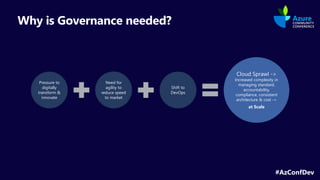
Why is Governance needed?
Pressure to
digitally
transform &
innovate
Need for
agility to
reduce speed
to market
Shift to
DevOps
Cloud Sprawl ->
Increased complexity in
managing standard,
accountability,
compliance, consistent
architecture & cost ->
at Scale
#AzConfDev
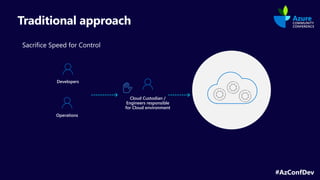
Traditional approach
Sacrifice Speed for Control
Developers
Operations
Cloud Custodian /
Engineers responsible
for Cloud environment
#AzConfDev
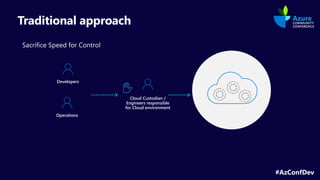
Traditional approach
Sacrifice Speed for Control
Developers
Operations
Cloud Custodian /
Engineers responsible
for Cloud environment
#AzConfDev
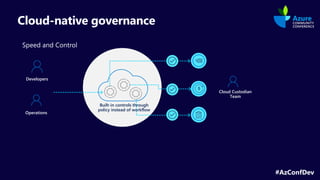
Cloud-native governance
Speed and Control
Developers
Built-in controls through
policy instead of workflow
Operations
Cloud Custodian
Team
#AzConfDev
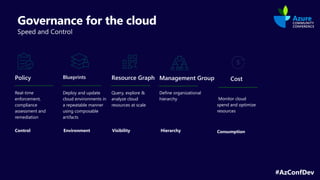
Governance for the cloud
Speed and Control
Blueprints
Deploy and update
cloud environments in
a repeatable manner
using composable
artifacts
Resource Graph
Query, explore &
analyze cloud
resources at scale
Management Group
Define organizational
hierarchy
Policy
Real-time
enforcement,
compliance
assessment and
remediation
Control Visibility
Environment
Monitor cloud
spend and optimize
resources
Consumption
Hierarchy
Cost
#AzConfDev
Management Groups
#AzConfDev
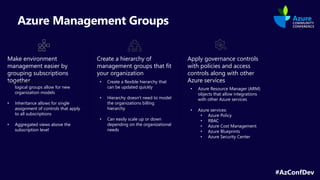
Azure Management Groups
Make environment
management easier by
grouping subscriptions
together
Create a hierarchy of
management groups that fit
your organization
Apply governance controls
with policies and access
controls along with other
Azure services
logical groups allow for new
organization models
• Inheritance allows for single
assignment of controls that apply
to all subscriptions
• Aggregated views above the
subscription level
• Create a flexible hierarchy that
can be updated quickly
• Hierarchy doesn’t need to model
the organizations billing
hierarchy
• Can easily scale up or down
depending on the organizational
needs
• Azure Resource Manager (ARM)
objects that allow integrations
with other Azure services
• Azure services:
• Azure Policy
• RBAC
• Azure Cost Management
• Azure Blueprints
• Azure Security Center
#AzConfDev
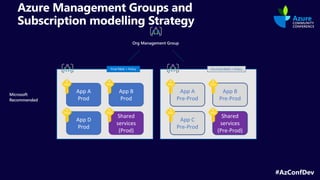
Azure Management Groups and
Subscription modelling Strategy
App A
Pre-Prod
Microsoft
Recommended
App B
Pre-Prod
Shared
services
(Pre-Prod)
App C
Pre-Prod
App A
Prod
App B
Prod
Shared
services
(Prod)
App D
Prod
Prod RBAC + Policy Pre-Prod RBAC + Policy
Org Management Group
#AzConfDev
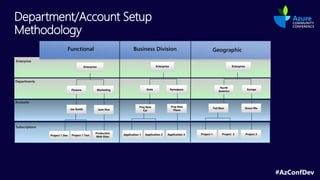
Department/Account Setup
Methodology
#AzConfDev
RBAC
#AzConfDev
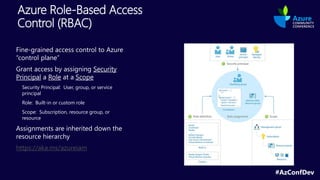
Azure Role-Based Access
Control (RBAC)
Fine-grained access control to Azure
“control plane”
Grant access by assigning Security
Principal a Role at a Scope
Security Principal: User, group, or service
principal
Role: Built-in or custom role
Scope: Subscription, resource group, or
resource
Assignments are inherited down the
resource hierarchy
https://aka.ms/azureiam
#AzConfDev
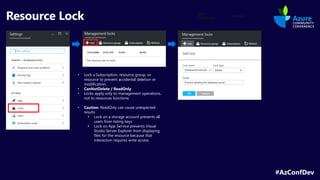
Resource Lock
• Lock a Subscription, resource group, or
resource to prevent accidental deletion or
modification.
• CanNotDelete / ReadOnly
• Locks apply only to management operations,
not to resources functions
• Caution: ReadOnly can cause unexpected
results
• Lock on a storage account prevents all
users from listing keys
• Lock on App Service prevents Visual
Studio Server Explorer from displaying
files for the resource because that
interaction requires write access
#AzConfDev
Azure Policy
#AzConfDev
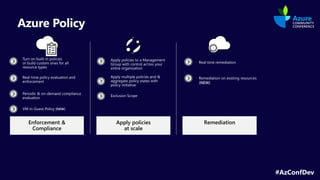
Azure Policy
Remediation
Enforcement &
Compliance
Apply policies
at scale
Turn on built-in policies
or build custom ones for all
resource types
Real-time policy evaluation and
enforcement
Periodic & on-demand compliance
evaluation
Apply policies to a Management
Group with control across your
entire organization
Apply multiple policies and &
aggregate policy states with
policy initiative
Real time remediation
Remediation on existing resources
(NEW)
Exclusion Scope
VM In-Guest Policy (NEW)
{
"if": {
<accessor>, <condition> | <logical operator>
},
"then": {
"effect": “Disabled | append | deny | audit | auditIfNotExists | deployIfNotExists"
}
}
Operators
“not”: { … }
“allOf”: [ … ]
“anyOf”: [ … ]
Conditions
“equals”: “value”
“like”: “value”
“match”: “value”
“contains”: “value”
“in”: [“val1”, “val2”]
“containsKey”: “keyName”
“exists”: “bool”
+ “not*” variants
Accessors
“field”: “fieldname”
“source”: “action”
Fields
name
kind
type
location
fullName
tags
tags.*
aliases
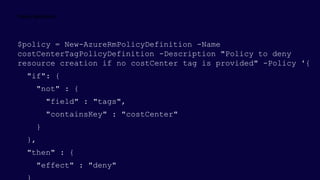
$policy = New-AzureRmPolicyDefinition -Name
costCenterTagPolicyDefinition -Description "Policy to deny
resource creation if no costCenter tag is provided" -Policy '{
"if": {
"not" : {
"field" : "tags",
"containsKey" : "costCenter"
}
},
"then" : {
"effect" : "deny"
{
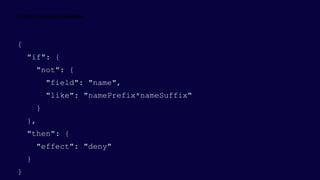
"if": {
"not": {
"field": "name",
"like": "namePrefix*nameSuffix"
}
},
"then": {
"effect": "deny"
}
}
"properties": {
"displayName": "Allowed VM Skus",
"description": "This policy enables you to specify a set of virtual machine SKUs that your
organization can deploy.“
},
"policyRule": {
"if": {
"allOf": [
{
"field": "type",
"equals": "Microsoft.Compute/virtualMachines“
},
{
"not": {
"field":"Microsoft.Compute/virtualMachines/sku.name",
"in": ["Basic_A0”,”Basic_A1”,”Basic_A2”,”Basic_A3”,”Basic_A4”]
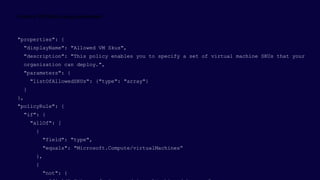
"properties": {
"displayName": "Allowed VM Skus",
"description": "This policy enables you to specify a set of virtual machine SKUs that your
organization can deploy.",
"parameters": {
"listOfAllowedSKUs": {"type": "array"}
}
},
"policyRule": {
"if": {
"allOf": [
{
"field": "type",
"equals": "Microsoft.Compute/virtualMachines“
},
{
"not": {
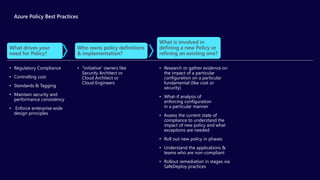
Azure Policy Best Practices
• “Initiative" owners like
Security Architect or
Cloud Architect or
Cloud Engineers
Who owns policy definitions
& implementation?
• Research or gather evidence on
the impact of a particular
configuration on a particular
fundamental (like cost or
security)
• What-if analysis of
enforcing configuration
in a particular manner
• Assess the current state of
compliance to understand the
impact of new policy and what
exceptions are needed
• Roll out new policy in phases
• Understand the applications &
teams who are non-compliant
• Rollout remediation in stages via
SafeDeploy practices
What is involved in
defining a new Policy or
refining an existing one?
• Regulatory Compliance
• Controlling cost
• Standards & Tagging
• Maintain security and
performance consistency
• Enforce enterprise wide
design principles
What drives your
need for Policy?
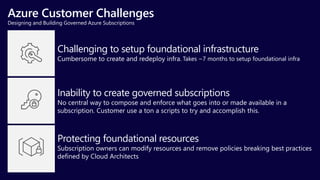
Azure Customer Challenges
Designing and Building Governed Azure Subscriptions
Challenging to setup foundational infrastructure
Cumbersome to create and redeploy infra.
Inability to create governed subscriptions
No central way to compose and enforce what goes into or made available in a
subscription. Customer use a ton a scripts to try and accomplish this.
Protecting foundational resources
Subscription owners can modify resources and remove policies breaking best practices
defined by Cloud Architects
Takes ~7 months to setup foundational infra
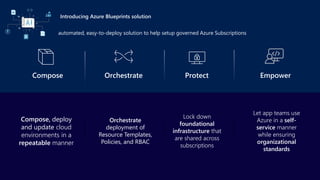
Introducing Azure Blueprints solution
automated, easy-to-deploy solution to help setup governed Azure Subscriptions
Empower
Compose Orchestrate Protect
Lock down
foundational
infrastructure that
are shared across
subscriptions
Orchestrate
deployment of
Resource Templates,
Policies, and RBAC
Let app teams use
Azure in a self-
service manner
while ensuring
organizational
standards
Compose, deploy
and update cloud
environments in a
repeatable manner
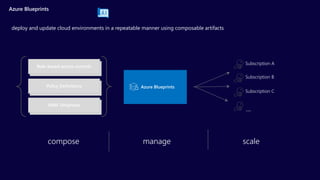
Azure Blueprints
deploy and update cloud environments in a repeatable manner using composable artifacts
Azure Blueprints
Subscription A
Subscription B
Subscription C
…
compose manage scale
Role-based access controls
Policy Definitions
ARM Templates
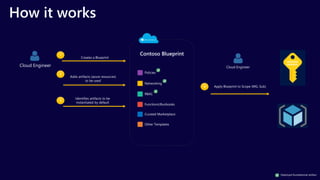
How it works
Cloud Engineer
1
Creates a Blueprint
Contoso Blueprint
2
Adds artifacts (azure resources)
to be used
3
Identifies artifacts to be
instantiated by default
Other Templates
Policies
Networking
RBAC
FunctionsRunbooks
Curated Marketplace
4 Apply Blueprint to Scope (MG, Sub)
Cloud Engineer
Deployed foundational artifact
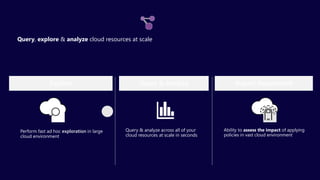
Query, explore & analyze cloud resources at scale
Perform fast ad hoc exploration in large
cloud environment
Ability to assess the impact of applying
policies in vast cloud environment
Impact Assessment
Explore
Query & analyze across all of your
cloud resources at scale in seconds
Query & Analyze
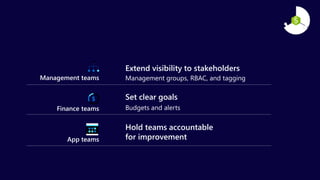
Extend visibility to stakeholders
Management groups, RBAC, and tagging
Management teams
Finance teams
App teams
Set clear goals
Budgets and alerts
Hold teams accountable
for improvement
#AzConfDev
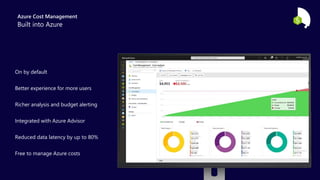
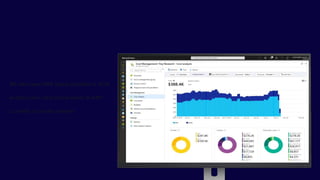
Azure Cost Management
Richer analysis and budget alerting
Reduced data latency by up to 80%
On by default
Integrated with Azure Advisor
Better experience for more users
Free to manage Azure costs
Azure Cost Management
Built into Azure
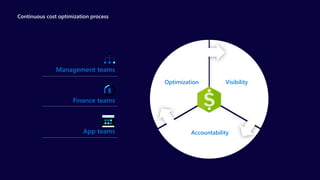
Continuous cost optimization process
Management teams
Finance teams
App teams Accountability
Visibility
Optimization
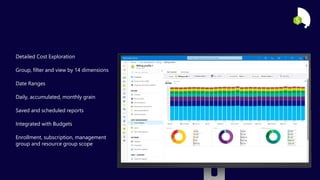
Date Ranges
Saved and scheduled reports
Detailed Cost Exploration
Daily, accumulated, monthly grain
Group, filter and view by 14 dimensions
Integrated with Budgets
Enrollment, subscription, management
group and resource group scope
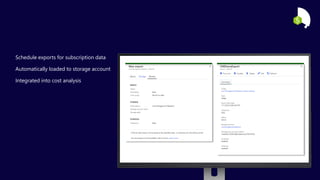
Schedule exports for subscription data
Automatically loaded to storage account
Integrated into cost analysis
Currently in private preview
We also have AWS spend available in ACM
Analyze your costs across Azure & AWS
# ##
##
###
TAG = #
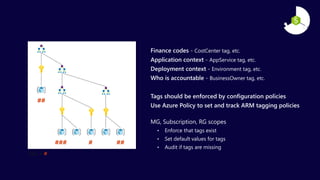
Finance codes - CostCenter tag, etc.
Application context - AppService tag, etc.
Deployment context - Environment tag, etc.
Who is accountable - BusinessOwner tag, etc.
Tags should be enforced by configuration policies
Use Azure Policy to set and track ARM tagging policies
MG, Subscription, RG scopes
• Enforce that tags exist
• Set default values for tags
• Audit if tags are missing
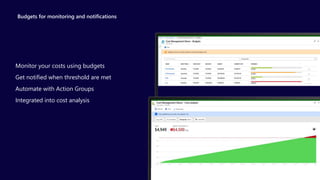
Budgets for monitoring and notifications
Monitor your costs using budgets
Get notified when threshold are met
Automate with Action Groups
Integrated into cost analysis
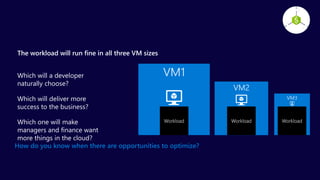
The workload will run fine in all three VM sizes
Which will a developer
naturally choose?
Which will deliver more
success to the business?
Which one will make
managers and finance want
more things in the cloud?
VM1
Workload
VM3
Workload
VM2
Workload
How do you know when there are opportunities to optimize?
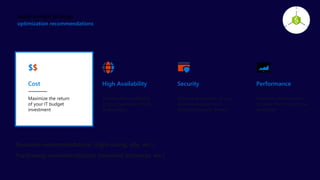
optimization recommendations
Optimize performance
to make the most of your
resources
Performance
Maximize the return
of your IT budget
investment
Cost
Improve the availability
of your business-critical
applications
High Availability
Enhance protection of your
Azure resources from
potential security threats
Security
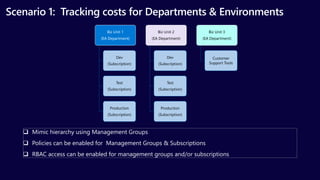
Scenario 1: Tracking costs for Departments & Environments
Biz Unit 1
(EA Department)
Dev
(Subscription)
Test
(Subscription)
Production
(Subscription)
Biz Unit 2
(EA Department)
Dev
(Subscription)
Test
(Subscription)
Production
(Subscription)
Biz Unit 3
(EA Department)
Customer
Support Tools
 Mimic hierarchy using Management Groups
 Policies can be enabled for Management Groups & Subscriptions
 RBAC access can be enabled for management groups and/or subscriptions
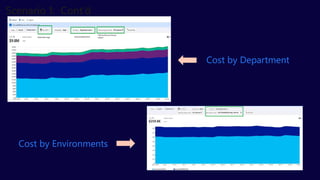
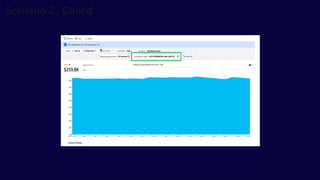
Cost by Department
Cost by Environments
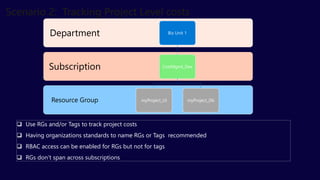
 Use RGs and/or Tags to track project costs
 Having organizations standards to name RGs or Tags recommended
 RBAC access can be enabled for RGs but not for tags
 RGs don’t span across subscriptions
Resource Group
Subscription
Department Biz Unit 1
CostMgmt_Dev
myProject_UI myProject_Db
Reinvest the money saved on
migrating more workloads
Migrate
Reinvest the money saved on
modernizing workloads
Modernize
Reinvest the money saved on
adding security and management
Secure and manage
Get started today!
Manage your EA costs with Azure
Cost Management preview
1
Use Azure Reserved Instances
and Hybrid Use Benefits to save
2
Reinvest your savings to get even
more business value out of Azure
3
#AzConfDev
Our Partners
#AzConfDev
Communities
#AzConfDev
Q & A
#AzConfDev
Feedback
#AzConfDev
THANK YOU!
Azure Community Conference 2021
India’s largest Azure Conference
#AzConfDev
#AzConfDev
Title Sponsor Gold Sponsor
Community Partner
#AzConfDev
ANANT MAHESHWARI
President, Microsoft India
#AzConfDev
Presentation Title
#AzConfDev
Title
#AzConfDev
Demo Title
#AzConfDev
Our Partners
#AzConfDev
Communities
#AzConfDev
Q & A
#AzConfDev
Feedback
#AzConfDev
THANK YOU!

Azure Governance for Enterprise

  • 1.
    Azure Community Conference2021 India’s largest Azure Conference #AzConfDev
  • 2.
    #AzConfDev Title Sponsor GoldSponsor Community Partner
  • 3.
  • 4.
    #AzConfDev Azure Governance forscale Mohit Chhabra Microsoft Azure MVP
  • 5.
    #AzConfDev Need to Govern YourTeam runs an Azure Environment with • Multiple Engineering Team • Multiple Subscriptions • Need to Standardize/enforce how cloud Resources are configured • Due to Regulatory compliance, cost control, security or design consistency
  • 6.
    #AzConfDev Why is Governanceneeded? Pressure to digitally transform & innovate Need for agility to reduce speed to market Shift to DevOps Cloud Sprawl -> Increased complexity in managing standard, accountability, compliance, consistent architecture & cost -> at Scale
  • 7.
    #AzConfDev Traditional approach Sacrifice Speedfor Control Developers Operations Cloud Custodian / Engineers responsible for Cloud environment
  • 8.
    #AzConfDev Traditional approach Sacrifice Speedfor Control Developers Operations Cloud Custodian / Engineers responsible for Cloud environment
  • 9.
    #AzConfDev Cloud-native governance Speed andControl Developers Built-in controls through policy instead of workflow Operations Cloud Custodian Team
  • 10.
    #AzConfDev Governance for thecloud Speed and Control Blueprints Deploy and update cloud environments in a repeatable manner using composable artifacts Resource Graph Query, explore & analyze cloud resources at scale Management Group Define organizational hierarchy Policy Real-time enforcement, compliance assessment and remediation Control Visibility Environment Monitor cloud spend and optimize resources Consumption Hierarchy Cost
  • 11.
  • 12.
    #AzConfDev Azure Management Groups Makeenvironment management easier by grouping subscriptions together Create a hierarchy of management groups that fit your organization Apply governance controls with policies and access controls along with other Azure services logical groups allow for new organization models • Inheritance allows for single assignment of controls that apply to all subscriptions • Aggregated views above the subscription level • Create a flexible hierarchy that can be updated quickly • Hierarchy doesn’t need to model the organizations billing hierarchy • Can easily scale up or down depending on the organizational needs • Azure Resource Manager (ARM) objects that allow integrations with other Azure services • Azure services: • Azure Policy • RBAC • Azure Cost Management • Azure Blueprints • Azure Security Center
  • 13.
    #AzConfDev Azure Management Groupsand Subscription modelling Strategy App A Pre-Prod Microsoft Recommended App B Pre-Prod Shared services (Pre-Prod) App C Pre-Prod App A Prod App B Prod Shared services (Prod) App D Prod Prod RBAC + Policy Pre-Prod RBAC + Policy Org Management Group
  • 14.
  • 15.
  • 16.
    #AzConfDev Azure Role-Based Access Control(RBAC) Fine-grained access control to Azure “control plane” Grant access by assigning Security Principal a Role at a Scope Security Principal: User, group, or service principal Role: Built-in or custom role Scope: Subscription, resource group, or resource Assignments are inherited down the resource hierarchy https://aka.ms/azureiam
  • 17.
    #AzConfDev Resource Lock • Locka Subscription, resource group, or resource to prevent accidental deletion or modification. • CanNotDelete / ReadOnly • Locks apply only to management operations, not to resources functions • Caution: ReadOnly can cause unexpected results • Lock on a storage account prevents all users from listing keys • Lock on App Service prevents Visual Studio Server Explorer from displaying files for the resource because that interaction requires write access
  • 18.
  • 19.
    #AzConfDev Azure Policy Remediation Enforcement & Compliance Applypolicies at scale Turn on built-in policies or build custom ones for all resource types Real-time policy evaluation and enforcement Periodic & on-demand compliance evaluation Apply policies to a Management Group with control across your entire organization Apply multiple policies and & aggregate policy states with policy initiative Real time remediation Remediation on existing resources (NEW) Exclusion Scope VM In-Guest Policy (NEW)
  • 20.
    { "if": { <accessor>, <condition>| <logical operator> }, "then": { "effect": “Disabled | append | deny | audit | auditIfNotExists | deployIfNotExists" } } Operators “not”: { … } “allOf”: [ … ] “anyOf”: [ … ] Conditions “equals”: “value” “like”: “value” “match”: “value” “contains”: “value” “in”: [“val1”, “val2”] “containsKey”: “keyName” “exists”: “bool” + “not*” variants Accessors “field”: “fieldname” “source”: “action” Fields name kind type location fullName tags tags.* aliases
  • 21.
    $policy = New-AzureRmPolicyDefinition-Name costCenterTagPolicyDefinition -Description "Policy to deny resource creation if no costCenter tag is provided" -Policy '{ "if": { "not" : { "field" : "tags", "containsKey" : "costCenter" } }, "then" : { "effect" : "deny"
  • 22.
    { "if": { "not": { "field":"name", "like": "namePrefix*nameSuffix" } }, "then": { "effect": "deny" } }
  • 23.
    "properties": { "displayName": "AllowedVM Skus", "description": "This policy enables you to specify a set of virtual machine SKUs that your organization can deploy.“ }, "policyRule": { "if": { "allOf": [ { "field": "type", "equals": "Microsoft.Compute/virtualMachines“ }, { "not": { "field":"Microsoft.Compute/virtualMachines/sku.name", "in": ["Basic_A0”,”Basic_A1”,”Basic_A2”,”Basic_A3”,”Basic_A4”]
  • 24.
    "properties": { "displayName": "AllowedVM Skus", "description": "This policy enables you to specify a set of virtual machine SKUs that your organization can deploy.", "parameters": { "listOfAllowedSKUs": {"type": "array"} } }, "policyRule": { "if": { "allOf": [ { "field": "type", "equals": "Microsoft.Compute/virtualMachines“ }, { "not": {
  • 26.
    Azure Policy BestPractices • “Initiative" owners like Security Architect or Cloud Architect or Cloud Engineers Who owns policy definitions & implementation? • Research or gather evidence on the impact of a particular configuration on a particular fundamental (like cost or security) • What-if analysis of enforcing configuration in a particular manner • Assess the current state of compliance to understand the impact of new policy and what exceptions are needed • Roll out new policy in phases • Understand the applications & teams who are non-compliant • Rollout remediation in stages via SafeDeploy practices What is involved in defining a new Policy or refining an existing one? • Regulatory Compliance • Controlling cost • Standards & Tagging • Maintain security and performance consistency • Enforce enterprise wide design principles What drives your need for Policy?
  • 27.
    Azure Customer Challenges Designingand Building Governed Azure Subscriptions Challenging to setup foundational infrastructure Cumbersome to create and redeploy infra. Inability to create governed subscriptions No central way to compose and enforce what goes into or made available in a subscription. Customer use a ton a scripts to try and accomplish this. Protecting foundational resources Subscription owners can modify resources and remove policies breaking best practices defined by Cloud Architects Takes ~7 months to setup foundational infra
  • 28.
    Introducing Azure Blueprintssolution automated, easy-to-deploy solution to help setup governed Azure Subscriptions Empower Compose Orchestrate Protect Lock down foundational infrastructure that are shared across subscriptions Orchestrate deployment of Resource Templates, Policies, and RBAC Let app teams use Azure in a self- service manner while ensuring organizational standards Compose, deploy and update cloud environments in a repeatable manner
  • 29.
    Azure Blueprints deploy andupdate cloud environments in a repeatable manner using composable artifacts Azure Blueprints Subscription A Subscription B Subscription C … compose manage scale Role-based access controls Policy Definitions ARM Templates
  • 30.
    How it works CloudEngineer 1 Creates a Blueprint Contoso Blueprint 2 Adds artifacts (azure resources) to be used 3 Identifies artifacts to be instantiated by default Other Templates Policies Networking RBAC FunctionsRunbooks Curated Marketplace 4 Apply Blueprint to Scope (MG, Sub) Cloud Engineer Deployed foundational artifact
  • 31.
    Query, explore &analyze cloud resources at scale Perform fast ad hoc exploration in large cloud environment Ability to assess the impact of applying policies in vast cloud environment Impact Assessment Explore Query & analyze across all of your cloud resources at scale in seconds Query & Analyze
  • 32.
    Extend visibility tostakeholders Management groups, RBAC, and tagging Management teams Finance teams App teams Set clear goals Budgets and alerts Hold teams accountable for improvement
  • 33.
  • 34.
    Richer analysis andbudget alerting Reduced data latency by up to 80% On by default Integrated with Azure Advisor Better experience for more users Free to manage Azure costs Azure Cost Management Built into Azure
  • 35.
    Continuous cost optimizationprocess Management teams Finance teams App teams Accountability Visibility Optimization
  • 36.
    Date Ranges Saved andscheduled reports Detailed Cost Exploration Daily, accumulated, monthly grain Group, filter and view by 14 dimensions Integrated with Budgets Enrollment, subscription, management group and resource group scope
  • 37.
    Schedule exports forsubscription data Automatically loaded to storage account Integrated into cost analysis
  • 39.
    Currently in privatepreview We also have AWS spend available in ACM Analyze your costs across Azure & AWS
  • 40.
    # ## ## ### TAG =# Finance codes - CostCenter tag, etc. Application context - AppService tag, etc. Deployment context - Environment tag, etc. Who is accountable - BusinessOwner tag, etc. Tags should be enforced by configuration policies Use Azure Policy to set and track ARM tagging policies MG, Subscription, RG scopes • Enforce that tags exist • Set default values for tags • Audit if tags are missing
  • 41.
    Budgets for monitoringand notifications Monitor your costs using budgets Get notified when threshold are met Automate with Action Groups Integrated into cost analysis
  • 42.
    The workload willrun fine in all three VM sizes Which will a developer naturally choose? Which will deliver more success to the business? Which one will make managers and finance want more things in the cloud? VM1 Workload VM3 Workload VM2 Workload How do you know when there are opportunities to optimize?
  • 43.
    optimization recommendations Optimize performance tomake the most of your resources Performance Maximize the return of your IT budget investment Cost Improve the availability of your business-critical applications High Availability Enhance protection of your Azure resources from potential security threats Security
  • 44.
    Scenario 1: Trackingcosts for Departments & Environments Biz Unit 1 (EA Department) Dev (Subscription) Test (Subscription) Production (Subscription) Biz Unit 2 (EA Department) Dev (Subscription) Test (Subscription) Production (Subscription) Biz Unit 3 (EA Department) Customer Support Tools  Mimic hierarchy using Management Groups  Policies can be enabled for Management Groups & Subscriptions  RBAC access can be enabled for management groups and/or subscriptions
  • 45.
    Cost by Department Costby Environments
  • 46.
     Use RGsand/or Tags to track project costs  Having organizations standards to name RGs or Tags recommended  RBAC access can be enabled for RGs but not for tags  RGs don’t span across subscriptions Resource Group Subscription Department Biz Unit 1 CostMgmt_Dev myProject_UI myProject_Db
  • 48.
    Reinvest the moneysaved on migrating more workloads Migrate Reinvest the money saved on modernizing workloads Modernize Reinvest the money saved on adding security and management Secure and manage
  • 49.
    Get started today! Manageyour EA costs with Azure Cost Management preview 1 Use Azure Reserved Instances and Hybrid Use Benefits to save 2 Reinvest your savings to get even more business value out of Azure 3
  • 50.
  • 51.
  • 52.
  • 53.
  • 54.
  • 55.
    Azure Community Conference2021 India’s largest Azure Conference #AzConfDev
  • 56.
    #AzConfDev Title Sponsor GoldSponsor Community Partner
  • 57.
  • 58.
  • 59.
  • 60.
  • 61.
  • 62.
  • 63.
  • 64.
  • 65.

Editor's Notes

  • #21 This is how Azure Policy can help with governance. Your DevOps request to deploy resources to Azure for a given project through a JSON template they pre-created to make things easier and quicker. Let’s say they want to deploy 5 G series VMs in Europe (high memory-to-cpu ratio and are ideal for DB servers) and 5 Ls in the US (high disk throughput, ideal for big data and SQL) Azure Policy takes action and scans
  • #24 Order of evaluation Requests to create or update a resource through Azure Resource Manager are evaluated by Policy first. Policy creates a list of all assignments that apply to the resource and then evaluates the resource against each definition. Policy processes several of the effects before handing the request to the appropriate Resource Provider. Doing so prevents unnecessary processing by a Resource Provider when a resource doesn't meet the designed governance controls of Policy. Disabled is checked first to determine if the policy rule should be evaluated. Append is then evaluated. Since append could alter the request, a change made by append may prevent an audit or deny effect from triggering. Append is used to add additional fields to the requested resource during creation or update. A common example is adding tags on resources such as costCenter or specifying allowed IPs for a storage resource. Deny is then evaluated. By evaluating deny before audit, double logging of an undesired resource is prevented. Deny is used to prevent a resource request that doesn't match defined standards through a policy definition and fails the request. Audit is then evaluated before the request going to the Resource Provider. Audit is used to create a warning event in the activity log when evaluating a non-compliant resource, but it doesn't stop the request. After the Resource Provider returns a success code, AuditIfNotExists and DeployIfNotExists evaluate to determine if additional compliance logging or action is required. AuditIfNotExists (exiting resources) AuditIfNotExists enables auditing on resources that match the if condition, but doesn't have the components specified in the details of the then condition. DeployIfNotExists Similar to AuditIfNotExists, DeployIfNotExists executes a template deployment when the condition is met.
  • #30 Ask yourself these 3 questions and work from there when defining your policies What drives your need for policy? Who owns policy definitions? What is involved in defining a new policy or refining an existing one? These questions need to be asked from time to time as compliance is an evolving thing. You need to adjust your policies according to your current priorities, not only for compliance, but also for different projects that might require more powerful resources deployed that are currently blocked by policy, for example.
  • #32 It’s a tracked entity.
  • #36 There are a few challenges today when it comes to getting visibility of all your resources properties in all subscriptions and understand how they can be impacting negatively your organization, being from a cost or a security perspectives. Inability to view resources and their properties across subscriptions Query resources (without worrying about timeouts & throttling), including filtering, grouping and sorting of resources by resource properties Resource graph provides a way to interactively explore resources, so you can assess the impact of applying policies in vast cloud environment Demo: Launch Resource Graph in the portal and show the example query commands Launch CloudShell and run those command examples
  • #41 Reducing # of portals…and we will cover details in upcoming slides..
  • #42 Ability to slice and dice your data and analyze this on multiple dimensions..