pdfcrowd.comopen in browser PRO version Are you a developer? Try out the HTML to PDF API
6 Ways to Use Google+ to
Increase Your Visibility
By Kristi Hines
Published June 2, 2015
Do you use Google+ for your business?
Interested in ways to get more exposure?
With a few simple tactics, you can extend your reach
on Google+ and attract additional followers.
In this article I’ll show you six ways to increase
your visibility on Google+ and in Google search
results.
Enter your name
Email
HOME FREE UPDATES PODCASTS SOCIETY CONFERENCE EVENTS REPORTS STARTING ABOUT
Browse Categories
4k
Shares
2.1k
481
436
385
339
23
pdfcrowd.comopen in browser PRO version Are you a developer? Try out the HTML to PDF API
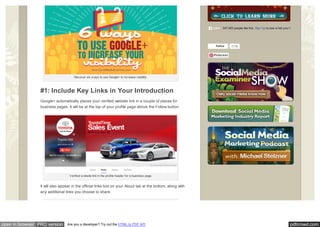
Discover six w ays to use Google+ to increase visibility.
#1: Include Key Links in Your Introduction
Google+ automatically places your verified website link in a couple of places for
business pages. It will be at the top of your profile page above the Follow button.
Verified w ebsite link in the profile header for a business page.
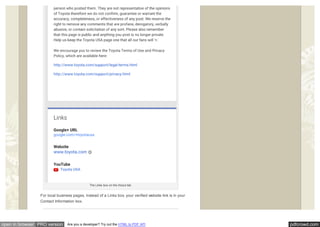
It will also appear in the official links box on your About tab at the bottom, along with
any additional links you choose to share.
347,063 people like this. Sign Up to see w hat your friends like.Like
Follow 213k
Pinterest
pdfcrowd.comopen in browser PRO version Are you a developer? Try out the HTML to PDF API
The Links box on the About tab.
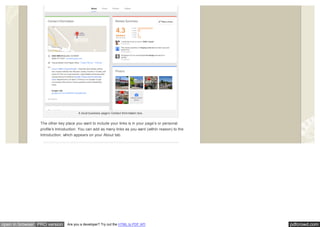
For local business pages, instead of a Links box, your verified website link is in your
Contact Information box.
pdfcrowd.comopen in browser PRO version Are you a developer? Try out the HTML to PDF API
A local business page’s Contact Information box.
The other key place you want to include your links is in your page’s or personal
profile’s Introduction. You can add as many links as you want (within reason) to the
Introduction, which appears on your About tab.
pdfcrowd.comopen in browser PRO version Are you a developer? Try out the HTML to PDF API
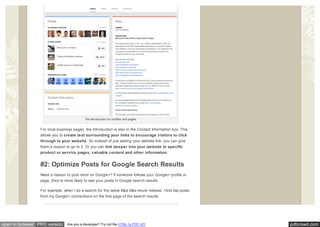
The Introduction for profiles and pages.
For local business pages, the Introduction is also in the Contact Information box. This
allows you to create text surrounding your links to encourage visitors to click
through to your website. So instead of just seeing your website link, you can give
them a reason to go to it. Or you can link deeper into your website to specific
product or service pages, valuable content and other information.
#2: Optimize Posts for Google Search Results
Need a reason to post more on Google+? If someone follows your Google+ profile or
page, they’re more likely to see your posts in Google search results.
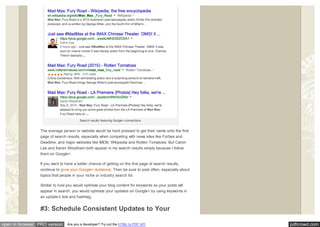
For example, when I do a search for the latest Mad Max movie release, I find two posts
from my Google+ connections on the first page of the search results.
pdfcrowd.comopen in browser PRO version Are you a developer? Try out the HTML to PDF API
Search results featuring Google+ connections.
The average person or website would be hard pressed to get their name onto the first
page of search results, especially when competing with news sites like Forbes and
Deadline, and major websites like IMDB, Wikipedia and Rotten Tomatoes. But Calvin
Lee and Karen Woodham both appear in my search results simply because I follow
them on Google+.
If you want to have a better chance of getting on the first page of search results,
continue to grow your Google+ audience. Then be sure to post often, especially about
topics that people in your niche or industry search for.
Similar to how you would optimize your blog content for keywords so your posts will
appear in search, you would optimize your updates on Google+ by using keywords in
an update’s text and hashtag.
#3: Schedule Consistent Updates to Your
pdfcrowd.comopen in browser PRO version Are you a developer? Try out the HTML to PDF API
Profile and Page
There are several popular social media management tools that allow you to post
updates to your Google+ business page, but most of these don’t work with your
Google+ personal profile. Fortunately, a tool like BuzzBundle allows you to post to
and manage both Google+ personal profiles and business pages.
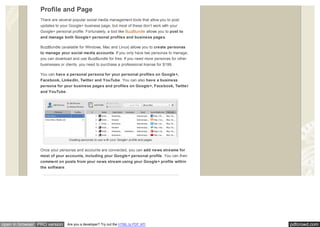
BuzzBundle (available for Windows, Mac and Linux) allows you to create personas
to manage your social media accounts. If you only have two personas to manage,
you can download and use BuzzBundle for free. If you need more personas for other
businesses or clients, you need to purchase a professional license for $199.
You can have a personal persona for your personal profiles on Google+,
Facebook, LinkedIn, Twitter and YouTube. You can also have a business
persona for your business pages and profiles on Google+, Facebook, Twitter
and YouTube.
Creating personas to use w ith your Google+ profile and pages.
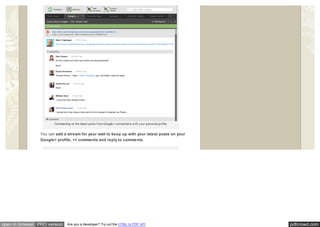
Once your personas and accounts are connected, you can add news streams for
most of your accounts, including your Google+ personal profile. You can then
comment on posts from your news stream using your Google+ profile within
the software.
pdfcrowd.comopen in browser PRO version Are you a developer? Try out the HTML to PDF API
Commenting on the latest posts from Google+ connections w ith your personal profile.
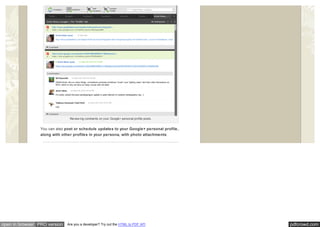
You can add a stream for your wall to keep up with your latest posts on your
Google+ profile, +1 comments and reply to comments.
pdfcrowd.comopen in browser PRO version Are you a developer? Try out the HTML to PDF API
Review ing comments on your Google+ personal profile posts.
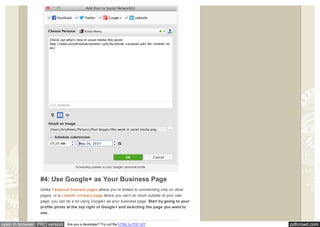
You can also post or schedule updates to your Google+ personal profile,
along with other profiles in your persona, with photo attachments.
pdfcrowd.comopen in browser PRO version Are you a developer? Try out the HTML to PDF API
Scheduling updates to your Google+ personal profile.
#4: Use Google+ as Your Business Page
Unlike Facebook business pages where you’re limited to commenting only on other
pages, or a LinkedIn company page where you can’t do much outside of your own
page, you can do a lot using Google+ as your business page. Start by going to your
profile photo at the top right of Google+ and selecting the page you want to
use.
pdfcrowd.comopen in browser PRO version Are you a developer? Try out the HTML to PDF API
Sw itch to your Google+ page.
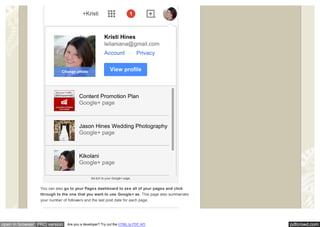
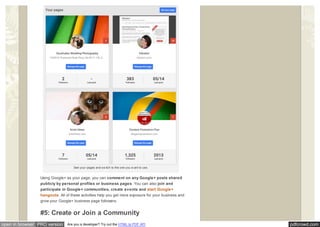
You can also go to your Pages dashboard to see all of your pages and click
through to the one that you want to use Google+ as. This page also summarizes
your number of followers and the last post date for each page.
pdfcrowd.comopen in browser PRO version Are you a developer? Try out the HTML to PDF API
See your pages and sw itch to the one you w ant to use.
Using Google+ as your page, you can comment on any Google+ posts shared
publicly by personal profiles or business pages. You can also join and
participate in Google+ communities, create events and start Google+
hangouts. All of these activities help you get more exposure for your business and
grow your Google+ business page followers.
#5: Create or Join a Community
pdfcrowd.comopen in browser PRO version Are you a developer? Try out the HTML to PDF API
Google+ communities are similar to Facebook and LinkedIn groups. The one main
difference is that you can use either your Google+ personal profile or your business
page to both create and participate in communities.
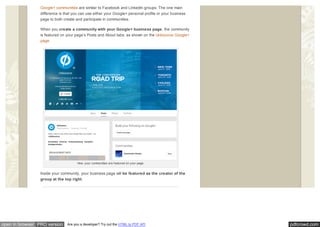
When you create a community with your Google+ business page, the community
is featured on your page’s Posts and About tabs, as shown on the Unbounce Google+
page.
How your communities are featured on your page.
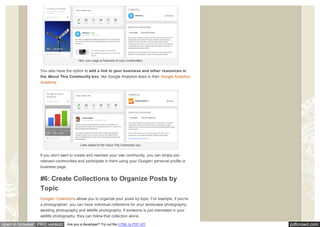
Inside your community, your business page will be featured as the creator of the
group at the top right.
pdfcrowd.comopen in browser PRO version Are you a developer? Try out the HTML to PDF API
How your page is featured on your communities.
You also have the option to add a link to your business and other resources in
the About This Community box, like Google Analytics does in their Google Analytics
Academy.
Links added to the About This Community box.
If you don’t want to create and maintain your own community, you can simply join
relevant communities and participate in them using your Google+ personal profile or
business page.
#6: Create Collections to Organize Posts by
Topic
Google+ Collections allows you to organize your posts by topic. For example, if you’re
a photographer, you can have individual collections for your landscape photography,
wedding photography and wildlife photography. If someone is just interested in your
wildlife photography, they can follow that collection alone.
pdfcrowd.comopen in browser PRO version Are you a developer? Try out the HTML to PDF API
Google+ profiles and pages that update dozens of times a day or several times hourly,
like a news organization, would especially benefit from using collections. Collections
allow people to follow the news they’re most interested in without being overwhelmed
by a lot of other updates.
For example, a big news organization could have a collection of top news for the day
so people would only get a few updates of the most important headline news. The
organization could also have collections for world news, news by location, politics,
technology or entertainment.
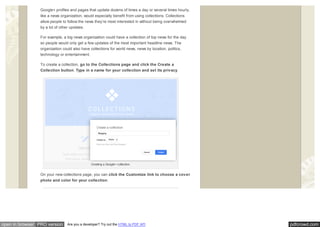
To create a collection, go to the Collections page and click the Create a
Collection button. Type in a name for your collection and set its privacy.
Creating a Google+ collection.
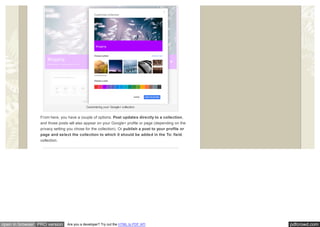
On your new collections page, you can click the Customize link to choose a cover
photo and color for your collection.
pdfcrowd.comopen in browser PRO version Are you a developer? Try out the HTML to PDF API
Customizing your Google+ collection.
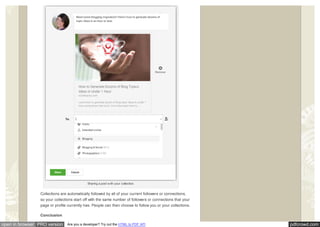
From here, you have a couple of options. Post updates directly to a collection,
and those posts will also appear on your Google+ profile or page (depending on the
privacy setting you chose for the collection). Or publish a post to your profile or
page and select the collection to which it should be added in the To: field.
collection.
pdfcrowd.comopen in browser PRO version Are you a developer? Try out the HTML to PDF API
Sharing a post w ith your collection.
Collections are automatically followed by all of your current followers or connections,
so your collections start off with the same number of followers or connections that your
page or profile currently has. People can then choose to follow you or your collections.
Conclusion
pdfcrowd.comopen in browser PRO version Are you a developer? Try out the HTML to PDF API
As you can see, there are lots of great ways to use Google+ to promote your
business.
What do you think? How do you use Google+? Please share your thoughts in the
comments!
Tips for improving visibility w ith Google+.
Related Posts
Tags: google, google plus, google prof ile, google+ audience, google+ collection, google+ community , google+ marketing, kristi
hines
How to Discover
Analytics With the
Google+ Dashboard
How to Grow Your
Facebook Audience: 8
Success Tips
How to Cross Promote
Your Social Profiles With
Facebook
Sign Up to see w hat your friends like.Like Share
pdfcrowd.comopen in browser PRO version Are you a developer? Try out the HTML to PDF API
ABOUT THE AUTHOR, Kristi Hines
Kristi Hines is a contributing editor f or Social Media Examiner,
f reelance w riter, and HubSpot Inbound Certif ied Marketer. She
specializes in analytics, blogging, and social media topics. Othe r
pos ts by Kristi Hines »
18 Comments Social Media Examiner
Share⤤
Join the discussion…
• Reply •
Jeewan Garg™ • 19 hours ago
Again a good post , thank you Kristi Hines
△ ▽
Recommend 2
Share ›
Enter your name
Email
pdfcrowd.comopen in browser PRO version Are you a developer? Try out the HTML to PDF API
• Reply •
Kristi Hines • 14 hours ago> Jeewan Garg™
Thanks Jeewan! :)
△ ▽
• Reply •
Josephine Tang • 16 hours ago
Informative article, good job, thanks
1 △ ▽
• Reply •
Kristi Hines • 14 hours ago> Josephine Tang
You're welcome Josephine! :)
△ ▽
• Reply •
Cypher - Mass Planner • 16 hours ago
Awesome Post Kristi. It has been easier for me to join groups in my niche using our software :). Maybe you could
check it out in the future. Thank you again
△ ▽
• Reply •
Kristi Hines • 14 hours ago> Cypher - Mass Planner
Thanks Cypher! :) I need to play more around with Mass Planner - I just have my Windows on a separate
hard drive, so I don't think about it as often.
PS. When will a Mac version of your platform arrive?
1 △ ▽
• Reply •
Cypher - Mass Planner • 5 hours ago> Kristi Hines
Thank you for the reply Kristi. Unfortunately, we don't have any resources as of yet to make a Mac
version because as of now we are trying to improve the windows version and add as much feature as
possible. Let us know how we can help you and we will get back to you as soon as possible. Thank
you again.
△ ▽
• Reply •
CHANDAN DAS • 16 hours ago
I am using google+ only for my personal work and i get lots of positive feedback by sharing only high quality and
informative images :)
△ ▽
Stuart O'Neill • 15 hours ago> CHANDAN DAS
Share ›
Share ›
Share ›
Share ›
Share ›
Share ›
Share ›
pdfcrowd.comopen in browser PRO version Are you a developer? Try out the HTML to PDF API
• Reply •
G+ is made for that type of high-level very personal interaction and engagement. Good for you. I will add you
to my photographers circle. :)
△ ▽
• Reply •
Kristi Hines • 14 hours ago> Stuart O'Neill
Photographers seem to run G+ - makes it a great place to be. :)
△ ▽
• Reply •
Kristi Hines • 14 hours ago> CHANDAN DAS
That's great to hear Chandan! :)
△ ▽
• Reply •
Amandah Tayler Blackwell • 15 hours ago
Great post! I've been slacking with updating my Google+ pages as I've been focused on Twitter (go to) and my new
favorite, Instagram. I need a more balanced approach to social media. So many networks, only so many hours in a
day. :-)
△ ▽
• Reply •
Kristi Hines • 14 hours ago> Amandah Tayler Blackwell
Thanks Amandah! It's tough to manage them all - you kind of need a checklist in front of you every day to say
that you are devoting X amount of time into specific networks. Otherwise, it's easy to overlook some.
△ ▽
• Reply •
Logikal Code • 13 hours ago
Great post, thanks for emphasizing the value that Google+ still provides. With all the talk of Google repurposing the
network, our efforts there have definitely decreased as we attempted to see where its future is headed.
△ ▽
• Reply •
Niquenya Fulbright • 13 hours ago
We've had great results with using hashtags on Google+. It's a great way to achieve first page Google results for
broad keywords that ordinarily wouldn't be touchable like "cat" or "books" for instance.
△ ▽
• Reply •
LauraBeSocial • 12 hours ago
Its great! I use Google+ fro my business and its worth it! Thanks for these tips!
△ ▽
Share ›
Share ›
Share ›
Share ›
Share ›
Share ›
Share ›
Share ›
pdfcrowd.comopen in browser PRO version Are you a developer? Try out the HTML to PDF API
• Reply •
Nirmala Santhakumar • 3 hours ago
Good post on Google Plus Krisiti. I'm a regular user of Google plus and have good no. of followers. Most of the
bloggers and internet marketers believe that there is a strong correlation between Google Plus and Google search
and even I too.
I'm almost following all the tips which you've mentioned, BuzzBuldle is new to me, I'll check its details.
△ ▽
• Reply •
vijee djega • 2 hours ago
Thanks for all the great advice, am going to try out buzzbundle after reading this :-)And am going to put some time
into organizing collections.
△ ▽
Subscribe✉ Add Disqus to your sited Privacy
Share ›
Share ›
Copyright © 2015 Social Media Examiner®. All Rights Reserved. Terms of Use.

6 Ways to Use Google+ to Increase Your Visibility

  • 1.
    pdfcrowd.comopen in browserPRO version Are you a developer? Try out the HTML to PDF API 6 Ways to Use Google+ to Increase Your Visibility By Kristi Hines Published June 2, 2015 Do you use Google+ for your business? Interested in ways to get more exposure? With a few simple tactics, you can extend your reach on Google+ and attract additional followers. In this article I’ll show you six ways to increase your visibility on Google+ and in Google search results. Enter your name Email HOME FREE UPDATES PODCASTS SOCIETY CONFERENCE EVENTS REPORTS STARTING ABOUT Browse Categories 4k Shares 2.1k 481 436 385 339 23
  • 2.
    pdfcrowd.comopen in browserPRO version Are you a developer? Try out the HTML to PDF API Discover six w ays to use Google+ to increase visibility. #1: Include Key Links in Your Introduction Google+ automatically places your verified website link in a couple of places for business pages. It will be at the top of your profile page above the Follow button. Verified w ebsite link in the profile header for a business page. It will also appear in the official links box on your About tab at the bottom, along with any additional links you choose to share. 347,063 people like this. Sign Up to see w hat your friends like.Like Follow 213k Pinterest
  • 3.
    pdfcrowd.comopen in browserPRO version Are you a developer? Try out the HTML to PDF API The Links box on the About tab. For local business pages, instead of a Links box, your verified website link is in your Contact Information box.
  • 4.
    pdfcrowd.comopen in browserPRO version Are you a developer? Try out the HTML to PDF API A local business page’s Contact Information box. The other key place you want to include your links is in your page’s or personal profile’s Introduction. You can add as many links as you want (within reason) to the Introduction, which appears on your About tab.
  • 5.
    pdfcrowd.comopen in browserPRO version Are you a developer? Try out the HTML to PDF API The Introduction for profiles and pages. For local business pages, the Introduction is also in the Contact Information box. This allows you to create text surrounding your links to encourage visitors to click through to your website. So instead of just seeing your website link, you can give them a reason to go to it. Or you can link deeper into your website to specific product or service pages, valuable content and other information. #2: Optimize Posts for Google Search Results Need a reason to post more on Google+? If someone follows your Google+ profile or page, they’re more likely to see your posts in Google search results. For example, when I do a search for the latest Mad Max movie release, I find two posts from my Google+ connections on the first page of the search results.
  • 6.
    pdfcrowd.comopen in browserPRO version Are you a developer? Try out the HTML to PDF API Search results featuring Google+ connections. The average person or website would be hard pressed to get their name onto the first page of search results, especially when competing with news sites like Forbes and Deadline, and major websites like IMDB, Wikipedia and Rotten Tomatoes. But Calvin Lee and Karen Woodham both appear in my search results simply because I follow them on Google+. If you want to have a better chance of getting on the first page of search results, continue to grow your Google+ audience. Then be sure to post often, especially about topics that people in your niche or industry search for. Similar to how you would optimize your blog content for keywords so your posts will appear in search, you would optimize your updates on Google+ by using keywords in an update’s text and hashtag. #3: Schedule Consistent Updates to Your
  • 7.
    pdfcrowd.comopen in browserPRO version Are you a developer? Try out the HTML to PDF API Profile and Page There are several popular social media management tools that allow you to post updates to your Google+ business page, but most of these don’t work with your Google+ personal profile. Fortunately, a tool like BuzzBundle allows you to post to and manage both Google+ personal profiles and business pages. BuzzBundle (available for Windows, Mac and Linux) allows you to create personas to manage your social media accounts. If you only have two personas to manage, you can download and use BuzzBundle for free. If you need more personas for other businesses or clients, you need to purchase a professional license for $199. You can have a personal persona for your personal profiles on Google+, Facebook, LinkedIn, Twitter and YouTube. You can also have a business persona for your business pages and profiles on Google+, Facebook, Twitter and YouTube. Creating personas to use w ith your Google+ profile and pages. Once your personas and accounts are connected, you can add news streams for most of your accounts, including your Google+ personal profile. You can then comment on posts from your news stream using your Google+ profile within the software.
  • 8.
    pdfcrowd.comopen in browserPRO version Are you a developer? Try out the HTML to PDF API Commenting on the latest posts from Google+ connections w ith your personal profile. You can add a stream for your wall to keep up with your latest posts on your Google+ profile, +1 comments and reply to comments.
  • 9.
    pdfcrowd.comopen in browserPRO version Are you a developer? Try out the HTML to PDF API
  • 10.
    pdfcrowd.comopen in browserPRO version Are you a developer? Try out the HTML to PDF API Review ing comments on your Google+ personal profile posts. You can also post or schedule updates to your Google+ personal profile, along with other profiles in your persona, with photo attachments.
  • 11.
    pdfcrowd.comopen in browserPRO version Are you a developer? Try out the HTML to PDF API Scheduling updates to your Google+ personal profile. #4: Use Google+ as Your Business Page Unlike Facebook business pages where you’re limited to commenting only on other pages, or a LinkedIn company page where you can’t do much outside of your own page, you can do a lot using Google+ as your business page. Start by going to your profile photo at the top right of Google+ and selecting the page you want to use.
  • 12.
    pdfcrowd.comopen in browserPRO version Are you a developer? Try out the HTML to PDF API Sw itch to your Google+ page. You can also go to your Pages dashboard to see all of your pages and click through to the one that you want to use Google+ as. This page also summarizes your number of followers and the last post date for each page.
  • 13.
    pdfcrowd.comopen in browserPRO version Are you a developer? Try out the HTML to PDF API See your pages and sw itch to the one you w ant to use. Using Google+ as your page, you can comment on any Google+ posts shared publicly by personal profiles or business pages. You can also join and participate in Google+ communities, create events and start Google+ hangouts. All of these activities help you get more exposure for your business and grow your Google+ business page followers. #5: Create or Join a Community
  • 14.
    pdfcrowd.comopen in browserPRO version Are you a developer? Try out the HTML to PDF API Google+ communities are similar to Facebook and LinkedIn groups. The one main difference is that you can use either your Google+ personal profile or your business page to both create and participate in communities. When you create a community with your Google+ business page, the community is featured on your page’s Posts and About tabs, as shown on the Unbounce Google+ page. How your communities are featured on your page. Inside your community, your business page will be featured as the creator of the group at the top right.
  • 15.
    pdfcrowd.comopen in browserPRO version Are you a developer? Try out the HTML to PDF API How your page is featured on your communities. You also have the option to add a link to your business and other resources in the About This Community box, like Google Analytics does in their Google Analytics Academy. Links added to the About This Community box. If you don’t want to create and maintain your own community, you can simply join relevant communities and participate in them using your Google+ personal profile or business page. #6: Create Collections to Organize Posts by Topic Google+ Collections allows you to organize your posts by topic. For example, if you’re a photographer, you can have individual collections for your landscape photography, wedding photography and wildlife photography. If someone is just interested in your wildlife photography, they can follow that collection alone.
  • 16.
    pdfcrowd.comopen in browserPRO version Are you a developer? Try out the HTML to PDF API Google+ profiles and pages that update dozens of times a day or several times hourly, like a news organization, would especially benefit from using collections. Collections allow people to follow the news they’re most interested in without being overwhelmed by a lot of other updates. For example, a big news organization could have a collection of top news for the day so people would only get a few updates of the most important headline news. The organization could also have collections for world news, news by location, politics, technology or entertainment. To create a collection, go to the Collections page and click the Create a Collection button. Type in a name for your collection and set its privacy. Creating a Google+ collection. On your new collections page, you can click the Customize link to choose a cover photo and color for your collection.
  • 17.
    pdfcrowd.comopen in browserPRO version Are you a developer? Try out the HTML to PDF API Customizing your Google+ collection. From here, you have a couple of options. Post updates directly to a collection, and those posts will also appear on your Google+ profile or page (depending on the privacy setting you chose for the collection). Or publish a post to your profile or page and select the collection to which it should be added in the To: field. collection.
  • 18.
    pdfcrowd.comopen in browserPRO version Are you a developer? Try out the HTML to PDF API Sharing a post w ith your collection. Collections are automatically followed by all of your current followers or connections, so your collections start off with the same number of followers or connections that your page or profile currently has. People can then choose to follow you or your collections. Conclusion
  • 19.
    pdfcrowd.comopen in browserPRO version Are you a developer? Try out the HTML to PDF API As you can see, there are lots of great ways to use Google+ to promote your business. What do you think? How do you use Google+? Please share your thoughts in the comments! Tips for improving visibility w ith Google+. Related Posts Tags: google, google plus, google prof ile, google+ audience, google+ collection, google+ community , google+ marketing, kristi hines How to Discover Analytics With the Google+ Dashboard How to Grow Your Facebook Audience: 8 Success Tips How to Cross Promote Your Social Profiles With Facebook Sign Up to see w hat your friends like.Like Share
  • 20.
    pdfcrowd.comopen in browserPRO version Are you a developer? Try out the HTML to PDF API ABOUT THE AUTHOR, Kristi Hines Kristi Hines is a contributing editor f or Social Media Examiner, f reelance w riter, and HubSpot Inbound Certif ied Marketer. She specializes in analytics, blogging, and social media topics. Othe r pos ts by Kristi Hines » 18 Comments Social Media Examiner Share⤤ Join the discussion… • Reply • Jeewan Garg™ • 19 hours ago Again a good post , thank you Kristi Hines △ ▽ Recommend 2 Share › Enter your name Email
  • 21.
    pdfcrowd.comopen in browserPRO version Are you a developer? Try out the HTML to PDF API • Reply • Kristi Hines • 14 hours ago> Jeewan Garg™ Thanks Jeewan! :) △ ▽ • Reply • Josephine Tang • 16 hours ago Informative article, good job, thanks 1 △ ▽ • Reply • Kristi Hines • 14 hours ago> Josephine Tang You're welcome Josephine! :) △ ▽ • Reply • Cypher - Mass Planner • 16 hours ago Awesome Post Kristi. It has been easier for me to join groups in my niche using our software :). Maybe you could check it out in the future. Thank you again △ ▽ • Reply • Kristi Hines • 14 hours ago> Cypher - Mass Planner Thanks Cypher! :) I need to play more around with Mass Planner - I just have my Windows on a separate hard drive, so I don't think about it as often. PS. When will a Mac version of your platform arrive? 1 △ ▽ • Reply • Cypher - Mass Planner • 5 hours ago> Kristi Hines Thank you for the reply Kristi. Unfortunately, we don't have any resources as of yet to make a Mac version because as of now we are trying to improve the windows version and add as much feature as possible. Let us know how we can help you and we will get back to you as soon as possible. Thank you again. △ ▽ • Reply • CHANDAN DAS • 16 hours ago I am using google+ only for my personal work and i get lots of positive feedback by sharing only high quality and informative images :) △ ▽ Stuart O'Neill • 15 hours ago> CHANDAN DAS Share › Share › Share › Share › Share › Share › Share ›
  • 22.
    pdfcrowd.comopen in browserPRO version Are you a developer? Try out the HTML to PDF API • Reply • G+ is made for that type of high-level very personal interaction and engagement. Good for you. I will add you to my photographers circle. :) △ ▽ • Reply • Kristi Hines • 14 hours ago> Stuart O'Neill Photographers seem to run G+ - makes it a great place to be. :) △ ▽ • Reply • Kristi Hines • 14 hours ago> CHANDAN DAS That's great to hear Chandan! :) △ ▽ • Reply • Amandah Tayler Blackwell • 15 hours ago Great post! I've been slacking with updating my Google+ pages as I've been focused on Twitter (go to) and my new favorite, Instagram. I need a more balanced approach to social media. So many networks, only so many hours in a day. :-) △ ▽ • Reply • Kristi Hines • 14 hours ago> Amandah Tayler Blackwell Thanks Amandah! It's tough to manage them all - you kind of need a checklist in front of you every day to say that you are devoting X amount of time into specific networks. Otherwise, it's easy to overlook some. △ ▽ • Reply • Logikal Code • 13 hours ago Great post, thanks for emphasizing the value that Google+ still provides. With all the talk of Google repurposing the network, our efforts there have definitely decreased as we attempted to see where its future is headed. △ ▽ • Reply • Niquenya Fulbright • 13 hours ago We've had great results with using hashtags on Google+. It's a great way to achieve first page Google results for broad keywords that ordinarily wouldn't be touchable like "cat" or "books" for instance. △ ▽ • Reply • LauraBeSocial • 12 hours ago Its great! I use Google+ fro my business and its worth it! Thanks for these tips! △ ▽ Share › Share › Share › Share › Share › Share › Share › Share ›
  • 23.
    pdfcrowd.comopen in browserPRO version Are you a developer? Try out the HTML to PDF API • Reply • Nirmala Santhakumar • 3 hours ago Good post on Google Plus Krisiti. I'm a regular user of Google plus and have good no. of followers. Most of the bloggers and internet marketers believe that there is a strong correlation between Google Plus and Google search and even I too. I'm almost following all the tips which you've mentioned, BuzzBuldle is new to me, I'll check its details. △ ▽ • Reply • vijee djega • 2 hours ago Thanks for all the great advice, am going to try out buzzbundle after reading this :-)And am going to put some time into organizing collections. △ ▽ Subscribe✉ Add Disqus to your sited Privacy Share › Share › Copyright © 2015 Social Media Examiner®. All Rights Reserved. Terms of Use.