
6 Storage Workloads Ideal for
Microsoft Azure
March 15, 2017
Agenda
2
• 6 StorageWorkloads Ideal for Azure
• Demo: Deploy aVirtual NAS onAzure
• 17 Lessons Learned from Migrating
Workloads to Azure
• SoftNAS Cloud Overview
• Q&A
© 2017 SoftNAS, Inc.
6 Storage Workloads Ideal for
Microsoft Azure
© 2017 SoftNAS, Inc.
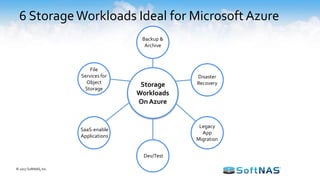
6 StorageWorkloads Ideal for Microsoft Azure
Storage
Workloads
On Azure
Dev/Test
Legacy
App
Migration
Disaster
Recovery
Backup &
Archive
File
Services for
Object
Storage
© 2017 SoftNAS, Inc.
SaaS-enable
Applications
Cloud Backup & Archive
© 2017 SoftNAS, Inc.
• Compelling alternative to tape
– Significant cost savings
– Shorter recovery times
– 99 years of retention
• Archive to inexpensive Azure Cool storage ($0.01/GB)
• Efficient backup over the network
– Once the initial seeding is complete, only incremental changes are
sent at a defined frequency
– Built-in features: compression, encryption, longer retention,
bandwidth throttling
Cloud Disaster Recovery
• Automated protection and replication of virtual machines
• Remote health monitoring
• Customizable recovery plans
• No-impact recovery plan testing
• Orchestrated recovery when needed
• Replication to – and recovery in – Azure
© 2017 SoftNAS, Inc.
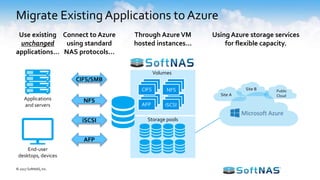
Migrate Existing Applications to Azure
End-user
desktops, devices
Applications
and servers
Volumes
AFP iSCSI
Storage pools
CIFS NFS
Site A
Site B Public
Cloud
NFS
CIFS/SMB
iSCSI
AFP
Use existing
unchanged
applications…
Connect to Azure
using standard
NAS protocols…
Through Azure VM
hosted instances…
Using Azure storage services
for flexible capacity.
© 2017 SoftNAS, Inc.
Dev /Test Environments
• UseAzure Dev/Test labs to quickly provision new dev and test
environments
• Set lab policies to automatically shut down and start up virtual
machines.
• Set caps on your lab, such as number of virtual machines per user and
per lab.
• Centrally manage development environments across a whole team or
organization
• Conduct compatibility and automated testing with reusable
environment templates
© 2017 SoftNAS, Inc.
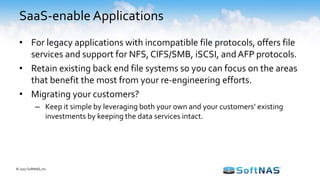
SaaS-enable Applications
• For legacy applications with incompatible file protocols, offers file
services and support for NFS, CIFS/SMB, iSCSI, and AFP protocols.
• Retain existing back end file systems so you can focus on the areas
that benefit the most from your re-engineering efforts.
• Migrating your customers?
– Keep it simple by leveraging both your own and your customers’ existing
investments by keeping the data services intact.
© 2017 SoftNAS, Inc.
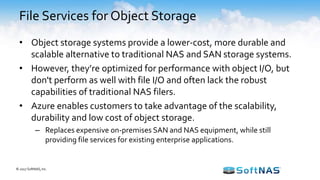
• Object storage systems provide a lower-cost, more durable and
scalable alternative to traditional NAS and SAN storage systems.
• However, they’re optimized for performance with object I/O, but
don't perform as well with file I/O and often lack the robust
capabilities of traditional NAS filers.
• Azure enables customers to take advantage of the scalability,
durability and low cost of object storage.
– Replaces expensive on-premises SAN and NAS equipment, while still
providing file services for existing enterprise applications.
File Services for Object Storage
© 2017 SoftNAS, Inc.
17 Lessons Learned from Migrating
Workloads to Azure
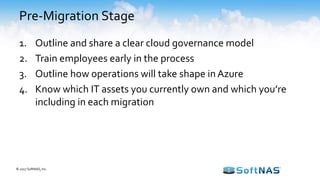
Pre-Migration Stage
1. Outline and share a clear cloud governance model
2. Train employees early in the process
3. Outline how operations will take shape in Azure
4. Know which IT assets you currently own and which you’re
including in each migration
© 2017 SoftNAS, Inc.
Migration Stage
5. Start small and simple – focus on quick wins
6. Automate, automate, automate
7. Approach the cloud as a transformational goal
8. Leverage Azure’s fully managed services
© 2017 SoftNAS, Inc.
Mass Migration Stage
9. Build a migration factory made up of teams, tools, and processes
all centered around migration activities
10. Set benchmarks for migration
11. Have an onboarding process for new team members while the
project is in full swing
12. Consider many different criteria when deciding on the migration
strategy for a particular application
13. Find patterns and create blueprints for them
14. Keep testing your applications!
© 2017 SoftNAS, Inc.
Post-Migration Stage
15. Monitor everything
16. Use cloud-native monitoring tools:
– Use the tools that best fit the business
17. Leverage Azure’s support team and Partner community
© 2017 SoftNAS, Inc.
SoftNAS Cloud Overview
© 2017 SoftNAS, Inc.
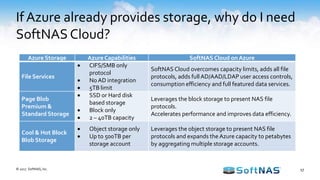
If Azure already provides storage, why do I need
SoftNAS Cloud?
© 2017 SoftNAS, Inc.
Azure Storage AzureCapabilities SoftNAS Cloud on Azure
File Services
 CIFS/SMB only
protocol
 No AD integration
 5TB limit
SoftNAS Cloud overcomes capacity limits, adds all file
protocols, adds full AD/AAD/LDAP user access controls,
consumption efficiency and full featured data services.
Page Blob
Premium &
Standard Storage
 SSD or Hard disk
based storage
 Block only
 2 – 40TB capacity
Leverages the block storage to present NAS file
protocols.
Accelerates performance and improves data efficiency.
Cool & Hot Block
Blob Storage
 Object storage only
 Up to 500TB per
storage account
Leverages the object storage to present NAS file
protocols and expands theAzure capacity to petabytes
by aggregating multiple storage accounts.
17
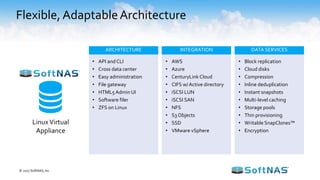
Flexible, AdaptableArchitecture
LinuxVirtual
Appliance
ARCHITECTURE INTEGRATION DATA SERVICES
• API and CLI
• Cross data center
• Easy administration
• File gateway
• HTML5Admin UI
• Software filer
• ZFS on Linux
• AWS
• Azure
• CenturyLink Cloud
• CIFS w/ Active directory
• iSCSI LUN
• iSCSI SAN
• NFS
• S3 Objects
• SSD
• VMware vSphere
• Block replication
• Cloud disks
• Compression
• Inline deduplication
• Instant snapshots
• Multi-level caching
• Storage pools
• Thin provisioning
• Writable SnapClones™
• Encryption
© 2017 SoftNAS, Inc.
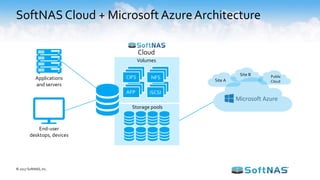
SoftNAS Cloud + Microsoft AzureArchitecture
End-user
desktops, devices
Applications
and servers
Volumes
AFP iSCSI
Storage pools
Cloud
CIFS NFS Site A
Site B Public
Cloud
© 2017 SoftNAS, Inc.
Technology Partners
© 2017 SoftNAS, Inc.
BrandsYou KnowTrust SoftNAS
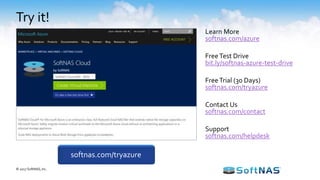
Try it!
Learn More
softnas.com/azure
FreeTest Drive
bit.ly/softnas-azure-test-drive
FreeTrial (30 Days)
softnas.com/tryazure
Contact Us
softnas.com/contact
Support
softnas.com/helpdesk
softnas.com/tryazure
© 2017 SoftNAS, Inc.

6 Storage Workloads Ideal for Microsoft Azure

  • 1.
    6 Storage WorkloadsIdeal for Microsoft Azure March 15, 2017
  • 2.
    Agenda 2 • 6 StorageWorkloadsIdeal for Azure • Demo: Deploy aVirtual NAS onAzure • 17 Lessons Learned from Migrating Workloads to Azure • SoftNAS Cloud Overview • Q&A © 2017 SoftNAS, Inc.
  • 3.
    6 Storage WorkloadsIdeal for Microsoft Azure © 2017 SoftNAS, Inc.
  • 4.
    6 StorageWorkloads Idealfor Microsoft Azure Storage Workloads On Azure Dev/Test Legacy App Migration Disaster Recovery Backup & Archive File Services for Object Storage © 2017 SoftNAS, Inc. SaaS-enable Applications
  • 5.
    Cloud Backup &Archive © 2017 SoftNAS, Inc. • Compelling alternative to tape – Significant cost savings – Shorter recovery times – 99 years of retention • Archive to inexpensive Azure Cool storage ($0.01/GB) • Efficient backup over the network – Once the initial seeding is complete, only incremental changes are sent at a defined frequency – Built-in features: compression, encryption, longer retention, bandwidth throttling
  • 6.
    Cloud Disaster Recovery •Automated protection and replication of virtual machines • Remote health monitoring • Customizable recovery plans • No-impact recovery plan testing • Orchestrated recovery when needed • Replication to – and recovery in – Azure © 2017 SoftNAS, Inc.
  • 7.
    Migrate Existing Applicationsto Azure End-user desktops, devices Applications and servers Volumes AFP iSCSI Storage pools CIFS NFS Site A Site B Public Cloud NFS CIFS/SMB iSCSI AFP Use existing unchanged applications… Connect to Azure using standard NAS protocols… Through Azure VM hosted instances… Using Azure storage services for flexible capacity. © 2017 SoftNAS, Inc.
  • 8.
    Dev /Test Environments •UseAzure Dev/Test labs to quickly provision new dev and test environments • Set lab policies to automatically shut down and start up virtual machines. • Set caps on your lab, such as number of virtual machines per user and per lab. • Centrally manage development environments across a whole team or organization • Conduct compatibility and automated testing with reusable environment templates © 2017 SoftNAS, Inc.
  • 9.
    SaaS-enable Applications • Forlegacy applications with incompatible file protocols, offers file services and support for NFS, CIFS/SMB, iSCSI, and AFP protocols. • Retain existing back end file systems so you can focus on the areas that benefit the most from your re-engineering efforts. • Migrating your customers? – Keep it simple by leveraging both your own and your customers’ existing investments by keeping the data services intact. © 2017 SoftNAS, Inc.
  • 10.
    • Object storagesystems provide a lower-cost, more durable and scalable alternative to traditional NAS and SAN storage systems. • However, they’re optimized for performance with object I/O, but don't perform as well with file I/O and often lack the robust capabilities of traditional NAS filers. • Azure enables customers to take advantage of the scalability, durability and low cost of object storage. – Replaces expensive on-premises SAN and NAS equipment, while still providing file services for existing enterprise applications. File Services for Object Storage © 2017 SoftNAS, Inc.
  • 11.
    17 Lessons Learnedfrom Migrating Workloads to Azure
  • 12.
    Pre-Migration Stage 1. Outlineand share a clear cloud governance model 2. Train employees early in the process 3. Outline how operations will take shape in Azure 4. Know which IT assets you currently own and which you’re including in each migration © 2017 SoftNAS, Inc.
  • 13.
    Migration Stage 5. Startsmall and simple – focus on quick wins 6. Automate, automate, automate 7. Approach the cloud as a transformational goal 8. Leverage Azure’s fully managed services © 2017 SoftNAS, Inc.
  • 14.
    Mass Migration Stage 9.Build a migration factory made up of teams, tools, and processes all centered around migration activities 10. Set benchmarks for migration 11. Have an onboarding process for new team members while the project is in full swing 12. Consider many different criteria when deciding on the migration strategy for a particular application 13. Find patterns and create blueprints for them 14. Keep testing your applications! © 2017 SoftNAS, Inc.
  • 15.
    Post-Migration Stage 15. Monitoreverything 16. Use cloud-native monitoring tools: – Use the tools that best fit the business 17. Leverage Azure’s support team and Partner community © 2017 SoftNAS, Inc.
  • 16.
    SoftNAS Cloud Overview ©2017 SoftNAS, Inc.
  • 17.
    If Azure alreadyprovides storage, why do I need SoftNAS Cloud? © 2017 SoftNAS, Inc. Azure Storage AzureCapabilities SoftNAS Cloud on Azure File Services  CIFS/SMB only protocol  No AD integration  5TB limit SoftNAS Cloud overcomes capacity limits, adds all file protocols, adds full AD/AAD/LDAP user access controls, consumption efficiency and full featured data services. Page Blob Premium & Standard Storage  SSD or Hard disk based storage  Block only  2 – 40TB capacity Leverages the block storage to present NAS file protocols. Accelerates performance and improves data efficiency. Cool & Hot Block Blob Storage  Object storage only  Up to 500TB per storage account Leverages the object storage to present NAS file protocols and expands theAzure capacity to petabytes by aggregating multiple storage accounts. 17
  • 18.
    Flexible, AdaptableArchitecture LinuxVirtual Appliance ARCHITECTURE INTEGRATIONDATA SERVICES • API and CLI • Cross data center • Easy administration • File gateway • HTML5Admin UI • Software filer • ZFS on Linux • AWS • Azure • CenturyLink Cloud • CIFS w/ Active directory • iSCSI LUN • iSCSI SAN • NFS • S3 Objects • SSD • VMware vSphere • Block replication • Cloud disks • Compression • Inline deduplication • Instant snapshots • Multi-level caching • Storage pools • Thin provisioning • Writable SnapClones™ • Encryption © 2017 SoftNAS, Inc.
  • 19.
    SoftNAS Cloud +Microsoft AzureArchitecture End-user desktops, devices Applications and servers Volumes AFP iSCSI Storage pools Cloud CIFS NFS Site A Site B Public Cloud © 2017 SoftNAS, Inc.
  • 20.
  • 21.
  • 22.
    Try it! Learn More softnas.com/azure FreeTestDrive bit.ly/softnas-azure-test-drive FreeTrial (30 Days) softnas.com/tryazure Contact Us softnas.com/contact Support softnas.com/helpdesk softnas.com/tryazure © 2017 SoftNAS, Inc.

Editor's Notes

  • #7 Fast Performance: Fast disk-based storage and retrieval of files. Compliance: Fast retrieval of files allows you to avoid fines for missing compliance deadlines. Elasticity: Add any amount of data, quickly. Easily expire and delete without handling media. Secure: Secure and durable cloud disaster recovery platform with industry-recognized certifications and audits. Partners: Azure solution provider and system integration partners to help with your deployment. Businesses are using the Azure cloud to enable faster disaster recovery of their critical IT systems without incurring the infrastructure expense of a second physical site. The Azure cloud supports many popular disaster recovery (DR) architectures from “pilot light” environments that may be suitable for small customer workload data center failures to “hot standby” environments that enable rapid failover at scale.
  • #8 SoftNAS Cloud enables existing applications to use standard storage protocols and operate unchanged. The SoftNAS Cloud virtual instances run on Azure compute and connect to the Azure back-end storage services. SoftNAS Cloud provides all of the Enterprise NAS capabilities in the cloud so customers don’t need to re-write their applications to the move to Azure. We help customers make the move to Azure and preserve their budgets for projects that improve business outcomes instead of re-architecting data systems. SoftNAS Cloud can also run on-premises as a virtual machine to create a virtual NAS storage system. The on-premises SoftNAS Cloud NAS can also connect to Azure for cloud hosted storage. Yes, we can run as a virtual storage appliance on-premises to create a NAS that connects to the cloud. Ideal use cases include: Capturing back-ups or replicating and migrating on-premises data to Azure Hosting applications with file protocol requirements – ideal for moving existing applications to Azure for hosting with less “re-architecture” work. Quickly SaaS-enable applications that use file system. Using off-premises snapshotting of virtual machines or application data to protect against disasters or rolling back to prior application versions Safe keeping for development to store source code off-site Media and content sharing or distribution
  • #9 Azure DevTest Labs is a service that helps developers and testers quickly create environments in Azure while minimizing waste and controlling cost. You can test the latest version of your application by quickly provisioning Windows and Linux environments using reusable templates and artifacts. Easily integrate your deployment pipeline with DevTest Labs to provision on-demand environments. Scale up your load testing by provisioning multiple test agents, and create pre-provisioned environments for training and demos.
  • #10 with Active Directory and LDAP integration to SaaS-enable your existing applications for the cloud with ease.
  • #20 Applications and Servers or End-User Desktops and Devices connect to SoftNAS Cloud via standard protocols (CIFS, NFS, AFP, iSCSI) SoftNAS Cloud provides multiple storage pools that connect to Azure Multiple sites connect to Azure cloud and seamlessly access their data with SoftNAS Cloud on Microsoft Azure as the backend