!
!
!
!
!
!
!
!
!
!
!
!
!
!
!
!
Implementing!SoftNAS!Cloud®!with!Docker®!
!
November!2014!
!
!
!
SoftNAS'Cloud'with'Docker'provides'simple,'on:demand,'persistent'shared'
storage'for'DevOps'striving'to'obtain'Continuous'Delivery/Integration'and'
applications'to'scale!
Implementing*SoftNAS*Cloud®*with*Docker®*
!
!
!
!
Copyright!©!2014!SoftNAS,!LLC!–!All!Rights!Reserved!
Table*of*Contents*
Introduction!.............................................................................................................................................................................................!3!
Overview!...............................................................................................................................................................................................!3!
What!is!NAS?!.......................................................................................................................................................................................!3!
What!is!SoftNAS™!Cloud?!..............................................................................................................................................................!3!
Why!SoftNAS!Cloud?!...................................................................................................................................................................!4!
Common!Use!Cases!.................................................................................................................................................................!5!
Docker!Containers!vs!Virtual!Machines!..................................................................................................................................!5!
First!there!was!virtualization!.................................................................................................................................................!5!
Containers!and!how!they!are!different!...............................................................................................................................!5!
The!Storage!Challenge!for!Containers!.................................................................................................................................!6!
Implementation!......................................................................................................................................................................................!7!
Ease!of!Application!Delivery!with!Persistent!Shared!Storage!.......................................................................................!7!
Setting!up!a!Docker!Host!..........................................................................................................................................................!8!
Continuous!Integration!and!Delivery!....................................................................................................................................!10!
Deploy!Applications!to!Scale!.....................................................................................................................................................!11!
Configuration!Overview!.........................................................................................................................................................!11!
Configure!the!Beanstalk!Docker!Host!..............................................................................................................................!12!
Configure!Elastic!Beanstalk!with!a!Docker!Container!..............................................................................................!12!
Create!Dockerrun.aws.json!to!connect!to!SoftNAS!.....................................................................................................!13!
Compress!Files!to!upload!to!Elastic!Beanstalk!.............................................................................................................!14!
Configure!Elastic!Beanstalk!..................................................................................................................................................!15!
High!Availability!and!Replication!...........................................................................................................................................!18!
Introduction!to!the!API!.....................................................................................................................................................................!20!
How!to!Get!Started!........................................................................................................................................................................!21!
!
! !
Implementing*SoftNAS*Cloud®*with*Docker®*
!
!
!
!
Copyright!©!2014!SoftNAS,!LLC!–!All!Rights!Reserved!
Introduction*
Overview*
Docker!is!an!open^source!project!that!automates!the!deployment!of!applications!inside!software!
containers,!by!providing!an!additional!layer!of!abstraction!and!automation!of!operating!system^level!
virtualization!on!Linux.!!Docker!enables!continuous!integration!with!DevOps!finding!value!through!
simplicity!to!build,!ship,!and!run!applications!within!containers.!!Docker!enables!separation!of!concern;!
developers!place!applications!into!containers,!operations!run!the!containers.!!Docker!is!one!of!the!most!
active!free!and!open^source!projects!today,!with!more!than!500!contributors!over!the!last!year.!
!
This!white!paper!will!help!you!understand!one!of!the!most!popular!cloud!NAS!options!available!for!the!
integration!with!Docker,!the!SoftNAS™!Cloud!NAS!Filer.!This!document!describes!how!SoftNAS!Cloud!can!
be!used!to!provide!persistent!storage!to!Docker!containers.!!It!will!pay!particular!attention!to!solving!
Dockers!key!storage!challenges.!
What*is*NAS?*
NAS!is!a!common!IT!term!for!Network!Attached!Storage!that!enables!data!and!file!sharing!using!popular!
protocols!like!NFS!and!CIFS/SMB.!iSCSI!is!typically!associated!with!SAN!(Storage!Area!Networks).!!NAS!
storage!systems!that!support!NFS,!CIFS/SMB!and!iSCSI!are!termed!“unified”!storage.!!SoftNAS!Cloud!
provides!unified!storage!designed!and!optimized!for!high^performance,!higher!than!normal!I/O!per!
second!(IOPS)!and!data!reliability!and!recoverability.!!It!also!increases!storage!efficiency!through!thin^
provisioning,!compression!and!deduplication.!
What*is*SoftNAS™*Cloud?*
SoftNAS™!is!a!Software^defined!NAS!Filer!delivered!as!a!virtual!storage!appliance!that!runs!within!
popular!public!cloud!environments,!such!as!the!AWS!EC2®,!Microsoft®!Azure®,!VMware®!vCloud!Air!
and!private!clouds!running!VMware!ESXi/vSphere.!SoftNAS!provides!enterprise^grade!NAS!shared!
storage!capabilities,!including!high^availability!with!automatic!failover.!
!
Nothing!is!more!critical!to!the!continuity!of!your!business!than!your!data.!Like!the!blood!in!your!veins,!it!
has!to!be!safe!and!available!100%!of!the!time.!!SoftNAS!offers!the!mission^critical!data!protection!and!
high^availability!required!for!non^stop!operation!of!business!applications,!websites!and!IT!infrastructure.!!
SoftNAS!runs!within!the!customer’s!own!hosts!and/or!in!the!public!clouds,!and!provides!a!no!
compromise!safety!net!for!business!information.!
*
Unlike!legacy!storage!appliances,!SoftNAS!offers!the!enterprise^grade!data!protection!and!high^
availability!capabilities!required!for!non^stop!operation,!without!the!high!storage!acquisition!and!
maintenance!costs,!and!without!the!complexities!and!associated!specialized!storage!skills.!
Instead!of!locking!your!company!and!data!into!a!particular!vendor’s!proprietary!hardware/software!
storage!appliance,!SoftNAS!provides!customers!with!the!same!freedom!of!choice!for!storage!that!
customers!have!come!to!expect!from!other!IT!infrastructure;!e.g.,!servers,!switches,!firewalls.!!And!
because!SoftNAS!leverage!the!richness!of!cloud!platforms,!the!full!range!of!features!and!hardware^
independent!virtualization!now!apply!equally!to!storage,!providing!the!same!benefits!for!storage!that!
Implementing*SoftNAS*Cloud®*with*Docker®*
!
!
!
!
Copyright!©!2014!SoftNAS,!LLC!–!All!Rights!Reserved!
customers!enjoy!today!for!server!virtualization.!
Why*SoftNAS*Cloud?*
Why!should!Docker!users!consider!SoftNAS!Cloud?!
!
!! Shared!Storage!for!Docker!applications!
•! Many!applications!involve!use!of!files!and!file!systems!
•! Enables!rapid!scale^out!Docker!clusters!with!high^availability!
•! Full^feature!NAS!capabilities!for!Docker!applications!
!! Ease!of!use!
•! Manage!data!for!all!containers!in!a!common!simple,'yet'powerful'storage!solution!for!
Docker!applications!
•! Quick!and!easy!to!configure!in!minutes!for!IT!administrator!and!DevOps!personnel!
without!training!
•! Available!on^demand!to!meet!IT!and!DevOps!agile!storage!needs!
•! Built!in!snapshots!and!writable!clones!for!the!stored!container!output;!build!–!test!–!
validate!–!repeat!on!cloned!production!data!sets!
•! Rapid!recovery!from!data!corruption!or!deletion!events!
•! Easy!to!set!up!and!securely!replicate!large!amounts!of!data!across!data!centers,!
platforms!and!clouds,!delivering!analysts!results!from!Big!Data!analytics!to!
consumers!on!different!platforms!
•! Storage!pools!support!dynamic!addition!of!storage!devices!and!thin^provisioned!
volumes!without!workload!reconfiguration!
•! No!training!or!special!storage!skills!required!
•! Built!upon!familiar,!standard!Linux!and!ZFS!open!source!technologies!
•! Flexible!open!architecture!and!API’s!enable!extensibility!
•! No!lock^in!of!customer!data!due!to!open!architecture!
•! Non^disruptive!online!storage!administration!and!maintenance!agility!
•! Agile!reconfiguration!of!storage!online!without!disrupting!production!workloads!
!! Security!and!availability!
•! Enhanced!security!built!into!AWS!for!EBS!and!SoftNAS!for!S3,!AWS!is!the!leading!
public!cloud!for!Docker!adoption!
•! Makes!cloud!storage!safer!for!business!
•! Protects!mission^critical!data!in!the!cloud!
•! Delivers!storage!uptime!with!99.999%!reliability!w/!dual!controllers!
(5!minutes/year!downtime)!
•! Increases!application!performance!and!processing!speeds!via!faster!storage!
performance!
!! Scalability!
•! Access!to!up!to!16!PB!of!S3^backed!cloud!disk!storage!
•! Access!to!up!to!154!TB!of!EBS!from!each!EC2!instance!as!shared!storage!
•! Block!replication!scales!efficiently!to!handle!hundreds!of!millions!of!files!and!
directories!
•! Securely!replicate!data!across!any!platform,!data!center!or!cloud!
!
Implementing*SoftNAS*Cloud®*with*Docker®*
!
!
!
!
Copyright!©!2014!SoftNAS,!LLC!–!All!Rights!Reserved!
!
Common%Use%Cases%
The!following!common!use!cases!are!addressed.!
!
•! Ease!of!application!deployment!
•! Continuous!Integration!/!Delivery!
•! Distributed!application!deployment!to!scale!
!
Docker*Containers*vs*Virtual*Machines*
First*there*was*virtualization*
A!virtual!machine!is!a!method!in!which!a!modern!server!can!run!multiple!operating!systems!on!the!same!
piece!of!physical!hardware.!There!are!several!ways!in!which!this!is!accomplished,!but!the!underlying!idea!
is!the!same.!Utilize!hardware!power!more!efficiently!by!adding!more!than!one!operating!system!onto!the!
same!physical!server.!There!are!numerous!benefits!to!running!a!server!in!a!virtualized!environment.!Here!
are!a!few!of!the!key!points:!
"! Redundancy:!The!operating!system!is!detached!from!the!hardware.!This!allows!a!certain!amount!
of!portability.!i.e.,!If!one!piece!of!hardware!fails!it!is!relatively!easy!to!move!that!operating!system!
to!another!piece!of!hardware.!
"! Scalable:!Along!with!the!portability,!virtualized!servers!generally!can!be!scaled!a!little!easier.!
Meaning,!because!the!server!software!is!not!tied!to!any!hardware,!it’s!easier!to!add!additional!
servers!to!handle!a!larger!workload.!
"! Cost0Savings:!This!is!pretty!straightforward.!It’s!not!necessarily!to!buy!multiple!physical!servers.!
In!the!pre^virtualization!era!multiple!pieces!of!hardware!were!necessary!to!satisfy!different!
computing!requirements.!For!an!email!server!and!a!crm!server,!would!have!very!likely!been!
deployed!as!to!separate!hardware!servers.!
Now!with!a!basic!understanding!of!virtualization!and!why!it’s!beneficial!lets!dive!into!Containers.!
Containers*and*how*they*are*different*
In!short,!containers!further!virtualize!the!underlying!hardware.!As!discussed!earlier!in!a!typical!
virtualized!environment!there!is!one!piece!of!hardware!with!several!computers!running!on!it!and!sharing!
resources.!Each!one!of!the!virtualized!computers!will!have!its!own!operating!systems!and!resource!usage!
along!with!it.!In!a!containerized!environment,!only!one!operating!system!would!be!running.!Within!that!
single!operating!system!is!where!the!containers!reside.!The!containers!each!have!the!necessary!software!
to!run!the!application.!Rather!than!having!the!overhead!of!all!the!operating!systems,!all!the!resources!
being!are!used!by!one!underlying!system.!The!rest!of!the!computing!power!is!now!available!to!the!
application!itself.!It’s!important!to!know!that!containers!do!not!have!access!to!other!containers.!So!from!a!
security!standpoint,!containers!are!no!more!or!less!secure!than!a!standard!virtual!server.!
!
While!virtualized!servers!do!some!things!much!better!than!traditional!hardware,!there!still!is!room!for!
improvement.!Containers!bring!a!different!approach!to!virtualization!that!was!not!previously!
!
"! Ease:!With!a!container,!there!is!only!one!operating!system!to!maintain!versus!many!many!
Implementing*SoftNAS*Cloud®*with*Docker®*
!
!
!
!
Copyright!©!2014!SoftNAS,!LLC!–!All!Rights!Reserved!
virtualized!server!operating!systems.!Also,!applications!will!behave!the!exactly!the!same!across!all!
containers.!Meaning,!containers!developed!and!testing!within!a!local!computer!can!easily!an!
successfully!be!moved!up!to!a!container!in!the!cloud.!
"! Speed0of0scalability:!Once!an!application!is!running!in!a!container,!it!can!be!duplicated!extremely!
easily.!Since!there!is!no!operating!system,!only!the!software!needs!to!be!duplicated!for!the!
container.!The!time!consumed!for!scaling!changes!from!minutes!and!hours!to!several!seconds.!
"! Efficiency:!Without!the!additional!burden!of!running!multiple!operating!systems,!each!piece!of!
hardware!now!has!extra!resources.!These!resources!can!be!used!to!offer!more!power!to!the!
application(s)!that!are!running!within!the!containers.!
The*Storage*Challenge*for*Containers*
While!containers!have!some!amazing!and!simple!advantages!over!virtualized!servers,!there!are!
challenges!to!overcome.!!Chief!among!the!challenges!is!storage.!!
!
Docker!storage!limitations:!
"! The!container!has!ephemeral!storage,!when!the!container!is!turned!off,!data!is!lost!
"! Container!data!cannot!be!imported!nor!exported!
"! Container!data!cannot!be!backed!up!and!restored!
"! Container!data!cannot!be!stored!based!on!storage!capabilities;!SSD!for!high!IOPs,!SATA!for!
inexpensive!large!capacity!
"! Its!not!possible!to!specify!volumes!to!be!used!from!one!old!container!to!new!container!
"! Its!not!possible!to!manage!volumes!after!deleting!the!containers!in!which!they!were!attached!
"! Because!containers!are!intended!to!be!lightweight,!it!is!not!feasible!to!implement!shared!storage!
within!each!container!
"! While!some!applications!can!work!around!shared!storage!limitations!using!object!storage,!there!
remain!many!use!cases!where!file^based!storage!and!shared!storage!are!required.!
! !
Implementing*SoftNAS*Cloud®*with*Docker®*
!
!
!
!
Copyright!©!2014!SoftNAS,!LLC!–!All!Rights!Reserved!
Implementation*
Ease*of*Application*Delivery*with*Persistent*Shared*Storage*
Web!development!with!Docker!utilizing!SoftNAS!Cloud!solves!storage!issues.!!Docker!provides!rapid!
creation!of!ubiquitous!development!environments!on!the!fly.!!SoftNAS!Cloud!provides!continuous!
persistent!shared!storage!expected!in!enterprise!environments.!!The!storage!problem!areas!of!Docker!are!
resolved!by!SoftNAS!Cloud.!
!
!
Developers!can!also!benefit!from!creating!writeable!snapshots!of!production!data!to!develop!and!test!
with.!The!development!lifecycle!now!becomes!extremely!flexible.!The!production!environment!is!safer!
when!developers!are!not!permitted!to!directly!access!production!infrastructure!and!data!sets.!QA!testing!
cycles!are!faster!when!large!amounts!of!data!does!not!need!to!be!copied!for!each!test,!and!instantaneous!
storage!snapshots!and!writable!clones!are!used!instead!of!time^consuming,!expensive!deep!copies!of!
data.!!
0
The!following!implementation!demonstrates!how!a!web!developer!could!create!a!development!
environment!that!can!be!used!to!host!both!web!data!as!well!as!a!code!repository.!By!doing!so!in!the!
following!fashion!it!can!allow!for!maximum!development!flexibility!and!will!keep!strict!security!in!place!
throughout!the!development!lifecycle.!!More!specifically,!in!this!use!case!we!will!configure!a!container!to!
run!an!apache!webserver!that!will!serve!content!from!our!SoftNAS!file!share.!
Implementing*SoftNAS*Cloud®*with*Docker®*
!
!
!
!
Copyright!©!2014!SoftNAS,!LLC!–!All!Rights!Reserved!
!
Setting*up*a*Docker*Host*
Setup!starts!with!instructions!for!starting!Docker!on!an!Ubuntu!host.!!
sudo apt-get update
sudo apt-get install docker.io
sudo ln -sf /usr/bin/docker.io /usr/local/bin/docker
sudo sed -i '$acomplete -F _docker docker' /etc/bash_completion.d/docker.io
source /etc/bash_completion.d/docker.io
In!order!to!test!use!the!version!option!to!check!that!Docker!installed.!
sudo docker --version
Once!Docker!is!installed!map!the!host!server!to!a!SoftNAS!Cloud!share.!Depending!on!the!version!of!
Ubuntu!it!may!be!necessary!to!install!the!nfs^common!package.!!
sudo apt-get install nfs-common
Once!the!nfs!tools!are!installed!map!the!host!to!the!SoftNAS!server.!As!an!example,!map!the!drive!to!a!
/softnas!folder!on!the!host.!!First!make!the!directory!
sudo mkdir /softnas
Once!the!directory!is!made!mount!the!share.!
sudo mount SOFTNAS_IP_ADDRESS:/SOFTNAS_SHARE /softnas
As!an!example:!
sudo mount SOFTNAS_IP_ADDRESS:/eph/eph /softnas
This!mounts!the!directory!from!our!ephemeral!storage!to!the!Docker!host!into!the!directory!/softnas.!
!
Another!brief!test:!
Implementing*SoftNAS*Cloud®*with*Docker®*
!
!
!
!
Copyright!©!2014!SoftNAS,!LLC!–!All!Rights!Reserved!
sudo touch /softnas/host.file
Now!check!to!make!sure!that!the!file!is!created.!!
ls /softnas
!
With!the!Docker!host!is!configured,!now!connect!to!the!hosts!file!system!via!the!^v!option!in!the!Docker!
run!command.!!
!
This!command!will!launch!an!interactive!Ubuntu!container!mapping!a!folder!from!the!container!named!
/softnas!to!the!host!folder!created!in!the!previous!step!named!/softnas.!!
sudo docker run -i -t --name ubuntu -v /softnas:/softnas ubuntu /bin/bash
!
A!command!prompt!is!now!launched!that!will!allow!a!new!container!to!be!explored.!Ensure!that!the!share!
is!writable!from!the!container!by!creating!a!basic!HTML!file.!
sudo cat > index.html
Type <html><h1>This is from SoftNAS</h1></html>
Then press Ctrl C to exit
Then!double!check!!
ls /softnas
This!should!now!show!index.html,!as!well!as!the!host.file!created!earlier.!
!
Once!the!file!storage!and!access!have!been!tested,!and!the!html!file!has!been!created!we!can!continue.!!
Issue!a!run!command!to!Docker!that!will!pull!an!apache!image!from!the!Docker!repository.!Docker!will!
then!run!a!container!with!Apache!installed,!and!it!will!serve!the!content!from!the!SoftNAS!share!created!
earlier.!!
'
sudo docker run --name apache2 -p 80:80 -v /softnas:/var/www -d eboraas/apache
!
! !
Implementing*SoftNAS*Cloud®*with*Docker®*
!
!
!
!
Copyright!©!2014!SoftNAS,!LLC!–!All!Rights!Reserved!
Continuous*Integration*and*Delivery*
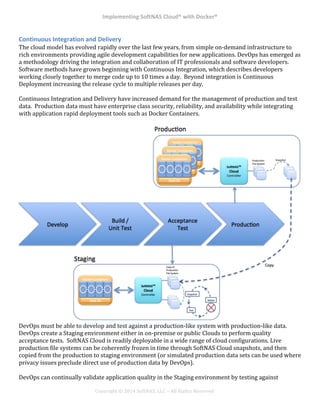
The!cloud!model!has!evolved!rapidly!over!the!last!few!years,!from!simple!on^demand!infrastructure!to!
rich!environments!providing!agile!development!capabilities!for!new!applications.!DevOps!has!emerged!as!
a!methodology!driving!the!integration!and!collaboration!of!IT!professionals!and!software!developers.!!
Software!methods!have!grown!beginning!with!Continuous!Integration,!which!describes!developers!
working!closely!together!to!merge!code!up!to!10!times!a!day.!!Beyond!integration!is!Continuous!
Deployment!increasing!the!release!cycle!to!multiple!releases!per!day.!
!
Continuous!Integration!and!Delivery!have!increased!demand!for!the!management!of!production!and!test!
data.!!Production!data!must!have!enterprise!class!security,!reliability,!and!availability!while!integrating!
with!application!rapid!deployment!tools!such!as!Docker!Containers.!!!
!
!
DevOps!must!be!able!to!develop!and!test!against!a!production^like!system!with!production^like!data.!!
DevOps!create!a!Staging!environment!either!in!on^premise!or!public!Clouds!to!perform!quality!
acceptance!tests.!!SoftNAS!Cloud!is!readily!deployable!in!a!wide!range!of!cloud!configurations.!Live!
production!file!systems!can!be!coherently!frozen!in!time!through!SoftNAS!Cloud!snapshots,!and!then!
copied!from!the!production!to!staging!environment!(or!simulated!production!data!sets!can!be!used!where!
privacy!issues!preclude!direct!use!of!production!data!by!DevOps).!
!
DevOps!can!continually!validate!application!quality!in!the!Staging!environment!by!testing!against!
Implementing*SoftNAS*Cloud®*with*Docker®*
!
!
!
!
Copyright!©!2014!SoftNAS,!LLC!–!All!Rights!Reserved!
writable!SoftNAS!snapshots.!!Instantaneously!snapshot!creation!allows!quick!test!cycles!where!data!is!
manage!by!creating!and!mounting!snapshots,!executing!tests!to!read/write!the!snapshots,!deleting!the!
snapshots!at!test!conclusion,!and!looping!back!to!snapshot!creation!supporting!code!fix!and!retest.!
*
Deploy*Applications*to*Scale*
The!previous!section!discussed!how!the!SoftNAS!Cloud!solution!helped!to!simplify!a!continuous!
development!cycle!by!delivering!complete!storage!flexibility!to!Docker!containers.!This!section!will!
extend!that!premise,!by!showing!how!easily!a!web!application!can!be!moved!from!development!to!
production!to!scale.!
!
In!order!to!achieve!application!scale,!automation!tools!are!valuable!to!minimize!effort!and!complexity.!!!
AWS!Elastic!Beanstalk!is!one!automation!tool!that!provides!an!easy^to^use!service!for!deployments!and!
solves!resource!problems!enabling!the!scaling!of!web!applications!and!services.!!Developers!simply!
upload!code!and!Elastic!Beanstalk!automatically!handles!deployment,!capacity!provisioning,!load!
balancing,!auto^scaling!and!health!monitoring.!!Elastic!Beanstalk!simplifies!the!creation,!deployment,!and!
operations!of!Web!applications!as!they!scale,!with!AWS!provisioning!and!configuring!AWS!resources!such!
as!EC2!instances,!Elastic!Load!Balancer,!and!Auto!Scaling!Group.!!Docker!support!in!Elastic!Beanstalk!
extends!the!deployment!capabilities!to!any!software!stack.!
!
Utilizing!SoftNAS!Cloud!with!AWS!Elastic!Beanstalk!and!Docker!creates!a!simple!and!scalable!way!to!
move!your!web!application!to!a!production!level!architecture.!SoftNAS!Cloud!provides!the!sharable!
scalable!storage!to!the!auto!scaling!Docker!containers!that!are!managed!by!Elastic!Beanstalk.!!
!
The!following!implementation!will!describe!how!to!create!scripts!to!automatically!configure!hosts!and!
containers!to!utilize!the!SoftNAS!share.!By!creating!these!scripts!developers!are!poised!to!rapidly!scale!
out!their!applications!with!persistent!shareable!storage.!!
!
Configuration*Overview*
Deployment!will!now!be!integrated!with!Beanstalk!to!launch!new!instances!automatically.!!An!apache!
container!in!Docker!will!serve!files!from!a!SoftNAS!share.!!
!
There!are!two!main!files!used!to!tell!Beanstalk!how!to!build!the!instances.!One!file!configures!the!map!to!
the!beanstalk!host,!and!one!file!will!tell!Docker!how!to!configure!its!container.!!
Implementing*SoftNAS*Cloud®*with*Docker®*
!
!
!
!
Copyright!©!2014!SoftNAS,!LLC!–!All!Rights!Reserved!
!
!
Configure*the*Beanstalk*Docker*Host*
Elastic!beanstalk!allows!the!creation!of!files!to!automatically!configure!the!instances!as!created.!This!is!a!
very!important!part!because!it!will!allow!mapping!the!Docker!host!to!the!SoftNAS!share.!!Beanstalk!
allows!this!by!reading!YAML!configuration!files!in!a!hidden!directory!called!“.ebextensions”.!!The!file!for!
this!example!will!look!like!the!following:!
---
packages:
yum:
nfs-utils: []
commands:
MKDIR:
command: mkdir /softnas
NFS Map:
command: mount [softnas host ip]:/eph/eph /softnas
It’s!important!to!remember!that!the!default!Beanstalk!host!is!the!Amazon!Linux!AMI.!!Do!a!couple!of!
items!specific!to!that!AMI.!!
!
Ensure!that!“nfs^utils”!is!installed!!
Create!the!mount!point!“/softnas”!
Mount!the!Softnas!share!to!the!host.!Please!make!sure!to!change!“softnas!host!ip”!to!the!
corresponding!correct!ip.
Configure*Elastic*Beanstalk*with*a*Docker*Container*
There!are!three!main!ways!to!describe!a!container,!and!how!it!is!going!to!run!with!the!Elastic!Beanstalk!
Docker!host.!!
•! Dockerfile:!A!Docker!file!is!a!plain!text!document!that!is!used!by!Docker!to!build!a!custom!image!
to!be!run!in!a!container!
Implementing*SoftNAS*Cloud®*with*Docker®*
!
!
!
!
Copyright!©!2014!SoftNAS,!LLC!–!All!Rights!Reserved!
•! Dockerrun.aws.json:!A!JSON!formatted!document!used!to!download!images!from!the!Docker!
repository!as!well!as!configure!any!options!while!running!that!container.!This!is!the!method!that!
this!document!will!use.!!
•! Combination:!Elastic!Beanstalk!will!allow!use!of!a!combination!of!Dockerfile!as!well!as!Dockerrun!
to!describe!the!Docker!container!in!greater!detail.!
Create*Dockerrun.aws.json*to*connect*to*SoftNAS*
The!following!json!file!is!going!to!download!a!prebuilt!image!from!the!Docker!repository,!and!launch!it!
onto!the!Docker!host.!
!
{!
! "AWSEBDockerrunVersion":!"1",!
! "Image":!{!
!!!! ! "Name":!"eboraas/apache",!
"Update":!"true"!!!!!
!!!! },!
!! "Ports":![!
! !! {! !
! ! ! "ContainerPort":!"80",!
! ! ! "ContainerPort":!"443"!
! ! !}!
!!!! ],!
!!!! "Volumes":![!
!!!!!! ! {!
!!!!!! ! ! "HostDirectory":!"/softnas",!
!!!!!! ! ! "ContainerDirectory":!"/var/www"!
!!!! ! }!
!!!! ]!
}!
!
Here!is!a!screenshot!to!make!sure!that!the!document!is!formatted!correctly.!JSON!is!very!sensitive!to!
formatting!irregularities.!
!
Implementing*SoftNAS*Cloud®*with*Docker®*
!
!
!
!
Copyright!©!2014!SoftNAS,!LLC!–!All!Rights!Reserved!
Compress*Files*to*upload*to*Elastic*Beanstalk*
At!this!point!the!files!will!need!to!be!put!into!a!folder.!!The!most!important!thing!to!remember!is!to!have!
all!of!the!files!in!the!root!zip!file.!In!other!words!the!files!should!be!compressed,!and!not!in!a!folder.!!
Implementing*SoftNAS*Cloud®*with*Docker®*
!
!
!
!
Copyright!©!2014!SoftNAS,!LLC!–!All!Rights!Reserved!
Configure*Elastic*Beanstalk*
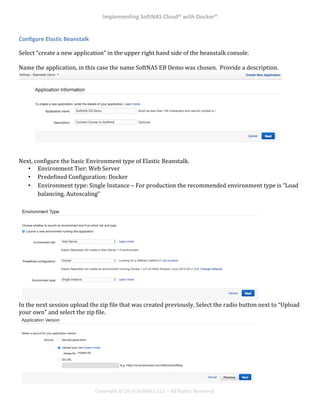
Select!“create!a!new!application”!in!the!upper!right!hand!side!of!the!beanstalk!console.!!
!
Name!the!application,!in!this!case!the!name!SoftNAS!EB!Demo!was!chosen.!!Provide!a!description.!!
!
!
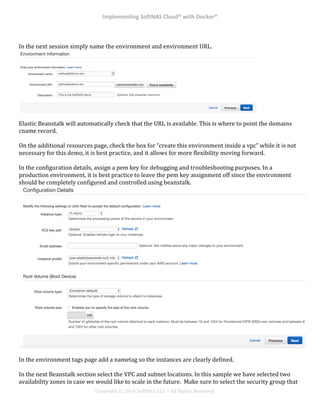
Next,!configure!the!basic!Environment!type!of!Elastic!Beanstalk.!!
•! Environment!Tier:!Web!Server!
•! Predefined!Configuration:!Docker!
•! Environment!type:!Single!Instance!–!For!production!the!recommended!environment!type!is!“Load!
balancing,!Autoscaling”!
In!the!next!session!upload!the!zip!file!that!was!created!previously.!Select!the!radio!button!next!to!“Upload!
your!own”!and!select!the!zip!file.!
Implementing*SoftNAS*Cloud®*with*Docker®*
!
!
!
!
Copyright!©!2014!SoftNAS,!LLC!–!All!Rights!Reserved!
!
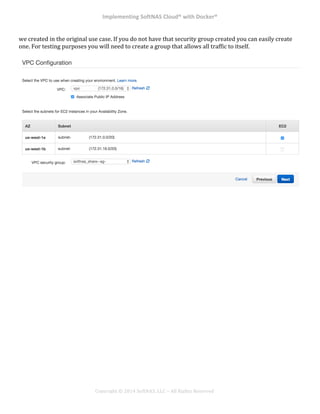
In!the!next!session!simply!name!the!environment!and!environment!URL.!
Elastic!Beanstalk!will!automatically!check!that!the!URL!is!available.!This!is!where!to!point!the!domains!
cname!record.!!
!
On!the!additional!resources!page,!check!the!box!for!“create!this!environment!inside!a!vpc”!while!it!is!not!
necessary!for!this!demo,!it!is!best!practice,!and!it!allows!for!more!flexibility!moving!forward.!!
!
In!the!configuration!details,!assign!a!pem!key!for!debugging!and!troubleshooting!purposes.!In!a!
production!environment,!it!is!best!practice!to!leave!the!pem!key!assignment!off!since!the!environment!
should!be!completely!configured!and!controlled!using!beanstalk.!!
!
In!the!environment!tags!page!add!a!nametag!so!the!instances!are!clearly!defined.!
!
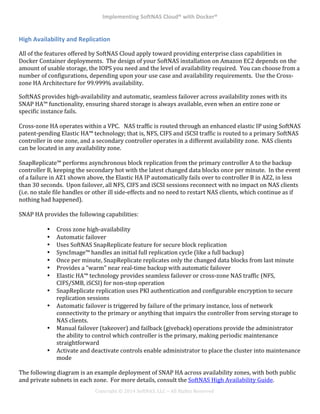
In!the!next!Beanstalk!section!select!the!VPC!and!subnet!locations.!In!this!sample!we!have!selected!two!
availability!zones!in!case!we!would!like!to!scale!in!the!future.!!Make!sure!to!select!the!security!group!that!
Implementing*SoftNAS*Cloud®*with*Docker®*
!
!
!
!
Copyright!©!2014!SoftNAS,!LLC!–!All!Rights!Reserved!
we!created!in!the!original!use!case.!If!you!do!not!have!that!security!group!created!you!can!easily!create!
one.!For!testing!purposes!you!will!need!to!create!a!group!that!allows!all!traffic!to!itself.!!
!
!
!
!
!
!
! *
Implementing*SoftNAS*Cloud®*with*Docker®*
!
!
!
!
Copyright!©!2014!SoftNAS,!LLC!–!All!Rights!Reserved!
High*Availability*and*Replication*
All!of!the!features!offered!by!SoftNAS!Cloud!apply!toward!providing!enterprise!class!capabilities!in!
Docker!Container!deployments.!!The!design!of!your!SoftNAS!installation!on!Amazon!EC2!depends!on!the!
amount!of!usable!storage,!the!IOPS!you!need!and!the!level!of!availability!required.!!You!can!choose!from!a!
number!of!configurations,!depending!upon!your!use!case!and!availability!requirements.!!Use!the!Cross^
zone!HA!Architecture!for!99.999%!availability.!
SoftNAS!provides!high^availability!and!automatic,!seamless!failover!across!availability!zones!with!its!
SNAP!HA™!functionality,!ensuring!shared!storage!is!always!available,!even!when!an!entire!zone!or!
specific!instance!fails.!
!
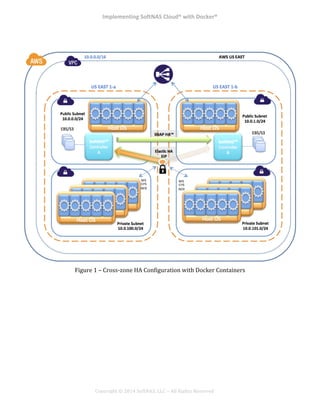
Cross^zone!HA!operates!within!a!VPC.!!!NAS!traffic!is!routed!through!an!enhanced!elastic!IP!using!SoftNAS!
patent^pending!Elastic!HA™!technology;!that!is,!NFS,!CIFS!and!iSCSI!traffic!is!routed!to!a!primary!SoftNAS!
controller!in!one!zone,!and!a!secondary!controller!operates!in!a!different!availability!zone.!!NAS!clients!
can!be!located!in!any!availability!zone.!!
!
SnapReplicate™!performs!asynchronous!block!replication!from!the!primary!controller!A!to!the!backup!
controller!B,!keeping!the!secondary!hot!with!the!latest!changed!data!blocks!once!per!minute.!!In!the!event!
of!a!failure!in!AZ1!shown!above,!the!Elastic!HA!IP!automatically!fails!over!to!controller!B!in!AZ2,!in!less!
than!30!seconds.!!Upon!failover,!all!NFS,!CIFS!and!iSCSI!sessions!reconnect!with!no!impact!on!NAS!clients!
(i.e.!no!stale!file!handles!or!other!ill!side^effects!and!no!need!to!restart!NAS!clients,!which!continue!as!if!
nothing!had!happened).!
!
SNAP!HA!provides!the!following!capabilities:!
!
•! Cross!zone!high^availability!
•! Automatic!failover!
•! Uses!SoftNAS!SnapReplicate!feature!for!secure!block!replication!
•! SyncImage™!handles!an!initial!full!replication!cycle!(like!a!full!backup)!
•! Once!per!minute,!SnapReplicate!replicates!only!the!changed!data!blocks!from!last!minute!
•! Provides!a!“warm”!near!real^time!backup!with!automatic!failover!
•! Elastic!HA™!technology!provides!seamless!failover!or!cross^zone!NAS!traffic!(NFS,!
CIFS/SMB,!iSCSI)!for!non^stop!operation!
•! SnapReplicate!replication!uses!PKI!authentication!and!configurable!encryption!to!secure!
replication!sessions!
•! Automatic!failover!is!triggered!by!failure!of!the!primary!instance,!loss!of!network!
connectivity!to!the!primary!or!anything!that!impairs!the!controller!from!serving!storage!to!
NAS!clients.!!!
•! Manual!failover!(takeover)!and!failback!(giveback)!operations!provide!the!administrator!
the!ability!to!control!which!controller!is!the!primary,!making!periodic!maintenance!
straightforward!
•! Activate!and!deactivate!controls!enable!administrator!to!place!the!cluster!into!maintenance!
mode!
!
The!following!diagram!is!an!example!deployment!of!SNAP!HA!across!availability!zones,!with!both!public!
and!private!subnets!in!each!zone.!!For!more!details,!consult!the!SoftNAS!High!Availability!Guide.!
Implementing*SoftNAS*Cloud®*with*Docker®*
!
!
!
!
Copyright!©!2014!SoftNAS,!LLC!–!All!Rights!Reserved!
!
!
!
Figure!1!–!Cross^zone!HA!Configuration!with!Docker!Containers!
!
! *
Implementing*SoftNAS*Cloud®*with*Docker®*
!
!
!
!
Copyright!©!2014!SoftNAS,!LLC!–!All!Rights!Reserved!
Introduction*to*the*API*
The!SoftNAS!Rest!API!provides!access!to!the!PHP^based!SoftNAS!admin!server.!!This!provides!access!to!
SSD!and!disk!device!management!on!the!EC2,!Azure,!and!vSphere!hosts.!!The!SoftNAS!API!can!be!
programmed!in!any!language!that!supports!HTTPS!requests!and!responses,!including!Javascript!with!
Ajax,!PHP,!CURL,!PERL,!.NET,!Java,!etc.!
!!
The!SoftNAS!Rest!API!uses!GET,!POST,!PUT!and!DELETE!requests!sent!over!HTTPS!connections!to!the!
Apache!web!server!running!on!Linux,!which!in!turn!are!processed!by!the!PHP^based!SoftNAS!admin!
server.!!The!SoftNAS!admin!server!returns!its!responses!as!JSON^formatted!strings!via!the!HTTP!
response.!!The!SoftNAS!REST!API!offers!a!way!for!third!party!systems!to!access!the!same!API!that!is!used!
by!the!SoftNAS!StorageCenter!administration!GUI.!This!provides!access!to!the!SoftNAS!admin!server,!
which!manages!the!SoftNAS!run^time!environment.!
!!
In!addition,!the!"softnas^cmd,"!a!command^line!utility!written!in!CURL,!provides!access!to!the!same!API!
calls!from!the!Linux!command!line.!!The!command!line!operations!are!defined!in!the!Command!
Reference!section.!
!!
!
!
The!CLI!provides!command!line!access!to!the!API!set!for!quick!and!easy!storage!administration.!!Both!
methods!are!available!for!programmatic!storage!administration!by!DevOps!teams!who!want!to!design!
storage!into!CloudFormation!and!other!automated!processes.!!For!more!details,!refer!to!the!SoftNAS!API!
and!CLI!Guide.!
!
Implementing*SoftNAS*Cloud®*with*Docker®*
!
!
!
!
Copyright!©!2014!SoftNAS,!LLC!–!All!Rights!Reserved!
How*to*Get*Started*
Launch!from!Marketplace!!(Free!Tier!and!30^day!free!trials!available)!
!
Try!SoftNAS!Cloud!in!your!AWS!account!for!free.!!Choose!any!instance!size!you!prefer!for!free!(certain!
AWS!usage!fees!may!apply).!
!
Read!the!Documentation!
!
Learn!more!about!SoftNAS!by!going!deeper!into!the!documentation!to!get!all!the!details.!
!
Questions?!!!Contact!SoftNAS!Sales!and!Support!staff!to!get!your!questions!answered!today.!

Implementing SoftNAS Cloud with Docker