Production Reflection
Your Name
Process
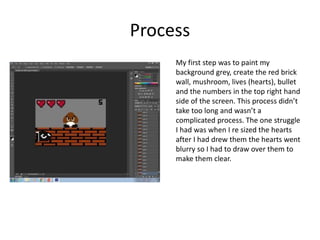
My first step was to paint my
background grey, create the red brick
wall, mushroom, lives (hearts), bullet
and the numbers in the top right hand
side of the screen. This process didn’t
take too long and wasn’t a
complicated process. The one struggle
I had was when I re sized the hearts
after I had drew them the hearts went
blurry so I had to draw over them to
make them clear.
Process
In this process the
player had already
had one shot so I had
to keep moving the
bullet and miss the
mushroom to
demonstrate how
the game works and
when you loose a
life.
Process
In this screenshot the
player has one more
shot to hit the
mushroom or they
will loose a life.
Process
Here you can see that a life has been
lost I did this by making on heart layer
not visible to make it look like it has
diapered. After the heart had
disappeared I changed the number in
the top right corner to the number 4
by hiding the number 5 layer and
making the number 4 layer visible by
clicking the eye.
Process
In this part of my game the player
has hit the mushroom In his
second shot of his second life, I
shown that the mushroom was hit
by flashing the mushroom. I did
this by making the mushroom
layer visible and then invisible by
clicking the eye on the left of the
layer I repeated this a few times
to ensure I got the mushroom to
flash in the animation frame. The
player had won by hitting the
mushroom because a banner
saying “you won” was visible, I
also made the banner flash to
make it more effective
process
This process was the final process
of my game. This process wasn’t a
very difficult process, the fist thin g
I did was convert sound effects
from youtube into my user area to
use for my game, next I put all the
sound effects into premiere to
make them fit into my game. The
most difficult part was to put the
sound effects exactly where they
needed to be and see how long
they can be.

6. production reflection

  • 1.
  • 2.
    Process My first stepwas to paint my background grey, create the red brick wall, mushroom, lives (hearts), bullet and the numbers in the top right hand side of the screen. This process didn’t take too long and wasn’t a complicated process. The one struggle I had was when I re sized the hearts after I had drew them the hearts went blurry so I had to draw over them to make them clear.
  • 3.
    Process In this processthe player had already had one shot so I had to keep moving the bullet and miss the mushroom to demonstrate how the game works and when you loose a life.
  • 4.
    Process In this screenshotthe player has one more shot to hit the mushroom or they will loose a life.
  • 5.
    Process Here you cansee that a life has been lost I did this by making on heart layer not visible to make it look like it has diapered. After the heart had disappeared I changed the number in the top right corner to the number 4 by hiding the number 5 layer and making the number 4 layer visible by clicking the eye.
  • 6.
    Process In this partof my game the player has hit the mushroom In his second shot of his second life, I shown that the mushroom was hit by flashing the mushroom. I did this by making the mushroom layer visible and then invisible by clicking the eye on the left of the layer I repeated this a few times to ensure I got the mushroom to flash in the animation frame. The player had won by hitting the mushroom because a banner saying “you won” was visible, I also made the banner flash to make it more effective
  • 7.
    process This process wasthe final process of my game. This process wasn’t a very difficult process, the fist thin g I did was convert sound effects from youtube into my user area to use for my game, next I put all the sound effects into premiere to make them fit into my game. The most difficult part was to put the sound effects exactly where they needed to be and see how long they can be.

Editor's Notes

  • #3 Discuss the tools and processes used in your production. Log your thoughts and feelings about your work.
  • #4 Discuss the tools and processes used in your production. Log your thoughts and feelings about your work.
  • #5 Discuss the tools and processes used in your production. Log your thoughts and feelings about your work.
  • #6 Discuss the tools and processes used in your production. Log your thoughts and feelings about your work.
  • #7 Discuss the tools and processes used in your production. Log your thoughts and feelings about your work.