Java course - IAG0040


            Unit testing &
     Agile Software Development


Anton Keks                           2011
Unit tests
 ●
     How to be confident that your code works?
 ●
     Why wait for somebody else to test your code?
 ●
     How to provide up-to-date examples on using your API?
 ●
     How to help yourself see your design better and therefore
     improve it?

                 The answer: write Unit Tests!!!

 ●   Unit tests are executable test cases for your modules (units),
     expressed in code
 ●
     Unit tests are executed automatically to ensure that your code
     still works after changing it (regression testing)
Java course – IAG0040                                         Lecture 6
Anton Keks                                                      Slide 2
Benefits of unit tests
 ●
     Unit testing isolates each module and shows that it is correct.
     It provides a strict written contract that the code must satisfy
 ●
     Facilitates change – unit tests provide regression testing,
     make refactoring safer
 ●   Simplifies integration – integration testing is easier, if
     parts are already proven to work correctly
 ●   Documentation – unit tests show how to use the API
 ●   Separation of interface from implementation – unit tests
     result in loosely coupled code


Java course – IAG0040                                          Lecture 6
Anton Keks                                                       Slide 3
A simple example
 ●   public class Concatenator {
        // this is a method under test
        public String concat(String a, String b) {
          return a + b;
        }

         // this is a simple test case
         public static void main(String[] args) {
           Concatenator c = new Concatenator();
           assert “abc123”.equals(
              c.concat(“abc”, “123”))
              : “concat() failed!”;
         }
     }

Java course – IAG0040                           Lecture 6
Anton Keks                                        Slide 4
JUnit
 ●
     JUnit is the first and most popular unit and regression
     testing framework for Java
 ●
     Is a 3rd-party jar file
     –   Obtainable from http://www.junit.org/
     –   Included and interfaced in IDEA, Eclipse, etc
 ●   JUnit 3
     –   older but still very popular
 ●   JUnit 4
     –   takes advantage of Java 5 features

Java course – IAG0040                                    Lecture 6
Anton Keks                                                 Slide 5
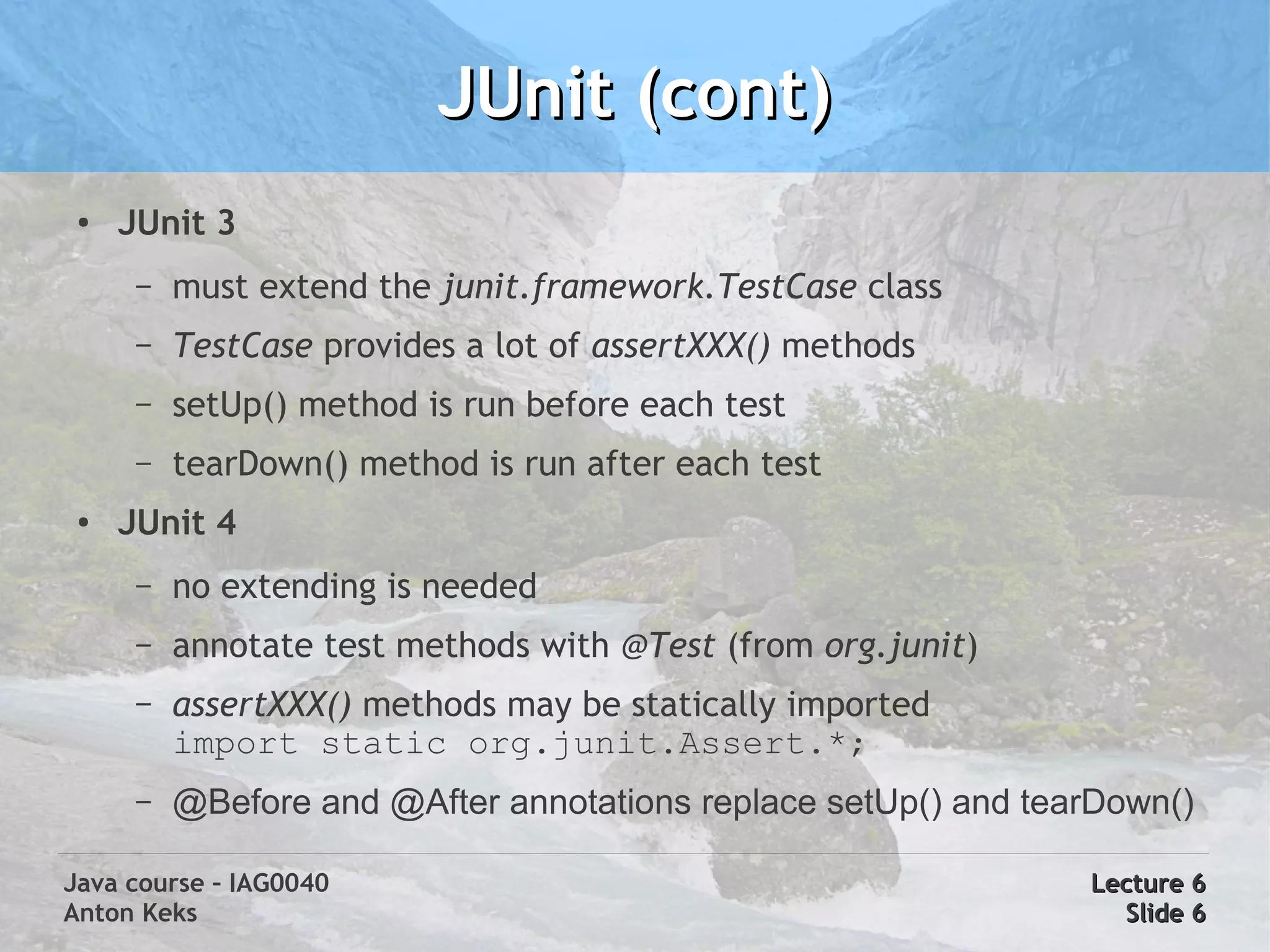
JUnit (cont)
 ●   JUnit 3
      –   must extend the junit.framework.TestCase class
      –   TestCase provides a lot of assertXXX() methods
      –   setUp() method is run before each test
      –   tearDown() method is run after each test
 ●   JUnit 4
      –   no extending is needed
      –   annotate test methods with @Test (from org.junit)
      –   assertXXX() methods may be statically imported
          import static org.junit.Assert.*;
      –   @Before and @After annotations replace setUp() and tearDown()

Java course – IAG0040                                           Lecture 6
Anton Keks                                                        Slide 6
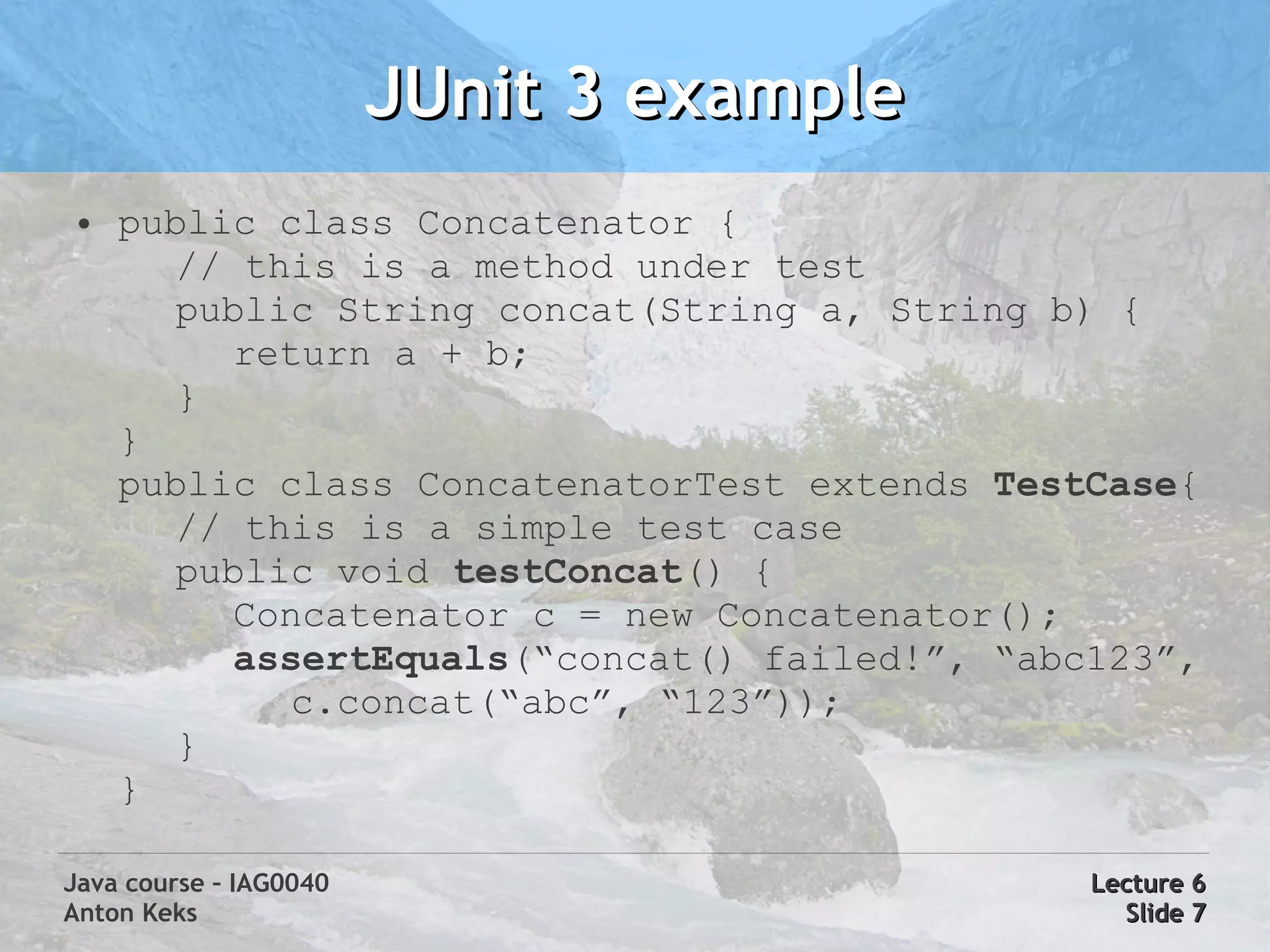
JUnit 3 example
 ●   public class Concatenator {
        // this is a method under test
        public String concat(String a, String b) {
          return a + b;
        }
     }
     public class ConcatenatorTest extends TestCase{
        // this is a simple test case
        public void testConcat() {
          Concatenator c = new Concatenator();
          assertEquals(“concat() failed!”, “abc123”,
             c.concat(“abc”, “123”));
        }
     }

Java course – IAG0040                          Lecture 6
Anton Keks                                       Slide 7
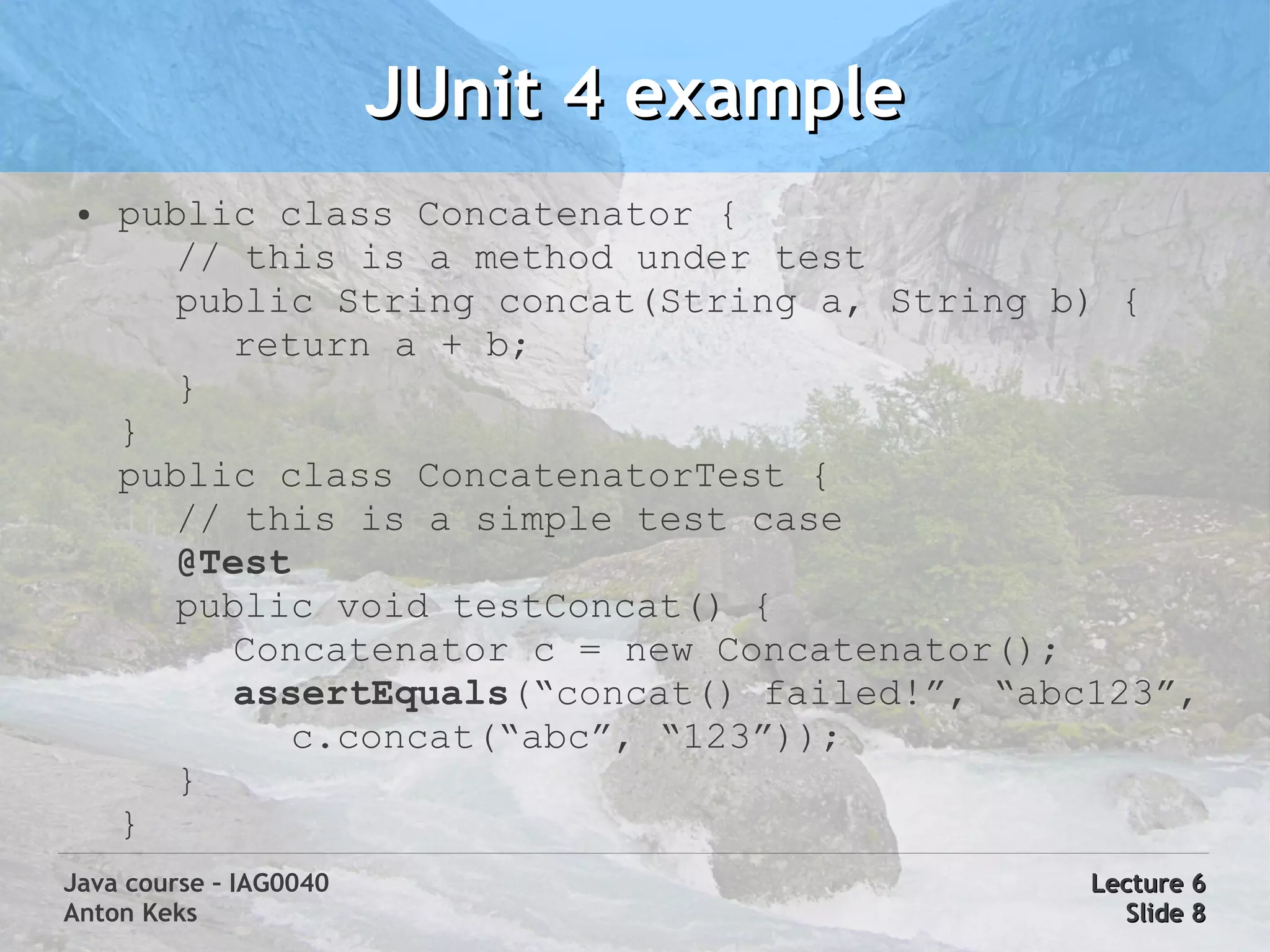
JUnit 4 example
 ●   public class Concatenator {
        // this is a method under test
        public String concat(String a, String b) {
          return a + b;
        }
     }
     public class ConcatenatorTest {
        // this is a simple test case
        @Test
        public void testConcat() {
          Concatenator c = new Concatenator();
          assertEquals(“concat() failed!”, “abc123”,
             c.concat(“abc”, “123”));
        }
     }
Java course – IAG0040                          Lecture 6
Anton Keks                                       Slide 8
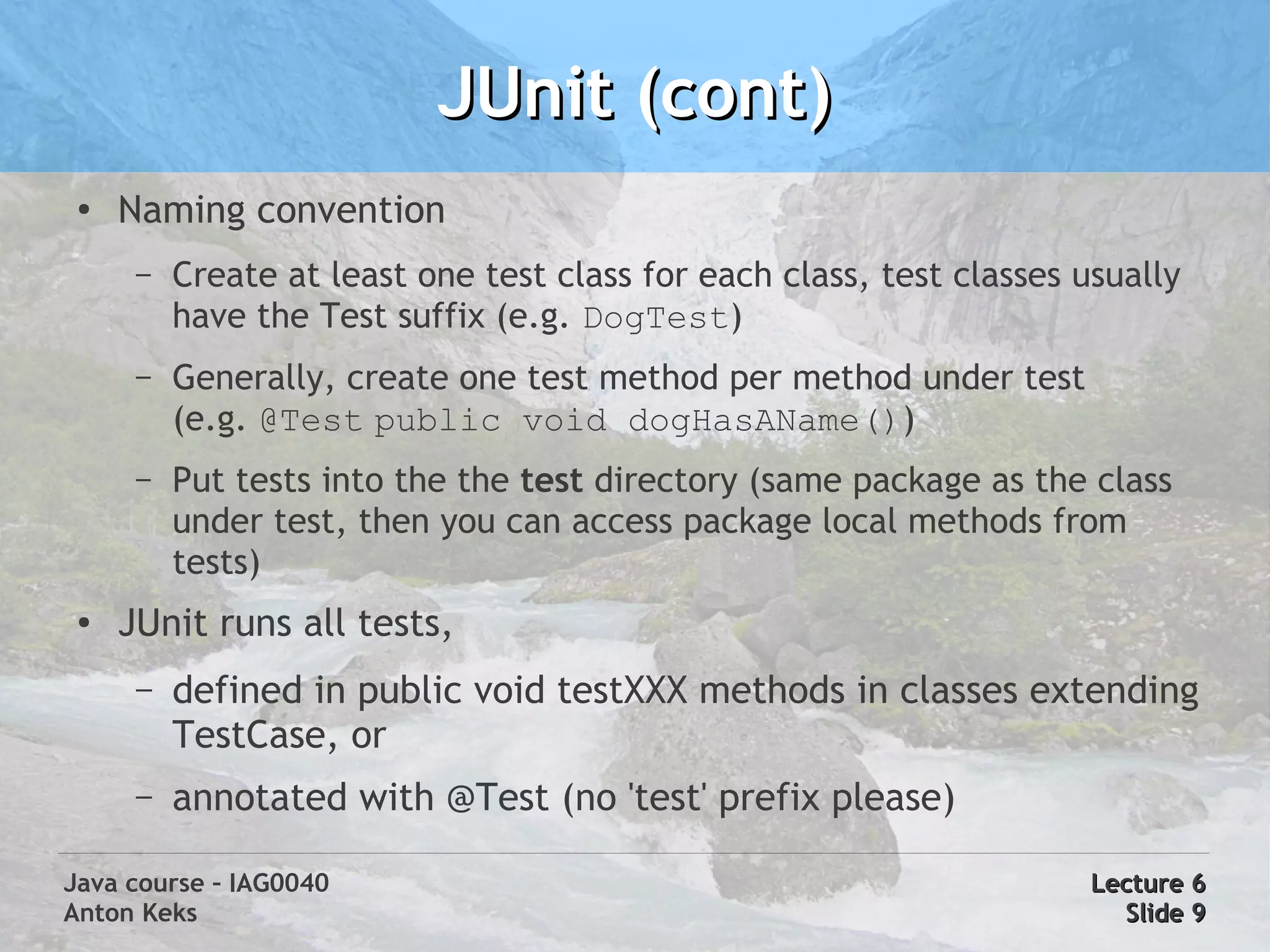
JUnit (cont)
 ●
     Naming convention
      –   Create at least one test class for each class, test classes usually
          have the Test suffix (e.g. DogTest)
      –   Generally, create one test method per method under test
          (e.g. @Test public void dogHasAName())
      –   Put tests into the the test directory (same package as the class
          under test, then you can access package local methods from
          tests)
 ●   JUnit runs all tests,
      –   defined in public void testXXX methods in classes extending
          TestCase, or
      –   annotated with @Test (no 'test' prefix please)

Java course – IAG0040                                                  Lecture 6
Anton Keks                                                               Slide 9
Mock objects in tests
 ●   Unit tests must isolate the unit under test (avoid dependencies)
 ●
     If an object under test uses other objects, they must be mocked
 ●   A mock object has the same interface as the real object, but
     different implementation (in many cases, it does nothing)
 ●   Real objects being mocked should have their own separate unit tests
 ●
     Possible implementations:
      –   Overriding: class MockDog extends Dog { ... }
      –   Anonymous classes: new Dog() { ... }
      –   Dynamic proxies: Proxy.newProxyInstance( ... )
          (see javadoc of java.lang.reflect.Proxy)
      –   Frameworks: mockito, easymock, mockobjects, jmock, etc

Java course – IAG0040                                               Lecture 6
Anton Keks                                                           Slide 10
Unit test tasks
 ●
     Write unit tests for these your classes using JUnit 4
     (see previous lectures' slides if you don't have them):
      –   Fibonacci, Factorial
      –   DuplicateRemoverImpl
      –   WordFrequencyCalculatorImpl
      –   ShapeAggregatorImpl
 ●   Use the above mentioned naming/coding convention
 ●   You no longer need main() methods in these classes
     which demonstrate that the code works – these were
     actually a sort of unit tests, too
Java course – IAG0040                                          Lecture 6
Anton Keks                                                      Slide 11
Agile Software Development
 ●
     Is a relatively new and more efficient software
     development methodology (process)
 ●
     Minimizes risks by splitting projects into small iterations
     that look like separate projects
      –   Each iteration includes all tasks to release an increment in
          functionality
           ●
               planning
           ●   requirements analysis
           ●   design & coding & testing
           ●   documentation


Java course – IAG0040                                                Lecture 6
Anton Keks                                                            Slide 12
Agile Manifesto
 ●
     http://www.agilemanifesto.org/
 ●   We are uncovering better ways of developing software by doing it
     and helping others do it. Through this work we have come to value:
      –   Individuals and interactions over processes and tools
      –   Working software over comprehensive documentation
      –   Customer collaboration over contract negotiation
      –   Responding to change over following a plan
 ●   That is, while there is value in the items on the right, we value the
     items on the left more.


Java course – IAG0040                                               Lecture 6
Anton Keks                                                           Slide 13
So what is Agile?
 ●   Way of creating software in lighter, faster, and people-centric way
 ●
     Adaptable, not predictable
 ●   Working software is the primary measure of success and is delivered
     frequently
 ●   Agile software development requires strict discipline
 ●
     Project team sits together (face-to-face communication)
      –   programmers and customers at minimum
      –   testers, designers, technical writers, managers
 ●   Changes in requirements are welcomed, not being afraid of


Java course – IAG0040                                             Lecture 6
Anton Keks                                                         Slide 14
Agile methodologies
 ●
     There are many (some existed before the Agile
     Manifesto)
     –   Scrum, Crystal Clear, Lean Software Development,
         XP (Extreme Programming), etc
 ●
     Bad (but often used) alternatives:
     –   Cowboy coding – no well-defined process
     –   Waterfall – most predictive, steps through
         requirements capture, analysis, design, coding,
         testing in a strict sequence
         (see www.waterfall2006.com fake conference site)

Java course – IAG0040                                Lecture 6
Anton Keks                                            Slide 15
Agile/XP project cycle
 ●
     Kick-off meeting
 ●   Iterations:
     –   Iteration planning meeting (a few hours)
     –   Daily stand-up meetings (max 15 min)
     –   Designing, coding, testing, communicating
 ●
     Fixed deadline ends (or customer decides to
     finish the project)


Java course – IAG0040                                Lecture 6
Anton Keks                                            Slide 16
User stories and iterations
 ●
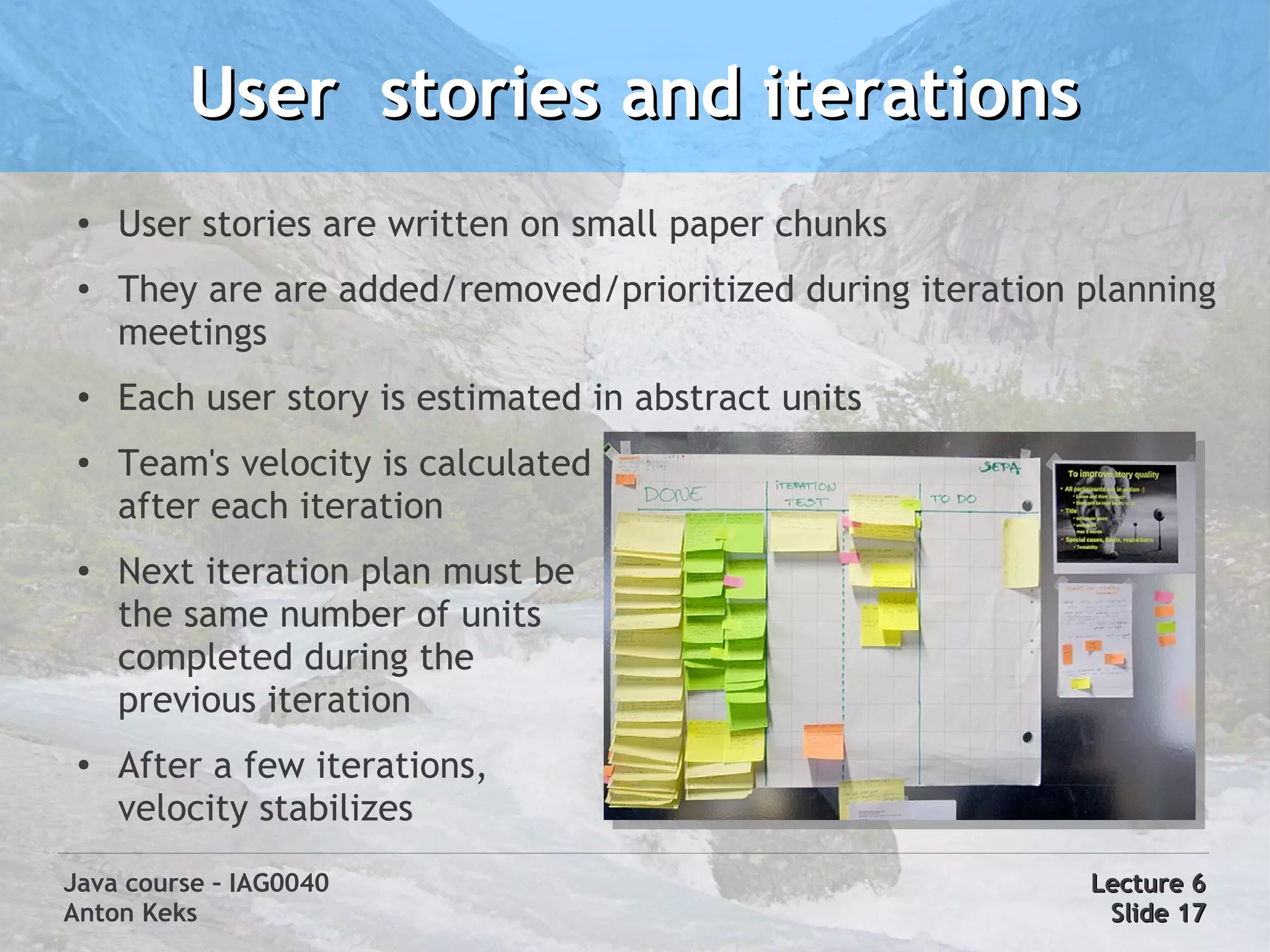
     User stories are written on small paper chunks
 ●   They are are added/removed/prioritized during iteration planning
     meetings
 ●   Each user story is estimated in abstract units
 ●
     Team's velocity is calculated
     after each iteration
 ●   Next iteration plan must be
     the same number of units
     completed during the
     previous iteration
 ●
     After a few iterations,
     velocity stabilizes
Java course – IAG0040                                        Lecture 6
Anton Keks                                                    Slide 17
TDD (Test Driven Development)
 ●
     TDD is one of the main practices of XP (Extreme Programming)
 ●   TDD = TFD + refactoring
 ●
     TFD (Test First Development) means
      –   Write tests before the real (functional) code
      –   Write real code only to satisfy failing tests
      –   Eliminate duplication
 ●   Refactoring means redesigning the code without changing or
     braking existing functionality
      –   always ensure that you have the simplest design possible for the
          functionality built to date


Java course – IAG0040                                              Lecture 6
Anton Keks                                                          Slide 18
TDD benefits
 ●   Code is written in small steps
 ●
     You design your API before writing code, which results in better and
     loosely coupled object model
 ●   You get 100% unit test coverage
 ●   After each test-code iteration you get a working code, you can
     virtually stop anytime
 ●   You don't waste time designing beforehand; initial designs cannot
     predict everything
 ●
     You can change anything anytime (because requirements always
     change)
 ●
     Overengineering is eliminated


Java course – IAG0040                                             Lecture 6
Anton Keks                                                         Slide 19
Pair Programming
 ●
     Pair Programming means there are two programmers sitting
     and working together
 ●   Pairs help stay on track with TDD
 ●   Pairing helps to learn from each other
 ●   Instant (extreme) code review
 ●   Two people produce better ideas than any of them could alone
 ●   “Ping-pong” allows to turn development into a game
      –   Implement failing test, write a new test, pass keyboard


Java course – IAG0040                                         Lecture 6
Anton Keks                                                     Slide 20
Continuous integration
 ●   Regular automated builds of the software (e.g. after each commit)
           –   the whole program is recompiled
           –   automated (unit) tests are run
           –   documentation is generated
           –   software is packaged and therefore ready to run
 ●
     Provides short feedback to developers
 ●   Helps to find integration problems and failed tests early
 ●
     The latest builds are always runnable and testable by e.g. customers
 ●   Hudson is one of the tools used for this purpose
           –   see http://java.azib.net/hudson

Java course – IAG0040                                            Lecture 6
Anton Keks                                                        Slide 21
Hands-on: TDD Bowling
 ●
     Rules/Requirements of 10-pin bowling:
           –   A game of 10 frames (2 shots per frame)
           –   Total score = sum of scores of all frames
           –   Spare – all 10 pins are hit with two shots (frame)
                        ●   Frame score += next shot (bonus)
           –   Strike – all 10 pins are hit with one shot
                        ●   Frame score += two next shots (bonus)
           –   If last frame hits all pins, extra shot is awarded
           –   Perfect game = 12 strikes = 300 points

Java course – IAG0040                                               Lecture 6
Anton Keks                                                           Slide 22

Java Course 6: Introduction to Agile

  • 1.
    Java course -IAG0040 Unit testing & Agile Software Development Anton Keks 2011
  • 2.
    Unit tests ● How to be confident that your code works? ● Why wait for somebody else to test your code? ● How to provide up-to-date examples on using your API? ● How to help yourself see your design better and therefore improve it? The answer: write Unit Tests!!! ● Unit tests are executable test cases for your modules (units), expressed in code ● Unit tests are executed automatically to ensure that your code still works after changing it (regression testing) Java course – IAG0040 Lecture 6 Anton Keks Slide 2
  • 3.
    Benefits of unittests ● Unit testing isolates each module and shows that it is correct. It provides a strict written contract that the code must satisfy ● Facilitates change – unit tests provide regression testing, make refactoring safer ● Simplifies integration – integration testing is easier, if parts are already proven to work correctly ● Documentation – unit tests show how to use the API ● Separation of interface from implementation – unit tests result in loosely coupled code Java course – IAG0040 Lecture 6 Anton Keks Slide 3
  • 4.
    A simple example ● public class Concatenator { // this is a method under test public String concat(String a, String b) { return a + b; } // this is a simple test case public static void main(String[] args) { Concatenator c = new Concatenator(); assert “abc123”.equals( c.concat(“abc”, “123”)) : “concat() failed!”; } } Java course – IAG0040 Lecture 6 Anton Keks Slide 4
  • 5.
    JUnit ● JUnit is the first and most popular unit and regression testing framework for Java ● Is a 3rd-party jar file – Obtainable from http://www.junit.org/ – Included and interfaced in IDEA, Eclipse, etc ● JUnit 3 – older but still very popular ● JUnit 4 – takes advantage of Java 5 features Java course – IAG0040 Lecture 6 Anton Keks Slide 5
  • 6.
    JUnit (cont) ● JUnit 3 – must extend the junit.framework.TestCase class – TestCase provides a lot of assertXXX() methods – setUp() method is run before each test – tearDown() method is run after each test ● JUnit 4 – no extending is needed – annotate test methods with @Test (from org.junit) – assertXXX() methods may be statically imported import static org.junit.Assert.*; – @Before and @After annotations replace setUp() and tearDown() Java course – IAG0040 Lecture 6 Anton Keks Slide 6
  • 7.
    JUnit 3 example ● public class Concatenator { // this is a method under test public String concat(String a, String b) { return a + b; } } public class ConcatenatorTest extends TestCase{ // this is a simple test case public void testConcat() { Concatenator c = new Concatenator(); assertEquals(“concat() failed!”, “abc123”, c.concat(“abc”, “123”)); } } Java course – IAG0040 Lecture 6 Anton Keks Slide 7
  • 8.
    JUnit 4 example ● public class Concatenator { // this is a method under test public String concat(String a, String b) { return a + b; } } public class ConcatenatorTest { // this is a simple test case @Test public void testConcat() { Concatenator c = new Concatenator(); assertEquals(“concat() failed!”, “abc123”, c.concat(“abc”, “123”)); } } Java course – IAG0040 Lecture 6 Anton Keks Slide 8
  • 9.
    JUnit (cont) ● Naming convention – Create at least one test class for each class, test classes usually have the Test suffix (e.g. DogTest) – Generally, create one test method per method under test (e.g. @Test public void dogHasAName()) – Put tests into the the test directory (same package as the class under test, then you can access package local methods from tests) ● JUnit runs all tests, – defined in public void testXXX methods in classes extending TestCase, or – annotated with @Test (no 'test' prefix please) Java course – IAG0040 Lecture 6 Anton Keks Slide 9
  • 10.
    Mock objects intests ● Unit tests must isolate the unit under test (avoid dependencies) ● If an object under test uses other objects, they must be mocked ● A mock object has the same interface as the real object, but different implementation (in many cases, it does nothing) ● Real objects being mocked should have their own separate unit tests ● Possible implementations: – Overriding: class MockDog extends Dog { ... } – Anonymous classes: new Dog() { ... } – Dynamic proxies: Proxy.newProxyInstance( ... ) (see javadoc of java.lang.reflect.Proxy) – Frameworks: mockito, easymock, mockobjects, jmock, etc Java course – IAG0040 Lecture 6 Anton Keks Slide 10
  • 11.
    Unit test tasks ● Write unit tests for these your classes using JUnit 4 (see previous lectures' slides if you don't have them): – Fibonacci, Factorial – DuplicateRemoverImpl – WordFrequencyCalculatorImpl – ShapeAggregatorImpl ● Use the above mentioned naming/coding convention ● You no longer need main() methods in these classes which demonstrate that the code works – these were actually a sort of unit tests, too Java course – IAG0040 Lecture 6 Anton Keks Slide 11
  • 12.
    Agile Software Development ● Is a relatively new and more efficient software development methodology (process) ● Minimizes risks by splitting projects into small iterations that look like separate projects – Each iteration includes all tasks to release an increment in functionality ● planning ● requirements analysis ● design & coding & testing ● documentation Java course – IAG0040 Lecture 6 Anton Keks Slide 12
  • 13.
    Agile Manifesto ● http://www.agilemanifesto.org/ ● We are uncovering better ways of developing software by doing it and helping others do it. Through this work we have come to value: – Individuals and interactions over processes and tools – Working software over comprehensive documentation – Customer collaboration over contract negotiation – Responding to change over following a plan ● That is, while there is value in the items on the right, we value the items on the left more. Java course – IAG0040 Lecture 6 Anton Keks Slide 13
  • 14.
    So what isAgile? ● Way of creating software in lighter, faster, and people-centric way ● Adaptable, not predictable ● Working software is the primary measure of success and is delivered frequently ● Agile software development requires strict discipline ● Project team sits together (face-to-face communication) – programmers and customers at minimum – testers, designers, technical writers, managers ● Changes in requirements are welcomed, not being afraid of Java course – IAG0040 Lecture 6 Anton Keks Slide 14
  • 15.
    Agile methodologies ● There are many (some existed before the Agile Manifesto) – Scrum, Crystal Clear, Lean Software Development, XP (Extreme Programming), etc ● Bad (but often used) alternatives: – Cowboy coding – no well-defined process – Waterfall – most predictive, steps through requirements capture, analysis, design, coding, testing in a strict sequence (see www.waterfall2006.com fake conference site) Java course – IAG0040 Lecture 6 Anton Keks Slide 15
  • 16.
    Agile/XP project cycle ● Kick-off meeting ● Iterations: – Iteration planning meeting (a few hours) – Daily stand-up meetings (max 15 min) – Designing, coding, testing, communicating ● Fixed deadline ends (or customer decides to finish the project) Java course – IAG0040 Lecture 6 Anton Keks Slide 16
  • 17.
    User stories anditerations ● User stories are written on small paper chunks ● They are are added/removed/prioritized during iteration planning meetings ● Each user story is estimated in abstract units ● Team's velocity is calculated after each iteration ● Next iteration plan must be the same number of units completed during the previous iteration ● After a few iterations, velocity stabilizes Java course – IAG0040 Lecture 6 Anton Keks Slide 17
  • 18.
    TDD (Test DrivenDevelopment) ● TDD is one of the main practices of XP (Extreme Programming) ● TDD = TFD + refactoring ● TFD (Test First Development) means – Write tests before the real (functional) code – Write real code only to satisfy failing tests – Eliminate duplication ● Refactoring means redesigning the code without changing or braking existing functionality – always ensure that you have the simplest design possible for the functionality built to date Java course – IAG0040 Lecture 6 Anton Keks Slide 18
  • 19.
    TDD benefits ● Code is written in small steps ● You design your API before writing code, which results in better and loosely coupled object model ● You get 100% unit test coverage ● After each test-code iteration you get a working code, you can virtually stop anytime ● You don't waste time designing beforehand; initial designs cannot predict everything ● You can change anything anytime (because requirements always change) ● Overengineering is eliminated Java course – IAG0040 Lecture 6 Anton Keks Slide 19
  • 20.
    Pair Programming ● Pair Programming means there are two programmers sitting and working together ● Pairs help stay on track with TDD ● Pairing helps to learn from each other ● Instant (extreme) code review ● Two people produce better ideas than any of them could alone ● “Ping-pong” allows to turn development into a game – Implement failing test, write a new test, pass keyboard Java course – IAG0040 Lecture 6 Anton Keks Slide 20
  • 21.
    Continuous integration ● Regular automated builds of the software (e.g. after each commit) – the whole program is recompiled – automated (unit) tests are run – documentation is generated – software is packaged and therefore ready to run ● Provides short feedback to developers ● Helps to find integration problems and failed tests early ● The latest builds are always runnable and testable by e.g. customers ● Hudson is one of the tools used for this purpose – see http://java.azib.net/hudson Java course – IAG0040 Lecture 6 Anton Keks Slide 21
  • 22.
    Hands-on: TDD Bowling ● Rules/Requirements of 10-pin bowling: – A game of 10 frames (2 shots per frame) – Total score = sum of scores of all frames – Spare – all 10 pins are hit with two shots (frame) ● Frame score += next shot (bonus) – Strike – all 10 pins are hit with one shot ● Frame score += two next shots (bonus) – If last frame hits all pins, extra shot is awarded – Perfect game = 12 strikes = 300 points Java course – IAG0040 Lecture 6 Anton Keks Slide 22