Java course - IAG0040


               Text processing,
             Charsets & Encodings


Anton Keks                             2011
String processing
 ●
     The following classes provide String processing:
     String, StringBuilder/Buffer, StringTokenizer
 ●
     All primitives can be converted to/from Strings using
     their wrapper classes (e.g. Integer, Float, etc)
 ●
     java.util.regex provides regular expressions
 ●   java.text package provides classes and interfaces for
     parsing and formatting text, dates, numbers, and
     messages in a manner independent of natural
     languages


Java course – IAG0040                                   Lecture 7
Anton Keks                                                Slide 2
Locales
 ●
     Java also supports locales, just like most OSs
 ●
     A java.util.Locale object represents a specific
     geographical, political, or cultural region.
     –   There is a default locale, which is used by some
         String operations (e.g. toUpperCase) and formatters
         in java.text package.
     –   Locale is initialized with: ISO 2-letter language code
         (lower case), ISO 2-letter country code (upper case),
         and a variant. Latter two are optional
                        ●   e.g. “de”, “et_EE”, “en_GB”

Java course – IAG0040                                     Lecture 7
Anton Keks                                                  Slide 3
Localization
 ●   ResourceBundle classes can be used for
     localization of your programs
           –   ResourceBundles contain locale-specific
                objects, e.g. Strings
           –   ListResourceBundle and
                PropertyResourceBundle are simple
                implementations
           –   ResourceBundle.getBundle(...)
                returns a locale-specific bundle

Java course – IAG0040                              Lecture 7
Anton Keks                                           Slide 4
Natural language comparison
 ●   String.compareTo() does lexicographical
     comparison, ie compares character codes
 ●   Collators are used for locale-sensitive
     comparison/sorting, according to the rules of
     the specific language/locale
        –   java.text.Collator implements Comparator<String>
        –   Use Collator.getInstance(...) for obtaining one
        –   RuleBasedCollator is the common implementation,
              allows specification of own rules

Java course – IAG0040                                         Lecture 7
Anton Keks                                                      Slide 5
StringBuffer vs String
 ●
     A StringBuilder (and StringBuffer) is a mutable String
 ●   Always use it, when doing complex String processing, especially when
     doing a lot of concatenations in a loop
 ●   Java uses StringBuilder internally in place of the '+' operator
      –   String s = a + b + 25; is the same as
      –   String s = new StringBuilder()
             .append(a).append(b).append(25).toString();
      –   There are many different append() methods for all primitive types as well as
          any objects. For an arbitrary object, toString() is called.
 ●   StringBuffer, StringBuilder, and String implement CharSequence
 ●   StringBuilder has the same methods as StringBuffer, but a bit faster,
     because it is not thread safe (not internally synchronized)


Java course – IAG0040                                                           Lecture 7
Anton Keks                                                                        Slide 6
Formatting and Parsing
 ●   Locale-specific formatting and parsing is provided by java.text.
 ●   java.text.Format is an abstract base class for
      –   DateFormat (SimpleDateFormat) – date and time. Calendar is used for
          manipulation of date and time.
      –   NumberFormat (ChoiceFormat, DecimalFormat) – numbers, currencies,
          percentages, etc
      –   MessageFormat – for complex concatenated messages
      –   all of them provide various format and parse methods
      –   all of them can be initialized for the default or specified locale using
          provided static methods
      –   all of them can be created directly, specifying the custom format


Java course – IAG0040                                                       Lecture 7
Anton Keks                                                                    Slide 7
Regular expressions
 ●
     Regular expressions are expressions, allowing easy searching and matching
     of textual data, they are built into many languages, like Perl and PHP, and
     widely used in Unix command-line
 ●   Regular expression classes are in the java.util.regex package.
 ●   In Java, represented as Strings, but must be 'compiled' by
     Pattern.compile() before use.
 ●   However, many String methods provide convenient 'shortcuts', like
     split(), matches(), replaceFirst(), replaceAll(), etc
 ●   Pattern is an immutable compiled representation, which can be used for
     creation of mutable Matcher objects.
 ●   Use Patterns directly in case you intend to reuse the regexp


Java course – IAG0040                                                    Lecture 7
Anton Keks                                                                 Slide 8
Regular Expressions (cont)
 ●
     Read javadoc of the Pattern class!
      –   . (a dot) matches any character
      –   [] can be used for matching any specified character
      –   s, S, d, w, etc save you typing sometimes (note: double escaping
          is needed within String literals, e.g. “s”
      –   ?, +, * match the number of occurrences of the preceding character:
          0 or 1, 1 or more, any number respectively
      –   () - matches groups (they can be accessed individually)
      –   | means 'or', e.g. (dog|cat) matches both “dog” and “cat”
      –   ^ and $ match beginning and end of a line, respectively
      –   b matches word boundary


Java course – IAG0040                                                   Lecture 7
Anton Keks                                                                Slide 9
Scanning
 ●
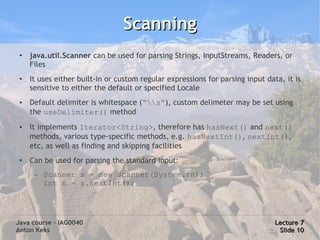
     java.util.Scanner can be used for parsing Strings, InputStreams, Readers, or
     Files
 ●
     It uses either built-in or custom regular expressions for parsing input data, it is
     sensitive to either the default or specified Locale
 ●   Default delimiter is whitespace (“s”), custom delimeter may be set using
     the useDelimiter() method
 ●   It implements Iterator<String>, therefore has hasNext() and next()
     methods, various type-specific methods, e.g. hasNextInt(), nextInt(),
     etc, as well as finding and skipping facilities
 ●
     Can be used for parsing the standard input:
      –   Scanner s = new Scanner(System.in);
          int n = s.nextInt();


Java course – IAG0040                                                           Lecture 7
Anton Keks                                                                       Slide 10
Charsets and encodings
 ●
     In the 21st century, there is no excuse for any programmer
     not to know charsets and encodings well
 ●
     Charsets map glyphs (symbols) to numeric codes
 ●
     Charsets are represented by character encodings (actual
     bits and bytes that are stored in files)
 ●
     Fonts must support charsets in order to display texts in
     respective encodings properly
 ●
     Example:
      –   Glyph (symbol): A
      –   Numeric code: 65              (ASCII charset)
      –   Encoding: 0x41 == 1000001 b   (ASCII 7-bit encoding)
Java course – IAG0040                                       Lecture 7
Anton Keks                                                   Slide 11
ASCII
 ●
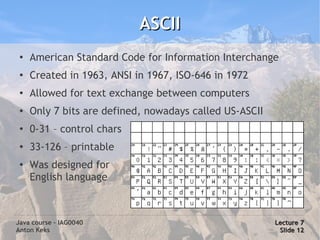
     American Standard Code for Information Interchange
 ●
     Created in 1963, ANSI in 1967, ISO-646 in 1972
 ●
     Allowed for text exchange between computers
 ●   Only 7 bits are defined, nowadays called US-ASCII
 ●
     0-31 – control chars
 ●
     33-126 – printable
 ●
     Was designed for
     English language


Java course – IAG0040                                    Lecture 7
Anton Keks                                                Slide 12
ASCII extensions
 ●
     ASCII is enough for only Latin, English, Hawaiian and Swahili
 ●
     For most other languages a number of 8-bit ASCII extensions
     were developed, incompatible with each other
 ●   ISO-8859 was an attempt to standardize them by defining the
     upper 128 characters in 8-bit wide bytes
      –   All of them have the first 7-bit the same as ASCII
      –   ISO-8859-1 (Latin-1) – Western European
      –   ISO-8859-4 – Northern, ISO-8859-13 – Baltic,
          WIN-1257 – MS Baltic (modified ISO)
      –   ISO-8859-5, KOI8-R – Cyrillic,
          WIN-1251 – MS Cyrillic (different from ISO)
      –   Many of them are still used today in legacy systems or formats
Java course – IAG0040                                              Lecture 7
Anton Keks                                                          Slide 13
Unicode (UCS, ISO-10646)
 ●
     Unicode solves the problem of incompatible charsets
 ●
     Unicode defines standardized numeric codes (code
     points) for most glyphs used in the world
      –   Code points are abstract – they don't define representation
      –   First 256 code points correspond to ISO-8859-1
      –   16 bit BMP (Basic Multilingual Plane) – most modern
          languages (including Chinese, Japanese, etc)
      –   More planes for other scripts (mathematical symbols,
          musical notation, ancient alphabets, etc)
 ●   Apart from UCS, Unicode defines formatting and
     combining rules as well (e.g. for bidirectional text)
Java course – IAG0040                                            Lecture 7
Anton Keks                                                        Slide 14
Unicode encodings
 ●
     Define representation of code points in bits and bytes
 ●
     Fixed-width UCS-2 (2 bytes) and UCS-4 (4 bytes)
 ●
     UTF (Unicode Transformation Format)
     –   All of them can encode any Unicode code points
     –   UTF-8 – variable size from 1 to 6 bytes (usually no longer
         than 3 bytes, compatible with ASCII), the most popular and
         compact
     –   UTF-16 – 2 or 4 bytes, 2 bytes for BMP code points, 4 bytes
         for other planes
     –   UTF-32 – constant size, 4 bytes per character, 'raw' unicode
     –   UTF-7 – 7-bit safe encoding (less popular nowadays)
Java course – IAG0040                                           Lecture 7
Anton Keks                                                       Slide 15
Charsets and Java
 ●   char and String are UTF-16
      –   Beware that length(), indexOf(), etc operate on chars (surrogates), not
          Unicode glyphs, therefore can return 'logically wrong' values in case of
          4-byte characters – this was a performance decision
 ●   Encoding conversions are built-in
      –   Encoded text is binary data for Java, therefore stored in bytes
      –   There always exists the default encoding (the one OS uses)
      –   Charset class is provided for encoding/decoding, enumeration, etc
      –   s.toBytes(...) - encodes a String
      –   new String(...) - decodes raw bytes to a String
      –   System.out and System.in automatically convert to/from the default
          encoding

Java course – IAG0040                                                       Lecture 7
Anton Keks                                                                   Slide 16

Java Course 7: Text processing, Charsets & Encodings

  • 1.
    Java course -IAG0040 Text processing, Charsets & Encodings Anton Keks 2011
  • 2.
    String processing ● The following classes provide String processing: String, StringBuilder/Buffer, StringTokenizer ● All primitives can be converted to/from Strings using their wrapper classes (e.g. Integer, Float, etc) ● java.util.regex provides regular expressions ● java.text package provides classes and interfaces for parsing and formatting text, dates, numbers, and messages in a manner independent of natural languages Java course – IAG0040 Lecture 7 Anton Keks Slide 2
  • 3.
    Locales ● Java also supports locales, just like most OSs ● A java.util.Locale object represents a specific geographical, political, or cultural region. – There is a default locale, which is used by some String operations (e.g. toUpperCase) and formatters in java.text package. – Locale is initialized with: ISO 2-letter language code (lower case), ISO 2-letter country code (upper case), and a variant. Latter two are optional ● e.g. “de”, “et_EE”, “en_GB” Java course – IAG0040 Lecture 7 Anton Keks Slide 3
  • 4.
    Localization ● ResourceBundle classes can be used for localization of your programs – ResourceBundles contain locale-specific objects, e.g. Strings – ListResourceBundle and PropertyResourceBundle are simple implementations – ResourceBundle.getBundle(...) returns a locale-specific bundle Java course – IAG0040 Lecture 7 Anton Keks Slide 4
  • 5.
    Natural language comparison ● String.compareTo() does lexicographical comparison, ie compares character codes ● Collators are used for locale-sensitive comparison/sorting, according to the rules of the specific language/locale – java.text.Collator implements Comparator<String> – Use Collator.getInstance(...) for obtaining one – RuleBasedCollator is the common implementation, allows specification of own rules Java course – IAG0040 Lecture 7 Anton Keks Slide 5
  • 6.
    StringBuffer vs String ● A StringBuilder (and StringBuffer) is a mutable String ● Always use it, when doing complex String processing, especially when doing a lot of concatenations in a loop ● Java uses StringBuilder internally in place of the '+' operator – String s = a + b + 25; is the same as – String s = new StringBuilder() .append(a).append(b).append(25).toString(); – There are many different append() methods for all primitive types as well as any objects. For an arbitrary object, toString() is called. ● StringBuffer, StringBuilder, and String implement CharSequence ● StringBuilder has the same methods as StringBuffer, but a bit faster, because it is not thread safe (not internally synchronized) Java course – IAG0040 Lecture 7 Anton Keks Slide 6
  • 7.
    Formatting and Parsing ● Locale-specific formatting and parsing is provided by java.text. ● java.text.Format is an abstract base class for – DateFormat (SimpleDateFormat) – date and time. Calendar is used for manipulation of date and time. – NumberFormat (ChoiceFormat, DecimalFormat) – numbers, currencies, percentages, etc – MessageFormat – for complex concatenated messages – all of them provide various format and parse methods – all of them can be initialized for the default or specified locale using provided static methods – all of them can be created directly, specifying the custom format Java course – IAG0040 Lecture 7 Anton Keks Slide 7
  • 8.
    Regular expressions ● Regular expressions are expressions, allowing easy searching and matching of textual data, they are built into many languages, like Perl and PHP, and widely used in Unix command-line ● Regular expression classes are in the java.util.regex package. ● In Java, represented as Strings, but must be 'compiled' by Pattern.compile() before use. ● However, many String methods provide convenient 'shortcuts', like split(), matches(), replaceFirst(), replaceAll(), etc ● Pattern is an immutable compiled representation, which can be used for creation of mutable Matcher objects. ● Use Patterns directly in case you intend to reuse the regexp Java course – IAG0040 Lecture 7 Anton Keks Slide 8
  • 9.
    Regular Expressions (cont) ● Read javadoc of the Pattern class! – . (a dot) matches any character – [] can be used for matching any specified character – s, S, d, w, etc save you typing sometimes (note: double escaping is needed within String literals, e.g. “s” – ?, +, * match the number of occurrences of the preceding character: 0 or 1, 1 or more, any number respectively – () - matches groups (they can be accessed individually) – | means 'or', e.g. (dog|cat) matches both “dog” and “cat” – ^ and $ match beginning and end of a line, respectively – b matches word boundary Java course – IAG0040 Lecture 7 Anton Keks Slide 9
  • 10.
    Scanning ● java.util.Scanner can be used for parsing Strings, InputStreams, Readers, or Files ● It uses either built-in or custom regular expressions for parsing input data, it is sensitive to either the default or specified Locale ● Default delimiter is whitespace (“s”), custom delimeter may be set using the useDelimiter() method ● It implements Iterator<String>, therefore has hasNext() and next() methods, various type-specific methods, e.g. hasNextInt(), nextInt(), etc, as well as finding and skipping facilities ● Can be used for parsing the standard input: – Scanner s = new Scanner(System.in); int n = s.nextInt(); Java course – IAG0040 Lecture 7 Anton Keks Slide 10
  • 11.
    Charsets and encodings ● In the 21st century, there is no excuse for any programmer not to know charsets and encodings well ● Charsets map glyphs (symbols) to numeric codes ● Charsets are represented by character encodings (actual bits and bytes that are stored in files) ● Fonts must support charsets in order to display texts in respective encodings properly ● Example: – Glyph (symbol): A – Numeric code: 65 (ASCII charset) – Encoding: 0x41 == 1000001 b (ASCII 7-bit encoding) Java course – IAG0040 Lecture 7 Anton Keks Slide 11
  • 12.
    ASCII ● American Standard Code for Information Interchange ● Created in 1963, ANSI in 1967, ISO-646 in 1972 ● Allowed for text exchange between computers ● Only 7 bits are defined, nowadays called US-ASCII ● 0-31 – control chars ● 33-126 – printable ● Was designed for English language Java course – IAG0040 Lecture 7 Anton Keks Slide 12
  • 13.
    ASCII extensions ● ASCII is enough for only Latin, English, Hawaiian and Swahili ● For most other languages a number of 8-bit ASCII extensions were developed, incompatible with each other ● ISO-8859 was an attempt to standardize them by defining the upper 128 characters in 8-bit wide bytes – All of them have the first 7-bit the same as ASCII – ISO-8859-1 (Latin-1) – Western European – ISO-8859-4 – Northern, ISO-8859-13 – Baltic, WIN-1257 – MS Baltic (modified ISO) – ISO-8859-5, KOI8-R – Cyrillic, WIN-1251 – MS Cyrillic (different from ISO) – Many of them are still used today in legacy systems or formats Java course – IAG0040 Lecture 7 Anton Keks Slide 13
  • 14.
    Unicode (UCS, ISO-10646) ● Unicode solves the problem of incompatible charsets ● Unicode defines standardized numeric codes (code points) for most glyphs used in the world – Code points are abstract – they don't define representation – First 256 code points correspond to ISO-8859-1 – 16 bit BMP (Basic Multilingual Plane) – most modern languages (including Chinese, Japanese, etc) – More planes for other scripts (mathematical symbols, musical notation, ancient alphabets, etc) ● Apart from UCS, Unicode defines formatting and combining rules as well (e.g. for bidirectional text) Java course – IAG0040 Lecture 7 Anton Keks Slide 14
  • 15.
    Unicode encodings ● Define representation of code points in bits and bytes ● Fixed-width UCS-2 (2 bytes) and UCS-4 (4 bytes) ● UTF (Unicode Transformation Format) – All of them can encode any Unicode code points – UTF-8 – variable size from 1 to 6 bytes (usually no longer than 3 bytes, compatible with ASCII), the most popular and compact – UTF-16 – 2 or 4 bytes, 2 bytes for BMP code points, 4 bytes for other planes – UTF-32 – constant size, 4 bytes per character, 'raw' unicode – UTF-7 – 7-bit safe encoding (less popular nowadays) Java course – IAG0040 Lecture 7 Anton Keks Slide 15
  • 16.
    Charsets and Java ● char and String are UTF-16 – Beware that length(), indexOf(), etc operate on chars (surrogates), not Unicode glyphs, therefore can return 'logically wrong' values in case of 4-byte characters – this was a performance decision ● Encoding conversions are built-in – Encoded text is binary data for Java, therefore stored in bytes – There always exists the default encoding (the one OS uses) – Charset class is provided for encoding/decoding, enumeration, etc – s.toBytes(...) - encodes a String – new String(...) - decodes raw bytes to a String – System.out and System.in automatically convert to/from the default encoding Java course – IAG0040 Lecture 7 Anton Keks Slide 16