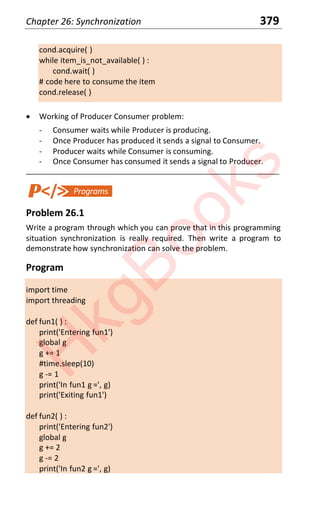
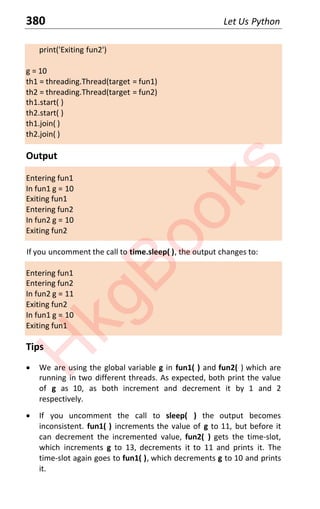
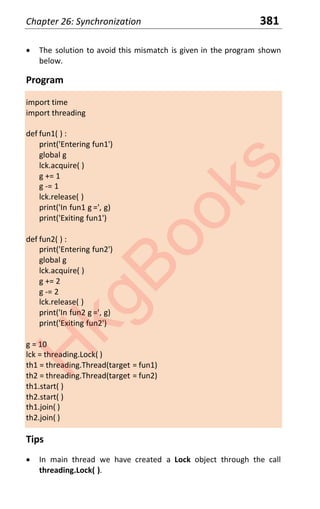
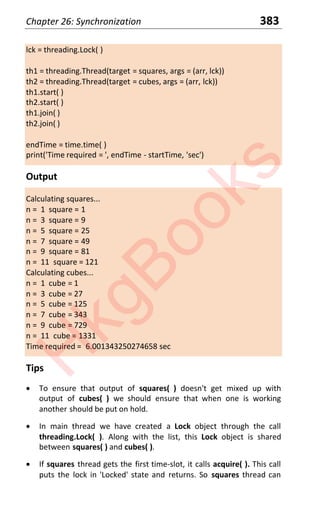
H
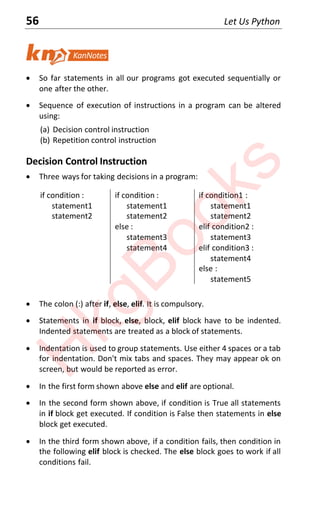
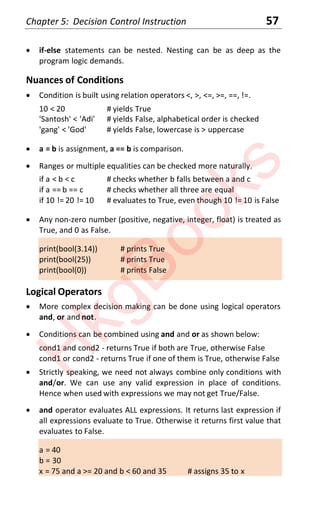
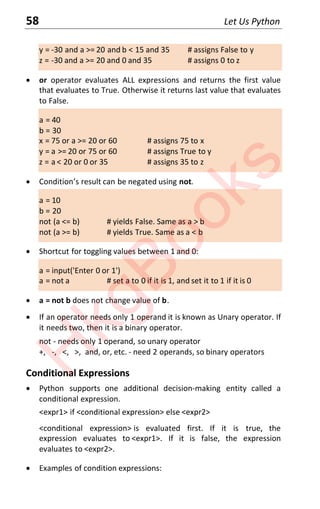
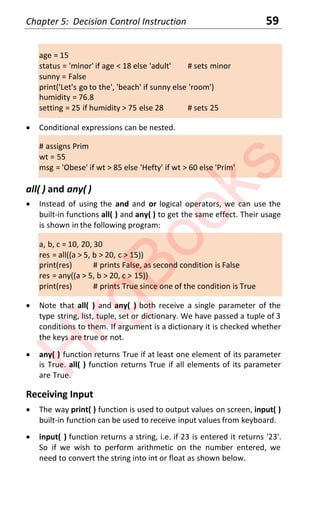
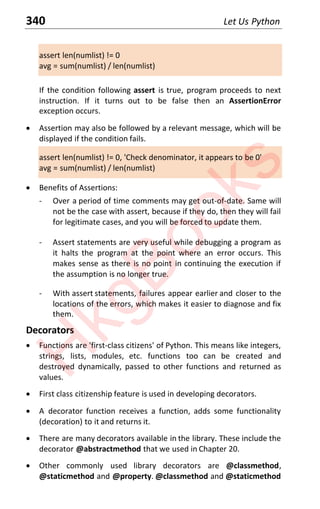
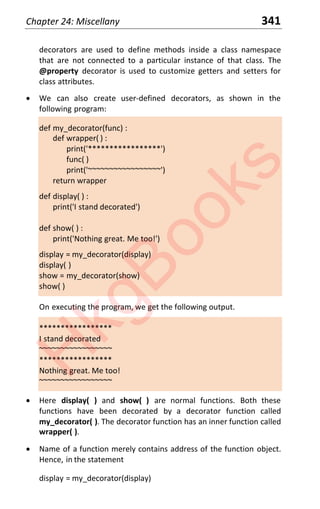
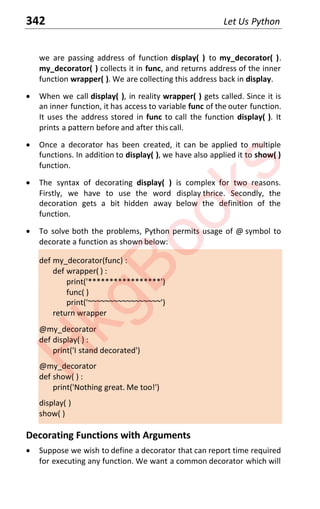
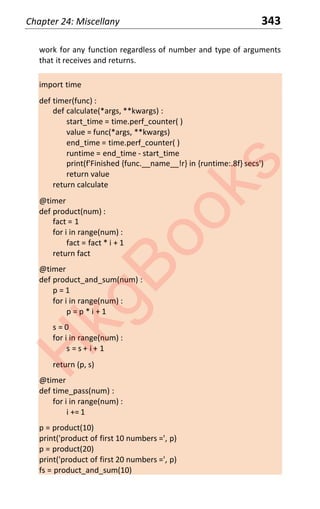
k
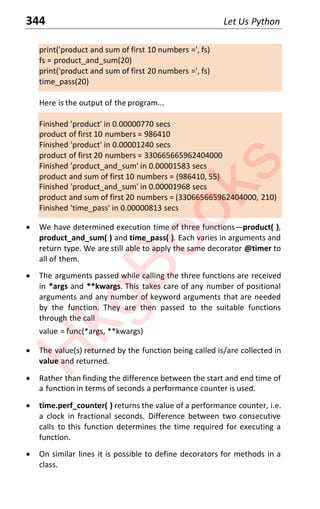
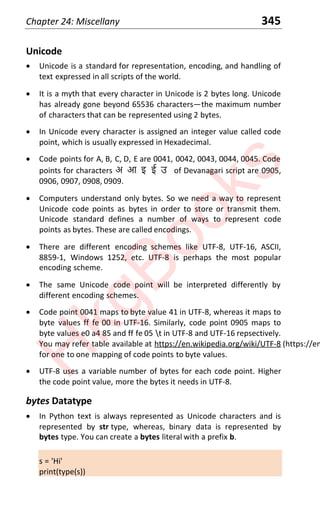
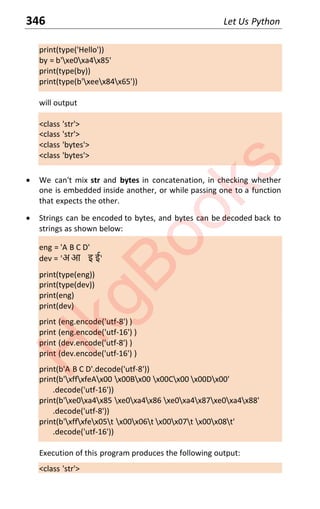
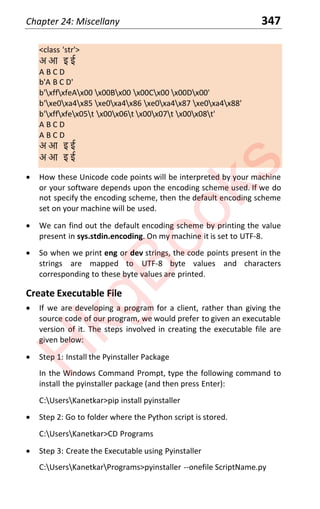
g
B
o
o
k
s
i
H
k
g
B
o
o
k
s
iii
Dedicated to
Nalinee & Prabhakar Kanetkar...
H
k
g
B
o
o
k
s
iv
About Yashavant Kanetkar
Through his books and Online Courses on C, C++,
Java, Python, Data Structures, .NET, IoT, etc.
Yashavant Kanetkar has created, molded and
groomed lacs of IT careers in the last three
decades Yashaǀants books and Online Courses
have made a significant contribution in creating
top-notch IT manpower in India and abroad.
His books are globally recognized and millions of students /
professionals have benefitted from them. Many of his books have been
translated into Hindi, Gujarati, Japanese, Korean and Chinese
languages. Many of his books are published in India, USA, Japan,
Singapore, Korea and China.
He is a much sought after speaker in the IT field and has conducted
seminars/workshops at TedEx, IITs, IIITs, NITs and global software
companies.
He has been honored ǁith the prestigioƵs DistingƵished AlƵmnƵs
Aǁard bLJ IIT KanpƵr for his entrepreneurial, professional and
academic excellence. This award was given to top 50 alumni of IIT
Kanpur who have made significant contribution towards their
profession and betterment of society in the last 50 years.
In recognition of his immense contribution to IT education in India, he
has been aǁarded the Best NET Technical ContribƵtor and Most
ValƵable Professional aǁards bLJ Microsoft for ϱ sƵccessiǀe LJears
Yashavant holds a BE from VJTI Mumbai and M.Tech. from IIT Kanpur.
His current affiliations include being a Director of KICIT Pvt. Ltd. He can
be reached at kanetkar@kicit.com or through http://www.kicit.com. (http://www.kicit
H
k
g
B
o
o
k
s
v
About Aditya Kanetkar
Aditya is currently working as a Cloud
Software Engineer at Microsoft, Redmond,
USA.
He has worked at multiple software
companies in the past, including Oracle,
Redfin, Amazon and Arista Networks. He has
been designing distributed systems software
for the last four years.
Aditya holds a Bachelor's degree in Computer Science and Engineering
from IIT Guwahati and a Master's degree in Computer Science from
Georgia Tech, Atlanta. His current passion is anything remotely
connected to Python, Machine Learning, Distributed Systems, Cloud
Computing and C#. When not writing software, he is most likely to be
found on a Badminton court or watching a football game.
Aditya can be reached through http://www.kicit.com. (http://www.kicit.com.)
H
k
g
B
o
o
k
s
vi
Preface to Third Edition
Programming landscape has changed significantly over the last few
years. Python is making inroads into every field that has anything to do
with programming. Naturally, Python programming is a skill that one has
to acquire, sooner the better.
If you have no programming background and you are learning Python as
your first programming language you will find the book very simple to
understand. Primary credit of this goes to the Python languageͶit is
very simple for the beginner, yet very powerful for the expert who can
tap into its power.
If you have some acquaintance with a programming language, you need
to get off the ground with Python quickly. To do that you need to
understand the similarities/differences in a feature that you have used
in other language(s) and new features that Python offers. In both
respects this book should help you immensely. Instead of explaining a
feature with verbose text, we have mentioned the key points about it as
'KanNotes' and explained those points with the help of programs.
The most important characteristic of this book is its simplicityͶbe it the
code or the text. You will also notice that very few programming
examples in this book are code fragments. We have realized that a
program that actƵallLJ compiles and rƵns helps improǀe ones
understanding of a subject a great deal more, than just code snippets.
Exercises are exceptionally useful to complete the readers
understanding of a topic. So you will find them at the end of each
chapter. Please do attempt them. They will really make you battle-
ready. If you want solutions to these Exercises then take a look at our
book 'Let Us Python Solutions'.
The immense success of first edition of 'Let Us Python' has enthused us
to pour our best efforts creating this third edition. Admittedly, in the
first two editions there were a few key places where the topic change
was a bit jarring. To address this issue many chapters have been
reorganized, split or combined. In addition one new chapter and three
new appendices have been added in this edition.
We have tried to write a Python book that makes reading it as much fun
as the language is. Enjoy the book and your journey into the Python
world!
H
k
g
B
o
o
k
s
vii
Brief Contents
1 Introduction to Python _______________________________ 1
2 Getting Started______________________________________ 9
3 Python Basics ______________________________________ 17
4 Strings ____________________________________________ 39
5 Decision Control Instruction ___________________________ 55
6 Repetition Control Instruction _________________________ 69
7 Console Input/Output ________________________________ 81
8 Lists ______________________________________________ 91
9 Tuples _____________________________________________ 109
10 Sets _______________________________________________ 121
11 Dictionaries ________________________________________ 131
12 Comprehensions ____________________________________ 145
13 Functions __________________________________________ 157
14 Recursion __________________________________________ 175
15 Functional Programming _____________________________ 191
16 Modules and Packages _______________________________ 205
17 Namespaces _______________________________________ 217
18 Classes and Objects _________________________________ 227
19 Intricacies of Classes and Objects ______________________ 245
20 Containership and Inheritance ________________________ 257
21 Iterators and Generators ____________________________ 277
22 Exception Handling _________________________________ 299
23 File Input/Output __________________________________ 317
24 Miscellany ________________________________________ 333
25 Concurrency and Parallelism__________________________ 355
26 Synchronization ____________________________________ 373
H
k
g
B
o
o
k
s
viii
Appendix A - Precedence Table________________________ 395
Appendix B - Debugging in Python______________________ 397
Appendix C - Chasing the Bugs_________________________ 401
Index _____________________________________________ 407
H
k
g
B
o
o
k
s
ix
Contents
1 Introduction to Python _____________________________ 1
What is Python? 2
Reasons for Popularity 2
What sets Python apart? 3
What can be done using Python? 3
Who uses Python today? 4
Programming Paradigms 4
Functional Programming Model 5
Procedural Programming Model 5
Object-oriented Programming Model 6
Event-driven Programming Model 6
Exercises 7
2 Getting Started __________________________________ 9
Python Specification 10
Python Installation under Windows 10
Python Installation under Linux 11
Python Resources 12
Third-party Packages 12
More Sophisticated Tools 13
Working with Python 13
Python Programming Modes 14
Determining Python Version 15
Exercises 15
3 Python Basics ____________________________________ 17
Identifiers and Keywords 18
Python Types 18
Basic Types 19
Integer and Float Ranges 19
Variable Type and Assignment 20
Arithmetic Operators 20
Operation Nuances 21
Precedence and Associativity 22
Conversions 23
Built-in Functions 23
Built-in Modules 24
Container Types 26
H
k
g
B
o
o
k
s
x
Python Type Jargon 26
Comments and Indentation 27
Multi-lining 27
Classes and Objects 28
Multiple Objects 29
Programs 30
Exercises 37
4 Strings __________________________________________ 39
What are Strings? 40
Accessing String Elements 40
String Properties 41
Built-in Functions 42
String Methods 42
String Conversions 43
String Comparisons 44
Programs 45
Exercises 52
5 Decision Control Instruction_________________________ 55
Decision Control Instruction 56
Nuances of Conditions 57
Logical Operators 57
Conditional Expressions 58
all( ) and any( ) 59
Receiving Input 59
pass Statement 60
Programs 60
Exercises 65
6 Repetition Control Instruction _______________________ 69
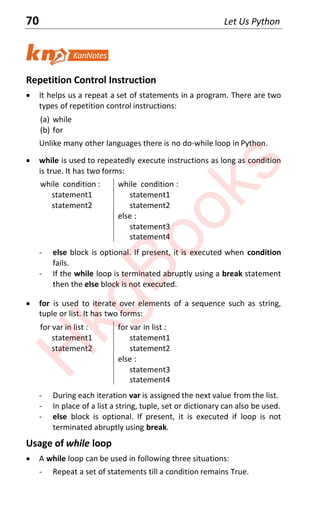
Repetition Control Instruction 70
Usage of while Loop 70
Usage of for Loop 71
break and continue 73
Else Block of a Loop 73
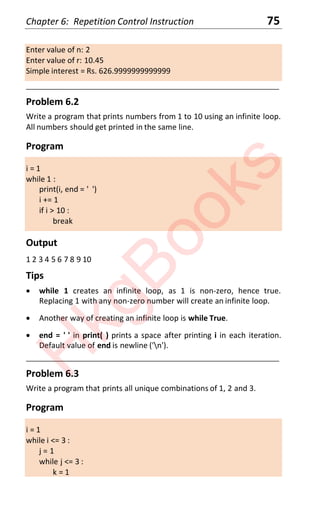
Programs 74
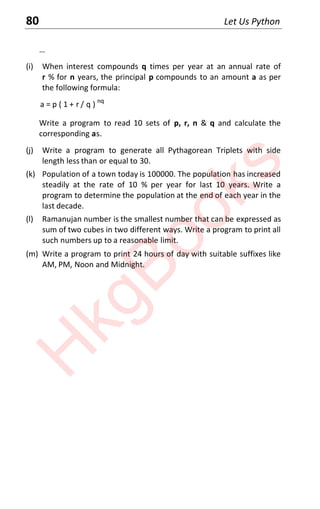
Exercises 77
7 Console Input/Output _____________________________ 81
Console Input 82
H
k
g
B
o
o
k
s
xi
Console Output 83
Formatted Printing 83
Programs 85
Exercises 88
8 Lists ____________________________________________ 91
What are Lists? 92
Accessing List Elements 92
Looping in Lists 93
Basic List Operations 93
Using Built-in Functions on Lists 96
List Methods 97
Sorting and Reversing 97
List Varieties 98
Stack Data Structure 99
Queue Data Structure 99
Programs 99
Exercises 105
9 Tuples __________________________________________ 109
What are Tuples? 110
Accessing Tuple Elements 110
Looping in Tuples 111
Basic Tuple Operations 111
Using Built-in Functions on Tuples 112
Tuple Methods 113
Tuple Varieties 113
Programs 114
Exercises 119
10 Sets ____________________________________________ 121
What are Sets? 122
Accessing Set Elements 123
Looping in Sets 123
Basic Set Operations 123
Using Built-in Functions on Sets 124
Set Methods 124
Mathematical Set Operations 125
Updating Set Operations 126
Set Varieties 126
Programs 126
H
k
g
B
o
o
k
s
xii
Exercises 129
11 Dictionaries ______________________________________ 131
What are Dictionaries? 132
Accessing Dictionary Elements 132
Looping in Dictionaries 133
Basic Dictionary Operations 133
Using Built-in Functions on Dictionaries 134
Dictionary Methods 135
Dictionary Varieties 135
Programs 136
Exercises 141
12 Comprehensions __________________________________ 145
What are Comprehensions? 146
List Comprehension 146
Set Comprehension 147
Dictionary Comprehension 148
Programs 148
Exercises 154
13 Functions ________________________________________ 157
What are Functions? 158
Communication with Functions 159
Types of Arguments 160
Unpacking Arguments 163
Programs 164
Exercises 173
14 Recursion ________________________________________ 175
Repetitions 176
Recursive Function 176
When to use Recursion 177
Problem as Similar Sub-problems 177
Recursive Factorial Function 178
Problem with Unknown Loops 179
Types of Recursion 181
Recursion Limit 182
Iteration to Recursion 182
Programs 182
Exercises 188
H
k
g
B
o
o
k
s
xiii
15 Functional Programming ___________________________ 191
Functional Programming 192
Functions as First-class Values 192
Lambda Functions 193
Higher Order Functions 194
Map, Filter, Reduce 195
map( ) Function 195
filter( ) Function 196
reduce( ) Function 196
Using Lambda with map( ), filter( ), reduce( ) 197
Where are they Useful? 198
Programs 199
Exercises 203
16 Modules and Packages _____________________________ 205
The Main Module 206
Multiple Modules 206
Importing a Module 207
Variations of import 208
Search Sequence 208
Same Code, Different Interpretation 209
Packages 209
Third-party Packages 210
Programs 211
Exercises 215
17 Namespaces _____________________________________ 217
Symbol Table 218
Namespace 218
globals( ) and locals( ) 219
Where to use them? 220
Inner Functions 221
Scope and LEGB Rule 222
Programs 223
Exercises 225
18 Classes and Objects ________________________________ 227
Programming Paradigms 228
What are Classes and Objects? 228
Classes and Objects in Programming 229
H
k
g
B
o
o
k
s
xiv
User-defined Classes 229
Access Convention 231
Object Initialization 232
Class Variables and Methods 234
vars( ) and dir( ) Functions 234
More vars( ) and dir( ) 235
Programs 236
Exercises 242
19 Intricacies of Classes and Objects ____________________ 245
Identifier Naming Convention 246
Calling Functions and Methods 247
Operator Overloading 248
Which Operators to Overload 249
Everything is an Object 250
Imitating a Structure 252
Type Conversion 252
Programs 253
Exercises 256
20 Containership and Inheritance _______________________ 259
Reuse Mechanisms 260
Which to use When? 260
Containership 260
Inheritance 261
What is Accessible where? 263
isinstance( ) and issubclass( ) 264
The object class 265
Features of Inheritance 265
Types of Inheritance 265
Diamond Problem 267
Abstract Classes 268
Runtime Polymorphism 269
Programs 269
Exercises 274
21 Iterators and Generators ___________________________ 277
Iterables and Iterators 278
zip( ) Function 278
Iterators 279
User-defined Iterators 281
H
k
g
B
o
o
k
s
xv
Generators 282
Which to use When? 283
Generator Expressions 283
Programs 284
Exercises 297
22 Exception Handling ________________________________ 299
What may go Wrong? 300
Syntax Errors 300
Exceptions 301
How to deal with Exceptions? 302
How to use try - except? 303
Nuances of try and except 304
User-defined Exceptions 305
else Block 308
finally Block 309
Exception Handling Tips 309
Programs 309
Exercises 314
23 File Input/Output _________________________________ 317
I/O System 318
File I/O 318
Read / Write Operations 319
File Opening Modes 320
with Keyword 321
Moving within a File 321
Serialization and Deserialization 322
Serialization of User-defined Types 325
File and Directory Operations 326
Programs 327
Exercises 330
24 Miscellany _______________________________________ 333
Documentation Strings 334
Command-line Arguments 335
Parsing of Command-line 336
Bitwise Operators 338
Assertion 339
Decorators 340
Decorating Functions with Arguments 342
H
k
g
B
o
o
k
s
xvi
Unicode 345
bytes Datatype 345
Create Executable File 347
Programs 348
Exercises 353
25 Concurrency and Parallelism ________________________ 355
Concurrency and Parallelism 356
What are Threads? 356
Concurrency and Parallelism in Programming 357
CPU-bound and I/O-bound Programs 358
Which to use When? 358
Concurrency for Improving Performance 359
Types of Concurrencies 360
Thread Properties 361
Launching Threads 361
Passing Parameters to a Thread 362
Programs 363
Exercises 370
26 Synchronization __________________________________ 373
Synchronization 374
Examples of Sharing Resources 374
Example of Communication between Threads 374
Mechanisms for Sharing Resources 375
Lock 375
RLock 376
Semaphore 377
Mechanisms for Inter-thread Communication 377
Event 377
Condition 378
Programs 379
Exercises 393
Appendix A - Precedence Table _____________________ 395
Appendix B - Debugging in Python ___________________ 397
Appendix C - Chasing the Bugs _______________________ 401
Index ___________________________________________ 407
H
k
g
B
o
o
k
s
Let Us
Python
1
Introduction to
Python
x What is Python? x Functional Programming Model
x Reasons for Popularity x Procedural Programming Model
x What sets Python apart? x Object-oriented Programming Model
x Where is Python Used? x Event-driven Programming Model
x Who uses Python today? x Exercises
x Programming Paradigms
1
“Wet your feet...”
H
k
g
B
o
o
k
s
2 Let Us Python
What is Python?
x Python is a high-level programming language created by Guido Van
Rossum - fondly known as Benevolent Dictator For Life.
x Python was first released in 1991. Today Python interpreters are
available for many Operating Systems including Windows and Linux.
x Python programmers are often called Pythonists or Pythonistas.
Reasons for Popularity
x Theƌe aƌe Ɛeǀeƌal ƌeaƐonƐ foƌ PLJƚhonƐ popƵlaƌiƚLJ TheƐe inclƵde
(a) Free:
- Python is free to use and distribute and is supported by
community.
- Python interpreter is available for every major platform.
(b) Software quality:
- Better than traditional and scripting languages.
- Readable code, hence reusable and maintainable.
- Support for advance reuse mechanisms.
(c) Developer productivity:
- Much better than statically typed languages.
- Much smaller code.
- Less to type, debug and maintain.
- No lengthy compile and link steps.
(d) Program portability:
- Python programs run unchanged on most platforms.
- Python runs on every major platform currently in use.
- Porting program to a new platform usually need only cut and
paste. This is true even for GUI, DB access, Web programming,
OS interfacing, Directory access, etc.
(e) Support libraries:
- Strong library support from Text pattern matching to
networking.
- Vast collection of third party libraries.
- Libraries for Web site construction, Numeric programming,
Game development, Machine Learning etc.
H
k
g
B
o
o
k
s
Chapter 1: Introduction to Python 3
(f) Component integration:
- Can invoke C, C++ libraries and Java components.
- Can communicate with frameworks such as COM, .NET.
- Can interact over networks with interfaces like SOAP, XML-RPC,
CORBA.
- With appropriate glue code, Python can subclass C++, Java, C#.
classes, thereby extending the reach of the program.
- Popularly used for product customization and extension.
(g) Enjoyment:
- Ease of use.
- Built-in toolset.
- Programming becomes pleasure than work.
What sets Python apart?
(a) Powerful:
- Dynamic typing.
- No variable declaration.
- Automatic allocation and Garbage Collection.
- Supports classes, modules and exceptions.
- Permits componentization and reuse.
- Powerful containers - Lists, Dictionaries, Tuples, etc.
(b) Ready-made stuff:
- Support for operations like joining, slicing, sorting, mapping, etc.
- Powerful library.
- Large collection of third-party utilities.
(c) Ease of use:
- Type and run.
- No compile and link steps.
- Interactive programming experience.
- Rapid turnaround.
- Programs are simpler, smaller and more flexible.
Where is Python used?
x Python is used for multiple purposes. These include:
(a) System programming
(b) Building GUI applications
(c) Internet scripting
H
k
g
B
o
o
k
s
4 Let Us Python
(d) Component integration
(e) Database programming
(f) Rapid prototyping
(g) Numeric and Scientific programming
(h) Game programming
(i) Robotics programming
Who uses Python today?
x Many organizations use Python for varied purposes. These include:
(a) Google - In web search system
(b) YouTube - Video Sharing service
(c) Bit-torrent - Peer to Peer file sharing system
(d) Intel, HP, Seagate, IBM, Qualcomm - Hardware testing
(e) Pixar, Industrial Light and Magic - Movie animation
(f) JP Morgan, Chase, UBS - Financial market forecasting
(g) NASA, FermiLab - Scientific programming
(h) iRobot - Commercial robot vacuum cleaners
(i) NSA - Cryptographic and Intelligence analysis
(j) IronPort - Email Servers
Programming Paradigms
x Paradigm means organization principle. It is also known as model.
x Programming paradigm/model is a style of building the structure
and elements of computer programs.
x There exist many programming models like Functional, Procedural,
Object-oriented, Event-driven, etc.
x Many languages facilitate programming in one or more paradigms.
For example, Python supports Functional, Procedural, Object-
oriented and Event-driven programming models.
H
k
g
B
o
o
k
s
Chapter 1: Introduction to Python 5
x There are situations when Functional programming is the obvious
choice, and other situations were Procedural programming is the
better choice.
x Paradigms are not meant to be mutually exclusive. A single program
may use multiple paradigms.
Functional Programming Model
x Functional programming decomposes a problem into a set of
functions. These functions provide the main source of logic in the
program.
x Functions take input parameters and produce outputs. Python
provides functional programming techniques like lambda, map,
reduce and filter. These are discussed in Chapter 15.
x In this model computation is treated as evaluation of mathematical
functions. For example, to get factorial value of a number, or nth
Fibonacci number we can use the following functions:
factorial(n) = 1 if n == 0
= n * factorial(n - 1) if n > 0
fibo(n) = 0 if n = 0
= 1 if n = 1
= fibo(n - 2) + fibo(n - 1) if n > 1
x The output value of a function depends only on its arguments, so
calling a function with the same value for an argument always
produces the same result. As a result, it is a good fit for parallel
execution.
x No function can have side effects on other variables (state remains
unaltered).
x Functional programming model is often called a 'Declarative'
programming paradigm as programming is done with expressions or
declarations instead of statements.
Procedural Programming Model
x Procedural programming solves the problem by implementing one
statement (a procedure) at a time. Thus it contains explicit steps that
are executed in a specific order.
H
k
g
B
o
o
k
s
6 Let Us Python
x It also uses functions, but these are not mathematical functions like
the ones used in functional programming. Functional programming
focuses on expressions, whereas Procedural programming focuses
on statements.
x The statements don't have values and instead modify the state of
some conceptual machine.
x Same language expression can result in different values at different
times depending on the global state of the executing program. Also,
the functions may change a program's state.
x Procedural programming model is often called 'Imperative'
programming as it changes state with an explicit sequence of
statements.
Object-oriented Programming Model
x This model mimics the real world by creating inside the computer a
mini-world of objects.
x In a University system objects can be VC, Professors, Non-teaching
staff, students, courses, semesters, examinations, etc.
x Each object has a state (values) and behavior (interface/methods).
Objects get state and behavior based on the class from which it
created.
x Objects interact with one another by sending messages to each
oƚheƌ ie bLJ calling each oƚheƌƐ inƚeƌface methods.
Event-driven Programming Model
x This model is popularly used for programming GUI applications
containing elements like windows, check boxes, buttons, combo-
boxes, scroll bars, menus, etc.
x When we interact with these elements (like clicking a button, or
moving the scrollbar or selecting a menu item) events occur and
these elements emit messages. There are listener methods which
are registered with these GUI elements which react to these events.
x Since there is no guaranteed sequence in which events may occur
(based on how we interact with GUI elements), the listeners should
be able to handle them in asynchronous manner.
____________________________________________________________________
H
k
g
B
o
o
k
s
Chapter 1: Introduction to Python 7
[A] Answer the following:
(a) Mention 5 fields in which Python is popularly used.
(b) Where is event-driven programming popularly used?
(c) Why Python is called portable language?
(d) What is the single most important feature of different programming
models discussed in this chapter?
(e) Which of the following is not a feature of Python?
- Static typing
- Dynamic typing
- Run-time error handling through error numbers
- Library support for containers like Lists, Dictionaries, Tuples
(f) Give an example application of each of the following programming
models:
- Functional model
- Procedural model
- Object-oriented model
- Event-driven model
[B] State whether the following statements are True or False:
(a) Python is free to use and distribute.
(b) Same Python program can work on different OS - microprocessor
combinations.
(c) It is possible to use C++ or Java libraries in a Python program.
(d) In Python type of the variable is decided based on its usage.
(e) Python cannot be used for building GUI applications.
(f) Python supports functional, procedural, object-oriented and event-
driven programming models.
(g) GUI applications are based on event-driven programming model.
H
k
g
B
o
o
k
s
8 Let Us Python
(h) Functional programming model consists of interaction of multiple
objects.
[C] Match the following pairs:
a. Functional programming 1. GUI element based interaction
b. Event-driven programming 2. Interaction of objects
c. Procedural programming 3. Statements
d. OOP 4. Maths-like functions
[D] Fill in the blanks:
(a) Functional programming paradigm is also known as ________
programming model.
(b) Procedural programming paradigm is also known as ________
programming model.
(c) Python was created by _________.
(d) Python programmers are often called _________.
H
k
g
B
o
o
k
s
Let Us
Python
9
Getting Started
x Python Specification x More Sophisticated Tools
x Python Installation under Windows x Working with Python
x Python Installation under Linux x Python Programming Modes
x Python Resources x Determining Python Version
x Third-party Packages x Exercises
2
“On your mark, set, go...”
H
k
g
B
o
o
k
s
10 Let Us Python
Python Specification
x Python is a specification for a language that can be implemented in
different ways. There are many implementations of this specification
written in different languages.
x Different popular Python implementations are:
CPython - is the reference implementation, written in C.
PyPy - Written in a subset of Python language called RPython.
Jython - Written in Java.
IronPython - Written in C#.
x All the implementations are compilers as well as interpreters. The
compiler converts the Python program into intermediate bytecode.
This bytecode is then interpreted by the interpreter.
Python Installation under Windows
x Python has evolved over the years. At the time of writing of this
edition the latest version for Windows and Linux environments was
Python 3.8.2.
x Python is not shipped as part of Windows OS. So we need to install it
separately. For this we need to download the Python installer from
www.python.org/downloads/. (http://www.python.org/downloads/. )
x While downloading ensure that you choose the appropriate installer
from the following, based on whether you wish to install it on a 32-
bit machine or a 64-bit machine:
64-bit machine: Download Windows x86-64 executable installer
32-bit machine: Download Windows x86 executable installer
x Once you have chosen and downloaded an installer, execute it by
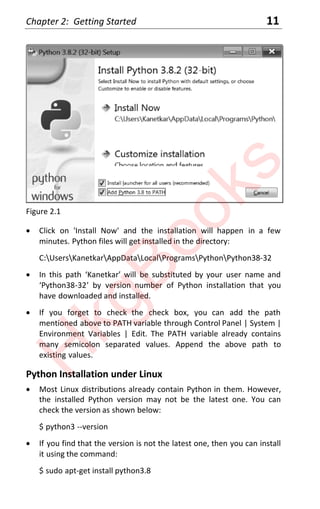
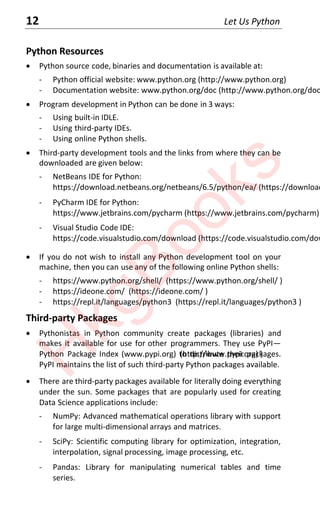
double-clicking on the downloaded file. A dialog shown in Figure 2.1
will appear on the screen.
x In this dialog check the check box 'Add Python 3.8 to PATH' to
ensure that the interpreter will be placed in your execution path.
H
k
g
B
o
o
k
s
Chapter 2: Getting Started 11
Figure 2.1
x Click on 'Install Now' and the installation will happen in a few
minutes. Python files will get installed in the directory:
C:UsersKanetkarAppDataLocalProgramsPythonPython38-32
x In this path ‘Kanetkar’ will be substituted by your user name and
‘Pythonϯϴ-32’ by version number of Python installation that you
have downloaded and installed.
x If you forget to check the check box, you can add the path
mentioned above to PATH variable through Control Panel | System |
Environment Variables | Edit. The PATH variable already contains
many semicolon separated values. Append the above path to
existing values.
Python Installation under Linux
x Most Linux distributions already contain Python in them. However,
the installed Python version may not be the latest one. You can
check the version as shown below:
$ python3 --version
x If you find that the version is not the latest one, then you can install
it using the command:
$ sudo apt-get install python3.8
H
k
g
B
o
o
k
s
12 Let Us Python
Python Resources
x Python source code, binaries and documentation is available at:
- Python official website: www.python.org (http://www.python.org)
- Documentation website: www.python.org/doc (http://www.python.org/doc)
x Program development in Python can be done in 3 ways:
- Using built-in IDLE.
- Using third-party IDEs.
- Using online Python shells.
x Third-party development tools and the links from where they can be
downloaded are given below:
- NetBeans IDE for Python:
https://download.netbeans.org/netbeans/6.5/python/ea/ (https://download.ne
- PyCharm IDE for Python:
https://www.jetbrains.com/pycharm (https://www.jetbrains.com/pycharm)
- Visual Studio Code IDE:
https://code.visualstudio.com/download (https://code.visualstudio.com/downlo
x If you do not wish to install any Python development tool on your
machine, then you can use any of the following online Python shells:
- https://www.python.org/shell/ (https://www.python.org/shell/ )
- https://ideone.com/ (https://ideone.com/ )
- https://repl.it/languages/python3 (https://repl.it/languages/python3 )
Third-party Packages
x Pythonistas in Python community create packages (libraries) and
makes it available for use for other programmers. They use PyPI—
Python Package Index (www.pypi.org) (http://www.pypi.org) )
to distribute their packages.
PyPI maintains the list of such third-party Python packages available.
x There are third-party packages available for literally doing everything
under the sun. Some packages that are popularly used for creating
Data Science applications include:
- NumPy: Advanced mathematical operations library with support
for large multi-dimensional arrays and matrices.
- SciPy: Scientific computing library for optimization, integration,
interpolation, signal processing, image processing, etc.
- Pandas: Library for manipulating numerical tables and time
series.
H
k
g
B
o
o
k
s
Chapter 2: Getting Started 13
- MatPlotLib: 2D and 3D Data visualization library.
- OpenCV: Open source Computer vision library.
x You too can register at PyPI and upload your packages there. You
should follow the guidelines given at www.pypi.org (http://www.pypi.org)
to create the
package, build it and upload it to the Python Package Index.
x pip is a commonly used tool for installing packages from PyPI. This
tool gets installed when you install Python.
More Sophisticated Tools
x Many tools have come into existence to help Python programmers
build and document their Data Science and Artificial Intelligence
applications. These include:
- Jupyter Notebook - It is a very flexible browser-based tool that
lets us to interactively work with Python (and many other
languages). It lets us put our Python code, output of the code
and any kind of visualization or plot etc. in the same document
called Notebook. It is a great tool doing modular program
development.
- Google Colab - This tool provides a free Jupyter notebook
environment to execute code on Google's cloud servers. As a
result, you can leverage the power of Google's hardware.
- Spyder - This tool provides a Scientific PYthon Development
EnviRonment with sophisticated testing and debugging features.
x Both Jupyter and Spyder are part of a very popular software
distribution called Anaconda. So once you download and install
Anaconda, you get Jupyter and Spyder ready-made.
Working with Python
x Once Python is installed, program development can be done using
the built-in Python Integrated Development and Learning
Environment (IDLE).
x IDLE is a good development tool. It offers handy features like syntax
highlighting, context-sensitive help and debugging.
x Syntax highlighting feature display keywords, functions, methods
and strings in different colors making it easy to identify them.
H
k
g
B
o
o
k
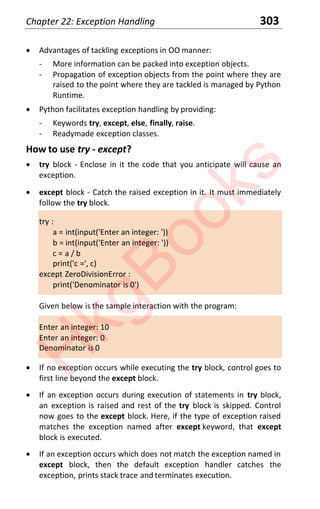
s
14 Let Us Python
x Context-sensitive help can be obtained by pressing Ctrl Space
wherever you need help as you type the program. This is immensely
useful since it is almost impossible to remember names of all
functions and methods and their parameters.
x Debugger lets you locate any logical errors that you may have
committed in your program by allowing you trace the flow of
execution of the program. This tracing can be done a step at a time
by setting up break points and by single stepping through the
program. As you do so IDLE lets you watch the values of different
variables as they change during execution.
Python Programming Modes
x Python can be used in two modes:
- Interactive mode - used for exploring Python syntax, seek help
and debug short programs.
- Script mode - used for writing full-fledged Python programs.
x Both modes are supported by IDLE (Python Integrated Development
and Learning Environment).
x To use IDLE in Interactive mode:
- Locate it in Windows by typing IDLE in Windows search bar and
hit enter, or double click the IDLE icon.
- It will open the Python shell window showing >>> Python shell
prompt.
- Execute the following Python code at this prompt.
>>> print('Keep calm and bubble on')
- It will display the message 'Keep calm and bubble on' followed
by the >>> prompt.
x To use IDLE in Script mode:
- Launch IDLE. In the IDLE shell window from the menu select File
| New File. A new window will open. Type the following script in
it:
print('Those who canΖt laugh at themselves…')
print('leave the job to others.')
H
k
g
B
o
o
k
s
Chapter 2: Getting Started 15
- Using File | Save and save the script under the name 'Test.py'.
- Execute the script from the Run menu or using F5. The two
messages will get printed.
x Instead of IDLE if you decide to use NetBeans or Visual Studio Code
for program development then follow the steps given below:
- Create a new Python project ‘Test’.
- Type the script in Test.py.
- Execute the script using F6 in NetBeans or Ctrl F5 in Visual Studio
Code.
- On execution it will print the two lines and then you are ready to
create another project and another script in it.
Determining Python Version
x Python has evolved over the years. You can determine the version
installed on your machine through a simple Python script:
import sys
print(sys.version)
____________________________________________________________________
[A] Answer the following questions:
(a) What do the prompts C:>, $ and >>> signify?
(b) In which two modes can IDLE be used?
(c) What is the purpose of the two programming modes offered by
IDLE?
(d) How can third party libraries be used in a Python program?
[B] Match the following pairs:
a. pip 1. Advanced mathematical operations
b. Jupyter 2. Scientific computing
c. Spyder 3. Manipulate numerical tables
d. PyPI 4. Visualization
H
k
g
B
o
o
k
s
16 Let Us Python
e. NumPy 5. Computer vision
f. SciPy 6. Package installation tool
g. Pandas 7. Build and document applications
h. MatPlotLib 8. Scientific library
i. OpenCV 9. Python package index
[C] State whether the following statements are True or False:
(a) Python is a specification that can be implemented through
languages like Python, C#, Java, etc.
(b) CPython is implementation of Python specification, written in C.
(c) Python program is first compiled into byte code, which is then
interpreted.
(d) Most Linux distributions already contain Python.
(e) Windows system doesn't contain Python and it needs to be
separately installed.
(f) Python programs can be built using IDLE, NetBeans, PyCharm and
Visual Studio Code.
(g) Third-party Python packages are distributed using PyPI.
H
k
g
B
o
o
k
s
Let Us
Python
17
Python Basics
x Identifiers and Keywords x Built-in Modules
x Python Types x Container Types
x Basic Types x Python Type Jargon
x Integer and Float Ranges x Comments and Indentation
x Variable Type and Assignment x Multi-lining
x Arithmetic Operators x Classes and Objects
x Operation Nuances x Multiple Objects
x Precedence and Associativity x Programs
x Conversions x Exercises
x Built-in Functions
3
“Well begun is half done...”
H
k
g
B
o
o
k
s
18 Let Us Python
Identifiers and Keywords
x Python is a case sensitive language.
x Python identifier is a name used to identify a variable, function,
class, module, or other object.
x Rules for creating identifiers:
- Starts with alphabet or an underscore.
- Followed by zero or more letters, _ , and digits.
- keyword cannot be used as identifier.
x All keywords are in lowercase.
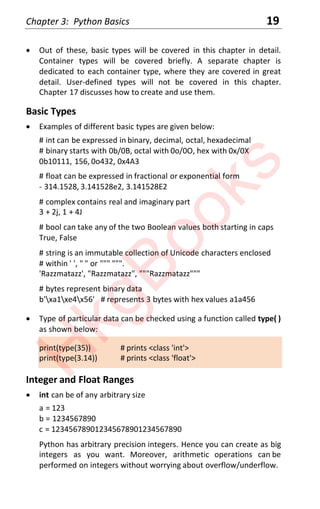
x Python has 33 keywords shown in Figure 3.1.
False continue from not
None def global or
True del if pass
and elif import raise
as else in return
assert except is try
break finally lambda while
class for nonlocal with
yield
Figure 3.1
x You can print a list of Python keywords through the statements:
import keyword # makes the module 'keyword' available
print(keyword.kwlist) # syntax modulename.object/function
Python Types
x Python supports 3 categories of data types:
Basic types - int, float, complex, bool, string, bytes
Container types - list, tuple, set, dict
User-defined types - class
H
k
g
B
o
o
k
s
Chapter 3: Python Basics 19
x Out of these, basic types will be covered in this chapter in detail.
Container types will be covered briefly. A separate chapter is
dedicated to each container type, where they are covered in great
detail. User-defined types will not be covered in this chapter.
Chapter 17 discusses how to create and use them.
Basic Types
x Examples of different basic types are given below:
# int can be expressed in binary, decimal, octal, hexadecimal
# binary starts with 0b/0B, octal with 0o/0O, hex with 0x/0X
0b10111, 156, 0o432, 0x4A3
# float can be expressed in fractional or exponential form
- 314.1528, 3.141528e2, 3.141528E2
# complex contains real and imaginary part
3 + 2j, 1 + 4J
# bool can take any of the two Boolean values both starting in caps
True, False
# string is an immutable collection of Unicode characters enclosed
# within ' ', " " or """ """.
'Razzmatazz', "Razzmatazz", """Razzmatazz"""
# bytes represent binary data
b'xa1xe4x56' # represents 3 bytes with hex values a1a456
x Type of particular data can be checked using a function called type( )
as shown below:
print(type(35)) # prints <class 'int'>
print(type(3.14)) # prints <class 'float'>
Integer and Float Ranges
x int can be of any arbitrary size
a = 123
b = 1234567890
c = 123456789012345678901234567890
Python has arbitrary precision integers. Hence you can create as big
integers as you want. Moreover, arithmetic operations can be
performed on integers without worrying about overflow/underflow.
H
k
g
B
o
o
k
s
20 Let Us Python
x Floats are represented internally in binary as 64-bit double-precision
values, as per the IEEE 754 standard. As per this standard, the
maximum value a float can have is approximately 1.8 x 10308
. A
number greater than this is represented as inf (short for infinity).
x Many floats cannot be represented 'exactly' in binary form. So the
internal representation is often an approximation of the actual
value.
x The difference between the actual value and the represented value
is very small and should not usually cause significant problems.
Variable Type and Assignment
x There is no need to define type of a variable. During execution the
type of the variable is inferred from the context in which it is being
used. Hence Python is called dynamically-typed language.
a = 25 # type of a is inferred as int
a = 31.4 # type of a is inferred as float
a = 'Hi' # type of a is inferred as str
x Type of a variable can be checked using the built-in function type( ).
a = 'Jamboree'
print(type(a)) # type will be reported as str
x Simple variable assignment:
a = 10
pi = 3.14
name = 'Sanjay'
x Multiple variable assignment:
a = 10 ; pi = 31.4 ; name = 'Sanjay' # use ; as statement separator
a, pi, name = 10, 3.14, 'Sanjay'
a = b = c = d = 5
Arithmetic Operators
x Arithmetic operators: + - * / % // **
a = 4 / 2 # performs true division and yields a float 2.0
a = 7 % 2 # % yields remainder 1
H
k
g
B
o
o
k
s
Chapter 3: Python Basics 21
b = 3 ** 4 # ** yields 3 raised to 4 (exponentiation)
c = 4 // 3 # // yields quotient 1 after discarding fractional part
x In-place assignment operators offer a good shortcut for arithmetic
operations. These include += -= *= /= %= //= **=.
a **= 3 # same as a = a ** 3
b %= 10 # same as b = b % 10
Operation Nuances
x On performing floor division a // b, result is the largest integer which
is less than or equal to the quotient. // is called floor division
operator.
print(10 // 3) # yields 3
print(-10 // 3) # yields -4
print(10 // -3) # yields -4
print(-10 // -3) # yields 3
print(3 // 10) # yields 0
print(3 // -10) # yields -1
print(-3 // 10) # yields -1
print(-3 // -10) # yields 0
In -10 // 3, multiple of 3 which will yield -10 is -3.333, whose floor
value is -4.
In 10 // -3, multiple of -3 which will yield 10 is -3.333, whose floor
value is -4.
In -10 // -3, multiple of -3 which will yield -10 is 3.333, whose floor
value is 3.
x print( ) is a function which is used for sending output to screen. Iy
can be used in many forms. They are discussed in Chapter 7.
x Operation a % b is evaluated as a - (b * (a // b)). This can be best
understood using the following examples:
print(10 % 3) # yields 1
print(-10 % 3) # yields 2
print(10 % -3) # yields -2
print(-10 % -3) # yields -1
print(3 % 10) # yields 3
print(3 % -10) # yields -7
H
k
g
B
o
o
k
s
22 Let Us Python
print(-3 % 10) # yields 7
print(-3 % -10) # yields -3
Since a % b is evaluated as a - (b * (a // b)),
-10 % 3 is evaluated as -10 - (3 * (-10 // 3)), which yields 2
10 % -3 is evaluated as 10 - (-3 * (10 // -3)), which yields -2
-10 % -3 is evaluated as -10 - (-3 * (-10 // -3)), which yields -1
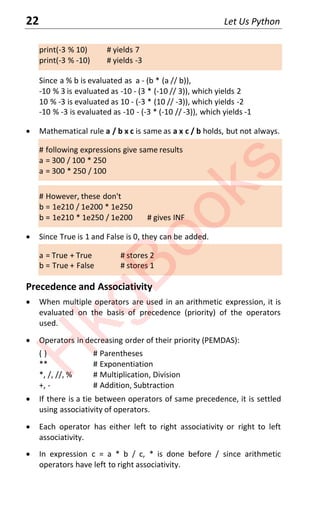
x Mathematical rule a / b x c is same as a x c / b holds, but not always.
# following expressions give same results
a = 300 / 100 * 250
a = 300 * 250 / 100
# However, these don't
b = 1e210 / 1e200 * 1e250
b = 1e210 * 1e250 / 1e200 # gives INF
x Since True is 1 and False is 0, they can be added.
a = True + True # stores 2
b = True + False # stores 1
Precedence and Associativity
x When multiple operators are used in an arithmetic expression, it is
evaluated on the basis of precedence (priority) of the operators
used.
x Operators in decreasing order of their priority (PEMDAS):
( ) # Parentheses
** # Exponentiation
*, /, //, % # Multiplication, Division
+, - # Addition, Subtraction
x If there is a tie between operators of same precedence, it is settled
using associativity of operators.
x Each operator has either left to right associativity or right to left
associativity.
x In expression c = a * b / c, * is done before / since arithmetic
operators have left to right associativity.
H
k
g
B
o
o
k
s
Chapter 3: Python Basics 23
x A complete list of Python operators, their priority and associativity is
given in Appendix A.
Conversions
x Mixed mode operations:
- Operation between int and float will yield float.
- Operation between int and complex will yield complex.
- Operation between float and complex will yield complex.
x We can convert one numeric type to another using built-in functions
int( ), float( ), complex( ) and bool( ).
x Type conversions:
int(float/numeric string) # from float/numeric string to int
int(numeric string, base) # from numeric string to int in base
float(int/numeric string) # from int/numeric string to float
float(int) # from int to float
complex(int/float) # convert to complex with imaginary part 0
complex(int/float, int/float) # convert to complex
bool(int/float) # from int/float to True/False (1/0)
str(int/float/bool) # converts to string
chr(int) # yields character corresponding to int
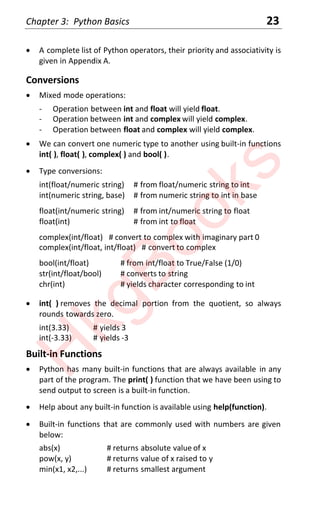
x int( ) removes the decimal portion from the quotient, so always
rounds towards zero.
int(3.33) # yields 3
int(-3.33) # yields -3
Built-in Functions
x Python has many built-in functions that are always available in any
part of the program. The print( ) function that we have been using to
send output to screen is a built-in function.
x Help about any built-in function is available using help(function).
x Built-in functions that are commonly used with numbers are given
below:
abs(x) # returns absolute value of x
pow(x, y) # returns value of x raised to y
min(x1, x2,...) # returns smallest argument
H
k
g
B
o
o
k
s
24 Let Us Python
max(x1, x2,...) # returns largest argument
divmod(x, y) # returns a pair(x // y, x % y)
round(x [,n]) # returns x rounded to n digits after .
bin(x) # returns binary equivalent of x
oct(x) # returns octal equivalent of x
hex(x) # returns hexadecimal equivalent of x
x Following Python program shows how to use some of these built-in
functions:
a = abs(-3) # assigns 3 to a
print(min(10, 20, 30, 40)) # prints 10
print(hex(26)) # prints 1a
Built-in Modules
x Apart from built-in functions, Python provides many built-in
modules. Each module contains many functions.
x For performing sophisticated mathematical operations we can use
the functions present in built-in modules math, cmath, random,
decimal.
math - many useful mathematics functions.
cmath - functions for performing operations on complex numbers.
random - functions related to random number generation.
decimal - functions for performing precise arithmetic operations.
x Mathematical functions in math module:
pi, e # values of constants pi and e
sqrt(x) # square root of x
factorial(x) # factorial of x
fabs(x) # absolute value of float x
log(x) # natural log of x (log to the base e)
log10(x) # base-10 logarithm of x
exp(x) # e raised to x
trunc(x) # truncate to integer
ceil(x) # smallest integer >= x
floor(x) # largest integer <= x
modf(x) # fractional and integer parts of x
H
k
g
B
o
o
k
s
Chapter 3: Python Basics 25
x round( ) built-in function can round to a specific number of decimal
places, whereas math module's library functions trunc( ), ceil( ) and
floor( ) always round to zero decimal places.
x Trigonometric functions in math module:
degrees(x) # radians to degrees
radians(x) # degrees to radians
sin(x) # sine of x radians
cos(x) # cosine of x radians
tan(x) # tan of x radians
sinh(x) # hyperbolic sine of x
cosh(x) # hyperbolic cosine of x
tanh(x) # hyperbolic tan of x
acos(x) # cos inverse of x, in radians
asin(x) # sine inverse of x, in radians
atan(x) # tan inverse of x, in radians
hypot(x, y) # sqrt(x * x + y * y)
x Random number generation functions from random module:
random( ) # random number between 0 and 1
randint(start, stop) # random number in the range
seed( ) # sets current time as seed for random number generation
seed(x) # sets x as seed for random number generation logic
x To use functions present in a module, we need to import the module
using the import statement.
x Following Python program shows how to use some of the functions
of math module and random module:
import math
import random
print(math.factorial(5)) # prints 120
print(math.degrees(math.pi)) # prints 180.0
print(random.random( )) # prints 0.8960522546341796
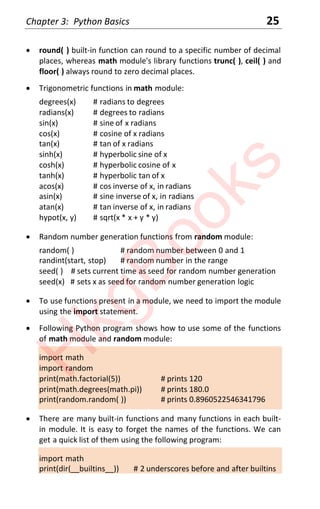
x There are many built-in functions and many functions in each built-
in module. It is easy to forget the names of the functions. We can
get a quick list of them using the following program:
import math
print(dir(__builtins__)) # 2 underscores before and after builtins
H
k
g
B
o
o
k
s
26 Let Us Python
print(dir(math))
Container Types
x Container types typically refer to multiple values stored together.
Examples of different basic types are given below:
# list is a indexed collection of similar/dissimilar entities
[ϭϬ, ϮϬ, ϯϬ, ϮϬ, ϯϬ, ϰϬ, ϱϬ, ϭϬ], ['She', 'sold', ϭϬ, 'shells'’]
# tuple is an immutable collection
('Sanjay', 34, 4500.55), ('Let Us Python', 350, 195.00)
# set is a collection of unique values
{10, 20, 30, 40}, {'Sanjay', 34, 45000}
# dict is a collection of key-value pairs, with unique key enclosed in ' '
{'ME101' : 'Strength of materials', 'EE101' : 'Electronics'}
x Values in a list and tuple can be accessed using their position in the
list or tuple. Values in a set can be accessed using a for loop
(discussed in Chapter 6). Values in a dictionary can be accessed using
a key. This is shown in the following program:
lst = [10, 20, 30, 20, 30, 40, 50, 10]
tpl = ('Let Us Python', 350, 195.00)
s = {10, 20, 30, 40}
dct = {'ME101' : 'SOM', 'EE101' : 'Electronics'}
print(lst[0], tpl[2]) # prints 10 195.0
print(dct['ME101']) # prints SOM
Python Type Jargon
x Often following terms are used while describing Python types:
Collection - a generic term for container types.
Iterable - means a collection that can be iterated over using a loop.
Ordered collection - elements are stored in the same order in which
they are inserted. Hence its elements can be accessed using an
index, i.e. its position in the collection.
Unordered collection - elements are not stored in the same order in
which they are inserted. So we cannot predict at which position a
particular element is present. So we cannot access its elements using
a position based index.
H
k
g
B
o
o
k
s
Chapter 3: Python Basics 27
Sequence is the generic term for an ordered collection.
Immutable - means unchangeable collection.
Mutable - means changeable collection.
x Let us now see which of these terms apply to types that we have
seen so far.
String - ordered collection, immutable, iterable.
List - ordered collection, mutable, iterable.
Tuple - ordered collection, immutable, iterable.
Set - unordered collection, mutable, iterable.
Dictionary - unordered collection, mutable, iterable.
Comments and Indentation
x Comments begin with #.
# calculate gross salary
gs = bs + da + hra + ca
si = p * n * r / 100 # calculate simple interest
x Multi-line comments should be written in a pair of ''' or """.
''' Additional program: Calculate bonus to be paid
URL: https://www.ykanetkar.com (https://www.ykanetkar.com)
Author: Yashavant, Date: 18 May 2020 '''
x Indentation matters! Don’t use it casually. Following code will report
an error 'Unexpected indent'.
a = 20
b = 45
Multi-lining
x If statements are long they can be written as multi-lines with each
line except the last ending with a .
total = physics + chemistry + maths + 
english + Marathi + history + 
geography + civics
x Multi-line statements within [ ], { }, or ( ) don't need .
H
k
g
B
o
o
k
s
28 Let Us Python
days = [ 'Monday', 'Tuesday', 'Wednesday', Thursday',
'Friday', 'Saturday', 'Sunday' ]
Classes and Objects
x In Python every type is a class. So int, float, complex, bool, str, list,
tuple, set, dict are all classes. These are ready-made classes. Python
also permits us to create user-defined classes as we would see in
Chapter 18.
x An object is created from a class. A class describes two things—the
form an object created from it will take and the methods (functions)
that can be used to access and manipulate the object.
x From one class multiple objects can be created. When an object is
created from a class, it is said that an instance of the class is being
created.
x A class has a name, whereas objects are nameless. Since objects do
not have names, they are referred using their addresses in memory.
x All the above statements can be verified through the following
program. Refer to Figure 3.1 to understand it better.
a = 30
b = 'Good'
print(a, b) # prints 3 Good
print(type(a), type(b)) # prints <class 'int'> <class 'str'>
print(id(a), id(b)) # prints 1356658640 33720000
print(isinstance(a, int), isinstance(b, str)) # prints True True
33720000
1356658640
1356658640
30
a int object
33720000 Good
b str object
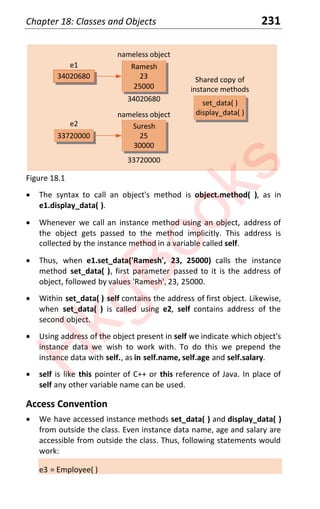
Figure 3.1
- In this program we have created two objects—one from ready-
made class int and another from ready-made class str.
H
k
g
B
o
o
k
s
Chapter 3: Python Basics 29
- The object of type int contains 30, whereas the object of type str
contains 'Good'.
- Both the objects are nameless. Their addresses in memory are
1356658640 and 33720000 which are stored in a and b.
- These addresses can be obtained using the built-in function id( ).
When you execute the program you may get different addresses.
- Since a and b contain addresses they are said to refer to objects
present at these addresses. In simpler words they are pointers to
objects.
- Type of objects to which a and b are referring to can be obtained
using the built-in function type( ).
- Whether a refers to an instance of class int can be checked using
the built-in function instanceof( ).
Multiple Objects
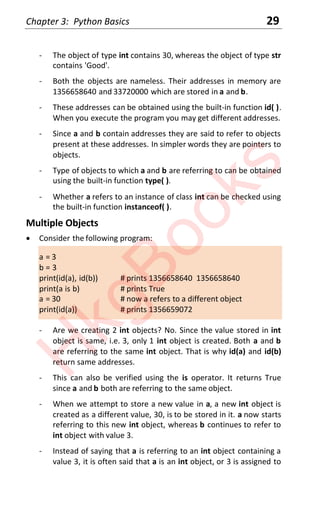
x Consider the following program:
a = 3
b = 3
print(id(a), id(b)) # prints 1356658640 1356658640
print(a is b) # prints True
a = 30 # now a refers to a different object
print(id(a)) # prints 1356659072
- Are we creating 2 int objects? No. Since the value stored in int
object is same, i.e. 3, only 1 int object is created. Both a and b
are referring to the same int object. That is why id(a) and id(b)
return same addresses.
- This can also be verified using the is operator. It returns True
since a and b both are referring to the same object.
- When we attempt to store a new value in a, a new int object is
created as a different value, 30, is to be stored in it. a now starts
referring to this new int object, whereas b continues to refer to
int object with value 3.
- Instead of saying that a is referring to an int object containing a
value 3, it is often said that a is an int object, or 3 is assigned to
H
k
g
B
o
o
k
s
30 Let Us Python
int object a. Many programmers continue to believe that a and b
are int variables, which we now know is not the case.
____________________________________________________________________
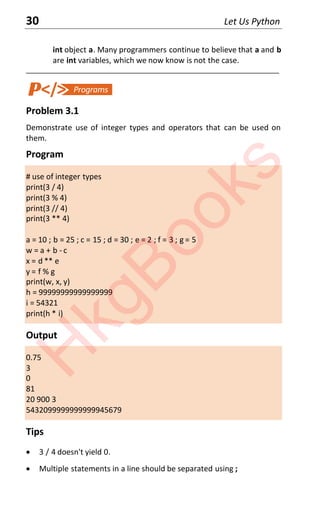
Problem 3.1
Demonstrate use of integer types and operators that can be used on
them.
Program
# use of integer types
print(3 / 4)
print(3 % 4)
print(3 // 4)
print(3 ** 4)
a = 10 ; b = 25 ; c = 15 ; d = 30 ; e = 2 ; f = 3 ; g = 5
w = a + b - c
x = d ** e
y = f % g
print(w, x, y)
h = 99999999999999999
i = 54321
print(h * i)
Output
0.75
3
0
81
20 900 3
5432099999999999945679
Tips
x 3 / 4 doesn't yield 0.
x Multiple statements in a line should be separated using ;
H
k
g
B
o
o
k
s
Chapter 3: Python Basics 31
x print(w, x, y) prints values separated by a space.
____________________________________________________________________
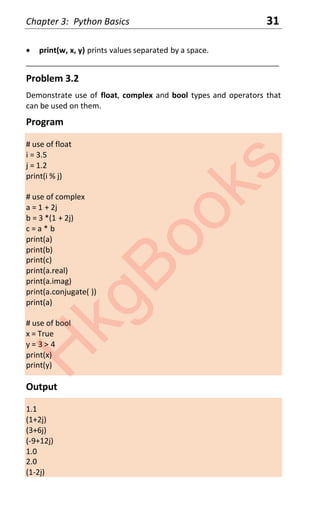
Problem 3.2
Demonstrate use of float, complex and bool types and operators that
can be used on them.
Program
# use of float
i = 3.5
j = 1.2
print(i % j)
# use of complex
a = 1 + 2j
b = 3 *(1 + 2j)
c = a * b
print(a)
print(b)
print(c)
print(a.real)
print(a.imag)
print(a.conjugate( ))
print(a)
# use of bool
x = True
y = 3 > 4
print(x)
print(y)
Output
1.1
(1+2j)
(3+6j)
(-9+12j)
1.0
2.0
(1-2j)
H
k
g
B
o
o
k
s
32 Let Us Python
(1+2j)
True
False
Tips
x % works on floats.
x It is possible to obtain real and imag part from a complex number.
x On evaluation of a condition it replaced by True or False.
____________________________________________________________________
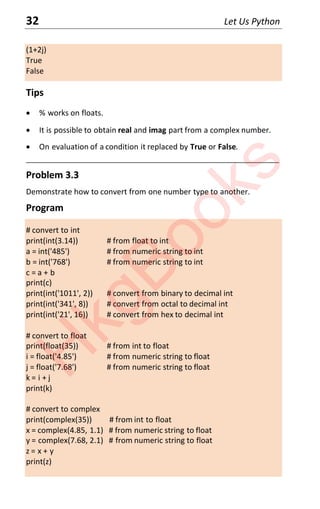
Problem 3.3
Demonstrate how to convert from one number type to another.
Program
# convert to int
print(int(3.14)) # from float to int
a = int('485') # from numeric string to int
b = int('768') # from numeric string to int
c = a + b
print(c)
print(int('1011', 2)) # convert from binary to decimal int
print(int('341', 8)) # convert from octal to decimal int
print(int('21', 16)) # convert from hex to decimal int
# convert to float
print(float(35)) # from int to float
i = float('4.85') # from numeric string to float
j = float('7.68') # from numeric string to float
k = i + j
print(k)
# convert to complex
print(complex(35)) # from int to float
x = complex(4.85, 1.1) # from numeric string to float
y = complex(7.68, 2.1) # from numeric string to float
z = x + y
print(z)
H
k
g
B
o
o
k
s
Chapter 3: Python Basics 33
# convert to bool
print(bool(35))
print(bool(1.2))
print(int(True))
print(int(False))
Output
3
1253
11
225
33
35.0
12.53
(35+0j)
(12.53+3.2j)
True
True
1
0
Tips
x It is possible to convert a binary numeric string, octal numeric string
or hexadecimal numeric string to equivalent decimal integer. Same
cannot be done for a float.
x While converting to complex if only one argument is used, imaginary
part is considered to be 0.
x Any non-zero number (int or float) is treated as True. 0 is treated as
False.
____________________________________________________________________
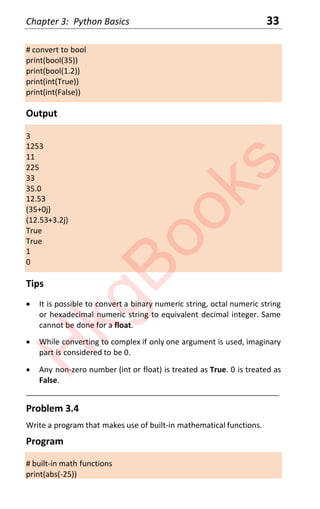
Problem 3.4
Write a program that makes use of built-in mathematical functions.
Program
# built-in math functions
print(abs(-25))
H
k
g
B
o
o
k
s
34 Let Us Python
print(pow(2, 4))
print(min(10, 20, 30, 40, 50))
print(max(10, 20, 30, 40, 50))
print(divmod(17, 3))
print(bin(64), oct(64), hex(64))
print(round(2.567), round(2.5678, 2))
Output
25
16
10
50
(5, 2)
0b1000000 0o100 0x40
3 2.57
Tips
x divmod(a, b) yields a pair (a // b, a % b).
x bin( ), oct( ), hex( ) return binary, octal and hexadecimal equivalents.
x round(x) assumes that rounding-off has to be done with 0 places
beyond decimal point.
___________________________________________________________________
Problem 3.5
Write a program that makes use of functions in the math module.
Program
# mathematical functions from math module
import math
x = 1.5357
print ( math.pi, math.e)
print(math.sqrt( x))
print(math.factorial(6))
print(math.fabs(x))
print(math.log(x))
print(math.log10(x))
print(math.exp(x))
H
k
g
B
o
o
k
s
Chapter 3: Python Basics 35
print(math.trunc(x))
print(math.floor(x))
print(math.ceil(x))
print(math.trunc(-x))
print(math.floor(-x))
print(math.ceil(-x))
print(math.modf(x))
Output
3.141592653589793 2.718281828459045
1.2392336341465238
720
1.5357
0.42898630314951025
0.1863063842699079
4.644575595215059
1
1
2
-1
-2
-1
(0.5357000000000001, 1.0)
Tips
x floor( ) rounds down towards negative infinity, ceil( ) rounds up
towards positive infinity, trunc( ) rounds up or down towards 0.
x trunc( ) is like floor( ) for positive numbers.
x trunc( ) is like ceil( ) for negative numbers.
____________________________________________________________________
Problem 3.6
Write a program that generates float and integer random numbers.
Program
# random number operations using random module
import random
H
k
g
B
o
o
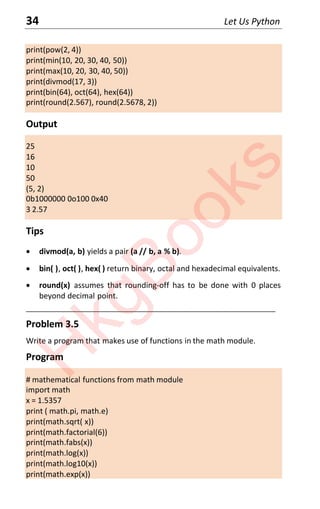
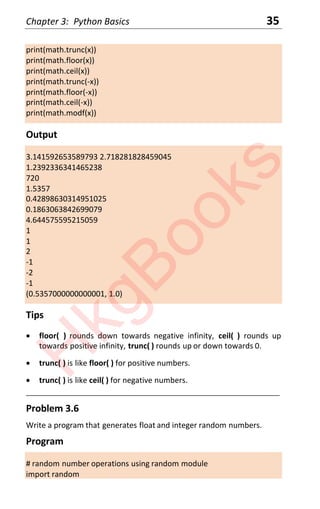
k
s
36 Let Us Python
import datetime
random.seed(datetime.time( ))
print(random.random( ))
print(random.randint(10, 100))
Output
0.23796462709189137
0.5442292252959519
57
Tips
x It is necessary to import random module.
x If we seed the random number generation logic with current time,
we get different random numbers on each execution of the
program.
x random.seed( ) with no parameter also seeds the logic with current
time.
____________________________________________________________________
Problem 3.7
How will you identify which of the following is a string, list, tuple, set or
dictionary?
{10, 20, 30.5}
[1, 2, 3.14, 'Nagpur']
{12 : 'Simple', 43 : 'Complicated', 13 : 'Complex'}
"Check it out!"
3 + 2j
Program
# determine type of data
print(type({10, 20, 30.5}))
print(type([1, 2, 3.14, 'Nagpur']))
print(type({12 : 'Simple', 43 : 'Complicated', 13 : 'Complex'}))
print(type("Check it out!"))
print(type(3 + 2j))
H
k
g
B
o
o
k
s
Chapter 3: Python Basics 37
Output
<class 'set'>
<class 'list'>
<class 'dict'>
<class 'str'>
<class 'complex'>
Tips
x type( ) is a built-in function which can determine type of any data—
built-in, container or user-defined.
____________________________________________________________________
[A] Answer the following questions:
(a) Write a program that swaps the values of variables a and b. You are
not allowed to use a third variable. You are not allowed to perform
arithmetic on a and b.
(b) Write a program that makes use of trigonometric functions
available in math module.
(c) Write a program that generates 5 random numbers in the range 10
to 50. Use a seed value of 6. Make a provision to change this seed
value every time you execute the program by associating it with
time of execution?
(d) Use trunc( ), floor( ) and ceil( ) for numbers -2.8, -0.5, 0.2, 1.5 and
2.9 to understand the difference between these functions clearly.
(e) Assume a suitable value for temperature of a city in Fahrenheit
degrees. Write a program to convert this temperature into
Centigrade degrees and print both temperatures.
(f) Given three sides a, b, c of a triangle, write a program to obtain and
print the values of three angles rounded to the next integer. Use
the formulae:
a2
= b2
+ c2
- 2bc cos A, b2
= a2
+ c2
- 2ac cos B, c2
= a2
+ b2
- 2ab cos C
H
k
g
B
o
o
k
s
38 Let Us Python
[B] How will you perform the following operations:
(a) Print imaginary part out of 2 + 3j.
(b) Obtain conjugate of 4 + 2j.
(c) Print decimal equivalent of binary '1100001110'.
(d) Convert a float value 4.33 into a numeric string.
(e) Obtain integer quotient and remainder while dividing 29 with 5.
(f) Obtain hexadecimal equivalent of decimal 34567.
(g) Round-off 45.6782 to second decimal place.
(h) Obtain 4 from 3.556.
(i) Obtain 17 from 16.7844.
(j) Obtain remainder on dividing 3.45 with 1.22.
[C] Which of the following is invalid variable name and why?
BASICSALARY _basic basic-hra #MEAN
group. 422 pop in 2020 over
timemindovermatter SINGLE hELLO queue.
team’svictory Plot # 3 2015_DDay
[D] Evaluate the following expressions:
(a) 2 ** 6 // 8 % 2
(b) 9 ** 2 // 5 - 3
(c) 10 + 6 - 2 % 3 + 7 - 2
(d) 5 % 10 + 10 -23 * 4 // 3
(e) 5 + 5 // 5 - 5 * 5 ** 5 % 5
(f) 7 % 7 + 7 // 7 - 7 * 7
[E] Evaluate the following expressions:
(a) min(2, 6, 8, 5)
(b) bin(46)
(c) round(10.544336, 2)
(d) math.hypot(6, 8)
(e) math.modf(3.1415)
[F] Match the following pairs:
a. complex 1. 
b. Escape special character 2. Container type
c. Tuple 3 Basic type
d. Natural logarithm 4. log( )
e. Common logarithmlog10( ) 5. log10( )
H
k
g
B
o
o
k
s
Let Us
Python
39
Strings
x What are Strings? x String Conversions
x Accessing String Elements x String Comparisons
x String Properties x Programs
x Built-in Functions x Exercises
x String Methods
4
“Puppeting on strings...”
H
k
g
B
o
o
k
s
40 Let Us Python
What are Strings?
x Python string is a collection of Unicode characters.
x Python strings can be enclosed in single, double or triple quotes.
'BlindSpot'
"BlindSpot"
' ' 'BlindSpot' ' '
"""Blindspot"""
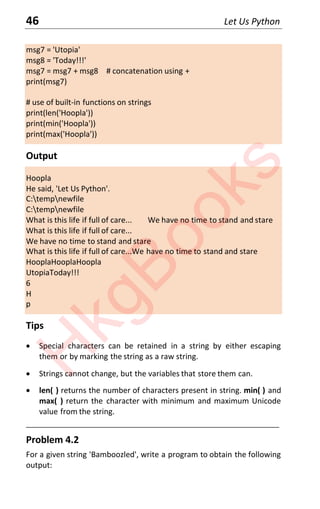
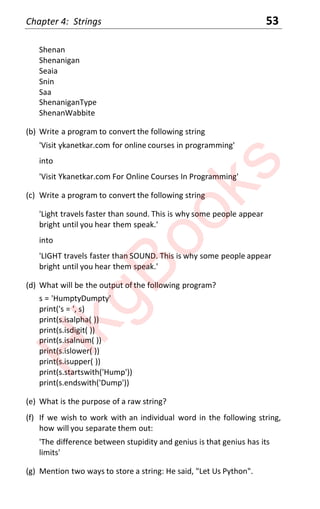
x If there are characters like ' " or  within a string, they can be
retained in two ways:
(a) Escape them by preceding them with a 
(b) Prepend the string with a 'r' indicating that it is a raw string
msg = 'He said, 'Let Us Python.''
msg = r'He said, 'Let Us Python.''
x Multiline strings can be created in 3 ways:
- All but the last line ends with 
- Enclosed within """some msg """ or ' ' 'some msg' ' '
- ('one msg'
'another msg')
Accessing String Elements
x String elements can be accessed using an index value, starting with
0. Negative index value is allowed. The last character is considered
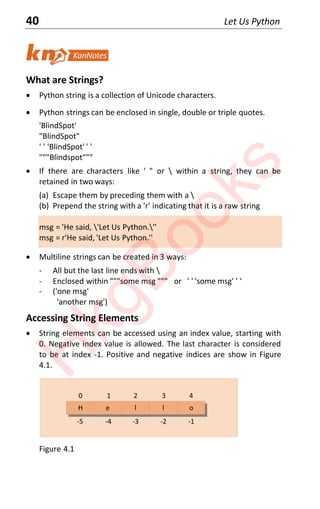
to be at index -1. Positive and negative indices are show in Figure
4.1.
-5 -4 -3 -2 -1
H e l l o
0 1 2 3 4
Figure 4.1
H
k
g
B
o
o
k
s
Chapter 4: Strings 41
x Examples of positive and negative indexing:
msg = 'Hello'
a = msg[0] # yields H
b = msg[4] # yields o
c = msg[-0] # yields H, -0 is same as 0
d = msg[-1] # yields o
e = msg[-2] # yields l
f = msg[-5] # yields H
x A sub-string can be sliced out of a string.
s[start : end] - extract from start to end - 1.
s[start :] - extract from start to end.
s[: end] - extract from start to end - 1.
s[-start :] - extract from -start (included) to end.
s[: -end] - extract from beginning to -end - 1.
x Using too large an index reports an error, but using too large index
while slicing is handled elegantly.
msg = 'Rafting'
print(msg[3:100]) # prints elements from 't' up to end of string
print(msg[100]) # error since 100 th element doesn't exist
String Properties
x Python strings are immutable—they cannot be changed.
s = 'Hello'
s[0] = 'M' # rejected, attempt to mutate string
s = 'Bye' # s is a variable, it can change
x Strings can be concatenated using +.
msg3 = ms1 + msg2
x Strings can be replicated during printing.
print('-', 50) # prints 50 dashes
x Whether one string is part of another can be found out using in.
print('e' in 'Hello') # prints True
print('z' in 'Hello') # print False
H
k
g
B
o
o
k
s
42 Let Us Python
print('lo' in 'Hello') # prints True
Built-in Functions
x Some built-in functions can be used with a string:
msg = 'Surreal'
print(len(msg)) # prints 7 - length of string
print(min(msg)) # prints S - character with min value
print(max(msg)) # prints u - character with max value
String Methods
x When we create a string a nameless object of type str is created.
msg = 'Surreal'
print(type(msg)) # prints <class 'str'>
print(id(msg)) # prints 33720000
Address of the nameless str object is stored in msg. which is
returned by the built-in id( ) function.
x An object of type str contains methods using which it can be
accessed and modified. These methods can be called using a syntax
similar to calling a function in a module as shown below:
import random
num = random.randint(1, 25) # syntax module.function( )
s = 'Hello'
s.upper( ) # syntax string.method( )
x Different categories of string methods are given below.
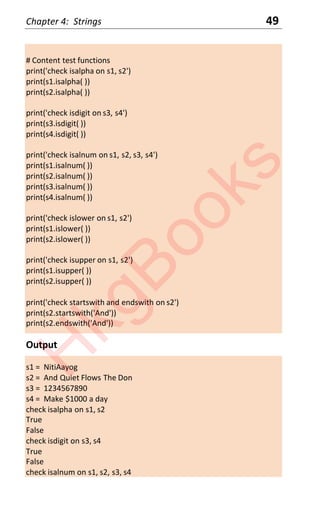
# content test functions
isalpha( ) - checks if all characters in string are alphabets.
isdigit( ) - checks if all characters in string are digits.
isalnum( ) - checks if all characters in string are alphabets or digits.
islower( ) - checks if all characters in string are lowercase alphabets.
isupper( ) - checks if all characters in string are uppercase alphabets.
startswith( ) - checks if string starts with a value.
endswith( ) - checks if string ends with a value.
# search and replace
find( ) - searches for a value, returns its position.
replace( ) - replace one value with another.
H
k
g
B
o
o
k
s
Chapter 4: Strings 43
# trims whitespace
lstrip( ) - removes whitespace from the left of string including t.
rstrip( ) - removes whitespace from the right of string including t.
strip( ) - removes whitespace from left and right
# split and partition
split( ) - split the string at a specified separator string.
partition( ) - partitions string into 3 parts at first occurrence of
specified string.
# join - different than concatenation. It joins string to each element
of string1 except last.
join(string1)
x Following program shows how to use the string methods:
msg = 'Hello'
print(msg.replace('l', 'L')) # replaces l with L in Hello
print("-".join("Hello")) # prints H-e-l-l-o
String Conversions
x Two types of string conversions are required frequently:
- Converting the case of characters in string
- Converting numbers to string and vice versa
x Case conversions can be done using str methods:
upper( ) - converts string to uppercase.
lower( ) - converts string to uppercase.
capitalize( ) - converts first character of string to uppercase.
title( ) - converts first character of each word to uppercase.
swapcase( ) - swap cases in the string.
msg = 'Hello'
print(msg.upper( )) # prints HELLO
print('Hello'.upper( )) # prints HELLO
x Built-in functions are used for string to number conversions and vice
versa:
str( ) - converts an int, float or complex to string
int( ) - converts a numeric string to int
float( ) - converts a numeric string to float
H
k
g
B
o
o
k
s
44 Let Us Python
complex( ) - converts a numeric string to complex
x The built-in function chr( ) returns a string representing its Unicode
value (known as code point). ord( ) does the reverse.
x Following program shows how to use the conversion functions:
age = 25
print('She is ' + str(age) + ' years old')
i = int("34")
f = float("3.14")
c = complex("3+2j") # "3 + 2j" would be a malformed string
print(ord('A')) # prints 65
print(chr(65)) # prints A
String Comparison
x Two strings can be compared using operators ==, !=, <, >, <=, >=. This
is shown in the following program:
s1 = "Bombay"
s2 = "bombay"
s3 = "Nagpur"
s4 = "Bombaywala"
s5 = "Bombay"
print(s1 == s2) # displays False
print(s1 == s5) # displays True
print(s1 != s3) # displays True
print(s1 > s5) # displays False
print(s1 < s2) # displays True
print(s1 <= s4) # displays True
x String comparison is done in lexicographical order (alphabetical)
character by character. Capitals are considered to be less than their
lowercase counterparts. Result of comparison operation is either
True or False.
x Note that there is only one str object containing "Bombay", so s1
and s5 both contain the same address.
____________________________________________________________________
H
k
g
B
o
o
k
s
Chapter 4: Strings 45
Problem 4.1
Demonstrate how to create simple and multi-line strings and whether a
string can change after creation. Also show the usage of built-in
functions len( ), min( ) and max( ) on a string.
Program
# simple strings
msg1 = 'Hoopla'
print(msg1)
# strings with special characters
msg2 = 'He said, 'Let Us Python'.'
file1 = 'C:tempnewfile'
file2 = r'C:tempnewfile' # raw string - prepend r
print(msg2)
print(file1)
print(file2)
# multiline strings
# whitespace at beginning of second line becomes part of string
msg3 = 'What is this life if full of care...
We have no time to stand and stare'
# enter at the end of first line becomes part of string
msg4 = """What is this life if full of care...
We have no time to stand and stare"""
# strings are concatenated properly.( ) necessary
msg5 = ('What is this life if full of care...'
'We have no time to stand and stare')
print(msg3)
print(msg4)
print(msg5)
# string replication during printing
msg6 = 'MacLearn!!'
print(msg1 * 3)
# immutability of strings
# Utopia cannot change, msg7 can
H
k
g
B
o
o
k
s
46 Let Us Python
msg7 = 'Utopia'
msg8 = 'Today!!!'
msg7 = msg7 + msg8 # concatenation using +
print(msg7)
# use of built-in functions on strings
print(len('Hoopla'))
print(min('Hoopla'))
print(max('Hoopla'))
Output
Hoopla
He said, 'Let Us Python'.
C:tempnewfile
C:tempnewfile
What is this life if full of care... We have no time to stand and stare
What is this life if full of care...
We have no time to stand and stare
What is this life if full of care...We have no time to stand and stare
HooplaHooplaHoopla
UtopiaToday!!!
6
H
p
Tips
x Special characters can be retained in a string by either escaping
them or by marking the string as a raw string.
x Strings cannot change, but the variables that store them can.
x len( ) returns the number of characters present in string. min( ) and
max( ) return the character with minimum and maximum Unicode
value from the string.
____________________________________________________________________
Problem 4.2
For a given string 'Bamboozled', write a program to obtain the following
output:
H
k
g
B
o
o
k
s
Chapter 4: Strings 47
B a
e d
e d
mboozled
mboozled
mboozled
Bamboo
Bamboo
Bamboo
Bamboo
delzoobmaB
Bamboozled
Bmoze
Bbzd
Boe
BamboozledHype!
BambooMonger!
Use multiple ways to get any of the above outputs.
Program
s = 'Bamboozled'
# extract B a
print(s[0], s[1])
print(s[-10], s[-9])
# extract e d
print(s[8], s[9])
print(s[-2], s[-1])
# extract mboozled
print(s[2:10])
print(s[2:])
print(s[-8:])
# extract Bamboo
print(s[0:6])
print(s[:6])
print(s[-10:-4])
print(s[:-4])
# reverse Bamboozled
H
k
g
B
o
o
k
s
48 Let Us Python
print([::-1])
print(s[0:10:1])
print(s[0:10:2])
print(s[0:10:3])
print(s[0:10:4])
s = s + 'Hype!'
print(s)
s = s[:6] + 'Monger' + s[-1]
print(s)
Tips
x Special characters can be retained in a string by either escaping
them or by marking the string as a raw string.
x s[4:8] is same as s[4:8:1], where 1 is the default.
x s[4:8:2] returns a character, then move forward 2 positions, etc.
____________________________________________________________________
Problem 4.3
For the following strings find out which are having only alphabets, which
are numeric, which are alphanumeric, which are lowercase, which are
uppercase. Also find out whether 'And Quiet Flows The Don' begins with
'And' or ends with 'And' :
'NitiAayog'
'And Quiet Flows The Don'
'1234567890'
'Make $1000 a day'
Program
s1 = 'NitiAayog'
s2 = 'And Quiet Flows The Don'
s3 = '1234567890'
s4 = 'Make $1000 a day'
print('s1 = ', s1)
print('s2 = ', s2)
print('s3 = ', s3)
print('s4 = ', s4)
H
k
g
B
o
o
k
s
Chapter 4: Strings 49
# Content test functions
print('check isalpha on s1, s2')
print(s1.isalpha( ))
print(s2.isalpha( ))
print('check isdigit on s3, s4')
print(s3.isdigit( ))
print(s4.isdigit( ))
print('check isalnum on s1, s2, s3, s4')
print(s1.isalnum( ))
print(s2.isalnum( ))
print(s3.isalnum( ))
print(s4.isalnum( ))
print('check islower on s1, s2')
print(s1.islower( ))
print(s2.islower( ))
print('check isupper on s1, s2')
print(s1.isupper( ))
print(s2.isupper( ))
print('check startswith and endswith on s2')
print(s2.startswith('And'))
print(s2.endswith('And'))
Output
s1 = NitiAayog
s2 = And Quiet Flows The Don
s3 = 1234567890
s4 = Make $1000 a day
check isalpha on s1, s2
True
False
check isdigit on s3, s4
True
False
check isalnum on s1, s2, s3, s4
H
k
g
B
o
o
k
s
50 Let Us Python
True
False
True
False
check islower on s1, s2
False
False
check isupper on s1, s2
False
False
check startswith and endswith on s2
True
False
____________________________________________________________________
Problem 4.4
Given the following string:
'Bring It On'
' Flanked by spaces on either side '
'C:UsersKanetkarDocuments'
write a program to produce the following output using appropriate
string functions.
BRING IT ON
bring it on
Bring it on
Bring It On
bRING iT oN
6
9
Bring Him On
Flanked by spaces on either side
['C:', 'Users', 'Kanetkar', 'Documents']
('C:', '', 'UsersKanetkarDocuments')
Program
s1 = 'Bring It On'
# Conversions
H
k
g
B
o
o
k
s
Chapter 4: Strings 51
print(s1.upper( ))
print(s1.lower( ))
print(s1.capitalize( ))
print(s1.title( ))
print(s1.swapcase( ))
# search and replace
print(s1.find('I'))
print(s1.find('On'))
print(s1.replace('It', 'Him'))
# trimming
s2 = ' Flanked by spaces on either side '
print(s2.lstrip( ))
print(s2.rstrip( ))
# splitting
s3 = 'C:UsersKanetkarDocuments'
print(s3.split(''))
print(s3.partition(''))
____________________________________________________________________
Problem 4.5
Find all occurrences of 'T' in the string 'The Terrible Tiger Tore The
Towel'. Replace all occurrences of 'T' with 't'.
Program
s = 'The Terrible Tiger Tore The Towel'
pos = s.find('T', 0)
print(pos, s[pos])
pos = s.find('T', pos + 1)
print(pos, s[pos])
pos = s.find('T', pos + 1)
print(pos, s[pos])
pos = s.find('T', pos + 1)
print(pos, s[pos])
pos = s.find('T', pos + 1)
print(pos, s[pos])
pos = s.find('T', pos + 1)
print(pos, s[pos])
H
k
g
B
o
o
k
s
52 Let Us Python
pos = s.find('T', pos + 1)
print(pos)
c = s.count('T')
s = s.replace('T', 't', c)
print(s)
Output
0 T
4 T
13 T
19 T
24 T
28 T
-1
the terrible tiger tore the towel
Tips
x First call to search( ) returns the position where first 'T' is found. To
search subsequent 'T' search is started from pos + 1.
x When 'T' is not found search( ) returns -1.
x count( ) returns the number of occurrences of 'T' in the string.
x Third parameter in the call to replace( ) indicates number of
replacements to be done.
____________________________________________________________________
[A] Answer the following questions:
(a) Write a program that generates the following output from the string
'Shenanigan'.
S h
a n
enanigan
Shenan
Shenan
Shenan
H
k
g
B
o
o
k
s
Chapter 4: Strings 53
Shenan
Shenanigan
Seaia
Snin
Saa
ShenaniganType
ShenanWabbite
(b) Write a program to convert the following string
'Visit ykanetkar.com for online courses in programming'
into
'Visit Ykanetkar.com For Online Courses In Programming'
(c) Write a program to convert the following string
'Light travels faster than sound. This is why some people appear
bright until you hear them speak.'
into
'LIGHT travels faster than SOUND. This is why some people appear
bright until you hear them speak.'
(d) What will be the output of the following program?
s = 'HumptyDumpty'
print('s = ', s)
print(s.isalpha( ))
print(s.isdigit( ))
print(s.isalnum( ))
print(s.islower( ))
print(s.isupper( ))
print(s.startswith('Hump'))
print(s.endswith('Dump'))
(e) What is the purpose of a raw string?
(f) If we wish to work with an individual word in the following string,
how will you separate them out:
'The difference between stupidity and genius is that genius has its
limits'
(g) Mention two ways to store a string: He said, "Let Us Python".
H
k
g
B
o
o
k
s
54 Let Us Python
(h) What will be the output of following code snippet?
print(id('Imaginary'))
print(type('Imaginary'))
(i) What will be the output of the following code snippet?
s3 = 'C:UsersKanetkarDocuments'
print(s3.split(''))
print(s3.partition(''))
(j) Strings in Python are iterable, sliceable and immutable. (True/False)
(k) How will you extract ' TraPoete' from the string 'ThreadProperties'?
(l) How will you eliminate spaces on either side of the string ' Flanked
by spaces on either side '?
(m)What will be the output of the following code snippet?
s1 = s2 = s3 = "Hello"
print(id(s1), id(s2), id(s3))
(n) What will get stored in ch in the following code snippet:
msg = 'Aeroplane'
ch = msg[-0]
[B] Match the following pairs assuming msg = 'Keep yourself warm'
a. msg.partition(' ') 1. 18
b. msg.split(' ') 2. kEEP YOURSELF WARM
c. msg.startswith('Keep') 3. Keep yourself warm
d. msg.endswith('Keep') 4. 3
e. msg.swapcase( ) 5. True
f. msg.capitalize( ) 6. False
g. msg.count('e') 7. ['Keep', 'yourself', 'warm']
h. len(msg) 8. ('Keep', ' ', 'yourself warm')
i. msg[0] 9. Keep yourself w
j. msg[-1] 10. keep yourself wa
k. msg[1:1:1] 11. K
l. msg[-1:3] 12. empty string
m. msg[:-3] 13. m
n. msg[-3:] 14. arm
o. msg[0:-2] 15. empty string
H
k
g
B
o
o
k
s
Let Us
Python
55
Decision Control
Instruction
x Decision Control Instruction x Receiving Input
x Nuances of Conditions x pass Statement
x Logical Operators x Programs
x Conditional Expressions x Exercises
x all( ) and any( )
5
“Indecision cost > Wrong decision cost.. ”
H
k
g
B
o
o
k
s
56 Let Us Python
x So far statements in all our programs got executed sequentially or
one after the other.
x Sequence of execution of instructions in a program can be altered
using:
(a) Decision control instruction
(b) Repetition control instruction
Decision Control Instruction
x Three ways for taking decisions in a program:
if condition :
statement1
statement2
if condition :
statement1
statement2
else :
statement3
statement4
if condition1 :
statement1
statement2
elif condition2 :
statement3
elif condition3 :
statement4
else :
statement5
x The colon (:) after if, else, elif. It is compulsory.
x Statements in if block, else, block, elif block have to be indented.
Indented statements are treated as a block of statements.
x Indentation is used to group statements. Use either 4 spaces or a tab
for indentation. Don't mix tabs and spaces. They may appear ok on
screen, but would be reported as error.
x In the first form shown above else and elif are optional.
x In the second form shown above, if condition is True all statements
in if block get executed. If condition is False then statements in else
block get executed.
x In the third form shown above, if a condition fails, then condition in
the following elif block is checked. The else block goes to work if all
conditions fail.
H
k
g
B
o
o
k
s
Chapter 5: Decision Control Instruction 57
x if-else statements can be nested. Nesting can be as deep as the
program logic demands.
Nuances of Conditions
x Condition is built using relation operators <, >, <=, >=, ==, !=.
10 < 20 # yields True
'Santosh' < 'Adi' # yields False, alphabetical order is checked
'gang' < 'God' # yields False, lowercase is > uppercase
x a = b is assignment, a == b is comparison.
x Ranges or multiple equalities can be checked more naturally.
if a < b < c # checks whether b falls between a and c
if a == b == c # checks whether all three are equal
if 10 != 20 != 10 # evaluates to True, even though 10 != 10 is False
x Any non-zero number (positive, negative, integer, float) is treated as
True, and 0 as False.
print(bool(3.14)) # prints True
print(bool(25)) # prints True
print(bool(0)) # prints False
Logical Operators
x More complex decision making can be done using logical operators
and, or and not.
x Conditions can be combined using and and or as shown below:
cond1 and cond2 - returns True if both are True, otherwise False
cond1 or cond2 - returns True if one of them is True, otherwise False
x Strictly speaking, we need not always combine only conditions with
and/or. We can use any valid expression in place of conditions.
Hence when used with expressions we may not get True/False.
x and operator evaluates ALL expressions. It returns last expression if
all expressions evaluate to True. Otherwise it returns first value that
evaluates to False.
a = 40
b = 30
x = 75 and a >= 20 and b < 60 and 35 # assigns 35 to x
H
k
g
B
o
o
k
s
58 Let Us Python
y = -30 and a >= 20 and b < 15 and 35 # assigns False to y
z = -30 and a >= 20 and 0 and 35 # assigns 0 to z
x or operator evaluates ALL expressions and returns the first value
that evaluates to True. Otherwise it returns last value that evaluates
to False.
a = 40
b = 30
x = 75 or a >= 20 or 60 # assigns 75 to x
y = a >= 20 or 75 or 60 # assigns True to y
z = a < 20 or 0 or 35 # assigns 35 to z
x Condition’s result can be negated using not.
a = 10
b = 20
not (a <= b) # yields False. Same as a > b
not (a >= b) # yields True. Same as a < b
x Shortcut for toggling values between 1 and 0:
a = input('Enter 0 or 1')
a = not a # set a to 0 if it is 1, and set it to 1 if it is 0
x a = not b does not change value of b.
x If an operator needs only 1 operand it is known as Unary operator. If
it needs two, then it is a binary operator.
not - needs only 1 operand, so unary operator
+, -, <, >, and, or, etc. - need 2 operands, so binary operators
Conditional Expressions
x Python supports one additional decision-making entity called a
conditional expression.
<expr1> if <conditional expression> else <expr2>
<conditional expression> is evaluated first. If it is true, the
expression evaluates to <expr1>. If it is false, the expression
evaluates to <expr2>.
x Examples of condition expressions:
H
k
g
B
o
o
k
s
Chapter 5: Decision Control Instruction 59
age = 15
status = 'minor' if age < 18 else 'adult' # sets minor
sunny = False
print('Let's go to the', 'beach' if sunny else 'room')
humidity = 76.8
setting = 25 if humidity > 75 else 28 # sets 25
x Conditional expressions can be nested.
# assigns Prim
wt = 55
msg = 'Obese' if wt > 85 else 'Hefty' if wt > 60 else 'Prim'
all( ) and any( )
x Instead of using the and and or logical operators, we can use the
built-in functions all( ) and any( ) to get the same effect. Their usage
is shown in the following program:
a, b, c = 10, 20, 30
res = all((a > 5, b > 20, c > 15))
print(res) # prints False, as second condition is False
res = any((a > 5, b > 20, c > 15))
print(res) # prints True since one of the condition is True
x Note that all( ) and any( ) both receive a single parameter of the
type string, list, tuple, set or dictionary. We have passed a tuple of 3
conditions to them. If argument is a dictionary it is checked whether
the keys are true or not.
x any( ) function returns True if at least one element of its parameter
is True. all( ) function returns True if all elements of its parameter
are True.
Receiving Input
x The way print( ) function is used to output values on screen, input( )
built-in function can be used to receive input values from keyboard.
x input( ) function returns a string, i.e. if 23 is entered it returns '23'.
So if we wish to perform arithmetic on the number entered, we
need to convert the string into int or float as shown below.
H
k
g
B
o
o
k
s
60 Let Us Python
n = input('Enter your name: ')
age = int(input('Enter your age: '))
salary = float(input('Enter your salary: '))
print(name, age, salary)
pass Statement
x pass statement is intended to do nothing on execution. Hence it is
often called a no-op instruction.
x If we wish that on execution of a statement nothing should happen,
we can achieve this using a pass statement. Its utility is shown in
Problem 5.6.
x It is often used as a placeholder for unimplemented code in an if,
loop, function or class. This is not a good use of pass. Instead you
should use ... in its place. If you use pass it might make one believe
that you actually do not intend to do anything in the
if/loop/function/class.
____________________________________________________________________
Problem 5.1
While purchasing certain items, a discount of 10% is offered if the
quantity purchased is more than 1000. If quantity and price per item are
input through the keyboard, write a program to calculate the total
expenses.
Program
qty = int(input('Enter value of quantity: '))
price = float(input('Enter value of price: '))
if qty > 1000 :
dis = 10
else :
dis = 0
totexp = qty * price - qty * price * dis / 100
print('Total expenses = Rs. ' + str(totexp))
H
k
g
B
o
o
k
s
Chapter 5: Decision Control Instruction 61
Output
Enter value of quantity: 1200
Enter value of price: 15.50
Total expenses = Rs. 16740.0
Tips
x input( ) returns a string, so it is necessary to convert it into int or
float suitably. If we do not do the conversion, qty > 1000 will throw
an error as a string cannot be compared with an int.
x str( ) should be used to convert totexp to string before doing
concatenation using +.
____________________________________________________________________
Problem 5.2
In a company an employee is paid as under:
If his basic salary is less than Rs. 1500, then HRA = 10% of basic salary
and DA = 90% of basic salary. If his salary is either equal to or above Rs.
1500, then HRA = Rs. 500 and DA = 98% of basic salary. If the employee's
salary is input through the keyboard write a program to find his gross
salary.
Program
bs = int(input('Enter value of bs: '))
if bs > 1000 :
hra = bs * 15 /100
da = bs * 95 / 100
ca = bs * 10 / 100
else:
hra = bs * 10 / 100
da = bs * 90 / 100
ca = bs * 5 / 100
gs = bs + da + hra + ca
print('Gross Salary = Rs. ' + str(gs))
H
k
g
B
o
o
k
s
62 Let Us Python
Tips
x if block and else block can contain multiple statements in them,
suitably indented.
____________________________________________________________________
Problem 5.3
Percentage marks obtained by a student are input through the
keyboard. The student gets a division as per the following rules:
Percentage above or equal to 60 - First division
Percentage between 50 and 59 - Second division
Percentage between 40 and 49 - Third division
Percentage less than 40 - Fail
Write a program to calculate the division obtained by the student.
Program
per = int(input('Enter value of percentage: '))
if per >= 60 :
print('First Division')
elif per >= 50 :
print('Second Division')
elif per >= 40 :
print('Third Division')
else :
print('Fail')
Output
Enter value of percentage: 55
Second Division
____________________________________________________________________
Problem 5.4
A company insures its drivers in the following cases:
 If the driver is married.
 If the driver is unmarried, male & above 30 years of age.
 If the driver is unmarried, female & above 25 years of age.
H
k
g
B
o
o
k
s
Chapter 5: Decision Control Instruction 63
In all other cases, the driver is not insured. If the marital status, sex and
age of the driver are the inputs, write a program to determine whether
the driver should be insured or not.
Program
ms = input('Enter marital status: ')
s = input('Enter sex: ')
age = int(input('Enter age: '))
if ( ms == 'm' ) or ( ms == 'u' and s == 'm' and age > 30 ) 
or ( ms == 'u' and s == 'f' and age > 25 ) :
print('Insured')
else :
print('Not Insured')
Output
Enter marital status: u
Enter sex: m
Enter age: 23
Not Insured
____________________________________________________________________
Problem 5.5
Suppose there are four flag variables w, x, y, z. Write a program to check
in multiple ways whether one of them is true.
Program
# Different ways to test multiple flags
w, x, y, z = 0, 1, 0, 1
if w == 1 or x == 1 or y == 1 or z == 1 :
print('True')
if w or x or y or z :
print('True')
if any((w, x, y, z)):
print('True')
H
k
g
B
o
o
k
s
64 Let Us Python
if 1 in (w, x, y, z) :
print('True')
Output
True
True
True
True
Tips
x any( ) is a built-in function that returns True if at least one of the
element of its parameter is True.
x We have to pass a string, list, tuple, set or dictionary to any( ).
x There is another similar function called all( ), which returns True if all
elements of its parameter are True. This function too should be
passed a string, list, tuple, set or dictionary.
____________________________________________________________________
Problem 5.6
Given a number n we wish to do the following:
If n is positive - print n * n, set a flag to true
If n is negative - print n * n * n, set a flag to true
if n is 0 - do nothing
Is the code given below correct for this logic?
n = int(input('Enter a number: '))
if n > 0 :
flag = True
print(n * n)
elif n < 0 :
flag = True
print(n * n * n)
Answer
x This is misleading code. At a later date, anybody looking at this code
may feel that flag = True should be written outside if and else.
x Better code will be as follows:
H
k
g
B
o
o
k
s
Chapter 5: Decision Control Instruction 65
n = int(input('Enter a number: '))
if n > 0 :
flag = True
print(n * n)
elif n < 0 :
flag = True
print(n * n * n)
else :
pass # does nothing on execution
____________________________________________________________________
[A] Answer the following questions:
(a) Write conditional expressions for
- If a < 10 b = 20, else b = 30
- Print 'Morning' if time < 12, otherwise print 'Afternoon'
- If marks >= 70, set remarks to True, otherwise False
(b) Rewrite the following code snippet in 1 line:
x = 3
y = 3.0
if x == y :
print('x and y are equal')
else :
print('x and y are not equal')
(c) What happens when a pass statement is executed?
[B] What will be the output of the following programs:
(a) i, j, k = 4, -1, 0
w = i or j or k
x = i and j and k
y = i or j and k
z = i and j or k
print(w, x, y, z)
(b) a = 10
a = not not a
print(a)
H
k
g
B
o
o
k
s
66 Let Us Python
(c) x, y, z = 20, 40, 45
if x > y and x > z :
print('biggest = ' + str(x))
elif y > x and y > z :
print('biggest = ' + str(y))
elif z > x and z > y :
print('biggest = ' + str(z))
(d) num = 30
k = 100 if num <= 10 else 500
print(k)
(e) a = 10
b = 60
if a and b > 20 :
print('Hello')
else :
print('Hi')
(f) a = 10
b = 60
if a > 20 and b > 20 :
print('Hello')
else :
print('Hi')
(g) a = 10
if a = 30 or 40 or 60 :
print('Hello')
else :
print('Hi')
(h) a = 10
if a = 30 or a == 40 or a == 60 :
print('Hello')
else :
print('Hi')
(i) a = 10
if a in (30, 40, 50) :
print('Hello')
else :
print('Hi')
H
k
g
B
o
o
k
s
Chapter 5: Decision Control Instruction 67
[C] Point out the errors, if any, in the following programs:
(a) a = 12.25
b = 12.52
if a = b :
print('a and b are equal')
(b) if ord('X') < ord('x')
print('Unicode value of X is smaller than that of x')
(c) x = 10
if x >= 2 then
print('x')
(d) x = 10 ; y = 15
if x % 2 = y % 3
print('Carpathiansn')
(e) x, y = 30, 40
if x == y :
print('x is equal to y')
elseif x > y :
print('x is greater than y')
elseif x < y :
print('x is less than y')
[D] If a = 10, b = 12, c = 0, find the values of the following expressions:
a != 6 and b > 5
a == 9 or b < 3
not ( a < 10 )
not ( a > 5 and c )
5 and c != 8 or !c
[E] Attempt the following questions:
(a) Any integer is input through the keyboard. Write a program to find
out whether it is an odd number or even number.
(b) Any year is input through the keyboard. Write a program to
determine whether the year is a leap year or not.
(c) If ages of Ram, Shyam and Ajay are input through the keyboard,
write a program to determine the youngest of the three.
(d) Write a program to check whether a triangle is valid or not, when
the three angles of the triangle are entered through the keyboard.
H
k
g
B
o
o
k
s
68 Let Us Python
A triangle is valid if the sum of all the three angles is equal to 180
degrees.
(e) Write a program to find the absolute value of a number entered
through the keyboard.
(f) Given the length and breadth of a rectangle, write a program to find
whether the area of the rectangle is greater than its perimeter. For
example, the area of the rectangle with length = 5 and breadth = 4
is greater than its perimeter.
(g) Given three points (x1, y1), (x2, y2) and (x3, y3), write a program to
check if all the three points fall on one straight line.
(h) Given the coordinates (x, y) of center of a circle and its radius, write
a program that will determine whether a point lies inside the circle,
on the circle or outside the circle. (Hint: Use sqrt( ) and pow( )
functions)
(i) Given a point (x, y), write a program to find out if it lies on the X-
axis, Y-axis or on the origin.
(j) A year is entered through the keyboard, write a program to
determine whether the year is leap or not. Use the logical operators
and and or.
(k) If the three sides of a triangle are entered through the keyboard,
write a program to check whether the triangle is valid or not. The
triangle is valid if the sum of two sides is greater than the largest of
the three sides.
(l) If the three sides of a triangle are entered through the keyboard,
write a program to check whether the triangle is isosceles,
equilateral, scalene or right angled triangle.
H
k
g
B
o
o
k
s
Let Us
Python
69
Repetition Control
Instruction
x Repetition Control Instruction x Else Block of a Loop
x Usage of while Loop x Programs
x Usage of for Loop x Exercises
x break and continue
6
“Merry go round...”
H
k
g
B
o
o
k
s
70 Let Us Python
Repetition Control Instruction
x It helps us a repeat a set of statements in a program. There are two
types of repetition control instructions:
(a) while
(b) for
Unlike many other languages there is no do-while loop in Python.
x while is used to repeatedly execute instructions as long as condition
is true. It has two forms:
while condition :
statement1
statement2
while condition :
statement1
statement2
else :
statement3
statement4
- else block is optional. If present, it is executed when condition
fails.
- If the while loop is terminated abruptly using a break statement
then the else block is not executed.
x for is used to iterate over elements of a sequence such as string,
tuple or list. It has two forms:
for var in list :
statement1
statement2
for var in list :
statement1
statement2
else :
statement3
statement4
- During each iteration var is assigned the next value from the list.
- In place of a list a string, tuple, set or dictionary can also be used.
- else block is optional. If present, it is executed if loop is not
terminated abruptly using break.
Usage of while loop
x A while loop can be used in following three situations:
- Repeat a set of statements till a condition remains True.
H
k
g
B
o
o
k
s
Chapter 6: Repetition Control Instruction 71
- Repeat a set of statements a finite number of times.
- Iterate through a string, list and tuple.
x When we use while loop to repeat a set of statements till a
condition remains True, it means that when we do not know before-
hand how many times the statements are to be executed.
num = int(input('Enter a number: '))
while num != 5 :
print(num, num * num)
num = int(input('Enter a number: '))
The loop terminates when 5 is entered as input.
x We can use a while loop to repeat a set of statements a finite
number of times.
count = 0
while count < 10 :
print(count, count * count, count * count * count)
count += 1
x A while loop can also be used to iterate through a string, a list or a
tuple using an index value as shown in the following program:
s = 'Mumbai'
lst = ['desert', 'dessert', 'to', 'too', 'lose', 'loose']
tpl = (10, 20, 30, -20, -10)
i = 0
while i < len(lst) :
print(i, s[i], lst[i], tpl[i])
i += 1
Since items in a set or a dictionary cannot be accessed using an index
value, it is better to use a for loop to access their elements.
x Of the three usages of while loop shown above, the most popular is
the first usage—repeat statements an unknown number of times.
The other two situations are usually handled using a for loop.
Usage of for loop
x A for loop can be used in following two situations:
- Repeat a set of statements a finite number of times.
- Iterate through a string, list, tuple, set or dictionary.
H
k
g
B
o
o
k
s
72 Let Us Python
x To repeat a set of statements a finite number of times a built-in
function range( ) is used.
x range( ) function generates a sequence of integers.
range(10) - generates numbers from 0 to 9.
range(10, 20) - generates numbers from 10 to 19.
range(10, 20, 2) - generates numbers from 10 to 19 in steps of 2.
range(20, 10, -3) - generates numbers from 20 to 9 in steps of -3.
Note that range( ) cannot generate a sequence of floats.
x In general,
range(start, stop, step)
produces a sequence of integers from start (inclusive) to stop
(exclusive) by step.
x The list of numbers generated using range( ) can be iterated through
using a for loop.
for i in range(1, 10, 2) :
print(i, i * i, i * i * i)
x A for loop is very popularly used to iterate through a string, list,
tuple, set or dictionary, as shown below.
for char in 'Leopard' :
print(char)
for animal in ['Cat', 'Dog', 'Tiger', 'Lion', 'Leopard'] :
print(animal)
for flower in ('Rose', 'Lily', 'Jasmine') :
print(flower)
for num in {10, 20, 30, -10, -25} :
print(num)
for key in {'A101' : 'Rajesh', 'A111' : 'Sunil', 'A112' : 'Rakesh'} :
print(key)
In the first for loop in each iteration of the loop char is assigned the
next value from the string.
Similarly, in the second, third and fourth for loop, in each iteration of
the loop animal/flower/num is assigned the next value form the
list/tuple/set.
H
k
g
B
o
o
k
s
Chapter 6: Repetition Control Instruction 73
Note that in the last for loop we are printing only the keys in the
dictionary. Printing values, or printing both keys and values are
covered in Chapter 11.
x If while iterating through a collection using a for loop if we wish to
also get an index of the item we should use the built-in enumerate( )
function as shown below:
lst = ['desert', 'dessert', 'to', 'too', 'lose', 'loose']
for i, ele in enumerate(lst) :
print(i, ele)
break and continue
x break and continue statements can be used with while and for.
x break statement terminates the loop without executing the else
block.
x continue statement skips the rest of the statements in the block and
continues with the next iteration of the loop.
Else Block of a Loop
x else block of a while loop should be used in situations where you
wish to execute some statements if the loop is terminated normally
and not if it is terminated abruptly.
x Such a situation arises if we are to determine whether a number is
prime or not.
num = int(input('Enter an integer: '))
i = 2
while i <= num - 1 :
if num % i == 0 :
print(num, 'is not a prime number')
break
i += 1
else :
print(num, 'is a prime number')
Note the indentation of else. else is working for the while and not
for if.
H
k
g
B
o
o
k
s
74 Let Us Python
x In the following example else block will not go to work as the list
contains 3, a non-multiple of 10, on encountering which we
terminate the loop.
for ele in [10, 20, 30, 3, 40, 50] :
if ele % 10 != 0 :
print(ele, 'is a not a multiple of 10')
break
else :
print('all numbers in list are multiples of 10')
____________________________________________________________________
Problem 6.1
Write a program that receives 3 sets of values of p, n and r and
calculates simple interest for each.
Program
i = 1
while i <= 3 :
p = float(input('Enter value of p: '))
n = int(input('Enter value of n: '))
r = float(input('Enter value of r: '))
si = p * n * r / 100
print('Simple interest = Rs. ' + str (si))
i = i + 1
Output
Enter value of p: 1000
Enter value of n: 3
Enter value of r: 15.5
Simple interest = Rs. 465.0
Enter value of p: 2000
Enter value of n: 5
Enter value of r: 16.5
Simple interest = Rs. 1650.0
Enter value of p: 3000
H
k
g
B
o
o
k
s
Chapter 6: Repetition Control Instruction 75
Enter value of n: 2
Enter value of r: 10.45
Simple interest = Rs. 626.9999999999999
____________________________________________________________________
Problem 6.2
Write a program that prints numbers from 1 to 10 using an infinite loop.
All numbers should get printed in the same line.
Program
i = 1
while 1 :
print(i, end = ' ')
i += 1
if i > 10 :
break
Output
1 2 3 4 5 6 7 8 9 10
Tips
x while 1 creates an infinite loop, as 1 is non-zero, hence true.
Replacing 1 with any non-zero number will create an infinite loop.
x Another way of creating an infinite loop is while True.
x end = ' ' in print( ) prints a space after printing i in each iteration.
Default value of end is newline ('n').
____________________________________________________________________
Problem 6.3
Write a program that prints all unique combinations of 1, 2 and 3.
Program
i = 1
while i <= 3 :
j = 1
while j <= 3 :
k = 1
H
k
g
B
o
o
k
s
76 Let Us Python
while k <= 3 :
if i == j or j == k or k == i :
k += 1
continue
else :
print(i, j, k)
k += 1
j += 1
i += 1
Output
1 2 3
1 3 2
2 1 3
2 3 1
3 1 2
3 2 1
____________________________________________________________________
Problem 6.4
Write a program that obtains decimal value of a binary numeric string.
For example, decimal value of '1111' is 15.
Program
b = '1111'
i = 0
while b :
i = i * 2 + (ord(b[0]) - ord('0'))
b = b[1:]
print('Decimal value = ' + str(i))
Output
Decimal value = 15
Tips
x ord(1) is 49, whereas ord('0') is 0.
x b = b[1:] strips the first character in b.
____________________________________________________________________
H
k
g
B
o
o
k
s
Chapter 6: Repetition Control Instruction 77
Problem 6.5
Write a program that generates the following output using a for loop:
A,B,C,D,E,F,G,H,I,J,K,L,M,N,O,P,Q,R,S,T,U,V,W,X,Y,Z,
z,y,x,w,v,u,t,s,r,q,p,o,n,m,l,k,j,i,h,g,f,e,d,c,b,a,
Program
for alpha in range(65, 91) :
print(chr(alpha), end=',')
print( )
for alpha in range(122, 96, -1) :
print(chr(alpha), end=',')
Tips
x Unicode values of alphabets A-Z are 65-90. Unicode values of
alphabets a-z are 97-122.
x Each output of print statement ends with a comma.
x Empty print( ) statement positions the cursor at the beginning of the
next line.
____________________________________________________________________
[A] Answer the following questions:
(a) When does the else block of a while loop go to work?
(b) Can range( ) function be used to generate numbers from 0.1 to 1.0
in steps of 0.1?
(c) Can a while loop be nested within a for loop and vice versa?
(d) Can a while/for loop be used in an if/else and vice versa?
(e) Can a do-while loop be used to repeat a set of statements?
(f) How will you write an equivalent for loop for the following:
count = 1
while count <= 10 :
print(count)
count = count + 1
H
k
g
B
o
o
k
s
78 Let Us Python
(g) What will be the output of the following code snippet?
for index in range(20, 10, -3) :
print(index, end = ' ')
(h) Why should break and continue be always used with an if
embedded in a while or for loop?
[B] Point out the errors, if any, in the following programs:
(a) j = 1
while j <= 10 :
print(j)
j++
(b) while true :
print('Infinite loop')
(c) lst = [10, 20, 30, 40, 50]
for count = 1 to 5 :
print(lst[ i ])
(d) i = 15
not while i < 10 :
print(i)
i -= 1
(e) # Print alphabets from A to Z
for alpha in range(65, 91) :
print(ord(alpha), end=' ')
(f) for i in range(0.1, 1.0, 0.25) :
print(i)
(g) i = 1
while i <= 10 :
j = 1
while j <= 5 :
print(i, j )
j += 1
break
print(i, j)
i += 1
H
k
g
B
o
o
k
s
Chapter 6: Repetition Control Instruction 79
[C] Match the following for the values each range( ) function will
generate.
a. range(5) 1. 1, 2, 3, 4
b. range(1, 10, 3) 2. 0, 1, 2, 3, 4
c. range(10, 1, -2) 3. Nothing
d. range(1, 5) 4. 10, 8, 6, 4, 2
e. range(-2) 5. 1, 4, 7
[D] Attempt the following questions:
(a) Write a program to print first 25 odd numbers using range( ).
(b) Rewrite the following program using for loop.
lst = ['desert', 'dessert', 'to', 'too', 'lose', 'loose']
s = 'Mumbai'
i = 0
while i < len(lst) :
if i > 3 :
break
else :
print(i, lst[i], s[i])
i += 1
(c) Write a program to count the number of alphabets and number of
digits in the string 'Nagpur-440010'
(d) A five-digit number is entered through the keyboard. Write a
program to obtain the reversed number and to determine whether
the original and reversed numbers are equal or not.
(e) Write a program to find the factorial value of any number entered
through the keyboard.
(f) Write a program to print out all Armstrong numbers between 1 and
500. If sum of cubes of each digit of the number is equal to the
number itself, then the number is called an Armstrong number. For
example, 153 = ( 1 * 1 * 1 ) + ( 5 * 5 * 5 ) + ( 3 * 3 * 3 ).
(g) Write a program to print all prime numbers from 1 to 300.
(h) Write a program to print the multiplication table of the number
entered by the user. The table should get displayed in the following
form:
29 * 1 = 29
29 * 2 = 58
H
k
g
B
o
o
k
s
80 Let Us Python
…
(i) When interest compounds q times per year at an annual rate of
r % for n years, the principal p compounds to an amount a as per
the following formula:
a = p ( 1 + r / q ) nq
Write a program to read 10 sets of p, r, n & q and calculate the
corresponding as.
(j) Write a program to generate all Pythagorean Triplets with side
length less than or equal to 30.
(k) Population of a town today is 100000. The population has increased
steadily at the rate of 10 % per year for last 10 years. Write a
program to determine the population at the end of each year in the
last decade.
(l) Ramanujan number is the smallest number that can be expressed as
sum of two cubes in two different ways. Write a program to print all
such numbers up to a reasonable limit.
(m) Write a program to print 24 hours of day with suitable suffixes like
AM, PM, Noon and Midnight.
H
k
g
B
o
o
k
s
Let Us
Python
81
Console
Input/Output
x Console Input x Programs
x Console Output x Exercises
x Formatted Printing
7
“Input from keyboard, output to screen...”
H
k
g
B
o
o
k
s
82 Let Us Python
x Console Input/Output means input from keyboard and output to
screen.
Console Input
x Console input can be received using the built-in input( ) function.
x General form of input( ) function is
s = input('prompt')
prompt is a string that is displayed on the screen, soliciting a value.
input( ) returns a string. If 123 is entered as input, '123' is returned.
x input( ) can be used to receive, 1, or more values.
# receive full name
name = input('Enter full name')
# separate first name, middle name and surname
fname, mname, sname = input('Enter full name: ').split( )
split( ) function will split the entered fullname with space as a
delimiter. The split values will then be assigned to fname, mname,
lname.
x If we are to receive multiple int values, we can receive them as
strings and then convert them to ints.
n1, n2, n3 = input('Enter three values: ').split( )
n1, n2, n3 = int(n1), int(n2), int(n3)
print(n1 + 10, n2 + 20, n3 + 30)
x The same thing can be done using in a more compact manner using
a feature called list comprehension. It applies int( ) function to every
element of the list returned by the split( ) function.
n1, n2, n3 = [int(n) for n in input('Enter three values: ').split( )]
print(n1 + 10, n2 + 20, n3 + 30)
The expression enclosed within [ ] is called list comprehension. It is
discussed in detail in Chapter 12.
x input( ) can be used to receive arbitrary number of values.
H
k
g
B
o
o
k
s
Chapter 7: Console Input/Output 83
numbers = [int(x) for x in input('Enter values: ').split( )]
for n in numbers :
print(n + 10)
x input( ) can be used to receive different types of values at a time.
data = input('Enter name, age, salary: ').split( )
name = data[0]
age = int(data[1])
salary = float(data[2])
Console Output
x Built-in function print( ) is used to send output to screen.
x print( ) function has this form:
print(objects, sep = ' ', end = 'n', file = sys.stdout, flush = False)
This means that by default objects will be printed on screen
(sys.stdout), separated by space (sep = ' ') and last printed object will
be followed by a newline (end = 'n'). flush = False indicates that
output stream will not be flushed.
x Python has a facility to call functions and pass keyword-based values
as arguments. So while calling print( ) we can pass specific values for
sep and end. In this case, default values will not be used; instead the
values that we pass will be used.
print(a, b, c, sep = ',', end = '!') # prints ',' after each value, ! at end
print(x, y, sep = '...', end = '#') # prints '...' after each value, # at end
Formatted Printing
x There are 4 ways to control the formatting of output:
(a) Using formatted string literals - easiest
(b) Using the format( ) method - older
(c) C printf( ) style - legacy
(d) Using slicing and concatenation operation - difficult
Today (a) is most dominantly used method followed by (b).
x Using formatted string literals (often called fstrings):
H
k
g
B
o
o
k
s
84 Let Us Python
r, l, b = 1.5678, 10.5, 12.66
print(f'radius = {r}')
print(f'length = {l} breadth = {b} radius = {r}')
name = 'Sushant Ajay Raje'
for n in name.split( ) :
print(f'{n:10}') # print in 10 columns
x Using format( ) method of string object:
r, l, b = 1.5678, 10.5, 12.66
name, age, salary = 'Rakshita', 30, 53000.55
# print in order by position of variables using empty {}
print('radius = {} length = {} breadth ={}'.format(r, l, b))
print('name = {} age = {} salary = {}'.format(name, age, salary))
# print in any desired order
print('radius = {2} length = {1} breadth ={0}'.format(r, l, b))
print('age={1} salary={2} name={0}'.format(name, age, salary))
# print name in 15 columns, salary in 10 columns
print('name = {0:15} salary = {1:10}'.format(name, salary))
# print radius in 10 columns, with 2 digits after decimal point
print('radius = {0:10.2f}'.format(r))
On execution, the above code snippet will produce the following
output:
radius = 1.5678 length = 10.5 breadth =12.66
name = Rakshita age = 30 salary = 53000.55
radius = 12.66 length = 10.5 breadth =1.5678
age=30 salary=53000.55 name=Rakshita
name = Rakshita salary = 53000.55
radius = 1.57
____________________________________________________________________
H
k
g
B
o
o
k
s
Chapter 7: Console Input/Output 85
Problem 7.1
Write a program to receive radius of a circle, and length and breadth of
a rectangle in one call to input( ). Calculate and print the circumference
of circle and perimeter of rectangle.
Program
r, l, b = input('Enter radius, length and breadth: ').split( )
radius = int(r)
length = int(l)
breadth = int(b)
circumference = 2 * 3.14 * radius
perimeter = 2 * ( length + breadth )
print(circumference)
print(perimeter)
Output
Enter radius, length and breadth: 3 4 5
18.84
18
Tips
x input( ) returns a string, so it is necessary to convert it into int or
float suitably, before performing arithmetic operations.
____________________________________________________________________
Problem 7.2
Write a program to receive 3 integers using one call to input( ). The
three integers signify starting value, ending value and step value for a
range. The program should use these values to print the number, its
square and its cube, all properly right-aligned. Also output the same
values left-aligned.
H
k
g
B
o
o
k
s
86 Let Us Python
Program
start, end, step = input('Enter start, end, step values: ').split( )
# right aligned printing
for n in range(int(start), int(end), int(step)) :
print(f'{n:>5}{n**2:>7}{n**3:>8}')
print( )
# left aligned printing
for n in range(int(start), int(end), int(step)) :
print('{0:<5}{1:<7}{2:<8}'.format(n, n ** 2, n ** 3))
Output
Enter start, end, step values: 1 10 2
1 1 1
3 9 27
5 25 125
7 49 343
9 81 729
1 1 1
3 9 27
5 25 125
7 49 343
9 81 729
Tips
x {n:>5} will print n right-justified within 5 columns. Use < to left-
justify.
x {0:<5} will left-justify 0th
parameter in the list within 5 columns. Use
> to right-justify.
____________________________________________________________________
Problem 7.3
Write a program to maintain names and cell numbers of 4 persons and
then print them systematically in a tabular form.
H
k
g
B
o
o
k
s
Chapter 7: Console Input/Output 87
Program
contacts = {
'Dilip' : 9823077892, 'Shekhar' : 6784512345,
'Vivek' : 9823011245, 'Riddhi' : 9766556779
}
for name, cellno in contacts.items( ) :
print(f'{name:15} : {cellno:10d}')
Output
Dilip : 9823077892
Shekhar : 6784512345
Vivek : 9823011245
Riddhi : 9766556779
____________________________________________________________________
Problem 7.4
Suppose there are 5 variables in a program—max, min, mean, sd and
var, having some suitable values. Write a program to print these
variables properly aligned using multiple fstrings, but one call to print( ).
Program
min, max = 25, 75
mean = 35
sd = 0.56
var = 0.9
print(
f'n{"Max Value:":<15}{max:>10}',
f'n{"Min Value:":<15}{min:>10}',
f'n{"Mean:":<15}{mean:>10}',
f'n{"Std Dev:":<15}{sd:>10}',
f'n{"Variance:":<15}{var:>10}' )
Output
Max Value: 75
Min Value: 25
Mean: 35
H
k
g
B
o
o
k
s
88 Let Us Python
Std Deviation: 0.56
Variance: 0.9
____________________________________________________________________
Problem 7.5
Write a program that prints square root and cube root of numbers from
1 to 10, up to 3 decimal places. Ensure that the output is displayed in
separate lines, with number center-justified and square and cube roots,
right-justified.
Program
import math
width = 10
precision = 4
for n in range(1, 10) :
s = math.sqrt(n)
c = math.pow(n,1/3)
print(f'{n:^5}{s:{width}.{precision}}{c:{width}.{precision}}')
Output
1 1.0 1.0
2 1.414 1.26
3 1.732 1.442
4 2.0 1.587
5 2.236 1.71
6 2.449 1.817
7 2.646 1.913
8 2.828 2.0
9 3.0 2.08
____________________________________________________________________
[A] Attempt the following questions:
(a) How will you make the following code more compact?
print('Enter ages of 3 persons')
age1 = input( )
age2 = input( )
H
k
g
B
o
o
k
s
Chapter 7: Console Input/Output 89
age3 = input( )
(b) How will you print "Rendezvous" in a line and retain the cursor in
the same line in which the output has been printed?
(c) What will be the output of the following code snippet?
l, b = 1.5678, 10.5
print('length = {l} breadth = {b}')
(d) In the following statement what do > 5, > 7 and > 8 signify?
print(f'{n:>5}{n ** 2:>7}{n ** 3:>8}')
(e) What will be the output of the following code segment?
name = 'Sanjay'
cellno = 9823017892
print(f'{name:15} : {cellno:10}')
(f) How will you print the output of the following code segment using
fstring?
x, y, z =10, 20, 40
print('{0:<5}{1:<7}{2:<8}'.format(x, y, z))
(g) How will you receive arbitrary number of floats from keyboard?
(h) What changes should be made in
print(f'{'nx = ':4}{x:>10}{'ny = ':4}{y:>10}')
to produce the output given below:
x = 14.99
y = 114.39
(i) How will you receive a boolean value as input?
(j) How will you receive a complex number as input?
(k) How will you display price in 10 columns with 4 places beyond
decimal points? Assume value of price to be 1.5567894.
(l) Write a program to receive an arbitrary number of floats using one
input( ) statement. Calculate the average of floats received.
(m)Write a program to receive the following using one input( )
statement.
H
k
g
B
o
o
k
s
90 Let Us Python
Name of the person
Years of service
Diwali bonus received
Calculate and print the agreement deduction as per the following
formula:
deduction = 2 * years of service + bonus * 5.5 / 100
(n) Which import statement should be added to use the built-in
functions input( ) and print( )?
(o) Is the following statement correct?
print('Result = ' + 4 > 3)
(p) Write a program to print the following values
a = 12.34, b = 234.39, c = 444.34, d = 1.23, e = 34.67
as shown below:
a = 12.34
b = 234.39
c = 444.34
d = 1.23
e = 34.67
[B] Match the following pairs:
a. Default value of sep in print( ) 1. ' '
b. Default value of end in print( ) 2. Using fstring
c. Easiest way to print output 3. Right justify num in 5 columns
d. Return type of split( ) 4. Left justify num in 5 columns
e. print('{num:>5}') 5. list
f. print('{num:<5}') 6. n
H
k
g
B
o
o
k
s
91
Lists
• What are Lists? • Sorting and Reversing
• Accessing List Elements • List Varieties
• Looping in Lists • Stack Data Structure
• Basic List Operations • Queue Data structure
• Using Built-in Functions on Lists • Programs
• List Methods • Exercises
8
“Bringing order to chaos...”
H
k
g
B
o
o
k
s
92 Let Us Python
What are Lists?
• Container is an entity which contains multiple data items. It is also
known as a collection or a compound data type.
• Python has following container data types:
Lists Tuples
Sets Dictionaries
• A list can grow or shrink during execution of the program. Hence it is
also known as a dynamic array. Because of this nature of lists they
are commonly used for handling variable length data.
• A list is defined by writing comma-separated elements within [ ].
num = [10, 25, 30, 40, 100]
names = ['Sanjay', 'Anil', 'Radha', 'Suparna']
• List can contain dissimilar types, though usually they are a collection
of similar types. For example:
animal = ['Zebra', 155.55, 110]
• Items in a list can be repeated, i.e. a list may contain duplicate items.
Like printing, * can be used to repeat an element multiple times. An
empty list is also feasible.
ages = [25, 26, 25, 27, 26] # duplicates allowed
num = [10] * 5 # stores [10, 10, 10, 10, 10]
lst = [ ] # empty list, valid
Accessing List Elements
• Entire list can be printed by just using the name of the list.
l = ['Able', 'was', 'I', 'ere', 'I', 'saw', 'elbA']
print(l)
• Like strings, individual elements in a list can be accessed using
indices. Hence they are also known as sequence types. The index
value starts from 0.
H
k
g
B
o
o
k
s
Chapter 8: Lists 93
print(animals[1], ages[3])
• Like strings, lists can be sliced.
print(animals[1:3])
print(ages[3:])
Looping in Lists
• If we wish to process each item in the list, we should be able to
iterate through the list. This can done using a while or for loop.
animals = ['Zebra', 'Tiger', 'Lion', 'Jackal', 'Kangaroo']
# using while loop
i = 0
while i < len(animals) :
print(animals[ i ])
i += 1
# using more convenient for loop
for a in animals :
print(a)
• While iterating through a list using a for loop, if we wish to keep
track of index of the element that a is referring to, we can do so
using the built-in enumerate( ) function.
animals = ['Zebra', 'Tiger', 'Lion', 'Jackal', 'Kangaroo']
for index, a in enumerate(animals) :
print(index, a)
Basic List Operations
• Mutability - Unlike strings, lists are mutable (changeable). So lists
can be updated as shown below:
animals = ['Zebra', 'Tiger', 'Lion', 'Jackal', 'Kangaroo']
ages = [25, 26, 25, 27, 26, 28, 25]
animals[2] ='Rhinoceros'
ages[5] = 31
ages[2:5] = [24, 25, 32] # sets items 2 to 5 with values 24, 25, 32
ages[2:5] = [ ] # delete items 2 to 4
H
k
g
B
o
o
k
s
94 Let Us Python
• Concatenation - One list can be concatenated (appended) at the end
of another as shown below:
lst = [12, 15, 13, 23, 22, 16, 17]
lst = lst + [33, 44, 55]
print(lst) # prints [12, 15, 13, 23, 22, 16, 17, 33, 44, 55]
• Merging - Two lists can be merged to create a new list.
s = [10, 20, 30]
t = [100, 200, 300]
z = s + t
print(z) # prints [10, 20, 30, 100, 200, 300]
• Conversion - A string/tuple/set can be converted into a list using the
list( ) conversion function.
l = list('Africa') # converts the string to a list ['A', 'f', 'r', 'i', 'c', 'a']
• Aliasing - On assigning one list to another, both refer to the same
list. Changing one changes the other. This assignment is often known
as shallow copy or aliasing.
lst1 = [10, 20, 30, 40, 50]
lst2 = lst1 # doesn't copy list. lst2 refers to same list as lst1
print(lst1) # prints [10, 20, 30, 40, 50]
print(lst2) # prints [10, 20, 30, 40, 50]
lst1[0] = 100
print(lst1[0], lst2[0]) # prints 100 100
• Cloning - This involves copying contents of one list into another.
After copying both refer to different lists, though both contain same
values. Changing one list, doesn't change another. This operation is
often known as deep copy.
lst1 = [10, 20, 30, 40, 50]
lst2 = [ ] # empty list
lst2 = lst2 + lst1 # lst1, lst2 refer to different lists
print(lst1) # prints [10, 20, 30, 40, 50]
print(lst2) # prints [10, 20, 30, 40, 50]
lst1[0] = 100
print(lst1[0], lst2[0]) # prints 100, 10
H
k
g
B
o
o
k
s
Chapter 8: Lists 95
• Searching - An element can be searched in a list using the in
membership operator as shown below:
lst = ['a', 'e', 'i', 'o', 'u']
res = 'a' in lst # return True since 'a' is present in list
res = 'z' not in lst # return True since 'z' is absent in list
• Identity - Whether the two variables are referring to the same list
can be checked using the is identity operator as shown below:
lst1 = [10, 20, 30, 40, 50]
lst2 = [10, 20, 30, 40, 50]
lst3 = lst1
print(lst1 is lst2) # prints False
print(lst1 is lst3) # prints True
print(lst1 is not lst2) # prints True
Note the difference for basic types like int or str:
num1 = 10
num2 = 10
s1 = 'Hi'
s2 = 'Hi'
print( num1 is num2) # prints True
print( s1 is s2) # prints True
• Comparison - It is possible to compare contents of two lists.
Comparison is done item by item till there is a mismatch. In
following code it would be decided that a is less than b when 3 and 5
are compared.
a = [1, 2, 3, 4]
b = [1, 2, 5]
print(a < b) # prints True
• Emptiness - We can check if a list is empty using not operator.
lst = [ ]
if not lst :
print('Empty list')
Alternately, we can convert a list to a bool and check the result.
H
k
g
B
o
o
k
s
96 Let Us Python
lst = [ ]
print(bool(lst)) # prints False
• Also note that the following values are considered to be False:
None
Number equivalent to zero: 0, 0.0, 0j
Empty string, list and tuple: ' ', "", [ ], ( )
Empty set and dictionary: { }
Using Built-in Functions on Lists
• Many built-in functions can be used with lists.
len(lst) # return number of items in the list
max(lst) # return maximum element in the list
min(lst) # return minimum element in the list
sum(lst) # return sum of all elements in the list
any(lst) # return True if any element of lst is True
all(lst) # return True if all elements of lst are True
del( ) # deletes element or slice or entire list
sorted(lst) # return sorted list, lst remains unchanged
reversed(lst) # used for reversing lst
Except the last 3, other functions are self-explanatory. sorted( ) and
reversed( ) are discussed in section after next. del( ) function's usage
is shown below:
lst1 = [10, 20, 30, 40, 50]
lst = del(lst[3]) # delete 3rd item in the list
del(lst[2:5]) # delete items 2 to 4 from the list
del(a[:]) # delete entire list
lst = [ ] # another way to delete an entire list
• If multiple variables are referring to same list, then deleting one
doesn't delete the others.
lst1 = [10, 20, 30, 40, 50]
lst3 = lst2 = lst1 # all refer to same list
lst1 = [ ] # lst1 refers to empty list; lst2, lst3 to original list
print(lst2) # prints [10, 20, 30, 40, 50]
print(lst3) # prints [10, 20, 30, 40, 50]
H
k
g
B
o
o
k
s
Chapter 8: Lists 97
• If multiple variables are referring to same list and we wish to delete
all, we can do so as shown below:
lst2[:] = [ ] # list is emptied by deleting all items
print(lst2) # prints [ ]
print(lst3) # prints [ ]
List Methods
• Any list is an object of type list. Its methods can be accessed using
the syntax lst.method( ). Usage of some of the commonly used
methods is shown below:
lst = [12, 15, 13, 23, 22, 16, 17] # create list
lst.append(22) # add new item at end
lst.remove(13) # delete item 13 from list
lst.remove(30) # reports valueError as 30 is absent in lst
lst.pop( ) # removes last item in list
lst.pop(3) # removes 3rd item in the list
lst.insert(3,21) # insert 21 at 3rd position
lst.count(23) # return no. of times 23 appears in lst
idx = lst.index(22) # return index of item 22
idx = lst.index(50) # reports valueError as 50 is absent in lst
Sorting and Reversing
• Usage of list methods for reversing a list and for sorting is shown
below:
lst = [10, 2, 0, 50, 4]
lst.reverse( )
print(lst) # prints [4, 50, 0, 2, 10]
lst.sort( )
print(lst) # prints [0, 2, 4, 10, 50]
lst.sort(reverse = True)# sort items in reverse order
print(lst) # prints [50, 10, 4, 2, 0]
Note that reverse( ) and sort( ) do not return a list. Both manipulate
the list in place.
• Usage of built-in functions for reversing a list and for sorting is
shown below:
lst = [10, 2, 0, 50, 4]
H
k
g
B
o
o
k
s
98 Let Us Python
print(sorted(lst)) # prints [0, 2, 4, 10, 50]
print(sorted(lst, reverse = True)) # prints [50, 10, 4, 2, 0]
print(list(reversed(lst))) # prints [4, 50, 0, 2, 10]
Note that sorted( ) function returns a new sorted list and keeps the
original list unchanged. Also, reversed( ) function returns a
list_reverseiterator object which has to converted into a list to get a
reversed list.
• Reversal is also possible using a slicing operation as shown below:
lst = [10, 2, 0, 50, 4]
print(lst[::-1]) # prints [0, 2, 4, 10, 50]
List Varieties
• It is possible to create a list of lists (nested lists).
a = [1, 3, 5, 7, 9]
b = [2, 4, 6, 8, 10]
c = [a, b]
print(c[0][0], c[1][2]) # 0th element of 0th list, 2nd ele. of 1st list
• A list may be embedded in anotherlist.
x = [1, 2, 3, 4]
y = [10, 20, x, 30]
print(y) # outputs [10, 20, [1, 2, 3, 4], 30]
• It is possible to unpack a string or list within a list using the *
operator.
s = 'Hello'
l = [*s]
print(l) # outputs ['H', 'e', 'l', 'l', 'o']
x = [1, 2, 3, 4]
y = [10, 20, *x, 30]
print(y) # outputs [10, 20, 1, 2, 3, 4, 30]
H
k
g
B
o
o
k
s
Chapter 8: Lists 99
Stack Data Structure
• A data structure refers to an arrangement of data in memory.
Popular data structures are stack, queue, tree, graph and map.
• Stack is a last in first out (LIFO) list, i.e. last element that is added to
the list is the first element that is removed from it.
• Adding an element to a stack is called push operation and removing
an element from it is called pop operation. Both these operations
are carried out at the rear end of the list.
• Push and pop operations can be carried out using the append( ) and
pop( ) methods of list object. This is demonstrated in Program 8.3.
Queue Data Structure
• Queue is a first in first out (FIFO) list, i.e. first element that is added
to the list is the first element that is removed from it.
• Lists are not efficient for implementation of queue data structure.
• With lists removal of items from beginning is not efficient, since it
involves shifting of rest of the elements by 1 position after deletion.
• Hence for fast additions and deletions, dequeue class of collections
module is preferred.
• Deque stands for double ended queue. Addition and deletion in a
deque can take place at both ends.
• Usage of deque class to implement a queue data structure is
demonstrated in Program 8.4.
____________________________________________________________________
Problem 8.1
Perform the following operations on a list of names.
- Create a list of 5 names - 'Anil', 'Amol', 'Aditya', 'Avi', 'Alka'
- Insert a name 'Anuj' before 'Aditya'
- Append a name 'Zulu'
- Delete 'Avi' from the list
- Replace 'Anil' with 'AnilKumar'
H
k
g
B
o
o
k
s
100 Let Us Python
- Sort all the names in the list
- Print reversed sorted list
Program
# Create a list of 5 names
names = ['Anil', 'Amol', 'Aditya', 'Avi', 'Alka']
print(names)
# insert a name 'Anuj' before 'Aditya'
names.insert(2,'Anuj')
print(names)
# append a name 'Zulu'
names.append('Zulu')
print(names)
# delete 'Avi' from the list
names.remove('Avi')
print(names)
# replace 'Anil' with 'AnilKumar'
i=names.index('Anil')
names[i] = 'AnilKumar'
print(names)
# sort all the names in the list
names.sort( )
print(names)
# print reversed sorted list
names.reverse( )
print(names)
Output
['Anil', 'Amol', 'Aditya', 'Avi', 'Alka']
['Anil', 'Amol', 'Anuj', 'Aditya', 'Avi', 'Alka']
['Anil', 'Amol', 'Anuj', 'Aditya', 'Avi', 'Alka', 'Zulu']
['Anil', 'Amol', 'Anuj', 'Aditya', 'Alka', 'Zulu']
['AnilKumar', 'Amol', 'Anuj', 'Aditya', 'Alka', 'Zulu']
['Aditya', 'Alka', 'Amol', 'AnilKumar', 'Anuj', 'Zulu']
H
k
g
B
o
o
k
s
Chapter 8: Lists 101
['Zulu', 'Anuj', 'AnilKumar', 'Amol', 'Alka', 'Aditya']
____________________________________________________________________
Problem 8.2
Perform the following operations on a list of numbers.
- Create a list of 5 odd numbers
- Create a list of 5 even numbers
- Combine the two lists
- Add prime numbers 11, 17, 29 at the beginning of the combined list
- Report how many elements are present in the list
- Replace last 3 numbers in the list with 100, 200, 300
- Delete all the numbers in the list
- Delete the list
Program
# create a list of 5 odd numbers
a = [1, 3, 5, 7, 9]
print(a)
# create a list of 5 even numbers
b = [2, 4, 6, 8, 10]
print(b)
# combine the two lists
a = a + b
print(a)
# add prime numbers 11, 17, 29 at the beginning of the combined list
a = [11, 17, 29] + a
print(a)
# report how many elements are present in the list
num = len(a)
print(num)
# replace last 3 numbers in the list with 100, 200, 300
a[num-3:num] = [100, 200, 300]
print(a)
# delete all the numbers in the list
a[:] = [ ]
H
k
g
B
o
o
k
s
102 Let Us Python
print(a)
# delete the list
del a
Output
[1, 3, 5, 7, 9]
[2, 4, 6, 8, 10]
[1, 3, 5, 7, 9, 2, 4, 6, 8, 10]
[11, 17, 29, 1, 3, 5, 7, 9, 2, 4, 6, 8, 10]
13
[11, 17, 29, 1, 3, 5, 7, 9, 2, 4, 100, 200, 300]
[ ]
____________________________________________________________________
Problem 8.3
Write a program to implement a Stack data structure. Stack is a Last In
First Out (LIFO) list in which addition and deletion takes place at the
same end.
Program
# stack - LIFO list
s = [ ] # empty stack
# push elements on stack
s.append(10)
s.append(20)
s.append(30)
s.append(40)
s.append(50)
print(s)
# pop elements from stack
print(s.pop( ))
print(s.pop( ))
print(s.pop( ))
print(s)
H
k
g
B
o
o
k
s
Chapter 8: Lists 103
Output
[10, 20, 30, 40, 50]
50
40
30
[10, 20]
____________________________________________________________________
Problem 8.4
Write a program to implement a Queue data structure. Queue is a First
In First Out (FIFO) list, in which addition takes place at the rear end of
the queue and deletion takes place at the front end of the queue.
Program
import collections
q = collections.deque( )
q.append('Suhana')
q.append('Shabana')
q.append('Shakila')
q.append('Shakira')
q.append('Sameera')
print(q)
print(q.popleft( ))
print(q.popleft( ))
print(q.popleft( ))
print(q)
Output
deque(['Suhana', 'Shabana', 'Shakila', 'Shakira', 'Sameera'])
Suhana
Shabana
Shakila
deque(['Shakira', 'Sameera'])
____________________________________________________________________
H
k
g
B
o
o
k
s
104 Let Us Python
Problem 8.5
Write a program to generate and store in a list 20 random numbers in
the range 10 to 100. From this list delete all those entries which have
value between 20 and 50. Print the remaining list.
Program
import random
a = [ ]
i = 1
while i <= 15 :
num = random.randint(10,100)
a.append(num)
i += 1
print(a)
for num in a :
if num > 20 and num < 50 :
a.remove(num)
print(a)
Output
[64, 10, 13, 25, 16, 39, 80, 100, 45, 33, 30, 22, 59, 73, 83]
[64, 10, 13, 16, 80, 100, 33, 22, 59, 73, 83]
____________________________________________________________________
Problem 8.6
Write a program to add two 3 x 4 matrices.
Program
mat1 = [[1, 2, 3, 4], [5, 6, 7, 8], [9, 10, 11, 12]]
mat2 = [[1, 2, 3, 4], [5, 6, 7, 8], [9, 10, 11, 12]]
mat3 = [[0, 0, 0, 0], [0, 0, 0, 0], [0, 0, 0, 0]]
# iterate through rows
H
k
g
B
o
o
k
s
Chapter 8: Lists 105
for i in range(len(mat1)) :
# iterate through columns
for j in range(len(mat1[0])) :
mat3[i][j] = mat1[i][j] + mat2[i][j]
print(mat3)
Output
[[2, 4, 6, 8], [10, 12, 14, 16], [18, 20, 22, 24]]
____________________________________________________________________
[A] What will be the output of the following programs:
(a) msg = list('www.kicit.com') (http://www.kicit.com') )
ch = msg[-1]
print(ch)
(b) msg = list('kanlabs.teachable.com')
s = msg[4:6]
print(s)
(c) msg = 'Online Courses - KanLabs'
s = list(msg[:3])
print(s)
(d) msg = 'Rahate Colony'
s = list(msg[-5:-2])
print(s)
(e) s = list('KanLabs')
t = s[::-1]
print(t)
(f) num1 = [10, 20, 30, 40, 50]
num2 = num1
print(id(num1))
print(type(num2))
print(isinstance(num1, list))
print(num1 is num2)
(g) num = [10, 20, 30, 40, 50]
H
k
g
B
o
o
k
s
106 Let Us Python
num[2:4] = [ ]
print(num)
(h) num1 = [10, 20, 30, 40, 50]
num2 = [60, 70, 80]
num1.append(num2)
print(num1)
(i) lst = [10, 25, 4, 12, 3, 8]
sorted(lst)
print(lst)
(j) a = [1, 2, 3, 4]
b = [1, 2, 5]
print(a < b)
[B] Attempt the following questions:
(a) Which of the following is a valid List?
['List'] {"List"} ("List") "List"
(b) What will happen on execution of the following code snippet?
s = list('Hello')
s[1] = 'M'
(c) The following code snippet deletes elements 30 and 40 from the
list:
num = [10, 20, 30, 40, 50]
del(num[2:4])
In which other way can the same effect be obtained?
(d) Which of the following is an INCORRECT list?
a = [0, 1, 2, 3, [10, 20, 30]]
a = [10, 'Suraj', 34555.50]
a = [[10, 20, 30], [40, 50, 60]]
(e) From the list given below
num1 = [10, 20, 30, 40, 50]
How will you create the list num2 containing:
['A', 'B', 'C', 10, 20, 30, 40, 50, 'Y', 'Z']
H
k
g
B
o
o
k
s
Chapter 8: Lists 107
(f) Given a list
lst = [10, 25, 4, 12, 3, 8]
How will you sort it in descending order?
(g) Given a list
lst = [10, 25, 4, 12, 3, 8]
How will you check whether 30 is present in the list or not?
(h) Given a list
lst = [10, 25, 4, 12, 3, 8]
How will you insert 30 between 25 and 4?
(i) Given a string
s = 'Hello'
How will you obtain a list ['H', 'e', 'l', 'l', 'o'] from it?
[C] Answer the following questions:
(a) Write a program to create a list of 5 odd integers. Replace the third
element with a list of 4 even integers. Flatten, sort and print the list.
(b) Suppose a list contains 20 integers generated randomly. Receive a
number from the keyboard and report position of all occurrences of
this number in the list.
(c) Suppose a list has 20 numbers. Write a program that removes all
duplicates from this list.
(d) Suppose a list contains positive and negative numbers. Write a
program to create two lists—one containing positive numbers and
another containing negative numbers.
(e) Suppose a list contains 5 strings. Write a program to convert all
these strings to uppercase.
(f) Write a program that converts list of temperatures in Fahrenheit
degrees to equivalent Celsius degrees.
(g) Write a program to obtain a median value of a list of numbers,
without disturbing the order of the numbers in the list.
(h) A list contains only positive and negative integers. Write a program
to obtain the number of negative numbers present in the list.
H
k
g
B
o
o
k
s
108 Let Us Python
(i) Suppose a list contains several words. Write a program to create
another list that contains first character of each word present in the
first list.
(j) A list contains 10 numbers. Write a program to eliminate all
duplicates from the list.
(k) Write a program to find the mean, median and mode of a list of 10
numbers.
H
k
g
B
o
o
k
s
Let Us
Python
109
Tuples
x What are Tuples? x Tuple Methods
x Accessing Tuple Elements x Tuple Varieties
x Looping in Tuples x Programs
x Basic Tuple Operations x Exercises
x Using Built-in Functions on Tuples
9
“Ordered, heterogenous, immutable....”
H
k
g
B
o
o
k
s
110 Let Us Python
What are Tuples?
x Though a list can store dissimilar data, it is commonly used for
storing similar data.
x Though a tuple can store similar data it is commonly used for storing
dissimilar data. The tuple data is enclosed within ( ) as shown below.
a = ( ) # empty tuple
b = (10,) # tuple with one item. , after 10 is necessary
c = ('Sanjay', 25, 34555.50) # tuple with dissimilar items
d = (10, 20, 30, 40) # tuple with similar items
While creating the tuple b, if we do not use the comma after 10, b is
treated to be of type int.
x While initializing a tuple, we may drop ( ).
c = 'Sanjay', 25, 34555.50 # tuple with multiple items
print(type(c)) # c is of the type tuple
x Items in a tuple can be repeated, i.e. tuple may contain duplicate
items. However, unlike list, tuple elements cannot be repeated using
a *.
tpl1 = (10,) * 5 # stores (10, 10, 10, 10, 10)
tpl2 = (10) * 5 # stores (50)
Accessing Tuple Elements
x Entire tuple can be printed by just using the name of the tuple.
tpl = ('Sanjay', 25, 34555.50)
print(tpl)
x Tuple is an ordered collection. So order of insertion of elements in a
tuple is same as the order of access. So like a string and list, tuple
items too can be accessed using indices, starting with 0.
msg = ('Handle', 'Exceptions', 'Like', 'a', 'boss')
print(msg[1], msg[3])
H
k
g
B
o
o
k
s
Chapter 9: Tuples 111
x Like strings and lists, tuples too can be sliced to yield smaller tuples.
emp = ('Sanjay', 23, 23000, 1760, 2040)
print(emp[1:3]) # prints (23, 23000)
print(emp[3:]) # prints (1760, 2040)
print(emp[:3]) # prints ('Sanjay', 23, 23000)
Looping in Tuples
x If we wish to process each item in a tuple, we should be able to
iterate through it. This can be done using a while loop or for loop.
tpl = (10, 20, 30, 40, 50)
i = 0
while i < len(tpl) :
print(tpl[i])
i += 1
for n in tpl :
print(n)
x While iterating through a tuple using a for loop, if we wish to keep
track of index of the element that is being currently processed, we
can do so using the built-in enumerate( ) function.
tpl = (10, 20, 30, 40, 50)
for index, n in enumerate(tpl) :
print(index, n)
Basic Tuple Operations
x Mutability - Unlike a list, a tuple is immutable, i.e. it cannot be
modified.
msg = ('Fall', 'In', 'Line')
msg[0] ='FALL' # error
msg[1:3] = ('Above', 'Mark') # error
x Since a tuple is immutable operations like append, remove and
insert do not work with a tuple.
x Though a tuple itself is immutable, it can contain mutable objects
like lists.
H
k
g
B
o
o
k
s
112 Let Us Python
# mutable lists, immutable string—all can belong to tuple
s = ([1, 2, 3, 4], [4, 5], 'Ocelot')
x If a tuple contains a list, the list can be modified since list is a
mutable object.
s = ([1, 2, 3, 4], [10, 20], 'Oynx')
s[1][1] = 45 # changes first item of first list, i.e. 20
print(s) # prints ([1, 2, 3, 4], [4, 45], 'Oynx')
# one more way to change first item of first list
p = s[1]
p[1] = 100
print(s) # prints ([1, 2, 3, 4], [4, 100], 'Oynx')
x The other basic operations that are done on a tuple are very similar
to the ones done on a list. These operations are discussed in Chapter
8. You may try the following operations on tuples as an exercise:
Concatenation
Merging
Conversion
Aliasing
Cloning
Searching
Identity
Comparison
Emptiness
Using Built-in Functions on Tuples
x Many built-in functions can be used with tuples.
t = (12, 15, 13, 23, 22, 16, 17) # create tuple
len(t) # return number of items in tuple t
max(t) # return maximum element in tuple t
min(t) # return minimum element in tuple t
sum(t) # return sum of all elements in tuple t
any(t) # return True if any element of tpl is True
all(t) # return True if all elements of tpl are True
sorted(t) # return sorted list (not sorted tuple)
reversed(t) # used for reversing t
H
k
g
B
o
o
k
s
Chapter 9: Tuples 113
Tuple Methods
x Any tuple is an object of type tuple. Its methods can be accessed
using the syntax tpl.method( ). Usage of two methods is shown
below:
tpl = (12, 15, 13, 23, 22) # create tuple
print(tpl.count(23)) # return no. of times 23 appears in lst
print(tpl.index(22)) # return index of item 22
print(tpl.index(50)) # reports valueError as 50 is absent in lst
Tuple Varieties
x It is possible to create a tuple of tuples.
a = (1, 3, 5, 7, 9)
b = (2, 4, 6, 8, 10)
c = (a, b)
print(c[0][0], c[1][2]) # 0th element of 0th tuple, 2nd ele of 1st tuple
records = (
('Priyanka', 24, 3455.50), ('Shailesh', 25, 4555.50),
('Subhash', 25, 4505.50), ('Sugandh', 27, 4455.55)
)
print(records[0][0], records[0][1], records[0][2])
print(records[1][0], records[1][1], records[1][2])
for n, a, s in records :
print(n,a,s)
x A tuple may be embedded in another tuple.
x = (1, 2, 3, 4)
y = (10, 20, x, 30)
print(y) # outputs (10, 20, (1, 2, 3, 4), 30)
x It is possible to unpack a tuple within a tuple using the *operator.
x = (1, 2, 3, 4)
y = (10, 20, *x, 30)
print(y) # outputs (10, 20, 1, 2, 3, 4, 30)
x It is possible to create a list of tuples, or a tuple of lists.
H
k
g
B
o
o
k
s
114 Let Us Python
lst = [('Priyanka', 24, 3455.50), ('Shailesh', 25, 4555.50)]
tpl = (['Priyanka', 24, 3455.50], ['Shailesh', 25, 4555.50])
x If we wish to sort a list of tuples or tuple of lists, it can be done as
follows:
import operator
# each embedded tuple/list contains name, age, salary
lst = [('Shailesh', 24, 3455.50), ('Priyanka', 25, 4555.50)]
tpl = (['Shailesh', 24, 3455.50], ['Priyanka', 25, 4555.50])
print(sorted(lst))
print(sorted(tpl))
print(sorted(lst, key = operator.itemgetter(2)))
print(sorted(tpl, key = operator.itemgetter(2)))
x By default, sorted( ) sorts by first item in list/tuple, i.e. name.
x If we wish to sort by salary, we need to use the itemgetter( )
function of operator module.
x The key parameter of sorted( ) requires a key function (to be applied
to objects to be sorted) rather than a single key value.
x operator.itemgetter(2) will give us a function that fetches salary
from a list/tuple.
x In general, operator.itemgetter(n) constructs a function that takes a
list/tuple as input, and fetches the n-th element out of it.
____________________________________________________________________
Problem 8.1
Pass a tuple to the divmod( ) function and obtain the quotient and the
remainder.
Program
result = divmod(17,3)
print(result)
t = (17, 3)
result = divmod(*t)
H
k
g
B
o
o
k
s
Chapter 9: Tuples 115
print(result)
Output
(5, 2)
(5, 2)
Tips
x If we pass t to divmod( ) an error is reported. We have to unpack the
tuple into two distinct values and then pass them to divmod( ).
x divmod( ) returns a tuple consisting of quotient and remainder.
____________________________________________________________________
Problem 8.2
Write a Python program to perform the following operations:
- Pack first 10 multiples of 10 into a tuple
- Unpack the tuple into 10 variables, each holding 1 value
- Unpack the tuple such that first value gets stored in variable x, last
value in y and all values in between into disposable variables _
- Unpack the tuple such that first value gets stored in variable i, last
value in j and all values in between into a single disposable variable _
Program
tpl = (10, 20, 30, 40, 50, 60, 70, 8, 90, 100)
a, b, c, d, e, f, g, h, i, j = tpl
print(tpl)
print(a, b, c, d, e, f, g, h, i, j)
x, _, _, _, _, _, _, _, _, y = tpl
print(x, y, _)
i, *_, j = tpl
print(i, j, _)
Output
(10, 20, 30, 40, 50, 60, 70, 8, 90, 100)
10 20 30 40 50 60 70 8 90 100
10 100 90
10 100 [20, 30, 40, 50, 60, 70, 8, 90]
H
k
g
B
o
o
k
s
116 Let Us Python
Tips
x Disposable variable _ is usally used when you do not wish to use the
variable further, and is being used only as a place-holder.
____________________________________________________________________
Problem 8.3
A list contains names of boys and girls as its elements. Boys' names are
stored as tuples. Write a Python program to find out number of boys
and girls in the list.
Program
lst = ['Shubha', 'Nisha', 'Sudha', ('Suresh',), ('Rajesh',), 'Radha']
boys = 0
girls = 0
for ele in lst:
if isinstance(ele, tuple):
boys += 1
else :
girls += 1
print('Boys = ', boys, 'Girls = ', girls)
Output
Boys = 2 Girls = 4
Tips
x isinstance( ) functions checks whether ele is an instance of tuple
type.
x Note that since the tuples contain a single element, it is followed by
a comma.
____________________________________________________________________
Problem 8.4
A list contains tuples containing roll number, names and age of student.
Write a Python program to gather all the names from this list into
another list.
H
k
g
B
o
o
k
s
Chapter 9: Tuples 117
Program
lst = [('A101', 'Shubha', 23), ('A104', 'Nisha', 25), ('A111', 'Sudha', 24)]
nlst = [ ]
for ele in lst:
nlst = nlst + [ele[1]]
print(nlst)
Output
['Shubha', 'Nisha', 'Sudha']
Tips
x nlst is an empty to begin with. During each iteration name is
extracted from the tuple using ele[1] and added to the current list of
names in nlst.
____________________________________________________________________
Problem 8.5
Given the following tuple
('F', 'l', 'a', 'b', 'b', 'e', 'r', 'g', 'a', 's', 't', 'e', 'd')
Write a Python program to carry out the following operations:
- Add an ! at the end of the tuple
- Convert a tuple to a string
- Extract ('b', 'b') from the tuple
- Find out number of occurrences of 'e' in the tuple
- Check whether 'r' exists in the tuple
- Convert the tuple to a list
- Delete characters 'b, 'b', 'e', 'r' from the tuple
Program
tpl = ('F', 'l', 'a', 'b', 'b', 'e', 'r', 'g', 'a', 's', 't', 'e', 'd')
# addition of ! is not possible as tuple is an immutable
# so to add ! we need to create a new tuple and then make tpl refer to it
tpl = tpl + ('!',)
print(tpl)
H
k
g
B
o
o
k
s
118 Let Us Python
# convert tuple to string
s = ''.join(tpl)
print(s)
# extract ('b', 'b') from the tuple
t = tpl[3:5]
print(t)
# count number of 'e' in the tuple
count = tpl.count('e')
print('count = ', count)
# check whether 'r' exists in the tuple
print('r' in tpl)
# Convert the tuple to a list
lst = list(tpl)
print(lst)
# tuples are immutable, so we cannot remove elements from it
# we need to split the tuple, eliminate the unwanted element and then
merge the tuples
tpl = tpl[:3] + tpl[7:]
print(tpl)
Output
('F', 'l', 'a', 'b', 'b', 'e', 'r', 'g', 'a', 's', 't', 'e', 'd', '!')
Flabbergasted!
('b', 'b')
count = 2
True
['F', 'l', 'a', 'b', 'b', 'e', 'r', 'g', 'a', 's', 't', 'e', 'd', '!']
('F', 'l', 'a', 'g', 'a', 's', 't', 'e', 'd', '!')
____________________________________________________________________
H
k
g
B
o
o
k
s
Chapter 9: Tuples 119
[A] Which of the following properties apply to string, list and tuple?
- Iterable
- Sliceable
- Indexable
- Immutable
- Sequence
- Can be empty
- Sorted collection
- Ordered collection
- Unordered collection
- Elements can be accessed using their position in the collection
[B] Which of the following operations can be performed on string, list
and tuple?
- a = b + c
- a += b
- Appending a new element at the end
- Deletion of an element at the 0th position
- Modification of last element
- In place reversal
[C] Answer the following questions:
(a) Is this a valid tuple?
tpl = ('Square')
(b) What will be the output of the following code snippet?
num1 = num2 = (10, 20, 30, 40, 50)
print(id(num1), type(num2))
print(isinstance(num1, tuple))
print(num1 is num2)
print(num1 is not num2)
print(20 in num1)
print(30 not in num2)
(c) Suppose a date is represented as a tuple (d, m, y). Write a program
to create two date tuples and find the number of days between the
two dates.
H
k
g
B
o
o
k
s
120 Let Us Python
(d) Create a list of tuples. Each tuple should contain an item and its
price in float. Write a program to sort the tuples in descending order
by price. Hint: Use operator.itemgetter( ).
(e) Store the data about shares held by a user as tuples containing the
following information about shares:
Share name
Date of purchase
Cost price
Number of shares
Selling price
Write a program to determine:
- Total cost of the portfolio.
- Total amount gained or lost.
- Percentage profit made or loss incurred.
(f) Write a program to remove empty tuple from a list of tuples.
(g) Write a program to create following 3 lists:
- a list of names
- a list of roll numbers
- a list of marks
Generate and print a list of tuples containing name, roll number and
marks from the 3 lists. From this list generate 3 tuples—one
containing all names, another containing all roll numbers and third
containing all marks.
[D] Match the following pairs:
a. tpl1 = ('A',) 1. tuple of length 6
b. tpl1 = ('A') 2. tuple of lists
c. t = tpl[::-1] 3. Tuple
d. ('A', 'B', 'C', 'D') 4. list of tuples
e. [(1, 2), (2, 3), (4, 5)] 5. String
f. tpl = tuple(range(2, 5)) 6. Sorts tuple
g. ([1, 2], [3, 4], [5, 6]) 7. (2, 3, 4)
h. t = tuple('Ajooba') 8. tuple of strings
i. [*a, *b, *c] 9. Unpacking of tuples in a list
j. (*a, *b, *c) 10. Unpacking of lists in a tuple
H
k
g
B
o
o
k
s
Let Us
Python
121
Sets
x What are Sets? x Mathematical Set Operations
x Accessing Set Elements x Updating Set Operations
x Looping in Sets x Set Varieties
x Basic Set Operations x Programs
x Using Built-in Functions on Sets x Exercises
x Set Methods
10
“Chic and unique....”
H
k
g
B
o
o
k
s
122 Let Us Python
What are Sets?
x Sets are like lists, with an exception that they do not contain
duplicate entries.
a = set( ) # empty set, use ( ) instead of { }
b = {20} # set with one item
c = {'Sanjay', 25, 34555.50} # set with multiple items
d = {10, 10, 10, 10} # only one 10 gets stored
x While storing an element in a set, its hash value is computed using a
hashing technique to determine where it should be stored in the set.
x Since hash value of an element will always be same, no matter in
which order we insert the elements in a set, they get stored in the
same order.
s = {12, 23, 45, 16, 52}
t = {16, 52, 12, 23, 45}
u = {52, 12, 16, 45, 23}
print(s) # prints {12, 45, 16, 52, 23}
print(t) # prints {12, 45, 16, 52, 23}
print(u) # prints {12, 45, 16, 52, 23}
x It is possible to create a set of strings and tuples, but not a set of
lists.
s1 = {'Morning', 'Evening'} # works
s2 = {(12, 23), (15, 25), (17, 34)} # works
s3 = {[12, 23], [15, 25], [17, 34]} # error
Since strings and tuples are immutable, their hash value remains
same at all times. Hence a set of strings or tuples is permitted.
However, a list may change, so its hash value may change, hence a
set of lists is not permitted.
x Sets are commonly used for eliminating duplicate entries and
membership testing.
H
k
g
B
o
o
k
s
Chapter 10: Sets 123
Accessing Set Elements
x Entire set can be printed by just using the name of the set. Set is an
unordered collection. Hence order of insertion is not same as the
order of access.
s = {15, 25, 35, 45, 55}
print(s) # prints {35, 45, 15, 55, 25}
x Being an unordered collection, items in a set cannot be accessed
using indices.
x Sets cannot be sliced using [ ].
Looping in Sets
x Like strings, lists and tuples, sets too can be iterated over using a for
loop.
s = {12, 15, 13, 23, 22, 16, 17}
for ele in s :
print(ele)
x Note that unlike a string, list or tuple, a while loop should not be
used to access the set elements. This is because we cannot access a
set element using an index, as in s[i].
x Built-in function enumerate( ) can be used with a set. The
enumeration is done on access order, not insertion order.
Basic Set Operations
x Sets like lists are mutable. Their contents can be changed.
s = {'gate', 'fate', 'late'}
s.add('rate') # adds one more element to set s
x If we want an immutable set, we should use a frozenset.
s = frozenset({'gate', 'fate', 'late'})
s.add('rate') # error
x Given below are the operations that work on lists and tuples. These
operations are discussed in detail in Chapter 8. Try these operations
on sets too.
H
k
g
B
o
o
k
s
124 Let Us Python
Concatenation - doesn't work
Merging - doesn't work
Conversion - works
Aliasing - works
Cloning - works
Searching - works
Identity - works
Comparison - works
Emptiness - works
x Two sets cannot be concatenated using +.
x Two sets cannot be merged using the form z = s + t.
x While converting a set using set( ), repetitions are eliminated.
lst = [10, 20, 10, 30, 40, 50, 30]
s = set(lst) # will create set containing 10, 20, 30, 40, 50
Using Built-in Functions on Sets
x Many built-in functions can be used with sets.
s = {10, 20, 30, 40, 50}
len(s) # return number of items in set s
max(s) # return maximum element in set s
min(s) # return minimum element in set s
sorted(s) # return sorted list (not sorted set)
sum(s) # return sum of all elements in set s
any(t) # return True if any element of s is True
all(t) # return True if all elements of s are True
Note that reversed( ) built-in function doesn't work on sets.
Set Methods
x Any set is an object of type set. Its methods can be accessed using
the syntax s.method( ). Usage of commonly used set methods is
shown below:
s = {12, 15, 13, 23, 22, 16, 17}
t = {'A', 'B', 'C'}
u = set ( ) # empty set
s.add('Hello') # adds 'Hello' to s
s.update(t) # adds elements of t to s
H
k
g
B
o
o
k
s
Chapter 10: Sets 125
u = s.copy( ) # performs deep copy (cloning)
s.remove(15) # deletes 15 from s
s.remove(101) # would raise error, as 101 is not a member of s
s.discard(12) # removes 12 from s
s.discard(101) # won't raise an error, though 101 is not in s
s.clear( ) # removes all elements
x Following methods can be used on 2 sets to check the relationship
between them:
s = {12, 15, 13, 23, 22, 16, 17}
t = {13, 15, 22}
print(s.issuperset(t)) # prints True
print(s.issubset(t)) # prints False
print(s.isdisjoint(t)) # prints False
Since all elements of t are present in s, s is a superset of t and t is
subset of s. If intersection of two sets is null, the sets are called
disjoint sets.
Mathematical Set Operations
x Following union, intersection and difference operations can be
carried out on sets:
# sets
engineers = {'Vijay', 'Sanjay', 'Ajay', 'Sujay', 'Dinesh'}
managers = {'Aditya', 'Sanjay'}
# union - all people in both categories
print(engineers | managers)
# intersection - who are engineers and managers
print(engineers & managers)
# difference - engineers who are not managers
print(engineers - managers)
# difference - managers who are not engineers
print(managers - engineers)
# symmetric difference - managers who are not engineers
# and engineers who are not managers
print(managers ^ engineers)
a = {1, 2, 3, 4, 5}
H
k
g
B
o
o
k
s
126 Let Us Python
b = {2, 4, 5}
print(a >= b) # prints True as a is superset of b
print(a <= b) # prints False as a is not a subset of b
Updating Set Operations
x Mathematical set operations can be extended to update an existing
set.
a |= b # update a with the result of a | b
a &= b # update a with the result of a & b
a -= b # update a with the result of a - b
a ^= b # update a with the result of a ^ b
Set Varieties
x Unlike a list and tuple, a set cannot contain a set embedded in it.
s = {'gate', 'fate', {10, 20, 30}, 'late'} # error, nested sets
x It is possible to unpack a set using the *operator.
x = {1, 2, 3, 4}
print(*x) # outputs 1, 2, 3, 4
____________________________________________________________________
Problem 10.1
What will be the output of the following program?
a = {10, 20, 30, 40, 50, 60, 70}
b = {33, 44, 51, 10, 20,50, 30, 33}
print(a | b)
print(a & b)
print(a - b)
print(b - a)
print(a ^ b)
print(a >= b)
print(a <= b)
H
k
g
B
o
o
k
s
Chapter 10: Sets 127
Output
{33, 70, 40, 10, 44, 50, 51, 20, 60, 30}
{10, 50, 20, 30}
{40, 60, 70}
{33, 51, 44}
{33, 70, 40, 44, 51, 60}
False
False
____________________________________________________________________
Problem 10.2
What will be the output of the following program?
a = {1, 2, 3, 4, 5, 6, 7}
b = {1, 2, 3, 4, 5, 6, 7}
c = {1, 2, 3, 4, 5, 6, 7}
d = {1, 2, 3, 4, 5, 6, 7}
e = {3, 4, 1, 0, 2, 5, 8, 9}
a |= e
print(a)
b &= e
print(b)
c -= e
print(c)
d ^= e
print(d)
Output
{0, 1, 2, 3, 4, 5, 6, 7, 8, 9}
{1, 2, 3, 4, 5}
{6, 7}
{0, 6, 7, 8, 9}
____________________________________________________________________
Problem 10.3
Write a program to carry out the following operations on the given set
s = {10, 2, -3, 4, 5, 88}
- number of items in set s
- maximum element in set s
- minimum element in set s
H
k
g
B
o
o
k
s
128 Let Us Python
- sum of all elements in set s
- obtain a new sorted set from s, set s remaining unchanged
- report whether 100 is an element of set s
- report whether -3 is an element of set s
Program
s = {10, 2, -3, 4, 5, 88}
print(len(s))
print(max(s))
print(min(s))
print(sum(s))
t = sorted(s)
print(t)
print(100 in s)
print(-3 not in s)
Output
6
88
-3
106
[-3, 2, 4, 5, 10, 88]
False
False
____________________________________________________________________
Problem 10.4
What will be the output of the following program?
Program
l = [10, 20, 30, 40, 50]
t = ('Sundeep', 25, 79.58)
s = 'set theory'
s1 = set(l)
s2 = set(t)
s3 = set(s)
print(s1)
print(s2)
print(s3)
H
k
g
B
o
o
k
s
Chapter 10: Sets 129
Output
{40, 10, 50, 20, 30}
{25, 79.58, 'Sundeep'}
{'h', 's', 't', 'y', ' ', 'r', 'e', 'o'}
____________________________________________________________________
[A] What will be the output of the following programs:
(a) s = {1, 2, 3, 7, 6, 4}
s.discard(10)
s.remove(10)
print(s)
(b) s1 = {10, 20, 30, 40, 50}
s2 = {10, 20, 30, 40, 50}
print(id(s1), id(s2))
(c) s1 = {10, 20, 30, 40, 50}
s2 = {10, 20, 30, 40, 50}
s3 = {*s1, *s2}
print(s3)
(d) s = set('KanLabs')
t = s[::-1]
print(t)
(e) num = {10, 20, {30, 40}, 50}
print(num)
(f) s = {'Tiger', 'Lion', 'Jackal'}
del(s)
print(s)
(g) fruits = {'Kiwi', 'Jack Fruit', 'Lichi'}
fruits.clear( )
print(fruits)
(h) s = {10, 25, 4, 12, 3, 8}
sorted(s)
print(s)
(i) s = { }
t = {1, 4, 5, 2, 3}
H
k
g
B
o
o
k
s
130 Let Us Python
print(type(s), type(t))
[B] Answer the following questions:
(a) A set contains names which begin either with A or with B. write a
program to separate out the names into two sets, one containing
names beginning with A and another containing names beginning
with B.
(b) Create an empty set. Write a program that adds five new names to
this set, modifies one existing name and deletes two names existing
in it.
(c) What is the difference between the two set functions—discard( )
and remove( ).
(d) Write a program to create a set containing 10 randomly generated
numbers in the range 15 to 45. Count how many of these numbers
are less than 30. Delete all numbers which are greater than 35.
(e) What do the following set operators do?
|, &, ^, ~
(f) What do the following set operators do?
|=, &=, ^=, -=
(g) How will you remove all duplicate elements present in a string, a list
and a tuple?
(h) Which operator is used for determining whether a set is a subset of
another set?
(i) What will be the output of the following program?
s = {'Mango', 'Banana', 'Guava', 'Kiwi'}
s.clear( )
print(s)
del(s)
print(s)
(j) Which of the following is the correct way to create an empty set?
s1 = set( )
s2 = { }
What are the types of s1 and s2? How will you confirm the type?
H
k
g
B
o
o
k
s
Let Us
Python
131
Dictionaries
x What are Dictionaries? x Dictionary Methods
x Accessing Dictionary Elements x Dictionary Varieties
x Looping in Dictionaries x Programs
x Basic Dictionary Operations x Exercises
x Using Built-in Functions on
Dictionaries
11
“Versatility, thy names is dictionary...”
H
k
g
B
o
o
k
s
132 Let Us Python
What are Dictionaries?
x Dictionary is a collection of key-value pairs.
x Dictionaries are also known as maps or associative arrays.
x A dictionary contains comma separated key : value pairs enclosed
within { }.
d1 = { } # empty dictionary
d2 = {'A101' : 'Amol', 'A102' : 'Anil', 'B103' : 'Ravi'}
Here, 'A101', 'A102', 'B103' are keys, whereas, 'Amol', 'Anil', 'Ravi'
are values.
x Different keys may have same values.
d = {10 : 'A', 20 : 'A', 30 : 'Z'} # ok
x Keys must be unique. If keys are same, but values are different,
latest key value pair gets stored.
d = {10 : 'A', 20 : 'B', 10 : 'Z'} # will store {10 : 'Z', 20 : 'B'}
x If key value pairs are repeated, then only one pair gets stored.
d = {10 : 'A', 20 : 'B', 10 : 'A'} # will store {10 : 'A', 20 : 'B'}
Accessing Dictionary Elements
x Entire dictionary can be printed by just using the name of the
dictionary.
d = {'A101' : 'Amol', 'A102' : 'Anil', 'B103' : 'Ravi'}
print(d)
x Unlike sets, dictionaries preserve insertion order. However,
elements are not accessed using the position, but using the key.
d = {'A101' : 'Dinesh', 'A102' : 'Shrikant', 'B103' : 'Sudhir'}
print(d['A102']) # prints value for key 'A102'
H
k
g
B
o
o
k
s
Chapter 11: Dictionaries 133
Thus, elements are not position indexed, but key indexed.
x Dictionaries cannot be sliced using [ ].
Looping in Dictionaries
x Like strings, lists, tuples and sets, dictionaries too can be iterated
over using a for loop. There are three ways to do so:
courses = {'DAA' : 'CS', 'AOA' : 'ME', 'SVY' : 'CE' }
# iterate over key-value pairs
for k, v in courses.items( ) :
print(k, v)
# iterate over keys
for k in courses.keys( ) :
print(k)
# iterate over keys - shorter way
for k in courses :
print(k)
# iterate over values
for v in courses.values( ) :
print(v)
x While iterating through a dictionary using a for loop, if we wish to
keep track of index of the key-value pairs that is being referred to,
we can do so using the built-in enumerate( ) function.
courses = {'DAA' : 'CS', 'AOA' : 'ME', 'SVY' : 'CE' }
for i, (k, v) in enumerate(courses.items( )) :
print(i,k)
Note that ( ) around k, v are necessary.
Basic Dictionary Operations
x Dictionaries are mutable. So we can perform add/delete/modify
operations on a dictionary.
courses = { 'CS101' : 'CPP', 'CS102' : 'DS', 'CS201' : 'OOP',
'CS226' : 'DAA', 'CS601' : 'Crypt', 'CS442' : 'Web'}
# add, modify, delete
courses['CS444'] = 'Web Services' # add new key-value pair
H
k
g
B
o
o
k
s
134 Let Us Python
courses['CS201'] = 'OOP Using java' # modify value for a key
del(courses['CS102']) # delete a key-value pair
del(courses) # delete dictionary object
x Note that any new addition will take place at the end of the existing
dictionary, since dictionary preserves the insertion order.
x Dictionary keys cannot be changed in place.
x Given below are the operations that work on lists and tuples. These
operations are discussed in detail in Chapter 8. Try these operations
on dictionaries as an exercise.
Concatenation - doesn't work Merging - doesn't work
Conversion - works Aliasing - works
Cloning - works Searching - works
Identity - works Comparison - doesn't work
Emptiness - works
x Two dictionaries cannot be concatenated using +.
x Two dictionaries cannot be merged using the form z = s + t.
x Two dictionary objects cannot be compared using <, >.
Using Built-in Functions on Dictionaries
x Many built-in functions can be used with dictionaries.
d = { 'CS101' : 'CPP', 'CS102' : 'DS', 'CS201' : 'OOP'}
len(d) # return number of key-value pairs
max(d) # return maximum key in dictionary d
min(d) # return minimum key in dictionary d
sorted(d) # return sorted list of keys
sum(d) # return sum of all keys if keys are numbers
any(d) # return True if any key of dictionary d is True
all(d) # return True if all keys of dictionary d are True
reversed(d) # can be used for reversing dict/keys/values
x Use of reversed function to reverse a dictionary by keys is shown
below:
courses = { 'CS101' : 'CPP', 'CS102' : 'DS', 'CS201' : 'OOP'}
for k, v in reversed(courses.items( )) :
print(k, v)
H
k
g
B
o
o
k
s
Chapter 11: Dictionaries 135
Dictionary Methods
x There are many dictionary methods. Many of the operations
performed by them can also be performed using built-in functions.
The useful dictionary methods are shown below:
c = { 'CS101' : 'CPP', 'CS102' : 'DS', 'CS201' : 'OOP'}
d = { 'ME126' : 'HPE', 'ME102' : 'TOM', 'ME234' : 'AEM'}
print(c.get('CS102', 'Absent')) # prints DS
print(c.get('EE102', 'Absent')) # prints Absent
print(c['EE102']) # raises keyerror
c.update(d) # updates c with items in d
print(c.popitem( )) # removes and returns item in LIFO order
print(c.pop('CS102') # removes key and returns its value
c.clear( ) # clears all dictionary entries
Note that while updating a dictionary if keys are same, values are
overwritten.
popitem( ) is useful in destructively iterate through a dictionary.
Dictionary Varieties
x Keys in a dictionary must be unique and immutable. Numbers,
strings or tuples can be used as keys. If tuple is used as a key it
should not contain any mutable element like list.
d = { (1, 5) : 'ME126', (3, 2) : 'ME102', (5, 4) : 'ME234'}
x Dictionaries can be nested.
contacts = {
'Anil': {'DOB' : '17/11/98', 'Favorite' : 'Igloo'},
'Amol': {'DOB' : '14/10/99', 'Favorite' : 'Tundra'},
'Ravi': {'DOB' : '19/11/97', 'Favorite' : 'Artic'}
}
x Two dictionaries can be merged to create a third dictionary by
unpacking the two dictionaries using **. If we use * only keys will be
unpacked.
animals = {'Tiger' : 141, 'Lion' : 152, 'Leopard' : 110}
birds = {'Eagle' : 38, 'Crow': 3, 'Parrot' : 2}
H
k
g
B
o
o
k
s
136 Let Us Python
combined = {** animals, ** birds }
x A dictionary containing different keys but same values can be
created using a fromkeys( ) function as shown below:
lst = [12, 13, 14, 15, 16]
d = dict.fromkeys(lst, 25) # keys - list items, all values set to 25
____________________________________________________________________
Problem 11.1
Create a dictionary called students containing names and ages. Copy the
dictionary into stud. Empty the students dictionary, as stud continues to
hold the data.
Program
students = {'Anil' : 23, 'Sanjay' : 28, 'Ajay' : 25}
stud = students # shallow copy, stud starts referring to same dictionary
students = { } # students now refers to an empty dictionary
print(stud)
Output
{'Anil': 23, 'Sanjay': 28, 'Ajay': 25}
Tips
x By making a shallow copy, a new dictionary is not created. stud just
starts referring (pointing) to the same data to which students was
referring (pointing).
x Had we used students.clear( ) it would have cleared all the data, so
students and stud both would have referred to an empty dictionary.
____________________________________________________________________
Problem 11.2
Create a list of cricketers. Use this list to create a dictionary in which the
list values become keys of the dictionary. Set the values of all keys to 50
in the dictionary created.
H
k
g
B
o
o
k
s
Chapter 11: Dictionaries 137
Program
lst = ['Sunil', 'Sachin', 'Rahul', 'Kapil', 'Sunil', 'Rahul']
d = dict.fromkeys(lst, 50)
print(len(lst))
print(len(d))
print(d)
Output
6
4
{'Sunil': 50, 'Sachin': 50, 'Rahul': 50, 'Kapil': 50}
Tips
x The list may contain duplicate items, whereas a dictionary always
contains unique keys. Hence when the dictionary is created from list,
duplicates are eliminated, as seen in the output.
____________________________________________________________________
Problem 11.3
Write a program to sort a dictionary in ascending/descending order by
key and ascending/descending order by value.
Program
import operator
d = {'Oil' : 230, 'Clip' : 150, 'Stud' : 175, 'Nut' : 35}
print('Original dictionary : ', d)
# sorting by key
d1 = sorted(d.items( ))
print('Asc. order by key : ', d1)
d2 = sorted(d.items( ), reverse = True)
print('Des. order by key : ', d2)
# sorting by value
d1 = sorted(d.items( ), key = operator.itemgetter(1))
print('Asc. order by value : ', d1)
d2 = sorted(d.items( ), key = operator.itemgetter(1), reverse = True)
H
k
g
B
o
o
k
s
138 Let Us Python
print('Des. order by value : ', d2)
Output
Original dictionary : {'Oil': 230, 'Clip': 150, 'Stud': 175, 'Nut': 35}
Asc. order by key : [('Clip', 150), ('Nut', 35), ('Oil', 230), ('Stud', 175)]
Des. order by key : [('Stud', 175), ('Oil', 230), ('Nut', 35), ('Clip', 150)]
Asc. order by value : [('Nut', 35), ('Clip', 150), ('Stud', 175), ('Oil', 230)]
Des. order by value : [('Oil', 230), ('Stud', 175), ('Clip', 150), ('Nut', 35)]
Tips
x By default items in a dictionary would be sorted as per the key.
x To sort by values we need to use operator.itemgetter(1).
x The key parameter of sorted( ) requires a key function (to be applied
to be objects to be sorted) rather than a single key value.
x operator.itemgetter(1) gives a function that grabs the first item
from a list-like object.
x In general, operator.itemgetter(n) constructs a callable that
assumes an iterable object (e.g. list, tuple, set) as input, and fetches
the nth
element out of it.
____________________________________________________________________
Problem 11.4
Write a program to create three dictionaries and concatenate them to
create fourth dictionary.
Program
d1 = {'Mango' : 30, 'Guava': 20}
d2 = {'Apple' : 70, 'Pineapple' : 50}
d3 = {'Kiwi' : 90, 'Banana' : 35}
d4 = { }
for d in (d1, d2, d3) :
d4.update(d)
print(d4)
# one more way
d5 = { **d1, **d2, **d3}
H
k
g
B
o
o
k
s
Chapter 11: Dictionaries 139
print(d5)
# will unpack only the keys into the list
d6 = list({*d1, *d2, *d3})
print(d6)
Output
{'Mango': 30, 'Guava': 20, 'Apple': 70, 'Pineapple': 50, 'Kiwi': 90,
'Banana': 35}
{'Mango': 30, 'Guava': 20, 'Apple': 70, 'Pineapple': 50, 'Kiwi': 90,
'Banana': 35}
[Apple', 'Guava', 'Kiwi', 'Mango', 'Banana', 'Pineapple']
Tips
x From the output it can be observed that the dictionaries are merged
in the order listed in the expression.
x Note that list of keys is constructed from a dictionary they are not
stored in the order listed in the expression.
____________________________________________________________________
Problem 11.5
Write a program to check whether a dictionary is empty or not.
Program
d1 = {'Anil' : 45, 'Amol' : 32}
if bool(d1) :
print('Dictionary is not empty')
d2 = { }
if not bool(d2) :
print('Dictionary is empty')
Output
Dictionary is not empty
Dictionary is empty
____________________________________________________________________
H
k
g
B
o
o
k
s
140 Let Us Python
Problem 11.6
Suppose there are two dictionaries called boys and girls containing
names as keys and ages as values. Write a program to merge the two
dictionaries into a third dictionary.
Program
boys = {'Nilesh' : 41, 'Soumitra' : 42, 'Nadeem' : 47}
girls = {'Rasika' : 38, 'Rajashree': 43, 'Rasika' : 45}
combined = {**boys, **girls}
print(combined)
combined = {**girls, **boys}
print(combined)
Output
{'Nilesh': 41, 'Soumitra': 42, 'Nadeem': 47, 'Rasika': 45, 'Rajashree': 43}
{'Rasika': 45, 'Rajashree': 43, 'Nilesh': 41, 'Soumitra': 42, 'Nadeem': 47}
Tips
x From the output it can be observed that the dictionaries are merged
in the order listed in the expression.
x As the merging takes place, duplicates get overwritten from left to
right. So Rasika : 38 got overwritten with Rasika : 45.
____________________________________________________________________
Problem 11.7
For the following dictionary, write a program to report the maximum
and minimum salary.
Program
d = {
'anuj' : {'salary' : 10000, 'age' : 20, 'height' : 6},
'aditya' : {'salary' : 6000, 'age' : 26, 'height' : 5.6},
'rahul' : {'salary' : 7000, 'age' : 26, 'height' : 5.9}
}
lst = [ ]
for v in d.values( ) :
H
k
g
B
o
o
k
s
Chapter 11: Dictionaries 141
lst.append(v['salary'])
print(max(lst))
print(min(lst))
Output
10000
6000
____________________________________________________________________
Problem 11.8
Suppose a dictionary contains roll numbers and names of students.
Write a program to receive the roll number, extract the name
corresponding to the roll number and display a message congratulating
the student by his name. If the roll number doesn't exist in the
dictionary, the message should be 'Congratulations Student!'.
Program
students = {554 : 'Ajay', 350: 'Ramesh', 395: 'Rakesh'}
rollno = int(input('Enter roll number: '))
name = students.get(rollno, 'Student')
print(f'Congratulations {name}!')
rollno = int(input('Enter roll number: '))
name = students.get(rollno, 'Student')
print(f'Congratulations {name}!')
Output
Enter roll number: 350
Congratulations Ramesh!
Enter roll number: 450
Congratulations Student!
____________________________________________________________________
[A] State whether the following statements are True or False:
(a) Dictionary elements can be accessed using position-based index.
H
k
g
B
o
o
k
s
142 Let Us Python
(b) Dictionaries are immutable.
(c) Insertion order is preserved by a dictionary.
(d) The very first key - value pair in a dictionary d can be accessed using
the expression d[0].
(e) courses.clear( ) will delete the dictionary object called courses.
(f) It is possible to nest dictionaries.
(g) It is possible to hold multiple values against a key in a dictionary.
[B] Attempt the following questions:
(a) Write a program that reads a string from the keyboard and creates
dictionary containing frequency of each character occurring in the
string. Also print these occurrences in the form of a histogram.
(b) Create a dictionary containing names of students and marks
obtained by them in three subjects. Write a program to replace the
marks in three subjects with the total in three subjects, and average
marks. Also report the topper of the class.
(c) Given the following dictionary:
portfolio = {
'accounts' : ['SBI', 'IOB'],
'shares' : ' [HDFC, 'ICICI', 'TM', 'TCS'],
'ornaments' : ['10 gm gold', '1 kg silver']
}
Write a program to perform the following operations:
- Add a key to portfolio called 'MF' with values 'Relaince' and 'ABSL'.
- Set the value of 'accounts' to a list containing 'Axis' and 'BOB'.
- Sort the items in the list stored under the 'shares' key.
- Delete the list stored under 'ornaments' key.
(d) Create two dictionaries—one containing grocery items and their
prices and another containing grocery items and quantity purchased.
By using the values from these two dictionaries compute the total
bill.
(e) Which functions will you use to fetch all keys, all values and key
value pairs from a given dictionary?
H
k
g
B
o
o
k
s
Chapter 11: Dictionaries 143
(f) Create a dictionary of 10 user names and passwords. Receive the
user name and password from keyboard and search for them in the
dictionary. Print appropriate message on the screen based on
whether a match is found or not.
(g) Given the following dictionary
marks = {
'Subu' : {'Maths' : 88, 'Eng' : 60, 'SSt' : 95},
'Amol' : {'Maths' : 78, 'Eng' : 68, 'SSt' : 89},
'Raka' : {'Maths' : 56, 'Eng' : 66, 'SSt' : 77}
}
Write a program to perform the following operations:
- Print marks obtained by Amol in English.
- Set marks obtained by Raka in Maths to 77.
- Sort the dictionary by name.
(h) Create a dictionary which stores the following data:
Interface IP Address status
eth0 1.1.1.1 up
eth1 2.2.2.2 up
wlan0 3.3.3.3 down
wlan1 4.4.4.4 up
Write a program to perform the following operations:
- Find the status of a given interface.
- Find interface and IP of all interfaces which are up.
- Find the total number of interfaces.
- Add two new entries to the dictionary.
(i) Suppose a dictionary contains 5 key-value pairs of name and marks.
Write a program to print them from last pair to first pair. Keep
deleting every pair printed, such that the end of printing the
dictionary falls empty.
[C] Answer the following questions:
(a) What will be the output of the following code snippet?
d = { 'Milk' : 1, 'Soap' : 2, 'Towel' : 3, 'Shampoo' : 4, 'Milk' : 7}
print(d[0], d[1], d[2])
(b) Which of the following statements are CORRECT?
H
k
g
B
o
o
k
s
144 Let Us Python
i. A dictionary will always contain unique keys.
ii. Each key in a dictionary may have multiple values.
iii. If same key is assigned a different value, latest value will prevail.
(c) How will you create an empty list, empty tuple, empty set and
empty dictionary?
(d) How will you create a list, tuple, set and dictionary, each containing
one element?
(e) Given the following dictionary:
d = { 'd1': {'Fruitname' : 'Mango', 'Season' : 'Summer'},
'd2': {'Fruitname' : 'Orange', 'Season' : 'Winter'}}
How will you access and print Mango and Winter?
(f) In the following table check the box if a property is enjoyed by the
data types mentioned in columns?
Property str list tuple set dict
Object
Collection
Mutable
Ordered
Indexed by position
Indexed by key
Iterable
Slicing allowed
Nesting allowed
Homogeneous elements
Heterogeneous elements
(g) What is the most common usage of the data types mentioned
below?
str
list
tuple
set
dict
H
k
g
B
o
o
k
s
Let Us
Python
145
Comprehensions
x What are Comprehensions? x Dictionary Comprehension
x List Comprehension x Programs
x Set Comprehension x Exercises
12
“Add punch to your thought...”
H
k
g
B
o
o
k
s
146 Let Us Python
What are comprehensions?
x Comprehensions offer an easy and compact way of creating lists,
sets and dictionaries.
x A comprehension works by looping or iterating over items and
assigning them to a container like list, set or dictionary.
x This container cannot be a tuple as tuple being immutable is unable
to receive assignments.
List Comprehension
x List comprehension consists of brackets containing an expression
followed by a for clause, and zero or more for or if clauses.
x So general form of a list comprehension is
lst = [expression for var in sequence [optional for and/or if]]
x Examples of list comprehension:
# generate 20 random numbers in the range 10 to 100
a = [random.randint(10, 100) for n in range(20)]
# generate square and cube of all numbers between 0 and 10
a = [( x, x**2, x**3) for x in range(10)]
# convert a list of strings to a list of integers
a = [int(x) for x in ['10', '20', '30', '40']
x Examples of use of if in list comprehension:
# generate a list of even numbers in the range 10 to 30
a = [n for n in range(10, 30) if n % 2 == 0]
# from a list delete all numbers having a value between 20 and 50
a = [num for num in a if num < 20 or num > 50]
x Example of use of if-else in list comprehension:
# when if-else both are used, place them before for
# replace a vowel in a string with !
a = ['!' if alphabet in 'aeiou' else alphabet for alphabet in 'Technical' ]
H
k
g
B
o
o
k
s
Chapter 12: Comprehensions 147
x Example of use of multiple fors and if in list comprehension:
# flatten a list of lists
arr = [[1,2,3,4], [5,6,7,8], [10, 11, 12, 13]]
b = [n for ele in arr for n in ele] # one way
# * can be used to unpack a list
c = [*arr[0], *arr[1], *arr[2]] # one more way
x Note the difference between nested for in a list comprehension and
a nested comprehension:
# produces [4, 5, 6, 5, 6, 7, 6, 7, 8]. Uses nested for
lst = [a + b for a in [1, 2, 3] for b in [3, 4, 5]]
# produces [[4, 5, 6], [5, 6, 7], [6, 7, 8]]. Uses nested comprehension
lst = [[a + b for a in [1, 2, 3]] for b in [3, 4, 5]]
Think of first for as outer loop and second for as inner loop.
x Example of use of multiple fors and if in list comprehension:
# generate all unique combinations of 1, 2 and 3
a = [(i, j, k) for i in [1,2,3] for j in [1,2,3] for k in [1, 2, 3] if i != j 
and j !=k and k != i]
Set Comprehension
x Like list comprehensions, set comprehensions offer an easy way of
creating sets. It consists of braces containing an expression followed
by a for clause, and zero or more for or if clauses.
x So general form of a set comprehension is
s = {expression for var in sequence [optional for and/or if]}
x Examples of set comprehension:
# generate a set containing square of all numbers between 0 and 10
a = {x**2 for x in range(10)}
# from a set delete all numbers between 20 and 50
a = {num for num in a if num > 20 and num < 50}
H
k
g
B
o
o
k
s
148 Let Us Python
Dictionary Comprehension
x General form of a dictionary comprehension is as follows:
dict_var = {key:value for (key, value) in dictonary.items( )}
x Examples of dictionary comprehension:
d = {'a': 1, 'b': 2, 'c': 3, 'd': 4}
# obtain dictionary with each value cubed
d1 = {k : v ** 3 for (k, v) in d.items( )}
print(d1) # prints {'a': 1, 'b': 8, 'c': 27, 'd': 64}
# obtain dictionary with each value cubed if value > 3
d2 = {k : v ** 3 for (k, v) in d.items( ) if v > 3}
print(d2) # prints {'d': 64}
# Identify odd and even entries in the dictionary
d3 = {k : ('Even' if v % 2 == 0 else 'Odd') for (k, v) in d.items( )}
print(d3) # prints {'a': 'Odd', 'b': 'Even', 'c': 'Odd', 'd': 'Even'}
____________________________________________________________________
Problem 12.1
Using list comprehension, write a program to generate a list of numbers
in the range 2 to 50 that are divisible by 2 and 4.
Program
lst = [num for num in range(2,51) if num % 2 == 0 and num % 4 == 0]
print(lst)
Output
[4, 8, 12, 16, 20, 24, 28, 32, 36, 40, 44, 48]
____________________________________________________________________
Problem 12.2
Write a program to flatten the following list using list comprehension:
mat = [[1, 2, 3, 4], [5, 6, 7, 8], [9, 10, 11, 12]]
H
k
g
B
o
o
k
s
Chapter 12: Comprehensions 149
Program
mat = [[1, 2, 3, 4], [5, 6, 7, 8], [9, 10, 11, 12]]
a = [num for lst in mat for num in lst]
print(a)
Output
[1, 2, 3, 4, 5, 6, 7, 8, 9, 10, 11, 12]
____________________________________________________________________
Problem 12.3
Write a program to create a set containing some randomly generated
numbers in the range 15 to 45. Count how many of these numbers are
less than 30. Delete all numbers which are less than 30.
Program
import random
r = {int(15 + 30 * random.random( )) for num in range(10)}
print(r)
count = len({num for num in r if num < 30})
print(count)
s = {num for num in r if num < 30}
r = r - s
print(r)
Output
{32, 35, 36, 38, 41, 43, 21, 23, 25, 26}
4
{32, 35, 36, 38, 41, 43}
Tips
x Deletion of elements cannot be done while iterating the set. Hence a
separate set s containing elements below 30 is first created and then
r = r - s is done to delete set s elements from set r.
____________________________________________________________________
H
k
g
B
o
o
k
s
150 Let Us Python
Problem 12.4
Write a program using list comprehension to eliminate empty tuples
from a list of tuples.
Program
lst = [( ), ( ), (10), (10, 20), ('',), (10, 20, 30), (40, 50), ( ), (45)]
lst = [tpl for tpl in lst if tpl]
print(lst)
Output
[10, (10, 20), ('',), (10, 20, 30), (40, 50), 45]
Tips
x if tpl returns True if the tuple is not empty.
____________________________________________________________________
Problem 12.5
Given a string, split it on whitespace, capitalize each element of the
resulting list and join them back into a string. Your implementation
should use a list comprehension.
Program
s1 = 'dreams may change, but friends are forever'
s2 = [' '.join(w.capitalize( ) for w in s1.split( ))]
s3 = s2[0]
print(s3)
Output
'Dreams May Change, But Friends Are Forever'
Tips
x To rebuild the list from capitalized elements, start with an empty
string.
____________________________________________________________________
H
k
g
B
o
o
k
s
Chapter 12: Comprehensions 151
Problem 12.6
From a dictionary with string keys create a new dictionary with the
vowels removed from the keys.
Program
words = { 'Tub' : 1, 'Toothbrush' : 2, 'Towel' : 3, 'Nailcutter' : 4}
d = {''.join(alpha for alpha in k if alpha not in 'aeiou'): v for (k, v) in
words.items( )}
print(d)
Output
{'Tb': 1, 'Tthbrsh': 2, 'Twl': 3, 'Nlcttr': 4}
Tips
x We have use a list comprehension nested inside a dictionary
comprehension.
x The list comprehension builds a new key starting with an empty
string, adding only those characters from the key which are not
vowels.
x The list comprehension is fed with keys by the dictionary
comprehension.
____________________________________________________________________
Problem 12.7
Write a program to add two 3 x 4 matrices using
(a) lists
(b) list comprehension
Program
mat1 = [[1, 2, 3, 4], [5, 6, 7, 8], [9, 10, 11, 12]]
mat2 = [[1, 2, 3, 4], [5, 6, 7, 8], [9, 10, 11, 12]]
mat3 = [[0, 0, 0, 0], [0, 0, 0, 0], [0, 0, 0, 0]]
# iterate through rows
for i in range(len(mat1)) :
H
k
g
B
o
o
k
s
152 Let Us Python
# iterate through columns
for j in range(len(mat1[0])) :
mat3[i][j] = mat1[i][j] + mat2[i][j]
print(mat3)
mat3 = [[mat1[i][j] + mat2[i][j] for j in range(len(mat1[0]))]
for i in range(len(mat1))]
print(mat3)
Output
[[2, 4, 6, 8], [10, 12, 14, 16], [18, 20, 22, 24]]
[[2, 4, 6, 8], [10, 12, 14, 16], [18, 20, 22, 24]]
Tips
x Nested list comprehension is evaluated in the context of the for that
follows it.
____________________________________________________________________
Problem 12.8
Suppose a dictionary contains following information for 5 employees:
emp = {
'A101' : {'name' : 'Ashish', 'age' : 30, 'salary' : 21000},
'B102' : {'name' : 'Dinesh', 'age' : 25, 'salary' : 12200},
'A103' : {'name' : 'Ramesh', 'age' : 28, 'salary' : 11000},
'D104' : {'name' : 'Akheel', 'age' : 30, 'salary' : 18000},
'A105' : {'name' : 'Akaash', 'age' : 32, 'salary' : 20000}
}
Using dictionary comprehensions, write a program to create:
- Dictionary of all those codes and values, where codes that start with
'A'.
- Dictionary of all codes and names.
- Dictionary of all codes and ages.
- Dictionary of all codes and ages, where age is more than 30.
- Dictionary of all codes and names, where names start with 'A'.
- Dictionary of all codes and salaries, where salary is in the range
13000 to 20000.
H
k
g
B
o
o
k
s
Chapter 12: Comprehensions 153
Program
emp = {
'A101' : {'name' : 'Ashish', 'age' : 30, 'salary' : 21000},
'B102' : {'name' : 'Dinesh', 'age' : 25, 'salary' : 12200},
'A103' : {'name' : 'Ramesh', 'age' : 28, 'salary' : 11000},
'D104' : {'name' : 'Akheel', 'age' : 30, 'salary' : 18000},
}
d1 = {k : v for (k, v) in emp.items( ) if k.startswith('A')}
d2 = {k : v['name'] for (k, v) in emp.items( )}
d3 = {k : v['age'] for (k, v) in emp.items( )}
d4 = {k : v['age'] for (k, v) in emp.items( ) if v['age'] > 30}
d5 = {k : v['name'] for (k, v) in emp.items( ) if v['name'].startswith('A')}
d6 = {k : v['salary'] for (k, v) in emp.items( ) if v['salary'] > 13000 and
v['salary'] <= 20000}
print(d1)
print(d2)
print(d3)
print(d4)
print(d5)
print(d6)
Output
{'A101': {'name': 'Ashish', 'age': 30, 'salary': 21000}, 'A103': {'name':
'Ramesh', 'age': 28, 'salary': 11000}}
{'A101': 'Ashish', 'B102': 'Dinesh', 'A103': 'Ramesh', 'D104': 'Akheel'}
{'A101': 30, 'B102': 25, 'A103': 28, 'D104': 30}
{}
{'A101': 'Ashish', 'D104': 'Akheel'}
{'D104': 18000}
Tips
x Note that the data has been organized in nested directories.
x To access 'Ashish' we need to use the syntax emp['A101']['name']
x To access 32 we need to use the syntax emp['A105']['age']
____________________________________________________________________
H
k
g
B
o
o
k
s
154 Let Us Python
[A] State whether the following statements are True or False:
(a) Tuple comprehension offers a fast and compact way to generate a
tuple.
(b) List comprehension and dictionary comprehension can be nested.
(c) A list being used in a list comprehension cannot be modified when it
is being iterated.
(d) Sets being immutable cannot be used in comprehension.
(e) Comprehensions can be used create a list, set or a dictionary.
[B] Answer the following questions:
(a) Write a program that generates a list of integer coordinates for all
points in the first quadrant from (1, 1) to (5, 5). Use list
comprehension.
(b) Using list comprehension, write a program to create a list by
multiplying each element in the list by 10.
(c) Write a program to generate first 20 Fibonacci numbers using list
comprehension.
(d) Write a program to generate two lists using list comprehension. One
list should contain first 20 odd numbers and another should contain
first 20 even numbers.
(e) Suppose a list contains positive and negative numbers. Write a
program to create two lists—one containing positive numbers and
another containing negative numbers.
(f) Suppose a list contains 5 strings. Write a program to convert all
these strings to uppercase.
(g) Write a program that converts list of temperatures in Fahrenheit
degrees to equivalent Celsius degrees using list comprehension.
(h) Write a program to generate a 2D matrix of size 4 x 5 containing
random multiples of 4 in the range 40 to 160.
H
k
g
B
o
o
k
s
Chapter 12: Comprehensions 155
(i) Write a program that converts words present in a list into uppercase
and stores them in a set.
[C] Attempt the following questions:
(a) Consider the following code snippet:
s = set([int(n) for n in input('Enter values: ').split( )])
print(s)
What will be the output of the above code snippet if input provided
to it is 1 2 3 4 5 6 7 2 4 5 0?
(b) How will you convert the following code into a list comprehension?
a = [ ]
for n in range(10, 30) :
if n % 2 == 0 :
a.append(n)
(c) How will you convert the following code into a set comprehension?
a = set( )
for n in range(21, 40) :
if n % 2 == 0 :
a.add(n)
print(a)
(d) What will be the output of the following code snippet?
s = [a + b for a in ['They ', 'We '] for b in ['are gone!', 'have come!']]
print(s)
(e) From the sentence
sent = 'Pack my box with five dozen liquor jugs'
how will you generate a set given below?
{'liquor', 'jugs', 'with', 'five', 'dozen', 'Pack'}
(f) Which of the following the correct form of dictionary
comprehension?
i. dict_var = {key : value for (key, value) in dictonary.items( )}
ii. dict_var = {key : value for (key, value) in dictonary}
iii. dict_var = {key : value for (key, value) in dictonary.keys( )}
(g) Using comprehension how will you convert
H
k
g
B
o
o
k
s
156 Let Us Python
{'a' : 1, 'b' : 2, 'c' : 3, 'd' : 4, 'e' : 5}
into
{'A' : 100, 'B' : 200, 'C' : 300, 'D' : 400, 'E' : 500}?
(h) What will be the output of the following code snippet?
lst = [2, 7, 8, 6, 5, 5, 4, 4, 8]
s = {True if n % 2 == 0 else False for n in lst}
print(s)
(i) How will you convert
d = {'AMOL' : 20, 'ANIL' : 12, 'SUNIL' : 13, 'RAMESH' : 10}
into
{'Amol' : 400, 'Anil' : 144, 'Sunil' : 169, 'Ramesh' : 100}
(j) How will you convert words present in a list given below into
uppercase and store them in a set?
lst = ['Amol', 'Vijay', 'Vinay', 'Rahul', 'Sandeep']
H
k
g
B
o
o
k
s
Let Us
Python
157
Functions
x What are Functions? x Unpacking Arguments
x Communication with Functions x Programs
x Types of Arguments x Exercises
13
“Think modular, think of functions...”
H
k
g
B
o
o
k
s
158 Let Us Python
What are Functions?
x Python function is a block of code that performs a specific and well-
defined task.
x Two main advantages of function are:
(a) They help us divide our program into multiple tasks. For each
task we can define a function. This makes the code modular.
(b) Functions provide a reuse mechanism. The same function can be
called any number of times.
x There are two types of Python functions:
(a) Built-in functions - Ex. len( ), sorted( ), min( ), max( ), etc.
(b) User-defined functions
x Given below is an example of user-defined function. Note that the
body of the function must be indented suitably.
# function definition
def fun( ) :
print('My opinions may have changed')
print('But not the fact that I am right')
x A function can be called any number of times.
fun( ) # first call
fun( ) # second call
x When a function is called, control is transferred to the function, its
statements are executed and control is returned to place from
where the call originated.
x Python convention for function names:
- Always use lowercase characters
- Connect multiple words using _
Example: cal_si( ), split_data( ), etc.
x A function can be redefined. While calling the function its latest
definition will be called.
H
k
g
B
o
o
k
s
Chapter 13: Functions 159
x Function definitions can be nested. When we do so, the inner
function is able to access the variables of outer function. The outer
function has to be called for the inner function to execute.
def fun1( ) :
print('Reached fun1')
def fun2( ) : # nested definition
print('Inner avatar')
print('Outer avatar')
fun2( )
fun1( ) # ok
fun2( ) # cannot call inner function from here
print(type(fun1)) # nested call
x Suppose we wish to develop a function myrandom( ) to generate
random numbers. While executing this function we wish to check
whether a number is a prime number or not. We can do so by
defining a function isprime( ). But we do not want want isprime( ) to
be callable from outside myrandom( ). In a way we wish to protect
it. In such a case we can define isprime( ) as an inner function.
x Another use of inner functions is in creating decorators. This usage is
discussed in Chapter 24.
Communication with Functions
x Communication with functions is done using parameters/arguments
passed to it and the value(s) returned from it.
x The way to pass values to a function and return value from it is
shown below:
def cal_sum(x, y, z) :
return x + y + z
# pass 10, 20, 30 to cal_sum( ), collect value returned by it
s1 = cal_sum(10, 20, 30)
# pass a, b, c to cal_sum( ), collect value returned by it
a, b, c = 1, 2, 3
s2 = cal_sum(a, b, c)
H
k
g
B
o
o
k
s
160 Let Us Python
x return statement returns control and value from a function. return
without an expression returns None.
x To return multiple values from a function we can put them into a
list/tuple/set/dictionary and then return it.
x Suppose we pass arguments a, b, c to a function and collect them in
x, y, z. Changing x, y, z in the function body, does not change a, b, c.
Thus a function is always called by value.
x A function can return different types through different return
statements.
x A function that reaches end of execution without a return statement
will always return None.
Types of Arguments
x Arguments in a Python function can be of 4 types:
(a) Positional arguments
(b) Keyword arguments
(c) Variable-length positional arguments
(d) Variable-length keyword arguments
Positional and keyword arguments are often called 'required'
arguments, whereas, variable-length arguments are called 'optional'
arguments.
x Positional arguments must be passed in correct positional order. For
example, if a function expects an int, float and string to be passed to
it, then while calling this function the arguments must be passed in
the same order.
def fun(i, j, k) :
print(i + j)
print(k.upper( ))
fun(10, 3.14, 'Rigmarole') # correct call
fun('Rigmarole', 3.14, 10) # error, incorrect order
While passing positional arguments, number of arguments passed
must match with number of arguments received.
H
k
g
B
o
o
k
s
Chapter 13: Functions 161
x Keyword arguments can be passed out of order. Python interpreter
uses keywords (variable names) to match the values passed with the
arguments used in the function definition.
def print_it(i, a, str) :
print(i, a, str)
print_it(a = 3.14, i = 10, str = 'Sicilian') # keyword, ok
print_it(str = 'Sicilian', a = 3.14, i = 10) # keyword, ok
print_it(str = 'Sicilian', i = 10, a = 3.14) # keyword, ok
print_it(s = 'Sicilian', j = 10, a = 3.14) # error, keyword name
An error is reported in the last call since the variable names in the
call and the definition do not match.
x In a call we can use positional as well as keyword arguments. If we
do so, the positional arguments must precede keyword arguments.
def print_it(i, a, str) :
print(i, a, str)
print_it(10, a = 3.14, str = 'Ngp') # ok
print_it(10, str = 'Ngp', a = 3.14) # ok
print_it(str = 'Ngp', 10, a = 3.14) # error, positional after keyword
print_it(str = 'Ngp', a = 3.14, 10) # error, positional after keyword
x Sometimes number of positional arguments to be passed to a
function is not certain. In such cases, variable-length positional
arguments can be received using *args.
def print_it(*args) :
print( )
for var in args :
print(var, end = ' ')
print_it(10) # 1 arg, ok
print_it(10, 3.14) # 2 args, ok
print_it(10, 3.14,'Sicilian') # 3 args, ok
print_it(10, 3.14, 'Sicilian', 'Punekar') # 4 args, ok
H
k
g
B
o
o
k
s
162 Let Us Python
args used in definition of print_it( ) is a tuple. * indicates that it will
hold all the arguments passed to print_it( ). The tuple can be
iterated through using a for loop.
x Sometimes number of keyword arguments to be passed to a
function is not certain. In such cases, variable-length keyword
arguments can be received using **kwargs.
def print_it(**kwargs) :
print( )
for name, value in kwargs.items( ) :
print(name, value, end = ' ')
print_it(a = 10) # keyword, ok
print_it(a = 10, b = 3.14) # keyword, ok
print_it(a = 10, b = 3.14, s = 'Sicilian') # keyword, ok
dct = {'Student' : 'Ajay', 'Age' : 23}
print_it(**dct) # ok
kwargs used in definition of print_it( ) is a dictionary containing
variable names as keys and their values as values. ** indicates that it
will hold all the arguments passed to print_it( ).
x We can use any other names in place of args and kwargs. We cannot
use more than one args and more than one kwargs while defining a
function.
x If a function is to receive required as well as optional arguments
then they must occur in following order:
- positional arguments
- variable-length positional arguments
- keyword arguments
- variable-length keyword arguments
def print_it(i, j, *args, x, y, **kwargs) :
print( )
print(i, j, end = ' ')
for var in args :
print(var, end = ' ')
print(x, y, end = ' ')
for name, value in kwargs.items( ) :
print(name, value, end = ' ')
H
k
g
B
o
o
k
s
Chapter 13: Functions 163
# nothing goes to args, kwargs
print_it(10, 20, x = 30, y = 40)
# 100, 200 go to args, nothing goes to kwargs
print_it(10, 20, 100, 200, x = 30, y = 40)
# 100, 200 go to args, nothing goes to kwargs
print_it(10, 20, 100, 200, y = 40, x = 30)
# 100, 200 go to args. 'a' : 5, ' b' : 6, 'c' : 7 go to kwargs
print_it(10, 20, 100, 200, x = 30, y = 40, a = 5, b = 6, c = 7)
# error, 30 40 go to args, nothing left for required arguments x, y
print_it(10, 20, 30, 40)
x While defining a function default value can be given to arguments.
Default value will be used if we do not pass the value for that
argument during the call.
def fun(a, b = 100, c = 3.14) :
return a + b + c
w = fun(10) # passes 10 to a, b is taken as 100, c as 3.14
x = fun(20, 50) # passes 20, 50 to a, b. c is taken as 3.14
y = fun(30, 60, 6.28) # passes 30, 60, 6.28 to a, b, c
z = fun(1, c = 3, b = 5) # passes 1 to a, 5 to b, 3 to c
x Note that while defining a function default arguments must follow
non-default arguments.
Unpacking Arguments
x Suppose a function is expecting positional arguments and the
arguments to be passed are in a list, tuple or set. In such a case we
need to unpack the list/tuple/set using * operator before passing it
to the function.
def print_it(a, b, c, d, e) :
print(a, b, c, d, e)
lst = [10, 20, 30, 40, 50]
tpl = ('A', 'B', 'C', 'D', 'E')
s = {1, 2, 3, 4, 5}
print_it(*lst)
H
k
g
B
o
o
k
s
164 Let Us Python
print_it(*tpl)
print_it(*s)
x Suppose a function is expecting keyword arguments and the
arguments to be passed are in a dictionary. In such a case we need
to unpack the dictionary using ** operator before passing it to the
function.
def print_it(name = 'Sanjay', marks = 75) :
print(name, marks)
d = {'name' : 'Anil', 'marks' : 50}
print_it(*d)
print_it(**d)
The first call to print_it( ) passes keys to it, whereas, the second call
passes values.
____________________________________________________________________
Problem 13.1
Write a program to receive three integers from keyboard and get their
sum and product calculated through a user-defined function
cal_sum_prod( ).
Program
def cal_sum_prod(x, y, z) :
ss = x + y + z
pp = x * y * z
return ss, pp # or return(ss, pp)
a = int(input('Enter a: '))
b = int(input('Enter b: '))
c = int(input('Enter c: '))
s, p = cal_sum_prod(a, b, c)
print(s, p)
H
k
g
B
o
o
k
s
Chapter 13: Functions 165
Output
Enter a: 10
Enter b: 20
Enter c: 30
60 6000
Tips
x Multiple values can be returned from a function as a tuple.
____________________________________________________________________
Problem 13.2
Pangram is a sentence that uses every letter of the alphabet. Write a
program that checks whether a given string is pangram or not, through a
user-defined function ispangram( ).
Program
def ispangram(s) :
alphaset = set('abcdefghijklmnopqrstuvwxyz')
return alphaset <= set(s.lower( ))
print(ispangram('The quick brown fox jumps over the lazy dog'))
print(ispangram('Crazy Fredrick bought many very exquisite opal
jewels'))
Output
True
True
Tips
x set( ) converts the string into a set of characters present in the
string.
x <= checks whether alphaset is a subset of the given string.
____________________________________________________________________
Problem 13.3
Write a Python program that accepts a hyphen-separated sequence of
words as input and calls a function convert( ) which converts it into a
H
k
g
B
o
o
k
s
166 Let Us Python
hyphen-separated sequence after sorting them alphabetically. For
example, if the input string is
'here-come-the-dots-followed-by-dashes'
then, the converted string should be
'by-come-dashes-dots-followed-here-the'
Program
def convert(s1) :
items = [s for s in s1.split('-')]
items.sort( )
s2 = '-'.join(items)
return s2
s = 'here-come-the-dots-followed-by-dashes'
t = convert(s)
print(t)
Output
by-come-dashes-dots-followed-here-the
Tips
x We have used list comprehension to create a list of words present in
the string s1.
x The join( ) method returns a string concatenated with the elements
of an iterable. In our case the iterable is the list called items.
____________________________________________________________________
Problem 13.4
Write a Python function to create and return a list containing tuples of
the form (x, x2
, x3
) for all x between 1 and 20 (both included).
Program
def generate_list( ):
lst = list( ) # or lst = [ ]
for i in range(1, 11):
lst.append((i, i ** 2, i ** 3))
H
k
g
B
o
o
k
s
Chapter 13: Functions 167
return lst
l = generate_list( )
print(l)
Output
[(1, 1, 1), (2, 4, 8), (3, 9, 27), (4, 16, 64), (5, 25, 125), (6, 36, 216),
(7, 49, 343), (8, 64, 512), (9, 81, 729), (10, 100, 1000)]
Tips
x range(1, 11) produces a list of numbers from 1 to 10.
x append( ) adds a new tuple to the list in each iteration.
____________________________________________________________________
Problem 13.5
A palindrome is a word or phrase which reads the same in both
directions. Given below are some palindromic strings:
deed
level
Malayalam
Rats live on no evil star
Murder for a jar of red rum
Write a program that defines a function ispalindrome( ) which checks
whether a given string is a palindrome or not. Ignore spaces and case
mismatch while checking for palindrome.
Program
def ispalindrome(s):
t = s.lower( )
left = 0
right = len(t) - 1
while right >= left :
if t[left] == ' ' :
left += 1
if t[right] == ' ' :
right -= 1
H
k
g
B
o
o
k
s
168 Let Us Python
if t[left] != t[right]:
return False
left += 1
right -= 1
return True
print(ispalindrome('Malayalam'))
print(ispalindrome('Rats live on no evil star'))
print(ispalindrome('Murder for a jar of red rum'))
Output
True
True
True
Tips
x Since strings are immutable the string converted to lowercase has to
be collected in another string t.
____________________________________________________________________
Problem 13.6
Write a program that defines a function convert( ) that receives a string
containing a sequence of whitespace separated words and returns a
string after removing all duplicate words and sorting them
alphanumerically.
For example, if the string passed to convert( ) is
s = 'Sakhi was a singer because her mother was a singer, and Sakhi's
mother was a singer because her father was a singer'
then, the output should be:
Sakhi Sakhi's a and because father her mother singer singer, was
Program
def convert(s) :
words = [word for word in s.split(' ')]
return ' '.join(sorted(list(set(words))))
H
k
g
B
o
o
k
s
Chapter 13: Functions 169
s = 'I felt happy because I saw the others were happy and because I
knew I should feel happy, but I wasn't really happy'
t = convert(s)
print(t)
s = 'Sakhi was a singer because her mother was a singer, and Sakhi's
mother was a singer because her father was a singer'
t = convert(s)
print(t)
Output
I and because but feel felt happy happy, knew others really saw should
the wasn't were
Sakhi Sakhi's a and because father her mother singer singer, was
Tips
x set( ) removes duplicate data automatically.
x list( ) converts the set into a list.
x sorted( ) sorts the list data and returns sorted list.
x Sorted data list is converted to a string using a str method join( ),
appending a space at the end of each word, except the last.
____________________________________________________________________
Problem 13.7
Write a program that defines a function count_alphabets_digits( ) that
accepts a string and calculates the number of alphabets and digits in it. It
should return these values as a dictionary. Call this function for some
sample strings.
Program
def count_alphabets_digits(s) :
d={'Digits' : 0, 'Alphabets' : 0}
for ch in s:
if ch.isalpha( ) :
d['Alphabets'] += 1
elif ch.isdigit( ) :
d['Digits'] += 1
H
k
g
B
o
o
k
s
170 Let Us Python
else :
pass
return(d)
d = count_alphabets_digits('James Bond 007')
print(d)
d = count_alphabets_digits('Kholi Number 420')
print(d)
Output
{'Digits': 3, 'Alphabets': 9}
{'Digits': 3, 'Alphabets': 11}
Tips
x pass doesn't do anything on execution.
____________________________________________________________________
Problem 13.8
Write a program that defines a function called frequency( ) which
computes the frequency of words present in a string passed to it. The
frequencies should be returned in sorted order by words in the string.
Program
def frequency(s) :
freq = { }
for word in s.split( ) :
freq[word] = freq.get(word, 0) + 1
return freq
sentence = 'It is true for all that that that that 
that that that refers to is not the same that 
that that that refers to'
d = frequency(sentence)
words = sorted(d)
for w in words:
print ('%s:%d' % (w, d[w]))
H
k
g
B
o
o
k
s
Chapter 13: Functions 171
Output
It:1
all:1
for:1
is:2
not:1
refers:2
same:1
that:11
the:1
to:2
true:1
Tips
x We did not use freq[word] = freq[word] + 1 because we have not
initialized all word counts for each unique word to 0 to begin with.
x When we use freq.get(word, 0), get( ) searches the word. If it is not
found, the second parameter, i.e. 0 will be returned. Thus, for first
call for each unique word, the word count is properly initialized to 0.
x sorted( ) returns a sorted list of key values in the dictionary.
x w, d[w] yields the word and its frequency count stored in the
dictionary d.
____________________________________________________________________
Problem 13.9
Write a program that defines two functions called create_sent1( ) and
create_sent2( ). Both receive following 3 lists:
subjects = ['He', 'She']
verbs = ['loves', 'hates']
objects = ['TV Serials','Netflix']
Both functions should form sentences by picking elements from these
lists and return them. Use for loops in create_sent1( ) and list
comprehension in create_sent2( ).
H
k
g
B
o
o
k
s
172 Let Us Python
Program
def create_sent1(sub, ver, obj) :
lst = [ ]
for i in range(len(sub)) :
for j in range(len(ver)) :
for k in range(len(obj)) :
sent = sub[i] + ' ' + ver[j] + ' ' + obj[k]
lst.append(sent)
return lst
def create_sent2(sub, ver, obj) :
return [(s + ' ' + v + ' ' + o) for s in sub for v in ver for o in obj]
subjects = ['He', 'She']
verbs = ['loves', 'hates']
objects = ['TV Serials','Netflix']
lst1 = create_sent1( subjects, verbs, objects)
for l in lst1 :
print(l)
print( )
lst2 = create_sent2( subjects, verbs, objects)
for l in lst2 :
print(l)
Output
He loves TV Serials
He loves Netflix
He hates TV Serials
He hates Netflix
She loves TV Serials
She loves Netflix
She hates TV Serials
She hates Netflix
He loves TV Serials
He loves Netflix
He hates TV Serials
H
k
g
B
o
o
k
s
Chapter 13: Functions 173
He hates Netflix
She loves TV Serials
She loves Netflix
She hates TV Serials
She hates Netflix
____________________________________________________________________
[A] Answer the following questions:
(a) Write a program that defines a function count_lower_upper( ) that
accepts a string and calculates the number of uppercase and
lowercase alphabets in it. It should return these values as a
dictionary. Call this function for some sample strings.
(b) Write a program that defines a function compute( ) that calculates
the value of n + nn + nnn + nnnn, where n is digit received by the
function. Test the function for digits 4 and 7.
(c) Write a program that defines a function create_array( ) to create
and return a 3D array whose dimensions are passed to the function.
Also initialize each element of this array to a value passed to the
function.
(d) Write a program that defines a function create_list( ) to create and
return a list which is an intersection of two lists passed to it.
(e) Write a program that defines a function sanitize_list( ) to remove all
duplicate entries from the list that it receives.
(f) Which of the calls to print_it( ) in the following program will report
errors.
def print_it(i, a, s, *args) :
print( )
print(i, a, s, end = ' ')
for var in args :
print(var, end = ' ')
print_it(10, 3.14)
print_it(20, s = 'Hi', a = 6.28)
print_it(a = 6.28, s = 'Hello', i = 30)
print_it(40, 2.35, 'Nag', 'Mum', 10)
H
k
g
B
o
o
k
s
174 Let Us Python
(g) Which of the calls to fun( ) in the following program will report
errors.
def fun(a, *args, s = '!') :
print(a, s)
for i in args :
print(i, s)
fun(10)
fun(10, 20)
fun(10, 20, 30)
fun(10, 20, 30, 40, s = '+')
[B] Attempt the following questions:
(a) What is being passed to function fun( ) in the following code?
int a = 20
lst = [10, 20, 30, 40, 50]
fun(a, lst)
(b) Which of the following are valid return statements?
return (a, b, c)
return a + b + c
return a, b, c
(c) What will be the output of the following program?
def fun( ) :
print('First avatar')
fun( )
def fun( ) :
print('New avatar')
fun( )
(d) How will you define a function containing three return statements,
each returning a different type of value?
(e) Can function definitions be nested? If yes, why would you want to
do so?
(f) How will you call print_it( ) to print elements of tpl?
def print_it(a, b, c, d, e) :
print(a, b, c, d, e)
tpl = ('A', 'B', 'C', 'D', 'E')
H
k
g
B
o
o
k
s
Let Us
Python
175
Recursion
x Repetitions x Types of Recursion
x Recursive Function x Recursion Limit
x When to use Recursion x Iteration to Recursion
x Problem as Similar Sub-problems x Programs
x Recursive Factorial Function x Exercises
x Problem with Unknown Loops
14
“To iterate is human, to recurse divine...”
H
k
g
B
o
o
k
s
176 Let Us Python
Repetitions
x There are two ways to repeat a set of statements in a function:
- By using while or for loop
- By calling the function from within itself
x The first method is known as iteration, whereas the second is known
as recursion.
x The functions that use iteration are called iterative functions and
those that use recursion are called recursive functions.
Recursive Function
x A Python function can be called from within its body. When we do so
it is called a recursive function.
def fun( ) :
# some statements
fun( ) # recursive call
x Recursive call keeps calling the function again and again, leading to
an infinite loop.
x A provision must be made to get outside this infinite recursive loop.
This is done by making the recursive call either in if block or in else
block as shown below:
def fun( ) : def fun( ) :
if condition : if condition :
# some statements fun( )
else else
fun( ) # recursive call # some statements
x The case when a recursive call is made is called the recursive case,
whereas the other case is called the base case.
x If recursive call is made in if block (recursive case), else block should
contain the base case logic. If recursive call is made in else block
(recursive case), if block should contain the base case logic.
H
k
g
B
o
o
k
s
Chapter 14: Recursion 177
When to use Recursion
x Recursion is useful in 2 scenarios:
- When a problem can be solved by breaking it down into similar
sub-problems.
- When a problem requires an unknown number of loops.
x Examples of problem as similar sub-problems:
- Finding factorial value of a number
- Finding sum of digits of an integer
- Finding binary equivalent of a number
x Examples of unknown number of nested loops:
- Finding all combinations of 1 to n, where n is received as input
- Traversing a binary tree data structure
- Traversing a graph data structure
x In this book we would cover both sets of problems that can be
solved using recursion.
Problem as Similar Sub-problems
x In problem that can be solved by breaking it down into similar sub-
problems the computation of a function is described in terms of the
function itself.
x For example, suppose we wish to calculate factorial value of n. Then
n! = n * (n - 1) * (n - 2) * (n - 3) * ... * 2 * 1
We can write this as:
n! = 1 if n = 0
= n * (n -1)! if n > 0
x In terms of function this can be written as:
factorial(n) = 1 if n = 0 (base case)
= n * factorial(n - 1) if n > 0 (recursive case)
x If we are to obtain sum of digits of an integer n, then the recursive
function can be written as
sumdig(n) = 0 if n = 0 (base case)
= n % 10 + sumdig(n / 10) if n > 0 (recursive case)
H
k
g
B
o
o
k
s
178 Let Us Python
x Following tips will help you understand recursive functions better:
- A fresh set of variables are born during each function call—
normal call as well as recursive call.
- Variables created in a function die when control returns from a
function.
- Recursive function may or may not have a return statement.
- Typically, during execution of a recursive function many
recursive calls happen, so several sets of variables get created.
This increases the space requirement of the function.
- Recursive functions are inherently slow since passing value(s)
and control to a function and returning value(s) and control will
slow down the execution of the function.
- Recursive calls terminate when the base case condition is
satisfied.
Recursive Factorial Function
x A simple program that calculates factorial of a given number using a
recursive function is given below, followed by a brief explanation of
its working.
def refact(n) :
if n == 0 :
return 1
else :
p = n * refact(n - 1)
return p
num = int(input('Enter any number: '))
fact = refact(num)
print('Factorial value = ', fact)
x Suppose 2 is supplied as input, we should get the output as 2, since
2! evaluates to 2.
x It becomes easier to follow the working of a recursive function if we
make copies of the function on paper and then perform a dry run of
the program to follow the control flow. In reality multiple copies of
function are not created in memory.
H
k
g
B
o
o
k
s
Chapter 14: Recursion 179
x Trace the control flow of the recursive factorial function in Figure
14.1. Assume that we are trying to find factorial value of 2. The solid
arrows indicate the call to the function, whereas dashed arrows
indicate return from the function.
x Note that return 1 goes to work only during the last call. All other
calls return via return p.
def refact(n):
if n == 0 :
return 1
else :
p = n * refact(n - 1)
return p
fact = refact(2)
def refact(n) :
if n == 0 :
return 1
else :
p =n *refact(n - 1)
return p
def refact(n) :
if n == 0:
return 1
else :
p = n * refact(n - 1)
return p
1 0
2
1
1
2
Start
here
Figure 14.1
Problem with Unknown Loops
x If we are to define a function which generates and returns a list of
lists containing all possible combinations of numbers 1, 2 and 3 we
can do so through following program:
def generate(n) :
lol = [[ ] for i in range(n ** n)]
pos = 0
for i in range(1, n + 1) :
for j in range(1, n + 1) :
for k in range(1, n + 1) :
t = [i, j, k]
lol[pos] = t
pos += 1
return lol
H
k
g
B
o
o
k
s
180 Let Us Python
l = generate(3)
print(l)
Since we can generate 27 combinations out of 1, 2, 3 ([1, 1, 1], [1, 1,
2], ... [3, 3, 3]), list of lists lol is set up with 27 empty lists. Then
through 3 for loops we have generated each sub-list and inserted it
in lol.
x If we are to generate all possible combinations of 1, 2, 3, 4 then we
will have to introduce one more for loop. If generate( ) is to remain
generic we cannot dynamically add this loop.
x We can make generate( ) function create the desired combinations
by using recursion in place of loops as shown in the following
program:
def generate(n) :
t = [ ]
lol = [[ ] for i in range(n ** n)]
helper(n, t, lol)
return(lol)
def helper(n, t, lol) :
global j
if len(t) == n :
lol[ j ] = lol[ j ] + t
j += 1
return
for i in range(1, n + 1) :
t.append(i)
helper(n, t, lol);
t.pop( )
j = 0
l = generate(3)
print(l)
In addition to generate( ) we have defined the helper( ) function
since we wish to build each sub-list incrementally and generate( )
receives only n.
H
k
g
B
o
o
k
s
Chapter 14: Recursion 181
After generating a sub-list like [1, 1, 1], list method pop( ) has been
called to remove the last 1 from this sub-list and create the next sub-
list [1, 1, 2].
Types of Recursion
x Two types of recursions can exist:
(a) Head recursion
(b) Tail recursion
x Head recursion - In this type of recursion the recursive call is made
before other processing in the function.
def headprint(n) :
if n == 0 :
return
else :
headprint(n - 1)
print(n)
headprint(10)
Here firstly the recursive calls happen and then the printing takes
place. Hence last value of n, i.e. 1 gets printed first. So numbers get
printed in the order 1 to 10.
x Tail recursion - In this type of recursion processing is done before
the recursive call. The tail recursion is similar to a loop—the function
executes all the statements before making the recursive call.
def tailprint(n) :
if n == 11 :
return
else :
print(n)
tailprint(n + 1)
tailprint(1)
Here firstly printing takes place and then the recursive call is made.
Hence first value of n, i.e. 1 gets printed first and then the recursive
call is done. So once again numbers get printed in the order 1 to 10.
H
k
g
B
o
o
k
s
182 Let Us Python
Recursion Limit
x In head recursion we don't get the result of our calculation until we
have returned from every recursive call. So the state (local variables)
has to be saved before making the next recursive call. This results in
consumption of more memory. Too many recursive calls may result
into an error.
x Default recursion limit in Python is usually set to a small value
(approximately, 10 ** 4). So if we provide a large input to the
recursive function, a RecursionError will be raised.
x The setrecursionlimit( ) function in sys module permits us to set the
recursion limit. Once set to 10^6 large inputs can be handled
without any errors.
Iteration to Recursion
x Given below are the steps that should be followed if we are to
convert an iterative function to a recursive function:
- Use the local variables in the iterative function as parameters of
the recursive function.
- Identify the main loop in the iterative function. This loop
typically modifies one or more variables and returns some final
value(s).
- Write the condition in the loop as the base case and the body of
the loop as the recursive case.
- Run to check whether recursive function achieves the desired
result.
- Remove any unnecessary variables and improve the structure of
the recursive function.
____________________________________________________________________
Problem 14.1
If a positive integer is entered through the keyboard, write a recursive
function to obtain the prime factors of the number.
H
k
g
B
o
o
k
s
Chapter 14: Recursion 183
Program
def factorize(n, i) :
if i <= n :
if n % i == 0 :
print( i, end =', ' )
n = n // i
else :
i += 1
factorize(n, i)
num = int(input('Enter a number: '))
print('Prime factors are:')
factorize(num, 2)
Output
Enter a number: 50
Prime factors are:
2, 5, 5,
Enter a number: 24
Prime factors are:
2, 2, 2, 3,
Tips
x In factorize( ) we keep checking, starting with 2, whether i is a factor
of n (means, can i divide n exactly). If so, we print that factor, reduce
n and again call factorize( ) recursively. If not, we increment i and
call factorize( ) to check whether the new i is a factor of n.
____________________________________________________________________
Problem 14.2
A positive integer is entered through the keyboard, write a recursive
function to calculate sum of digits of the 5-digit number.
Program
def rsum(num) :
if num != 0 :
digit = num % 10
H
k
g
B
o
o
k
s
184 Let Us Python
num = int(num / 10)
sum = digit + rsum(num)
else :
return 0
return sum
n = int(input('Enter number: '))
rs = rsum(n)
print('Sum of digits = ', rs)
Output
Enter number:
345
Sum of digits = 12
Tips
x In the rsum( ) function, we extract the last digit, reduce the number
and call rsum( ) with reduced value of num. Thus if the number
entered is 3256, the call becomes sum = 6 + rsum(325).
x During each call additions are kept pending, for example the
addition to 6 is kept pending as the program calls rsum(325) to
obtain sum of digits of 325.
x The recursive calls end when n falls to 0, whereupon the function
returns a 0, because sum of digits of 0 is 0. The 0 is returned to the
previous pending call, i.e. sum = 3 + rsum (0). Now sum = 3 + 0 is
completed and the control reaches return s. Now the value of sum,
i.e. 3 is returned to the previous call made during the pending
addition 2 + rsum (3). This way all pending calls are completed and
finally the sum of 3256 is returned.
x In short, return 0 goes to work only once (during the last call to
rsum( )), whereas, for all previous calls return sum goes to work.
____________________________________________________________________
Problem 14.3
Paper of size A0 has dimensions 1189 mm x 841 mm. Each subsequent
size A(n) is defined as A(n-1) cut in half, parallel to its shorter sides.
Write a program to calculate and print paper sizes A0, A1, A2, … Aϴ
using recursion.
H
k
g
B
o
o
k
s
Chapter 14: Recursion 185
Program
def papersizes(i, n, l, b) :
if n != 0 :
print(f'A{i}: L = {int(l)} B = {int(b)}')
newb = l / 2
newl = b
n -= 1
i += 1
papersizes(i, n, newl, newb)
papersizes(0, 7, 1189, 841)
Output
A0: L = 1189 B = 841
A1: L = 841 B = 594
A2: L = 594 B = 420
A3: L = 420 B = 297
A4: L = 297 B = 210
A5: L = 210 B = 148
A6: L = 148 B = 105
Tips
A1
A2
A3
A4
A5
A6
A7
A0: L = 1189 B = 841
A1: L = 841 B = 594
A2: L = 594 B = 420
A3: L = 420 B = 297
A4: L = 297 B = 210
A5: L = 210 B = 148
A6: L = 148 B = 105
Figure 14.2
H
k
g
B
o
o
k
s
186 Let Us Python
x Figure 14.2 shows different paper sizes are obtained. In function
papersizes( ), i is used to obtain the digit in A0, A1, A2, etc., whereas
n is used to keep track of number of times the function should be
called. The moment n falls to 0, the recursive calls are stopped.
Alternately, we could have dropped n and stopped recursive calls
when i reaches 7.
____________________________________________________________________
Problem 14.4
Write a recursive function to obtain first 15 numbers of a Fibonacci
sequence. In a Fibonacci sequence the sum of two successive terms
gives the third term. First few terms of the Fibonacci sequence:
1 1 2 ϯ ϱ ϴ 1ϯ 21 ϯϰ ϱϱ ϴϵ….
Program
def fibo(old, current, terms) :
if terms >= 1 :
new = old + current
print( f'{new}', end = 't')
terms = terms - 1
fibo(current, new, terms)
old = 1
current = 1
print(f'{old}', end = 't')
print(f'{current}', end = 't')
fibo(old, current, 13)
Output
1 1 2 3 5 8 13 21 34 55
89 144 233 377 610
Tips
x This program generates the Fibonacci sequence of numbers using
recursion. terms is used to keep track of when to stop recursive
calls. Since the first two terms are printed before calling fibo( ), we
have generated only 13 terms through the recursive calls.
____________________________________________________________________
H
k
g
B
o
o
k
s
Chapter 14: Recursion 187
Problem 14.5
A positive integer is entered through the keyboard; write a function to
find the binary equivalent of this number using recursion.
Program
import sys
def dec_to_binary(n) :
r = n % 2
n = int(n / 2)
if n != 0 :
dec_to_binary(n)
print(r, end = '')
sys.setrecursionlimit(10 ** 6)
num = int(input('Enter the number: '))
print('The binary equivalent is:')
dec_to_binary(num)
Output
Enter the number: 32
The binary equivalent is:
100000
Enter the number: 45
The binary equivalent is:
101101
Tips
x To obtain binary equivalent of a number, we have to keep dividing
the dividend till it doesn’t become 0. Finally, the remainders
obtained during each successive division must be written in reverse
order to get the binary equivalent.
x Since the remainders are to be written in the reverse order, we start
printing only when n falls to 0, otherwise we make a call to
dec_to_binary( ) with a reduced dividend value.
____________________________________________________________________
H
k
g
B
o
o
k
s
188 Let Us Python
Problem 14.6
Write a recursive function to obtain the running sum of first 25 natural
numbers.
Program
def runningSum(n) :
if n == 0 :
return 0
else :
s = n + runningSum(n - 1)
return(s)
max = int(input('Enter the positive largest number for running sum: '))
if max > 0 :
sum = runningSum(max)
print(f'Running Sum: {sum}')
else :
print('Entered number is negative')
Output
Enter the positive largest number for running sum: 25
Running Sum: 325
Tips
x We calculate the running sum as we calculate the factorial value,
starting from n and then go on reducing it moving towards 0. We
stop on reaching 0.
____________________________________________________________________
[A] State whether the following statements are True or False:
(a) A recursive function that calls another execution instance of the
same function.
(b) If a recursive function uses three variables a, b and c, then the same
set of variables are used during each recursive call.
H
k
g
B
o
o
k
s
Chapter 14: Recursion 189
(c) Multiple copies of the recursive function are created in memory.
(d) A recursive function must contain at least 1 return statement.
(e) Every iteration done using a while or for loop can be replaced with
recursion.
(f) Logics expressible in the form of themselves are good candidates for
writing recursive functions.
(g) Tail recursion is similar to a loop.
(h) Infinite recursion can occur if the base case is not properly defined.
(i) A recursive function is easy to write, understand and maintain as
compared to a one that uses a loop.
[B] Answer the following questions:
(a) Following program calculates sum of first 5 natural numbers using
tail recursion and head recursion.
(b) There are three pegs labeled A, B and C. Four disks are placed on peg
A. The bottom-most disk is largest, and disks go on decreasing in size
with the topmost disk being smallest. The objective of the game is to
move the disks from peg A to peg C, using peg B as an auxiliary peg.
The rules of the game are as follows:
- Only one disk may be moved at a time, and it must be the top
disk on one of the pegs.
- A larger disk should never be placed on the top of a smaller disk.
Write a program to print out the sequence in which the disks should
be moved such that all disks on peg A are finally transferred to peg
C.
(c) A string is entered through the keyboard. Write a recursive function
that counts the number of vowels in this string.
(d) A string is entered through the keyboard. Write a recursive function
removes any tabs present in this string.
(e) A string is entered through the keyboard. Write a recursive function
that checks whether the string is a palindrome or not.
(f) Two numbers are received through the keyboard into variables a
and b. Write a recursive function that calculate the value of ab
.
H
k
g
B
o
o
k
s
190 Let Us Python
(g) Write a recursive function that reverses the list of numbers that it
receives.
(h) A list contains some negative and some positive numbers. Write a
recursive function that sanitizes the list by replacing all negative
numbers with 0.
(i) Write a recursive function to obtain average of all numbers present
in a given list.
(j) Write a recursive function to obtain length of a given string.
(k) Write a recursive function that receives a number as input and
returns the square of the number. Use the mathematical identity
(n - 1)2
= n2
- 2n + 1.
[C] What will be the output of the following programs?
(a) def fun(x, y) :
if x == 0 :
return y
else :
return fun(x - 1, x * y)
print(fun(4, 2))
(b) def fun(num) :
if num > 100 :
return num - 10
return fun(fun(num + 11))
print(fun(75))
(c) def fun(num) :
if num == 0 :
print("False")
if num == 1 :
print("True")
if num % 2 == 0 :
fun(num / 2)
fun(256)
H
k
g
B
o
o
k
s
Let Us
Python
191
Functional
Programming
x Functional Programming x filter( ) Function
x Functions as First-class Values x reduce( ) Function
x Lambda Functions x Using Lambda with map( ),
filter( ), reduce( )
x Higher Order Functions x Where are they Useful?
x Map, Filter, Reduce x Programs
x map( ) Function x Exercises
15
“Map it, reduce it, filter it......”
H
k
g
B
o
o
k
s
192 Let Us Python
Functional Programming
x In functional programming a problem is treated as evaluation of one
or more functions.
x Hence a given problem is decomposed into a set of functions. These
functions provide the main source of logic in the program.
Functions as First Class Values
x Python facilitates functional programming by treating functions as
'first-class' data values. This means that:
- Functions can be assigned to variables and then called using
these variables.
- Functions can be passed as arguments to function and returned
from function.
- Functions can be built at execution time, the way lists, tuples,
etc. can be.
x Example of assigning a function to a variable and calling the function
using the variable:
def func( ) :
print('Hello')
def sum(x, y) :
print(x + y)
f = func # assignment of function to a variable
f( ) # call to func( )
g = sum # assignment of function to a variable
g(10, 20) # call to sum( )
x Example of passing a function as argument to a function:
def sum(x, y, f) :
print(x + y)
f( ) # calls func( )
def func( ) :
print('Hello')
H
k
g
B
o
o
k
s
Chapter 15: Functional Programming 193
f = func # assignment of function to a variable
sum(10, 20, f) # pass function as argument to a function
x Example of building function at execution time is discussed in the
next section on lambda functions.
Lambda Functions
x Normal functions have names. They are defined using the def
keyword.
x Lambda functions do not have names. They are defined using the
lambda keyword and are built at execution time.
x Lambda functions are commonly used for short functions that are
convenient to define at the point where they are called.
x Lambda functions are also called anonymous functions or inline
functions.
x A lambda function can take any number of arguments but can return
only one value. Its syntax is:
lambda arguments : expression
: separates the parameters to be passed to the lambda function and
the function body. The result of running the function body is
returned implicitly.
x A few examples of lambda functions
# function that receives an argument and returns its cube
lambda n : n * n * n
# function that receives 3 arguments and returns average of them
lambda x, y, z : (x + y + z) / 3
# function that receives a string, strips any whitespace and returns
# the uppercase version of the string
lambda s : s.trim( ).upper( )
x Lambda functions are often used as an argument to other functions.
For example, the above lambdas can be passed to print( ) function
to print the value that they return.
print((lambda n : n * n * n)(3)) # prints 27
print((lambda x, y, z : (x + y + z) / 3)(10, 20, 30)) # prints 20.0
H
k
g
B
o
o
k
s
194 Let Us Python
print((lambda s : s.lstrip( ).rstrip( ).upper( ))(' Ngp ')) # prints NGP
x The lambda can also be assigned to a variable and then invoked.
p = lambda n : n * n * n
q = lambda x, y, z : (x + y + z) / 3
r = lambda s : s.lstrip( ).rstrip( ).upper( )
print(p(3)) # calls first lambda function
print(q(10, 20, 30)) # calls second lambda function
print(r(' Nagpur ')) # calls third lambda function
x Container types can also be passed to a lambda function. For
example, a lambda function that calculates average of numbers in a
list can be passed to print( ) function:
lst1 = [1, 2, 3, 4, 5]
lst2 = [10, 20, 30, 40, 50]
print((lambda l : sum(l) / len(l)) (lst1))
print((lambda l : sum(l) / len(l)) (lst2))
Here instead of assigning a lambda function to a variable and then
passing the variable to print( ), we have passed the lambda function
itself to print( ).
Higher Order Functions
x A higher order function is a function that can receive other functions
as arguments or return them.
x For example, we can pass a lambda function to the built-in sorted( )
function to sort a dictionary by values.
d = {'Oil' : 230, 'Clip' : 150, 'Stud' : 175, 'Nut' : 35}
# lambda takes a dictionary item and returns a value
d1 = sorted(d.items( ), key = lambda kv : kv[1])
print(d1) # prints [('Nut', 35), ('Clip', 150), ('Stud', 175), ('Oil', 230)]
The sorted( ) function uses a parameter key. It specifies a function of
one argument that is used to extract a comparison for each element
in the first argument of sorted( ). The default value of key is None,
indicating that the elements in first argument are to be compared
directly.
H
k
g
B
o
o
k
s
Chapter 15: Functional Programming 195
x To facilitate functional programming Python provides 3 higher order
functions—map( ), filter( ) and reduce( ). Before we see how to use
these functions, we need to understand the map, filter and reduce
operations.
Map, Filter, Reduce
x A map operation applies a function to each element in the sequence
like list, tuple, etc. and returns a new sequence containing the
results. For example:
- Finding square root of all numbers in the list and returning a list
of these roots.
- Converting all characters in the list to uppercase and returning
the uppercase characters' list.
x A filter operation applies a function to all the elements of a
sequence. A sequence of those elements for which the function
returns True is returned. For example:
- Checking whether each element in a list is an alphabet and
returning a list of alphabets.
- Checking whether each element in a list is odd and returning a
list of odd numbers.
x A reduce operation performs a rolling computation to sequential
pairs of values in a sequence and returns the result. For example:
- Obtaining product of a list of integers and returning the product.
- Concatenating all strings in a list and returning the final string.
x Usually, map, filter, reduce operations mentioned above would need
a for loop and/or if statement to control the flow while iterating
over elements of sequence types like strings, lists, tuples.
x If we use Python functions map( ), filter( ), reduce( ) we do not need
a for loop or if statement to control the flow. This lets the
programmer focus on the actual computation rather than on the
details of loops, branches, and control flow.
map( ) Function
x Use of map( ) function:
import math
def fun(n) :
H
k
g
B
o
o
k
s
196 Let Us Python
return n * n
lst = [5, 10, 15, 20, 25]
m1 = map(math.radians, lst)
m2 = map(math.factorial, lst)
m3 = map(fun, lst)
print(list(m1)) # prints list of radians of all values in lst
print(list(m2)) # prints list of factorial of all values in lst
print(list(m3)) # prints list of squares of all values in lst
x General form of map( ) function is
map(function_to_apply, list_of_inputs)
map( ) returns a map object which can be converted to a list using
list( ) function.
filter( ) Function
x Use of filter( ) function:
def fun(n) :
if n % 5 == 0 :
return True
else :
return False
lst1 = ['A', 'X', 'Y', '3', 'M', '4', 'D']
f1 = filter(str.isalpha, lst1)
print(list(f1)) # prints ['A', 'X', 'Y', 'M', 'D']
lst2 = [5, 10, 18, 27, 25]
f2 = filter(fun, lst2)
print(list(f2)) # prints [5, 10, 25]
x General form of filter( ) function is:
filter(function_to_apply, list_of_inputs)
filter( ) returns a filter object which can be converted to a list using
list( ) function.
reduce( ) Function
x Use of reduce( ) function:
from functools import reduce
H
k
g
B
o
o
k
s
Chapter 15: Functional Programming 197
def getsum(x, y) :
return x + y
def getprod(x, y) :
return x * y
lst = [1, 2, 3, 4, 5]
s = reduce(getsum, lst)
p = reduce(getprod, lst)
print(s) # prints 15
print(p) # prints 120
Here the result of addition of previous two elements is added to the
next element, till the end of the list. In our program this translates
into operations like ((((1 + 2) + 3) + 4) + 5) and ((((1 * 2) * 3) * 4) * 5).
x General form of reduce( ) function is:
reduce(function_to_apply, list_of_inputs)
The reduce( ) function operation performs a rolling computation to
sequential pairs of values in a sequence and returns the result.
x You can observe that map( ), filter( ) and reduce( ) abstract away
control flow code.
Using Lambda with map( ), filter( ), reduce( )
x We can use map( ), filter( ) and reduce( ) with lambda functions to
simplify the implementation of functions that operate over
sequence types like, strings, lists and tuples.
x Since map( ), filter( ) and reduce( ) expect a function to be passed to
them, we can also pass lambda functions to them, as shown below.
# using lambda with map( )
lst1 = [5, 10, 15, 20, 25]
m = map(lambda n : n * n, lst1)
print(list(m)) # prints [25, 100, 225, 400, 625]
# using lambda with filter( )
lst2 = [5, 10, 18, 27, 25]
f = filter(lambda n : n % 5 == 0, lst2)
print(list(f)) # prints [5, 10, 25]
# using lambda with reduce( )
H
k
g
B
o
o
k
s
198 Let Us Python
from functools import reduce
lst3 = [1, 2, 3, 4, 5]
s = reduce(lambda x, y : x + y, lst3)
p = reduce(lambda x, y : x * y, lst3)
print(s, p) # prints 15 120
x If required map( ), filter( ) and reduce( ) can be used together.
def fun(n) :
return n > 1000
lst = [10, 20, 30, 40, 50]
l = filter(fun, map(lambda x : x * x, lst))
print(list(l))
x Here map( ) and filter( ) are used together. map( ) obtains a list of
square of all elements in a list. filter( ) then filters out only those
squares which are bigger than 1000.
Where are they Useful?
x Relational databases use the map/filter/reduce paradigm. A typical
SQL query to obtain the maximum salary that a skilled worker gets
from an Employees table will be:
SELECT max(salary) FROM Employees WHERE grade = 'Skilled'
The same query can be written in terms of map( ), filter( ) and
reduce( ) as:
reduce(max, map(get_salary, filter(lambda x : x.grade( ) ==
'Skilled', employees)))
Here employees is a sequence, i.e. a list of lists, where each list has
the data for one employee
grade = 'Skilled' is a filter
get_salary is a map which returns the salary field from the list
and max is a reduce
In SQL terminology map, filter and reduce are called project, select
and aggregate respectively.
H
k
g
B
o
o
k
s
Chapter 15: Functional Programming 199
x If we can manage our program using map, filter, and reduce, and
lambda functions then we can run each operation in separate
threads and/or different processors and still get the same results.
Multithreading is discussed in detail in Chapter 25.
____________________________________________________________________
Problem 15.1
Define three functions fun( ), disp( ) and msg( ), store them in a list and
call them one by one in a loop.
Program
def fun( ) :
print('In fun')
def disp( ) :
print('In disp')
def msg( ) :
print('In msg')
lst = [fun, disp, msg]
for f in lst :
f( )
Output
In fun
In disp
In msg
____________________________________________________________________
Problem 15.2
Suppose there are two lists, one containing numbers from 1 to 6, and
other containing umbers from 6 to 1. Write a program to obtain a list
that contains elements obtained by adding corresponding elements of
the two lists.
H
k
g
B
o
o
k
s
200 Let Us Python
Program
lst1 = [1, 2, 3, 4, 5, 6]
lst2 = [6, 5, 4, 3, 2, 1]
result = map(lambda n1, n2: n1 + n2, lst1, lst2)
print(list(result))
Output
[7, 7, 7, 7, 7, 7]
Tips
x lambda function receives two numbers and returns their sum.
x map( ) function applies lambda function to each pair of elements
from lst1 and lst2.
x The map( ) function returns a map object which is then converted
into a list using list( ) before printing.
____________________________________________________________________
Problem 15.3
Write a program to create a new list by obtaining square of all numbers
in a list.
Program
lst1 = [5, 7, 9, -3, 4, 2, 6]
lst2 = list(map(lambda n : n ** 2, lst1))
print(lst2)
Output
[25, 49, 81, 9, 16, 4, 36]
Tips
x lambda function receives a number and returns its square.
x map( ) function applies lambda function to each element from lst1.
H
k
g
B
o
o
k
s
Chapter 15: Functional Programming 201
x The map( ) function returns a map object which is then converted
into a list using list( ) before printing.
____________________________________________________________________
Problem 15.4
Though map( ) function is available ready-made in Python, can you
define one yourself and test it?
Program
def my_map(fun, seq) :
result = [ ]
for ele in seq :
result.append(fun(ele))
return result
lst1 = [5, 7, 9, -3, 4, 2, 6]
lst2 = list(my_map(lambda n : n ** 2, lst1))
print(lst2)
Output
[25, 49, 81, 9, 16, 4, 36]
Tips
x lambda function receives a number and returns its square.
x my_map( ) function applies lambda function to each element from
lst1.
x The my_map( ) function returns a map object which is then
converted into a list using list( ) before printing.
____________________________________________________________________
Problem 15.5
Following data shows names, ages and marks of students in a class:
Anil, 21, 80
Sohail, 20, 90
Sunil, 20, 91
Shobha, 18, 93
Anil, 19, 85
H
k
g
B
o
o
k
s
202 Let Us Python
Write a program to sort this data on multiple keys in the order name,
age and marks.
Program
import operator
lst = [('Anil', 21, 80), ('Sohail', 20, 90), ('Sunil', 20, 91),
('Shobha', 18, 93), ('Anil', 19, 85), ('Shobha', 20, 92)]
print(sorted(lst, key = operator.itemgetter(0, 1, 2)))
print(sorted(lst, key = lambda tpl : (tpl[0], tpl[1], tpl[2])))
Output
[('Anil', 19, 85), ('Anil', 21, 80), ('Shobha', 18, 93), ('Shobha', 20, 92),
('Sohail', 20, 90), ('Sunil', 20, 91)]
[('Anil', 19, 85), ('Anil', 21, 80), ('Shobha', 18, 93), ('Shobha', 20, 92),
('Sohail', 20, 90), ('Sunil', 20, 91)]
Tips
x Since there are multiple data items about a student, they have been
put into a tuple.
x Since there are multiple students, all tuples have been put in a list.
x Two sorting methods have been used. In the first method
itemgetter( ) specifies the sorting order. In the second method a
lambda has been used to specify the sorting order.
____________________________________________________________________
Problem 15.6
Suppose a dictionary contain key-value pairs, where key is an alphabet
and value is a number. Write a program that obtains the maximum and
minimum values from the dictionary.
Program
d = {'x' : 500, 'y' : 5874, 'z' : 560}
key_max = max(d.keys( ), key = (lambda k: d[k]))
key_min = min(d.keys( ), key = (lambda k: d[k]))
H
k
g
B
o
o
k
s
Chapter 15: Functional Programming 203
print('Maximum Value: ', d[key_max])
print('Minimum Value: ', d[key_min])
Output
Maximum Value: 5874
Minimum Value: 500
____________________________________________________________________
[A] State whether the following statements are True or False:
(a) lambda function cannot be used with reduce( ) function.
(b) lambda, map( ), filter( ), reduce( ) can be combined in one single
expression.
(c) Though functions can be assigned to variables, they cannot be called
using these variables.
(d) Functions can be passed as arguments to function and returned
from function.
(e) Functions can be built at execution time, the way lists, tuples, etc.
can be.
(f) Lambda functions are always nameless.
[B] Using lambda, map( ), filter( ) and reduce( ) or a combination
thereof to perform the following tasks:
(a) Suppose a dictionary contains type of pet (cat, dog, etc.), name of
pet and age of pet. Write a program that obtains the sum of all dog's
ages.
(b) Consider the following list:
lst = [1.25, 3.22, 4.68, 10.95, 32.55, 12.54]
The numbers in the list represent radii of circles. Write a program to
obtain a list of areas of these circles rounded off to two decimal
places.
(c) Consider the following lists:
nums = [10, 20, 30, 40, 50, 60, 70, 80]
H
k
g
B
o
o
k
s
204 Let Us Python
strs = ['A', 'B', 'C', 'D', 'E', 'F', 'G', 'H']
Write a program to obtain a list of tuples, where each tuple contains
a number from one list and a string from another, in the same order
in which they appear in the original lists.
(d) Suppose a dictionary contains names of students and marks
obtained by them in an examination. Write a program to obtain a list
of students who obtained more than 40 marks in the examination.
(e) Consider the following list:
lst = ['Malayalam', 'Drawing', 'madamIamadam', '1234321']
Write a program to print those strings which are palindromes.
(f) A list contains names of employees. Write a program to filter out
those names whose length is more than 8 characters.
(g) A dictionary contains following information about 5 employees:
First name
Last name
Age
Grade (Skilled, Semi-skilled, Highly-skilled)
Write a program to obtain a list of employees (first name + last
name) who are Highly-skilled.
(h) Consider the following list:
lst = ['Benevolent', 'Dictator', 'For', 'Life']
Write a program to obtain a string 'Benevolent Dictator For Life'.
(i) Consider the following list of students in a class.
lst = ['Rahul', 'Priya', 'Chaaya', 'Narendra', 'Prashant']
Write a program to obtain a list in which all the names are converted
to uppercase.
H
k
g
B
o
o
k
s
Let Us
Python
205
Modules and
Packages
x The Main Module x Same Code, Different Interpretation
x Multiple Modules x Packages
x Importing a Module x Third-party Packages
x Variations of import x Programs
x Search Sequence x Exercises
16
“Organize, and you will be better off...”
H
k
g
B
o
o
k
s
206 Let Us Python
The Main Module
x A module is a .py file containing definitions and statements. So all
.py files that we created so far for our programs are modules.
x When we execute a program its module name is __main__. This
name is available in the variable __name__.
def display( ) :
print('You cannot make History if you use Incognito Mode')
def show( ) :
print('Pizza is a pie chart of how much pizza is left')
print(__name__)
display( )
show( )
‘
On execution of this program, we get the following output:
__main__
You cannot make History if you use Incognito Mode
Pizza is a pie chart of how much pizza is left
Multiple Modules
x There are two reasons why we may want to create a program that
contains multiple modules:
(a) It makes sense to split a big program into multiple .py files,
where each .py file acts as a module.
Benefit - Ease of development and maintenance.
(b) We may need a set of handy functions in several programs. In
such a case instead of copying these functions in different
program files, we may keep them in one file and use them in
different programs.
Benefit - Reuse of existing code.
H
k
g
B
o
o
k
s
Chapter 16: Modules and Packages 207
Importing a Module
x To use the definitions and statements in a module in another
module, we need to 'import' it into this module.
# functions.py
def display( ) :
print('Earlier rich owned cars, while poor had horses')
def show( ) :
print('Now everyone has car, while only rich own horses')
# usefunctions.py
import functions
functions.display( )
functions.show( )
When we execute 'usefunctions.py', it runs as a module with name
__main__.
import functions makes the definitions in 'functions.py' available in
'usefunctions.py'.
x A module can import multiple modules.
import math
import random
import functions # use function.py of previous program
a = 100
b = 200
print(__name__)
print(math.sin(0.5))
prinr(math.cos(0.5))
print(random.random( ))
print(random.randint(30, 45))
functions.display( )
functions.show( )
Here __name__ contains __main__ indicating that we are executing
the main module. random and math are standard modules.
functions is a user-defined module.
H
k
g
B
o
o
k
s
208 Let Us Python
Variations of import
x The import statement can be used in multiple forms.
import math
import random
is same as
import math, random
x If we wish, we can import specific names from a module.
from math import sin, cos, tan
from functions import display # imports only display function
from functions import * # imports all functions
x We can rename a module while importing it. We can then use the
new name in place of the original module name.
import functions as fun
fun.display( )
or even
from functions import display as disp
disp( )
Search Sequence
x If we import a module called 'myfuncs', following search sequence
will be followed:
- Interpreter will first search for a built-in module called 'myfuncs'.
- If such a module is not found, then it will search for it in
directory list given by the variable sys.path.
x The list in the sys.path variable contains directory from where the
script has been executed, followed by a list of directories as specified
in PYTHONPATH environment variable.
x We can print the list of directories in sys.path using:
H
k
g
B
o
o
k
s
Chapter 16: Modules and Packages 209
import sys
for p in sys.path :
print(p)
Same Code, Different Interpretation
x Suppose we have a module called functions in 'functions.py'. If this
module has functions display( ) and main( ). We want to use this
program sometime as an independent script, and at other times as a
module from which we can use display( ) function.
x To achieve this, we need to write the code in this fashion:
# functions.py
def display( ) :
print('Wright Brothers are responsible for 9/11 too')
def main( ) :
print('If you beat your own record, you win as well as lose')
print('Internet connects people at a long distance')
print('Internet disconnects people at a short distance')
display( )
if __name__ == '__main__' :
main( )
If we run it as an independent program, if will be satisfied. As a
result, main( ) will be called. The name of this function need not be
main( ).
If we import this module in another program, if will fail, so main( )
will not be called. However, the program can call display( )
independently.
Packages
x The way drives, folders, subfolders help us organize files in an OS,
packages help us organize sub-packages and modules.
x A particular directory is treated as a package if it contains a file
named __init__.py in it. The directory may contain other sub-
packages and modules in it. __init__.py file may be empty or it may
contain some initialization code for the package.
H
k
g
B
o
o
k
s
210 Let Us Python
x Suppose there is a package called pkg containing a module called
mod.py. If the module contains functions f1( ) and f2( ) then the
directory structure would be as follows:
Directory - pkg
Contents of pkg directory - mod.py and __init__.py
Contents of mod.py - f1( ) and f2( )
x Program to use f1( ) and f2( ) would be as follows:
# mod.py
def f1( ) :
print('Inside function f1')
def f2( ) :
print('Inside function f2')
# client.py
import pkg.mod
pkg.mod.f1( )
pkg.mod.f2( )
Third-party Packages
x Pythonistas in Python community create software and make it
available for other programmers to use. They use PyPI—Python
Package Index (www.pypi.org) (http://www.pypi.org) )
to distribute their software. PyPI
maintains the list of such third-party Python packages available.
x There are third-party packages available for literally doing everything
under the sun.
x You too can register at PyPI and upload your packages there. You
should follow the guidelines given at www.pypi.org (http://www.pypi.org)
to create the
package, build it and upload it to the Python Package Index.
x To use a package available at PyPI we need to first download it and
then install it. The installation is done using a package manager
utility called pip. pip itself is installed when Python is installed.
x Following command shows how to use pip to install a package
pykrige that has been downloaded from PyPI.
c:>pip install pykrige
____________________________________________________________________
H
k
g
B
o
o
k
s
Chapter 16: Modules and Packages 211
Problem 16.1
Write a Python program that is organized as follows:
Packages:
messages.funny
messages.curt
Modules:
modf1.py, modf2.py, modf3.py in package messages.funny
modc1.py, modc2.py, modc3.py in package messages.curt
Functions:
funf1( ) in module modf1
funf2( ) in module modf2
funf3( ) in module modf3
func1( ) in module modc1
func2( ) in module modc2
func3( ) in module modc3
Use all the functions in a program client.py.
Program
Directory structure will be as follows:
messages
__init__.py
funny
__init__.py
modf1.py
modf2.py
modf3.py
curt
__init__.py
modc1.py
modc2.py
modc3.py
client.py
Of these, messages, funny and curt are directories, rest are files. All
__init__.py files are empty.
H
k
g
B
o
o
k
s
212 Let Us Python
# modf1.py
def funf1( ) :
print('The ability to speak several languages is an asset...')
print('ability tokeep your mouth shut in any language ispriceless')
# modf2.py
def funf2( ) :
print('If you cut off your left arm...')
print('then your right arm would be left')
# modf3.py
def funf3( ) :
print('Alcohol is a solution!')
# modc1.py
def func1( ) :
print('Light travels faster than sound...')
print('People look intelligent, till they open their mouth')
# modc2.py
def func2( ) :
print('There is no physical evidence to say that today is Tuesday...')
print('We have to trust someone who kept the count since first day')
# modc3.py
def func3( ) :
print('We spend five days a week pretending to be someone else...')
print('in order to spend two days being who we are')
# client.py
import messages.funny.modf1
import messages.funny.modf2
import messages.funny.modf3
import messages.curt.modc1
import messages.curt.modc2
import messages.curt.modc3
messages.funny.modf1.funf1( )
H
k
g
B
o
o
k
s
Chapter 16: Modules and Packages 213
messages.funny.modf2.funf2( )
messages.funny.modf3.funf3( )
messages.curt.modc1.func1( )
messages.curt.modc2.func2( )
messages.curt.modc3.func3( )
Tips
x Directory structure is very important. For a directory to qualify as a
package, it has to contain a file __init__.py.
____________________________________________________________________
Problem 16.2
Rewrite the import statements in Program 16.1, such that using
functions in different modules becomes convenient.
Program
from messages.funny.modf1 import funf1
from messages.funny.modf2 import funf2
from messages.funny.modf3 import funf3
from messages.curt.modc1 import func1
from messages.curt.modc2 import func2
from messages.curt.modc3 import func3
funf1( )
funf2( )
funf3( )
func1( )
func2( )
func3( )
Tips
x Benefit - Calls to functions does not need the dotted syntax.
x Limitation - Only the specified function gets imported.
____________________________________________________________________
H
k
g
B
o
o
k
s
214 Let Us Python
Problem 16.3
Can we rewrite the following imports using * notation?
from messages.curt.modc1 import func1
from messages.curt.modc2 import func2
from messages.curt.modc3 import func3
from messages.funny.modf1 import funf1
from messages.funny.modf2 import funf2
from messages.funny.modf3 import funf3
Program
We may use the following import statements:
# client.py
from messages.curt.modc1 import *
from messages.curt.modc2 import *
from messages.curt.modc3 import *
from messages.funny.modf1 import *
from messages.funny.modf2 import *
from messages.funny.modf3 import *
funf1( )
funf2( )
funf3( )
func1( )
func2( )
func3( )
Tips
x Limitation - Since there is only one function in each module, using *
is not so useful.
x Also, * is not so popular as it does not indicate which function/class
are we importing.
____________________________________________________________________
H
k
g
B
o
o
k
s
Chapter 16: Modules and Packages 215
[A] Answer the following questions:
(a) Suppose there are three modules m1.py, m2.py, m3.py, containing
functions f1( ), f2( ) and f3( ) respectively. How will you use those
functions in your program?
(b) Write a program containing functions fun1( ), fun2( ), fun3( ) and
some statements. Add suitable code to the program such that you
can use it as a module or a normal program.
(c) Suppose a module mod.py contains functions f1( ), f2( ) and f3( ).
Write 4 forms of import statements to use these functions in your
program.
[B] Attempt the following questions:
(a) What is the difference between a module and a package?
(b) What is the purpose behind creating multiple packages and
modules?
(c) By default, to which module do the statements in a program belong?
How do we access the name of this module?
(d) In the following statement what do a, b, c, x represent?
import a.b.c.x
(e) If module m contains a function fun( ), what is wrong with the
following statements?
import m
fun( )
(f) What are the contents of PYTHONPATH variable? How can we
access its contents programmatically?
(g) What does the content of sys.path signify? What does the order of
contents of sys.path signify?
(h) Where a list of third-party packages is maintained?
(i) Which tool is commonly used for installing third-party packages?
(j) Do the following import statements serve the same purpose?
H
k
g
B
o
o
k
s
216 Let Us Python
# version 1
import a, b, c, d
# version 2
import a
import b
import c
import d
# version 3
from a import *
from b import *
from c import *
from d import *
[C] State whether the following statements are True or False:
(a) A function can belong to a module and the module can belong to a
package.
(b) A package can contain one or more modules in it.
(c) Nested packages are allowed.
(d) Contents of sys.path variable cannot be modified.
(e) In the statement import a.b.c, c cannot be a function.
(f) It is a good idea to use * to import all the functions/classes defined
in a module.
H
k
g
B
o
o
k
s
Let Us
Python
217
Namespaces
x Symbol Table x Inner Functions
x Namespace x Scope and LEGB Rule
x globals( ) and locals( ) x Programs
x Where to use them? x Exercises
17
“Scope it out...”
H
k
g
B
o
o
k
s
218 Let Us Python
Symbol Table
x Variable names, function names and class names are in general
called identifiers.
x While interpreting our program Python interpreter creates a symbol
table consisting identifiers and relevant information about each
identifier.
x The relevant information includes the type of the identifier, its scope
level and its location in memory.
x This information is used by the interpreter to decide whether the
operations performed on the identifiers in our program should be
permitted or not.
x For example, suppose we have an identifier whose type has been
marked as tuple in the symbol table. Later in the program if we try to
modify its contents, interpreter will report an error as a tuple is
immutable.
Namespace
x As the name suggests, a namespace is a space that holds names
(identifiers).
x Programmatically, a namespace is a dictionary of identifiers (keys)
and their corresponding objects (values).
x An identifier used in a function or a method belongs to the local
namespace.
x An identifier used outside a function or a method belongs to the
global namespace.
x If a local and a global identifier have the same name, the local
identifier shadows out the global identifier.
x Python assumes that an identifier that is assigned a value in a
function/method is a local identifier.
x If we wish to assign a value to a global identifier within a
function/method, we should explicitly declare the variable as global
using the global keyword.
H
k
g
B
o
o
k
s
Chapter 17: Namespaces 219
def fun( ) :
# name conflict. local a shadows out global a
a = 45
# name conflict, use global b
global b
b = 6.28
# uses local a, global b and s
# no need to define s as global, since it is not being changed
print(a, b, s)
# global identifiers
a = 20
b = 3.14
s = 'Aabra Ka Daabra'
fun( )
print(a, b, s) # b has changed, a and s are unchanged
globals( ) and locals( )
x Dictionary of identifiers in global and local namespaces can be
obtained using built-in functions globals( ) and locals( ).
x If locals( ) is called from within a function/method, it returns a
dictionary of identifiers that are accessible from that
function/method.
x If globals( ) is called from within a function/method, it returns a
dictionary of global identifiers that can be accessed from that
function/method.
x Following program illustrates usage of globals( ) and locals( ):
def fun( ) :
a = 45
global b
b = 6.28
print(locals( ))
print(globals( ))
a = 20
b = 3.14
s = 'Aabra Ka Daabra'
H
k
g
B
o
o
k
s
220 Let Us Python
print(locals( ))
print(globals( ))
fun( )
On execution of this program, we get the following output:
{'a': 20, 'b': 6.28, 's': 'Aabra Ka Daabra'}
{'a': 45}
{'a': 20, 'b': 6.28, 's': 'Aabra Ka Daabra'}
The first, second and last line above shows abridged output. At
global scope locals( ) and globals( ) return the same dictionary of
global namespace.
Inside fun( ) locals( ) returns the local namespace, whereas globals( )
returns global namespace as seen from the output above.
Where to use them?
x Apart from finding out what all is available in the local and global
namespace, globals( ) and locals( ) can be used to access variables
using strings. This is shown in the following program:
a = 20
b = 3.14
s = 'Aabra Ka Daabra'
lst = ['a', 'b', 's']
for var in lst :
print(globals( )[var])
On execution it produces the following output:
20
3.14
Aabra Ka Daabra
globals( )[var] gives the current value of var in global namespace.
x Using the same technique we can call different functions through
the same variable as shown below:
def fun1( ) :
print('Inside fun1')
H
k
g
B
o
o
k
s
Chapter 17: Namespaces 221
def fun2( ) :
print('Inside fun2')
def fun3( ) :
print('Inside fun3')
lst = ['fun1', 'fun2', 'fun3']
for var in lst :
globals( )[var]( )
On execution it produces the following output:
Inside fun1
Inside fun2
Inside fun3
Inner Functions
x An inner function is simply a function that is defined inside another
function. Following program shows how to do this:
# outer function
def display( ) :
a = 500
print ('Saving is the best thing...')
# inner function
def show( ) :
print ('Especially when your parents have done it for you!')
print(a)
show( )
display( )
On executing this program, we get the following output:
Saving is the best thing...
Especially when your parents have done it for you!
500
x show( ) being the inner function defined inside display( ), it can be
called only from within display( ). In that sense, show( ) has been
encapsulated inside display( ).
H
k
g
B
o
o
k
s
222 Let Us Python
x The inner function has access to variables of the enclosing function,
but it cannot change the value of the variable. Had we done a = 600
in show( ), a new local a would have been created and set, and not
the one belonging to display( ).
Scope and LEGB Rule
x Scope of an identifier indicates where it is available for use.
x Scope can be Local (L), Enclosing (E), Global (G), Built-in (B). Scope
becomes more and more liberal from Local to Built-in. This can be
best understood though the program given below.
def fun1( ) :
y = 20
print(x, y)
print(len(str(x)))
def fun2( ) :
z = 30
print(x, y, z)
print(len(str(x)))
fun2( )
x = 10
print(len(str(x)))
fun1( )
Output of the program is given below:
2
10 20
2
10 20 30
2
x len, str, print can be used anywhere in the program without
importing any module. So they have a built-in scope.
x Variable x is created outside all functions, so it has a global scope. It
is available to fun1( ) as well as fun2( ).
x fun2( ) is nested inside fun1( ). So identifier y created in fun1( ) is
available to fun2( ). When we attempt to print y in fun2( ), it is not
H
k
g
B
o
o
k
s
Chapter 17: Namespaces 223
found in fun2( ), hence the search is continued in the enclosing
function fun1( ). Here it is found hence its value 20 gets printed. This
is an example of enclosing scope.
x Identifier z is local to fun2( ). So it is available only to statements
within fun2( ). Thus it has a local scope.
____________________________________________________________________
Problem 17.1
Write a program that nests function fun2( ) inside function fun1( ).
Create two variables by the name a in each function. Prove that they are
two different variables.
Program
def fun1( ) :
a = 45
print(a)
print(id(a))
def fun2( ) :
a = 90
print(a)
print(id(a))
fun2( )
fun1( )
Output
45
11067296
90
11068736
H
k
g
B
o
o
k
s
224 Let Us Python
Tips
x Function id( ) gives the address stored in a variable. Since the
addresses in the output are different, it means that the two a's are
referring to two different values
____________________________________________________________________
Problem 17.2
Write a program that proves that the dictionary returned by globals( )
can be used to manipulate values of variables in it.
Program
a = 10
b = 20
c = 30
globals( )['a'] = 25
globals( )['b'] = 50
globals( )['c'] = 75
print(a, b, c)
Output
25 50 75
Tips
x globals( ) returns a dictionary of identifiers and their values. From
this dictionary specific identifier can be accessed by using the
identifier as the key.
x From the output it is evident that we are able to manipulate
variables a, b, c.
____________________________________________________________________
Problem 17.3
Write a program that proves that if the dictionary returned by locals( ) is
manipulated, the values of original variables don't change.
H
k
g
B
o
o
k
s
Chapter 17: Namespaces 225
Program
def fun( ) :
a = 10
b = 20
c = 30
locals( )['a'] = 25
locals( )['b'] = 50
locals( )['c'] = 75
print(a, b, c)
fun( )
Output
10 20 30
Tips
x locals( ) returns a 'copy' of dictionary of identifiers that can be
accessed from fun( ) and their values. From this dictionary specific
identifier can be accessed by using the identifier as the key.
x From the output it is evident that though we do not get any error,
the manipulation of variables a, b, c does not become effective as
we are manipulating the copy.
____________________________________________________________________
[A] State whether the following statements are True or False:
(a) Symbol table consists of information about each identifier used in
our program.
(b) An identifier with global scope can be used anywhere in the
program.
(c) It is possible to define a function within another function.
(d) If a function is nested inside another function then variables
defined in outer function are available to inner function.
H
k
g
B
o
o
k
s
226 Let Us Python
(e) If a nested function creates a variable with same name as the one in
the outer function, then the two variables are treated as same
variable.
(f) An inner function can be called from outside the outer function.
(g) If a function creates a variable by the same name as the one that
exists in global scope, then the function's variable will shadow out
the global variable.
(h) Variables defined at global scope are available to all the functions
defined in the program.
[B] Answer the following questions:
(a) What is the difference between the function locals( ) & globals( )?
(b) Would the output of the following print statements be same or
different?
a = 20
b = 40
print(globals( ))
print(locals( ))
(c) Which different scopes can an identifier have?
(d) Which is the most liberal scope that an identifier can have?
H
k
g
B
o
o
k
s
Let Us
Python
227
Classes and
Objects
x Programming Paradigms x Class Variables & Methods
x What are Classes and Objects? x vars( ) and dir( ) Functions
x Classes and Objects in Programming x More vars( ) and dir( )
x User-defined Classes x Programs
x Access Convention x Exercises
x Object Initialization
18
“World is OO, you too should be...”
H
k
g
B
o
o
k
s
228 Let Us Python
Programming Paradigms
x Paradigm means the principle according to which a program is
organized to carry out a given task.
x Python supports three programming paradigms—Structured
programming, Functional Programming and Object-oriented
programming (OOP). We had a brief introduction to these paradigms
in Chapter 1.
What are Classes and Objects?
x World is object oriented. It is full of objects like Sparrow, Rose,
Guitar, Keyboard, etc.
x Each object is a specific instance of a class. For example, Sparrow is a
specific instance of a Bird class or Rose is a specific instance of a
Flower class.
x More examples of classes and objects in real life:
Bird is a class. Sparrow, Crow, Eagle are objects of Bird class.
Player is a class. Sachin, Rahul, Kapil are objects of Player class.
Flower is a class. Rose, Lily, Gerbera are objects of Flower class.
Instrument is a class. Sitar, Flute are objects of Instrument class.
x A class describes two things—the form an object created from it will
take and functionality it will have. For example, a Bird class may
specify the form in terms of weight, color, number of feathers, etc.
and functionality in terms of flying, hopping, chirping, eating, etc.
x The form is often termed as properties and the functionality is often
termed as methods. A class lets us bundle data and functionality
together.
x When objects like Sparrow or Eagle are created from the Bird class
the properties will have values. The methods can either access or
manipulate these values. For example, the property weight will have
value 250 grams for a Sparrow object, but 10 Kg for an Eagle object.
x Thus class is generic in nature, whereas an object is specific in
nature.
H
k
g
B
o
o
k
s
Chapter 18: Classes and Objects 229
x Multiple objects can be created from a class. The process of creation
of an object from a class is called instantiation.
Classes and Objects in Programming
x In Python every type is a class. So int, float, complex, bool, str, list,
tuple, set, dict are all classes.
x A class has a name, whereas objects are nameless. Since objects do
not have names, they are referred using their addresses in memory.
x When we use a simple statement num = 10, a nameless object of
type int is created in memory and its address is stored in num. Thus
num refers to or points to the nameless object containing value 10.
x However, instead of saying that num refers to a nameless int object,
often for sake of convenience, it is said that num is an int object.
x More programmatic examples of classes and objects:
a = 3.14 # a is an object of float class
s = 'Sudesh' # s is an object of str class
lst = [10, 20, 30] # lst is an object of list class
tpl = ('a', 'b', 'c') # tpl is an object of tuple class
x Different objects of a particular type may contain different data, but
same methods. Consider the code snippet given below.
s1 = 'Rupesh' # s1 is object of type str
s2 = 'Geeta' # s2 is object of type str
Here s1 and s2 both are str objects containing different data, but
same methods like upper( ), lower( ), capitalize( ), etc.
x The specific data in an object is often called instance data or
properties of the object or state of the object or attributes of the
object. Methods in an object are called instance methods.
User-defined Classes
x In addition to providing ready-made classes like int, str, list, tuple,
etc., Python permits us to define our own classes and create objects
from them.
H
k
g
B
o
o
k
s
230 Let Us Python
x The classes that we define are called user-defined data types. Rules
for defining and using a user-defined class and a standard class are
same.
x Let us define a user-defined class Employee.
class Employee :
def set_data(self, n, a, s) :
self.name = n
self.age = a
self.salary = s
def display_data(self) :
print(self.name, self.age, self.salary)
e1 = Employee( )
e1.set_data('Ramesh', 23, 25000)
e1.display_data( )
e2 = Employee( )
e2.set_data('Suresh', 25, 30000)
e2.display_data( )
x The Employee class contains two methods set_data( ) and
display_data( ) which are used to set and display data present in
objects created from Employee class.
x Two nameless objects get created through the statements:
e1 = Employee( )
e2 = Employee( )
Addresses of the nameless objects are stored in e1 and e2.
x In principle both the nameless objects should contain instance data
name, age, salary and instance methods set_data( ) and
display_data( ).
x In practice each object has its own instance data name, age and
salary, whereas the methods set_data( ) and display_data( ) are
shared amongst objects.
x Instance data is not shared since instance data values would be
different from one object to another (Refer Figure 18.1).
H
k
g
B
o
o
k
s
Chapter 18: Classes and Objects 231
33720000
34020680
34020680
Ramesh
23
25000
e1
nameless object
33720000
Suresh
25
30000
e2
nameless object
set_data( )
display_data( )
Shared copy of
instance methods
Figure 18.1
x The syntax to call an object's method is object.method( ), as in
e1.display_data( ).
x Whenever we call an instance method using an object, address of
the object gets passed to the method implicitly. This address is
collected by the instance method in a variable called self.
x Thus, when e1.set_data('Ramesh', 23, 25000) calls the instance
method set_data( ), first parameter passed to it is the address of
object, followed by values 'Ramesh', 23, 25000.
x Within set_data( ) self contains the address of first object. Likewise,
when set_data( ) is called using e2, self contains address of the
second object.
x Using address of the object present in self we indicate which object's
instance data we wish to work with. To do this we prepend the
instance data with self., as in self.name, self.age and self.salary.
x self is like this pointer of C++ or this reference of Java. In place of
self any other variable name can be used.
Access Convention
x We have accessed instance methods set_data( ) and display_data( )
from outside the class. Even instance data name, age and salary are
accessible from outside the class. Thus, following statements would
work:
e3 = Employee( )
H
k
g
B
o
o
k
s
232 Let Us Python
e3.name = 'Rakesh'
e3.age = 25
x However, it is a good idea to keep data in a class inaccessible from
outside the class and access it only through member functions of the
class.
x There is no mechanism or keyword available in Python to enforce
this. Hence a convention is used to start the instance data identifiers
with two leading underscores (often called dunderscore, short for
double underscore). Example: __name, __age and __salary.
Object Initialization
x There are two ways to initialize an object:
Method 1 : Using methods like get_data( ) / set_data( ).
Method 2 : Using special method __init__( )
x get_data( ) can receive data from keyboard into instance data
variables. set_data( ) can set up instance data with a values that it
receives. The benefit of this method is that the data remains
protected from manipulation from outside the class.
x The benefit of initializing an object using the special method
__init__( ) is that it guarantees initialization, since __init__( ) is
always called when an object is created.
x Following program illustrates both these methods:
class Employee :
def set_data(self, n, a, s) :
self.__name = n
self.__age = a
self.__salary = s
def display_data(self) :
print(self.__name, self.__age, self.__salary)
def __init__(self, n = ' ', a = 0, s = 0.0) :
self.__name = n
self.__age = a
self.__salary = s
def __del__(self) :
H
k
g
B
o
o
k
s
Chapter 18: Classes and Objects 233
print('Deleting object' + str(self))
e1 = Employee( )
e1.set_data('Suresh', 25, 30000)
e1.display_data( )
e2 = Employee('Ramesh', 23, 25000)
e2.display_data( )
e1 = None
e2 = None
On execution of this program, we get the following output:
Ramesh 23 25000
Suresh 25 30000
Deleting object<__main__.Employee object at 0x013F6810>
Deleting object<__main__.Employee object at 0x013F65B0>
x The statements
e1 = Employee( )
e2 = Employee('Ramesh', 23, 25000)
create two objects which are referred by e1 and e2. In both cases
__init__( ) is called.
x Whenever an object is created, space is allocated for it in memory
and __init__( ) is called. So address of object is passed to __init__( ).
x __init__( )'s parameters can take default values. In our program they
get used while creating object e2.
x __init__( ) doesn't return any value.
x If we do not define __init__( ), then Python inserts a default
__init__( ) method in our class.
x __init__( ) is called only once during entire lifetime of an object.
x A class may have __init__( ) as well as set_data( ).
__init__( ) – To initialize object.
set_data( ) – To modify an already initialized object.
x __del__( ) method gets called automatically when an object goes
out of scope. Cleanup activity, if any, should be done in __del__( ).
H
k
g
B
o
o
k
s
234 Let Us Python
x __init__( ) method is similar to constructor function of C++ / Java.
x __del__( ) is similar to destructor function of C++.
Class Variables and Methods
x If we wish to share a variable amongst all objects of a class, we must
declare the variable as a class variable or class attribute.
x To declare a class variable, we have to create a variable without
prepending it with self.
x Class variables do not become part of objects of a class.
x Class variables are accessed using the syntax classname.varname.
x Contrasted with instance methods, class methods do not receive a
self argument.
x Class methods can be accessed using the syntax
classname.methodname( ).
x Class variables can be used to count how many objects have been
created from a class.
x Class variables and methods are like static members in C++ / Java.
vars( ) and dir( ) Functions
x There are two useful built-in functions vars( ) and dir( ). Of these,
vars( ) returns a dictionary of attributes and their values, whereas
dir( ) returns a list of attributes.
x Given below is the sample usage of these functions:
import math # standard module
import functions # some user-defined module
a = 125
s = 'Spooked'
print(vars( )) # prints dict of attributes in current module
# including a and s
print(vars(math)) # prints dict of attributes in math module
print(vars(functions)) # prints dict of attributes in functions module
print(dir( )) # prints list of attributes in current module
# including a and s
H
k
g
B
o
o
k
s
Chapter 18: Classes and Objects 235
print(dir(math)) # prints list of attributes in math module
print(dir(functions)) # prints list of attributes in functions module
More vars( ) and dir( )
x Both the built-in functions can be used with a class as well as an
object as shown in the following program.
class Fruit :
count = 0
def __init__(self, name = ' ', size = 0, color = ' ') :
self.__name = name
self.__size = size
self.__color = color
Fruit.count += 1
def display( ) :
print(Fruit.count)
f1 = Fruit('Banana', 5, 'Yellow')
print(vars(Fruit))
print(dir(Fruit))
print(vars(f1))
print(dir(f1))
On execution of this program, we get the following output:
{... ... ... , 'count': 0, '__init__': <function Fruit.__init__>,
'display': <function Fruit.display at 0x7f290a00f598>, ... ... ... }
[ ... ... ... '__init__', 'count', 'display']
{'_name': 'Banana', '_size': 5, '_color': 'Yellow'}
[... ... ... '__init__', '_color', '_name', '_size', 'count', 'display']
x When used with class, vars( ) returns a dictionary of the class's
attributes and their values. On the other hand the dir( ) function
merely returns a list of its attributes.
x When used with object, vars( ) returns a dictionary of the object's
attributes and their values. In addition, it also returns the object's
class's attributes, and recursively the attributes of its class's base
classes.
H
k
g
B
o
o
k
s
236 Let Us Python
x When used with object, dir( ) returns a list of the object's attributes,
object's class's attributes, and recursively the attributes of its class's
base classes.
____________________________________________________________________
Problem 18.1
Write a class called Number which maintains an integer. It should have
following methods in it to perform various operations on the integer:
set_number(self, n) # sets n into int
get_number(self) # return current value of int
print_number(self) # prints the int
isnegative(self) # checks whether int is negative
isdivisibleby(self, n) # checks whether int is divisible by n
absolute_value(self) # returns absolute value of int
Program
class Number :
def set_number(self, n) :
self.__num = n
def get_number(self) :
return self.__num
def print_number(self) :
print(self.__num)
def isnegative(self) :
if self.__num < 0 :
return True
else :
return False ;
def isdivisibleby(self, n) :
if n == 0 :
return False
if self.__num % n == 0 :
return True
else :
return False
H
k
g
B
o
o
k
s
Chapter 18: Classes and Objects 237
def absolute_value(self) :
if self.__num >= 0 :
return self.__num
else :
return -1 * self.__num
x = Number( )
x.set_number(-1234)
x.print_number( ) ;
if x.isdivisibleby(5) == True :
print("5 divides ", x.get_number( ))
else :
print("5 does not divide ", x.get_number( ))
print("Absolute Value of ", x.get_number( ), " is ", x.absolute_value( ))
Output
-1234
5 does not divide -1234
Absolute Value of -1234 is 1234
____________________________________________________________________
Problem 18.2
Write a program to create a class called Fruit with attributes size and
color. Create multiple objects of this class. Report how many objects
have been created from the class.
Program
class Fruit :
count = 0
def __init__(self, name = ' ', size = 0, color = ' ') :
self.__name = name
self.__size = size
self.__color = color
Fruit.count += 1
def display( ) :
print(Fruit.count)
f1 = Fruit('Banana', 5, 'Yellow')
f2 = Fruit('Orange', 4, 'Orange')
H
k
g
B
o
o
k
s
238 Let Us Python
f3 = Fruit('Apple', 3, 'Red')
Fruit.display( )
print(Fruit.count)
Output
3
3
Tips
x count is a class attribute, not an object attribute. So it is shared
amongst all Fruit objects.
x It can be initialized as count = 0, but must be accessed using
Fruit.count.
____________________________________________________________________
Problem 18.3
Write a program that determines whether two objects are of same type,
whether their attributes are same and whether they are pointing to
same object.
Program
class Complex :
def __init__(self, r = 0.0, i = 0.0) :
self.__real = r
self.__imag = i
def __eq__(self, other) :
if self.__real == other.__real and self.__imag == other.__imag :
return True
else :
return False
c1 = Complex(1.1, 0.2)
c2 = Complex(2.1, 0.4)
c3 = c1
if c1 == c2 :
print('Attributes of c1 and c2 are same')
else :
H
k
g
B
o
o
k
s
Chapter 18: Classes and Objects 239
print('Attributes of c1 and c2 are different')
if type(c1) == type(c3) :
print('c1 and c3 are of same type')
else :
print('c1 and c3 are of different type' )
if c1 is c3 :
print('c1 and c3 are pointing to same object')
else :
print('c1 and c3 are pointing to different objects' )
Output
Attributes of c1 and c2 are different
c1 and c3 are of same type
c1 and c3 are pointing to same object
Tips
x To compare attributes of two Complex objects we have overloaded
the == operator, by defining the function __eq__( ). Operator
overloading is explained in detail in Chapter 19.
x type( ) is used to obtain the type of an object. Types can be
compared using the == operator.
x is keyword is used to check whether c1 and c3 are pointing to the
same object.
____________________________________________________________________
Problem 18.4
Write a program to get a list of built-in functions.
Program
import builtins
print(dir(builtins))
print( )
print(vars(builtins))
H
k
g
B
o
o
k
s
240 Let Us Python
Output
['ArithmeticError', 'AssertionError', 'AttributeError', ...
'__debug__', '__doc__', '__import__', '__loader__', '__name__', ...
'abs', 'all', 'any', 'ascii', 'bin', 'bool', 'bytearray', 'bytes', 'callable', 'chr', ...
'sum', 'super', 'tuple', 'type', 'vars', 'zip']
{'__name__': 'builtins', '__package__': '', '__loader__': <class
'_frozen_importlib.BuiltinImporter'>, 'abs': <built-in function abs>,
'all': <built-in function all>, 'any': <built-in function any>, ... 'False': False}
Tips
x In the output above only partial items of dictionary and list is being
displayed. The actual output is much more exhaustive.
____________________________________________________________________
Problem 18.5
Suppose we have defined two functions msg1( ) and msg2( ) in main
module. What will be the output of vars( ) and dir( ) on the current
module? How will you obtain the list of names which are present in both
outputs, those which are unique to either list?
Program
def msg1( ) :
print('Wright Brothers are responsible for 9/11 too')
def msg2( ) :
print('Cells divide to multiply')
d = vars( )
l = dir( )
print(sorted(d.keys()))
print(l)
print(d.keys( ) - l)
print(l - d.keys( ))
H
k
g
B
o
o
k
s
Chapter 18: Classes and Objects 241
Output
['__annotations__', '__builtins__', '__cached__', '__doc__', '__file__',
'__loader__', '__name__', '__package__', '__spec__', 'd', 'l', 'msg1',
'msg2']
['__annotations__', '__builtins__', '__cached__', '__doc__', '__file__',
'__loader__', '__name__', '__package__', '__spec__', 'd', 'msg1', 'msg2']
{'l'}
set( )
Tips
x set( ) shown in the output means an empty set. It means there is
nothing in l that is not present in d.
____________________________________________________________________
Problem 18.6
Is there any difference in the values returned by the functions dir( ) and
vars(..).keys( )? If yes, write a program to obtain that difference?
Program
s = set(dir(list)).difference(vars(list).keys( ))
print(s)
Output
{'__class__', '__setattr__', '__format__', '__init_subclass__',
'__subclasshook__', '__delattr__', '__dir__', '__reduce__',
'__reduce_ex__', '__str__'}
Tips
x dir(list) will return a list of attributes of list type.
x vars(list).keys( ) returns a list of keys from the dictionary returned
by vars( ) for the list type.
x differernce( ) returns the difference between the two lists.
____________________________________________________________________
H
k
g
B
o
o
k
s
242 Let Us Python
[A] State whether the following statements are True or False:
(a) Class attributes and object attributes are same.
(b) A class data member is useful when all objects of the same class
must share a common item of information.
(c) If a class has a data member and three objects are created from this
class, then each object would have its own data member.
(d) A class can have class data as well as class methods.
(e) Usually data in a class is kept private and the data is accessed /
manipulated through object methods of the class.
(f) Member functions of an object have to be called explicitly, whereas,
the __init__( ) method gets called automatically.
(g) A constructor gets called whenever an object gets instantiated.
(h) The __init__( ) method never returns a value.
(i) When an object goes out of scope, its __del__( ) method gets called
automatically.
(j) The self variable always contains the address of the object using
which the method/data is being accessed.
(k) The self variable can be used even outside the class.
(l) The __init__( ) method gets called only once during the lifetime of
an object.
(m) By default, instance data and methods in a class are public.
(n) In a class two constructors can coexist—a 0-argument constructor
and a 2-argument constructor.
[B] Answer the following questions:
(a) Which methods in a class act as constructor?
H
k
g
B
o
o
k
s
Chapter 18: Classes and Objects 243
(b) How many object are created in the following code snippet?
a = 10
b = a
c = b
(c) What is the difference between variables, age and __age?
(d) What is the difference between the function vars( ) and dir( )?
(e) In the following code snippet what is the difference between
display( ) and show( )?
class Message :
def display(self, msg) :
pass
def show(msg) :
pass
(f) In the following code snippet what is the difference between
display( ) and show( )?
m = Message( )
m.display('Hi and Bye' )
Message.show('Hi and Bye' )
(g) How many parameters are being passed to display( ) in the
following code snippet:
m = Sample( )
m.display(10, 20, 30)
[C] Attempt the following questions:
(a) Write a program to create a class that represents Complex numbers
containing real and imaginary parts and then use it to perform
complex number addition, subtraction, multiplication and division.
(b) Write a program that implements a Matrix class and performs
addition, multiplication, and transpose operations on 3 x 3 matrices.
(c) Write a program to create a class that can calculate the surface area
and volume of a solid. The class should also have a provision to
accept the data relevant to the solid.
H
k
g
B
o
o
k
s
244 Let Us Python
(d) Write a program to create a class that can calculate the perimeter /
circumference and area of a regular shape. The class should also
have a provision to accept the data relevant to the shape.
(e) Write a program that creates and uses a Time class to perform
various time arithmetic operations.
(f) Write a program to implement a linked list data structure by creating
a linked list class. Each node in the linked list should contain name of
the car, its price and a link to the next node.
[D] Match the following pairs:
a. dir( ) 1. Nested packages
b. vars( ) 2. Identifiers, their type & scope
c. Variables in a function 3. Returns dictionary
d. import a.b.c 4. Local namespace
e. Symbol table 5. Returns list
f. Variables outside all functions 6. Global namespace
H
k
g
B
o
o
k
s
Let Us
Python
245
Intricacies of
Classes & Objects
x Identifier Naming Convention x Imitating a Structure
x Calling Functions and Methods x Type Conversion
x Operator Overloading x Programs
x Which Operators to Overload? x Exercises
x Everything is an Object
19
“It's the detail that matters...”
H
k
g
B
o
o
k
s
246 Let Us Python
Identifier Naming Convention
x We have created identifiers for many thingsͶnormal variables,
functions, classes, instance data, instance methods, class data and
class methods.
x It is a good idea to follow the following convention while creating
identifiers:
(a) All variables and functions not belonging to a class - Start with a
lowercase alphabet.
Example: real, imag, name, age, salary, printit( ), display( )
(b) Variables which are to be used and discarded - Use _.
Ex: for _ in [10, 20, 30, 40] : print(_)
(c) Class names - Start with an uppercase alphabet.
Example: Employee, Fruit, Bird, Complex, Tool, Machine
(d) Private identifiers, i.e. identifiers which we want should be
accessed only from within the class in which they are declared -
Start with two leading underscores.
Example: __name, __age, __get_errors( )
(e) Protected identifiers, i.e. identifiers which we want should be
accessed only from within the class in which they are declared
or from the classes that are derived from the class using a
concept called inheritance (discussed in Chapter 20) - Start with
one leading underscore.
Example: _address, _maintain_height( )
(f) Public identifiers, i.e. identifiers which we want should be
accessed only from within the class or from outside it - Start
with a lowercase alphabet.
Example: neighbour, displayheight( )
(g) Language-defined special names - Start and end with two __.
Example: __init__( ), __del__( ), __add__( ), __sub__( )
DŽŶƚ call ƚheƐe ŵeƚhŽdƐ TheLJ aƌe ƚhe ŵeƚhŽdƐ ƚhaƚ PLJƚhŽŶ
calls.
H
k
g
B
o
o
k
s
Chapter 19: Intricacies of Classes and Objects 247
(h) Unlike C++ and Java, Python does not have keywords private,
protected or public to mark the attributes. So if above
conventions are followed diligently, the identifier name itself
can convey how you wish it to be accessed.
Calling Functions and Methods
x Consider the program given below. It contains a global function
printit( ) which does not belong to any class, an instance method
called display( ) and a class method called show( ).
def printit( ) : # global function
print('Opener')
class Message :
def display(self, msg) : # instance method
printit( )
print(msg)
def show( ) : # class method
printit( )
print('Hello')
# display( ) # this call will result in an error
printit( ) # call global function
m = Message( )
m.display('Good Morning') # call instance method
Message.show( ) # call class method
On execution of this program, we get the following output:
Opener
Opener
Good Morning
Opener
Hello
x Class method show( ) does not receive self, whereas instance
method display( ) does.
x A global function printit( ) can call a class method show( ) and
instance method display( ).
H
k
g
B
o
o
k
s
248 Let Us Python
x A class method and instance method can call a global function
printit( ).
x A class method show( ) cannot call an instance method display( )
since show( ) dŽeƐŶƚ ƌeceiǀe a self argument. In absence of this
argument display( ) will not know which object is it supposed to
work with.
x A class method and instance method can also be called from a
method of another class. The syntax for doing so remains same:
m2 = Message( )
m2.display('Good Afternoon')
Message.show('Hi')
Operator Overloading
x Since Complex is a user-defined class, Python doesn't know how to
add objects of this class. We can teach it how to do it, by overloading
the + operator as shown below.
class Complex :
def __init__(self, r = 0.0, i = 0.0) :
self.__real = r
self.__imag = i
def __add__(self, other) :
z = Complex( )
z.__real = self.__real + other.__real
z.__imag = self.__imag + other.__imag
return z
def __sub__(self, other) :
z = Complex( )
z.__real = self.__real - other.__real
z.__imag = self.__imag - other.__imag
return z
def display(self) :
print(self.__real, self.__imag)
c1 = Complex(1.1, 0.2)
c2 = Complex(1.1, 0.2)
c3 = c1 + c2
c3.display( )
H
k
g
B
o
o
k
s
Chapter 19: Intricacies of Classes and Objects 249
c4 = c1 - c2
c4.display( )
x To overload the + operator we need to define __add__( ) function
within the Complex class.
x Likewise, to overload the - operator we need to define __sub__( )
function for carrying out subtraction of two Complex objects.
x In the expression c3 = c1 + c2, c1 becomes available in self, whereas,
c2 is collected in other.
Which Operators to Overload?
x Given below is the list of operators that we can overload and their
function equivalents that we need to define.
# Arithmetic operators
+ __add__(self, other)
- __sub__(self, other)
* __mul__(self, other)
/ __truediv__(self, other)
% __mod__(self, other)
** __pow__(self, other)
// __floordiv__(self, other)
# Comparison operators
< __lt__(self, other)
> __gt__(self, other)
<= __le__(self, other)
>= __ge__(self, other)
== __eq__(self, other)
!= __ne__(self, other)
# Compound Assignment operators
= __isub__(self, other)
+= __iadd__(self, other)
*= __imul__(self, other)
/= __idiv__(self, other)
//= __ifloordiv__(self, other)
%= __imod__(self, other)
**= __ipow__(self, other)
H
k
g
B
o
o
k
s
250 Let Us Python
x Unlike many other languages like C++, Java, etc., Python does not
support function overloading. It means function names in a program,
or method names within a class should be unique. If we define two
fƵŶcƚiŽŶƐ Žƌ ŵeƚhŽdƐ bLJ Ɛaŵe Ŷaŵe ǁe ǁŽŶƚ geƚ aŶ eƌƌŽƌ ŵeƐƐage
but the latest version would prevail.
Everything is an Object
x In python every entity is an object. This includes int, float, bool,
complex, string, list, tuple, set, dictionary, function, class, method
and module.
x When we say x = 20, a nameless object of type int is created
containing a value 20 and address (location in memory) of the object
is stored in x. x is called a reference to the int object.
x Same object can have multiple references.
i = 20
j = i # another reference for same int object referred to by i
k = i # yet another reference for same object
k = 30
print (k) # will print 30, as k now points to a new int object
print (i, j) # will print 20 20 as i, j continue to refer to old object
x In the following code snippet x and y are referring to same object.
ChaŶgiŶg ŽŶe dŽeƐŶƚ chaŶge ƚhe Žƚheƌ Saŵe behaǀiŽƌ iƐ ƐhŽǁŶ fŽƌ
float, complex, bool and str types.
x = 20
y = 20 # x and y point to same object
x = 30 # x now points to a new object
x In the following code snippet x and y are referring to different
objects. Same behavior is shown for list, tuple, set, dictionary, etc.
x = Sample(10, 20)
y = Sample(10, 20)
x Some objects are mutable, some are not. Also, all objects have some
attributes and methods.
H
k
g
B
o
o
k
s
Chapter 19: Intricacies of Classes and Objects 251
x The type( ) function returns type of the object, whereas id( )
function returns location of the object in memory.
import math
class Message :
def display(self, msg):
print(msg)
def fun( ) :
print('Everything is an object')
i = 45
a = 3.14
c = 3 + 2j
city = 'Nagpur'
lst = [10, 20, 30]
tup = (10, 20, 30, 40)
s = {'a', 'e', 'i', 'o', 'u'}
d = {'Ajay' : 30, 'Vijay' : 35, 'Sujay' : 36}
print(type(i), id(i))
print(type(a), id(a))
print(type(c), id(c))
print(type(city), id(city))
print(type(lst), id(lst))
print(type(tup), id(tup))
print(type(s), id(s))
print(type(d), id(d))
print(type(fun), id(fun))
print(type(Message), id(Message))
print(type(math), id(math))
On execution of this program we get the following output:
<class 'int'> 495245808
<class 'float'> 25154336
<class 'complex'> 25083752
<class 'str'> 25343392
<class 'list'> 25360544
<class 'tuple'> 25317808
<class 'set'> 20645208
<class 'dict'> 4969744
H
k
g
B
o
o
k
s
252 Let Us Python
<class 'function'> 3224536
<class 'type'> 25347040
<class 'module'> 25352448
Imitating a Structure
x In C if we wish to keep dissimilar but related data together we create
a structure to do so.
x In Python too, we can do this by creating a class that is merely a
collection of attributes (and not methods).
x Moreover, unlike C++ and Java, Python permits us to add/delete/
modify these attributes to a class/object dynamically.
x In the following program we have added 4 attributes, modified two
attributes and deleted one attribute, all on the fly, i.e. after creation
of Bird object.
class Bird :
pass
b = Bird( )
# create attributes dynamically
b.name = 'Sparrow'
b.weight = 500
b.color = 'light brown'
b.animaltype = 'Vertebrate'
# modify attributes dynamically
b.weight = 450
b.color = 'brown'
# delete attributes dynamically
del b.animaltype
Type Conversion
x There are two types of conversions that we may wish to perform.
These are:
(a) Conversion between different built-in types
(b) Conversion between different built-in types and container types
(c) Conversion between built-in and user-defined types
H
k
g
B
o
o
k
s
Chapter 19: Intricacies of Classes and Objects 253
x We are already aware of first two types of conversions, some
examples of which are given below:
a = float(25) # built-in to built-in conversion
b = tuple([10, 20, 30]) # container to container conversion
c = list('Hello') # built-in to container conversion
d = str([10, 20, 30]) # container to built-in conversion
x Conversion between built-in and user-defined types:
Following program illustrates how a user-defined String type can be
converted to built-in type int. __int__( ) has been overloaded to
carry out conversion from str to int.
class String :
def __init__(self, s = '') :
self.__str = s
def display(self) :
print(self.__str)
def __int__(self) :
return int( self.__str )
s1 = String(123) # conversion from int to String
s1.display( )
i = int(s1) # conversion from string to int
print(i)
____________________________________________________________________
Problem 19.1
Write a Python program that displays the attributes of integer, float and
function objects. Also show how these attributes can be used.
Program
def fun( ) :
print('Everything is an object')
print(dir(55))
print(dir(-5.67))
H
k
g
B
o
o
k
s
254 Let Us Python
print(dir(fun))
print((5).__add__(6))
print((-5.67).__abs__( ))
d = globals( )
d['fun'].__call__( ) # calls fun( )
Output
['__abs__', '__add__', '__and__', '__bool__', '__ceil__', ...]
['__abs__', '__add__', '__bool__', '__class__', '__delattr__', ...]
['__annotations__', '__call__', '__class__', '__closure__', ... ]
11
5.67
Everything is an object
Tips
x Output shows incomplete list of attributes of int, float and function
objects.
x From this list we have used the attributes __add__( ) to add two
integers, __abs__( ) to get absolute value of float and __call__( ) to
call the function fun( ).
x globals( ) return a dictionary representing the current global symbol
table. From this dictionary we have picked the object representing
the fun function and used it to call __call__( ). This results into call to
fun( ).
____________________________________________________________________
Problem 19.2
Create a class Date that has a list containing day, month and year
attributes. Define an overloaded == operator to compare two Date
objects.
Program
class Date :
def __init__(self, d, m, y) :
self.__day, self.__mth, self.__yr = d, m, y
def __eq__(self, other) :
H
k
g
B
o
o
k
s
Chapter 19: Intricacies of Classes and Objects 255
if self.__day == other.__day and self.__mth == other.__mth and
self.__yr == other.__yr :
return True
else :
return False
d1 = Date(17, 11, 98)
d2 = Date(17, 11, 98)
d3 = Date(19, 10, 92)
print(id(d1))
print(id(d2))
print(d1 == d3)
Output
44586224
44586256
False
Tips
x ids of the two objects referred by d1 and d2 are different. This
means that they are referring to two different objects.
x To overload the == operator in the Date class, we need to define the
function __eq__( ).
____________________________________________________________________
Problem 19.3
Create a class Weather that has a list containing weather parameters.
Define an overloaded in operator that checks whether an item is present
in the list.
Program
class Weather :
def __init__(self) :
self.__params = [ 'Temp', 'Rel Hum', 'Cloud Cover', 'Wind Vel']
def __contains__(self, p) :
return True if p in self.__params else False
w = Weather( )
H
k
g
B
o
o
k
s
256 Let Us Python
if 'Rel Hum' in w :
print('Valid weather parameter')
else :
print('Invalid weather parameter')
Output
Valid weather parameter
Tips
x To overload the in operator we need to define the function
__contains__( ).
____________________________________________________________________
[A] State whether the following statements are True or False:
(a) A global function can call a class method as well as an instance
method.
(b) In Python a function, class, method and module are treated as
objects.
(c) Given an object, it is possible to determine its type and address.
(d) It is possible to delete attributes of an object during execution of
the program.
(e) Arithmetic operators, Comparison operators and Compound
assignment operators can be overloaded in Python.
(f) The + operator has been overloaded in the classes str, list and int.
[B] Answer the following questions:
(a) Which functions should be defined to overload the +, -, / and //
operators?
(b) How many objects are created by lst = [10, 10, 10, 30]?
H
k
g
B
o
o
k
s
Chapter 19: Intricacies of Classes and Objects 257
(c) How will you define a structure Employee containing the attributes
Name, Age, Salary, Address, Hobbies dynamically?
(d) To overload the + operator, which method should be defined in the
corresponding class?
(e) To overload the % operator, which method should be defined in the
corresponding class?
(f) To overload the //= operator, which method should be defined in
the corresponding class?
(g) If a class contains instance methods __ge__( ) and __ne__( ), what
do they signify?
(h) What conclusion can be drawn if the following statements work?
a = (10, 20) + (30, 40)
b = 'Good' + 'Morning'
c = [10, 20, 30] + [40, 50, 60]
(i) What will be the output of the following code snippet?
a = (10, 20) - (30, 40)
b = 'Good' - 'Morning'
c = [10, 20, 30] - [40, 50, 60]
(j) Will the following statement work? What is your conclusion if it
works?
print ( 'Hello' * 7)
(k) Which out of +, - and * have been overloaded in str class?
(l) When would the method __truediv__( ) defined in the Sample class
shown below would get called?
class Sample :
def __truediv__(self, other) :
pass
(m) If != operators has been overloaded in a class then the expression
c1 <= c2 would get converted into which function call?
H
k
g
B
o
o
k
s
258 Let Us Python
(n) How will you define the overloaded * operator for the following
code snippet?
c1 = Complex(1.1, 0.2)
c2 = Complex(1.1, 0.2)
c3 = c1 * c2
(o) Implement a String class containing the following functions:
 Overloaded += operator function to perform string
concatenation.
 Method toLower( ) to convert upper case letters to lower case.
 Method toUpper( ) to convert lower case letters to upper case.
[C] Match the following pairs:
a. Can't use as identifier name 1. class name
b. basic_salary 2. class variable
c. CellPhone 3. keyword
d. count 4. local variable in a function
e. self 5. private variable
f. _fuel_used 6. strongly private identifier
g. __draw( ) 7. method that Python calls
h. __iter__( ) 8. meaningful only in instance func.
H
k
g
B
o
o
k
s
Let Us
Python
259
Containership
and Inheritance
x Reuse Mechanisms x Features of Inheritance
x Which to use When? x Types of Inheritance
x Containership x Diamond Problem
x Inheritance x Abstract Classes
x What is Accessible where? x Runtime Polymorphism
x isinstance( ) and issubclass( ) x Programs
x The object class x Exercises
20
“Reuse, and you will benefit...”
H
k
g
B
o
o
k
s
260 Let Us Python
Reuse Mechanisms
x Instead of reinventing the same code that is already available, it
makes sense in reusing existing code.
x Python permits two code reuse mechanisms:
(a) Containership (also called composition)
(b) Inheritance
x In both mechanisms we can reuse existing classes and create new
enhanced classes based on them.
x We can reuse existing classes even if their source code is not
available.
Which to use When?
x Containership should be used when the two classes have a ‘has a’
relationship. For example, a College has Professors. So College
class's object can contain one or more Professor class’s object(sͿ.
x Inheritance should be used when the two classes have a ‘like a’
relationship. For example, a Button is like a Window. So Button class
can inherit features of an existing class called Window.
Containership
x A container can contain one or more contained objects apart from
other data, thereby reusing contained objects.
x In the following program a Department object is contained in an
Employee object.
class Department :
def set_department(self) :
self.__id = input('Enter department id: ')
self.__name = input('Enter department name: ')
def display_department(self) :
print('Department ID is: ', self.__id)
print('Department Name is: ', self.__name)
class Employee :
H
k
g
B
o
o
k
s
Chapter 20: Containership and Inheritance 261
def set_employee(self) :
self.__eid = input('Enter employee id: ')
self.__ename = input('Enter employee name: ')
self.__dobj = Department( )
self.__dobj.set_department( )
def display_employee(self) :
print('Employee ID : ', self.__eid)
print('Employee Name : ', self.__ename)
self.__dobj.display_department( )
obj = Employee( )
obj.set_employee( )
obj.display_employee( )
Given below is the sample interaction with this program:
Enter employee id: 101
Enter employee name: Ramesh
Enter department id: ME
Enter department name: Mechanical Engineering
Employee ID : 101
Employee Name : Ramesh
Department ID is: ME
Department Name is: Mechanical Engineering
Inheritance
x In Inheritance a new class called derived class can be created to
inherit features of an existing class called base class.
x Base class is also called super class or parent class.
x Derived class is also called sub class or child class.
x In the following program Index is the base class and NewIndex is the
derived class. Note the definition of NewIndex class. The mention of
Index within parentheses indicates that NewIndex is being inherited
from Index class.
# base class
class Index :
def __init__(self) :
self._count = 0
H
k
g
B
o
o
k
s
262 Let Us Python
def display(self) :
print('count = ' + str(self._count))
def incr(self) :
self._count += 1
# derived class
class NewIndex(Index) :
def __init__(self) :
super( ).__init__( )
def decr(self) :
self._count -= 1
i = NewIndex( )
i.incr( )
i.incr( )
i.incr( )
i.display( )
i.decr( )
i.display( )
i.decr( )
i.display( )
On execution of this program we get the following output:
count = 3
count = 2
count = 1
x Construction of an object should always proceed from base towards
derived.
x So when we create the derived class object, base class __init__( )
followed by derived class __init__( ) should get called. The syntax
used for calling base class constructor is super( ).__init__( ).
x Derived class object contains all base class data. So _count is
available in derived class.
x When incr( ) is called using derived class object, first it is searched in
derived class. Since it is not found here, the search is continued in
the base class.
H
k
g
B
o
o
k
s
Chapter 20: Containership and Inheritance 263
What is Accessible where?
x Derived class members can access base class members, vice versa is
not true.
x There are no keywords in Python to control access of base class
members from derived class or from outside the class hierarchy.
x Instead a convention that suggests the desired access is used while
creating variable names or method names. This convention is shown
below:
var - access it from anywhere in the program
_var - access it only from within the class or its subclass
__var - access it only within the class
x Using _var in the class inheritance hierarchy or using __var within
the class is only a convention. If we violate it we won’t get errors,
but it would be a bad practice to follow.
x Following program shows the usage of the 3 types of variables.
class Base :
def __init__(self) :
self.i = 10
self._a = 3.14
self.__s = 'Hello'
def display(self) :
print (self.i, self._a, self.__s)
class Derived(Base) :
def __init__(self) :
super( ).__init__( )
self.i = 100
self._a = 31.44
self.__s = 'Good Morning'
self.j = 20
self._b = 6.28
self.__ss = 'Hi'
def display(self) :
super( ).display( )
print (self.i, self._a, self.__s)
print (self.j, self._b, self.__ss)
H
k
g
B
o
o
k
s
264 Let Us Python
bobj = Base( )
bobj.display( )
print(bobj.i)
print(bobj._a)
print(bobj.__s) # causes error
dobj = Derived( )
dobj.display( )
print(dobj.i)
print(dobj._a)
print(dobj.__s) # causes error
If we comment out the statements that would cause error, we will
get the following output:
10 3.14 Hello
10
3.14
100 31.44 Hello
100 31.44 Good Morning
20 6.28 Hi
100
31.44
x Why we get error while accessing __ss variable? Well, all __var type
of variables get name mangled, i.e. in Base class __s becomes
_Base__s. Likewise, in Derived class __s becomes _Derived__s and
__ss becomes _Derived__ss.
x When in Derived class’s Display( ) method we attempt to use __s, it
is not the data member of Base class, but a new data member of
Derived class that is being used.
isinstance( ) and issubclass( )
x isinstance( ) and issubclass( ) are built-in functions.
x isinstance(o, c) is used to check whether an object o is an instance of
a class c.
x issubclass(d, b) is used to check whether class d has been derived
from class b.
H
k
g
B
o
o
k
s
Chapter 20: Containership and Inheritance 265
The object class
x All classes in Python are derived from a ready-made base class called
object. So methods of this class are available in all classes.
x You can get a list of these methods using:
print(dir(object))
print(dir(Index)) # Index is derived from Object
print(dir(NewIndex)) # NewIndex is derived from Index
Features of Inheritance
x Inheritance facilitates three things:
(a) Inheritance of existing feature: To implement this just establish
inheritance relationship.
(b) Suppressing an existing feature: To implement this hide base
class implementation by defining same method in derived class.
(c) Extending an existing feature: To implement this call base class
method from derived class by using one of the following two
forms:
super( ).base_class_method( )
Baseclassname.base_class_method(self)
Types of Inheritance
x There are 3 types of inheritance:
(a) Simple Inheritance - Ex. class NewIndex derived from class Index
(b) Multi-level Inheritance - Ex. class HOD is derived from class
Professor which is derived from class Person.
(c) Multiple Inheritance - Ex. class HardwareSales derived from two
base classes—Product and Sales.
x In multiple inheritance a class is derived from 2 or more than 2 base
classes. This is shown in the following program:
class Product :
def __init__(self) :
self.__title = input ('Enter title: ')
H
k
g
B
o
o
k
s
266 Let Us Python
self.__price = input ('Enter price: ')
def display_data(self) :
print(self.__title, self.__price)
class Sales :
def __init__(self) :
self.__sales_figures = [int(x) for x in
input('Enter sales fig: ').split( )]
def display_data(self) :
print(self.__sales_figures)
class HardwareItem(Product, Sales) :
def __init__(self) :
Product.__init__(self)
Sales.__init__(self)
self.__category = input ('Enter category: ')
self.__oem = input ('Enter oem: ')
def display_data(self) :
Product.display_data(self)
Sales.display_data(self)
print(self.__category, self.__oem)
hw1 = HardwareItem( )
hw1.display_data( )
hw2 = HardwareItem( )
hw2.display_data( )
Given below is the sample interaction with this program:
Enter title: Bolt
Enter price: 12
Enter sales fig: 120 300 433
Enter category: C
Enter oem: Axis Mfg
Bolt 12
[120, 300, 433]
C Axis Mfg
Enter title: Nut
H
k
g
B
o
o
k
s
Chapter 20: Containership and Inheritance 267
Enter price: 8
Enter sales fig: 1000 2000 1800
Enter category: C
Enter oem: Simplex Pvt Ltd
Nut 8
[1000, 2000, 1800]
C Simplex Pvt Ltd
x Note the syntax for calling __init__( ) of base classes in the
constructor of derived class:
Product.__init__(self)
Sales.__init__(self)
Here we cannot use here the syntax super.__init__( ).
x Also note how the input for sales figures has been received using list
comprehension.
Diamond Problem
x Suppose two classes Derived1 and Derived2 are derived from a base
class called Base using simple inheritance. Also, a new class Der is
derived from Derived1 and Derived2 using multiple inheritance. This
is known as diamond relationship.
x If we now construct an object of Der it will have one copy of
members from the path Base -> Derived1 and another copy from
the path Base --> Derived2. This will result in ambiguity.
x To eliminate the ambiguity, Python linearizes the search order in
such a way that the left to right order while creating Der is honored.
In our case it is Derived1, Derived2. So we would get a copy of
members from the path Base --> Derived1. Following program
shows this implementation:
class Base :
def display(self) :
print('In Base')
class Derived1(Base) :
def display(self) :
print('In Derived1')
class Derived2(Base) :
H
k
g
B
o
o
k
s
268 Let Us Python
def display(self) :
print('In Derived2')
class Der(Derived1, Derived2) :
def display(self) :
super( ).display( )
Derived1.display(self)
Derived2.display(self)
print(Der.__mro__)
d1 = Der( )
d1.display( )
On executing the program we get the following output:
In Derived2
In Derived1
In Derived2
(<class '__main__.Der'>, <class '__main__.Derived1'>, <class
'__main__.Derived2'>, <class '__main__.Base'>, <class 'object'>)
x __mro__ gives the method resolution order.
Abstract Classes
x Suppose we have a Shape class and from it we have derived Circle
and Rectangle classes. Each contains a method called draw( ).
However, drawing a shape doesn’t make too much sense, hence we
do not want draw( ) of Shape to ever get called. This can happen
only if we can prevent creation of object of Shape class. This can be
done as shown in the following program:
from abc import ABC, abstractmethod
class Shape(ABC) :
@abstractmethod
def draw(self) :
pass
class Rectangle(Shape) :
def draw(self) :
print('In Rectangle.draw')
class Circle(Shape) :
H
k
g
B
o
o
k
s
Chapter 20: Containership and Inheritance 269
def draw(self) :
print('In Circle.draw')
s = Shape( ) # will result in error, as Shape is abstract class
c = Circle( )
c.draw( )
x A class from which an object cannot be created is called an abstract
class.
x abc is a module. It stands for abstract base classes. From abc we
have imported class ABC and decorator abstractmethod.
x To create an abstract class we need to derive it from class ABC. We
also need to mark draw( ) as abstract method using the decorator
@abstractmethod.
x If an abstract class contains only methods marked by the decorator
@abstractmethod, it is often called an interface.
x Decorators are discussed in Chapter 24.
Runtime Polymorphism
x Polymorphism means one thing existing in several different forms.
Runtime polymorphism involves deciding at runtime which function
from base class or derived class should get called. This feature is
widely used in C++.
x Parallel to Runtime Polymorphism, Java has a Dynamic Dispatch
mechanism which works similarly.
x Python is dynamically typed language, where type of any variable is
determined at runtime based on its usage. Hence discussion of
Runtime Polymorphism or Dynamic Dispatch mechanism is not
relevant in Python.
____________________________________________________________________
Problem 20.1
Define a class Shape. Inherit two classes Circle and Rectangle. Check
programmatically the inheritance relationship between the classes.
H
k
g
B
o
o
k
s
270 Let Us Python
Create Shape and Circle objects. Report of which classes are these
objects instances of.
Program
class Shape :
pass
class Rectangle(Shape) :
pass
class Circle(Shape) :
pass
s = Shape( )
c = Circle( )
print(isinstance(s, Shape))
print(isinstance(s, Rectangle))
print(isinstance(s, Circle))
print(issubclass(Rectangle, Shape))
print(issubclass(Circle, Shape))
Output
True
False
False
True
True
____________________________________________________________________
Problem 20.2
Write a program that uses simple inheritance between classes Base and
Derived. If there is a method in Base class, how do you prevent it from
being overridden in the Derived class?
Program
class Base :
def __method(self):
print('In Base.__method')
def func(self):
H
k
g
B
o
o
k
s
Chapter 20: Containership and Inheritance 271
self.__method( )
class Derived(Base):
def __method(self):
print('In Derived.__method')
b = Base( )
b.func( )
d = Derived( )
d.func( )
Output
In Base.__method
In Base.__method
Tips
x To prevent method from being overridden, prepend it with __.
x When func( ) is called using b, self contains address of Base class
object. When it is called using d, self contains address of Derived
class object.
x In Base class __method( ) gets mangled to _Base__method( ) and in
Derived class it becomes _Derived__method( ).
x When func( ) calls __method( ) from Base class, it is the
_Base__method( ) that gets called. In effect, __method( ) cannot be
overridden. This is true, even when self contains address of the
Derived class object.
____________________________________________________________________
Problem 20.3
Write a program that defines an abstract class called Printer containing
an abstract method print( ). Derive from it two classes—LaserPrinter
and Inkjetprinter. Create objects of derived classes and call the print( )
method using these objects, passing to it the name of the file to be
printed. In the print( ) method simply print the filename and the class
name to which print( ) belongs.
H
k
g
B
o
o
k
s
272 Let Us Python
Program
from abc import ABC, abstractmethod
class Printer(ABC) :
def __init__(self, n) :
self.__name = n
@abstractmethod
def print(self, docName) :
pass
class LaserPrinter(Printer) :
def __init__(self, n) :
super( ).__init__(n)
def print(self, docName) :
print('>> LaserPrinter.print')
print('Trying to print :', docName)
class InkjetPrinter(Printer) :
def __init__(self, n) :
super( ).__init__(n)
def print(self, docName) :
print('>> InkjetPrinter.print')
print('Trying to print :', docName)
p = LaserPrinter('LaserJet 1100')
p.print('hello1.pdf')
p = InkjetPrinter('IBM 2140')
p.print('hello2.doc')
Output
>> LaserPrinter.print
Trying to print :
hello1.pdf
>> InkjetPrinter.print
Trying to print :
hello2.doc
____________________________________________________________________
H
k
g
B
o
o
k
s
Chapter 20: Containership and Inheritance 273
Problem 20.4
Define an abstract class called Character containing an abstract method
patriotism( ). Define a class Actor containing a method style( ). Define a
class Person derived from Character and Actor. Implement the method
patriotism( ) in it, and override the method style( ) in it. Also define a
new method do_acting( ) in it. Create an object of Person class and call
the three methods in it.
Program
from abc import ABC, abstractmethod
class Character(ABC) :
@abstractmethod
def patriotism(self) :
pass
class Actor :
def style(self) :
print('>> Actor.Style: ')
class Person(Actor, Character) :
def do_acting(self) :
print('>> Person.doActing')
def style(self) :
print('>> Person.style')
def patriotism(self) :
print('>> Person.patriotism')
p = Person( )
p.patriotism( )
p.style( )
p.do_acting( )
Output
>> Person.patriotism
>> Person.style
>> Person.doActing
____________________________________________________________________
H
k
g
B
o
o
k
s
274 Let Us Python
[A] State whether the following statements are True or False:
(a) Inheritance is the ability of a class to inherit properties and behavior
from a parent class by extending it.
(b) Containership is the ability of a class to contain objects of different
classes as member data.
(c) We can derive a class from a base class even if the base class's
source code is not available.
(d) Multiple inheritance is different from multiple levels of inheritance.
(e) An object of a derived class cannot access members of base class if
the member names begin with __.
(f) Creating a derived class from a base class requires fundamental
changes to the base class.
(g) If a base class contains a member function func( ), and a derived
class does not contain a function with this name, an object of the
derived class cannot access func( ).
(h) If no constructors are specified for a derived class, objects of the
derived class will use the constructors in the base class.
(i) If a base class and a derived class each include a member function
with the same name, the member function of the derived class will
be called by an object of the derived class.
(j) A class D can be derived from a class C, which is derived from a class
B, which is derived from a class A.
(k) It is illegal to make objects of one class members of another class.
[B] Answer the following questions:
(a) Which module should be imported to create abstract class?
(b) For a class to be abstract from which class should we inherit it?
H
k
g
B
o
o
k
s
Chapter 20: Containership and Inheritance 275
(c) Suppose there is a base class B and a derived class D derived from
B. B has two public member functions b1( ) and b2( ), whereas D
has two member functions d1( ) and d2( ). Write these classes for
the following different situations:
 b1( ) should be accessible from main module, b2( ) should not
be.
 Neither b1( ), nor b2( ) should be accessible from main module.
 Both b1( ) and b2( ) should be accessible from main module.
(d) If a class D is derived from two base classes B1 and B2, then write
these classes each containing a constructor. Ensure that while
building an object of type D, constructor of B2 should get called.
Also provide a destructor in each class. In what order would these
destructors get called?
(e) Create an abstract class called Vehicle containing methods speed( ),
maintenance( ) and value( ) in it. Derive classes FourWheeler,
TwoWheeler and Airborne from Vehicle class. Check whether you
are able to prevent creation of objects of Vehicle class. Call the
methods using objects of other classes.
(f) Assume a class D that is derived from class B. Which of the
following can an object of class D access?
 members of D
 members of B
[C] Match the following pairs:
a. __mro__( ) ϭ. ‘has a’ relationship
b. Inheritance 2. Object creation not allowed
c. __var 3. Super class
d. Abstract class 4. Root class
e. Parent class ϱ. ‘is a’ relationship
f. object 6. Name mangling
g. Child class 7. Decides resolution order
h. Containership 8. Sub class
[D] Attempt the following questions:
(a) From which class is any abstract class derived?
(b) At a time a class can be derived from how many abstract classes?
H
k
g
B
o
o
k
s
276 Let Us Python
(c) How do we create an abstract class in Python?
(d) What can an abstract class contain—instance method, class
method, abstract method?
(e) How many objects can be created from an abstract class?
(f) What will happen on execution of this code snippet?
from abc import ABC, abstractmethod
class Sample(ABC) :
@abstractmethod
def display(self) :
pass
s = Sample( )
(g) Suppose there is a class called Vehicle. What should be done to
ensure that an object should not be created from Vehicle class?
(h) How will you mark an instance method in an abstract class as
abstract?
(i) There is something wrong in the following code snippet. How will
you rectify it?
class Shape(ABC) :
@abstractmethod
def draw(self) :
pass
class Circle(Shape) :
@abstractmethod
def draw(self) :
print('In draw')
H
k
g
B
o
o
k
s
Let Us
Python
277
Iterators
and Generators
x Iterables and Iterators x Which to use When?
x zip( ) Function x Generator Expressions
x Iterators x Programs
x User-defined Iterators x Exercise
x Generators
21
“The modern way...”
H
k
g
B
o
o
k
s
278 Let Us Python
Iterables and Iterators
x An object is called iterable if it is capable of returning its members
one at a time. Basic types like string and containers like list
and tuple are iterables.
x Iterator is an object which is used to iterate over an iterable. An
iterable provides an iterator object.
x Iterators are implemented in for loops, comprehensions, generators
etc.
zip( ) Function
x zip( ) function typically receives multiple iterable objects and returns
an iterator of tuples based on them. This iterator can be used in a
for loop as shown below.
words = ['A', 'coddle', 'called', 'Molly']
numbers = [10, 20, 30, 40]
for ele in zip(words, numbers) :
print(ele[0], ele[1])
for ele in zip(words, numbers) :
print(*ele)
for w, n in zip(words, numbers) :
print(w, n)
All three for loops will output:
A 10
coddle 20
called 30
Molly 40
x If two iterables are passed to zip( ), one containing 4 and other
containing 6 elements, the returned iterator has 4 (shorter iterable)
tuples.
H
k
g
B
o
o
k
s
Chapter 21: Iterators and Generators 279
x A list/tuple/set can be generated from the iterator of tuples
returned by zip( ).
words = ['A', 'coddle', 'called', 'Molly']
numbers = [10, 20, 30, 40]
it = zip(words, numbers)
lst = list(it)
print(lst) # prints [('A', 10), ('coddle', 20), ('called', 30), ('Molly', 40)]
it = zip(words, numbers) # necessary to zip again
tpl = tuple(it)
print(tpl) # prints (('A', 10), ('coddle', 20), ('called', 30), ('Molly', 40))
it = zip(words, numbers) # necessary to zip again
s = set(it)
print(s) # prints {('coddle', 20), ('Molly', 40), ('A', 10), ('called', 30)}
x The values can be unzipped from the list into tuples using *.
words = ['A', 'coddle', 'called', 'Molly']
numbers = [10, 20, 30, 40]
it = zip(words, numbers)
lst = list(it)
w, n = zip(*lst)
print(w) # prints ('A', 'coddle', 'called', 'Molly')
print(n) # print (10, 20, 30, 40)
Iterators
x We know that a string and container objects like list, tuple, set,
dictionary etc. can be iterated through using a for loop as in
for ch in 'Good Afternoon' :
print(ch)
for num in [10, 20, 30, 40, 50] :
print(num)
Both these for loops call __iter__( ) method of str/list. This method
returns an iterator object. The iterator object has a method
__next__( ) which returns the next item in the str/list container.
H
k
g
B
o
o
k
s
280 Let Us Python
When all items have been iterated, next call to __next__( ) raises a
StopIteration exception which tells the for loop to terminate.
Exceptions have been discussed in Chapter 22.
x We too can call __iter__( ) and __next__( ) and get the same results.
lst = [10, 20, 30, 40]
i = lst.__iter__( )
print(i.__next__( ))
x Instead of calling __iter__( ) and __next__( ), we can call the more
convenient built-in functions iter( ) and next( ). These functions in
turn call __iter__( ) and __next__( ) respectively.
lst = [10, 20, 30, 40]
i = iter(lst)
print(next(i))
print(next(i))
print(next(i))
Note than once we have iterated a container, if we wish to iterate it
again we have to obtain an iterator object afresh.
x An iterable is an object capable of returning its members one at a
time. Programmatically, it is an object that has implemented
__iter__( ) in it.
x An iterator is an object that has implemented both __iter__( ) and
__next__( ) in it.
x As a proof that an iterable contains __iter__( ), whereas an iterator
contains both __iter__( ) and __next__( ), we can check it using the
hasattr( ) built-in function.
s = 'Hello'
lst = ['Focussed', 'bursts', 'of', 'activity']
print(hasattr(s, '__iter__'))
print(hasattr(s, '__next__'))
print(hasattr(lst, '__iter__'))
print(hasattr(lst, '__next__'))
i = iter(s)
H
k
g
B
o
o
k
s
Chapter 21: Iterators and Generators 281
j = iter(lst)
print(hasattr(i, '__iter__'))
print(hasattr(i, '__next__'))
print(hasattr(j, '__iter__'))
print(hasattr(j, '__next__'))
On execution of this program we get the following output:
True
False
True
False
True
True
True
True
User-defined Iterators
x Suppose we wish our class to behave like an iterator. To do this we
need to define __iter__( ) and __next__( ) in it.
x Our iterator class AvgAdj should maintain a list. When it is iterated
upon it should return average of two adjacent numbers in the list.
class AvgAdj :
def __init__(self, data) :
self.__data = data
self.__len = len(data)
self.__first = 0
self.__sec = 1
def __iter__(self) :
return self
def __next__(self) :
if self.__sec == self.__len :
raise StopIteration # raises exception (runtime error)
self.__avg = (self.__data[self.__first] +
self.__data[self.__sec]) / 2
self.__first += 1
self.__sec += 1
return self.__avg
H
k
g
B
o
o
k
s
282 Let Us Python
lst = [10, 20, 30, 40, 50, 60, 70]
coll = AvgAdj(lst)
for val in coll :
print(val)
On execution of this program, we get the following output:
15.0
25.0
35.0
45.0
55.0
65.0
x __iter__( ) is supposed to return an object which has implemented
__next__( ) in it. Since we have defined __next__( ) in AvgAdj class,
we have returned self from __iter__( ).
x Length of lst is 7, whereas elements in it are indexed from 0 to 6.
x When self._sec becomes 7 it means that we have reached the end of
list and further iteration is not possible. In this situation we have
raised an exception StopIteration.
Generators
x Generators are very efficient functions that create iterators. They
use yield statement instead of return whenever they wish to return
data from the function.
x Specialty of a generator is that, it remembers the state of the
function and the last statement it had executed when yield was
executed.
x So each time next( ) is called, it resumes where it had left off last
time.
x Generators can be used in place of class-based iterator that we saw
in the last section.
x Generators are very compact because the __iter__( ), __next__( )
and StopIteration code is created automatically for them.
x Given below is an example of a generator that returns average of
next two adjacent numbers in the list every time.
H
k
g
B
o
o
k
s
Chapter 21: Iterators and Generators 283
def AvgAdj(data) :
for i in range(0, len(data) - 1) :
yield (data[i] + data[i + 1]) / 2
lst = [10, 20, 30, 40, 50, 60, 70]
for i in AvgAdj(lst) :
print(i)
On execution of this program, we get the following output:
15.0
25.0
35.0
45.0
55.0
65.0
Which to use When?
x Suppose from a list of 100 integers we are to return an entity which
contains elements which are prime numbers. In this case we will
return an 'iterable' which contains a list of prime numbers.
x Suppose we wish to add all prime numbers below three million. In
this case, first creating a list of all prime numbers and then adding
them will consume lot of memory. So we should write an iterator
class or a generator function which generates next prime number on
the fly and adds it to the running sum.
Generator Expressions
x Like list/set/dictionary comprehensions, to make the code more
compact as well as succinct, we can write compact generator
expressions.
x A generator expression creates a generator on the fly without being
required to use the yield statement.
x Some sample generator expressions are given below.
# generate 20 random numbers in the range 10 to 100 and obtain
# maximum out of them
H
k
g
B
o
o
k
s
284 Let Us Python
print(max(random.randint(10, 100) for n in range(20)))
# print sum of cubes of all numbers less than 20
print(sum(n * n * n for n in range(20)))
x List comprehensions are enclosed within [ ], set/dictionary
comprehensions are enclosed within { }, whereas generator
expressions are enclosed within ( ).
x Since a list comprehension returns a list, it consumes more memory
than a generator expression. Generator expression takes less
memory since it generates the next element on demand, rather than
generating all elements upfront.
import sys
lst = [i * i for i in range(15)]
gen = (i * i for i in range(15))
print(lst)
print(gen)
print(sys.getsizeof(lst))
print(sys.getsizeof(gen))
On execution of this program, we get the following output:
[0, 1, 4, 9, 16, 25, 36, 49, 64, 81, 100, 121, 144, 169, 196]
<generator object <genexpr> at 0x003BD570>
100
48
x Though useful, generator expressions do not have the same power
of a full-fledged generator function.
____________________________________________________________________
Problem 21.1
Write a program that proves that a list is an iterable and not an iterator.
Program
lst = [10, 20, 30, 40, 50]
print(dir(lst))
H
k
g
B
o
o
k
s
Chapter 21: Iterators and Generators 285
i = iter(lst)
print(dir(i))
Output
['__add__', '__class__', '__contains__', '__delattr__', '__delitem__',
'__dir__', '__doc__', '__eq__', '__format__', '__ge__', '__getattribute__',
'__getitem__', '__gt__', '__hash__', '__iadd__', '__imul__', '__init__',
'__init_subclass__', '__iter__', '__le__', '__len__', '__lt__', '__mul__',
'__ne__', '__new__', '__reduce__', '__reduce_ex__', '__repr__',
'__reversed__', '__rmul__', '__setattr__', '__setitem__', '__sizeof__',
'index', 'insert', 'pop', 'remove', 'reverse', 'sort']
['__class__', '__delattr__', '__dir__', '__doc__', '__eq__', '__format__',
'__ge__', '__getattribute__', '__gt__', '__hash__', '__init__',
'__init_subclass__', '__iter__', '__le__', '__length_hint__', '__lt__',
'__ne__', '__new__', '__next__', '__reduce__', '__reduce_ex__',
'__repr__', '__setattr__', '__setstate__', '__sizeof__', '__str__',
'__subclasshook__']
Tips
x lst is an iterable since dir(lst) shows __iter__ but no __next__.
x iter(lst) returns an iterator object, which is collected in i.
x dir(i) shows __iter__ as well as __next__. This shows that it is an
iterator object.
____________________________________________________________________
Problem 21.2
Write a program that generates prime numbers below 3 million. Print
sum of these prime numbers.
Program
def generate_primes( ) :
num = 1
while True :
if isprime(num) :
yield num
num += 1
H
k
g
B
o
o
k
s
286 Let Us Python
def isprime( n ) :
if n > 1 :
if n == 2 :
return True
if n % 2 == 0 :
return False
for i in range(2, n // 2) :
if n % i == 0 :
return False
else :
return True
else :
return False
total = 0
for next_prime in generate_primes( ) :
if next_prime < 300000 :
total += next_prime
else :
print(total)
exit( )
Output
3709507114
Tips
x exit( ) terminates the execution of the program.
____________________________________________________________________
Problem 21.3
Write a program that uses dictionary comprehension to print sin, cos
and tan tables for angles ranging from 0 to 360 in steps of 15 degrees.
Write generator expressions to find the maximum value of sine and cos.
Program
import math
pi = 3.14
sine_table = {ang : math.sin(ang * pi / 180) for ang in range(0, 360, 90)}
H
k
g
B
o
o
k
s
Chapter 21: Iterators and Generators 287
cos_table = {ang : math.cos(ang * pi / 180) for ang in range(0, 360, 90)}
tan_table = {ang : math.tan(ang * pi / 180) for ang in range(0, 360, 90)}
print(sine_table)
print(cos_table)
print(tan_table)
maxsin = max((math.sin(ang * pi / 180) for ang in range(0, 360, 90)))
maxcos = max((math.cos(ang * pi / 180) for ang in range(0, 360, 90)))
print(maxsin)
print(maxcos)
Output
{0: 0.0, 90: 0.9999996829318346, 180: 0.0015926529164868282, 270: -
0.999997146387718}
{0: 1.0, 90: 0.0007963267107332633, 180: -0.9999987317275395, 270: -
0.0023889781122815386}
{0: 0.0, 90: 1255.7655915007897, 180: -0.001592654936407223, 270:
418.58782265388515}
0.9999996829318346
1.0
____________________________________________________________________
Problem 21.4
Create 3 listsͶa list of names, a list of ages and a list of salaries.
Generate and print a list of tuples containing name, age and salary from
the 3 lists. From this list generate 3 tuplesͶone containing all names,
another containing all ages and third containing all salaries.
Program
names = ['Amol', 'Anil', 'Akash']
ages = [25, 23, 27]
salaries= [34555.50, 40000.00, 450000.00]
# create iterator of tuples
it = zip(names, ages, salaries)
# build list by iterating the iterator object
lst = list(it)
print(lst)
# unzip the list into tuples
H
k
g
B
o
o
k
s
288 Let Us Python
n, a, s = zip(*lst)
print(n)
print(a)
print(s)
Output
[('Amol', 25, 34555.5), ('Anil', 23, 40000.0), ('Akash', 27, 450000.0)]
('Amol', 'Anil', 'Akash')
(25, 23, 27)
(34555.5, 40000.0, 450000.0)
____________________________________________________________________
Problem 21.5
Write a program to obtain transpose of a 3 x 4 matrix.
Program
mat = [[1, 2, 3, 4], [5, 6, 7, 8], [9, 10, 11, 12]]
ti = zip(*mat)
lst = [[ ] for i in range(4)]
i = 0
for t in ti :
lst[i] = list(t)
i += 1
print(lst)
Output
[[1, 5, 9], [2, 6, 10], [3, 7, 11], [4, 8, 12]]
Tips
x mat contains a list of lists. These can be accessed using either
mat[0], mat[1] and mat[2] or simply *mat.
x zip(*mat) receives three lists and returns an iterator of tuples, each
tuple containing 3 elements.
x lst is intitialized as a list of 4 empty lists.
H
k
g
B
o
o
k
s
Chapter 21: Iterators and Generators 289
x The iterator returned by zip( ) is iterated upon and a list is generated
using the list( ) function. Each generated list is inserted in the list of
lists at an appropriate index.
____________________________________________________________________
Problem 21.6
Write a program to multiply two matrices x(2 x 3) and y(2, 2) using list
comprehension.
Program
x = [ [1, 2, 3], 4, 5, 6] ]
y = [ [11, 12], [21, 22], [31, 32] ]
l1 = [xrow for xrow in x]
print(l1)
l2 = [(xrow, ycol) for ycol in zip(*y) for xrow in x]
print(l2)
l3 = [[sum(a * b for a, b in zip(xrow,ycol)) for ycol in zip(*y)]for xrow in x]
print(l3)
Output
[[1, 2, 3], [4, 5, 6]]
[([1, 2, 3], (11, 21, 31)), ([4, 5, 6], (11, 21, 31)), ([1, 2, 3], (12, 22, 32)),
([4, 5, 6], (12, 22, 32))]
[[146, 152], [335, 350]]
Tips
x To make it easy for you to understand the list comprehension, I have
built it in 3 parts. Follow them by checking their output.
____________________________________________________________________
Problem 21.7
Suppose we have a list of 5 integers and a tuple of 5 floats. Can we zip
them and obtain an iterator. If yes, how?
Program
integers = [10, 20, 30, 40, 50]
H
k
g
B
o
o
k
s
290 Let Us Python
floats = (1.1, 2.2, 3.3, 4.4, 5.5)
ti = zip(integers, floats)
lst = list(ti)
for i, f in lst :
print(i, f)
Output
10 1.1
20 2.2
30 3.3
40 4.4
50 5.5
Tips
x Any type of iterables can be passed to a zip( ) function.
____________________________________________________________________
Problem 21.8
Create two lists students and marks. Create a dictionary from these two
lists using dictionary comprehension. Use names as keys and marks as
values.
Program
# lists of keys and values
lstnames = ['Sunil', 'Sachin', 'Rahul', 'Kapil', 'Rohit']
lstmarks = [54, 65, 45, 67, 78]
# dictionary comprehension
d = {k:v for (k, v) in zip(lstnames, lstmarks)}
print(d)
Output
{'Sunil': 54, 'Sachin': 65, 'Rahul': 45, 'Kapil': 67, 'Rohit': 78}
____________________________________________________________________
H
k
g
B
o
o
k
s
Chapter 21: Iterators and Generators 291
Problem 21.9
Create a dictionary containing names of students and marks obtained by
them in three subjects. Write a program to print these names in tabular
form with sorted names as columns and marks in three subjects listed
below each student name as shown below.
Rahul Rakesh Sameer
67 59 58
76 70 86
39 81 78
Program
d = {'Rahul':[67,76,39],'Sameer':[58,86,78],'Rakesh':[59,70,81]}
lst = [(k, *v) for k, v in d.items( )]
print(lst)
lst = [(k, *v) for k, v in sorted(d.items( ))]
print(lst)
for row in zip(*lst) :
print(row)
for row in zip(*lst) :
print(*row, sep = 't')
for row in zip(*((k, *v) for k, v in sorted(d.items( )))):
print(*row, sep = 't')
Output
[('Rahul', 67, 76, 39), ('Sameer', 58, 86, 78), ('Rakesh', 59, 70, 81)]
[('Rahul', 67, 76, 39), ('Rakesh', 59, 70, 81), ('Sameer', 58, 86, 78)]
('Rahul', 'Rakesh', 'Sameer')
(67, 59, 58)
(76, 70, 86)
(39, 81, 78)
Rahul Rakesh Sameer
67 59 58
76 70 86
39 81 78
Rahul Rakesh Sameer
67 59 58
H
k
g
B
o
o
k
s
292 Let Us Python
76 70 86
39 81 78
Tips
x Try to understand this program step-by-step:
lst = [(k, *v) for k, v in d.items( )]
*v will unpack the marks in v. So a tuple like ('Rahul', 67, 76, 39) will
be created. All such tuples will be collected in the list to create:
[('Rahul', 67, 76, 39), ('Sameer', 58, 86, 78), ('Rakesh', 59, 70, 81)]
x To create a list of tuples sorted by name we have used the sorted( )
function:
lst = [(k, *v) for k, v in sorted(d.items( ))]
This will create the list:
[('Rahul', 67, 76, 39), ('Rakesh', 59, 70, 81), ('Sameer', 58, 86, 78)]
x The sorted list is then unpacked and submitted to the zip( ) function
for row in zip(*lst) :
print(row)
This will print the tuples
('Rahul', 'Rakesh', 'Sameer')
(67, 59, 58)
(76, 70, 86)
(39, 81, 78)
x We have then unpacked these tuples before printing and added
separator 't' to properly align the values being printed.
for row in zip(*lst) :
print(*row, sep = 't')
x Lastly we have combined all these activities into one loop:
for row in zip(*((k, *v) for k, v in sorted(d.items( )))):
print(*row, sep = 't')
____________________________________________________________________
H
k
g
B
o
o
k
s
Chapter 21: Iterators and Generators 293
Problem 21.10
Write a program that defines a function pascal_triangle( ) that displays a
Pascal Triangle of level received as parameter to the function. A Pascal's
Triangle of level 5 is shown below.
1
1 1
1 2 1
1 3 3 1
1 4 6 4 1
Program
def pascal_triangle(n) :
row = [1]
z = [0]
for x in range(n) :
print(row)
row = [l + r for l, r in zip(row + z, z + row)]
pascal_triangle(5)
Output
[1]
[1, 1]
[1, 2, 1]
[1, 3, 3, 1]
[1, 4, 6, 4, 1]
Tips
x For n = 5, x will vary from 0 to 4.
x row + z merges two lists.
x For x = 1, row = [1], z = [0], so,
zip([1, 0], [0, 1]) gives tuples (1, 0), (0, 1)
l + r gives row = [ 1, 1]
H
k
g
B
o
o
k
s
294 Let Us Python
x For x = 2, row = [1, 1], z = [0], so,
zip([1, 1, 0], [0, 1, 1]) gives tuples (1, 0), (1, 1), (0, 1)
l + r gives [ 1, 2, 1]
x For x = 3, row = [1, 2, 1], z = [0], so,
zip([1, 2, 1, 0], [0, 1, 2, 1]) gives tuples (1, 0), (2, 1), (1, 2), (0, 1)
l + r gives [ 1, 3, 3, 1]
x For x = 4, row = [1, 3, 3, 1], z = [0], so,
zip([1, 3, 3, 1, 0], [0, 1, 3, 3, 1]) gives (1, 0), (3, 1), (3, 3), (1, 3), (0, 1)
l + r gives [ 1, 4, 6, 4, 1]
____________________________________________________________________
Problem 21.11
Write a program that defines a class called Progression and inherits
three classes from it AP, GP and FP, standing for Arithmetic Progression,
Geometric Progression and Fibonacci Progression respectively.
Progression class should act as a user-defined iterator. By default, it
should generate integers stating with 0 and advancing in steps of 1. AP,
GP and FP should make use of the iteration facility of Progression class.
They should appropriately adjust themselves to generate numbers in
arithmetic progression, geometric progression or Fibonacci progression.
Program
class Progression :
def __init__ (self, start = 0) :
self._cur = start
def __iter__ (self):
return self
def advance(self):
self._cur += 1
def __next__ (self) :
if self._cur is None :
raise StopIteration
else :
data = self._cur
self.advance( )
H
k
g
B
o
o
k
s
Chapter 21: Iterators and Generators 295
return data
def display(self, n) :
print(' '.join(str(next(self)) for i in range(n)))
class AP(Progression) :
def __init__ (self, start = 0, step = 1) :
super( ).__init__ (start)
self.__step = step
def advance(self) :
self._cur += self.__step
class GP(Progression) :
def __init__ (self, start = 1, step = 2 ) :
super( ).__init__(start)
self.__step = step
def advance(self) :
self._cur *= self.__step
class FP(Progression) :
def __init__ (self, first = 0, second = 1) :
super( ).__init__(first)
self.__prev = second - first
def advance(self) :
self.__prev, self._cur = self._cur, self.__prev + self._cur
print('Default progression:')
p = Progression( )
p.display(10)
print('AP with step 5:')
a = AP(5)
a.display(10)
print('AP with start 2 and step 4:')
a = AP(2, 4)
a.display(10)
print('GP with default multiple:')
g = GP( )
g.display(10)
H
k
g
B
o
o
k
s
296 Let Us Python
print('GP with start 1 and multiple 3:')
g = GP(1, 3)
g.display(10)
print('FP with default start values:')
f = FP( )
f.display(10)
print('FP with start values 4 and 6:')
f = FP(4, 6)
f.display(10)
Output
Default progression:
0 1 2 3 4 5 6 7 8 9
AP with step 5:
5 6 7 8 9 10 11 12 13 14
AP with start 2 and step 4:
2 6 10 14 18 22 26 30 34 38
GP with default multiple:
1 2 4 8 16 32 64 128 256 512
GP with start 1 and multiple 3:
1 3 9 27 81 243 729 2187 6561 19683
FP with default start values:
0 1 1 2 3 5 8 13 21 34
FP with start values 4 and 6:
4 6 10 16 26 42 68 110 178 288
Tips
x Since Progression is an iterator it has to implement __iter__( ) and
__next__( ) methods.
x __next__( ) calls advance( ) method to suitably adjust the value of
self.cur (and self.prev in case of FP).
x Each derived class has an advance( ) method. Depending on which
objects address is present in self that objects advance( ) method
gets called.
x The generation of next data value happens one value at a time,
when display( ) methods for loop goes into action.
x There are two ways to create an object and call display( ). These are:
H
k
g
B
o
o
k
s
Chapter 21: Iterators and Generators 297
a = AP(5)
a.display(10)
or
AP(5).display(10)
____________________________________________________________________
[A] Answer the following:
(a) Write a program to create a list of 5 odd integers. Replace the third
element with a list of 4 even integers. Flatten, sort and print the list.
(b) Write a program to flatten the following list:
mat1 = [[1, 2, 3, 4], [5, 6, 7, 8], [9, 10, 11, 12]]
(c) Write a program to generate a list of numbers in the range 2 to 50
that are divisible by 2 and 4.
(d) Suppose there are two lists, each holding 5 strings. Write a program
to generate a list that consists of strings that are concatenated by
picking corresponding elements from the two lists.
(e) Suppose a list contains 20 integers generated randomly. Receive a
number from the keyboard and report position of all occurrences of
this number in the list.
(f) Suppose there are two listsͶone contains questions and another
contains lists of 4 possible answers for each question. Write a
program to generate a list that contains lists of question and its 4
possible answers.
(g) Suppose a list has 20 numbers. Write a program that removes all
duplicates from this list.
(h) Write a program to obtain a median value of a list of numbers,
without disturbing the order of the numbers in the list.
(i) A list contains only positive and negative integers. Write a program
to obtain the number of negative numbers present in the list.
(j) Write a program to convert a list of tuples
[(10, 20, 30), (150.55, 145.60, 157.65), ('A1', 'B1', 'C1')]
H
k
g
B
o
o
k
s
298 Let Us Python
into another list of tuples
[(10, 150.55, 'A1'), (20, 145.60, 'B1'), (30, 157.65, 'C1')]
(k) What will be the output of the following program:
x = [[1, 2, 3, 4], [4, 5, 6, 7]]
y = [[1, 1], [2, 2], [3, 3], [4, 4]]
l1 = [xrow for xrow in x]
print(l1)
l2 = [(xrow, ycol) for ycol in zip(*y) for xrow in x]
print(l2)
(l) Write a program that uses a generator to create a set of unique
words from a line input through the keyboard.
(m)Write a program that uses a generator to find out maximum marks
obtained by a student and his name from tuples of multiple
students.
(n) Write a program that uses a generator that generates characters
from a string in reverse order.
(o) What is the difference between the following statements:
sum([x**2 for x in range(20)])
sum(x**2 for x in range(20))
(p) Suppose there are two lists, each holding 5 strings. Write a program
to generate a list that consists of strings that are concatenated by
picking corresponding elements from the two lists.
(q) 36 unique combinations can result from use of two dice. Create a
dictionary which stores these combinations as tuples.
H
k
g
B
o
o
k
s
Let Us
Python
299
Exception
Handling
x What may go Wrong? x User-defined Exceptions
x Syntax Errors x else Block
x Exceptions x finally Block
x How to deal with Exceptions? x Exception Handling Tips
x How to use try - except? x Programs
x Nuances of try and except x Exercises
22
“Expect an exception and prepare for it”
H
k
g
B
o
o
k
s
300 Let Us Python
What may go Wrong?
x While creating and executing a Python program things may go
wrong at two different stagesͶduring compilation and during
execution.
x Errors that occur during compilation are called Syntax Errors. Errors
that occur during execution are called Exceptions.
Syntax Errors
x If things go wrong during compilation:
Means - Something in the program is not as per language grammar
Reported by - Interpreter/Compiler
Action to be taken - Rectify program
x Examples of syntax errors:
print 'Hello' # ( ) is missing
d = 'Nagpur'
a = b + float(d) # d is a string, so it cannot be converted to float
a = Math.pow(3) # pow( ) needs two arguments
x Other common syntax error are:
- Leaving out a symbol, such as a colon, comma or brackets
- Misspelling a keyword
- Incorrect indentation
- Empty if, else, while, for, function, class, method
- Missing :
- Incorrect number of positional arguments
x Suppose we try to compile the following piece of code:
basic_salary = int ( input('Enter basic salary') )
if basic_salary < 5000
print('Does not qualify for Diwali bonus')
We get the following syntax error:
File 'c:UsersKanetkarDesktopPhonesrcphone.py', line 2
if basic_salary < 5000
H
k
g
B
o
o
k
s
Chapter 22: Exception Handling 301
^
SyntaxError: invalid syntax
x ^ indicates the position in the line where an error was detected. It
occurred because : is missing after the condition.
x Filename and line number are also displayed to help you locate the
erroneous statement easily.
Exceptions
x If things go wrong during execution (runtime):
Means - Something unforeseen has happened
Reported by - Python Runtime
Action to be taken - Tackle it on the fly
x Examples of Runtime errors:
Memory Related - Stack/Heap overflow, Exceeding bounds
Arithmetic Related - Divide by zero
Others - Attempt to use an unassigned reference, File not found
x Even if the program is grammatically correct, things may go wrong
during execution causing exceptions.
a = int(input('Enter an integer: '))
b = int(input('Enter an integer: '))
c = a / b
If during execution of this script we give value of b as 0, then
following message gets displayed:
Exception has occurred: ZeroDivisionError
division by zero
File 'C:UsersKanetkarDesktopPhonesrctrial.py', line 3, in
<module> c = a / b
# blah blah... rest of the stack trace showing how we landed here
x Another example of exception:
a, b = 10, 20
c = a / b * d
H
k
g
B
o
o
k
s
302 Let Us Python
File 'c:UsersKanetkarDesktopPhonesrcphone.py', line 2, in
<module> c = a / b * d
NameError: name 'd' is not defined
# blah blah... rest of the stack trace showing how we landed here
x The stack trace prints the names of the files, line numbers starting
from the first file that got executed, up to the point of exception.
x The stack trace is useful for the programmer to figure out where
things went wrong. However, a user is likely to get spooked looking
at it, thinking something is very wrong. So we should try and tackle
the exceptions ourselves and provide a graceful exit from the
program, instead of printing the stack trace.
How to deal with Exceptions?
x try and except blocks are used to deal with an exception.
x Statement(s) which you suspect may go wrong at runtime should be
enclosed within a try block.
x If while executing statement(s) in try block, an exceptional condition
occurs it can be tackled in two ways:
(a) Pack exception information in an object and raise an exception.
(b) Let Python Runtime pack exception information in an object and
raise an exception.
In the examples in previous section Python Runtime raised
exceptions ZeroDivisionError and NameError.
Raising an exception is same as throwing an exception in C++/Java.
x Two things that can be done when an exception is raised:
(a) Catch the raised exception object in except block.
(b) Raise the exception further.
x If we catch the exception object, we can either perform a graceful
exit or rectify the exceptional situation and continue execution.
x If we raise the exception object further - Default exception handler
catches the object, prints stack trace and terminates.
x There are two ways to create exception objects:
(a) From ready-made exception classes (like ZeroDivisionError)
(b) From user-defined exception classes
H
k
g
B
o
o
k
s
Chapter 22: Exception Handling 303
x Advantages of tackling exceptions in OO manner:
- More information can be packed into exception objects.
- Propagation of exception objects from the point where they are
raised to the point where they are tackled is managed by Python
Runtime.
x Python facilitates exception handling by providing:
- Keywords try, except, else, finally, raise.
- Readymade exception classes.
How to use try - except?
x try block - Enclose in it the code that you anticipate will cause an
exception.
x except block - Catch the raised exception in it. It must immediately
follow the try block.
try :
a = int(input('Enter an integer: '))
b = int(input('Enter an integer: '))
c = a / b
print('c =', c)
except ZeroDivisionError :
print('Denominator is 0')
Given below is the sample interaction with the program:
Enter an integer: 10
Enter an integer: 0
Denominator is 0
x If no exception occurs while executing the try block, control goes to
first line beyond the except block.
x If an exception occurs during execution of statements in try block,
an exception is raised and rest of the try block is skipped. Control
now goes to the except block. Here, if the type of exception raised
matches the exception named after except keyword, that except
block is executed.
x If an exception occurs which does not match the exception named in
except block, then the default exception handler catches the
exception, prints stack trace and terminates execution.
H
k
g
B
o
o
k
s
304 Let Us Python
x When exception is raised and except block is executed, control goes
to the next line after except block, unless there is a return or raise in
except block.
Nuances of try and except
x try block:
- Can be nested inside another try block.
- If an exception occurs and if a matching except handler is not
found in the except block, then the outer try's except handlers
are inspected for a match.
x except block:
- Multiple except blocks for one try block are ok.
- At a time only one except block goes to work.
- If same action is to be taken in case of multiple exceptions, then
the except clause can mention these exceptions in a tuple
try :
# some statements
except (NameError, TypeError, ZeroDivisionError) :
# some other statements
- Order of except blocks is important - Derived first, Base last.
- An empty except is like a catchallͶcatches all exceptions.
- An exception may be re-raised from any except block.
x Given below is a program that puts some of the try, except nuances
to a practical stint:
try :
a = int(input('Enter an integer: '))
b = int(input('Enter an integer: '))
c = a / b
print('c =', c)
except ZeroDivisionError as zde :
print('Denominator is 0')
print(zde.args)
print(zde)
except ValueError :
print('Unable to convert string to int')
except :
H
k
g
B
o
o
k
s
Chapter 22: Exception Handling 305
print('Some unknown error')
Given below is the sample interaction with the program:
Enter an integer: 10
Enter an integer: 20
c = 0.5
Enter an integer: 10
Enter an integer: 0
Denominator is 0
('division by zero',)
division by zero
Enter an integer: 10
Enter an integer: abc
Unable to convert string to int
x If an exception occurs, the type of exception raised is matched with
the exceptions named after except keyword. When a match occurs,
that except block is executed, and then execution continues after
the last except block.
x If we wish to do something more before doing a graceful exit, we
can use the keyword as to receive the exception object. We can then
access its argument either using its args variable, or by simply using
the exception object.
x args refers to arguments that were used while creating the
exception object.
User-defined Exceptions
x Since all exceptional conditions cannot be anticipated, for every
exceptional condition there cannot be a class in Python library.
x In such cases we can define our own exception class as shown in the
following program:
class InsufficientBalanceError(Exception) :
def __init__(self, accno, cb) :
self.__accno = accno
self.__curbal = cb
H
k
g
B
o
o
k
s
306 Let Us Python
def get_details(self) :
return { 'Acc no' : self.__accno,
'Current Balance' : self.__curbal}
class Customers :
def __init__(self) :
self.__dct = { }
def append(self, accno, n, bal) :
self.__dct[accno] = { 'Name' : n, 'Balance' : bal }
def deposit(self, accno, amt) :
d = self.__dct[accno]
d['Balance'] = d['Balance'] + amt
self.__dct[accno] = d
def display(self) :
for k, v in self.__dct.items( ) :
print(k, v)
print( )
def withdraw(self, accno, amt) :
d = self.__dct[accno]
curbal = d['Balance']
if curbal - amt < 5000 :
raise InsufficientBalanceError(accno, curbal)
else :
d['Balance'] = d['Balance'] - amt
self.__dct[accno] = d
c = Customers( )
c.append(123, 'Sanjay', 9000)
c.append(101, 'Sameer', 8000)
c.append(423, 'Ajay', 7000)
c.append(133, 'Sanket', 6000)
c.display( )
c.deposit(123, 1000)
c.deposit(423, 2000)
c.display( )
try :
c.withdraw(423, 3000)
print('Amount withdrawn successfully')
c.display( )
c.withdraw(101, 5000)
H
k
g
B
o
o
k
s
Chapter 22: Exception Handling 307
print('Amount withdrawn successfully')
c.display( )
except InsufficientBalanceError as ibe :
print('Withdrawal denied')
print('Insufficient balance')
print(ibe.get_details( ))
On execution of this program we get the following output:
123 {'Name': 'Sanjay', 'Balance': 9000}
101 {'Name': 'Sameer', 'Balance': 8000}
423 {'Name': 'Ajay', 'Balance': 7000}
133 {'Name': 'Sanket', 'Balance': 6000}
123 {'Name': 'Sanjay', 'Balance': 10000}
101 {'Name': 'Sameer', 'Balance': 8000}
423 {'Name': 'Ajay', 'Balance': 9000}
133 {'Name': 'Sanket', 'Balance': 6000}
Amount withdrawn successfully
123 {'Name': 'Sanjay', 'Balance': 10000}
101 {'Name': 'Sameer', 'Balance': 8000}
423 {'Name': 'Ajay', 'Balance': 6000}
133 {'Name': 'Sanket', 'Balance': 6000}
Withdrawal denied
Insufficient balance
{'Acc no': 101, 'Current Balance': 8000}
x Each customer in a Bank has data like account number, name and
balance amount. This data is maintained in nested directories.
x If during withdrawal of money from a particular account the balance
goes below Rs. 5000, then a user-defined exception called
InsufficientBalanceError is raised.
x In the matching except block, details of the withdrawal transaction
that resulted into an exception are fetched by calling get_details( )
method present in InsufficientBalanceError class and displayed.
x get_details( ) returns the formatted data. If we wish to get raw data,
then we can use ibe.args variable, or simply ibe.
H
k
g
B
o
o
k
s
308 Let Us Python
print(ibe.args)
print(ibe)
else Block
x The try .. except statement may also have an optional else block.
x If it is present, it must occur after all the except blocks.
x Control goes to else block if no exception occurs during execution of
the try block.
x Program given below shows how to use the else block.
try :
lst = [10, 20, 30, 40, 50]
for num in lst :
i = int(num)
j = i * i
print(i, j)
except NameError:
print(NameError.args)
else:
print('Total numbers processed', len(lst))
del(lst)
We get the following output on executing this program:
10 100
20 400
30 900
40 1600
50 2500
Total numbers processed 5
x Control goes to else block since no exception occurred while
obtaining squares.
x If we replace one of the elements in lst to 'abc', then a NameError
will occur which will be caught by except block. In this case else
block doesn't go to work.
H
k
g
B
o
o
k
s
Chapter 22: Exception Handling 309
finally Block
x finally block is optional.
x Code in finally always runs, no matter what! Even if a return or
break occurs first.
x finally block is placed after except blocks (if they exist).
x try block must have except block and/or finally block.
x finally block is commonly used for releasing external resources like
files, network connections or database connections, irrespective of
whether the use of the resource was successful or not.
Exception Handling Tips
x Donƚ caƚch and ignore an exception.
x Don't catch everything using a catchall except, distinguish between
types of exceptions.
x Make exception handling optimally elaborate; not too much, not too
little.
____________________________________________________________________
Problem 22.1
Write a program that infinitely receives positive integer as input and
prints its square. If a negative number is entered then raise an
exception, display a relevant error message and make a graceful exit.
Program
try:
while True :
num = int(input('Enter a positive number: '))
if num >= 0 :
print(num * num)
else :
raise ValueError('Negative number')
except ValueError as ve :
print(ve.args)
H
k
g
B
o
o
k
s
310 Let Us Python
Output
Enter a positive number: 12
144
Enter a positive number: 34
1156
Enter a positive number: 45
2025
Enter a positive number: -9
('Negative number',)
____________________________________________________________________
Problem 22.2
Write a program that implements a stack data structure of specified size.
If the stack becomes full and we still try to push an element to it, then
an IndexError exception should be raised. Similarly, if the stack is empty
and we try to pop an element from it then an IndexError exception
should be raised.
Program
class Stack :
def __init__(self, sz) :
self.size = sz
self.arr = [ ]
self.top = -1
def push(self, n) :
if self.top + 1 == self.size :
raise IndexError('Stack is full')
else :
self.top += 1
self.arr = self.arr + [n]
def pop(self) :
if self.top == -1 :
raise IndexError('Stack is empty')
else :
n = self.arr[self.top]
self.top -= 1
H
k
g
B
o
o
k
s
Chapter 22: Exception Handling 311
return n
def printall(self) :
print(self.arr)
s = Stack(5)
try :
s.push(10)
n = s.pop( )
print(n)
n = s.pop( )
print(n)
s.push(20)
s.push(30)
s.push(40)
s.push(50)
s.push(60)
s.printall( )
s.push(70)
except IndexError as ie :
print(ie.args)
Output
10
('Stack is empty',)
Tips
x A new element is added to the stack by merging two lists.
x IndexError is a readymade exception class. Here we have used it to
raise a stack full or stack empty exception.
____________________________________________________________________
Problem 22.3
Write a program that implements a queue data structure of specified
size. If the queue becomes full and we still try to add an element to it,
then a user-defined QueueError exception should be raised. Similarly, if
the queue is empty and we try to delete an element from it then a
QueueError exception should be raised.
H
k
g
B
o
o
k
s
312 Let Us Python
Program
class QueueError(Exception) :
def __init__(self, msg, front, rear ) :
self.errmsg = msg + ' front = ' + str(front) + ' rear = ' + str(rear)
def get_message(self) :
return self.errmsg
class Queue :
def __init__(self, sz) :
self.size = sz
self.arr = [ ]
self.front = self.rear = -1
def add_queue(self, item) :
if self.rear == self.size - 1 :
raise QueueError('Queue is full.', self.front, self.rear)
else :
self.rear += 1
self.arr = self.arr + [item]
if self.front == -1 :
self.front = 0
def delete_queue(self) :
if self.front == -1 :
raise QueueError('Queue is empty.', self.front, self.rear)
else :
data = self.arr[self.front]
if ( self.front == self.rear ) :
self.front = self.rear = -1
else :
self.front += 1
return data
def printall(self) :
print(self.arr)
q = Queue(5)
try :
H
k
g
B
o
o
k
s
Chapter 22: Exception Handling 313
q.add_queue(11)
q.add_queue(12)
q.add_queue(13)
q.add_queue(14)
q.add_queue(15) # oops, queue is full
q.printall( )
i = q.delete_queue( )
print('Item deleted = ', i)
i = q.delete_queue( )
print('Item deleted = ', i)
i = q.delete_queue( )
print('Item deleted = ', i)
i = q.delete_queue( )
print('Item deleted = ', i)
i = q.delete_queue( )
print('Item deleted = ', i)
i = q.delete_queue( ) # oops, queue is empty
print('Item deleted = ', i)
except QueueError as qe :
print(qe.get_message( ))
Output
[11, 12, 13, 14, 15]
Item deleted = 11
Item deleted = 12
Item deleted = 13
Item deleted = 14
Item deleted = 15
Queue is empty. front = -1 rear = -1
____________________________________________________________________
Problem 22.4
Write a program that receives an integer as input. If a string is entered
instead of an integer, then report an error and give another chance to
user to enter an integer. Continue this process till correct input is
supplied.
H
k
g
B
o
o
k
s
314 Let Us Python
Program
while True :
try :
num = int(input('Enter a number: '))
break
except ValueError :
print('Incorrect Input')
print('You entered: ', num)
Output
Enter a number: aa
Incorrect Input
Enter a number: abc
Incorrect Input
Enter a number: a
Incorrect Input
Enter a number: 23
You entered: 23
____________________________________________________________________
[A] State whether the following statements are True or False:
(a) The exception handling mechanism is supposed to handle compile
time errors.
(b) It is necessary to declare the exception class within the class in
which an exception is going to be thrown.
(c) Every raised exception must be caught.
(d) For one try block there can be multiple except blocks.
(e) When an edžcepƚion is raised an edžcepƚion classs consƚrƵcƚor geƚs
called.
(f) try blocks cannot be nested.
H
k
g
B
o
o
k
s
Chapter 22: Exception Handling 315
(g) Proper destruction of an object is guaranteed by exception handling
mechanism.
(h) All exceptions occur at runtime.
(i) Exceptions offer an object-oriented way of handling runtime errors.
(j) If an exception occurs, then the program terminates abruptly
without getting any chance to recover from the exception.
(k) No matter whether an exception occurs or not, the statements in
the finally clause (if present) will get executed.
(l) A program can contain multiple finally clauses.
(m) finally clause is used to perform cleanup operations like closing the
network/database connections.
(n) While raising a user-defined exception, multiple values can be set in
the exception object.
(o) In one function/method, there can be only one try block.
(p) An exception must be caught in the same function/method in which
it is raised.
(q) All values set up in the exception object are available in the except
block that catches the exception.
(r) If our program does not catch an exception then Python Runtime
catches it.
(s) It is possible to create user-defined exceptions.
(t) All types of exceptions can be caught using the Exception class.
(u) For every try block there must be a corresponding finally block.
[B] Answer the following questions:
(a) If we do not catch the exception thrown at runtime then who
catches it?
H
k
g
B
o
o
k
s
316 Let Us Python
(b) Explain in short most compelling reasons for using exception
handling over conventional error handling approaches.
(c) Is it necessary that all classes that can be used to represent
exceptions be derived from base class Exception?
(d) What is the use of a finally block in Python exception handling
mechanism?
(e) How does nested exception handling work in Python?
(f) Write a program that receives 10 integers and stores them and their
cubes in a dictionary. If the number entered is less than 3, raise a
user-defined exception NumberTooSmall, and if the number
entered is more than 30, then raise a user-defined exception
NumberTooBig. Whether an exception occurs or not, at the end
print the contents of the dictionary.
(g) What's wrong with the following code snippet?
try :
# some statements
except :
# report error 1
except ZeroDivisionError :
# report error 2
(h) Which of these keywords is not part of Python's exception handling
vocabularyͶtry, catch, throw, except, raise, finally, else?
(i) What will be the output of the following code?
def fun( ) :
try :
return 10
finally :
return 20
k = fun( )
print(k)
H
k
g
B
o
o
k
s
Let Us
Python
317
File Input/Output
x I/O System x Serialization and Deserialization
x File I/O x Serialization of User-defined Types
x Read / Write Operations x File and Directory Operations
x File Opening Modes x Programs
x with Keyword x Exercises
x Moving within a File
23
“Save in file, or perish...”
H
k
g
B
o
o
k
s
318 Let Us Python
I/O System
x Expectations from an I/O System:
- It should allow us to communicate with multiple sources and
destinations.
Ex. Sources - Keyboard, File, Network
Ex. Destinations - Screen, File, Network
- It should allow us to input/output varied entities.
Ex. Numbers, Strings, Lists, Tuples, Sets, Dictionaries, etc.
- It should allow us to communicate in multiple ways.
Ex. Sequential access, Random access
- It should allow us to deal with underlying file system.
Ex. Create, Modify, Rename, Delete files and directories
x Types of data used for I/O:
Text - '485000' as a sequence of Unicode characters.
Binary - 485000 as sequence of bytes of its binary equivalent.
x File Types:
All program files are text files.
All image, music, video, executable files are binary files.
File I/O
x Sequence of operations in file I/O:
- Open a file
- Read/Write data to it
- Close the file
x Given below is a program that implements this sequence of file I/O
operations:
# write/read text data
msg1 = 'Pay taxes with a smile...n'
msg2 = 'I tried, but they wanted money!n'
msg3 = 'Don't feel bad...n'
msg4 = 'It is alright to have no talent!n'
f = open('messages', 'w')
f.write(msg1)
f.write(msg2)
H
k
g
B
o
o
k
s
Chapter 23: File Input/Output 319
f.write(msg3)
f.write(msg4)
f.close( )
f = open('messages', 'r')
data = f.read( )
print(data)
f.close( )
On executing this program, we get the following output:
Pay taxes with a smile...
I tried, but they wanted money!
Don't feel bad...
It is alright to have no talent!
x Opening a file brings its contents to a buffer in memory. While
performing read/write operations, data is read from or written to
buffer.
f = open(filename, 'r') # opens file for reading
f = open(filename, 'w') # opens file for writing
f.close( ) # closes the file by vacating the buffer
Once file is closed read/write operation on it are not feasible.
x f.write(msg1) writes msg1 string to the file.
x data = f.read( ) reads all the lines present in the file represented by
object f into data.
Read / Write Operations
x There are two functions for writing data to a file:
msg = 'Bad officials are elected by good citizens who do not vote.n'
msgs = ['Humptyn', 'Dumptyn', 'Satn', 'Onn', 'an', 'walln']
f.write(msg)
f.writelines(msgs)
x To write objects other than strings, we need to convert them to
strings before writing:
tpl = ('Ajay', 23, 15000)
H
k
g
B
o
o
k
s
320 Let Us Python
lst = {23, 45, 56, 78, 90}
d = {'Name' : 'Dilip', 'Age' : 25}
f.write(str(tpl))
f.write(str(lst))
f.write(str(d))
x There are three functions for reading data from a file represented by
file object f.
data = f.read( ) # reads entire file contents and returns as string
data = f.read(n) # reads n characters, and returns as string
data = f.readline( ) # reads a line, and returns as string
If end of file is reached f.read( ) returns an empty string.
x There are two ways to read a file line-by-line till end of file:
# first way
while True :
data = f.readline( )
if data == '' :
break
print(data, end ='')
# second way
for data in f :
print(data, end ='')
x To read all the lines in a file and form a list of lines:
data = f.readlines( )
File Opening Modes
x There are multiple file-opening modes available:
'r' - Opens file for reading in text mode.
'w' - Opens file for writing in text mode.
'a' - Opens file for appending in text mode.
'r+' - Opens file for reading and writing in text mode.
'w+' - Opens file for writing and reading in text mode.
'a+' - Opens file for appending and reading in text mode.
H
k
g
B
o
o
k
s
Chapter 23: File Input/Output 321
'rb' - Opens file for reading in binary mode.
'wb' - Opens file for writing in binary mode.
'ab' - Opens file for appending in binary mode.
'rb+' - Opens file for reading and writing in binary mode.
'wb+' - Opens file for writing and reading in binary mode.
'ab+' - Opens file for appending and reading in binary mode.
If mode argument is not mentioned while opening a file, then 'r' is
assumed.
x While opening a file for writing, if the file already exists, it is
overwritten.
x If file is opened for writing in binary mode then a bytes-like object
should be passed to write( ) as shown below:
f = open('a.dat', 'wb+')
d = b'xeex86xaa' # series of 3 bytes, x indicates hexadecimal
f.write(d)
with Keyword
x It is a good idea to close a file once its usage is over, as it will free up
system resources.
x If we don’t close a file, when the file object is destroyed file will be
closed for us by Python's garbage collector program.
x If we use with keyword while opening the file, the file gets closed as
soon as its usage is over.
with open('messages', 'r') as f :
data = f.read( )
x with ensures that the file is closed even if an exception occurs while
processing it.
Moving within a File
x When we are reading a file or writing a file, the next read or write
operation is performed from the next character/byte as compared
to the previous read/write operation.
x Thus if we read the first character from a file using f.read(1), next
call to f.read(1) will automatically read the second character in the
file.
H
k
g
B
o
o
k
s
322 Let Us Python
x At times we may wish to move to desired position in a file before
reading/writing. This can be done using f.seek( ) method.
x General form of seek( ) is given below:
f.seek(offset, reference)
reference can take values 0, 1, 2 standing for beginning of file,
current position in file and end of file respectively.
x For file opened in text mode, reference values 0 and 2 alone can be
used. Also, using 2, we can only move to end of file.
f.seek(512, 0) # moves to position 512 from beginning of file
f.seek(0, 2) # moves to end of file
x For file opened in binary mode, reference values 0, 1, 2 can be used.
f.seek(0) # moves to beginning of file
f.seek(12, 0) # moves to position 12 from beginning of file
f.seek(-15, 2) # moves 15 positions to left from end of file
f.seek(6, 1) # moves 6 positions to right from current position
f.seek(-10, 1) # moves 10 positions to left from current position
Serialization and Deserialization
x Compared to strings, reading/writing numbers from/to a file is
tedious. This is because write( ) writes a string to a file and read( )
returns a string read from a file. So we need to do conversions while
reading/writing, as shown in the following program:
f = open('numberstxt', 'w+')
f.write(str(233)+'n')
f.write(str(13.45))
f.seek(0)
a = int(f.readline( ))
b = float(f.readline( ))
print(a + a)
print(b + b)
x If we are to read/write more complicated data in the form of tuple,
dictionaries, etc. from/to file using the above method, it will become
more difficult. In such cases a module called json should be used.
H
k
g
B
o
o
k
s
Chapter 23: File Input/Output 323
x json module converts Python data into appropriate JSON types
before writing data to a file. Likewise, it converts JSON types read
from a file into Python data. The first process is called serialization
and the second is called deserialization.
# serialize/deserialize a list
import json
f = open('sampledata', 'w+')
lst = [10, 20, 30, 40, 50, 60, 70, 80, 90]
json.dump(lst, f)
f.seek(0)
inlst = json.load(f)
print(inlst)
f.close( )
# serialize/deserialize a tuple
import json
f = open('sampledata', 'w+')
tpl = ('Ajay', 23, 2455.55)
json.dump(tpl, f)
f.seek(0)
intpl = json.load(f)
print(tuple(intpl))
f.close( )
# serialize/deserialize a dictionary
import json
f = open('sampledata', 'w+')
dct = { 'Anil' : 24, 'Ajay' : 23, 'Nisha' : 22}
json.dump(dct, f)
f.seek(0)
indct = json.load(f)
print(indct)
f.close( )
x Serialization of a Python type to JSON data is done using a function
dump( ). It writes the serialized data to a file.
x Deserialization of a JSON type to a Python type is done using a
function load( ). It reads the data from a file, does the conversion
and returns the converted data.
H
k
g
B
o
o
k
s
324 Let Us Python
x While deserializing a tuple, load( ) returns a list and not a tuple. So
we need to convert the list to a tuple using tuple( ) conversion
function.
x Instead of writing JSON data to a file, we can write it to a string, and
read it back from a string as shown below:
import json
lst = [10, 20, 30, 40, 50, 60, 70, 80, 90]
tpl = ('Ajay', 23, 2455.55)
dct = { 'Anil' : 24, 'Ajay' : 23, 'Nisha' : 22}
str1 = json.dumps(lst)
str2 = json.dumps(tpl)
str3 = json.dumps(dct)
l = json.loads(str1)
t = tuple(json.loads(str2))
d = json.loads(str3)
print(l)
print(t)
print(d)
x It is possible to serialize/deserialize nested lists and directories as
shown below:
# serialize/deserialize a dictionary
import json
lofl = [10, [20, 30, 40], [ 50, 60, 70], 80, 90]
f = open('data', 'w+')
json.dump(lofl, f)
f.seek(0)
inlofl = json.load(f)
print(inlofl)
f.close( )
# serialize/deserialize a dictionary
import json
contacts = { 'Anil': { 'DOB' : '17/11/98', 'Favorite' : 'Igloo' },
'Amol': { 'DOB' : '14/10/99', 'Favorite' : 'Tundra' },
'Ravi': { 'DOB' : '19/11/97', 'Favorite' : 'Artic' } }
f = open('data', 'w+')
json.dump(contacts, f)
f.seek(0)
H
k
g
B
o
o
k
s
Chapter 23: File Input/Output 325
incontacts = json.load(f)
print(incontacts)
f.close( )
Serialization of User-defined Types
x Standard Python types can be easily converted to JSON and vice-
cersa. However, if we attempt to serialize a user-defined Complex
type to JSON we get following error:
TypeError: Object of type 'Complex' is not JSON serializable
x To serialize user-defined types we need to define encoding and
decoding functions. This is shown in the following program where,
we serialize Complex type.
import json
def encode_complex(x):
if isinstance(x, Complex) :
return(x.real, x.imag)
else :
raise TypeError('Complex object is not JSON serializable')
def decode_complex(dct):
if '__Complex__' in dct :
return Complex(dct['real'], dct['imag'])
return dct
class Complex :
def __init__(self, r = 0, i = 0) :
self.real = r
self.imag = i
def print_data(self) :
print(self.real, self.imag)
c = Complex(1.0, 2.0)
f = open('data', 'w+')
json.dump(c, f, default = encode_complex)
f.seek(0)
inc = json.load(f, object_hook = decode_complex)
print(inc)
H
k
g
B
o
o
k
s
326 Let Us Python
x To translate a Complex object into JSON, we have defined an
encoding function called encode_complex( ). We have provided this
function to dump( ) method’s default parameter. dump( ) method
will use encode_complex( ) function while serializing a Complex
object.
x In encode_complex( ) we have checked whether the object received
is of the type Complex. If it is, then we return the Complex object
data as a tuple. If not, we raise a TypeError exception.
x During deserialization when load( ) method attempts to parse an
object, instead of the default decoder we provide our decoder
decode_complex( ) through the object_hook parameter.
File and Directory Operations
x Python lets us interact with the underlying file system. This lets us
perform many file and directory operations.
x File operations include creation, deletion, renaming, copying,
checking if an entry is a file, obtaining statistics of a file, etc.
x Directory operations include creation, recursive creation, renaming,
changing into, deleting, listing a directory, etc.
x Path operations include obtaining the absolute and relative path,
splitting path elements, joining paths, etc.
x '.' represents current directory and '..' represents parent of current
directory.
x Given below is a program that demonstrates some file, directory and
path operations.
import os
import shutil
print(os.name)
print(os.getcwd( ))
print(os.listdir('.'))
print(os.listdir('..'))
if os.path.exists('mydir') :
print('mydir already exists')
else :
H
k
g
B
o
o
k
s
Chapter 23: File Input/Output 327
os.mkdir('mydir')
os.chdir('mydir')
os.makedirs('.dir1dir2dir3')
f = open('myfile', 'w')
f.write('Having one child makes you a parent...')
f.write('Having two you are a referee')
f.close( )
stats = os.stat('myfile')
print('Size = ', stats.st_size)
os.rename('myfile', 'yourfile')
shutil.copyfile('yourfile', 'ourfile')
os.remove('yourfile')
curpath = os.path.abspath('.')
os.path.join(curpath, 'yourfile')
if os.path.isfile(curpath) :
print('yourfile file exists')
else :
print('yourfile file doesn't exist')
____________________________________________________________________
Problem 23.1
Write a program to read the contents of file 'messages' one character at
a time. Print each character that is read.
Program
f = open('messages', 'r')
while True :
data = f.read(1)
if data == '' :
break
print(data, end = '')
f.close( )
H
k
g
B
o
o
k
s
328 Let Us Python
Output
You may not be great when you start, but you need to start to be great.
Work hard until you don't need an introduction.
Work so hard that one day your signature becomes an autograph.
Tips
x f.read(1) reads 1 character from a file object f.
x read( ) returns an empty string on reaching end of file.
x if end = '' is not used in the call to print( ), each character read will
be printed in a new line.
____________________________________________________________________
Problem 23.2
Write a program that writes four integers to a file called 'numbers'. Go
to following positions in the file and report these positions.
10 positions from beginning
2 positions to the right of current position
5 positions to the left of current position
10 positions to the left from end
Program
f = open('numbers', 'wb')
f.write(b'231')
f.write(b'431')
f.write(b'2632')
f.write(b'833')
f.close( )
f = open('numbers', 'rb')
f.seek(10, 0)
print(f.tell( ))
f.seek(2, 1)
print(f.tell( ))
f.seek(-5, 1)
print(f.tell( ))
f.seek(-10, 2)
print(f.tell( ))
H
k
g
B
o
o
k
s
Chapter 23: File Input/Output 329
f.close( )
Output
10
12
7
1
____________________________________________________________________
Problem 23.3
Write a Python program that searches for a file, obtains its size and
reports the size in bytes/KB/MB/GB/TB as appropriate.
Program
import os
def convert(num) :
for x in ['bytes', 'KB', 'MB', 'GB', 'TB'] :
if num < 1024.0 :
return "%3.1f %s" % (num, x)
num /= 1024.0
def file_size(file_path) :
if os.path.isfile(file_path) :
file_info = os.stat(file_path)
return convert(file_info.st_size)
file_path = r'C:WindowsSystem32mspaint.exe'
print(file_size(file_path))
Output
6.1 MB
____________________________________________________________________
Problem 23.4
Write a Python program that reports the time of creation, time of last
access and time of last modification for a given file.
H
k
g
B
o
o
k
s
330 Let Us Python
Program
import os, time
file = 'sampledata'
print(file)
created = os.path.getctime(file)
modified = os.path.getmtime(file)
accessed = os.path.getatime(file)
print('Date created: ' + time.ctime(created))
print('Date modified: ' + time.ctime(modified))
print('Date accessed: ' + time.ctime(accessed))
Output
sampledata
Date created: Tue May 14 08:51:52 2019
Date modified: Tue May 14 09:11:59 2019
Date accessed: Tue May 14 08:51:52 2019
Tips
x Functions getctime( ), getmtime( ) and getatime( ) return the
creation, modification and access time for the given file. The times
are returned as number of seconds since the epoch. Epoch is
considered to be 1st
Jan 1970, 00:00:00.
x ctime( ) function of time module converts the time expressed in
seconds since epoch into a string representing local time.
____________________________________________________________________
[A] State whether the following statements are True or False:
(a) If a file is opened for reading, it is necessary that the file must exist.
H
k
g
B
o
o
k
s
Chapter 23: File Input/Output 331
(b) If a file opened for writing already exists, its contents would be
overwritten.
(c) For opening a file in append mode it is necessary that the file should
exist.
[B] Answer the following questions:
(a) What sequence of activities take place on opening a file for reading
in text mode?
(b) Is it necessary that a file created in text mode must always be
opened in text mode for subsequent operations?
(c) While using the statement,
fp = open('myfile', 'r')
what happens if,
 'myfile' does not exist on the disk
 'myfile' exists on the disk
(d) While using the statement,
f = open('myfile', 'wb')
what happens if,
 'myfile' does not exist on the disk
 'myfile' exists on the disk
(e) A floating-point list contains percentage marks obtained by
students in an examination. To store these marks in a file
‘marks.dat’, in which mode would you open the file and why?
[C] Attempt the following questions:
(a) Write a program to read a file and display its contents along with
line numbers before each line.
(b) Write a program to append the contents of one file at the end of
another.
H
k
g
B
o
o
k
s
332 Let Us Python
(c) Suppose a file contains student’s records with each record
containing name and age of a student. Write a program to read
these records and display them in sorted order by name.
(d) Write a program to copy contents of one file to another. While
doing so replace all lowercase characters with their equivalent
uppercase characters.
(e) Write a program that merges lines alternately from two files and
writes the results to new file. If one file has less number of lines
than the other, the remaining lines from the larger file should be
simply copied into the target file.
(f) Suppose an Employee object contains following details:
employee code, employee name, date of joining, salary
Write a program to serialize and deserialize this data.
(g) A hospital keeps a file of blood donors in which each record has the
format:
Name: 20 Columns
Address: 40 Columns
Age: 2 Columns
Blood Type: 1 Column (Type 1, 2, 3 or 4)
Write a program to read the file and print a list of all blood donors
whose age is below 25 and whose blood type is 2.
(h) Given a list of names of students in a class, write a program to store
the names in a file on disk. Make a provision to display the nth
name
in the list, where n is read from the keyboard.
(i) Assume that a Master file contains two fields, roll number and
name of the student. At the end of the year, a set of students join
the class and another set leaves. A Transaction file contains the roll
numbers and an appropriate code to add or delete a student.
Write a program to create another file that contains the updated
list of names and roll numbers. Assume that the Master file and the
Transaction file are arranged in ascending order by roll numbers.
The updated file should also be in ascending order by roll numbers.
(j) Given a text file, write a program to create another text file deleting
the words “a”, “the”, “an” and replacing each one of them with a
blank space.
H
k
g
B
o
o
k
s
Let Us
Python
333
Miscellany
x Documentation Strings x Decorating Functions with Args
x Command-line Arguments x Unicode
x Parsing of Command-line x bytes Datatype
x Bitwise Operators x Create Executable File
x Assertion x Programs
x Decorators x Exercises
24
“Efficient is better...”
H
k
g
B
o
o
k
s
334 Let Us Python
The topics discussed in this chapter are far too removed from the
mainstream Python programming for inclusion in the earlier chapters.
These topics provide certain useful programming features, and could
prove to be of immense help in certain programming strategies.
Documentation Strings
x It is a good idea to mention a documentation string (often called
doscstring) below a module, function, class or method definition. It
should be the first line below the def or the class statement.
x The docstring is available in the attribute __doc__ of a module,
function, class or method.
x If the docstring is multi-line it should contain a summary line
followed by a blank line, followed by a detailed comment.
x Single-line and Multi-line docstrings are written within triple quotes.
x Using help( ) method we can print the functions/class/method
documentation systematically.
x In the program given below the function display( ) displays a
message and the function show(msg1, msg2) displays msg1 in
lowercase and msg2 in uppercase. It uses a single line docstring for
display( ) and a mulit-line docstring for show( ). It displays both the
docstrings. Also, it generates help on both the functions.
def display( ) :
"""Display a message"""
print('Hello')
print(display.__doc__)
def show(msg1 = ' ', msg2 = ' ') :
"""Display 2 messages
Arguments:
msg1 -- message to be displayed in lowercase (default ' ')
msg2 -- message to be displayed in uppercase (default ' ')
"""
print(msg1.lower( ))
print(msg2.upper( ))
H
k
g
B
o
o
k
s
Chapter 24: Miscellany 335
print(show.__doc__)
display( )
show('Cindrella', 'Mozerella')
help(display)
help(show)
On execution of the program it produces the following output:
Hello
Display a message.
cindrella
MOZERELLA
Display 2 messages.
Arguments:
msg1 -- message to be displayed in lowercase (default ' ')
msg2 -- message to be displayed in uppercase (default ' ')
Help on function display in module __main__:
display( )
Display a message.
Help on function show in module __main__:
show(msg1=' ', msg2=' ')
Display 2 messages.
Arguments:
msg1 -- message to be displayed in lowercase (default ' ')
msg1 -- message to be displayed in uppercase (default ' ')
Command-line Arguments
x Arguments passed to a Python script are available in sys.argv.
# sample.py
import sys
print('Number of arguments received = ', len(sys.argv))
print('Arguments received = ', str(sys.argv))
If we execute the script as
H
k
g
B
o
o
k
s
336 Let Us Python
C:>sample.py cat dog parrot
we get the following output:
Number of arguments received = 4
Arguments received = sample.py cat dog parrot
x If we are to write a program for copying contents of one file to
another, we can receive source and target filenames through
command-line arguments.
# filecopy.py
import sys
import shutil
argc = len(sys.argv)
if argc != 3 :
print('Incorrect usage')
print('Correct usage: filecopy source target')
else :
source = sys.argv[1]
target = sys.argv[2]
shutil.copyfile(source, target)
Parsing of Command-line
x While using the 'filecopy.py' program discussed above, the first
filename is always treated as source and second as target. Instead of
this, if we wish to have flexibility in supplying source and target
filenames, we can use options at command-line as shown below:
filecopy.py -s phone -t newphone
filecopy -t newphone -s phone
filecopy -h
Now argument that follows -s would be treated as source filename
and the one that follows -t would be treated as target filename. The
option -h is for receiving help about the program.
x To permit this flexibility, we should use the getopt module to parse
the command-line.
# filecopy.py
import sys, getopt
H
k
g
B
o
o
k
s
Chapter 24: Miscellany 337
import shutil
if len(sys.argv) == 1 :
print('Incorrect usage')
print('Correct usage: filecopy.py -s <source> -t <target>')
sys.exit(1)
source = ''
target = ''
try :
options, arguments = getopt.getopt(sys.argv[1:],'hs:t:')
except getopt.GetoptError :
print('filecopy.py -s <source> -t <target>')
else :
for opt, arg in options :
if opt == '-h' :
print('filecopy.py -s <source> -t <target>')
sys.exit(2)
elif opt == '-s' :
source = arg
elif opt == '-t' :
target = arg
else :
print('source file: ', source)
print('target file: ', target)
if source and target :
shutil.copyfile(source, target)
x sys.argv[1:] returns the command-line except the name of the
program, i.e. filecopy.py.
x Command line and the valid options are passed to getopt( ). In our
case the valid options are -s, -t and -h. If an option has an argument
it is indicated using the : after the argument, as in s: and t:. -h option
has no argument.
x The getopt( ) method parses sys.argv[1:] and returns two listsͶa list
of (option, argument) pairs and a list of non-option arguments.
x Some examples of contents of these two lists are given below:
Example 1:
filecopy.py -s phone -t newphone
H
k
g
B
o
o
k
s
338 Let Us Python
options would be [('-s', 'phone'), ('-t', 'newphone')]
arguments would be [ ]
Example 2:
filecopy.py -h
options would be [('-h', ' ')]
arguments would be [ ]
Example 3:
filecopy.py -s phone -t newphone word1 word2
options would be [('-s', 'phone'), ('-t', 'newphone')]
arguments would be ['word1', 'word2']
x Note that non-option arguments like word1, word2 must always
follow option arguments like -s, -t, -h, otherwise they too would be
treated as non-option arguments.
x sys.exit( ) terminates the execution of the program.
x IDLE has no GUI-based provision to provide command-line
arguments. So at command prompt you have to execute program as
follows:
C:>idle.py -r filecopy.py -s phone -t newphone
Here -r indicates that when IDLE is launched it should run the script
following -r.
x When we are experimenting with getopt( ) function, frequently
going to command-prompt to execute the script becomes tedious.
Instead you can set up sys.argv[ ] at the beginning of the program as
shown below:
sys.argv = ['filecopy.py', '-s', 'phone', '-t', 'newphone']
Bitwise Operators
x Bitwise operators permit us to work with individual bits of a byte.
There are many bitwise operators available:
~ - not (also called complement operator)
<< - left shift, >> - right shift
& - and, | - or, ^ - xor
x Bitwise operators usage:
H
k
g
B
o
o
k
s
Chapter 24: Miscellany 339
ch = 32
dh = ~ch # toggles 0s to1s and 1s to 0s
eh = ch << 3 # << shifts bits in ch 3 positions to left
fh = ch >> 2 # >> shifts bits in ch 2 positions to right
a = 45 & 32 # and bits of 45 and 32
b = 45 | 32 # or bits of 45 and 32
c = 45 ^ 32 # xor bits of 45 and 32
x Remember:
Anything ANDed with 0 is 0.
Anything ORed with 1 is 1.
1 XORed with 1 is 0.
<< - As bits are shifted from left, zeros are pushed from right.
>> - As bits are shifted from right, left-most bit is copied from left.
x Purpose of each bitwise operator is given below:
~ - Convert 0 to 1 and 1 to 0
<< >> - Shift out desired number of bits from left or right
& - Check whether a bit is on / off. Put off a particular bit
| - Put on a particular bit
^ - Toggle a bit
x Bitwise in-place operators: <<= >>= &= |= ^=
a = a << 5 is same as a <<= 5
b = b & 2 is same as b &= 2
x Except ~ all other bitwise operators are binary operators.
Assertion
x An assertion allows you to express programmatically your
assumption about the data at a particular point in execution.
x Assertions perform run-time checks of assumptions that you would
have otherwise put in code comments.
# denominator should be non-zero, i.e. numlist must not be empty
avg = sum(numlist) / len(numlist)
Instead of this, a safer way to code will be:
H
k
g
B
o
o
k
s
340 Let Us Python
assert len(numlist) != 0
avg = sum(numlist) / len(numlist)
If the condition following assert is true, program proceeds to next
instruction. If it turns out to be false then an AssertionError
exception occurs.
x Assertion may also be followed by a relevant message, which will be
displayed if the condition fails.
assert len(numlist) != 0, 'Check denominator, it appears to be 0'
avg = sum(numlist) / len(numlist)
x Benefits of Assertions:
- Over a period of time comments may get out-of-date. Same will
not be the case with assert, because if they do, then they will fail
for legitimate cases, and you will be forced to update them.
- Assert statements are very useful while debugging a program as
it halts the program at the point where an error occurs. This
makes sense as there is no point in continuing the execution if
the assumption is no longer true.
- With assert statements, failures appear earlier and closer to the
locations of the errors, which makes it easier to diagnose and fix
them.
Decorators
x Functions are 'first-class citizens' of Python. This means like integers,
strings, lists, modules, etc. functions too can be created and
destroyed dynamically, passed to other functions and returned as
values.
x First class citizenship feature is used in developing decorators.
x A decorator function receives a function, adds some functionality
(decoration) to it and returns it.
x There are many decorators available in the library. These include the
decorator @abstractmethod that we used in Chapter 20.
x Other commonly used library decorators are @classmethod,
@staticmethod and @property. @classmethod and @staticmethod
H
k
g
B
o
o
k
s
Chapter 24: Miscellany 341
decorators are used to define methods inside a class namespace
that are not connected to a particular instance of that class. The
@property decorator is used to customize getters and setters for
class attributes.
x We can also create user-defined decorators, as shown in the
following program:
def my_decorator(func) :
def wrapper( ) :
print('*****************')
func( )
print('~~~~~~~~~~~~~~~~~')
return wrapper
def display( ) :
print('I stand decorated')
def show( ) :
print('Nothing great. Me too!')
display = my_decorator(display)
display( )
show = my_decorator(show)
show( )
On executing the program, we get the following output.
*****************
I stand decorated
~~~~~~~~~~~~~~~~~
*****************
Nothing great. Me too!
~~~~~~~~~~~~~~~~~
x Here display( ) and show( ) are normal functions. Both these
functions have been decorated by a decorator function called
my_decorator( ). The decorator function has an inner function called
wrapper( ).
x Name of a function merely contains address of the function object.
Hence, in the statement
display = my_decorator(display)
H
k
g
B
o
o
k
s
342 Let Us Python
we are passing address of function display( ) to my_decorator( ).
my_decorator( ) collects it in func, and returns address of the inner
function wrapper( ). We are collecting this address back in display.
x When we call display( ), in reality wrapper( ) gets called. Since it is
an inner function, it has access to variable func of the outer function.
It uses the address stored in func to call the function display( ). It
prints a pattern before and after this call.
x Once a decorator has been created, it can be applied to multiple
functions. In addition to display( ), we have also applied it to show( )
function.
x The syntax of decorating display( ) is complex for two reasons.
Firstly, we have to use the word display thrice. Secondly, the
decoration gets a bit hidden away below the definition of the
function.
x To solve both the problems, Python permits usage of @ symbol to
decorate a function as shown below:
def my_decorator(func) :
def wrapper( ) :
print('*****************')
func( )
print('~~~~~~~~~~~~~~~~~')
return wrapper
@my_decorator
def display( ) :
print('I stand decorated')
@my_decorator
def show( ) :
print('Nothing great. Me too!')
display( )
show( )
Decorating Functions with Arguments
x Suppose we wish to define a decorator that can report time required
for executing any function. We want a common decorator which will
H
k
g
B
o
o
k
s
Chapter 24: Miscellany 343
work for any function regardless of number and type of arguments
that it receives and returns.
import time
def timer(func) :
def calculate(*args, **kwargs) :
start_time = time.perf_counter( )
value = func(*args, **kwargs)
end_time = time.perf_counter( )
runtime = end_time - start_time
print(f'Finished {func.__name__!r} in {runtime:.8f} secs')
return value
return calculate
@timer
def product(num) :
fact = 1
for i in range(num) :
fact = fact * i + 1
return fact
@timer
def product_and_sum(num) :
p = 1
for i in range(num) :
p = p * i + 1
s = 0
for i in range(num) :
s = s + i + 1
return (p, s)
@timer
def time_pass(num) :
for i in range(num) :
i += 1
p = product(10)
print('product of first 10 numbers =', p)
p = product(20)
print('product of first 20 numbers =', p)
fs = product_and_sum(10)
H
k
g
B
o
o
k
s
344 Let Us Python
print('product and sum of first 10 numbers =', fs)
fs = product_and_sum(20)
print('product and sum of first 20 numbers =', fs)
time_pass(20)
Here is the output of the program...
Finished 'product' in 0.00000770 secs
product of first 10 numbers = 986410
Finished 'product' in 0.00001240 secs
product of first 20 numbers = 330665665962404000
Finished 'product_and_sum' in 0.00001583 secs
product and sum of first 10 numbers = (986410, 55)
Finished 'product_and_sum' in 0.00001968 secs
product and sum of first 20 numbers = (330665665962404000, 210)
Finished 'time_pass' in 0.00000813 secs
x We have determined execution time of three functionsͶproduct( ),
product_and_sum( ) and time_pass( ). Each varies in arguments and
return type. We are still able to apply the same decorator @timer to
all of them.
x The arguments passed while calling the three functions are received
in *args and **kwargs. This takes care of any number of positional
arguments and any number of keyword arguments that are needed
by the function. They are then passed to the suitable functions
through the call
value = func(*args, **kwargs)
x The value(s) returned by the function being called is/are collected in
value and returned.
x Rather than finding the difference between the start and end time of
a function in terms of seconds a performance counter is used.
x time.perf_counter( ) returns the value of a performance counter, i.e.
a clock in fractional seconds. Difference between two consecutive
calls to this function determines the time required for executing a
function.
x On similar lines it is possible to define decorators for methods in a
class.
H
k
g
B
o
o
k
s
Chapter 24: Miscellany 345
Unicode
x Unicode is a standard for representation, encoding, and handling of
text expressed in all scripts of the world.
x It is a myth that every character in Unicode is 2 bytes long. Unicode
has already gone beyond 65536 charactersͶthe maximum number
of characters that can be represented using 2 bytes.
x In Unicode every character is assigned an integer value called code
point, which is usually expressed in Hexadecimal.
x Code points for A, B, C, D, E are 0041, 0042, 0043, 0044, 0045. Code
points for characters अ आ इ ई ê of Devanagari script are 0905,
0906, 0907, 0908, 0909.
x Computers understand only bytes. So we need a way to represent
Unicode code points as bytes in order to store or transmit them.
Unicode standard defines a number of ways to represent code
points as bytes. These are called encodings.
x There are different encoding schemes like UTF-8, UTF-16, ASCII,
8859-1, Windows 1252, etc. UTF-8 is perhaps the most popular
encoding scheme.
x The same Unicode code point will be interpreted differently by
different encoding schemes.
x Code point 0041 maps to byte value 41 in UTF-8, whereas it maps to
byte values ff fe 00 in UTF-16. Similarly, code point 0905 maps to
byte values e0 a4 85 and ff fe 05 t in UTF-8 and UTF-16 repsectively.
You may refer table available at https://en.wikipedia.org/wiki/UTF-8 (https://en.wik
for one to one mapping of code points to byte values.
x UTF-8 uses a variable number of bytes for each code point. Higher
the code point value, more the bytes it needs in UTF-8.
bytes Datatype
x In Python text is always represented as Unicode characters and is
represented by str type, whereas, binary data is represented by
bytes type. You can create a bytes literal with a prefix b.
s = 'Hi'
print(type(s))
H
k
g
B
o
o
k
s
346 Let Us Python
print(type('Hello'))
by = b'xe0xa4x85'
print(type(by))
print(type(b'xeex84x65'))
will output
<class 'str'>
<class 'str'>
<class 'bytes'>
<class 'bytes'>
x We can't mix str and bytes in concatenation, in checking whether
one is embedded inside another, or while passing one to a function
that expects the other.
x Strings can be encoded to bytes, and bytes can be decoded back to
strings as shown below:
eng = 'A B C D'
dev с Ζअ आ इ ईΖ
print(type(eng))
print(type(dev))
print(eng)
print(dev)
print (eng.encode('utf-8') )
print (eng.encode('utf-16') )
print (dev.encode('utf-8') )
print (dev.encode('utf-16') )
print(b'A B C D'.decode('utf-8'))
print(b'xffxfeAx00 x00Bx00 x00Cx00 x00Dx00'
.decode('utf-16'))
print(b'xe0xa4x85 xe0xa4x86 xe0xa4x87xe0xa4x88'
.decode('utf-8'))
print(b'xffxfex05t x00x06t x00x07t x00x08t'
.decode('utf-16'))
Execution of this program produces the following output:
<class 'str'>
H
k
g
B
o
o
k
s
Chapter 24: Miscellany 347
<class 'str'>
अ आ इ ई
A B C D
b'A B C D'
b'xffxfeAx00 x00Bx00 x00Cx00 x00Dx00'
b'xe0xa4x85 xe0xa4x86 xe0xa4x87 xe0xa4x88'
b'xffxfex05t x00x06t x00x07t x00x08t'
A B C D
A B C D
अ आ इ ई
अ आ इ ई
x How these Unicode code points will be interpreted by your machine
or your software depends upon the encoding scheme used. If we do
not specify the encoding scheme, then the default encoding scheme
set on your machine will be used.
x We can find out the default encoding scheme by printing the value
present in sys.stdin.encoding. On my machine it is set to UTF-8.
x So when we print eng or dev strings, the code points present in the
strings are mapped to UTF-8 byte values and characters
corresponding to these byte values are printed.
Create Executable File
x If we are developing a program for a client, rather than giving the
source code of our program, we would prefer to given an executable
version of it. The steps involved in creating the executable file are
given below:
x Step 1: Install the Pyinstaller Package
In the Windows Command Prompt, type the following command to
install the pyinstaller package (and then press Enter):
C:UsersKanetkar>pip install pyinstaller
x Step 2: Go to folder where the Python script is stored.
C:UsersKanetkar>CD Programs
x Step 3: Create the Executable using Pyinstaller
C:UsersKanetkarPrograms>pyinstaller --onefile ScriptName.py
H
k
g
B
o
o
k
s
348 Let Us Python
x Step 4: Executable file pythonScriptName.exe will be created in 'dist'
folder. Double-click the EXE file to execute it.
____________________________________________________________________
Problem 24.1
Write a program that displays all files in current directory. It can receive
options -h or -l or -w from command-line. If -h is received display help
about the program. If -l is received, display files one line at a time,. If -w
is received, display files separated by tab character.
Program
# mydir.py
import os, sys, getopt
if len(sys.argv) == 1 :
print(os.listdir('.'))
sys.exit(1)
try :
options, arguments = getopt.getopt(sys.argv[1:],'hlw')
print(options)
print(arguments)
for opt, arg in options :
print(opt)
if opt == '-h':
print('mydir.py -h -l -w')
sys.exit(2)
elif opt == '-l' :
lst = os.listdir('.')
print(*lst, sep = 'n')
elif opt == '-w' :
lst = os.listdir('.')
print(*lst, sep = 't')
except getopt.GetoptError :
print('mydir.py -h -l -w')
H
k
g
B
o
o
k
s
Chapter 24: Miscellany 349
Output
C:>mydir -l
data
messages
mydir
nbproject
numbers
numbersbin
numberstxt
sampledata
src
____________________________________________________________________
Problem 24.2
Define a function show_bits( ) which displays the binary equivalent of
the integer passed to it. Call it to display binary equivalent of 45.
Program
def show_bits(n) :
for i in range(32, -1, -1) :
andmask = 1 << i
k = n & andmask
print('0', end = '') if k == 0 else print('1', end = '')
show_bits(45)
print( )
print(bin(45))
Output
000000000000000000000000000101101
0b101101
Tips
x show_bits( ) performs a bitwise and operation with individual bits of
45, and prints a 1 or 0 based on the value of the individual bit.
____________________________________________________________________
H
k
g
B
o
o
k
s
350 Let Us Python
Problem 24.3
Windows stores date of creation of a file as a 2-byte number with the
following bit distribution:
left-most 7 bits: year - 1980
middle 4 bits - month
right-most 5 bits - day
Write a program that converts 9766 into a date 6/1/1999.
Program
dt = 9766
y = (dt >> 9) + 1980
m = (dt & 0b111100000) >> 5
d = (dt & 0b11111)
print(str(d) + '/' + str(m) + '/' + str(y))
Output
6/1/1999
Tips
x Number preceded by 0b is treated as a binary number.
____________________________________________________________________
Problem 24.4
Windows stores time of creation of a file as a 2-byte number.
Distribution of different bits which account for hours, minutes and
seconds is as follows:
left-most 5 bits: hours
middle 6 bits - minute
right-most 5 bits - second / 2
Write a program to convert time represented by a number 26031 into
12:45:30.
Program
tm = 26031
H
k
g
B
o
o
k
s
Chapter 24: Miscellany 351
hr = tm >> 11
min = (tm & 0b11111100000) >> 5
sec = (tm & 0b11111) * 2
print(str(hr) + ':' + str(min) + ':' + str(sec))
Output
12:45:30
____________________________________________________________________
Problem 24.5
Write assert statements for the following with suitable messages:
- Salary multiplier sm must be non-zero
- Both p and q are of same type
- Value present in num is part of the list lst
- Length of combined string is 45 characters
- Gross salary is in the range 30,000 to 45,000
Program
# Salary multiplier m must be non-zero
sm = 45
assert sm != 0, 'Oops, salary multiplier is 0'
# Both p and q are of type Sample
class Sample :
pass
class NewSample :
pass
p = Sample( )
q = NewSample( )
assert type(p) == type(q), 'Type mismatch'
# Value present in num is part of the list lst
num = 45
lst = [10, 20, 30, 40, 50]
assert num in lst, 'num is missing from lst'
H
k
g
B
o
o
k
s
352 Let Us Python
# Length of combined string is less than 45 characters
s1 = 'A successful marriage requires falling in love many times...'
s2 = 'Always with the same person!'
s = s1 + s2
assert len(s) <= 45, 'String s is too long'
# Gross salary is in the range 30,000 to 45,000
gs = 30000 + 20000 * 15 / 100 + 20000 * 12 / 100
assert gs >= 30000 and gs <= 45000, 'Gross salary out of range'
____________________________________________________________________
Problem 24.6
Define a decorator that will decorate any function such that it prepends
a call with a message indicating that the function is being called and
follows the call with a message indicating that the function has been
called. Also, report the name of the function being called, its arguments
and its return value. A sample output is given below:
Calling sum_num ((10, 20), { })
Called sum_num ((10, 20), { }) got return value: 30
Program
def calldecorator(func) :
def _decorated(*arg, **kwargs) :
print(f'Calling {func.__name__} ({arg}, {kwargs})')
ret = func(*arg, **kwargs)
print(f'Called {func.__name__} ({arg}, {kwargs}) got ret val: {ret}')
return ret
return _decorated
@calldecorator
def sum_num(arg1,arg2) :
return arg1 + arg2
@calldecorator
def prod_num(arg1,arg2) :
return arg1 * arg2
@calldecorator
def message(msg) :
pass
H
k
g
B
o
o
k
s
Chapter 24: Miscellany 353
sum_num(10, 20)
prod_num(10, 20)
message('Errors should never pass silently')
Output
Calling sum_num ((10, 20), { })
Called sum_num ((10, 20), { }) got return value: 30
Calling prod_num ((10, 20), { })
Called prod_num ((10, 20), { }) got return value: 200
Calling message (('Errors should never pass silently',), { })
Called message (('Errors should never pass silently',), { }) got return
value: None
____________________________________________________________________
[A] State whether the following statements are True or False:
(a) We can send arguments at command-line to any Python program.
(b) The zeroth element of sys.argv is always the name of the file being
executed.
(c) In Python a function is treated as an object.
(d) A function can be passed to a function and can be returned from a
function.
(e) A decorator adds some features to an existing function.
(f) Once a decorator has been created, it can be applied to only one
function within the program.
(g) It is mandatory that the function being decorated should not
receive any arguments.
(h) It is mandatory that the function being decorated should not return
any value.
(i) Type of 'Good!' is bytes.
(j) Type of msg in the statement msg = 'Good!' is str.
H
k
g
B
o
o
k
s
354 Let Us Python
[B] Answer the following questions:
(a) Is it necessary to mention the docstring for a function immediately
below the def statement?
(b) Write a program using command-line arguments to search for a
word in a file and replace it with the specified word. The usage of
the program is shown below.
C:> change -o oldword -n newword -f filename
(c) Write a program that can be used at command prompt as a
calculating utility. The usage of the program is shown below.
C:> calc <switch> <n> <m>
Where, n and m are two integer operands. switch can be any
arithmetic operator. The output should be the result of the
operation.
(d) Rewrite the following expressions using bitwise in-place operators:
a = a | 3 a = a & 0x48 b = b ^ 0x22
c = c << 2 d = d >> 4
(e) Consider an unsigned integer in which rightmost bit is numbered as
0. Write a function checkbits(x, p, n) which returns True if all 'n' bits
starting from position 'p' are on, False otherwise. For example,
checkbits(x, 4, 3) will return true if bits 4, 3 and 2 are 1 in number x.
(f) Write a program to receive a number as input and check whether
its 3rd
, 6th
and 7th
bit is on.
(g) Write a program to receive a 8-bit number into a variable and then
exchange its higher 4 bits with lower 4 bits.
(h) Write a program to receive a 8-bit number into a variable and then
set its odd bits to 1.
H
k
g
B
o
o
k
s
Let Us
Python
355
Concurrency and
Parallelism
x Concurrency and Parallelism x Types of Concurrencies
x What are Threads? x Thread Properties
x Concurrency & Parallelism in
Programming
x Launching Threads
x CPU-bound & I/O-bound Programs x Passing parameters to a
Thread
x Which to use when? x Programs
x Concurrency for Improving
Performance
x Exercises
25
“Efficient is better...”
H
k
g
B
o
o
k
s
356 Let Us Python
Concurrency and Parallelism
x A task is an activity that we carry out. For example, driving a car,
watering a plant, cooking food, etc. are all tasks.
x When we perform multiple tasks in overlapping times we are doing
them concurrently. When we perform tasks simultaneously we are
doing them parallelly.
x Thus though the words concurrency and parallelism indicate
happening of two or more tasks at the same time, they are not the
same thing.
x Example 1 of concurrency: We watch TV, read a news-paper, sip
coffee in overlapping times. At any given moment you are doing only
one task.
x Example 2 of concurrency: In a 4 x 100 meter relay race, each runner
in a given lane has to run, but unless the first runner hands over the
baton, second doesn't start and unless second hands over the baton
the third doesn't start. So at any given moment only one runner in
running.
x Example 1 of parallelism: Example of parallelism: While driving a car
we carry out several activities in parallel—we listen to music, we
drive the car and we talk to the co-passengers.
x Example 2 of parallelism: In a 100 meter race each runner is running
in his own lane. At a given moment all runners are running.
What are Threads?
x A program may have several units (parts). Each unit of execution is
called a thread.
x Example 1 of multiple threads: One unit of execution may carry out
copying of files, whereas another unit may display a progress bar.
x Example 2 of multiple threads: One unit of execution may download
images, whereas another unit may display text.
H
k
g
B
o
o
k
s
Chapter 25: Concurrency and Parallelism 357
x Example 3 of multiple threads: One unit may let you edit a
document, second unit may check spellings, third unit may check
grammar and fourth unit may do printing.
x Example 4 of multiple threads: One unit may scan disk for viruses,
second unit may scan memory for viruses and third unit may let you
interact with the program user-interface to stop/pause the scanning
of viruses by first two units.
Concurrency and Parallelism in Programming
x Concurrency is when multiple threads of a program start, run, and
complete in overlapping time periods.
x Once the program execution begins one thread may run for some
time, then it may stop and the second thread may start running.
After some time, second thread may stop and the third may start
running.
x Threads may get executed in a round-robin fashion or based on
priority of each thread. At any given instance only one thread is
running.
x Parallelism is when multiple threads of a program literally run at the
same time. So at any given instance multiple threads are running.
x In concurrency multiple units of a program can run on a single-core
processor, whereas, in parallelism multiple units can run on multiple
cores of a multi-core processor.
x Figure 25.1 shows working how threads t1, t2 and t3 in a program
may run concurrently or in parallel over a period of time.
Concurrency
Time Time
Parallelism
t1
t2
t1
t3
t2
t1
t3
t2
Figure 25.1
H
k
g
B
o
o
k
s
358 Let Us Python
x Advantages of Concurrency:
- Improves application's speed, by making CPU do other things
instead of waiting for slow I/O operations to finish
- Simplifies program design. For example, the logic that copies
files and logic that displays the progress bar can be kept
separate.
x Advantage of Parallelism:
- Capability of multi-core processors can be exploited by running
different processes in each processor simultaneously.
CPU-bound and I/O-bound Programs
x A program typically performs two types of operations:
- Operations involving CPU for calculations, comparisons, etc.
- Operations that perform input or output
x Usually CPU operations run several times faster than I/O operations.
x A program that predominantly performs CPU operations is called
CPU-bound program. A program that predominantly performs I/O
operations is called I/O-bound program.
x Example of CPU-bound program: A program that perform
multiplication of matrices, or a program that finds sum of first 200
prime numbers.
x Example of I/O-bound program: A program that processes files on
the disk, or a program that does database queries or sends a lot of
data over a network.
Which to use when?
x A CPU-bound program will perform better on a faster CPU. For
example, using i7 CPU instead of i3 CPU.
x An IO-bound program will perform better on a faster I/O subsystem.
For example using a faster disk or faster network.
x The solution to improve performance cannot always be to replace
existing CPU with a faster CPU or an existing I/O subsystem with a
faster I/O subsystem.
H
k
g
B
o
o
k
s
Chapter 25: Concurrency and Parallelism 359
x Instead, we should organize our program to use concurrency or
parallelism to improve performance.
x Performance of I/O-bound program can improve if different units of
the program are executed in overlapping times.
x Performance of CPU-bound program can improve if different units of
the program are executed parallelly on multiple cores of a processor.
x It is quite easy to imagine how performance of a CPU-bound
program can improve with parallelism. Performance improvement of
an I/O-bound program using concurrency is discussed in the next
section.
Concurrency for improving Performance
x Suppose we wish to write a program that finds squares and cubes of
first 5000 natural numbers and prints them on the screen.
x We can write this program in two ways:
- A single-threaded program - calculation of squares, calculation of
cubes and printing are done in same thread.
- A multi-threaded program - calculation of squares is done in one
thread, calculation of cubes in second thread and printing in
third thread.
x In the single-threaded program the CPU has to frequently wait for
printing of square/cube (I/O operation) to get over before it can
proceed to calculate square or cube of the next number. So CPU
remains under-utilized. This scenario is shown in Figure 25.2.
Single-threaded program
Time
Print 1
12
Print 1
13
Print 4
22
Print 8
23
32
I/O
CPU
Figure 25.2
H
k
g
B
o
o
k
s
360 Let Us Python
x In the multi-threaded program the CPU can proceed with the next
calculation (square or cube) and need not wait for the square or
cube to get printed on the screen. This scenario is shown in Figure
25.3.
Multi-threaded program
Time
Print 1
12
Print 4
22
32
Print 8
I/O
CPU
13
23
33
Print 1
CPU
Figure 25.3
Types of Concurrencies
x In a multi-threaded program one thread runs for some time, then it
stops and the second thread starts running. After some time, second
thread stops and the third thread starts running. This is true even if
the program is being executed on a multi-core processor.
x When context would switch from one thread to another depends on
the type of concurrency that we use in our program.
x Concurrencies are of two types:
- Pre-emptive concurrency - The OS decides when to switch from
one thread to another.
- Cooperative concurrency - The thread decides when to give up
the control to the next task.
x Python modules available for implementing concurrency and
parallelism in our program are as follows:
Pre-emptive concurrency - threading
Cooperative concurrency - asyncio
Parallelism - multiprocessing
H
k
g
B
o
o
k
s
Chapter 25: Concurrency and Parallelism 361
This book discusses the technique for pre-emptive concurrency
alone.
Thread Properties
x Every running thread has a name a number called thread identifier
associated with it.
x The name of all running threads need not be unique, whereas the
identifier must be unique.
x The identifier could be reused for other threads, if the current
thread ends.
import threading
t = threading.current_thread( ) # returns current Thread object
print("Current thread:", t) # prints thread name, identifier & status
print("Thread name:", t.name)
print("Thread identifier:", t.ident)
print("Is thread alive:", t.is_alive( ))
t.name = 'MyThread'
print("After name change:", t.name)
Here, current_thread( ) is a function defined in threading module
and name and ident are attributes of Thread object.
Launching Threads
x There are two ways to launch a new thread:
- By passing the name of the function that should run as a
separate thread, to the constructor of the Thread class.
- By overriding __init__( ) and run( ) methods in a subclass of
Thread class.
x Method 1 - thread creation
th1 = threading.Thread(name = 'My first thread', target = func1)
th2 = threading.Thread(target = func2) # use default name
th1.start( )
th2.start( )
x Method 2 - thread creation
H
k
g
B
o
o
k
s
362 Let Us Python
class SquareGeneratorThread(threading.Thread) :
def __init__(self) :
threading.Thread.__init__(self)
def run(self) :
print('Launching...')
th = SquareGeneratorThread( )
th.start( )
x Once a thread object is created, its activity must be started by calling
the thread's start( ) method. This method in turn invokes the run( )
method.
x start( ) method will raise an exception RuntimeError if called more
than once on the same thread object.
Passing parameters to a Thread
x Sometimes we may wish to pass some parameters to the target
function of a thread object.
th1 = threading.Thread(target = squares, args = (a, b))
th2 = threading.Thread(target = cubes, args = (a,))
Arguments being passed to the constructor of Thread class will
ultimately be passed to the target function. Arguments must be in
the form of a tuple.
x Once thread have been launched we have no control over the order
in which they are executed. It is controlled by the thread scheduler
of the Python runtime environment.
x Sometimes we may wish to pass some parameters to the run( )
method in the thread class. For this pass the parameters to the
constructor while creating the thread object. The constructor should
store them in object's variables. Once stored, run( ) will be able to
access them.
th = SquareGeneratorThread(a, b, c)
____________________________________________________________________
H
k
g
B
o
o
k
s
Chapter 25: Concurrency and Parallelism 363
Problem 25.1
Write a program that launches three threads, assigns new names to two
of them. Suspend each thread for 1 second after it has been launched.
Program
import threading
import time
def fun1( ):
t = threading.current_thread( )
print('Starting', t.name)
time.sleep(1)
print('Exiting', t.name)
def fun2( ):
t = threading.current_thread( )
print('Starting', t.name)
time.sleep(1)
print('Exiting', t.name)
def fun3( ):
t = threading.current_thread( )
print('Starting', t.name)
time.sleep(1)
print('Exiting', t.name)
t1 = threading.Thread(target=fun1) # use default name
t2 = threading.Thread(name = 'My second thread', target = fun2)
t3 = threading.Thread(name = 'My third thread', target = fun3)
t1.start( )
t2.start( )
t3.start( )
Output
Starting Thread-1
Starting My second thread
H
k
g
B
o
o
k
s
364 Let Us Python
Starting My third thread
Exiting Thread-1
Exiting My third thread
Exiting My second thread
Tips
x sleep( ) function of time module suspends execution of the calling
thread for the number of seconds passed to it.
____________________________________________________________________
Problem 25.2
Write a program that calculates the squares and cubes of first 6 odd
numbers through functions that are executed sequentially. Incorporate
a delay of 0.5 seconds after calculation of each square/cube value.
Report the time required for execution of the program.
Program
import time
import threading
def squares(nos) :
print('Calculating squares...')
for n in nos :
time.sleep(0.5)
print('n = ', n, ' square =', n * n)
def cubes(nos) :
print('Calculating cubes...')
for n in nos :
time.sleep(0.5)
print('n = ', n, ' cube =', n * n * n)
arr = [1, 3, 5, 7, 9, 11]
startTime = time.time( )
squares(arr)
cubes(arr)
endTime = time.time( )
print('Time required = ', endTime - startTime, 'sec')
H
k
g
B
o
o
k
s
Chapter 25: Concurrency and Parallelism 365
Output
Calculating squares...
n = 1 square = 1
n = 3 square = 9
n = 5 square = 25
n = 7 square = 49
n = 9 square = 81
n = 11 square = 121
Calculating cubes...
n = 1 cube = 1
n = 3 cube = 27
n = 5 cube = 125
n = 7 cube = 343
n = 9 cube = 729
n = 11 cube = 1331
Time required = 6.000343322753906 sec
Tips
x The functions squares( ) and cubes( ) are running in the same
thread.
x time( ) function returns the time in seconds since the epoch (Jan 1,
1970, 00:00:00) as a floating point number.
____________________________________________________________________
Problem 25.3
Write a program that calculates squares and cubes of first 6 odd
numbers through functions that are executed in two independent
threads. Incorporate a delay of 0.5 seconds after calculation of each
square/cube value. Report the time required for execution of the
program.
Program
import time
import threading
def squares(nos) :
H
k
g
B
o
o
k
s
366 Let Us Python
print('Calculating squares...')
for n in nos :
time.sleep(0.5)
print('n = ', n, ' square =', n * n)
def cubes(nos) :
print('Calculating cubes...')
for n in nos :
time.sleep(0.5)
print('n = ', n, ' cube =', n * n * n)
arr = [1, 3, 5, 7, 9, 11]
startTime = time.time( )
th1 = threading.Thread(target = squares, args = (arr,))
th2 = threading.Thread(target = cubes, args = (arr,))
th1.start( )
th2.start( )
th1.join( )
th2.join( )
endTime = time.time( )
print('Time required = ', endTime - startTime, 'sec')
Output
Calculating squares...
Calculating cubes...
n = 1 square = 1
n = 1 cube = 1
n = 3 square = 9
n = 3 cube = 27
n = 5 square = 25
n = 5 cube = 125
n = 7 square = 49
n = 7 cube = 343
n = 9 square = 81
n = 9 cube = 729
n = 11 square = 121
n = 11 cube = 1331
Time required = 3.001171588897705 sec
H
k
g
B
o
o
k
s
Chapter 25: Concurrency and Parallelism 367
Tips
x squares( ) and cubes( ) are being launched in separate threads.
x Since squares( ) and cubes( ) need arr, it is passed to the constructor
while launching the threads.
x Arguments meant for target functions must be passed as a tuple.
x join( ) waits until the thread on which it is called terminates.
x If this program is executed on a single processor machine it will still
work faster than the one in Problem 25.2. This is because when one
thread is performing I/O, i.e. printing value of square/cube, the
other thread can proceed with the calculation of cube/square.
x The output shows values of squares and cubes mixed. How to take
care of it has been shown in Chapter 26.
____________________________________________________________________
Problem 25.4
Write a program that reads the contents of 3 files a.txt, b.txt and c.txt
sequentially and reports the number of lines present in it as well as the
total reading time. These files should be added to the project and filled
with some text. The program should receive the file names as command-
line arguments. Suspend the program for 0.5 seconds after reading a
line from any file.
Program
import time, sys
startTime = time.time( )
lst = sys.argv
lst = lst[1:]
for file in lst:
f = open(file, 'r')
count = 0
while True :
data = f.readline( )
time.sleep(0.5)
if data == '' :
H
k
g
B
o
o
k
s
368 Let Us Python
break
count = count + 1
print('File:', file, 'Lines:', count)
endTime = time.time( )
print('Time required =', endTime - startTime, 'sec')
Output
File: a.txt Lines: 5
File: b.txt Lines: 24
File: c.txt Lines: 6
Time required = 19.009087324142456 sec
Tips
x If you are using IDLE then create three files a.txt, b.txt and c.txt
these files in the same folder as the source file.
x If you are using NetBeans add files a.txt, b.txt and c.txt to the project
as 'Empty' files by right-clicking the project in Project window in
NetBeans. Once created, add some lines to each of these files.
x If you are using IDLE then provide command-line arguments as
follows:
c:>idle -r SingleThreading.py a.txt b.txt c.txt
Ensure that the path of idle batch file given below is added to PATH
environment variable through Control Panel:
C:UsersKanetkarAppDataLocalProgramsPythonPython36-32
Libidlelib
x If you are using NetBeans, to provide a.txt, b.txt and c.txt as
command-line arguments, right-click the project in Project window
in NetBeans and select 'Properties' followed by 'Run'. Add 'a.txt b.txt
c.txt' as 'Application Arguments'.
x Application arguments become available through sys.argv as a list.
This list also includes application name as the 0th
element in the list.
So we have sliced the list to eliminate it.
H
k
g
B
o
o
k
s
Chapter 25: Concurrency and Parallelism 369
x File is opened for reading using open( ) and file is read line by line in
a loop using readline( ).
____________________________________________________________________
Problem 25.5
Write a program that reads the contents of 3 files a.txt, b.txt and c.txt in
different threads and reports the number of lines present in it as well as
the total reading time. These files should be added to the project and
filled with some text. The program should receive the file names as
command-line arguments. Suspend the program for 0.5 seconds after
reading a line from any file.
Program
import time
import sys
import threading
def readFile(inputFile):
f = open(inputFile, 'r')
count = 0
while True :
data = f.readline( )
time.sleep(0.5)
if data == '' :
break
count = count + 1
print('File:', inputFile, 'Lines:', count)
startTime = time.time( )
lst = sys.argv
lst = lst[1:]
tharr = [ ]
for file in lst:
th = threading.Thread(target = readFile, args = (file,))
th.start( )
tharr.append(th)
for th in tharr:
H
k
g
B
o
o
k
s
370 Let Us Python
th.join( )
endTime = time.time( )
print('Time required = ', endTime - startTime, 'sec')
Output
File: a.txt Lines: 5
File: c.txt Lines: 6
File: b.txt Lines: 24
Time required = 12.504715204238892 sec
Tips
x For details of adding files to the project, making them available to
application as command-line arguments and slicing the command-
line argument list refer tips in Problem 25.4.
x As each thread is launched, the thread object is added to the thread
array through tharr.append( ). This is necessary, so that we can later
call join( ) on each thread.
x This program performs better than the one in Problem 25.4 because
as one thread is busy printing the file statistics, the other thread can
continue reading a file.
____________________________________________________________________
[A] State whether the following statements are True or False:
(a) Multi-threading improves the speed of execution of the program.
(b) A running task may have several threads running in it.
(c) Multi-processing is same as multi-threading.
(d) If we create a class that inherits from the Thread class, we can still
inherit our class from some other class.
(e) It is possible to change the name of the running thread.
H
k
g
B
o
o
k
s
Chapter 25: Concurrency and Parallelism 371
(f) To launch a thread we must explicitly call the function that is
supposed to run in a separate thread.
(g) To launch a thread we must explicitly call the run( ) method defined
in a class that extends the Thread class.
(h) Though we do not explicitly call the function that is supposed to run
in a separate thread, it is possible to pass arguments to the
function.
(i) We cannot control the priority of multiple threads that we may
launch in a program.
[B] Answer the following questions:
(a) What is the difference between multi-processing and multi-
threading?
(b) What is the difference between preemptive multi-threading and
cooperative multi-threading?
(c) Which are the two methods available for launching threads in a
Python program?
(d) If Ex class extends the Thread class, then can we launch multiple
threads for objects of Ex class? If yes, how?
(e) What do different elements of the following statement signify?
th1 = threading.Thread(target = quads, args = (a, b))
(f) Write a multithreaded program that copies contents of one folder
into another. The source and target folder paths should be input
through keyboard.
(g) Write a program that reads the contents of 3 files a.txt, b.txt and
c.txt sequentially and converts their contents into uppercase and
writes them into files aa.txt, bb.txt and cc.txt respectively. The
program should report the time required in carrying out this
conversion. The files a.txt, b.txt and c.txt should be added to the
project and filled with some text. The program should receive the
file names as command-line arguments. Suspend the program for
0.5 seconds after reading a line from any file.
H
k
g
B
o
o
k
s
372 Let Us Python
(h) Write a program that accomplishes the same task mentioned in
Exercise [B](g) above by launching the conversion operations in 3
different threads.
[C] Match the following pairs:
a. Multiprocessing 1. use multiprocessing module
b. Pre-emptive multi-threading 2. use multi-threading
c. Cooperative multi-threading 3. use threading module
d. CPU-bound programs 4. use multi-processing
e. I/O-bound programs 5. use asyncio module
H
k
g
B
o
o
k
s
Let Us
Python
373
Synchronization
x Synchronization x Semaphore
x Examples of sharing Resources x Mechanisms for ITC
x Example of comm. between Threads x Event
x Mechanisms for Sharing Resources x Condition
x Lock x Programs
x RLock x Exercises
26
“Well-oiled threads run smoother...”
H
k
g
B
o
o
k
s
374 Let Us Python
Synchronization
x In a multithreaded application we may be needed to coordinate
(synchronize) the activities of the threads running in it.
x The need to coordinate activities of threads will arise in two
situations:
(a) When data or other resources are to be shared amongst threads.
(b) When we need to carry out communication between threads.
Examples of Sharing Resources
x Example 1: Suppose a function has a statement n = n + 1. Here value
of n is read, 1 is added to it and the result is written back. If multiple
threads call this function then n will be shared amongst these
threads. In such a case, if one thread has read n and before it
updates it another thread may read and update it. Such overlapping
accesses and modifications from multiple threads may not
increment n systematically.
x Solution to Example 1: To ensure proper incrementation of n, we
should ensure that whichever thread gets the time-slot first should
complete working with n. If in the meanwhile another thread gets
the time-slot, it should be made to wait. Only when first thread is
done, the other thread should be able to access to n.
x Example 2: Suppose there are two threads in an application. One
thread reads a list of numbers and prints its squares and another
reads the list and prints cubes of numbers in it. So both threads are
going to share the list. When the threads print the squares and
cubes, the output is likely to get mixed up.
x Solution to Example 2: To avoid mixing of output we should ensure
that whichever thread gets the time-slot first should complete
working with the list. If in the meanwhile other thread gets the time-
slot, it should be made to wait. Only when first thread is done, the
other thread should be able to access the list.
Example of Communication between Threads
x Suppose one thread is generating numbers in an infinite loop and
another thread is finding squares of generated numbers. Unless the
H
k
g
B
o
o
k
s
Chapter 26: Synchronization 375
new number is generated its square cannot be found. So if squaring
thread gets the time slot earlier than the generating thread,
squaring thread must be made to wait. Also, when square is being
generated, new numbers should not get generated. This is necessary
otherwise the squaring thread may miss some numbers.
x This is a typical producer-consumer problem, where the number
generating thread is the producer and the squaring thread is the
consumer.
x Here communication between two threads would be required.
When producer thread completes production it should communicate
to the squaring thread that it is done with production. When
consumer thread completes squaring it should communicate to the
producer thread that it is done and producer thread can produce the
next number.
Mechanisms for Sharing Resources
x Python's threading module provides three mechanisms for sharing
resources between threads:
(a) Lock
(b) RLock
(c) Semaphore
x They should be used in following situations:
- For synchronized access to shared resources - use lock.
- For nested access to shared resources - use re-entrant lock.
- For permitting limited number of accesses to a resource - use
semaphore.
Lock
x Locks are used to synchronize access to a shared resource. We
should first create a Lock object. When we need to access the
resource we should call acquire( ), then use the resource and once
done, call release( ) as shown below:
lck = threading.Lock( )
lck.acquire( )
# use the resource
lck.release( )
H
k
g
B
o
o
k
s
376 Let Us Python
x For each shared resource, a new Lock object should be created.
x A lock can be in two statesͶ'Locked' or 'Unlocked'.
x A Lock object has two methodsͶacquire( ) and release( ). If a thread
calls acquire( ) it puts the lock in 'Locked' state if it is currently in
'Unlocked' state and returns. If it is already in 'Locked' state then the
call to acquire( ) blocks the thread (means control doesn't return
from acquire( )). A call to release( ) puts the lock in 'Unlocked' state.
RLock
x Sometimes a recursive function may be invoked through multiple
threads. In such cases, if we use Lock to provide synchronized access
to shared variables it would lead to a problemͶthread will be
blocked when it attempts to acquire the same lock second time.
x This problem can be overcome by using re-entrant Lock or RLock. A
re-entrant lock only blocks if another thread currently holds the lock.
If ƚhe cƵrrenƚ ƚhread ƚrieƐ ƚo acqƵire a lock ƚhaƚ iƚƐ alreadLJ holding
execution continues as usual.
x A lock/rlock acquired by one thread can be released either by same
thread or by another thread.
x release( ) should be called as many times as acquire( ) is called.
x Following code snippet shows working of normal lock and re-entrant
lock.
lck = threading.Lock( )
lck.acquire( )
lck.acquire( ) # this will block
rlck = threading.RLock( )
rlck.acquire( )
rlck.acquire( ) # this won't block
x A lock/rlock is also known as mutex as it permits mutual exclusive
access to a resource.
H
k
g
B
o
o
k
s
Chapter 26: Synchronization 377
Semaphore
x If we wish to permit access to a resource like network connection or
a database server to a limited number of threads we can do so using
a semaphore object.
x A semaphore object uses a counter rather than a lock flag. The
counter can be set to indicate the number of threads that
can acquire the semaphore before blocking occurs.
x Once the counter is set, the counter decreases per acquire( ) call,
and increases per release( ) call. Blocking occurs only if more than
the set number of threads attempt to acquire the semaphore.
x We have to only initialize the counter to the maximum number while
creating the semaphore object, and the semaphore implementationl
takes care of the rest.
Mechanisms for Inter-thread Communication (ITC)
x Python's threading module provides two mechanisms for inter-
thread communication:
(a) Event
(b) Condition
Event
x An Event object is used to communicate between threads. It has an
internal flag which threads can set or clear through methods set( )
and clear( ).
x Typical working: If thread 1 calls the method wait( ), it will wait
(block) if internal flag has not yet been set. Thread 2 will set the flag.
Since the flag now stands set, Thread 1 will come out its wait state,
perform its work and then clear the flag. This scenario is shown in
the following program:
def fun1( ) :
while True :
# wait for the flag to be set
ev.wait( )
# once flag is set by thread 2, do the work in this thread
ev.clear( ) # clear the flag
def fun2( ) :
H
k
g
B
o
o
k
s
378 Let Us Python
while True :
# perform some work
# set the flag
ev.set( )
ev = Event( )
th1 = threading.Thread(target = fun1)
th2 = threading.Thread(target = fun2)
Condition
x A Condition object is an advanced version of the Event object. It too
is used to communicate between threads. It has methods acquire( ),
release( ), wait( ), notify( ) and notifyAll( ).
x A Condition object internally uses a lock that can be acquired or
released using acquire( ) and release( ) functions respectively.
acquire( ) blocks if the lock is already in locked state.
x Condition object can notify other threads using notify( )/notifyAll( )
about a change in the state of the program.
x The wait( ) method releases the lock, and then blocks until it is
awakened by a notify( ) or notifyAll( ) call for the same Condition in
another thread. Once awakened, it re-acquires the lock and returns.
x A thread should release a Condition once it has completed the
related actions, so that other threads can acquire the condition for
their purposes.
x Producer Consumer algorithm is a technique for generating requests
and processing the pending requests. Producer produces requests,
Consumer consumes generated requests. Both work as independent
threads.
x Condition object can be used to implement a Producer Consumer
algorithm as shown below:
# Producer thread
cond.acquire( )
# code here to produce one item
cond.notify( )
cond.release( )
# Consumer thread
H
k
g
B
o
o
k
s
Chapter 26: Synchronization 379
cond.acquire( )
while item_is_not_available( ) :
cond.wait( )
# code here to consume the item
cond.release( )
x Working of Producer Consumer problem:
- Consumer waits while Producer is producing.
- Once Producer has produced it sends a signal to Consumer.
- Producer waits while Consumer is consuming.
- Once Consumer has consumed it sends a signal to Producer.
____________________________________________________________________
Problem 26.1
Write a program through which you can prove that in this programming
situation synchronization is really required. Then write a program to
demonstrate how synchronization can solve the problem.
Program
import time
import threading
def fun1( ) :
print('Entering fun1')
global g
g += 1
#time.sleep(10)
g -= 1
print('In fun1 g =', g)
print('Exiting fun1')
def fun2( ) :
print('Entering fun2')
global g
g += 2
g -= 2
print('In fun2 g =', g)
H
k
g
B
o
o
k
s
380 Let Us Python
print('Exiting fun2')
g = 10
th1 = threading.Thread(target = fun1)
th2 = threading.Thread(target = fun2)
th1.start( )
th2.start( )
th1.join( )
th2.join( )
Output
Entering fun1
In fun1 g = 10
Exiting fun1
Entering fun2
In fun2 g = 10
Exiting fun2
If you uncomment the call to time.sleep( ), the output changes to:
Entering fun1
Entering fun2
In fun2 g = 11
Exiting fun2
In fun1 g = 10
Exiting fun1
Tips
x We are using the global variable g in fun1( ) and fun2( ) which are
running in two different threads. As expected, both print the value
of g as 10, as both increment and decrement it by 1 and 2
respectively.
x If you uncomment the call to sleep( ) the output becomes
inconsistent. fun1( ) increments the value of g to 11, but before it
can decrement the incremented value, fun2( ) gets the time-slot,
which increments g to 13, decrements it to 11 and prints it. The
time-slot again goes to fun1( ), which decrements g to 10 and prints
it.
H
k
g
B
o
o
k
s
Chapter 26: Synchronization 381
x The solution to avoid this mismatch is given in the program shown
below.
Program
import time
import threading
def fun1( ) :
print('Entering fun1')
global g
lck.acquire( )
g += 1
g -= 1
lck.release( )
print('In fun1 g =', g)
print('Exiting fun1')
def fun2( ) :
print('Entering fun2')
global g
lck.acquire( )
g += 2
g -= 2
lck.release( )
print('In fun2 g =', g)
print('Exiting fun2')
g = 10
lck = threading.Lock( )
th1 = threading.Thread(target = fun1)
th2 = threading.Thread(target = fun2)
th1.start( )
th2.start( )
th1.join( )
th2.join( )
Tips
x In main thread we have created a Lock object through the call
threading.Lock( ).
H
k
g
B
o
o
k
s
382 Let Us Python
x If fun1 thread gets the first time-slot, it calls acquire( ). This call puts
the lock in 'Locked' state and returns. So fun1 thread can work with
g. If midway through its time-slot expires and fun2 thread gets it, it
will also call acquire( ), but it will be blocked (control will not return
from it) since lock is in 'Locked' state. In the next time-slot fun1
thread finishes its work and releases the lock (puts the lock in
'Unlocked' state) by calling release( ). As a result, fun2 thread can
work with g when it gets time-slot.
____________________________________________________________________
Problem 26.2
Write a program that calculates the squares and cubes of first 6 odd
numbers through functions that are executed in two independent
threads. Incorporate a delay of 0.5 seconds after calculation of each
square/cube value. Report the time required for execution of the
program. Make sure that the output of squares( ) and cubes( ) doesn't
get mixed up.
Program
import time
import threading
def squares(nos, lck) :
lck.acquire( )
print('Calculating squares...')
for n in nos :
time.sleep(0.5)
print('n = ', n, ' square =', n * n)
lck.release( )
def cubes(nos, lck) :
lck.acquire( )
print('Calculating cubes...')
for n in nos :
time.sleep(0.5)
print('n = ', n, ' cube =', n * n * n)
lck.release( )
arr = [1, 3, 5, 7, 9, 11]
startTime = time.time( )
H
k
g
B
o
o
k
s
Chapter 26: Synchronization 383
lck = threading.Lock( )
th1 = threading.Thread(target = squares, args = (arr, lck))
th2 = threading.Thread(target = cubes, args = (arr, lck))
th1.start( )
th2.start( )
th1.join( )
th2.join( )
endTime = time.time( )
print('Time required = ', endTime - startTime, 'sec')
Output
Calculating squares...
n = 1 square = 1
n = 3 square = 9
n = 5 square = 25
n = 7 square = 49
n = 9 square = 81
n = 11 square = 121
Calculating cubes...
n = 1 cube = 1
n = 3 cube = 27
n = 5 cube = 125
n = 7 cube = 343
n = 9 cube = 729
n = 11 cube = 1331
Time required = 6.001343250274658 sec
Tips
x To ensure that output of squares( ) doesn't get mixed up with
output of cubes( ) we should ensure that when one is working
another should be put on hold.
x In main thread we have created a Lock object through the call
threading.Lock( ). Along with the list, this Lock object is shared
between squares( ) and cubes( ).
x If squares thread gets the first time-slot, it calls acquire( ). This call
puts the lock in 'Locked' state and returns. So squares thread can
H
k
g
B
o
o
k
s
384 Let Us Python
start generating and printing squares. If midway through its time-
slot expires and cubes thread gets it, it will also call acquire( ), but it
will be blocked (control will not return from it) since lock is in
'Locked' state. In the next time-slot squares thread finishes its work
and releases the lock (puts the lock in 'Unlocked' state) by calling
release( ).
x Similar reasoning would hold good if cubes thread gets the first
time-slot.
x Suppose there were three threads squares, cubes and quadruples
and squares thread acquires the lock. When it releases the lock
which of the two waiting threads will proceed is not defined and
may vary across Python implementations.
____________________________________________________________________
Problem 26.3
Write a program that prints the following 3 messages through 3
different threads:
[What is this life...]
[We have no time...]
[To stand and stare!]
Each thread should be passed the relevant message and should print '[',
message and ']' through three different print( ) calls.
Program
import time
import threading
def printMsg(msg, lck):
lck.acquire( )
print('[', end = '')
print(msg, end = '')
time.sleep(0.5)
print(']')
lck.release( )
lck = threading.Lock( )
th1 = threading.Thread(target = printMsg,
args = ('What is this life...', lck))
H
k
g
B
o
o
k
s
Chapter 26: Synchronization 385
th1.start( )
th2 = threading.Thread(target = printMsg,
args = ('We have no time...', lck))
th2.start( )
th3 = threading.Thread(target = printMsg,
args = ('To stand and stare!', lck))
th3.start( )
th1.join( )
th2.join( )
th3.join( )
Tips
x Three threads are created. In each thread the printMsg( ) function is
executed, but a different message is passed to it in each thread.
x To ensure that '[', message and ']' are printed in the same order in
each thread, the activity of the threads is synchronized.
x When one thread acquires a lock, others are blocked until the thread
that acquired the lock releases it.
____________________________________________________________________
Problem 26.4
Write a program that runs a recursive print_num( ) function in 2
threads. This function should receive an integer and print all numbers
from that number up to 1.
Program
import threading
def print_num(n) :
try :
rlck.acquire( )
if n == 0 :
return
else :
t = threading.current_thread( )
print(t.name, ':', n)
n -= 1
H
k
g
B
o
o
k
s
386 Let Us Python
print_num(n)
finally :
rlck.release( )
rlck = threading.RLock( )
th1 = threading.Thread(target = print_num, args = (8,))
th1.start( )
th2 = threading.Thread(target = print_num, args = (5,))
th2.start( )
th1.join( )
th2.join( )
Output
Thread-1 : 8
Thread-1 : 7
Thread-1 : 6
Thread-1 : 5
Thread-1 : 4
Thread-1 : 3
Thread-1 : 2
Thread-1 : 1
Thread-2 : 5
Thread-2 : 4
Thread-2 : 3
Thread-2 : 2
Thread-2 : 1
Tips
x Since we are sharing resources in a recursive function we have used
RLock instead of Lock.
x A lock acquired by one thread can be released by another. So we
have released the lock in finally block for each thread. finally block
goes to work only when control returns from print_num( ) last time
after completing all recursive calls.
x We have printed name of each thread along with the current value
of n so that we get an idea of which thread are we working in.
H
k
g
B
o
o
k
s
Chapter 26: Synchronization 387
x If we replace RLock with Lock we will get output from one thread
only. This is because one thread will acquire the lock and do some
printing. When its' time-slot expires and another thread gets it, it
will also call acquire( ) and would get blocked.
x If you do not use any lock the output from the two threads will get
mixed up.
____________________________________________________________________
Problem 26.5
Write a program that runs a recursive factorial( ) function in 2 threads.
This function should receive an integer and print all the intermediate
products and final product.
Program
import threading
def factorial(n) :
try :
rlck.acquire( )
if n == 0 :
return 1
else :
p = n * factorial(n - 1)
print(f'{n}! = {p}')
return p
finally :
rlck.release( )
rlck = threading.RLock( )
th1 = threading.Thread(target = factorial, args = (5,))
th1.start( )
th2 = threading.Thread(target = factorial, args = (8,))
th2.start( )
th1.join( )
th2.join( )
Output
1 != 1
H
k
g
B
o
o
k
s
388 Let Us Python
2 != 2
3 != 6
4 != 24
5 != 120
1 != 1
2 != 2
3 != 6
4 != 24
5 != 120
6 != 720
7 != 5040
8 != 40320
Tips
x Since we are sharing resources in a recursive function we have used
RLock instead of Lock.
x A lock acquired by one thread can be released by another. So we
have released the lock in finally block for each thread. finally block
goes to work only when control returns from factorial( ) last time
after completing all recursive calls.
x If we replace RLock with Lock we will get output from one thread
only. This is because one thread will acquire the lock and do some
calculation and printing. When its' time-slot expires and other
thread gets it, it will also call acquire( ) and would get blocked.
x If we do not use any lock the output from the two threads will get
mixed up.
____________________________________________________________________
Problem 26.6
Write a program that defines a function fun( ) that prints a message that
it receives infinite times. Limit the number of threads that can invoke
fun( ) to 3. If 4th
thread tries to invoke fun( ), it should not get invoked.
Program
import threading
def fun(msg) :
H
k
g
B
o
o
k
s
Chapter 26: Synchronization 389
s.acquire( )
t = threading.current_thread( )
while True :
print(t.name, ':', msg)
s.release( )
s = threading.BoundedSemaphore(3)
th1 = threading.Thread(target = fun, args = ('Hello',))
th2 = threading.Thread(target = fun, args = ('Hi',))
th3 = threading.Thread(target = fun, args = ('Welcome',))
th4 = threading.Thread(target = fun, args = ('ByeBye',))
th1.start( )
th2.start( )
th3.start( )
th4.start( )
th1.join( )
th2.join( )
th3.join( )
th4.join( )
Output
Thread-2 : Hi
Thread-1 : Hello
Thread-2 : Hi
Thread-1 : Hello
Thread-2 : Hi
Thread-3 : Welcome
Thread-1 : Hello
Thread-2 : Hi
Thread-3 : Welcome
Thread-3 : Welcome
Thread-3 : Welcome
...
Tips
x From the output it is evident that the 4th
thread could not invoke
fun( ).
____________________________________________________________________
H
k
g
B
o
o
k
s
390 Let Us Python
Problem 26.7
Write a program that runs functions fun1( ) and fun2( ) in two different
threads. Using an event object, function fun1( ) should wait for fun2( )
to signal it at random intervals that its wait is over. On receiving the
signal, fun1( ) should report the time and clear the event flag.
Program
import threading
import random
import time
def fun1(ev, n) :
for i in range(n) :
print(i + 1, 'Waiting for the flag to be set...')
ev.wait( )
print('Wait complete at:', time.ctime( ))
ev.clear( )
print( )
def fun2(ev, n):
for i in range(n):
time.sleep(random.randrange(2, 5))
ev.set( )
ev = threading.Event( )
th = [ ]
num = random.randrange(4, 8)
th.append(threading.Thread(target = fun1, args = (ev, num)))
th[-1].start( )
th.append(threading.Thread(target = fun2, args = (ev, num)))
th[-1].start( )
for t in th :
t.join( )
print('All done!!')
Output
1 Waiting for the flag to be set...
Wait complete at: Sat Nov 2 11:03:43 2019
H
k
g
B
o
o
k
s
Chapter 26: Synchronization 391
2 Waiting for the flag to be set...
Wait complete at: Sat Nov 2 11:03:45 2019
3 Waiting for the flag to be set...
Wait complete at: Sat Nov 2 11:03:48 2019
4 Waiting for the flag to be set...
Wait complete at: Sat Nov 2 11:03:52 2019
5 Waiting for the flag to be set...
Wait complete at: Sat Nov 2 11:03:54 2019
All done!!
Tips
x Note how the thread array is maintained using the index value '-1' to
refer to the last thread added to the array.
____________________________________________________________________
Problem 26.8
Write a program that implements a Producer - Consumer algorithm. The
producer thread should generate random numbers in the range 10 to
20. The consumer thread should print the square of the random number
produced by the producer thread.
Program
import threading
import random
import queue
import time
def producer( ) :
for i in range(5) :
time.sleep(random.randrange(2, 5))
cond.acquire( )
num = random.randrange(10, 20)
print('Generated number =', num)
q.append(num)
cond.notify( )
H
k
g
B
o
o
k
s
392 Let Us Python
cond.release( )
def consumer( ) :
for i in range(5) :
cond.acquire( )
while True:
if len(q) :
num = q.pop( )
break
cond.wait( )
print('Its square =', num * num)
cond.release( )
cond = threading.Condition( )
q = [ ]
th1 = threading.Thread(target = producer)
th2 = threading.Thread(target = consumer)
th1.start( )
th2.start( )
th1.join( )
th2.join( )
print('All done!!')
Output
Generated number = 14
Its square = 196
Generated number = 10
Its square = 100
Generated number = 13
Its square = 169
Generated number = 15
Its square = 225
Generated number = 10
Its square = 100
All done!!
H
k
g
B
o
o
k
s
Chapter 26: Synchronization 393
Tips
x Examine the program for the following possibilities and satisfy
yourself that it works as per expectation in all situations:
- Producer gets a time-slot before Consumer
- Producer gets time-slot when Consumer is consuming
- Producer finishes producing before its time-slot expires
- Consumer gets a time-slot after Producer
- Consumer finishes before its time-slot expires
- Consumer gets a time-slot before Producer
- Consumer gets time-slot when Producer is busy
____________________________________________________________________
[A] State whether the following statements are True or False:
(a) All multi-threaded applications should use synchronization.
(b) If 3 threads are going to read from a shared list it is necessary to
synchronize their activities.
(c) A Lock acquired by one thread can be released by either the same
thread or any other thread running in the application.
(d) If Lock is used in reentrant code then the thread is likely to get
blocked during the second call.
(e) Lock and RLock work like a Mutex.
(f) A thread will wait on an Event object unless its internal flag is
cleared.
(g) A Condition object internally uses a lock.
(h) While using RLock we must ensure that we call release( ) as many
times as the number of calls to acquire( ).
(i) Using Lock we can control the maximum number of threads that
can access a resource.
(j) There is no difference between the synchronization objects Event
and Condition.
(k) If in a Python program one thread reads a document and another
thread writes to the same document then the two threads should
be synchronized.
H
k
g
B
o
o
k
s
394 Let Us Python
(l) If in a Python program one thread copies a document and another
thread displays progress bar then the two threads should be
synchronized.
(m) If in a Python program one thread lets you type a document and
another thread performs spellcheck on the same document then
the two threads should be synchronized.
(n) If in a Python program one thread can scan a document for viruses
and another thread can pause or stop the scan then the two
threads should be synchronized.
[B] Answer the following questions:
(a) Which synchronization mechanisms are used for sharing resources
amongst multiple threads?
(b) Which synchronization objects are used for inter-thread
communication in a multi-threaded application?
(c) What is the difference between a Lock and RLock?
(d) What is the purpose of the Semaphore synchronization primitive?
(e) Write a program that has three threads in it. The first thread should
produce random numbers in the range 1 to 20, the second thread
should display the square of the number generated by first thread
on the screen, and the third thread should write cube of number
generated by first thread into a file.
(f) Suppose one thread is producing numbers from 1 to n and another
thread is printing the produced numbers. Comment on the output
that we are likely to get.
(g) What will happen if thread t1 waits for thread t2 to finish and
thread t2 waits for t1 to finish?
[C] Match the following pairs:
a. RLock 1. limits no. of threads accessing a resource
b. Event 2. useful in sharing resource in reentrant code
c. Semaphore 3. useful for inter-thread communication
d. Condition 4. signals waiting threads on change in state
e. Lock 5. useful in sharing resource among threads
H
k
g
B
o
o
k
s
Let Us
Python
395
Precedence Table
A
“Preferential treatments...”
H
k
g
B
o
o
k
s
396 Let Us Python
Description Operator Associativity
Grouping
Function call
Slicing
Exponentiation
Bitwise NOT
Unary plus / minus
Multiplication
Division
Modular Divsion
Addition
Subtraction
Bitwise left shift
Bitwise right shift
Bitwise AND
Bitwise XOR
Bitwise OR
Membership
Identity
Relational
Equality
Inequality
Logical NOT
Logical AND
Logical OR
Assignment
( )
function( )
[start:end:step]
**
~
+ -
*
/
%
+
-
<<
>>
&
^
|
In not in
is is not
< > <= >=
==
!= <>
not
and
or
= += -= *= /= %= //= **= &= |= ^= >>= <<=
Left to Right
Left to Right
Left to Right
Right to Left
Right to Left
Left to Right
Left to Right
Left to Right
Left to Right
Left to Right
Left to Right
Left to Right
Left to Right
Left to Right
Left to Right
Left to Right
Left to Right
Left to Right
Left to Right
Left to Right
Left to Right
Left to Right
Left to Right
Left to Right
Right to Left
H
k
g
B
o
o
k
s
Let Us
Python
397
Debugging in
Python
B
Dont bug others, debug instead...
H
k
g
B
o
o
k
s
398 Let Us Python
Debugging
x Two types of errors occur while creating programsͶSyntax errors
and Logical errors.
x Syntax errors are grammatical errors and are reported by Python
interpreter. It is easy to rectify these errors as interpreter tells us
exactly which statement in the program is incorrect and why is it so.
x Logical errors are difficƵlƚ ƚo locaƚe becaƵse ǁe donƚ geƚ anLJ hinƚ as
to where things are wrong in our program and why we are not
getting the desired results.
x Bug means an error. Debugging means process of removal of errors.
Debugger is a special program the can help us detect Logical errors
in our program.
x There are many debuggers available for debugging Python programs.
No matter which debugger we use, the steps for debugging remain
same. These steps are given below:
(a) Start the debugger
(b) Set breakpoints
(c) Step through the source code one line at a time
(d) Inspect the values of variables as they change
(e) Make corrections to the source code
(f) Rerun the program to make sure the fixes are correct
Given below is a detailed explanation of these steps for IDLE
debugger.
Start Debugger
x Start IDLE and type any program in it, or open an already typed
source file.
x In the Shell window, click on the 'Debug' menu option at the top and
then choose 'Debugger' from the pop-up menu. A new window
shown in Figure B.1 and titled 'Debug Control' will appear on the
screen.
H
k
g
B
o
o
k
s
Appendix B: Debugging in Python 399
Figure B.1
x The Shell window will show:
>>>
[DEBUG ON]
>>>
Set Breakpoints
x A breakpoint is a marker in our code that tells the debugger that
execution should proceed at normal speed up to the breakpoint, and
stop there. Execution will not proceed beyond it unless we do so
through manual intervention.
x Break points can be set in a program wherever we suspect
something may go wrong. We can have many of them at different
statements in one program.
x To set up a break point right click on a line of the source and choose
'Set breakpoint' from the menu.
x On setting a breakpoint the background color of the line turns
yellow to show that a breakpoint has been set at that line.
Single Step through Program
x Execute the program using F5.
x The Debug Control window will now show in blue color the first line
from where our program execution is to start. This means that line is
ready to be executed.
H
k
g
B
o
o
k
s
400 Let Us Python
x From this point we can click the 'Go' button in the Debug Control
window to execute the program at normal speed until a breakpoint
is encountered (or input is requested or the program finishes).
x Once control reaches the breakpoint, we can use the 'Step' button to
step through our code, one line at a time. If the line being stepped
through has a function call, execution will go to the first line of the
function definition (we are "stepping into" the function). If we not
wish to examine the statements in the function, we can choose the
'Over' button to step over the function.
Inspect Values
x As we single step through the program we can watch the type and
value of local and global variables used in our program at the
bottom of the Debug Control window.
x As different steps of our program get executed and the values of the
variables change, the changed values get displayed in the Debug
Control window.
Correct and Run Again
x By watching the values of the variables if we get a clue as to what is
wrong with our program, we can stop the execution using the 'Quit'
button. We can then rectify the program and debug it again using
the same steps.
x While single stepping if we reach inside a function and we wish to
finish execution of the function at normal speed and return from the
function, we can do so using the 'Out' button.
H
k
g
B
o
o
k
s
Let Us
Python
401
Chasing the Bugs
C
“Wading through the choppy waters...”
H
k
g
B
o
o
k
s
402 Let Us Python
How can we chase away the bugs in a Python program? No sure-shot
way for that. So I thought if I make a list of more common programming
mistakes, it might be of help. I have presented them below. They are not
arranged in any particular order, but I think, they would be a good help!
Bug 1
Mixing tabs with spaces in indentation.
Consider the code snippet given below:
if a < b :
a = 10
b = 20
Here the first statement in if block has been indented using tab, whereas
the second has been indented using spaces. So on the screen the
snippet looks alright, but Python interpreter will flag an error. Such
errors are difficult to spot, so always use 4 spaces for indentation.
Bug 2
Missing : after if, loop, function, class.
Since other languages do not need a : those who migrate to Python from
other languages tend to forget to use :.
Bug 3
Using ++ or --.
Don't increment/decrement using ++ or --. There are only two ways to
increment/decrement a variable:
i = i + 1
i += 1
Bug 4
No static types for variables.
Unlike other languages, we do not have to define the type of the
variable. Type of the variable is determined dynamically at the time of
H
k
g
B
o
o
k
s
Appendix C: Chasing the Bugs 403
execution based on the usage of the variable. So in the following code
snippet a is integer to begin with, but when the context changes its type
changes to str.
a = 25
print(type(a)) # prints <class 'int'>
a = 'Hi'
print(type(a)) # prints <class 'str'>
Bug 5
Deleting an item from a list while iterating it.
lst = [n for n in range(10)]
for i in range(len(lst)) :
if i % 2 == 0 :
del lst[i]
Correct way to do this is to use list comprehension as shown below:
lst = [n for n in range(10)]
lst = [n for n in lst if n % 2 != 0]
print(lst)
Bug 6
Improper interpretation of range( ) function.
Remember the following for loop will generate numbers from 0 to 9 and
not from 1 to 10.
for i in range(10) :
print(i)
Bug 7
Using = in place of ==.
When performing a comparison between two objects or value, you just
use the equality operator (==), not the assignment operator (=). The
assignment operator places an object or value within a variable and
doesnt compare anything
H
k
g
B
o
o
k
s
404 Let Us Python
Bug 8
Difference in built-in and other types while referring to objects.
i = 10
j = 10
a = 'Hi'
b = 'Hi'
x = [10]
y = [10]
print(id(i), id(j), id(a), id(b), id(x), id(y))
id( ) returns the address stored in its argument. Since i and j are
referring to same int, they contain same address. Since a and b are
referring to same string, they contain same address. However, addresses
stored in x and y are different as two objects each containing [10] are
created.
Bug 9
Using improper case in logical values.
All keywords and operator (like and, or, not, in, is) are in small-case, but
logical values are True and False (not true and false).
Bug 10
Improper order of function calls.
While creating complex Python statements we may place function calls
in wrong order producing unexpected results. For example, in the
following code snippet if we change the order of the function calls, we
get different results.
s = " Hi "
print(s.strip().center(21, "!")) # prints !!!!!!!!!!Hi!!!!!!!!!
print(s.center(21, "!").strip( )) # prints !!!!!!!! Hi !!!!!!!
Remember that Python always executes functions from left to right.
Bug 11
Improperly initializing a mutable default value for a function argument.
Consider the following code snippet:
H
k
g
B
o
o
k
s
Appendix C: Chasing the Bugs 405
def fun(lst = [ ]) :
lst.append('Hi')
print(lst)
fun( ) # prints ['Hi']
fun( ) # prints ['Hi', 'Hi']
It may appear that during each call to fun 'Hi' would be printed.
However, this doesn't happen since the default value for a function
argument is only evaluated once, at the time that the function is
defined. Correct way to write this code would be:
def fun(lst = None) :
if lst is None :
lst = [ ]
lst.append('Hi')
print(lst)
fun( )
fun( )
Bug 12
Common exceptions.
Following is a list of common exceptions that occur at runtime and the
reasons that cause them:
AssertionError - It is raised when the assert statement fails.
age = int(input('Enter your age: '))
assert age >= 0, 'Negative age'
AttributeError - It is raised when we try to use an attribute that doesn't
exist.
s = 'Hi'
s.convert( )# str doesn't have convert( ) method
EOFError - It is raised when the input() function hits the end-of-file
condition.
ImportError - It is raised when the imported module is not found.
H
k
g
B
o
o
k
s
406 Let Us Python
IndexError - It is raised when the index of a sequence is out of range.
lst = [10, 20, 30]
print(lst[3])
KeyError - It is raised when a key is not found in a dictionary.
KeyboardInterrupt - It is raised when the user hits Ctrl+c.
MemoryError - It is raised when an operation runs out of memory.
NameError - It is raised when a variable is not found in the local or global
scope.
RuntimeError - It is raised when an error does not fall under any other
category.
StopIteration - It is raised by the next( ) function to indicate that there is
no further item to be returned by the iterator.
TypeError - It is raised when a function or operation is applied to an
object of an incorrect type.
H
k
g
B
o
o
k
s
Let Us
Python
407
Index
I
“Random access begins here...”
H
k
g
B
o
o
k
s
408 Let Us Python
**, 20, 135, 136, 162
*, 92, 98, 113
@, 340
_ _add_ _, 249
__del__( ), 232
_ _doc_ _, 334
_ _eq_ _, 249
_ _floordiv_ _, 249
_ _ge_ _, 249
_ _gt_ _, 249
_ _iadd_ _, 249
_ _idiv_ _, 249
_ _ifloordiv_ _, 249
_ _imod__, 249
_ _imult_ _, 249
__init_ _( ), 232
_ _ipow_ _, 249
_ _isub_ _, 249
_ _iter_ _, 279
_ _le_ _, 249
_ _lt_ _, 249
_ _main_ _, 206
_ _mod_ _, 249
_ _mult_ _, 249
_ _name_ _, 206
_ _ne_ _, 249
_ _next_ _, 279
_ _pow_ _, 249
_ _sub_ _, 249
_ _truediv_ _, 249
A
abs( ), 23
abspath( ), 327
abstract classes, 268
access convention, 231
accessing dictionary elements, 132
accessing list elements, 92
accessing set elements, 123
accessing string elements, 40
accessing tuple elements, 110
acos( ), 25
add( ), 123
all( ), 59
any( ), 59
and, 57
append( ), 97
precedence table, 395
debugging in python, 397
chasing the bugs, 401
arguments, keyword, 160
arguments, positional, 160
arguments, variable length, 160
arithmetic operators, 20
asin( ), 25
assert, 339
assertion, 339
assignment, 20
associativity, 22
atan( ), 25
B
basic dictionary operations, 133
basic list operations,93
basic set operations, 123
basic tuple operations, 111
basic types, 19
bin( ), 24
bitwise operators, 338
break, 73
built-in functions, 23
built-in functions, 42
built-in modules, 24
bytes datatype, 345
C
calling methods, 247
capitalize( ), 44
ceil( ), 24
chr( ), 23
class methods, 234
class variables, 234
classes and objects, 28
classes and objects , 227
classes and objects in programming,
229
clear( ), 125
close( ), 319
cmath, 24
code point, 345
H
k
g
B
o
o
k
s
Index 409
command-line arguments, 335
comments and indentation, 27
communication with functions, 159
complex, 18
comprehensions, 145
concurrency and parallelism, 356
concurrency and parallelism in
programming, 357
concurrency and parallelism, 355
concurrency for improving
performance, 359
condition, 378
conditional expressions, 58
console input, 82
console input/output, 81
console output, 83
container types, 26
containership, 260
continue, 73
conversions, 23
copyfile( ), 327
cos( ), 25
cosh( ), 25
count( ), 97
cpu-bound & i/o-bound prog, 358
create executable file, 347
D
decimal, 19
decision control instruction, 56
decorating functions with
arguments, 342
decorators, 340
default values for arguments, 163
degrees( ), 25
del( ), 96
determining python version, 15
diamond problem, 267
dictionaries , 131
dictionary comprehension, 148
dictionary methods, 135
dictionary varieties, 135
dir( ), 234
discard( ), 125
divmod( ), 24
docstring, 334
documentation strings, 334
dump( ), 323
dumps( ), 324
E
e, 24
elif, 56
else block, 308
else block of a loop,73
else, 56
encoding, 325
endswith( ), 42
event, 377
event-driven programming model, 6
everything is an object, 250
example of communication between
threads, 374
examples of sharing resources, 374
except, 302
exception handling , 299
exception handling tips, 309
exceptions, 301
exp( ), 24
exponentiation operator, 20
F
fabs( ), 24
factorial( ), 24
features of inheritance, 265
file and directory operations, 326
file i/o, 318
file input/output, 317
file opening modes, 320
filter( ) function, 196
finally block, 309
find( ), 42
float, 18
floor( ), 24
for loop, 70
formatted printing, 83
fstring, 83
functional programming, 192
functional programming model, 5
functions, 157
H
k
g
B
o
o
k
s
410 Let Us Python
functions as first-class values, 192
functions, 158
G
generator expressions, 283
generators, 282
getcwd( ), 326
getopt, 336
globals( ) and locals( ), 219
H
has a relationship, 260
hex( ), 24
higher order functions, 194
how to deal with exceptions?, 302
how to use try - except?, 303
I
I/O system, 318
id( ), 28
identifier naming convention , 246
identifiers and keywords, 18
if, 56
imitating a structure , 252
importing a module, 207
indentation, 27
index, 407
index( ), 97
inheritance, 261
inner functions, 221
input( ), 82
insert( ), 97
int, 18
integer and float ranges, 19
interactive mode, 13
inter-thread communication, 321,
intricacies of classes and objects, 245
intricacies of classes and objects,
199,
introduction to python, 1
isalnum( ), 42
isalpha( ), 42
isdigit( ), 42
isfile( ), 327
isinstance( ), 28
islower( ), 42
issubclass( ), 264
isupper( ), 42
items( ), 133
iterable, 278
iterators, 278
iteration to recursion, 182
iterators, 279
iterators and generators, 277
J
JSON, 323
join( ), 327
K
keys( ), 133
keyword arguments, 160
keywords, 18
L
lambda functions, 193
launching threads, 361
left shift, 338
len( ), 93
library functions, 25
like a relationship, 260
list comprehension, 146
list methods, 97
list varieties, 98
list, 92
listdir( ), 348
lists , 91
load( ), 323
lock , 375
log( ), 24
log10( ), 24
logical operators, 57
looping in dictionaries, 133
looping in lists, 93
H
k
g
B
o
o
k
s
Index 411
looping in sets, 123
looping in tuples, 111
lower( ), 43
lstrip( ), 43
M
main module, 206
makedirs( ), 327
map( ) function, 195
map, filter, reduce, 195
math module, 24
mathematical set operations, 125
max( ), 24
mechanisms for inter-thread
communication, 377
mechanisms for sharing resources,
375
min( ), 24
miscellany, 333
modf( ), 24
modules and packages_, 205
moving within a file, 321
multi-lining, 27
multiple modules, 206
multiple objects, 29
N
NameError, 302
namespace, 218
nested dictionary, 135
next( ), 280
none, 160
not, 57
nuances of conditions, 57
nuances of try and except, 304
O
Object class, 265
object creation, 230
object initialization, 232
object-oriented prog model, 6
objects, 229
oct( ), 24
open( ), 318
operation nuances, 21
operator overloading, 248
operator precedence, 22
or, 57
ord( ), 44
P
PYTHONPATH, 208
Python basics, 17
Python installation under Linux, 11
Python installation under Windows,
10
Python, reasons for popularity, 18
Python resources, 2
Python specification, 12
Python type Jargon, 10
Python types, 26
packages, 209
parsing of command-line, 336
pass statement, 60
passing parameters to a thread, 362
perf_counter( ), 343
pi, 24
pop( ), 97
positional arguments, 160
pow( ), 23
precedence and associativity, 22
print( ), 83, 84
problem as similar sub-problems,
177
problem with unknown loops, 179
procedural programming model, 5
programming paradigms, 4
programming paradigms, 228
classes and objects, 228
comprehensions, 146
dictionaries, 132
function, 158
lists, 92
H
k
g
B
o
o
k
s
412 Let Us Python
Q
queue data structure, 99
R
read / write operations, 319
reasons for popularity, 2
receiving input, 59
recursion, 175
recursion limit, 182
recursive factorial function, 178
recursive function, 176
reduce( ) function, 196
repetition control instruction, 70
repetitions, 176
replace( ), 42
reuse mechanisms, 260
rlock , 376
runtime polymorphism, 269
S
same code, different interpretation,
209
scope and legb rule, 222
script mode, 13
search sequence, 208
seek( ), 321
semaphore, 377
serialization and deserialization, 322
serialization of user-defined types,
325
set comprehension, 147
set methods, 124
set varieties, 126
sets, 121
sets, 122
sorting and reversing, 97
stack data structure, 99
string comparisons, 44
string conversions, 43
string methods, 42
string properties, 41
strings, 40
strings , 39
symbol table, 218
synchronization, 374
synchronization_, 373
syntax errors, 300
T
third-party packages, 210
thread properties, 361
threads, 356
tuple methods, 113
tuple varieties, 113
tuples, 109
tuples, 110
type( ), 28
type conversion, 252
types of arguments, 160
types of concurrencies, 360
types of inheritance, 265
types of recursion, 181
U
unicode, 345
unpacking arguments, 163
unpacking dictionary, 135, 136
unpacking list, 98
unpacking tuple, 113
updating set operations, 126
usage of for loop, 71
usage of while loop, 70
user-defined classes, 229
user-defined exceptions, 305
user-defined iterators, 281
using built-in functions on
dictionaries, 134
using built-in functions on lists, 96
using built-in functions on sets, 124
using built-in functions on tuples,
112
using lambda with map( ), filter( ),
reduce( ), 197
H
k
g
B
o
o
k
s
Index 413
V
variable type and assignment, 20
variations of import, 208
vars( ) and dir( ) functions, 234
W
with keyword, 321
working with python, 13
X
xor, 338
Y
yield, 282
Z
zip( ) function , 278
H
k
g
B
o
o
k
s

559011580-Let-Us-Python-by-Yashavant-Kanetkar.pdf

  • 1.
  • 2.
  • 3.
    iii Dedicated to Nalinee &Prabhakar Kanetkar... H k g B o o k s
  • 4.
    iv About Yashavant Kanetkar Throughhis books and Online Courses on C, C++, Java, Python, Data Structures, .NET, IoT, etc. Yashavant Kanetkar has created, molded and groomed lacs of IT careers in the last three decades Yashaǀants books and Online Courses have made a significant contribution in creating top-notch IT manpower in India and abroad. His books are globally recognized and millions of students / professionals have benefitted from them. Many of his books have been translated into Hindi, Gujarati, Japanese, Korean and Chinese languages. Many of his books are published in India, USA, Japan, Singapore, Korea and China. He is a much sought after speaker in the IT field and has conducted seminars/workshops at TedEx, IITs, IIITs, NITs and global software companies. He has been honored ǁith the prestigioƵs DistingƵished AlƵmnƵs Aǁard bLJ IIT KanpƵr for his entrepreneurial, professional and academic excellence. This award was given to top 50 alumni of IIT Kanpur who have made significant contribution towards their profession and betterment of society in the last 50 years. In recognition of his immense contribution to IT education in India, he has been aǁarded the Best NET Technical ContribƵtor and Most ValƵable Professional aǁards bLJ Microsoft for ϱ sƵccessiǀe LJears Yashavant holds a BE from VJTI Mumbai and M.Tech. from IIT Kanpur. His current affiliations include being a Director of KICIT Pvt. Ltd. He can be reached at kanetkar@kicit.com or through http://www.kicit.com. (http://www.kicit H k g B o o k s
  • 5.
    v About Aditya Kanetkar Adityais currently working as a Cloud Software Engineer at Microsoft, Redmond, USA. He has worked at multiple software companies in the past, including Oracle, Redfin, Amazon and Arista Networks. He has been designing distributed systems software for the last four years. Aditya holds a Bachelor's degree in Computer Science and Engineering from IIT Guwahati and a Master's degree in Computer Science from Georgia Tech, Atlanta. His current passion is anything remotely connected to Python, Machine Learning, Distributed Systems, Cloud Computing and C#. When not writing software, he is most likely to be found on a Badminton court or watching a football game. Aditya can be reached through http://www.kicit.com. (http://www.kicit.com.) H k g B o o k s
  • 6.
    vi Preface to ThirdEdition Programming landscape has changed significantly over the last few years. Python is making inroads into every field that has anything to do with programming. Naturally, Python programming is a skill that one has to acquire, sooner the better. If you have no programming background and you are learning Python as your first programming language you will find the book very simple to understand. Primary credit of this goes to the Python languageͶit is very simple for the beginner, yet very powerful for the expert who can tap into its power. If you have some acquaintance with a programming language, you need to get off the ground with Python quickly. To do that you need to understand the similarities/differences in a feature that you have used in other language(s) and new features that Python offers. In both respects this book should help you immensely. Instead of explaining a feature with verbose text, we have mentioned the key points about it as 'KanNotes' and explained those points with the help of programs. The most important characteristic of this book is its simplicityͶbe it the code or the text. You will also notice that very few programming examples in this book are code fragments. We have realized that a program that actƵallLJ compiles and rƵns helps improǀe ones understanding of a subject a great deal more, than just code snippets. Exercises are exceptionally useful to complete the readers understanding of a topic. So you will find them at the end of each chapter. Please do attempt them. They will really make you battle- ready. If you want solutions to these Exercises then take a look at our book 'Let Us Python Solutions'. The immense success of first edition of 'Let Us Python' has enthused us to pour our best efforts creating this third edition. Admittedly, in the first two editions there were a few key places where the topic change was a bit jarring. To address this issue many chapters have been reorganized, split or combined. In addition one new chapter and three new appendices have been added in this edition. We have tried to write a Python book that makes reading it as much fun as the language is. Enjoy the book and your journey into the Python world! H k g B o o k s
  • 7.
    vii Brief Contents 1 Introductionto Python _______________________________ 1 2 Getting Started______________________________________ 9 3 Python Basics ______________________________________ 17 4 Strings ____________________________________________ 39 5 Decision Control Instruction ___________________________ 55 6 Repetition Control Instruction _________________________ 69 7 Console Input/Output ________________________________ 81 8 Lists ______________________________________________ 91 9 Tuples _____________________________________________ 109 10 Sets _______________________________________________ 121 11 Dictionaries ________________________________________ 131 12 Comprehensions ____________________________________ 145 13 Functions __________________________________________ 157 14 Recursion __________________________________________ 175 15 Functional Programming _____________________________ 191 16 Modules and Packages _______________________________ 205 17 Namespaces _______________________________________ 217 18 Classes and Objects _________________________________ 227 19 Intricacies of Classes and Objects ______________________ 245 20 Containership and Inheritance ________________________ 257 21 Iterators and Generators ____________________________ 277 22 Exception Handling _________________________________ 299 23 File Input/Output __________________________________ 317 24 Miscellany ________________________________________ 333 25 Concurrency and Parallelism__________________________ 355 26 Synchronization ____________________________________ 373 H k g B o o k s
  • 8.
    viii Appendix A -Precedence Table________________________ 395 Appendix B - Debugging in Python______________________ 397 Appendix C - Chasing the Bugs_________________________ 401 Index _____________________________________________ 407 H k g B o o k s
  • 9.
    ix Contents 1 Introduction toPython _____________________________ 1 What is Python? 2 Reasons for Popularity 2 What sets Python apart? 3 What can be done using Python? 3 Who uses Python today? 4 Programming Paradigms 4 Functional Programming Model 5 Procedural Programming Model 5 Object-oriented Programming Model 6 Event-driven Programming Model 6 Exercises 7 2 Getting Started __________________________________ 9 Python Specification 10 Python Installation under Windows 10 Python Installation under Linux 11 Python Resources 12 Third-party Packages 12 More Sophisticated Tools 13 Working with Python 13 Python Programming Modes 14 Determining Python Version 15 Exercises 15 3 Python Basics ____________________________________ 17 Identifiers and Keywords 18 Python Types 18 Basic Types 19 Integer and Float Ranges 19 Variable Type and Assignment 20 Arithmetic Operators 20 Operation Nuances 21 Precedence and Associativity 22 Conversions 23 Built-in Functions 23 Built-in Modules 24 Container Types 26 H k g B o o k s
  • 10.
    x Python Type Jargon26 Comments and Indentation 27 Multi-lining 27 Classes and Objects 28 Multiple Objects 29 Programs 30 Exercises 37 4 Strings __________________________________________ 39 What are Strings? 40 Accessing String Elements 40 String Properties 41 Built-in Functions 42 String Methods 42 String Conversions 43 String Comparisons 44 Programs 45 Exercises 52 5 Decision Control Instruction_________________________ 55 Decision Control Instruction 56 Nuances of Conditions 57 Logical Operators 57 Conditional Expressions 58 all( ) and any( ) 59 Receiving Input 59 pass Statement 60 Programs 60 Exercises 65 6 Repetition Control Instruction _______________________ 69 Repetition Control Instruction 70 Usage of while Loop 70 Usage of for Loop 71 break and continue 73 Else Block of a Loop 73 Programs 74 Exercises 77 7 Console Input/Output _____________________________ 81 Console Input 82 H k g B o o k s
  • 11.
    xi Console Output 83 FormattedPrinting 83 Programs 85 Exercises 88 8 Lists ____________________________________________ 91 What are Lists? 92 Accessing List Elements 92 Looping in Lists 93 Basic List Operations 93 Using Built-in Functions on Lists 96 List Methods 97 Sorting and Reversing 97 List Varieties 98 Stack Data Structure 99 Queue Data Structure 99 Programs 99 Exercises 105 9 Tuples __________________________________________ 109 What are Tuples? 110 Accessing Tuple Elements 110 Looping in Tuples 111 Basic Tuple Operations 111 Using Built-in Functions on Tuples 112 Tuple Methods 113 Tuple Varieties 113 Programs 114 Exercises 119 10 Sets ____________________________________________ 121 What are Sets? 122 Accessing Set Elements 123 Looping in Sets 123 Basic Set Operations 123 Using Built-in Functions on Sets 124 Set Methods 124 Mathematical Set Operations 125 Updating Set Operations 126 Set Varieties 126 Programs 126 H k g B o o k s
  • 12.
    xii Exercises 129 11 Dictionaries______________________________________ 131 What are Dictionaries? 132 Accessing Dictionary Elements 132 Looping in Dictionaries 133 Basic Dictionary Operations 133 Using Built-in Functions on Dictionaries 134 Dictionary Methods 135 Dictionary Varieties 135 Programs 136 Exercises 141 12 Comprehensions __________________________________ 145 What are Comprehensions? 146 List Comprehension 146 Set Comprehension 147 Dictionary Comprehension 148 Programs 148 Exercises 154 13 Functions ________________________________________ 157 What are Functions? 158 Communication with Functions 159 Types of Arguments 160 Unpacking Arguments 163 Programs 164 Exercises 173 14 Recursion ________________________________________ 175 Repetitions 176 Recursive Function 176 When to use Recursion 177 Problem as Similar Sub-problems 177 Recursive Factorial Function 178 Problem with Unknown Loops 179 Types of Recursion 181 Recursion Limit 182 Iteration to Recursion 182 Programs 182 Exercises 188 H k g B o o k s
  • 13.
    xiii 15 Functional Programming___________________________ 191 Functional Programming 192 Functions as First-class Values 192 Lambda Functions 193 Higher Order Functions 194 Map, Filter, Reduce 195 map( ) Function 195 filter( ) Function 196 reduce( ) Function 196 Using Lambda with map( ), filter( ), reduce( ) 197 Where are they Useful? 198 Programs 199 Exercises 203 16 Modules and Packages _____________________________ 205 The Main Module 206 Multiple Modules 206 Importing a Module 207 Variations of import 208 Search Sequence 208 Same Code, Different Interpretation 209 Packages 209 Third-party Packages 210 Programs 211 Exercises 215 17 Namespaces _____________________________________ 217 Symbol Table 218 Namespace 218 globals( ) and locals( ) 219 Where to use them? 220 Inner Functions 221 Scope and LEGB Rule 222 Programs 223 Exercises 225 18 Classes and Objects ________________________________ 227 Programming Paradigms 228 What are Classes and Objects? 228 Classes and Objects in Programming 229 H k g B o o k s
  • 14.
    xiv User-defined Classes 229 AccessConvention 231 Object Initialization 232 Class Variables and Methods 234 vars( ) and dir( ) Functions 234 More vars( ) and dir( ) 235 Programs 236 Exercises 242 19 Intricacies of Classes and Objects ____________________ 245 Identifier Naming Convention 246 Calling Functions and Methods 247 Operator Overloading 248 Which Operators to Overload 249 Everything is an Object 250 Imitating a Structure 252 Type Conversion 252 Programs 253 Exercises 256 20 Containership and Inheritance _______________________ 259 Reuse Mechanisms 260 Which to use When? 260 Containership 260 Inheritance 261 What is Accessible where? 263 isinstance( ) and issubclass( ) 264 The object class 265 Features of Inheritance 265 Types of Inheritance 265 Diamond Problem 267 Abstract Classes 268 Runtime Polymorphism 269 Programs 269 Exercises 274 21 Iterators and Generators ___________________________ 277 Iterables and Iterators 278 zip( ) Function 278 Iterators 279 User-defined Iterators 281 H k g B o o k s
  • 15.
    xv Generators 282 Which touse When? 283 Generator Expressions 283 Programs 284 Exercises 297 22 Exception Handling ________________________________ 299 What may go Wrong? 300 Syntax Errors 300 Exceptions 301 How to deal with Exceptions? 302 How to use try - except? 303 Nuances of try and except 304 User-defined Exceptions 305 else Block 308 finally Block 309 Exception Handling Tips 309 Programs 309 Exercises 314 23 File Input/Output _________________________________ 317 I/O System 318 File I/O 318 Read / Write Operations 319 File Opening Modes 320 with Keyword 321 Moving within a File 321 Serialization and Deserialization 322 Serialization of User-defined Types 325 File and Directory Operations 326 Programs 327 Exercises 330 24 Miscellany _______________________________________ 333 Documentation Strings 334 Command-line Arguments 335 Parsing of Command-line 336 Bitwise Operators 338 Assertion 339 Decorators 340 Decorating Functions with Arguments 342 H k g B o o k s
  • 16.
    xvi Unicode 345 bytes Datatype345 Create Executable File 347 Programs 348 Exercises 353 25 Concurrency and Parallelism ________________________ 355 Concurrency and Parallelism 356 What are Threads? 356 Concurrency and Parallelism in Programming 357 CPU-bound and I/O-bound Programs 358 Which to use When? 358 Concurrency for Improving Performance 359 Types of Concurrencies 360 Thread Properties 361 Launching Threads 361 Passing Parameters to a Thread 362 Programs 363 Exercises 370 26 Synchronization __________________________________ 373 Synchronization 374 Examples of Sharing Resources 374 Example of Communication between Threads 374 Mechanisms for Sharing Resources 375 Lock 375 RLock 376 Semaphore 377 Mechanisms for Inter-thread Communication 377 Event 377 Condition 378 Programs 379 Exercises 393 Appendix A - Precedence Table _____________________ 395 Appendix B - Debugging in Python ___________________ 397 Appendix C - Chasing the Bugs _______________________ 401 Index ___________________________________________ 407 H k g B o o k s
  • 17.
    Let Us Python 1 Introduction to Python xWhat is Python? x Functional Programming Model x Reasons for Popularity x Procedural Programming Model x What sets Python apart? x Object-oriented Programming Model x Where is Python Used? x Event-driven Programming Model x Who uses Python today? x Exercises x Programming Paradigms 1 “Wet your feet...” H k g B o o k s
  • 18.
    2 Let UsPython What is Python? x Python is a high-level programming language created by Guido Van Rossum - fondly known as Benevolent Dictator For Life. x Python was first released in 1991. Today Python interpreters are available for many Operating Systems including Windows and Linux. x Python programmers are often called Pythonists or Pythonistas. Reasons for Popularity x Theƌe aƌe Ɛeǀeƌal ƌeaƐonƐ foƌ PLJƚhonƐ popƵlaƌiƚLJ TheƐe inclƵde (a) Free: - Python is free to use and distribute and is supported by community. - Python interpreter is available for every major platform. (b) Software quality: - Better than traditional and scripting languages. - Readable code, hence reusable and maintainable. - Support for advance reuse mechanisms. (c) Developer productivity: - Much better than statically typed languages. - Much smaller code. - Less to type, debug and maintain. - No lengthy compile and link steps. (d) Program portability: - Python programs run unchanged on most platforms. - Python runs on every major platform currently in use. - Porting program to a new platform usually need only cut and paste. This is true even for GUI, DB access, Web programming, OS interfacing, Directory access, etc. (e) Support libraries: - Strong library support from Text pattern matching to networking. - Vast collection of third party libraries. - Libraries for Web site construction, Numeric programming, Game development, Machine Learning etc. H k g B o o k s
  • 19.
    Chapter 1: Introductionto Python 3 (f) Component integration: - Can invoke C, C++ libraries and Java components. - Can communicate with frameworks such as COM, .NET. - Can interact over networks with interfaces like SOAP, XML-RPC, CORBA. - With appropriate glue code, Python can subclass C++, Java, C#. classes, thereby extending the reach of the program. - Popularly used for product customization and extension. (g) Enjoyment: - Ease of use. - Built-in toolset. - Programming becomes pleasure than work. What sets Python apart? (a) Powerful: - Dynamic typing. - No variable declaration. - Automatic allocation and Garbage Collection. - Supports classes, modules and exceptions. - Permits componentization and reuse. - Powerful containers - Lists, Dictionaries, Tuples, etc. (b) Ready-made stuff: - Support for operations like joining, slicing, sorting, mapping, etc. - Powerful library. - Large collection of third-party utilities. (c) Ease of use: - Type and run. - No compile and link steps. - Interactive programming experience. - Rapid turnaround. - Programs are simpler, smaller and more flexible. Where is Python used? x Python is used for multiple purposes. These include: (a) System programming (b) Building GUI applications (c) Internet scripting H k g B o o k s
  • 20.
    4 Let UsPython (d) Component integration (e) Database programming (f) Rapid prototyping (g) Numeric and Scientific programming (h) Game programming (i) Robotics programming Who uses Python today? x Many organizations use Python for varied purposes. These include: (a) Google - In web search system (b) YouTube - Video Sharing service (c) Bit-torrent - Peer to Peer file sharing system (d) Intel, HP, Seagate, IBM, Qualcomm - Hardware testing (e) Pixar, Industrial Light and Magic - Movie animation (f) JP Morgan, Chase, UBS - Financial market forecasting (g) NASA, FermiLab - Scientific programming (h) iRobot - Commercial robot vacuum cleaners (i) NSA - Cryptographic and Intelligence analysis (j) IronPort - Email Servers Programming Paradigms x Paradigm means organization principle. It is also known as model. x Programming paradigm/model is a style of building the structure and elements of computer programs. x There exist many programming models like Functional, Procedural, Object-oriented, Event-driven, etc. x Many languages facilitate programming in one or more paradigms. For example, Python supports Functional, Procedural, Object- oriented and Event-driven programming models. H k g B o o k s
  • 21.
    Chapter 1: Introductionto Python 5 x There are situations when Functional programming is the obvious choice, and other situations were Procedural programming is the better choice. x Paradigms are not meant to be mutually exclusive. A single program may use multiple paradigms. Functional Programming Model x Functional programming decomposes a problem into a set of functions. These functions provide the main source of logic in the program. x Functions take input parameters and produce outputs. Python provides functional programming techniques like lambda, map, reduce and filter. These are discussed in Chapter 15. x In this model computation is treated as evaluation of mathematical functions. For example, to get factorial value of a number, or nth Fibonacci number we can use the following functions: factorial(n) = 1 if n == 0 = n * factorial(n - 1) if n > 0 fibo(n) = 0 if n = 0 = 1 if n = 1 = fibo(n - 2) + fibo(n - 1) if n > 1 x The output value of a function depends only on its arguments, so calling a function with the same value for an argument always produces the same result. As a result, it is a good fit for parallel execution. x No function can have side effects on other variables (state remains unaltered). x Functional programming model is often called a 'Declarative' programming paradigm as programming is done with expressions or declarations instead of statements. Procedural Programming Model x Procedural programming solves the problem by implementing one statement (a procedure) at a time. Thus it contains explicit steps that are executed in a specific order. H k g B o o k s
  • 22.
    6 Let UsPython x It also uses functions, but these are not mathematical functions like the ones used in functional programming. Functional programming focuses on expressions, whereas Procedural programming focuses on statements. x The statements don't have values and instead modify the state of some conceptual machine. x Same language expression can result in different values at different times depending on the global state of the executing program. Also, the functions may change a program's state. x Procedural programming model is often called 'Imperative' programming as it changes state with an explicit sequence of statements. Object-oriented Programming Model x This model mimics the real world by creating inside the computer a mini-world of objects. x In a University system objects can be VC, Professors, Non-teaching staff, students, courses, semesters, examinations, etc. x Each object has a state (values) and behavior (interface/methods). Objects get state and behavior based on the class from which it created. x Objects interact with one another by sending messages to each oƚheƌ ie bLJ calling each oƚheƌƐ inƚeƌface methods. Event-driven Programming Model x This model is popularly used for programming GUI applications containing elements like windows, check boxes, buttons, combo- boxes, scroll bars, menus, etc. x When we interact with these elements (like clicking a button, or moving the scrollbar or selecting a menu item) events occur and these elements emit messages. There are listener methods which are registered with these GUI elements which react to these events. x Since there is no guaranteed sequence in which events may occur (based on how we interact with GUI elements), the listeners should be able to handle them in asynchronous manner. ____________________________________________________________________ H k g B o o k s
  • 23.
    Chapter 1: Introductionto Python 7 [A] Answer the following: (a) Mention 5 fields in which Python is popularly used. (b) Where is event-driven programming popularly used? (c) Why Python is called portable language? (d) What is the single most important feature of different programming models discussed in this chapter? (e) Which of the following is not a feature of Python? - Static typing - Dynamic typing - Run-time error handling through error numbers - Library support for containers like Lists, Dictionaries, Tuples (f) Give an example application of each of the following programming models: - Functional model - Procedural model - Object-oriented model - Event-driven model [B] State whether the following statements are True or False: (a) Python is free to use and distribute. (b) Same Python program can work on different OS - microprocessor combinations. (c) It is possible to use C++ or Java libraries in a Python program. (d) In Python type of the variable is decided based on its usage. (e) Python cannot be used for building GUI applications. (f) Python supports functional, procedural, object-oriented and event- driven programming models. (g) GUI applications are based on event-driven programming model. H k g B o o k s
  • 24.
    8 Let UsPython (h) Functional programming model consists of interaction of multiple objects. [C] Match the following pairs: a. Functional programming 1. GUI element based interaction b. Event-driven programming 2. Interaction of objects c. Procedural programming 3. Statements d. OOP 4. Maths-like functions [D] Fill in the blanks: (a) Functional programming paradigm is also known as ________ programming model. (b) Procedural programming paradigm is also known as ________ programming model. (c) Python was created by _________. (d) Python programmers are often called _________. H k g B o o k s
  • 25.
    Let Us Python 9 Getting Started xPython Specification x More Sophisticated Tools x Python Installation under Windows x Working with Python x Python Installation under Linux x Python Programming Modes x Python Resources x Determining Python Version x Third-party Packages x Exercises 2 “On your mark, set, go...” H k g B o o k s
  • 26.
    10 Let UsPython Python Specification x Python is a specification for a language that can be implemented in different ways. There are many implementations of this specification written in different languages. x Different popular Python implementations are: CPython - is the reference implementation, written in C. PyPy - Written in a subset of Python language called RPython. Jython - Written in Java. IronPython - Written in C#. x All the implementations are compilers as well as interpreters. The compiler converts the Python program into intermediate bytecode. This bytecode is then interpreted by the interpreter. Python Installation under Windows x Python has evolved over the years. At the time of writing of this edition the latest version for Windows and Linux environments was Python 3.8.2. x Python is not shipped as part of Windows OS. So we need to install it separately. For this we need to download the Python installer from www.python.org/downloads/. (http://www.python.org/downloads/. ) x While downloading ensure that you choose the appropriate installer from the following, based on whether you wish to install it on a 32- bit machine or a 64-bit machine: 64-bit machine: Download Windows x86-64 executable installer 32-bit machine: Download Windows x86 executable installer x Once you have chosen and downloaded an installer, execute it by double-clicking on the downloaded file. A dialog shown in Figure 2.1 will appear on the screen. x In this dialog check the check box 'Add Python 3.8 to PATH' to ensure that the interpreter will be placed in your execution path. H k g B o o k s
  • 27.
    Chapter 2: GettingStarted 11 Figure 2.1 x Click on 'Install Now' and the installation will happen in a few minutes. Python files will get installed in the directory: C:UsersKanetkarAppDataLocalProgramsPythonPython38-32 x In this path ‘Kanetkar’ will be substituted by your user name and ‘Pythonϯϴ-32’ by version number of Python installation that you have downloaded and installed. x If you forget to check the check box, you can add the path mentioned above to PATH variable through Control Panel | System | Environment Variables | Edit. The PATH variable already contains many semicolon separated values. Append the above path to existing values. Python Installation under Linux x Most Linux distributions already contain Python in them. However, the installed Python version may not be the latest one. You can check the version as shown below: $ python3 --version x If you find that the version is not the latest one, then you can install it using the command: $ sudo apt-get install python3.8 H k g B o o k s
  • 28.
    12 Let UsPython Python Resources x Python source code, binaries and documentation is available at: - Python official website: www.python.org (http://www.python.org) - Documentation website: www.python.org/doc (http://www.python.org/doc) x Program development in Python can be done in 3 ways: - Using built-in IDLE. - Using third-party IDEs. - Using online Python shells. x Third-party development tools and the links from where they can be downloaded are given below: - NetBeans IDE for Python: https://download.netbeans.org/netbeans/6.5/python/ea/ (https://download.ne - PyCharm IDE for Python: https://www.jetbrains.com/pycharm (https://www.jetbrains.com/pycharm) - Visual Studio Code IDE: https://code.visualstudio.com/download (https://code.visualstudio.com/downlo x If you do not wish to install any Python development tool on your machine, then you can use any of the following online Python shells: - https://www.python.org/shell/ (https://www.python.org/shell/ ) - https://ideone.com/ (https://ideone.com/ ) - https://repl.it/languages/python3 (https://repl.it/languages/python3 ) Third-party Packages x Pythonistas in Python community create packages (libraries) and makes it available for use for other programmers. They use PyPI— Python Package Index (www.pypi.org) (http://www.pypi.org) ) to distribute their packages. PyPI maintains the list of such third-party Python packages available. x There are third-party packages available for literally doing everything under the sun. Some packages that are popularly used for creating Data Science applications include: - NumPy: Advanced mathematical operations library with support for large multi-dimensional arrays and matrices. - SciPy: Scientific computing library for optimization, integration, interpolation, signal processing, image processing, etc. - Pandas: Library for manipulating numerical tables and time series. H k g B o o k s
  • 29.
    Chapter 2: GettingStarted 13 - MatPlotLib: 2D and 3D Data visualization library. - OpenCV: Open source Computer vision library. x You too can register at PyPI and upload your packages there. You should follow the guidelines given at www.pypi.org (http://www.pypi.org) to create the package, build it and upload it to the Python Package Index. x pip is a commonly used tool for installing packages from PyPI. This tool gets installed when you install Python. More Sophisticated Tools x Many tools have come into existence to help Python programmers build and document their Data Science and Artificial Intelligence applications. These include: - Jupyter Notebook - It is a very flexible browser-based tool that lets us to interactively work with Python (and many other languages). It lets us put our Python code, output of the code and any kind of visualization or plot etc. in the same document called Notebook. It is a great tool doing modular program development. - Google Colab - This tool provides a free Jupyter notebook environment to execute code on Google's cloud servers. As a result, you can leverage the power of Google's hardware. - Spyder - This tool provides a Scientific PYthon Development EnviRonment with sophisticated testing and debugging features. x Both Jupyter and Spyder are part of a very popular software distribution called Anaconda. So once you download and install Anaconda, you get Jupyter and Spyder ready-made. Working with Python x Once Python is installed, program development can be done using the built-in Python Integrated Development and Learning Environment (IDLE). x IDLE is a good development tool. It offers handy features like syntax highlighting, context-sensitive help and debugging. x Syntax highlighting feature display keywords, functions, methods and strings in different colors making it easy to identify them. H k g B o o k s
  • 30.
    14 Let UsPython x Context-sensitive help can be obtained by pressing Ctrl Space wherever you need help as you type the program. This is immensely useful since it is almost impossible to remember names of all functions and methods and their parameters. x Debugger lets you locate any logical errors that you may have committed in your program by allowing you trace the flow of execution of the program. This tracing can be done a step at a time by setting up break points and by single stepping through the program. As you do so IDLE lets you watch the values of different variables as they change during execution. Python Programming Modes x Python can be used in two modes: - Interactive mode - used for exploring Python syntax, seek help and debug short programs. - Script mode - used for writing full-fledged Python programs. x Both modes are supported by IDLE (Python Integrated Development and Learning Environment). x To use IDLE in Interactive mode: - Locate it in Windows by typing IDLE in Windows search bar and hit enter, or double click the IDLE icon. - It will open the Python shell window showing >>> Python shell prompt. - Execute the following Python code at this prompt. >>> print('Keep calm and bubble on') - It will display the message 'Keep calm and bubble on' followed by the >>> prompt. x To use IDLE in Script mode: - Launch IDLE. In the IDLE shell window from the menu select File | New File. A new window will open. Type the following script in it: print('Those who canΖt laugh at themselves…') print('leave the job to others.') H k g B o o k s
  • 31.
    Chapter 2: GettingStarted 15 - Using File | Save and save the script under the name 'Test.py'. - Execute the script from the Run menu or using F5. The two messages will get printed. x Instead of IDLE if you decide to use NetBeans or Visual Studio Code for program development then follow the steps given below: - Create a new Python project ‘Test’. - Type the script in Test.py. - Execute the script using F6 in NetBeans or Ctrl F5 in Visual Studio Code. - On execution it will print the two lines and then you are ready to create another project and another script in it. Determining Python Version x Python has evolved over the years. You can determine the version installed on your machine through a simple Python script: import sys print(sys.version) ____________________________________________________________________ [A] Answer the following questions: (a) What do the prompts C:>, $ and >>> signify? (b) In which two modes can IDLE be used? (c) What is the purpose of the two programming modes offered by IDLE? (d) How can third party libraries be used in a Python program? [B] Match the following pairs: a. pip 1. Advanced mathematical operations b. Jupyter 2. Scientific computing c. Spyder 3. Manipulate numerical tables d. PyPI 4. Visualization H k g B o o k s
  • 32.
    16 Let UsPython e. NumPy 5. Computer vision f. SciPy 6. Package installation tool g. Pandas 7. Build and document applications h. MatPlotLib 8. Scientific library i. OpenCV 9. Python package index [C] State whether the following statements are True or False: (a) Python is a specification that can be implemented through languages like Python, C#, Java, etc. (b) CPython is implementation of Python specification, written in C. (c) Python program is first compiled into byte code, which is then interpreted. (d) Most Linux distributions already contain Python. (e) Windows system doesn't contain Python and it needs to be separately installed. (f) Python programs can be built using IDLE, NetBeans, PyCharm and Visual Studio Code. (g) Third-party Python packages are distributed using PyPI. H k g B o o k s
  • 33.
    Let Us Python 17 Python Basics xIdentifiers and Keywords x Built-in Modules x Python Types x Container Types x Basic Types x Python Type Jargon x Integer and Float Ranges x Comments and Indentation x Variable Type and Assignment x Multi-lining x Arithmetic Operators x Classes and Objects x Operation Nuances x Multiple Objects x Precedence and Associativity x Programs x Conversions x Exercises x Built-in Functions 3 “Well begun is half done...” H k g B o o k s
  • 34.
    18 Let UsPython Identifiers and Keywords x Python is a case sensitive language. x Python identifier is a name used to identify a variable, function, class, module, or other object. x Rules for creating identifiers: - Starts with alphabet or an underscore. - Followed by zero or more letters, _ , and digits. - keyword cannot be used as identifier. x All keywords are in lowercase. x Python has 33 keywords shown in Figure 3.1. False continue from not None def global or True del if pass and elif import raise as else in return assert except is try break finally lambda while class for nonlocal with yield Figure 3.1 x You can print a list of Python keywords through the statements: import keyword # makes the module 'keyword' available print(keyword.kwlist) # syntax modulename.object/function Python Types x Python supports 3 categories of data types: Basic types - int, float, complex, bool, string, bytes Container types - list, tuple, set, dict User-defined types - class H k g B o o k s
  • 35.
    Chapter 3: PythonBasics 19 x Out of these, basic types will be covered in this chapter in detail. Container types will be covered briefly. A separate chapter is dedicated to each container type, where they are covered in great detail. User-defined types will not be covered in this chapter. Chapter 17 discusses how to create and use them. Basic Types x Examples of different basic types are given below: # int can be expressed in binary, decimal, octal, hexadecimal # binary starts with 0b/0B, octal with 0o/0O, hex with 0x/0X 0b10111, 156, 0o432, 0x4A3 # float can be expressed in fractional or exponential form - 314.1528, 3.141528e2, 3.141528E2 # complex contains real and imaginary part 3 + 2j, 1 + 4J # bool can take any of the two Boolean values both starting in caps True, False # string is an immutable collection of Unicode characters enclosed # within ' ', " " or """ """. 'Razzmatazz', "Razzmatazz", """Razzmatazz""" # bytes represent binary data b'xa1xe4x56' # represents 3 bytes with hex values a1a456 x Type of particular data can be checked using a function called type( ) as shown below: print(type(35)) # prints <class 'int'> print(type(3.14)) # prints <class 'float'> Integer and Float Ranges x int can be of any arbitrary size a = 123 b = 1234567890 c = 123456789012345678901234567890 Python has arbitrary precision integers. Hence you can create as big integers as you want. Moreover, arithmetic operations can be performed on integers without worrying about overflow/underflow. H k g B o o k s
  • 36.
    20 Let UsPython x Floats are represented internally in binary as 64-bit double-precision values, as per the IEEE 754 standard. As per this standard, the maximum value a float can have is approximately 1.8 x 10308 . A number greater than this is represented as inf (short for infinity). x Many floats cannot be represented 'exactly' in binary form. So the internal representation is often an approximation of the actual value. x The difference between the actual value and the represented value is very small and should not usually cause significant problems. Variable Type and Assignment x There is no need to define type of a variable. During execution the type of the variable is inferred from the context in which it is being used. Hence Python is called dynamically-typed language. a = 25 # type of a is inferred as int a = 31.4 # type of a is inferred as float a = 'Hi' # type of a is inferred as str x Type of a variable can be checked using the built-in function type( ). a = 'Jamboree' print(type(a)) # type will be reported as str x Simple variable assignment: a = 10 pi = 3.14 name = 'Sanjay' x Multiple variable assignment: a = 10 ; pi = 31.4 ; name = 'Sanjay' # use ; as statement separator a, pi, name = 10, 3.14, 'Sanjay' a = b = c = d = 5 Arithmetic Operators x Arithmetic operators: + - * / % // ** a = 4 / 2 # performs true division and yields a float 2.0 a = 7 % 2 # % yields remainder 1 H k g B o o k s
  • 37.
    Chapter 3: PythonBasics 21 b = 3 ** 4 # ** yields 3 raised to 4 (exponentiation) c = 4 // 3 # // yields quotient 1 after discarding fractional part x In-place assignment operators offer a good shortcut for arithmetic operations. These include += -= *= /= %= //= **=. a **= 3 # same as a = a ** 3 b %= 10 # same as b = b % 10 Operation Nuances x On performing floor division a // b, result is the largest integer which is less than or equal to the quotient. // is called floor division operator. print(10 // 3) # yields 3 print(-10 // 3) # yields -4 print(10 // -3) # yields -4 print(-10 // -3) # yields 3 print(3 // 10) # yields 0 print(3 // -10) # yields -1 print(-3 // 10) # yields -1 print(-3 // -10) # yields 0 In -10 // 3, multiple of 3 which will yield -10 is -3.333, whose floor value is -4. In 10 // -3, multiple of -3 which will yield 10 is -3.333, whose floor value is -4. In -10 // -3, multiple of -3 which will yield -10 is 3.333, whose floor value is 3. x print( ) is a function which is used for sending output to screen. Iy can be used in many forms. They are discussed in Chapter 7. x Operation a % b is evaluated as a - (b * (a // b)). This can be best understood using the following examples: print(10 % 3) # yields 1 print(-10 % 3) # yields 2 print(10 % -3) # yields -2 print(-10 % -3) # yields -1 print(3 % 10) # yields 3 print(3 % -10) # yields -7 H k g B o o k s
  • 38.
    22 Let UsPython print(-3 % 10) # yields 7 print(-3 % -10) # yields -3 Since a % b is evaluated as a - (b * (a // b)), -10 % 3 is evaluated as -10 - (3 * (-10 // 3)), which yields 2 10 % -3 is evaluated as 10 - (-3 * (10 // -3)), which yields -2 -10 % -3 is evaluated as -10 - (-3 * (-10 // -3)), which yields -1 x Mathematical rule a / b x c is same as a x c / b holds, but not always. # following expressions give same results a = 300 / 100 * 250 a = 300 * 250 / 100 # However, these don't b = 1e210 / 1e200 * 1e250 b = 1e210 * 1e250 / 1e200 # gives INF x Since True is 1 and False is 0, they can be added. a = True + True # stores 2 b = True + False # stores 1 Precedence and Associativity x When multiple operators are used in an arithmetic expression, it is evaluated on the basis of precedence (priority) of the operators used. x Operators in decreasing order of their priority (PEMDAS): ( ) # Parentheses ** # Exponentiation *, /, //, % # Multiplication, Division +, - # Addition, Subtraction x If there is a tie between operators of same precedence, it is settled using associativity of operators. x Each operator has either left to right associativity or right to left associativity. x In expression c = a * b / c, * is done before / since arithmetic operators have left to right associativity. H k g B o o k s
  • 39.
    Chapter 3: PythonBasics 23 x A complete list of Python operators, their priority and associativity is given in Appendix A. Conversions x Mixed mode operations: - Operation between int and float will yield float. - Operation between int and complex will yield complex. - Operation between float and complex will yield complex. x We can convert one numeric type to another using built-in functions int( ), float( ), complex( ) and bool( ). x Type conversions: int(float/numeric string) # from float/numeric string to int int(numeric string, base) # from numeric string to int in base float(int/numeric string) # from int/numeric string to float float(int) # from int to float complex(int/float) # convert to complex with imaginary part 0 complex(int/float, int/float) # convert to complex bool(int/float) # from int/float to True/False (1/0) str(int/float/bool) # converts to string chr(int) # yields character corresponding to int x int( ) removes the decimal portion from the quotient, so always rounds towards zero. int(3.33) # yields 3 int(-3.33) # yields -3 Built-in Functions x Python has many built-in functions that are always available in any part of the program. The print( ) function that we have been using to send output to screen is a built-in function. x Help about any built-in function is available using help(function). x Built-in functions that are commonly used with numbers are given below: abs(x) # returns absolute value of x pow(x, y) # returns value of x raised to y min(x1, x2,...) # returns smallest argument H k g B o o k s
  • 40.
    24 Let UsPython max(x1, x2,...) # returns largest argument divmod(x, y) # returns a pair(x // y, x % y) round(x [,n]) # returns x rounded to n digits after . bin(x) # returns binary equivalent of x oct(x) # returns octal equivalent of x hex(x) # returns hexadecimal equivalent of x x Following Python program shows how to use some of these built-in functions: a = abs(-3) # assigns 3 to a print(min(10, 20, 30, 40)) # prints 10 print(hex(26)) # prints 1a Built-in Modules x Apart from built-in functions, Python provides many built-in modules. Each module contains many functions. x For performing sophisticated mathematical operations we can use the functions present in built-in modules math, cmath, random, decimal. math - many useful mathematics functions. cmath - functions for performing operations on complex numbers. random - functions related to random number generation. decimal - functions for performing precise arithmetic operations. x Mathematical functions in math module: pi, e # values of constants pi and e sqrt(x) # square root of x factorial(x) # factorial of x fabs(x) # absolute value of float x log(x) # natural log of x (log to the base e) log10(x) # base-10 logarithm of x exp(x) # e raised to x trunc(x) # truncate to integer ceil(x) # smallest integer >= x floor(x) # largest integer <= x modf(x) # fractional and integer parts of x H k g B o o k s
  • 41.
    Chapter 3: PythonBasics 25 x round( ) built-in function can round to a specific number of decimal places, whereas math module's library functions trunc( ), ceil( ) and floor( ) always round to zero decimal places. x Trigonometric functions in math module: degrees(x) # radians to degrees radians(x) # degrees to radians sin(x) # sine of x radians cos(x) # cosine of x radians tan(x) # tan of x radians sinh(x) # hyperbolic sine of x cosh(x) # hyperbolic cosine of x tanh(x) # hyperbolic tan of x acos(x) # cos inverse of x, in radians asin(x) # sine inverse of x, in radians atan(x) # tan inverse of x, in radians hypot(x, y) # sqrt(x * x + y * y) x Random number generation functions from random module: random( ) # random number between 0 and 1 randint(start, stop) # random number in the range seed( ) # sets current time as seed for random number generation seed(x) # sets x as seed for random number generation logic x To use functions present in a module, we need to import the module using the import statement. x Following Python program shows how to use some of the functions of math module and random module: import math import random print(math.factorial(5)) # prints 120 print(math.degrees(math.pi)) # prints 180.0 print(random.random( )) # prints 0.8960522546341796 x There are many built-in functions and many functions in each built- in module. It is easy to forget the names of the functions. We can get a quick list of them using the following program: import math print(dir(__builtins__)) # 2 underscores before and after builtins H k g B o o k s
  • 42.
    26 Let UsPython print(dir(math)) Container Types x Container types typically refer to multiple values stored together. Examples of different basic types are given below: # list is a indexed collection of similar/dissimilar entities [ϭϬ, ϮϬ, ϯϬ, ϮϬ, ϯϬ, ϰϬ, ϱϬ, ϭϬ], ['She', 'sold', ϭϬ, 'shells'’] # tuple is an immutable collection ('Sanjay', 34, 4500.55), ('Let Us Python', 350, 195.00) # set is a collection of unique values {10, 20, 30, 40}, {'Sanjay', 34, 45000} # dict is a collection of key-value pairs, with unique key enclosed in ' ' {'ME101' : 'Strength of materials', 'EE101' : 'Electronics'} x Values in a list and tuple can be accessed using their position in the list or tuple. Values in a set can be accessed using a for loop (discussed in Chapter 6). Values in a dictionary can be accessed using a key. This is shown in the following program: lst = [10, 20, 30, 20, 30, 40, 50, 10] tpl = ('Let Us Python', 350, 195.00) s = {10, 20, 30, 40} dct = {'ME101' : 'SOM', 'EE101' : 'Electronics'} print(lst[0], tpl[2]) # prints 10 195.0 print(dct['ME101']) # prints SOM Python Type Jargon x Often following terms are used while describing Python types: Collection - a generic term for container types. Iterable - means a collection that can be iterated over using a loop. Ordered collection - elements are stored in the same order in which they are inserted. Hence its elements can be accessed using an index, i.e. its position in the collection. Unordered collection - elements are not stored in the same order in which they are inserted. So we cannot predict at which position a particular element is present. So we cannot access its elements using a position based index. H k g B o o k s
  • 43.
    Chapter 3: PythonBasics 27 Sequence is the generic term for an ordered collection. Immutable - means unchangeable collection. Mutable - means changeable collection. x Let us now see which of these terms apply to types that we have seen so far. String - ordered collection, immutable, iterable. List - ordered collection, mutable, iterable. Tuple - ordered collection, immutable, iterable. Set - unordered collection, mutable, iterable. Dictionary - unordered collection, mutable, iterable. Comments and Indentation x Comments begin with #. # calculate gross salary gs = bs + da + hra + ca si = p * n * r / 100 # calculate simple interest x Multi-line comments should be written in a pair of ''' or """. ''' Additional program: Calculate bonus to be paid URL: https://www.ykanetkar.com (https://www.ykanetkar.com) Author: Yashavant, Date: 18 May 2020 ''' x Indentation matters! Don’t use it casually. Following code will report an error 'Unexpected indent'. a = 20 b = 45 Multi-lining x If statements are long they can be written as multi-lines with each line except the last ending with a . total = physics + chemistry + maths + english + Marathi + history + geography + civics x Multi-line statements within [ ], { }, or ( ) don't need . H k g B o o k s
  • 44.
    28 Let UsPython days = [ 'Monday', 'Tuesday', 'Wednesday', Thursday', 'Friday', 'Saturday', 'Sunday' ] Classes and Objects x In Python every type is a class. So int, float, complex, bool, str, list, tuple, set, dict are all classes. These are ready-made classes. Python also permits us to create user-defined classes as we would see in Chapter 18. x An object is created from a class. A class describes two things—the form an object created from it will take and the methods (functions) that can be used to access and manipulate the object. x From one class multiple objects can be created. When an object is created from a class, it is said that an instance of the class is being created. x A class has a name, whereas objects are nameless. Since objects do not have names, they are referred using their addresses in memory. x All the above statements can be verified through the following program. Refer to Figure 3.1 to understand it better. a = 30 b = 'Good' print(a, b) # prints 3 Good print(type(a), type(b)) # prints <class 'int'> <class 'str'> print(id(a), id(b)) # prints 1356658640 33720000 print(isinstance(a, int), isinstance(b, str)) # prints True True 33720000 1356658640 1356658640 30 a int object 33720000 Good b str object Figure 3.1 - In this program we have created two objects—one from ready- made class int and another from ready-made class str. H k g B o o k s
  • 45.
    Chapter 3: PythonBasics 29 - The object of type int contains 30, whereas the object of type str contains 'Good'. - Both the objects are nameless. Their addresses in memory are 1356658640 and 33720000 which are stored in a and b. - These addresses can be obtained using the built-in function id( ). When you execute the program you may get different addresses. - Since a and b contain addresses they are said to refer to objects present at these addresses. In simpler words they are pointers to objects. - Type of objects to which a and b are referring to can be obtained using the built-in function type( ). - Whether a refers to an instance of class int can be checked using the built-in function instanceof( ). Multiple Objects x Consider the following program: a = 3 b = 3 print(id(a), id(b)) # prints 1356658640 1356658640 print(a is b) # prints True a = 30 # now a refers to a different object print(id(a)) # prints 1356659072 - Are we creating 2 int objects? No. Since the value stored in int object is same, i.e. 3, only 1 int object is created. Both a and b are referring to the same int object. That is why id(a) and id(b) return same addresses. - This can also be verified using the is operator. It returns True since a and b both are referring to the same object. - When we attempt to store a new value in a, a new int object is created as a different value, 30, is to be stored in it. a now starts referring to this new int object, whereas b continues to refer to int object with value 3. - Instead of saying that a is referring to an int object containing a value 3, it is often said that a is an int object, or 3 is assigned to H k g B o o k s
  • 46.
    30 Let UsPython int object a. Many programmers continue to believe that a and b are int variables, which we now know is not the case. ____________________________________________________________________ Problem 3.1 Demonstrate use of integer types and operators that can be used on them. Program # use of integer types print(3 / 4) print(3 % 4) print(3 // 4) print(3 ** 4) a = 10 ; b = 25 ; c = 15 ; d = 30 ; e = 2 ; f = 3 ; g = 5 w = a + b - c x = d ** e y = f % g print(w, x, y) h = 99999999999999999 i = 54321 print(h * i) Output 0.75 3 0 81 20 900 3 5432099999999999945679 Tips x 3 / 4 doesn't yield 0. x Multiple statements in a line should be separated using ; H k g B o o k s
  • 47.
    Chapter 3: PythonBasics 31 x print(w, x, y) prints values separated by a space. ____________________________________________________________________ Problem 3.2 Demonstrate use of float, complex and bool types and operators that can be used on them. Program # use of float i = 3.5 j = 1.2 print(i % j) # use of complex a = 1 + 2j b = 3 *(1 + 2j) c = a * b print(a) print(b) print(c) print(a.real) print(a.imag) print(a.conjugate( )) print(a) # use of bool x = True y = 3 > 4 print(x) print(y) Output 1.1 (1+2j) (3+6j) (-9+12j) 1.0 2.0 (1-2j) H k g B o o k s
  • 48.
    32 Let UsPython (1+2j) True False Tips x % works on floats. x It is possible to obtain real and imag part from a complex number. x On evaluation of a condition it replaced by True or False. ____________________________________________________________________ Problem 3.3 Demonstrate how to convert from one number type to another. Program # convert to int print(int(3.14)) # from float to int a = int('485') # from numeric string to int b = int('768') # from numeric string to int c = a + b print(c) print(int('1011', 2)) # convert from binary to decimal int print(int('341', 8)) # convert from octal to decimal int print(int('21', 16)) # convert from hex to decimal int # convert to float print(float(35)) # from int to float i = float('4.85') # from numeric string to float j = float('7.68') # from numeric string to float k = i + j print(k) # convert to complex print(complex(35)) # from int to float x = complex(4.85, 1.1) # from numeric string to float y = complex(7.68, 2.1) # from numeric string to float z = x + y print(z) H k g B o o k s
  • 49.
    Chapter 3: PythonBasics 33 # convert to bool print(bool(35)) print(bool(1.2)) print(int(True)) print(int(False)) Output 3 1253 11 225 33 35.0 12.53 (35+0j) (12.53+3.2j) True True 1 0 Tips x It is possible to convert a binary numeric string, octal numeric string or hexadecimal numeric string to equivalent decimal integer. Same cannot be done for a float. x While converting to complex if only one argument is used, imaginary part is considered to be 0. x Any non-zero number (int or float) is treated as True. 0 is treated as False. ____________________________________________________________________ Problem 3.4 Write a program that makes use of built-in mathematical functions. Program # built-in math functions print(abs(-25)) H k g B o o k s
  • 50.
    34 Let UsPython print(pow(2, 4)) print(min(10, 20, 30, 40, 50)) print(max(10, 20, 30, 40, 50)) print(divmod(17, 3)) print(bin(64), oct(64), hex(64)) print(round(2.567), round(2.5678, 2)) Output 25 16 10 50 (5, 2) 0b1000000 0o100 0x40 3 2.57 Tips x divmod(a, b) yields a pair (a // b, a % b). x bin( ), oct( ), hex( ) return binary, octal and hexadecimal equivalents. x round(x) assumes that rounding-off has to be done with 0 places beyond decimal point. ___________________________________________________________________ Problem 3.5 Write a program that makes use of functions in the math module. Program # mathematical functions from math module import math x = 1.5357 print ( math.pi, math.e) print(math.sqrt( x)) print(math.factorial(6)) print(math.fabs(x)) print(math.log(x)) print(math.log10(x)) print(math.exp(x)) H k g B o o k s
  • 51.
    Chapter 3: PythonBasics 35 print(math.trunc(x)) print(math.floor(x)) print(math.ceil(x)) print(math.trunc(-x)) print(math.floor(-x)) print(math.ceil(-x)) print(math.modf(x)) Output 3.141592653589793 2.718281828459045 1.2392336341465238 720 1.5357 0.42898630314951025 0.1863063842699079 4.644575595215059 1 1 2 -1 -2 -1 (0.5357000000000001, 1.0) Tips x floor( ) rounds down towards negative infinity, ceil( ) rounds up towards positive infinity, trunc( ) rounds up or down towards 0. x trunc( ) is like floor( ) for positive numbers. x trunc( ) is like ceil( ) for negative numbers. ____________________________________________________________________ Problem 3.6 Write a program that generates float and integer random numbers. Program # random number operations using random module import random H k g B o o k s
  • 52.
    36 Let UsPython import datetime random.seed(datetime.time( )) print(random.random( )) print(random.random( )) print(random.randint(10, 100)) Output 0.23796462709189137 0.5442292252959519 57 Tips x It is necessary to import random module. x If we seed the random number generation logic with current time, we get different random numbers on each execution of the program. x random.seed( ) with no parameter also seeds the logic with current time. ____________________________________________________________________ Problem 3.7 How will you identify which of the following is a string, list, tuple, set or dictionary? {10, 20, 30.5} [1, 2, 3.14, 'Nagpur'] {12 : 'Simple', 43 : 'Complicated', 13 : 'Complex'} "Check it out!" 3 + 2j Program # determine type of data print(type({10, 20, 30.5})) print(type([1, 2, 3.14, 'Nagpur'])) print(type({12 : 'Simple', 43 : 'Complicated', 13 : 'Complex'})) print(type("Check it out!")) print(type(3 + 2j)) H k g B o o k s
  • 53.
    Chapter 3: PythonBasics 37 Output <class 'set'> <class 'list'> <class 'dict'> <class 'str'> <class 'complex'> Tips x type( ) is a built-in function which can determine type of any data— built-in, container or user-defined. ____________________________________________________________________ [A] Answer the following questions: (a) Write a program that swaps the values of variables a and b. You are not allowed to use a third variable. You are not allowed to perform arithmetic on a and b. (b) Write a program that makes use of trigonometric functions available in math module. (c) Write a program that generates 5 random numbers in the range 10 to 50. Use a seed value of 6. Make a provision to change this seed value every time you execute the program by associating it with time of execution? (d) Use trunc( ), floor( ) and ceil( ) for numbers -2.8, -0.5, 0.2, 1.5 and 2.9 to understand the difference between these functions clearly. (e) Assume a suitable value for temperature of a city in Fahrenheit degrees. Write a program to convert this temperature into Centigrade degrees and print both temperatures. (f) Given three sides a, b, c of a triangle, write a program to obtain and print the values of three angles rounded to the next integer. Use the formulae: a2 = b2 + c2 - 2bc cos A, b2 = a2 + c2 - 2ac cos B, c2 = a2 + b2 - 2ab cos C H k g B o o k s
  • 54.
    38 Let UsPython [B] How will you perform the following operations: (a) Print imaginary part out of 2 + 3j. (b) Obtain conjugate of 4 + 2j. (c) Print decimal equivalent of binary '1100001110'. (d) Convert a float value 4.33 into a numeric string. (e) Obtain integer quotient and remainder while dividing 29 with 5. (f) Obtain hexadecimal equivalent of decimal 34567. (g) Round-off 45.6782 to second decimal place. (h) Obtain 4 from 3.556. (i) Obtain 17 from 16.7844. (j) Obtain remainder on dividing 3.45 with 1.22. [C] Which of the following is invalid variable name and why? BASICSALARY _basic basic-hra #MEAN group. 422 pop in 2020 over timemindovermatter SINGLE hELLO queue. team’svictory Plot # 3 2015_DDay [D] Evaluate the following expressions: (a) 2 ** 6 // 8 % 2 (b) 9 ** 2 // 5 - 3 (c) 10 + 6 - 2 % 3 + 7 - 2 (d) 5 % 10 + 10 -23 * 4 // 3 (e) 5 + 5 // 5 - 5 * 5 ** 5 % 5 (f) 7 % 7 + 7 // 7 - 7 * 7 [E] Evaluate the following expressions: (a) min(2, 6, 8, 5) (b) bin(46) (c) round(10.544336, 2) (d) math.hypot(6, 8) (e) math.modf(3.1415) [F] Match the following pairs: a. complex 1. b. Escape special character 2. Container type c. Tuple 3 Basic type d. Natural logarithm 4. log( ) e. Common logarithmlog10( ) 5. log10( ) H k g B o o k s
  • 55.
    Let Us Python 39 Strings x Whatare Strings? x String Conversions x Accessing String Elements x String Comparisons x String Properties x Programs x Built-in Functions x Exercises x String Methods 4 “Puppeting on strings...” H k g B o o k s
  • 56.
    40 Let UsPython What are Strings? x Python string is a collection of Unicode characters. x Python strings can be enclosed in single, double or triple quotes. 'BlindSpot' "BlindSpot" ' ' 'BlindSpot' ' ' """Blindspot""" x If there are characters like ' " or within a string, they can be retained in two ways: (a) Escape them by preceding them with a (b) Prepend the string with a 'r' indicating that it is a raw string msg = 'He said, 'Let Us Python.'' msg = r'He said, 'Let Us Python.'' x Multiline strings can be created in 3 ways: - All but the last line ends with - Enclosed within """some msg """ or ' ' 'some msg' ' ' - ('one msg' 'another msg') Accessing String Elements x String elements can be accessed using an index value, starting with 0. Negative index value is allowed. The last character is considered to be at index -1. Positive and negative indices are show in Figure 4.1. -5 -4 -3 -2 -1 H e l l o 0 1 2 3 4 Figure 4.1 H k g B o o k s
  • 57.
    Chapter 4: Strings41 x Examples of positive and negative indexing: msg = 'Hello' a = msg[0] # yields H b = msg[4] # yields o c = msg[-0] # yields H, -0 is same as 0 d = msg[-1] # yields o e = msg[-2] # yields l f = msg[-5] # yields H x A sub-string can be sliced out of a string. s[start : end] - extract from start to end - 1. s[start :] - extract from start to end. s[: end] - extract from start to end - 1. s[-start :] - extract from -start (included) to end. s[: -end] - extract from beginning to -end - 1. x Using too large an index reports an error, but using too large index while slicing is handled elegantly. msg = 'Rafting' print(msg[3:100]) # prints elements from 't' up to end of string print(msg[100]) # error since 100 th element doesn't exist String Properties x Python strings are immutable—they cannot be changed. s = 'Hello' s[0] = 'M' # rejected, attempt to mutate string s = 'Bye' # s is a variable, it can change x Strings can be concatenated using +. msg3 = ms1 + msg2 x Strings can be replicated during printing. print('-', 50) # prints 50 dashes x Whether one string is part of another can be found out using in. print('e' in 'Hello') # prints True print('z' in 'Hello') # print False H k g B o o k s
  • 58.
    42 Let UsPython print('lo' in 'Hello') # prints True Built-in Functions x Some built-in functions can be used with a string: msg = 'Surreal' print(len(msg)) # prints 7 - length of string print(min(msg)) # prints S - character with min value print(max(msg)) # prints u - character with max value String Methods x When we create a string a nameless object of type str is created. msg = 'Surreal' print(type(msg)) # prints <class 'str'> print(id(msg)) # prints 33720000 Address of the nameless str object is stored in msg. which is returned by the built-in id( ) function. x An object of type str contains methods using which it can be accessed and modified. These methods can be called using a syntax similar to calling a function in a module as shown below: import random num = random.randint(1, 25) # syntax module.function( ) s = 'Hello' s.upper( ) # syntax string.method( ) x Different categories of string methods are given below. # content test functions isalpha( ) - checks if all characters in string are alphabets. isdigit( ) - checks if all characters in string are digits. isalnum( ) - checks if all characters in string are alphabets or digits. islower( ) - checks if all characters in string are lowercase alphabets. isupper( ) - checks if all characters in string are uppercase alphabets. startswith( ) - checks if string starts with a value. endswith( ) - checks if string ends with a value. # search and replace find( ) - searches for a value, returns its position. replace( ) - replace one value with another. H k g B o o k s
  • 59.
    Chapter 4: Strings43 # trims whitespace lstrip( ) - removes whitespace from the left of string including t. rstrip( ) - removes whitespace from the right of string including t. strip( ) - removes whitespace from left and right # split and partition split( ) - split the string at a specified separator string. partition( ) - partitions string into 3 parts at first occurrence of specified string. # join - different than concatenation. It joins string to each element of string1 except last. join(string1) x Following program shows how to use the string methods: msg = 'Hello' print(msg.replace('l', 'L')) # replaces l with L in Hello print("-".join("Hello")) # prints H-e-l-l-o String Conversions x Two types of string conversions are required frequently: - Converting the case of characters in string - Converting numbers to string and vice versa x Case conversions can be done using str methods: upper( ) - converts string to uppercase. lower( ) - converts string to uppercase. capitalize( ) - converts first character of string to uppercase. title( ) - converts first character of each word to uppercase. swapcase( ) - swap cases in the string. msg = 'Hello' print(msg.upper( )) # prints HELLO print('Hello'.upper( )) # prints HELLO x Built-in functions are used for string to number conversions and vice versa: str( ) - converts an int, float or complex to string int( ) - converts a numeric string to int float( ) - converts a numeric string to float H k g B o o k s
  • 60.
    44 Let UsPython complex( ) - converts a numeric string to complex x The built-in function chr( ) returns a string representing its Unicode value (known as code point). ord( ) does the reverse. x Following program shows how to use the conversion functions: age = 25 print('She is ' + str(age) + ' years old') i = int("34") f = float("3.14") c = complex("3+2j") # "3 + 2j" would be a malformed string print(ord('A')) # prints 65 print(chr(65)) # prints A String Comparison x Two strings can be compared using operators ==, !=, <, >, <=, >=. This is shown in the following program: s1 = "Bombay" s2 = "bombay" s3 = "Nagpur" s4 = "Bombaywala" s5 = "Bombay" print(s1 == s2) # displays False print(s1 == s5) # displays True print(s1 != s3) # displays True print(s1 > s5) # displays False print(s1 < s2) # displays True print(s1 <= s4) # displays True x String comparison is done in lexicographical order (alphabetical) character by character. Capitals are considered to be less than their lowercase counterparts. Result of comparison operation is either True or False. x Note that there is only one str object containing "Bombay", so s1 and s5 both contain the same address. ____________________________________________________________________ H k g B o o k s
  • 61.
    Chapter 4: Strings45 Problem 4.1 Demonstrate how to create simple and multi-line strings and whether a string can change after creation. Also show the usage of built-in functions len( ), min( ) and max( ) on a string. Program # simple strings msg1 = 'Hoopla' print(msg1) # strings with special characters msg2 = 'He said, 'Let Us Python'.' file1 = 'C:tempnewfile' file2 = r'C:tempnewfile' # raw string - prepend r print(msg2) print(file1) print(file2) # multiline strings # whitespace at beginning of second line becomes part of string msg3 = 'What is this life if full of care... We have no time to stand and stare' # enter at the end of first line becomes part of string msg4 = """What is this life if full of care... We have no time to stand and stare""" # strings are concatenated properly.( ) necessary msg5 = ('What is this life if full of care...' 'We have no time to stand and stare') print(msg3) print(msg4) print(msg5) # string replication during printing msg6 = 'MacLearn!!' print(msg1 * 3) # immutability of strings # Utopia cannot change, msg7 can H k g B o o k s
  • 62.
    46 Let UsPython msg7 = 'Utopia' msg8 = 'Today!!!' msg7 = msg7 + msg8 # concatenation using + print(msg7) # use of built-in functions on strings print(len('Hoopla')) print(min('Hoopla')) print(max('Hoopla')) Output Hoopla He said, 'Let Us Python'. C:tempnewfile C:tempnewfile What is this life if full of care... We have no time to stand and stare What is this life if full of care... We have no time to stand and stare What is this life if full of care...We have no time to stand and stare HooplaHooplaHoopla UtopiaToday!!! 6 H p Tips x Special characters can be retained in a string by either escaping them or by marking the string as a raw string. x Strings cannot change, but the variables that store them can. x len( ) returns the number of characters present in string. min( ) and max( ) return the character with minimum and maximum Unicode value from the string. ____________________________________________________________________ Problem 4.2 For a given string 'Bamboozled', write a program to obtain the following output: H k g B o o k s
  • 63.
    Chapter 4: Strings47 B a e d e d mboozled mboozled mboozled Bamboo Bamboo Bamboo Bamboo delzoobmaB Bamboozled Bmoze Bbzd Boe BamboozledHype! BambooMonger! Use multiple ways to get any of the above outputs. Program s = 'Bamboozled' # extract B a print(s[0], s[1]) print(s[-10], s[-9]) # extract e d print(s[8], s[9]) print(s[-2], s[-1]) # extract mboozled print(s[2:10]) print(s[2:]) print(s[-8:]) # extract Bamboo print(s[0:6]) print(s[:6]) print(s[-10:-4]) print(s[:-4]) # reverse Bamboozled H k g B o o k s
  • 64.
    48 Let UsPython print([::-1]) print(s[0:10:1]) print(s[0:10:2]) print(s[0:10:3]) print(s[0:10:4]) s = s + 'Hype!' print(s) s = s[:6] + 'Monger' + s[-1] print(s) Tips x Special characters can be retained in a string by either escaping them or by marking the string as a raw string. x s[4:8] is same as s[4:8:1], where 1 is the default. x s[4:8:2] returns a character, then move forward 2 positions, etc. ____________________________________________________________________ Problem 4.3 For the following strings find out which are having only alphabets, which are numeric, which are alphanumeric, which are lowercase, which are uppercase. Also find out whether 'And Quiet Flows The Don' begins with 'And' or ends with 'And' : 'NitiAayog' 'And Quiet Flows The Don' '1234567890' 'Make $1000 a day' Program s1 = 'NitiAayog' s2 = 'And Quiet Flows The Don' s3 = '1234567890' s4 = 'Make $1000 a day' print('s1 = ', s1) print('s2 = ', s2) print('s3 = ', s3) print('s4 = ', s4) H k g B o o k s
  • 65.
    Chapter 4: Strings49 # Content test functions print('check isalpha on s1, s2') print(s1.isalpha( )) print(s2.isalpha( )) print('check isdigit on s3, s4') print(s3.isdigit( )) print(s4.isdigit( )) print('check isalnum on s1, s2, s3, s4') print(s1.isalnum( )) print(s2.isalnum( )) print(s3.isalnum( )) print(s4.isalnum( )) print('check islower on s1, s2') print(s1.islower( )) print(s2.islower( )) print('check isupper on s1, s2') print(s1.isupper( )) print(s2.isupper( )) print('check startswith and endswith on s2') print(s2.startswith('And')) print(s2.endswith('And')) Output s1 = NitiAayog s2 = And Quiet Flows The Don s3 = 1234567890 s4 = Make $1000 a day check isalpha on s1, s2 True False check isdigit on s3, s4 True False check isalnum on s1, s2, s3, s4 H k g B o o k s
  • 66.
    50 Let UsPython True False True False check islower on s1, s2 False False check isupper on s1, s2 False False check startswith and endswith on s2 True False ____________________________________________________________________ Problem 4.4 Given the following string: 'Bring It On' ' Flanked by spaces on either side ' 'C:UsersKanetkarDocuments' write a program to produce the following output using appropriate string functions. BRING IT ON bring it on Bring it on Bring It On bRING iT oN 6 9 Bring Him On Flanked by spaces on either side Flanked by spaces on either side ['C:', 'Users', 'Kanetkar', 'Documents'] ('C:', '', 'UsersKanetkarDocuments') Program s1 = 'Bring It On' # Conversions H k g B o o k s
  • 67.
    Chapter 4: Strings51 print(s1.upper( )) print(s1.lower( )) print(s1.capitalize( )) print(s1.title( )) print(s1.swapcase( )) # search and replace print(s1.find('I')) print(s1.find('On')) print(s1.replace('It', 'Him')) # trimming s2 = ' Flanked by spaces on either side ' print(s2.lstrip( )) print(s2.rstrip( )) # splitting s3 = 'C:UsersKanetkarDocuments' print(s3.split('')) print(s3.partition('')) ____________________________________________________________________ Problem 4.5 Find all occurrences of 'T' in the string 'The Terrible Tiger Tore The Towel'. Replace all occurrences of 'T' with 't'. Program s = 'The Terrible Tiger Tore The Towel' pos = s.find('T', 0) print(pos, s[pos]) pos = s.find('T', pos + 1) print(pos, s[pos]) pos = s.find('T', pos + 1) print(pos, s[pos]) pos = s.find('T', pos + 1) print(pos, s[pos]) pos = s.find('T', pos + 1) print(pos, s[pos]) pos = s.find('T', pos + 1) print(pos, s[pos]) H k g B o o k s
  • 68.
    52 Let UsPython pos = s.find('T', pos + 1) print(pos) c = s.count('T') s = s.replace('T', 't', c) print(s) Output 0 T 4 T 13 T 19 T 24 T 28 T -1 the terrible tiger tore the towel Tips x First call to search( ) returns the position where first 'T' is found. To search subsequent 'T' search is started from pos + 1. x When 'T' is not found search( ) returns -1. x count( ) returns the number of occurrences of 'T' in the string. x Third parameter in the call to replace( ) indicates number of replacements to be done. ____________________________________________________________________ [A] Answer the following questions: (a) Write a program that generates the following output from the string 'Shenanigan'. S h a n enanigan Shenan Shenan Shenan H k g B o o k s
  • 69.
    Chapter 4: Strings53 Shenan Shenanigan Seaia Snin Saa ShenaniganType ShenanWabbite (b) Write a program to convert the following string 'Visit ykanetkar.com for online courses in programming' into 'Visit Ykanetkar.com For Online Courses In Programming' (c) Write a program to convert the following string 'Light travels faster than sound. This is why some people appear bright until you hear them speak.' into 'LIGHT travels faster than SOUND. This is why some people appear bright until you hear them speak.' (d) What will be the output of the following program? s = 'HumptyDumpty' print('s = ', s) print(s.isalpha( )) print(s.isdigit( )) print(s.isalnum( )) print(s.islower( )) print(s.isupper( )) print(s.startswith('Hump')) print(s.endswith('Dump')) (e) What is the purpose of a raw string? (f) If we wish to work with an individual word in the following string, how will you separate them out: 'The difference between stupidity and genius is that genius has its limits' (g) Mention two ways to store a string: He said, "Let Us Python". H k g B o o k s
  • 70.
    54 Let UsPython (h) What will be the output of following code snippet? print(id('Imaginary')) print(type('Imaginary')) (i) What will be the output of the following code snippet? s3 = 'C:UsersKanetkarDocuments' print(s3.split('')) print(s3.partition('')) (j) Strings in Python are iterable, sliceable and immutable. (True/False) (k) How will you extract ' TraPoete' from the string 'ThreadProperties'? (l) How will you eliminate spaces on either side of the string ' Flanked by spaces on either side '? (m)What will be the output of the following code snippet? s1 = s2 = s3 = "Hello" print(id(s1), id(s2), id(s3)) (n) What will get stored in ch in the following code snippet: msg = 'Aeroplane' ch = msg[-0] [B] Match the following pairs assuming msg = 'Keep yourself warm' a. msg.partition(' ') 1. 18 b. msg.split(' ') 2. kEEP YOURSELF WARM c. msg.startswith('Keep') 3. Keep yourself warm d. msg.endswith('Keep') 4. 3 e. msg.swapcase( ) 5. True f. msg.capitalize( ) 6. False g. msg.count('e') 7. ['Keep', 'yourself', 'warm'] h. len(msg) 8. ('Keep', ' ', 'yourself warm') i. msg[0] 9. Keep yourself w j. msg[-1] 10. keep yourself wa k. msg[1:1:1] 11. K l. msg[-1:3] 12. empty string m. msg[:-3] 13. m n. msg[-3:] 14. arm o. msg[0:-2] 15. empty string H k g B o o k s
  • 71.
    Let Us Python 55 Decision Control Instruction xDecision Control Instruction x Receiving Input x Nuances of Conditions x pass Statement x Logical Operators x Programs x Conditional Expressions x Exercises x all( ) and any( ) 5 “Indecision cost > Wrong decision cost.. ” H k g B o o k s
  • 72.
    56 Let UsPython x So far statements in all our programs got executed sequentially or one after the other. x Sequence of execution of instructions in a program can be altered using: (a) Decision control instruction (b) Repetition control instruction Decision Control Instruction x Three ways for taking decisions in a program: if condition : statement1 statement2 if condition : statement1 statement2 else : statement3 statement4 if condition1 : statement1 statement2 elif condition2 : statement3 elif condition3 : statement4 else : statement5 x The colon (:) after if, else, elif. It is compulsory. x Statements in if block, else, block, elif block have to be indented. Indented statements are treated as a block of statements. x Indentation is used to group statements. Use either 4 spaces or a tab for indentation. Don't mix tabs and spaces. They may appear ok on screen, but would be reported as error. x In the first form shown above else and elif are optional. x In the second form shown above, if condition is True all statements in if block get executed. If condition is False then statements in else block get executed. x In the third form shown above, if a condition fails, then condition in the following elif block is checked. The else block goes to work if all conditions fail. H k g B o o k s
  • 73.
    Chapter 5: DecisionControl Instruction 57 x if-else statements can be nested. Nesting can be as deep as the program logic demands. Nuances of Conditions x Condition is built using relation operators <, >, <=, >=, ==, !=. 10 < 20 # yields True 'Santosh' < 'Adi' # yields False, alphabetical order is checked 'gang' < 'God' # yields False, lowercase is > uppercase x a = b is assignment, a == b is comparison. x Ranges or multiple equalities can be checked more naturally. if a < b < c # checks whether b falls between a and c if a == b == c # checks whether all three are equal if 10 != 20 != 10 # evaluates to True, even though 10 != 10 is False x Any non-zero number (positive, negative, integer, float) is treated as True, and 0 as False. print(bool(3.14)) # prints True print(bool(25)) # prints True print(bool(0)) # prints False Logical Operators x More complex decision making can be done using logical operators and, or and not. x Conditions can be combined using and and or as shown below: cond1 and cond2 - returns True if both are True, otherwise False cond1 or cond2 - returns True if one of them is True, otherwise False x Strictly speaking, we need not always combine only conditions with and/or. We can use any valid expression in place of conditions. Hence when used with expressions we may not get True/False. x and operator evaluates ALL expressions. It returns last expression if all expressions evaluate to True. Otherwise it returns first value that evaluates to False. a = 40 b = 30 x = 75 and a >= 20 and b < 60 and 35 # assigns 35 to x H k g B o o k s
  • 74.
    58 Let UsPython y = -30 and a >= 20 and b < 15 and 35 # assigns False to y z = -30 and a >= 20 and 0 and 35 # assigns 0 to z x or operator evaluates ALL expressions and returns the first value that evaluates to True. Otherwise it returns last value that evaluates to False. a = 40 b = 30 x = 75 or a >= 20 or 60 # assigns 75 to x y = a >= 20 or 75 or 60 # assigns True to y z = a < 20 or 0 or 35 # assigns 35 to z x Condition’s result can be negated using not. a = 10 b = 20 not (a <= b) # yields False. Same as a > b not (a >= b) # yields True. Same as a < b x Shortcut for toggling values between 1 and 0: a = input('Enter 0 or 1') a = not a # set a to 0 if it is 1, and set it to 1 if it is 0 x a = not b does not change value of b. x If an operator needs only 1 operand it is known as Unary operator. If it needs two, then it is a binary operator. not - needs only 1 operand, so unary operator +, -, <, >, and, or, etc. - need 2 operands, so binary operators Conditional Expressions x Python supports one additional decision-making entity called a conditional expression. <expr1> if <conditional expression> else <expr2> <conditional expression> is evaluated first. If it is true, the expression evaluates to <expr1>. If it is false, the expression evaluates to <expr2>. x Examples of condition expressions: H k g B o o k s
  • 75.
    Chapter 5: DecisionControl Instruction 59 age = 15 status = 'minor' if age < 18 else 'adult' # sets minor sunny = False print('Let's go to the', 'beach' if sunny else 'room') humidity = 76.8 setting = 25 if humidity > 75 else 28 # sets 25 x Conditional expressions can be nested. # assigns Prim wt = 55 msg = 'Obese' if wt > 85 else 'Hefty' if wt > 60 else 'Prim' all( ) and any( ) x Instead of using the and and or logical operators, we can use the built-in functions all( ) and any( ) to get the same effect. Their usage is shown in the following program: a, b, c = 10, 20, 30 res = all((a > 5, b > 20, c > 15)) print(res) # prints False, as second condition is False res = any((a > 5, b > 20, c > 15)) print(res) # prints True since one of the condition is True x Note that all( ) and any( ) both receive a single parameter of the type string, list, tuple, set or dictionary. We have passed a tuple of 3 conditions to them. If argument is a dictionary it is checked whether the keys are true or not. x any( ) function returns True if at least one element of its parameter is True. all( ) function returns True if all elements of its parameter are True. Receiving Input x The way print( ) function is used to output values on screen, input( ) built-in function can be used to receive input values from keyboard. x input( ) function returns a string, i.e. if 23 is entered it returns '23'. So if we wish to perform arithmetic on the number entered, we need to convert the string into int or float as shown below. H k g B o o k s
  • 76.
    60 Let UsPython n = input('Enter your name: ') age = int(input('Enter your age: ')) salary = float(input('Enter your salary: ')) print(name, age, salary) pass Statement x pass statement is intended to do nothing on execution. Hence it is often called a no-op instruction. x If we wish that on execution of a statement nothing should happen, we can achieve this using a pass statement. Its utility is shown in Problem 5.6. x It is often used as a placeholder for unimplemented code in an if, loop, function or class. This is not a good use of pass. Instead you should use ... in its place. If you use pass it might make one believe that you actually do not intend to do anything in the if/loop/function/class. ____________________________________________________________________ Problem 5.1 While purchasing certain items, a discount of 10% is offered if the quantity purchased is more than 1000. If quantity and price per item are input through the keyboard, write a program to calculate the total expenses. Program qty = int(input('Enter value of quantity: ')) price = float(input('Enter value of price: ')) if qty > 1000 : dis = 10 else : dis = 0 totexp = qty * price - qty * price * dis / 100 print('Total expenses = Rs. ' + str(totexp)) H k g B o o k s
  • 77.
    Chapter 5: DecisionControl Instruction 61 Output Enter value of quantity: 1200 Enter value of price: 15.50 Total expenses = Rs. 16740.0 Tips x input( ) returns a string, so it is necessary to convert it into int or float suitably. If we do not do the conversion, qty > 1000 will throw an error as a string cannot be compared with an int. x str( ) should be used to convert totexp to string before doing concatenation using +. ____________________________________________________________________ Problem 5.2 In a company an employee is paid as under: If his basic salary is less than Rs. 1500, then HRA = 10% of basic salary and DA = 90% of basic salary. If his salary is either equal to or above Rs. 1500, then HRA = Rs. 500 and DA = 98% of basic salary. If the employee's salary is input through the keyboard write a program to find his gross salary. Program bs = int(input('Enter value of bs: ')) if bs > 1000 : hra = bs * 15 /100 da = bs * 95 / 100 ca = bs * 10 / 100 else: hra = bs * 10 / 100 da = bs * 90 / 100 ca = bs * 5 / 100 gs = bs + da + hra + ca print('Gross Salary = Rs. ' + str(gs)) H k g B o o k s
  • 78.
    62 Let UsPython Tips x if block and else block can contain multiple statements in them, suitably indented. ____________________________________________________________________ Problem 5.3 Percentage marks obtained by a student are input through the keyboard. The student gets a division as per the following rules: Percentage above or equal to 60 - First division Percentage between 50 and 59 - Second division Percentage between 40 and 49 - Third division Percentage less than 40 - Fail Write a program to calculate the division obtained by the student. Program per = int(input('Enter value of percentage: ')) if per >= 60 : print('First Division') elif per >= 50 : print('Second Division') elif per >= 40 : print('Third Division') else : print('Fail') Output Enter value of percentage: 55 Second Division ____________________________________________________________________ Problem 5.4 A company insures its drivers in the following cases:  If the driver is married.  If the driver is unmarried, male & above 30 years of age.  If the driver is unmarried, female & above 25 years of age. H k g B o o k s
  • 79.
    Chapter 5: DecisionControl Instruction 63 In all other cases, the driver is not insured. If the marital status, sex and age of the driver are the inputs, write a program to determine whether the driver should be insured or not. Program ms = input('Enter marital status: ') s = input('Enter sex: ') age = int(input('Enter age: ')) if ( ms == 'm' ) or ( ms == 'u' and s == 'm' and age > 30 ) or ( ms == 'u' and s == 'f' and age > 25 ) : print('Insured') else : print('Not Insured') Output Enter marital status: u Enter sex: m Enter age: 23 Not Insured ____________________________________________________________________ Problem 5.5 Suppose there are four flag variables w, x, y, z. Write a program to check in multiple ways whether one of them is true. Program # Different ways to test multiple flags w, x, y, z = 0, 1, 0, 1 if w == 1 or x == 1 or y == 1 or z == 1 : print('True') if w or x or y or z : print('True') if any((w, x, y, z)): print('True') H k g B o o k s
  • 80.
    64 Let UsPython if 1 in (w, x, y, z) : print('True') Output True True True True Tips x any( ) is a built-in function that returns True if at least one of the element of its parameter is True. x We have to pass a string, list, tuple, set or dictionary to any( ). x There is another similar function called all( ), which returns True if all elements of its parameter are True. This function too should be passed a string, list, tuple, set or dictionary. ____________________________________________________________________ Problem 5.6 Given a number n we wish to do the following: If n is positive - print n * n, set a flag to true If n is negative - print n * n * n, set a flag to true if n is 0 - do nothing Is the code given below correct for this logic? n = int(input('Enter a number: ')) if n > 0 : flag = True print(n * n) elif n < 0 : flag = True print(n * n * n) Answer x This is misleading code. At a later date, anybody looking at this code may feel that flag = True should be written outside if and else. x Better code will be as follows: H k g B o o k s
  • 81.
    Chapter 5: DecisionControl Instruction 65 n = int(input('Enter a number: ')) if n > 0 : flag = True print(n * n) elif n < 0 : flag = True print(n * n * n) else : pass # does nothing on execution ____________________________________________________________________ [A] Answer the following questions: (a) Write conditional expressions for - If a < 10 b = 20, else b = 30 - Print 'Morning' if time < 12, otherwise print 'Afternoon' - If marks >= 70, set remarks to True, otherwise False (b) Rewrite the following code snippet in 1 line: x = 3 y = 3.0 if x == y : print('x and y are equal') else : print('x and y are not equal') (c) What happens when a pass statement is executed? [B] What will be the output of the following programs: (a) i, j, k = 4, -1, 0 w = i or j or k x = i and j and k y = i or j and k z = i and j or k print(w, x, y, z) (b) a = 10 a = not not a print(a) H k g B o o k s
  • 82.
    66 Let UsPython (c) x, y, z = 20, 40, 45 if x > y and x > z : print('biggest = ' + str(x)) elif y > x and y > z : print('biggest = ' + str(y)) elif z > x and z > y : print('biggest = ' + str(z)) (d) num = 30 k = 100 if num <= 10 else 500 print(k) (e) a = 10 b = 60 if a and b > 20 : print('Hello') else : print('Hi') (f) a = 10 b = 60 if a > 20 and b > 20 : print('Hello') else : print('Hi') (g) a = 10 if a = 30 or 40 or 60 : print('Hello') else : print('Hi') (h) a = 10 if a = 30 or a == 40 or a == 60 : print('Hello') else : print('Hi') (i) a = 10 if a in (30, 40, 50) : print('Hello') else : print('Hi') H k g B o o k s
  • 83.
    Chapter 5: DecisionControl Instruction 67 [C] Point out the errors, if any, in the following programs: (a) a = 12.25 b = 12.52 if a = b : print('a and b are equal') (b) if ord('X') < ord('x') print('Unicode value of X is smaller than that of x') (c) x = 10 if x >= 2 then print('x') (d) x = 10 ; y = 15 if x % 2 = y % 3 print('Carpathiansn') (e) x, y = 30, 40 if x == y : print('x is equal to y') elseif x > y : print('x is greater than y') elseif x < y : print('x is less than y') [D] If a = 10, b = 12, c = 0, find the values of the following expressions: a != 6 and b > 5 a == 9 or b < 3 not ( a < 10 ) not ( a > 5 and c ) 5 and c != 8 or !c [E] Attempt the following questions: (a) Any integer is input through the keyboard. Write a program to find out whether it is an odd number or even number. (b) Any year is input through the keyboard. Write a program to determine whether the year is a leap year or not. (c) If ages of Ram, Shyam and Ajay are input through the keyboard, write a program to determine the youngest of the three. (d) Write a program to check whether a triangle is valid or not, when the three angles of the triangle are entered through the keyboard. H k g B o o k s
  • 84.
    68 Let UsPython A triangle is valid if the sum of all the three angles is equal to 180 degrees. (e) Write a program to find the absolute value of a number entered through the keyboard. (f) Given the length and breadth of a rectangle, write a program to find whether the area of the rectangle is greater than its perimeter. For example, the area of the rectangle with length = 5 and breadth = 4 is greater than its perimeter. (g) Given three points (x1, y1), (x2, y2) and (x3, y3), write a program to check if all the three points fall on one straight line. (h) Given the coordinates (x, y) of center of a circle and its radius, write a program that will determine whether a point lies inside the circle, on the circle or outside the circle. (Hint: Use sqrt( ) and pow( ) functions) (i) Given a point (x, y), write a program to find out if it lies on the X- axis, Y-axis or on the origin. (j) A year is entered through the keyboard, write a program to determine whether the year is leap or not. Use the logical operators and and or. (k) If the three sides of a triangle are entered through the keyboard, write a program to check whether the triangle is valid or not. The triangle is valid if the sum of two sides is greater than the largest of the three sides. (l) If the three sides of a triangle are entered through the keyboard, write a program to check whether the triangle is isosceles, equilateral, scalene or right angled triangle. H k g B o o k s
  • 85.
    Let Us Python 69 Repetition Control Instruction xRepetition Control Instruction x Else Block of a Loop x Usage of while Loop x Programs x Usage of for Loop x Exercises x break and continue 6 “Merry go round...” H k g B o o k s
  • 86.
    70 Let UsPython Repetition Control Instruction x It helps us a repeat a set of statements in a program. There are two types of repetition control instructions: (a) while (b) for Unlike many other languages there is no do-while loop in Python. x while is used to repeatedly execute instructions as long as condition is true. It has two forms: while condition : statement1 statement2 while condition : statement1 statement2 else : statement3 statement4 - else block is optional. If present, it is executed when condition fails. - If the while loop is terminated abruptly using a break statement then the else block is not executed. x for is used to iterate over elements of a sequence such as string, tuple or list. It has two forms: for var in list : statement1 statement2 for var in list : statement1 statement2 else : statement3 statement4 - During each iteration var is assigned the next value from the list. - In place of a list a string, tuple, set or dictionary can also be used. - else block is optional. If present, it is executed if loop is not terminated abruptly using break. Usage of while loop x A while loop can be used in following three situations: - Repeat a set of statements till a condition remains True. H k g B o o k s
  • 87.
    Chapter 6: RepetitionControl Instruction 71 - Repeat a set of statements a finite number of times. - Iterate through a string, list and tuple. x When we use while loop to repeat a set of statements till a condition remains True, it means that when we do not know before- hand how many times the statements are to be executed. num = int(input('Enter a number: ')) while num != 5 : print(num, num * num) num = int(input('Enter a number: ')) The loop terminates when 5 is entered as input. x We can use a while loop to repeat a set of statements a finite number of times. count = 0 while count < 10 : print(count, count * count, count * count * count) count += 1 x A while loop can also be used to iterate through a string, a list or a tuple using an index value as shown in the following program: s = 'Mumbai' lst = ['desert', 'dessert', 'to', 'too', 'lose', 'loose'] tpl = (10, 20, 30, -20, -10) i = 0 while i < len(lst) : print(i, s[i], lst[i], tpl[i]) i += 1 Since items in a set or a dictionary cannot be accessed using an index value, it is better to use a for loop to access their elements. x Of the three usages of while loop shown above, the most popular is the first usage—repeat statements an unknown number of times. The other two situations are usually handled using a for loop. Usage of for loop x A for loop can be used in following two situations: - Repeat a set of statements a finite number of times. - Iterate through a string, list, tuple, set or dictionary. H k g B o o k s
  • 88.
    72 Let UsPython x To repeat a set of statements a finite number of times a built-in function range( ) is used. x range( ) function generates a sequence of integers. range(10) - generates numbers from 0 to 9. range(10, 20) - generates numbers from 10 to 19. range(10, 20, 2) - generates numbers from 10 to 19 in steps of 2. range(20, 10, -3) - generates numbers from 20 to 9 in steps of -3. Note that range( ) cannot generate a sequence of floats. x In general, range(start, stop, step) produces a sequence of integers from start (inclusive) to stop (exclusive) by step. x The list of numbers generated using range( ) can be iterated through using a for loop. for i in range(1, 10, 2) : print(i, i * i, i * i * i) x A for loop is very popularly used to iterate through a string, list, tuple, set or dictionary, as shown below. for char in 'Leopard' : print(char) for animal in ['Cat', 'Dog', 'Tiger', 'Lion', 'Leopard'] : print(animal) for flower in ('Rose', 'Lily', 'Jasmine') : print(flower) for num in {10, 20, 30, -10, -25} : print(num) for key in {'A101' : 'Rajesh', 'A111' : 'Sunil', 'A112' : 'Rakesh'} : print(key) In the first for loop in each iteration of the loop char is assigned the next value from the string. Similarly, in the second, third and fourth for loop, in each iteration of the loop animal/flower/num is assigned the next value form the list/tuple/set. H k g B o o k s
  • 89.
    Chapter 6: RepetitionControl Instruction 73 Note that in the last for loop we are printing only the keys in the dictionary. Printing values, or printing both keys and values are covered in Chapter 11. x If while iterating through a collection using a for loop if we wish to also get an index of the item we should use the built-in enumerate( ) function as shown below: lst = ['desert', 'dessert', 'to', 'too', 'lose', 'loose'] for i, ele in enumerate(lst) : print(i, ele) break and continue x break and continue statements can be used with while and for. x break statement terminates the loop without executing the else block. x continue statement skips the rest of the statements in the block and continues with the next iteration of the loop. Else Block of a Loop x else block of a while loop should be used in situations where you wish to execute some statements if the loop is terminated normally and not if it is terminated abruptly. x Such a situation arises if we are to determine whether a number is prime or not. num = int(input('Enter an integer: ')) i = 2 while i <= num - 1 : if num % i == 0 : print(num, 'is not a prime number') break i += 1 else : print(num, 'is a prime number') Note the indentation of else. else is working for the while and not for if. H k g B o o k s
  • 90.
    74 Let UsPython x In the following example else block will not go to work as the list contains 3, a non-multiple of 10, on encountering which we terminate the loop. for ele in [10, 20, 30, 3, 40, 50] : if ele % 10 != 0 : print(ele, 'is a not a multiple of 10') break else : print('all numbers in list are multiples of 10') ____________________________________________________________________ Problem 6.1 Write a program that receives 3 sets of values of p, n and r and calculates simple interest for each. Program i = 1 while i <= 3 : p = float(input('Enter value of p: ')) n = int(input('Enter value of n: ')) r = float(input('Enter value of r: ')) si = p * n * r / 100 print('Simple interest = Rs. ' + str (si)) i = i + 1 Output Enter value of p: 1000 Enter value of n: 3 Enter value of r: 15.5 Simple interest = Rs. 465.0 Enter value of p: 2000 Enter value of n: 5 Enter value of r: 16.5 Simple interest = Rs. 1650.0 Enter value of p: 3000 H k g B o o k s
  • 91.
    Chapter 6: RepetitionControl Instruction 75 Enter value of n: 2 Enter value of r: 10.45 Simple interest = Rs. 626.9999999999999 ____________________________________________________________________ Problem 6.2 Write a program that prints numbers from 1 to 10 using an infinite loop. All numbers should get printed in the same line. Program i = 1 while 1 : print(i, end = ' ') i += 1 if i > 10 : break Output 1 2 3 4 5 6 7 8 9 10 Tips x while 1 creates an infinite loop, as 1 is non-zero, hence true. Replacing 1 with any non-zero number will create an infinite loop. x Another way of creating an infinite loop is while True. x end = ' ' in print( ) prints a space after printing i in each iteration. Default value of end is newline ('n'). ____________________________________________________________________ Problem 6.3 Write a program that prints all unique combinations of 1, 2 and 3. Program i = 1 while i <= 3 : j = 1 while j <= 3 : k = 1 H k g B o o k s
  • 92.
    76 Let UsPython while k <= 3 : if i == j or j == k or k == i : k += 1 continue else : print(i, j, k) k += 1 j += 1 i += 1 Output 1 2 3 1 3 2 2 1 3 2 3 1 3 1 2 3 2 1 ____________________________________________________________________ Problem 6.4 Write a program that obtains decimal value of a binary numeric string. For example, decimal value of '1111' is 15. Program b = '1111' i = 0 while b : i = i * 2 + (ord(b[0]) - ord('0')) b = b[1:] print('Decimal value = ' + str(i)) Output Decimal value = 15 Tips x ord(1) is 49, whereas ord('0') is 0. x b = b[1:] strips the first character in b. ____________________________________________________________________ H k g B o o k s
  • 93.
    Chapter 6: RepetitionControl Instruction 77 Problem 6.5 Write a program that generates the following output using a for loop: A,B,C,D,E,F,G,H,I,J,K,L,M,N,O,P,Q,R,S,T,U,V,W,X,Y,Z, z,y,x,w,v,u,t,s,r,q,p,o,n,m,l,k,j,i,h,g,f,e,d,c,b,a, Program for alpha in range(65, 91) : print(chr(alpha), end=',') print( ) for alpha in range(122, 96, -1) : print(chr(alpha), end=',') Tips x Unicode values of alphabets A-Z are 65-90. Unicode values of alphabets a-z are 97-122. x Each output of print statement ends with a comma. x Empty print( ) statement positions the cursor at the beginning of the next line. ____________________________________________________________________ [A] Answer the following questions: (a) When does the else block of a while loop go to work? (b) Can range( ) function be used to generate numbers from 0.1 to 1.0 in steps of 0.1? (c) Can a while loop be nested within a for loop and vice versa? (d) Can a while/for loop be used in an if/else and vice versa? (e) Can a do-while loop be used to repeat a set of statements? (f) How will you write an equivalent for loop for the following: count = 1 while count <= 10 : print(count) count = count + 1 H k g B o o k s
  • 94.
    78 Let UsPython (g) What will be the output of the following code snippet? for index in range(20, 10, -3) : print(index, end = ' ') (h) Why should break and continue be always used with an if embedded in a while or for loop? [B] Point out the errors, if any, in the following programs: (a) j = 1 while j <= 10 : print(j) j++ (b) while true : print('Infinite loop') (c) lst = [10, 20, 30, 40, 50] for count = 1 to 5 : print(lst[ i ]) (d) i = 15 not while i < 10 : print(i) i -= 1 (e) # Print alphabets from A to Z for alpha in range(65, 91) : print(ord(alpha), end=' ') (f) for i in range(0.1, 1.0, 0.25) : print(i) (g) i = 1 while i <= 10 : j = 1 while j <= 5 : print(i, j ) j += 1 break print(i, j) i += 1 H k g B o o k s
  • 95.
    Chapter 6: RepetitionControl Instruction 79 [C] Match the following for the values each range( ) function will generate. a. range(5) 1. 1, 2, 3, 4 b. range(1, 10, 3) 2. 0, 1, 2, 3, 4 c. range(10, 1, -2) 3. Nothing d. range(1, 5) 4. 10, 8, 6, 4, 2 e. range(-2) 5. 1, 4, 7 [D] Attempt the following questions: (a) Write a program to print first 25 odd numbers using range( ). (b) Rewrite the following program using for loop. lst = ['desert', 'dessert', 'to', 'too', 'lose', 'loose'] s = 'Mumbai' i = 0 while i < len(lst) : if i > 3 : break else : print(i, lst[i], s[i]) i += 1 (c) Write a program to count the number of alphabets and number of digits in the string 'Nagpur-440010' (d) A five-digit number is entered through the keyboard. Write a program to obtain the reversed number and to determine whether the original and reversed numbers are equal or not. (e) Write a program to find the factorial value of any number entered through the keyboard. (f) Write a program to print out all Armstrong numbers between 1 and 500. If sum of cubes of each digit of the number is equal to the number itself, then the number is called an Armstrong number. For example, 153 = ( 1 * 1 * 1 ) + ( 5 * 5 * 5 ) + ( 3 * 3 * 3 ). (g) Write a program to print all prime numbers from 1 to 300. (h) Write a program to print the multiplication table of the number entered by the user. The table should get displayed in the following form: 29 * 1 = 29 29 * 2 = 58 H k g B o o k s
  • 96.
    80 Let UsPython … (i) When interest compounds q times per year at an annual rate of r % for n years, the principal p compounds to an amount a as per the following formula: a = p ( 1 + r / q ) nq Write a program to read 10 sets of p, r, n & q and calculate the corresponding as. (j) Write a program to generate all Pythagorean Triplets with side length less than or equal to 30. (k) Population of a town today is 100000. The population has increased steadily at the rate of 10 % per year for last 10 years. Write a program to determine the population at the end of each year in the last decade. (l) Ramanujan number is the smallest number that can be expressed as sum of two cubes in two different ways. Write a program to print all such numbers up to a reasonable limit. (m) Write a program to print 24 hours of day with suitable suffixes like AM, PM, Noon and Midnight. H k g B o o k s
  • 97.
    Let Us Python 81 Console Input/Output x ConsoleInput x Programs x Console Output x Exercises x Formatted Printing 7 “Input from keyboard, output to screen...” H k g B o o k s
  • 98.
    82 Let UsPython x Console Input/Output means input from keyboard and output to screen. Console Input x Console input can be received using the built-in input( ) function. x General form of input( ) function is s = input('prompt') prompt is a string that is displayed on the screen, soliciting a value. input( ) returns a string. If 123 is entered as input, '123' is returned. x input( ) can be used to receive, 1, or more values. # receive full name name = input('Enter full name') # separate first name, middle name and surname fname, mname, sname = input('Enter full name: ').split( ) split( ) function will split the entered fullname with space as a delimiter. The split values will then be assigned to fname, mname, lname. x If we are to receive multiple int values, we can receive them as strings and then convert them to ints. n1, n2, n3 = input('Enter three values: ').split( ) n1, n2, n3 = int(n1), int(n2), int(n3) print(n1 + 10, n2 + 20, n3 + 30) x The same thing can be done using in a more compact manner using a feature called list comprehension. It applies int( ) function to every element of the list returned by the split( ) function. n1, n2, n3 = [int(n) for n in input('Enter three values: ').split( )] print(n1 + 10, n2 + 20, n3 + 30) The expression enclosed within [ ] is called list comprehension. It is discussed in detail in Chapter 12. x input( ) can be used to receive arbitrary number of values. H k g B o o k s
  • 99.
    Chapter 7: ConsoleInput/Output 83 numbers = [int(x) for x in input('Enter values: ').split( )] for n in numbers : print(n + 10) x input( ) can be used to receive different types of values at a time. data = input('Enter name, age, salary: ').split( ) name = data[0] age = int(data[1]) salary = float(data[2]) Console Output x Built-in function print( ) is used to send output to screen. x print( ) function has this form: print(objects, sep = ' ', end = 'n', file = sys.stdout, flush = False) This means that by default objects will be printed on screen (sys.stdout), separated by space (sep = ' ') and last printed object will be followed by a newline (end = 'n'). flush = False indicates that output stream will not be flushed. x Python has a facility to call functions and pass keyword-based values as arguments. So while calling print( ) we can pass specific values for sep and end. In this case, default values will not be used; instead the values that we pass will be used. print(a, b, c, sep = ',', end = '!') # prints ',' after each value, ! at end print(x, y, sep = '...', end = '#') # prints '...' after each value, # at end Formatted Printing x There are 4 ways to control the formatting of output: (a) Using formatted string literals - easiest (b) Using the format( ) method - older (c) C printf( ) style - legacy (d) Using slicing and concatenation operation - difficult Today (a) is most dominantly used method followed by (b). x Using formatted string literals (often called fstrings): H k g B o o k s
  • 100.
    84 Let UsPython r, l, b = 1.5678, 10.5, 12.66 print(f'radius = {r}') print(f'length = {l} breadth = {b} radius = {r}') name = 'Sushant Ajay Raje' for n in name.split( ) : print(f'{n:10}') # print in 10 columns x Using format( ) method of string object: r, l, b = 1.5678, 10.5, 12.66 name, age, salary = 'Rakshita', 30, 53000.55 # print in order by position of variables using empty {} print('radius = {} length = {} breadth ={}'.format(r, l, b)) print('name = {} age = {} salary = {}'.format(name, age, salary)) # print in any desired order print('radius = {2} length = {1} breadth ={0}'.format(r, l, b)) print('age={1} salary={2} name={0}'.format(name, age, salary)) # print name in 15 columns, salary in 10 columns print('name = {0:15} salary = {1:10}'.format(name, salary)) # print radius in 10 columns, with 2 digits after decimal point print('radius = {0:10.2f}'.format(r)) On execution, the above code snippet will produce the following output: radius = 1.5678 length = 10.5 breadth =12.66 name = Rakshita age = 30 salary = 53000.55 radius = 12.66 length = 10.5 breadth =1.5678 age=30 salary=53000.55 name=Rakshita name = Rakshita salary = 53000.55 radius = 1.57 ____________________________________________________________________ H k g B o o k s
  • 101.
    Chapter 7: ConsoleInput/Output 85 Problem 7.1 Write a program to receive radius of a circle, and length and breadth of a rectangle in one call to input( ). Calculate and print the circumference of circle and perimeter of rectangle. Program r, l, b = input('Enter radius, length and breadth: ').split( ) radius = int(r) length = int(l) breadth = int(b) circumference = 2 * 3.14 * radius perimeter = 2 * ( length + breadth ) print(circumference) print(perimeter) Output Enter radius, length and breadth: 3 4 5 18.84 18 Tips x input( ) returns a string, so it is necessary to convert it into int or float suitably, before performing arithmetic operations. ____________________________________________________________________ Problem 7.2 Write a program to receive 3 integers using one call to input( ). The three integers signify starting value, ending value and step value for a range. The program should use these values to print the number, its square and its cube, all properly right-aligned. Also output the same values left-aligned. H k g B o o k s
  • 102.
    86 Let UsPython Program start, end, step = input('Enter start, end, step values: ').split( ) # right aligned printing for n in range(int(start), int(end), int(step)) : print(f'{n:>5}{n**2:>7}{n**3:>8}') print( ) # left aligned printing for n in range(int(start), int(end), int(step)) : print('{0:<5}{1:<7}{2:<8}'.format(n, n ** 2, n ** 3)) Output Enter start, end, step values: 1 10 2 1 1 1 3 9 27 5 25 125 7 49 343 9 81 729 1 1 1 3 9 27 5 25 125 7 49 343 9 81 729 Tips x {n:>5} will print n right-justified within 5 columns. Use < to left- justify. x {0:<5} will left-justify 0th parameter in the list within 5 columns. Use > to right-justify. ____________________________________________________________________ Problem 7.3 Write a program to maintain names and cell numbers of 4 persons and then print them systematically in a tabular form. H k g B o o k s
  • 103.
    Chapter 7: ConsoleInput/Output 87 Program contacts = { 'Dilip' : 9823077892, 'Shekhar' : 6784512345, 'Vivek' : 9823011245, 'Riddhi' : 9766556779 } for name, cellno in contacts.items( ) : print(f'{name:15} : {cellno:10d}') Output Dilip : 9823077892 Shekhar : 6784512345 Vivek : 9823011245 Riddhi : 9766556779 ____________________________________________________________________ Problem 7.4 Suppose there are 5 variables in a program—max, min, mean, sd and var, having some suitable values. Write a program to print these variables properly aligned using multiple fstrings, but one call to print( ). Program min, max = 25, 75 mean = 35 sd = 0.56 var = 0.9 print( f'n{"Max Value:":<15}{max:>10}', f'n{"Min Value:":<15}{min:>10}', f'n{"Mean:":<15}{mean:>10}', f'n{"Std Dev:":<15}{sd:>10}', f'n{"Variance:":<15}{var:>10}' ) Output Max Value: 75 Min Value: 25 Mean: 35 H k g B o o k s
  • 104.
    88 Let UsPython Std Deviation: 0.56 Variance: 0.9 ____________________________________________________________________ Problem 7.5 Write a program that prints square root and cube root of numbers from 1 to 10, up to 3 decimal places. Ensure that the output is displayed in separate lines, with number center-justified and square and cube roots, right-justified. Program import math width = 10 precision = 4 for n in range(1, 10) : s = math.sqrt(n) c = math.pow(n,1/3) print(f'{n:^5}{s:{width}.{precision}}{c:{width}.{precision}}') Output 1 1.0 1.0 2 1.414 1.26 3 1.732 1.442 4 2.0 1.587 5 2.236 1.71 6 2.449 1.817 7 2.646 1.913 8 2.828 2.0 9 3.0 2.08 ____________________________________________________________________ [A] Attempt the following questions: (a) How will you make the following code more compact? print('Enter ages of 3 persons') age1 = input( ) age2 = input( ) H k g B o o k s
  • 105.
    Chapter 7: ConsoleInput/Output 89 age3 = input( ) (b) How will you print "Rendezvous" in a line and retain the cursor in the same line in which the output has been printed? (c) What will be the output of the following code snippet? l, b = 1.5678, 10.5 print('length = {l} breadth = {b}') (d) In the following statement what do > 5, > 7 and > 8 signify? print(f'{n:>5}{n ** 2:>7}{n ** 3:>8}') (e) What will be the output of the following code segment? name = 'Sanjay' cellno = 9823017892 print(f'{name:15} : {cellno:10}') (f) How will you print the output of the following code segment using fstring? x, y, z =10, 20, 40 print('{0:<5}{1:<7}{2:<8}'.format(x, y, z)) (g) How will you receive arbitrary number of floats from keyboard? (h) What changes should be made in print(f'{'nx = ':4}{x:>10}{'ny = ':4}{y:>10}') to produce the output given below: x = 14.99 y = 114.39 (i) How will you receive a boolean value as input? (j) How will you receive a complex number as input? (k) How will you display price in 10 columns with 4 places beyond decimal points? Assume value of price to be 1.5567894. (l) Write a program to receive an arbitrary number of floats using one input( ) statement. Calculate the average of floats received. (m)Write a program to receive the following using one input( ) statement. H k g B o o k s
  • 106.
    90 Let UsPython Name of the person Years of service Diwali bonus received Calculate and print the agreement deduction as per the following formula: deduction = 2 * years of service + bonus * 5.5 / 100 (n) Which import statement should be added to use the built-in functions input( ) and print( )? (o) Is the following statement correct? print('Result = ' + 4 > 3) (p) Write a program to print the following values a = 12.34, b = 234.39, c = 444.34, d = 1.23, e = 34.67 as shown below: a = 12.34 b = 234.39 c = 444.34 d = 1.23 e = 34.67 [B] Match the following pairs: a. Default value of sep in print( ) 1. ' ' b. Default value of end in print( ) 2. Using fstring c. Easiest way to print output 3. Right justify num in 5 columns d. Return type of split( ) 4. Left justify num in 5 columns e. print('{num:>5}') 5. list f. print('{num:<5}') 6. n H k g B o o k s
  • 107.
    91 Lists • What areLists? • Sorting and Reversing • Accessing List Elements • List Varieties • Looping in Lists • Stack Data Structure • Basic List Operations • Queue Data structure • Using Built-in Functions on Lists • Programs • List Methods • Exercises 8 “Bringing order to chaos...” H k g B o o k s
  • 108.
    92 Let UsPython What are Lists? • Container is an entity which contains multiple data items. It is also known as a collection or a compound data type. • Python has following container data types: Lists Tuples Sets Dictionaries • A list can grow or shrink during execution of the program. Hence it is also known as a dynamic array. Because of this nature of lists they are commonly used for handling variable length data. • A list is defined by writing comma-separated elements within [ ]. num = [10, 25, 30, 40, 100] names = ['Sanjay', 'Anil', 'Radha', 'Suparna'] • List can contain dissimilar types, though usually they are a collection of similar types. For example: animal = ['Zebra', 155.55, 110] • Items in a list can be repeated, i.e. a list may contain duplicate items. Like printing, * can be used to repeat an element multiple times. An empty list is also feasible. ages = [25, 26, 25, 27, 26] # duplicates allowed num = [10] * 5 # stores [10, 10, 10, 10, 10] lst = [ ] # empty list, valid Accessing List Elements • Entire list can be printed by just using the name of the list. l = ['Able', 'was', 'I', 'ere', 'I', 'saw', 'elbA'] print(l) • Like strings, individual elements in a list can be accessed using indices. Hence they are also known as sequence types. The index value starts from 0. H k g B o o k s
  • 109.
    Chapter 8: Lists93 print(animals[1], ages[3]) • Like strings, lists can be sliced. print(animals[1:3]) print(ages[3:]) Looping in Lists • If we wish to process each item in the list, we should be able to iterate through the list. This can done using a while or for loop. animals = ['Zebra', 'Tiger', 'Lion', 'Jackal', 'Kangaroo'] # using while loop i = 0 while i < len(animals) : print(animals[ i ]) i += 1 # using more convenient for loop for a in animals : print(a) • While iterating through a list using a for loop, if we wish to keep track of index of the element that a is referring to, we can do so using the built-in enumerate( ) function. animals = ['Zebra', 'Tiger', 'Lion', 'Jackal', 'Kangaroo'] for index, a in enumerate(animals) : print(index, a) Basic List Operations • Mutability - Unlike strings, lists are mutable (changeable). So lists can be updated as shown below: animals = ['Zebra', 'Tiger', 'Lion', 'Jackal', 'Kangaroo'] ages = [25, 26, 25, 27, 26, 28, 25] animals[2] ='Rhinoceros' ages[5] = 31 ages[2:5] = [24, 25, 32] # sets items 2 to 5 with values 24, 25, 32 ages[2:5] = [ ] # delete items 2 to 4 H k g B o o k s
  • 110.
    94 Let UsPython • Concatenation - One list can be concatenated (appended) at the end of another as shown below: lst = [12, 15, 13, 23, 22, 16, 17] lst = lst + [33, 44, 55] print(lst) # prints [12, 15, 13, 23, 22, 16, 17, 33, 44, 55] • Merging - Two lists can be merged to create a new list. s = [10, 20, 30] t = [100, 200, 300] z = s + t print(z) # prints [10, 20, 30, 100, 200, 300] • Conversion - A string/tuple/set can be converted into a list using the list( ) conversion function. l = list('Africa') # converts the string to a list ['A', 'f', 'r', 'i', 'c', 'a'] • Aliasing - On assigning one list to another, both refer to the same list. Changing one changes the other. This assignment is often known as shallow copy or aliasing. lst1 = [10, 20, 30, 40, 50] lst2 = lst1 # doesn't copy list. lst2 refers to same list as lst1 print(lst1) # prints [10, 20, 30, 40, 50] print(lst2) # prints [10, 20, 30, 40, 50] lst1[0] = 100 print(lst1[0], lst2[0]) # prints 100 100 • Cloning - This involves copying contents of one list into another. After copying both refer to different lists, though both contain same values. Changing one list, doesn't change another. This operation is often known as deep copy. lst1 = [10, 20, 30, 40, 50] lst2 = [ ] # empty list lst2 = lst2 + lst1 # lst1, lst2 refer to different lists print(lst1) # prints [10, 20, 30, 40, 50] print(lst2) # prints [10, 20, 30, 40, 50] lst1[0] = 100 print(lst1[0], lst2[0]) # prints 100, 10 H k g B o o k s
  • 111.
    Chapter 8: Lists95 • Searching - An element can be searched in a list using the in membership operator as shown below: lst = ['a', 'e', 'i', 'o', 'u'] res = 'a' in lst # return True since 'a' is present in list res = 'z' not in lst # return True since 'z' is absent in list • Identity - Whether the two variables are referring to the same list can be checked using the is identity operator as shown below: lst1 = [10, 20, 30, 40, 50] lst2 = [10, 20, 30, 40, 50] lst3 = lst1 print(lst1 is lst2) # prints False print(lst1 is lst3) # prints True print(lst1 is not lst2) # prints True Note the difference for basic types like int or str: num1 = 10 num2 = 10 s1 = 'Hi' s2 = 'Hi' print( num1 is num2) # prints True print( s1 is s2) # prints True • Comparison - It is possible to compare contents of two lists. Comparison is done item by item till there is a mismatch. In following code it would be decided that a is less than b when 3 and 5 are compared. a = [1, 2, 3, 4] b = [1, 2, 5] print(a < b) # prints True • Emptiness - We can check if a list is empty using not operator. lst = [ ] if not lst : print('Empty list') Alternately, we can convert a list to a bool and check the result. H k g B o o k s
  • 112.
    96 Let UsPython lst = [ ] print(bool(lst)) # prints False • Also note that the following values are considered to be False: None Number equivalent to zero: 0, 0.0, 0j Empty string, list and tuple: ' ', "", [ ], ( ) Empty set and dictionary: { } Using Built-in Functions on Lists • Many built-in functions can be used with lists. len(lst) # return number of items in the list max(lst) # return maximum element in the list min(lst) # return minimum element in the list sum(lst) # return sum of all elements in the list any(lst) # return True if any element of lst is True all(lst) # return True if all elements of lst are True del( ) # deletes element or slice or entire list sorted(lst) # return sorted list, lst remains unchanged reversed(lst) # used for reversing lst Except the last 3, other functions are self-explanatory. sorted( ) and reversed( ) are discussed in section after next. del( ) function's usage is shown below: lst1 = [10, 20, 30, 40, 50] lst = del(lst[3]) # delete 3rd item in the list del(lst[2:5]) # delete items 2 to 4 from the list del(a[:]) # delete entire list lst = [ ] # another way to delete an entire list • If multiple variables are referring to same list, then deleting one doesn't delete the others. lst1 = [10, 20, 30, 40, 50] lst3 = lst2 = lst1 # all refer to same list lst1 = [ ] # lst1 refers to empty list; lst2, lst3 to original list print(lst2) # prints [10, 20, 30, 40, 50] print(lst3) # prints [10, 20, 30, 40, 50] H k g B o o k s
  • 113.
    Chapter 8: Lists97 • If multiple variables are referring to same list and we wish to delete all, we can do so as shown below: lst2[:] = [ ] # list is emptied by deleting all items print(lst2) # prints [ ] print(lst3) # prints [ ] List Methods • Any list is an object of type list. Its methods can be accessed using the syntax lst.method( ). Usage of some of the commonly used methods is shown below: lst = [12, 15, 13, 23, 22, 16, 17] # create list lst.append(22) # add new item at end lst.remove(13) # delete item 13 from list lst.remove(30) # reports valueError as 30 is absent in lst lst.pop( ) # removes last item in list lst.pop(3) # removes 3rd item in the list lst.insert(3,21) # insert 21 at 3rd position lst.count(23) # return no. of times 23 appears in lst idx = lst.index(22) # return index of item 22 idx = lst.index(50) # reports valueError as 50 is absent in lst Sorting and Reversing • Usage of list methods for reversing a list and for sorting is shown below: lst = [10, 2, 0, 50, 4] lst.reverse( ) print(lst) # prints [4, 50, 0, 2, 10] lst.sort( ) print(lst) # prints [0, 2, 4, 10, 50] lst.sort(reverse = True)# sort items in reverse order print(lst) # prints [50, 10, 4, 2, 0] Note that reverse( ) and sort( ) do not return a list. Both manipulate the list in place. • Usage of built-in functions for reversing a list and for sorting is shown below: lst = [10, 2, 0, 50, 4] H k g B o o k s
  • 114.
    98 Let UsPython print(sorted(lst)) # prints [0, 2, 4, 10, 50] print(sorted(lst, reverse = True)) # prints [50, 10, 4, 2, 0] print(list(reversed(lst))) # prints [4, 50, 0, 2, 10] Note that sorted( ) function returns a new sorted list and keeps the original list unchanged. Also, reversed( ) function returns a list_reverseiterator object which has to converted into a list to get a reversed list. • Reversal is also possible using a slicing operation as shown below: lst = [10, 2, 0, 50, 4] print(lst[::-1]) # prints [0, 2, 4, 10, 50] List Varieties • It is possible to create a list of lists (nested lists). a = [1, 3, 5, 7, 9] b = [2, 4, 6, 8, 10] c = [a, b] print(c[0][0], c[1][2]) # 0th element of 0th list, 2nd ele. of 1st list • A list may be embedded in anotherlist. x = [1, 2, 3, 4] y = [10, 20, x, 30] print(y) # outputs [10, 20, [1, 2, 3, 4], 30] • It is possible to unpack a string or list within a list using the * operator. s = 'Hello' l = [*s] print(l) # outputs ['H', 'e', 'l', 'l', 'o'] x = [1, 2, 3, 4] y = [10, 20, *x, 30] print(y) # outputs [10, 20, 1, 2, 3, 4, 30] H k g B o o k s
  • 115.
    Chapter 8: Lists99 Stack Data Structure • A data structure refers to an arrangement of data in memory. Popular data structures are stack, queue, tree, graph and map. • Stack is a last in first out (LIFO) list, i.e. last element that is added to the list is the first element that is removed from it. • Adding an element to a stack is called push operation and removing an element from it is called pop operation. Both these operations are carried out at the rear end of the list. • Push and pop operations can be carried out using the append( ) and pop( ) methods of list object. This is demonstrated in Program 8.3. Queue Data Structure • Queue is a first in first out (FIFO) list, i.e. first element that is added to the list is the first element that is removed from it. • Lists are not efficient for implementation of queue data structure. • With lists removal of items from beginning is not efficient, since it involves shifting of rest of the elements by 1 position after deletion. • Hence for fast additions and deletions, dequeue class of collections module is preferred. • Deque stands for double ended queue. Addition and deletion in a deque can take place at both ends. • Usage of deque class to implement a queue data structure is demonstrated in Program 8.4. ____________________________________________________________________ Problem 8.1 Perform the following operations on a list of names. - Create a list of 5 names - 'Anil', 'Amol', 'Aditya', 'Avi', 'Alka' - Insert a name 'Anuj' before 'Aditya' - Append a name 'Zulu' - Delete 'Avi' from the list - Replace 'Anil' with 'AnilKumar' H k g B o o k s
  • 116.
    100 Let UsPython - Sort all the names in the list - Print reversed sorted list Program # Create a list of 5 names names = ['Anil', 'Amol', 'Aditya', 'Avi', 'Alka'] print(names) # insert a name 'Anuj' before 'Aditya' names.insert(2,'Anuj') print(names) # append a name 'Zulu' names.append('Zulu') print(names) # delete 'Avi' from the list names.remove('Avi') print(names) # replace 'Anil' with 'AnilKumar' i=names.index('Anil') names[i] = 'AnilKumar' print(names) # sort all the names in the list names.sort( ) print(names) # print reversed sorted list names.reverse( ) print(names) Output ['Anil', 'Amol', 'Aditya', 'Avi', 'Alka'] ['Anil', 'Amol', 'Anuj', 'Aditya', 'Avi', 'Alka'] ['Anil', 'Amol', 'Anuj', 'Aditya', 'Avi', 'Alka', 'Zulu'] ['Anil', 'Amol', 'Anuj', 'Aditya', 'Alka', 'Zulu'] ['AnilKumar', 'Amol', 'Anuj', 'Aditya', 'Alka', 'Zulu'] ['Aditya', 'Alka', 'Amol', 'AnilKumar', 'Anuj', 'Zulu'] H k g B o o k s
  • 117.
    Chapter 8: Lists101 ['Zulu', 'Anuj', 'AnilKumar', 'Amol', 'Alka', 'Aditya'] ____________________________________________________________________ Problem 8.2 Perform the following operations on a list of numbers. - Create a list of 5 odd numbers - Create a list of 5 even numbers - Combine the two lists - Add prime numbers 11, 17, 29 at the beginning of the combined list - Report how many elements are present in the list - Replace last 3 numbers in the list with 100, 200, 300 - Delete all the numbers in the list - Delete the list Program # create a list of 5 odd numbers a = [1, 3, 5, 7, 9] print(a) # create a list of 5 even numbers b = [2, 4, 6, 8, 10] print(b) # combine the two lists a = a + b print(a) # add prime numbers 11, 17, 29 at the beginning of the combined list a = [11, 17, 29] + a print(a) # report how many elements are present in the list num = len(a) print(num) # replace last 3 numbers in the list with 100, 200, 300 a[num-3:num] = [100, 200, 300] print(a) # delete all the numbers in the list a[:] = [ ] H k g B o o k s
  • 118.
    102 Let UsPython print(a) # delete the list del a Output [1, 3, 5, 7, 9] [2, 4, 6, 8, 10] [1, 3, 5, 7, 9, 2, 4, 6, 8, 10] [11, 17, 29, 1, 3, 5, 7, 9, 2, 4, 6, 8, 10] 13 [11, 17, 29, 1, 3, 5, 7, 9, 2, 4, 100, 200, 300] [ ] ____________________________________________________________________ Problem 8.3 Write a program to implement a Stack data structure. Stack is a Last In First Out (LIFO) list in which addition and deletion takes place at the same end. Program # stack - LIFO list s = [ ] # empty stack # push elements on stack s.append(10) s.append(20) s.append(30) s.append(40) s.append(50) print(s) # pop elements from stack print(s.pop( )) print(s.pop( )) print(s.pop( )) print(s) H k g B o o k s
  • 119.
    Chapter 8: Lists103 Output [10, 20, 30, 40, 50] 50 40 30 [10, 20] ____________________________________________________________________ Problem 8.4 Write a program to implement a Queue data structure. Queue is a First In First Out (FIFO) list, in which addition takes place at the rear end of the queue and deletion takes place at the front end of the queue. Program import collections q = collections.deque( ) q.append('Suhana') q.append('Shabana') q.append('Shakila') q.append('Shakira') q.append('Sameera') print(q) print(q.popleft( )) print(q.popleft( )) print(q.popleft( )) print(q) Output deque(['Suhana', 'Shabana', 'Shakila', 'Shakira', 'Sameera']) Suhana Shabana Shakila deque(['Shakira', 'Sameera']) ____________________________________________________________________ H k g B o o k s
  • 120.
    104 Let UsPython Problem 8.5 Write a program to generate and store in a list 20 random numbers in the range 10 to 100. From this list delete all those entries which have value between 20 and 50. Print the remaining list. Program import random a = [ ] i = 1 while i <= 15 : num = random.randint(10,100) a.append(num) i += 1 print(a) for num in a : if num > 20 and num < 50 : a.remove(num) print(a) Output [64, 10, 13, 25, 16, 39, 80, 100, 45, 33, 30, 22, 59, 73, 83] [64, 10, 13, 16, 80, 100, 33, 22, 59, 73, 83] ____________________________________________________________________ Problem 8.6 Write a program to add two 3 x 4 matrices. Program mat1 = [[1, 2, 3, 4], [5, 6, 7, 8], [9, 10, 11, 12]] mat2 = [[1, 2, 3, 4], [5, 6, 7, 8], [9, 10, 11, 12]] mat3 = [[0, 0, 0, 0], [0, 0, 0, 0], [0, 0, 0, 0]] # iterate through rows H k g B o o k s
  • 121.
    Chapter 8: Lists105 for i in range(len(mat1)) : # iterate through columns for j in range(len(mat1[0])) : mat3[i][j] = mat1[i][j] + mat2[i][j] print(mat3) Output [[2, 4, 6, 8], [10, 12, 14, 16], [18, 20, 22, 24]] ____________________________________________________________________ [A] What will be the output of the following programs: (a) msg = list('www.kicit.com') (http://www.kicit.com') ) ch = msg[-1] print(ch) (b) msg = list('kanlabs.teachable.com') s = msg[4:6] print(s) (c) msg = 'Online Courses - KanLabs' s = list(msg[:3]) print(s) (d) msg = 'Rahate Colony' s = list(msg[-5:-2]) print(s) (e) s = list('KanLabs') t = s[::-1] print(t) (f) num1 = [10, 20, 30, 40, 50] num2 = num1 print(id(num1)) print(type(num2)) print(isinstance(num1, list)) print(num1 is num2) (g) num = [10, 20, 30, 40, 50] H k g B o o k s
  • 122.
    106 Let UsPython num[2:4] = [ ] print(num) (h) num1 = [10, 20, 30, 40, 50] num2 = [60, 70, 80] num1.append(num2) print(num1) (i) lst = [10, 25, 4, 12, 3, 8] sorted(lst) print(lst) (j) a = [1, 2, 3, 4] b = [1, 2, 5] print(a < b) [B] Attempt the following questions: (a) Which of the following is a valid List? ['List'] {"List"} ("List") "List" (b) What will happen on execution of the following code snippet? s = list('Hello') s[1] = 'M' (c) The following code snippet deletes elements 30 and 40 from the list: num = [10, 20, 30, 40, 50] del(num[2:4]) In which other way can the same effect be obtained? (d) Which of the following is an INCORRECT list? a = [0, 1, 2, 3, [10, 20, 30]] a = [10, 'Suraj', 34555.50] a = [[10, 20, 30], [40, 50, 60]] (e) From the list given below num1 = [10, 20, 30, 40, 50] How will you create the list num2 containing: ['A', 'B', 'C', 10, 20, 30, 40, 50, 'Y', 'Z'] H k g B o o k s
  • 123.
    Chapter 8: Lists107 (f) Given a list lst = [10, 25, 4, 12, 3, 8] How will you sort it in descending order? (g) Given a list lst = [10, 25, 4, 12, 3, 8] How will you check whether 30 is present in the list or not? (h) Given a list lst = [10, 25, 4, 12, 3, 8] How will you insert 30 between 25 and 4? (i) Given a string s = 'Hello' How will you obtain a list ['H', 'e', 'l', 'l', 'o'] from it? [C] Answer the following questions: (a) Write a program to create a list of 5 odd integers. Replace the third element with a list of 4 even integers. Flatten, sort and print the list. (b) Suppose a list contains 20 integers generated randomly. Receive a number from the keyboard and report position of all occurrences of this number in the list. (c) Suppose a list has 20 numbers. Write a program that removes all duplicates from this list. (d) Suppose a list contains positive and negative numbers. Write a program to create two lists—one containing positive numbers and another containing negative numbers. (e) Suppose a list contains 5 strings. Write a program to convert all these strings to uppercase. (f) Write a program that converts list of temperatures in Fahrenheit degrees to equivalent Celsius degrees. (g) Write a program to obtain a median value of a list of numbers, without disturbing the order of the numbers in the list. (h) A list contains only positive and negative integers. Write a program to obtain the number of negative numbers present in the list. H k g B o o k s
  • 124.
    108 Let UsPython (i) Suppose a list contains several words. Write a program to create another list that contains first character of each word present in the first list. (j) A list contains 10 numbers. Write a program to eliminate all duplicates from the list. (k) Write a program to find the mean, median and mode of a list of 10 numbers. H k g B o o k s
  • 125.
    Let Us Python 109 Tuples x Whatare Tuples? x Tuple Methods x Accessing Tuple Elements x Tuple Varieties x Looping in Tuples x Programs x Basic Tuple Operations x Exercises x Using Built-in Functions on Tuples 9 “Ordered, heterogenous, immutable....” H k g B o o k s
  • 126.
    110 Let UsPython What are Tuples? x Though a list can store dissimilar data, it is commonly used for storing similar data. x Though a tuple can store similar data it is commonly used for storing dissimilar data. The tuple data is enclosed within ( ) as shown below. a = ( ) # empty tuple b = (10,) # tuple with one item. , after 10 is necessary c = ('Sanjay', 25, 34555.50) # tuple with dissimilar items d = (10, 20, 30, 40) # tuple with similar items While creating the tuple b, if we do not use the comma after 10, b is treated to be of type int. x While initializing a tuple, we may drop ( ). c = 'Sanjay', 25, 34555.50 # tuple with multiple items print(type(c)) # c is of the type tuple x Items in a tuple can be repeated, i.e. tuple may contain duplicate items. However, unlike list, tuple elements cannot be repeated using a *. tpl1 = (10,) * 5 # stores (10, 10, 10, 10, 10) tpl2 = (10) * 5 # stores (50) Accessing Tuple Elements x Entire tuple can be printed by just using the name of the tuple. tpl = ('Sanjay', 25, 34555.50) print(tpl) x Tuple is an ordered collection. So order of insertion of elements in a tuple is same as the order of access. So like a string and list, tuple items too can be accessed using indices, starting with 0. msg = ('Handle', 'Exceptions', 'Like', 'a', 'boss') print(msg[1], msg[3]) H k g B o o k s
  • 127.
    Chapter 9: Tuples111 x Like strings and lists, tuples too can be sliced to yield smaller tuples. emp = ('Sanjay', 23, 23000, 1760, 2040) print(emp[1:3]) # prints (23, 23000) print(emp[3:]) # prints (1760, 2040) print(emp[:3]) # prints ('Sanjay', 23, 23000) Looping in Tuples x If we wish to process each item in a tuple, we should be able to iterate through it. This can be done using a while loop or for loop. tpl = (10, 20, 30, 40, 50) i = 0 while i < len(tpl) : print(tpl[i]) i += 1 for n in tpl : print(n) x While iterating through a tuple using a for loop, if we wish to keep track of index of the element that is being currently processed, we can do so using the built-in enumerate( ) function. tpl = (10, 20, 30, 40, 50) for index, n in enumerate(tpl) : print(index, n) Basic Tuple Operations x Mutability - Unlike a list, a tuple is immutable, i.e. it cannot be modified. msg = ('Fall', 'In', 'Line') msg[0] ='FALL' # error msg[1:3] = ('Above', 'Mark') # error x Since a tuple is immutable operations like append, remove and insert do not work with a tuple. x Though a tuple itself is immutable, it can contain mutable objects like lists. H k g B o o k s
  • 128.
    112 Let UsPython # mutable lists, immutable string—all can belong to tuple s = ([1, 2, 3, 4], [4, 5], 'Ocelot') x If a tuple contains a list, the list can be modified since list is a mutable object. s = ([1, 2, 3, 4], [10, 20], 'Oynx') s[1][1] = 45 # changes first item of first list, i.e. 20 print(s) # prints ([1, 2, 3, 4], [4, 45], 'Oynx') # one more way to change first item of first list p = s[1] p[1] = 100 print(s) # prints ([1, 2, 3, 4], [4, 100], 'Oynx') x The other basic operations that are done on a tuple are very similar to the ones done on a list. These operations are discussed in Chapter 8. You may try the following operations on tuples as an exercise: Concatenation Merging Conversion Aliasing Cloning Searching Identity Comparison Emptiness Using Built-in Functions on Tuples x Many built-in functions can be used with tuples. t = (12, 15, 13, 23, 22, 16, 17) # create tuple len(t) # return number of items in tuple t max(t) # return maximum element in tuple t min(t) # return minimum element in tuple t sum(t) # return sum of all elements in tuple t any(t) # return True if any element of tpl is True all(t) # return True if all elements of tpl are True sorted(t) # return sorted list (not sorted tuple) reversed(t) # used for reversing t H k g B o o k s
  • 129.
    Chapter 9: Tuples113 Tuple Methods x Any tuple is an object of type tuple. Its methods can be accessed using the syntax tpl.method( ). Usage of two methods is shown below: tpl = (12, 15, 13, 23, 22) # create tuple print(tpl.count(23)) # return no. of times 23 appears in lst print(tpl.index(22)) # return index of item 22 print(tpl.index(50)) # reports valueError as 50 is absent in lst Tuple Varieties x It is possible to create a tuple of tuples. a = (1, 3, 5, 7, 9) b = (2, 4, 6, 8, 10) c = (a, b) print(c[0][0], c[1][2]) # 0th element of 0th tuple, 2nd ele of 1st tuple records = ( ('Priyanka', 24, 3455.50), ('Shailesh', 25, 4555.50), ('Subhash', 25, 4505.50), ('Sugandh', 27, 4455.55) ) print(records[0][0], records[0][1], records[0][2]) print(records[1][0], records[1][1], records[1][2]) for n, a, s in records : print(n,a,s) x A tuple may be embedded in another tuple. x = (1, 2, 3, 4) y = (10, 20, x, 30) print(y) # outputs (10, 20, (1, 2, 3, 4), 30) x It is possible to unpack a tuple within a tuple using the *operator. x = (1, 2, 3, 4) y = (10, 20, *x, 30) print(y) # outputs (10, 20, 1, 2, 3, 4, 30) x It is possible to create a list of tuples, or a tuple of lists. H k g B o o k s
  • 130.
    114 Let UsPython lst = [('Priyanka', 24, 3455.50), ('Shailesh', 25, 4555.50)] tpl = (['Priyanka', 24, 3455.50], ['Shailesh', 25, 4555.50]) x If we wish to sort a list of tuples or tuple of lists, it can be done as follows: import operator # each embedded tuple/list contains name, age, salary lst = [('Shailesh', 24, 3455.50), ('Priyanka', 25, 4555.50)] tpl = (['Shailesh', 24, 3455.50], ['Priyanka', 25, 4555.50]) print(sorted(lst)) print(sorted(tpl)) print(sorted(lst, key = operator.itemgetter(2))) print(sorted(tpl, key = operator.itemgetter(2))) x By default, sorted( ) sorts by first item in list/tuple, i.e. name. x If we wish to sort by salary, we need to use the itemgetter( ) function of operator module. x The key parameter of sorted( ) requires a key function (to be applied to objects to be sorted) rather than a single key value. x operator.itemgetter(2) will give us a function that fetches salary from a list/tuple. x In general, operator.itemgetter(n) constructs a function that takes a list/tuple as input, and fetches the n-th element out of it. ____________________________________________________________________ Problem 8.1 Pass a tuple to the divmod( ) function and obtain the quotient and the remainder. Program result = divmod(17,3) print(result) t = (17, 3) result = divmod(*t) H k g B o o k s
  • 131.
    Chapter 9: Tuples115 print(result) Output (5, 2) (5, 2) Tips x If we pass t to divmod( ) an error is reported. We have to unpack the tuple into two distinct values and then pass them to divmod( ). x divmod( ) returns a tuple consisting of quotient and remainder. ____________________________________________________________________ Problem 8.2 Write a Python program to perform the following operations: - Pack first 10 multiples of 10 into a tuple - Unpack the tuple into 10 variables, each holding 1 value - Unpack the tuple such that first value gets stored in variable x, last value in y and all values in between into disposable variables _ - Unpack the tuple such that first value gets stored in variable i, last value in j and all values in between into a single disposable variable _ Program tpl = (10, 20, 30, 40, 50, 60, 70, 8, 90, 100) a, b, c, d, e, f, g, h, i, j = tpl print(tpl) print(a, b, c, d, e, f, g, h, i, j) x, _, _, _, _, _, _, _, _, y = tpl print(x, y, _) i, *_, j = tpl print(i, j, _) Output (10, 20, 30, 40, 50, 60, 70, 8, 90, 100) 10 20 30 40 50 60 70 8 90 100 10 100 90 10 100 [20, 30, 40, 50, 60, 70, 8, 90] H k g B o o k s
  • 132.
    116 Let UsPython Tips x Disposable variable _ is usally used when you do not wish to use the variable further, and is being used only as a place-holder. ____________________________________________________________________ Problem 8.3 A list contains names of boys and girls as its elements. Boys' names are stored as tuples. Write a Python program to find out number of boys and girls in the list. Program lst = ['Shubha', 'Nisha', 'Sudha', ('Suresh',), ('Rajesh',), 'Radha'] boys = 0 girls = 0 for ele in lst: if isinstance(ele, tuple): boys += 1 else : girls += 1 print('Boys = ', boys, 'Girls = ', girls) Output Boys = 2 Girls = 4 Tips x isinstance( ) functions checks whether ele is an instance of tuple type. x Note that since the tuples contain a single element, it is followed by a comma. ____________________________________________________________________ Problem 8.4 A list contains tuples containing roll number, names and age of student. Write a Python program to gather all the names from this list into another list. H k g B o o k s
  • 133.
    Chapter 9: Tuples117 Program lst = [('A101', 'Shubha', 23), ('A104', 'Nisha', 25), ('A111', 'Sudha', 24)] nlst = [ ] for ele in lst: nlst = nlst + [ele[1]] print(nlst) Output ['Shubha', 'Nisha', 'Sudha'] Tips x nlst is an empty to begin with. During each iteration name is extracted from the tuple using ele[1] and added to the current list of names in nlst. ____________________________________________________________________ Problem 8.5 Given the following tuple ('F', 'l', 'a', 'b', 'b', 'e', 'r', 'g', 'a', 's', 't', 'e', 'd') Write a Python program to carry out the following operations: - Add an ! at the end of the tuple - Convert a tuple to a string - Extract ('b', 'b') from the tuple - Find out number of occurrences of 'e' in the tuple - Check whether 'r' exists in the tuple - Convert the tuple to a list - Delete characters 'b, 'b', 'e', 'r' from the tuple Program tpl = ('F', 'l', 'a', 'b', 'b', 'e', 'r', 'g', 'a', 's', 't', 'e', 'd') # addition of ! is not possible as tuple is an immutable # so to add ! we need to create a new tuple and then make tpl refer to it tpl = tpl + ('!',) print(tpl) H k g B o o k s
  • 134.
    118 Let UsPython # convert tuple to string s = ''.join(tpl) print(s) # extract ('b', 'b') from the tuple t = tpl[3:5] print(t) # count number of 'e' in the tuple count = tpl.count('e') print('count = ', count) # check whether 'r' exists in the tuple print('r' in tpl) # Convert the tuple to a list lst = list(tpl) print(lst) # tuples are immutable, so we cannot remove elements from it # we need to split the tuple, eliminate the unwanted element and then merge the tuples tpl = tpl[:3] + tpl[7:] print(tpl) Output ('F', 'l', 'a', 'b', 'b', 'e', 'r', 'g', 'a', 's', 't', 'e', 'd', '!') Flabbergasted! ('b', 'b') count = 2 True ['F', 'l', 'a', 'b', 'b', 'e', 'r', 'g', 'a', 's', 't', 'e', 'd', '!'] ('F', 'l', 'a', 'g', 'a', 's', 't', 'e', 'd', '!') ____________________________________________________________________ H k g B o o k s
  • 135.
    Chapter 9: Tuples119 [A] Which of the following properties apply to string, list and tuple? - Iterable - Sliceable - Indexable - Immutable - Sequence - Can be empty - Sorted collection - Ordered collection - Unordered collection - Elements can be accessed using their position in the collection [B] Which of the following operations can be performed on string, list and tuple? - a = b + c - a += b - Appending a new element at the end - Deletion of an element at the 0th position - Modification of last element - In place reversal [C] Answer the following questions: (a) Is this a valid tuple? tpl = ('Square') (b) What will be the output of the following code snippet? num1 = num2 = (10, 20, 30, 40, 50) print(id(num1), type(num2)) print(isinstance(num1, tuple)) print(num1 is num2) print(num1 is not num2) print(20 in num1) print(30 not in num2) (c) Suppose a date is represented as a tuple (d, m, y). Write a program to create two date tuples and find the number of days between the two dates. H k g B o o k s
  • 136.
    120 Let UsPython (d) Create a list of tuples. Each tuple should contain an item and its price in float. Write a program to sort the tuples in descending order by price. Hint: Use operator.itemgetter( ). (e) Store the data about shares held by a user as tuples containing the following information about shares: Share name Date of purchase Cost price Number of shares Selling price Write a program to determine: - Total cost of the portfolio. - Total amount gained or lost. - Percentage profit made or loss incurred. (f) Write a program to remove empty tuple from a list of tuples. (g) Write a program to create following 3 lists: - a list of names - a list of roll numbers - a list of marks Generate and print a list of tuples containing name, roll number and marks from the 3 lists. From this list generate 3 tuples—one containing all names, another containing all roll numbers and third containing all marks. [D] Match the following pairs: a. tpl1 = ('A',) 1. tuple of length 6 b. tpl1 = ('A') 2. tuple of lists c. t = tpl[::-1] 3. Tuple d. ('A', 'B', 'C', 'D') 4. list of tuples e. [(1, 2), (2, 3), (4, 5)] 5. String f. tpl = tuple(range(2, 5)) 6. Sorts tuple g. ([1, 2], [3, 4], [5, 6]) 7. (2, 3, 4) h. t = tuple('Ajooba') 8. tuple of strings i. [*a, *b, *c] 9. Unpacking of tuples in a list j. (*a, *b, *c) 10. Unpacking of lists in a tuple H k g B o o k s
  • 137.
    Let Us Python 121 Sets x Whatare Sets? x Mathematical Set Operations x Accessing Set Elements x Updating Set Operations x Looping in Sets x Set Varieties x Basic Set Operations x Programs x Using Built-in Functions on Sets x Exercises x Set Methods 10 “Chic and unique....” H k g B o o k s
  • 138.
    122 Let UsPython What are Sets? x Sets are like lists, with an exception that they do not contain duplicate entries. a = set( ) # empty set, use ( ) instead of { } b = {20} # set with one item c = {'Sanjay', 25, 34555.50} # set with multiple items d = {10, 10, 10, 10} # only one 10 gets stored x While storing an element in a set, its hash value is computed using a hashing technique to determine where it should be stored in the set. x Since hash value of an element will always be same, no matter in which order we insert the elements in a set, they get stored in the same order. s = {12, 23, 45, 16, 52} t = {16, 52, 12, 23, 45} u = {52, 12, 16, 45, 23} print(s) # prints {12, 45, 16, 52, 23} print(t) # prints {12, 45, 16, 52, 23} print(u) # prints {12, 45, 16, 52, 23} x It is possible to create a set of strings and tuples, but not a set of lists. s1 = {'Morning', 'Evening'} # works s2 = {(12, 23), (15, 25), (17, 34)} # works s3 = {[12, 23], [15, 25], [17, 34]} # error Since strings and tuples are immutable, their hash value remains same at all times. Hence a set of strings or tuples is permitted. However, a list may change, so its hash value may change, hence a set of lists is not permitted. x Sets are commonly used for eliminating duplicate entries and membership testing. H k g B o o k s
  • 139.
    Chapter 10: Sets123 Accessing Set Elements x Entire set can be printed by just using the name of the set. Set is an unordered collection. Hence order of insertion is not same as the order of access. s = {15, 25, 35, 45, 55} print(s) # prints {35, 45, 15, 55, 25} x Being an unordered collection, items in a set cannot be accessed using indices. x Sets cannot be sliced using [ ]. Looping in Sets x Like strings, lists and tuples, sets too can be iterated over using a for loop. s = {12, 15, 13, 23, 22, 16, 17} for ele in s : print(ele) x Note that unlike a string, list or tuple, a while loop should not be used to access the set elements. This is because we cannot access a set element using an index, as in s[i]. x Built-in function enumerate( ) can be used with a set. The enumeration is done on access order, not insertion order. Basic Set Operations x Sets like lists are mutable. Their contents can be changed. s = {'gate', 'fate', 'late'} s.add('rate') # adds one more element to set s x If we want an immutable set, we should use a frozenset. s = frozenset({'gate', 'fate', 'late'}) s.add('rate') # error x Given below are the operations that work on lists and tuples. These operations are discussed in detail in Chapter 8. Try these operations on sets too. H k g B o o k s
  • 140.
    124 Let UsPython Concatenation - doesn't work Merging - doesn't work Conversion - works Aliasing - works Cloning - works Searching - works Identity - works Comparison - works Emptiness - works x Two sets cannot be concatenated using +. x Two sets cannot be merged using the form z = s + t. x While converting a set using set( ), repetitions are eliminated. lst = [10, 20, 10, 30, 40, 50, 30] s = set(lst) # will create set containing 10, 20, 30, 40, 50 Using Built-in Functions on Sets x Many built-in functions can be used with sets. s = {10, 20, 30, 40, 50} len(s) # return number of items in set s max(s) # return maximum element in set s min(s) # return minimum element in set s sorted(s) # return sorted list (not sorted set) sum(s) # return sum of all elements in set s any(t) # return True if any element of s is True all(t) # return True if all elements of s are True Note that reversed( ) built-in function doesn't work on sets. Set Methods x Any set is an object of type set. Its methods can be accessed using the syntax s.method( ). Usage of commonly used set methods is shown below: s = {12, 15, 13, 23, 22, 16, 17} t = {'A', 'B', 'C'} u = set ( ) # empty set s.add('Hello') # adds 'Hello' to s s.update(t) # adds elements of t to s H k g B o o k s
  • 141.
    Chapter 10: Sets125 u = s.copy( ) # performs deep copy (cloning) s.remove(15) # deletes 15 from s s.remove(101) # would raise error, as 101 is not a member of s s.discard(12) # removes 12 from s s.discard(101) # won't raise an error, though 101 is not in s s.clear( ) # removes all elements x Following methods can be used on 2 sets to check the relationship between them: s = {12, 15, 13, 23, 22, 16, 17} t = {13, 15, 22} print(s.issuperset(t)) # prints True print(s.issubset(t)) # prints False print(s.isdisjoint(t)) # prints False Since all elements of t are present in s, s is a superset of t and t is subset of s. If intersection of two sets is null, the sets are called disjoint sets. Mathematical Set Operations x Following union, intersection and difference operations can be carried out on sets: # sets engineers = {'Vijay', 'Sanjay', 'Ajay', 'Sujay', 'Dinesh'} managers = {'Aditya', 'Sanjay'} # union - all people in both categories print(engineers | managers) # intersection - who are engineers and managers print(engineers & managers) # difference - engineers who are not managers print(engineers - managers) # difference - managers who are not engineers print(managers - engineers) # symmetric difference - managers who are not engineers # and engineers who are not managers print(managers ^ engineers) a = {1, 2, 3, 4, 5} H k g B o o k s
  • 142.
    126 Let UsPython b = {2, 4, 5} print(a >= b) # prints True as a is superset of b print(a <= b) # prints False as a is not a subset of b Updating Set Operations x Mathematical set operations can be extended to update an existing set. a |= b # update a with the result of a | b a &= b # update a with the result of a & b a -= b # update a with the result of a - b a ^= b # update a with the result of a ^ b Set Varieties x Unlike a list and tuple, a set cannot contain a set embedded in it. s = {'gate', 'fate', {10, 20, 30}, 'late'} # error, nested sets x It is possible to unpack a set using the *operator. x = {1, 2, 3, 4} print(*x) # outputs 1, 2, 3, 4 ____________________________________________________________________ Problem 10.1 What will be the output of the following program? a = {10, 20, 30, 40, 50, 60, 70} b = {33, 44, 51, 10, 20,50, 30, 33} print(a | b) print(a & b) print(a - b) print(b - a) print(a ^ b) print(a >= b) print(a <= b) H k g B o o k s
  • 143.
    Chapter 10: Sets127 Output {33, 70, 40, 10, 44, 50, 51, 20, 60, 30} {10, 50, 20, 30} {40, 60, 70} {33, 51, 44} {33, 70, 40, 44, 51, 60} False False ____________________________________________________________________ Problem 10.2 What will be the output of the following program? a = {1, 2, 3, 4, 5, 6, 7} b = {1, 2, 3, 4, 5, 6, 7} c = {1, 2, 3, 4, 5, 6, 7} d = {1, 2, 3, 4, 5, 6, 7} e = {3, 4, 1, 0, 2, 5, 8, 9} a |= e print(a) b &= e print(b) c -= e print(c) d ^= e print(d) Output {0, 1, 2, 3, 4, 5, 6, 7, 8, 9} {1, 2, 3, 4, 5} {6, 7} {0, 6, 7, 8, 9} ____________________________________________________________________ Problem 10.3 Write a program to carry out the following operations on the given set s = {10, 2, -3, 4, 5, 88} - number of items in set s - maximum element in set s - minimum element in set s H k g B o o k s
  • 144.
    128 Let UsPython - sum of all elements in set s - obtain a new sorted set from s, set s remaining unchanged - report whether 100 is an element of set s - report whether -3 is an element of set s Program s = {10, 2, -3, 4, 5, 88} print(len(s)) print(max(s)) print(min(s)) print(sum(s)) t = sorted(s) print(t) print(100 in s) print(-3 not in s) Output 6 88 -3 106 [-3, 2, 4, 5, 10, 88] False False ____________________________________________________________________ Problem 10.4 What will be the output of the following program? Program l = [10, 20, 30, 40, 50] t = ('Sundeep', 25, 79.58) s = 'set theory' s1 = set(l) s2 = set(t) s3 = set(s) print(s1) print(s2) print(s3) H k g B o o k s
  • 145.
    Chapter 10: Sets129 Output {40, 10, 50, 20, 30} {25, 79.58, 'Sundeep'} {'h', 's', 't', 'y', ' ', 'r', 'e', 'o'} ____________________________________________________________________ [A] What will be the output of the following programs: (a) s = {1, 2, 3, 7, 6, 4} s.discard(10) s.remove(10) print(s) (b) s1 = {10, 20, 30, 40, 50} s2 = {10, 20, 30, 40, 50} print(id(s1), id(s2)) (c) s1 = {10, 20, 30, 40, 50} s2 = {10, 20, 30, 40, 50} s3 = {*s1, *s2} print(s3) (d) s = set('KanLabs') t = s[::-1] print(t) (e) num = {10, 20, {30, 40}, 50} print(num) (f) s = {'Tiger', 'Lion', 'Jackal'} del(s) print(s) (g) fruits = {'Kiwi', 'Jack Fruit', 'Lichi'} fruits.clear( ) print(fruits) (h) s = {10, 25, 4, 12, 3, 8} sorted(s) print(s) (i) s = { } t = {1, 4, 5, 2, 3} H k g B o o k s
  • 146.
    130 Let UsPython print(type(s), type(t)) [B] Answer the following questions: (a) A set contains names which begin either with A or with B. write a program to separate out the names into two sets, one containing names beginning with A and another containing names beginning with B. (b) Create an empty set. Write a program that adds five new names to this set, modifies one existing name and deletes two names existing in it. (c) What is the difference between the two set functions—discard( ) and remove( ). (d) Write a program to create a set containing 10 randomly generated numbers in the range 15 to 45. Count how many of these numbers are less than 30. Delete all numbers which are greater than 35. (e) What do the following set operators do? |, &, ^, ~ (f) What do the following set operators do? |=, &=, ^=, -= (g) How will you remove all duplicate elements present in a string, a list and a tuple? (h) Which operator is used for determining whether a set is a subset of another set? (i) What will be the output of the following program? s = {'Mango', 'Banana', 'Guava', 'Kiwi'} s.clear( ) print(s) del(s) print(s) (j) Which of the following is the correct way to create an empty set? s1 = set( ) s2 = { } What are the types of s1 and s2? How will you confirm the type? H k g B o o k s
  • 147.
    Let Us Python 131 Dictionaries x Whatare Dictionaries? x Dictionary Methods x Accessing Dictionary Elements x Dictionary Varieties x Looping in Dictionaries x Programs x Basic Dictionary Operations x Exercises x Using Built-in Functions on Dictionaries 11 “Versatility, thy names is dictionary...” H k g B o o k s
  • 148.
    132 Let UsPython What are Dictionaries? x Dictionary is a collection of key-value pairs. x Dictionaries are also known as maps or associative arrays. x A dictionary contains comma separated key : value pairs enclosed within { }. d1 = { } # empty dictionary d2 = {'A101' : 'Amol', 'A102' : 'Anil', 'B103' : 'Ravi'} Here, 'A101', 'A102', 'B103' are keys, whereas, 'Amol', 'Anil', 'Ravi' are values. x Different keys may have same values. d = {10 : 'A', 20 : 'A', 30 : 'Z'} # ok x Keys must be unique. If keys are same, but values are different, latest key value pair gets stored. d = {10 : 'A', 20 : 'B', 10 : 'Z'} # will store {10 : 'Z', 20 : 'B'} x If key value pairs are repeated, then only one pair gets stored. d = {10 : 'A', 20 : 'B', 10 : 'A'} # will store {10 : 'A', 20 : 'B'} Accessing Dictionary Elements x Entire dictionary can be printed by just using the name of the dictionary. d = {'A101' : 'Amol', 'A102' : 'Anil', 'B103' : 'Ravi'} print(d) x Unlike sets, dictionaries preserve insertion order. However, elements are not accessed using the position, but using the key. d = {'A101' : 'Dinesh', 'A102' : 'Shrikant', 'B103' : 'Sudhir'} print(d['A102']) # prints value for key 'A102' H k g B o o k s
  • 149.
    Chapter 11: Dictionaries133 Thus, elements are not position indexed, but key indexed. x Dictionaries cannot be sliced using [ ]. Looping in Dictionaries x Like strings, lists, tuples and sets, dictionaries too can be iterated over using a for loop. There are three ways to do so: courses = {'DAA' : 'CS', 'AOA' : 'ME', 'SVY' : 'CE' } # iterate over key-value pairs for k, v in courses.items( ) : print(k, v) # iterate over keys for k in courses.keys( ) : print(k) # iterate over keys - shorter way for k in courses : print(k) # iterate over values for v in courses.values( ) : print(v) x While iterating through a dictionary using a for loop, if we wish to keep track of index of the key-value pairs that is being referred to, we can do so using the built-in enumerate( ) function. courses = {'DAA' : 'CS', 'AOA' : 'ME', 'SVY' : 'CE' } for i, (k, v) in enumerate(courses.items( )) : print(i,k) Note that ( ) around k, v are necessary. Basic Dictionary Operations x Dictionaries are mutable. So we can perform add/delete/modify operations on a dictionary. courses = { 'CS101' : 'CPP', 'CS102' : 'DS', 'CS201' : 'OOP', 'CS226' : 'DAA', 'CS601' : 'Crypt', 'CS442' : 'Web'} # add, modify, delete courses['CS444'] = 'Web Services' # add new key-value pair H k g B o o k s
  • 150.
    134 Let UsPython courses['CS201'] = 'OOP Using java' # modify value for a key del(courses['CS102']) # delete a key-value pair del(courses) # delete dictionary object x Note that any new addition will take place at the end of the existing dictionary, since dictionary preserves the insertion order. x Dictionary keys cannot be changed in place. x Given below are the operations that work on lists and tuples. These operations are discussed in detail in Chapter 8. Try these operations on dictionaries as an exercise. Concatenation - doesn't work Merging - doesn't work Conversion - works Aliasing - works Cloning - works Searching - works Identity - works Comparison - doesn't work Emptiness - works x Two dictionaries cannot be concatenated using +. x Two dictionaries cannot be merged using the form z = s + t. x Two dictionary objects cannot be compared using <, >. Using Built-in Functions on Dictionaries x Many built-in functions can be used with dictionaries. d = { 'CS101' : 'CPP', 'CS102' : 'DS', 'CS201' : 'OOP'} len(d) # return number of key-value pairs max(d) # return maximum key in dictionary d min(d) # return minimum key in dictionary d sorted(d) # return sorted list of keys sum(d) # return sum of all keys if keys are numbers any(d) # return True if any key of dictionary d is True all(d) # return True if all keys of dictionary d are True reversed(d) # can be used for reversing dict/keys/values x Use of reversed function to reverse a dictionary by keys is shown below: courses = { 'CS101' : 'CPP', 'CS102' : 'DS', 'CS201' : 'OOP'} for k, v in reversed(courses.items( )) : print(k, v) H k g B o o k s
  • 151.
    Chapter 11: Dictionaries135 Dictionary Methods x There are many dictionary methods. Many of the operations performed by them can also be performed using built-in functions. The useful dictionary methods are shown below: c = { 'CS101' : 'CPP', 'CS102' : 'DS', 'CS201' : 'OOP'} d = { 'ME126' : 'HPE', 'ME102' : 'TOM', 'ME234' : 'AEM'} print(c.get('CS102', 'Absent')) # prints DS print(c.get('EE102', 'Absent')) # prints Absent print(c['EE102']) # raises keyerror c.update(d) # updates c with items in d print(c.popitem( )) # removes and returns item in LIFO order print(c.pop('CS102') # removes key and returns its value c.clear( ) # clears all dictionary entries Note that while updating a dictionary if keys are same, values are overwritten. popitem( ) is useful in destructively iterate through a dictionary. Dictionary Varieties x Keys in a dictionary must be unique and immutable. Numbers, strings or tuples can be used as keys. If tuple is used as a key it should not contain any mutable element like list. d = { (1, 5) : 'ME126', (3, 2) : 'ME102', (5, 4) : 'ME234'} x Dictionaries can be nested. contacts = { 'Anil': {'DOB' : '17/11/98', 'Favorite' : 'Igloo'}, 'Amol': {'DOB' : '14/10/99', 'Favorite' : 'Tundra'}, 'Ravi': {'DOB' : '19/11/97', 'Favorite' : 'Artic'} } x Two dictionaries can be merged to create a third dictionary by unpacking the two dictionaries using **. If we use * only keys will be unpacked. animals = {'Tiger' : 141, 'Lion' : 152, 'Leopard' : 110} birds = {'Eagle' : 38, 'Crow': 3, 'Parrot' : 2} H k g B o o k s
  • 152.
    136 Let UsPython combined = {** animals, ** birds } x A dictionary containing different keys but same values can be created using a fromkeys( ) function as shown below: lst = [12, 13, 14, 15, 16] d = dict.fromkeys(lst, 25) # keys - list items, all values set to 25 ____________________________________________________________________ Problem 11.1 Create a dictionary called students containing names and ages. Copy the dictionary into stud. Empty the students dictionary, as stud continues to hold the data. Program students = {'Anil' : 23, 'Sanjay' : 28, 'Ajay' : 25} stud = students # shallow copy, stud starts referring to same dictionary students = { } # students now refers to an empty dictionary print(stud) Output {'Anil': 23, 'Sanjay': 28, 'Ajay': 25} Tips x By making a shallow copy, a new dictionary is not created. stud just starts referring (pointing) to the same data to which students was referring (pointing). x Had we used students.clear( ) it would have cleared all the data, so students and stud both would have referred to an empty dictionary. ____________________________________________________________________ Problem 11.2 Create a list of cricketers. Use this list to create a dictionary in which the list values become keys of the dictionary. Set the values of all keys to 50 in the dictionary created. H k g B o o k s
  • 153.
    Chapter 11: Dictionaries137 Program lst = ['Sunil', 'Sachin', 'Rahul', 'Kapil', 'Sunil', 'Rahul'] d = dict.fromkeys(lst, 50) print(len(lst)) print(len(d)) print(d) Output 6 4 {'Sunil': 50, 'Sachin': 50, 'Rahul': 50, 'Kapil': 50} Tips x The list may contain duplicate items, whereas a dictionary always contains unique keys. Hence when the dictionary is created from list, duplicates are eliminated, as seen in the output. ____________________________________________________________________ Problem 11.3 Write a program to sort a dictionary in ascending/descending order by key and ascending/descending order by value. Program import operator d = {'Oil' : 230, 'Clip' : 150, 'Stud' : 175, 'Nut' : 35} print('Original dictionary : ', d) # sorting by key d1 = sorted(d.items( )) print('Asc. order by key : ', d1) d2 = sorted(d.items( ), reverse = True) print('Des. order by key : ', d2) # sorting by value d1 = sorted(d.items( ), key = operator.itemgetter(1)) print('Asc. order by value : ', d1) d2 = sorted(d.items( ), key = operator.itemgetter(1), reverse = True) H k g B o o k s
  • 154.
    138 Let UsPython print('Des. order by value : ', d2) Output Original dictionary : {'Oil': 230, 'Clip': 150, 'Stud': 175, 'Nut': 35} Asc. order by key : [('Clip', 150), ('Nut', 35), ('Oil', 230), ('Stud', 175)] Des. order by key : [('Stud', 175), ('Oil', 230), ('Nut', 35), ('Clip', 150)] Asc. order by value : [('Nut', 35), ('Clip', 150), ('Stud', 175), ('Oil', 230)] Des. order by value : [('Oil', 230), ('Stud', 175), ('Clip', 150), ('Nut', 35)] Tips x By default items in a dictionary would be sorted as per the key. x To sort by values we need to use operator.itemgetter(1). x The key parameter of sorted( ) requires a key function (to be applied to be objects to be sorted) rather than a single key value. x operator.itemgetter(1) gives a function that grabs the first item from a list-like object. x In general, operator.itemgetter(n) constructs a callable that assumes an iterable object (e.g. list, tuple, set) as input, and fetches the nth element out of it. ____________________________________________________________________ Problem 11.4 Write a program to create three dictionaries and concatenate them to create fourth dictionary. Program d1 = {'Mango' : 30, 'Guava': 20} d2 = {'Apple' : 70, 'Pineapple' : 50} d3 = {'Kiwi' : 90, 'Banana' : 35} d4 = { } for d in (d1, d2, d3) : d4.update(d) print(d4) # one more way d5 = { **d1, **d2, **d3} H k g B o o k s
  • 155.
    Chapter 11: Dictionaries139 print(d5) # will unpack only the keys into the list d6 = list({*d1, *d2, *d3}) print(d6) Output {'Mango': 30, 'Guava': 20, 'Apple': 70, 'Pineapple': 50, 'Kiwi': 90, 'Banana': 35} {'Mango': 30, 'Guava': 20, 'Apple': 70, 'Pineapple': 50, 'Kiwi': 90, 'Banana': 35} [Apple', 'Guava', 'Kiwi', 'Mango', 'Banana', 'Pineapple'] Tips x From the output it can be observed that the dictionaries are merged in the order listed in the expression. x Note that list of keys is constructed from a dictionary they are not stored in the order listed in the expression. ____________________________________________________________________ Problem 11.5 Write a program to check whether a dictionary is empty or not. Program d1 = {'Anil' : 45, 'Amol' : 32} if bool(d1) : print('Dictionary is not empty') d2 = { } if not bool(d2) : print('Dictionary is empty') Output Dictionary is not empty Dictionary is empty ____________________________________________________________________ H k g B o o k s
  • 156.
    140 Let UsPython Problem 11.6 Suppose there are two dictionaries called boys and girls containing names as keys and ages as values. Write a program to merge the two dictionaries into a third dictionary. Program boys = {'Nilesh' : 41, 'Soumitra' : 42, 'Nadeem' : 47} girls = {'Rasika' : 38, 'Rajashree': 43, 'Rasika' : 45} combined = {**boys, **girls} print(combined) combined = {**girls, **boys} print(combined) Output {'Nilesh': 41, 'Soumitra': 42, 'Nadeem': 47, 'Rasika': 45, 'Rajashree': 43} {'Rasika': 45, 'Rajashree': 43, 'Nilesh': 41, 'Soumitra': 42, 'Nadeem': 47} Tips x From the output it can be observed that the dictionaries are merged in the order listed in the expression. x As the merging takes place, duplicates get overwritten from left to right. So Rasika : 38 got overwritten with Rasika : 45. ____________________________________________________________________ Problem 11.7 For the following dictionary, write a program to report the maximum and minimum salary. Program d = { 'anuj' : {'salary' : 10000, 'age' : 20, 'height' : 6}, 'aditya' : {'salary' : 6000, 'age' : 26, 'height' : 5.6}, 'rahul' : {'salary' : 7000, 'age' : 26, 'height' : 5.9} } lst = [ ] for v in d.values( ) : H k g B o o k s
  • 157.
    Chapter 11: Dictionaries141 lst.append(v['salary']) print(max(lst)) print(min(lst)) Output 10000 6000 ____________________________________________________________________ Problem 11.8 Suppose a dictionary contains roll numbers and names of students. Write a program to receive the roll number, extract the name corresponding to the roll number and display a message congratulating the student by his name. If the roll number doesn't exist in the dictionary, the message should be 'Congratulations Student!'. Program students = {554 : 'Ajay', 350: 'Ramesh', 395: 'Rakesh'} rollno = int(input('Enter roll number: ')) name = students.get(rollno, 'Student') print(f'Congratulations {name}!') rollno = int(input('Enter roll number: ')) name = students.get(rollno, 'Student') print(f'Congratulations {name}!') Output Enter roll number: 350 Congratulations Ramesh! Enter roll number: 450 Congratulations Student! ____________________________________________________________________ [A] State whether the following statements are True or False: (a) Dictionary elements can be accessed using position-based index. H k g B o o k s
  • 158.
    142 Let UsPython (b) Dictionaries are immutable. (c) Insertion order is preserved by a dictionary. (d) The very first key - value pair in a dictionary d can be accessed using the expression d[0]. (e) courses.clear( ) will delete the dictionary object called courses. (f) It is possible to nest dictionaries. (g) It is possible to hold multiple values against a key in a dictionary. [B] Attempt the following questions: (a) Write a program that reads a string from the keyboard and creates dictionary containing frequency of each character occurring in the string. Also print these occurrences in the form of a histogram. (b) Create a dictionary containing names of students and marks obtained by them in three subjects. Write a program to replace the marks in three subjects with the total in three subjects, and average marks. Also report the topper of the class. (c) Given the following dictionary: portfolio = { 'accounts' : ['SBI', 'IOB'], 'shares' : ' [HDFC, 'ICICI', 'TM', 'TCS'], 'ornaments' : ['10 gm gold', '1 kg silver'] } Write a program to perform the following operations: - Add a key to portfolio called 'MF' with values 'Relaince' and 'ABSL'. - Set the value of 'accounts' to a list containing 'Axis' and 'BOB'. - Sort the items in the list stored under the 'shares' key. - Delete the list stored under 'ornaments' key. (d) Create two dictionaries—one containing grocery items and their prices and another containing grocery items and quantity purchased. By using the values from these two dictionaries compute the total bill. (e) Which functions will you use to fetch all keys, all values and key value pairs from a given dictionary? H k g B o o k s
  • 159.
    Chapter 11: Dictionaries143 (f) Create a dictionary of 10 user names and passwords. Receive the user name and password from keyboard and search for them in the dictionary. Print appropriate message on the screen based on whether a match is found or not. (g) Given the following dictionary marks = { 'Subu' : {'Maths' : 88, 'Eng' : 60, 'SSt' : 95}, 'Amol' : {'Maths' : 78, 'Eng' : 68, 'SSt' : 89}, 'Raka' : {'Maths' : 56, 'Eng' : 66, 'SSt' : 77} } Write a program to perform the following operations: - Print marks obtained by Amol in English. - Set marks obtained by Raka in Maths to 77. - Sort the dictionary by name. (h) Create a dictionary which stores the following data: Interface IP Address status eth0 1.1.1.1 up eth1 2.2.2.2 up wlan0 3.3.3.3 down wlan1 4.4.4.4 up Write a program to perform the following operations: - Find the status of a given interface. - Find interface and IP of all interfaces which are up. - Find the total number of interfaces. - Add two new entries to the dictionary. (i) Suppose a dictionary contains 5 key-value pairs of name and marks. Write a program to print them from last pair to first pair. Keep deleting every pair printed, such that the end of printing the dictionary falls empty. [C] Answer the following questions: (a) What will be the output of the following code snippet? d = { 'Milk' : 1, 'Soap' : 2, 'Towel' : 3, 'Shampoo' : 4, 'Milk' : 7} print(d[0], d[1], d[2]) (b) Which of the following statements are CORRECT? H k g B o o k s
  • 160.
    144 Let UsPython i. A dictionary will always contain unique keys. ii. Each key in a dictionary may have multiple values. iii. If same key is assigned a different value, latest value will prevail. (c) How will you create an empty list, empty tuple, empty set and empty dictionary? (d) How will you create a list, tuple, set and dictionary, each containing one element? (e) Given the following dictionary: d = { 'd1': {'Fruitname' : 'Mango', 'Season' : 'Summer'}, 'd2': {'Fruitname' : 'Orange', 'Season' : 'Winter'}} How will you access and print Mango and Winter? (f) In the following table check the box if a property is enjoyed by the data types mentioned in columns? Property str list tuple set dict Object Collection Mutable Ordered Indexed by position Indexed by key Iterable Slicing allowed Nesting allowed Homogeneous elements Heterogeneous elements (g) What is the most common usage of the data types mentioned below? str list tuple set dict H k g B o o k s
  • 161.
    Let Us Python 145 Comprehensions x Whatare Comprehensions? x Dictionary Comprehension x List Comprehension x Programs x Set Comprehension x Exercises 12 “Add punch to your thought...” H k g B o o k s
  • 162.
    146 Let UsPython What are comprehensions? x Comprehensions offer an easy and compact way of creating lists, sets and dictionaries. x A comprehension works by looping or iterating over items and assigning them to a container like list, set or dictionary. x This container cannot be a tuple as tuple being immutable is unable to receive assignments. List Comprehension x List comprehension consists of brackets containing an expression followed by a for clause, and zero or more for or if clauses. x So general form of a list comprehension is lst = [expression for var in sequence [optional for and/or if]] x Examples of list comprehension: # generate 20 random numbers in the range 10 to 100 a = [random.randint(10, 100) for n in range(20)] # generate square and cube of all numbers between 0 and 10 a = [( x, x**2, x**3) for x in range(10)] # convert a list of strings to a list of integers a = [int(x) for x in ['10', '20', '30', '40'] x Examples of use of if in list comprehension: # generate a list of even numbers in the range 10 to 30 a = [n for n in range(10, 30) if n % 2 == 0] # from a list delete all numbers having a value between 20 and 50 a = [num for num in a if num < 20 or num > 50] x Example of use of if-else in list comprehension: # when if-else both are used, place them before for # replace a vowel in a string with ! a = ['!' if alphabet in 'aeiou' else alphabet for alphabet in 'Technical' ] H k g B o o k s
  • 163.
    Chapter 12: Comprehensions147 x Example of use of multiple fors and if in list comprehension: # flatten a list of lists arr = [[1,2,3,4], [5,6,7,8], [10, 11, 12, 13]] b = [n for ele in arr for n in ele] # one way # * can be used to unpack a list c = [*arr[0], *arr[1], *arr[2]] # one more way x Note the difference between nested for in a list comprehension and a nested comprehension: # produces [4, 5, 6, 5, 6, 7, 6, 7, 8]. Uses nested for lst = [a + b for a in [1, 2, 3] for b in [3, 4, 5]] # produces [[4, 5, 6], [5, 6, 7], [6, 7, 8]]. Uses nested comprehension lst = [[a + b for a in [1, 2, 3]] for b in [3, 4, 5]] Think of first for as outer loop and second for as inner loop. x Example of use of multiple fors and if in list comprehension: # generate all unique combinations of 1, 2 and 3 a = [(i, j, k) for i in [1,2,3] for j in [1,2,3] for k in [1, 2, 3] if i != j and j !=k and k != i] Set Comprehension x Like list comprehensions, set comprehensions offer an easy way of creating sets. It consists of braces containing an expression followed by a for clause, and zero or more for or if clauses. x So general form of a set comprehension is s = {expression for var in sequence [optional for and/or if]} x Examples of set comprehension: # generate a set containing square of all numbers between 0 and 10 a = {x**2 for x in range(10)} # from a set delete all numbers between 20 and 50 a = {num for num in a if num > 20 and num < 50} H k g B o o k s
  • 164.
    148 Let UsPython Dictionary Comprehension x General form of a dictionary comprehension is as follows: dict_var = {key:value for (key, value) in dictonary.items( )} x Examples of dictionary comprehension: d = {'a': 1, 'b': 2, 'c': 3, 'd': 4} # obtain dictionary with each value cubed d1 = {k : v ** 3 for (k, v) in d.items( )} print(d1) # prints {'a': 1, 'b': 8, 'c': 27, 'd': 64} # obtain dictionary with each value cubed if value > 3 d2 = {k : v ** 3 for (k, v) in d.items( ) if v > 3} print(d2) # prints {'d': 64} # Identify odd and even entries in the dictionary d3 = {k : ('Even' if v % 2 == 0 else 'Odd') for (k, v) in d.items( )} print(d3) # prints {'a': 'Odd', 'b': 'Even', 'c': 'Odd', 'd': 'Even'} ____________________________________________________________________ Problem 12.1 Using list comprehension, write a program to generate a list of numbers in the range 2 to 50 that are divisible by 2 and 4. Program lst = [num for num in range(2,51) if num % 2 == 0 and num % 4 == 0] print(lst) Output [4, 8, 12, 16, 20, 24, 28, 32, 36, 40, 44, 48] ____________________________________________________________________ Problem 12.2 Write a program to flatten the following list using list comprehension: mat = [[1, 2, 3, 4], [5, 6, 7, 8], [9, 10, 11, 12]] H k g B o o k s
  • 165.
    Chapter 12: Comprehensions149 Program mat = [[1, 2, 3, 4], [5, 6, 7, 8], [9, 10, 11, 12]] a = [num for lst in mat for num in lst] print(a) Output [1, 2, 3, 4, 5, 6, 7, 8, 9, 10, 11, 12] ____________________________________________________________________ Problem 12.3 Write a program to create a set containing some randomly generated numbers in the range 15 to 45. Count how many of these numbers are less than 30. Delete all numbers which are less than 30. Program import random r = {int(15 + 30 * random.random( )) for num in range(10)} print(r) count = len({num for num in r if num < 30}) print(count) s = {num for num in r if num < 30} r = r - s print(r) Output {32, 35, 36, 38, 41, 43, 21, 23, 25, 26} 4 {32, 35, 36, 38, 41, 43} Tips x Deletion of elements cannot be done while iterating the set. Hence a separate set s containing elements below 30 is first created and then r = r - s is done to delete set s elements from set r. ____________________________________________________________________ H k g B o o k s
  • 166.
    150 Let UsPython Problem 12.4 Write a program using list comprehension to eliminate empty tuples from a list of tuples. Program lst = [( ), ( ), (10), (10, 20), ('',), (10, 20, 30), (40, 50), ( ), (45)] lst = [tpl for tpl in lst if tpl] print(lst) Output [10, (10, 20), ('',), (10, 20, 30), (40, 50), 45] Tips x if tpl returns True if the tuple is not empty. ____________________________________________________________________ Problem 12.5 Given a string, split it on whitespace, capitalize each element of the resulting list and join them back into a string. Your implementation should use a list comprehension. Program s1 = 'dreams may change, but friends are forever' s2 = [' '.join(w.capitalize( ) for w in s1.split( ))] s3 = s2[0] print(s3) Output 'Dreams May Change, But Friends Are Forever' Tips x To rebuild the list from capitalized elements, start with an empty string. ____________________________________________________________________ H k g B o o k s
  • 167.
    Chapter 12: Comprehensions151 Problem 12.6 From a dictionary with string keys create a new dictionary with the vowels removed from the keys. Program words = { 'Tub' : 1, 'Toothbrush' : 2, 'Towel' : 3, 'Nailcutter' : 4} d = {''.join(alpha for alpha in k if alpha not in 'aeiou'): v for (k, v) in words.items( )} print(d) Output {'Tb': 1, 'Tthbrsh': 2, 'Twl': 3, 'Nlcttr': 4} Tips x We have use a list comprehension nested inside a dictionary comprehension. x The list comprehension builds a new key starting with an empty string, adding only those characters from the key which are not vowels. x The list comprehension is fed with keys by the dictionary comprehension. ____________________________________________________________________ Problem 12.7 Write a program to add two 3 x 4 matrices using (a) lists (b) list comprehension Program mat1 = [[1, 2, 3, 4], [5, 6, 7, 8], [9, 10, 11, 12]] mat2 = [[1, 2, 3, 4], [5, 6, 7, 8], [9, 10, 11, 12]] mat3 = [[0, 0, 0, 0], [0, 0, 0, 0], [0, 0, 0, 0]] # iterate through rows for i in range(len(mat1)) : H k g B o o k s
  • 168.
    152 Let UsPython # iterate through columns for j in range(len(mat1[0])) : mat3[i][j] = mat1[i][j] + mat2[i][j] print(mat3) mat3 = [[mat1[i][j] + mat2[i][j] for j in range(len(mat1[0]))] for i in range(len(mat1))] print(mat3) Output [[2, 4, 6, 8], [10, 12, 14, 16], [18, 20, 22, 24]] [[2, 4, 6, 8], [10, 12, 14, 16], [18, 20, 22, 24]] Tips x Nested list comprehension is evaluated in the context of the for that follows it. ____________________________________________________________________ Problem 12.8 Suppose a dictionary contains following information for 5 employees: emp = { 'A101' : {'name' : 'Ashish', 'age' : 30, 'salary' : 21000}, 'B102' : {'name' : 'Dinesh', 'age' : 25, 'salary' : 12200}, 'A103' : {'name' : 'Ramesh', 'age' : 28, 'salary' : 11000}, 'D104' : {'name' : 'Akheel', 'age' : 30, 'salary' : 18000}, 'A105' : {'name' : 'Akaash', 'age' : 32, 'salary' : 20000} } Using dictionary comprehensions, write a program to create: - Dictionary of all those codes and values, where codes that start with 'A'. - Dictionary of all codes and names. - Dictionary of all codes and ages. - Dictionary of all codes and ages, where age is more than 30. - Dictionary of all codes and names, where names start with 'A'. - Dictionary of all codes and salaries, where salary is in the range 13000 to 20000. H k g B o o k s
  • 169.
    Chapter 12: Comprehensions153 Program emp = { 'A101' : {'name' : 'Ashish', 'age' : 30, 'salary' : 21000}, 'B102' : {'name' : 'Dinesh', 'age' : 25, 'salary' : 12200}, 'A103' : {'name' : 'Ramesh', 'age' : 28, 'salary' : 11000}, 'D104' : {'name' : 'Akheel', 'age' : 30, 'salary' : 18000}, } d1 = {k : v for (k, v) in emp.items( ) if k.startswith('A')} d2 = {k : v['name'] for (k, v) in emp.items( )} d3 = {k : v['age'] for (k, v) in emp.items( )} d4 = {k : v['age'] for (k, v) in emp.items( ) if v['age'] > 30} d5 = {k : v['name'] for (k, v) in emp.items( ) if v['name'].startswith('A')} d6 = {k : v['salary'] for (k, v) in emp.items( ) if v['salary'] > 13000 and v['salary'] <= 20000} print(d1) print(d2) print(d3) print(d4) print(d5) print(d6) Output {'A101': {'name': 'Ashish', 'age': 30, 'salary': 21000}, 'A103': {'name': 'Ramesh', 'age': 28, 'salary': 11000}} {'A101': 'Ashish', 'B102': 'Dinesh', 'A103': 'Ramesh', 'D104': 'Akheel'} {'A101': 30, 'B102': 25, 'A103': 28, 'D104': 30} {} {'A101': 'Ashish', 'D104': 'Akheel'} {'D104': 18000} Tips x Note that the data has been organized in nested directories. x To access 'Ashish' we need to use the syntax emp['A101']['name'] x To access 32 we need to use the syntax emp['A105']['age'] ____________________________________________________________________ H k g B o o k s
  • 170.
    154 Let UsPython [A] State whether the following statements are True or False: (a) Tuple comprehension offers a fast and compact way to generate a tuple. (b) List comprehension and dictionary comprehension can be nested. (c) A list being used in a list comprehension cannot be modified when it is being iterated. (d) Sets being immutable cannot be used in comprehension. (e) Comprehensions can be used create a list, set or a dictionary. [B] Answer the following questions: (a) Write a program that generates a list of integer coordinates for all points in the first quadrant from (1, 1) to (5, 5). Use list comprehension. (b) Using list comprehension, write a program to create a list by multiplying each element in the list by 10. (c) Write a program to generate first 20 Fibonacci numbers using list comprehension. (d) Write a program to generate two lists using list comprehension. One list should contain first 20 odd numbers and another should contain first 20 even numbers. (e) Suppose a list contains positive and negative numbers. Write a program to create two lists—one containing positive numbers and another containing negative numbers. (f) Suppose a list contains 5 strings. Write a program to convert all these strings to uppercase. (g) Write a program that converts list of temperatures in Fahrenheit degrees to equivalent Celsius degrees using list comprehension. (h) Write a program to generate a 2D matrix of size 4 x 5 containing random multiples of 4 in the range 40 to 160. H k g B o o k s
  • 171.
    Chapter 12: Comprehensions155 (i) Write a program that converts words present in a list into uppercase and stores them in a set. [C] Attempt the following questions: (a) Consider the following code snippet: s = set([int(n) for n in input('Enter values: ').split( )]) print(s) What will be the output of the above code snippet if input provided to it is 1 2 3 4 5 6 7 2 4 5 0? (b) How will you convert the following code into a list comprehension? a = [ ] for n in range(10, 30) : if n % 2 == 0 : a.append(n) (c) How will you convert the following code into a set comprehension? a = set( ) for n in range(21, 40) : if n % 2 == 0 : a.add(n) print(a) (d) What will be the output of the following code snippet? s = [a + b for a in ['They ', 'We '] for b in ['are gone!', 'have come!']] print(s) (e) From the sentence sent = 'Pack my box with five dozen liquor jugs' how will you generate a set given below? {'liquor', 'jugs', 'with', 'five', 'dozen', 'Pack'} (f) Which of the following the correct form of dictionary comprehension? i. dict_var = {key : value for (key, value) in dictonary.items( )} ii. dict_var = {key : value for (key, value) in dictonary} iii. dict_var = {key : value for (key, value) in dictonary.keys( )} (g) Using comprehension how will you convert H k g B o o k s
  • 172.
    156 Let UsPython {'a' : 1, 'b' : 2, 'c' : 3, 'd' : 4, 'e' : 5} into {'A' : 100, 'B' : 200, 'C' : 300, 'D' : 400, 'E' : 500}? (h) What will be the output of the following code snippet? lst = [2, 7, 8, 6, 5, 5, 4, 4, 8] s = {True if n % 2 == 0 else False for n in lst} print(s) (i) How will you convert d = {'AMOL' : 20, 'ANIL' : 12, 'SUNIL' : 13, 'RAMESH' : 10} into {'Amol' : 400, 'Anil' : 144, 'Sunil' : 169, 'Ramesh' : 100} (j) How will you convert words present in a list given below into uppercase and store them in a set? lst = ['Amol', 'Vijay', 'Vinay', 'Rahul', 'Sandeep'] H k g B o o k s
  • 173.
    Let Us Python 157 Functions x Whatare Functions? x Unpacking Arguments x Communication with Functions x Programs x Types of Arguments x Exercises 13 “Think modular, think of functions...” H k g B o o k s
  • 174.
    158 Let UsPython What are Functions? x Python function is a block of code that performs a specific and well- defined task. x Two main advantages of function are: (a) They help us divide our program into multiple tasks. For each task we can define a function. This makes the code modular. (b) Functions provide a reuse mechanism. The same function can be called any number of times. x There are two types of Python functions: (a) Built-in functions - Ex. len( ), sorted( ), min( ), max( ), etc. (b) User-defined functions x Given below is an example of user-defined function. Note that the body of the function must be indented suitably. # function definition def fun( ) : print('My opinions may have changed') print('But not the fact that I am right') x A function can be called any number of times. fun( ) # first call fun( ) # second call x When a function is called, control is transferred to the function, its statements are executed and control is returned to place from where the call originated. x Python convention for function names: - Always use lowercase characters - Connect multiple words using _ Example: cal_si( ), split_data( ), etc. x A function can be redefined. While calling the function its latest definition will be called. H k g B o o k s
  • 175.
    Chapter 13: Functions159 x Function definitions can be nested. When we do so, the inner function is able to access the variables of outer function. The outer function has to be called for the inner function to execute. def fun1( ) : print('Reached fun1') def fun2( ) : # nested definition print('Inner avatar') print('Outer avatar') fun2( ) fun1( ) # ok fun2( ) # cannot call inner function from here print(type(fun1)) # nested call x Suppose we wish to develop a function myrandom( ) to generate random numbers. While executing this function we wish to check whether a number is a prime number or not. We can do so by defining a function isprime( ). But we do not want want isprime( ) to be callable from outside myrandom( ). In a way we wish to protect it. In such a case we can define isprime( ) as an inner function. x Another use of inner functions is in creating decorators. This usage is discussed in Chapter 24. Communication with Functions x Communication with functions is done using parameters/arguments passed to it and the value(s) returned from it. x The way to pass values to a function and return value from it is shown below: def cal_sum(x, y, z) : return x + y + z # pass 10, 20, 30 to cal_sum( ), collect value returned by it s1 = cal_sum(10, 20, 30) # pass a, b, c to cal_sum( ), collect value returned by it a, b, c = 1, 2, 3 s2 = cal_sum(a, b, c) H k g B o o k s
  • 176.
    160 Let UsPython x return statement returns control and value from a function. return without an expression returns None. x To return multiple values from a function we can put them into a list/tuple/set/dictionary and then return it. x Suppose we pass arguments a, b, c to a function and collect them in x, y, z. Changing x, y, z in the function body, does not change a, b, c. Thus a function is always called by value. x A function can return different types through different return statements. x A function that reaches end of execution without a return statement will always return None. Types of Arguments x Arguments in a Python function can be of 4 types: (a) Positional arguments (b) Keyword arguments (c) Variable-length positional arguments (d) Variable-length keyword arguments Positional and keyword arguments are often called 'required' arguments, whereas, variable-length arguments are called 'optional' arguments. x Positional arguments must be passed in correct positional order. For example, if a function expects an int, float and string to be passed to it, then while calling this function the arguments must be passed in the same order. def fun(i, j, k) : print(i + j) print(k.upper( )) fun(10, 3.14, 'Rigmarole') # correct call fun('Rigmarole', 3.14, 10) # error, incorrect order While passing positional arguments, number of arguments passed must match with number of arguments received. H k g B o o k s
  • 177.
    Chapter 13: Functions161 x Keyword arguments can be passed out of order. Python interpreter uses keywords (variable names) to match the values passed with the arguments used in the function definition. def print_it(i, a, str) : print(i, a, str) print_it(a = 3.14, i = 10, str = 'Sicilian') # keyword, ok print_it(str = 'Sicilian', a = 3.14, i = 10) # keyword, ok print_it(str = 'Sicilian', i = 10, a = 3.14) # keyword, ok print_it(s = 'Sicilian', j = 10, a = 3.14) # error, keyword name An error is reported in the last call since the variable names in the call and the definition do not match. x In a call we can use positional as well as keyword arguments. If we do so, the positional arguments must precede keyword arguments. def print_it(i, a, str) : print(i, a, str) print_it(10, a = 3.14, str = 'Ngp') # ok print_it(10, str = 'Ngp', a = 3.14) # ok print_it(str = 'Ngp', 10, a = 3.14) # error, positional after keyword print_it(str = 'Ngp', a = 3.14, 10) # error, positional after keyword x Sometimes number of positional arguments to be passed to a function is not certain. In such cases, variable-length positional arguments can be received using *args. def print_it(*args) : print( ) for var in args : print(var, end = ' ') print_it(10) # 1 arg, ok print_it(10, 3.14) # 2 args, ok print_it(10, 3.14,'Sicilian') # 3 args, ok print_it(10, 3.14, 'Sicilian', 'Punekar') # 4 args, ok H k g B o o k s
  • 178.
    162 Let UsPython args used in definition of print_it( ) is a tuple. * indicates that it will hold all the arguments passed to print_it( ). The tuple can be iterated through using a for loop. x Sometimes number of keyword arguments to be passed to a function is not certain. In such cases, variable-length keyword arguments can be received using **kwargs. def print_it(**kwargs) : print( ) for name, value in kwargs.items( ) : print(name, value, end = ' ') print_it(a = 10) # keyword, ok print_it(a = 10, b = 3.14) # keyword, ok print_it(a = 10, b = 3.14, s = 'Sicilian') # keyword, ok dct = {'Student' : 'Ajay', 'Age' : 23} print_it(**dct) # ok kwargs used in definition of print_it( ) is a dictionary containing variable names as keys and their values as values. ** indicates that it will hold all the arguments passed to print_it( ). x We can use any other names in place of args and kwargs. We cannot use more than one args and more than one kwargs while defining a function. x If a function is to receive required as well as optional arguments then they must occur in following order: - positional arguments - variable-length positional arguments - keyword arguments - variable-length keyword arguments def print_it(i, j, *args, x, y, **kwargs) : print( ) print(i, j, end = ' ') for var in args : print(var, end = ' ') print(x, y, end = ' ') for name, value in kwargs.items( ) : print(name, value, end = ' ') H k g B o o k s
  • 179.
    Chapter 13: Functions163 # nothing goes to args, kwargs print_it(10, 20, x = 30, y = 40) # 100, 200 go to args, nothing goes to kwargs print_it(10, 20, 100, 200, x = 30, y = 40) # 100, 200 go to args, nothing goes to kwargs print_it(10, 20, 100, 200, y = 40, x = 30) # 100, 200 go to args. 'a' : 5, ' b' : 6, 'c' : 7 go to kwargs print_it(10, 20, 100, 200, x = 30, y = 40, a = 5, b = 6, c = 7) # error, 30 40 go to args, nothing left for required arguments x, y print_it(10, 20, 30, 40) x While defining a function default value can be given to arguments. Default value will be used if we do not pass the value for that argument during the call. def fun(a, b = 100, c = 3.14) : return a + b + c w = fun(10) # passes 10 to a, b is taken as 100, c as 3.14 x = fun(20, 50) # passes 20, 50 to a, b. c is taken as 3.14 y = fun(30, 60, 6.28) # passes 30, 60, 6.28 to a, b, c z = fun(1, c = 3, b = 5) # passes 1 to a, 5 to b, 3 to c x Note that while defining a function default arguments must follow non-default arguments. Unpacking Arguments x Suppose a function is expecting positional arguments and the arguments to be passed are in a list, tuple or set. In such a case we need to unpack the list/tuple/set using * operator before passing it to the function. def print_it(a, b, c, d, e) : print(a, b, c, d, e) lst = [10, 20, 30, 40, 50] tpl = ('A', 'B', 'C', 'D', 'E') s = {1, 2, 3, 4, 5} print_it(*lst) H k g B o o k s
  • 180.
    164 Let UsPython print_it(*tpl) print_it(*s) x Suppose a function is expecting keyword arguments and the arguments to be passed are in a dictionary. In such a case we need to unpack the dictionary using ** operator before passing it to the function. def print_it(name = 'Sanjay', marks = 75) : print(name, marks) d = {'name' : 'Anil', 'marks' : 50} print_it(*d) print_it(**d) The first call to print_it( ) passes keys to it, whereas, the second call passes values. ____________________________________________________________________ Problem 13.1 Write a program to receive three integers from keyboard and get their sum and product calculated through a user-defined function cal_sum_prod( ). Program def cal_sum_prod(x, y, z) : ss = x + y + z pp = x * y * z return ss, pp # or return(ss, pp) a = int(input('Enter a: ')) b = int(input('Enter b: ')) c = int(input('Enter c: ')) s, p = cal_sum_prod(a, b, c) print(s, p) H k g B o o k s
  • 181.
    Chapter 13: Functions165 Output Enter a: 10 Enter b: 20 Enter c: 30 60 6000 Tips x Multiple values can be returned from a function as a tuple. ____________________________________________________________________ Problem 13.2 Pangram is a sentence that uses every letter of the alphabet. Write a program that checks whether a given string is pangram or not, through a user-defined function ispangram( ). Program def ispangram(s) : alphaset = set('abcdefghijklmnopqrstuvwxyz') return alphaset <= set(s.lower( )) print(ispangram('The quick brown fox jumps over the lazy dog')) print(ispangram('Crazy Fredrick bought many very exquisite opal jewels')) Output True True Tips x set( ) converts the string into a set of characters present in the string. x <= checks whether alphaset is a subset of the given string. ____________________________________________________________________ Problem 13.3 Write a Python program that accepts a hyphen-separated sequence of words as input and calls a function convert( ) which converts it into a H k g B o o k s
  • 182.
    166 Let UsPython hyphen-separated sequence after sorting them alphabetically. For example, if the input string is 'here-come-the-dots-followed-by-dashes' then, the converted string should be 'by-come-dashes-dots-followed-here-the' Program def convert(s1) : items = [s for s in s1.split('-')] items.sort( ) s2 = '-'.join(items) return s2 s = 'here-come-the-dots-followed-by-dashes' t = convert(s) print(t) Output by-come-dashes-dots-followed-here-the Tips x We have used list comprehension to create a list of words present in the string s1. x The join( ) method returns a string concatenated with the elements of an iterable. In our case the iterable is the list called items. ____________________________________________________________________ Problem 13.4 Write a Python function to create and return a list containing tuples of the form (x, x2 , x3 ) for all x between 1 and 20 (both included). Program def generate_list( ): lst = list( ) # or lst = [ ] for i in range(1, 11): lst.append((i, i ** 2, i ** 3)) H k g B o o k s
  • 183.
    Chapter 13: Functions167 return lst l = generate_list( ) print(l) Output [(1, 1, 1), (2, 4, 8), (3, 9, 27), (4, 16, 64), (5, 25, 125), (6, 36, 216), (7, 49, 343), (8, 64, 512), (9, 81, 729), (10, 100, 1000)] Tips x range(1, 11) produces a list of numbers from 1 to 10. x append( ) adds a new tuple to the list in each iteration. ____________________________________________________________________ Problem 13.5 A palindrome is a word or phrase which reads the same in both directions. Given below are some palindromic strings: deed level Malayalam Rats live on no evil star Murder for a jar of red rum Write a program that defines a function ispalindrome( ) which checks whether a given string is a palindrome or not. Ignore spaces and case mismatch while checking for palindrome. Program def ispalindrome(s): t = s.lower( ) left = 0 right = len(t) - 1 while right >= left : if t[left] == ' ' : left += 1 if t[right] == ' ' : right -= 1 H k g B o o k s
  • 184.
    168 Let UsPython if t[left] != t[right]: return False left += 1 right -= 1 return True print(ispalindrome('Malayalam')) print(ispalindrome('Rats live on no evil star')) print(ispalindrome('Murder for a jar of red rum')) Output True True True Tips x Since strings are immutable the string converted to lowercase has to be collected in another string t. ____________________________________________________________________ Problem 13.6 Write a program that defines a function convert( ) that receives a string containing a sequence of whitespace separated words and returns a string after removing all duplicate words and sorting them alphanumerically. For example, if the string passed to convert( ) is s = 'Sakhi was a singer because her mother was a singer, and Sakhi's mother was a singer because her father was a singer' then, the output should be: Sakhi Sakhi's a and because father her mother singer singer, was Program def convert(s) : words = [word for word in s.split(' ')] return ' '.join(sorted(list(set(words)))) H k g B o o k s
  • 185.
    Chapter 13: Functions169 s = 'I felt happy because I saw the others were happy and because I knew I should feel happy, but I wasn't really happy' t = convert(s) print(t) s = 'Sakhi was a singer because her mother was a singer, and Sakhi's mother was a singer because her father was a singer' t = convert(s) print(t) Output I and because but feel felt happy happy, knew others really saw should the wasn't were Sakhi Sakhi's a and because father her mother singer singer, was Tips x set( ) removes duplicate data automatically. x list( ) converts the set into a list. x sorted( ) sorts the list data and returns sorted list. x Sorted data list is converted to a string using a str method join( ), appending a space at the end of each word, except the last. ____________________________________________________________________ Problem 13.7 Write a program that defines a function count_alphabets_digits( ) that accepts a string and calculates the number of alphabets and digits in it. It should return these values as a dictionary. Call this function for some sample strings. Program def count_alphabets_digits(s) : d={'Digits' : 0, 'Alphabets' : 0} for ch in s: if ch.isalpha( ) : d['Alphabets'] += 1 elif ch.isdigit( ) : d['Digits'] += 1 H k g B o o k s
  • 186.
    170 Let UsPython else : pass return(d) d = count_alphabets_digits('James Bond 007') print(d) d = count_alphabets_digits('Kholi Number 420') print(d) Output {'Digits': 3, 'Alphabets': 9} {'Digits': 3, 'Alphabets': 11} Tips x pass doesn't do anything on execution. ____________________________________________________________________ Problem 13.8 Write a program that defines a function called frequency( ) which computes the frequency of words present in a string passed to it. The frequencies should be returned in sorted order by words in the string. Program def frequency(s) : freq = { } for word in s.split( ) : freq[word] = freq.get(word, 0) + 1 return freq sentence = 'It is true for all that that that that that that that refers to is not the same that that that that refers to' d = frequency(sentence) words = sorted(d) for w in words: print ('%s:%d' % (w, d[w])) H k g B o o k s
  • 187.
    Chapter 13: Functions171 Output It:1 all:1 for:1 is:2 not:1 refers:2 same:1 that:11 the:1 to:2 true:1 Tips x We did not use freq[word] = freq[word] + 1 because we have not initialized all word counts for each unique word to 0 to begin with. x When we use freq.get(word, 0), get( ) searches the word. If it is not found, the second parameter, i.e. 0 will be returned. Thus, for first call for each unique word, the word count is properly initialized to 0. x sorted( ) returns a sorted list of key values in the dictionary. x w, d[w] yields the word and its frequency count stored in the dictionary d. ____________________________________________________________________ Problem 13.9 Write a program that defines two functions called create_sent1( ) and create_sent2( ). Both receive following 3 lists: subjects = ['He', 'She'] verbs = ['loves', 'hates'] objects = ['TV Serials','Netflix'] Both functions should form sentences by picking elements from these lists and return them. Use for loops in create_sent1( ) and list comprehension in create_sent2( ). H k g B o o k s
  • 188.
    172 Let UsPython Program def create_sent1(sub, ver, obj) : lst = [ ] for i in range(len(sub)) : for j in range(len(ver)) : for k in range(len(obj)) : sent = sub[i] + ' ' + ver[j] + ' ' + obj[k] lst.append(sent) return lst def create_sent2(sub, ver, obj) : return [(s + ' ' + v + ' ' + o) for s in sub for v in ver for o in obj] subjects = ['He', 'She'] verbs = ['loves', 'hates'] objects = ['TV Serials','Netflix'] lst1 = create_sent1( subjects, verbs, objects) for l in lst1 : print(l) print( ) lst2 = create_sent2( subjects, verbs, objects) for l in lst2 : print(l) Output He loves TV Serials He loves Netflix He hates TV Serials He hates Netflix She loves TV Serials She loves Netflix She hates TV Serials She hates Netflix He loves TV Serials He loves Netflix He hates TV Serials H k g B o o k s
  • 189.
    Chapter 13: Functions173 He hates Netflix She loves TV Serials She loves Netflix She hates TV Serials She hates Netflix ____________________________________________________________________ [A] Answer the following questions: (a) Write a program that defines a function count_lower_upper( ) that accepts a string and calculates the number of uppercase and lowercase alphabets in it. It should return these values as a dictionary. Call this function for some sample strings. (b) Write a program that defines a function compute( ) that calculates the value of n + nn + nnn + nnnn, where n is digit received by the function. Test the function for digits 4 and 7. (c) Write a program that defines a function create_array( ) to create and return a 3D array whose dimensions are passed to the function. Also initialize each element of this array to a value passed to the function. (d) Write a program that defines a function create_list( ) to create and return a list which is an intersection of two lists passed to it. (e) Write a program that defines a function sanitize_list( ) to remove all duplicate entries from the list that it receives. (f) Which of the calls to print_it( ) in the following program will report errors. def print_it(i, a, s, *args) : print( ) print(i, a, s, end = ' ') for var in args : print(var, end = ' ') print_it(10, 3.14) print_it(20, s = 'Hi', a = 6.28) print_it(a = 6.28, s = 'Hello', i = 30) print_it(40, 2.35, 'Nag', 'Mum', 10) H k g B o o k s
  • 190.
    174 Let UsPython (g) Which of the calls to fun( ) in the following program will report errors. def fun(a, *args, s = '!') : print(a, s) for i in args : print(i, s) fun(10) fun(10, 20) fun(10, 20, 30) fun(10, 20, 30, 40, s = '+') [B] Attempt the following questions: (a) What is being passed to function fun( ) in the following code? int a = 20 lst = [10, 20, 30, 40, 50] fun(a, lst) (b) Which of the following are valid return statements? return (a, b, c) return a + b + c return a, b, c (c) What will be the output of the following program? def fun( ) : print('First avatar') fun( ) def fun( ) : print('New avatar') fun( ) (d) How will you define a function containing three return statements, each returning a different type of value? (e) Can function definitions be nested? If yes, why would you want to do so? (f) How will you call print_it( ) to print elements of tpl? def print_it(a, b, c, d, e) : print(a, b, c, d, e) tpl = ('A', 'B', 'C', 'D', 'E') H k g B o o k s
  • 191.
    Let Us Python 175 Recursion x Repetitionsx Types of Recursion x Recursive Function x Recursion Limit x When to use Recursion x Iteration to Recursion x Problem as Similar Sub-problems x Programs x Recursive Factorial Function x Exercises x Problem with Unknown Loops 14 “To iterate is human, to recurse divine...” H k g B o o k s
  • 192.
    176 Let UsPython Repetitions x There are two ways to repeat a set of statements in a function: - By using while or for loop - By calling the function from within itself x The first method is known as iteration, whereas the second is known as recursion. x The functions that use iteration are called iterative functions and those that use recursion are called recursive functions. Recursive Function x A Python function can be called from within its body. When we do so it is called a recursive function. def fun( ) : # some statements fun( ) # recursive call x Recursive call keeps calling the function again and again, leading to an infinite loop. x A provision must be made to get outside this infinite recursive loop. This is done by making the recursive call either in if block or in else block as shown below: def fun( ) : def fun( ) : if condition : if condition : # some statements fun( ) else else fun( ) # recursive call # some statements x The case when a recursive call is made is called the recursive case, whereas the other case is called the base case. x If recursive call is made in if block (recursive case), else block should contain the base case logic. If recursive call is made in else block (recursive case), if block should contain the base case logic. H k g B o o k s
  • 193.
    Chapter 14: Recursion177 When to use Recursion x Recursion is useful in 2 scenarios: - When a problem can be solved by breaking it down into similar sub-problems. - When a problem requires an unknown number of loops. x Examples of problem as similar sub-problems: - Finding factorial value of a number - Finding sum of digits of an integer - Finding binary equivalent of a number x Examples of unknown number of nested loops: - Finding all combinations of 1 to n, where n is received as input - Traversing a binary tree data structure - Traversing a graph data structure x In this book we would cover both sets of problems that can be solved using recursion. Problem as Similar Sub-problems x In problem that can be solved by breaking it down into similar sub- problems the computation of a function is described in terms of the function itself. x For example, suppose we wish to calculate factorial value of n. Then n! = n * (n - 1) * (n - 2) * (n - 3) * ... * 2 * 1 We can write this as: n! = 1 if n = 0 = n * (n -1)! if n > 0 x In terms of function this can be written as: factorial(n) = 1 if n = 0 (base case) = n * factorial(n - 1) if n > 0 (recursive case) x If we are to obtain sum of digits of an integer n, then the recursive function can be written as sumdig(n) = 0 if n = 0 (base case) = n % 10 + sumdig(n / 10) if n > 0 (recursive case) H k g B o o k s
  • 194.
    178 Let UsPython x Following tips will help you understand recursive functions better: - A fresh set of variables are born during each function call— normal call as well as recursive call. - Variables created in a function die when control returns from a function. - Recursive function may or may not have a return statement. - Typically, during execution of a recursive function many recursive calls happen, so several sets of variables get created. This increases the space requirement of the function. - Recursive functions are inherently slow since passing value(s) and control to a function and returning value(s) and control will slow down the execution of the function. - Recursive calls terminate when the base case condition is satisfied. Recursive Factorial Function x A simple program that calculates factorial of a given number using a recursive function is given below, followed by a brief explanation of its working. def refact(n) : if n == 0 : return 1 else : p = n * refact(n - 1) return p num = int(input('Enter any number: ')) fact = refact(num) print('Factorial value = ', fact) x Suppose 2 is supplied as input, we should get the output as 2, since 2! evaluates to 2. x It becomes easier to follow the working of a recursive function if we make copies of the function on paper and then perform a dry run of the program to follow the control flow. In reality multiple copies of function are not created in memory. H k g B o o k s
  • 195.
    Chapter 14: Recursion179 x Trace the control flow of the recursive factorial function in Figure 14.1. Assume that we are trying to find factorial value of 2. The solid arrows indicate the call to the function, whereas dashed arrows indicate return from the function. x Note that return 1 goes to work only during the last call. All other calls return via return p. def refact(n): if n == 0 : return 1 else : p = n * refact(n - 1) return p fact = refact(2) def refact(n) : if n == 0 : return 1 else : p =n *refact(n - 1) return p def refact(n) : if n == 0: return 1 else : p = n * refact(n - 1) return p 1 0 2 1 1 2 Start here Figure 14.1 Problem with Unknown Loops x If we are to define a function which generates and returns a list of lists containing all possible combinations of numbers 1, 2 and 3 we can do so through following program: def generate(n) : lol = [[ ] for i in range(n ** n)] pos = 0 for i in range(1, n + 1) : for j in range(1, n + 1) : for k in range(1, n + 1) : t = [i, j, k] lol[pos] = t pos += 1 return lol H k g B o o k s
  • 196.
    180 Let UsPython l = generate(3) print(l) Since we can generate 27 combinations out of 1, 2, 3 ([1, 1, 1], [1, 1, 2], ... [3, 3, 3]), list of lists lol is set up with 27 empty lists. Then through 3 for loops we have generated each sub-list and inserted it in lol. x If we are to generate all possible combinations of 1, 2, 3, 4 then we will have to introduce one more for loop. If generate( ) is to remain generic we cannot dynamically add this loop. x We can make generate( ) function create the desired combinations by using recursion in place of loops as shown in the following program: def generate(n) : t = [ ] lol = [[ ] for i in range(n ** n)] helper(n, t, lol) return(lol) def helper(n, t, lol) : global j if len(t) == n : lol[ j ] = lol[ j ] + t j += 1 return for i in range(1, n + 1) : t.append(i) helper(n, t, lol); t.pop( ) j = 0 l = generate(3) print(l) In addition to generate( ) we have defined the helper( ) function since we wish to build each sub-list incrementally and generate( ) receives only n. H k g B o o k s
  • 197.
    Chapter 14: Recursion181 After generating a sub-list like [1, 1, 1], list method pop( ) has been called to remove the last 1 from this sub-list and create the next sub- list [1, 1, 2]. Types of Recursion x Two types of recursions can exist: (a) Head recursion (b) Tail recursion x Head recursion - In this type of recursion the recursive call is made before other processing in the function. def headprint(n) : if n == 0 : return else : headprint(n - 1) print(n) headprint(10) Here firstly the recursive calls happen and then the printing takes place. Hence last value of n, i.e. 1 gets printed first. So numbers get printed in the order 1 to 10. x Tail recursion - In this type of recursion processing is done before the recursive call. The tail recursion is similar to a loop—the function executes all the statements before making the recursive call. def tailprint(n) : if n == 11 : return else : print(n) tailprint(n + 1) tailprint(1) Here firstly printing takes place and then the recursive call is made. Hence first value of n, i.e. 1 gets printed first and then the recursive call is done. So once again numbers get printed in the order 1 to 10. H k g B o o k s
  • 198.
    182 Let UsPython Recursion Limit x In head recursion we don't get the result of our calculation until we have returned from every recursive call. So the state (local variables) has to be saved before making the next recursive call. This results in consumption of more memory. Too many recursive calls may result into an error. x Default recursion limit in Python is usually set to a small value (approximately, 10 ** 4). So if we provide a large input to the recursive function, a RecursionError will be raised. x The setrecursionlimit( ) function in sys module permits us to set the recursion limit. Once set to 10^6 large inputs can be handled without any errors. Iteration to Recursion x Given below are the steps that should be followed if we are to convert an iterative function to a recursive function: - Use the local variables in the iterative function as parameters of the recursive function. - Identify the main loop in the iterative function. This loop typically modifies one or more variables and returns some final value(s). - Write the condition in the loop as the base case and the body of the loop as the recursive case. - Run to check whether recursive function achieves the desired result. - Remove any unnecessary variables and improve the structure of the recursive function. ____________________________________________________________________ Problem 14.1 If a positive integer is entered through the keyboard, write a recursive function to obtain the prime factors of the number. H k g B o o k s
  • 199.
    Chapter 14: Recursion183 Program def factorize(n, i) : if i <= n : if n % i == 0 : print( i, end =', ' ) n = n // i else : i += 1 factorize(n, i) num = int(input('Enter a number: ')) print('Prime factors are:') factorize(num, 2) Output Enter a number: 50 Prime factors are: 2, 5, 5, Enter a number: 24 Prime factors are: 2, 2, 2, 3, Tips x In factorize( ) we keep checking, starting with 2, whether i is a factor of n (means, can i divide n exactly). If so, we print that factor, reduce n and again call factorize( ) recursively. If not, we increment i and call factorize( ) to check whether the new i is a factor of n. ____________________________________________________________________ Problem 14.2 A positive integer is entered through the keyboard, write a recursive function to calculate sum of digits of the 5-digit number. Program def rsum(num) : if num != 0 : digit = num % 10 H k g B o o k s
  • 200.
    184 Let UsPython num = int(num / 10) sum = digit + rsum(num) else : return 0 return sum n = int(input('Enter number: ')) rs = rsum(n) print('Sum of digits = ', rs) Output Enter number: 345 Sum of digits = 12 Tips x In the rsum( ) function, we extract the last digit, reduce the number and call rsum( ) with reduced value of num. Thus if the number entered is 3256, the call becomes sum = 6 + rsum(325). x During each call additions are kept pending, for example the addition to 6 is kept pending as the program calls rsum(325) to obtain sum of digits of 325. x The recursive calls end when n falls to 0, whereupon the function returns a 0, because sum of digits of 0 is 0. The 0 is returned to the previous pending call, i.e. sum = 3 + rsum (0). Now sum = 3 + 0 is completed and the control reaches return s. Now the value of sum, i.e. 3 is returned to the previous call made during the pending addition 2 + rsum (3). This way all pending calls are completed and finally the sum of 3256 is returned. x In short, return 0 goes to work only once (during the last call to rsum( )), whereas, for all previous calls return sum goes to work. ____________________________________________________________________ Problem 14.3 Paper of size A0 has dimensions 1189 mm x 841 mm. Each subsequent size A(n) is defined as A(n-1) cut in half, parallel to its shorter sides. Write a program to calculate and print paper sizes A0, A1, A2, … Aϴ using recursion. H k g B o o k s
  • 201.
    Chapter 14: Recursion185 Program def papersizes(i, n, l, b) : if n != 0 : print(f'A{i}: L = {int(l)} B = {int(b)}') newb = l / 2 newl = b n -= 1 i += 1 papersizes(i, n, newl, newb) papersizes(0, 7, 1189, 841) Output A0: L = 1189 B = 841 A1: L = 841 B = 594 A2: L = 594 B = 420 A3: L = 420 B = 297 A4: L = 297 B = 210 A5: L = 210 B = 148 A6: L = 148 B = 105 Tips A1 A2 A3 A4 A5 A6 A7 A0: L = 1189 B = 841 A1: L = 841 B = 594 A2: L = 594 B = 420 A3: L = 420 B = 297 A4: L = 297 B = 210 A5: L = 210 B = 148 A6: L = 148 B = 105 Figure 14.2 H k g B o o k s
  • 202.
    186 Let UsPython x Figure 14.2 shows different paper sizes are obtained. In function papersizes( ), i is used to obtain the digit in A0, A1, A2, etc., whereas n is used to keep track of number of times the function should be called. The moment n falls to 0, the recursive calls are stopped. Alternately, we could have dropped n and stopped recursive calls when i reaches 7. ____________________________________________________________________ Problem 14.4 Write a recursive function to obtain first 15 numbers of a Fibonacci sequence. In a Fibonacci sequence the sum of two successive terms gives the third term. First few terms of the Fibonacci sequence: 1 1 2 ϯ ϱ ϴ 1ϯ 21 ϯϰ ϱϱ ϴϵ…. Program def fibo(old, current, terms) : if terms >= 1 : new = old + current print( f'{new}', end = 't') terms = terms - 1 fibo(current, new, terms) old = 1 current = 1 print(f'{old}', end = 't') print(f'{current}', end = 't') fibo(old, current, 13) Output 1 1 2 3 5 8 13 21 34 55 89 144 233 377 610 Tips x This program generates the Fibonacci sequence of numbers using recursion. terms is used to keep track of when to stop recursive calls. Since the first two terms are printed before calling fibo( ), we have generated only 13 terms through the recursive calls. ____________________________________________________________________ H k g B o o k s
  • 203.
    Chapter 14: Recursion187 Problem 14.5 A positive integer is entered through the keyboard; write a function to find the binary equivalent of this number using recursion. Program import sys def dec_to_binary(n) : r = n % 2 n = int(n / 2) if n != 0 : dec_to_binary(n) print(r, end = '') sys.setrecursionlimit(10 ** 6) num = int(input('Enter the number: ')) print('The binary equivalent is:') dec_to_binary(num) Output Enter the number: 32 The binary equivalent is: 100000 Enter the number: 45 The binary equivalent is: 101101 Tips x To obtain binary equivalent of a number, we have to keep dividing the dividend till it doesn’t become 0. Finally, the remainders obtained during each successive division must be written in reverse order to get the binary equivalent. x Since the remainders are to be written in the reverse order, we start printing only when n falls to 0, otherwise we make a call to dec_to_binary( ) with a reduced dividend value. ____________________________________________________________________ H k g B o o k s
  • 204.
    188 Let UsPython Problem 14.6 Write a recursive function to obtain the running sum of first 25 natural numbers. Program def runningSum(n) : if n == 0 : return 0 else : s = n + runningSum(n - 1) return(s) max = int(input('Enter the positive largest number for running sum: ')) if max > 0 : sum = runningSum(max) print(f'Running Sum: {sum}') else : print('Entered number is negative') Output Enter the positive largest number for running sum: 25 Running Sum: 325 Tips x We calculate the running sum as we calculate the factorial value, starting from n and then go on reducing it moving towards 0. We stop on reaching 0. ____________________________________________________________________ [A] State whether the following statements are True or False: (a) A recursive function that calls another execution instance of the same function. (b) If a recursive function uses three variables a, b and c, then the same set of variables are used during each recursive call. H k g B o o k s
  • 205.
    Chapter 14: Recursion189 (c) Multiple copies of the recursive function are created in memory. (d) A recursive function must contain at least 1 return statement. (e) Every iteration done using a while or for loop can be replaced with recursion. (f) Logics expressible in the form of themselves are good candidates for writing recursive functions. (g) Tail recursion is similar to a loop. (h) Infinite recursion can occur if the base case is not properly defined. (i) A recursive function is easy to write, understand and maintain as compared to a one that uses a loop. [B] Answer the following questions: (a) Following program calculates sum of first 5 natural numbers using tail recursion and head recursion. (b) There are three pegs labeled A, B and C. Four disks are placed on peg A. The bottom-most disk is largest, and disks go on decreasing in size with the topmost disk being smallest. The objective of the game is to move the disks from peg A to peg C, using peg B as an auxiliary peg. The rules of the game are as follows: - Only one disk may be moved at a time, and it must be the top disk on one of the pegs. - A larger disk should never be placed on the top of a smaller disk. Write a program to print out the sequence in which the disks should be moved such that all disks on peg A are finally transferred to peg C. (c) A string is entered through the keyboard. Write a recursive function that counts the number of vowels in this string. (d) A string is entered through the keyboard. Write a recursive function removes any tabs present in this string. (e) A string is entered through the keyboard. Write a recursive function that checks whether the string is a palindrome or not. (f) Two numbers are received through the keyboard into variables a and b. Write a recursive function that calculate the value of ab . H k g B o o k s
  • 206.
    190 Let UsPython (g) Write a recursive function that reverses the list of numbers that it receives. (h) A list contains some negative and some positive numbers. Write a recursive function that sanitizes the list by replacing all negative numbers with 0. (i) Write a recursive function to obtain average of all numbers present in a given list. (j) Write a recursive function to obtain length of a given string. (k) Write a recursive function that receives a number as input and returns the square of the number. Use the mathematical identity (n - 1)2 = n2 - 2n + 1. [C] What will be the output of the following programs? (a) def fun(x, y) : if x == 0 : return y else : return fun(x - 1, x * y) print(fun(4, 2)) (b) def fun(num) : if num > 100 : return num - 10 return fun(fun(num + 11)) print(fun(75)) (c) def fun(num) : if num == 0 : print("False") if num == 1 : print("True") if num % 2 == 0 : fun(num / 2) fun(256) H k g B o o k s
  • 207.
    Let Us Python 191 Functional Programming x FunctionalProgramming x filter( ) Function x Functions as First-class Values x reduce( ) Function x Lambda Functions x Using Lambda with map( ), filter( ), reduce( ) x Higher Order Functions x Where are they Useful? x Map, Filter, Reduce x Programs x map( ) Function x Exercises 15 “Map it, reduce it, filter it......” H k g B o o k s
  • 208.
    192 Let UsPython Functional Programming x In functional programming a problem is treated as evaluation of one or more functions. x Hence a given problem is decomposed into a set of functions. These functions provide the main source of logic in the program. Functions as First Class Values x Python facilitates functional programming by treating functions as 'first-class' data values. This means that: - Functions can be assigned to variables and then called using these variables. - Functions can be passed as arguments to function and returned from function. - Functions can be built at execution time, the way lists, tuples, etc. can be. x Example of assigning a function to a variable and calling the function using the variable: def func( ) : print('Hello') def sum(x, y) : print(x + y) f = func # assignment of function to a variable f( ) # call to func( ) g = sum # assignment of function to a variable g(10, 20) # call to sum( ) x Example of passing a function as argument to a function: def sum(x, y, f) : print(x + y) f( ) # calls func( ) def func( ) : print('Hello') H k g B o o k s
  • 209.
    Chapter 15: FunctionalProgramming 193 f = func # assignment of function to a variable sum(10, 20, f) # pass function as argument to a function x Example of building function at execution time is discussed in the next section on lambda functions. Lambda Functions x Normal functions have names. They are defined using the def keyword. x Lambda functions do not have names. They are defined using the lambda keyword and are built at execution time. x Lambda functions are commonly used for short functions that are convenient to define at the point where they are called. x Lambda functions are also called anonymous functions or inline functions. x A lambda function can take any number of arguments but can return only one value. Its syntax is: lambda arguments : expression : separates the parameters to be passed to the lambda function and the function body. The result of running the function body is returned implicitly. x A few examples of lambda functions # function that receives an argument and returns its cube lambda n : n * n * n # function that receives 3 arguments and returns average of them lambda x, y, z : (x + y + z) / 3 # function that receives a string, strips any whitespace and returns # the uppercase version of the string lambda s : s.trim( ).upper( ) x Lambda functions are often used as an argument to other functions. For example, the above lambdas can be passed to print( ) function to print the value that they return. print((lambda n : n * n * n)(3)) # prints 27 print((lambda x, y, z : (x + y + z) / 3)(10, 20, 30)) # prints 20.0 H k g B o o k s
  • 210.
    194 Let UsPython print((lambda s : s.lstrip( ).rstrip( ).upper( ))(' Ngp ')) # prints NGP x The lambda can also be assigned to a variable and then invoked. p = lambda n : n * n * n q = lambda x, y, z : (x + y + z) / 3 r = lambda s : s.lstrip( ).rstrip( ).upper( ) print(p(3)) # calls first lambda function print(q(10, 20, 30)) # calls second lambda function print(r(' Nagpur ')) # calls third lambda function x Container types can also be passed to a lambda function. For example, a lambda function that calculates average of numbers in a list can be passed to print( ) function: lst1 = [1, 2, 3, 4, 5] lst2 = [10, 20, 30, 40, 50] print((lambda l : sum(l) / len(l)) (lst1)) print((lambda l : sum(l) / len(l)) (lst2)) Here instead of assigning a lambda function to a variable and then passing the variable to print( ), we have passed the lambda function itself to print( ). Higher Order Functions x A higher order function is a function that can receive other functions as arguments or return them. x For example, we can pass a lambda function to the built-in sorted( ) function to sort a dictionary by values. d = {'Oil' : 230, 'Clip' : 150, 'Stud' : 175, 'Nut' : 35} # lambda takes a dictionary item and returns a value d1 = sorted(d.items( ), key = lambda kv : kv[1]) print(d1) # prints [('Nut', 35), ('Clip', 150), ('Stud', 175), ('Oil', 230)] The sorted( ) function uses a parameter key. It specifies a function of one argument that is used to extract a comparison for each element in the first argument of sorted( ). The default value of key is None, indicating that the elements in first argument are to be compared directly. H k g B o o k s
  • 211.
    Chapter 15: FunctionalProgramming 195 x To facilitate functional programming Python provides 3 higher order functions—map( ), filter( ) and reduce( ). Before we see how to use these functions, we need to understand the map, filter and reduce operations. Map, Filter, Reduce x A map operation applies a function to each element in the sequence like list, tuple, etc. and returns a new sequence containing the results. For example: - Finding square root of all numbers in the list and returning a list of these roots. - Converting all characters in the list to uppercase and returning the uppercase characters' list. x A filter operation applies a function to all the elements of a sequence. A sequence of those elements for which the function returns True is returned. For example: - Checking whether each element in a list is an alphabet and returning a list of alphabets. - Checking whether each element in a list is odd and returning a list of odd numbers. x A reduce operation performs a rolling computation to sequential pairs of values in a sequence and returns the result. For example: - Obtaining product of a list of integers and returning the product. - Concatenating all strings in a list and returning the final string. x Usually, map, filter, reduce operations mentioned above would need a for loop and/or if statement to control the flow while iterating over elements of sequence types like strings, lists, tuples. x If we use Python functions map( ), filter( ), reduce( ) we do not need a for loop or if statement to control the flow. This lets the programmer focus on the actual computation rather than on the details of loops, branches, and control flow. map( ) Function x Use of map( ) function: import math def fun(n) : H k g B o o k s
  • 212.
    196 Let UsPython return n * n lst = [5, 10, 15, 20, 25] m1 = map(math.radians, lst) m2 = map(math.factorial, lst) m3 = map(fun, lst) print(list(m1)) # prints list of radians of all values in lst print(list(m2)) # prints list of factorial of all values in lst print(list(m3)) # prints list of squares of all values in lst x General form of map( ) function is map(function_to_apply, list_of_inputs) map( ) returns a map object which can be converted to a list using list( ) function. filter( ) Function x Use of filter( ) function: def fun(n) : if n % 5 == 0 : return True else : return False lst1 = ['A', 'X', 'Y', '3', 'M', '4', 'D'] f1 = filter(str.isalpha, lst1) print(list(f1)) # prints ['A', 'X', 'Y', 'M', 'D'] lst2 = [5, 10, 18, 27, 25] f2 = filter(fun, lst2) print(list(f2)) # prints [5, 10, 25] x General form of filter( ) function is: filter(function_to_apply, list_of_inputs) filter( ) returns a filter object which can be converted to a list using list( ) function. reduce( ) Function x Use of reduce( ) function: from functools import reduce H k g B o o k s
  • 213.
    Chapter 15: FunctionalProgramming 197 def getsum(x, y) : return x + y def getprod(x, y) : return x * y lst = [1, 2, 3, 4, 5] s = reduce(getsum, lst) p = reduce(getprod, lst) print(s) # prints 15 print(p) # prints 120 Here the result of addition of previous two elements is added to the next element, till the end of the list. In our program this translates into operations like ((((1 + 2) + 3) + 4) + 5) and ((((1 * 2) * 3) * 4) * 5). x General form of reduce( ) function is: reduce(function_to_apply, list_of_inputs) The reduce( ) function operation performs a rolling computation to sequential pairs of values in a sequence and returns the result. x You can observe that map( ), filter( ) and reduce( ) abstract away control flow code. Using Lambda with map( ), filter( ), reduce( ) x We can use map( ), filter( ) and reduce( ) with lambda functions to simplify the implementation of functions that operate over sequence types like, strings, lists and tuples. x Since map( ), filter( ) and reduce( ) expect a function to be passed to them, we can also pass lambda functions to them, as shown below. # using lambda with map( ) lst1 = [5, 10, 15, 20, 25] m = map(lambda n : n * n, lst1) print(list(m)) # prints [25, 100, 225, 400, 625] # using lambda with filter( ) lst2 = [5, 10, 18, 27, 25] f = filter(lambda n : n % 5 == 0, lst2) print(list(f)) # prints [5, 10, 25] # using lambda with reduce( ) H k g B o o k s
  • 214.
    198 Let UsPython from functools import reduce lst3 = [1, 2, 3, 4, 5] s = reduce(lambda x, y : x + y, lst3) p = reduce(lambda x, y : x * y, lst3) print(s, p) # prints 15 120 x If required map( ), filter( ) and reduce( ) can be used together. def fun(n) : return n > 1000 lst = [10, 20, 30, 40, 50] l = filter(fun, map(lambda x : x * x, lst)) print(list(l)) x Here map( ) and filter( ) are used together. map( ) obtains a list of square of all elements in a list. filter( ) then filters out only those squares which are bigger than 1000. Where are they Useful? x Relational databases use the map/filter/reduce paradigm. A typical SQL query to obtain the maximum salary that a skilled worker gets from an Employees table will be: SELECT max(salary) FROM Employees WHERE grade = 'Skilled' The same query can be written in terms of map( ), filter( ) and reduce( ) as: reduce(max, map(get_salary, filter(lambda x : x.grade( ) == 'Skilled', employees))) Here employees is a sequence, i.e. a list of lists, where each list has the data for one employee grade = 'Skilled' is a filter get_salary is a map which returns the salary field from the list and max is a reduce In SQL terminology map, filter and reduce are called project, select and aggregate respectively. H k g B o o k s
  • 215.
    Chapter 15: FunctionalProgramming 199 x If we can manage our program using map, filter, and reduce, and lambda functions then we can run each operation in separate threads and/or different processors and still get the same results. Multithreading is discussed in detail in Chapter 25. ____________________________________________________________________ Problem 15.1 Define three functions fun( ), disp( ) and msg( ), store them in a list and call them one by one in a loop. Program def fun( ) : print('In fun') def disp( ) : print('In disp') def msg( ) : print('In msg') lst = [fun, disp, msg] for f in lst : f( ) Output In fun In disp In msg ____________________________________________________________________ Problem 15.2 Suppose there are two lists, one containing numbers from 1 to 6, and other containing umbers from 6 to 1. Write a program to obtain a list that contains elements obtained by adding corresponding elements of the two lists. H k g B o o k s
  • 216.
    200 Let UsPython Program lst1 = [1, 2, 3, 4, 5, 6] lst2 = [6, 5, 4, 3, 2, 1] result = map(lambda n1, n2: n1 + n2, lst1, lst2) print(list(result)) Output [7, 7, 7, 7, 7, 7] Tips x lambda function receives two numbers and returns their sum. x map( ) function applies lambda function to each pair of elements from lst1 and lst2. x The map( ) function returns a map object which is then converted into a list using list( ) before printing. ____________________________________________________________________ Problem 15.3 Write a program to create a new list by obtaining square of all numbers in a list. Program lst1 = [5, 7, 9, -3, 4, 2, 6] lst2 = list(map(lambda n : n ** 2, lst1)) print(lst2) Output [25, 49, 81, 9, 16, 4, 36] Tips x lambda function receives a number and returns its square. x map( ) function applies lambda function to each element from lst1. H k g B o o k s
  • 217.
    Chapter 15: FunctionalProgramming 201 x The map( ) function returns a map object which is then converted into a list using list( ) before printing. ____________________________________________________________________ Problem 15.4 Though map( ) function is available ready-made in Python, can you define one yourself and test it? Program def my_map(fun, seq) : result = [ ] for ele in seq : result.append(fun(ele)) return result lst1 = [5, 7, 9, -3, 4, 2, 6] lst2 = list(my_map(lambda n : n ** 2, lst1)) print(lst2) Output [25, 49, 81, 9, 16, 4, 36] Tips x lambda function receives a number and returns its square. x my_map( ) function applies lambda function to each element from lst1. x The my_map( ) function returns a map object which is then converted into a list using list( ) before printing. ____________________________________________________________________ Problem 15.5 Following data shows names, ages and marks of students in a class: Anil, 21, 80 Sohail, 20, 90 Sunil, 20, 91 Shobha, 18, 93 Anil, 19, 85 H k g B o o k s
  • 218.
    202 Let UsPython Write a program to sort this data on multiple keys in the order name, age and marks. Program import operator lst = [('Anil', 21, 80), ('Sohail', 20, 90), ('Sunil', 20, 91), ('Shobha', 18, 93), ('Anil', 19, 85), ('Shobha', 20, 92)] print(sorted(lst, key = operator.itemgetter(0, 1, 2))) print(sorted(lst, key = lambda tpl : (tpl[0], tpl[1], tpl[2]))) Output [('Anil', 19, 85), ('Anil', 21, 80), ('Shobha', 18, 93), ('Shobha', 20, 92), ('Sohail', 20, 90), ('Sunil', 20, 91)] [('Anil', 19, 85), ('Anil', 21, 80), ('Shobha', 18, 93), ('Shobha', 20, 92), ('Sohail', 20, 90), ('Sunil', 20, 91)] Tips x Since there are multiple data items about a student, they have been put into a tuple. x Since there are multiple students, all tuples have been put in a list. x Two sorting methods have been used. In the first method itemgetter( ) specifies the sorting order. In the second method a lambda has been used to specify the sorting order. ____________________________________________________________________ Problem 15.6 Suppose a dictionary contain key-value pairs, where key is an alphabet and value is a number. Write a program that obtains the maximum and minimum values from the dictionary. Program d = {'x' : 500, 'y' : 5874, 'z' : 560} key_max = max(d.keys( ), key = (lambda k: d[k])) key_min = min(d.keys( ), key = (lambda k: d[k])) H k g B o o k s
  • 219.
    Chapter 15: FunctionalProgramming 203 print('Maximum Value: ', d[key_max]) print('Minimum Value: ', d[key_min]) Output Maximum Value: 5874 Minimum Value: 500 ____________________________________________________________________ [A] State whether the following statements are True or False: (a) lambda function cannot be used with reduce( ) function. (b) lambda, map( ), filter( ), reduce( ) can be combined in one single expression. (c) Though functions can be assigned to variables, they cannot be called using these variables. (d) Functions can be passed as arguments to function and returned from function. (e) Functions can be built at execution time, the way lists, tuples, etc. can be. (f) Lambda functions are always nameless. [B] Using lambda, map( ), filter( ) and reduce( ) or a combination thereof to perform the following tasks: (a) Suppose a dictionary contains type of pet (cat, dog, etc.), name of pet and age of pet. Write a program that obtains the sum of all dog's ages. (b) Consider the following list: lst = [1.25, 3.22, 4.68, 10.95, 32.55, 12.54] The numbers in the list represent radii of circles. Write a program to obtain a list of areas of these circles rounded off to two decimal places. (c) Consider the following lists: nums = [10, 20, 30, 40, 50, 60, 70, 80] H k g B o o k s
  • 220.
    204 Let UsPython strs = ['A', 'B', 'C', 'D', 'E', 'F', 'G', 'H'] Write a program to obtain a list of tuples, where each tuple contains a number from one list and a string from another, in the same order in which they appear in the original lists. (d) Suppose a dictionary contains names of students and marks obtained by them in an examination. Write a program to obtain a list of students who obtained more than 40 marks in the examination. (e) Consider the following list: lst = ['Malayalam', 'Drawing', 'madamIamadam', '1234321'] Write a program to print those strings which are palindromes. (f) A list contains names of employees. Write a program to filter out those names whose length is more than 8 characters. (g) A dictionary contains following information about 5 employees: First name Last name Age Grade (Skilled, Semi-skilled, Highly-skilled) Write a program to obtain a list of employees (first name + last name) who are Highly-skilled. (h) Consider the following list: lst = ['Benevolent', 'Dictator', 'For', 'Life'] Write a program to obtain a string 'Benevolent Dictator For Life'. (i) Consider the following list of students in a class. lst = ['Rahul', 'Priya', 'Chaaya', 'Narendra', 'Prashant'] Write a program to obtain a list in which all the names are converted to uppercase. H k g B o o k s
  • 221.
    Let Us Python 205 Modules and Packages xThe Main Module x Same Code, Different Interpretation x Multiple Modules x Packages x Importing a Module x Third-party Packages x Variations of import x Programs x Search Sequence x Exercises 16 “Organize, and you will be better off...” H k g B o o k s
  • 222.
    206 Let UsPython The Main Module x A module is a .py file containing definitions and statements. So all .py files that we created so far for our programs are modules. x When we execute a program its module name is __main__. This name is available in the variable __name__. def display( ) : print('You cannot make History if you use Incognito Mode') def show( ) : print('Pizza is a pie chart of how much pizza is left') print(__name__) display( ) show( ) ‘ On execution of this program, we get the following output: __main__ You cannot make History if you use Incognito Mode Pizza is a pie chart of how much pizza is left Multiple Modules x There are two reasons why we may want to create a program that contains multiple modules: (a) It makes sense to split a big program into multiple .py files, where each .py file acts as a module. Benefit - Ease of development and maintenance. (b) We may need a set of handy functions in several programs. In such a case instead of copying these functions in different program files, we may keep them in one file and use them in different programs. Benefit - Reuse of existing code. H k g B o o k s
  • 223.
    Chapter 16: Modulesand Packages 207 Importing a Module x To use the definitions and statements in a module in another module, we need to 'import' it into this module. # functions.py def display( ) : print('Earlier rich owned cars, while poor had horses') def show( ) : print('Now everyone has car, while only rich own horses') # usefunctions.py import functions functions.display( ) functions.show( ) When we execute 'usefunctions.py', it runs as a module with name __main__. import functions makes the definitions in 'functions.py' available in 'usefunctions.py'. x A module can import multiple modules. import math import random import functions # use function.py of previous program a = 100 b = 200 print(__name__) print(math.sin(0.5)) prinr(math.cos(0.5)) print(random.random( )) print(random.randint(30, 45)) functions.display( ) functions.show( ) Here __name__ contains __main__ indicating that we are executing the main module. random and math are standard modules. functions is a user-defined module. H k g B o o k s
  • 224.
    208 Let UsPython Variations of import x The import statement can be used in multiple forms. import math import random is same as import math, random x If we wish, we can import specific names from a module. from math import sin, cos, tan from functions import display # imports only display function from functions import * # imports all functions x We can rename a module while importing it. We can then use the new name in place of the original module name. import functions as fun fun.display( ) or even from functions import display as disp disp( ) Search Sequence x If we import a module called 'myfuncs', following search sequence will be followed: - Interpreter will first search for a built-in module called 'myfuncs'. - If such a module is not found, then it will search for it in directory list given by the variable sys.path. x The list in the sys.path variable contains directory from where the script has been executed, followed by a list of directories as specified in PYTHONPATH environment variable. x We can print the list of directories in sys.path using: H k g B o o k s
  • 225.
    Chapter 16: Modulesand Packages 209 import sys for p in sys.path : print(p) Same Code, Different Interpretation x Suppose we have a module called functions in 'functions.py'. If this module has functions display( ) and main( ). We want to use this program sometime as an independent script, and at other times as a module from which we can use display( ) function. x To achieve this, we need to write the code in this fashion: # functions.py def display( ) : print('Wright Brothers are responsible for 9/11 too') def main( ) : print('If you beat your own record, you win as well as lose') print('Internet connects people at a long distance') print('Internet disconnects people at a short distance') display( ) if __name__ == '__main__' : main( ) If we run it as an independent program, if will be satisfied. As a result, main( ) will be called. The name of this function need not be main( ). If we import this module in another program, if will fail, so main( ) will not be called. However, the program can call display( ) independently. Packages x The way drives, folders, subfolders help us organize files in an OS, packages help us organize sub-packages and modules. x A particular directory is treated as a package if it contains a file named __init__.py in it. The directory may contain other sub- packages and modules in it. __init__.py file may be empty or it may contain some initialization code for the package. H k g B o o k s
  • 226.
    210 Let UsPython x Suppose there is a package called pkg containing a module called mod.py. If the module contains functions f1( ) and f2( ) then the directory structure would be as follows: Directory - pkg Contents of pkg directory - mod.py and __init__.py Contents of mod.py - f1( ) and f2( ) x Program to use f1( ) and f2( ) would be as follows: # mod.py def f1( ) : print('Inside function f1') def f2( ) : print('Inside function f2') # client.py import pkg.mod pkg.mod.f1( ) pkg.mod.f2( ) Third-party Packages x Pythonistas in Python community create software and make it available for other programmers to use. They use PyPI—Python Package Index (www.pypi.org) (http://www.pypi.org) ) to distribute their software. PyPI maintains the list of such third-party Python packages available. x There are third-party packages available for literally doing everything under the sun. x You too can register at PyPI and upload your packages there. You should follow the guidelines given at www.pypi.org (http://www.pypi.org) to create the package, build it and upload it to the Python Package Index. x To use a package available at PyPI we need to first download it and then install it. The installation is done using a package manager utility called pip. pip itself is installed when Python is installed. x Following command shows how to use pip to install a package pykrige that has been downloaded from PyPI. c:>pip install pykrige ____________________________________________________________________ H k g B o o k s
  • 227.
    Chapter 16: Modulesand Packages 211 Problem 16.1 Write a Python program that is organized as follows: Packages: messages.funny messages.curt Modules: modf1.py, modf2.py, modf3.py in package messages.funny modc1.py, modc2.py, modc3.py in package messages.curt Functions: funf1( ) in module modf1 funf2( ) in module modf2 funf3( ) in module modf3 func1( ) in module modc1 func2( ) in module modc2 func3( ) in module modc3 Use all the functions in a program client.py. Program Directory structure will be as follows: messages __init__.py funny __init__.py modf1.py modf2.py modf3.py curt __init__.py modc1.py modc2.py modc3.py client.py Of these, messages, funny and curt are directories, rest are files. All __init__.py files are empty. H k g B o o k s
  • 228.
    212 Let UsPython # modf1.py def funf1( ) : print('The ability to speak several languages is an asset...') print('ability tokeep your mouth shut in any language ispriceless') # modf2.py def funf2( ) : print('If you cut off your left arm...') print('then your right arm would be left') # modf3.py def funf3( ) : print('Alcohol is a solution!') # modc1.py def func1( ) : print('Light travels faster than sound...') print('People look intelligent, till they open their mouth') # modc2.py def func2( ) : print('There is no physical evidence to say that today is Tuesday...') print('We have to trust someone who kept the count since first day') # modc3.py def func3( ) : print('We spend five days a week pretending to be someone else...') print('in order to spend two days being who we are') # client.py import messages.funny.modf1 import messages.funny.modf2 import messages.funny.modf3 import messages.curt.modc1 import messages.curt.modc2 import messages.curt.modc3 messages.funny.modf1.funf1( ) H k g B o o k s
  • 229.
    Chapter 16: Modulesand Packages 213 messages.funny.modf2.funf2( ) messages.funny.modf3.funf3( ) messages.curt.modc1.func1( ) messages.curt.modc2.func2( ) messages.curt.modc3.func3( ) Tips x Directory structure is very important. For a directory to qualify as a package, it has to contain a file __init__.py. ____________________________________________________________________ Problem 16.2 Rewrite the import statements in Program 16.1, such that using functions in different modules becomes convenient. Program from messages.funny.modf1 import funf1 from messages.funny.modf2 import funf2 from messages.funny.modf3 import funf3 from messages.curt.modc1 import func1 from messages.curt.modc2 import func2 from messages.curt.modc3 import func3 funf1( ) funf2( ) funf3( ) func1( ) func2( ) func3( ) Tips x Benefit - Calls to functions does not need the dotted syntax. x Limitation - Only the specified function gets imported. ____________________________________________________________________ H k g B o o k s
  • 230.
    214 Let UsPython Problem 16.3 Can we rewrite the following imports using * notation? from messages.curt.modc1 import func1 from messages.curt.modc2 import func2 from messages.curt.modc3 import func3 from messages.funny.modf1 import funf1 from messages.funny.modf2 import funf2 from messages.funny.modf3 import funf3 Program We may use the following import statements: # client.py from messages.curt.modc1 import * from messages.curt.modc2 import * from messages.curt.modc3 import * from messages.funny.modf1 import * from messages.funny.modf2 import * from messages.funny.modf3 import * funf1( ) funf2( ) funf3( ) func1( ) func2( ) func3( ) Tips x Limitation - Since there is only one function in each module, using * is not so useful. x Also, * is not so popular as it does not indicate which function/class are we importing. ____________________________________________________________________ H k g B o o k s
  • 231.
    Chapter 16: Modulesand Packages 215 [A] Answer the following questions: (a) Suppose there are three modules m1.py, m2.py, m3.py, containing functions f1( ), f2( ) and f3( ) respectively. How will you use those functions in your program? (b) Write a program containing functions fun1( ), fun2( ), fun3( ) and some statements. Add suitable code to the program such that you can use it as a module or a normal program. (c) Suppose a module mod.py contains functions f1( ), f2( ) and f3( ). Write 4 forms of import statements to use these functions in your program. [B] Attempt the following questions: (a) What is the difference between a module and a package? (b) What is the purpose behind creating multiple packages and modules? (c) By default, to which module do the statements in a program belong? How do we access the name of this module? (d) In the following statement what do a, b, c, x represent? import a.b.c.x (e) If module m contains a function fun( ), what is wrong with the following statements? import m fun( ) (f) What are the contents of PYTHONPATH variable? How can we access its contents programmatically? (g) What does the content of sys.path signify? What does the order of contents of sys.path signify? (h) Where a list of third-party packages is maintained? (i) Which tool is commonly used for installing third-party packages? (j) Do the following import statements serve the same purpose? H k g B o o k s
  • 232.
    216 Let UsPython # version 1 import a, b, c, d # version 2 import a import b import c import d # version 3 from a import * from b import * from c import * from d import * [C] State whether the following statements are True or False: (a) A function can belong to a module and the module can belong to a package. (b) A package can contain one or more modules in it. (c) Nested packages are allowed. (d) Contents of sys.path variable cannot be modified. (e) In the statement import a.b.c, c cannot be a function. (f) It is a good idea to use * to import all the functions/classes defined in a module. H k g B o o k s
  • 233.
    Let Us Python 217 Namespaces x SymbolTable x Inner Functions x Namespace x Scope and LEGB Rule x globals( ) and locals( ) x Programs x Where to use them? x Exercises 17 “Scope it out...” H k g B o o k s
  • 234.
    218 Let UsPython Symbol Table x Variable names, function names and class names are in general called identifiers. x While interpreting our program Python interpreter creates a symbol table consisting identifiers and relevant information about each identifier. x The relevant information includes the type of the identifier, its scope level and its location in memory. x This information is used by the interpreter to decide whether the operations performed on the identifiers in our program should be permitted or not. x For example, suppose we have an identifier whose type has been marked as tuple in the symbol table. Later in the program if we try to modify its contents, interpreter will report an error as a tuple is immutable. Namespace x As the name suggests, a namespace is a space that holds names (identifiers). x Programmatically, a namespace is a dictionary of identifiers (keys) and their corresponding objects (values). x An identifier used in a function or a method belongs to the local namespace. x An identifier used outside a function or a method belongs to the global namespace. x If a local and a global identifier have the same name, the local identifier shadows out the global identifier. x Python assumes that an identifier that is assigned a value in a function/method is a local identifier. x If we wish to assign a value to a global identifier within a function/method, we should explicitly declare the variable as global using the global keyword. H k g B o o k s
  • 235.
    Chapter 17: Namespaces219 def fun( ) : # name conflict. local a shadows out global a a = 45 # name conflict, use global b global b b = 6.28 # uses local a, global b and s # no need to define s as global, since it is not being changed print(a, b, s) # global identifiers a = 20 b = 3.14 s = 'Aabra Ka Daabra' fun( ) print(a, b, s) # b has changed, a and s are unchanged globals( ) and locals( ) x Dictionary of identifiers in global and local namespaces can be obtained using built-in functions globals( ) and locals( ). x If locals( ) is called from within a function/method, it returns a dictionary of identifiers that are accessible from that function/method. x If globals( ) is called from within a function/method, it returns a dictionary of global identifiers that can be accessed from that function/method. x Following program illustrates usage of globals( ) and locals( ): def fun( ) : a = 45 global b b = 6.28 print(locals( )) print(globals( )) a = 20 b = 3.14 s = 'Aabra Ka Daabra' H k g B o o k s
  • 236.
    220 Let UsPython print(locals( )) print(globals( )) fun( ) On execution of this program, we get the following output: {'a': 20, 'b': 6.28, 's': 'Aabra Ka Daabra'} {'a': 20, 'b': 6.28, 's': 'Aabra Ka Daabra'} {'a': 45} {'a': 20, 'b': 6.28, 's': 'Aabra Ka Daabra'} The first, second and last line above shows abridged output. At global scope locals( ) and globals( ) return the same dictionary of global namespace. Inside fun( ) locals( ) returns the local namespace, whereas globals( ) returns global namespace as seen from the output above. Where to use them? x Apart from finding out what all is available in the local and global namespace, globals( ) and locals( ) can be used to access variables using strings. This is shown in the following program: a = 20 b = 3.14 s = 'Aabra Ka Daabra' lst = ['a', 'b', 's'] for var in lst : print(globals( )[var]) On execution it produces the following output: 20 3.14 Aabra Ka Daabra globals( )[var] gives the current value of var in global namespace. x Using the same technique we can call different functions through the same variable as shown below: def fun1( ) : print('Inside fun1') H k g B o o k s
  • 237.
    Chapter 17: Namespaces221 def fun2( ) : print('Inside fun2') def fun3( ) : print('Inside fun3') lst = ['fun1', 'fun2', 'fun3'] for var in lst : globals( )[var]( ) On execution it produces the following output: Inside fun1 Inside fun2 Inside fun3 Inner Functions x An inner function is simply a function that is defined inside another function. Following program shows how to do this: # outer function def display( ) : a = 500 print ('Saving is the best thing...') # inner function def show( ) : print ('Especially when your parents have done it for you!') print(a) show( ) display( ) On executing this program, we get the following output: Saving is the best thing... Especially when your parents have done it for you! 500 x show( ) being the inner function defined inside display( ), it can be called only from within display( ). In that sense, show( ) has been encapsulated inside display( ). H k g B o o k s
  • 238.
    222 Let UsPython x The inner function has access to variables of the enclosing function, but it cannot change the value of the variable. Had we done a = 600 in show( ), a new local a would have been created and set, and not the one belonging to display( ). Scope and LEGB Rule x Scope of an identifier indicates where it is available for use. x Scope can be Local (L), Enclosing (E), Global (G), Built-in (B). Scope becomes more and more liberal from Local to Built-in. This can be best understood though the program given below. def fun1( ) : y = 20 print(x, y) print(len(str(x))) def fun2( ) : z = 30 print(x, y, z) print(len(str(x))) fun2( ) x = 10 print(len(str(x))) fun1( ) Output of the program is given below: 2 10 20 2 10 20 30 2 x len, str, print can be used anywhere in the program without importing any module. So they have a built-in scope. x Variable x is created outside all functions, so it has a global scope. It is available to fun1( ) as well as fun2( ). x fun2( ) is nested inside fun1( ). So identifier y created in fun1( ) is available to fun2( ). When we attempt to print y in fun2( ), it is not H k g B o o k s
  • 239.
    Chapter 17: Namespaces223 found in fun2( ), hence the search is continued in the enclosing function fun1( ). Here it is found hence its value 20 gets printed. This is an example of enclosing scope. x Identifier z is local to fun2( ). So it is available only to statements within fun2( ). Thus it has a local scope. ____________________________________________________________________ Problem 17.1 Write a program that nests function fun2( ) inside function fun1( ). Create two variables by the name a in each function. Prove that they are two different variables. Program def fun1( ) : a = 45 print(a) print(id(a)) def fun2( ) : a = 90 print(a) print(id(a)) fun2( ) fun1( ) Output 45 11067296 90 11068736 H k g B o o k s
  • 240.
    224 Let UsPython Tips x Function id( ) gives the address stored in a variable. Since the addresses in the output are different, it means that the two a's are referring to two different values ____________________________________________________________________ Problem 17.2 Write a program that proves that the dictionary returned by globals( ) can be used to manipulate values of variables in it. Program a = 10 b = 20 c = 30 globals( )['a'] = 25 globals( )['b'] = 50 globals( )['c'] = 75 print(a, b, c) Output 25 50 75 Tips x globals( ) returns a dictionary of identifiers and their values. From this dictionary specific identifier can be accessed by using the identifier as the key. x From the output it is evident that we are able to manipulate variables a, b, c. ____________________________________________________________________ Problem 17.3 Write a program that proves that if the dictionary returned by locals( ) is manipulated, the values of original variables don't change. H k g B o o k s
  • 241.
    Chapter 17: Namespaces225 Program def fun( ) : a = 10 b = 20 c = 30 locals( )['a'] = 25 locals( )['b'] = 50 locals( )['c'] = 75 print(a, b, c) fun( ) Output 10 20 30 Tips x locals( ) returns a 'copy' of dictionary of identifiers that can be accessed from fun( ) and their values. From this dictionary specific identifier can be accessed by using the identifier as the key. x From the output it is evident that though we do not get any error, the manipulation of variables a, b, c does not become effective as we are manipulating the copy. ____________________________________________________________________ [A] State whether the following statements are True or False: (a) Symbol table consists of information about each identifier used in our program. (b) An identifier with global scope can be used anywhere in the program. (c) It is possible to define a function within another function. (d) If a function is nested inside another function then variables defined in outer function are available to inner function. H k g B o o k s
  • 242.
    226 Let UsPython (e) If a nested function creates a variable with same name as the one in the outer function, then the two variables are treated as same variable. (f) An inner function can be called from outside the outer function. (g) If a function creates a variable by the same name as the one that exists in global scope, then the function's variable will shadow out the global variable. (h) Variables defined at global scope are available to all the functions defined in the program. [B] Answer the following questions: (a) What is the difference between the function locals( ) & globals( )? (b) Would the output of the following print statements be same or different? a = 20 b = 40 print(globals( )) print(locals( )) (c) Which different scopes can an identifier have? (d) Which is the most liberal scope that an identifier can have? H k g B o o k s
  • 243.
    Let Us Python 227 Classes and Objects xProgramming Paradigms x Class Variables & Methods x What are Classes and Objects? x vars( ) and dir( ) Functions x Classes and Objects in Programming x More vars( ) and dir( ) x User-defined Classes x Programs x Access Convention x Exercises x Object Initialization 18 “World is OO, you too should be...” H k g B o o k s
  • 244.
    228 Let UsPython Programming Paradigms x Paradigm means the principle according to which a program is organized to carry out a given task. x Python supports three programming paradigms—Structured programming, Functional Programming and Object-oriented programming (OOP). We had a brief introduction to these paradigms in Chapter 1. What are Classes and Objects? x World is object oriented. It is full of objects like Sparrow, Rose, Guitar, Keyboard, etc. x Each object is a specific instance of a class. For example, Sparrow is a specific instance of a Bird class or Rose is a specific instance of a Flower class. x More examples of classes and objects in real life: Bird is a class. Sparrow, Crow, Eagle are objects of Bird class. Player is a class. Sachin, Rahul, Kapil are objects of Player class. Flower is a class. Rose, Lily, Gerbera are objects of Flower class. Instrument is a class. Sitar, Flute are objects of Instrument class. x A class describes two things—the form an object created from it will take and functionality it will have. For example, a Bird class may specify the form in terms of weight, color, number of feathers, etc. and functionality in terms of flying, hopping, chirping, eating, etc. x The form is often termed as properties and the functionality is often termed as methods. A class lets us bundle data and functionality together. x When objects like Sparrow or Eagle are created from the Bird class the properties will have values. The methods can either access or manipulate these values. For example, the property weight will have value 250 grams for a Sparrow object, but 10 Kg for an Eagle object. x Thus class is generic in nature, whereas an object is specific in nature. H k g B o o k s
  • 245.
    Chapter 18: Classesand Objects 229 x Multiple objects can be created from a class. The process of creation of an object from a class is called instantiation. Classes and Objects in Programming x In Python every type is a class. So int, float, complex, bool, str, list, tuple, set, dict are all classes. x A class has a name, whereas objects are nameless. Since objects do not have names, they are referred using their addresses in memory. x When we use a simple statement num = 10, a nameless object of type int is created in memory and its address is stored in num. Thus num refers to or points to the nameless object containing value 10. x However, instead of saying that num refers to a nameless int object, often for sake of convenience, it is said that num is an int object. x More programmatic examples of classes and objects: a = 3.14 # a is an object of float class s = 'Sudesh' # s is an object of str class lst = [10, 20, 30] # lst is an object of list class tpl = ('a', 'b', 'c') # tpl is an object of tuple class x Different objects of a particular type may contain different data, but same methods. Consider the code snippet given below. s1 = 'Rupesh' # s1 is object of type str s2 = 'Geeta' # s2 is object of type str Here s1 and s2 both are str objects containing different data, but same methods like upper( ), lower( ), capitalize( ), etc. x The specific data in an object is often called instance data or properties of the object or state of the object or attributes of the object. Methods in an object are called instance methods. User-defined Classes x In addition to providing ready-made classes like int, str, list, tuple, etc., Python permits us to define our own classes and create objects from them. H k g B o o k s
  • 246.
    230 Let UsPython x The classes that we define are called user-defined data types. Rules for defining and using a user-defined class and a standard class are same. x Let us define a user-defined class Employee. class Employee : def set_data(self, n, a, s) : self.name = n self.age = a self.salary = s def display_data(self) : print(self.name, self.age, self.salary) e1 = Employee( ) e1.set_data('Ramesh', 23, 25000) e1.display_data( ) e2 = Employee( ) e2.set_data('Suresh', 25, 30000) e2.display_data( ) x The Employee class contains two methods set_data( ) and display_data( ) which are used to set and display data present in objects created from Employee class. x Two nameless objects get created through the statements: e1 = Employee( ) e2 = Employee( ) Addresses of the nameless objects are stored in e1 and e2. x In principle both the nameless objects should contain instance data name, age, salary and instance methods set_data( ) and display_data( ). x In practice each object has its own instance data name, age and salary, whereas the methods set_data( ) and display_data( ) are shared amongst objects. x Instance data is not shared since instance data values would be different from one object to another (Refer Figure 18.1). H k g B o o k s
  • 247.
    Chapter 18: Classesand Objects 231 33720000 34020680 34020680 Ramesh 23 25000 e1 nameless object 33720000 Suresh 25 30000 e2 nameless object set_data( ) display_data( ) Shared copy of instance methods Figure 18.1 x The syntax to call an object's method is object.method( ), as in e1.display_data( ). x Whenever we call an instance method using an object, address of the object gets passed to the method implicitly. This address is collected by the instance method in a variable called self. x Thus, when e1.set_data('Ramesh', 23, 25000) calls the instance method set_data( ), first parameter passed to it is the address of object, followed by values 'Ramesh', 23, 25000. x Within set_data( ) self contains the address of first object. Likewise, when set_data( ) is called using e2, self contains address of the second object. x Using address of the object present in self we indicate which object's instance data we wish to work with. To do this we prepend the instance data with self., as in self.name, self.age and self.salary. x self is like this pointer of C++ or this reference of Java. In place of self any other variable name can be used. Access Convention x We have accessed instance methods set_data( ) and display_data( ) from outside the class. Even instance data name, age and salary are accessible from outside the class. Thus, following statements would work: e3 = Employee( ) H k g B o o k s
  • 248.
    232 Let UsPython e3.name = 'Rakesh' e3.age = 25 x However, it is a good idea to keep data in a class inaccessible from outside the class and access it only through member functions of the class. x There is no mechanism or keyword available in Python to enforce this. Hence a convention is used to start the instance data identifiers with two leading underscores (often called dunderscore, short for double underscore). Example: __name, __age and __salary. Object Initialization x There are two ways to initialize an object: Method 1 : Using methods like get_data( ) / set_data( ). Method 2 : Using special method __init__( ) x get_data( ) can receive data from keyboard into instance data variables. set_data( ) can set up instance data with a values that it receives. The benefit of this method is that the data remains protected from manipulation from outside the class. x The benefit of initializing an object using the special method __init__( ) is that it guarantees initialization, since __init__( ) is always called when an object is created. x Following program illustrates both these methods: class Employee : def set_data(self, n, a, s) : self.__name = n self.__age = a self.__salary = s def display_data(self) : print(self.__name, self.__age, self.__salary) def __init__(self, n = ' ', a = 0, s = 0.0) : self.__name = n self.__age = a self.__salary = s def __del__(self) : H k g B o o k s
  • 249.
    Chapter 18: Classesand Objects 233 print('Deleting object' + str(self)) e1 = Employee( ) e1.set_data('Suresh', 25, 30000) e1.display_data( ) e2 = Employee('Ramesh', 23, 25000) e2.display_data( ) e1 = None e2 = None On execution of this program, we get the following output: Ramesh 23 25000 Suresh 25 30000 Deleting object<__main__.Employee object at 0x013F6810> Deleting object<__main__.Employee object at 0x013F65B0> x The statements e1 = Employee( ) e2 = Employee('Ramesh', 23, 25000) create two objects which are referred by e1 and e2. In both cases __init__( ) is called. x Whenever an object is created, space is allocated for it in memory and __init__( ) is called. So address of object is passed to __init__( ). x __init__( )'s parameters can take default values. In our program they get used while creating object e2. x __init__( ) doesn't return any value. x If we do not define __init__( ), then Python inserts a default __init__( ) method in our class. x __init__( ) is called only once during entire lifetime of an object. x A class may have __init__( ) as well as set_data( ). __init__( ) – To initialize object. set_data( ) – To modify an already initialized object. x __del__( ) method gets called automatically when an object goes out of scope. Cleanup activity, if any, should be done in __del__( ). H k g B o o k s
  • 250.
    234 Let UsPython x __init__( ) method is similar to constructor function of C++ / Java. x __del__( ) is similar to destructor function of C++. Class Variables and Methods x If we wish to share a variable amongst all objects of a class, we must declare the variable as a class variable or class attribute. x To declare a class variable, we have to create a variable without prepending it with self. x Class variables do not become part of objects of a class. x Class variables are accessed using the syntax classname.varname. x Contrasted with instance methods, class methods do not receive a self argument. x Class methods can be accessed using the syntax classname.methodname( ). x Class variables can be used to count how many objects have been created from a class. x Class variables and methods are like static members in C++ / Java. vars( ) and dir( ) Functions x There are two useful built-in functions vars( ) and dir( ). Of these, vars( ) returns a dictionary of attributes and their values, whereas dir( ) returns a list of attributes. x Given below is the sample usage of these functions: import math # standard module import functions # some user-defined module a = 125 s = 'Spooked' print(vars( )) # prints dict of attributes in current module # including a and s print(vars(math)) # prints dict of attributes in math module print(vars(functions)) # prints dict of attributes in functions module print(dir( )) # prints list of attributes in current module # including a and s H k g B o o k s
  • 251.
    Chapter 18: Classesand Objects 235 print(dir(math)) # prints list of attributes in math module print(dir(functions)) # prints list of attributes in functions module More vars( ) and dir( ) x Both the built-in functions can be used with a class as well as an object as shown in the following program. class Fruit : count = 0 def __init__(self, name = ' ', size = 0, color = ' ') : self.__name = name self.__size = size self.__color = color Fruit.count += 1 def display( ) : print(Fruit.count) f1 = Fruit('Banana', 5, 'Yellow') print(vars(Fruit)) print(dir(Fruit)) print(vars(f1)) print(dir(f1)) On execution of this program, we get the following output: {... ... ... , 'count': 0, '__init__': <function Fruit.__init__>, 'display': <function Fruit.display at 0x7f290a00f598>, ... ... ... } [ ... ... ... '__init__', 'count', 'display'] {'_name': 'Banana', '_size': 5, '_color': 'Yellow'} [... ... ... '__init__', '_color', '_name', '_size', 'count', 'display'] x When used with class, vars( ) returns a dictionary of the class's attributes and their values. On the other hand the dir( ) function merely returns a list of its attributes. x When used with object, vars( ) returns a dictionary of the object's attributes and their values. In addition, it also returns the object's class's attributes, and recursively the attributes of its class's base classes. H k g B o o k s
  • 252.
    236 Let UsPython x When used with object, dir( ) returns a list of the object's attributes, object's class's attributes, and recursively the attributes of its class's base classes. ____________________________________________________________________ Problem 18.1 Write a class called Number which maintains an integer. It should have following methods in it to perform various operations on the integer: set_number(self, n) # sets n into int get_number(self) # return current value of int print_number(self) # prints the int isnegative(self) # checks whether int is negative isdivisibleby(self, n) # checks whether int is divisible by n absolute_value(self) # returns absolute value of int Program class Number : def set_number(self, n) : self.__num = n def get_number(self) : return self.__num def print_number(self) : print(self.__num) def isnegative(self) : if self.__num < 0 : return True else : return False ; def isdivisibleby(self, n) : if n == 0 : return False if self.__num % n == 0 : return True else : return False H k g B o o k s
  • 253.
    Chapter 18: Classesand Objects 237 def absolute_value(self) : if self.__num >= 0 : return self.__num else : return -1 * self.__num x = Number( ) x.set_number(-1234) x.print_number( ) ; if x.isdivisibleby(5) == True : print("5 divides ", x.get_number( )) else : print("5 does not divide ", x.get_number( )) print("Absolute Value of ", x.get_number( ), " is ", x.absolute_value( )) Output -1234 5 does not divide -1234 Absolute Value of -1234 is 1234 ____________________________________________________________________ Problem 18.2 Write a program to create a class called Fruit with attributes size and color. Create multiple objects of this class. Report how many objects have been created from the class. Program class Fruit : count = 0 def __init__(self, name = ' ', size = 0, color = ' ') : self.__name = name self.__size = size self.__color = color Fruit.count += 1 def display( ) : print(Fruit.count) f1 = Fruit('Banana', 5, 'Yellow') f2 = Fruit('Orange', 4, 'Orange') H k g B o o k s
  • 254.
    238 Let UsPython f3 = Fruit('Apple', 3, 'Red') Fruit.display( ) print(Fruit.count) Output 3 3 Tips x count is a class attribute, not an object attribute. So it is shared amongst all Fruit objects. x It can be initialized as count = 0, but must be accessed using Fruit.count. ____________________________________________________________________ Problem 18.3 Write a program that determines whether two objects are of same type, whether their attributes are same and whether they are pointing to same object. Program class Complex : def __init__(self, r = 0.0, i = 0.0) : self.__real = r self.__imag = i def __eq__(self, other) : if self.__real == other.__real and self.__imag == other.__imag : return True else : return False c1 = Complex(1.1, 0.2) c2 = Complex(2.1, 0.4) c3 = c1 if c1 == c2 : print('Attributes of c1 and c2 are same') else : H k g B o o k s
  • 255.
    Chapter 18: Classesand Objects 239 print('Attributes of c1 and c2 are different') if type(c1) == type(c3) : print('c1 and c3 are of same type') else : print('c1 and c3 are of different type' ) if c1 is c3 : print('c1 and c3 are pointing to same object') else : print('c1 and c3 are pointing to different objects' ) Output Attributes of c1 and c2 are different c1 and c3 are of same type c1 and c3 are pointing to same object Tips x To compare attributes of two Complex objects we have overloaded the == operator, by defining the function __eq__( ). Operator overloading is explained in detail in Chapter 19. x type( ) is used to obtain the type of an object. Types can be compared using the == operator. x is keyword is used to check whether c1 and c3 are pointing to the same object. ____________________________________________________________________ Problem 18.4 Write a program to get a list of built-in functions. Program import builtins print(dir(builtins)) print( ) print(vars(builtins)) H k g B o o k s
  • 256.
    240 Let UsPython Output ['ArithmeticError', 'AssertionError', 'AttributeError', ... '__debug__', '__doc__', '__import__', '__loader__', '__name__', ... 'abs', 'all', 'any', 'ascii', 'bin', 'bool', 'bytearray', 'bytes', 'callable', 'chr', ... 'sum', 'super', 'tuple', 'type', 'vars', 'zip'] {'__name__': 'builtins', '__package__': '', '__loader__': <class '_frozen_importlib.BuiltinImporter'>, 'abs': <built-in function abs>, 'all': <built-in function all>, 'any': <built-in function any>, ... 'False': False} Tips x In the output above only partial items of dictionary and list is being displayed. The actual output is much more exhaustive. ____________________________________________________________________ Problem 18.5 Suppose we have defined two functions msg1( ) and msg2( ) in main module. What will be the output of vars( ) and dir( ) on the current module? How will you obtain the list of names which are present in both outputs, those which are unique to either list? Program def msg1( ) : print('Wright Brothers are responsible for 9/11 too') def msg2( ) : print('Cells divide to multiply') d = vars( ) l = dir( ) print(sorted(d.keys())) print(l) print(d.keys( ) - l) print(l - d.keys( )) H k g B o o k s
  • 257.
    Chapter 18: Classesand Objects 241 Output ['__annotations__', '__builtins__', '__cached__', '__doc__', '__file__', '__loader__', '__name__', '__package__', '__spec__', 'd', 'l', 'msg1', 'msg2'] ['__annotations__', '__builtins__', '__cached__', '__doc__', '__file__', '__loader__', '__name__', '__package__', '__spec__', 'd', 'msg1', 'msg2'] {'l'} set( ) Tips x set( ) shown in the output means an empty set. It means there is nothing in l that is not present in d. ____________________________________________________________________ Problem 18.6 Is there any difference in the values returned by the functions dir( ) and vars(..).keys( )? If yes, write a program to obtain that difference? Program s = set(dir(list)).difference(vars(list).keys( )) print(s) Output {'__class__', '__setattr__', '__format__', '__init_subclass__', '__subclasshook__', '__delattr__', '__dir__', '__reduce__', '__reduce_ex__', '__str__'} Tips x dir(list) will return a list of attributes of list type. x vars(list).keys( ) returns a list of keys from the dictionary returned by vars( ) for the list type. x differernce( ) returns the difference between the two lists. ____________________________________________________________________ H k g B o o k s
  • 258.
    242 Let UsPython [A] State whether the following statements are True or False: (a) Class attributes and object attributes are same. (b) A class data member is useful when all objects of the same class must share a common item of information. (c) If a class has a data member and three objects are created from this class, then each object would have its own data member. (d) A class can have class data as well as class methods. (e) Usually data in a class is kept private and the data is accessed / manipulated through object methods of the class. (f) Member functions of an object have to be called explicitly, whereas, the __init__( ) method gets called automatically. (g) A constructor gets called whenever an object gets instantiated. (h) The __init__( ) method never returns a value. (i) When an object goes out of scope, its __del__( ) method gets called automatically. (j) The self variable always contains the address of the object using which the method/data is being accessed. (k) The self variable can be used even outside the class. (l) The __init__( ) method gets called only once during the lifetime of an object. (m) By default, instance data and methods in a class are public. (n) In a class two constructors can coexist—a 0-argument constructor and a 2-argument constructor. [B] Answer the following questions: (a) Which methods in a class act as constructor? H k g B o o k s
  • 259.
    Chapter 18: Classesand Objects 243 (b) How many object are created in the following code snippet? a = 10 b = a c = b (c) What is the difference between variables, age and __age? (d) What is the difference between the function vars( ) and dir( )? (e) In the following code snippet what is the difference between display( ) and show( )? class Message : def display(self, msg) : pass def show(msg) : pass (f) In the following code snippet what is the difference between display( ) and show( )? m = Message( ) m.display('Hi and Bye' ) Message.show('Hi and Bye' ) (g) How many parameters are being passed to display( ) in the following code snippet: m = Sample( ) m.display(10, 20, 30) [C] Attempt the following questions: (a) Write a program to create a class that represents Complex numbers containing real and imaginary parts and then use it to perform complex number addition, subtraction, multiplication and division. (b) Write a program that implements a Matrix class and performs addition, multiplication, and transpose operations on 3 x 3 matrices. (c) Write a program to create a class that can calculate the surface area and volume of a solid. The class should also have a provision to accept the data relevant to the solid. H k g B o o k s
  • 260.
    244 Let UsPython (d) Write a program to create a class that can calculate the perimeter / circumference and area of a regular shape. The class should also have a provision to accept the data relevant to the shape. (e) Write a program that creates and uses a Time class to perform various time arithmetic operations. (f) Write a program to implement a linked list data structure by creating a linked list class. Each node in the linked list should contain name of the car, its price and a link to the next node. [D] Match the following pairs: a. dir( ) 1. Nested packages b. vars( ) 2. Identifiers, their type & scope c. Variables in a function 3. Returns dictionary d. import a.b.c 4. Local namespace e. Symbol table 5. Returns list f. Variables outside all functions 6. Global namespace H k g B o o k s
  • 261.
    Let Us Python 245 Intricacies of Classes& Objects x Identifier Naming Convention x Imitating a Structure x Calling Functions and Methods x Type Conversion x Operator Overloading x Programs x Which Operators to Overload? x Exercises x Everything is an Object 19 “It's the detail that matters...” H k g B o o k s
  • 262.
    246 Let UsPython Identifier Naming Convention x We have created identifiers for many thingsͶnormal variables, functions, classes, instance data, instance methods, class data and class methods. x It is a good idea to follow the following convention while creating identifiers: (a) All variables and functions not belonging to a class - Start with a lowercase alphabet. Example: real, imag, name, age, salary, printit( ), display( ) (b) Variables which are to be used and discarded - Use _. Ex: for _ in [10, 20, 30, 40] : print(_) (c) Class names - Start with an uppercase alphabet. Example: Employee, Fruit, Bird, Complex, Tool, Machine (d) Private identifiers, i.e. identifiers which we want should be accessed only from within the class in which they are declared - Start with two leading underscores. Example: __name, __age, __get_errors( ) (e) Protected identifiers, i.e. identifiers which we want should be accessed only from within the class in which they are declared or from the classes that are derived from the class using a concept called inheritance (discussed in Chapter 20) - Start with one leading underscore. Example: _address, _maintain_height( ) (f) Public identifiers, i.e. identifiers which we want should be accessed only from within the class or from outside it - Start with a lowercase alphabet. Example: neighbour, displayheight( ) (g) Language-defined special names - Start and end with two __. Example: __init__( ), __del__( ), __add__( ), __sub__( ) DŽŶƚ call ƚheƐe ŵeƚhŽdƐ TheLJ aƌe ƚhe ŵeƚhŽdƐ ƚhaƚ PLJƚhŽŶ calls. H k g B o o k s
  • 263.
    Chapter 19: Intricaciesof Classes and Objects 247 (h) Unlike C++ and Java, Python does not have keywords private, protected or public to mark the attributes. So if above conventions are followed diligently, the identifier name itself can convey how you wish it to be accessed. Calling Functions and Methods x Consider the program given below. It contains a global function printit( ) which does not belong to any class, an instance method called display( ) and a class method called show( ). def printit( ) : # global function print('Opener') class Message : def display(self, msg) : # instance method printit( ) print(msg) def show( ) : # class method printit( ) print('Hello') # display( ) # this call will result in an error printit( ) # call global function m = Message( ) m.display('Good Morning') # call instance method Message.show( ) # call class method On execution of this program, we get the following output: Opener Opener Good Morning Opener Hello x Class method show( ) does not receive self, whereas instance method display( ) does. x A global function printit( ) can call a class method show( ) and instance method display( ). H k g B o o k s
  • 264.
    248 Let UsPython x A class method and instance method can call a global function printit( ). x A class method show( ) cannot call an instance method display( ) since show( ) dŽeƐŶƚ ƌeceiǀe a self argument. In absence of this argument display( ) will not know which object is it supposed to work with. x A class method and instance method can also be called from a method of another class. The syntax for doing so remains same: m2 = Message( ) m2.display('Good Afternoon') Message.show('Hi') Operator Overloading x Since Complex is a user-defined class, Python doesn't know how to add objects of this class. We can teach it how to do it, by overloading the + operator as shown below. class Complex : def __init__(self, r = 0.0, i = 0.0) : self.__real = r self.__imag = i def __add__(self, other) : z = Complex( ) z.__real = self.__real + other.__real z.__imag = self.__imag + other.__imag return z def __sub__(self, other) : z = Complex( ) z.__real = self.__real - other.__real z.__imag = self.__imag - other.__imag return z def display(self) : print(self.__real, self.__imag) c1 = Complex(1.1, 0.2) c2 = Complex(1.1, 0.2) c3 = c1 + c2 c3.display( ) H k g B o o k s
  • 265.
    Chapter 19: Intricaciesof Classes and Objects 249 c4 = c1 - c2 c4.display( ) x To overload the + operator we need to define __add__( ) function within the Complex class. x Likewise, to overload the - operator we need to define __sub__( ) function for carrying out subtraction of two Complex objects. x In the expression c3 = c1 + c2, c1 becomes available in self, whereas, c2 is collected in other. Which Operators to Overload? x Given below is the list of operators that we can overload and their function equivalents that we need to define. # Arithmetic operators + __add__(self, other) - __sub__(self, other) * __mul__(self, other) / __truediv__(self, other) % __mod__(self, other) ** __pow__(self, other) // __floordiv__(self, other) # Comparison operators < __lt__(self, other) > __gt__(self, other) <= __le__(self, other) >= __ge__(self, other) == __eq__(self, other) != __ne__(self, other) # Compound Assignment operators = __isub__(self, other) += __iadd__(self, other) *= __imul__(self, other) /= __idiv__(self, other) //= __ifloordiv__(self, other) %= __imod__(self, other) **= __ipow__(self, other) H k g B o o k s
  • 266.
    250 Let UsPython x Unlike many other languages like C++, Java, etc., Python does not support function overloading. It means function names in a program, or method names within a class should be unique. If we define two fƵŶcƚiŽŶƐ Žƌ ŵeƚhŽdƐ bLJ Ɛaŵe Ŷaŵe ǁe ǁŽŶƚ geƚ aŶ eƌƌŽƌ ŵeƐƐage but the latest version would prevail. Everything is an Object x In python every entity is an object. This includes int, float, bool, complex, string, list, tuple, set, dictionary, function, class, method and module. x When we say x = 20, a nameless object of type int is created containing a value 20 and address (location in memory) of the object is stored in x. x is called a reference to the int object. x Same object can have multiple references. i = 20 j = i # another reference for same int object referred to by i k = i # yet another reference for same object k = 30 print (k) # will print 30, as k now points to a new int object print (i, j) # will print 20 20 as i, j continue to refer to old object x In the following code snippet x and y are referring to same object. ChaŶgiŶg ŽŶe dŽeƐŶƚ chaŶge ƚhe Žƚheƌ Saŵe behaǀiŽƌ iƐ ƐhŽǁŶ fŽƌ float, complex, bool and str types. x = 20 y = 20 # x and y point to same object x = 30 # x now points to a new object x In the following code snippet x and y are referring to different objects. Same behavior is shown for list, tuple, set, dictionary, etc. x = Sample(10, 20) y = Sample(10, 20) x Some objects are mutable, some are not. Also, all objects have some attributes and methods. H k g B o o k s
  • 267.
    Chapter 19: Intricaciesof Classes and Objects 251 x The type( ) function returns type of the object, whereas id( ) function returns location of the object in memory. import math class Message : def display(self, msg): print(msg) def fun( ) : print('Everything is an object') i = 45 a = 3.14 c = 3 + 2j city = 'Nagpur' lst = [10, 20, 30] tup = (10, 20, 30, 40) s = {'a', 'e', 'i', 'o', 'u'} d = {'Ajay' : 30, 'Vijay' : 35, 'Sujay' : 36} print(type(i), id(i)) print(type(a), id(a)) print(type(c), id(c)) print(type(city), id(city)) print(type(lst), id(lst)) print(type(tup), id(tup)) print(type(s), id(s)) print(type(d), id(d)) print(type(fun), id(fun)) print(type(Message), id(Message)) print(type(math), id(math)) On execution of this program we get the following output: <class 'int'> 495245808 <class 'float'> 25154336 <class 'complex'> 25083752 <class 'str'> 25343392 <class 'list'> 25360544 <class 'tuple'> 25317808 <class 'set'> 20645208 <class 'dict'> 4969744 H k g B o o k s
  • 268.
    252 Let UsPython <class 'function'> 3224536 <class 'type'> 25347040 <class 'module'> 25352448 Imitating a Structure x In C if we wish to keep dissimilar but related data together we create a structure to do so. x In Python too, we can do this by creating a class that is merely a collection of attributes (and not methods). x Moreover, unlike C++ and Java, Python permits us to add/delete/ modify these attributes to a class/object dynamically. x In the following program we have added 4 attributes, modified two attributes and deleted one attribute, all on the fly, i.e. after creation of Bird object. class Bird : pass b = Bird( ) # create attributes dynamically b.name = 'Sparrow' b.weight = 500 b.color = 'light brown' b.animaltype = 'Vertebrate' # modify attributes dynamically b.weight = 450 b.color = 'brown' # delete attributes dynamically del b.animaltype Type Conversion x There are two types of conversions that we may wish to perform. These are: (a) Conversion between different built-in types (b) Conversion between different built-in types and container types (c) Conversion between built-in and user-defined types H k g B o o k s
  • 269.
    Chapter 19: Intricaciesof Classes and Objects 253 x We are already aware of first two types of conversions, some examples of which are given below: a = float(25) # built-in to built-in conversion b = tuple([10, 20, 30]) # container to container conversion c = list('Hello') # built-in to container conversion d = str([10, 20, 30]) # container to built-in conversion x Conversion between built-in and user-defined types: Following program illustrates how a user-defined String type can be converted to built-in type int. __int__( ) has been overloaded to carry out conversion from str to int. class String : def __init__(self, s = '') : self.__str = s def display(self) : print(self.__str) def __int__(self) : return int( self.__str ) s1 = String(123) # conversion from int to String s1.display( ) i = int(s1) # conversion from string to int print(i) ____________________________________________________________________ Problem 19.1 Write a Python program that displays the attributes of integer, float and function objects. Also show how these attributes can be used. Program def fun( ) : print('Everything is an object') print(dir(55)) print(dir(-5.67)) H k g B o o k s
  • 270.
    254 Let UsPython print(dir(fun)) print((5).__add__(6)) print((-5.67).__abs__( )) d = globals( ) d['fun'].__call__( ) # calls fun( ) Output ['__abs__', '__add__', '__and__', '__bool__', '__ceil__', ...] ['__abs__', '__add__', '__bool__', '__class__', '__delattr__', ...] ['__annotations__', '__call__', '__class__', '__closure__', ... ] 11 5.67 Everything is an object Tips x Output shows incomplete list of attributes of int, float and function objects. x From this list we have used the attributes __add__( ) to add two integers, __abs__( ) to get absolute value of float and __call__( ) to call the function fun( ). x globals( ) return a dictionary representing the current global symbol table. From this dictionary we have picked the object representing the fun function and used it to call __call__( ). This results into call to fun( ). ____________________________________________________________________ Problem 19.2 Create a class Date that has a list containing day, month and year attributes. Define an overloaded == operator to compare two Date objects. Program class Date : def __init__(self, d, m, y) : self.__day, self.__mth, self.__yr = d, m, y def __eq__(self, other) : H k g B o o k s
  • 271.
    Chapter 19: Intricaciesof Classes and Objects 255 if self.__day == other.__day and self.__mth == other.__mth and self.__yr == other.__yr : return True else : return False d1 = Date(17, 11, 98) d2 = Date(17, 11, 98) d3 = Date(19, 10, 92) print(id(d1)) print(id(d2)) print(d1 == d3) Output 44586224 44586256 False Tips x ids of the two objects referred by d1 and d2 are different. This means that they are referring to two different objects. x To overload the == operator in the Date class, we need to define the function __eq__( ). ____________________________________________________________________ Problem 19.3 Create a class Weather that has a list containing weather parameters. Define an overloaded in operator that checks whether an item is present in the list. Program class Weather : def __init__(self) : self.__params = [ 'Temp', 'Rel Hum', 'Cloud Cover', 'Wind Vel'] def __contains__(self, p) : return True if p in self.__params else False w = Weather( ) H k g B o o k s
  • 272.
    256 Let UsPython if 'Rel Hum' in w : print('Valid weather parameter') else : print('Invalid weather parameter') Output Valid weather parameter Tips x To overload the in operator we need to define the function __contains__( ). ____________________________________________________________________ [A] State whether the following statements are True or False: (a) A global function can call a class method as well as an instance method. (b) In Python a function, class, method and module are treated as objects. (c) Given an object, it is possible to determine its type and address. (d) It is possible to delete attributes of an object during execution of the program. (e) Arithmetic operators, Comparison operators and Compound assignment operators can be overloaded in Python. (f) The + operator has been overloaded in the classes str, list and int. [B] Answer the following questions: (a) Which functions should be defined to overload the +, -, / and // operators? (b) How many objects are created by lst = [10, 10, 10, 30]? H k g B o o k s
  • 273.
    Chapter 19: Intricaciesof Classes and Objects 257 (c) How will you define a structure Employee containing the attributes Name, Age, Salary, Address, Hobbies dynamically? (d) To overload the + operator, which method should be defined in the corresponding class? (e) To overload the % operator, which method should be defined in the corresponding class? (f) To overload the //= operator, which method should be defined in the corresponding class? (g) If a class contains instance methods __ge__( ) and __ne__( ), what do they signify? (h) What conclusion can be drawn if the following statements work? a = (10, 20) + (30, 40) b = 'Good' + 'Morning' c = [10, 20, 30] + [40, 50, 60] (i) What will be the output of the following code snippet? a = (10, 20) - (30, 40) b = 'Good' - 'Morning' c = [10, 20, 30] - [40, 50, 60] (j) Will the following statement work? What is your conclusion if it works? print ( 'Hello' * 7) (k) Which out of +, - and * have been overloaded in str class? (l) When would the method __truediv__( ) defined in the Sample class shown below would get called? class Sample : def __truediv__(self, other) : pass (m) If != operators has been overloaded in a class then the expression c1 <= c2 would get converted into which function call? H k g B o o k s
  • 274.
    258 Let UsPython (n) How will you define the overloaded * operator for the following code snippet? c1 = Complex(1.1, 0.2) c2 = Complex(1.1, 0.2) c3 = c1 * c2 (o) Implement a String class containing the following functions:  Overloaded += operator function to perform string concatenation.  Method toLower( ) to convert upper case letters to lower case.  Method toUpper( ) to convert lower case letters to upper case. [C] Match the following pairs: a. Can't use as identifier name 1. class name b. basic_salary 2. class variable c. CellPhone 3. keyword d. count 4. local variable in a function e. self 5. private variable f. _fuel_used 6. strongly private identifier g. __draw( ) 7. method that Python calls h. __iter__( ) 8. meaningful only in instance func. H k g B o o k s
  • 275.
    Let Us Python 259 Containership and Inheritance xReuse Mechanisms x Features of Inheritance x Which to use When? x Types of Inheritance x Containership x Diamond Problem x Inheritance x Abstract Classes x What is Accessible where? x Runtime Polymorphism x isinstance( ) and issubclass( ) x Programs x The object class x Exercises 20 “Reuse, and you will benefit...” H k g B o o k s
  • 276.
    260 Let UsPython Reuse Mechanisms x Instead of reinventing the same code that is already available, it makes sense in reusing existing code. x Python permits two code reuse mechanisms: (a) Containership (also called composition) (b) Inheritance x In both mechanisms we can reuse existing classes and create new enhanced classes based on them. x We can reuse existing classes even if their source code is not available. Which to use When? x Containership should be used when the two classes have a ‘has a’ relationship. For example, a College has Professors. So College class's object can contain one or more Professor class’s object(sͿ. x Inheritance should be used when the two classes have a ‘like a’ relationship. For example, a Button is like a Window. So Button class can inherit features of an existing class called Window. Containership x A container can contain one or more contained objects apart from other data, thereby reusing contained objects. x In the following program a Department object is contained in an Employee object. class Department : def set_department(self) : self.__id = input('Enter department id: ') self.__name = input('Enter department name: ') def display_department(self) : print('Department ID is: ', self.__id) print('Department Name is: ', self.__name) class Employee : H k g B o o k s
  • 277.
    Chapter 20: Containershipand Inheritance 261 def set_employee(self) : self.__eid = input('Enter employee id: ') self.__ename = input('Enter employee name: ') self.__dobj = Department( ) self.__dobj.set_department( ) def display_employee(self) : print('Employee ID : ', self.__eid) print('Employee Name : ', self.__ename) self.__dobj.display_department( ) obj = Employee( ) obj.set_employee( ) obj.display_employee( ) Given below is the sample interaction with this program: Enter employee id: 101 Enter employee name: Ramesh Enter department id: ME Enter department name: Mechanical Engineering Employee ID : 101 Employee Name : Ramesh Department ID is: ME Department Name is: Mechanical Engineering Inheritance x In Inheritance a new class called derived class can be created to inherit features of an existing class called base class. x Base class is also called super class or parent class. x Derived class is also called sub class or child class. x In the following program Index is the base class and NewIndex is the derived class. Note the definition of NewIndex class. The mention of Index within parentheses indicates that NewIndex is being inherited from Index class. # base class class Index : def __init__(self) : self._count = 0 H k g B o o k s
  • 278.
    262 Let UsPython def display(self) : print('count = ' + str(self._count)) def incr(self) : self._count += 1 # derived class class NewIndex(Index) : def __init__(self) : super( ).__init__( ) def decr(self) : self._count -= 1 i = NewIndex( ) i.incr( ) i.incr( ) i.incr( ) i.display( ) i.decr( ) i.display( ) i.decr( ) i.display( ) On execution of this program we get the following output: count = 3 count = 2 count = 1 x Construction of an object should always proceed from base towards derived. x So when we create the derived class object, base class __init__( ) followed by derived class __init__( ) should get called. The syntax used for calling base class constructor is super( ).__init__( ). x Derived class object contains all base class data. So _count is available in derived class. x When incr( ) is called using derived class object, first it is searched in derived class. Since it is not found here, the search is continued in the base class. H k g B o o k s
  • 279.
    Chapter 20: Containershipand Inheritance 263 What is Accessible where? x Derived class members can access base class members, vice versa is not true. x There are no keywords in Python to control access of base class members from derived class or from outside the class hierarchy. x Instead a convention that suggests the desired access is used while creating variable names or method names. This convention is shown below: var - access it from anywhere in the program _var - access it only from within the class or its subclass __var - access it only within the class x Using _var in the class inheritance hierarchy or using __var within the class is only a convention. If we violate it we won’t get errors, but it would be a bad practice to follow. x Following program shows the usage of the 3 types of variables. class Base : def __init__(self) : self.i = 10 self._a = 3.14 self.__s = 'Hello' def display(self) : print (self.i, self._a, self.__s) class Derived(Base) : def __init__(self) : super( ).__init__( ) self.i = 100 self._a = 31.44 self.__s = 'Good Morning' self.j = 20 self._b = 6.28 self.__ss = 'Hi' def display(self) : super( ).display( ) print (self.i, self._a, self.__s) print (self.j, self._b, self.__ss) H k g B o o k s
  • 280.
    264 Let UsPython bobj = Base( ) bobj.display( ) print(bobj.i) print(bobj._a) print(bobj.__s) # causes error dobj = Derived( ) dobj.display( ) print(dobj.i) print(dobj._a) print(dobj.__s) # causes error If we comment out the statements that would cause error, we will get the following output: 10 3.14 Hello 10 3.14 100 31.44 Hello 100 31.44 Good Morning 20 6.28 Hi 100 31.44 x Why we get error while accessing __ss variable? Well, all __var type of variables get name mangled, i.e. in Base class __s becomes _Base__s. Likewise, in Derived class __s becomes _Derived__s and __ss becomes _Derived__ss. x When in Derived class’s Display( ) method we attempt to use __s, it is not the data member of Base class, but a new data member of Derived class that is being used. isinstance( ) and issubclass( ) x isinstance( ) and issubclass( ) are built-in functions. x isinstance(o, c) is used to check whether an object o is an instance of a class c. x issubclass(d, b) is used to check whether class d has been derived from class b. H k g B o o k s
  • 281.
    Chapter 20: Containershipand Inheritance 265 The object class x All classes in Python are derived from a ready-made base class called object. So methods of this class are available in all classes. x You can get a list of these methods using: print(dir(object)) print(dir(Index)) # Index is derived from Object print(dir(NewIndex)) # NewIndex is derived from Index Features of Inheritance x Inheritance facilitates three things: (a) Inheritance of existing feature: To implement this just establish inheritance relationship. (b) Suppressing an existing feature: To implement this hide base class implementation by defining same method in derived class. (c) Extending an existing feature: To implement this call base class method from derived class by using one of the following two forms: super( ).base_class_method( ) Baseclassname.base_class_method(self) Types of Inheritance x There are 3 types of inheritance: (a) Simple Inheritance - Ex. class NewIndex derived from class Index (b) Multi-level Inheritance - Ex. class HOD is derived from class Professor which is derived from class Person. (c) Multiple Inheritance - Ex. class HardwareSales derived from two base classes—Product and Sales. x In multiple inheritance a class is derived from 2 or more than 2 base classes. This is shown in the following program: class Product : def __init__(self) : self.__title = input ('Enter title: ') H k g B o o k s
  • 282.
    266 Let UsPython self.__price = input ('Enter price: ') def display_data(self) : print(self.__title, self.__price) class Sales : def __init__(self) : self.__sales_figures = [int(x) for x in input('Enter sales fig: ').split( )] def display_data(self) : print(self.__sales_figures) class HardwareItem(Product, Sales) : def __init__(self) : Product.__init__(self) Sales.__init__(self) self.__category = input ('Enter category: ') self.__oem = input ('Enter oem: ') def display_data(self) : Product.display_data(self) Sales.display_data(self) print(self.__category, self.__oem) hw1 = HardwareItem( ) hw1.display_data( ) hw2 = HardwareItem( ) hw2.display_data( ) Given below is the sample interaction with this program: Enter title: Bolt Enter price: 12 Enter sales fig: 120 300 433 Enter category: C Enter oem: Axis Mfg Bolt 12 [120, 300, 433] C Axis Mfg Enter title: Nut H k g B o o k s
  • 283.
    Chapter 20: Containershipand Inheritance 267 Enter price: 8 Enter sales fig: 1000 2000 1800 Enter category: C Enter oem: Simplex Pvt Ltd Nut 8 [1000, 2000, 1800] C Simplex Pvt Ltd x Note the syntax for calling __init__( ) of base classes in the constructor of derived class: Product.__init__(self) Sales.__init__(self) Here we cannot use here the syntax super.__init__( ). x Also note how the input for sales figures has been received using list comprehension. Diamond Problem x Suppose two classes Derived1 and Derived2 are derived from a base class called Base using simple inheritance. Also, a new class Der is derived from Derived1 and Derived2 using multiple inheritance. This is known as diamond relationship. x If we now construct an object of Der it will have one copy of members from the path Base -> Derived1 and another copy from the path Base --> Derived2. This will result in ambiguity. x To eliminate the ambiguity, Python linearizes the search order in such a way that the left to right order while creating Der is honored. In our case it is Derived1, Derived2. So we would get a copy of members from the path Base --> Derived1. Following program shows this implementation: class Base : def display(self) : print('In Base') class Derived1(Base) : def display(self) : print('In Derived1') class Derived2(Base) : H k g B o o k s
  • 284.
    268 Let UsPython def display(self) : print('In Derived2') class Der(Derived1, Derived2) : def display(self) : super( ).display( ) Derived1.display(self) Derived2.display(self) print(Der.__mro__) d1 = Der( ) d1.display( ) On executing the program we get the following output: In Derived2 In Derived1 In Derived2 (<class '__main__.Der'>, <class '__main__.Derived1'>, <class '__main__.Derived2'>, <class '__main__.Base'>, <class 'object'>) x __mro__ gives the method resolution order. Abstract Classes x Suppose we have a Shape class and from it we have derived Circle and Rectangle classes. Each contains a method called draw( ). However, drawing a shape doesn’t make too much sense, hence we do not want draw( ) of Shape to ever get called. This can happen only if we can prevent creation of object of Shape class. This can be done as shown in the following program: from abc import ABC, abstractmethod class Shape(ABC) : @abstractmethod def draw(self) : pass class Rectangle(Shape) : def draw(self) : print('In Rectangle.draw') class Circle(Shape) : H k g B o o k s
  • 285.
    Chapter 20: Containershipand Inheritance 269 def draw(self) : print('In Circle.draw') s = Shape( ) # will result in error, as Shape is abstract class c = Circle( ) c.draw( ) x A class from which an object cannot be created is called an abstract class. x abc is a module. It stands for abstract base classes. From abc we have imported class ABC and decorator abstractmethod. x To create an abstract class we need to derive it from class ABC. We also need to mark draw( ) as abstract method using the decorator @abstractmethod. x If an abstract class contains only methods marked by the decorator @abstractmethod, it is often called an interface. x Decorators are discussed in Chapter 24. Runtime Polymorphism x Polymorphism means one thing existing in several different forms. Runtime polymorphism involves deciding at runtime which function from base class or derived class should get called. This feature is widely used in C++. x Parallel to Runtime Polymorphism, Java has a Dynamic Dispatch mechanism which works similarly. x Python is dynamically typed language, where type of any variable is determined at runtime based on its usage. Hence discussion of Runtime Polymorphism or Dynamic Dispatch mechanism is not relevant in Python. ____________________________________________________________________ Problem 20.1 Define a class Shape. Inherit two classes Circle and Rectangle. Check programmatically the inheritance relationship between the classes. H k g B o o k s
  • 286.
    270 Let UsPython Create Shape and Circle objects. Report of which classes are these objects instances of. Program class Shape : pass class Rectangle(Shape) : pass class Circle(Shape) : pass s = Shape( ) c = Circle( ) print(isinstance(s, Shape)) print(isinstance(s, Rectangle)) print(isinstance(s, Circle)) print(issubclass(Rectangle, Shape)) print(issubclass(Circle, Shape)) Output True False False True True ____________________________________________________________________ Problem 20.2 Write a program that uses simple inheritance between classes Base and Derived. If there is a method in Base class, how do you prevent it from being overridden in the Derived class? Program class Base : def __method(self): print('In Base.__method') def func(self): H k g B o o k s
  • 287.
    Chapter 20: Containershipand Inheritance 271 self.__method( ) class Derived(Base): def __method(self): print('In Derived.__method') b = Base( ) b.func( ) d = Derived( ) d.func( ) Output In Base.__method In Base.__method Tips x To prevent method from being overridden, prepend it with __. x When func( ) is called using b, self contains address of Base class object. When it is called using d, self contains address of Derived class object. x In Base class __method( ) gets mangled to _Base__method( ) and in Derived class it becomes _Derived__method( ). x When func( ) calls __method( ) from Base class, it is the _Base__method( ) that gets called. In effect, __method( ) cannot be overridden. This is true, even when self contains address of the Derived class object. ____________________________________________________________________ Problem 20.3 Write a program that defines an abstract class called Printer containing an abstract method print( ). Derive from it two classes—LaserPrinter and Inkjetprinter. Create objects of derived classes and call the print( ) method using these objects, passing to it the name of the file to be printed. In the print( ) method simply print the filename and the class name to which print( ) belongs. H k g B o o k s
  • 288.
    272 Let UsPython Program from abc import ABC, abstractmethod class Printer(ABC) : def __init__(self, n) : self.__name = n @abstractmethod def print(self, docName) : pass class LaserPrinter(Printer) : def __init__(self, n) : super( ).__init__(n) def print(self, docName) : print('>> LaserPrinter.print') print('Trying to print :', docName) class InkjetPrinter(Printer) : def __init__(self, n) : super( ).__init__(n) def print(self, docName) : print('>> InkjetPrinter.print') print('Trying to print :', docName) p = LaserPrinter('LaserJet 1100') p.print('hello1.pdf') p = InkjetPrinter('IBM 2140') p.print('hello2.doc') Output >> LaserPrinter.print Trying to print : hello1.pdf >> InkjetPrinter.print Trying to print : hello2.doc ____________________________________________________________________ H k g B o o k s
  • 289.
    Chapter 20: Containershipand Inheritance 273 Problem 20.4 Define an abstract class called Character containing an abstract method patriotism( ). Define a class Actor containing a method style( ). Define a class Person derived from Character and Actor. Implement the method patriotism( ) in it, and override the method style( ) in it. Also define a new method do_acting( ) in it. Create an object of Person class and call the three methods in it. Program from abc import ABC, abstractmethod class Character(ABC) : @abstractmethod def patriotism(self) : pass class Actor : def style(self) : print('>> Actor.Style: ') class Person(Actor, Character) : def do_acting(self) : print('>> Person.doActing') def style(self) : print('>> Person.style') def patriotism(self) : print('>> Person.patriotism') p = Person( ) p.patriotism( ) p.style( ) p.do_acting( ) Output >> Person.patriotism >> Person.style >> Person.doActing ____________________________________________________________________ H k g B o o k s
  • 290.
    274 Let UsPython [A] State whether the following statements are True or False: (a) Inheritance is the ability of a class to inherit properties and behavior from a parent class by extending it. (b) Containership is the ability of a class to contain objects of different classes as member data. (c) We can derive a class from a base class even if the base class's source code is not available. (d) Multiple inheritance is different from multiple levels of inheritance. (e) An object of a derived class cannot access members of base class if the member names begin with __. (f) Creating a derived class from a base class requires fundamental changes to the base class. (g) If a base class contains a member function func( ), and a derived class does not contain a function with this name, an object of the derived class cannot access func( ). (h) If no constructors are specified for a derived class, objects of the derived class will use the constructors in the base class. (i) If a base class and a derived class each include a member function with the same name, the member function of the derived class will be called by an object of the derived class. (j) A class D can be derived from a class C, which is derived from a class B, which is derived from a class A. (k) It is illegal to make objects of one class members of another class. [B] Answer the following questions: (a) Which module should be imported to create abstract class? (b) For a class to be abstract from which class should we inherit it? H k g B o o k s
  • 291.
    Chapter 20: Containershipand Inheritance 275 (c) Suppose there is a base class B and a derived class D derived from B. B has two public member functions b1( ) and b2( ), whereas D has two member functions d1( ) and d2( ). Write these classes for the following different situations:  b1( ) should be accessible from main module, b2( ) should not be.  Neither b1( ), nor b2( ) should be accessible from main module.  Both b1( ) and b2( ) should be accessible from main module. (d) If a class D is derived from two base classes B1 and B2, then write these classes each containing a constructor. Ensure that while building an object of type D, constructor of B2 should get called. Also provide a destructor in each class. In what order would these destructors get called? (e) Create an abstract class called Vehicle containing methods speed( ), maintenance( ) and value( ) in it. Derive classes FourWheeler, TwoWheeler and Airborne from Vehicle class. Check whether you are able to prevent creation of objects of Vehicle class. Call the methods using objects of other classes. (f) Assume a class D that is derived from class B. Which of the following can an object of class D access?  members of D  members of B [C] Match the following pairs: a. __mro__( ) ϭ. ‘has a’ relationship b. Inheritance 2. Object creation not allowed c. __var 3. Super class d. Abstract class 4. Root class e. Parent class ϱ. ‘is a’ relationship f. object 6. Name mangling g. Child class 7. Decides resolution order h. Containership 8. Sub class [D] Attempt the following questions: (a) From which class is any abstract class derived? (b) At a time a class can be derived from how many abstract classes? H k g B o o k s
  • 292.
    276 Let UsPython (c) How do we create an abstract class in Python? (d) What can an abstract class contain—instance method, class method, abstract method? (e) How many objects can be created from an abstract class? (f) What will happen on execution of this code snippet? from abc import ABC, abstractmethod class Sample(ABC) : @abstractmethod def display(self) : pass s = Sample( ) (g) Suppose there is a class called Vehicle. What should be done to ensure that an object should not be created from Vehicle class? (h) How will you mark an instance method in an abstract class as abstract? (i) There is something wrong in the following code snippet. How will you rectify it? class Shape(ABC) : @abstractmethod def draw(self) : pass class Circle(Shape) : @abstractmethod def draw(self) : print('In draw') H k g B o o k s
  • 293.
    Let Us Python 277 Iterators and Generators xIterables and Iterators x Which to use When? x zip( ) Function x Generator Expressions x Iterators x Programs x User-defined Iterators x Exercise x Generators 21 “The modern way...” H k g B o o k s
  • 294.
    278 Let UsPython Iterables and Iterators x An object is called iterable if it is capable of returning its members one at a time. Basic types like string and containers like list and tuple are iterables. x Iterator is an object which is used to iterate over an iterable. An iterable provides an iterator object. x Iterators are implemented in for loops, comprehensions, generators etc. zip( ) Function x zip( ) function typically receives multiple iterable objects and returns an iterator of tuples based on them. This iterator can be used in a for loop as shown below. words = ['A', 'coddle', 'called', 'Molly'] numbers = [10, 20, 30, 40] for ele in zip(words, numbers) : print(ele[0], ele[1]) for ele in zip(words, numbers) : print(*ele) for w, n in zip(words, numbers) : print(w, n) All three for loops will output: A 10 coddle 20 called 30 Molly 40 x If two iterables are passed to zip( ), one containing 4 and other containing 6 elements, the returned iterator has 4 (shorter iterable) tuples. H k g B o o k s
  • 295.
    Chapter 21: Iteratorsand Generators 279 x A list/tuple/set can be generated from the iterator of tuples returned by zip( ). words = ['A', 'coddle', 'called', 'Molly'] numbers = [10, 20, 30, 40] it = zip(words, numbers) lst = list(it) print(lst) # prints [('A', 10), ('coddle', 20), ('called', 30), ('Molly', 40)] it = zip(words, numbers) # necessary to zip again tpl = tuple(it) print(tpl) # prints (('A', 10), ('coddle', 20), ('called', 30), ('Molly', 40)) it = zip(words, numbers) # necessary to zip again s = set(it) print(s) # prints {('coddle', 20), ('Molly', 40), ('A', 10), ('called', 30)} x The values can be unzipped from the list into tuples using *. words = ['A', 'coddle', 'called', 'Molly'] numbers = [10, 20, 30, 40] it = zip(words, numbers) lst = list(it) w, n = zip(*lst) print(w) # prints ('A', 'coddle', 'called', 'Molly') print(n) # print (10, 20, 30, 40) Iterators x We know that a string and container objects like list, tuple, set, dictionary etc. can be iterated through using a for loop as in for ch in 'Good Afternoon' : print(ch) for num in [10, 20, 30, 40, 50] : print(num) Both these for loops call __iter__( ) method of str/list. This method returns an iterator object. The iterator object has a method __next__( ) which returns the next item in the str/list container. H k g B o o k s
  • 296.
    280 Let UsPython When all items have been iterated, next call to __next__( ) raises a StopIteration exception which tells the for loop to terminate. Exceptions have been discussed in Chapter 22. x We too can call __iter__( ) and __next__( ) and get the same results. lst = [10, 20, 30, 40] i = lst.__iter__( ) print(i.__next__( )) print(i.__next__( )) print(i.__next__( )) x Instead of calling __iter__( ) and __next__( ), we can call the more convenient built-in functions iter( ) and next( ). These functions in turn call __iter__( ) and __next__( ) respectively. lst = [10, 20, 30, 40] i = iter(lst) print(next(i)) print(next(i)) print(next(i)) Note than once we have iterated a container, if we wish to iterate it again we have to obtain an iterator object afresh. x An iterable is an object capable of returning its members one at a time. Programmatically, it is an object that has implemented __iter__( ) in it. x An iterator is an object that has implemented both __iter__( ) and __next__( ) in it. x As a proof that an iterable contains __iter__( ), whereas an iterator contains both __iter__( ) and __next__( ), we can check it using the hasattr( ) built-in function. s = 'Hello' lst = ['Focussed', 'bursts', 'of', 'activity'] print(hasattr(s, '__iter__')) print(hasattr(s, '__next__')) print(hasattr(lst, '__iter__')) print(hasattr(lst, '__next__')) i = iter(s) H k g B o o k s
  • 297.
    Chapter 21: Iteratorsand Generators 281 j = iter(lst) print(hasattr(i, '__iter__')) print(hasattr(i, '__next__')) print(hasattr(j, '__iter__')) print(hasattr(j, '__next__')) On execution of this program we get the following output: True False True False True True True True User-defined Iterators x Suppose we wish our class to behave like an iterator. To do this we need to define __iter__( ) and __next__( ) in it. x Our iterator class AvgAdj should maintain a list. When it is iterated upon it should return average of two adjacent numbers in the list. class AvgAdj : def __init__(self, data) : self.__data = data self.__len = len(data) self.__first = 0 self.__sec = 1 def __iter__(self) : return self def __next__(self) : if self.__sec == self.__len : raise StopIteration # raises exception (runtime error) self.__avg = (self.__data[self.__first] + self.__data[self.__sec]) / 2 self.__first += 1 self.__sec += 1 return self.__avg H k g B o o k s
  • 298.
    282 Let UsPython lst = [10, 20, 30, 40, 50, 60, 70] coll = AvgAdj(lst) for val in coll : print(val) On execution of this program, we get the following output: 15.0 25.0 35.0 45.0 55.0 65.0 x __iter__( ) is supposed to return an object which has implemented __next__( ) in it. Since we have defined __next__( ) in AvgAdj class, we have returned self from __iter__( ). x Length of lst is 7, whereas elements in it are indexed from 0 to 6. x When self._sec becomes 7 it means that we have reached the end of list and further iteration is not possible. In this situation we have raised an exception StopIteration. Generators x Generators are very efficient functions that create iterators. They use yield statement instead of return whenever they wish to return data from the function. x Specialty of a generator is that, it remembers the state of the function and the last statement it had executed when yield was executed. x So each time next( ) is called, it resumes where it had left off last time. x Generators can be used in place of class-based iterator that we saw in the last section. x Generators are very compact because the __iter__( ), __next__( ) and StopIteration code is created automatically for them. x Given below is an example of a generator that returns average of next two adjacent numbers in the list every time. H k g B o o k s
  • 299.
    Chapter 21: Iteratorsand Generators 283 def AvgAdj(data) : for i in range(0, len(data) - 1) : yield (data[i] + data[i + 1]) / 2 lst = [10, 20, 30, 40, 50, 60, 70] for i in AvgAdj(lst) : print(i) On execution of this program, we get the following output: 15.0 25.0 35.0 45.0 55.0 65.0 Which to use When? x Suppose from a list of 100 integers we are to return an entity which contains elements which are prime numbers. In this case we will return an 'iterable' which contains a list of prime numbers. x Suppose we wish to add all prime numbers below three million. In this case, first creating a list of all prime numbers and then adding them will consume lot of memory. So we should write an iterator class or a generator function which generates next prime number on the fly and adds it to the running sum. Generator Expressions x Like list/set/dictionary comprehensions, to make the code more compact as well as succinct, we can write compact generator expressions. x A generator expression creates a generator on the fly without being required to use the yield statement. x Some sample generator expressions are given below. # generate 20 random numbers in the range 10 to 100 and obtain # maximum out of them H k g B o o k s
  • 300.
    284 Let UsPython print(max(random.randint(10, 100) for n in range(20))) # print sum of cubes of all numbers less than 20 print(sum(n * n * n for n in range(20))) x List comprehensions are enclosed within [ ], set/dictionary comprehensions are enclosed within { }, whereas generator expressions are enclosed within ( ). x Since a list comprehension returns a list, it consumes more memory than a generator expression. Generator expression takes less memory since it generates the next element on demand, rather than generating all elements upfront. import sys lst = [i * i for i in range(15)] gen = (i * i for i in range(15)) print(lst) print(gen) print(sys.getsizeof(lst)) print(sys.getsizeof(gen)) On execution of this program, we get the following output: [0, 1, 4, 9, 16, 25, 36, 49, 64, 81, 100, 121, 144, 169, 196] <generator object <genexpr> at 0x003BD570> 100 48 x Though useful, generator expressions do not have the same power of a full-fledged generator function. ____________________________________________________________________ Problem 21.1 Write a program that proves that a list is an iterable and not an iterator. Program lst = [10, 20, 30, 40, 50] print(dir(lst)) H k g B o o k s
  • 301.
    Chapter 21: Iteratorsand Generators 285 i = iter(lst) print(dir(i)) Output ['__add__', '__class__', '__contains__', '__delattr__', '__delitem__', '__dir__', '__doc__', '__eq__', '__format__', '__ge__', '__getattribute__', '__getitem__', '__gt__', '__hash__', '__iadd__', '__imul__', '__init__', '__init_subclass__', '__iter__', '__le__', '__len__', '__lt__', '__mul__', '__ne__', '__new__', '__reduce__', '__reduce_ex__', '__repr__', '__reversed__', '__rmul__', '__setattr__', '__setitem__', '__sizeof__', 'index', 'insert', 'pop', 'remove', 'reverse', 'sort'] ['__class__', '__delattr__', '__dir__', '__doc__', '__eq__', '__format__', '__ge__', '__getattribute__', '__gt__', '__hash__', '__init__', '__init_subclass__', '__iter__', '__le__', '__length_hint__', '__lt__', '__ne__', '__new__', '__next__', '__reduce__', '__reduce_ex__', '__repr__', '__setattr__', '__setstate__', '__sizeof__', '__str__', '__subclasshook__'] Tips x lst is an iterable since dir(lst) shows __iter__ but no __next__. x iter(lst) returns an iterator object, which is collected in i. x dir(i) shows __iter__ as well as __next__. This shows that it is an iterator object. ____________________________________________________________________ Problem 21.2 Write a program that generates prime numbers below 3 million. Print sum of these prime numbers. Program def generate_primes( ) : num = 1 while True : if isprime(num) : yield num num += 1 H k g B o o k s
  • 302.
    286 Let UsPython def isprime( n ) : if n > 1 : if n == 2 : return True if n % 2 == 0 : return False for i in range(2, n // 2) : if n % i == 0 : return False else : return True else : return False total = 0 for next_prime in generate_primes( ) : if next_prime < 300000 : total += next_prime else : print(total) exit( ) Output 3709507114 Tips x exit( ) terminates the execution of the program. ____________________________________________________________________ Problem 21.3 Write a program that uses dictionary comprehension to print sin, cos and tan tables for angles ranging from 0 to 360 in steps of 15 degrees. Write generator expressions to find the maximum value of sine and cos. Program import math pi = 3.14 sine_table = {ang : math.sin(ang * pi / 180) for ang in range(0, 360, 90)} H k g B o o k s
  • 303.
    Chapter 21: Iteratorsand Generators 287 cos_table = {ang : math.cos(ang * pi / 180) for ang in range(0, 360, 90)} tan_table = {ang : math.tan(ang * pi / 180) for ang in range(0, 360, 90)} print(sine_table) print(cos_table) print(tan_table) maxsin = max((math.sin(ang * pi / 180) for ang in range(0, 360, 90))) maxcos = max((math.cos(ang * pi / 180) for ang in range(0, 360, 90))) print(maxsin) print(maxcos) Output {0: 0.0, 90: 0.9999996829318346, 180: 0.0015926529164868282, 270: - 0.999997146387718} {0: 1.0, 90: 0.0007963267107332633, 180: -0.9999987317275395, 270: - 0.0023889781122815386} {0: 0.0, 90: 1255.7655915007897, 180: -0.001592654936407223, 270: 418.58782265388515} 0.9999996829318346 1.0 ____________________________________________________________________ Problem 21.4 Create 3 listsͶa list of names, a list of ages and a list of salaries. Generate and print a list of tuples containing name, age and salary from the 3 lists. From this list generate 3 tuplesͶone containing all names, another containing all ages and third containing all salaries. Program names = ['Amol', 'Anil', 'Akash'] ages = [25, 23, 27] salaries= [34555.50, 40000.00, 450000.00] # create iterator of tuples it = zip(names, ages, salaries) # build list by iterating the iterator object lst = list(it) print(lst) # unzip the list into tuples H k g B o o k s
  • 304.
    288 Let UsPython n, a, s = zip(*lst) print(n) print(a) print(s) Output [('Amol', 25, 34555.5), ('Anil', 23, 40000.0), ('Akash', 27, 450000.0)] ('Amol', 'Anil', 'Akash') (25, 23, 27) (34555.5, 40000.0, 450000.0) ____________________________________________________________________ Problem 21.5 Write a program to obtain transpose of a 3 x 4 matrix. Program mat = [[1, 2, 3, 4], [5, 6, 7, 8], [9, 10, 11, 12]] ti = zip(*mat) lst = [[ ] for i in range(4)] i = 0 for t in ti : lst[i] = list(t) i += 1 print(lst) Output [[1, 5, 9], [2, 6, 10], [3, 7, 11], [4, 8, 12]] Tips x mat contains a list of lists. These can be accessed using either mat[0], mat[1] and mat[2] or simply *mat. x zip(*mat) receives three lists and returns an iterator of tuples, each tuple containing 3 elements. x lst is intitialized as a list of 4 empty lists. H k g B o o k s
  • 305.
    Chapter 21: Iteratorsand Generators 289 x The iterator returned by zip( ) is iterated upon and a list is generated using the list( ) function. Each generated list is inserted in the list of lists at an appropriate index. ____________________________________________________________________ Problem 21.6 Write a program to multiply two matrices x(2 x 3) and y(2, 2) using list comprehension. Program x = [ [1, 2, 3], 4, 5, 6] ] y = [ [11, 12], [21, 22], [31, 32] ] l1 = [xrow for xrow in x] print(l1) l2 = [(xrow, ycol) for ycol in zip(*y) for xrow in x] print(l2) l3 = [[sum(a * b for a, b in zip(xrow,ycol)) for ycol in zip(*y)]for xrow in x] print(l3) Output [[1, 2, 3], [4, 5, 6]] [([1, 2, 3], (11, 21, 31)), ([4, 5, 6], (11, 21, 31)), ([1, 2, 3], (12, 22, 32)), ([4, 5, 6], (12, 22, 32))] [[146, 152], [335, 350]] Tips x To make it easy for you to understand the list comprehension, I have built it in 3 parts. Follow them by checking their output. ____________________________________________________________________ Problem 21.7 Suppose we have a list of 5 integers and a tuple of 5 floats. Can we zip them and obtain an iterator. If yes, how? Program integers = [10, 20, 30, 40, 50] H k g B o o k s
  • 306.
    290 Let UsPython floats = (1.1, 2.2, 3.3, 4.4, 5.5) ti = zip(integers, floats) lst = list(ti) for i, f in lst : print(i, f) Output 10 1.1 20 2.2 30 3.3 40 4.4 50 5.5 Tips x Any type of iterables can be passed to a zip( ) function. ____________________________________________________________________ Problem 21.8 Create two lists students and marks. Create a dictionary from these two lists using dictionary comprehension. Use names as keys and marks as values. Program # lists of keys and values lstnames = ['Sunil', 'Sachin', 'Rahul', 'Kapil', 'Rohit'] lstmarks = [54, 65, 45, 67, 78] # dictionary comprehension d = {k:v for (k, v) in zip(lstnames, lstmarks)} print(d) Output {'Sunil': 54, 'Sachin': 65, 'Rahul': 45, 'Kapil': 67, 'Rohit': 78} ____________________________________________________________________ H k g B o o k s
  • 307.
    Chapter 21: Iteratorsand Generators 291 Problem 21.9 Create a dictionary containing names of students and marks obtained by them in three subjects. Write a program to print these names in tabular form with sorted names as columns and marks in three subjects listed below each student name as shown below. Rahul Rakesh Sameer 67 59 58 76 70 86 39 81 78 Program d = {'Rahul':[67,76,39],'Sameer':[58,86,78],'Rakesh':[59,70,81]} lst = [(k, *v) for k, v in d.items( )] print(lst) lst = [(k, *v) for k, v in sorted(d.items( ))] print(lst) for row in zip(*lst) : print(row) for row in zip(*lst) : print(*row, sep = 't') for row in zip(*((k, *v) for k, v in sorted(d.items( )))): print(*row, sep = 't') Output [('Rahul', 67, 76, 39), ('Sameer', 58, 86, 78), ('Rakesh', 59, 70, 81)] [('Rahul', 67, 76, 39), ('Rakesh', 59, 70, 81), ('Sameer', 58, 86, 78)] ('Rahul', 'Rakesh', 'Sameer') (67, 59, 58) (76, 70, 86) (39, 81, 78) Rahul Rakesh Sameer 67 59 58 76 70 86 39 81 78 Rahul Rakesh Sameer 67 59 58 H k g B o o k s
  • 308.
    292 Let UsPython 76 70 86 39 81 78 Tips x Try to understand this program step-by-step: lst = [(k, *v) for k, v in d.items( )] *v will unpack the marks in v. So a tuple like ('Rahul', 67, 76, 39) will be created. All such tuples will be collected in the list to create: [('Rahul', 67, 76, 39), ('Sameer', 58, 86, 78), ('Rakesh', 59, 70, 81)] x To create a list of tuples sorted by name we have used the sorted( ) function: lst = [(k, *v) for k, v in sorted(d.items( ))] This will create the list: [('Rahul', 67, 76, 39), ('Rakesh', 59, 70, 81), ('Sameer', 58, 86, 78)] x The sorted list is then unpacked and submitted to the zip( ) function for row in zip(*lst) : print(row) This will print the tuples ('Rahul', 'Rakesh', 'Sameer') (67, 59, 58) (76, 70, 86) (39, 81, 78) x We have then unpacked these tuples before printing and added separator 't' to properly align the values being printed. for row in zip(*lst) : print(*row, sep = 't') x Lastly we have combined all these activities into one loop: for row in zip(*((k, *v) for k, v in sorted(d.items( )))): print(*row, sep = 't') ____________________________________________________________________ H k g B o o k s
  • 309.
    Chapter 21: Iteratorsand Generators 293 Problem 21.10 Write a program that defines a function pascal_triangle( ) that displays a Pascal Triangle of level received as parameter to the function. A Pascal's Triangle of level 5 is shown below. 1 1 1 1 2 1 1 3 3 1 1 4 6 4 1 Program def pascal_triangle(n) : row = [1] z = [0] for x in range(n) : print(row) row = [l + r for l, r in zip(row + z, z + row)] pascal_triangle(5) Output [1] [1, 1] [1, 2, 1] [1, 3, 3, 1] [1, 4, 6, 4, 1] Tips x For n = 5, x will vary from 0 to 4. x row + z merges two lists. x For x = 1, row = [1], z = [0], so, zip([1, 0], [0, 1]) gives tuples (1, 0), (0, 1) l + r gives row = [ 1, 1] H k g B o o k s
  • 310.
    294 Let UsPython x For x = 2, row = [1, 1], z = [0], so, zip([1, 1, 0], [0, 1, 1]) gives tuples (1, 0), (1, 1), (0, 1) l + r gives [ 1, 2, 1] x For x = 3, row = [1, 2, 1], z = [0], so, zip([1, 2, 1, 0], [0, 1, 2, 1]) gives tuples (1, 0), (2, 1), (1, 2), (0, 1) l + r gives [ 1, 3, 3, 1] x For x = 4, row = [1, 3, 3, 1], z = [0], so, zip([1, 3, 3, 1, 0], [0, 1, 3, 3, 1]) gives (1, 0), (3, 1), (3, 3), (1, 3), (0, 1) l + r gives [ 1, 4, 6, 4, 1] ____________________________________________________________________ Problem 21.11 Write a program that defines a class called Progression and inherits three classes from it AP, GP and FP, standing for Arithmetic Progression, Geometric Progression and Fibonacci Progression respectively. Progression class should act as a user-defined iterator. By default, it should generate integers stating with 0 and advancing in steps of 1. AP, GP and FP should make use of the iteration facility of Progression class. They should appropriately adjust themselves to generate numbers in arithmetic progression, geometric progression or Fibonacci progression. Program class Progression : def __init__ (self, start = 0) : self._cur = start def __iter__ (self): return self def advance(self): self._cur += 1 def __next__ (self) : if self._cur is None : raise StopIteration else : data = self._cur self.advance( ) H k g B o o k s
  • 311.
    Chapter 21: Iteratorsand Generators 295 return data def display(self, n) : print(' '.join(str(next(self)) for i in range(n))) class AP(Progression) : def __init__ (self, start = 0, step = 1) : super( ).__init__ (start) self.__step = step def advance(self) : self._cur += self.__step class GP(Progression) : def __init__ (self, start = 1, step = 2 ) : super( ).__init__(start) self.__step = step def advance(self) : self._cur *= self.__step class FP(Progression) : def __init__ (self, first = 0, second = 1) : super( ).__init__(first) self.__prev = second - first def advance(self) : self.__prev, self._cur = self._cur, self.__prev + self._cur print('Default progression:') p = Progression( ) p.display(10) print('AP with step 5:') a = AP(5) a.display(10) print('AP with start 2 and step 4:') a = AP(2, 4) a.display(10) print('GP with default multiple:') g = GP( ) g.display(10) H k g B o o k s
  • 312.
    296 Let UsPython print('GP with start 1 and multiple 3:') g = GP(1, 3) g.display(10) print('FP with default start values:') f = FP( ) f.display(10) print('FP with start values 4 and 6:') f = FP(4, 6) f.display(10) Output Default progression: 0 1 2 3 4 5 6 7 8 9 AP with step 5: 5 6 7 8 9 10 11 12 13 14 AP with start 2 and step 4: 2 6 10 14 18 22 26 30 34 38 GP with default multiple: 1 2 4 8 16 32 64 128 256 512 GP with start 1 and multiple 3: 1 3 9 27 81 243 729 2187 6561 19683 FP with default start values: 0 1 1 2 3 5 8 13 21 34 FP with start values 4 and 6: 4 6 10 16 26 42 68 110 178 288 Tips x Since Progression is an iterator it has to implement __iter__( ) and __next__( ) methods. x __next__( ) calls advance( ) method to suitably adjust the value of self.cur (and self.prev in case of FP). x Each derived class has an advance( ) method. Depending on which objects address is present in self that objects advance( ) method gets called. x The generation of next data value happens one value at a time, when display( ) methods for loop goes into action. x There are two ways to create an object and call display( ). These are: H k g B o o k s
  • 313.
    Chapter 21: Iteratorsand Generators 297 a = AP(5) a.display(10) or AP(5).display(10) ____________________________________________________________________ [A] Answer the following: (a) Write a program to create a list of 5 odd integers. Replace the third element with a list of 4 even integers. Flatten, sort and print the list. (b) Write a program to flatten the following list: mat1 = [[1, 2, 3, 4], [5, 6, 7, 8], [9, 10, 11, 12]] (c) Write a program to generate a list of numbers in the range 2 to 50 that are divisible by 2 and 4. (d) Suppose there are two lists, each holding 5 strings. Write a program to generate a list that consists of strings that are concatenated by picking corresponding elements from the two lists. (e) Suppose a list contains 20 integers generated randomly. Receive a number from the keyboard and report position of all occurrences of this number in the list. (f) Suppose there are two listsͶone contains questions and another contains lists of 4 possible answers for each question. Write a program to generate a list that contains lists of question and its 4 possible answers. (g) Suppose a list has 20 numbers. Write a program that removes all duplicates from this list. (h) Write a program to obtain a median value of a list of numbers, without disturbing the order of the numbers in the list. (i) A list contains only positive and negative integers. Write a program to obtain the number of negative numbers present in the list. (j) Write a program to convert a list of tuples [(10, 20, 30), (150.55, 145.60, 157.65), ('A1', 'B1', 'C1')] H k g B o o k s
  • 314.
    298 Let UsPython into another list of tuples [(10, 150.55, 'A1'), (20, 145.60, 'B1'), (30, 157.65, 'C1')] (k) What will be the output of the following program: x = [[1, 2, 3, 4], [4, 5, 6, 7]] y = [[1, 1], [2, 2], [3, 3], [4, 4]] l1 = [xrow for xrow in x] print(l1) l2 = [(xrow, ycol) for ycol in zip(*y) for xrow in x] print(l2) (l) Write a program that uses a generator to create a set of unique words from a line input through the keyboard. (m)Write a program that uses a generator to find out maximum marks obtained by a student and his name from tuples of multiple students. (n) Write a program that uses a generator that generates characters from a string in reverse order. (o) What is the difference between the following statements: sum([x**2 for x in range(20)]) sum(x**2 for x in range(20)) (p) Suppose there are two lists, each holding 5 strings. Write a program to generate a list that consists of strings that are concatenated by picking corresponding elements from the two lists. (q) 36 unique combinations can result from use of two dice. Create a dictionary which stores these combinations as tuples. H k g B o o k s
  • 315.
    Let Us Python 299 Exception Handling x Whatmay go Wrong? x User-defined Exceptions x Syntax Errors x else Block x Exceptions x finally Block x How to deal with Exceptions? x Exception Handling Tips x How to use try - except? x Programs x Nuances of try and except x Exercises 22 “Expect an exception and prepare for it” H k g B o o k s
  • 316.
    300 Let UsPython What may go Wrong? x While creating and executing a Python program things may go wrong at two different stagesͶduring compilation and during execution. x Errors that occur during compilation are called Syntax Errors. Errors that occur during execution are called Exceptions. Syntax Errors x If things go wrong during compilation: Means - Something in the program is not as per language grammar Reported by - Interpreter/Compiler Action to be taken - Rectify program x Examples of syntax errors: print 'Hello' # ( ) is missing d = 'Nagpur' a = b + float(d) # d is a string, so it cannot be converted to float a = Math.pow(3) # pow( ) needs two arguments x Other common syntax error are: - Leaving out a symbol, such as a colon, comma or brackets - Misspelling a keyword - Incorrect indentation - Empty if, else, while, for, function, class, method - Missing : - Incorrect number of positional arguments x Suppose we try to compile the following piece of code: basic_salary = int ( input('Enter basic salary') ) if basic_salary < 5000 print('Does not qualify for Diwali bonus') We get the following syntax error: File 'c:UsersKanetkarDesktopPhonesrcphone.py', line 2 if basic_salary < 5000 H k g B o o k s
  • 317.
    Chapter 22: ExceptionHandling 301 ^ SyntaxError: invalid syntax x ^ indicates the position in the line where an error was detected. It occurred because : is missing after the condition. x Filename and line number are also displayed to help you locate the erroneous statement easily. Exceptions x If things go wrong during execution (runtime): Means - Something unforeseen has happened Reported by - Python Runtime Action to be taken - Tackle it on the fly x Examples of Runtime errors: Memory Related - Stack/Heap overflow, Exceeding bounds Arithmetic Related - Divide by zero Others - Attempt to use an unassigned reference, File not found x Even if the program is grammatically correct, things may go wrong during execution causing exceptions. a = int(input('Enter an integer: ')) b = int(input('Enter an integer: ')) c = a / b If during execution of this script we give value of b as 0, then following message gets displayed: Exception has occurred: ZeroDivisionError division by zero File 'C:UsersKanetkarDesktopPhonesrctrial.py', line 3, in <module> c = a / b # blah blah... rest of the stack trace showing how we landed here x Another example of exception: a, b = 10, 20 c = a / b * d H k g B o o k s
  • 318.
    302 Let UsPython File 'c:UsersKanetkarDesktopPhonesrcphone.py', line 2, in <module> c = a / b * d NameError: name 'd' is not defined # blah blah... rest of the stack trace showing how we landed here x The stack trace prints the names of the files, line numbers starting from the first file that got executed, up to the point of exception. x The stack trace is useful for the programmer to figure out where things went wrong. However, a user is likely to get spooked looking at it, thinking something is very wrong. So we should try and tackle the exceptions ourselves and provide a graceful exit from the program, instead of printing the stack trace. How to deal with Exceptions? x try and except blocks are used to deal with an exception. x Statement(s) which you suspect may go wrong at runtime should be enclosed within a try block. x If while executing statement(s) in try block, an exceptional condition occurs it can be tackled in two ways: (a) Pack exception information in an object and raise an exception. (b) Let Python Runtime pack exception information in an object and raise an exception. In the examples in previous section Python Runtime raised exceptions ZeroDivisionError and NameError. Raising an exception is same as throwing an exception in C++/Java. x Two things that can be done when an exception is raised: (a) Catch the raised exception object in except block. (b) Raise the exception further. x If we catch the exception object, we can either perform a graceful exit or rectify the exceptional situation and continue execution. x If we raise the exception object further - Default exception handler catches the object, prints stack trace and terminates. x There are two ways to create exception objects: (a) From ready-made exception classes (like ZeroDivisionError) (b) From user-defined exception classes H k g B o o k s
  • 319.
    Chapter 22: ExceptionHandling 303 x Advantages of tackling exceptions in OO manner: - More information can be packed into exception objects. - Propagation of exception objects from the point where they are raised to the point where they are tackled is managed by Python Runtime. x Python facilitates exception handling by providing: - Keywords try, except, else, finally, raise. - Readymade exception classes. How to use try - except? x try block - Enclose in it the code that you anticipate will cause an exception. x except block - Catch the raised exception in it. It must immediately follow the try block. try : a = int(input('Enter an integer: ')) b = int(input('Enter an integer: ')) c = a / b print('c =', c) except ZeroDivisionError : print('Denominator is 0') Given below is the sample interaction with the program: Enter an integer: 10 Enter an integer: 0 Denominator is 0 x If no exception occurs while executing the try block, control goes to first line beyond the except block. x If an exception occurs during execution of statements in try block, an exception is raised and rest of the try block is skipped. Control now goes to the except block. Here, if the type of exception raised matches the exception named after except keyword, that except block is executed. x If an exception occurs which does not match the exception named in except block, then the default exception handler catches the exception, prints stack trace and terminates execution. H k g B o o k s
  • 320.
    304 Let UsPython x When exception is raised and except block is executed, control goes to the next line after except block, unless there is a return or raise in except block. Nuances of try and except x try block: - Can be nested inside another try block. - If an exception occurs and if a matching except handler is not found in the except block, then the outer try's except handlers are inspected for a match. x except block: - Multiple except blocks for one try block are ok. - At a time only one except block goes to work. - If same action is to be taken in case of multiple exceptions, then the except clause can mention these exceptions in a tuple try : # some statements except (NameError, TypeError, ZeroDivisionError) : # some other statements - Order of except blocks is important - Derived first, Base last. - An empty except is like a catchallͶcatches all exceptions. - An exception may be re-raised from any except block. x Given below is a program that puts some of the try, except nuances to a practical stint: try : a = int(input('Enter an integer: ')) b = int(input('Enter an integer: ')) c = a / b print('c =', c) except ZeroDivisionError as zde : print('Denominator is 0') print(zde.args) print(zde) except ValueError : print('Unable to convert string to int') except : H k g B o o k s
  • 321.
    Chapter 22: ExceptionHandling 305 print('Some unknown error') Given below is the sample interaction with the program: Enter an integer: 10 Enter an integer: 20 c = 0.5 Enter an integer: 10 Enter an integer: 0 Denominator is 0 ('division by zero',) division by zero Enter an integer: 10 Enter an integer: abc Unable to convert string to int x If an exception occurs, the type of exception raised is matched with the exceptions named after except keyword. When a match occurs, that except block is executed, and then execution continues after the last except block. x If we wish to do something more before doing a graceful exit, we can use the keyword as to receive the exception object. We can then access its argument either using its args variable, or by simply using the exception object. x args refers to arguments that were used while creating the exception object. User-defined Exceptions x Since all exceptional conditions cannot be anticipated, for every exceptional condition there cannot be a class in Python library. x In such cases we can define our own exception class as shown in the following program: class InsufficientBalanceError(Exception) : def __init__(self, accno, cb) : self.__accno = accno self.__curbal = cb H k g B o o k s
  • 322.
    306 Let UsPython def get_details(self) : return { 'Acc no' : self.__accno, 'Current Balance' : self.__curbal} class Customers : def __init__(self) : self.__dct = { } def append(self, accno, n, bal) : self.__dct[accno] = { 'Name' : n, 'Balance' : bal } def deposit(self, accno, amt) : d = self.__dct[accno] d['Balance'] = d['Balance'] + amt self.__dct[accno] = d def display(self) : for k, v in self.__dct.items( ) : print(k, v) print( ) def withdraw(self, accno, amt) : d = self.__dct[accno] curbal = d['Balance'] if curbal - amt < 5000 : raise InsufficientBalanceError(accno, curbal) else : d['Balance'] = d['Balance'] - amt self.__dct[accno] = d c = Customers( ) c.append(123, 'Sanjay', 9000) c.append(101, 'Sameer', 8000) c.append(423, 'Ajay', 7000) c.append(133, 'Sanket', 6000) c.display( ) c.deposit(123, 1000) c.deposit(423, 2000) c.display( ) try : c.withdraw(423, 3000) print('Amount withdrawn successfully') c.display( ) c.withdraw(101, 5000) H k g B o o k s
  • 323.
    Chapter 22: ExceptionHandling 307 print('Amount withdrawn successfully') c.display( ) except InsufficientBalanceError as ibe : print('Withdrawal denied') print('Insufficient balance') print(ibe.get_details( )) On execution of this program we get the following output: 123 {'Name': 'Sanjay', 'Balance': 9000} 101 {'Name': 'Sameer', 'Balance': 8000} 423 {'Name': 'Ajay', 'Balance': 7000} 133 {'Name': 'Sanket', 'Balance': 6000} 123 {'Name': 'Sanjay', 'Balance': 10000} 101 {'Name': 'Sameer', 'Balance': 8000} 423 {'Name': 'Ajay', 'Balance': 9000} 133 {'Name': 'Sanket', 'Balance': 6000} Amount withdrawn successfully 123 {'Name': 'Sanjay', 'Balance': 10000} 101 {'Name': 'Sameer', 'Balance': 8000} 423 {'Name': 'Ajay', 'Balance': 6000} 133 {'Name': 'Sanket', 'Balance': 6000} Withdrawal denied Insufficient balance {'Acc no': 101, 'Current Balance': 8000} x Each customer in a Bank has data like account number, name and balance amount. This data is maintained in nested directories. x If during withdrawal of money from a particular account the balance goes below Rs. 5000, then a user-defined exception called InsufficientBalanceError is raised. x In the matching except block, details of the withdrawal transaction that resulted into an exception are fetched by calling get_details( ) method present in InsufficientBalanceError class and displayed. x get_details( ) returns the formatted data. If we wish to get raw data, then we can use ibe.args variable, or simply ibe. H k g B o o k s
  • 324.
    308 Let UsPython print(ibe.args) print(ibe) else Block x The try .. except statement may also have an optional else block. x If it is present, it must occur after all the except blocks. x Control goes to else block if no exception occurs during execution of the try block. x Program given below shows how to use the else block. try : lst = [10, 20, 30, 40, 50] for num in lst : i = int(num) j = i * i print(i, j) except NameError: print(NameError.args) else: print('Total numbers processed', len(lst)) del(lst) We get the following output on executing this program: 10 100 20 400 30 900 40 1600 50 2500 Total numbers processed 5 x Control goes to else block since no exception occurred while obtaining squares. x If we replace one of the elements in lst to 'abc', then a NameError will occur which will be caught by except block. In this case else block doesn't go to work. H k g B o o k s
  • 325.
    Chapter 22: ExceptionHandling 309 finally Block x finally block is optional. x Code in finally always runs, no matter what! Even if a return or break occurs first. x finally block is placed after except blocks (if they exist). x try block must have except block and/or finally block. x finally block is commonly used for releasing external resources like files, network connections or database connections, irrespective of whether the use of the resource was successful or not. Exception Handling Tips x Donƚ caƚch and ignore an exception. x Don't catch everything using a catchall except, distinguish between types of exceptions. x Make exception handling optimally elaborate; not too much, not too little. ____________________________________________________________________ Problem 22.1 Write a program that infinitely receives positive integer as input and prints its square. If a negative number is entered then raise an exception, display a relevant error message and make a graceful exit. Program try: while True : num = int(input('Enter a positive number: ')) if num >= 0 : print(num * num) else : raise ValueError('Negative number') except ValueError as ve : print(ve.args) H k g B o o k s
  • 326.
    310 Let UsPython Output Enter a positive number: 12 144 Enter a positive number: 34 1156 Enter a positive number: 45 2025 Enter a positive number: -9 ('Negative number',) ____________________________________________________________________ Problem 22.2 Write a program that implements a stack data structure of specified size. If the stack becomes full and we still try to push an element to it, then an IndexError exception should be raised. Similarly, if the stack is empty and we try to pop an element from it then an IndexError exception should be raised. Program class Stack : def __init__(self, sz) : self.size = sz self.arr = [ ] self.top = -1 def push(self, n) : if self.top + 1 == self.size : raise IndexError('Stack is full') else : self.top += 1 self.arr = self.arr + [n] def pop(self) : if self.top == -1 : raise IndexError('Stack is empty') else : n = self.arr[self.top] self.top -= 1 H k g B o o k s
  • 327.
    Chapter 22: ExceptionHandling 311 return n def printall(self) : print(self.arr) s = Stack(5) try : s.push(10) n = s.pop( ) print(n) n = s.pop( ) print(n) s.push(20) s.push(30) s.push(40) s.push(50) s.push(60) s.printall( ) s.push(70) except IndexError as ie : print(ie.args) Output 10 ('Stack is empty',) Tips x A new element is added to the stack by merging two lists. x IndexError is a readymade exception class. Here we have used it to raise a stack full or stack empty exception. ____________________________________________________________________ Problem 22.3 Write a program that implements a queue data structure of specified size. If the queue becomes full and we still try to add an element to it, then a user-defined QueueError exception should be raised. Similarly, if the queue is empty and we try to delete an element from it then a QueueError exception should be raised. H k g B o o k s
  • 328.
    312 Let UsPython Program class QueueError(Exception) : def __init__(self, msg, front, rear ) : self.errmsg = msg + ' front = ' + str(front) + ' rear = ' + str(rear) def get_message(self) : return self.errmsg class Queue : def __init__(self, sz) : self.size = sz self.arr = [ ] self.front = self.rear = -1 def add_queue(self, item) : if self.rear == self.size - 1 : raise QueueError('Queue is full.', self.front, self.rear) else : self.rear += 1 self.arr = self.arr + [item] if self.front == -1 : self.front = 0 def delete_queue(self) : if self.front == -1 : raise QueueError('Queue is empty.', self.front, self.rear) else : data = self.arr[self.front] if ( self.front == self.rear ) : self.front = self.rear = -1 else : self.front += 1 return data def printall(self) : print(self.arr) q = Queue(5) try : H k g B o o k s
  • 329.
    Chapter 22: ExceptionHandling 313 q.add_queue(11) q.add_queue(12) q.add_queue(13) q.add_queue(14) q.add_queue(15) # oops, queue is full q.printall( ) i = q.delete_queue( ) print('Item deleted = ', i) i = q.delete_queue( ) print('Item deleted = ', i) i = q.delete_queue( ) print('Item deleted = ', i) i = q.delete_queue( ) print('Item deleted = ', i) i = q.delete_queue( ) print('Item deleted = ', i) i = q.delete_queue( ) # oops, queue is empty print('Item deleted = ', i) except QueueError as qe : print(qe.get_message( )) Output [11, 12, 13, 14, 15] Item deleted = 11 Item deleted = 12 Item deleted = 13 Item deleted = 14 Item deleted = 15 Queue is empty. front = -1 rear = -1 ____________________________________________________________________ Problem 22.4 Write a program that receives an integer as input. If a string is entered instead of an integer, then report an error and give another chance to user to enter an integer. Continue this process till correct input is supplied. H k g B o o k s
  • 330.
    314 Let UsPython Program while True : try : num = int(input('Enter a number: ')) break except ValueError : print('Incorrect Input') print('You entered: ', num) Output Enter a number: aa Incorrect Input Enter a number: abc Incorrect Input Enter a number: a Incorrect Input Enter a number: 23 You entered: 23 ____________________________________________________________________ [A] State whether the following statements are True or False: (a) The exception handling mechanism is supposed to handle compile time errors. (b) It is necessary to declare the exception class within the class in which an exception is going to be thrown. (c) Every raised exception must be caught. (d) For one try block there can be multiple except blocks. (e) When an edžcepƚion is raised an edžcepƚion classs consƚrƵcƚor geƚs called. (f) try blocks cannot be nested. H k g B o o k s
  • 331.
    Chapter 22: ExceptionHandling 315 (g) Proper destruction of an object is guaranteed by exception handling mechanism. (h) All exceptions occur at runtime. (i) Exceptions offer an object-oriented way of handling runtime errors. (j) If an exception occurs, then the program terminates abruptly without getting any chance to recover from the exception. (k) No matter whether an exception occurs or not, the statements in the finally clause (if present) will get executed. (l) A program can contain multiple finally clauses. (m) finally clause is used to perform cleanup operations like closing the network/database connections. (n) While raising a user-defined exception, multiple values can be set in the exception object. (o) In one function/method, there can be only one try block. (p) An exception must be caught in the same function/method in which it is raised. (q) All values set up in the exception object are available in the except block that catches the exception. (r) If our program does not catch an exception then Python Runtime catches it. (s) It is possible to create user-defined exceptions. (t) All types of exceptions can be caught using the Exception class. (u) For every try block there must be a corresponding finally block. [B] Answer the following questions: (a) If we do not catch the exception thrown at runtime then who catches it? H k g B o o k s
  • 332.
    316 Let UsPython (b) Explain in short most compelling reasons for using exception handling over conventional error handling approaches. (c) Is it necessary that all classes that can be used to represent exceptions be derived from base class Exception? (d) What is the use of a finally block in Python exception handling mechanism? (e) How does nested exception handling work in Python? (f) Write a program that receives 10 integers and stores them and their cubes in a dictionary. If the number entered is less than 3, raise a user-defined exception NumberTooSmall, and if the number entered is more than 30, then raise a user-defined exception NumberTooBig. Whether an exception occurs or not, at the end print the contents of the dictionary. (g) What's wrong with the following code snippet? try : # some statements except : # report error 1 except ZeroDivisionError : # report error 2 (h) Which of these keywords is not part of Python's exception handling vocabularyͶtry, catch, throw, except, raise, finally, else? (i) What will be the output of the following code? def fun( ) : try : return 10 finally : return 20 k = fun( ) print(k) H k g B o o k s
  • 333.
    Let Us Python 317 File Input/Output xI/O System x Serialization and Deserialization x File I/O x Serialization of User-defined Types x Read / Write Operations x File and Directory Operations x File Opening Modes x Programs x with Keyword x Exercises x Moving within a File 23 “Save in file, or perish...” H k g B o o k s
  • 334.
    318 Let UsPython I/O System x Expectations from an I/O System: - It should allow us to communicate with multiple sources and destinations. Ex. Sources - Keyboard, File, Network Ex. Destinations - Screen, File, Network - It should allow us to input/output varied entities. Ex. Numbers, Strings, Lists, Tuples, Sets, Dictionaries, etc. - It should allow us to communicate in multiple ways. Ex. Sequential access, Random access - It should allow us to deal with underlying file system. Ex. Create, Modify, Rename, Delete files and directories x Types of data used for I/O: Text - '485000' as a sequence of Unicode characters. Binary - 485000 as sequence of bytes of its binary equivalent. x File Types: All program files are text files. All image, music, video, executable files are binary files. File I/O x Sequence of operations in file I/O: - Open a file - Read/Write data to it - Close the file x Given below is a program that implements this sequence of file I/O operations: # write/read text data msg1 = 'Pay taxes with a smile...n' msg2 = 'I tried, but they wanted money!n' msg3 = 'Don't feel bad...n' msg4 = 'It is alright to have no talent!n' f = open('messages', 'w') f.write(msg1) f.write(msg2) H k g B o o k s
  • 335.
    Chapter 23: FileInput/Output 319 f.write(msg3) f.write(msg4) f.close( ) f = open('messages', 'r') data = f.read( ) print(data) f.close( ) On executing this program, we get the following output: Pay taxes with a smile... I tried, but they wanted money! Don't feel bad... It is alright to have no talent! x Opening a file brings its contents to a buffer in memory. While performing read/write operations, data is read from or written to buffer. f = open(filename, 'r') # opens file for reading f = open(filename, 'w') # opens file for writing f.close( ) # closes the file by vacating the buffer Once file is closed read/write operation on it are not feasible. x f.write(msg1) writes msg1 string to the file. x data = f.read( ) reads all the lines present in the file represented by object f into data. Read / Write Operations x There are two functions for writing data to a file: msg = 'Bad officials are elected by good citizens who do not vote.n' msgs = ['Humptyn', 'Dumptyn', 'Satn', 'Onn', 'an', 'walln'] f.write(msg) f.writelines(msgs) x To write objects other than strings, we need to convert them to strings before writing: tpl = ('Ajay', 23, 15000) H k g B o o k s
  • 336.
    320 Let UsPython lst = {23, 45, 56, 78, 90} d = {'Name' : 'Dilip', 'Age' : 25} f.write(str(tpl)) f.write(str(lst)) f.write(str(d)) x There are three functions for reading data from a file represented by file object f. data = f.read( ) # reads entire file contents and returns as string data = f.read(n) # reads n characters, and returns as string data = f.readline( ) # reads a line, and returns as string If end of file is reached f.read( ) returns an empty string. x There are two ways to read a file line-by-line till end of file: # first way while True : data = f.readline( ) if data == '' : break print(data, end ='') # second way for data in f : print(data, end ='') x To read all the lines in a file and form a list of lines: data = f.readlines( ) File Opening Modes x There are multiple file-opening modes available: 'r' - Opens file for reading in text mode. 'w' - Opens file for writing in text mode. 'a' - Opens file for appending in text mode. 'r+' - Opens file for reading and writing in text mode. 'w+' - Opens file for writing and reading in text mode. 'a+' - Opens file for appending and reading in text mode. H k g B o o k s
  • 337.
    Chapter 23: FileInput/Output 321 'rb' - Opens file for reading in binary mode. 'wb' - Opens file for writing in binary mode. 'ab' - Opens file for appending in binary mode. 'rb+' - Opens file for reading and writing in binary mode. 'wb+' - Opens file for writing and reading in binary mode. 'ab+' - Opens file for appending and reading in binary mode. If mode argument is not mentioned while opening a file, then 'r' is assumed. x While opening a file for writing, if the file already exists, it is overwritten. x If file is opened for writing in binary mode then a bytes-like object should be passed to write( ) as shown below: f = open('a.dat', 'wb+') d = b'xeex86xaa' # series of 3 bytes, x indicates hexadecimal f.write(d) with Keyword x It is a good idea to close a file once its usage is over, as it will free up system resources. x If we don’t close a file, when the file object is destroyed file will be closed for us by Python's garbage collector program. x If we use with keyword while opening the file, the file gets closed as soon as its usage is over. with open('messages', 'r') as f : data = f.read( ) x with ensures that the file is closed even if an exception occurs while processing it. Moving within a File x When we are reading a file or writing a file, the next read or write operation is performed from the next character/byte as compared to the previous read/write operation. x Thus if we read the first character from a file using f.read(1), next call to f.read(1) will automatically read the second character in the file. H k g B o o k s
  • 338.
    322 Let UsPython x At times we may wish to move to desired position in a file before reading/writing. This can be done using f.seek( ) method. x General form of seek( ) is given below: f.seek(offset, reference) reference can take values 0, 1, 2 standing for beginning of file, current position in file and end of file respectively. x For file opened in text mode, reference values 0 and 2 alone can be used. Also, using 2, we can only move to end of file. f.seek(512, 0) # moves to position 512 from beginning of file f.seek(0, 2) # moves to end of file x For file opened in binary mode, reference values 0, 1, 2 can be used. f.seek(0) # moves to beginning of file f.seek(12, 0) # moves to position 12 from beginning of file f.seek(-15, 2) # moves 15 positions to left from end of file f.seek(6, 1) # moves 6 positions to right from current position f.seek(-10, 1) # moves 10 positions to left from current position Serialization and Deserialization x Compared to strings, reading/writing numbers from/to a file is tedious. This is because write( ) writes a string to a file and read( ) returns a string read from a file. So we need to do conversions while reading/writing, as shown in the following program: f = open('numberstxt', 'w+') f.write(str(233)+'n') f.write(str(13.45)) f.seek(0) a = int(f.readline( )) b = float(f.readline( )) print(a + a) print(b + b) x If we are to read/write more complicated data in the form of tuple, dictionaries, etc. from/to file using the above method, it will become more difficult. In such cases a module called json should be used. H k g B o o k s
  • 339.
    Chapter 23: FileInput/Output 323 x json module converts Python data into appropriate JSON types before writing data to a file. Likewise, it converts JSON types read from a file into Python data. The first process is called serialization and the second is called deserialization. # serialize/deserialize a list import json f = open('sampledata', 'w+') lst = [10, 20, 30, 40, 50, 60, 70, 80, 90] json.dump(lst, f) f.seek(0) inlst = json.load(f) print(inlst) f.close( ) # serialize/deserialize a tuple import json f = open('sampledata', 'w+') tpl = ('Ajay', 23, 2455.55) json.dump(tpl, f) f.seek(0) intpl = json.load(f) print(tuple(intpl)) f.close( ) # serialize/deserialize a dictionary import json f = open('sampledata', 'w+') dct = { 'Anil' : 24, 'Ajay' : 23, 'Nisha' : 22} json.dump(dct, f) f.seek(0) indct = json.load(f) print(indct) f.close( ) x Serialization of a Python type to JSON data is done using a function dump( ). It writes the serialized data to a file. x Deserialization of a JSON type to a Python type is done using a function load( ). It reads the data from a file, does the conversion and returns the converted data. H k g B o o k s
  • 340.
    324 Let UsPython x While deserializing a tuple, load( ) returns a list and not a tuple. So we need to convert the list to a tuple using tuple( ) conversion function. x Instead of writing JSON data to a file, we can write it to a string, and read it back from a string as shown below: import json lst = [10, 20, 30, 40, 50, 60, 70, 80, 90] tpl = ('Ajay', 23, 2455.55) dct = { 'Anil' : 24, 'Ajay' : 23, 'Nisha' : 22} str1 = json.dumps(lst) str2 = json.dumps(tpl) str3 = json.dumps(dct) l = json.loads(str1) t = tuple(json.loads(str2)) d = json.loads(str3) print(l) print(t) print(d) x It is possible to serialize/deserialize nested lists and directories as shown below: # serialize/deserialize a dictionary import json lofl = [10, [20, 30, 40], [ 50, 60, 70], 80, 90] f = open('data', 'w+') json.dump(lofl, f) f.seek(0) inlofl = json.load(f) print(inlofl) f.close( ) # serialize/deserialize a dictionary import json contacts = { 'Anil': { 'DOB' : '17/11/98', 'Favorite' : 'Igloo' }, 'Amol': { 'DOB' : '14/10/99', 'Favorite' : 'Tundra' }, 'Ravi': { 'DOB' : '19/11/97', 'Favorite' : 'Artic' } } f = open('data', 'w+') json.dump(contacts, f) f.seek(0) H k g B o o k s
  • 341.
    Chapter 23: FileInput/Output 325 incontacts = json.load(f) print(incontacts) f.close( ) Serialization of User-defined Types x Standard Python types can be easily converted to JSON and vice- cersa. However, if we attempt to serialize a user-defined Complex type to JSON we get following error: TypeError: Object of type 'Complex' is not JSON serializable x To serialize user-defined types we need to define encoding and decoding functions. This is shown in the following program where, we serialize Complex type. import json def encode_complex(x): if isinstance(x, Complex) : return(x.real, x.imag) else : raise TypeError('Complex object is not JSON serializable') def decode_complex(dct): if '__Complex__' in dct : return Complex(dct['real'], dct['imag']) return dct class Complex : def __init__(self, r = 0, i = 0) : self.real = r self.imag = i def print_data(self) : print(self.real, self.imag) c = Complex(1.0, 2.0) f = open('data', 'w+') json.dump(c, f, default = encode_complex) f.seek(0) inc = json.load(f, object_hook = decode_complex) print(inc) H k g B o o k s
  • 342.
    326 Let UsPython x To translate a Complex object into JSON, we have defined an encoding function called encode_complex( ). We have provided this function to dump( ) method’s default parameter. dump( ) method will use encode_complex( ) function while serializing a Complex object. x In encode_complex( ) we have checked whether the object received is of the type Complex. If it is, then we return the Complex object data as a tuple. If not, we raise a TypeError exception. x During deserialization when load( ) method attempts to parse an object, instead of the default decoder we provide our decoder decode_complex( ) through the object_hook parameter. File and Directory Operations x Python lets us interact with the underlying file system. This lets us perform many file and directory operations. x File operations include creation, deletion, renaming, copying, checking if an entry is a file, obtaining statistics of a file, etc. x Directory operations include creation, recursive creation, renaming, changing into, deleting, listing a directory, etc. x Path operations include obtaining the absolute and relative path, splitting path elements, joining paths, etc. x '.' represents current directory and '..' represents parent of current directory. x Given below is a program that demonstrates some file, directory and path operations. import os import shutil print(os.name) print(os.getcwd( )) print(os.listdir('.')) print(os.listdir('..')) if os.path.exists('mydir') : print('mydir already exists') else : H k g B o o k s
  • 343.
    Chapter 23: FileInput/Output 327 os.mkdir('mydir') os.chdir('mydir') os.makedirs('.dir1dir2dir3') f = open('myfile', 'w') f.write('Having one child makes you a parent...') f.write('Having two you are a referee') f.close( ) stats = os.stat('myfile') print('Size = ', stats.st_size) os.rename('myfile', 'yourfile') shutil.copyfile('yourfile', 'ourfile') os.remove('yourfile') curpath = os.path.abspath('.') os.path.join(curpath, 'yourfile') if os.path.isfile(curpath) : print('yourfile file exists') else : print('yourfile file doesn't exist') ____________________________________________________________________ Problem 23.1 Write a program to read the contents of file 'messages' one character at a time. Print each character that is read. Program f = open('messages', 'r') while True : data = f.read(1) if data == '' : break print(data, end = '') f.close( ) H k g B o o k s
  • 344.
    328 Let UsPython Output You may not be great when you start, but you need to start to be great. Work hard until you don't need an introduction. Work so hard that one day your signature becomes an autograph. Tips x f.read(1) reads 1 character from a file object f. x read( ) returns an empty string on reaching end of file. x if end = '' is not used in the call to print( ), each character read will be printed in a new line. ____________________________________________________________________ Problem 23.2 Write a program that writes four integers to a file called 'numbers'. Go to following positions in the file and report these positions. 10 positions from beginning 2 positions to the right of current position 5 positions to the left of current position 10 positions to the left from end Program f = open('numbers', 'wb') f.write(b'231') f.write(b'431') f.write(b'2632') f.write(b'833') f.close( ) f = open('numbers', 'rb') f.seek(10, 0) print(f.tell( )) f.seek(2, 1) print(f.tell( )) f.seek(-5, 1) print(f.tell( )) f.seek(-10, 2) print(f.tell( )) H k g B o o k s
  • 345.
    Chapter 23: FileInput/Output 329 f.close( ) Output 10 12 7 1 ____________________________________________________________________ Problem 23.3 Write a Python program that searches for a file, obtains its size and reports the size in bytes/KB/MB/GB/TB as appropriate. Program import os def convert(num) : for x in ['bytes', 'KB', 'MB', 'GB', 'TB'] : if num < 1024.0 : return "%3.1f %s" % (num, x) num /= 1024.0 def file_size(file_path) : if os.path.isfile(file_path) : file_info = os.stat(file_path) return convert(file_info.st_size) file_path = r'C:WindowsSystem32mspaint.exe' print(file_size(file_path)) Output 6.1 MB ____________________________________________________________________ Problem 23.4 Write a Python program that reports the time of creation, time of last access and time of last modification for a given file. H k g B o o k s
  • 346.
    330 Let UsPython Program import os, time file = 'sampledata' print(file) created = os.path.getctime(file) modified = os.path.getmtime(file) accessed = os.path.getatime(file) print('Date created: ' + time.ctime(created)) print('Date modified: ' + time.ctime(modified)) print('Date accessed: ' + time.ctime(accessed)) Output sampledata Date created: Tue May 14 08:51:52 2019 Date modified: Tue May 14 09:11:59 2019 Date accessed: Tue May 14 08:51:52 2019 Tips x Functions getctime( ), getmtime( ) and getatime( ) return the creation, modification and access time for the given file. The times are returned as number of seconds since the epoch. Epoch is considered to be 1st Jan 1970, 00:00:00. x ctime( ) function of time module converts the time expressed in seconds since epoch into a string representing local time. ____________________________________________________________________ [A] State whether the following statements are True or False: (a) If a file is opened for reading, it is necessary that the file must exist. H k g B o o k s
  • 347.
    Chapter 23: FileInput/Output 331 (b) If a file opened for writing already exists, its contents would be overwritten. (c) For opening a file in append mode it is necessary that the file should exist. [B] Answer the following questions: (a) What sequence of activities take place on opening a file for reading in text mode? (b) Is it necessary that a file created in text mode must always be opened in text mode for subsequent operations? (c) While using the statement, fp = open('myfile', 'r') what happens if,  'myfile' does not exist on the disk  'myfile' exists on the disk (d) While using the statement, f = open('myfile', 'wb') what happens if,  'myfile' does not exist on the disk  'myfile' exists on the disk (e) A floating-point list contains percentage marks obtained by students in an examination. To store these marks in a file ‘marks.dat’, in which mode would you open the file and why? [C] Attempt the following questions: (a) Write a program to read a file and display its contents along with line numbers before each line. (b) Write a program to append the contents of one file at the end of another. H k g B o o k s
  • 348.
    332 Let UsPython (c) Suppose a file contains student’s records with each record containing name and age of a student. Write a program to read these records and display them in sorted order by name. (d) Write a program to copy contents of one file to another. While doing so replace all lowercase characters with their equivalent uppercase characters. (e) Write a program that merges lines alternately from two files and writes the results to new file. If one file has less number of lines than the other, the remaining lines from the larger file should be simply copied into the target file. (f) Suppose an Employee object contains following details: employee code, employee name, date of joining, salary Write a program to serialize and deserialize this data. (g) A hospital keeps a file of blood donors in which each record has the format: Name: 20 Columns Address: 40 Columns Age: 2 Columns Blood Type: 1 Column (Type 1, 2, 3 or 4) Write a program to read the file and print a list of all blood donors whose age is below 25 and whose blood type is 2. (h) Given a list of names of students in a class, write a program to store the names in a file on disk. Make a provision to display the nth name in the list, where n is read from the keyboard. (i) Assume that a Master file contains two fields, roll number and name of the student. At the end of the year, a set of students join the class and another set leaves. A Transaction file contains the roll numbers and an appropriate code to add or delete a student. Write a program to create another file that contains the updated list of names and roll numbers. Assume that the Master file and the Transaction file are arranged in ascending order by roll numbers. The updated file should also be in ascending order by roll numbers. (j) Given a text file, write a program to create another text file deleting the words “a”, “the”, “an” and replacing each one of them with a blank space. H k g B o o k s
  • 349.
    Let Us Python 333 Miscellany x DocumentationStrings x Decorating Functions with Args x Command-line Arguments x Unicode x Parsing of Command-line x bytes Datatype x Bitwise Operators x Create Executable File x Assertion x Programs x Decorators x Exercises 24 “Efficient is better...” H k g B o o k s
  • 350.
    334 Let UsPython The topics discussed in this chapter are far too removed from the mainstream Python programming for inclusion in the earlier chapters. These topics provide certain useful programming features, and could prove to be of immense help in certain programming strategies. Documentation Strings x It is a good idea to mention a documentation string (often called doscstring) below a module, function, class or method definition. It should be the first line below the def or the class statement. x The docstring is available in the attribute __doc__ of a module, function, class or method. x If the docstring is multi-line it should contain a summary line followed by a blank line, followed by a detailed comment. x Single-line and Multi-line docstrings are written within triple quotes. x Using help( ) method we can print the functions/class/method documentation systematically. x In the program given below the function display( ) displays a message and the function show(msg1, msg2) displays msg1 in lowercase and msg2 in uppercase. It uses a single line docstring for display( ) and a mulit-line docstring for show( ). It displays both the docstrings. Also, it generates help on both the functions. def display( ) : """Display a message""" print('Hello') print(display.__doc__) def show(msg1 = ' ', msg2 = ' ') : """Display 2 messages Arguments: msg1 -- message to be displayed in lowercase (default ' ') msg2 -- message to be displayed in uppercase (default ' ') """ print(msg1.lower( )) print(msg2.upper( )) H k g B o o k s
  • 351.
    Chapter 24: Miscellany335 print(show.__doc__) display( ) show('Cindrella', 'Mozerella') help(display) help(show) On execution of the program it produces the following output: Hello Display a message. cindrella MOZERELLA Display 2 messages. Arguments: msg1 -- message to be displayed in lowercase (default ' ') msg2 -- message to be displayed in uppercase (default ' ') Help on function display in module __main__: display( ) Display a message. Help on function show in module __main__: show(msg1=' ', msg2=' ') Display 2 messages. Arguments: msg1 -- message to be displayed in lowercase (default ' ') msg1 -- message to be displayed in uppercase (default ' ') Command-line Arguments x Arguments passed to a Python script are available in sys.argv. # sample.py import sys print('Number of arguments received = ', len(sys.argv)) print('Arguments received = ', str(sys.argv)) If we execute the script as H k g B o o k s
  • 352.
    336 Let UsPython C:>sample.py cat dog parrot we get the following output: Number of arguments received = 4 Arguments received = sample.py cat dog parrot x If we are to write a program for copying contents of one file to another, we can receive source and target filenames through command-line arguments. # filecopy.py import sys import shutil argc = len(sys.argv) if argc != 3 : print('Incorrect usage') print('Correct usage: filecopy source target') else : source = sys.argv[1] target = sys.argv[2] shutil.copyfile(source, target) Parsing of Command-line x While using the 'filecopy.py' program discussed above, the first filename is always treated as source and second as target. Instead of this, if we wish to have flexibility in supplying source and target filenames, we can use options at command-line as shown below: filecopy.py -s phone -t newphone filecopy -t newphone -s phone filecopy -h Now argument that follows -s would be treated as source filename and the one that follows -t would be treated as target filename. The option -h is for receiving help about the program. x To permit this flexibility, we should use the getopt module to parse the command-line. # filecopy.py import sys, getopt H k g B o o k s
  • 353.
    Chapter 24: Miscellany337 import shutil if len(sys.argv) == 1 : print('Incorrect usage') print('Correct usage: filecopy.py -s <source> -t <target>') sys.exit(1) source = '' target = '' try : options, arguments = getopt.getopt(sys.argv[1:],'hs:t:') except getopt.GetoptError : print('filecopy.py -s <source> -t <target>') else : for opt, arg in options : if opt == '-h' : print('filecopy.py -s <source> -t <target>') sys.exit(2) elif opt == '-s' : source = arg elif opt == '-t' : target = arg else : print('source file: ', source) print('target file: ', target) if source and target : shutil.copyfile(source, target) x sys.argv[1:] returns the command-line except the name of the program, i.e. filecopy.py. x Command line and the valid options are passed to getopt( ). In our case the valid options are -s, -t and -h. If an option has an argument it is indicated using the : after the argument, as in s: and t:. -h option has no argument. x The getopt( ) method parses sys.argv[1:] and returns two listsͶa list of (option, argument) pairs and a list of non-option arguments. x Some examples of contents of these two lists are given below: Example 1: filecopy.py -s phone -t newphone H k g B o o k s
  • 354.
    338 Let UsPython options would be [('-s', 'phone'), ('-t', 'newphone')] arguments would be [ ] Example 2: filecopy.py -h options would be [('-h', ' ')] arguments would be [ ] Example 3: filecopy.py -s phone -t newphone word1 word2 options would be [('-s', 'phone'), ('-t', 'newphone')] arguments would be ['word1', 'word2'] x Note that non-option arguments like word1, word2 must always follow option arguments like -s, -t, -h, otherwise they too would be treated as non-option arguments. x sys.exit( ) terminates the execution of the program. x IDLE has no GUI-based provision to provide command-line arguments. So at command prompt you have to execute program as follows: C:>idle.py -r filecopy.py -s phone -t newphone Here -r indicates that when IDLE is launched it should run the script following -r. x When we are experimenting with getopt( ) function, frequently going to command-prompt to execute the script becomes tedious. Instead you can set up sys.argv[ ] at the beginning of the program as shown below: sys.argv = ['filecopy.py', '-s', 'phone', '-t', 'newphone'] Bitwise Operators x Bitwise operators permit us to work with individual bits of a byte. There are many bitwise operators available: ~ - not (also called complement operator) << - left shift, >> - right shift & - and, | - or, ^ - xor x Bitwise operators usage: H k g B o o k s
  • 355.
    Chapter 24: Miscellany339 ch = 32 dh = ~ch # toggles 0s to1s and 1s to 0s eh = ch << 3 # << shifts bits in ch 3 positions to left fh = ch >> 2 # >> shifts bits in ch 2 positions to right a = 45 & 32 # and bits of 45 and 32 b = 45 | 32 # or bits of 45 and 32 c = 45 ^ 32 # xor bits of 45 and 32 x Remember: Anything ANDed with 0 is 0. Anything ORed with 1 is 1. 1 XORed with 1 is 0. << - As bits are shifted from left, zeros are pushed from right. >> - As bits are shifted from right, left-most bit is copied from left. x Purpose of each bitwise operator is given below: ~ - Convert 0 to 1 and 1 to 0 << >> - Shift out desired number of bits from left or right & - Check whether a bit is on / off. Put off a particular bit | - Put on a particular bit ^ - Toggle a bit x Bitwise in-place operators: <<= >>= &= |= ^= a = a << 5 is same as a <<= 5 b = b & 2 is same as b &= 2 x Except ~ all other bitwise operators are binary operators. Assertion x An assertion allows you to express programmatically your assumption about the data at a particular point in execution. x Assertions perform run-time checks of assumptions that you would have otherwise put in code comments. # denominator should be non-zero, i.e. numlist must not be empty avg = sum(numlist) / len(numlist) Instead of this, a safer way to code will be: H k g B o o k s
  • 356.
    340 Let UsPython assert len(numlist) != 0 avg = sum(numlist) / len(numlist) If the condition following assert is true, program proceeds to next instruction. If it turns out to be false then an AssertionError exception occurs. x Assertion may also be followed by a relevant message, which will be displayed if the condition fails. assert len(numlist) != 0, 'Check denominator, it appears to be 0' avg = sum(numlist) / len(numlist) x Benefits of Assertions: - Over a period of time comments may get out-of-date. Same will not be the case with assert, because if they do, then they will fail for legitimate cases, and you will be forced to update them. - Assert statements are very useful while debugging a program as it halts the program at the point where an error occurs. This makes sense as there is no point in continuing the execution if the assumption is no longer true. - With assert statements, failures appear earlier and closer to the locations of the errors, which makes it easier to diagnose and fix them. Decorators x Functions are 'first-class citizens' of Python. This means like integers, strings, lists, modules, etc. functions too can be created and destroyed dynamically, passed to other functions and returned as values. x First class citizenship feature is used in developing decorators. x A decorator function receives a function, adds some functionality (decoration) to it and returns it. x There are many decorators available in the library. These include the decorator @abstractmethod that we used in Chapter 20. x Other commonly used library decorators are @classmethod, @staticmethod and @property. @classmethod and @staticmethod H k g B o o k s
  • 357.
    Chapter 24: Miscellany341 decorators are used to define methods inside a class namespace that are not connected to a particular instance of that class. The @property decorator is used to customize getters and setters for class attributes. x We can also create user-defined decorators, as shown in the following program: def my_decorator(func) : def wrapper( ) : print('*****************') func( ) print('~~~~~~~~~~~~~~~~~') return wrapper def display( ) : print('I stand decorated') def show( ) : print('Nothing great. Me too!') display = my_decorator(display) display( ) show = my_decorator(show) show( ) On executing the program, we get the following output. ***************** I stand decorated ~~~~~~~~~~~~~~~~~ ***************** Nothing great. Me too! ~~~~~~~~~~~~~~~~~ x Here display( ) and show( ) are normal functions. Both these functions have been decorated by a decorator function called my_decorator( ). The decorator function has an inner function called wrapper( ). x Name of a function merely contains address of the function object. Hence, in the statement display = my_decorator(display) H k g B o o k s
  • 358.
    342 Let UsPython we are passing address of function display( ) to my_decorator( ). my_decorator( ) collects it in func, and returns address of the inner function wrapper( ). We are collecting this address back in display. x When we call display( ), in reality wrapper( ) gets called. Since it is an inner function, it has access to variable func of the outer function. It uses the address stored in func to call the function display( ). It prints a pattern before and after this call. x Once a decorator has been created, it can be applied to multiple functions. In addition to display( ), we have also applied it to show( ) function. x The syntax of decorating display( ) is complex for two reasons. Firstly, we have to use the word display thrice. Secondly, the decoration gets a bit hidden away below the definition of the function. x To solve both the problems, Python permits usage of @ symbol to decorate a function as shown below: def my_decorator(func) : def wrapper( ) : print('*****************') func( ) print('~~~~~~~~~~~~~~~~~') return wrapper @my_decorator def display( ) : print('I stand decorated') @my_decorator def show( ) : print('Nothing great. Me too!') display( ) show( ) Decorating Functions with Arguments x Suppose we wish to define a decorator that can report time required for executing any function. We want a common decorator which will H k g B o o k s
  • 359.
    Chapter 24: Miscellany343 work for any function regardless of number and type of arguments that it receives and returns. import time def timer(func) : def calculate(*args, **kwargs) : start_time = time.perf_counter( ) value = func(*args, **kwargs) end_time = time.perf_counter( ) runtime = end_time - start_time print(f'Finished {func.__name__!r} in {runtime:.8f} secs') return value return calculate @timer def product(num) : fact = 1 for i in range(num) : fact = fact * i + 1 return fact @timer def product_and_sum(num) : p = 1 for i in range(num) : p = p * i + 1 s = 0 for i in range(num) : s = s + i + 1 return (p, s) @timer def time_pass(num) : for i in range(num) : i += 1 p = product(10) print('product of first 10 numbers =', p) p = product(20) print('product of first 20 numbers =', p) fs = product_and_sum(10) H k g B o o k s
  • 360.
    344 Let UsPython print('product and sum of first 10 numbers =', fs) fs = product_and_sum(20) print('product and sum of first 20 numbers =', fs) time_pass(20) Here is the output of the program... Finished 'product' in 0.00000770 secs product of first 10 numbers = 986410 Finished 'product' in 0.00001240 secs product of first 20 numbers = 330665665962404000 Finished 'product_and_sum' in 0.00001583 secs product and sum of first 10 numbers = (986410, 55) Finished 'product_and_sum' in 0.00001968 secs product and sum of first 20 numbers = (330665665962404000, 210) Finished 'time_pass' in 0.00000813 secs x We have determined execution time of three functionsͶproduct( ), product_and_sum( ) and time_pass( ). Each varies in arguments and return type. We are still able to apply the same decorator @timer to all of them. x The arguments passed while calling the three functions are received in *args and **kwargs. This takes care of any number of positional arguments and any number of keyword arguments that are needed by the function. They are then passed to the suitable functions through the call value = func(*args, **kwargs) x The value(s) returned by the function being called is/are collected in value and returned. x Rather than finding the difference between the start and end time of a function in terms of seconds a performance counter is used. x time.perf_counter( ) returns the value of a performance counter, i.e. a clock in fractional seconds. Difference between two consecutive calls to this function determines the time required for executing a function. x On similar lines it is possible to define decorators for methods in a class. H k g B o o k s
  • 361.
    Chapter 24: Miscellany345 Unicode x Unicode is a standard for representation, encoding, and handling of text expressed in all scripts of the world. x It is a myth that every character in Unicode is 2 bytes long. Unicode has already gone beyond 65536 charactersͶthe maximum number of characters that can be represented using 2 bytes. x In Unicode every character is assigned an integer value called code point, which is usually expressed in Hexadecimal. x Code points for A, B, C, D, E are 0041, 0042, 0043, 0044, 0045. Code points for characters अ आ इ ई ê of Devanagari script are 0905, 0906, 0907, 0908, 0909. x Computers understand only bytes. So we need a way to represent Unicode code points as bytes in order to store or transmit them. Unicode standard defines a number of ways to represent code points as bytes. These are called encodings. x There are different encoding schemes like UTF-8, UTF-16, ASCII, 8859-1, Windows 1252, etc. UTF-8 is perhaps the most popular encoding scheme. x The same Unicode code point will be interpreted differently by different encoding schemes. x Code point 0041 maps to byte value 41 in UTF-8, whereas it maps to byte values ff fe 00 in UTF-16. Similarly, code point 0905 maps to byte values e0 a4 85 and ff fe 05 t in UTF-8 and UTF-16 repsectively. You may refer table available at https://en.wikipedia.org/wiki/UTF-8 (https://en.wik for one to one mapping of code points to byte values. x UTF-8 uses a variable number of bytes for each code point. Higher the code point value, more the bytes it needs in UTF-8. bytes Datatype x In Python text is always represented as Unicode characters and is represented by str type, whereas, binary data is represented by bytes type. You can create a bytes literal with a prefix b. s = 'Hi' print(type(s)) H k g B o o k s
  • 362.
    346 Let UsPython print(type('Hello')) by = b'xe0xa4x85' print(type(by)) print(type(b'xeex84x65')) will output <class 'str'> <class 'str'> <class 'bytes'> <class 'bytes'> x We can't mix str and bytes in concatenation, in checking whether one is embedded inside another, or while passing one to a function that expects the other. x Strings can be encoded to bytes, and bytes can be decoded back to strings as shown below: eng = 'A B C D' dev с Ζअ आ इ ईΖ print(type(eng)) print(type(dev)) print(eng) print(dev) print (eng.encode('utf-8') ) print (eng.encode('utf-16') ) print (dev.encode('utf-8') ) print (dev.encode('utf-16') ) print(b'A B C D'.decode('utf-8')) print(b'xffxfeAx00 x00Bx00 x00Cx00 x00Dx00' .decode('utf-16')) print(b'xe0xa4x85 xe0xa4x86 xe0xa4x87xe0xa4x88' .decode('utf-8')) print(b'xffxfex05t x00x06t x00x07t x00x08t' .decode('utf-16')) Execution of this program produces the following output: <class 'str'> H k g B o o k s
  • 363.
    Chapter 24: Miscellany347 <class 'str'> अ आ इ ई A B C D b'A B C D' b'xffxfeAx00 x00Bx00 x00Cx00 x00Dx00' b'xe0xa4x85 xe0xa4x86 xe0xa4x87 xe0xa4x88' b'xffxfex05t x00x06t x00x07t x00x08t' A B C D A B C D अ आ इ ई अ आ इ ई x How these Unicode code points will be interpreted by your machine or your software depends upon the encoding scheme used. If we do not specify the encoding scheme, then the default encoding scheme set on your machine will be used. x We can find out the default encoding scheme by printing the value present in sys.stdin.encoding. On my machine it is set to UTF-8. x So when we print eng or dev strings, the code points present in the strings are mapped to UTF-8 byte values and characters corresponding to these byte values are printed. Create Executable File x If we are developing a program for a client, rather than giving the source code of our program, we would prefer to given an executable version of it. The steps involved in creating the executable file are given below: x Step 1: Install the Pyinstaller Package In the Windows Command Prompt, type the following command to install the pyinstaller package (and then press Enter): C:UsersKanetkar>pip install pyinstaller x Step 2: Go to folder where the Python script is stored. C:UsersKanetkar>CD Programs x Step 3: Create the Executable using Pyinstaller C:UsersKanetkarPrograms>pyinstaller --onefile ScriptName.py H k g B o o k s
  • 364.
    348 Let UsPython x Step 4: Executable file pythonScriptName.exe will be created in 'dist' folder. Double-click the EXE file to execute it. ____________________________________________________________________ Problem 24.1 Write a program that displays all files in current directory. It can receive options -h or -l or -w from command-line. If -h is received display help about the program. If -l is received, display files one line at a time,. If -w is received, display files separated by tab character. Program # mydir.py import os, sys, getopt if len(sys.argv) == 1 : print(os.listdir('.')) sys.exit(1) try : options, arguments = getopt.getopt(sys.argv[1:],'hlw') print(options) print(arguments) for opt, arg in options : print(opt) if opt == '-h': print('mydir.py -h -l -w') sys.exit(2) elif opt == '-l' : lst = os.listdir('.') print(*lst, sep = 'n') elif opt == '-w' : lst = os.listdir('.') print(*lst, sep = 't') except getopt.GetoptError : print('mydir.py -h -l -w') H k g B o o k s
  • 365.
    Chapter 24: Miscellany349 Output C:>mydir -l data messages mydir nbproject numbers numbersbin numberstxt sampledata src ____________________________________________________________________ Problem 24.2 Define a function show_bits( ) which displays the binary equivalent of the integer passed to it. Call it to display binary equivalent of 45. Program def show_bits(n) : for i in range(32, -1, -1) : andmask = 1 << i k = n & andmask print('0', end = '') if k == 0 else print('1', end = '') show_bits(45) print( ) print(bin(45)) Output 000000000000000000000000000101101 0b101101 Tips x show_bits( ) performs a bitwise and operation with individual bits of 45, and prints a 1 or 0 based on the value of the individual bit. ____________________________________________________________________ H k g B o o k s
  • 366.
    350 Let UsPython Problem 24.3 Windows stores date of creation of a file as a 2-byte number with the following bit distribution: left-most 7 bits: year - 1980 middle 4 bits - month right-most 5 bits - day Write a program that converts 9766 into a date 6/1/1999. Program dt = 9766 y = (dt >> 9) + 1980 m = (dt & 0b111100000) >> 5 d = (dt & 0b11111) print(str(d) + '/' + str(m) + '/' + str(y)) Output 6/1/1999 Tips x Number preceded by 0b is treated as a binary number. ____________________________________________________________________ Problem 24.4 Windows stores time of creation of a file as a 2-byte number. Distribution of different bits which account for hours, minutes and seconds is as follows: left-most 5 bits: hours middle 6 bits - minute right-most 5 bits - second / 2 Write a program to convert time represented by a number 26031 into 12:45:30. Program tm = 26031 H k g B o o k s
  • 367.
    Chapter 24: Miscellany351 hr = tm >> 11 min = (tm & 0b11111100000) >> 5 sec = (tm & 0b11111) * 2 print(str(hr) + ':' + str(min) + ':' + str(sec)) Output 12:45:30 ____________________________________________________________________ Problem 24.5 Write assert statements for the following with suitable messages: - Salary multiplier sm must be non-zero - Both p and q are of same type - Value present in num is part of the list lst - Length of combined string is 45 characters - Gross salary is in the range 30,000 to 45,000 Program # Salary multiplier m must be non-zero sm = 45 assert sm != 0, 'Oops, salary multiplier is 0' # Both p and q are of type Sample class Sample : pass class NewSample : pass p = Sample( ) q = NewSample( ) assert type(p) == type(q), 'Type mismatch' # Value present in num is part of the list lst num = 45 lst = [10, 20, 30, 40, 50] assert num in lst, 'num is missing from lst' H k g B o o k s
  • 368.
    352 Let UsPython # Length of combined string is less than 45 characters s1 = 'A successful marriage requires falling in love many times...' s2 = 'Always with the same person!' s = s1 + s2 assert len(s) <= 45, 'String s is too long' # Gross salary is in the range 30,000 to 45,000 gs = 30000 + 20000 * 15 / 100 + 20000 * 12 / 100 assert gs >= 30000 and gs <= 45000, 'Gross salary out of range' ____________________________________________________________________ Problem 24.6 Define a decorator that will decorate any function such that it prepends a call with a message indicating that the function is being called and follows the call with a message indicating that the function has been called. Also, report the name of the function being called, its arguments and its return value. A sample output is given below: Calling sum_num ((10, 20), { }) Called sum_num ((10, 20), { }) got return value: 30 Program def calldecorator(func) : def _decorated(*arg, **kwargs) : print(f'Calling {func.__name__} ({arg}, {kwargs})') ret = func(*arg, **kwargs) print(f'Called {func.__name__} ({arg}, {kwargs}) got ret val: {ret}') return ret return _decorated @calldecorator def sum_num(arg1,arg2) : return arg1 + arg2 @calldecorator def prod_num(arg1,arg2) : return arg1 * arg2 @calldecorator def message(msg) : pass H k g B o o k s
  • 369.
    Chapter 24: Miscellany353 sum_num(10, 20) prod_num(10, 20) message('Errors should never pass silently') Output Calling sum_num ((10, 20), { }) Called sum_num ((10, 20), { }) got return value: 30 Calling prod_num ((10, 20), { }) Called prod_num ((10, 20), { }) got return value: 200 Calling message (('Errors should never pass silently',), { }) Called message (('Errors should never pass silently',), { }) got return value: None ____________________________________________________________________ [A] State whether the following statements are True or False: (a) We can send arguments at command-line to any Python program. (b) The zeroth element of sys.argv is always the name of the file being executed. (c) In Python a function is treated as an object. (d) A function can be passed to a function and can be returned from a function. (e) A decorator adds some features to an existing function. (f) Once a decorator has been created, it can be applied to only one function within the program. (g) It is mandatory that the function being decorated should not receive any arguments. (h) It is mandatory that the function being decorated should not return any value. (i) Type of 'Good!' is bytes. (j) Type of msg in the statement msg = 'Good!' is str. H k g B o o k s
  • 370.
    354 Let UsPython [B] Answer the following questions: (a) Is it necessary to mention the docstring for a function immediately below the def statement? (b) Write a program using command-line arguments to search for a word in a file and replace it with the specified word. The usage of the program is shown below. C:> change -o oldword -n newword -f filename (c) Write a program that can be used at command prompt as a calculating utility. The usage of the program is shown below. C:> calc <switch> <n> <m> Where, n and m are two integer operands. switch can be any arithmetic operator. The output should be the result of the operation. (d) Rewrite the following expressions using bitwise in-place operators: a = a | 3 a = a & 0x48 b = b ^ 0x22 c = c << 2 d = d >> 4 (e) Consider an unsigned integer in which rightmost bit is numbered as 0. Write a function checkbits(x, p, n) which returns True if all 'n' bits starting from position 'p' are on, False otherwise. For example, checkbits(x, 4, 3) will return true if bits 4, 3 and 2 are 1 in number x. (f) Write a program to receive a number as input and check whether its 3rd , 6th and 7th bit is on. (g) Write a program to receive a 8-bit number into a variable and then exchange its higher 4 bits with lower 4 bits. (h) Write a program to receive a 8-bit number into a variable and then set its odd bits to 1. H k g B o o k s
  • 371.
    Let Us Python 355 Concurrency and Parallelism xConcurrency and Parallelism x Types of Concurrencies x What are Threads? x Thread Properties x Concurrency & Parallelism in Programming x Launching Threads x CPU-bound & I/O-bound Programs x Passing parameters to a Thread x Which to use when? x Programs x Concurrency for Improving Performance x Exercises 25 “Efficient is better...” H k g B o o k s
  • 372.
    356 Let UsPython Concurrency and Parallelism x A task is an activity that we carry out. For example, driving a car, watering a plant, cooking food, etc. are all tasks. x When we perform multiple tasks in overlapping times we are doing them concurrently. When we perform tasks simultaneously we are doing them parallelly. x Thus though the words concurrency and parallelism indicate happening of two or more tasks at the same time, they are not the same thing. x Example 1 of concurrency: We watch TV, read a news-paper, sip coffee in overlapping times. At any given moment you are doing only one task. x Example 2 of concurrency: In a 4 x 100 meter relay race, each runner in a given lane has to run, but unless the first runner hands over the baton, second doesn't start and unless second hands over the baton the third doesn't start. So at any given moment only one runner in running. x Example 1 of parallelism: Example of parallelism: While driving a car we carry out several activities in parallel—we listen to music, we drive the car and we talk to the co-passengers. x Example 2 of parallelism: In a 100 meter race each runner is running in his own lane. At a given moment all runners are running. What are Threads? x A program may have several units (parts). Each unit of execution is called a thread. x Example 1 of multiple threads: One unit of execution may carry out copying of files, whereas another unit may display a progress bar. x Example 2 of multiple threads: One unit of execution may download images, whereas another unit may display text. H k g B o o k s
  • 373.
    Chapter 25: Concurrencyand Parallelism 357 x Example 3 of multiple threads: One unit may let you edit a document, second unit may check spellings, third unit may check grammar and fourth unit may do printing. x Example 4 of multiple threads: One unit may scan disk for viruses, second unit may scan memory for viruses and third unit may let you interact with the program user-interface to stop/pause the scanning of viruses by first two units. Concurrency and Parallelism in Programming x Concurrency is when multiple threads of a program start, run, and complete in overlapping time periods. x Once the program execution begins one thread may run for some time, then it may stop and the second thread may start running. After some time, second thread may stop and the third may start running. x Threads may get executed in a round-robin fashion or based on priority of each thread. At any given instance only one thread is running. x Parallelism is when multiple threads of a program literally run at the same time. So at any given instance multiple threads are running. x In concurrency multiple units of a program can run on a single-core processor, whereas, in parallelism multiple units can run on multiple cores of a multi-core processor. x Figure 25.1 shows working how threads t1, t2 and t3 in a program may run concurrently or in parallel over a period of time. Concurrency Time Time Parallelism t1 t2 t1 t3 t2 t1 t3 t2 Figure 25.1 H k g B o o k s
  • 374.
    358 Let UsPython x Advantages of Concurrency: - Improves application's speed, by making CPU do other things instead of waiting for slow I/O operations to finish - Simplifies program design. For example, the logic that copies files and logic that displays the progress bar can be kept separate. x Advantage of Parallelism: - Capability of multi-core processors can be exploited by running different processes in each processor simultaneously. CPU-bound and I/O-bound Programs x A program typically performs two types of operations: - Operations involving CPU for calculations, comparisons, etc. - Operations that perform input or output x Usually CPU operations run several times faster than I/O operations. x A program that predominantly performs CPU operations is called CPU-bound program. A program that predominantly performs I/O operations is called I/O-bound program. x Example of CPU-bound program: A program that perform multiplication of matrices, or a program that finds sum of first 200 prime numbers. x Example of I/O-bound program: A program that processes files on the disk, or a program that does database queries or sends a lot of data over a network. Which to use when? x A CPU-bound program will perform better on a faster CPU. For example, using i7 CPU instead of i3 CPU. x An IO-bound program will perform better on a faster I/O subsystem. For example using a faster disk or faster network. x The solution to improve performance cannot always be to replace existing CPU with a faster CPU or an existing I/O subsystem with a faster I/O subsystem. H k g B o o k s
  • 375.
    Chapter 25: Concurrencyand Parallelism 359 x Instead, we should organize our program to use concurrency or parallelism to improve performance. x Performance of I/O-bound program can improve if different units of the program are executed in overlapping times. x Performance of CPU-bound program can improve if different units of the program are executed parallelly on multiple cores of a processor. x It is quite easy to imagine how performance of a CPU-bound program can improve with parallelism. Performance improvement of an I/O-bound program using concurrency is discussed in the next section. Concurrency for improving Performance x Suppose we wish to write a program that finds squares and cubes of first 5000 natural numbers and prints them on the screen. x We can write this program in two ways: - A single-threaded program - calculation of squares, calculation of cubes and printing are done in same thread. - A multi-threaded program - calculation of squares is done in one thread, calculation of cubes in second thread and printing in third thread. x In the single-threaded program the CPU has to frequently wait for printing of square/cube (I/O operation) to get over before it can proceed to calculate square or cube of the next number. So CPU remains under-utilized. This scenario is shown in Figure 25.2. Single-threaded program Time Print 1 12 Print 1 13 Print 4 22 Print 8 23 32 I/O CPU Figure 25.2 H k g B o o k s
  • 376.
    360 Let UsPython x In the multi-threaded program the CPU can proceed with the next calculation (square or cube) and need not wait for the square or cube to get printed on the screen. This scenario is shown in Figure 25.3. Multi-threaded program Time Print 1 12 Print 4 22 32 Print 8 I/O CPU 13 23 33 Print 1 CPU Figure 25.3 Types of Concurrencies x In a multi-threaded program one thread runs for some time, then it stops and the second thread starts running. After some time, second thread stops and the third thread starts running. This is true even if the program is being executed on a multi-core processor. x When context would switch from one thread to another depends on the type of concurrency that we use in our program. x Concurrencies are of two types: - Pre-emptive concurrency - The OS decides when to switch from one thread to another. - Cooperative concurrency - The thread decides when to give up the control to the next task. x Python modules available for implementing concurrency and parallelism in our program are as follows: Pre-emptive concurrency - threading Cooperative concurrency - asyncio Parallelism - multiprocessing H k g B o o k s
  • 377.
    Chapter 25: Concurrencyand Parallelism 361 This book discusses the technique for pre-emptive concurrency alone. Thread Properties x Every running thread has a name a number called thread identifier associated with it. x The name of all running threads need not be unique, whereas the identifier must be unique. x The identifier could be reused for other threads, if the current thread ends. import threading t = threading.current_thread( ) # returns current Thread object print("Current thread:", t) # prints thread name, identifier & status print("Thread name:", t.name) print("Thread identifier:", t.ident) print("Is thread alive:", t.is_alive( )) t.name = 'MyThread' print("After name change:", t.name) Here, current_thread( ) is a function defined in threading module and name and ident are attributes of Thread object. Launching Threads x There are two ways to launch a new thread: - By passing the name of the function that should run as a separate thread, to the constructor of the Thread class. - By overriding __init__( ) and run( ) methods in a subclass of Thread class. x Method 1 - thread creation th1 = threading.Thread(name = 'My first thread', target = func1) th2 = threading.Thread(target = func2) # use default name th1.start( ) th2.start( ) x Method 2 - thread creation H k g B o o k s
  • 378.
    362 Let UsPython class SquareGeneratorThread(threading.Thread) : def __init__(self) : threading.Thread.__init__(self) def run(self) : print('Launching...') th = SquareGeneratorThread( ) th.start( ) x Once a thread object is created, its activity must be started by calling the thread's start( ) method. This method in turn invokes the run( ) method. x start( ) method will raise an exception RuntimeError if called more than once on the same thread object. Passing parameters to a Thread x Sometimes we may wish to pass some parameters to the target function of a thread object. th1 = threading.Thread(target = squares, args = (a, b)) th2 = threading.Thread(target = cubes, args = (a,)) Arguments being passed to the constructor of Thread class will ultimately be passed to the target function. Arguments must be in the form of a tuple. x Once thread have been launched we have no control over the order in which they are executed. It is controlled by the thread scheduler of the Python runtime environment. x Sometimes we may wish to pass some parameters to the run( ) method in the thread class. For this pass the parameters to the constructor while creating the thread object. The constructor should store them in object's variables. Once stored, run( ) will be able to access them. th = SquareGeneratorThread(a, b, c) ____________________________________________________________________ H k g B o o k s
  • 379.
    Chapter 25: Concurrencyand Parallelism 363 Problem 25.1 Write a program that launches three threads, assigns new names to two of them. Suspend each thread for 1 second after it has been launched. Program import threading import time def fun1( ): t = threading.current_thread( ) print('Starting', t.name) time.sleep(1) print('Exiting', t.name) def fun2( ): t = threading.current_thread( ) print('Starting', t.name) time.sleep(1) print('Exiting', t.name) def fun3( ): t = threading.current_thread( ) print('Starting', t.name) time.sleep(1) print('Exiting', t.name) t1 = threading.Thread(target=fun1) # use default name t2 = threading.Thread(name = 'My second thread', target = fun2) t3 = threading.Thread(name = 'My third thread', target = fun3) t1.start( ) t2.start( ) t3.start( ) Output Starting Thread-1 Starting My second thread H k g B o o k s
  • 380.
    364 Let UsPython Starting My third thread Exiting Thread-1 Exiting My third thread Exiting My second thread Tips x sleep( ) function of time module suspends execution of the calling thread for the number of seconds passed to it. ____________________________________________________________________ Problem 25.2 Write a program that calculates the squares and cubes of first 6 odd numbers through functions that are executed sequentially. Incorporate a delay of 0.5 seconds after calculation of each square/cube value. Report the time required for execution of the program. Program import time import threading def squares(nos) : print('Calculating squares...') for n in nos : time.sleep(0.5) print('n = ', n, ' square =', n * n) def cubes(nos) : print('Calculating cubes...') for n in nos : time.sleep(0.5) print('n = ', n, ' cube =', n * n * n) arr = [1, 3, 5, 7, 9, 11] startTime = time.time( ) squares(arr) cubes(arr) endTime = time.time( ) print('Time required = ', endTime - startTime, 'sec') H k g B o o k s
  • 381.
    Chapter 25: Concurrencyand Parallelism 365 Output Calculating squares... n = 1 square = 1 n = 3 square = 9 n = 5 square = 25 n = 7 square = 49 n = 9 square = 81 n = 11 square = 121 Calculating cubes... n = 1 cube = 1 n = 3 cube = 27 n = 5 cube = 125 n = 7 cube = 343 n = 9 cube = 729 n = 11 cube = 1331 Time required = 6.000343322753906 sec Tips x The functions squares( ) and cubes( ) are running in the same thread. x time( ) function returns the time in seconds since the epoch (Jan 1, 1970, 00:00:00) as a floating point number. ____________________________________________________________________ Problem 25.3 Write a program that calculates squares and cubes of first 6 odd numbers through functions that are executed in two independent threads. Incorporate a delay of 0.5 seconds after calculation of each square/cube value. Report the time required for execution of the program. Program import time import threading def squares(nos) : H k g B o o k s
  • 382.
    366 Let UsPython print('Calculating squares...') for n in nos : time.sleep(0.5) print('n = ', n, ' square =', n * n) def cubes(nos) : print('Calculating cubes...') for n in nos : time.sleep(0.5) print('n = ', n, ' cube =', n * n * n) arr = [1, 3, 5, 7, 9, 11] startTime = time.time( ) th1 = threading.Thread(target = squares, args = (arr,)) th2 = threading.Thread(target = cubes, args = (arr,)) th1.start( ) th2.start( ) th1.join( ) th2.join( ) endTime = time.time( ) print('Time required = ', endTime - startTime, 'sec') Output Calculating squares... Calculating cubes... n = 1 square = 1 n = 1 cube = 1 n = 3 square = 9 n = 3 cube = 27 n = 5 square = 25 n = 5 cube = 125 n = 7 square = 49 n = 7 cube = 343 n = 9 square = 81 n = 9 cube = 729 n = 11 square = 121 n = 11 cube = 1331 Time required = 3.001171588897705 sec H k g B o o k s
  • 383.
    Chapter 25: Concurrencyand Parallelism 367 Tips x squares( ) and cubes( ) are being launched in separate threads. x Since squares( ) and cubes( ) need arr, it is passed to the constructor while launching the threads. x Arguments meant for target functions must be passed as a tuple. x join( ) waits until the thread on which it is called terminates. x If this program is executed on a single processor machine it will still work faster than the one in Problem 25.2. This is because when one thread is performing I/O, i.e. printing value of square/cube, the other thread can proceed with the calculation of cube/square. x The output shows values of squares and cubes mixed. How to take care of it has been shown in Chapter 26. ____________________________________________________________________ Problem 25.4 Write a program that reads the contents of 3 files a.txt, b.txt and c.txt sequentially and reports the number of lines present in it as well as the total reading time. These files should be added to the project and filled with some text. The program should receive the file names as command- line arguments. Suspend the program for 0.5 seconds after reading a line from any file. Program import time, sys startTime = time.time( ) lst = sys.argv lst = lst[1:] for file in lst: f = open(file, 'r') count = 0 while True : data = f.readline( ) time.sleep(0.5) if data == '' : H k g B o o k s
  • 384.
    368 Let UsPython break count = count + 1 print('File:', file, 'Lines:', count) endTime = time.time( ) print('Time required =', endTime - startTime, 'sec') Output File: a.txt Lines: 5 File: b.txt Lines: 24 File: c.txt Lines: 6 Time required = 19.009087324142456 sec Tips x If you are using IDLE then create three files a.txt, b.txt and c.txt these files in the same folder as the source file. x If you are using NetBeans add files a.txt, b.txt and c.txt to the project as 'Empty' files by right-clicking the project in Project window in NetBeans. Once created, add some lines to each of these files. x If you are using IDLE then provide command-line arguments as follows: c:>idle -r SingleThreading.py a.txt b.txt c.txt Ensure that the path of idle batch file given below is added to PATH environment variable through Control Panel: C:UsersKanetkarAppDataLocalProgramsPythonPython36-32 Libidlelib x If you are using NetBeans, to provide a.txt, b.txt and c.txt as command-line arguments, right-click the project in Project window in NetBeans and select 'Properties' followed by 'Run'. Add 'a.txt b.txt c.txt' as 'Application Arguments'. x Application arguments become available through sys.argv as a list. This list also includes application name as the 0th element in the list. So we have sliced the list to eliminate it. H k g B o o k s
  • 385.
    Chapter 25: Concurrencyand Parallelism 369 x File is opened for reading using open( ) and file is read line by line in a loop using readline( ). ____________________________________________________________________ Problem 25.5 Write a program that reads the contents of 3 files a.txt, b.txt and c.txt in different threads and reports the number of lines present in it as well as the total reading time. These files should be added to the project and filled with some text. The program should receive the file names as command-line arguments. Suspend the program for 0.5 seconds after reading a line from any file. Program import time import sys import threading def readFile(inputFile): f = open(inputFile, 'r') count = 0 while True : data = f.readline( ) time.sleep(0.5) if data == '' : break count = count + 1 print('File:', inputFile, 'Lines:', count) startTime = time.time( ) lst = sys.argv lst = lst[1:] tharr = [ ] for file in lst: th = threading.Thread(target = readFile, args = (file,)) th.start( ) tharr.append(th) for th in tharr: H k g B o o k s
  • 386.
    370 Let UsPython th.join( ) endTime = time.time( ) print('Time required = ', endTime - startTime, 'sec') Output File: a.txt Lines: 5 File: c.txt Lines: 6 File: b.txt Lines: 24 Time required = 12.504715204238892 sec Tips x For details of adding files to the project, making them available to application as command-line arguments and slicing the command- line argument list refer tips in Problem 25.4. x As each thread is launched, the thread object is added to the thread array through tharr.append( ). This is necessary, so that we can later call join( ) on each thread. x This program performs better than the one in Problem 25.4 because as one thread is busy printing the file statistics, the other thread can continue reading a file. ____________________________________________________________________ [A] State whether the following statements are True or False: (a) Multi-threading improves the speed of execution of the program. (b) A running task may have several threads running in it. (c) Multi-processing is same as multi-threading. (d) If we create a class that inherits from the Thread class, we can still inherit our class from some other class. (e) It is possible to change the name of the running thread. H k g B o o k s
  • 387.
    Chapter 25: Concurrencyand Parallelism 371 (f) To launch a thread we must explicitly call the function that is supposed to run in a separate thread. (g) To launch a thread we must explicitly call the run( ) method defined in a class that extends the Thread class. (h) Though we do not explicitly call the function that is supposed to run in a separate thread, it is possible to pass arguments to the function. (i) We cannot control the priority of multiple threads that we may launch in a program. [B] Answer the following questions: (a) What is the difference between multi-processing and multi- threading? (b) What is the difference between preemptive multi-threading and cooperative multi-threading? (c) Which are the two methods available for launching threads in a Python program? (d) If Ex class extends the Thread class, then can we launch multiple threads for objects of Ex class? If yes, how? (e) What do different elements of the following statement signify? th1 = threading.Thread(target = quads, args = (a, b)) (f) Write a multithreaded program that copies contents of one folder into another. The source and target folder paths should be input through keyboard. (g) Write a program that reads the contents of 3 files a.txt, b.txt and c.txt sequentially and converts their contents into uppercase and writes them into files aa.txt, bb.txt and cc.txt respectively. The program should report the time required in carrying out this conversion. The files a.txt, b.txt and c.txt should be added to the project and filled with some text. The program should receive the file names as command-line arguments. Suspend the program for 0.5 seconds after reading a line from any file. H k g B o o k s
  • 388.
    372 Let UsPython (h) Write a program that accomplishes the same task mentioned in Exercise [B](g) above by launching the conversion operations in 3 different threads. [C] Match the following pairs: a. Multiprocessing 1. use multiprocessing module b. Pre-emptive multi-threading 2. use multi-threading c. Cooperative multi-threading 3. use threading module d. CPU-bound programs 4. use multi-processing e. I/O-bound programs 5. use asyncio module H k g B o o k s
  • 389.
    Let Us Python 373 Synchronization x Synchronizationx Semaphore x Examples of sharing Resources x Mechanisms for ITC x Example of comm. between Threads x Event x Mechanisms for Sharing Resources x Condition x Lock x Programs x RLock x Exercises 26 “Well-oiled threads run smoother...” H k g B o o k s
  • 390.
    374 Let UsPython Synchronization x In a multithreaded application we may be needed to coordinate (synchronize) the activities of the threads running in it. x The need to coordinate activities of threads will arise in two situations: (a) When data or other resources are to be shared amongst threads. (b) When we need to carry out communication between threads. Examples of Sharing Resources x Example 1: Suppose a function has a statement n = n + 1. Here value of n is read, 1 is added to it and the result is written back. If multiple threads call this function then n will be shared amongst these threads. In such a case, if one thread has read n and before it updates it another thread may read and update it. Such overlapping accesses and modifications from multiple threads may not increment n systematically. x Solution to Example 1: To ensure proper incrementation of n, we should ensure that whichever thread gets the time-slot first should complete working with n. If in the meanwhile another thread gets the time-slot, it should be made to wait. Only when first thread is done, the other thread should be able to access to n. x Example 2: Suppose there are two threads in an application. One thread reads a list of numbers and prints its squares and another reads the list and prints cubes of numbers in it. So both threads are going to share the list. When the threads print the squares and cubes, the output is likely to get mixed up. x Solution to Example 2: To avoid mixing of output we should ensure that whichever thread gets the time-slot first should complete working with the list. If in the meanwhile other thread gets the time- slot, it should be made to wait. Only when first thread is done, the other thread should be able to access the list. Example of Communication between Threads x Suppose one thread is generating numbers in an infinite loop and another thread is finding squares of generated numbers. Unless the H k g B o o k s
  • 391.
    Chapter 26: Synchronization375 new number is generated its square cannot be found. So if squaring thread gets the time slot earlier than the generating thread, squaring thread must be made to wait. Also, when square is being generated, new numbers should not get generated. This is necessary otherwise the squaring thread may miss some numbers. x This is a typical producer-consumer problem, where the number generating thread is the producer and the squaring thread is the consumer. x Here communication between two threads would be required. When producer thread completes production it should communicate to the squaring thread that it is done with production. When consumer thread completes squaring it should communicate to the producer thread that it is done and producer thread can produce the next number. Mechanisms for Sharing Resources x Python's threading module provides three mechanisms for sharing resources between threads: (a) Lock (b) RLock (c) Semaphore x They should be used in following situations: - For synchronized access to shared resources - use lock. - For nested access to shared resources - use re-entrant lock. - For permitting limited number of accesses to a resource - use semaphore. Lock x Locks are used to synchronize access to a shared resource. We should first create a Lock object. When we need to access the resource we should call acquire( ), then use the resource and once done, call release( ) as shown below: lck = threading.Lock( ) lck.acquire( ) # use the resource lck.release( ) H k g B o o k s
  • 392.
    376 Let UsPython x For each shared resource, a new Lock object should be created. x A lock can be in two statesͶ'Locked' or 'Unlocked'. x A Lock object has two methodsͶacquire( ) and release( ). If a thread calls acquire( ) it puts the lock in 'Locked' state if it is currently in 'Unlocked' state and returns. If it is already in 'Locked' state then the call to acquire( ) blocks the thread (means control doesn't return from acquire( )). A call to release( ) puts the lock in 'Unlocked' state. RLock x Sometimes a recursive function may be invoked through multiple threads. In such cases, if we use Lock to provide synchronized access to shared variables it would lead to a problemͶthread will be blocked when it attempts to acquire the same lock second time. x This problem can be overcome by using re-entrant Lock or RLock. A re-entrant lock only blocks if another thread currently holds the lock. If ƚhe cƵrrenƚ ƚhread ƚrieƐ ƚo acqƵire a lock ƚhaƚ iƚƐ alreadLJ holding execution continues as usual. x A lock/rlock acquired by one thread can be released either by same thread or by another thread. x release( ) should be called as many times as acquire( ) is called. x Following code snippet shows working of normal lock and re-entrant lock. lck = threading.Lock( ) lck.acquire( ) lck.acquire( ) # this will block rlck = threading.RLock( ) rlck.acquire( ) rlck.acquire( ) # this won't block x A lock/rlock is also known as mutex as it permits mutual exclusive access to a resource. H k g B o o k s
  • 393.
    Chapter 26: Synchronization377 Semaphore x If we wish to permit access to a resource like network connection or a database server to a limited number of threads we can do so using a semaphore object. x A semaphore object uses a counter rather than a lock flag. The counter can be set to indicate the number of threads that can acquire the semaphore before blocking occurs. x Once the counter is set, the counter decreases per acquire( ) call, and increases per release( ) call. Blocking occurs only if more than the set number of threads attempt to acquire the semaphore. x We have to only initialize the counter to the maximum number while creating the semaphore object, and the semaphore implementationl takes care of the rest. Mechanisms for Inter-thread Communication (ITC) x Python's threading module provides two mechanisms for inter- thread communication: (a) Event (b) Condition Event x An Event object is used to communicate between threads. It has an internal flag which threads can set or clear through methods set( ) and clear( ). x Typical working: If thread 1 calls the method wait( ), it will wait (block) if internal flag has not yet been set. Thread 2 will set the flag. Since the flag now stands set, Thread 1 will come out its wait state, perform its work and then clear the flag. This scenario is shown in the following program: def fun1( ) : while True : # wait for the flag to be set ev.wait( ) # once flag is set by thread 2, do the work in this thread ev.clear( ) # clear the flag def fun2( ) : H k g B o o k s
  • 394.
    378 Let UsPython while True : # perform some work # set the flag ev.set( ) ev = Event( ) th1 = threading.Thread(target = fun1) th2 = threading.Thread(target = fun2) Condition x A Condition object is an advanced version of the Event object. It too is used to communicate between threads. It has methods acquire( ), release( ), wait( ), notify( ) and notifyAll( ). x A Condition object internally uses a lock that can be acquired or released using acquire( ) and release( ) functions respectively. acquire( ) blocks if the lock is already in locked state. x Condition object can notify other threads using notify( )/notifyAll( ) about a change in the state of the program. x The wait( ) method releases the lock, and then blocks until it is awakened by a notify( ) or notifyAll( ) call for the same Condition in another thread. Once awakened, it re-acquires the lock and returns. x A thread should release a Condition once it has completed the related actions, so that other threads can acquire the condition for their purposes. x Producer Consumer algorithm is a technique for generating requests and processing the pending requests. Producer produces requests, Consumer consumes generated requests. Both work as independent threads. x Condition object can be used to implement a Producer Consumer algorithm as shown below: # Producer thread cond.acquire( ) # code here to produce one item cond.notify( ) cond.release( ) # Consumer thread H k g B o o k s
  • 395.
    Chapter 26: Synchronization379 cond.acquire( ) while item_is_not_available( ) : cond.wait( ) # code here to consume the item cond.release( ) x Working of Producer Consumer problem: - Consumer waits while Producer is producing. - Once Producer has produced it sends a signal to Consumer. - Producer waits while Consumer is consuming. - Once Consumer has consumed it sends a signal to Producer. ____________________________________________________________________ Problem 26.1 Write a program through which you can prove that in this programming situation synchronization is really required. Then write a program to demonstrate how synchronization can solve the problem. Program import time import threading def fun1( ) : print('Entering fun1') global g g += 1 #time.sleep(10) g -= 1 print('In fun1 g =', g) print('Exiting fun1') def fun2( ) : print('Entering fun2') global g g += 2 g -= 2 print('In fun2 g =', g) H k g B o o k s
  • 396.
    380 Let UsPython print('Exiting fun2') g = 10 th1 = threading.Thread(target = fun1) th2 = threading.Thread(target = fun2) th1.start( ) th2.start( ) th1.join( ) th2.join( ) Output Entering fun1 In fun1 g = 10 Exiting fun1 Entering fun2 In fun2 g = 10 Exiting fun2 If you uncomment the call to time.sleep( ), the output changes to: Entering fun1 Entering fun2 In fun2 g = 11 Exiting fun2 In fun1 g = 10 Exiting fun1 Tips x We are using the global variable g in fun1( ) and fun2( ) which are running in two different threads. As expected, both print the value of g as 10, as both increment and decrement it by 1 and 2 respectively. x If you uncomment the call to sleep( ) the output becomes inconsistent. fun1( ) increments the value of g to 11, but before it can decrement the incremented value, fun2( ) gets the time-slot, which increments g to 13, decrements it to 11 and prints it. The time-slot again goes to fun1( ), which decrements g to 10 and prints it. H k g B o o k s
  • 397.
    Chapter 26: Synchronization381 x The solution to avoid this mismatch is given in the program shown below. Program import time import threading def fun1( ) : print('Entering fun1') global g lck.acquire( ) g += 1 g -= 1 lck.release( ) print('In fun1 g =', g) print('Exiting fun1') def fun2( ) : print('Entering fun2') global g lck.acquire( ) g += 2 g -= 2 lck.release( ) print('In fun2 g =', g) print('Exiting fun2') g = 10 lck = threading.Lock( ) th1 = threading.Thread(target = fun1) th2 = threading.Thread(target = fun2) th1.start( ) th2.start( ) th1.join( ) th2.join( ) Tips x In main thread we have created a Lock object through the call threading.Lock( ). H k g B o o k s
  • 398.
    382 Let UsPython x If fun1 thread gets the first time-slot, it calls acquire( ). This call puts the lock in 'Locked' state and returns. So fun1 thread can work with g. If midway through its time-slot expires and fun2 thread gets it, it will also call acquire( ), but it will be blocked (control will not return from it) since lock is in 'Locked' state. In the next time-slot fun1 thread finishes its work and releases the lock (puts the lock in 'Unlocked' state) by calling release( ). As a result, fun2 thread can work with g when it gets time-slot. ____________________________________________________________________ Problem 26.2 Write a program that calculates the squares and cubes of first 6 odd numbers through functions that are executed in two independent threads. Incorporate a delay of 0.5 seconds after calculation of each square/cube value. Report the time required for execution of the program. Make sure that the output of squares( ) and cubes( ) doesn't get mixed up. Program import time import threading def squares(nos, lck) : lck.acquire( ) print('Calculating squares...') for n in nos : time.sleep(0.5) print('n = ', n, ' square =', n * n) lck.release( ) def cubes(nos, lck) : lck.acquire( ) print('Calculating cubes...') for n in nos : time.sleep(0.5) print('n = ', n, ' cube =', n * n * n) lck.release( ) arr = [1, 3, 5, 7, 9, 11] startTime = time.time( ) H k g B o o k s
  • 399.
    Chapter 26: Synchronization383 lck = threading.Lock( ) th1 = threading.Thread(target = squares, args = (arr, lck)) th2 = threading.Thread(target = cubes, args = (arr, lck)) th1.start( ) th2.start( ) th1.join( ) th2.join( ) endTime = time.time( ) print('Time required = ', endTime - startTime, 'sec') Output Calculating squares... n = 1 square = 1 n = 3 square = 9 n = 5 square = 25 n = 7 square = 49 n = 9 square = 81 n = 11 square = 121 Calculating cubes... n = 1 cube = 1 n = 3 cube = 27 n = 5 cube = 125 n = 7 cube = 343 n = 9 cube = 729 n = 11 cube = 1331 Time required = 6.001343250274658 sec Tips x To ensure that output of squares( ) doesn't get mixed up with output of cubes( ) we should ensure that when one is working another should be put on hold. x In main thread we have created a Lock object through the call threading.Lock( ). Along with the list, this Lock object is shared between squares( ) and cubes( ). x If squares thread gets the first time-slot, it calls acquire( ). This call puts the lock in 'Locked' state and returns. So squares thread can H k g B o o k s
  • 400.
    384 Let UsPython start generating and printing squares. If midway through its time- slot expires and cubes thread gets it, it will also call acquire( ), but it will be blocked (control will not return from it) since lock is in 'Locked' state. In the next time-slot squares thread finishes its work and releases the lock (puts the lock in 'Unlocked' state) by calling release( ). x Similar reasoning would hold good if cubes thread gets the first time-slot. x Suppose there were three threads squares, cubes and quadruples and squares thread acquires the lock. When it releases the lock which of the two waiting threads will proceed is not defined and may vary across Python implementations. ____________________________________________________________________ Problem 26.3 Write a program that prints the following 3 messages through 3 different threads: [What is this life...] [We have no time...] [To stand and stare!] Each thread should be passed the relevant message and should print '[', message and ']' through three different print( ) calls. Program import time import threading def printMsg(msg, lck): lck.acquire( ) print('[', end = '') print(msg, end = '') time.sleep(0.5) print(']') lck.release( ) lck = threading.Lock( ) th1 = threading.Thread(target = printMsg, args = ('What is this life...', lck)) H k g B o o k s
  • 401.
    Chapter 26: Synchronization385 th1.start( ) th2 = threading.Thread(target = printMsg, args = ('We have no time...', lck)) th2.start( ) th3 = threading.Thread(target = printMsg, args = ('To stand and stare!', lck)) th3.start( ) th1.join( ) th2.join( ) th3.join( ) Tips x Three threads are created. In each thread the printMsg( ) function is executed, but a different message is passed to it in each thread. x To ensure that '[', message and ']' are printed in the same order in each thread, the activity of the threads is synchronized. x When one thread acquires a lock, others are blocked until the thread that acquired the lock releases it. ____________________________________________________________________ Problem 26.4 Write a program that runs a recursive print_num( ) function in 2 threads. This function should receive an integer and print all numbers from that number up to 1. Program import threading def print_num(n) : try : rlck.acquire( ) if n == 0 : return else : t = threading.current_thread( ) print(t.name, ':', n) n -= 1 H k g B o o k s
  • 402.
    386 Let UsPython print_num(n) finally : rlck.release( ) rlck = threading.RLock( ) th1 = threading.Thread(target = print_num, args = (8,)) th1.start( ) th2 = threading.Thread(target = print_num, args = (5,)) th2.start( ) th1.join( ) th2.join( ) Output Thread-1 : 8 Thread-1 : 7 Thread-1 : 6 Thread-1 : 5 Thread-1 : 4 Thread-1 : 3 Thread-1 : 2 Thread-1 : 1 Thread-2 : 5 Thread-2 : 4 Thread-2 : 3 Thread-2 : 2 Thread-2 : 1 Tips x Since we are sharing resources in a recursive function we have used RLock instead of Lock. x A lock acquired by one thread can be released by another. So we have released the lock in finally block for each thread. finally block goes to work only when control returns from print_num( ) last time after completing all recursive calls. x We have printed name of each thread along with the current value of n so that we get an idea of which thread are we working in. H k g B o o k s
  • 403.
    Chapter 26: Synchronization387 x If we replace RLock with Lock we will get output from one thread only. This is because one thread will acquire the lock and do some printing. When its' time-slot expires and another thread gets it, it will also call acquire( ) and would get blocked. x If you do not use any lock the output from the two threads will get mixed up. ____________________________________________________________________ Problem 26.5 Write a program that runs a recursive factorial( ) function in 2 threads. This function should receive an integer and print all the intermediate products and final product. Program import threading def factorial(n) : try : rlck.acquire( ) if n == 0 : return 1 else : p = n * factorial(n - 1) print(f'{n}! = {p}') return p finally : rlck.release( ) rlck = threading.RLock( ) th1 = threading.Thread(target = factorial, args = (5,)) th1.start( ) th2 = threading.Thread(target = factorial, args = (8,)) th2.start( ) th1.join( ) th2.join( ) Output 1 != 1 H k g B o o k s
  • 404.
    388 Let UsPython 2 != 2 3 != 6 4 != 24 5 != 120 1 != 1 2 != 2 3 != 6 4 != 24 5 != 120 6 != 720 7 != 5040 8 != 40320 Tips x Since we are sharing resources in a recursive function we have used RLock instead of Lock. x A lock acquired by one thread can be released by another. So we have released the lock in finally block for each thread. finally block goes to work only when control returns from factorial( ) last time after completing all recursive calls. x If we replace RLock with Lock we will get output from one thread only. This is because one thread will acquire the lock and do some calculation and printing. When its' time-slot expires and other thread gets it, it will also call acquire( ) and would get blocked. x If we do not use any lock the output from the two threads will get mixed up. ____________________________________________________________________ Problem 26.6 Write a program that defines a function fun( ) that prints a message that it receives infinite times. Limit the number of threads that can invoke fun( ) to 3. If 4th thread tries to invoke fun( ), it should not get invoked. Program import threading def fun(msg) : H k g B o o k s
  • 405.
    Chapter 26: Synchronization389 s.acquire( ) t = threading.current_thread( ) while True : print(t.name, ':', msg) s.release( ) s = threading.BoundedSemaphore(3) th1 = threading.Thread(target = fun, args = ('Hello',)) th2 = threading.Thread(target = fun, args = ('Hi',)) th3 = threading.Thread(target = fun, args = ('Welcome',)) th4 = threading.Thread(target = fun, args = ('ByeBye',)) th1.start( ) th2.start( ) th3.start( ) th4.start( ) th1.join( ) th2.join( ) th3.join( ) th4.join( ) Output Thread-2 : Hi Thread-1 : Hello Thread-2 : Hi Thread-1 : Hello Thread-2 : Hi Thread-3 : Welcome Thread-1 : Hello Thread-2 : Hi Thread-3 : Welcome Thread-3 : Welcome Thread-3 : Welcome ... Tips x From the output it is evident that the 4th thread could not invoke fun( ). ____________________________________________________________________ H k g B o o k s
  • 406.
    390 Let UsPython Problem 26.7 Write a program that runs functions fun1( ) and fun2( ) in two different threads. Using an event object, function fun1( ) should wait for fun2( ) to signal it at random intervals that its wait is over. On receiving the signal, fun1( ) should report the time and clear the event flag. Program import threading import random import time def fun1(ev, n) : for i in range(n) : print(i + 1, 'Waiting for the flag to be set...') ev.wait( ) print('Wait complete at:', time.ctime( )) ev.clear( ) print( ) def fun2(ev, n): for i in range(n): time.sleep(random.randrange(2, 5)) ev.set( ) ev = threading.Event( ) th = [ ] num = random.randrange(4, 8) th.append(threading.Thread(target = fun1, args = (ev, num))) th[-1].start( ) th.append(threading.Thread(target = fun2, args = (ev, num))) th[-1].start( ) for t in th : t.join( ) print('All done!!') Output 1 Waiting for the flag to be set... Wait complete at: Sat Nov 2 11:03:43 2019 H k g B o o k s
  • 407.
    Chapter 26: Synchronization391 2 Waiting for the flag to be set... Wait complete at: Sat Nov 2 11:03:45 2019 3 Waiting for the flag to be set... Wait complete at: Sat Nov 2 11:03:48 2019 4 Waiting for the flag to be set... Wait complete at: Sat Nov 2 11:03:52 2019 5 Waiting for the flag to be set... Wait complete at: Sat Nov 2 11:03:54 2019 All done!! Tips x Note how the thread array is maintained using the index value '-1' to refer to the last thread added to the array. ____________________________________________________________________ Problem 26.8 Write a program that implements a Producer - Consumer algorithm. The producer thread should generate random numbers in the range 10 to 20. The consumer thread should print the square of the random number produced by the producer thread. Program import threading import random import queue import time def producer( ) : for i in range(5) : time.sleep(random.randrange(2, 5)) cond.acquire( ) num = random.randrange(10, 20) print('Generated number =', num) q.append(num) cond.notify( ) H k g B o o k s
  • 408.
    392 Let UsPython cond.release( ) def consumer( ) : for i in range(5) : cond.acquire( ) while True: if len(q) : num = q.pop( ) break cond.wait( ) print('Its square =', num * num) cond.release( ) cond = threading.Condition( ) q = [ ] th1 = threading.Thread(target = producer) th2 = threading.Thread(target = consumer) th1.start( ) th2.start( ) th1.join( ) th2.join( ) print('All done!!') Output Generated number = 14 Its square = 196 Generated number = 10 Its square = 100 Generated number = 13 Its square = 169 Generated number = 15 Its square = 225 Generated number = 10 Its square = 100 All done!! H k g B o o k s
  • 409.
    Chapter 26: Synchronization393 Tips x Examine the program for the following possibilities and satisfy yourself that it works as per expectation in all situations: - Producer gets a time-slot before Consumer - Producer gets time-slot when Consumer is consuming - Producer finishes producing before its time-slot expires - Consumer gets a time-slot after Producer - Consumer finishes before its time-slot expires - Consumer gets a time-slot before Producer - Consumer gets time-slot when Producer is busy ____________________________________________________________________ [A] State whether the following statements are True or False: (a) All multi-threaded applications should use synchronization. (b) If 3 threads are going to read from a shared list it is necessary to synchronize their activities. (c) A Lock acquired by one thread can be released by either the same thread or any other thread running in the application. (d) If Lock is used in reentrant code then the thread is likely to get blocked during the second call. (e) Lock and RLock work like a Mutex. (f) A thread will wait on an Event object unless its internal flag is cleared. (g) A Condition object internally uses a lock. (h) While using RLock we must ensure that we call release( ) as many times as the number of calls to acquire( ). (i) Using Lock we can control the maximum number of threads that can access a resource. (j) There is no difference between the synchronization objects Event and Condition. (k) If in a Python program one thread reads a document and another thread writes to the same document then the two threads should be synchronized. H k g B o o k s
  • 410.
    394 Let UsPython (l) If in a Python program one thread copies a document and another thread displays progress bar then the two threads should be synchronized. (m) If in a Python program one thread lets you type a document and another thread performs spellcheck on the same document then the two threads should be synchronized. (n) If in a Python program one thread can scan a document for viruses and another thread can pause or stop the scan then the two threads should be synchronized. [B] Answer the following questions: (a) Which synchronization mechanisms are used for sharing resources amongst multiple threads? (b) Which synchronization objects are used for inter-thread communication in a multi-threaded application? (c) What is the difference between a Lock and RLock? (d) What is the purpose of the Semaphore synchronization primitive? (e) Write a program that has three threads in it. The first thread should produce random numbers in the range 1 to 20, the second thread should display the square of the number generated by first thread on the screen, and the third thread should write cube of number generated by first thread into a file. (f) Suppose one thread is producing numbers from 1 to n and another thread is printing the produced numbers. Comment on the output that we are likely to get. (g) What will happen if thread t1 waits for thread t2 to finish and thread t2 waits for t1 to finish? [C] Match the following pairs: a. RLock 1. limits no. of threads accessing a resource b. Event 2. useful in sharing resource in reentrant code c. Semaphore 3. useful for inter-thread communication d. Condition 4. signals waiting threads on change in state e. Lock 5. useful in sharing resource among threads H k g B o o k s
  • 411.
  • 412.
    396 Let UsPython Description Operator Associativity Grouping Function call Slicing Exponentiation Bitwise NOT Unary plus / minus Multiplication Division Modular Divsion Addition Subtraction Bitwise left shift Bitwise right shift Bitwise AND Bitwise XOR Bitwise OR Membership Identity Relational Equality Inequality Logical NOT Logical AND Logical OR Assignment ( ) function( ) [start:end:step] ** ~ + - * / % + - << >> & ^ | In not in is is not < > <= >= == != <> not and or = += -= *= /= %= //= **= &= |= ^= >>= <<= Left to Right Left to Right Left to Right Right to Left Right to Left Left to Right Left to Right Left to Right Left to Right Left to Right Left to Right Left to Right Left to Right Left to Right Left to Right Left to Right Left to Right Left to Right Left to Right Left to Right Left to Right Left to Right Left to Right Left to Right Right to Left H k g B o o k s
  • 413.
    Let Us Python 397 Debugging in Python B Dontbug others, debug instead... H k g B o o k s
  • 414.
    398 Let UsPython Debugging x Two types of errors occur while creating programsͶSyntax errors and Logical errors. x Syntax errors are grammatical errors and are reported by Python interpreter. It is easy to rectify these errors as interpreter tells us exactly which statement in the program is incorrect and why is it so. x Logical errors are difficƵlƚ ƚo locaƚe becaƵse ǁe donƚ geƚ anLJ hinƚ as to where things are wrong in our program and why we are not getting the desired results. x Bug means an error. Debugging means process of removal of errors. Debugger is a special program the can help us detect Logical errors in our program. x There are many debuggers available for debugging Python programs. No matter which debugger we use, the steps for debugging remain same. These steps are given below: (a) Start the debugger (b) Set breakpoints (c) Step through the source code one line at a time (d) Inspect the values of variables as they change (e) Make corrections to the source code (f) Rerun the program to make sure the fixes are correct Given below is a detailed explanation of these steps for IDLE debugger. Start Debugger x Start IDLE and type any program in it, or open an already typed source file. x In the Shell window, click on the 'Debug' menu option at the top and then choose 'Debugger' from the pop-up menu. A new window shown in Figure B.1 and titled 'Debug Control' will appear on the screen. H k g B o o k s
  • 415.
    Appendix B: Debuggingin Python 399 Figure B.1 x The Shell window will show: >>> [DEBUG ON] >>> Set Breakpoints x A breakpoint is a marker in our code that tells the debugger that execution should proceed at normal speed up to the breakpoint, and stop there. Execution will not proceed beyond it unless we do so through manual intervention. x Break points can be set in a program wherever we suspect something may go wrong. We can have many of them at different statements in one program. x To set up a break point right click on a line of the source and choose 'Set breakpoint' from the menu. x On setting a breakpoint the background color of the line turns yellow to show that a breakpoint has been set at that line. Single Step through Program x Execute the program using F5. x The Debug Control window will now show in blue color the first line from where our program execution is to start. This means that line is ready to be executed. H k g B o o k s
  • 416.
    400 Let UsPython x From this point we can click the 'Go' button in the Debug Control window to execute the program at normal speed until a breakpoint is encountered (or input is requested or the program finishes). x Once control reaches the breakpoint, we can use the 'Step' button to step through our code, one line at a time. If the line being stepped through has a function call, execution will go to the first line of the function definition (we are "stepping into" the function). If we not wish to examine the statements in the function, we can choose the 'Over' button to step over the function. Inspect Values x As we single step through the program we can watch the type and value of local and global variables used in our program at the bottom of the Debug Control window. x As different steps of our program get executed and the values of the variables change, the changed values get displayed in the Debug Control window. Correct and Run Again x By watching the values of the variables if we get a clue as to what is wrong with our program, we can stop the execution using the 'Quit' button. We can then rectify the program and debug it again using the same steps. x While single stepping if we reach inside a function and we wish to finish execution of the function at normal speed and return from the function, we can do so using the 'Out' button. H k g B o o k s
  • 417.
    Let Us Python 401 Chasing theBugs C “Wading through the choppy waters...” H k g B o o k s
  • 418.
    402 Let UsPython How can we chase away the bugs in a Python program? No sure-shot way for that. So I thought if I make a list of more common programming mistakes, it might be of help. I have presented them below. They are not arranged in any particular order, but I think, they would be a good help! Bug 1 Mixing tabs with spaces in indentation. Consider the code snippet given below: if a < b : a = 10 b = 20 Here the first statement in if block has been indented using tab, whereas the second has been indented using spaces. So on the screen the snippet looks alright, but Python interpreter will flag an error. Such errors are difficult to spot, so always use 4 spaces for indentation. Bug 2 Missing : after if, loop, function, class. Since other languages do not need a : those who migrate to Python from other languages tend to forget to use :. Bug 3 Using ++ or --. Don't increment/decrement using ++ or --. There are only two ways to increment/decrement a variable: i = i + 1 i += 1 Bug 4 No static types for variables. Unlike other languages, we do not have to define the type of the variable. Type of the variable is determined dynamically at the time of H k g B o o k s
  • 419.
    Appendix C: Chasingthe Bugs 403 execution based on the usage of the variable. So in the following code snippet a is integer to begin with, but when the context changes its type changes to str. a = 25 print(type(a)) # prints <class 'int'> a = 'Hi' print(type(a)) # prints <class 'str'> Bug 5 Deleting an item from a list while iterating it. lst = [n for n in range(10)] for i in range(len(lst)) : if i % 2 == 0 : del lst[i] Correct way to do this is to use list comprehension as shown below: lst = [n for n in range(10)] lst = [n for n in lst if n % 2 != 0] print(lst) Bug 6 Improper interpretation of range( ) function. Remember the following for loop will generate numbers from 0 to 9 and not from 1 to 10. for i in range(10) : print(i) Bug 7 Using = in place of ==. When performing a comparison between two objects or value, you just use the equality operator (==), not the assignment operator (=). The assignment operator places an object or value within a variable and doesnt compare anything H k g B o o k s
  • 420.
    404 Let UsPython Bug 8 Difference in built-in and other types while referring to objects. i = 10 j = 10 a = 'Hi' b = 'Hi' x = [10] y = [10] print(id(i), id(j), id(a), id(b), id(x), id(y)) id( ) returns the address stored in its argument. Since i and j are referring to same int, they contain same address. Since a and b are referring to same string, they contain same address. However, addresses stored in x and y are different as two objects each containing [10] are created. Bug 9 Using improper case in logical values. All keywords and operator (like and, or, not, in, is) are in small-case, but logical values are True and False (not true and false). Bug 10 Improper order of function calls. While creating complex Python statements we may place function calls in wrong order producing unexpected results. For example, in the following code snippet if we change the order of the function calls, we get different results. s = " Hi " print(s.strip().center(21, "!")) # prints !!!!!!!!!!Hi!!!!!!!!! print(s.center(21, "!").strip( )) # prints !!!!!!!! Hi !!!!!!! Remember that Python always executes functions from left to right. Bug 11 Improperly initializing a mutable default value for a function argument. Consider the following code snippet: H k g B o o k s
  • 421.
    Appendix C: Chasingthe Bugs 405 def fun(lst = [ ]) : lst.append('Hi') print(lst) fun( ) # prints ['Hi'] fun( ) # prints ['Hi', 'Hi'] It may appear that during each call to fun 'Hi' would be printed. However, this doesn't happen since the default value for a function argument is only evaluated once, at the time that the function is defined. Correct way to write this code would be: def fun(lst = None) : if lst is None : lst = [ ] lst.append('Hi') print(lst) fun( ) fun( ) Bug 12 Common exceptions. Following is a list of common exceptions that occur at runtime and the reasons that cause them: AssertionError - It is raised when the assert statement fails. age = int(input('Enter your age: ')) assert age >= 0, 'Negative age' AttributeError - It is raised when we try to use an attribute that doesn't exist. s = 'Hi' s.convert( )# str doesn't have convert( ) method EOFError - It is raised when the input() function hits the end-of-file condition. ImportError - It is raised when the imported module is not found. H k g B o o k s
  • 422.
    406 Let UsPython IndexError - It is raised when the index of a sequence is out of range. lst = [10, 20, 30] print(lst[3]) KeyError - It is raised when a key is not found in a dictionary. KeyboardInterrupt - It is raised when the user hits Ctrl+c. MemoryError - It is raised when an operation runs out of memory. NameError - It is raised when a variable is not found in the local or global scope. RuntimeError - It is raised when an error does not fall under any other category. StopIteration - It is raised by the next( ) function to indicate that there is no further item to be returned by the iterator. TypeError - It is raised when a function or operation is applied to an object of an incorrect type. H k g B o o k s
  • 423.
    Let Us Python 407 Index I “Random accessbegins here...” H k g B o o k s
  • 424.
    408 Let UsPython **, 20, 135, 136, 162 *, 92, 98, 113 @, 340 _ _add_ _, 249 __del__( ), 232 _ _doc_ _, 334 _ _eq_ _, 249 _ _floordiv_ _, 249 _ _ge_ _, 249 _ _gt_ _, 249 _ _iadd_ _, 249 _ _idiv_ _, 249 _ _ifloordiv_ _, 249 _ _imod__, 249 _ _imult_ _, 249 __init_ _( ), 232 _ _ipow_ _, 249 _ _isub_ _, 249 _ _iter_ _, 279 _ _le_ _, 249 _ _lt_ _, 249 _ _main_ _, 206 _ _mod_ _, 249 _ _mult_ _, 249 _ _name_ _, 206 _ _ne_ _, 249 _ _next_ _, 279 _ _pow_ _, 249 _ _sub_ _, 249 _ _truediv_ _, 249 A abs( ), 23 abspath( ), 327 abstract classes, 268 access convention, 231 accessing dictionary elements, 132 accessing list elements, 92 accessing set elements, 123 accessing string elements, 40 accessing tuple elements, 110 acos( ), 25 add( ), 123 all( ), 59 any( ), 59 and, 57 append( ), 97 precedence table, 395 debugging in python, 397 chasing the bugs, 401 arguments, keyword, 160 arguments, positional, 160 arguments, variable length, 160 arithmetic operators, 20 asin( ), 25 assert, 339 assertion, 339 assignment, 20 associativity, 22 atan( ), 25 B basic dictionary operations, 133 basic list operations,93 basic set operations, 123 basic tuple operations, 111 basic types, 19 bin( ), 24 bitwise operators, 338 break, 73 built-in functions, 23 built-in functions, 42 built-in modules, 24 bytes datatype, 345 C calling methods, 247 capitalize( ), 44 ceil( ), 24 chr( ), 23 class methods, 234 class variables, 234 classes and objects, 28 classes and objects , 227 classes and objects in programming, 229 clear( ), 125 close( ), 319 cmath, 24 code point, 345 H k g B o o k s
  • 425.
    Index 409 command-line arguments,335 comments and indentation, 27 communication with functions, 159 complex, 18 comprehensions, 145 concurrency and parallelism, 356 concurrency and parallelism in programming, 357 concurrency and parallelism, 355 concurrency for improving performance, 359 condition, 378 conditional expressions, 58 console input, 82 console input/output, 81 console output, 83 container types, 26 containership, 260 continue, 73 conversions, 23 copyfile( ), 327 cos( ), 25 cosh( ), 25 count( ), 97 cpu-bound & i/o-bound prog, 358 create executable file, 347 D decimal, 19 decision control instruction, 56 decorating functions with arguments, 342 decorators, 340 default values for arguments, 163 degrees( ), 25 del( ), 96 determining python version, 15 diamond problem, 267 dictionaries , 131 dictionary comprehension, 148 dictionary methods, 135 dictionary varieties, 135 dir( ), 234 discard( ), 125 divmod( ), 24 docstring, 334 documentation strings, 334 dump( ), 323 dumps( ), 324 E e, 24 elif, 56 else block, 308 else block of a loop,73 else, 56 encoding, 325 endswith( ), 42 event, 377 event-driven programming model, 6 everything is an object, 250 example of communication between threads, 374 examples of sharing resources, 374 except, 302 exception handling , 299 exception handling tips, 309 exceptions, 301 exp( ), 24 exponentiation operator, 20 F fabs( ), 24 factorial( ), 24 features of inheritance, 265 file and directory operations, 326 file i/o, 318 file input/output, 317 file opening modes, 320 filter( ) function, 196 finally block, 309 find( ), 42 float, 18 floor( ), 24 for loop, 70 formatted printing, 83 fstring, 83 functional programming, 192 functional programming model, 5 functions, 157 H k g B o o k s
  • 426.
    410 Let UsPython functions as first-class values, 192 functions, 158 G generator expressions, 283 generators, 282 getcwd( ), 326 getopt, 336 globals( ) and locals( ), 219 H has a relationship, 260 hex( ), 24 higher order functions, 194 how to deal with exceptions?, 302 how to use try - except?, 303 I I/O system, 318 id( ), 28 identifier naming convention , 246 identifiers and keywords, 18 if, 56 imitating a structure , 252 importing a module, 207 indentation, 27 index, 407 index( ), 97 inheritance, 261 inner functions, 221 input( ), 82 insert( ), 97 int, 18 integer and float ranges, 19 interactive mode, 13 inter-thread communication, 321, intricacies of classes and objects, 245 intricacies of classes and objects, 199, introduction to python, 1 isalnum( ), 42 isalpha( ), 42 isdigit( ), 42 isfile( ), 327 isinstance( ), 28 islower( ), 42 issubclass( ), 264 isupper( ), 42 items( ), 133 iterable, 278 iterators, 278 iteration to recursion, 182 iterators, 279 iterators and generators, 277 J JSON, 323 join( ), 327 K keys( ), 133 keyword arguments, 160 keywords, 18 L lambda functions, 193 launching threads, 361 left shift, 338 len( ), 93 library functions, 25 like a relationship, 260 list comprehension, 146 list methods, 97 list varieties, 98 list, 92 listdir( ), 348 lists , 91 load( ), 323 lock , 375 log( ), 24 log10( ), 24 logical operators, 57 looping in dictionaries, 133 looping in lists, 93 H k g B o o k s
  • 427.
    Index 411 looping insets, 123 looping in tuples, 111 lower( ), 43 lstrip( ), 43 M main module, 206 makedirs( ), 327 map( ) function, 195 map, filter, reduce, 195 math module, 24 mathematical set operations, 125 max( ), 24 mechanisms for inter-thread communication, 377 mechanisms for sharing resources, 375 min( ), 24 miscellany, 333 modf( ), 24 modules and packages_, 205 moving within a file, 321 multi-lining, 27 multiple modules, 206 multiple objects, 29 N NameError, 302 namespace, 218 nested dictionary, 135 next( ), 280 none, 160 not, 57 nuances of conditions, 57 nuances of try and except, 304 O Object class, 265 object creation, 230 object initialization, 232 object-oriented prog model, 6 objects, 229 oct( ), 24 open( ), 318 operation nuances, 21 operator overloading, 248 operator precedence, 22 or, 57 ord( ), 44 P PYTHONPATH, 208 Python basics, 17 Python installation under Linux, 11 Python installation under Windows, 10 Python, reasons for popularity, 18 Python resources, 2 Python specification, 12 Python type Jargon, 10 Python types, 26 packages, 209 parsing of command-line, 336 pass statement, 60 passing parameters to a thread, 362 perf_counter( ), 343 pi, 24 pop( ), 97 positional arguments, 160 pow( ), 23 precedence and associativity, 22 print( ), 83, 84 problem as similar sub-problems, 177 problem with unknown loops, 179 procedural programming model, 5 programming paradigms, 4 programming paradigms, 228 classes and objects, 228 comprehensions, 146 dictionaries, 132 function, 158 lists, 92 H k g B o o k s
  • 428.
    412 Let UsPython Q queue data structure, 99 R read / write operations, 319 reasons for popularity, 2 receiving input, 59 recursion, 175 recursion limit, 182 recursive factorial function, 178 recursive function, 176 reduce( ) function, 196 repetition control instruction, 70 repetitions, 176 replace( ), 42 reuse mechanisms, 260 rlock , 376 runtime polymorphism, 269 S same code, different interpretation, 209 scope and legb rule, 222 script mode, 13 search sequence, 208 seek( ), 321 semaphore, 377 serialization and deserialization, 322 serialization of user-defined types, 325 set comprehension, 147 set methods, 124 set varieties, 126 sets, 121 sets, 122 sorting and reversing, 97 stack data structure, 99 string comparisons, 44 string conversions, 43 string methods, 42 string properties, 41 strings, 40 strings , 39 symbol table, 218 synchronization, 374 synchronization_, 373 syntax errors, 300 T third-party packages, 210 thread properties, 361 threads, 356 tuple methods, 113 tuple varieties, 113 tuples, 109 tuples, 110 type( ), 28 type conversion, 252 types of arguments, 160 types of concurrencies, 360 types of inheritance, 265 types of recursion, 181 U unicode, 345 unpacking arguments, 163 unpacking dictionary, 135, 136 unpacking list, 98 unpacking tuple, 113 updating set operations, 126 usage of for loop, 71 usage of while loop, 70 user-defined classes, 229 user-defined exceptions, 305 user-defined iterators, 281 using built-in functions on dictionaries, 134 using built-in functions on lists, 96 using built-in functions on sets, 124 using built-in functions on tuples, 112 using lambda with map( ), filter( ), reduce( ), 197 H k g B o o k s
  • 429.
    Index 413 V variable typeand assignment, 20 variations of import, 208 vars( ) and dir( ) functions, 234 W with keyword, 321 working with python, 13 X xor, 338 Y yield, 282 Z zip( ) function , 278 H k g B o o k s