Finding Your Place in the
Network
What are networks and how do I connect to them?
By Erin Hatfield
EDTECH 541
Boise State University
What is a Network?
● A network is two or more computers linked
together
● Can include more than just computers
– Printers
– Scanners
– Copiers
– iPads
What does a Network do?
● Allow computers to communicate
● Shared drives and shared folders
● Share files, internet connections, printers,
etc.
What makes up a Network?
● At least two computers
● Router
● Software
● A path for the information to take (usually
cable)
Router
● Directs information
● Share Internet
Software
● Usually comes with computer
● District purchased Novel
The Path
● Ethernet cord
– Faster
– More secure
– Less mobility
● Wireless
– More mobility
– Cleaner appearance
– Slower
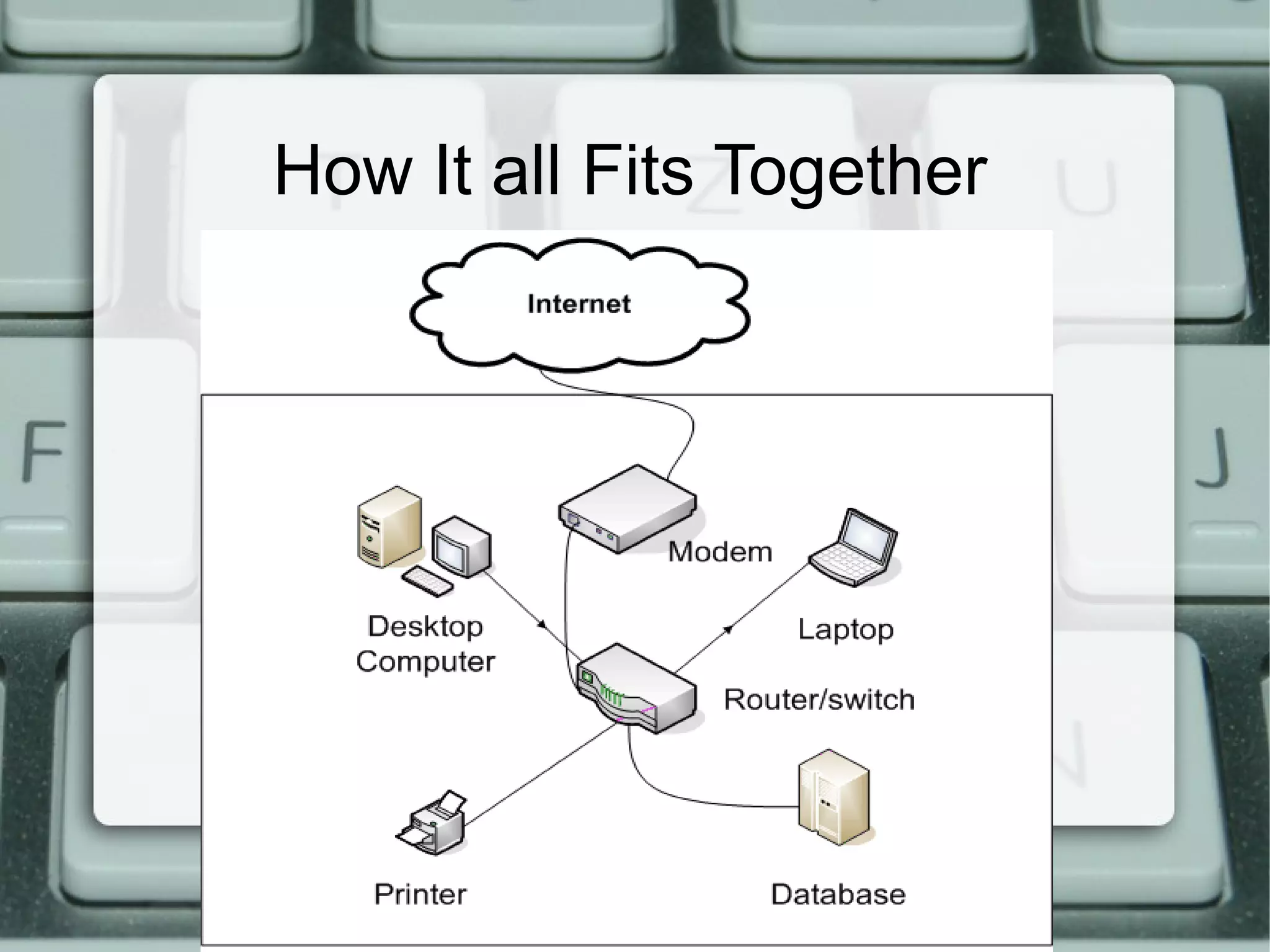
How It all Fits Together
What We See
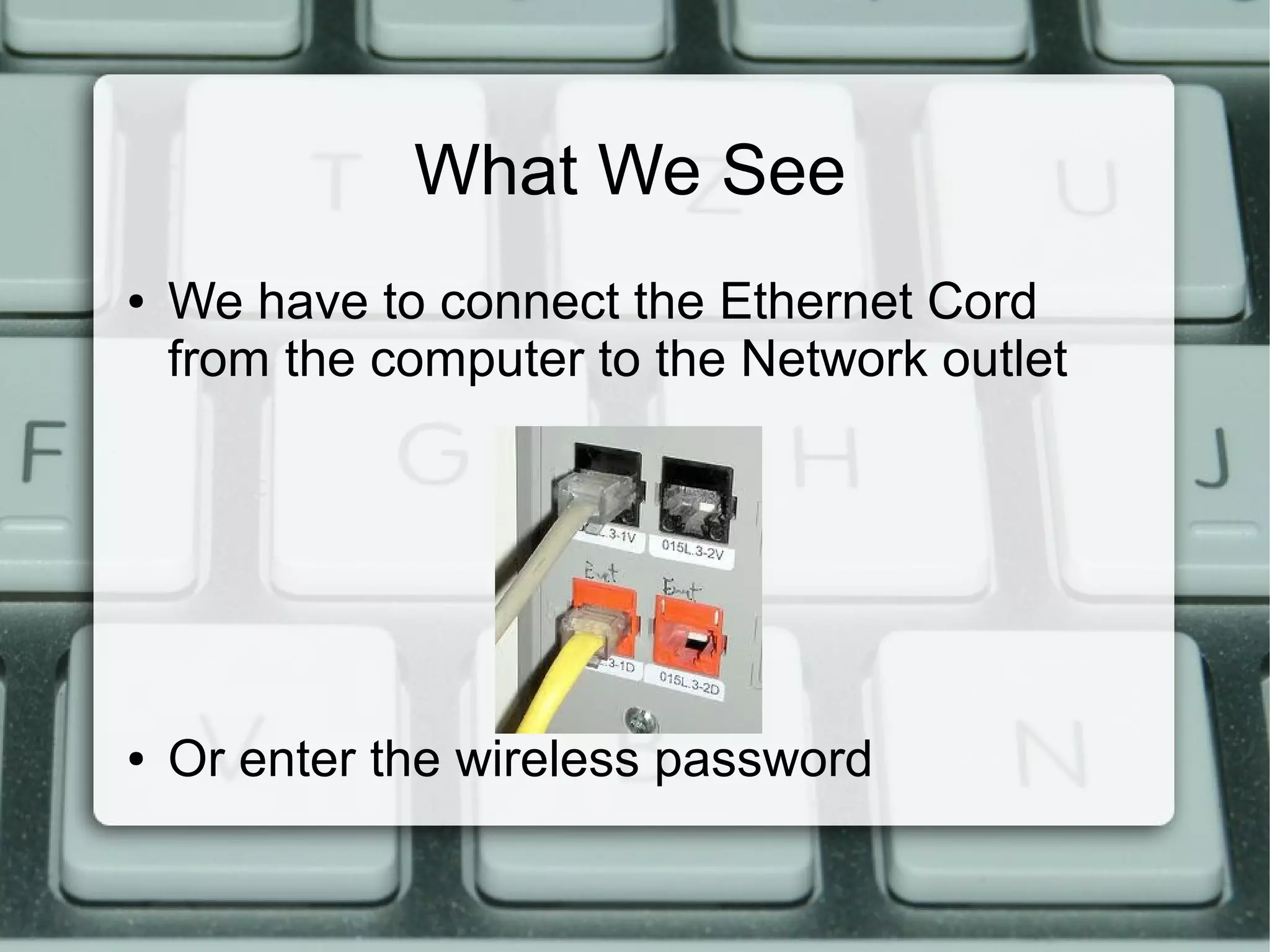
● We have to connect the Ethernet Cord
from the computer to the Network outlet
● Or enter the wireless password
Resources
●
Ethernet cord picture courtesy of:
http://www.washington.edu/itconnect/connect/uw-networks/uw-housing/
●
Network picture courtesy of: http://www.ask-the-computer-doc.com/lan-
definition.html
●
Information from: http://computer.howstuffworks.com/home-network.htm

541 network presentation

  • 1.
    Finding Your Placein the Network What are networks and how do I connect to them? By Erin Hatfield EDTECH 541 Boise State University
  • 2.
    What is aNetwork? ● A network is two or more computers linked together ● Can include more than just computers – Printers – Scanners – Copiers – iPads
  • 3.
    What does aNetwork do? ● Allow computers to communicate ● Shared drives and shared folders ● Share files, internet connections, printers, etc.
  • 4.
    What makes upa Network? ● At least two computers ● Router ● Software ● A path for the information to take (usually cable)
  • 5.
  • 6.
    Software ● Usually comeswith computer ● District purchased Novel
  • 7.
    The Path ● Ethernetcord – Faster – More secure – Less mobility ● Wireless – More mobility – Cleaner appearance – Slower
  • 8.
    How It allFits Together
  • 9.
    What We See ●We have to connect the Ethernet Cord from the computer to the Network outlet ● Or enter the wireless password
  • 10.
    Resources ● Ethernet cord picturecourtesy of: http://www.washington.edu/itconnect/connect/uw-networks/uw-housing/ ● Network picture courtesy of: http://www.ask-the-computer-doc.com/lan- definition.html ● Information from: http://computer.howstuffworks.com/home-network.htm

Editor's Notes

  • #3 What other things do we notice are connected to the network? How is networking computers helpful? How is it difficult?
  • #4 We have a shared drive for our district and everyone has a folder. When a computer is connected to the network, these files can be accessed. These folders can also share things between people and computers.
  • #5 Router- Switch for information. Makes sure things get where they are supposed to Software- Allows the computers to speak the same language and access things from each other. The path is the cables that run or the wireless signal Look around or think: Have I seen any of these components in my classroom?
  • #6 The Router directs information to computers as well as allows everyone to share one internet connection. Routers have limited range so there may be more than one in this building. How many do you think there are?
  • #7 Our district purchased Novel to use for it's networking. This software allows computers to tap into the same internet, files, and printers. It also keeps all the building networks separate so that you cannot print to another building!
  • #8 Ethernet cord looks like a chunky phone cable. While it is limiting, it is perfect for classroom computers because they are not mobile and it is so much faster. However, the cable is expensive and has to be run throughout a building