Pre-Production
Toby Jackson
Pre-production
• What are you making? I am making a film magazine, with a film trailer to go with one of my own ideas. This film
magazine includes a front cover, contents page, 6 pages of writing (including film trailer), and a back cover. It will be
based around films to be released in the future (this year), especially action or adventure films as they're the most
requested from my responses, and a section where I write about and recommend some of the responses from my
market research (their favourite films). My film idea and film trailer will be action, adventure, with elements of the
horror genre too, it is called Escape. It is set and filmed in the forest in Malton, about a group of friends out one
day and having to run away and escape from a mysterious person in the forest. The trailer will show parts of their
journey escaping and who they're running from.
• Why? This is because I enjoy doing graphic design and film editing, they're my two favourite aspects of creative
media and I have experience in both from previous projects. I am doing a film magazine because I enjoy watching
films and have knowledge on them. I've also watched a lot of action and adventure films, and their trailers, they're
my favourite film genre, so I have knowledge on how I should do my trailer
• Who is it for? It is for my primary target audience (teenagers), my film trailer is based off the most popular genres
from my market research responses, action and adventure, therefore they're more likely to click on it and be
interested in it. Also, in my film magazine I will include mainly those genres of films because from my market
research, the majority of my audience would want to read about action and adventure films, that’s why I have also
catered to my target audience from my market research responses by adding in a favourite films section which goes
over all the responses of people's favourite films, this adds a sense of an interactive part of the magazine, how it is
about some people's favourite films from my market research
• Where will it appear/on what? I will make it on Photoshop, and my film trailer will also be imported onto
photoshop on my 6th page so people can view it
Reflection:
Film Magazine Planning
Film Magazine Front Cover Layout
Film title (Escape)
Masthead (TOP FILMS)
Information of
what's inside the
magazine
Free poster
inside
Film Magazine Front Cover Layout
• On my front cover, I will have the background image on the right, which is
an image of the mysterious character holding his prop looking down a hill.
I will have a green masthead 'TOP FILMS' at the top with effects on it
including a stroke, emboss, etc. I chose to do a green masthead because it
matches the main colour scheme of green, brown, yellow and orange, as
the masthead will be at the top, it will be with the leaves on the trees so a
green title with a darker green stroke, and editing to make it bold, would
stand out well and suit the front cover. Then I will include information on
the front to show people what is inside the magazine and an orange circle
(like a sticker). I am chosing to do orange because it stands out as a sticker
colour and it will be eye-catching to the audience, and it fits well with the
other colours of the front cover, yellow, green and brown. The film title
'Escape' at the bottom in brown font, because it is on the ground. I will
add effects to the background like making the ground darker and making
the characters head go over text to show the importance of the character
in the trailer.
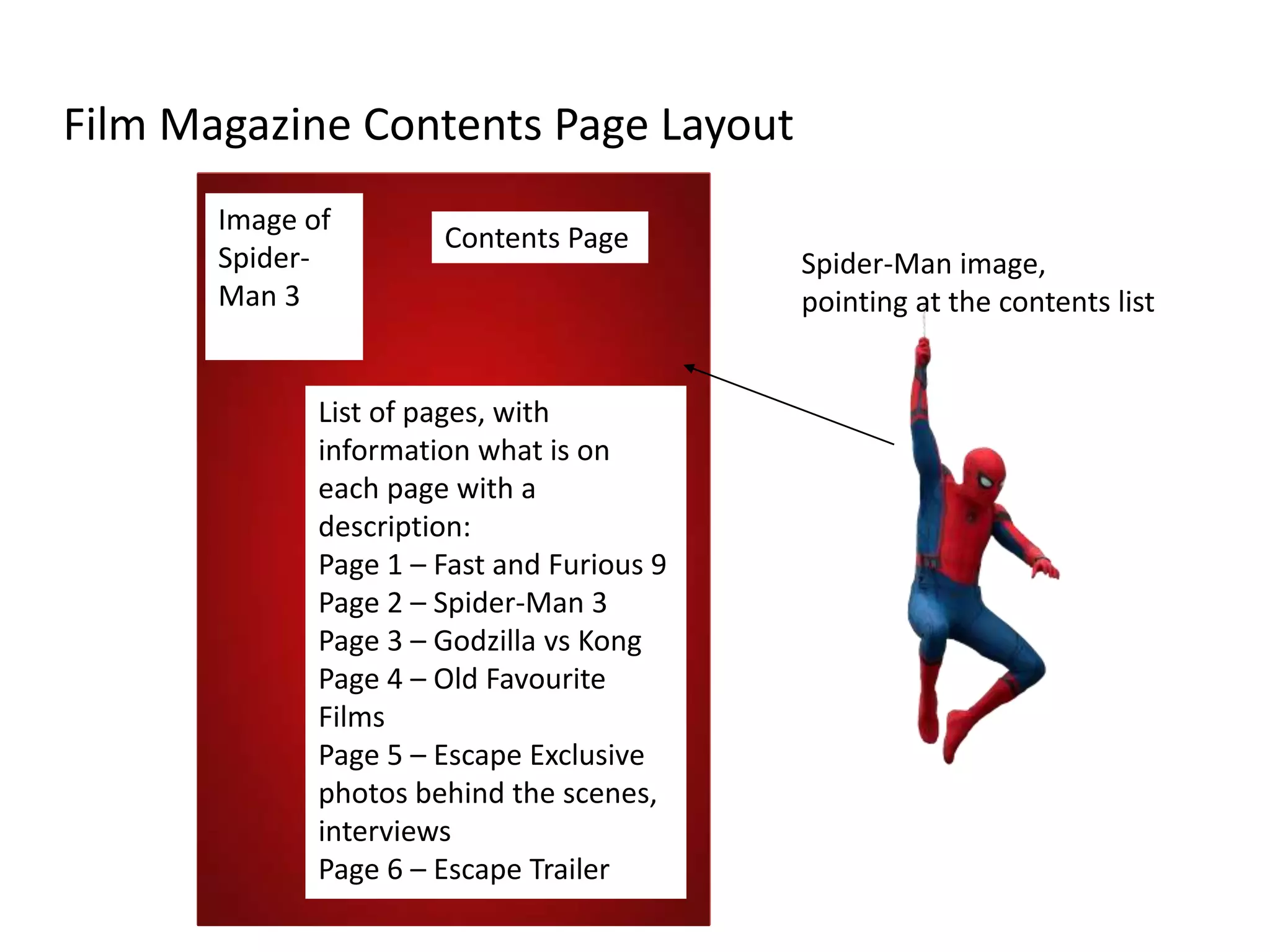
Film Magazine Contents Page Layout
Image of
Spider-
Man 3
Contents Page
List of pages, with
information what is on
each page with a
description:
Page 1 – Fast and Furious 9
Page 2 – Spider-Man 3
Page 3 – Godzilla vs Kong
Page 4 – Old Favourite
Films
Page 5 – Escape Exclusive
photos behind the scenes,
interviews
Page 6 – Escape Trailer
Spider-Man image,
pointing at the contents list
Film Magazine Contents Page Layout
• I will have a red background and a transparent
Spider-Man image to show that he is in the
magazine, with all the contents on the right
side in white font to show the audience what
information is on each page.
Film Magazine (written part, 6 pages)
Double page spread
Film title
Information about the film,
release date, cast, reviews
etc.
Image of the film on that
page
Headline
Box for fun
facts / extra
information
Information about the film,
release date, cast, reviews,
etc.
Film Magazine Written Part
• I am going to be doing double page spreads
and a single page for my film magazine. I will
include images of the film, titles, headlines to
keep the audience interested and an extra box
with fun facts to add to it, this could make the
audience interested in the film more.
Film Magazine Back Cover Layout
Masthead (TOP FILMS)
Exclusive
Interviews
Quotes from the exclusive
interviews:
Toby Jackson (Director of
'Escape') - "It was very fun
making it, it has a good
storyline, and I can't wait
for people to see the
trailer)
Film Title (Escape)
Film Magazine Back Cover Layout
• I will have the same green masthead on my
back cover, and I will have the film title behind
the character on screen and his head will be in
front of it to show their importance. I will add
in quotes on the back cover to make the
audience interested in the film, it will be
quotes from the director and actor, also it will
have another orange circle as a sticker
advertising a free poster inside.
Film Magazine Risk Assessment
Risk How I can avoid that risk /
solve it
Damaging the computer Keep water and other liquids
away from my computer I am
working on
Eye strain Make sure I have breaks at
lunchtime
Dropping my phone while
taking photos
When I am taking my own photos for my front
cover and back cover, I need to make sure I
don't drop my phone or other equipment
because it could break, I am using my phone to
film also which means I can't break it otherwise
I don’t have anything to film with
Injuring while taking the photos I am taking some photos of me on the edge of a
hill, so I need to make sure I don't fall or get
injured
Film Magazine Style Sheet Images
I have chosen the first Fast and Furious 9 image because the different colour layers (white, yellow, blue, black, green, red) as smoke, and all the
characters fits exactly the theme of what all film magazines are like, with a good colourful background including all the characters. The second is an
alternative, it is the good size and shape (vertical) for a front cover or poster, and I could have the chain overlapping the masthead, which is what I also
plan to do to Dom's head (the character on the far right) as it shows the dominance and how powerful these characters are in the films. I could use this
alternative image for my double page spread too. The Spider-Man image on a red background is for my contents page, I chose that image of Spider-Man
because it matches the text colours I plan to use on that page (blue and white stroke), also he is pointing down to where the text will be, which is
effective because the image is one of the first parts my audience sees when looking at this contents page, so they will see Spider-Man's hand pointing
down to the text to read. The alternative image is also Spider-Man which I could use at the bottom of the page, like he has dropped from the top of the
page to the bottom, as that pose on the alternative image is what he does when he lands, my primary target audience who are interested in these films
might recognize it. The Godzilla vs Kong image is very bright, with the colours mainly being purple, blue, green, yellow and black with the character
Godzilla. This is effective because it has a main character that the audience will recognize and very eye-catching bright neon colours. The alternative
back cover image is the one below, which shows Godzilla and Kong fighting, which shows the dominance and importance in both characters, also how
the left side with Godzilla is red and orange and the right side of Kong is blue and green, I could have red text on the left side and blue text on the right
side, because it matches the colour theme. The connotations of red and blue together show strength and power, which works well because it shows the
two characters importance and how powerful they can be. Also, some of connotations are that red and blue together are two very popular and different
colours, so it shows two different sides, like there is in this battle between both monsters. I will use this alternative image for my written pages in my
magazine most likely. The other two images are for my written pages, the first image is of Dom and Letty in the trailer, which shows the characters being
careful with their arms out, and looking down onto something, thisis effective because I will have this image in my writing pages about the film, so it is
like the characters are looking down onto the headline and the text. Additionally, the image of the 3 Spider-Men is a concept and rumour that all three
characters will be in the new Spider-Man film, as many fans will be aware of this, so I will write about it in my magazine based off this image. I will also
use exclusive behind the scenes images for my film idea 'Escape' and use these in my written pages too.
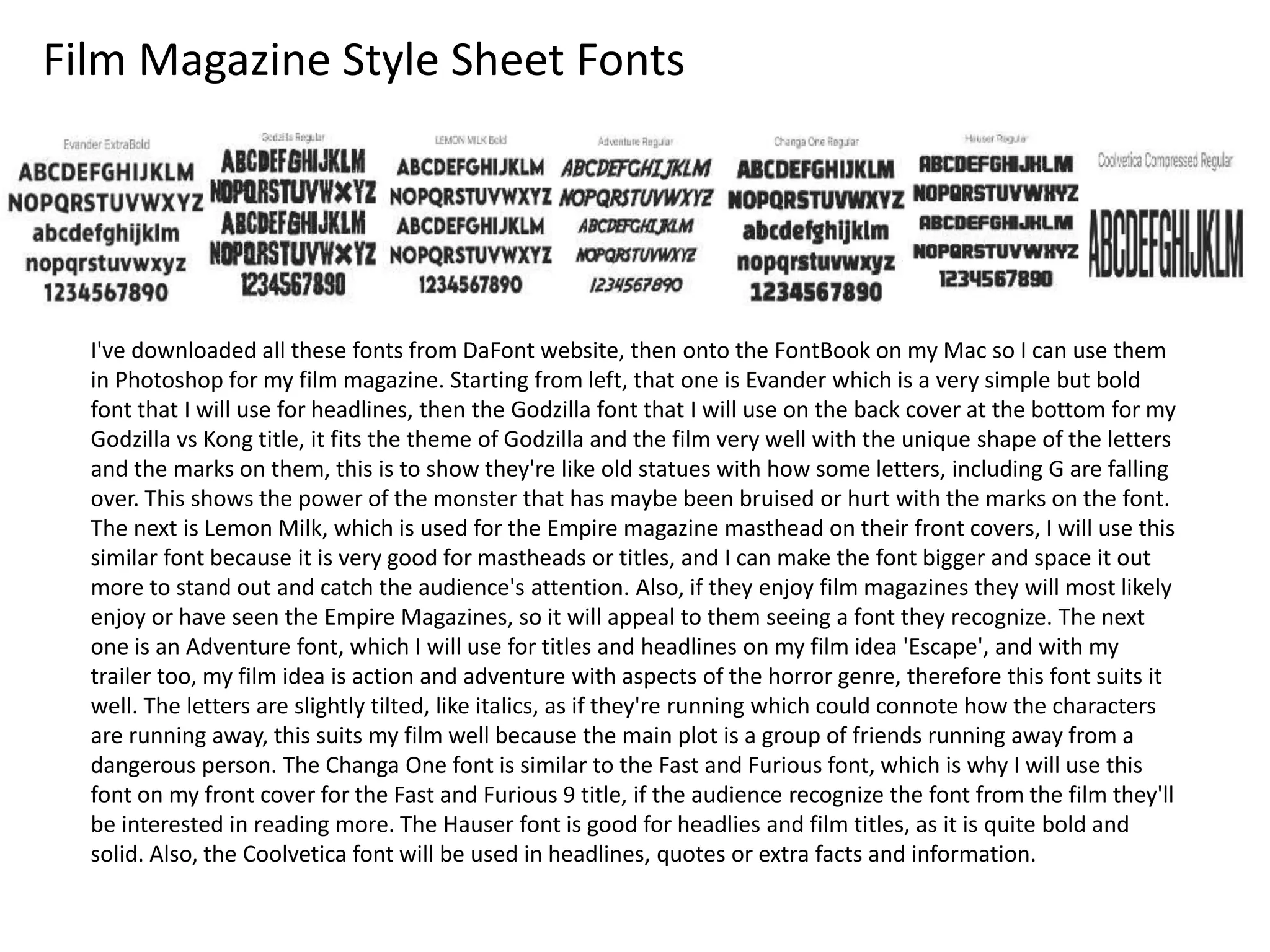
Film Magazine Style Sheet Fonts
I've downloaded all these fonts from DaFont website, then onto the FontBook on my Mac so I can use them
in Photoshop for my film magazine. Starting from left, that one is Evander which is a very simple but bold
font that I will use for headlines, then the Godzilla font that I will use on the back cover at the bottom for my
Godzilla vs Kong title, it fits the theme of Godzilla and the film very well with the unique shape of the letters
and the marks on them, this is to show they're like old statues with how some letters, including G are falling
over. This shows the power of the monster that has maybe been bruised or hurt with the marks on the font.
The next is Lemon Milk, which is used for the Empire magazine masthead on their front covers, I will use this
similar font because it is very good for mastheads or titles, and I can make the font bigger and space it out
more to stand out and catch the audience's attention. Also, if they enjoy film magazines they will most likely
enjoy or have seen the Empire Magazines, so it will appeal to them seeing a font they recognize. The next
one is an Adventure font, which I will use for titles and headlines on my film idea 'Escape', and with my
trailer too, my film idea is action and adventure with aspects of the horror genre, therefore this font suits it
well. The letters are slightly tilted, like italics, as if they're running which could connote how the characters
are running away, this suits my film well because the main plot is a group of friends running away from a
dangerous person. The Changa One font is similar to the Fast and Furious font, which is why I will use this
font on my front cover for the Fast and Furious 9 title, if the audience recognize the font from the film they'll
be interested in reading more. The Hauser font is good for headlies and film titles, as it is quite bold and
solid. Also, the Coolvetica font will be used in headlines, quotes or extra facts and information.
Film Magazine Colour Schemes
Front Cover Contents Page
Back Cover
Green
Masthead
(TOP FILMS)
Brown film title
(Escape)
Orange text
about what is
included in the
magazine,
films, quotes
etc.
Orange circle also
advertising what is
inside of the magazine
'exclusive interviews',
with yellow writing
Blue contents page title
Blue and white list of contents
with a description in smaller
text underneath, this is
because blue with a white
stroke stands out well on a
red background, and fits the
same colours as the Spider-
Man image in the top left
Green masthead (TOP
FILMS)
Orange text including
a quote of the director
and an actor
Film title at the
bottom with
'Escape', with the
bottom of the
background being
darker colours.
This matches the
front cover
(Colour scheme description
on next slide)
Film Magazine Colour Schemes
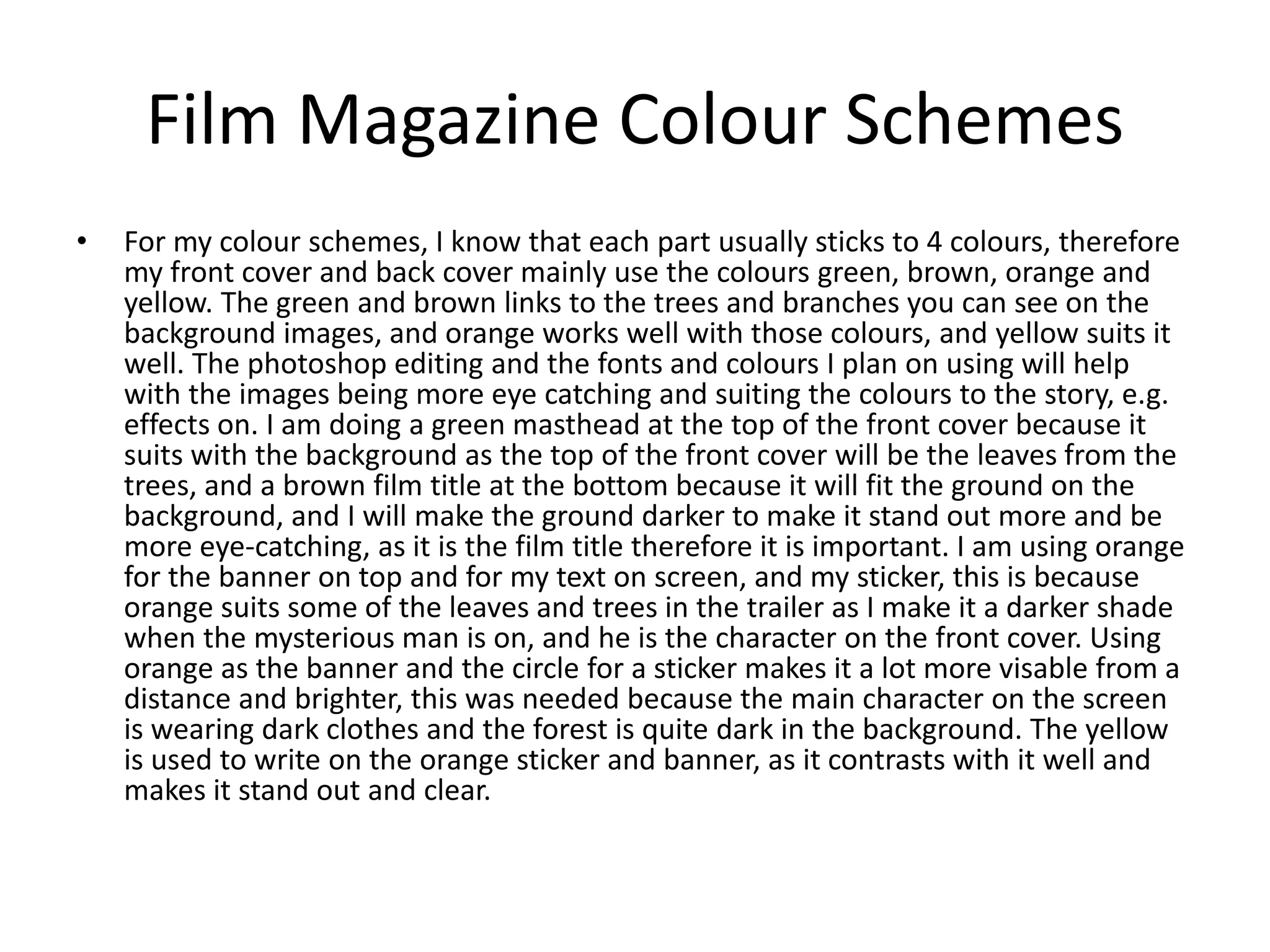
• For my colour schemes, I know that each part usually sticks to 4 colours, therefore
my front cover and back cover mainly use the colours green, brown, orange and
yellow. The green and brown links to the trees and branches you can see on the
background images, and orange works well with those colours, and yellow suits it
well. The photoshop editing and the fonts and colours I plan on using will help
with the images being more eye catching and suiting the colours to the story, e.g.
effects on. I am doing a green masthead at the top of the front cover because it
suits with the background as the top of the front cover will be the leaves from the
trees, and a brown film title at the bottom because it will fit the ground on the
background, and I will make the ground darker to make it stand out more and be
more eye-catching, as it is the film title therefore it is important. I am using orange
for the banner on top and for my text on screen, and my sticker, this is because
orange suits some of the leaves and trees in the trailer as I make it a darker shade
when the mysterious man is on, and he is the character on the front cover. Using
orange as the banner and the circle for a sticker makes it a lot more visable from a
distance and brighter, this was needed because the main character on the screen
is wearing dark clothes and the forest is quite dark in the background. The yellow
is used to write on the orange sticker and banner, as it contrasts with it well and
makes it stand out and clear.
Film Magazine Equipment List
- Mac, including mouse and keyboard (in college). I will need a Mac in college to edit
my magazine
- Photoshop (in college). This is because I am using Photoshop to create my
magazine
-Google (in college). I will need to google to download any fonts, get images or look
at anything if needed
- Internet Access (in college). I will need the internet to work to use Microsoft Office
online and Microsoft Teams, Outlook, Photoshop etc
- Bus Tickets (online). I will need my bus tickets to get into college so I can work on
my production on the Mac
- My phone (outside of college). I will need my phone with fully battery and a good
amount of storage left to take photos for my front cover and back cover, and to
include inside my magazine on a double page spread.
Film Magazine Budget
For my magazine, I won't need much of a budget, this is because I am making it on
the Mac in college. I will need a budget of over £12 a week for my bus tickets and
journey into college. Therefore, I won't need to purchase anything else in college,
unless if anything goes wrong and I need to work from home, I will need to pay £10
per month for Adobe Creative Cloud, which includes Photoshop, PremierPro etc.
Film Trailer Planning
Film Trailer Risk Assessment
Risk How I can avoid it / fix it
Bad weather could cause damage in
equipment
Make sure to check the weather
before I film the day before, and wear
suitable clothing for it and keep
equipment safe
Bad weather could cause injuries /
falling over
Make sure to walk safely if it is wet on
the ground to avoid injuries
Trees falling over / branches snapping
as I am filming in a forest
Make sure we don't knock anything
over and stay safe
Fallling down hills There are a few hills we are filming on
with a steep way down, so we need to
go down safely
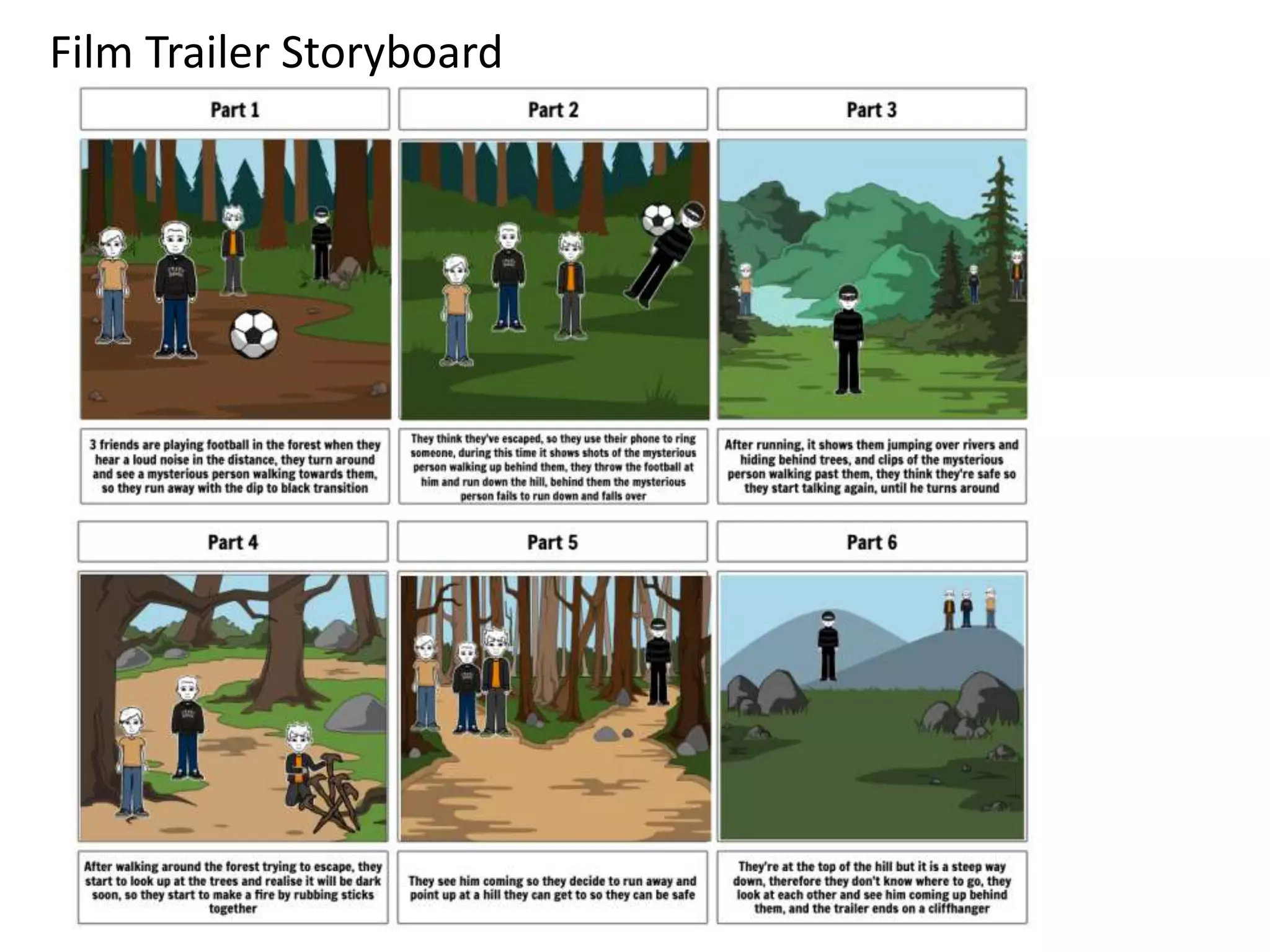
Film Trailer Storyboard
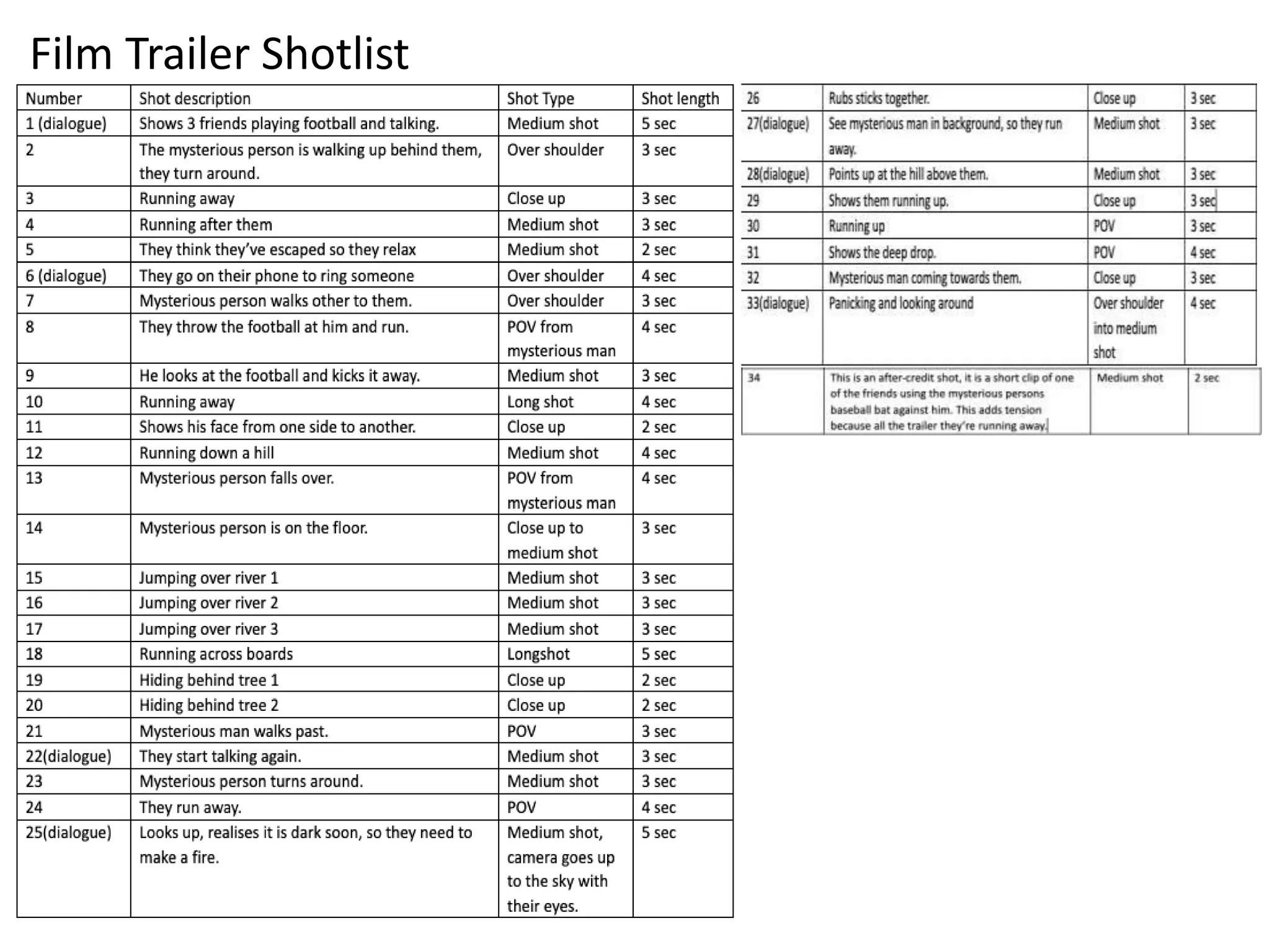
Film Trailer Shotlist
Film Trailer Equipment List
Clothes I will be wearing for the roal of my
character, black joggers, dark coat with
dark trainers
Everyone else will be
wearing casual clothing,
any colour
- Football, for a few scenes in the beginning when everything is like a normal day
- Baseball Bat, For the mysterious man to use
- Casual Clothing, This is for the other 3 actors who are in the trailer as at first everything
is like a normal day before everything gets interupted, this includes any joggers, jeans, t-
shirts, hoodies, trainers etc.
- Dark Clothes, this is for me, as I am acting as the mysterious man, black trainers, mask,
joggers, hoodie, coat. This is because the connotations of these colours are to add to the
element of mystery and horror within this character
- Phone, this is because I am filming it on my iPhone, and it needs to have full battery and
a lot of storage available
Film Trailer Script
Shot 1 - (Actor 2) "Where do you wanna go now?"
(Actor 3) "I don’t mind"
Shot 6 - (Actor 2) "Hello? I think we're in trouble..."
Shot 22 - (Actor 4)"Wow that was close"
(Actor 3) "Yeah, hopefully he's gone now
Shot 25 - (Actor 2) "We're gonna have to make a fire, look it's gonna be dark too"
Shot 27 - (Actor 4) "Oh not again"
Shot 28 - (Actor 3) "Let's go up there he won't see us"
Shot 33 - (actor 3)"Where do we go? Where do we go?"
Film Trailer Call Sheet
The cast for this film trailer includes Toby Jackson (myself, directing the film trailer,
and acting as the mysterious person too), Karl Shepherd (actor as one of the friends in
the group in this trailer), Sam Smith (also another actor for one of the friends), and
Harry Smith (the fourth actor and part of the group of friends for this trailer).
The location for this film trailer is at Orchard Fields, this is because this forest area
suits the theme of adventure, action and horror with it being set in a deep vast forest
which connotes lots of mysterious and easy to get lost, this links to the mysterious
person in this trailer and how the characters (group of friends) get lost. The film
crew in this trailer know this location very well and know this is the setting for the
trailer. I also chose to film here due to it being quite a quiet and remote area,
therefore we will have lots of space and time to film here, especially with it suiting my
storyline and genres very well, with it having lots of trees, a hill, river etc.
We will be filming my film trailer on Sunday 25th April 2021 at 1pm. All my shots are
on my shot list and my film crew know what shots I am doing and how long they will
be.
Film Trailer Budget
My budget for my film trailer isn't big because I am using my own equipment and
filming on a weekend. I will need over £12 a week for my bus tickets to get into
college to complete the post-production and pre-production, as I am doing the
filming outside of college on a weekend. I will be using my own clothes, equipment
therefore I won't need to pay for anything else
Resources – Magazine and Trailer
Equipment/ Props/
Costume needed
Locations needed
Football (owned) Orchard Fields seating area (accessible)
Baseball bat (owned) Bottom of Orchard Fields (accessible)
Black coat, hoodie and joggers for the
mysterious character, because it links to
the colour connotations, mystery and
darkness (owned)
Orchard Fields Forest (accessible)
Casual clothing for the other 3 characters
(owned)
Orchard Fields Forest Boardwalk
(accessible)
Mac, to access Photoshop and PremierPro
(owned)
College (accessible)
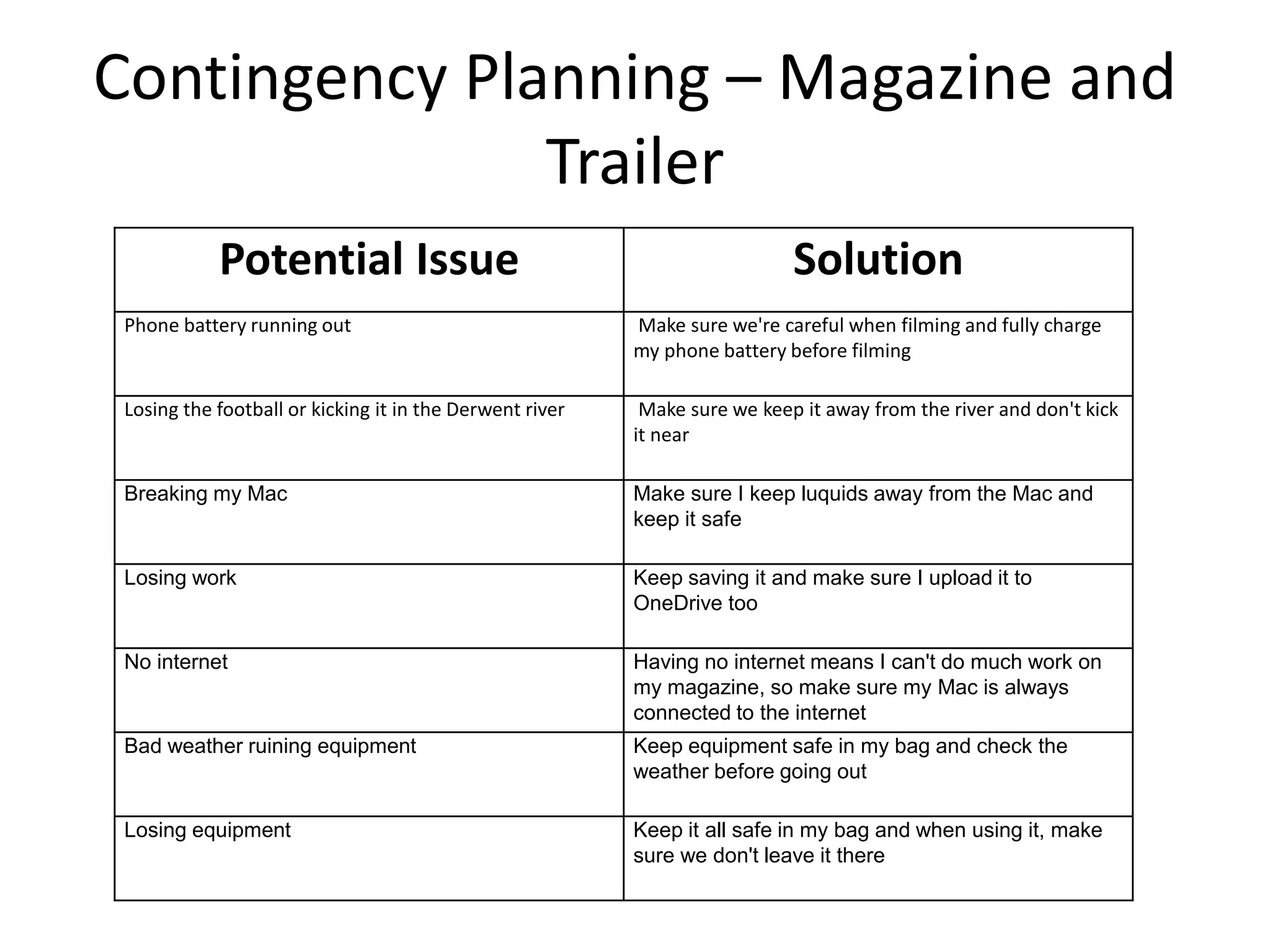
Contingency Planning – Magazine and
Trailer
Potential Issue Solution
Phone battery running out Make sure we're careful when filming and fully charge
my phone battery before filming
Losing the football or kicking it in the Derwent river Make sure we keep it away from the river and don't kick
it near
Breaking my Mac Make sure I keep luquids away from the Mac and
keep it safe
Losing work Keep saving it and make sure I upload it to
OneDrive too
No internet Having no internet means I can't do much work on
my magazine, so make sure my Mac is always
connected to the internet
Bad weather ruining equipment Keep equipment safe in my bag and check the
weather before going out
Losing equipment Keep it all safe in my bag and when using it, make
sure we don't leave it there
Health and Safety – Magazine and
Trailer
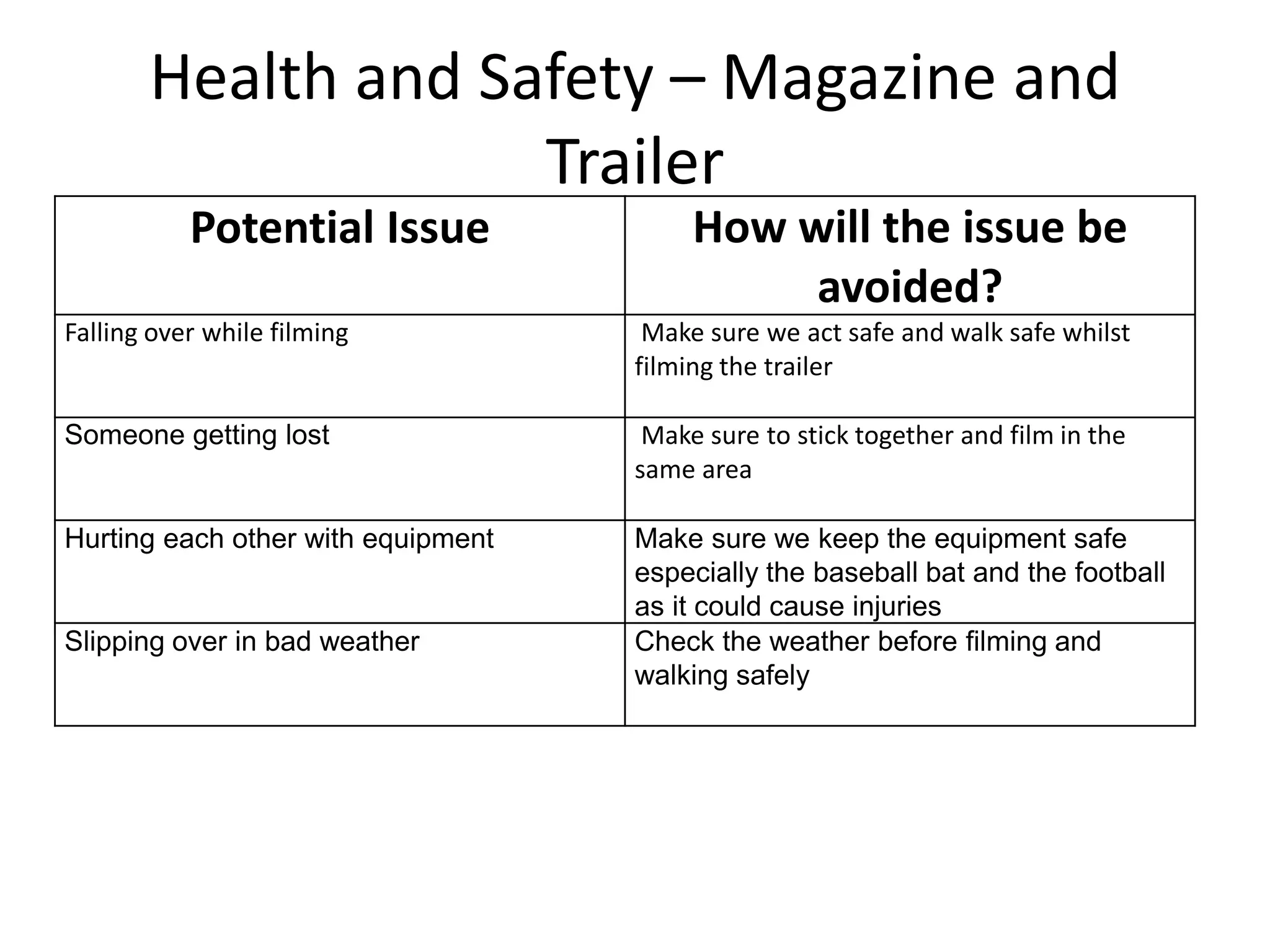
Potential Issue How will the issue be
avoided?
Falling over while filming Make sure we act safe and walk safe whilst
filming the trailer
Someone getting lost Make sure to stick together and film in the
same area
Hurting each other with equipment Make sure we keep the equipment safe
especially the baseball bat and the football
as it could cause injuries
Slipping over in bad weather Check the weather before filming and
walking safely
Production Schedule
Day/Lesson Tasks
Week 1 – Monday, Tuesday, Wednesday
(12th April – 14th April)
I will need to get started on my production and use photoshop to make my
film magazine on Monday. I will work on my contents page on Monday, and
try finish it on Tuesday so I can start and work on my double page spreads on
Tuesday and Wednesday, this will be the films releasing in 2021. I will get
photos for my front cover and back cover on this weekend (18th April) so I
can do them next week
Week 2 - Monday, Tuesday, Wednesday
(19th April – 21st April)
On Monday, I will put all my photos for my magazine from my phone and
uploaded onto OneDrive so I can start editing my front cover and back cover.
I will continue with them on Tuesday and Wednesday and finish them by the
end of the week
Week 3 – Monday, Tuesday, Wednesday
(26th April – 28th April)
On Monday I will make some new double page spreads for my audiences
favourite films, and my own film idea. I will carry on with these on Tuesday
and Wednesday and finish my magazine for the end of the week. I am filming
my trailer at the weekend on 9th May, so I can edit them next week.
Week 4 – Monday, Tuesday, Wednesday
(3rd May – 5th May)
On Monday, I am working on my trailer by uploading all my clips onto
OneDrive then onto PremierePro then I will edit and create my trailer,
on Tuesday I will continue with this trailer and finish it off. Then on
Wednesday I'll have a full day in college so I'll be able to make my
advert as it will be shorter than the trailer, using the same footage and
a few new scenes too.
Week 5 – Monday, Tuesday, Wednesday
(10th May – 12th May)
On Monday I will do any reflections on previous work or anything I
need to catch up on, I will do the same on Tuesday too, but when I
finish I'll start my evaluation, and do it on Wednesday too.
Week 6 – Monday, Tuesday, Wednesday
(17th May – 19th May)
On Monday I'll work on my evaluation and make sure it is detailed, and
on Tuesday I'll finish it off and make sure it is complete. On
Wednesday, it'll be my last day in college before the deadline, so I will
put all my work together, upload it all to my blog, and make any final
touches to my work if I need to.

5. pre production new-5

  • 1.
  • 2.
    Pre-production • What areyou making? I am making a film magazine, with a film trailer to go with one of my own ideas. This film magazine includes a front cover, contents page, 6 pages of writing (including film trailer), and a back cover. It will be based around films to be released in the future (this year), especially action or adventure films as they're the most requested from my responses, and a section where I write about and recommend some of the responses from my market research (their favourite films). My film idea and film trailer will be action, adventure, with elements of the horror genre too, it is called Escape. It is set and filmed in the forest in Malton, about a group of friends out one day and having to run away and escape from a mysterious person in the forest. The trailer will show parts of their journey escaping and who they're running from. • Why? This is because I enjoy doing graphic design and film editing, they're my two favourite aspects of creative media and I have experience in both from previous projects. I am doing a film magazine because I enjoy watching films and have knowledge on them. I've also watched a lot of action and adventure films, and their trailers, they're my favourite film genre, so I have knowledge on how I should do my trailer • Who is it for? It is for my primary target audience (teenagers), my film trailer is based off the most popular genres from my market research responses, action and adventure, therefore they're more likely to click on it and be interested in it. Also, in my film magazine I will include mainly those genres of films because from my market research, the majority of my audience would want to read about action and adventure films, that’s why I have also catered to my target audience from my market research responses by adding in a favourite films section which goes over all the responses of people's favourite films, this adds a sense of an interactive part of the magazine, how it is about some people's favourite films from my market research • Where will it appear/on what? I will make it on Photoshop, and my film trailer will also be imported onto photoshop on my 6th page so people can view it Reflection:
  • 3.
  • 4.
    Film Magazine FrontCover Layout Film title (Escape) Masthead (TOP FILMS) Information of what's inside the magazine Free poster inside
  • 5.
    Film Magazine FrontCover Layout • On my front cover, I will have the background image on the right, which is an image of the mysterious character holding his prop looking down a hill. I will have a green masthead 'TOP FILMS' at the top with effects on it including a stroke, emboss, etc. I chose to do a green masthead because it matches the main colour scheme of green, brown, yellow and orange, as the masthead will be at the top, it will be with the leaves on the trees so a green title with a darker green stroke, and editing to make it bold, would stand out well and suit the front cover. Then I will include information on the front to show people what is inside the magazine and an orange circle (like a sticker). I am chosing to do orange because it stands out as a sticker colour and it will be eye-catching to the audience, and it fits well with the other colours of the front cover, yellow, green and brown. The film title 'Escape' at the bottom in brown font, because it is on the ground. I will add effects to the background like making the ground darker and making the characters head go over text to show the importance of the character in the trailer.
  • 6.
    Film Magazine ContentsPage Layout Image of Spider- Man 3 Contents Page List of pages, with information what is on each page with a description: Page 1 – Fast and Furious 9 Page 2 – Spider-Man 3 Page 3 – Godzilla vs Kong Page 4 – Old Favourite Films Page 5 – Escape Exclusive photos behind the scenes, interviews Page 6 – Escape Trailer Spider-Man image, pointing at the contents list
  • 7.
    Film Magazine ContentsPage Layout • I will have a red background and a transparent Spider-Man image to show that he is in the magazine, with all the contents on the right side in white font to show the audience what information is on each page.
  • 8.
    Film Magazine (writtenpart, 6 pages) Double page spread Film title Information about the film, release date, cast, reviews etc. Image of the film on that page Headline Box for fun facts / extra information Information about the film, release date, cast, reviews, etc.
  • 9.
    Film Magazine WrittenPart • I am going to be doing double page spreads and a single page for my film magazine. I will include images of the film, titles, headlines to keep the audience interested and an extra box with fun facts to add to it, this could make the audience interested in the film more.
  • 10.
    Film Magazine BackCover Layout Masthead (TOP FILMS) Exclusive Interviews Quotes from the exclusive interviews: Toby Jackson (Director of 'Escape') - "It was very fun making it, it has a good storyline, and I can't wait for people to see the trailer) Film Title (Escape)
  • 11.
    Film Magazine BackCover Layout • I will have the same green masthead on my back cover, and I will have the film title behind the character on screen and his head will be in front of it to show their importance. I will add in quotes on the back cover to make the audience interested in the film, it will be quotes from the director and actor, also it will have another orange circle as a sticker advertising a free poster inside.
  • 12.
    Film Magazine RiskAssessment Risk How I can avoid that risk / solve it Damaging the computer Keep water and other liquids away from my computer I am working on Eye strain Make sure I have breaks at lunchtime Dropping my phone while taking photos When I am taking my own photos for my front cover and back cover, I need to make sure I don't drop my phone or other equipment because it could break, I am using my phone to film also which means I can't break it otherwise I don’t have anything to film with Injuring while taking the photos I am taking some photos of me on the edge of a hill, so I need to make sure I don't fall or get injured
  • 13.
    Film Magazine StyleSheet Images I have chosen the first Fast and Furious 9 image because the different colour layers (white, yellow, blue, black, green, red) as smoke, and all the characters fits exactly the theme of what all film magazines are like, with a good colourful background including all the characters. The second is an alternative, it is the good size and shape (vertical) for a front cover or poster, and I could have the chain overlapping the masthead, which is what I also plan to do to Dom's head (the character on the far right) as it shows the dominance and how powerful these characters are in the films. I could use this alternative image for my double page spread too. The Spider-Man image on a red background is for my contents page, I chose that image of Spider-Man because it matches the text colours I plan to use on that page (blue and white stroke), also he is pointing down to where the text will be, which is effective because the image is one of the first parts my audience sees when looking at this contents page, so they will see Spider-Man's hand pointing down to the text to read. The alternative image is also Spider-Man which I could use at the bottom of the page, like he has dropped from the top of the page to the bottom, as that pose on the alternative image is what he does when he lands, my primary target audience who are interested in these films might recognize it. The Godzilla vs Kong image is very bright, with the colours mainly being purple, blue, green, yellow and black with the character Godzilla. This is effective because it has a main character that the audience will recognize and very eye-catching bright neon colours. The alternative back cover image is the one below, which shows Godzilla and Kong fighting, which shows the dominance and importance in both characters, also how the left side with Godzilla is red and orange and the right side of Kong is blue and green, I could have red text on the left side and blue text on the right side, because it matches the colour theme. The connotations of red and blue together show strength and power, which works well because it shows the two characters importance and how powerful they can be. Also, some of connotations are that red and blue together are two very popular and different colours, so it shows two different sides, like there is in this battle between both monsters. I will use this alternative image for my written pages in my magazine most likely. The other two images are for my written pages, the first image is of Dom and Letty in the trailer, which shows the characters being careful with their arms out, and looking down onto something, thisis effective because I will have this image in my writing pages about the film, so it is like the characters are looking down onto the headline and the text. Additionally, the image of the 3 Spider-Men is a concept and rumour that all three characters will be in the new Spider-Man film, as many fans will be aware of this, so I will write about it in my magazine based off this image. I will also use exclusive behind the scenes images for my film idea 'Escape' and use these in my written pages too.
  • 14.
    Film Magazine StyleSheet Fonts I've downloaded all these fonts from DaFont website, then onto the FontBook on my Mac so I can use them in Photoshop for my film magazine. Starting from left, that one is Evander which is a very simple but bold font that I will use for headlines, then the Godzilla font that I will use on the back cover at the bottom for my Godzilla vs Kong title, it fits the theme of Godzilla and the film very well with the unique shape of the letters and the marks on them, this is to show they're like old statues with how some letters, including G are falling over. This shows the power of the monster that has maybe been bruised or hurt with the marks on the font. The next is Lemon Milk, which is used for the Empire magazine masthead on their front covers, I will use this similar font because it is very good for mastheads or titles, and I can make the font bigger and space it out more to stand out and catch the audience's attention. Also, if they enjoy film magazines they will most likely enjoy or have seen the Empire Magazines, so it will appeal to them seeing a font they recognize. The next one is an Adventure font, which I will use for titles and headlines on my film idea 'Escape', and with my trailer too, my film idea is action and adventure with aspects of the horror genre, therefore this font suits it well. The letters are slightly tilted, like italics, as if they're running which could connote how the characters are running away, this suits my film well because the main plot is a group of friends running away from a dangerous person. The Changa One font is similar to the Fast and Furious font, which is why I will use this font on my front cover for the Fast and Furious 9 title, if the audience recognize the font from the film they'll be interested in reading more. The Hauser font is good for headlies and film titles, as it is quite bold and solid. Also, the Coolvetica font will be used in headlines, quotes or extra facts and information.
  • 15.
    Film Magazine ColourSchemes Front Cover Contents Page Back Cover Green Masthead (TOP FILMS) Brown film title (Escape) Orange text about what is included in the magazine, films, quotes etc. Orange circle also advertising what is inside of the magazine 'exclusive interviews', with yellow writing Blue contents page title Blue and white list of contents with a description in smaller text underneath, this is because blue with a white stroke stands out well on a red background, and fits the same colours as the Spider- Man image in the top left Green masthead (TOP FILMS) Orange text including a quote of the director and an actor Film title at the bottom with 'Escape', with the bottom of the background being darker colours. This matches the front cover (Colour scheme description on next slide)
  • 16.
    Film Magazine ColourSchemes • For my colour schemes, I know that each part usually sticks to 4 colours, therefore my front cover and back cover mainly use the colours green, brown, orange and yellow. The green and brown links to the trees and branches you can see on the background images, and orange works well with those colours, and yellow suits it well. The photoshop editing and the fonts and colours I plan on using will help with the images being more eye catching and suiting the colours to the story, e.g. effects on. I am doing a green masthead at the top of the front cover because it suits with the background as the top of the front cover will be the leaves from the trees, and a brown film title at the bottom because it will fit the ground on the background, and I will make the ground darker to make it stand out more and be more eye-catching, as it is the film title therefore it is important. I am using orange for the banner on top and for my text on screen, and my sticker, this is because orange suits some of the leaves and trees in the trailer as I make it a darker shade when the mysterious man is on, and he is the character on the front cover. Using orange as the banner and the circle for a sticker makes it a lot more visable from a distance and brighter, this was needed because the main character on the screen is wearing dark clothes and the forest is quite dark in the background. The yellow is used to write on the orange sticker and banner, as it contrasts with it well and makes it stand out and clear.
  • 17.
    Film Magazine EquipmentList - Mac, including mouse and keyboard (in college). I will need a Mac in college to edit my magazine - Photoshop (in college). This is because I am using Photoshop to create my magazine -Google (in college). I will need to google to download any fonts, get images or look at anything if needed - Internet Access (in college). I will need the internet to work to use Microsoft Office online and Microsoft Teams, Outlook, Photoshop etc - Bus Tickets (online). I will need my bus tickets to get into college so I can work on my production on the Mac - My phone (outside of college). I will need my phone with fully battery and a good amount of storage left to take photos for my front cover and back cover, and to include inside my magazine on a double page spread.
  • 18.
    Film Magazine Budget Formy magazine, I won't need much of a budget, this is because I am making it on the Mac in college. I will need a budget of over £12 a week for my bus tickets and journey into college. Therefore, I won't need to purchase anything else in college, unless if anything goes wrong and I need to work from home, I will need to pay £10 per month for Adobe Creative Cloud, which includes Photoshop, PremierPro etc.
  • 19.
  • 20.
    Film Trailer RiskAssessment Risk How I can avoid it / fix it Bad weather could cause damage in equipment Make sure to check the weather before I film the day before, and wear suitable clothing for it and keep equipment safe Bad weather could cause injuries / falling over Make sure to walk safely if it is wet on the ground to avoid injuries Trees falling over / branches snapping as I am filming in a forest Make sure we don't knock anything over and stay safe Fallling down hills There are a few hills we are filming on with a steep way down, so we need to go down safely
  • 21.
  • 22.
  • 23.
    Film Trailer EquipmentList Clothes I will be wearing for the roal of my character, black joggers, dark coat with dark trainers Everyone else will be wearing casual clothing, any colour - Football, for a few scenes in the beginning when everything is like a normal day - Baseball Bat, For the mysterious man to use - Casual Clothing, This is for the other 3 actors who are in the trailer as at first everything is like a normal day before everything gets interupted, this includes any joggers, jeans, t- shirts, hoodies, trainers etc. - Dark Clothes, this is for me, as I am acting as the mysterious man, black trainers, mask, joggers, hoodie, coat. This is because the connotations of these colours are to add to the element of mystery and horror within this character - Phone, this is because I am filming it on my iPhone, and it needs to have full battery and a lot of storage available
  • 24.
    Film Trailer Script Shot1 - (Actor 2) "Where do you wanna go now?" (Actor 3) "I don’t mind" Shot 6 - (Actor 2) "Hello? I think we're in trouble..." Shot 22 - (Actor 4)"Wow that was close" (Actor 3) "Yeah, hopefully he's gone now Shot 25 - (Actor 2) "We're gonna have to make a fire, look it's gonna be dark too" Shot 27 - (Actor 4) "Oh not again" Shot 28 - (Actor 3) "Let's go up there he won't see us" Shot 33 - (actor 3)"Where do we go? Where do we go?"
  • 25.
    Film Trailer CallSheet The cast for this film trailer includes Toby Jackson (myself, directing the film trailer, and acting as the mysterious person too), Karl Shepherd (actor as one of the friends in the group in this trailer), Sam Smith (also another actor for one of the friends), and Harry Smith (the fourth actor and part of the group of friends for this trailer). The location for this film trailer is at Orchard Fields, this is because this forest area suits the theme of adventure, action and horror with it being set in a deep vast forest which connotes lots of mysterious and easy to get lost, this links to the mysterious person in this trailer and how the characters (group of friends) get lost. The film crew in this trailer know this location very well and know this is the setting for the trailer. I also chose to film here due to it being quite a quiet and remote area, therefore we will have lots of space and time to film here, especially with it suiting my storyline and genres very well, with it having lots of trees, a hill, river etc. We will be filming my film trailer on Sunday 25th April 2021 at 1pm. All my shots are on my shot list and my film crew know what shots I am doing and how long they will be.
  • 26.
    Film Trailer Budget Mybudget for my film trailer isn't big because I am using my own equipment and filming on a weekend. I will need over £12 a week for my bus tickets to get into college to complete the post-production and pre-production, as I am doing the filming outside of college on a weekend. I will be using my own clothes, equipment therefore I won't need to pay for anything else
  • 27.
    Resources – Magazineand Trailer Equipment/ Props/ Costume needed Locations needed Football (owned) Orchard Fields seating area (accessible) Baseball bat (owned) Bottom of Orchard Fields (accessible) Black coat, hoodie and joggers for the mysterious character, because it links to the colour connotations, mystery and darkness (owned) Orchard Fields Forest (accessible) Casual clothing for the other 3 characters (owned) Orchard Fields Forest Boardwalk (accessible) Mac, to access Photoshop and PremierPro (owned) College (accessible)
  • 28.
    Contingency Planning –Magazine and Trailer Potential Issue Solution Phone battery running out Make sure we're careful when filming and fully charge my phone battery before filming Losing the football or kicking it in the Derwent river Make sure we keep it away from the river and don't kick it near Breaking my Mac Make sure I keep luquids away from the Mac and keep it safe Losing work Keep saving it and make sure I upload it to OneDrive too No internet Having no internet means I can't do much work on my magazine, so make sure my Mac is always connected to the internet Bad weather ruining equipment Keep equipment safe in my bag and check the weather before going out Losing equipment Keep it all safe in my bag and when using it, make sure we don't leave it there
  • 29.
    Health and Safety– Magazine and Trailer Potential Issue How will the issue be avoided? Falling over while filming Make sure we act safe and walk safe whilst filming the trailer Someone getting lost Make sure to stick together and film in the same area Hurting each other with equipment Make sure we keep the equipment safe especially the baseball bat and the football as it could cause injuries Slipping over in bad weather Check the weather before filming and walking safely
  • 30.
    Production Schedule Day/Lesson Tasks Week1 – Monday, Tuesday, Wednesday (12th April – 14th April) I will need to get started on my production and use photoshop to make my film magazine on Monday. I will work on my contents page on Monday, and try finish it on Tuesday so I can start and work on my double page spreads on Tuesday and Wednesday, this will be the films releasing in 2021. I will get photos for my front cover and back cover on this weekend (18th April) so I can do them next week Week 2 - Monday, Tuesday, Wednesday (19th April – 21st April) On Monday, I will put all my photos for my magazine from my phone and uploaded onto OneDrive so I can start editing my front cover and back cover. I will continue with them on Tuesday and Wednesday and finish them by the end of the week Week 3 – Monday, Tuesday, Wednesday (26th April – 28th April) On Monday I will make some new double page spreads for my audiences favourite films, and my own film idea. I will carry on with these on Tuesday and Wednesday and finish my magazine for the end of the week. I am filming my trailer at the weekend on 9th May, so I can edit them next week. Week 4 – Monday, Tuesday, Wednesday (3rd May – 5th May) On Monday, I am working on my trailer by uploading all my clips onto OneDrive then onto PremierePro then I will edit and create my trailer, on Tuesday I will continue with this trailer and finish it off. Then on Wednesday I'll have a full day in college so I'll be able to make my advert as it will be shorter than the trailer, using the same footage and a few new scenes too. Week 5 – Monday, Tuesday, Wednesday (10th May – 12th May) On Monday I will do any reflections on previous work or anything I need to catch up on, I will do the same on Tuesday too, but when I finish I'll start my evaluation, and do it on Wednesday too. Week 6 – Monday, Tuesday, Wednesday (17th May – 19th May) On Monday I'll work on my evaluation and make sure it is detailed, and on Tuesday I'll finish it off and make sure it is complete. On Wednesday, it'll be my last day in college before the deadline, so I will put all my work together, upload it all to my blog, and make any final touches to my work if I need to.

Editor's Notes

  • #5 Use this space to document whatever pre-production work you did for your project. It will vary from person to person and project to project.
  • #7 Use this space to document whatever pre-production work you did for your project. It will vary from person to person and project to project.
  • #9 Use this space to document whatever pre-production work you did for your project. It will vary from person to person and project to project.
  • #11 Use this space to document whatever pre-production work you did for your project. It will vary from person to person and project to project.
  • #13 Use this space to document whatever pre-production work you did for your project. It will vary from person to person and project to project.
  • #14 Use this space to document whatever pre-production work you did for your project. It will vary from person to person and project to project.
  • #15 Use this space to document whatever pre-production work you did for your project. It will vary from person to person and project to project.
  • #16 Use this space to document whatever pre-production work you did for your project. It will vary from person to person and project to project.
  • #18 Use this space to document whatever pre-production work you did for your project. It will vary from person to person and project to project.
  • #19 Use this space to document whatever pre-production work you did for your project. It will vary from person to person and project to project.
  • #21 Use this space to document whatever pre-production work you did for your project. It will vary from person to person and project to project.
  • #22 Use this space to document whatever pre-production work you did for your project. It will vary from person to person and project to project.
  • #23 Use this space to document whatever pre-production work you did for your project. It will vary from person to person and project to project.
  • #24 Use this space to document whatever pre-production work you did for your project. It will vary from person to person and project to project.
  • #25 Use this space to document whatever pre-production work you did for your project. It will vary from person to person and project to project.
  • #26 Use this space to document whatever pre-production work you did for your project. It will vary from person to person and project to project.
  • #27 Use this space to document whatever pre-production work you did for your project. It will vary from person to person and project to project.