
Hệ quản trị cơ sở dữ liệu

Indexing
Dư Phương Hạnh
Bộ môn Hệ thống thông tin
Khoa CNTT, trường Đại học Công nghệ
Đại học Quốc gia Hanoi
hanhdp@vnu.edu.vn
Outline
 Introduce
 Types of Indexes
– Single-level Ordered Indexes
– Multilevel Indexes
– Dynamic Multilevel Indexes Using B-Trees and B+-Trees

 Using indexes on MySQL
Reading: [1]chap. 5+6(13+14)

http://dev.mysql.com/doc/refman/5.5/en/optimizatio
2

Hệ quản trị CSDL @ BM HTTT
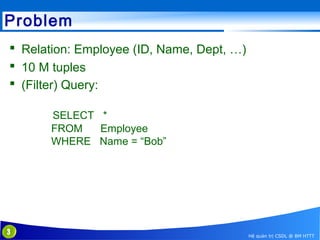
Problem
 Relation: Employee (ID, Name, Dept, …)
 10 M tuples
 (Filter) Query:
SELECT *
FROM
Employee
WHERE Name = “Bob”

3

Hệ quản trị CSDL @ BM HTTT
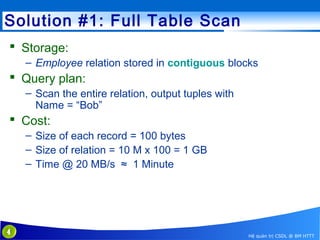
Solution #1: Full Table Scan
 Storage:
– Employee relation stored in contiguous blocks

 Query plan:
– Scan the entire relation, output tuples with
Name = “Bob”

 Cost:
– Size of each record = 100 bytes
– Size of relation = 10 M x 100 = 1 GB
– Time @ 20 MB/s ≈ 1 Minute

4

Hệ quản trị CSDL @ BM HTTT
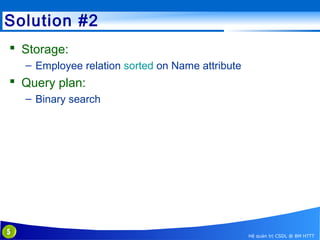
Solution #2
 Storage:
– Employee relation sorted on Name attribute

 Query plan:
– Binary search

5

Hệ quản trị CSDL @ BM HTTT
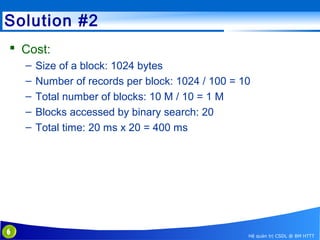
Solution #2
 Cost:
–
–
–
–
–

6

Size of a block: 1024 bytes
Number of records per block: 1024 / 100 = 10
Total number of blocks: 10 M / 10 = 1 M
Blocks accessed by binary search: 20
Total time: 20 ms x 20 = 400 ms

Hệ quản trị CSDL @ BM HTTT
Solution #2: Issues
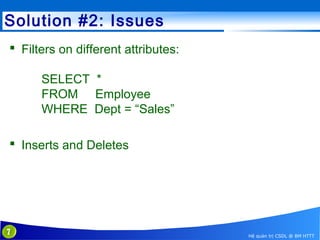
 Filters on different attributes:
SELECT *
FROM Employee
WHERE Dept = “Sales”
 Inserts and Deletes

7

Hệ quản trị CSDL @ BM HTTT
Indexes
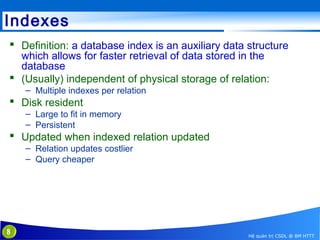
 Definition: a database index is an auxiliary data structure
which allows for faster retrieval of data stored in the
database
 (Usually) independent of physical storage of relation:
– Multiple indexes per relation

 Disk resident
– Large to fit in memory
– Persistent

 Updated when indexed relation updated
– Relation updates costlier
– Query cheaper

8

Hệ quản trị CSDL @ BM HTTT
Indexes as Access Paths
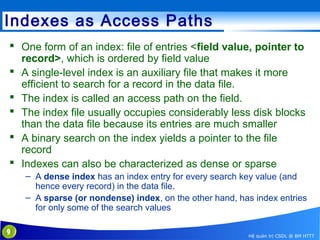
 One form of an index: file of entries <field value, pointer to
record>, which is ordered by field value
 A single-level index is an auxiliary file that makes it more
efficient to search for a record in the data file.
 The index is called an access path on the field.
 The index file usually occupies considerably less disk blocks
than the data file because its entries are much smaller
 A binary search on the index yields a pointer to the file
record
 Indexes can also be characterized as dense or sparse
– A dense index has an index entry for every search key value (and
hence every record) in the data file.
– A sparse (or nondense) index, on the other hand, has index entries
for only some of the search values
9

Hệ quản trị CSDL @ BM HTTT
Ví dụ
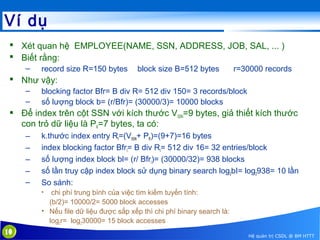
 Xét quan hệ EMPLOYEE(NAME, SSN, ADDRESS, JOB, SAL, ... )
 Biết rằng:
–

record size R=150 bytes

block size B=512 bytes

r=30000 records

 Như vậy:
–
–

blocking factor Bfr= B div R= 512 div 150= 3 records/block
số lượng block b= (r/Bfr)= (30000/3)= 10000 blocks

 Để index trên cột SSN với kích thước VSSN=9 bytes, giả thiết kích thước
con trỏ dữ liệu là PR=7 bytes, ta có:
–
–
–
–
–

k.thước index entry RI=(VSSN+ PR)=(9+7)=16 bytes
index blocking factor BfrI= B div RI= 512 div 16= 32 entries/block
số lượng index block bl= (r/ BfrI)= (30000/32)= 938 blocks
số lần truy cập index block sử dụng binary search log2bI= log2938= 10 lần
So sánh:
chi phí trung bình của việc tìm kiếm tuyến tính:
(b/2)= 10000/2= 5000 block accesses
• Nếu file dữ liệu được sắp xếp thì chi phí binary search là:
log2r= log230000= 15 block accesses
•

10

Hệ quản trị CSDL @ BM HTTT
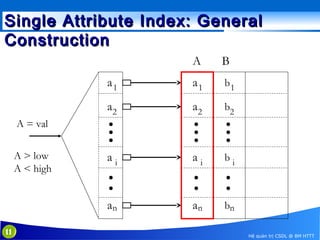
Single Attribute Index: General
Construction
A

B

a1

a1

b1

a2

a2

b2

ai

ai

bi

an

an

bn

A = val
A > low
A < high

11

Hệ quản trị CSDL @ BM HTTT
Types of Single-Level Indexes
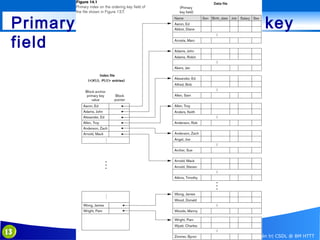
 Primary Index
– Defined on an ordered data file
– The data file is ordered on a key field
– Includes one index entry for each block in the data file;
the index entry has the key field value for the first record
in the block, which is called the block anchor
– A similar scheme can use the last record in a block.
– A primary index is a nondense (sparse) index, since it
includes an entry for each disk block of the data file and
the keys of its anchor record rather than for every search
value.

12

Hệ quản trị CSDL @ BM HTTT
Primary index on the ordering key
field

13

Hệ quản trị CSDL @ BM HTTT
Types of Single-Level Indexes…
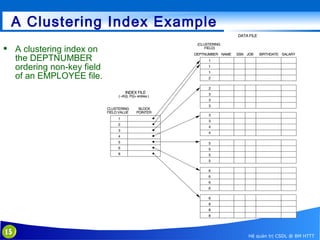
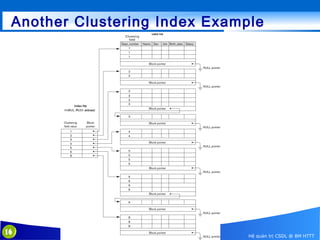
 Clustering Index
– Defined on an ordered data file
– The data file is ordered on a non-key field unlike primary
index, which requires that the ordering field of the data file
have a distinct value for each record.
– Includes one index entry for each distinct value of the
field; the index entry points to the first data block that
contains records with that field value.
– It is another example of nondense index where Insertion
and Deletion is relatively straightforward with a clustering
index.

14

Hệ quản trị CSDL @ BM HTTT
A Clustering Index Example
 A clustering index on
the DEPTNUMBER
ordering non-key field
of an EMPLOYEE file.

15

Hệ quản trị CSDL @ BM HTTT
Another Clustering Index Example

16

Hệ quản trị CSDL @ BM HTTT
Types of Single-Level Indexes
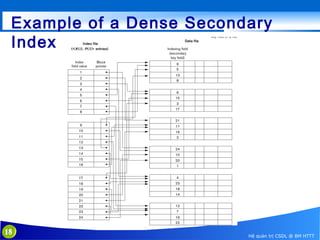
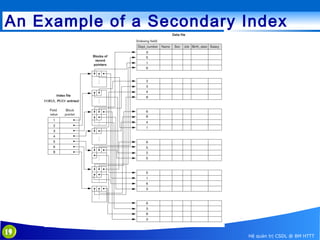
 Secondary Index
– A secondary index provides a secondary means of
accessing a file for which some primary access already
exists.
– The secondary index may be on a field which is a
candidate key and has a unique value in every record, or
a non-key with duplicate values.
– The index is an ordered file with two fields.
• The first field is of the same data type as some non-ordering
field of the data file that is an indexing field.
• The second field is either a block pointer or a record pointer.
• There can be many secondary indexes (and hence, indexing
fields) for the same file.

– Includes one entry for each record in the data file; hence,
it is a dense index
17

Hệ quản trị CSDL @ BM HTTT
Example of a Dense Secondary
Index

18

Hệ quản trị CSDL @ BM HTTT
An Example of a Secondary Index

19

Hệ quản trị CSDL @ BM HTTT
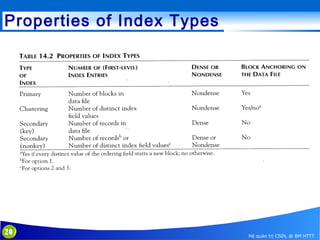
Properties of Index Types

20

Hệ quản trị CSDL @ BM HTTT
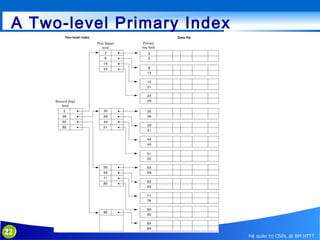
Multi-Level Indexes
 Because a single-level index is an ordered file, we can
create a primary index to the index itself;
– In this case, the original index file is called the first-level index and the
index to the index is called the second-level index.

 We can repeat the process, creating a third, fourth, ..., top
level until all entries of the top level fit in one disk block
 A multi-level index can be created for any type of first-level
index (primary, secondary, clustering) as long as the firstlevel index consists of more than one disk block
21

Hệ quản trị CSDL @ BM HTTT
A Two-level Primary Index

22

Hệ quản trị CSDL @ BM HTTT
Multi-Level Indexes
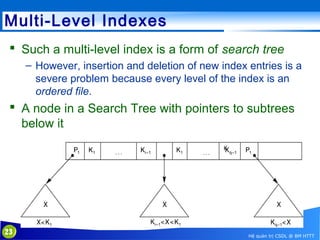
 Such a multi-level index is a form of search tree
– However, insertion and deletion of new index entries is a
severe problem because every level of the index is an
ordered file.

 A node in a Search Tree with pointers to subtrees
below it

23

Hệ quản trị CSDL @ BM HTTT
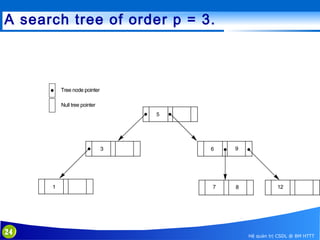
A search tree of order p = 3.

24

Hệ quản trị CSDL @ BM HTTT
Dynamic Multilevel Indexes Using BTrees and B+-Trees
 Most multi-level indexes use B-tree or B+-tree data
structures
 These data structures are variations of search trees that
allow efficient insertion and deletion of new search values.
 In B-Tree and B+-Tree data structures, each node
corresponds to a disk block
 Each node is kept between half-full and completely full

25

Hệ quản trị CSDL @ BM HTTT
Dynamic Multilevel Indexes Using BTrees and B+-Trees (contd.)
 An insertion into a node that is not full is quite
efficient
– If a node is full the insertion causes a split into two nodes

 Splitting may propagate to other tree levels
 A deletion is quite efficient if a node does not
become less than half full
 If a deletion causes a node to become less than half
full, it must be merged with neighboring nodes

26

Hệ quản trị CSDL @ BM HTTT
Difference between B-tree and B+-tree
 In a B-tree, pointers to data records exist at all
levels of the tree
 In a B+-tree, all pointers to data records exists at
the leaf-level nodes
 A B+-tree can have less levels (or higher capacity of
search values) than the corresponding B-tree

27

Hệ quản trị CSDL @ BM HTTT
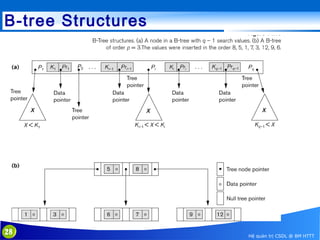
B-tree Structures

28

Hệ quản trị CSDL @ BM HTTT
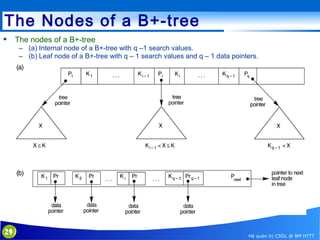
The Nodes of a B+-tree


The nodes of a B+-tree
– (a) Internal node of a B+-tree with q –1 search values.
– (b) Leaf node of a B+-tree with q – 1 search values and q – 1 data pointers.

29

Hệ quản trị CSDL @ BM HTTT
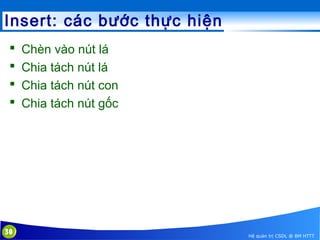
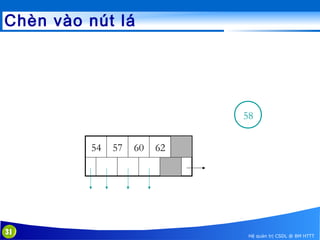
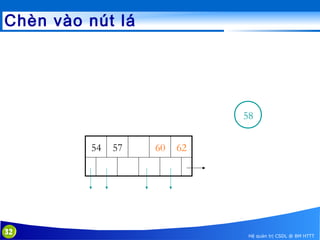
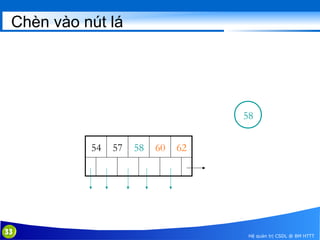
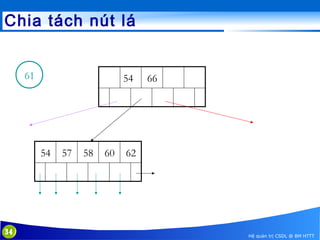
Insert: các bước thực hiện





30

Chèn vào nút lá
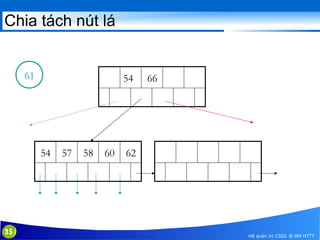
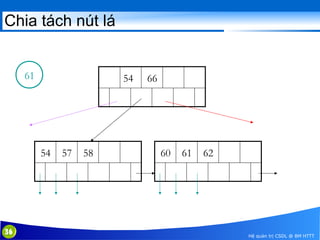
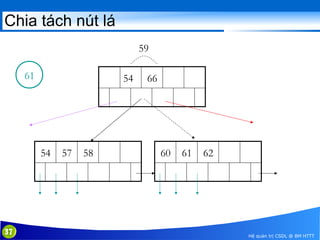
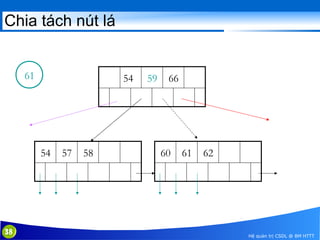
Chia tách nút lá
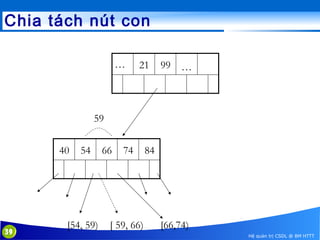
Chia tách nút con
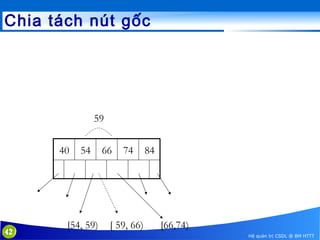
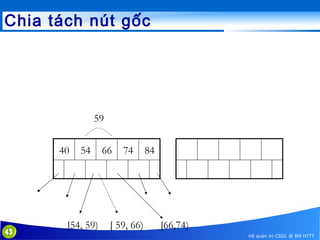
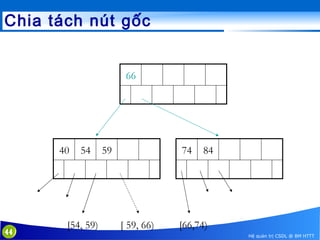
Chia tách nút gốc

Hệ quản trị CSDL @ BM HTTT
Chèn vào nút lá

58
54

31

57

60

62

Hệ quản trị CSDL @ BM HTTT
Chèn vào nút lá

58
54

32

57

60

62

Hệ quản trị CSDL @ BM HTTT
Chèn vào nút lá

58
54

33

57

58

60

62

Hệ quản trị CSDL @ BM HTTT
Chia tách nút lá
61

54

54

34

57

58

60

66

62

Hệ quản trị CSDL @ BM HTTT
Chia tách nút lá

61

54

54

35

57

58

60

66

62

Hệ quản trị CSDL @ BM HTTT
Chia tách nút lá

61

54

54

36

57

58

66

60

61

62

Hệ quản trị CSDL @ BM HTTT
Chia tách nút lá
59
61

54

54

37

57

58

66

60

61

62

Hệ quản trị CSDL @ BM HTTT
Chia tách nút lá

61

54

54

38

57

58

59

66

60

61

62

Hệ quản trị CSDL @ BM HTTT
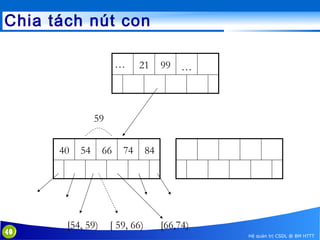
Chia tách nút con
…

21

99

…

59
40

39

54

[54, 59)

66

74

[ 59, 66)

84

[66,74)
Hệ quản trị CSDL @ BM HTTT
Chia tách nút con
…

21

99

…

59
40

40

54

[54, 59)

66

74

[ 59, 66)

84

[66,74)
Hệ quản trị CSDL @ BM HTTT
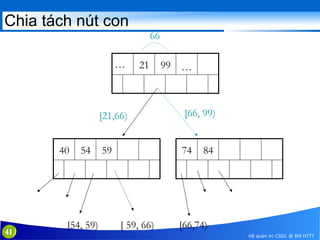
Chia tách nút con
66
…

21

99

…

[21,66)
40

41

54

[54, 59)

[66, 99)

59

74

[ 59, 66)

84

[66,74)
Hệ quản trị CSDL @ BM HTTT
Chia tách nút gốc

59
40

42

54

[54, 59)

66

74

[ 59, 66)

84

[66,74)
Hệ quản trị CSDL @ BM HTTT
Chia tách nút gốc

59
40

43

54

[54, 59)

66

74

[ 59, 66)

84

[66,74)
Hệ quản trị CSDL @ BM HTTT
Chia tách nút gốc
66

40

44

54

[54, 59)

59

74

[ 59, 66)

84

[66,74)
Hệ quản trị CSDL @ BM HTTT
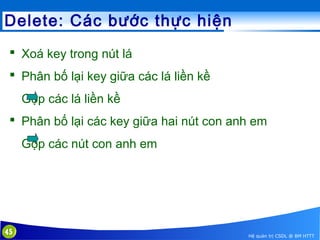
Delete: Các bước thực hiện
 Xoá key trong nút lá
 Phân bố lại key giữa các lá liền kề
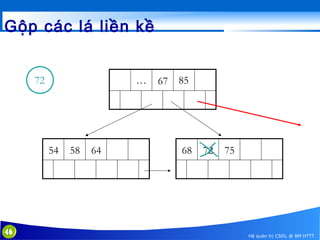
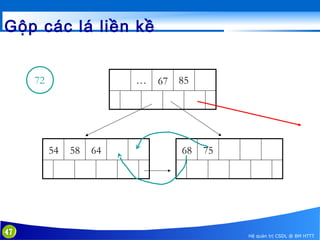
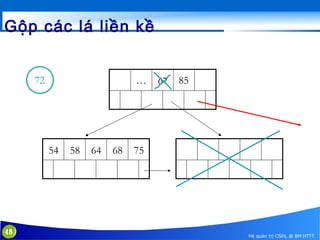
Gộp các lá liền kề
 Phân bố lại các key giữa hai nút con anh em
Gộp các nút con anh em

45

Hệ quản trị CSDL @ BM HTTT
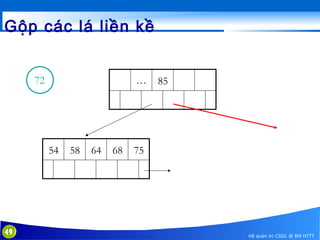
Gộp các lá liền kề
72

…

54

46

58

64

67

85

68

72

75

Hệ quản trị CSDL @ BM HTTT
Gộp các lá liền kề
72

…

54

47

58

64

67

85

68

75

Hệ quản trị CSDL @ BM HTTT
Gộp các lá liền kề
72

…

54

48

58

64

68

67

85

75

Hệ quản trị CSDL @ BM HTTT
Gộp các lá liền kề
72

…

54

49

58

64

68

85

75

Hệ quản trị CSDL @ BM HTTT
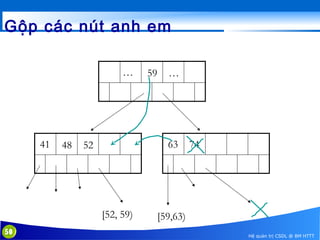
Gộp các nút anh em
…

41

48

…

63

52

[52, 59)
50

59

74

[59,63)
Hệ quản trị CSDL @ BM HTTT
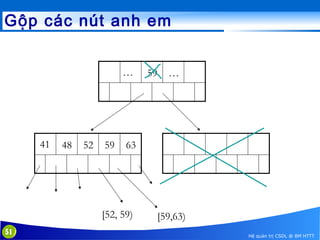
Gộp các nút anh em
…

41

48

52

59

…

63

[52, 59)
51

59

[59,63)
Hệ quản trị CSDL @ BM HTTT
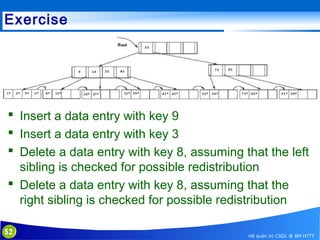
Exercise

 Insert a data entry with key 9
 Insert a data entry with key 3
 Delete a data entry with key 8, assuming that the left
sibling is checked for possible redistribution
 Delete a data entry with key 8, assuming that the
right sibling is checked for possible redistribution
52

Hệ quản trị CSDL @ BM HTTT
Hệ quản trị cơ sở dữ liệu

Using indexes in MySQL
Dư Phương Hạnh
Bộ môn Hệ thống thông tin
Khoa CNTT, trường Đại học Công nghệ
Đại học Quốc gia Hanoi
hanhdp@vnu.edu.vn
How MySQL using indexes
 Most MySQL indexes (PRIMARY
KEY, UNIQUE, INDEX, and FULLTEXT) are stored
in B-trees.
 MySQL uses indexes for these operations:
– To find the rows matching a WHERE clause quickly.
– To eliminate rows from consideration. If there is a choice
between multiple indexes, MySQL normally uses the
index that finds the smallest number of rows.
– To retrieve rows from other tables when performing joins.
MySQL can use indexes on columns more efficiently if
they are declared as the same type and size.
54

Hệ quản trị CSDL @ BM HTTT
How MySQL using indexes
 MySQL uses indexes for these operations (cont):
– To find the MIN() or MAX() value for a specific indexed
column key_col. This is optimized by a preprocessor that
checks whether you are using WHERE Key_part_N =
constant on all key parts that occur before key_col in the
index. In this case, MySQL does a single key lookup for
each MIN() or MAX() expression and replaces it with a
constant. If all expressions are replaced with constants,
the query returns at once:
SELECT MIN(key_part2),MAX(key_part2) FROM
tbl_name WHERE key_part1=10;
55

Hệ quản trị CSDL @ BM HTTT
How MySQL using indexes
 MySQL uses indexes for these operations (cont):
– To sort or group a table if the sorting or grouping is done
on a leftmost prefix of a usable key (for example, ORDER
BY key_part1, key_part2). If all key parts are followed
by DESC, the key is read in reverse order.
– In some cases, a query can be optimized to retrieve
values without consulting the data rows. (An index that
provides all the necessary results for a query is called a
covering index.) If a query uses only columns from a table
that are numeric and that form a leftmost prefix for some
key, the selected values can be retrieved from the index
tree for greater speed:
56

Hệ quản trị CSDL @ BM HTTT
Column Indexes
 A single column, storing copies of the values from that
column in a data structure, allowing fast lookups for the rows
with the corresponding column values.
 The B-tree data structure lets the index quickly find a specific
value, a set of values, or a range of values, corresponding to
operators such as =, >, ≤, BETWEEN, IN, and so on, in a
WHERE clause.
 The maximum number of indexes per table and the
maximum index length is defined per storage engine. All
storage engines support at least 16 indexes per table and a
total index length of at least 256 bytes. Most storage engines
have higher limits.

57

Hệ quản trị CSDL @ BM HTTT
Prefix Indexes
 With col_name(N) syntax in an index specification,
you can create an index that uses only the
first N characters of a string column.
 Indexing only a prefix of column values in this way
can make the index file much smaller.
 When you index a BLOB or TEXT column,
you must specify a prefix length for the index. For
example:
CREATE TABLE test (blob_col BLOB, INDEX(blob_col(10)));

 Prefixes can be up to 1000 bytes long (767 bytes
for InnoDB tables).
58

Hệ quản trị CSDL @ BM HTTT
Multiple-Column Indexes
 MySQL can create multiple columns index consist of
up to 16 columns
 MySQL can use multiple-column indexes for queries
that test all the columns in the index, or queries that
test just the first column, the first two columns, the
first three columns, and so on.
 If the table has a multiple-column index, any
leftmost prefix of the index can be used by the
optimizer to find rows. For example, if you have a
three-column index on (col1, col2, col3), you have
indexed search capabilities on(col1), (col1, col2),
and (col1, col2, col3).
59

Hệ quản trị CSDL @ BM HTTT
Multiple-Column Index Example
CREATE TABLE test
( id INT NOT NULL,
last_name CHAR(30) NOT NULL,
first_name CHAR(30) NOT NULL,
PRIMARY KEY (id),
INDEX name (last_name,first_name));
The name index can be used for lookups in queries that
specify values in a known range for combinations
of last_name and first_name values. It can also be used for
queries that specify just a last_name value because that
column is a leftmost prefix of the index
60

Hệ quản trị CSDL @ BM HTTT
Multiple-Column Index Example
 The name index is used for lookups in the following
queries:
– SELECT * FROM test WHERE last_name='Widenius';
– SELECT * FROM test WHERE last_name='Widenius'
AND first_name='Michael';
– SELECT * FROM test WHERE last_name='Widenius'
AND (first_name='Michael' OR first_name='Monty');
– SELECT * FROM test WHERE last_name='Widenius'
AND first_name >='M' AND first_name < 'N';

61

Hệ quản trị CSDL @ BM HTTT
Multiple-Column Index Example
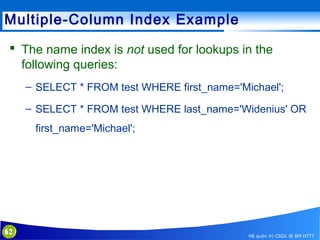
 The name index is not used for lookups in the
following queries:
– SELECT * FROM test WHERE first_name='Michael';
– SELECT * FROM test WHERE last_name='Widenius' OR
first_name='Michael';

62

Hệ quản trị CSDL @ BM HTTT
Verifying Index Usage
 Next lecture: Optimizing queries.

63

Hệ quản trị CSDL @ BM HTTT

5. indexing

  • 1.
    Hệ quản trịcơ sở dữ liệu Indexing Dư Phương Hạnh Bộ môn Hệ thống thông tin Khoa CNTT, trường Đại học Công nghệ Đại học Quốc gia Hanoi hanhdp@vnu.edu.vn
  • 2.
    Outline  Introduce  Typesof Indexes – Single-level Ordered Indexes – Multilevel Indexes – Dynamic Multilevel Indexes Using B-Trees and B+-Trees  Using indexes on MySQL Reading: [1]chap. 5+6(13+14) http://dev.mysql.com/doc/refman/5.5/en/optimizatio 2 Hệ quản trị CSDL @ BM HTTT
  • 3.
    Problem  Relation: Employee(ID, Name, Dept, …)  10 M tuples  (Filter) Query: SELECT * FROM Employee WHERE Name = “Bob” 3 Hệ quản trị CSDL @ BM HTTT
  • 4.
    Solution #1: FullTable Scan  Storage: – Employee relation stored in contiguous blocks  Query plan: – Scan the entire relation, output tuples with Name = “Bob”  Cost: – Size of each record = 100 bytes – Size of relation = 10 M x 100 = 1 GB – Time @ 20 MB/s ≈ 1 Minute 4 Hệ quản trị CSDL @ BM HTTT
  • 5.
    Solution #2  Storage: –Employee relation sorted on Name attribute  Query plan: – Binary search 5 Hệ quản trị CSDL @ BM HTTT
  • 6.
    Solution #2  Cost: – – – – – 6 Sizeof a block: 1024 bytes Number of records per block: 1024 / 100 = 10 Total number of blocks: 10 M / 10 = 1 M Blocks accessed by binary search: 20 Total time: 20 ms x 20 = 400 ms Hệ quản trị CSDL @ BM HTTT
  • 7.
    Solution #2: Issues Filters on different attributes: SELECT * FROM Employee WHERE Dept = “Sales”  Inserts and Deletes 7 Hệ quản trị CSDL @ BM HTTT
  • 8.
    Indexes  Definition: adatabase index is an auxiliary data structure which allows for faster retrieval of data stored in the database  (Usually) independent of physical storage of relation: – Multiple indexes per relation  Disk resident – Large to fit in memory – Persistent  Updated when indexed relation updated – Relation updates costlier – Query cheaper 8 Hệ quản trị CSDL @ BM HTTT
  • 9.
    Indexes as AccessPaths  One form of an index: file of entries <field value, pointer to record>, which is ordered by field value  A single-level index is an auxiliary file that makes it more efficient to search for a record in the data file.  The index is called an access path on the field.  The index file usually occupies considerably less disk blocks than the data file because its entries are much smaller  A binary search on the index yields a pointer to the file record  Indexes can also be characterized as dense or sparse – A dense index has an index entry for every search key value (and hence every record) in the data file. – A sparse (or nondense) index, on the other hand, has index entries for only some of the search values 9 Hệ quản trị CSDL @ BM HTTT
  • 10.
    Ví dụ  Xétquan hệ EMPLOYEE(NAME, SSN, ADDRESS, JOB, SAL, ... )  Biết rằng: – record size R=150 bytes block size B=512 bytes r=30000 records  Như vậy: – – blocking factor Bfr= B div R= 512 div 150= 3 records/block số lượng block b= (r/Bfr)= (30000/3)= 10000 blocks  Để index trên cột SSN với kích thước VSSN=9 bytes, giả thiết kích thước con trỏ dữ liệu là PR=7 bytes, ta có: – – – – – k.thước index entry RI=(VSSN+ PR)=(9+7)=16 bytes index blocking factor BfrI= B div RI= 512 div 16= 32 entries/block số lượng index block bl= (r/ BfrI)= (30000/32)= 938 blocks số lần truy cập index block sử dụng binary search log2bI= log2938= 10 lần So sánh: chi phí trung bình của việc tìm kiếm tuyến tính: (b/2)= 10000/2= 5000 block accesses • Nếu file dữ liệu được sắp xếp thì chi phí binary search là: log2r= log230000= 15 block accesses • 10 Hệ quản trị CSDL @ BM HTTT
  • 11.
    Single Attribute Index:General Construction A B a1 a1 b1 a2 a2 b2 ai ai bi an an bn A = val A > low A < high 11 Hệ quản trị CSDL @ BM HTTT
  • 12.
    Types of Single-LevelIndexes  Primary Index – Defined on an ordered data file – The data file is ordered on a key field – Includes one index entry for each block in the data file; the index entry has the key field value for the first record in the block, which is called the block anchor – A similar scheme can use the last record in a block. – A primary index is a nondense (sparse) index, since it includes an entry for each disk block of the data file and the keys of its anchor record rather than for every search value. 12 Hệ quản trị CSDL @ BM HTTT
  • 13.
    Primary index onthe ordering key field 13 Hệ quản trị CSDL @ BM HTTT
  • 14.
    Types of Single-LevelIndexes…  Clustering Index – Defined on an ordered data file – The data file is ordered on a non-key field unlike primary index, which requires that the ordering field of the data file have a distinct value for each record. – Includes one index entry for each distinct value of the field; the index entry points to the first data block that contains records with that field value. – It is another example of nondense index where Insertion and Deletion is relatively straightforward with a clustering index. 14 Hệ quản trị CSDL @ BM HTTT
  • 15.
    A Clustering IndexExample  A clustering index on the DEPTNUMBER ordering non-key field of an EMPLOYEE file. 15 Hệ quản trị CSDL @ BM HTTT
  • 16.
    Another Clustering IndexExample 16 Hệ quản trị CSDL @ BM HTTT
  • 17.
    Types of Single-LevelIndexes  Secondary Index – A secondary index provides a secondary means of accessing a file for which some primary access already exists. – The secondary index may be on a field which is a candidate key and has a unique value in every record, or a non-key with duplicate values. – The index is an ordered file with two fields. • The first field is of the same data type as some non-ordering field of the data file that is an indexing field. • The second field is either a block pointer or a record pointer. • There can be many secondary indexes (and hence, indexing fields) for the same file. – Includes one entry for each record in the data file; hence, it is a dense index 17 Hệ quản trị CSDL @ BM HTTT
  • 18.
    Example of aDense Secondary Index 18 Hệ quản trị CSDL @ BM HTTT
  • 19.
    An Example ofa Secondary Index 19 Hệ quản trị CSDL @ BM HTTT
  • 20.
    Properties of IndexTypes 20 Hệ quản trị CSDL @ BM HTTT
  • 21.
    Multi-Level Indexes  Becausea single-level index is an ordered file, we can create a primary index to the index itself; – In this case, the original index file is called the first-level index and the index to the index is called the second-level index.  We can repeat the process, creating a third, fourth, ..., top level until all entries of the top level fit in one disk block  A multi-level index can be created for any type of first-level index (primary, secondary, clustering) as long as the firstlevel index consists of more than one disk block 21 Hệ quản trị CSDL @ BM HTTT
  • 22.
    A Two-level PrimaryIndex 22 Hệ quản trị CSDL @ BM HTTT
  • 23.
    Multi-Level Indexes  Sucha multi-level index is a form of search tree – However, insertion and deletion of new index entries is a severe problem because every level of the index is an ordered file.  A node in a Search Tree with pointers to subtrees below it 23 Hệ quản trị CSDL @ BM HTTT
  • 24.
    A search treeof order p = 3. 24 Hệ quản trị CSDL @ BM HTTT
  • 25.
    Dynamic Multilevel IndexesUsing BTrees and B+-Trees  Most multi-level indexes use B-tree or B+-tree data structures  These data structures are variations of search trees that allow efficient insertion and deletion of new search values.  In B-Tree and B+-Tree data structures, each node corresponds to a disk block  Each node is kept between half-full and completely full 25 Hệ quản trị CSDL @ BM HTTT
  • 26.
    Dynamic Multilevel IndexesUsing BTrees and B+-Trees (contd.)  An insertion into a node that is not full is quite efficient – If a node is full the insertion causes a split into two nodes  Splitting may propagate to other tree levels  A deletion is quite efficient if a node does not become less than half full  If a deletion causes a node to become less than half full, it must be merged with neighboring nodes 26 Hệ quản trị CSDL @ BM HTTT
  • 27.
    Difference between B-treeand B+-tree  In a B-tree, pointers to data records exist at all levels of the tree  In a B+-tree, all pointers to data records exists at the leaf-level nodes  A B+-tree can have less levels (or higher capacity of search values) than the corresponding B-tree 27 Hệ quản trị CSDL @ BM HTTT
  • 28.
  • 29.
    The Nodes ofa B+-tree  The nodes of a B+-tree – (a) Internal node of a B+-tree with q –1 search values. – (b) Leaf node of a B+-tree with q – 1 search values and q – 1 data pointers. 29 Hệ quản trị CSDL @ BM HTTT
  • 30.
    Insert: các bướcthực hiện     30 Chèn vào nút lá Chia tách nút lá Chia tách nút con Chia tách nút gốc Hệ quản trị CSDL @ BM HTTT
  • 31.
    Chèn vào nútlá 58 54 31 57 60 62 Hệ quản trị CSDL @ BM HTTT
  • 32.
    Chèn vào nútlá 58 54 32 57 60 62 Hệ quản trị CSDL @ BM HTTT
  • 33.
    Chèn vào nútlá 58 54 33 57 58 60 62 Hệ quản trị CSDL @ BM HTTT
  • 34.
    Chia tách nútlá 61 54 54 34 57 58 60 66 62 Hệ quản trị CSDL @ BM HTTT
  • 35.
    Chia tách nútlá 61 54 54 35 57 58 60 66 62 Hệ quản trị CSDL @ BM HTTT
  • 36.
    Chia tách nútlá 61 54 54 36 57 58 66 60 61 62 Hệ quản trị CSDL @ BM HTTT
  • 37.
    Chia tách nútlá 59 61 54 54 37 57 58 66 60 61 62 Hệ quản trị CSDL @ BM HTTT
  • 38.
    Chia tách nútlá 61 54 54 38 57 58 59 66 60 61 62 Hệ quản trị CSDL @ BM HTTT
  • 39.
    Chia tách nútcon … 21 99 … 59 40 39 54 [54, 59) 66 74 [ 59, 66) 84 [66,74) Hệ quản trị CSDL @ BM HTTT
  • 40.
    Chia tách nútcon … 21 99 … 59 40 40 54 [54, 59) 66 74 [ 59, 66) 84 [66,74) Hệ quản trị CSDL @ BM HTTT
  • 41.
    Chia tách nútcon 66 … 21 99 … [21,66) 40 41 54 [54, 59) [66, 99) 59 74 [ 59, 66) 84 [66,74) Hệ quản trị CSDL @ BM HTTT
  • 42.
    Chia tách nútgốc 59 40 42 54 [54, 59) 66 74 [ 59, 66) 84 [66,74) Hệ quản trị CSDL @ BM HTTT
  • 43.
    Chia tách nútgốc 59 40 43 54 [54, 59) 66 74 [ 59, 66) 84 [66,74) Hệ quản trị CSDL @ BM HTTT
  • 44.
    Chia tách nútgốc 66 40 44 54 [54, 59) 59 74 [ 59, 66) 84 [66,74) Hệ quản trị CSDL @ BM HTTT
  • 45.
    Delete: Các bướcthực hiện  Xoá key trong nút lá  Phân bố lại key giữa các lá liền kề Gộp các lá liền kề  Phân bố lại các key giữa hai nút con anh em Gộp các nút con anh em 45 Hệ quản trị CSDL @ BM HTTT
  • 46.
    Gộp các láliền kề 72 … 54 46 58 64 67 85 68 72 75 Hệ quản trị CSDL @ BM HTTT
  • 47.
    Gộp các láliền kề 72 … 54 47 58 64 67 85 68 75 Hệ quản trị CSDL @ BM HTTT
  • 48.
    Gộp các láliền kề 72 … 54 48 58 64 68 67 85 75 Hệ quản trị CSDL @ BM HTTT
  • 49.
    Gộp các láliền kề 72 … 54 49 58 64 68 85 75 Hệ quản trị CSDL @ BM HTTT
  • 50.
    Gộp các nútanh em … 41 48 … 63 52 [52, 59) 50 59 74 [59,63) Hệ quản trị CSDL @ BM HTTT
  • 51.
    Gộp các nútanh em … 41 48 52 59 … 63 [52, 59) 51 59 [59,63) Hệ quản trị CSDL @ BM HTTT
  • 52.
    Exercise  Insert adata entry with key 9  Insert a data entry with key 3  Delete a data entry with key 8, assuming that the left sibling is checked for possible redistribution  Delete a data entry with key 8, assuming that the right sibling is checked for possible redistribution 52 Hệ quản trị CSDL @ BM HTTT
  • 53.
    Hệ quản trịcơ sở dữ liệu Using indexes in MySQL Dư Phương Hạnh Bộ môn Hệ thống thông tin Khoa CNTT, trường Đại học Công nghệ Đại học Quốc gia Hanoi hanhdp@vnu.edu.vn
  • 54.
    How MySQL usingindexes  Most MySQL indexes (PRIMARY KEY, UNIQUE, INDEX, and FULLTEXT) are stored in B-trees.  MySQL uses indexes for these operations: – To find the rows matching a WHERE clause quickly. – To eliminate rows from consideration. If there is a choice between multiple indexes, MySQL normally uses the index that finds the smallest number of rows. – To retrieve rows from other tables when performing joins. MySQL can use indexes on columns more efficiently if they are declared as the same type and size. 54 Hệ quản trị CSDL @ BM HTTT
  • 55.
    How MySQL usingindexes  MySQL uses indexes for these operations (cont): – To find the MIN() or MAX() value for a specific indexed column key_col. This is optimized by a preprocessor that checks whether you are using WHERE Key_part_N = constant on all key parts that occur before key_col in the index. In this case, MySQL does a single key lookup for each MIN() or MAX() expression and replaces it with a constant. If all expressions are replaced with constants, the query returns at once: SELECT MIN(key_part2),MAX(key_part2) FROM tbl_name WHERE key_part1=10; 55 Hệ quản trị CSDL @ BM HTTT
  • 56.
    How MySQL usingindexes  MySQL uses indexes for these operations (cont): – To sort or group a table if the sorting or grouping is done on a leftmost prefix of a usable key (for example, ORDER BY key_part1, key_part2). If all key parts are followed by DESC, the key is read in reverse order. – In some cases, a query can be optimized to retrieve values without consulting the data rows. (An index that provides all the necessary results for a query is called a covering index.) If a query uses only columns from a table that are numeric and that form a leftmost prefix for some key, the selected values can be retrieved from the index tree for greater speed: 56 Hệ quản trị CSDL @ BM HTTT
  • 57.
    Column Indexes  Asingle column, storing copies of the values from that column in a data structure, allowing fast lookups for the rows with the corresponding column values.  The B-tree data structure lets the index quickly find a specific value, a set of values, or a range of values, corresponding to operators such as =, >, ≤, BETWEEN, IN, and so on, in a WHERE clause.  The maximum number of indexes per table and the maximum index length is defined per storage engine. All storage engines support at least 16 indexes per table and a total index length of at least 256 bytes. Most storage engines have higher limits. 57 Hệ quản trị CSDL @ BM HTTT
  • 58.
    Prefix Indexes  Withcol_name(N) syntax in an index specification, you can create an index that uses only the first N characters of a string column.  Indexing only a prefix of column values in this way can make the index file much smaller.  When you index a BLOB or TEXT column, you must specify a prefix length for the index. For example: CREATE TABLE test (blob_col BLOB, INDEX(blob_col(10)));  Prefixes can be up to 1000 bytes long (767 bytes for InnoDB tables). 58 Hệ quản trị CSDL @ BM HTTT
  • 59.
    Multiple-Column Indexes  MySQLcan create multiple columns index consist of up to 16 columns  MySQL can use multiple-column indexes for queries that test all the columns in the index, or queries that test just the first column, the first two columns, the first three columns, and so on.  If the table has a multiple-column index, any leftmost prefix of the index can be used by the optimizer to find rows. For example, if you have a three-column index on (col1, col2, col3), you have indexed search capabilities on(col1), (col1, col2), and (col1, col2, col3). 59 Hệ quản trị CSDL @ BM HTTT
  • 60.
    Multiple-Column Index Example CREATETABLE test ( id INT NOT NULL, last_name CHAR(30) NOT NULL, first_name CHAR(30) NOT NULL, PRIMARY KEY (id), INDEX name (last_name,first_name)); The name index can be used for lookups in queries that specify values in a known range for combinations of last_name and first_name values. It can also be used for queries that specify just a last_name value because that column is a leftmost prefix of the index 60 Hệ quản trị CSDL @ BM HTTT
  • 61.
    Multiple-Column Index Example The name index is used for lookups in the following queries: – SELECT * FROM test WHERE last_name='Widenius'; – SELECT * FROM test WHERE last_name='Widenius' AND first_name='Michael'; – SELECT * FROM test WHERE last_name='Widenius' AND (first_name='Michael' OR first_name='Monty'); – SELECT * FROM test WHERE last_name='Widenius' AND first_name >='M' AND first_name < 'N'; 61 Hệ quản trị CSDL @ BM HTTT
  • 62.
    Multiple-Column Index Example The name index is not used for lookups in the following queries: – SELECT * FROM test WHERE first_name='Michael'; – SELECT * FROM test WHERE last_name='Widenius' OR first_name='Michael'; 62 Hệ quản trị CSDL @ BM HTTT
  • 63.
    Verifying Index Usage Next lecture: Optimizing queries. 63 Hệ quản trị CSDL @ BM HTTT

Editor's Notes

  • #21 1. A data entry k is an actual data record (with search key value k). 2. A data entry is a hk, rid i pair, where rid is the record id of a data record with search key value k. 3. A data entry is a hk, rid-list i pair, where rid-list is a list of record ids of data records with search key value k.