Shaping-Up SharePoint Security in Five Steps

          Amichai Shulman, CTO, Imperva


                © 2012 Imperva, Inc. All rights reserved.
Agenda

    Introduction to SharePoint
    Security Implications
    Top Five Steps to Securing SharePoint
    Imperva SecureSphere for SharePoint
    Q&A


                     © 2012 Imperva, Inc. All rights reserved.
Amichai Shulman – CTO Imperva

   Speaker at Industry Events
     + RSA, Sybase Techwave, Info Security UK, Black Hat
   Lecturer on Info Security
     + Technion - Israel Institute of Technology
   Former security consultant to banks & financial
    services firms
   Leads the Application Defense Center (ADC)
     + Discovered over 20 commercial application
       vulnerabilities
        – Credited by Oracle, MS-SQL, IBM and others


          Amichai Shulman one of InfoWorld’s “Top 25 CTOs”


                              © 2012 Imperva, Inc. All rights reserved.
Introduction to SharePoint


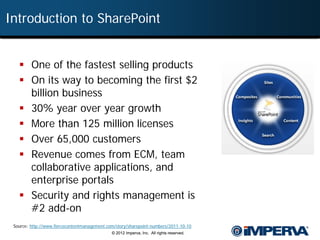
    One of the fastest selling products
    On its way to becoming the first $2
     billion business
    30% year over year growth
    More than 125 million licenses
    Over 65,000 customers
    Revenue comes from ECM, team
     collaborative applications, and
     enterprise portals
    Security and rights management is
     #2 add-on
 Source: http://www.fiercecontentmanagement.com/story/sharepoint-numbers/2011-10-10
                                              © 2012 Imperva, Inc. All rights reserved.
Impact of SharePoint Insecurity


                 “[Investigators] discovered Wget scripts on
                    Manning’s computer that pointed to a
                 Microsoft SharePoint server holding the
                   Gitmo documents. He ran the scripts to
                 download the documents, then downloaded
                 the ones that WikiLeaks had published and
                         found they were the same.”
                                                 —Wired, Dec 2011


 Source: http://www.wired.com/threatlevel/2011/12/cables-scripts-manning/
                                       © 2012 Imperva, Inc. All rights reserved.
In the Beginning…


          Internal Access

                   © 2012 Imperva, Inc. All rights reserved.
Food Brings Along Appetite


                                                                  External Web
                                                                     Access


           Internal Access                                      Partner access

                    © 2012 Imperva, Inc. All rights reserved.
Collaboration Figures

     Do you use SharePoint for collaboration with any of the
      following?


 Source: ShareP oint: Strategies and Ex periences , September 2011
                                              © 2012 Imperva, Inc. All rights reserved.
Type of Content Shared


                                        Other                                          HR
                                      Proprietary                                     21%
                                         33%


                                                                                            Customer Data
                                                                                                 30%
                                      Financial
                                        22%


  Source: NetworkWorld, May 2, 2011
                                          © 2012 Imperva, Inc. All rights reserved.
Native SharePoint Security Capabilities


    “In general, SharePoint involves a
     complex set of interactions that
       makes it difficult for security
   teams to know if all their concerns
              are covered.”
                —Burton Group, 2010


                  © 2012 Imperva, Inc. All rights reserved.
#1: Getting Permissions Right


11           © 2012 Imperva, Inc. All rights reserved.
#1: Getting Permissions Right


 Summary:
   + Microsoft’s advice begins with permissions
   + “Content should not be available to all users… information should be accessible on a
     need-to-know basis”
 Why challenging?


                             © 2012 Imperva, Inc. All rights reserved.
#1: Getting Permissions Right


 Summary:
   + Microsoft’s advice begins with permissions
   + “Content should not be available to all users… information should be
     accessible on a need-to-know basis”
 Why challenging?
   + Difficult to track and maintain
   + Constantly change
   + No automation or aggregation
   + Need to involve data owners
 What is Required?
   + Automated permissions review tools
   + Baseline and change reports
   + Simplify rights reviews


                           © 2012 Imperva, Inc. All rights reserved.
User Rights Management: Doing it Right


   Aggregate user rights across systems
   Detect excessive rights, reduce access
    to business-need-to-know
   Identify dormant users
   Identify and involve data owners
   Formalize and automate approval cycle


                     © 2012 Imperva, Inc. All rights reserved.
Finding Excessive Permissions


  Focus on access to
 HIPAA regulated data                           What departments have access?


                        Why does G&A have access?
               Who are the users?
        What type of access do they have?


      How did they get the access?


 15                      © 2012 Imperva, Inc. All rights reserved.
Automatic Identification of Excessive Rights


                      Should “Everyone” have access to sensitive data?
                       • “Everyone” group literally means all users


                         Are there any direct user permissions?


  What rights are not used?
  • Users with access they appear not to need
                              © 2012 Imperva, Inc. All rights reserved.
Identifying Dormant Users

                                                                      Focus on users that are
                                                                     dormant for over 6 month
      Are there dormant users?


                                                                     Who are they and when did
                                                                         they last access?


 17                      © 2012 Imperva, Inc. All rights reserved.
#2: Compliance Reporting


18         © 2012 Imperva, Inc. All rights reserved.
#2: Compliance Reporting


 Summary:
   + If you store business data, you must demonstrate compliance with regulations

 Why challenging?
   + Manual process – minimal inherent data audit capability
   + Native audit trail is not usable/readable
   + No knowledge of the identity of data owners


       Example: In August 2011, Bloomberg reported on 300,000 healthcare
       records that appeared in an Excel file. No one knows where the file came
       from, indicating a lack of auditing.


                              © 2012 Imperva, Inc. All rights reserved.
#2: Compliance Reporting


 Summary:
   + If you store business data, you must demonstrate compliance with
     regulations
 Why challenging?
   + Manual process – minimal inherent data audit capability
   + Native audit trail is not usable/readable
   + No knowledge of the identity of data owners
 What is Required?
   + Human-readable activity auditing and reporting
   + Add enrichment data to simplify compliance process
   + Data owner identification
   + Audit Analytics


                           © 2012 Imperva, Inc. All rights reserved.
Full Audit Trail


   When            Who                                     Where     What


                         © 2012 Imperva, Inc. All rights reserved.
SharePoint Admins Gone Wild


  Most popular documents eyeballed were those containing the details
   of their fellow employees, 34 per cent, followed by salary – 23 per
                    cent – and 30 per cent said "other.“


                        © 2012 Imperva, Inc. All rights reserved.
Detailed Analytics for Forensics

                                          Focus on access to financial data


                                                               What are the primary
                                                          departments accessing this data?


                                             Why are G&A accessing financial data?


                                                          Who accessed this data?
                                                        When & what did they access?


                                          Who owns this data?

                  © 2012 Imperva, Inc. All rights reserved.
Data Owner Identification

                                  Data ownership
                                     • Top users are either owners or can identify them
                                     • Go-to people key for business-based decision making
                                     • Save data owners information for decision making


                 © 2012 Imperva, Inc. All rights reserved.
#3: Respond to Suspicious Activity


25              © 2012 Imperva, Inc. All rights reserved.
#3: Respond to Suspicious Activity

 Summary:
    + SharePoint is used as a place to share information
    + A broad range of internal and external groups are given access
    + Organizations need to balance trust and openness with the ability to
      detect and alert on suspicious activity
 Why challenging?
    + No automated analysis of access activity
    + Rights management (RMS) is complex to configure and maintain
 What is Required?
    + Policy framework layered on top of activity monitoring
    + Pre-configured policies simplify monitoring and response processes
 Example: In the Wikileaks scenario, Manning used an automated
   process to crawl the SharePoint system and to siphon out available files. A
   simple occurrences policy would have alerted if a certain number of files
   were touched in a small timeframe.
                            © 2012 Imperva, Inc. All rights reserved.
Real-time Enforcement: Possible Data Leakage


        Is someone accessing large amounts of data?


                                                                Out-of-the-box policies


                                                    Alert when a user reads 100
                                                     files within the same hour
                                                                             27
                    © 2012 Imperva, Inc. All rights reserved.
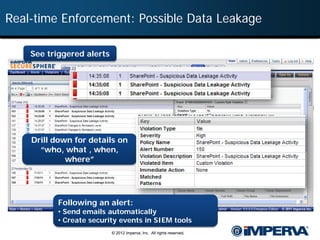
Real-time Enforcement: Possible Data Leakage

    See triggered alerts


    Drill down for details on
      “who, what , when,
             where”


           Following an alert:
           • Send emails automatically
           • Create security events in SIEM tools
                           © 2012 Imperva, Inc. All rights reserved.
#4: Protect Web Applications


29           © 2012 Imperva, Inc. All rights reserved.
#4: Protect Web Applications


 Summary:
    + Web attacks are a common threat
    + 30% of organizations have external-facing SharePoint sites
 Why challenging?
    + Need to patch the system frequently
    + 3rd party add-ons
 What is Required?
    + Real-time attack protection
    + Reputation based protection: malicious IPs, anonymous proxies
    + Prevent access to the admin pages by external users
 Example: According to CVE details, XSS is the most commonly reported
   vulnerability in SharePoint.


                             © 2012 Imperva, Inc. All rights reserved.
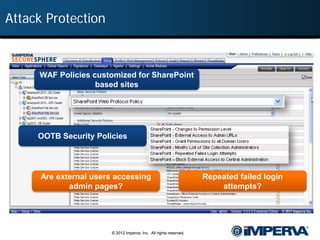
Attack Protection


     WAF Policies customized for SharePoint
                   based sites


     OOTB Security Policies


      Are external users accessing                                  Repeated failed login
             admin pages?                                               attempts?


                        © 2012 Imperva, Inc. All rights reserved.
Patch Protection


      InfoWorld (2010):
      “Admins report that a new Microsoft patch is causing
      SharePoint servers to fall over – and getting them back
      up isn’t easy”
      http://www.infoworld.com/t/application-security/june-black-tuesday-patch-causes-
      sharepoint-woes-510


 32                           © 2012 Imperva, Inc. All rights reserved.
What Do Hackers Think?


      Example: April 2010, Microsoft reveals a SharePoint issue
     The vulnerability could allow escalation of privilege (EoP) within the
      SharePoint site. If an attacker successfully exploits the vulnerability,
       the person could run commands against the SharePoint server with
                     the privileges of the compromised user.

  Source: http://www.eweek.com/c/a/Security/Microsoft-Confirms-SharePoint-Security-Vulnerability-187410/


                                       © 2012 Imperva, Inc. All rights reserved.
Google Diggity Project


                 © 2012 Imperva, Inc. All rights reserved.
#5: Monitor and Protect the SharePoint Database


35               © 2012 Imperva, Inc. All rights reserved.
#5: Monitor and Protect the SharePoint Database


 Summary:
   + The SharePoint database holds all configuration and content
     information
   + SharePoint administrators have full access to all SharePoint content
   + Whoever gains direct access to the database have full control on
     SharePoint
 Why challenging?
   + The SQL Server database isn't properly secured.
   + No activity monitoring and audit capabilities
   + No built-in database policy prevention
 What is Required?
   + Full audit trail of all activity originated from sources other than
     the application servers.
   + Protection from direct manipulation to the SharePoint internal
     database
                          © 2012 Imperva, Inc. All rights reserved.
Database Protection


      Microsoft Support:
      “Database modifications may results in a unsupported
      database state”
      http://support.microsoft.com/kb/841057


      Gartner (Securing SharePoint, February 2009):
      “Fully audit all SQL Server administrative activities”
      Security Considerations and Best Practices for Securing SharePoint


 37                            © 2012 Imperva, Inc. All rights reserved.
Summary

  5 Steps
      + Getting Permissions Right
      + Compliance Reporting
      + Respond to Suspicious Activity
      + Protect Web Applications
      + Monitor and Protect the SharePoint Database
  Key Issues
      + Full Visibility
      + Automate processes
           – Privilege anomalies
           – Attack detection
           – Compliance Reporting


 38                        © 2012 Imperva, Inc. All rights reserved.
Imperva SecureSphere for SharePoint


39              © 2012 Imperva, Inc. All rights reserved.
SecureSphere for SharePoint Deployment


                © 2012 Imperva, Inc. All rights reserved.
 40
Webinar Materials


41     © 2012 Imperva, Inc. All rights reserved.
Webinar Materials

    Get LinkedIn to
    Imperva Data Security Direct for…

                                                                Answers to
          Post-Webinar
                                                                 Attendee
           Discussions
                                                                Questions


            Webinar
                                                       Webinar Slides
         Recording Link


                    © 2012 Imperva, Inc. All rights reserved.
SharePoint Security Playbook


                                                             Download eBook


 43              © 2012 Imperva, Inc. All rights reserved.
www.imperva.com

Shaping-Up SharePoint Security in 5 Steps

  • 1.
    Shaping-Up SharePoint Securityin Five Steps Amichai Shulman, CTO, Imperva © 2012 Imperva, Inc. All rights reserved.
  • 2.
    Agenda  Introduction to SharePoint  Security Implications  Top Five Steps to Securing SharePoint  Imperva SecureSphere for SharePoint  Q&A © 2012 Imperva, Inc. All rights reserved.
  • 3.
    Amichai Shulman –CTO Imperva  Speaker at Industry Events + RSA, Sybase Techwave, Info Security UK, Black Hat  Lecturer on Info Security + Technion - Israel Institute of Technology  Former security consultant to banks & financial services firms  Leads the Application Defense Center (ADC) + Discovered over 20 commercial application vulnerabilities – Credited by Oracle, MS-SQL, IBM and others Amichai Shulman one of InfoWorld’s “Top 25 CTOs” © 2012 Imperva, Inc. All rights reserved.
  • 4.
    Introduction to SharePoint  One of the fastest selling products  On its way to becoming the first $2 billion business  30% year over year growth  More than 125 million licenses  Over 65,000 customers  Revenue comes from ECM, team collaborative applications, and enterprise portals  Security and rights management is #2 add-on Source: http://www.fiercecontentmanagement.com/story/sharepoint-numbers/2011-10-10 © 2012 Imperva, Inc. All rights reserved.
  • 5.
    Impact of SharePointInsecurity “[Investigators] discovered Wget scripts on Manning’s computer that pointed to a Microsoft SharePoint server holding the Gitmo documents. He ran the scripts to download the documents, then downloaded the ones that WikiLeaks had published and found they were the same.” —Wired, Dec 2011 Source: http://www.wired.com/threatlevel/2011/12/cables-scripts-manning/ © 2012 Imperva, Inc. All rights reserved.
  • 6.
    In the Beginning… Internal Access © 2012 Imperva, Inc. All rights reserved.
  • 7.
    Food Brings AlongAppetite External Web Access Internal Access Partner access © 2012 Imperva, Inc. All rights reserved.
  • 8.
    Collaboration Figures  Do you use SharePoint for collaboration with any of the following? Source: ShareP oint: Strategies and Ex periences , September 2011 © 2012 Imperva, Inc. All rights reserved.
  • 9.
    Type of ContentShared Other HR Proprietary 21% 33% Customer Data 30% Financial 22% Source: NetworkWorld, May 2, 2011 © 2012 Imperva, Inc. All rights reserved.
  • 10.
    Native SharePoint SecurityCapabilities “In general, SharePoint involves a complex set of interactions that makes it difficult for security teams to know if all their concerns are covered.” —Burton Group, 2010 © 2012 Imperva, Inc. All rights reserved.
  • 11.
    #1: Getting PermissionsRight 11 © 2012 Imperva, Inc. All rights reserved.
  • 12.
    #1: Getting PermissionsRight  Summary: + Microsoft’s advice begins with permissions + “Content should not be available to all users… information should be accessible on a need-to-know basis”  Why challenging? © 2012 Imperva, Inc. All rights reserved.
  • 13.
    #1: Getting PermissionsRight  Summary: + Microsoft’s advice begins with permissions + “Content should not be available to all users… information should be accessible on a need-to-know basis”  Why challenging? + Difficult to track and maintain + Constantly change + No automation or aggregation + Need to involve data owners  What is Required? + Automated permissions review tools + Baseline and change reports + Simplify rights reviews © 2012 Imperva, Inc. All rights reserved.
  • 14.
    User Rights Management:Doing it Right  Aggregate user rights across systems  Detect excessive rights, reduce access to business-need-to-know  Identify dormant users  Identify and involve data owners  Formalize and automate approval cycle © 2012 Imperva, Inc. All rights reserved.
  • 15.
    Finding Excessive Permissions Focus on access to HIPAA regulated data What departments have access? Why does G&A have access? Who are the users? What type of access do they have? How did they get the access? 15 © 2012 Imperva, Inc. All rights reserved.
  • 16.
    Automatic Identification ofExcessive Rights Should “Everyone” have access to sensitive data? • “Everyone” group literally means all users Are there any direct user permissions? What rights are not used? • Users with access they appear not to need © 2012 Imperva, Inc. All rights reserved.
  • 17.
    Identifying Dormant Users Focus on users that are dormant for over 6 month Are there dormant users? Who are they and when did they last access? 17 © 2012 Imperva, Inc. All rights reserved.
  • 18.
    #2: Compliance Reporting 18 © 2012 Imperva, Inc. All rights reserved.
  • 19.
    #2: Compliance Reporting Summary: + If you store business data, you must demonstrate compliance with regulations  Why challenging? + Manual process – minimal inherent data audit capability + Native audit trail is not usable/readable + No knowledge of the identity of data owners Example: In August 2011, Bloomberg reported on 300,000 healthcare records that appeared in an Excel file. No one knows where the file came from, indicating a lack of auditing. © 2012 Imperva, Inc. All rights reserved.
  • 20.
    #2: Compliance Reporting Summary: + If you store business data, you must demonstrate compliance with regulations  Why challenging? + Manual process – minimal inherent data audit capability + Native audit trail is not usable/readable + No knowledge of the identity of data owners  What is Required? + Human-readable activity auditing and reporting + Add enrichment data to simplify compliance process + Data owner identification + Audit Analytics © 2012 Imperva, Inc. All rights reserved.
  • 21.
    Full Audit Trail When Who Where What © 2012 Imperva, Inc. All rights reserved.
  • 22.
    SharePoint Admins GoneWild Most popular documents eyeballed were those containing the details of their fellow employees, 34 per cent, followed by salary – 23 per cent – and 30 per cent said "other.“ © 2012 Imperva, Inc. All rights reserved.
  • 23.
    Detailed Analytics forForensics Focus on access to financial data What are the primary departments accessing this data? Why are G&A accessing financial data? Who accessed this data? When & what did they access? Who owns this data? © 2012 Imperva, Inc. All rights reserved.
  • 24.
    Data Owner Identification Data ownership • Top users are either owners or can identify them • Go-to people key for business-based decision making • Save data owners information for decision making © 2012 Imperva, Inc. All rights reserved.
  • 25.
    #3: Respond toSuspicious Activity 25 © 2012 Imperva, Inc. All rights reserved.
  • 26.
    #3: Respond toSuspicious Activity  Summary: + SharePoint is used as a place to share information + A broad range of internal and external groups are given access + Organizations need to balance trust and openness with the ability to detect and alert on suspicious activity  Why challenging? + No automated analysis of access activity + Rights management (RMS) is complex to configure and maintain  What is Required? + Policy framework layered on top of activity monitoring + Pre-configured policies simplify monitoring and response processes  Example: In the Wikileaks scenario, Manning used an automated process to crawl the SharePoint system and to siphon out available files. A simple occurrences policy would have alerted if a certain number of files were touched in a small timeframe. © 2012 Imperva, Inc. All rights reserved.
  • 27.
    Real-time Enforcement: PossibleData Leakage Is someone accessing large amounts of data? Out-of-the-box policies Alert when a user reads 100 files within the same hour 27 © 2012 Imperva, Inc. All rights reserved.
  • 28.
    Real-time Enforcement: PossibleData Leakage See triggered alerts Drill down for details on “who, what , when, where” Following an alert: • Send emails automatically • Create security events in SIEM tools © 2012 Imperva, Inc. All rights reserved.
  • 29.
    #4: Protect WebApplications 29 © 2012 Imperva, Inc. All rights reserved.
  • 30.
    #4: Protect WebApplications  Summary: + Web attacks are a common threat + 30% of organizations have external-facing SharePoint sites  Why challenging? + Need to patch the system frequently + 3rd party add-ons  What is Required? + Real-time attack protection + Reputation based protection: malicious IPs, anonymous proxies + Prevent access to the admin pages by external users  Example: According to CVE details, XSS is the most commonly reported vulnerability in SharePoint. © 2012 Imperva, Inc. All rights reserved.
  • 31.
    Attack Protection WAF Policies customized for SharePoint based sites OOTB Security Policies Are external users accessing Repeated failed login admin pages? attempts? © 2012 Imperva, Inc. All rights reserved.
  • 32.
    Patch Protection InfoWorld (2010): “Admins report that a new Microsoft patch is causing SharePoint servers to fall over – and getting them back up isn’t easy” http://www.infoworld.com/t/application-security/june-black-tuesday-patch-causes- sharepoint-woes-510 32 © 2012 Imperva, Inc. All rights reserved.
  • 33.
    What Do HackersThink? Example: April 2010, Microsoft reveals a SharePoint issue The vulnerability could allow escalation of privilege (EoP) within the SharePoint site. If an attacker successfully exploits the vulnerability, the person could run commands against the SharePoint server with the privileges of the compromised user. Source: http://www.eweek.com/c/a/Security/Microsoft-Confirms-SharePoint-Security-Vulnerability-187410/ © 2012 Imperva, Inc. All rights reserved.
  • 34.
    Google Diggity Project © 2012 Imperva, Inc. All rights reserved.
  • 35.
    #5: Monitor andProtect the SharePoint Database 35 © 2012 Imperva, Inc. All rights reserved.
  • 36.
    #5: Monitor andProtect the SharePoint Database  Summary: + The SharePoint database holds all configuration and content information + SharePoint administrators have full access to all SharePoint content + Whoever gains direct access to the database have full control on SharePoint  Why challenging? + The SQL Server database isn't properly secured. + No activity monitoring and audit capabilities + No built-in database policy prevention  What is Required? + Full audit trail of all activity originated from sources other than the application servers. + Protection from direct manipulation to the SharePoint internal database © 2012 Imperva, Inc. All rights reserved.
  • 37.
    Database Protection Microsoft Support: “Database modifications may results in a unsupported database state” http://support.microsoft.com/kb/841057 Gartner (Securing SharePoint, February 2009): “Fully audit all SQL Server administrative activities” Security Considerations and Best Practices for Securing SharePoint 37 © 2012 Imperva, Inc. All rights reserved.
  • 38.
    Summary  5Steps + Getting Permissions Right + Compliance Reporting + Respond to Suspicious Activity + Protect Web Applications + Monitor and Protect the SharePoint Database  Key Issues + Full Visibility + Automate processes – Privilege anomalies – Attack detection – Compliance Reporting 38 © 2012 Imperva, Inc. All rights reserved.
  • 39.
    Imperva SecureSphere forSharePoint 39 © 2012 Imperva, Inc. All rights reserved.
  • 40.
    SecureSphere for SharePointDeployment © 2012 Imperva, Inc. All rights reserved. 40
  • 41.
    Webinar Materials 41 © 2012 Imperva, Inc. All rights reserved.
  • 42.
    Webinar Materials Get LinkedIn to Imperva Data Security Direct for… Answers to Post-Webinar Attendee Discussions Questions Webinar Webinar Slides Recording Link © 2012 Imperva, Inc. All rights reserved.
  • 43.
    SharePoint Security Playbook Download eBook 43 © 2012 Imperva, Inc. All rights reserved.
  • 44.