Mail us: info@spikyarc.net 
©2011 SPIKYarc www.spikyarc.net All Rights Reserved 
eXiger CRM System is a strategy to solidify relations with customers and at the same time reducing cost and enhancing productivity and profitability in business. 
An ideal system is a centralized collection all data sources under an organization and provides an atomistic real time vision of customer information. 
A eXiger CRM system is vast and significant, but it be can implemented for small business, as well as large enterprises also as the main goal is to assist the customers efficiently. 
About eXiger CRM
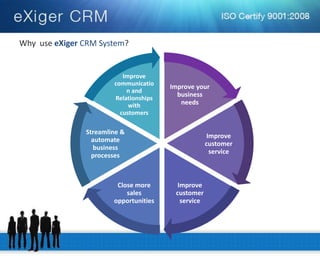
Improve your business needs 
Improve customer service 
Close more sales opportunities 
Streamline & automate business processes 
Improve communication and Relationships with customers 
Why use eXiger CRM System?
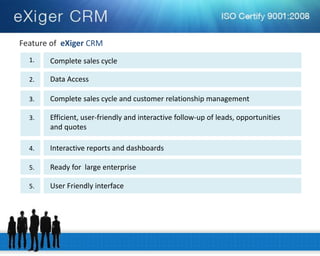
Feature of eXiger CRM 
Complete sales cycle 
1. 
Data Access 
2. 
Complete sales cycle and customer relationship management 
3. 
Efficient, user-friendly and interactive follow-up of leads, opportunities 
and quotes 
3. 
Interactive reports and dashboards 
4. 
Ready for large enterprise 
5. 
User Friendly interface 
5.
Mail us: info@spikyarc.net 
©2011 SPIKYarc www.spikyarc.net All Rights Reserved 
Feature of eXiger CRM 
Accounts and Contacts 
1. 
Forecast Information 
2. 
Provide Quotation 
3. 
Reporting and Customize Sales Process 
4. 
Dynamic Data Management 
5.
Mail us: info@spikyarc.net 
©2011 SPIKYarc www.spikyarc.net All Rights Reserved 
Advantage of eXiger CRM 
Decision Support 
1. 
Enterprise Agility 
2. 
Quality and Efficiency 
3. 
Decrease in Overall Costs 
4. 
Customer Attention 
5. 
Increase Profitability 
6.
Mail us: info@spikyarc.net 
©2011 SPIKYarc www.spikyarc.net All Rights Reserved 
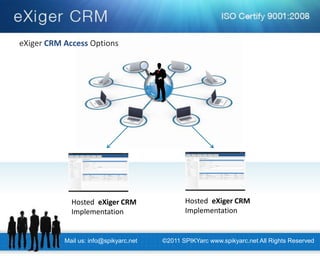
Hosted eXiger CRM Implementation 
eXiger CRM Access Options
Sales Process Concepts 
Mail us: info@spikyarc.net 
©2011 SPIKYarc www.spikyarc.net All Rights Reserved
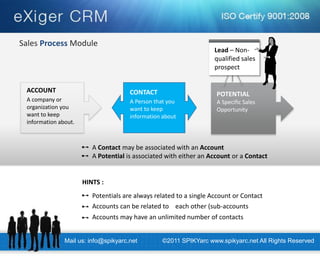
CONTACT 
A Person that you want to keep information about 
POTENTIAL 
A Specific Sales Opportunity 
ACCOUNT 
A company or organization you want to keep information about. 
Lead – Non- qualified sales prospect 
Accounts may have an unlimited number of contacts 
Accounts can be related to each other (sub-accounts 
Potentials are always related to a single Account or Contact 
HINTS : 
A Contact may be associated with an Account A Potential is associated with either an Account or a Contact 
Sales Process Module 
Mail us: info@spikyarc.net 
©2011 SPIKYarc www.spikyarc.net All Rights Reserved
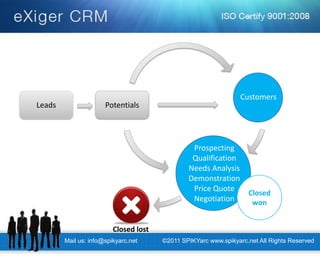
Leads 
Potentials 
Prospecting Qualification Needs Analysis Demonstration Price Quote Negotiation 
Customers 
Closed won 
Closed lost 
Mail us: info@spikyarc.net 
©2011 SPIKYarc www.spikyarc.net All Rights Reserved
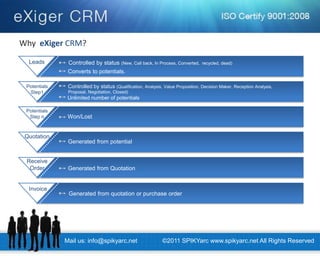
Generated from potential 
Quotation 
Controlled by status (Qualification, Analysis, Value Proposition, Decision Maker, Reception Analysis, 
Potentials 
Step1 
Unlimited number of potentials 
Controlled by status (New, Call back, In Process, Converted, recycled, dead) 
Leads 
Converts to potentials. 
Won/Lost 
Potentials 
Step n 
Generated from Quotation 
Receive 
Order 
Generated from quotation or purchase order 
Invoice 
Proposal, Negotiation, Closed) 
Why eXiger CRM? 
Mail us: info@spikyarc.net 
©2011 SPIKYarc www.spikyarc.net All Rights Reserved
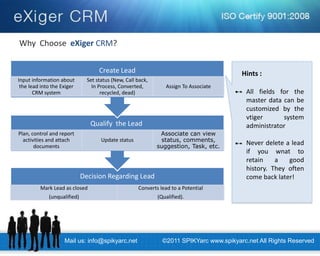
Why Choose eXiger CRM? 
Decision Regarding Lead 
Mark Lead as closed (unqualified) 
Converts lead to a Potential 
(Qualified). 
Plan, control and report activities and attach documents 
Update status 
Associate can view status, comments, suggestion, Task, etc. 
Create Lead 
Input information about the lead into the Exiger CRM system 
Set status (New, Call back, In Process, Converted, recycled, dead) 
Assign To Associate 
Qualify the Lead 
All fields for the master data can be customized by the vtiger system administrator 
Never delete a lead if you wnat to retain a good history. They often come back later! 
Hints : 
Mail us: info@spikyarc.net 
©2011 SPIKYarc www.spikyarc.net All Rights Reserved
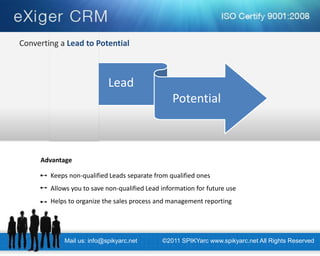
Lead 
Potential 
Keeps non-qualified Leads separate from qualified ones Allows you to save non-qualified Lead information for future use Helps to organize the sales process and management reporting 
Advantage 
Mail us: info@spikyarc.net 
©2011 SPIKYarc www.spikyarc.net All Rights Reserved 
Converting a Lead to Potential
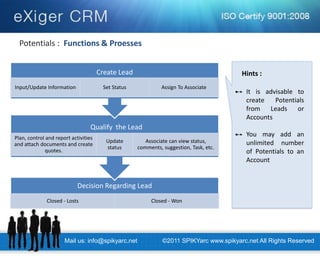
Potentials : Functions & Proesses 
Decision Regarding Lead 
Closed - Losts 
Closed - Won 
Plan, control and report activities and attach documents and create quotes. 
Update status 
Associate can view status, comments, suggestion, Task, etc. 
Create Lead 
Input/Update Information 
Set Status 
Assign To Associate 
Qualify the Lead 
It is advisable to create Potentials from Leads or Accounts 
You may add an unlimited number of Potentials to an Account 
Hints : 
Mail us: info@spikyarc.net 
©2011 SPIKYarc www.spikyarc.net All Rights Reserved
Why Choose eXiger CRM? 
Marketing Process Module 
Mail us: info@spikyarc.net 
©2011 SPIKYarc www.spikyarc.net All Rights Reserved
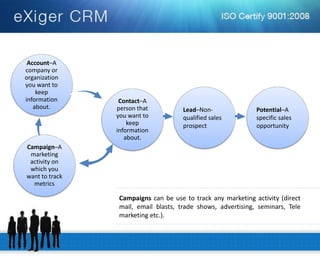
Account–A company or organization you want to keep information about. 
Contact–A person that you want to keep information about. 
Campaign–A marketing activity on which you want to track metrics 
Campaigns can be use to track any marketing activity (direct mail, email blasts, trade shows, advertising, seminars, Tele marketing etc.). 
Lead–Non- qualified sales prospect 
Potential–A specific sales opportunity
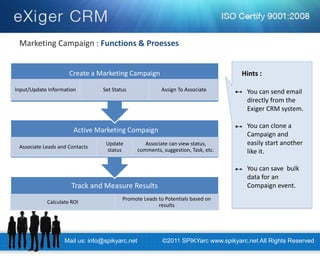
Marketing Campaign : Functions & Proesses 
Track and Measure Results 
Calculate ROI 
Promote Leads to Potentials based on results 
Associate Leads and Contacts 
Update status 
Associate can view status, comments, suggestion, Task, etc. 
Create a Marketing Campaign 
Input/Update Information 
Set Status 
Assign To Associate 
Active Marketing Compaign 
You can send email directly from the Exiger CRM system. You can clone a Campaign and easily start another like it. You can save bulk data for an Compaign event. 
Hints : 
Mail us: info@spikyarc.net 
©2011 SPIKYarc www.spikyarc.net All Rights Reserved
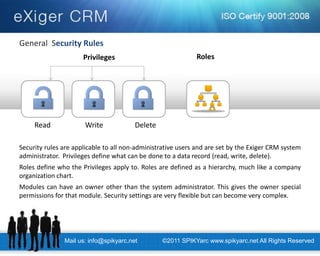
General Security Rules 
Security rules are applicable to all non-administrative users and are set by the Exiger CRM system administrator. Privileges define what can be done to a data record (read, write, delete). Roles define who the Privileges apply to. Roles are defined as a hierarchy, much like a company organization chart. Modules can have an owner other than the system administrator. This gives the owner special permissions for that module. Security settings are very flexible but can become very complex. 
Privileges 
Read 
Write 
Delete 
Roles 
Mail us: info@spikyarc.net 
©2011 SPIKYarc www.spikyarc.net All Rights Reserved
Thank You 
24/ M.R.C. Society, 
Near Jesal Society, Opp. Sahyog garden, 
Gorwa – 390016 Vadodara, Gujarat, India 
Phone: +91-265-2290452 
Mobile: +91-9998006029 
Website : www.spikyarc.net 
Mail us: info@spikyarc.net 
©2011 SPIKYarc www.spikyarc.net All Rights Reserved

360° Sales CRM System | Customer relationship-management (Web Based)

  • 2.
    Mail us: info@spikyarc.net ©2011 SPIKYarc www.spikyarc.net All Rights Reserved eXiger CRM System is a strategy to solidify relations with customers and at the same time reducing cost and enhancing productivity and profitability in business. An ideal system is a centralized collection all data sources under an organization and provides an atomistic real time vision of customer information. A eXiger CRM system is vast and significant, but it be can implemented for small business, as well as large enterprises also as the main goal is to assist the customers efficiently. About eXiger CRM
  • 3.
    Improve your businessneeds Improve customer service Improve customer service Close more sales opportunities Streamline & automate business processes Improve communication and Relationships with customers Why use eXiger CRM System?
  • 4.
    Feature of eXigerCRM Complete sales cycle 1. Data Access 2. Complete sales cycle and customer relationship management 3. Efficient, user-friendly and interactive follow-up of leads, opportunities and quotes 3. Interactive reports and dashboards 4. Ready for large enterprise 5. User Friendly interface 5.
  • 5.
    Mail us: info@spikyarc.net ©2011 SPIKYarc www.spikyarc.net All Rights Reserved Feature of eXiger CRM Accounts and Contacts 1. Forecast Information 2. Provide Quotation 3. Reporting and Customize Sales Process 4. Dynamic Data Management 5.
  • 6.
    Mail us: info@spikyarc.net ©2011 SPIKYarc www.spikyarc.net All Rights Reserved Advantage of eXiger CRM Decision Support 1. Enterprise Agility 2. Quality and Efficiency 3. Decrease in Overall Costs 4. Customer Attention 5. Increase Profitability 6.
  • 7.
    Mail us: info@spikyarc.net ©2011 SPIKYarc www.spikyarc.net All Rights Reserved Hosted eXiger CRM Implementation Hosted eXiger CRM Implementation eXiger CRM Access Options
  • 8.
    Sales Process Concepts Mail us: info@spikyarc.net ©2011 SPIKYarc www.spikyarc.net All Rights Reserved
  • 9.
    CONTACT A Personthat you want to keep information about POTENTIAL A Specific Sales Opportunity ACCOUNT A company or organization you want to keep information about. Lead – Non- qualified sales prospect Accounts may have an unlimited number of contacts Accounts can be related to each other (sub-accounts Potentials are always related to a single Account or Contact HINTS : A Contact may be associated with an Account A Potential is associated with either an Account or a Contact Sales Process Module Mail us: info@spikyarc.net ©2011 SPIKYarc www.spikyarc.net All Rights Reserved
  • 10.
    Leads Potentials ProspectingQualification Needs Analysis Demonstration Price Quote Negotiation Customers Closed won Closed lost Mail us: info@spikyarc.net ©2011 SPIKYarc www.spikyarc.net All Rights Reserved
  • 11.
    Generated from potential Quotation Controlled by status (Qualification, Analysis, Value Proposition, Decision Maker, Reception Analysis, Potentials Step1 Unlimited number of potentials Controlled by status (New, Call back, In Process, Converted, recycled, dead) Leads Converts to potentials. Won/Lost Potentials Step n Generated from Quotation Receive Order Generated from quotation or purchase order Invoice Proposal, Negotiation, Closed) Why eXiger CRM? Mail us: info@spikyarc.net ©2011 SPIKYarc www.spikyarc.net All Rights Reserved
  • 12.
    Why Choose eXigerCRM? Decision Regarding Lead Mark Lead as closed (unqualified) Converts lead to a Potential (Qualified). Plan, control and report activities and attach documents Update status Associate can view status, comments, suggestion, Task, etc. Create Lead Input information about the lead into the Exiger CRM system Set status (New, Call back, In Process, Converted, recycled, dead) Assign To Associate Qualify the Lead All fields for the master data can be customized by the vtiger system administrator Never delete a lead if you wnat to retain a good history. They often come back later! Hints : Mail us: info@spikyarc.net ©2011 SPIKYarc www.spikyarc.net All Rights Reserved
  • 13.
    Lead Potential Keepsnon-qualified Leads separate from qualified ones Allows you to save non-qualified Lead information for future use Helps to organize the sales process and management reporting Advantage Mail us: info@spikyarc.net ©2011 SPIKYarc www.spikyarc.net All Rights Reserved Converting a Lead to Potential
  • 14.
    Potentials : Functions& Proesses Decision Regarding Lead Closed - Losts Closed - Won Plan, control and report activities and attach documents and create quotes. Update status Associate can view status, comments, suggestion, Task, etc. Create Lead Input/Update Information Set Status Assign To Associate Qualify the Lead It is advisable to create Potentials from Leads or Accounts You may add an unlimited number of Potentials to an Account Hints : Mail us: info@spikyarc.net ©2011 SPIKYarc www.spikyarc.net All Rights Reserved
  • 15.
    Why Choose eXigerCRM? Marketing Process Module Mail us: info@spikyarc.net ©2011 SPIKYarc www.spikyarc.net All Rights Reserved
  • 16.
    Account–A company ororganization you want to keep information about. Contact–A person that you want to keep information about. Campaign–A marketing activity on which you want to track metrics Campaigns can be use to track any marketing activity (direct mail, email blasts, trade shows, advertising, seminars, Tele marketing etc.). Lead–Non- qualified sales prospect Potential–A specific sales opportunity
  • 17.
    Marketing Campaign :Functions & Proesses Track and Measure Results Calculate ROI Promote Leads to Potentials based on results Associate Leads and Contacts Update status Associate can view status, comments, suggestion, Task, etc. Create a Marketing Campaign Input/Update Information Set Status Assign To Associate Active Marketing Compaign You can send email directly from the Exiger CRM system. You can clone a Campaign and easily start another like it. You can save bulk data for an Compaign event. Hints : Mail us: info@spikyarc.net ©2011 SPIKYarc www.spikyarc.net All Rights Reserved
  • 18.
    General Security Rules Security rules are applicable to all non-administrative users and are set by the Exiger CRM system administrator. Privileges define what can be done to a data record (read, write, delete). Roles define who the Privileges apply to. Roles are defined as a hierarchy, much like a company organization chart. Modules can have an owner other than the system administrator. This gives the owner special permissions for that module. Security settings are very flexible but can become very complex. Privileges Read Write Delete Roles Mail us: info@spikyarc.net ©2011 SPIKYarc www.spikyarc.net All Rights Reserved
  • 19.
    Thank You 24/M.R.C. Society, Near Jesal Society, Opp. Sahyog garden, Gorwa – 390016 Vadodara, Gujarat, India Phone: +91-265-2290452 Mobile: +91-9998006029 Website : www.spikyarc.net Mail us: info@spikyarc.net ©2011 SPIKYarc www.spikyarc.net All Rights Reserved