Assistive Technology Options
for computer users with disabilities
atpdc 1
AT Program for the District of Columbia
(ATPDC)
Alicia Johns
Assistive Technology Program Manager
Kazuko Ross (Kaz)
Assistive Technology Specialist
Assistive Technology Resource Center
202-589-0288 EXT 137/EXT 105
democenter@uls-dc.org
atpdc 2
The Assistive Technology Program for the District of Columbia
(ATPDC) is funded by the Rehabilitation Services Administration of
the U.S. Department of Education, under the Assistive Technology
Act of 1998 as amended.
The project is administered by the Rehabilitation Administration of
the District of Columbia Department on Disability Services and
University Legal Services.
3
Assistive Technology Program for the District of Columbia
(ATPDC)
What is Assistive Technology?
• Devices
– “any item, piece of equipment, or product system,
whether acquired commercially, modified, or customized,
that is used to increase, maintain, or improve functional
capabilities of individuals with disabilities” (AT Act of 1998,
as amended)
• Services
– "any services that directly assist an individual with a
disability in the selection, acquisition, or use of an assistive
technology device" (AT Act of 1998, as amended)
atpdc 4
Low, Mid, and High-tech
Assistive Technology Devices
• Low: Inexpensive, easily made, easy to learn, readily
available, easy to replace/maintain
• Mid: May cost more, require some training, have
special design, often need power source
• High: Higher cost, need specific training to learn,
often customized
atpdc 5
AT Services and Types
atpdc 6
Any service that directly assists an individual with a
disability in the selection, acquisition or use of an assistive
technology device. Assistive technology services entail a
comprehensive and often ongoing process.
Information
Referrals
Evaluations
Assessments
Fabrication
Ordering
Fitting
Training
Recommendation
Maintenance
Follow up
The use of devices and the provision of services makes
up the assistive technology service delivery system.
• Learning Disabilities
• Computer Access
• Vision, Hearing, Speech Communication Aids
• Mobility Aids / Seating and Positioning
• Environmental Control Systems
• Vehicle modification and transportation
• Learning, cognition, and developmental
• Aids to Daily Living
• Architectural Modifications
• Recreation, sports, leisure
7
Types of AT Devices
• Persons with limited mobility
• Persons with low-vision or who are blind
• Persons with hard-of-hearing or deaf
8
Brief introduction:
Computer use with Assistive Technology
9
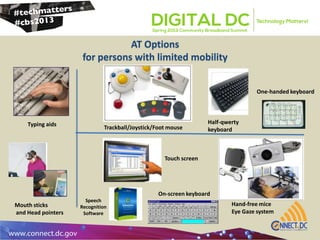
AT Options
for persons with limited mobility
Touch screen
Trackball/Joystick/Foot mouse
Hand-free mice
Eye Gaze system
On-screen keyboard
Typing aids
Mouth sticks
and Head pointers
One-handed keyboard
Half-qwerty
keyboard
Speech
Recognition
Software
10
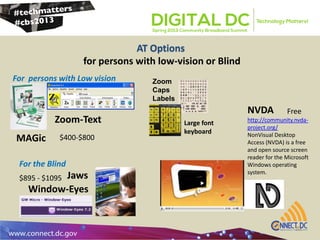
AT Options
for persons with low-vision or Blind
For persons with Low vision
MAGic
Zoom-Text
Jaws
Window-Eyes
For the Blind
Large font
keyboard
Zoom
Caps
Labels
NVDA
http://community.nvda-
project.org/
NonVisual Desktop
Access (NVDA) is a free
and open source screen
reader for the Microsoft
Windows operating
system.
$400-$800
Free
$895 - $1095
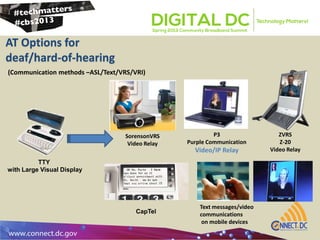
AT Options for
deaf/hard-of-hearing
(Communication methods –ASL/Text/VRS/VRI)
TTY
with Large Visual Display
CapTel
P3
Purple Communication
Video/IP Relay
SorensonVRS
Video Relay
Text messages/video
communications
on mobile devices
ZVRS
Z-20
Video Relay
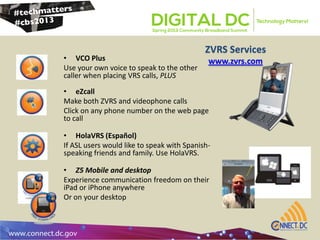
ZVRS Services
www.zvrs.com• VCO Plus
Use your own voice to speak to the other
caller when placing VRS calls, PLUS
• eZcall
Make both ZVRS and videophone calls
Click on any phone number on the web page
to call
• HolaVRS (Español)
If ASL users would like to speak with Spanish-
speaking friends and family. Use HolaVRS.
• Z5 Mobile and desktop
Experience communication freedom on their
iPad or iPhone anywhere
Or on your desktop
Technology Change
atpdc 13
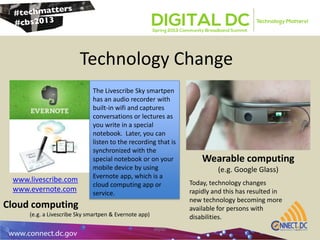
The Livescribe Sky smartpen
has an audio recorder with
built-in wifi and captures
conversations or lectures as
you write in a special
notebook. Later, you can
listen to the recording that is
synchronized with the
special notebook or on your
mobile device by using
Evernote app, which is a
cloud computing app or
service.
www.livescribe.com
www.evernote.com
Wearable computing
(e.g. Google Glass)
Cloud computing
(e.g. a Livescribe Sky smartpen & Evernote app)
Today, technology changes
rapidly and this has resulted in
new technology becoming more
available for persons with
disabilities.
Resources
Additional Recourses:
http://www.zvrs.com
http://www.sorenson.com
http://www.purple.us/p3?gclid=CO7z-6rsjrcCFUWK4AodN20Afg
http://www.scomm.com/
http://www.captel.com/ http://www.toby-
churchill.com/
NVDA (Free screen reader)
http://community.nvda-project.org/
http://etc.usf.edu/techease/4all/vision/how-do-i-use-the-nvda-
screen-reader-on-windows/
http://www.naturalreaders.com/index.php?gclid=CMbxoIuEj7cCFcJ
w4Aod01YArg
http://www.abledata.com
http://www.resna.com
http://www.atpdc.org/pages/links.html
Our websites:
www.atpdc.org
http://atpdc.wordpress.com
http://www.nuance.com/dragon/index.htm
http://www.humanware.com/en-
usa/products/blindness/dtb_players/compact_models
http://www.enablemart.com/bigtrack
http://www.naturalpoint.com/smartnav/
http://www.orin.com/access/headmouse/
http://www.freedomscientific.com/products/lv/magic-bl-product-
page.asp
http://www.aisquared.com/zoomtext/
http://www.freedomscientific.com/products/fs/jaws-product-
page.asp
http://www.gwmicro.com/Window-Eyes/
http://www.prometheanworld.com/en-us
http://smarttech.com/smartboard www.toolfactory.com
http://www.attainmentcompany.com/ www.infogrip.com
http://half-qwerty.com/
14
AT Product/Services:

Assistive Technology Options for computer users with disabilities

  • 1.
    Assistive Technology Options forcomputer users with disabilities atpdc 1
  • 2.
    AT Program forthe District of Columbia (ATPDC) Alicia Johns Assistive Technology Program Manager Kazuko Ross (Kaz) Assistive Technology Specialist Assistive Technology Resource Center 202-589-0288 EXT 137/EXT 105 democenter@uls-dc.org atpdc 2
  • 3.
    The Assistive TechnologyProgram for the District of Columbia (ATPDC) is funded by the Rehabilitation Services Administration of the U.S. Department of Education, under the Assistive Technology Act of 1998 as amended. The project is administered by the Rehabilitation Administration of the District of Columbia Department on Disability Services and University Legal Services. 3 Assistive Technology Program for the District of Columbia (ATPDC)
  • 4.
    What is AssistiveTechnology? • Devices – “any item, piece of equipment, or product system, whether acquired commercially, modified, or customized, that is used to increase, maintain, or improve functional capabilities of individuals with disabilities” (AT Act of 1998, as amended) • Services – "any services that directly assist an individual with a disability in the selection, acquisition, or use of an assistive technology device" (AT Act of 1998, as amended) atpdc 4
  • 5.
    Low, Mid, andHigh-tech Assistive Technology Devices • Low: Inexpensive, easily made, easy to learn, readily available, easy to replace/maintain • Mid: May cost more, require some training, have special design, often need power source • High: Higher cost, need specific training to learn, often customized atpdc 5
  • 6.
    AT Services andTypes atpdc 6 Any service that directly assists an individual with a disability in the selection, acquisition or use of an assistive technology device. Assistive technology services entail a comprehensive and often ongoing process. Information Referrals Evaluations Assessments Fabrication Ordering Fitting Training Recommendation Maintenance Follow up The use of devices and the provision of services makes up the assistive technology service delivery system.
  • 7.
    • Learning Disabilities •Computer Access • Vision, Hearing, Speech Communication Aids • Mobility Aids / Seating and Positioning • Environmental Control Systems • Vehicle modification and transportation • Learning, cognition, and developmental • Aids to Daily Living • Architectural Modifications • Recreation, sports, leisure 7 Types of AT Devices
  • 8.
    • Persons withlimited mobility • Persons with low-vision or who are blind • Persons with hard-of-hearing or deaf 8 Brief introduction: Computer use with Assistive Technology
  • 9.
    9 AT Options for personswith limited mobility Touch screen Trackball/Joystick/Foot mouse Hand-free mice Eye Gaze system On-screen keyboard Typing aids Mouth sticks and Head pointers One-handed keyboard Half-qwerty keyboard Speech Recognition Software
  • 10.
    10 AT Options for personswith low-vision or Blind For persons with Low vision MAGic Zoom-Text Jaws Window-Eyes For the Blind Large font keyboard Zoom Caps Labels NVDA http://community.nvda- project.org/ NonVisual Desktop Access (NVDA) is a free and open source screen reader for the Microsoft Windows operating system. $400-$800 Free $895 - $1095
  • 11.
    AT Options for deaf/hard-of-hearing (Communicationmethods –ASL/Text/VRS/VRI) TTY with Large Visual Display CapTel P3 Purple Communication Video/IP Relay SorensonVRS Video Relay Text messages/video communications on mobile devices ZVRS Z-20 Video Relay
  • 12.
    ZVRS Services www.zvrs.com• VCOPlus Use your own voice to speak to the other caller when placing VRS calls, PLUS • eZcall Make both ZVRS and videophone calls Click on any phone number on the web page to call • HolaVRS (Español) If ASL users would like to speak with Spanish- speaking friends and family. Use HolaVRS. • Z5 Mobile and desktop Experience communication freedom on their iPad or iPhone anywhere Or on your desktop
  • 13.
    Technology Change atpdc 13 TheLivescribe Sky smartpen has an audio recorder with built-in wifi and captures conversations or lectures as you write in a special notebook. Later, you can listen to the recording that is synchronized with the special notebook or on your mobile device by using Evernote app, which is a cloud computing app or service. www.livescribe.com www.evernote.com Wearable computing (e.g. Google Glass) Cloud computing (e.g. a Livescribe Sky smartpen & Evernote app) Today, technology changes rapidly and this has resulted in new technology becoming more available for persons with disabilities.
  • 14.
    Resources Additional Recourses: http://www.zvrs.com http://www.sorenson.com http://www.purple.us/p3?gclid=CO7z-6rsjrcCFUWK4AodN20Afg http://www.scomm.com/ http://www.captel.com/ http://www.toby- churchill.com/ NVDA(Free screen reader) http://community.nvda-project.org/ http://etc.usf.edu/techease/4all/vision/how-do-i-use-the-nvda- screen-reader-on-windows/ http://www.naturalreaders.com/index.php?gclid=CMbxoIuEj7cCFcJ w4Aod01YArg http://www.abledata.com http://www.resna.com http://www.atpdc.org/pages/links.html Our websites: www.atpdc.org http://atpdc.wordpress.com http://www.nuance.com/dragon/index.htm http://www.humanware.com/en- usa/products/blindness/dtb_players/compact_models http://www.enablemart.com/bigtrack http://www.naturalpoint.com/smartnav/ http://www.orin.com/access/headmouse/ http://www.freedomscientific.com/products/lv/magic-bl-product- page.asp http://www.aisquared.com/zoomtext/ http://www.freedomscientific.com/products/fs/jaws-product- page.asp http://www.gwmicro.com/Window-Eyes/ http://www.prometheanworld.com/en-us http://smarttech.com/smartboard www.toolfactory.com http://www.attainmentcompany.com/ www.infogrip.com http://half-qwerty.com/ 14 AT Product/Services:

Editor's Notes

  • #10 On-screen keyboards provide an image of a standard or modified keyboard on the computer screen that allows the user to select keys with a mouse, touch screen, trackball, joystick, switch, or electronic pointing device
  • #14 Cloud computing is the use of computing resources (hardware and software) which are available in a remote location and accessible over a network (typically the Internet).Wearable computers, also known as body-borne computers are miniature electronic devices that are worn under, with or on top of clothing.