Assistive Technology Overview
Jeremy St. Pierre– Assistive Technology Consultant
Technology Access Center
Evan Espey – Director of Outreach and Development,
Technology Access Center
Promoting Independence with Technology
What is Assistive Technology
 An assistive technology device is any item, piece of
equipment, or product system, whether acquired
commercially, modified, or customized, that is used
to increase, maintain, or improve functional
capabilities of individuals with disabilities. Assistive
Technology (AT) is technology used by individuals
with disabilities in order to perform functions that
might otherwise be difficult or impossible.
Assistive Technology Act
 This law helps make sure that AT is available to
people with disabilities so they can more fully
participate as active members of their communities.
The law covers all ages and in all environments,
including in school and at work. It’s often called the
“Tech Act”.
 Under the law, each U.S. state and territory receives
a grant to fund an AT Project (ATAP).
 TTAP in TN
What is TTAP?
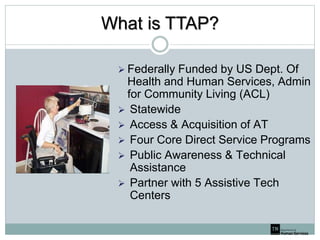
 Federally Funded by US Dept. Of
Health and Human Services, Admin
for Community Living (ACL)
 Statewide
 Access & Acquisition of AT
 Four Core Direct Service Programs
 Public Awareness & Technical
Assistance
 Partner with 5 Assistive Tech
Centers
Technology Center Locations
 Mid-South ACT – Memphis
 The STAR Center – Jackson
 Technology Access Center (TAC) – Nashville
 Signal Center – Chattanooga
 East Tennessee Technology Access Center (ETTAC) -
Knoxville
Core Programs
 Device Demonstration
 Device Loan
 Device Reutilization
 Funding and Information
Assistance
Device Demonstration
 Individualized
 Decision Making
 Multiple Devices
 Feature Exploration
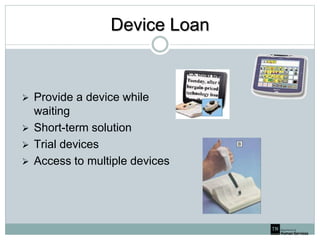
Device Loan
 Provide a device while
waiting
 Short-term solution
 Trial devices
 Access to multiple devices
Device Reutilization
 Free used devices
 New life for older devices
 Great access to technology
 Long or short term solution
 Maximize utilization of funding
Funding and Information Assistance
 Personalized
 Individualized Resources List
 Local, Statewide and National Resources
 Information Referral
 Technical Assistance
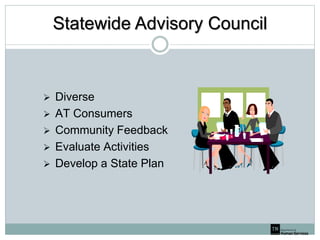
Statewide Advisory Council
 Diverse
 AT Consumers
 Community Feedback
 Evaluate Activities
 Develop a State Plan
Overview of Assistive Technology
 Computer Access
 Switches and Recreation
 Communication
 Low Vision Accommodations
 Mobility
 Aids for Daily Living
 Learning / Educational Supports
 Custom Job Accommodations
Computer Access
 Text Entry
 Alternative Keyboards
 Voice Recognition
 Typing Aids
 Mouse Control
 Mice
 Trackballs
 Joystick
 Head Control
 Eye Control
 Accessibility Features
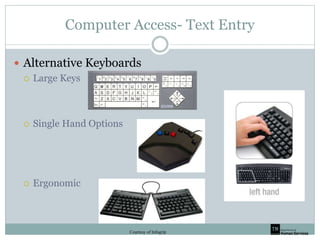
Computer Access- Text Entry
 Alternative Keyboards
 Large Keys
 Single Hand Options
 Ergonomic
Courtesy of Infogrip
Computer Access – Text Entry
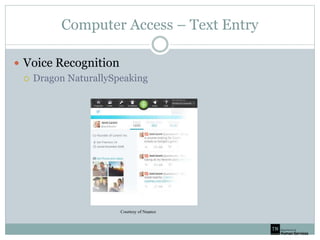
 Voice Recognition
 Dragon NaturallySpeaking
Courtesy of Nuance
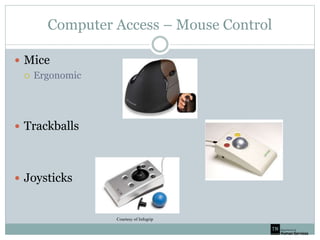
Computer Access – Mouse Control
 Mice
 Ergonomic
 Trackballs
 Joysticks
Courtesy of Infogrip
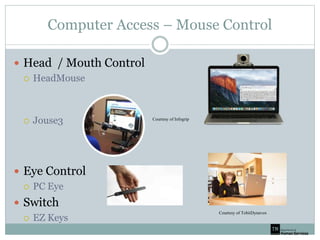
Computer Access – Mouse Control
 Head / Mouth Control
 HeadMouse
 Jouse3
 Eye Control
 PC Eye
 Switch
 EZ Keys
Courtesy of TobiiDynavox
Courtesy of Infogrip
Computer Access – Text Entry
 Accessibility Features
 Sticky Keys
 Onscreen Keyboard
 Filter Keys
 Screen Reader
 Magnification
 Voice Recognition
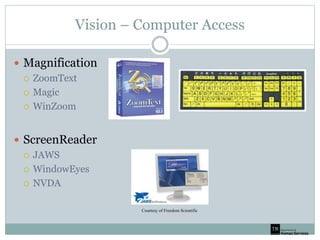
Vision – Computer Access
 Magnification
 ZoomText
 Magic
 WinZoom
 ScreenReader
 JAWS
 WindowEyes
 NVDA
Courtesy of Freedom Scientific
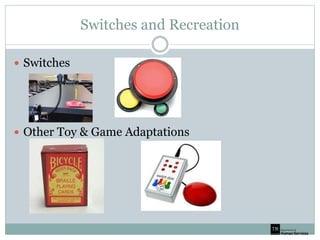
Switches and Recreation
 Switches
 Other Toy & Game Adaptations
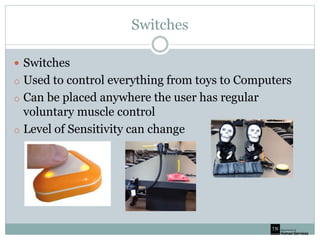
Switches
 Switches
o Used to control everything from toys to Computers
o Can be placed anywhere the user has regular
voluntary muscle control
o Level of Sensitivity can change
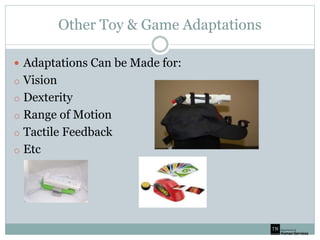
Other Toy & Game Adaptations
 Adaptations Can be Made for:
o Vision
o Dexterity
o Range of Motion
o Tactile Feedback
o Etc
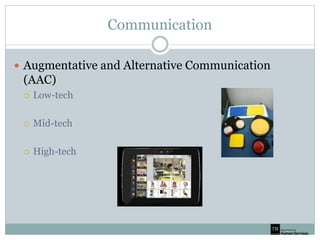
Communication
 Augmentative and Alternative Communication
(AAC)
 Low-tech
 Mid-tech
 High-tech
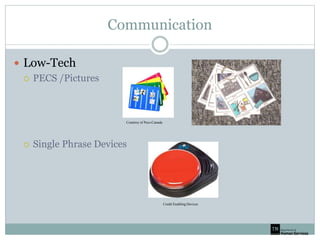
Communication
 Low-Tech
 PECS /Pictures
 Single Phrase Devices
Courtesy of Pecs-Canada
Credit Enabling Devices
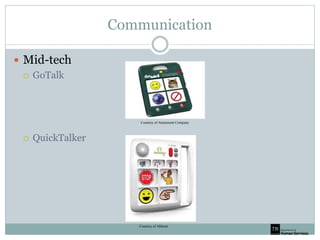
Communication
 Mid-tech
 GoTalk
 QuickTalker
Courtesy of Attainment Company
Courtesy of Ablenet
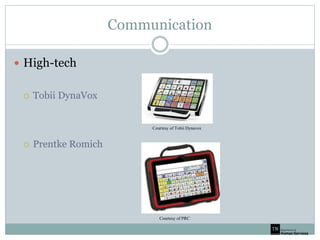
Communication
 High-tech
 Tobii DynaVox
 Prentke Romich
Courtesy of PRC
Courtesy of Tobii Dynavox
Communication
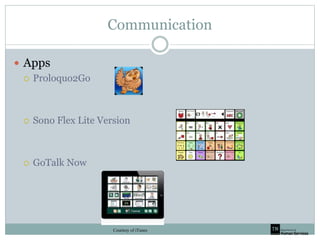
 Apps
 Proloquo2Go
 Sono Flex Lite Version
 GoTalk Now
Courtesy of iTunes
Vision – Print Materials
 Handheld Magnifiers
 CCTVs
 Scan and Read Products
 Alternative Format Text
Vision – Print Access
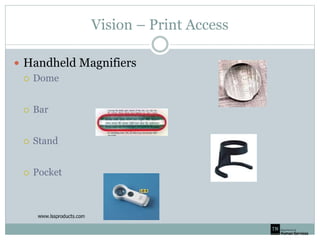
 Handheld Magnifiers
 Dome
 Bar
 Stand
 Pocket
Vision- Print Materials
 CCTVs (Closed Circuit Television)
 Handheld
 Semi-Portable
 Desktop
Vision – Print Access
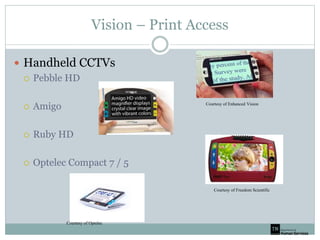
 Handheld CCTVs
 Pebble HD
 Amigo
 Ruby HD
 Optelec Compact 7 / 5
Courtesy of Optelec
Courtesy of Freedom Scientific
Courtesy of Enhanced Vision
Vision – Print Access
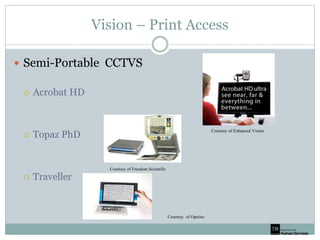
 Semi-Portable CCTVS
 Acrobat HD
 Topaz PhD
 Traveller
Courtesy of Enhanced Vision
Courtesy of Freedom Scientific
Courtesy of Optelec
Vision – Print Access
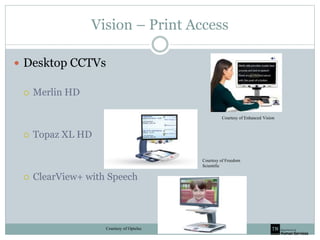
 Desktop CCTVs
 Merlin HD
 Topaz XL HD
 ClearView+ with Speech
Courtesy of Enhanced Vision
Courtesy of Optelec
Courtesy of Freedom
Scientific
Vision – Print Access
 Scan and Read Option
 Stand Alone Devices
 Computer Software Options
 Apps
Vision – Print Access
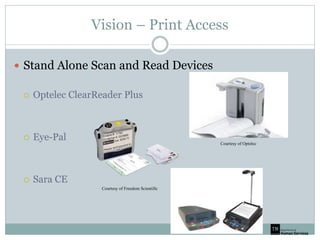
 Stand Alone Scan and Read Devices
 Optelec ClearReader Plus
 Eye-Pal
 Sara CE
Courtesy of Optelec
Courtesy of Freedom Scientific
Vision – Print Access
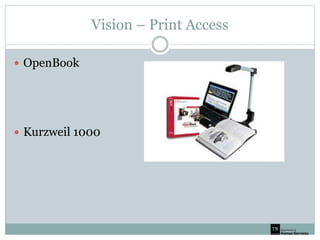
 OpenBook
 Kurzweil 1000
Vision – Print Access
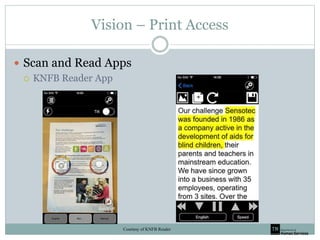
 Scan and Read Apps
 KNFB Reader App
Courtesy of KNFB Reader
Vision – Other Hardware
 Low Tech Braille Devices
 Perkins Brailler
 Slate and Stylus
 Braille Embossers
 Braille Displays
 Braille Notetakers
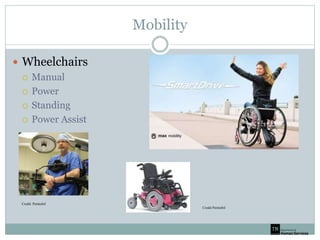
Mobility
 Wheelchairs
 Manual
 Power
 Standing
 Power Assist
Credit: Permobil
Credit Permobil
Mobility
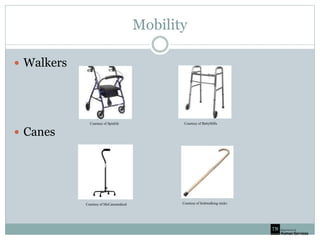
 Walkers
 Canes
Courtesy of Spinlife Courtesy of BettyMills
Courtesy of McCansmedical Courtesy of Irishwalking sticks
Independent Living
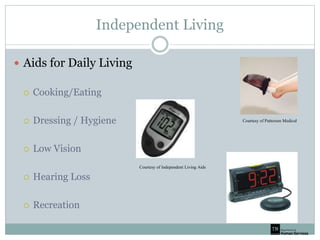
 Aids for Daily Living
 Cooking/Eating
 Dressing / Hygiene
 Low Vision
 Hearing Loss
 Recreation
Courtesy of Independent Living Aids
Courtesy of Patterson Medical
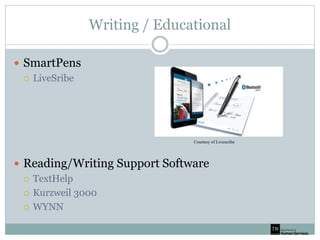
Writing / Educational
 SmartPens
 LiveSribe
 Reading/Writing Support Software
 TextHelp
 Kurzweil 3000
 WYNN
Courtesy of Livescribe
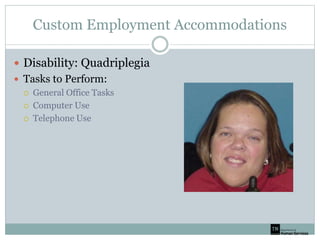
Custom Employment Accommodations
 Disability: Quadriplegia
 Tasks to Perform:
 General Office Tasks
 Computer Use
 Telephone Use
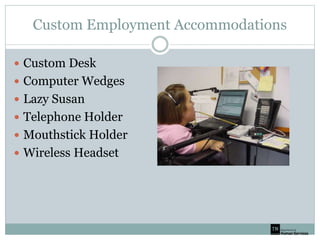
Custom Employment Accommodations
 Custom Desk
 Computer Wedges
 Lazy Susan
 Telephone Holder
 Mouthstick Holder
 Wireless Headset
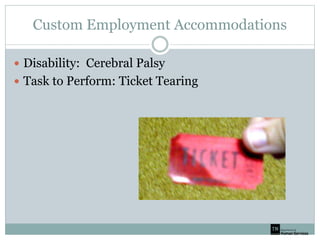
Custom Employment Accommodations
 Disability: Cerebral Palsy
 Task to Perform: Ticket Tearing
Custom Employment Accommodations
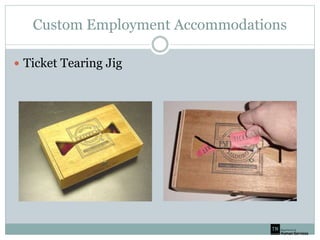
 Ticket Tearing Jig
Custom Employment Accommodations
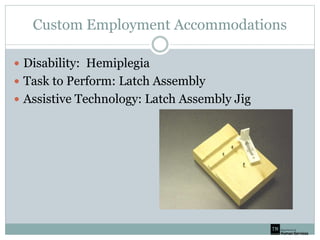
 Disability: Hemiplegia
 Task to Perform: Latch Assembly
 Assistive Technology: Latch Assembly Jig

Assistive technology: A review for Beginners

  • 1.
    Assistive Technology Overview JeremySt. Pierre– Assistive Technology Consultant Technology Access Center Evan Espey – Director of Outreach and Development, Technology Access Center Promoting Independence with Technology
  • 2.
    What is AssistiveTechnology  An assistive technology device is any item, piece of equipment, or product system, whether acquired commercially, modified, or customized, that is used to increase, maintain, or improve functional capabilities of individuals with disabilities. Assistive Technology (AT) is technology used by individuals with disabilities in order to perform functions that might otherwise be difficult or impossible.
  • 3.
    Assistive Technology Act This law helps make sure that AT is available to people with disabilities so they can more fully participate as active members of their communities. The law covers all ages and in all environments, including in school and at work. It’s often called the “Tech Act”.  Under the law, each U.S. state and territory receives a grant to fund an AT Project (ATAP).  TTAP in TN
  • 4.
    What is TTAP? Federally Funded by US Dept. Of Health and Human Services, Admin for Community Living (ACL)  Statewide  Access & Acquisition of AT  Four Core Direct Service Programs  Public Awareness & Technical Assistance  Partner with 5 Assistive Tech Centers
  • 5.
    Technology Center Locations Mid-South ACT – Memphis  The STAR Center – Jackson  Technology Access Center (TAC) – Nashville  Signal Center – Chattanooga  East Tennessee Technology Access Center (ETTAC) - Knoxville
  • 6.
    Core Programs  DeviceDemonstration  Device Loan  Device Reutilization  Funding and Information Assistance
  • 7.
    Device Demonstration  Individualized Decision Making  Multiple Devices  Feature Exploration
  • 8.
    Device Loan  Providea device while waiting  Short-term solution  Trial devices  Access to multiple devices
  • 9.
    Device Reutilization  Freeused devices  New life for older devices  Great access to technology  Long or short term solution  Maximize utilization of funding
  • 10.
    Funding and InformationAssistance  Personalized  Individualized Resources List  Local, Statewide and National Resources  Information Referral  Technical Assistance
  • 11.
    Statewide Advisory Council Diverse  AT Consumers  Community Feedback  Evaluate Activities  Develop a State Plan
  • 12.
    Overview of AssistiveTechnology  Computer Access  Switches and Recreation  Communication  Low Vision Accommodations  Mobility  Aids for Daily Living  Learning / Educational Supports  Custom Job Accommodations
  • 13.
    Computer Access  TextEntry  Alternative Keyboards  Voice Recognition  Typing Aids  Mouse Control  Mice  Trackballs  Joystick  Head Control  Eye Control  Accessibility Features
  • 14.
    Computer Access- TextEntry  Alternative Keyboards  Large Keys  Single Hand Options  Ergonomic Courtesy of Infogrip
  • 15.
    Computer Access –Text Entry  Voice Recognition  Dragon NaturallySpeaking Courtesy of Nuance
  • 16.
    Computer Access –Mouse Control  Mice  Ergonomic  Trackballs  Joysticks Courtesy of Infogrip
  • 17.
    Computer Access –Mouse Control  Head / Mouth Control  HeadMouse  Jouse3  Eye Control  PC Eye  Switch  EZ Keys Courtesy of TobiiDynavox Courtesy of Infogrip
  • 18.
    Computer Access –Text Entry  Accessibility Features  Sticky Keys  Onscreen Keyboard  Filter Keys  Screen Reader  Magnification  Voice Recognition
  • 19.
    Vision – ComputerAccess  Magnification  ZoomText  Magic  WinZoom  ScreenReader  JAWS  WindowEyes  NVDA Courtesy of Freedom Scientific
  • 20.
    Switches and Recreation Switches  Other Toy & Game Adaptations
  • 21.
    Switches  Switches o Usedto control everything from toys to Computers o Can be placed anywhere the user has regular voluntary muscle control o Level of Sensitivity can change
  • 22.
    Other Toy &Game Adaptations  Adaptations Can be Made for: o Vision o Dexterity o Range of Motion o Tactile Feedback o Etc
  • 23.
    Communication  Augmentative andAlternative Communication (AAC)  Low-tech  Mid-tech  High-tech
  • 24.
    Communication  Low-Tech  PECS/Pictures  Single Phrase Devices Courtesy of Pecs-Canada Credit Enabling Devices
  • 25.
    Communication  Mid-tech  GoTalk QuickTalker Courtesy of Attainment Company Courtesy of Ablenet
  • 26.
    Communication  High-tech  TobiiDynaVox  Prentke Romich Courtesy of PRC Courtesy of Tobii Dynavox
  • 27.
    Communication  Apps  Proloquo2Go Sono Flex Lite Version  GoTalk Now Courtesy of iTunes
  • 28.
    Vision – PrintMaterials  Handheld Magnifiers  CCTVs  Scan and Read Products  Alternative Format Text
  • 29.
    Vision – PrintAccess  Handheld Magnifiers  Dome  Bar  Stand  Pocket
  • 30.
    Vision- Print Materials CCTVs (Closed Circuit Television)  Handheld  Semi-Portable  Desktop
  • 31.
    Vision – PrintAccess  Handheld CCTVs  Pebble HD  Amigo  Ruby HD  Optelec Compact 7 / 5 Courtesy of Optelec Courtesy of Freedom Scientific Courtesy of Enhanced Vision
  • 32.
    Vision – PrintAccess  Semi-Portable CCTVS  Acrobat HD  Topaz PhD  Traveller Courtesy of Enhanced Vision Courtesy of Freedom Scientific Courtesy of Optelec
  • 33.
    Vision – PrintAccess  Desktop CCTVs  Merlin HD  Topaz XL HD  ClearView+ with Speech Courtesy of Enhanced Vision Courtesy of Optelec Courtesy of Freedom Scientific
  • 34.
    Vision – PrintAccess  Scan and Read Option  Stand Alone Devices  Computer Software Options  Apps
  • 35.
    Vision – PrintAccess  Stand Alone Scan and Read Devices  Optelec ClearReader Plus  Eye-Pal  Sara CE Courtesy of Optelec Courtesy of Freedom Scientific
  • 36.
    Vision – PrintAccess  OpenBook  Kurzweil 1000
  • 37.
    Vision – PrintAccess  Scan and Read Apps  KNFB Reader App Courtesy of KNFB Reader
  • 38.
    Vision – OtherHardware  Low Tech Braille Devices  Perkins Brailler  Slate and Stylus  Braille Embossers  Braille Displays  Braille Notetakers
  • 39.
    Mobility  Wheelchairs  Manual Power  Standing  Power Assist Credit: Permobil Credit Permobil
  • 40.
    Mobility  Walkers  Canes Courtesyof Spinlife Courtesy of BettyMills Courtesy of McCansmedical Courtesy of Irishwalking sticks
  • 41.
    Independent Living  Aidsfor Daily Living  Cooking/Eating  Dressing / Hygiene  Low Vision  Hearing Loss  Recreation Courtesy of Independent Living Aids Courtesy of Patterson Medical
  • 42.
    Writing / Educational SmartPens  LiveSribe  Reading/Writing Support Software  TextHelp  Kurzweil 3000  WYNN Courtesy of Livescribe
  • 43.
    Custom Employment Accommodations Disability: Quadriplegia  Tasks to Perform:  General Office Tasks  Computer Use  Telephone Use
  • 44.
    Custom Employment Accommodations Custom Desk  Computer Wedges  Lazy Susan  Telephone Holder  Mouthstick Holder  Wireless Headset
  • 45.
    Custom Employment Accommodations Disability: Cerebral Palsy  Task to Perform: Ticket Tearing
  • 46.
  • 47.
    Custom Employment Accommodations Disability: Hemiplegia  Task to Perform: Latch Assembly  Assistive Technology: Latch Assembly Jig