1
Multi-core architectures
Jernej Barbic
15-213, Spring 2006
May 4, 2006
2
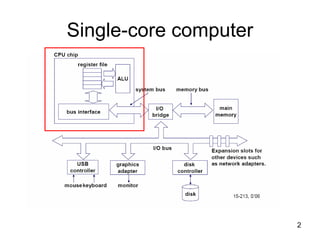
Single-core computer
3
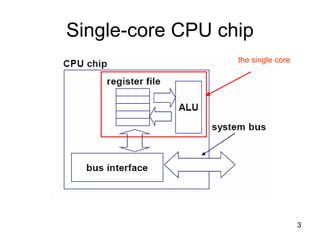
Single-core CPU chip
the single core
4
Multi-core architectures
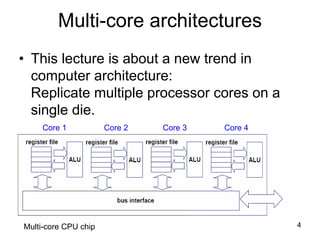
• This lecture is about a new trend in
computer architecture:
Replicate multiple processor cores on a
single die.
Core 1 Core 2 Core 3 Core 4
Multi-core CPU chip
5
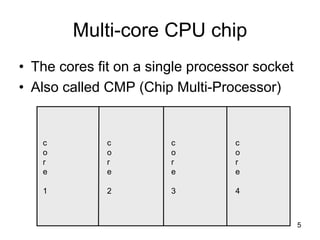
Multi-core CPU chip
• The cores fit on a single processor socket
• Also called CMP (Chip Multi-Processor)
c
o
r
e
1
c
o
r
e
2
c
o
r
e
3
c
o
r
e
4
6
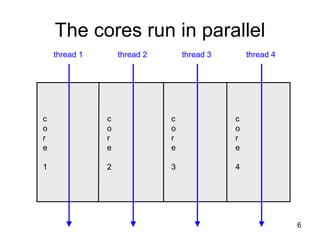
The cores run in parallel
c
o
r
e
1
c
o
r
e
2
c
o
r
e
3
c
o
r
e
4
thread 1 thread 2 thread 3 thread 4
7
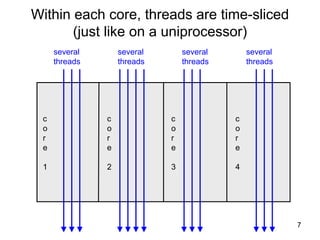
Within each core, threads are time-sliced
(just like on a uniprocessor)
c
o
r
e
1
c
o
r
e
2
c
o
r
e
3
c
o
r
e
4
several
threads
several
threads
several
threads
several
threads
8
Interaction with OS
• OS perceives each core as a separate
processor
• OS scheduler maps threads/processes
to different cores
• Most major OS support multi-core today
9
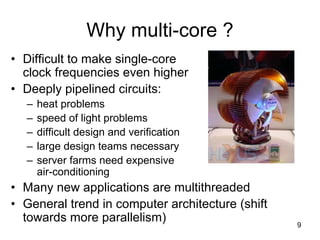
Why multi-core ?
• Difficult to make single-core
clock frequencies even higher
• Deeply pipelined circuits:
– heat problems
– speed of light problems
– difficult design and verification
– large design teams necessary
– server farms need expensive
air-conditioning
• Many new applications are multithreaded
• General trend in computer architecture (shift
towards more parallelism)
10
Instruction-level parallelism
• Parallelism at the machine-instruction level
• The processor can re-order, pipeline
instructions, split them into
microinstructions, do aggressive branch
prediction, etc.
• Instruction-level parallelism enabled rapid
increases in processor speeds over the
last 15 years
11
Thread-level parallelism (TLP)
• This is parallelism on a more coarser scale
• Server can serve each client in a separate
thread (Web server, database server)
• A computer game can do AI, graphics, and
physics in three separate threads
• Single-core superscalar processors cannot
fully exploit TLP
• Multi-core architectures are the next step in
processor evolution: explicitly exploiting TLP
12
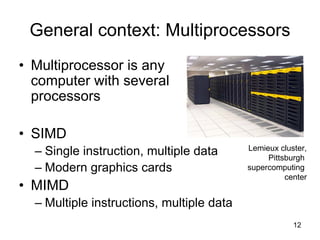
General context: Multiprocessors
• Multiprocessor is any
computer with several
processors
• SIMD
– Single instruction, multiple data
– Modern graphics cards
• MIMD
– Multiple instructions, multiple data
Lemieux cluster,
Pittsburgh
supercomputing
center
13
Multiprocessor memory types
• Shared memory:
In this model, there is one (large) common
shared memory for all processors
• Distributed memory:
In this model, each processor has its own
(small) local memory, and its content is not
replicated anywhere else
14
Multi-core processor is a special
kind of a multiprocessor:
All processors are on the same chip
• Multi-core processors are MIMD:
Different cores execute different threads
(Multiple Instructions), operating on different
parts of memory (Multiple Data).
• Multi-core is a shared memory multiprocessor:
All cores share the same memory
15
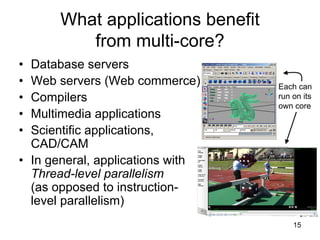
What applications benefit
from multi-core?
• Database servers
• Web servers (Web commerce)
• Compilers
• Multimedia applications
• Scientific applications,
CAD/CAM
• In general, applications with
Thread-level parallelism
(as opposed to instruction-
level parallelism)
Each can
run on its
own core
16
More examples
• Editing a photo while recording a TV show
through a digital video recorder
• Downloading software while running an
anti-virus program
• “Anything that can be threaded today will
map efficiently to multi-core”
• BUT: some applications difficult to
parallelize
17
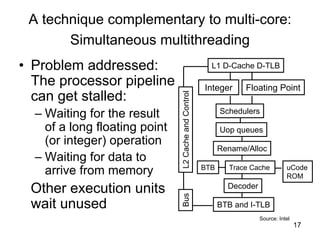
A technique complementary to multi-core:
Simultaneous multithreading
• Problem addressed:
The processor pipeline
can get stalled:
– Waiting for the result
of a long floating point
(or integer) operation
– Waiting for data to
arrive from memory
Other execution units
wait unused BTB and I-TLB
Decoder
Trace Cache
Rename/Alloc
Uop queues
Schedulers
Integer Floating Point
L1 D-Cache D-TLB
uCode
ROM
BTB
L2CacheandControlBus
Source: Intel
18
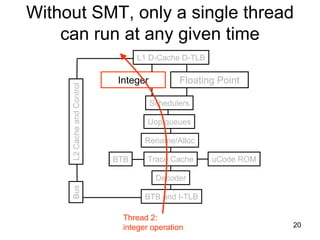
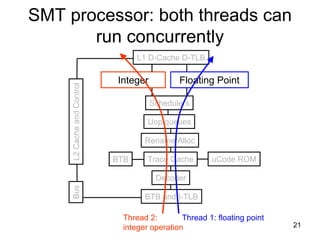
Simultaneous multithreading (SMT)
• Permits multiple independent threads to execute
SIMULTANEOUSLY on the SAME core
• Weaving together multiple “threads”
on the same core
• Example: if one thread is waiting for a floating
point operation to complete, another thread can
use the integer units
19
BTB and I-TLB
Decoder
Trace Cache
Rename/Alloc
Uop queues
Schedulers
Integer Floating Point
L1 D-Cache D-TLB
uCode ROMBTB
L2CacheandControlBus
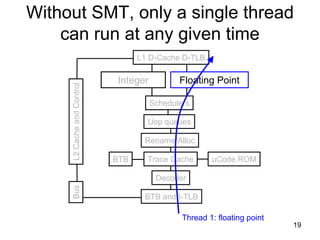
Thread 1: floating point
Without SMT, only a single thread
can run at any given time
20
Without SMT, only a single thread
can run at any given time
BTB and I-TLB
Decoder
Trace Cache
Rename/Alloc
Uop queues
Schedulers
Integer Floating Point
L1 D-Cache D-TLB
uCode ROMBTB
L2CacheandControlBus
Thread 2:
integer operation
21
SMT processor: both threads can
run concurrently
BTB and I-TLB
Decoder
Trace Cache
Rename/Alloc
Uop queues
Schedulers
Integer Floating Point
L1 D-Cache D-TLB
uCode ROMBTB
L2CacheandControlBus
Thread 1: floating pointThread 2:
integer operation
22
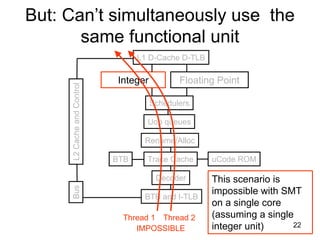
But: Can’t simultaneously use the
same functional unit
BTB and I-TLB
Decoder
Trace Cache
Rename/Alloc
Uop queues
Schedulers
Integer Floating Point
L1 D-Cache D-TLB
uCode ROMBTB
L2CacheandControlBus
Thread 1 Thread 2
This scenario is
impossible with SMT
on a single core
(assuming a single
integer unit)IMPOSSIBLE
23
SMT not a “true” parallel processor
• Enables better threading (e.g. up to 30%)
• OS and applications perceive each
simultaneous thread as a separate
“virtual processor”
• The chip has only a single copy
of each resource
• Compare to multi-core:
each core has its own copy of resources
24
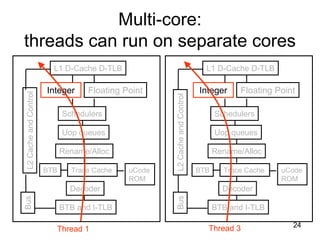
Multi-core:
threads can run on separate cores
BTB and I-TLB
Decoder
Trace Cache
Rename/Alloc
Uop queues
Schedulers
Integer Floating Point
L1 D-Cache D-TLB
uCode
ROM
BTB
L2CacheandControlBus
BTB and I-TLB
Decoder
Trace Cache
Rename/Alloc
Uop queues
Schedulers
Integer Floating Point
L1 D-Cache D-TLB
uCode
ROM
BTB
L2CacheandControlBus
Thread 1 Thread 3
25
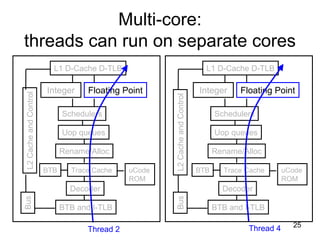
BTB and I-TLB
Decoder
Trace Cache
Rename/Alloc
Uop queues
Schedulers
Integer Floating Point
L1 D-Cache D-TLB
uCode
ROM
BTB
L2CacheandControlBus
BTB and I-TLB
Decoder
Trace Cache
Rename/Alloc
Uop queues
Schedulers
Integer Floating Point
L1 D-Cache D-TLB
uCode
ROM
BTB
L2CacheandControlBus
Thread 2 Thread 4
Multi-core:
threads can run on separate cores
26
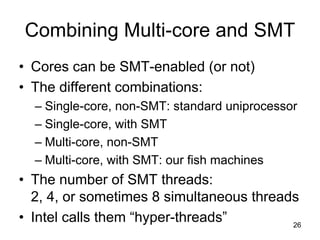
Combining Multi-core and SMT
• Cores can be SMT-enabled (or not)
• The different combinations:
– Single-core, non-SMT: standard uniprocessor
– Single-core, with SMT
– Multi-core, non-SMT
– Multi-core, with SMT: our fish machines
• The number of SMT threads:
2, 4, or sometimes 8 simultaneous threads
• Intel calls them “hyper-threads”
27
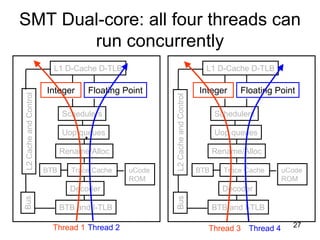
SMT Dual-core: all four threads can
run concurrently
BTB and I-TLB
Decoder
Trace Cache
Rename/Alloc
Uop queues
Schedulers
Integer Floating Point
L1 D-Cache D-TLB
uCode
ROM
BTB
L2CacheandControlBus
BTB and I-TLB
Decoder
Trace Cache
Rename/Alloc
Uop queues
Schedulers
Integer Floating Point
L1 D-Cache D-TLB
uCode
ROM
BTB
L2CacheandControlBus
Thread 1 Thread 2 Thread 3 Thread 4
28
Comparison: multi-core vs SMT
• Advantages/disadvantages?
29
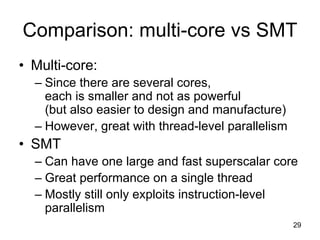
Comparison: multi-core vs SMT
• Multi-core:
– Since there are several cores,
each is smaller and not as powerful
(but also easier to design and manufacture)
– However, great with thread-level parallelism
• SMT
– Can have one large and fast superscalar core
– Great performance on a single thread
– Mostly still only exploits instruction-level
parallelism
30
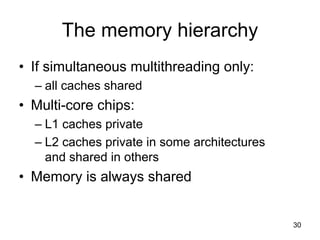
The memory hierarchy
• If simultaneous multithreading only:
– all caches shared
• Multi-core chips:
– L1 caches private
– L2 caches private in some architectures
and shared in others
• Memory is always shared
31
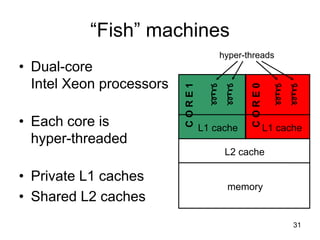
“Fish” machines
• Dual-core
Intel Xeon processors
• Each core is
hyper-threaded
• Private L1 caches
• Shared L2 caches
memory
L2 cache
L1 cache L1 cache
CORE1
CORE0
hyper-threads
32
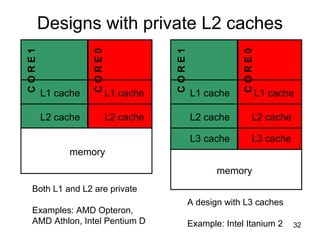
Designs with private L2 caches
memory
L2 cache
L1 cache L1 cache
CORE1
CORE0
L2 cache
memory
L2 cache
L1 cache L1 cache
CORE1
CORE0
L2 cache
Both L1 and L2 are private
Examples: AMD Opteron,
AMD Athlon, Intel Pentium D
L3 cache L3 cache
A design with L3 caches
Example: Intel Itanium 2
33
Private vs shared caches?
• Advantages/disadvantages?
34
Private vs shared caches
• Advantages of private:
– They are closer to core, so faster access
– Reduces contention
• Advantages of shared:
– Threads on different cores can share the
same cache data
– More cache space available if a single (or a
few) high-performance thread runs on the
system
35
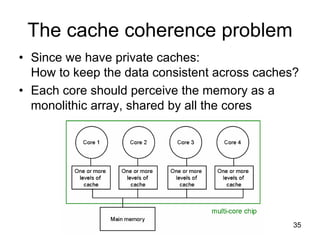
The cache coherence problem
• Since we have private caches:
How to keep the data consistent across caches?
• Each core should perceive the memory as a
monolithic array, shared by all the cores
36
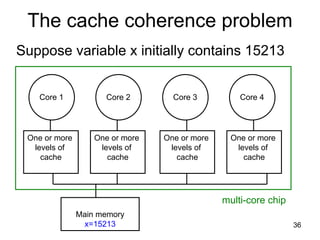
The cache coherence problem
Suppose variable x initially contains 15213
Core 1 Core 2 Core 3 Core 4
One or more
levels of
cache
One or more
levels of
cache
One or more
levels of
cache
One or more
levels of
cache
Main memory
x=15213
multi-core chip
37
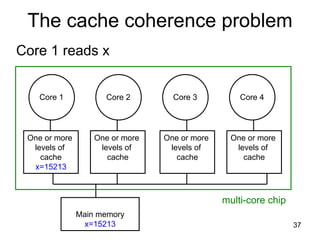
The cache coherence problem
Core 1 reads x
Core 1 Core 2 Core 3 Core 4
One or more
levels of
cache
x=15213
One or more
levels of
cache
One or more
levels of
cache
One or more
levels of
cache
Main memory
x=15213
multi-core chip
38
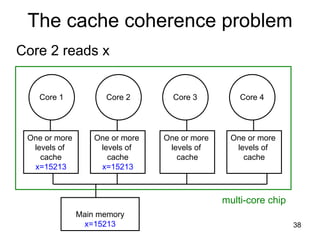
The cache coherence problem
Core 2 reads x
Core 1 Core 2 Core 3 Core 4
One or more
levels of
cache
x=15213
One or more
levels of
cache
x=15213
One or more
levels of
cache
One or more
levels of
cache
Main memory
x=15213
multi-core chip
39
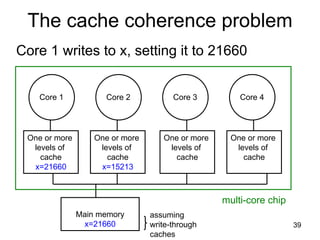
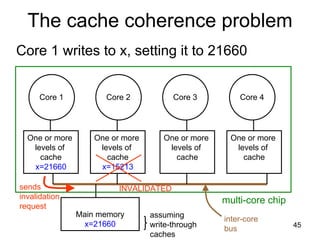
The cache coherence problem
Core 1 writes to x, setting it to 21660
Core 1 Core 2 Core 3 Core 4
One or more
levels of
cache
x=21660
One or more
levels of
cache
x=15213
One or more
levels of
cache
One or more
levels of
cache
Main memory
x=21660
multi-core chip
assuming
write-through
caches
40
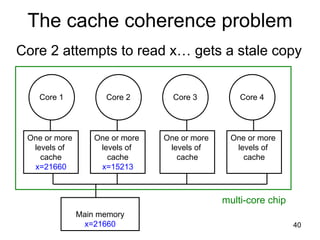
The cache coherence problem
Core 2 attempts to read x… gets a stale copy
Core 1 Core 2 Core 3 Core 4
One or more
levels of
cache
x=21660
One or more
levels of
cache
x=15213
One or more
levels of
cache
One or more
levels of
cache
Main memory
x=21660
multi-core chip
41
Solutions for cache coherence
• This is a general problem with
multiprocessors, not limited just to multi-core
• There exist many solution algorithms,
coherence protocols, etc.
• A simple solution:
invalidation-based protocol with snooping
42
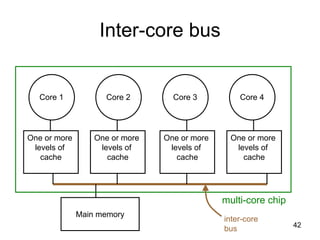
Inter-core bus
Core 1 Core 2 Core 3 Core 4
One or more
levels of
cache
One or more
levels of
cache
One or more
levels of
cache
One or more
levels of
cache
Main memory
multi-core chip
inter-core
bus
43
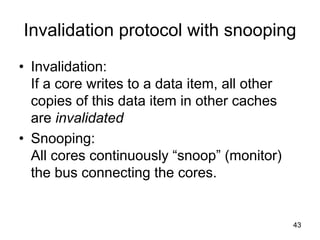
Invalidation protocol with snooping
• Invalidation:
If a core writes to a data item, all other
copies of this data item in other caches
are invalidated
• Snooping:
All cores continuously “snoop” (monitor)
the bus connecting the cores.
44
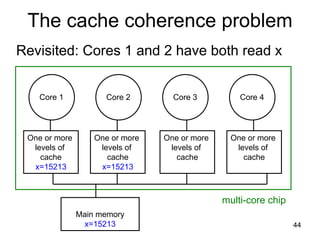
The cache coherence problem
Revisited: Cores 1 and 2 have both read x
Core 1 Core 2 Core 3 Core 4
One or more
levels of
cache
x=15213
One or more
levels of
cache
x=15213
One or more
levels of
cache
One or more
levels of
cache
Main memory
x=15213
multi-core chip
45
The cache coherence problem
Core 1 writes to x, setting it to 21660
Core 1 Core 2 Core 3 Core 4
One or more
levels of
cache
x=21660
One or more
levels of
cache
x=15213
One or more
levels of
cache
One or more
levels of
cache
Main memory
x=21660
multi-core chip
assuming
write-through
caches
INVALIDATEDsends
invalidation
request
inter-core
bus
46
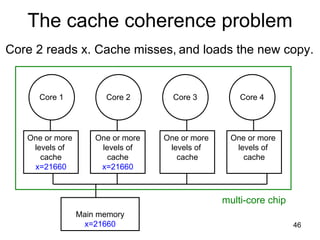
The cache coherence problem
Core 2 reads x. Cache misses, and loads the new copy.
Core 1 Core 2 Core 3 Core 4
One or more
levels of
cache
x=21660
One or more
levels of
cache
x=21660
One or more
levels of
cache
One or more
levels of
cache
Main memory
x=21660
multi-core chip
47
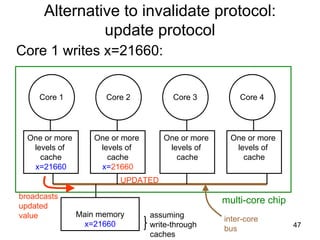
Alternative to invalidate protocol:
update protocol
Core 1 writes x=21660:
Core 1 Core 2 Core 3 Core 4
One or more
levels of
cache
x=21660
One or more
levels of
cache
x=21660
One or more
levels of
cache
One or more
levels of
cache
Main memory
x=21660
multi-core chip
assuming
write-through
caches
UPDATED
broadcasts
updated
value inter-core
bus
48
Which do you think is better?
Invalidation or update?
49
Invalidation vs update
• Multiple writes to the same location
– invalidation: only the first time
– update: must broadcast each write
• Writing to adjacent words in the same
cache block:
– invalidation: only invalidate block once
– update: must update block on each write
• Invalidation generally performs better:
it generates less bus traffic
50
Invalidation protocols
• This was just the basic invalidation
protocol
• More sophisticated protocols use extra
cache state bits
• MSI, MESI
(Modified, Exclusive, Shared, Invalid)
51
Programming for multi-core
• Programmers must use threads or
processes
• Spread the workload across multiple cores
• Write parallel algorithms
• OS will map threads/processes to cores
52
Thread safety very important
• Pre-emptive context switching:
context switch can happen AT ANY TIME
• True concurrency, not just uniprocessor
time-slicing
• Concurrency bugs exposed much faster
with multi-core
53
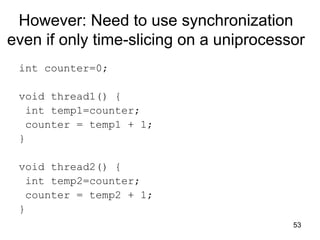
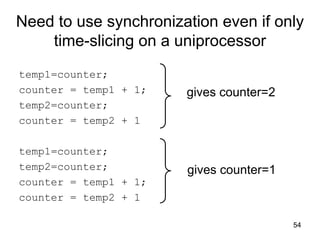
However: Need to use synchronization
even if only time-slicing on a uniprocessor
int counter=0;
void thread1() {
int temp1=counter;
counter = temp1 + 1;
}
void thread2() {
int temp2=counter;
counter = temp2 + 1;
}
54
Need to use synchronization even if only
time-slicing on a uniprocessor
temp1=counter;
counter = temp1 + 1;
temp2=counter;
counter = temp2 + 1
temp1=counter;
temp2=counter;
counter = temp1 + 1;
counter = temp2 + 1
gives counter=2
gives counter=1
55
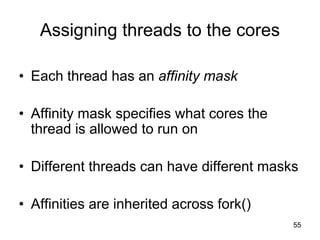
Assigning threads to the cores
• Each thread has an affinity mask
• Affinity mask specifies what cores the
thread is allowed to run on
• Different threads can have different masks
• Affinities are inherited across fork()
56
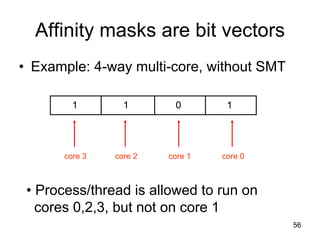
Affinity masks are bit vectors
• Example: 4-way multi-core, without SMT
1011
core 3 core 2 core 1 core 0
• Process/thread is allowed to run on
cores 0,2,3, but not on core 1
57
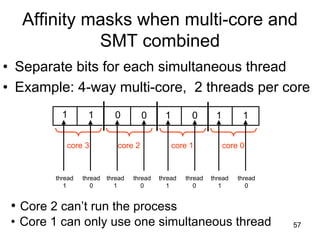
Affinity masks when multi-core and
SMT combined
• Separate bits for each simultaneous thread
• Example: 4-way multi-core, 2 threads per core
1
core 3 core 2 core 1 core 0
1 0 0 1 0 1 1
thread
1
• Core 2 can’t run the process
• Core 1 can only use one simultaneous thread
thread
0
thread
1
thread
0
thread
1
thread
0
thread
1
thread
0
58
Default Affinities
• Default affinity mask is all 1s:
all threads can run on all processors
• Then, the OS scheduler decides what
threads run on what core
• OS scheduler detects skewed workloads,
migrating threads to less busy processors
59
Process migration is costly
• Need to restart the execution pipeline
• Cached data is invalidated
• OS scheduler tries to avoid migration as
much as possible:
it tends to keeps a thread on the same core
• This is called soft affinity
60
Hard affinities
• The programmer can prescribe her own
affinities (hard affinities)
• Rule of thumb: use the default scheduler
unless a good reason not to
61
When to set your own affinities
• Two (or more) threads share data-structures in
memory
– map to same core so that can share cache
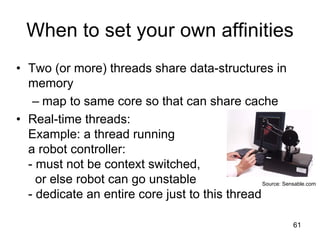
• Real-time threads:
Example: a thread running
a robot controller:
- must not be context switched,
or else robot can go unstable
- dedicate an entire core just to this thread
Source: Sensable.com
62
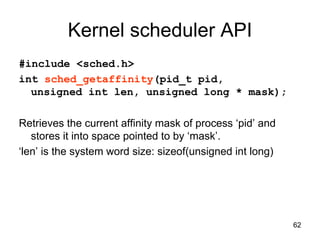
Kernel scheduler API
#include <sched.h>
int sched_getaffinity(pid_t pid,
unsigned int len, unsigned long * mask);
Retrieves the current affinity mask of process ‘pid’ and
stores it into space pointed to by ‘mask’.
‘len’ is the system word size: sizeof(unsigned int long)
63
Kernel scheduler API
#include <sched.h>
int sched_setaffinity(pid_t pid,
unsigned int len, unsigned long * mask);
Sets the current affinity mask of process ‘pid’ to *mask
‘len’ is the system word size: sizeof(unsigned int long)
To query affinity of a running process:
[barbic@bonito ~]$ taskset -p 3935
pid 3935's current affinity mask: f
64
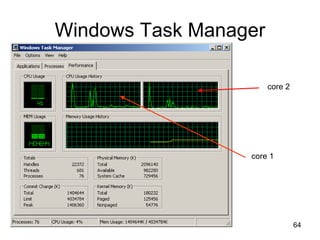
Windows Task Manager
core 2
core 1
65
Legal licensing issues
• Will software vendors charge a separate
license per each core or only a single
license per chip?
• Microsoft, Red Hat Linux, Suse Linux will
license their OS per chip, not per core
66
Conclusion
• Multi-core chips an
important new trend in
computer architecture
• Several new multi-core
chips in design phases
• Parallel programming techniques
likely to gain importance

27 multicore

  • 1.
  • 2.
  • 3.
  • 4.
    4 Multi-core architectures • Thislecture is about a new trend in computer architecture: Replicate multiple processor cores on a single die. Core 1 Core 2 Core 3 Core 4 Multi-core CPU chip
  • 5.
    5 Multi-core CPU chip •The cores fit on a single processor socket • Also called CMP (Chip Multi-Processor) c o r e 1 c o r e 2 c o r e 3 c o r e 4
  • 6.
    6 The cores runin parallel c o r e 1 c o r e 2 c o r e 3 c o r e 4 thread 1 thread 2 thread 3 thread 4
  • 7.
    7 Within each core,threads are time-sliced (just like on a uniprocessor) c o r e 1 c o r e 2 c o r e 3 c o r e 4 several threads several threads several threads several threads
  • 8.
    8 Interaction with OS •OS perceives each core as a separate processor • OS scheduler maps threads/processes to different cores • Most major OS support multi-core today
  • 9.
    9 Why multi-core ? •Difficult to make single-core clock frequencies even higher • Deeply pipelined circuits: – heat problems – speed of light problems – difficult design and verification – large design teams necessary – server farms need expensive air-conditioning • Many new applications are multithreaded • General trend in computer architecture (shift towards more parallelism)
  • 10.
    10 Instruction-level parallelism • Parallelismat the machine-instruction level • The processor can re-order, pipeline instructions, split them into microinstructions, do aggressive branch prediction, etc. • Instruction-level parallelism enabled rapid increases in processor speeds over the last 15 years
  • 11.
    11 Thread-level parallelism (TLP) •This is parallelism on a more coarser scale • Server can serve each client in a separate thread (Web server, database server) • A computer game can do AI, graphics, and physics in three separate threads • Single-core superscalar processors cannot fully exploit TLP • Multi-core architectures are the next step in processor evolution: explicitly exploiting TLP
  • 12.
    12 General context: Multiprocessors •Multiprocessor is any computer with several processors • SIMD – Single instruction, multiple data – Modern graphics cards • MIMD – Multiple instructions, multiple data Lemieux cluster, Pittsburgh supercomputing center
  • 13.
    13 Multiprocessor memory types •Shared memory: In this model, there is one (large) common shared memory for all processors • Distributed memory: In this model, each processor has its own (small) local memory, and its content is not replicated anywhere else
  • 14.
    14 Multi-core processor isa special kind of a multiprocessor: All processors are on the same chip • Multi-core processors are MIMD: Different cores execute different threads (Multiple Instructions), operating on different parts of memory (Multiple Data). • Multi-core is a shared memory multiprocessor: All cores share the same memory
  • 15.
    15 What applications benefit frommulti-core? • Database servers • Web servers (Web commerce) • Compilers • Multimedia applications • Scientific applications, CAD/CAM • In general, applications with Thread-level parallelism (as opposed to instruction- level parallelism) Each can run on its own core
  • 16.
    16 More examples • Editinga photo while recording a TV show through a digital video recorder • Downloading software while running an anti-virus program • “Anything that can be threaded today will map efficiently to multi-core” • BUT: some applications difficult to parallelize
  • 17.
    17 A technique complementaryto multi-core: Simultaneous multithreading • Problem addressed: The processor pipeline can get stalled: – Waiting for the result of a long floating point (or integer) operation – Waiting for data to arrive from memory Other execution units wait unused BTB and I-TLB Decoder Trace Cache Rename/Alloc Uop queues Schedulers Integer Floating Point L1 D-Cache D-TLB uCode ROM BTB L2CacheandControlBus Source: Intel
  • 18.
    18 Simultaneous multithreading (SMT) •Permits multiple independent threads to execute SIMULTANEOUSLY on the SAME core • Weaving together multiple “threads” on the same core • Example: if one thread is waiting for a floating point operation to complete, another thread can use the integer units
  • 19.
    19 BTB and I-TLB Decoder TraceCache Rename/Alloc Uop queues Schedulers Integer Floating Point L1 D-Cache D-TLB uCode ROMBTB L2CacheandControlBus Thread 1: floating point Without SMT, only a single thread can run at any given time
  • 20.
    20 Without SMT, onlya single thread can run at any given time BTB and I-TLB Decoder Trace Cache Rename/Alloc Uop queues Schedulers Integer Floating Point L1 D-Cache D-TLB uCode ROMBTB L2CacheandControlBus Thread 2: integer operation
  • 21.
    21 SMT processor: boththreads can run concurrently BTB and I-TLB Decoder Trace Cache Rename/Alloc Uop queues Schedulers Integer Floating Point L1 D-Cache D-TLB uCode ROMBTB L2CacheandControlBus Thread 1: floating pointThread 2: integer operation
  • 22.
    22 But: Can’t simultaneouslyuse the same functional unit BTB and I-TLB Decoder Trace Cache Rename/Alloc Uop queues Schedulers Integer Floating Point L1 D-Cache D-TLB uCode ROMBTB L2CacheandControlBus Thread 1 Thread 2 This scenario is impossible with SMT on a single core (assuming a single integer unit)IMPOSSIBLE
  • 23.
    23 SMT not a“true” parallel processor • Enables better threading (e.g. up to 30%) • OS and applications perceive each simultaneous thread as a separate “virtual processor” • The chip has only a single copy of each resource • Compare to multi-core: each core has its own copy of resources
  • 24.
    24 Multi-core: threads can runon separate cores BTB and I-TLB Decoder Trace Cache Rename/Alloc Uop queues Schedulers Integer Floating Point L1 D-Cache D-TLB uCode ROM BTB L2CacheandControlBus BTB and I-TLB Decoder Trace Cache Rename/Alloc Uop queues Schedulers Integer Floating Point L1 D-Cache D-TLB uCode ROM BTB L2CacheandControlBus Thread 1 Thread 3
  • 25.
    25 BTB and I-TLB Decoder TraceCache Rename/Alloc Uop queues Schedulers Integer Floating Point L1 D-Cache D-TLB uCode ROM BTB L2CacheandControlBus BTB and I-TLB Decoder Trace Cache Rename/Alloc Uop queues Schedulers Integer Floating Point L1 D-Cache D-TLB uCode ROM BTB L2CacheandControlBus Thread 2 Thread 4 Multi-core: threads can run on separate cores
  • 26.
    26 Combining Multi-core andSMT • Cores can be SMT-enabled (or not) • The different combinations: – Single-core, non-SMT: standard uniprocessor – Single-core, with SMT – Multi-core, non-SMT – Multi-core, with SMT: our fish machines • The number of SMT threads: 2, 4, or sometimes 8 simultaneous threads • Intel calls them “hyper-threads”
  • 27.
    27 SMT Dual-core: allfour threads can run concurrently BTB and I-TLB Decoder Trace Cache Rename/Alloc Uop queues Schedulers Integer Floating Point L1 D-Cache D-TLB uCode ROM BTB L2CacheandControlBus BTB and I-TLB Decoder Trace Cache Rename/Alloc Uop queues Schedulers Integer Floating Point L1 D-Cache D-TLB uCode ROM BTB L2CacheandControlBus Thread 1 Thread 2 Thread 3 Thread 4
  • 28.
    28 Comparison: multi-core vsSMT • Advantages/disadvantages?
  • 29.
    29 Comparison: multi-core vsSMT • Multi-core: – Since there are several cores, each is smaller and not as powerful (but also easier to design and manufacture) – However, great with thread-level parallelism • SMT – Can have one large and fast superscalar core – Great performance on a single thread – Mostly still only exploits instruction-level parallelism
  • 30.
    30 The memory hierarchy •If simultaneous multithreading only: – all caches shared • Multi-core chips: – L1 caches private – L2 caches private in some architectures and shared in others • Memory is always shared
  • 31.
    31 “Fish” machines • Dual-core IntelXeon processors • Each core is hyper-threaded • Private L1 caches • Shared L2 caches memory L2 cache L1 cache L1 cache CORE1 CORE0 hyper-threads
  • 32.
    32 Designs with privateL2 caches memory L2 cache L1 cache L1 cache CORE1 CORE0 L2 cache memory L2 cache L1 cache L1 cache CORE1 CORE0 L2 cache Both L1 and L2 are private Examples: AMD Opteron, AMD Athlon, Intel Pentium D L3 cache L3 cache A design with L3 caches Example: Intel Itanium 2
  • 33.
    33 Private vs sharedcaches? • Advantages/disadvantages?
  • 34.
    34 Private vs sharedcaches • Advantages of private: – They are closer to core, so faster access – Reduces contention • Advantages of shared: – Threads on different cores can share the same cache data – More cache space available if a single (or a few) high-performance thread runs on the system
  • 35.
    35 The cache coherenceproblem • Since we have private caches: How to keep the data consistent across caches? • Each core should perceive the memory as a monolithic array, shared by all the cores
  • 36.
    36 The cache coherenceproblem Suppose variable x initially contains 15213 Core 1 Core 2 Core 3 Core 4 One or more levels of cache One or more levels of cache One or more levels of cache One or more levels of cache Main memory x=15213 multi-core chip
  • 37.
    37 The cache coherenceproblem Core 1 reads x Core 1 Core 2 Core 3 Core 4 One or more levels of cache x=15213 One or more levels of cache One or more levels of cache One or more levels of cache Main memory x=15213 multi-core chip
  • 38.
    38 The cache coherenceproblem Core 2 reads x Core 1 Core 2 Core 3 Core 4 One or more levels of cache x=15213 One or more levels of cache x=15213 One or more levels of cache One or more levels of cache Main memory x=15213 multi-core chip
  • 39.
    39 The cache coherenceproblem Core 1 writes to x, setting it to 21660 Core 1 Core 2 Core 3 Core 4 One or more levels of cache x=21660 One or more levels of cache x=15213 One or more levels of cache One or more levels of cache Main memory x=21660 multi-core chip assuming write-through caches
  • 40.
    40 The cache coherenceproblem Core 2 attempts to read x… gets a stale copy Core 1 Core 2 Core 3 Core 4 One or more levels of cache x=21660 One or more levels of cache x=15213 One or more levels of cache One or more levels of cache Main memory x=21660 multi-core chip
  • 41.
    41 Solutions for cachecoherence • This is a general problem with multiprocessors, not limited just to multi-core • There exist many solution algorithms, coherence protocols, etc. • A simple solution: invalidation-based protocol with snooping
  • 42.
    42 Inter-core bus Core 1Core 2 Core 3 Core 4 One or more levels of cache One or more levels of cache One or more levels of cache One or more levels of cache Main memory multi-core chip inter-core bus
  • 43.
    43 Invalidation protocol withsnooping • Invalidation: If a core writes to a data item, all other copies of this data item in other caches are invalidated • Snooping: All cores continuously “snoop” (monitor) the bus connecting the cores.
  • 44.
    44 The cache coherenceproblem Revisited: Cores 1 and 2 have both read x Core 1 Core 2 Core 3 Core 4 One or more levels of cache x=15213 One or more levels of cache x=15213 One or more levels of cache One or more levels of cache Main memory x=15213 multi-core chip
  • 45.
    45 The cache coherenceproblem Core 1 writes to x, setting it to 21660 Core 1 Core 2 Core 3 Core 4 One or more levels of cache x=21660 One or more levels of cache x=15213 One or more levels of cache One or more levels of cache Main memory x=21660 multi-core chip assuming write-through caches INVALIDATEDsends invalidation request inter-core bus
  • 46.
    46 The cache coherenceproblem Core 2 reads x. Cache misses, and loads the new copy. Core 1 Core 2 Core 3 Core 4 One or more levels of cache x=21660 One or more levels of cache x=21660 One or more levels of cache One or more levels of cache Main memory x=21660 multi-core chip
  • 47.
    47 Alternative to invalidateprotocol: update protocol Core 1 writes x=21660: Core 1 Core 2 Core 3 Core 4 One or more levels of cache x=21660 One or more levels of cache x=21660 One or more levels of cache One or more levels of cache Main memory x=21660 multi-core chip assuming write-through caches UPDATED broadcasts updated value inter-core bus
  • 48.
    48 Which do youthink is better? Invalidation or update?
  • 49.
    49 Invalidation vs update •Multiple writes to the same location – invalidation: only the first time – update: must broadcast each write • Writing to adjacent words in the same cache block: – invalidation: only invalidate block once – update: must update block on each write • Invalidation generally performs better: it generates less bus traffic
  • 50.
    50 Invalidation protocols • Thiswas just the basic invalidation protocol • More sophisticated protocols use extra cache state bits • MSI, MESI (Modified, Exclusive, Shared, Invalid)
  • 51.
    51 Programming for multi-core •Programmers must use threads or processes • Spread the workload across multiple cores • Write parallel algorithms • OS will map threads/processes to cores
  • 52.
    52 Thread safety veryimportant • Pre-emptive context switching: context switch can happen AT ANY TIME • True concurrency, not just uniprocessor time-slicing • Concurrency bugs exposed much faster with multi-core
  • 53.
    53 However: Need touse synchronization even if only time-slicing on a uniprocessor int counter=0; void thread1() { int temp1=counter; counter = temp1 + 1; } void thread2() { int temp2=counter; counter = temp2 + 1; }
  • 54.
    54 Need to usesynchronization even if only time-slicing on a uniprocessor temp1=counter; counter = temp1 + 1; temp2=counter; counter = temp2 + 1 temp1=counter; temp2=counter; counter = temp1 + 1; counter = temp2 + 1 gives counter=2 gives counter=1
  • 55.
    55 Assigning threads tothe cores • Each thread has an affinity mask • Affinity mask specifies what cores the thread is allowed to run on • Different threads can have different masks • Affinities are inherited across fork()
  • 56.
    56 Affinity masks arebit vectors • Example: 4-way multi-core, without SMT 1011 core 3 core 2 core 1 core 0 • Process/thread is allowed to run on cores 0,2,3, but not on core 1
  • 57.
    57 Affinity masks whenmulti-core and SMT combined • Separate bits for each simultaneous thread • Example: 4-way multi-core, 2 threads per core 1 core 3 core 2 core 1 core 0 1 0 0 1 0 1 1 thread 1 • Core 2 can’t run the process • Core 1 can only use one simultaneous thread thread 0 thread 1 thread 0 thread 1 thread 0 thread 1 thread 0
  • 58.
    58 Default Affinities • Defaultaffinity mask is all 1s: all threads can run on all processors • Then, the OS scheduler decides what threads run on what core • OS scheduler detects skewed workloads, migrating threads to less busy processors
  • 59.
    59 Process migration iscostly • Need to restart the execution pipeline • Cached data is invalidated • OS scheduler tries to avoid migration as much as possible: it tends to keeps a thread on the same core • This is called soft affinity
  • 60.
    60 Hard affinities • Theprogrammer can prescribe her own affinities (hard affinities) • Rule of thumb: use the default scheduler unless a good reason not to
  • 61.
    61 When to setyour own affinities • Two (or more) threads share data-structures in memory – map to same core so that can share cache • Real-time threads: Example: a thread running a robot controller: - must not be context switched, or else robot can go unstable - dedicate an entire core just to this thread Source: Sensable.com
  • 62.
    62 Kernel scheduler API #include<sched.h> int sched_getaffinity(pid_t pid, unsigned int len, unsigned long * mask); Retrieves the current affinity mask of process ‘pid’ and stores it into space pointed to by ‘mask’. ‘len’ is the system word size: sizeof(unsigned int long)
  • 63.
    63 Kernel scheduler API #include<sched.h> int sched_setaffinity(pid_t pid, unsigned int len, unsigned long * mask); Sets the current affinity mask of process ‘pid’ to *mask ‘len’ is the system word size: sizeof(unsigned int long) To query affinity of a running process: [barbic@bonito ~]$ taskset -p 3935 pid 3935's current affinity mask: f
  • 64.
  • 65.
    65 Legal licensing issues •Will software vendors charge a separate license per each core or only a single license per chip? • Microsoft, Red Hat Linux, Suse Linux will license their OS per chip, not per core
  • 66.
    66 Conclusion • Multi-core chipsan important new trend in computer architecture • Several new multi-core chips in design phases • Parallel programming techniques likely to gain importance