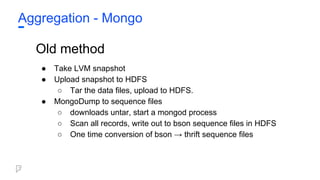
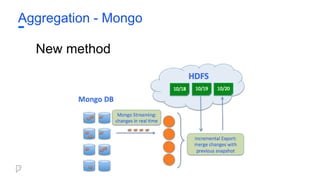
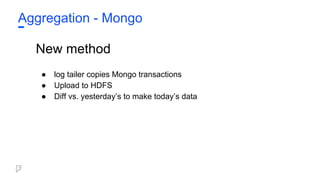
Aggregation - Mongo
Oldmethod
● Take LVM snapshot
● Upload snapshot to HDFS
○ Tar the data files, upload to HDFS.
● MongoDump to sequence files
○ downloads untar, start a mongod process
○ Scan all records, write out to bson sequence files in HDFS
○ One time conversion of bson → thrift sequence files
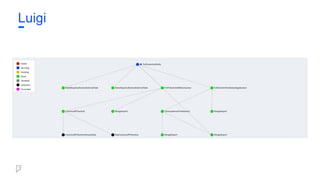
Luigi is aPython package that helps building complex
pipelines and handling all the plumbing typically
associated with long-running batch jobs.
It handles:
● dependency resolution
● workflow management
● visualization
● failures handling
● command line integration
● and much more...
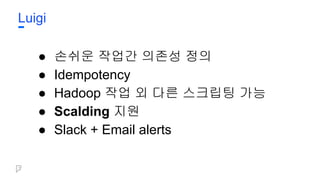
Luigi
• MapReduce
• Map/ Reduce 모델이 모든 데이터 처리에 좋지는 않음
• Join 구현이 매우 복잡함
• Cascading
• MapReduce 대신 data flow를 구현하게 해주는 Java wrapper
• Data flow를 구현하면 계산 엔진이 작업을 MapReduce로 변환
• Java 특유의 verbosity 문제
• Scalding
• Scala로 구현한 Cascading
• 함수형 프로그래밍으로 데이터 처리를 구현
• 코드가 간결하고 유지보수가 쉬움
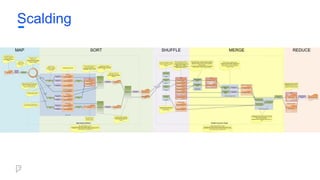
Scalding
• Data flowframeworks allow data
processing jobs to be expressed as a
series of operations on streams of data.
• Pros
• Composable - Share series of
operations between jobs.
• Simplifies - Complex joins are
much easier to write.
• Brevity - Faster iteration
• Functional programming style
is great for writing data flows.
• Cons
○ Adds complexity.
○ Debugging may require looking
behind the framework's
"magic."
○ Impacts performance
■ Time
■ Memory pressure
Scalding
46.
Example: Word Count
importjava.io.IOException;
import java.util.StringTokenizer;
import org.apache.hadoop.conf.Configuration;
import org.apache.hadoop.fs.Path;
import org.apache.hadoop.io.IntWritable;
import org.apache.hadoop.io.Text;
import org.apache.hadoop.mapreduce.Job;
import org.apache.hadoop.mapreduce.Mapper;
import org.apache.hadoop.mapreduce.Reducer;
import org.apache.hadoop.mapreduce.lib.input.FileInputFormat;
import org.apache.hadoop.mapreduce.lib.output.FileOutputFormat;
public class WordCount {
public static class TokenizerMapper
extends Mapper<Object, Text, Text, IntWritable>{
private final static IntWritable one = new IntWritable(1);
private Text word = new Text();
public void map(Object key, Text value, Context context
) throws IOException, InterruptedException {
StringTokenizer itr = new StringTokenizer(value.toString());
while (itr.hasMoreTokens()) {
word.set(itr.nextToken());
context.write(word, one);
}
}
}
Scalding
public static class IntSumReducer
extends Reducer<Text,IntWritable,Text,IntWritable> {
private IntWritable result = new IntWritable();
public void reduce(Text key, Iterable<IntWritable> values,
Context context
) throws IOException, InterruptedException {
int sum = 0;
for (IntWritable val : values) {
sum += val.get();
}
result.set(sum);
context.write(key, result);
}
}
public static void main(String[] args) throws Exception {
Configuration conf = new Configuration();
Job job = Job.getInstance(conf, "word count");
job.setJarByClass(WordCount.class);
job.setMapperClass(TokenizerMapper.class);
job.setCombinerClass(IntSumReducer.class);
job.setReducerClass(IntSumReducer.class);
job.setOutputKeyClass(Text.class);
job.setOutputValueClass(IntWritable.class);
FileInputFormat.addInputPath(job, new Path(args[0]));
FileOutputFormat.setOutputPath(job, new Path(args[1]));
System.exit(job.waitForCompletion(true) ? 0 : 1);
}
}
47.
Example: Word Count
SchemesourceScheme = new TextLine( new Fields( "line" ) );
Tap source = new Hfs( sourceScheme, inputPath );
Scheme sinkScheme = new TextLine( new Fields( "word", "count" ) );
Tap sink = new Hfs( sinkScheme, outputPath, SinkMode.REPLACE );
Pipe assembly = new Pipe( "wordcount" );
String regex = "(?<!pL)(?=pL)[^ ]*(?<=pL)(?!pL)";
Function function = new RegexGenerator( new Fields( "word" ), regex );
assembly = new Each( assembly, new Fields( "line" ), function );
assembly = new GroupBy( assembly, new Fields( "word" ) );
Aggregator count = new Count( new Fields( "count" ) );
assembly = new Every( assembly, count );
Properties properties = new Properties();
FlowConnector.setApplicationJarClass( properties, Main.class );
FlowConnector flowConnector = new FlowConnector( properties );
Flow flow = flowConnector.connect( "word-count", source, sink, assembly );
flow.complete();
Scalding
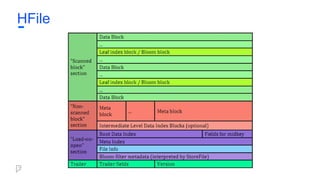
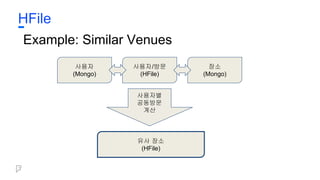
HFile
● 불변 K/V저장 방식
● Thrift를 이용해 typing
● 파일 작성시 정렬이 되어있기 때문에 빠른 Seek
● Sharding으로 한 dataset에서 높은 QPS 지원
● Foursquare에서 자체제작한 파일서버로 손쉽게
관리
● MapReduce나 Scalding Job의 output으로 생성
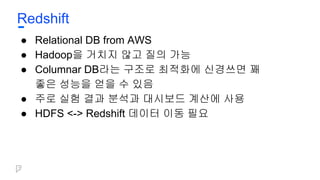
Redshift
● Relational DBfrom AWS
● Hadoop을 거치지 않고 질의 가능
● Columnar DB라는 구조로 최적화에 신경쓰면 꽤
좋은 성능을 얻을 수 있음
● 주로 실험 결과 분석과 대시보드 계산에 사용
● HDFS <-> Redshift 데이터 이동 필요
70.
Presto
● Open sourceSQL engine from Facebook
● Hadoop을 거치지 않고 질의 가능
● In-memory computation
● Really, Really, Really fast
● Hive connector를 사용해 Foursquare HDFS에 있는
thrift를 그대로 사용 가능
72.
Presto
● Dedicated prestoboxes
○ $$$, 질의가 없을 시 장비의 낭비
● Co-location on Hadoop boxes
○ 배포가 까다롭고 올바른 배포 과정을 찾을 때
까지의 iteration이 지나치게 힘듦
○ Netflix, Facebook에서 사용하는 방식
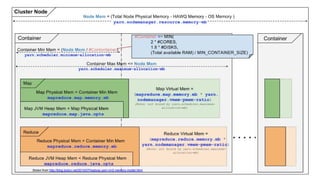
● Yarn
○ Hadoop이 해야 하는 작업과 리소스 경쟁
73.
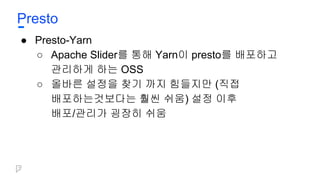
Presto
● Presto-Yarn
○ ApacheSlider를 통해 Yarn이 presto를 배포하고
관리하게 하는 OSS
○ 올바른 설정을 찾기 까지 힘들지만 (직접
배포하는것보다는 훨씬 쉬움) 설정 이후
배포/관리가 굉장히 쉬움
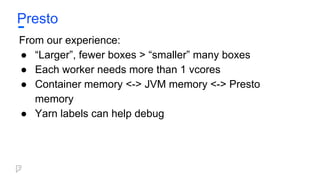
Presto
From our experience:
●“Larger”, fewer boxes > “smaller” many boxes
● Each worker needs more than 1 vcores
● Container memory <-> JVM memory <-> Presto
memory
● Yarn labels can help debug
Backup
● HDFS spaceisn’t free
○ 매일 HDFS <-> S3 백업
○ 일정 기간이 지나면 HDFS에서 삭제
● S3 also isn’t free
○ 일정 기간이 지나면 Glacier로 변환
○ Glacier Pricing: $0.007 per GB / month
79.
Retention
● HFile, Hivetables have retention policy
○ Collection 자체가 늘어나지 않으면 HDFS 용량
역시 일정 한도 내에서 머물 수 있음
● Retention때문에 필요한 데이터가 지워졌다?
○ Job을 다시 돌리면 다시 얻을 수 있음
80.
Compression
● 기본 압축방식: Snappy
○ Fast read, low compression
● HDFS에는 있어야 하지만 시간이 지나 많이
사용되지 않는 데이터: Gzip
○ Slow read, high compression
● 로그 백업
○ Snappy -> Gzip, Gzip to S3, replace Snappy
with Gzip after n days
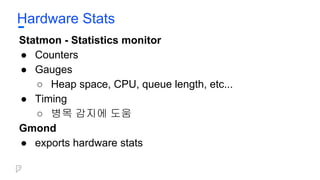
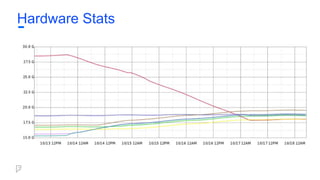
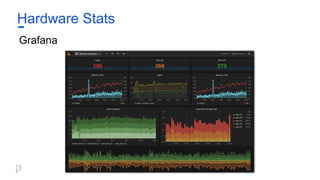
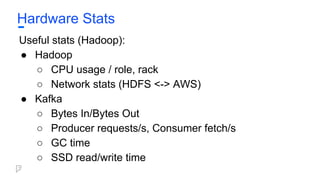
Hardware Stats
Useful stats(Hadoop):
● Hadoop
○ CPU usage / role, rack
○ Network stats (HDFS <-> AWS)
● Kafka
○ Bytes In/Bytes Out
○ Producer requests/s, Consumer fetch/s
○ GC time
○ SSD read/write time
87.
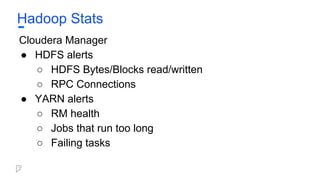
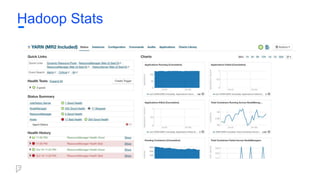
Hadoop Stats
Cloudera Manager
●HDFS alerts
○ HDFS Bytes/Blocks read/written
○ RPC Connections
● YARN alerts
○ RM health
○ Jobs that run too long
○ Failing tasks
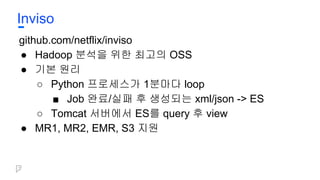
Inviso
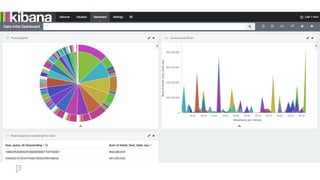
● 기본적으로 Inviso는ES 1.0+을 지원
● ES 2+로 포팅할 경우 Kibana 사용가능
○ . 를 모두 _로 변환
○ Timestamp handling
○ Inviso-imported stats != all available stats
○ 원하는 stat은 추가, 필요 없는 stat은 제거
■ CPU time
■ Pool-based resource usage
Wrapping Up
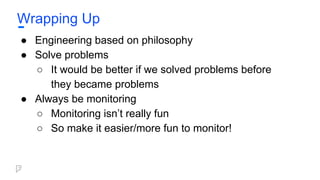
● Engineeringbased on philosophy
● Solve problems
○ It would be better if we solved problems before
they became problems
● Always be monitoring
○ Monitoring isn’t really fun
○ So make it easier/more fun to monitor!






















![Example: Word Count
import java.io.IOException;
import java.util.StringTokenizer;
import org.apache.hadoop.conf.Configuration;
import org.apache.hadoop.fs.Path;
import org.apache.hadoop.io.IntWritable;
import org.apache.hadoop.io.Text;
import org.apache.hadoop.mapreduce.Job;
import org.apache.hadoop.mapreduce.Mapper;
import org.apache.hadoop.mapreduce.Reducer;
import org.apache.hadoop.mapreduce.lib.input.FileInputFormat;
import org.apache.hadoop.mapreduce.lib.output.FileOutputFormat;
public class WordCount {
public static class TokenizerMapper
extends Mapper<Object, Text, Text, IntWritable>{
private final static IntWritable one = new IntWritable(1);
private Text word = new Text();
public void map(Object key, Text value, Context context
) throws IOException, InterruptedException {
StringTokenizer itr = new StringTokenizer(value.toString());
while (itr.hasMoreTokens()) {
word.set(itr.nextToken());
context.write(word, one);
}
}
}
Scalding
public static class IntSumReducer
extends Reducer<Text,IntWritable,Text,IntWritable> {
private IntWritable result = new IntWritable();
public void reduce(Text key, Iterable<IntWritable> values,
Context context
) throws IOException, InterruptedException {
int sum = 0;
for (IntWritable val : values) {
sum += val.get();
}
result.set(sum);
context.write(key, result);
}
}
public static void main(String[] args) throws Exception {
Configuration conf = new Configuration();
Job job = Job.getInstance(conf, "word count");
job.setJarByClass(WordCount.class);
job.setMapperClass(TokenizerMapper.class);
job.setCombinerClass(IntSumReducer.class);
job.setReducerClass(IntSumReducer.class);
job.setOutputKeyClass(Text.class);
job.setOutputValueClass(IntWritable.class);
FileInputFormat.addInputPath(job, new Path(args[0]));
FileOutputFormat.setOutputPath(job, new Path(args[1]));
System.exit(job.waitForCompletion(true) ? 0 : 1);
}
}](https://image.slidesharecdn.com/246foursquare-161025031706/85/246-foursquare-46-320.jpg)
![Example: Word Count
Scheme sourceScheme = new TextLine( new Fields( "line" ) );
Tap source = new Hfs( sourceScheme, inputPath );
Scheme sinkScheme = new TextLine( new Fields( "word", "count" ) );
Tap sink = new Hfs( sinkScheme, outputPath, SinkMode.REPLACE );
Pipe assembly = new Pipe( "wordcount" );
String regex = "(?<!pL)(?=pL)[^ ]*(?<=pL)(?!pL)";
Function function = new RegexGenerator( new Fields( "word" ), regex );
assembly = new Each( assembly, new Fields( "line" ), function );
assembly = new GroupBy( assembly, new Fields( "word" ) );
Aggregator count = new Count( new Fields( "count" ) );
assembly = new Every( assembly, count );
Properties properties = new Properties();
FlowConnector.setApplicationJarClass( properties, Main.class );
FlowConnector flowConnector = new FlowConnector( properties );
Flow flow = flowConnector.connect( "word-count", source, sink, assembly );
flow.complete();
Scalding](https://image.slidesharecdn.com/246foursquare-161025031706/85/246-foursquare-47-320.jpg)
![Example: Word Count
package com.twitter.scalding.examples
import com.twitter.scalding._
class WordCountJob(args : Args) extends Job(args) {
TextLine( args("input") )
.flatMap('line -> 'word) { line : String => tokenize(line) }
.groupBy('word) { _.size }
.write( Tsv( args("output") ) )
def tokenize(text : String) : Array[String] = {
text.toLowerCase.replaceAll("[^a-zA-Z0-9s]", "").split("s+")
}
}
Scalding](https://image.slidesharecdn.com/246foursquare-161025031706/85/246-foursquare-48-320.jpg)



















![[211] HBase 기반 검색 데이터 저장소 (공개용)](https://cdn.slidesharecdn.com/ss_thumbnails/211hbase-171016101436-thumbnail.jpg?width=640&height=640&fit=bounds)
![[215]네이버콘텐츠통계서비스소개 김기영](https://cdn.slidesharecdn.com/ss_thumbnails/215-161025030904-thumbnail.jpg?width=640&height=640&fit=bounds)
![[243]kaleido 노현걸](https://cdn.slidesharecdn.com/ss_thumbnails/243kaleido-161025011559-thumbnail.jpg?width=640&height=640&fit=bounds)
![[225]yarn 기반의 deep learning application cluster 구축 김제민](https://cdn.slidesharecdn.com/ss_thumbnails/225yarndeeplearningapplicationcluster-161025031031-thumbnail.jpg?width=640&height=640&fit=bounds)
![[244] 분산 환경에서 스트림과 배치 처리 통합 모델](https://cdn.slidesharecdn.com/ss_thumbnails/244-150915025618-lva1-app6891-thumbnail.jpg?width=640&height=640&fit=bounds)
![[235]루빅스개발이야기 황지수](https://cdn.slidesharecdn.com/ss_thumbnails/235-161025031044-thumbnail.jpg?width=640&height=640&fit=bounds)


![[124]네이버에서 사용되는 여러가지 Data Platform, 그리고 MongoDB](https://cdn.slidesharecdn.com/ss_thumbnails/124mongodb-181011042943-thumbnail.jpg?width=640&height=640&fit=bounds)
![[236] 카카오의데이터파이프라인 윤도영](https://cdn.slidesharecdn.com/ss_thumbnails/236-161025031702-thumbnail.jpg?width=640&height=640&fit=bounds)


![[NDC 2018] Spark, Flintrock, Airflow 로 구현하는 탄력적이고 유연한 데이터 분산처리 자동화 인프라 구축](https://cdn.slidesharecdn.com/ss_thumbnails/jparktemp-180424105624-thumbnail.jpg?width=640&height=640&fit=bounds)


![[142]편광을 활용한6 dof 전현기](https://cdn.slidesharecdn.com/ss_thumbnails/1426dof-161023161025-thumbnail.jpg?width=640&height=640&fit=bounds)

![[214] data science with apache zeppelin](https://cdn.slidesharecdn.com/ss_thumbnails/241datasciencewithapachezeppelin-150915001420-lva1-app6892-thumbnail.jpg?width=640&height=640&fit=bounds)

![[223]rye, 샤딩을 지원하는 오픈소스 관계형 dbms](https://cdn.slidesharecdn.com/ss_thumbnails/223ryedbms-171016104435-thumbnail.jpg?width=640&height=640&fit=bounds)

![[211]대규모 시스템 시각화 현동석김광림](https://cdn.slidesharecdn.com/ss_thumbnails/211-161025004529-thumbnail.jpg?width=640&height=640&fit=bounds)
![[125]react로개발자2명이플랫폼4개를서비스하는이야기 심상민](https://cdn.slidesharecdn.com/ss_thumbnails/125react24-161023163921-thumbnail.jpg?width=640&height=640&fit=bounds)
![[115] clean fe development_윤지수](https://cdn.slidesharecdn.com/ss_thumbnails/115cleanfedevelopment-161023163916-thumbnail.jpg?width=640&height=640&fit=bounds)


![[112]rest에서 graph ql과 relay로 갈아타기 이정우](https://cdn.slidesharecdn.com/ss_thumbnails/112restgraphqlrelay-161023161032-thumbnail.jpg?width=640&height=640&fit=bounds)


![[232] 수퍼컴퓨팅과 데이터 어낼리틱스](https://cdn.slidesharecdn.com/ss_thumbnails/223-150915022242-lva1-app6891-thumbnail.jpg?width=640&height=640&fit=bounds)
![[225]NSML: 머신러닝 플랫폼 서비스하기 & 모델 튜닝 자동화하기](https://cdn.slidesharecdn.com/ss_thumbnails/225nsmlmachinelearningntuningautomize-181012023407-thumbnail.jpg?width=640&height=640&fit=bounds)
![[232] TensorRT를 활용한 딥러닝 Inference 최적화](https://cdn.slidesharecdn.com/ss_thumbnails/232dlinferenceoptimizationusingtensorrt1-181012014455-thumbnail.jpg?width=640&height=640&fit=bounds)
![[214] Ai Serving Platform: 하루 수 억 건의 인퍼런스를 처리하기 위한 고군분투기](https://cdn.slidesharecdn.com/ss_thumbnails/214aiservingplatforminference-181012022603-thumbnail.jpg?width=640&height=640&fit=bounds)
![[223]기계독해 QA: 검색인가, NLP인가?](https://cdn.slidesharecdn.com/ss_thumbnails/2232018-181012010149-thumbnail.jpg?width=640&height=640&fit=bounds)
![[215] Druid로 쉽고 빠르게 데이터 분석하기](https://cdn.slidesharecdn.com/ss_thumbnails/215druid-181012071910-thumbnail.jpg?width=640&height=640&fit=bounds)
![[211] 인공지능이 인공지능 챗봇을 만든다](https://cdn.slidesharecdn.com/ss_thumbnails/211chatbot-181106094835-thumbnail.jpg?width=640&height=640&fit=bounds)
![[224]네이버 검색과 개인화](https://cdn.slidesharecdn.com/ss_thumbnails/224naversearchnpersonalizationfinal-181012022631-thumbnail.jpg?width=640&height=640&fit=bounds)
![[233] 대형 컨테이너 클러스터에서의 고가용성 Network Load Balancing: Maglev Hashing Scheduler i...](https://cdn.slidesharecdn.com/ss_thumbnails/233networkloadbalancing-181018151852-thumbnail.jpg?width=640&height=640&fit=bounds)
![Old version: [233]대형 컨테이너 클러스터에서의 고가용성 Network Load Balancing](https://cdn.slidesharecdn.com/ss_thumbnails/233largecontainerclusternetworkloadbalancing-181012024225-thumbnail.jpg?width=640&height=640&fit=bounds)
![[243] Deep Learning to help student’s Deep Learning](https://cdn.slidesharecdn.com/ss_thumbnails/243deeplearningtohelpstudentsdeeplearning-181012024530-thumbnail.jpg?width=640&height=640&fit=bounds)
![[244]로봇이 현실 세계에 대해 학습하도록 만들기](https://cdn.slidesharecdn.com/ss_thumbnails/244deview2018tomisilanderrobotsrealworldfinal11oct2018-181012024720-thumbnail.jpg?width=640&height=640&fit=bounds)
![[236] 스트림 저장소 최적화 이야기: 아파치 드루이드로부터 얻은 교훈](https://cdn.slidesharecdn.com/ss_thumbnails/236deview2018jihoonson-final-181012031726-thumbnail.jpg?width=640&height=640&fit=bounds)
![[242]컴퓨터 비전을 이용한 실내 지도 자동 업데이트 방법: 딥러닝을 통한 POI 변화 탐지](https://cdn.slidesharecdn.com/ss_thumbnails/242pcdpublic-181012011734-thumbnail.jpg?width=640&height=640&fit=bounds)
![[216]Search Reliability Engineering (부제: 지진에도 흔들리지 않는 네이버 검색시스템)](https://cdn.slidesharecdn.com/ss_thumbnails/216sresearchreliabilityengineering-181012022623-thumbnail.jpg?width=640&height=640&fit=bounds)
![[234]Fast & Accurate Data Annotation Pipeline for AI applications](https://cdn.slidesharecdn.com/ss_thumbnails/234fastaccuratedataannotationpipelineforaiapplications1-181012024230-thumbnail.jpg?width=640&height=640&fit=bounds)
![[235]Wikipedia-scale Q&A](https://cdn.slidesharecdn.com/ss_thumbnails/235deview2018julienperezwikipediaqa12oct2018-181012030613-thumbnail.jpg?width=640&height=640&fit=bounds)
![[213] Fashion Visual Search](https://cdn.slidesharecdn.com/ss_thumbnails/213fashionvisualsearchreduced-181012022540-thumbnail.jpg?width=640&height=640&fit=bounds)
![[245]Papago Internals: 모델분석과 응용기술 개발](https://cdn.slidesharecdn.com/ss_thumbnails/245papagointernals1-181012045005-thumbnail.jpg?width=640&height=640&fit=bounds)
![[212]C3, 데이터 처리에서 서빙까지 가능한 하둡 클러스터](https://cdn.slidesharecdn.com/ss_thumbnails/212c3-181012011644-thumbnail.jpg?width=640&height=640&fit=bounds)
![[226]NAVER 광고 deep click prediction: 모델링부터 서빙까지](https://cdn.slidesharecdn.com/ss_thumbnails/226naveraddeepclickprediction-181012024116-thumbnail.jpg?width=640&height=640&fit=bounds)