STEP TWO
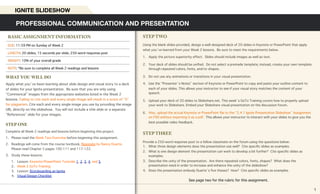
Using the blank slides provided, design a well-designed deck of 20 slides in Keynote or PowerPoint that apply
what you’ve learned from your Week 2 lessons. Be sure to meet the requirements below.
1. Apply the picture superiority effect. Slides should include images as well as text.
2. Your deck of slides should be unified. Do not select a premade template; instead, create your own template
through repeated colors, fonts, and/or shapes.
3. Do not use any animations or transitions in your visual presentation.
4. Use the “Presenter’s Notes” section of Keynote or PowerPoint to copy and paste your outline content to
each of your slides. This allows your instructor to see if your visual story matches the content of your
speech.
5. Upload your deck of 20 slides to Slideshare.net. This week’s GoTo Training covers how to properly upload
your work to Slideshare. Embed your Slideshare visual presentation on the discussion forum.
6. Also, upload the actual Keynote or PowerPoint file to the “2.4.1 Ignite Presentation Slideshow” Assignment
on FSO without exporting it as a pdf. This allows your instructor to interact with your slides to give you the
best possible video feedback.
STEP THREE
Provide a 250-word response post to a fellow classmate on the forum using the questions below:
1. What three design elements does the presentation use well? Cite specific slides as examples.
2. What is one design element the presentation can work to develop a bit further? Cite specific slides as
examples.
3. Describe the unity of the presentation. Are there repeated colors, fonts, shapes? What does the
presentation need in order to increase and enhance the unity of the slideshow?
4. Does the presentation embody Duarte’s five theses? How? Cite specific slides as examples.
See page two for the rubric for this assignment.
WHAT YOU WILL DO
Apply what you’ve been learning about slide design and visual story to a deck
of slides for your Ignite presentation. Be sure that you are only using
“Commerical” images from the appropriate websites listed in the Week 2
lessons. Failing to cite each and every single image will result in a score of “0”
for plagiarism. Cite each and every single image you use by providing the image
URL directly on the slideshow. You will not include a title slide or a separate
“References” slide for your images.
STEP ONE
Complete all Week 2 readings and lessons before beginning this project.
1. Please read the Week Two Overview before beginning this assignment.
2. Readings will come from the course textbook, Resonate by Nancy Duarte.
Please read Chapter 5 pages 100-111 and 117-122.
3. Study these lessons:
1. Lesson: Keynote/PowerPoint Tutorials 1, 2, 3, 4, and 5
2. Week 2 GoTo Training
3. Lesson: Storyboarding an Ignite
4. Visual Design Checklist
PROFESSIONAL COMMUNICATION AND PRESENTATION
IGNITE SLIDESHOW
BASIC ASSIGNMENT INFORMATION
DUE: 11:59 PM on Sunday of Week 2
LENGTH: 20 slides, 15 seconds per slide; 250-word response post
WEIGHT: 10% of your overall grade
NOTE: *Be sure to complete all Week 2 readings and lessons
1
Criteria Superior Average Developing Failing
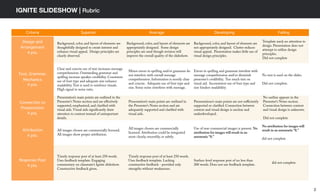
Design and
Arrangement
4 pts.
Background, color, and layout of elements are
thoughtfully designed to create interest and
enhance visual appeal. Design principles are
clearly observed.
Background, color, and layout of elements are
appropriately designed. Some design
principles are used though revision will
improve the overall quality of the slideshow.
Background, color, and layout of elements are
not appropriately designed. Clutter reduces
visual appeal. Presentation makes little use of
visual design principles.
Template used; no attention to
design. Presentation does not
attempt to utilize design
principles.
Did not complete
Text, Grammar,
Mechanics
4 pts.
Clear and concise use of text increases message
comprehension. Outstanding grammar and
spelling increase speaker credibility. Consistent
use of font type and adequate size enhance
readability.Text is used to reinforce visuals.
High signal to noise ratio.
Minor errors in spelling and/or grammar do
not interfere with overall message
comprehension. Information is mostly clear
and concise. Adequate use of font type and
size. Some noise interferes with message.
Errors in spelling and grammar interfere with
message comprehension and/or diminish
presenter’s credibility. Too much text on
visual aid. Inconsistent use of font type and
size hinders readability.
No text is used on the slides.
Did not complete.
Connection to
Presentation
4 pts.
Presentation’s main points are outlined in the
Presenter’s Notes section and are effectively
supported, emphasized, and clarified with
visual aids. Visual aids significantly draw
attention to content instead of unimportant
details.
Presentation’s main points are outlined in
the Presenter’s Notes section and are
adequately supported and clarified with
visual aids.
Presentations’s main points are not sufficiently
supported or clarified. Connection between
content and visual design is unclear and
underdeveloped.
No outline appears in the
Presenter’s Notes section.
Connection between content
and visual design is unknown.
Did not complete
Attribution
4 pts.
All images chosen are commercially licensed.
All images show proper attribution.
All images chosen are commercially
licensed. Attribution could be integrated
more clearly, smoothly, or subtly.
Use of non-commercial images is present. No
attribution for images will result in an
automatic “0.”
No attribution for images will
result in an automatic “0.”
did not complete
Response Post
4 pts.
Timely response post of at least 250 words.
Uses feedback template. Engaging
commentary on classmate’s Ignite slideshow.
Constructive feedback given.
Timely response post of at least 250 words.
Uses feedback template. Lacking
constructive feedback - provided only
strengths without weaknesses.
Surface-level response post of no less than
200 words. Does not use feedback template.
did not complete
2
IGNITE SLIDESHOW | Rubric

2.4 ignite slideshow

  • 1.
    STEP TWO Using theblank slides provided, design a well-designed deck of 20 slides in Keynote or PowerPoint that apply what you’ve learned from your Week 2 lessons. Be sure to meet the requirements below. 1. Apply the picture superiority effect. Slides should include images as well as text. 2. Your deck of slides should be unified. Do not select a premade template; instead, create your own template through repeated colors, fonts, and/or shapes. 3. Do not use any animations or transitions in your visual presentation. 4. Use the “Presenter’s Notes” section of Keynote or PowerPoint to copy and paste your outline content to each of your slides. This allows your instructor to see if your visual story matches the content of your speech. 5. Upload your deck of 20 slides to Slideshare.net. This week’s GoTo Training covers how to properly upload your work to Slideshare. Embed your Slideshare visual presentation on the discussion forum. 6. Also, upload the actual Keynote or PowerPoint file to the “2.4.1 Ignite Presentation Slideshow” Assignment on FSO without exporting it as a pdf. This allows your instructor to interact with your slides to give you the best possible video feedback. STEP THREE Provide a 250-word response post to a fellow classmate on the forum using the questions below: 1. What three design elements does the presentation use well? Cite specific slides as examples. 2. What is one design element the presentation can work to develop a bit further? Cite specific slides as examples. 3. Describe the unity of the presentation. Are there repeated colors, fonts, shapes? What does the presentation need in order to increase and enhance the unity of the slideshow? 4. Does the presentation embody Duarte’s five theses? How? Cite specific slides as examples. See page two for the rubric for this assignment. WHAT YOU WILL DO Apply what you’ve been learning about slide design and visual story to a deck of slides for your Ignite presentation. Be sure that you are only using “Commerical” images from the appropriate websites listed in the Week 2 lessons. Failing to cite each and every single image will result in a score of “0” for plagiarism. Cite each and every single image you use by providing the image URL directly on the slideshow. You will not include a title slide or a separate “References” slide for your images. STEP ONE Complete all Week 2 readings and lessons before beginning this project. 1. Please read the Week Two Overview before beginning this assignment. 2. Readings will come from the course textbook, Resonate by Nancy Duarte. Please read Chapter 5 pages 100-111 and 117-122. 3. Study these lessons: 1. Lesson: Keynote/PowerPoint Tutorials 1, 2, 3, 4, and 5 2. Week 2 GoTo Training 3. Lesson: Storyboarding an Ignite 4. Visual Design Checklist PROFESSIONAL COMMUNICATION AND PRESENTATION IGNITE SLIDESHOW BASIC ASSIGNMENT INFORMATION DUE: 11:59 PM on Sunday of Week 2 LENGTH: 20 slides, 15 seconds per slide; 250-word response post WEIGHT: 10% of your overall grade NOTE: *Be sure to complete all Week 2 readings and lessons 1
  • 2.
    Criteria Superior AverageDeveloping Failing Design and Arrangement 4 pts. Background, color, and layout of elements are thoughtfully designed to create interest and enhance visual appeal. Design principles are clearly observed. Background, color, and layout of elements are appropriately designed. Some design principles are used though revision will improve the overall quality of the slideshow. Background, color, and layout of elements are not appropriately designed. Clutter reduces visual appeal. Presentation makes little use of visual design principles. Template used; no attention to design. Presentation does not attempt to utilize design principles. Did not complete Text, Grammar, Mechanics 4 pts. Clear and concise use of text increases message comprehension. Outstanding grammar and spelling increase speaker credibility. Consistent use of font type and adequate size enhance readability.Text is used to reinforce visuals. High signal to noise ratio. Minor errors in spelling and/or grammar do not interfere with overall message comprehension. Information is mostly clear and concise. Adequate use of font type and size. Some noise interferes with message. Errors in spelling and grammar interfere with message comprehension and/or diminish presenter’s credibility. Too much text on visual aid. Inconsistent use of font type and size hinders readability. No text is used on the slides. Did not complete. Connection to Presentation 4 pts. Presentation’s main points are outlined in the Presenter’s Notes section and are effectively supported, emphasized, and clarified with visual aids. Visual aids significantly draw attention to content instead of unimportant details. Presentation’s main points are outlined in the Presenter’s Notes section and are adequately supported and clarified with visual aids. Presentations’s main points are not sufficiently supported or clarified. Connection between content and visual design is unclear and underdeveloped. No outline appears in the Presenter’s Notes section. Connection between content and visual design is unknown. Did not complete Attribution 4 pts. All images chosen are commercially licensed. All images show proper attribution. All images chosen are commercially licensed. Attribution could be integrated more clearly, smoothly, or subtly. Use of non-commercial images is present. No attribution for images will result in an automatic “0.” No attribution for images will result in an automatic “0.” did not complete Response Post 4 pts. Timely response post of at least 250 words. Uses feedback template. Engaging commentary on classmate’s Ignite slideshow. Constructive feedback given. Timely response post of at least 250 words. Uses feedback template. Lacking constructive feedback - provided only strengths without weaknesses. Surface-level response post of no less than 200 words. Does not use feedback template. did not complete 2 IGNITE SLIDESHOW | Rubric