OSPF
Objectives
• OSPF Overview (terminology, states, network types,
hello protocol)
• Single-area OSPF Operation
• Single-area OSPF Configuration and Verification
• Configuring OSPF Over NBMA
• Multiarea OSPF Operation
• Multiarea OSPF Configuration and Verification
• (Standard, Backbone), Stub, Totally Stubby-CISCO,
and Not-So-Stubby Areas
• Virtual Links
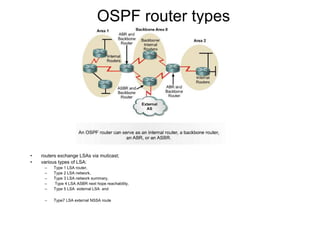
OSPF router types
• routers exchange LSAs via muticast;
• various types of LSA:
– Type 1 LSA router,
– Type 2 LSA network,
– Type 3 LSA network summary,
– Type 4 LSA ASBR next hope reachability,
– Type 5 LSA external LSA and
– Type7 LSA external NSSA route
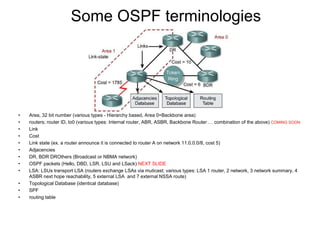
Some OSPF terminologies
• Area, 32 bit number (various types - Hierarchy based, Area 0=Backbone area)
• routers; router ID, lo0 (various types: Internal router, ABR, ASBR, Backbone Router … combination of the above) COMING SOON
• Link
• Cost
• Link state (ex. a router announce it is connected to router A on network 11.0.0.0/8, cost 5)
• Adjacencies
• DR, BDR DROthers (Broadcast or NBMA network)
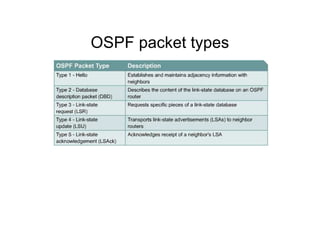
• OSPF packets (Hello, DBD, LSR, LSU and LSack) NEXT SLIDE
• LSA: LSUs transport LSA (routers exchange LSAs via muticast; various types: LSA 1 router, 2 network, 3 network summary, 4
ASBR next hope reachability, 5 external LSA and 7 external NSSA route)
• Topological Database (identical database)
• SPF
• routing table
OSPF packet types
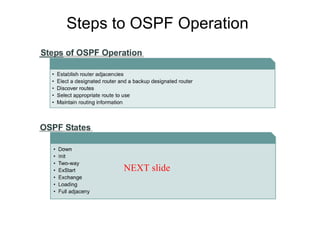
Steps to OSPF Operation
NEXT slide
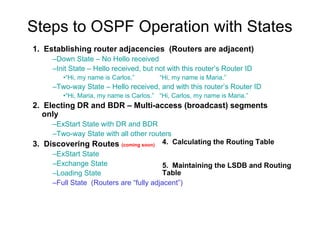
Steps to OSPF Operation with States
1. Establishing router adjacencies (Routers are adjacent)
–Down State – No Hello received
–Init State – Hello received, but not with this router’s Router ID
•“Hi, my name is Carlos.” “Hi, my name is Maria.”
–Two-way State – Hello received, and with this router’s Router ID
•“Hi, Maria, my name is Carlos.” “Hi, Carlos, my name is Maria.”
2. Electing DR and BDR – Multi-access (broadcast) segments
only
–ExStart State with DR and BDR
–Two-way State with all other routers
3. Discovering Routes (coming soon)
–ExStart State
–Exchange State
–Loading State
–Full State (Routers are “fully adjacent”)
4. Calculating the Routing Table
5. Maintaining the LSDB and Routing
Table
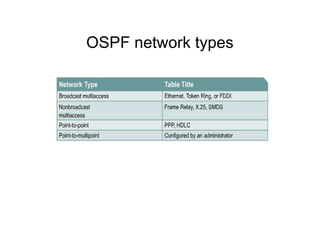
OSPF network types
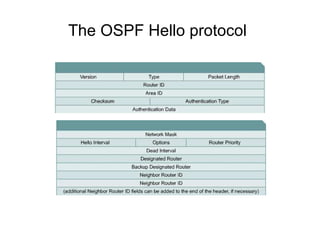
The OSPF Hello protocol
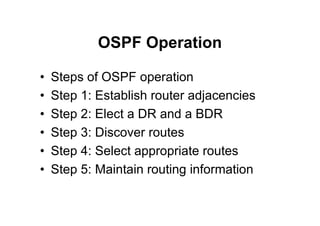
OSPF Operation
• Steps of OSPF operation
• Step 1: Establish router adjacencies
• Step 2: Elect a DR and a BDR
• Step 3: Discover routes
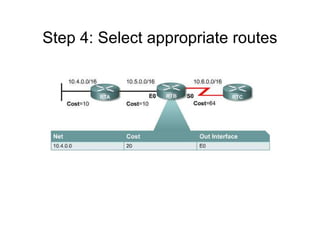
• Step 4: Select appropriate routes
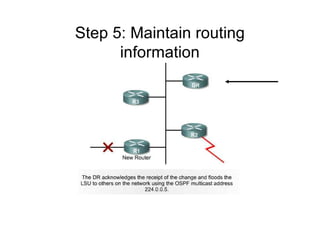
• Step 5: Maintain routing information
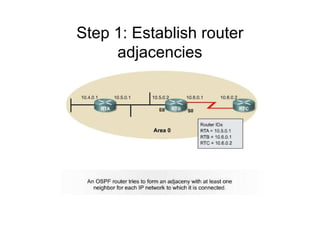
Step 1: Establish router
adjacencies
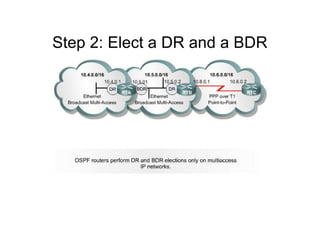
Step 2: Elect a DR and a BDR
Step 3: Discover routes
–Down State – No Hello received
–Init State – Hello received, but not with this router’s Router ID
•“Hi, my name is Carlos.” “Hi, my name is Maria.”
–Two-way State – Hello received, and with this router’s Router ID
•“Hi, Maria, my name is Carlos.” “Hi, Carlos, my name is Maria.”
Step 4: Select appropriate routes
Step 5: Maintain routing
information
OSPF Configuration and
Verification
• Configuring OSPF on routers within a
single area
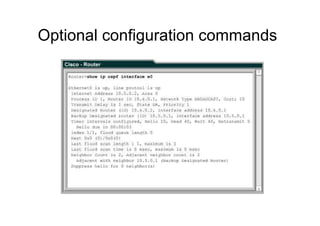
• Optional configuration commands
(continued)
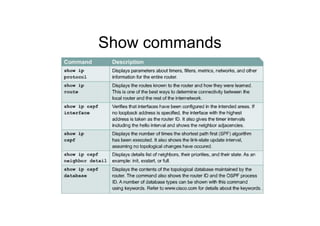
• Show commands
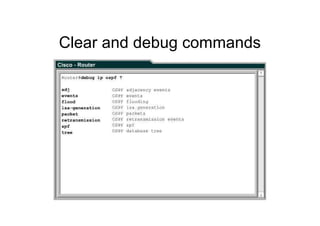
• Clear and debug commands
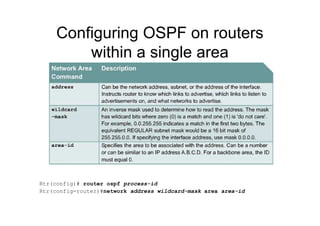
Configuring OSPF on routers
within a single area
Rtr(config)# router ospf process-id
Rtr(config-router)#network address wildcard-mask area area-id
Optional configuration commands
(continued)
CISCO Routers use the formula = 108/bandwidth
Rtr(config-if)# bandwidth 64 = Rtr(config-if)# ip ospf cost 1562
Rtr(config-if)# bandwidth kilobits
Rtr(config-if)# ip ospf authentication-key passwd
Rtr(config-router)# area “area” authentication
Rtr(config-if)# ip ospf message-digest-key key-id md5 password
Rtr(config-router)# area area authentication [message-digest]
Show commands
Clear and debug commands
Configuring OSPF Over NBMA
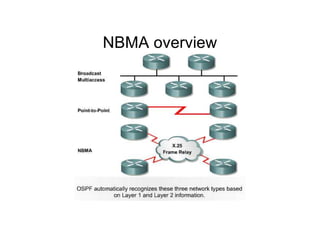
• NBMA overview
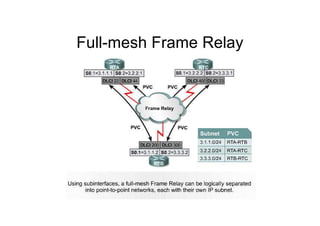
• Full-mesh Frame Relay
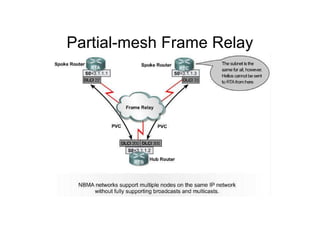
• Partial-mesh Frame Relay
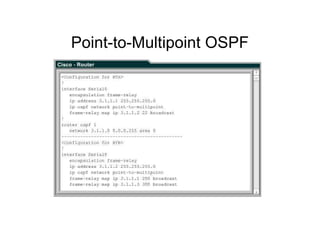
– Point-to-Multipoint OSPF
NBMA overview
Full-mesh Frame Relay
Partial-mesh Frame Relay
Point-to-Multipoint OSPF
Multiarea OSPF Operation
• The routing table is too big, the memory is
running low
– Creating multiple OSPF areas
• OSPF router types
• OSPF LSA and area types
• Configuring OSPF operation across multiple
areas
• Flooding LSUs to multiple areas
• Updating the routing table
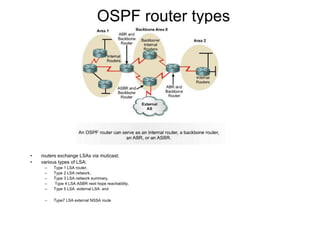
OSPF router types
• routers exchange LSAs via muticast;
• various types of LSA:
– Type 1 LSA router,
– Type 2 LSA network,
– Type 3 LSA network summary,
– Type 4 LSA ASBR next hope reachability,
– Type 5 LSA external LSA and
– Type7 LSA external NSSA route
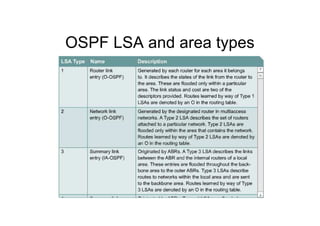
OSPF LSA and area types
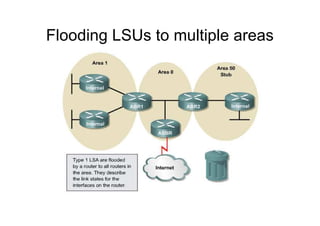
Flooding LSUs to multiple areas
Multiarea OSPF Configuration
and Verification
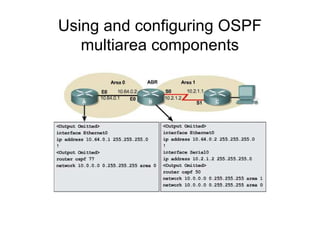
• Using and configuring OSPF multiarea
components
• Configuring OSPF route summarization
• Verifying multiarea OSPF operation
Using and configuring OSPF
multiarea components
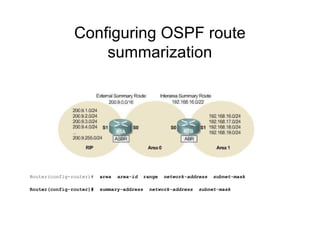
Configuring OSPF route
summarization
Router(config-router)# area area-id range network-address subnet-mask
Router(config-router)# summary-address network-address subnet-mask
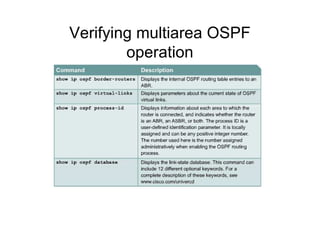
Verifying multiarea OSPF
operation
Stub, Totally Stubby, and Not-So-
Stubby Areas
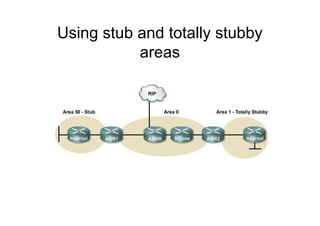
• Using stub and totally stubby areas
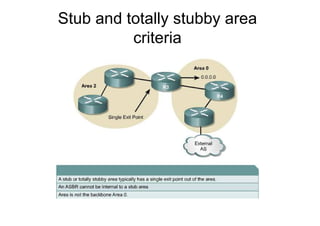
• Stub and totally stubby area criteria
• Configuring stub and totally stubby areas
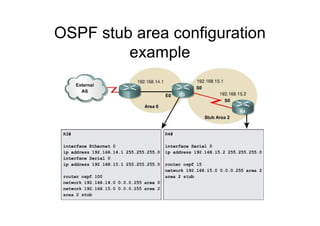
• OSPF stub area configuration example
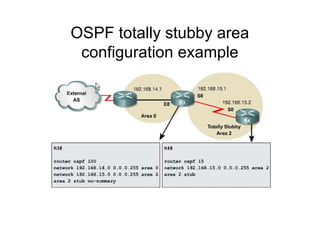
• OSPF totally stubby area configuration
example
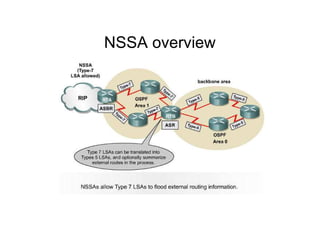
• NSSA overview
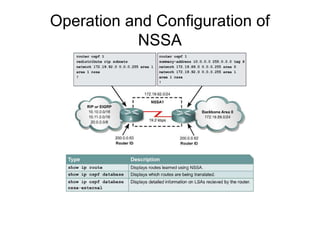
• How NSSA operates
• Configuring NSSA
Using stub and totally stubby
areas
Stub and totally stubby area
criteria
OSPF stub area configuration
example
OSPF totally stubby area
configuration example
NSSA overview
Operation and Configuration of
NSSA
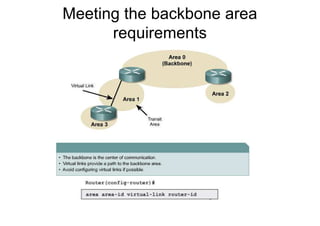
Virtual Links
• Meeting the backbone area
requirements
• Configuring virtual links
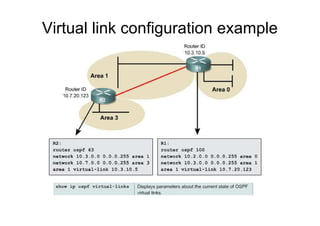
• Virtual link configuration example
Meeting the backbone area
requirements
Virtual link configuration example

20407473 ospf

  • 1.
  • 2.
    Objectives • OSPF Overview(terminology, states, network types, hello protocol) • Single-area OSPF Operation • Single-area OSPF Configuration and Verification • Configuring OSPF Over NBMA • Multiarea OSPF Operation • Multiarea OSPF Configuration and Verification • (Standard, Backbone), Stub, Totally Stubby-CISCO, and Not-So-Stubby Areas • Virtual Links
  • 3.
    OSPF router types •routers exchange LSAs via muticast; • various types of LSA: – Type 1 LSA router, – Type 2 LSA network, – Type 3 LSA network summary, – Type 4 LSA ASBR next hope reachability, – Type 5 LSA external LSA and – Type7 LSA external NSSA route
  • 4.
    Some OSPF terminologies •Area, 32 bit number (various types - Hierarchy based, Area 0=Backbone area) • routers; router ID, lo0 (various types: Internal router, ABR, ASBR, Backbone Router … combination of the above) COMING SOON • Link • Cost • Link state (ex. a router announce it is connected to router A on network 11.0.0.0/8, cost 5) • Adjacencies • DR, BDR DROthers (Broadcast or NBMA network) • OSPF packets (Hello, DBD, LSR, LSU and LSack) NEXT SLIDE • LSA: LSUs transport LSA (routers exchange LSAs via muticast; various types: LSA 1 router, 2 network, 3 network summary, 4 ASBR next hope reachability, 5 external LSA and 7 external NSSA route) • Topological Database (identical database) • SPF • routing table
  • 5.
  • 6.
    Steps to OSPFOperation NEXT slide
  • 7.
    Steps to OSPFOperation with States 1. Establishing router adjacencies (Routers are adjacent) –Down State – No Hello received –Init State – Hello received, but not with this router’s Router ID •“Hi, my name is Carlos.” “Hi, my name is Maria.” –Two-way State – Hello received, and with this router’s Router ID •“Hi, Maria, my name is Carlos.” “Hi, Carlos, my name is Maria.” 2. Electing DR and BDR – Multi-access (broadcast) segments only –ExStart State with DR and BDR –Two-way State with all other routers 3. Discovering Routes (coming soon) –ExStart State –Exchange State –Loading State –Full State (Routers are “fully adjacent”) 4. Calculating the Routing Table 5. Maintaining the LSDB and Routing Table
  • 8.
  • 9.
  • 10.
    OSPF Operation • Stepsof OSPF operation • Step 1: Establish router adjacencies • Step 2: Elect a DR and a BDR • Step 3: Discover routes • Step 4: Select appropriate routes • Step 5: Maintain routing information
  • 11.
    Step 1: Establishrouter adjacencies
  • 12.
    Step 2: Electa DR and a BDR
  • 13.
    Step 3: Discoverroutes –Down State – No Hello received –Init State – Hello received, but not with this router’s Router ID •“Hi, my name is Carlos.” “Hi, my name is Maria.” –Two-way State – Hello received, and with this router’s Router ID •“Hi, Maria, my name is Carlos.” “Hi, Carlos, my name is Maria.”
  • 14.
    Step 4: Selectappropriate routes
  • 15.
    Step 5: Maintainrouting information
  • 16.
    OSPF Configuration and Verification •Configuring OSPF on routers within a single area • Optional configuration commands • Optional configuration commands (continued) • Show commands • Clear and debug commands
  • 17.
    Configuring OSPF onrouters within a single area Rtr(config)# router ospf process-id Rtr(config-router)#network address wildcard-mask area area-id
  • 18.
  • 19.
    Optional configuration commands (continued) CISCORouters use the formula = 108/bandwidth Rtr(config-if)# bandwidth 64 = Rtr(config-if)# ip ospf cost 1562 Rtr(config-if)# bandwidth kilobits Rtr(config-if)# ip ospf authentication-key passwd Rtr(config-router)# area “area” authentication Rtr(config-if)# ip ospf message-digest-key key-id md5 password Rtr(config-router)# area area authentication [message-digest]
  • 20.
  • 21.
  • 22.
    Configuring OSPF OverNBMA • NBMA overview • Full-mesh Frame Relay • Partial-mesh Frame Relay – Point-to-Multipoint OSPF
  • 23.
  • 24.
  • 25.
  • 26.
  • 27.
    Multiarea OSPF Operation •The routing table is too big, the memory is running low – Creating multiple OSPF areas • OSPF router types • OSPF LSA and area types • Configuring OSPF operation across multiple areas • Flooding LSUs to multiple areas • Updating the routing table
  • 28.
    OSPF router types •routers exchange LSAs via muticast; • various types of LSA: – Type 1 LSA router, – Type 2 LSA network, – Type 3 LSA network summary, – Type 4 LSA ASBR next hope reachability, – Type 5 LSA external LSA and – Type7 LSA external NSSA route
  • 29.
    OSPF LSA andarea types
  • 30.
    Flooding LSUs tomultiple areas
  • 31.
    Multiarea OSPF Configuration andVerification • Using and configuring OSPF multiarea components • Configuring OSPF route summarization • Verifying multiarea OSPF operation
  • 32.
    Using and configuringOSPF multiarea components
  • 33.
    Configuring OSPF route summarization Router(config-router)#area area-id range network-address subnet-mask Router(config-router)# summary-address network-address subnet-mask
  • 34.
  • 35.
    Stub, Totally Stubby,and Not-So- Stubby Areas • Using stub and totally stubby areas • Stub and totally stubby area criteria • Configuring stub and totally stubby areas • OSPF stub area configuration example • OSPF totally stubby area configuration example • NSSA overview • How NSSA operates • Configuring NSSA
  • 36.
    Using stub andtotally stubby areas
  • 37.
    Stub and totallystubby area criteria
  • 38.
    OSPF stub areaconfiguration example
  • 39.
    OSPF totally stubbyarea configuration example
  • 40.
  • 41.
  • 42.
    Virtual Links • Meetingthe backbone area requirements • Configuring virtual links • Virtual link configuration example
  • 43.
    Meeting the backbonearea requirements
  • 44.