1Copyright © 2013 Blue Coat Systems Inc. All Rights Reserved.
WEB CACHE
COMMUNICATION
PROTOCOL (WCCP)
INTRODUCTION
Almas Raza
Product Support Specialist
2Copyright © 2013 Blue Coat Systems Inc. All Rights Reserved.
TOPICS OF DISCUSSION
 Why WCCP?
 WCCP Background
 WCCP Protocol Process
 WCCP Redirection Process
 WCCP Configuration
 WCCP Debugging
 References
3Copyright © 2013 Blue Coat Systems Inc. All Rights Reserved.
WHY WCCP
 Today’s networks require proxy services in order to secure
inbound an outbound communications.
 Communications need to be intercepted by the proxy
services in order to apply a secure policy and utilize the
caching capabilities.
 Proxy services can be deployed in two modes:
 Transparent mode
 Explicit mode
4Copyright © 2013 Blue Coat Systems Inc. All Rights Reserved.
WHY WCCP
 In Transparent mode, Requests are transparently
intercepted.
 User’s browser does not require modification in terms of
configuration.
 In Explicit mode, a user’s browser requires modification via
setting the hostname of the ProxySG or via Proxy
Autoconfig Client (PAC) files.
5Copyright © 2013 Blue Coat Systems Inc. All Rights Reserved.
WHY WCCP
 Transparent mode can be deployed in two ways
Inline
Virtually inline
6Copyright © 2013 Blue Coat Systems Inc. All Rights Reserved.
WHY WCCP
 When the ProxySG appliance is not in the physical path of
clients and servers, it must rely on an external device—
either a Layer 4 switch (Load Balancer) or a WCCP-capable
router—to redirect packets to it for transparent proxy
services. This type of deployment is known as a virtually in-
path deployment.
 Traffic can be redirected to Proxy via
Policy base routing in layer 3 switches OR
WCCP from Cisco layer3 switches and routers.
7Copyright © 2013 Blue Coat Systems Inc. All Rights Reserved.
USING WCCP WITH THE PROXYSG
 WCCP is the recommended virtually in-path deployment because it provides
the following advantages:
 Scalability and Load Balancing — Traffic can be automatically distributed to
up to 32 ProxySG: appliances. If one ProxySG goes down, traffic is
automatically redistributed across the other ProxySG appliances in the
group.
 Security — You can password-protect the WCCP service group so that only
authorized appliances can join. Additionally, you can configure access
control lists (ACLs) on the router to restrict access to specific ProxySG
appliances only.
 Failover — In the event that there are no ProxySG appliances available for
traffic redirection, the router forwards the traffic to the original destination
address.
 Flexibility — You control exactly what traffic to redirect and how to redirect it.
You can redirect all traffic entering or exiting a router interface; you can filter
traffic using ACLs; or, you can define specific protocol and ports to redirect.
8Copyright © 2013 Blue Coat Systems Inc. All Rights Reserved. 8Copyright © 2013 Blue Coat Systems Inc. All Rights Reserved.
8
WCCP BACKGROUND
9Copyright © 2013 Blue Coat Systems Inc. All Rights Reserved.
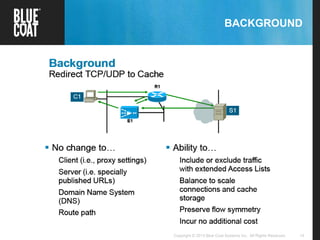
BACKGROUND
10Copyright © 2013 Blue Coat Systems Inc. All Rights Reserved.
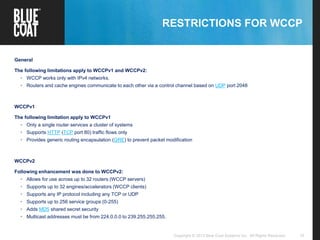
RESTRICTIONS FOR WCCP
General
The following limitations apply to WCCPv1 and WCCPv2:
• WCCP works only with IPv4 networks.
• Routers and cache engines communicate to each other via a control channel based on UDP port 2048
WCCPv1
The following limitation apply to WCCPv1
• Only a single router services a cluster of systems
• Supports HTTP (TCP port 80) traffic flows only
• Provides generic routing encapsulation (GRE) to prevent packet modification
WCCPv2
Following enhancement was done to WCCPv2:
• Allows for use across up to 32 routers (WCCP servers)
• Supports up to 32 engines/accelerators (WCCP clients)
• Supports any IP protocol including any TCP or UDP
• Supports up to 256 service groups (0-255)
• Adds MD5 shared secret security
• Multicast addresses must be from 224.0.0.0 to 239.255.255.255.
11Copyright © 2013 Blue Coat Systems Inc. All Rights Reserved.
BACKGROUND
12Copyright © 2013 Blue Coat Systems Inc. All Rights Reserved.
CISCO ROUTER / SWITCH COMMANDS
 Showing version of Cisco IOS
router# show version
CompNet-RT7206-5#show version
Cisco IOS Software, 7200 Software (C7200-ADVIPSERVICESK9-M), Version 12.4(22)T5, RELEASE SOFTWARE (fc3)
Technical Support: http://www.cisco.com/techsupport
Copyright (c) 1986-2010 by Cisco Systems, Inc.
Compiled Wed 28-Apr-10 13:31 by prod_rel_team
ROM: System Bootstrap, Version 12.0(19990210:195103) [12.0XE 105], DEVELOPMENT SOFTWARE
BOOTLDR: 7200 Software (C7200-BOOT-M), Version 12.0(9)S, EARLY DEPLOYMENT RELEASE SOFTWARE (fc1)
CompNet-RT7206-5 uptime is 1 hour, 20 minutes
System returned to ROM by reload at 13:43:21 PST Tue Nov 1 2011
.
.
.
Cisco 7206VXR (NPE300) processor (revision B) with 229376K/65536K bytes of memory.
Processor board ID 16071755
R7000 CPU at 262MHz, Implementation 39, Rev 1.0, 256KB L2 Cache
6 slot VXR midplane, Version 2.0
13Copyright © 2013 Blue Coat Systems Inc. All Rights Reserved.
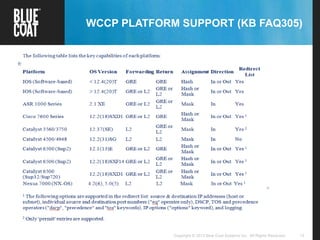
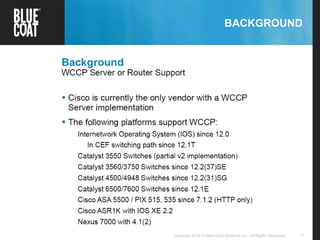
WCCP PLATFORM SUPPORT (KB FAQ305)
14Copyright © 2013 Blue Coat Systems Inc. All Rights Reserved.
BACKGROUND
15Copyright © 2013 Blue Coat Systems Inc. All Rights Reserved.
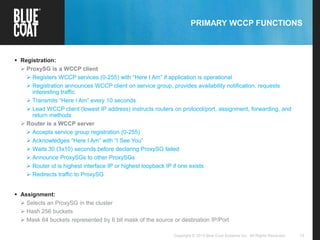
PRIMARY WCCP FUNCTIONS
 Registration:
 ProxySG is a WCCP client
 Registers WCCP services (0-255) with “Here I Am” if application is operational
 Registration announces WCCP client on service group, provides availability notification, requests
interesting traffic
 Transmits “Here I Am” every 10 seconds
 Lead WCCP client (lowest IP address) instructs routers on protocol/port, assignment, forwarding, and
return methods
 Router is a WCCP server
 Accepts service group registration (0-255)
 Acknowledges “Here I Am” with “I See You”
 Waits 30 (3x10) seconds before declaring ProxySG failed
 Announce ProxySGs to other ProxySGs
 Router id is highest interface IP or highest loopback IP if one exists
 Redirects traffic to ProxySG
 Assignment:
 Selects an ProxySG in the cluster
 Hash 256 buckets
 Mask 64 buckets represented by 6 bit mask of the source or destination IP/Port
16Copyright © 2013 Blue Coat Systems Inc. All Rights Reserved.
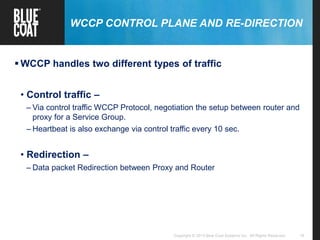
WCCP CONTROL PLANE AND RE-DIRECTION
 WCCP handles two different types of traffic
• Control traffic –
– Via control traffic WCCP Protocol, negotiation the setup between router and
proxy for a Service Group.
– Heartbeat is also exchange via control traffic every 10 sec.
• Redirection –
– Data packet Redirection between Proxy and Router
17Copyright © 2013 Blue Coat Systems Inc. All Rights Reserved.
WCCP SERVICE GROUPS
18Copyright © 2013 Blue Coat Systems Inc. All Rights Reserved.
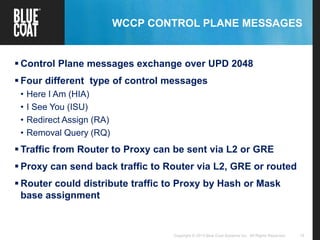
WCCP CONTROL PLANE MESSAGES
 Control Plane messages exchange over UPD 2048
 Four different type of control messages
• Here I Am (HIA)
• I See You (ISU)
• Redirect Assign (RA)
• Removal Query (RQ)
 Traffic from Router to Proxy can be sent via L2 or GRE
 Proxy can send back traffic to Router via L2, GRE or routed
 Router could distribute traffic to Proxy by Hash or Mask
base assignment
19Copyright © 2013 Blue Coat Systems Inc. All Rights Reserved.
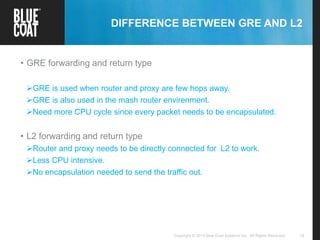
DIFFERENCE BETWEEN GRE AND L2
• GRE forwarding and return type
GRE is used when router and proxy are few hops away.
GRE is also used in the mash router envirenment.
Need more CPU cycle since every packet needs to be encapsulated.
• L2 forwarding and return type
Router and proxy needs to be directly connected for L2 to work.
Less CPU intensive.
No encapsulation needed to send the traffic out.
© Blue Coat Systems, Inc. 2008. All Rights Reserved.20
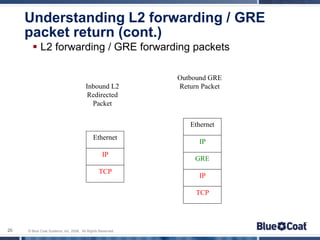
Understanding L2 forwarding / GRE
packet return (cont.)
 L2 forwarding / GRE forwarding packets
Ethernet
IP
TCP
Inbound L2
Redirected
Packet
Ethernet
IP
GRE
IP
TCP
Outbound GRE
Return Packet
21Copyright © 2013 Blue Coat Systems Inc. All Rights Reserved.
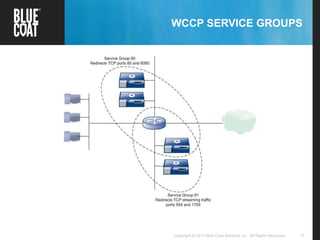
WCCP SERVICE GROUPS
A service group unites one or more routers/switches with one or more
caching devices (ProxySG appliances in this case) in a transparent
redirection scheme governed by a common set of rules. The service
group members agree on these rules initially by announcing their
specific capabilities and configurations to each other in WCCP protocol
packets as follows:
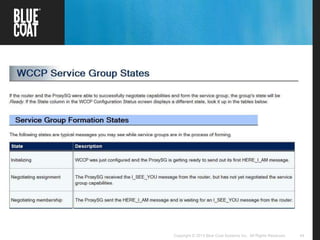
1. The ProxySG appliance sends out a “Here I Am” (WCCP2_HERE_I_AM)
message to the routers in the group. These messages include a
description of the service group that the ProxySG wants to join, including
the protocol, ports to redirect, method to use to forward and return
packets to each other, and load balancing instructions.
2. The routers respond with an “I See You” (WCCP2_I_SEE_YOU) message
that includes a Receive ID as well as a list of WCCP capabilities—such as
forwarding/return methods or load balancing schemes — that the router
supports.
22Copyright © 2013 Blue Coat Systems Inc. All Rights Reserved.
WCCP SERVICE GROUPS
3. The ProxySG appliance responds with another “Here I Am” message in which it
reflects the Receive ID that was sent in the “I See You” message from the router. In
addition, the ProxySG examines the capabilities advertised by the router and, if its
configuration specifies a capability that has not been advertised, it will abandon
its attempt to join the service group. If the capabilities it is configured to use are
advertised, it will select the capabilities it wants to use and will send them back to
the router in another “Here I Am” message.
4. The router inspects the capabilities that the ProxySG selected and, if the
capabilities are supported, the router accepts the ProxySG as compatible and
adds it to the service group. The router responds to all ProxySG appliances that it
has accepted with “I See You” messages that include a listing of all ProxySG
appliances in the service group (called the router view).
5. Each ProxySG in the group periodically sends out “Here I Am” messages to the
routers in the group to maintain its service group membership. If a router doesn’t
receive a “Here I Am” message from a ProxySG in the group within the designated
time-out interval, it removes the ProxySG from the service group and sends out an
“I See You” with an updated router view.
23Copyright © 2013 Blue Coat Systems Inc. All Rights Reserved.Copyright © 2013 Blue Coat Systems Inc. All Rights Reserved. 23
WCCP REDIRECTION PROCESS
24Copyright © 2013 Blue Coat Systems Inc. All Rights Reserved.
WCCP REDIRECTION
25Copyright © 2013 Blue Coat Systems Inc. All Rights Reserved.
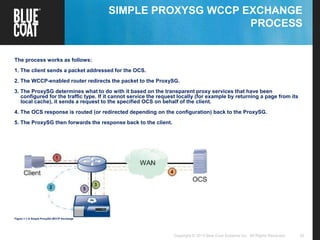
SIMPLE PROXYSG WCCP EXCHANGE
PROCESS
The process works as follows:
1. The client sends a packet addressed for the OCS.
2. The WCCP-enabled router redirects the packet to the ProxySG.
3. The ProxySG determines what to do with it based on the transparent proxy services that have been
configured for the traffic type. If it cannot service the request locally (for example by returning a page from its
local cache), it sends a request to the specified OCS on behalf of the client.
4. The OCS response is routed (or redirected depending on the configuration) back to the ProxySG.
5. The ProxySG then forwards the response back to the client.
Figure 1-1 A Simple ProxySG WCCP Exchange
26Copyright © 2013 Blue Coat Systems Inc. All Rights Reserved.
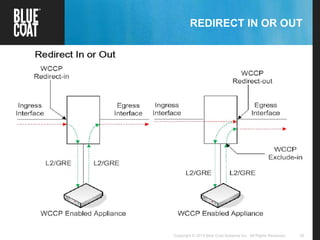
REDIRECT IN OR OUT
27Copyright © 2013 Blue Coat Systems Inc. All Rights Reserved.
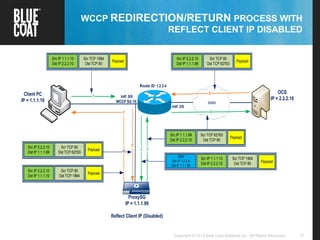
WCCP REDIRECTION/RETURN PROCESS WITH
REFLECT CLIENT IP DISABLED
Router ID: 1.2.3.4
ProxySG
IP = 1.1.1.99
Reflect Client IP (Disabled)
WAN
1Client PC
IP = 1.1.1.10
OCS
IP = 2.2.2.10Intf: 0/0
WCCP SG 10:
Intf: 2/0
2 3
4
5
6
7
Src IP 1.1.1.10
Dst IP 2.2.2.10
Scr TCP 1964
Dst TCP 80
Payload
Src IP 2.2.2.10
Dst IP 1.1.1.99
Scr TCP 80
Dst TCP 62763
Payload
Src IP 2.2.2.10
Dst IP 1.1.1.99
Scr TCP 80
Dst TCP 62763
Payload
Src IP 2.2.2.10
Dst IP 1.1.1.10
Scr TCP 80
Dst TCP 1964
Payload
Src IP 1.1.1.99
Dst IP 2.2.2.10
Scr TCP 62763
Dst TCP 80
Payload
GRE
Src IP 1.2.3.4
Dst IP 1.1.1.99
Scr TCP 1964
Dst TCP 80 Payload
Scr IP 1.1.1.10
Dst IP 2.2.2.10
28Copyright © 2013 Blue Coat Systems Inc. All Rights Reserved. 28Copyright © 2013 Blue Coat Systems Inc. All Rights Reserved.
WCCP CONFIGURATION
29Copyright © 2013 Blue Coat Systems Inc. All Rights Reserved.
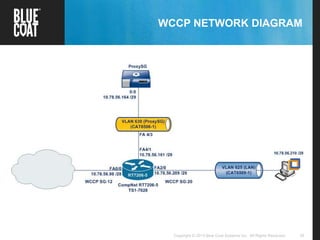
WCCP NETWORK DIAGRAM
30Copyright © 2013 Blue Coat Systems Inc. All Rights Reserved.
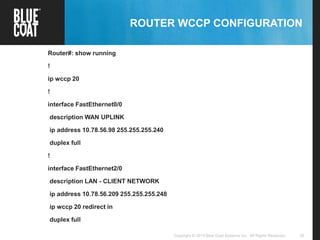
ROUTER WCCP CONFIGURATION
Router#: show running
!
ip wccp 20
!
interface FastEthernet0/0
description WAN UPLINK
ip address 10.78.56.98 255.255.255.240
duplex full
!
interface FastEthernet2/0
description LAN - CLIENT NETWORK
ip address 10.78.56.209 255.255.255.248
ip wccp 20 redirect in
duplex full
31Copyright © 2013 Blue Coat Systems Inc. All Rights Reserved.
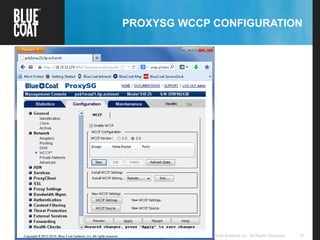
PROXYSG WCCP CONFIGURATION
32Copyright © 2013 Blue Coat Systems Inc. All Rights Reserved.
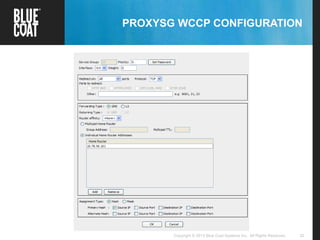
PROXYSG WCCP CONFIGURATION
33Copyright © 2013 Blue Coat Systems Inc. All Rights Reserved. 33Copyright © 2013 Blue Coat Systems Inc. All Rights Reserved.
WCCP DEBUGGING
34Copyright © 2013 Blue Coat Systems Inc. All Rights Reserved.
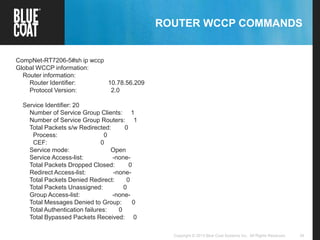
ROUTER WCCP COMMANDS
CompNet-RT7206-5#sh ip wccp
Global WCCP information:
Router information:
Router Identifier: 10.78.56.209
Protocol Version: 2.0
Service Identifier: 20
Number of Service Group Clients: 1
Number of Service Group Routers: 1
Total Packets s/w Redirected: 0
Process: 0
CEF: 0
Service mode: Open
Service Access-list: -none-
Total Packets Dropped Closed: 0
Redirect Access-list: -none-
Total Packets Denied Redirect: 0
Total Packets Unassigned: 0
Group Access-list: -none-
Total Messages Denied to Group: 0
Total Authentication failures: 0
Total Bypassed Packets Received: 0
35Copyright © 2013 Blue Coat Systems Inc. All Rights Reserved.
ROUTER WCCP COMMANDS
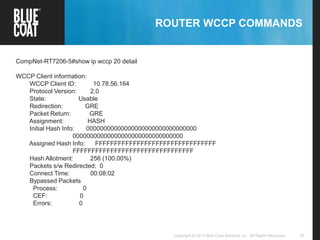
CompNet-RT7206-5#show ip wccp 20 detail
WCCP Client information:
WCCP Client ID: 10.78.56.164
Protocol Version: 2.0
State: Usable
Redirection: GRE
Packet Return: GRE
Assignment: HASH
Initial Hash Info: 00000000000000000000000000000000
00000000000000000000000000000000
Assigned Hash Info: FFFFFFFFFFFFFFFFFFFFFFFFFFFFFFFF
FFFFFFFFFFFFFFFFFFFFFFFFFFFFFFFF
Hash Allotment: 256 (100.00%)
Packets s/w Redirected: 0
Connect Time: 00:08:02
Bypassed Packets
Process: 0
CEF: 0
Errors: 0
36Copyright © 2013 Blue Coat Systems Inc. All Rights Reserved.
ROUTER WCCP COMMANDS
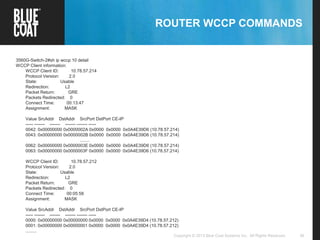
3560G-Switch-2#sh ip wccp 10 detail
WCCP Client information:
WCCP Client ID: 10.78.57.214
Protocol Version: 2.0
State: Usable
Redirection: L2
Packet Return: GRE
Packets Redirected: 0
Connect Time: 00:13:47
Assignment: MASK
Value SrcAddr DstAddr SrcPort DstPort CE-IP
----- ------- ------- ------- ------- -----
0042: 0x00000000 0x0000002A 0x0000 0x0000 0x0A4E39D6 (10.78.57.214)
0043: 0x00000000 0x0000002B 0x0000 0x0000 0x0A4E39D6 (10.78.57.214)
........
0062: 0x00000000 0x0000003E 0x0000 0x0000 0x0A4E39D6 (10.78.57.214)
0063: 0x00000000 0x0000003F 0x0000 0x0000 0x0A4E39D6 (10.78.57.214)
WCCP Client ID: 10.78.57.212
Protocol Version: 2.0
State: Usable
Redirection: L2
Packet Return: GRE
Packets Redirected: 0
Connect Time: 00:05:58
Assignment: MASK
Value SrcAddr DstAddr SrcPort DstPort CE-IP
----- ------- ------- ------- ------- -----
0000: 0x00000000 0x00000000 0x0000 0x0000 0x0A4E39D4 (10.78.57.212)
0001: 0x00000000 0x00000001 0x0000 0x0000 0x0A4E39D4 (10.78.57.212)
.........
37Copyright © 2013 Blue Coat Systems Inc. All Rights Reserved.
ROUTER WCCP COMMANDS
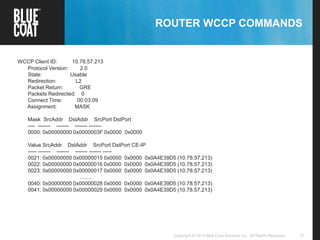
WCCP Client ID: 10.78.57.213
Protocol Version: 2.0
State: Usable
Redirection: L2
Packet Return: GRE
Packets Redirected: 0
Connect Time: 00:03:09
Assignment: MASK
Mask SrcAddr DstAddr SrcPort DstPort
---- ------- ------- ------- -------
0000: 0x00000000 0x0000003F 0x0000 0x0000
Value SrcAddr DstAddr SrcPort DstPort CE-IP
----- ------- ------- ------- ------- -----
0021: 0x00000000 0x00000015 0x0000 0x0000 0x0A4E39D5 (10.78.57.213)
0022: 0x00000000 0x00000016 0x0000 0x0000 0x0A4E39D5 (10.78.57.213)
0023: 0x00000000 0x00000017 0x0000 0x0000 0x0A4E39D5 (10.78.57.213)
........
0040: 0x00000000 0x00000028 0x0000 0x0000 0x0A4E39D5 (10.78.57.213)
0041: 0x00000000 0x00000029 0x0000 0x0000 0x0A4E39D5 (10.78.57.213)
38Copyright © 2013 Blue Coat Systems Inc. All Rights Reserved.
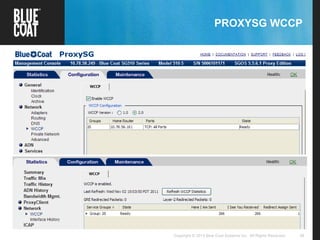
PROXYSG WCCP
39Copyright © 2013 Blue Coat Systems Inc. All Rights Reserved.
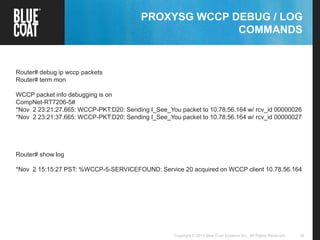
PROXYSG WCCP DEBUG / LOG
COMMANDS
Router# debug ip wccp packets
Router# term mon
WCCP packet info debugging is on
CompNet-RT7206-5#
*Nov 2 23:21:27.665: WCCP-PKT:D20: Sending I_See_You packet to 10.78.56.164 w/ rcv_id 00000026
*Nov 2 23:21:37.665: WCCP-PKT:D20: Sending I_See_You packet to 10.78.56.164 w/ rcv_id 00000027
Router# show log
*Nov 2 15:15:27 PST: %WCCP-5-SERVICEFOUND: Service 20 acquired on WCCP client 10.78.56.164
40Copyright © 2013 Blue Coat Systems Inc. All Rights Reserved.
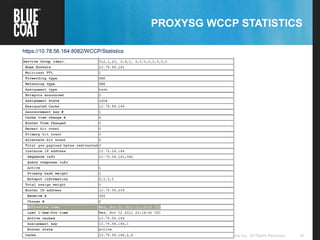
PROXYSG WCCP STATISTICS
https://10.78.56.164:8082/WCCP/Statistics
41Copyright © 2013 Blue Coat Systems Inc. All Rights Reserved.
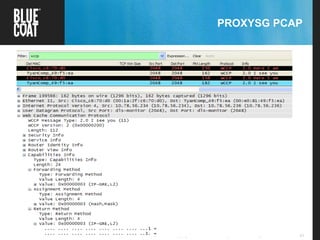
PROXYSG PCAP
42Copyright © 2013 Blue Coat Systems Inc. All Rights Reserved.
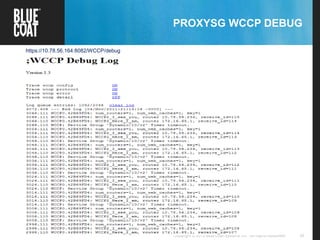
PROXYSG WCCP DEBUG
https://10.78.56.164:8082/WCCP/debug
43Copyright © 2013 Blue Coat Systems Inc. All Rights Reserved. 43Copyright © 2013 Blue Coat Systems Inc. All Rights Reserved.
REFERENCES
44Copyright © 2013 Blue Coat Systems Inc. All Rights Reserved.
45Copyright © 2013 Blue Coat Systems Inc. All Rights Reserved.
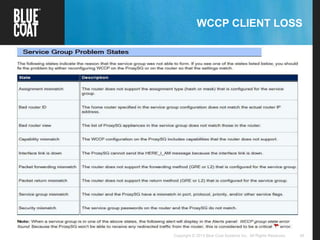
WCCP CLIENT LOSS
46Copyright © 2013 Blue Coat Systems Inc. All Rights Reserved.Blue Coat Confidential – Internal Use Only
THANK YOU FOR JOINING TODAY!
 Please provide feedback on this webcast and suggestions
for future webcasts to:
supportnewsletter@bluecoat.com
Webcast replay and
slide deck found here:
https://bto.bluecoat.com/training/custom
er-support-technical-webcasts
(requires BTO login)
47Copyright © 2013 Blue Coat Systems Inc. All Rights Reserved.Blue Coat Confidential – Internal Use Only
BLUE COAT CUSTOMER FORUMS
 New Blue Coat Customer Forums now available
 Community where you can learn from and share your
valuable knowledge and experience with other Blue Coat
customers
 Research, post and reply to topics relevant to you at your
own convenience
 Blue Coat Moderator Team ready to offer guidance, answer
questions, and help get you on the right track
 Access at forums.bluecoat.com and register for an account
today!
48Copyright © 2013 Blue Coat Systems Inc. All Rights Reserved.

Wccp introduction final2

  • 1.
    1Copyright © 2013Blue Coat Systems Inc. All Rights Reserved. WEB CACHE COMMUNICATION PROTOCOL (WCCP) INTRODUCTION Almas Raza Product Support Specialist
  • 2.
    2Copyright © 2013Blue Coat Systems Inc. All Rights Reserved. TOPICS OF DISCUSSION  Why WCCP?  WCCP Background  WCCP Protocol Process  WCCP Redirection Process  WCCP Configuration  WCCP Debugging  References
  • 3.
    3Copyright © 2013Blue Coat Systems Inc. All Rights Reserved. WHY WCCP  Today’s networks require proxy services in order to secure inbound an outbound communications.  Communications need to be intercepted by the proxy services in order to apply a secure policy and utilize the caching capabilities.  Proxy services can be deployed in two modes:  Transparent mode  Explicit mode
  • 4.
    4Copyright © 2013Blue Coat Systems Inc. All Rights Reserved. WHY WCCP  In Transparent mode, Requests are transparently intercepted.  User’s browser does not require modification in terms of configuration.  In Explicit mode, a user’s browser requires modification via setting the hostname of the ProxySG or via Proxy Autoconfig Client (PAC) files.
  • 5.
    5Copyright © 2013Blue Coat Systems Inc. All Rights Reserved. WHY WCCP  Transparent mode can be deployed in two ways Inline Virtually inline
  • 6.
    6Copyright © 2013Blue Coat Systems Inc. All Rights Reserved. WHY WCCP  When the ProxySG appliance is not in the physical path of clients and servers, it must rely on an external device— either a Layer 4 switch (Load Balancer) or a WCCP-capable router—to redirect packets to it for transparent proxy services. This type of deployment is known as a virtually in- path deployment.  Traffic can be redirected to Proxy via Policy base routing in layer 3 switches OR WCCP from Cisco layer3 switches and routers.
  • 7.
    7Copyright © 2013Blue Coat Systems Inc. All Rights Reserved. USING WCCP WITH THE PROXYSG  WCCP is the recommended virtually in-path deployment because it provides the following advantages:  Scalability and Load Balancing — Traffic can be automatically distributed to up to 32 ProxySG: appliances. If one ProxySG goes down, traffic is automatically redistributed across the other ProxySG appliances in the group.  Security — You can password-protect the WCCP service group so that only authorized appliances can join. Additionally, you can configure access control lists (ACLs) on the router to restrict access to specific ProxySG appliances only.  Failover — In the event that there are no ProxySG appliances available for traffic redirection, the router forwards the traffic to the original destination address.  Flexibility — You control exactly what traffic to redirect and how to redirect it. You can redirect all traffic entering or exiting a router interface; you can filter traffic using ACLs; or, you can define specific protocol and ports to redirect.
  • 8.
    8Copyright © 2013Blue Coat Systems Inc. All Rights Reserved. 8Copyright © 2013 Blue Coat Systems Inc. All Rights Reserved. 8 WCCP BACKGROUND
  • 9.
    9Copyright © 2013Blue Coat Systems Inc. All Rights Reserved. BACKGROUND
  • 10.
    10Copyright © 2013Blue Coat Systems Inc. All Rights Reserved. RESTRICTIONS FOR WCCP General The following limitations apply to WCCPv1 and WCCPv2: • WCCP works only with IPv4 networks. • Routers and cache engines communicate to each other via a control channel based on UDP port 2048 WCCPv1 The following limitation apply to WCCPv1 • Only a single router services a cluster of systems • Supports HTTP (TCP port 80) traffic flows only • Provides generic routing encapsulation (GRE) to prevent packet modification WCCPv2 Following enhancement was done to WCCPv2: • Allows for use across up to 32 routers (WCCP servers) • Supports up to 32 engines/accelerators (WCCP clients) • Supports any IP protocol including any TCP or UDP • Supports up to 256 service groups (0-255) • Adds MD5 shared secret security • Multicast addresses must be from 224.0.0.0 to 239.255.255.255.
  • 11.
    11Copyright © 2013Blue Coat Systems Inc. All Rights Reserved. BACKGROUND
  • 12.
    12Copyright © 2013Blue Coat Systems Inc. All Rights Reserved. CISCO ROUTER / SWITCH COMMANDS  Showing version of Cisco IOS router# show version CompNet-RT7206-5#show version Cisco IOS Software, 7200 Software (C7200-ADVIPSERVICESK9-M), Version 12.4(22)T5, RELEASE SOFTWARE (fc3) Technical Support: http://www.cisco.com/techsupport Copyright (c) 1986-2010 by Cisco Systems, Inc. Compiled Wed 28-Apr-10 13:31 by prod_rel_team ROM: System Bootstrap, Version 12.0(19990210:195103) [12.0XE 105], DEVELOPMENT SOFTWARE BOOTLDR: 7200 Software (C7200-BOOT-M), Version 12.0(9)S, EARLY DEPLOYMENT RELEASE SOFTWARE (fc1) CompNet-RT7206-5 uptime is 1 hour, 20 minutes System returned to ROM by reload at 13:43:21 PST Tue Nov 1 2011 . . . Cisco 7206VXR (NPE300) processor (revision B) with 229376K/65536K bytes of memory. Processor board ID 16071755 R7000 CPU at 262MHz, Implementation 39, Rev 1.0, 256KB L2 Cache 6 slot VXR midplane, Version 2.0
  • 13.
    13Copyright © 2013Blue Coat Systems Inc. All Rights Reserved. WCCP PLATFORM SUPPORT (KB FAQ305)
  • 14.
    14Copyright © 2013Blue Coat Systems Inc. All Rights Reserved. BACKGROUND
  • 15.
    15Copyright © 2013Blue Coat Systems Inc. All Rights Reserved. PRIMARY WCCP FUNCTIONS  Registration:  ProxySG is a WCCP client  Registers WCCP services (0-255) with “Here I Am” if application is operational  Registration announces WCCP client on service group, provides availability notification, requests interesting traffic  Transmits “Here I Am” every 10 seconds  Lead WCCP client (lowest IP address) instructs routers on protocol/port, assignment, forwarding, and return methods  Router is a WCCP server  Accepts service group registration (0-255)  Acknowledges “Here I Am” with “I See You”  Waits 30 (3x10) seconds before declaring ProxySG failed  Announce ProxySGs to other ProxySGs  Router id is highest interface IP or highest loopback IP if one exists  Redirects traffic to ProxySG  Assignment:  Selects an ProxySG in the cluster  Hash 256 buckets  Mask 64 buckets represented by 6 bit mask of the source or destination IP/Port
  • 16.
    16Copyright © 2013Blue Coat Systems Inc. All Rights Reserved. WCCP CONTROL PLANE AND RE-DIRECTION  WCCP handles two different types of traffic • Control traffic – – Via control traffic WCCP Protocol, negotiation the setup between router and proxy for a Service Group. – Heartbeat is also exchange via control traffic every 10 sec. • Redirection – – Data packet Redirection between Proxy and Router
  • 17.
    17Copyright © 2013Blue Coat Systems Inc. All Rights Reserved. WCCP SERVICE GROUPS
  • 18.
    18Copyright © 2013Blue Coat Systems Inc. All Rights Reserved. WCCP CONTROL PLANE MESSAGES  Control Plane messages exchange over UPD 2048  Four different type of control messages • Here I Am (HIA) • I See You (ISU) • Redirect Assign (RA) • Removal Query (RQ)  Traffic from Router to Proxy can be sent via L2 or GRE  Proxy can send back traffic to Router via L2, GRE or routed  Router could distribute traffic to Proxy by Hash or Mask base assignment
  • 19.
    19Copyright © 2013Blue Coat Systems Inc. All Rights Reserved. DIFFERENCE BETWEEN GRE AND L2 • GRE forwarding and return type GRE is used when router and proxy are few hops away. GRE is also used in the mash router envirenment. Need more CPU cycle since every packet needs to be encapsulated. • L2 forwarding and return type Router and proxy needs to be directly connected for L2 to work. Less CPU intensive. No encapsulation needed to send the traffic out.
  • 20.
    © Blue CoatSystems, Inc. 2008. All Rights Reserved.20 Understanding L2 forwarding / GRE packet return (cont.)  L2 forwarding / GRE forwarding packets Ethernet IP TCP Inbound L2 Redirected Packet Ethernet IP GRE IP TCP Outbound GRE Return Packet
  • 21.
    21Copyright © 2013Blue Coat Systems Inc. All Rights Reserved. WCCP SERVICE GROUPS A service group unites one or more routers/switches with one or more caching devices (ProxySG appliances in this case) in a transparent redirection scheme governed by a common set of rules. The service group members agree on these rules initially by announcing their specific capabilities and configurations to each other in WCCP protocol packets as follows: 1. The ProxySG appliance sends out a “Here I Am” (WCCP2_HERE_I_AM) message to the routers in the group. These messages include a description of the service group that the ProxySG wants to join, including the protocol, ports to redirect, method to use to forward and return packets to each other, and load balancing instructions. 2. The routers respond with an “I See You” (WCCP2_I_SEE_YOU) message that includes a Receive ID as well as a list of WCCP capabilities—such as forwarding/return methods or load balancing schemes — that the router supports.
  • 22.
    22Copyright © 2013Blue Coat Systems Inc. All Rights Reserved. WCCP SERVICE GROUPS 3. The ProxySG appliance responds with another “Here I Am” message in which it reflects the Receive ID that was sent in the “I See You” message from the router. In addition, the ProxySG examines the capabilities advertised by the router and, if its configuration specifies a capability that has not been advertised, it will abandon its attempt to join the service group. If the capabilities it is configured to use are advertised, it will select the capabilities it wants to use and will send them back to the router in another “Here I Am” message. 4. The router inspects the capabilities that the ProxySG selected and, if the capabilities are supported, the router accepts the ProxySG as compatible and adds it to the service group. The router responds to all ProxySG appliances that it has accepted with “I See You” messages that include a listing of all ProxySG appliances in the service group (called the router view). 5. Each ProxySG in the group periodically sends out “Here I Am” messages to the routers in the group to maintain its service group membership. If a router doesn’t receive a “Here I Am” message from a ProxySG in the group within the designated time-out interval, it removes the ProxySG from the service group and sends out an “I See You” with an updated router view.
  • 23.
    23Copyright © 2013Blue Coat Systems Inc. All Rights Reserved.Copyright © 2013 Blue Coat Systems Inc. All Rights Reserved. 23 WCCP REDIRECTION PROCESS
  • 24.
    24Copyright © 2013Blue Coat Systems Inc. All Rights Reserved. WCCP REDIRECTION
  • 25.
    25Copyright © 2013Blue Coat Systems Inc. All Rights Reserved. SIMPLE PROXYSG WCCP EXCHANGE PROCESS The process works as follows: 1. The client sends a packet addressed for the OCS. 2. The WCCP-enabled router redirects the packet to the ProxySG. 3. The ProxySG determines what to do with it based on the transparent proxy services that have been configured for the traffic type. If it cannot service the request locally (for example by returning a page from its local cache), it sends a request to the specified OCS on behalf of the client. 4. The OCS response is routed (or redirected depending on the configuration) back to the ProxySG. 5. The ProxySG then forwards the response back to the client. Figure 1-1 A Simple ProxySG WCCP Exchange
  • 26.
    26Copyright © 2013Blue Coat Systems Inc. All Rights Reserved. REDIRECT IN OR OUT
  • 27.
    27Copyright © 2013Blue Coat Systems Inc. All Rights Reserved. WCCP REDIRECTION/RETURN PROCESS WITH REFLECT CLIENT IP DISABLED Router ID: 1.2.3.4 ProxySG IP = 1.1.1.99 Reflect Client IP (Disabled) WAN 1Client PC IP = 1.1.1.10 OCS IP = 2.2.2.10Intf: 0/0 WCCP SG 10: Intf: 2/0 2 3 4 5 6 7 Src IP 1.1.1.10 Dst IP 2.2.2.10 Scr TCP 1964 Dst TCP 80 Payload Src IP 2.2.2.10 Dst IP 1.1.1.99 Scr TCP 80 Dst TCP 62763 Payload Src IP 2.2.2.10 Dst IP 1.1.1.99 Scr TCP 80 Dst TCP 62763 Payload Src IP 2.2.2.10 Dst IP 1.1.1.10 Scr TCP 80 Dst TCP 1964 Payload Src IP 1.1.1.99 Dst IP 2.2.2.10 Scr TCP 62763 Dst TCP 80 Payload GRE Src IP 1.2.3.4 Dst IP 1.1.1.99 Scr TCP 1964 Dst TCP 80 Payload Scr IP 1.1.1.10 Dst IP 2.2.2.10
  • 28.
    28Copyright © 2013Blue Coat Systems Inc. All Rights Reserved. 28Copyright © 2013 Blue Coat Systems Inc. All Rights Reserved. WCCP CONFIGURATION
  • 29.
    29Copyright © 2013Blue Coat Systems Inc. All Rights Reserved. WCCP NETWORK DIAGRAM
  • 30.
    30Copyright © 2013Blue Coat Systems Inc. All Rights Reserved. ROUTER WCCP CONFIGURATION Router#: show running ! ip wccp 20 ! interface FastEthernet0/0 description WAN UPLINK ip address 10.78.56.98 255.255.255.240 duplex full ! interface FastEthernet2/0 description LAN - CLIENT NETWORK ip address 10.78.56.209 255.255.255.248 ip wccp 20 redirect in duplex full
  • 31.
    31Copyright © 2013Blue Coat Systems Inc. All Rights Reserved. PROXYSG WCCP CONFIGURATION
  • 32.
    32Copyright © 2013Blue Coat Systems Inc. All Rights Reserved. PROXYSG WCCP CONFIGURATION
  • 33.
    33Copyright © 2013Blue Coat Systems Inc. All Rights Reserved. 33Copyright © 2013 Blue Coat Systems Inc. All Rights Reserved. WCCP DEBUGGING
  • 34.
    34Copyright © 2013Blue Coat Systems Inc. All Rights Reserved. ROUTER WCCP COMMANDS CompNet-RT7206-5#sh ip wccp Global WCCP information: Router information: Router Identifier: 10.78.56.209 Protocol Version: 2.0 Service Identifier: 20 Number of Service Group Clients: 1 Number of Service Group Routers: 1 Total Packets s/w Redirected: 0 Process: 0 CEF: 0 Service mode: Open Service Access-list: -none- Total Packets Dropped Closed: 0 Redirect Access-list: -none- Total Packets Denied Redirect: 0 Total Packets Unassigned: 0 Group Access-list: -none- Total Messages Denied to Group: 0 Total Authentication failures: 0 Total Bypassed Packets Received: 0
  • 35.
    35Copyright © 2013Blue Coat Systems Inc. All Rights Reserved. ROUTER WCCP COMMANDS CompNet-RT7206-5#show ip wccp 20 detail WCCP Client information: WCCP Client ID: 10.78.56.164 Protocol Version: 2.0 State: Usable Redirection: GRE Packet Return: GRE Assignment: HASH Initial Hash Info: 00000000000000000000000000000000 00000000000000000000000000000000 Assigned Hash Info: FFFFFFFFFFFFFFFFFFFFFFFFFFFFFFFF FFFFFFFFFFFFFFFFFFFFFFFFFFFFFFFF Hash Allotment: 256 (100.00%) Packets s/w Redirected: 0 Connect Time: 00:08:02 Bypassed Packets Process: 0 CEF: 0 Errors: 0
  • 36.
    36Copyright © 2013Blue Coat Systems Inc. All Rights Reserved. ROUTER WCCP COMMANDS 3560G-Switch-2#sh ip wccp 10 detail WCCP Client information: WCCP Client ID: 10.78.57.214 Protocol Version: 2.0 State: Usable Redirection: L2 Packet Return: GRE Packets Redirected: 0 Connect Time: 00:13:47 Assignment: MASK Value SrcAddr DstAddr SrcPort DstPort CE-IP ----- ------- ------- ------- ------- ----- 0042: 0x00000000 0x0000002A 0x0000 0x0000 0x0A4E39D6 (10.78.57.214) 0043: 0x00000000 0x0000002B 0x0000 0x0000 0x0A4E39D6 (10.78.57.214) ........ 0062: 0x00000000 0x0000003E 0x0000 0x0000 0x0A4E39D6 (10.78.57.214) 0063: 0x00000000 0x0000003F 0x0000 0x0000 0x0A4E39D6 (10.78.57.214) WCCP Client ID: 10.78.57.212 Protocol Version: 2.0 State: Usable Redirection: L2 Packet Return: GRE Packets Redirected: 0 Connect Time: 00:05:58 Assignment: MASK Value SrcAddr DstAddr SrcPort DstPort CE-IP ----- ------- ------- ------- ------- ----- 0000: 0x00000000 0x00000000 0x0000 0x0000 0x0A4E39D4 (10.78.57.212) 0001: 0x00000000 0x00000001 0x0000 0x0000 0x0A4E39D4 (10.78.57.212) .........
  • 37.
    37Copyright © 2013Blue Coat Systems Inc. All Rights Reserved. ROUTER WCCP COMMANDS WCCP Client ID: 10.78.57.213 Protocol Version: 2.0 State: Usable Redirection: L2 Packet Return: GRE Packets Redirected: 0 Connect Time: 00:03:09 Assignment: MASK Mask SrcAddr DstAddr SrcPort DstPort ---- ------- ------- ------- ------- 0000: 0x00000000 0x0000003F 0x0000 0x0000 Value SrcAddr DstAddr SrcPort DstPort CE-IP ----- ------- ------- ------- ------- ----- 0021: 0x00000000 0x00000015 0x0000 0x0000 0x0A4E39D5 (10.78.57.213) 0022: 0x00000000 0x00000016 0x0000 0x0000 0x0A4E39D5 (10.78.57.213) 0023: 0x00000000 0x00000017 0x0000 0x0000 0x0A4E39D5 (10.78.57.213) ........ 0040: 0x00000000 0x00000028 0x0000 0x0000 0x0A4E39D5 (10.78.57.213) 0041: 0x00000000 0x00000029 0x0000 0x0000 0x0A4E39D5 (10.78.57.213)
  • 38.
    38Copyright © 2013Blue Coat Systems Inc. All Rights Reserved. PROXYSG WCCP
  • 39.
    39Copyright © 2013Blue Coat Systems Inc. All Rights Reserved. PROXYSG WCCP DEBUG / LOG COMMANDS Router# debug ip wccp packets Router# term mon WCCP packet info debugging is on CompNet-RT7206-5# *Nov 2 23:21:27.665: WCCP-PKT:D20: Sending I_See_You packet to 10.78.56.164 w/ rcv_id 00000026 *Nov 2 23:21:37.665: WCCP-PKT:D20: Sending I_See_You packet to 10.78.56.164 w/ rcv_id 00000027 Router# show log *Nov 2 15:15:27 PST: %WCCP-5-SERVICEFOUND: Service 20 acquired on WCCP client 10.78.56.164
  • 40.
    40Copyright © 2013Blue Coat Systems Inc. All Rights Reserved. PROXYSG WCCP STATISTICS https://10.78.56.164:8082/WCCP/Statistics
  • 41.
    41Copyright © 2013Blue Coat Systems Inc. All Rights Reserved. PROXYSG PCAP
  • 42.
    42Copyright © 2013Blue Coat Systems Inc. All Rights Reserved. PROXYSG WCCP DEBUG https://10.78.56.164:8082/WCCP/debug
  • 43.
    43Copyright © 2013Blue Coat Systems Inc. All Rights Reserved. 43Copyright © 2013 Blue Coat Systems Inc. All Rights Reserved. REFERENCES
  • 44.
    44Copyright © 2013Blue Coat Systems Inc. All Rights Reserved.
  • 45.
    45Copyright © 2013Blue Coat Systems Inc. All Rights Reserved. WCCP CLIENT LOSS
  • 46.
    46Copyright © 2013Blue Coat Systems Inc. All Rights Reserved.Blue Coat Confidential – Internal Use Only THANK YOU FOR JOINING TODAY!  Please provide feedback on this webcast and suggestions for future webcasts to: supportnewsletter@bluecoat.com Webcast replay and slide deck found here: https://bto.bluecoat.com/training/custom er-support-technical-webcasts (requires BTO login)
  • 47.
    47Copyright © 2013Blue Coat Systems Inc. All Rights Reserved.Blue Coat Confidential – Internal Use Only BLUE COAT CUSTOMER FORUMS  New Blue Coat Customer Forums now available  Community where you can learn from and share your valuable knowledge and experience with other Blue Coat customers  Research, post and reply to topics relevant to you at your own convenience  Blue Coat Moderator Team ready to offer guidance, answer questions, and help get you on the right track  Access at forums.bluecoat.com and register for an account today!
  • 48.
    48Copyright © 2013Blue Coat Systems Inc. All Rights Reserved.