Living with the
Oracle Database Appliance
Simon Haslam, Veriton
Peter Moore, Simplyhealth
Simon Haslam
Consultant, Veriton &
Technical Director of
Oracle s/w since 1995
Middleware & SOA
WebLogic, SOA, BPM
Peter Moore
Principal Oracle DBA & MW
Admin, Simplyhealth
Oracle s/w since 1988
Oracle DBA for 19 years
Database Administrator
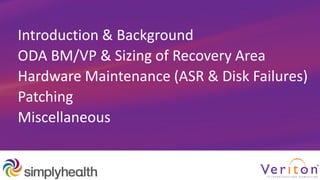
Introduction & Background
ODA BM/VP & Sizing of Recovery Area
Hardware Maintenance (ASR & Disk Failures)
Patching
Miscellaneous
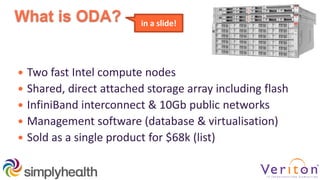
What is ODA?
 Two fast Intel compute nodes
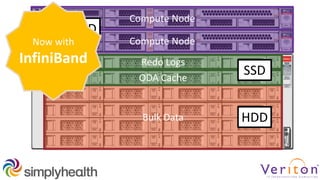
 Shared, direct attached storage array including flash
 InfiniBand interconnect & 10Gb public networks
 Management software (database & virtualisation)
 Sold as a single product for $68k (list)
in a slide!
Bulk Data HDD
Redo Logs
ODA Cache
SSD
Compute Node
Compute Node
HDD
Now with
InfiniBand
Background
 Started in 1872
◦ Previously… HSA, BCWA, HealthSure, LHF, Remedi, Medisure, Denplan
 Primary business areas
◦ Health Cash Plans
◦ Private Medical Insurance
◦ Dental Capitation
◦ Healthcare delivery
 Over 3M customers / 20,000 companies
 ~1700 Employees
Core IT
 Product / CRM / Finance Application
 ~1000 Users / 600 Active
 3M Customer records
 Java EE and PL/SQL
 3rd Party communications platform
 RAC (2TB main db), WebLogic, Reports
ZFS Appliance
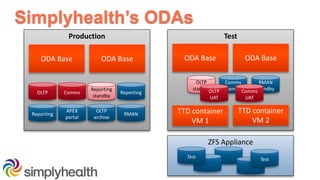
Simplyhealth’s ODAs
Production Test
ODA Base
OLTP
Reporting
standby
Comms
ODA Base
TTD container
VM 1
TTD container
VM 2
ODA BaseODA Base
OLTP
standby
Comms
standby
Test
Reporting
Reporting
APEX
portal
RMAN
OLTP
archive
RMAN
standbyOLTP
UAT
Comms
UAT
Test
ODA BM/VP &
Sizing of Recovery Area
13 | 1013 • 50
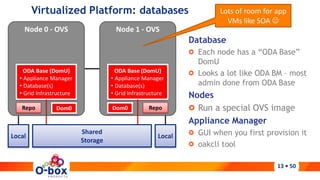
Virtualized Platform: databases
Database
Each node has a “ODA Base”
DomU
Looks a lot like ODA BM – most
admin done from ODA Base
Nodes
Run a special OVS image
Appliance Manager
GUI when you first provision it
oakcli tool
Node 0 - OVS
ODA Base (DomU)
• Appliance Manager
• Database(s)
• Grid Infrastructure
Node 1 - OVS
ODA Base (DomU)
• Appliance Manager
• Database(s)
• Grid Infrastructure
Dom0 Dom0Repo Repo
Local Local
Shared
Storage
Lots of room for app
VMs like SOA 
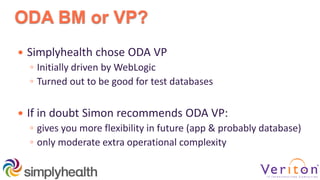
ODA BM or VP?
 Simplyhealth chose ODA VP
◦ Initially driven by WebLogic
◦ Turned out to be good for test databases
 If in doubt Simon recommends ODA VP:
◦ gives you more flexibility in future (app & probably database)
◦ only moderate extra operational complexity
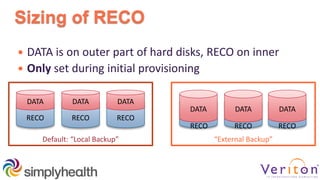
Sizing of RECO
 DATA is on outer part of hard disks, RECO on inner
 Only set during initial provisioning
RECO
DATA
RECO
DATA
RECO
DATA
Default: “Local Backup” “External Backup”
DATA
RECO
DATA
RECO
DATA
RECO
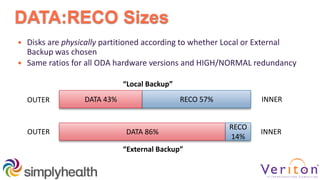
DATA:RECO Sizes
 Disks are physically partitioned according to whether Local or External
Backup was chosen
 Same ratios for all ODA hardware versions and HIGH/NORMAL redundancy
DATA 43% RECO 57%
DATA 86%
RECO
14%
“Local Backup”
“External Backup”
OUTER
OUTER
INNER
INNER
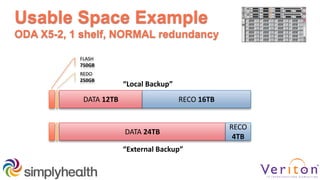
Usable Space Example
ODA X5-2, 1 shelf, NORMAL redundancy
DATA 12TB RECO 16TB
DATA 24TB
RECO
4TB
“Local Backup”
“External Backup”
REDO
250GB
FLASH
750GB
Hardware Maintenance
(ASR & Disk Failures)
My Oracle Support
Set up
 Use a team MOS account + group email dist. list
 Ensure MOS account has access to correct ODA CSI(s)
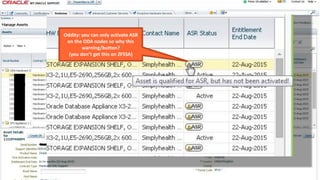
MOS
Oddity: you can only activate ASR
on the ODA nodes so why this
warning/button?
(you don’t get this on ZFSSA)
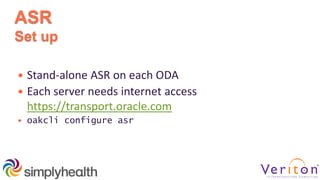
ASR
Set up
 Stand-alone ASR on each ODA
 Each server needs internet access
https://transport.oracle.com
 oakcli configure asr
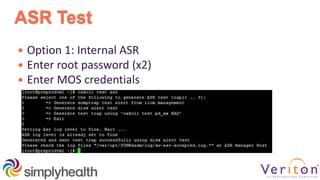
ASR Test
 Option 1: Internal ASR
 Enter root password (x2)
 Enter MOS credentials
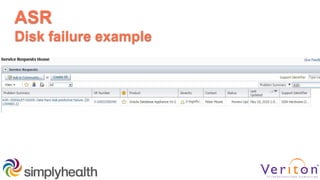
ASR
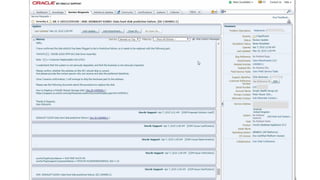
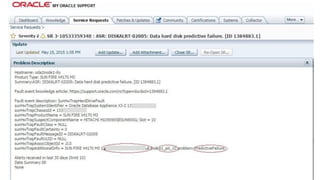
Disk failure example
ASR
Funnies
 ASR raises one SR per disk… or none… or two… 
 Sometimes the first time you know that a disk has
failed has been when Oracle has updated the SR
◦ New ODA plug-in for EM is expected to include hardware
notifications 
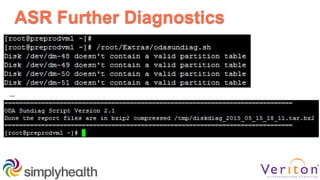
ASR Further Diagnostics
…
Our Disk History
 We have 2 x dual shelf ODA X3-2s  16 SSD & 88 HDD
 Running for 1.5 years (1.35M HDD-hours)
 Total of 6 HDDs have been replaced (i.e. 225k h MTBF)
◦ 5 predicted failures
◦ 1 real failure… bad experience with I/O waits though 
 No SSDs have failed
Note: new ZFS SA disk arrived automatically next morning without sys
admin knowing it had failed! (ODA should be more like this)
Disk Failure ‘Gotchas’
 1 predicted failure fixed itself!
 General fiddliness of replacing disks
◦ Firmware updating, getting new disks ONLINE, etc
◦ MOS 1435946.1 & 1496114.1
 The replacement disk includes the courier details to collect
the failed one…
◦ this is a European courier who will know nothing about it!
◦ we need the UK courier
 Blinking yellow light doesn’t always work?!
Patching
Patching: It’s Really Good!
 Vastly simplified process compared to DIY for full stack
 Approx. quarterly ODA-only bundled patches
◦ includes PSU for databases (optional)
 Oracle Support says <=2 versions behind current
 There’s probably a backlog of ODA customers on 2.10
(last 11g GI but CPU only to April 2014)
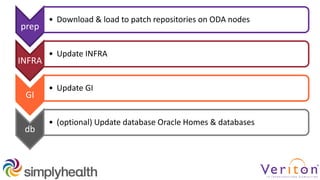
prep
• Download & load to patch repositories on ODA nodes
INFRA
• Update INFRA
GI
• Update GI
db
• (optional) Update database Oracle Homes & databases
Upgrade Example
ODA 2.10 to 12.1.2.2.0 INFRA, GI, DB PSU
 11g12c CRS/ASM upgrade would have probably
been a project pre-ODA
 We only have a single 11.2.0.4.x Oracle Home
◦ some people have several, e.g. for different apps
prep
• scp p20340774_121220_Linux-x86-64_[12]of2.zip
• oakcli unpack –package p20340774… {for each zip, on each node}
• oakcli update -patch 12.1.2.2.0 --verify
INFRA
• oakcli update –patch 12.1.2.2.0 --infra
GI
• oakcli update –patch 12.1.2.2.0 --gi
db
• oakcli update –patch 12.1.2.2.0 --database
Lost
1h 10min
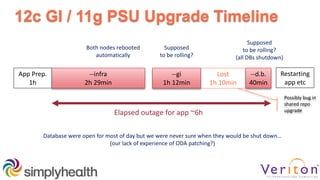
12c GI / 11g PSU Upgrade Timeline
--infra
2h 29min
--gi
1h 12min
--d.b.
40min
App Prep.
1h
Elapsed outage for app ~6h
Restarting
app etc
Supposed
to be rolling?
(all DBs shutdown)
Supposed
to be rolling?
Both nodes rebooted
automatically
Database were open for most of day but we were never sure when they would be shut down…
(our lack of experience of ODA patching?)
Possibly bug in
shared repo
upgrade
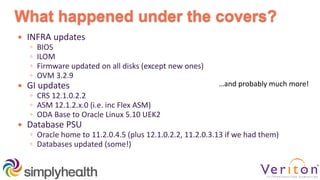
What happened under the covers?
 INFRA updates
◦ BIOS
◦ ILOM
◦ Firmware updated on all disks (except new ones)
◦ OVM 3.2.9
 GI updates
◦ CRS 12.1.0.2.2
◦ ASM 12.1.2.x.0 (i.e. inc Flex ASM)
◦ ODA Base to Oracle Linux 5.10 UEK2
 Database PSU
◦ Oracle home to 11.2.0.4.5 (plus 12.1.0.2.2, 11.2.0.3.13 if we had them)
◦ Databases updated (some!)
…and probably much more!
DB Patch-Set Update
 Choose which Oracle Home(s) to apply PSU to
 Script loops through databases running in each
updated home & runs catbundle.sql
◦ Recognises standbys - didn’t apply PSU (correctly) but still
shut them down! Perhaps because they shared the home
being patched? Possibly our fault!
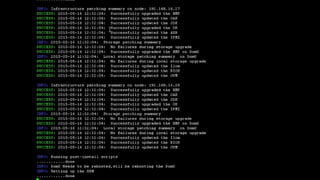
Strange Error Messages
 Some strange messages, but mostly harmless:
◦ Console: “An error occurred while restoring domain oakDom1:
Error: not a valid guest state file: config size read”
 But… 2 of us were watching everything very closely
◦ Probably better to just go for a long lunch instead!
Patching Wish List
 Status/confidence
◦ more timestamps (for checking back later – test vs prod)
◦ a progress indicator for anything taking over ~3 min
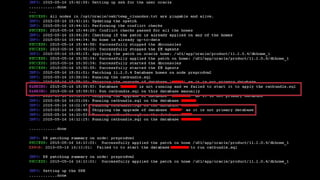
e.g. “INFO: Running prepatching on node 0” ~20 mins
 Could firmware updates of disks (35 mins) be done in
parallel?
Patching Wish List
 Help us to understand which parts of process are
rolling (could be different per ODA version) and how to
minimise downtime
◦ Is INFRA ever rolling?
◦ GI rolling?
◦ DB rolling if using RAC or RON?
Patching Nirvana:
Rolling Upgrades for Everything?!
 Size of ODA X5-2 invites DB consolidation
 Simplyhealth: Lack of rolling INFRA will drive all non-UAT
databases off test ODA
(v hard to test bundled patches on pre-prod/UAT)
 O-box SOA Appliance: sold on strength as HA so need rolling
updates below WebLogic layer
Miscellaneous
NFS Storage for Databases
 Oracle ZFS and NFS (e.g. NetApp) is supported
◦ See MOS 1445253.1: External Storage (read/write) Support
◦ Use files over NFS, not via ASM
 Uses Direct NFS (dNFS)  fast
◦ we have 10 GbE network dedicated to storage
 Not so self-contained so perhaps not “the ODA way”
An Innovative Approach for Test DBs
 Requirement:
◦ To use DB EE NUP licences for test, when the 2 ODA bases are
licensed by RAC processor
 Solution:
◦ One large VM on each node with multiple Linux Containers
◦ Test databases within the containers use ZFS SA for storage
 Suffers from lack of rolling upgrades for ODA INFRA
Technical Credit/Implementation:
Mark Leeuw & Fabrizio Bordaccini
Backup & Disaster Recovery
 Data Guard works well of course
 ODA VP & ODA Base?
◦ In practice you need to rebuild
 VMs running on ODA VP?
◦ Host level backup within VM
◦ ACFS Replication...?
Oracle White Paper:
Backup and Recovery Best Practices for the Oracle Database Appliance (April 2014)
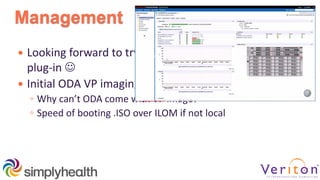
Management
 Looking forward to trying the new EM 12c R4 ODA
plug-in 
 Initial ODA VP imaging
◦ Why can’t ODA come with VP image?
◦ Speed of booting .ISO over ILOM if not local
Tips
 Keep It Simple!
◦ Don’t stray too far from standard ODA design goals
◦ Custom databases running off vDisks will end in tears!
 Don’t mess with BIOS!
◦ Simon’s don’t-do-this-at-home node eviction test
Summary
Choose Wisely!
 ODA Bare Metal or Virtualized Platform
 Internal or External Backup
 Double (NORMAL) or Triple (HIGH) Mirrored
Hardware
 ASR is useful
 Disks – replacement process needs improvement
Patching
 Probably the best feature of ODA
 The gift that keeps on giving!
◦ Over lifetime of an ODA you might patch/upgrade 10 or more
times
Oracle Database Appliance VP
It Just Works*™
*99%!
@simon_haslam@petercmoore

Living with the Oracle Database Appliance

  • 1.
    Living with the OracleDatabase Appliance Simon Haslam, Veriton Peter Moore, Simplyhealth
  • 2.
    Simon Haslam Consultant, Veriton& Technical Director of Oracle s/w since 1995 Middleware & SOA WebLogic, SOA, BPM Peter Moore Principal Oracle DBA & MW Admin, Simplyhealth Oracle s/w since 1988 Oracle DBA for 19 years Database Administrator
  • 3.
    Introduction & Background ODABM/VP & Sizing of Recovery Area Hardware Maintenance (ASR & Disk Failures) Patching Miscellaneous
  • 4.
    What is ODA? Two fast Intel compute nodes  Shared, direct attached storage array including flash  InfiniBand interconnect & 10Gb public networks  Management software (database & virtualisation)  Sold as a single product for $68k (list) in a slide!
  • 5.
    Bulk Data HDD RedoLogs ODA Cache SSD Compute Node Compute Node HDD Now with InfiniBand
  • 7.
    Background  Started in1872 ◦ Previously… HSA, BCWA, HealthSure, LHF, Remedi, Medisure, Denplan  Primary business areas ◦ Health Cash Plans ◦ Private Medical Insurance ◦ Dental Capitation ◦ Healthcare delivery  Over 3M customers / 20,000 companies  ~1700 Employees
  • 8.
    Core IT  Product/ CRM / Finance Application  ~1000 Users / 600 Active  3M Customer records  Java EE and PL/SQL  3rd Party communications platform  RAC (2TB main db), WebLogic, Reports
  • 9.
    ZFS Appliance Simplyhealth’s ODAs ProductionTest ODA Base OLTP Reporting standby Comms ODA Base TTD container VM 1 TTD container VM 2 ODA BaseODA Base OLTP standby Comms standby Test Reporting Reporting APEX portal RMAN OLTP archive RMAN standbyOLTP UAT Comms UAT Test
  • 10.
    ODA BM/VP & Sizingof Recovery Area
  • 11.
    13 | 1013• 50 Virtualized Platform: databases Database Each node has a “ODA Base” DomU Looks a lot like ODA BM – most admin done from ODA Base Nodes Run a special OVS image Appliance Manager GUI when you first provision it oakcli tool Node 0 - OVS ODA Base (DomU) • Appliance Manager • Database(s) • Grid Infrastructure Node 1 - OVS ODA Base (DomU) • Appliance Manager • Database(s) • Grid Infrastructure Dom0 Dom0Repo Repo Local Local Shared Storage Lots of room for app VMs like SOA 
  • 12.
    ODA BM orVP?  Simplyhealth chose ODA VP ◦ Initially driven by WebLogic ◦ Turned out to be good for test databases  If in doubt Simon recommends ODA VP: ◦ gives you more flexibility in future (app & probably database) ◦ only moderate extra operational complexity
  • 13.
    Sizing of RECO DATA is on outer part of hard disks, RECO on inner  Only set during initial provisioning RECO DATA RECO DATA RECO DATA Default: “Local Backup” “External Backup” DATA RECO DATA RECO DATA RECO
  • 14.
    DATA:RECO Sizes  Disksare physically partitioned according to whether Local or External Backup was chosen  Same ratios for all ODA hardware versions and HIGH/NORMAL redundancy DATA 43% RECO 57% DATA 86% RECO 14% “Local Backup” “External Backup” OUTER OUTER INNER INNER
  • 15.
    Usable Space Example ODAX5-2, 1 shelf, NORMAL redundancy DATA 12TB RECO 16TB DATA 24TB RECO 4TB “Local Backup” “External Backup” REDO 250GB FLASH 750GB
  • 16.
  • 17.
    My Oracle Support Setup  Use a team MOS account + group email dist. list  Ensure MOS account has access to correct ODA CSI(s)
  • 18.
    MOS Oddity: you canonly activate ASR on the ODA nodes so why this warning/button? (you don’t get this on ZFSSA)
  • 19.
    ASR Set up  Stand-aloneASR on each ODA  Each server needs internet access https://transport.oracle.com  oakcli configure asr
  • 20.
    ASR Test  Option1: Internal ASR  Enter root password (x2)  Enter MOS credentials
  • 21.
  • 24.
    ASR Funnies  ASR raisesone SR per disk… or none… or two…   Sometimes the first time you know that a disk has failed has been when Oracle has updated the SR ◦ New ODA plug-in for EM is expected to include hardware notifications 
  • 25.
  • 26.
    Our Disk History We have 2 x dual shelf ODA X3-2s  16 SSD & 88 HDD  Running for 1.5 years (1.35M HDD-hours)  Total of 6 HDDs have been replaced (i.e. 225k h MTBF) ◦ 5 predicted failures ◦ 1 real failure… bad experience with I/O waits though   No SSDs have failed Note: new ZFS SA disk arrived automatically next morning without sys admin knowing it had failed! (ODA should be more like this)
  • 27.
    Disk Failure ‘Gotchas’ 1 predicted failure fixed itself!  General fiddliness of replacing disks ◦ Firmware updating, getting new disks ONLINE, etc ◦ MOS 1435946.1 & 1496114.1  The replacement disk includes the courier details to collect the failed one… ◦ this is a European courier who will know nothing about it! ◦ we need the UK courier  Blinking yellow light doesn’t always work?!
  • 28.
  • 29.
    Patching: It’s ReallyGood!  Vastly simplified process compared to DIY for full stack  Approx. quarterly ODA-only bundled patches ◦ includes PSU for databases (optional)  Oracle Support says <=2 versions behind current  There’s probably a backlog of ODA customers on 2.10 (last 11g GI but CPU only to April 2014)
  • 30.
    prep • Download &load to patch repositories on ODA nodes INFRA • Update INFRA GI • Update GI db • (optional) Update database Oracle Homes & databases
  • 31.
    Upgrade Example ODA 2.10to 12.1.2.2.0 INFRA, GI, DB PSU  11g12c CRS/ASM upgrade would have probably been a project pre-ODA  We only have a single 11.2.0.4.x Oracle Home ◦ some people have several, e.g. for different apps
  • 32.
    prep • scp p20340774_121220_Linux-x86-64_[12]of2.zip •oakcli unpack –package p20340774… {for each zip, on each node} • oakcli update -patch 12.1.2.2.0 --verify INFRA • oakcli update –patch 12.1.2.2.0 --infra GI • oakcli update –patch 12.1.2.2.0 --gi db • oakcli update –patch 12.1.2.2.0 --database
  • 33.
    Lost 1h 10min 12c GI/ 11g PSU Upgrade Timeline --infra 2h 29min --gi 1h 12min --d.b. 40min App Prep. 1h Elapsed outage for app ~6h Restarting app etc Supposed to be rolling? (all DBs shutdown) Supposed to be rolling? Both nodes rebooted automatically Database were open for most of day but we were never sure when they would be shut down… (our lack of experience of ODA patching?) Possibly bug in shared repo upgrade
  • 35.
    What happened underthe covers?  INFRA updates ◦ BIOS ◦ ILOM ◦ Firmware updated on all disks (except new ones) ◦ OVM 3.2.9  GI updates ◦ CRS 12.1.0.2.2 ◦ ASM 12.1.2.x.0 (i.e. inc Flex ASM) ◦ ODA Base to Oracle Linux 5.10 UEK2  Database PSU ◦ Oracle home to 11.2.0.4.5 (plus 12.1.0.2.2, 11.2.0.3.13 if we had them) ◦ Databases updated (some!) …and probably much more!
  • 36.
    DB Patch-Set Update Choose which Oracle Home(s) to apply PSU to  Script loops through databases running in each updated home & runs catbundle.sql ◦ Recognises standbys - didn’t apply PSU (correctly) but still shut them down! Perhaps because they shared the home being patched? Possibly our fault!
  • 38.
    Strange Error Messages Some strange messages, but mostly harmless: ◦ Console: “An error occurred while restoring domain oakDom1: Error: not a valid guest state file: config size read”  But… 2 of us were watching everything very closely ◦ Probably better to just go for a long lunch instead!
  • 39.
    Patching Wish List Status/confidence ◦ more timestamps (for checking back later – test vs prod) ◦ a progress indicator for anything taking over ~3 min e.g. “INFO: Running prepatching on node 0” ~20 mins  Could firmware updates of disks (35 mins) be done in parallel?
  • 40.
    Patching Wish List Help us to understand which parts of process are rolling (could be different per ODA version) and how to minimise downtime ◦ Is INFRA ever rolling? ◦ GI rolling? ◦ DB rolling if using RAC or RON?
  • 41.
    Patching Nirvana: Rolling Upgradesfor Everything?!  Size of ODA X5-2 invites DB consolidation  Simplyhealth: Lack of rolling INFRA will drive all non-UAT databases off test ODA (v hard to test bundled patches on pre-prod/UAT)  O-box SOA Appliance: sold on strength as HA so need rolling updates below WebLogic layer
  • 42.
  • 43.
    NFS Storage forDatabases  Oracle ZFS and NFS (e.g. NetApp) is supported ◦ See MOS 1445253.1: External Storage (read/write) Support ◦ Use files over NFS, not via ASM  Uses Direct NFS (dNFS)  fast ◦ we have 10 GbE network dedicated to storage  Not so self-contained so perhaps not “the ODA way”
  • 44.
    An Innovative Approachfor Test DBs  Requirement: ◦ To use DB EE NUP licences for test, when the 2 ODA bases are licensed by RAC processor  Solution: ◦ One large VM on each node with multiple Linux Containers ◦ Test databases within the containers use ZFS SA for storage  Suffers from lack of rolling upgrades for ODA INFRA Technical Credit/Implementation: Mark Leeuw & Fabrizio Bordaccini
  • 45.
    Backup & DisasterRecovery  Data Guard works well of course  ODA VP & ODA Base? ◦ In practice you need to rebuild  VMs running on ODA VP? ◦ Host level backup within VM ◦ ACFS Replication...? Oracle White Paper: Backup and Recovery Best Practices for the Oracle Database Appliance (April 2014)
  • 46.
    Management  Looking forwardto trying the new EM 12c R4 ODA plug-in   Initial ODA VP imaging ◦ Why can’t ODA come with VP image? ◦ Speed of booting .ISO over ILOM if not local
  • 47.
    Tips  Keep ItSimple! ◦ Don’t stray too far from standard ODA design goals ◦ Custom databases running off vDisks will end in tears!  Don’t mess with BIOS! ◦ Simon’s don’t-do-this-at-home node eviction test
  • 48.
  • 49.
    Choose Wisely!  ODABare Metal or Virtualized Platform  Internal or External Backup  Double (NORMAL) or Triple (HIGH) Mirrored
  • 50.
    Hardware  ASR isuseful  Disks – replacement process needs improvement
  • 51.
    Patching  Probably thebest feature of ODA  The gift that keeps on giving! ◦ Over lifetime of an ODA you might patch/upgrade 10 or more times
  • 52.
    Oracle Database ApplianceVP It Just Works*™ *99%!
  • 54.