2.01 HOW TO USE THE
COMPUTER
THIS LECTURE HELPS THE STUDENT FOR
PROPER USE OF COMPUTER AND KNOW
THE ROLE OF IT.
PROLOGUE
 I don’t provide the study for the programming neither
Hardware Engineering.
 My lecture tells you how to utilize the computer and
improve the general knowledge for it’s operation.
 Think together Act together toward the success for the
better computing.
 Nepalese way in Nepal.
OUR TARGET
Learn different skill and ideas to create website step by step.
Website remain all the data and document in the cloud.
Never miss the data and easy to open for public.
Advantage
 Create your own website for your class
together.
LEARN MORE SKILLS
 How to maintain our computer well.
 File management and digital archives.
 Create the own Blog and Website.
 How to process GPS data.
 Compose the good writing.
 Editing the movie.
 Other multimedia skills.
 Collaboration with other devices (iPhone and Android)
PROGRAM (LESSON)
1. Day 01 Briefing and General knowledge .
2. Day 02 Create Website and blog
3. Day 03 Skill for Word and Excel.
4. Day 04 GPS data processing.
5. Day 05 Multi media editing.
6. Day 06 Concept of smart lecture.
7. Day 07 Collaboration with Smart Phone.
Personal counseling on demand.
LESSON 1 CHECK
YOUR COMPUTER
1. Windows experimental Index
2. Applications.
3. RAM, HD disk size.
4. Defragment and clean the computer.
5. What is the file. (file type and size)
6. ISO file and PDF file.
7. How to manage the folder and file.
8. Hung up!
9. Reinstall OS and back up
10. Free application and crack
11. Cloud Computing
LESSON 1-1-1
WINDOWS SCORE
Check your computer by Windows experience index
Task Check your computer
LESSON 1-1-2 RAM
AND OS
How do we check the Windows Index score?
Right click my computer →open the property
What we can find out the image above?
OS, RAM and 32bit or 64bit.
RAM
OS
32 or 64bit
Mac OS, Win Xp, Win 7, Win 8, Linux etc.
Android, i-phone, windows phone
Mobile
32bit OS Max 4GB RAM
64bit OS Max 32GB RAM
Size of work place.
LESSON 1-1-3 YOUR
SCORE
Now check you r computer and show your score.
Max point is 7.9.
We do check the guideline of our computer.
Read the help and let your computer faster.
Dell laptop N5010 windows score was only 1 !
What was wrong.? It was brought from Middle East
and it was re-installed by fake windows7
Question
LESSON 1-1-4
COMPUTER OPERATION
Operating computer is same as car driving.
CPU =Engine
HD = capacity of loading
RAM = Space of Engine Room.
Net connection= Road
Power supply=fuel.
GPS=Car navigation
High End audio System=Stereo music Player
So many facilities both in car and computer
Choose the proper spec of computer.
Marti Suzuki is suitable for Narrow road.
Mercedes Benz is just for showing!
LESSON 1-1-4
COMPUTER OPERATION
Operating computer is same as human body
CPU =Heart
Power = Blood
Organ = Application
Sensor= human sense
Don’t depend on computer. We are human being.
Computer control us.
Many warning while we use the computer.
We lose our sensor.
Go to Super market, we don’t need to speak.
Everything has done by computer.
There is no direct talk. We may forget how to
talk the others.
Task Discuss more about computer.
Replace it to the human body.
LESSON 1-2-1
APPLICATION
How many applications do you have on your computer?
1. We may know just 5%or less of
application in our computer. We can do
many things to do with computer.
2. Don’t make your computer just iron box.
3. Multi task smart phone can do many
things but we use it just 5%.
4. Customize the application and learn each
application, then use them mix.
( Mix masala properly, you make good dish)
LESSON 1-2-2 MY
FAVORITE APPS (1)
Wow! Full of Icon on it! Just for the link ICON (each 1KB)
LESSON 1-2-3 MY
FAVORITE APPS (2)
First Stone Image viewer. Picasa.
MS Office. Open Office
Corel video Studio. Windows Movie maker
Clean master. Glary Utility
Bandizip. Flexible Renamer
Windows live Writer.
Nero Essential.
Map source. Garmin Base camp. GPS Babel
Google Earth Pro.
Team viewer.
LESSON 1-2-4 MORE
APPLICATION
Don’t put two antivirus program.
Do you go to two hospitals while you are sick?
Be careful to set up free application.
Read the instruction carefully and avoid unnecessary
program’s auto set up.
Task
Check your search engine.
If it is something wrong, repair it.
ASK tool bar?
LESSON 1-3-1
HARD DISK(1)
How is your Hard Disk. Check up
Tips
1. Need more than 50% on C
drive
2. Life of Hard disk 5-7years. It
depends of usage.
3. Do defragmentation for keep
the performance well.
Anybody replace the HD or
add the Memory? Or
Reinstall your computer?
Q
LESSON 1-4-1 KNOW
YOUR HARD DISK
(DEFRAGMENTATION)
What is the defragment?
Clean your work place and rearrangement.
Task
Clean your HD by
defragmentation
LESSON 1-5-1 FILE
MANAGEMENT
File type and size.
(file details)
We see many
kinds of file type.
jpg, bmp, doc, xls, iso,
pdf, avi, mpg, gpx,
gdb
Task
Check your existing
files and know the
type of file.
LESSON 1-6-1
ISO FILE
ISO file = Image file.
What is the profit of
ISO file.
1. ISO works as virtual
DVD to store any kind of
files.
2. Safe for restore
without media.
Task Install Ultra ISO 8.2
Create ISO file.
Extract on your Computer.
LESSON 1-6-2
PDF FILE
PDF file =Portable Document Format.
What is the profit of PDF file.
Difference between Word doc and PDF
Easy to send the file.
PDF can not edit
MS Word can not open with higher version
How to Create PDF from word doc
Adobe reader and Adobe acrobat.
Task Find out any PDF creator.
Set it up your computer.
Convert any word file into PDF.
Check the per romance and file size.
Send it by e-mail.
See the difference Word and PDF.
LESSON 1-6-3
PROJECT FILE(NERO)
Nero project file. *.nri
It is easy to
know Image
file(Picture)
Word and
Excel file is
easy to
imagine.
Then what is
the project
file.
Tips
Demonstration of
NRI file.
Tips
LESSON 1-6-3
PROJECT FILE(VIDEO)
Corel Video Studio project file. *.vsp
Tips
Demonstration of
VSP file.
LESSON 1-7-1 NAMING
OF FILE AND FOLDER
• How to manage
the folder and
file.
• File and folder
arrangement.
• File Renamer
Task
Set up the program
and check the
performance.
LESSON 1-7-2 NAMING
OF FILE AND FOLDER
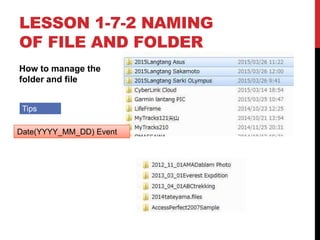
How to manage the
folder and file
Tips
Date(YYYY_MM_DD) Event
LESSON 1-8-1
HUNG UP AND SLOW
If your computer hung up and become slow, what do we do?
Check your computer.
Know your computer specification.
Clean the computer by Cleaner
Do defragmentation.
Stop the back ground program.
Stop the start up program.
Don’t keep the file on Desk Top.
Check your driver
Check by Utility program →Glary Utilities.
Task Tune up your computer
LESSON 1-9
REINSTALL(1)
Did you create Recovery Disk?
Recovery from internal Hard Disk(Recovery area)
Task
How do you find out the recovery area
on your computer?
LESSON 1-9
REINSTALL(2)
1. Control Pane
2. Administrative
Tool
3. Management
4. Disk Manager
Task
Does your computer
has recovery Area?
LESSON 1-9
REINSTALL(3)
Create Recovery Disk
Task Do you have recovery Disk?
LESSON 1-9
REINSTALL(4)
Recovery from DVD media.
Change the BIOS F2
Task
Change your BIOS
LESSON 1-9
REINSTALL(5)
Change the boot and perform
the linux from USB drive
Tips
Run LINUX
LESSON 1-10-1 CRACK AND
FREE APPLICATION(1)
What is the crack?
How does the crack work?
LESSON 1-10-1 CRACK AND
FREE APPLICATION(2)
What is the crack?
How does the crack work?
Stop the Antivirus.
Read the instruction.
Crack it and get
privilege.
Tips
LESSON 1-10-1 CRACK AND
FREE APPLICATION(3)
Free application?
Upgrade and update?
Up grade with
payment.
Update for free.
Read the instruction
carefully.
Free ware try to add
unnecessary
software. .
Tips
LESSON 1-11-1
CLOUD COMPUTING(1)
What is the Cloud computing?
Changing the data storage and transfer
Carry the data by Pen Drive
Send the link file by e-mail Share data direct
E-mail is oldest cloud computing system.
Free data storage. →One Drive, Drop box etc.
Free Picture storage→Picasa web album
Free Video Storage→You tube
Free web Hosting→Weebly
Free document Storage→Srribed
Free GPS data Storage→ My Tracks, All trails
Q
Facebook is a part of
cloud computing?
LESSON 1-11-2
CLOUD COMPUTING(2)
Basic of Cloud computing?
We need internet connection to take part cloud computing.
Offline and on line.
After download the file and data, we see it off line, but not up to date.
Off-line map and On-line map Check the MAPS.ME.Pro
Android or i-Phone
Our privacy leaks by google

201 how to use the computer

  • 1.
    2.01 HOW TOUSE THE COMPUTER THIS LECTURE HELPS THE STUDENT FOR PROPER USE OF COMPUTER AND KNOW THE ROLE OF IT.
  • 2.
    PROLOGUE  I don’tprovide the study for the programming neither Hardware Engineering.  My lecture tells you how to utilize the computer and improve the general knowledge for it’s operation.  Think together Act together toward the success for the better computing.  Nepalese way in Nepal.
  • 3.
    OUR TARGET Learn differentskill and ideas to create website step by step. Website remain all the data and document in the cloud. Never miss the data and easy to open for public. Advantage  Create your own website for your class together.
  • 4.
    LEARN MORE SKILLS How to maintain our computer well.  File management and digital archives.  Create the own Blog and Website.  How to process GPS data.  Compose the good writing.  Editing the movie.  Other multimedia skills.  Collaboration with other devices (iPhone and Android)
  • 5.
    PROGRAM (LESSON) 1. Day01 Briefing and General knowledge . 2. Day 02 Create Website and blog 3. Day 03 Skill for Word and Excel. 4. Day 04 GPS data processing. 5. Day 05 Multi media editing. 6. Day 06 Concept of smart lecture. 7. Day 07 Collaboration with Smart Phone. Personal counseling on demand.
  • 6.
    LESSON 1 CHECK YOURCOMPUTER 1. Windows experimental Index 2. Applications. 3. RAM, HD disk size. 4. Defragment and clean the computer. 5. What is the file. (file type and size) 6. ISO file and PDF file. 7. How to manage the folder and file. 8. Hung up! 9. Reinstall OS and back up 10. Free application and crack 11. Cloud Computing
  • 7.
    LESSON 1-1-1 WINDOWS SCORE Checkyour computer by Windows experience index Task Check your computer
  • 8.
    LESSON 1-1-2 RAM ANDOS How do we check the Windows Index score? Right click my computer →open the property What we can find out the image above? OS, RAM and 32bit or 64bit. RAM OS 32 or 64bit Mac OS, Win Xp, Win 7, Win 8, Linux etc. Android, i-phone, windows phone Mobile 32bit OS Max 4GB RAM 64bit OS Max 32GB RAM Size of work place.
  • 9.
    LESSON 1-1-3 YOUR SCORE Nowcheck you r computer and show your score. Max point is 7.9. We do check the guideline of our computer. Read the help and let your computer faster. Dell laptop N5010 windows score was only 1 ! What was wrong.? It was brought from Middle East and it was re-installed by fake windows7 Question
  • 10.
    LESSON 1-1-4 COMPUTER OPERATION Operatingcomputer is same as car driving. CPU =Engine HD = capacity of loading RAM = Space of Engine Room. Net connection= Road Power supply=fuel. GPS=Car navigation High End audio System=Stereo music Player So many facilities both in car and computer Choose the proper spec of computer. Marti Suzuki is suitable for Narrow road. Mercedes Benz is just for showing!
  • 11.
    LESSON 1-1-4 COMPUTER OPERATION Operatingcomputer is same as human body CPU =Heart Power = Blood Organ = Application Sensor= human sense Don’t depend on computer. We are human being. Computer control us. Many warning while we use the computer. We lose our sensor. Go to Super market, we don’t need to speak. Everything has done by computer. There is no direct talk. We may forget how to talk the others. Task Discuss more about computer. Replace it to the human body.
  • 12.
    LESSON 1-2-1 APPLICATION How manyapplications do you have on your computer? 1. We may know just 5%or less of application in our computer. We can do many things to do with computer. 2. Don’t make your computer just iron box. 3. Multi task smart phone can do many things but we use it just 5%. 4. Customize the application and learn each application, then use them mix. ( Mix masala properly, you make good dish)
  • 13.
    LESSON 1-2-2 MY FAVORITEAPPS (1) Wow! Full of Icon on it! Just for the link ICON (each 1KB)
  • 14.
    LESSON 1-2-3 MY FAVORITEAPPS (2) First Stone Image viewer. Picasa. MS Office. Open Office Corel video Studio. Windows Movie maker Clean master. Glary Utility Bandizip. Flexible Renamer Windows live Writer. Nero Essential. Map source. Garmin Base camp. GPS Babel Google Earth Pro. Team viewer.
  • 15.
    LESSON 1-2-4 MORE APPLICATION Don’tput two antivirus program. Do you go to two hospitals while you are sick? Be careful to set up free application. Read the instruction carefully and avoid unnecessary program’s auto set up. Task Check your search engine. If it is something wrong, repair it. ASK tool bar?
  • 16.
    LESSON 1-3-1 HARD DISK(1) Howis your Hard Disk. Check up Tips 1. Need more than 50% on C drive 2. Life of Hard disk 5-7years. It depends of usage. 3. Do defragmentation for keep the performance well. Anybody replace the HD or add the Memory? Or Reinstall your computer? Q
  • 17.
    LESSON 1-4-1 KNOW YOURHARD DISK (DEFRAGMENTATION) What is the defragment? Clean your work place and rearrangement. Task Clean your HD by defragmentation
  • 18.
    LESSON 1-5-1 FILE MANAGEMENT Filetype and size. (file details) We see many kinds of file type. jpg, bmp, doc, xls, iso, pdf, avi, mpg, gpx, gdb Task Check your existing files and know the type of file.
  • 19.
    LESSON 1-6-1 ISO FILE ISOfile = Image file. What is the profit of ISO file. 1. ISO works as virtual DVD to store any kind of files. 2. Safe for restore without media. Task Install Ultra ISO 8.2 Create ISO file. Extract on your Computer.
  • 20.
    LESSON 1-6-2 PDF FILE PDFfile =Portable Document Format. What is the profit of PDF file. Difference between Word doc and PDF Easy to send the file. PDF can not edit MS Word can not open with higher version How to Create PDF from word doc Adobe reader and Adobe acrobat. Task Find out any PDF creator. Set it up your computer. Convert any word file into PDF. Check the per romance and file size. Send it by e-mail. See the difference Word and PDF.
  • 21.
    LESSON 1-6-3 PROJECT FILE(NERO) Neroproject file. *.nri It is easy to know Image file(Picture) Word and Excel file is easy to imagine. Then what is the project file. Tips Demonstration of NRI file. Tips
  • 22.
    LESSON 1-6-3 PROJECT FILE(VIDEO) CorelVideo Studio project file. *.vsp Tips Demonstration of VSP file.
  • 23.
    LESSON 1-7-1 NAMING OFFILE AND FOLDER • How to manage the folder and file. • File and folder arrangement. • File Renamer Task Set up the program and check the performance.
  • 24.
    LESSON 1-7-2 NAMING OFFILE AND FOLDER How to manage the folder and file Tips Date(YYYY_MM_DD) Event
  • 25.
    LESSON 1-8-1 HUNG UPAND SLOW If your computer hung up and become slow, what do we do? Check your computer. Know your computer specification. Clean the computer by Cleaner Do defragmentation. Stop the back ground program. Stop the start up program. Don’t keep the file on Desk Top. Check your driver Check by Utility program →Glary Utilities. Task Tune up your computer
  • 26.
    LESSON 1-9 REINSTALL(1) Did youcreate Recovery Disk? Recovery from internal Hard Disk(Recovery area) Task How do you find out the recovery area on your computer?
  • 27.
    LESSON 1-9 REINSTALL(2) 1. ControlPane 2. Administrative Tool 3. Management 4. Disk Manager Task Does your computer has recovery Area?
  • 28.
    LESSON 1-9 REINSTALL(3) Create RecoveryDisk Task Do you have recovery Disk?
  • 29.
    LESSON 1-9 REINSTALL(4) Recovery fromDVD media. Change the BIOS F2 Task Change your BIOS
  • 30.
    LESSON 1-9 REINSTALL(5) Change theboot and perform the linux from USB drive Tips Run LINUX
  • 31.
    LESSON 1-10-1 CRACKAND FREE APPLICATION(1) What is the crack? How does the crack work?
  • 32.
    LESSON 1-10-1 CRACKAND FREE APPLICATION(2) What is the crack? How does the crack work? Stop the Antivirus. Read the instruction. Crack it and get privilege. Tips
  • 33.
    LESSON 1-10-1 CRACKAND FREE APPLICATION(3) Free application? Upgrade and update? Up grade with payment. Update for free. Read the instruction carefully. Free ware try to add unnecessary software. . Tips
  • 34.
    LESSON 1-11-1 CLOUD COMPUTING(1) Whatis the Cloud computing? Changing the data storage and transfer Carry the data by Pen Drive Send the link file by e-mail Share data direct E-mail is oldest cloud computing system. Free data storage. →One Drive, Drop box etc. Free Picture storage→Picasa web album Free Video Storage→You tube Free web Hosting→Weebly Free document Storage→Srribed Free GPS data Storage→ My Tracks, All trails Q Facebook is a part of cloud computing?
  • 35.
    LESSON 1-11-2 CLOUD COMPUTING(2) Basicof Cloud computing? We need internet connection to take part cloud computing. Offline and on line. After download the file and data, we see it off line, but not up to date. Off-line map and On-line map Check the MAPS.ME.Pro Android or i-Phone Our privacy leaks by google

Editor's Notes

  • #3 Offline use for slow connection.
  • #24 File renamer is not only change the file, folder too