Windows 7 Secrets Paul Thurrott Technology Analyst, Penton Media
Topics Where we’re at from an industry perspective Windows 7 – the impact on end users Windows 7 – the impact on businesses “ Windows 7 Secrets” – About the book, and why I must hate myself
Optional topics Office 2010 and the Office Web Applications Microsoft’s cloud computing strategy
Where we’re at
2006-2009 Windows Vista didn’t exactly get a positive reception. That said, it delivered on Microsoft’s promise to update the foundation of Windows to something more modern. That foundation is used in Windows 7.
Windows 7 Windows 7 is all about delivering on the failures of Vista, real or imagined. Real: Better performance, simpler and more efficient UI, more cohesiveness, etc. Perception: Microsoft is finally fighting back with “I’m a PC” and other ads.
Windows 7 for end users (the fun stuff)
“ Windows Vista done right” We’ve all heard this. Ironic? People universally embrace Windows 7. Which is really just Windows Vista R2. Low-level improvements: Smaller memory footprint, better performance, 100s of tiny usability tweaks. The whole is greater than the parts.
Picking the right version Virtually any home user: Windows 7 Home Premium. Managed small businesses: Windows 7 Professional. Adds domain support, network-based backup, EFS, Remote Desktop host. Enterprises: Windows 7 Enterprise. The full meal deal: BitLocker, BitLocker-To-Go
Setup Setup has been simplified. Clean install in 15-20 minutes. Upgrade: Averages a couple of hours. (Or, as IDG News reported, “Microsoft: Windows 7 upgrades to take 20 hours” Sigh.) Windows XP users: No upgrade for you. Don’t forget the Upgrade Advisor.
User experience Biggest end user changes are in the UI... Personalization with Aero Themes and slideshows. Major changes to the Taskbar – Pinning, Jump Lists, Live Previews, and more. Notification area clean-up. Libraries and Windows Explorer. Windows Aero desktop effects: Aero Peek, Aero Snaps, Aero Shake.
User experience Bundled apps Calculator Paint WordPad Sticky Notes, etc. Missing apps Windows Live Essentials fills the gaps You can also remove more apps than in Vista.
User experience Windows Touch Multi-touch now a full-fledged interface paradigm, alongside mouse, keyboard, stylus/tablet. Really does change the way you interact with the PC. Windows Search 4.0 Near-instantaneous search results. Harder to find thanks to Google.
Security Vista already got this mostly right. UAC has been overhauled, user gets fine-grained control. Windows 7 still doesn’t ship with an AV solution. The good news: Microsoft’s Security Essentials is free and appears to be decent.
Networking and sharing Again, Vista already got this mostly right. Simpler Network and Sharing Center. HomeGroup sharing makes sharing documents and digital media much easier. You can actually access a media library over the Internet. (Watch as I fail to get this to work!) Traditional sharing interfaces are still there.
Digital media Major updates to... Windows Media Player Windows Media Center No meaningful update to Windows DVD Maker. Windows Live Photo Gallery and Windows Live Movie Maker are part of Windows Live Essentials. Library views of digital media are also nice. Zune is the future. (Yes, really.)
Mobility Lots of work under the covers to improve efficiencies and battery life on the go. Power management simplification and improvement. Windows Mobility Center largely unchanged from Vista. Connect to a Projector. Netbooks and Tablet PCs.
Internet Internet Explorer 8 Big usability gains Questions about performance Email, contacts, and calendaring moved out of the base OS: Now supplied by Windows Live Mail in Windows Live Essentials. Windows Live Services complete the picture for consumers.
Reliability Windows Backup gets evolutionary update. Now offers image-based system backup on all SKUs. Network-based backups only on premium SKUs.
Compatibility Evolution of compatibility mode work from XP, Vista. Works surprisingly well. Windows Virtual PC and XP Mode for small businesses – that last mile solution for compatibility.
Windows 7 for businesses
Windows 7 at work It’s all about easing the pain. Simpler, more efficient environment for end users and IT administrators. Some of these features require Windows Server 2008 R2 as well. (“Better together”)
Remote access/Branch office VPN Reconnect. DirectAccess – replace VPNs with HTTPS. Branch Cache.
Security and reliability AppLocker. BitLocker. BitLocker To Go. Problem Steps Recorder.
Taking it to the next level PowerShell 2 built-into Windows 7/R2. Microsoft Desktop Optimization Pack A benefit of Software Assurance. App-V 4.5 R2 – Windows 7 integration. Several other high-value tools. Microsoft Deployment Toolkit 2010 Get up and running with Windows 7/R2 deployments. Available now.
Making the case for Windows 7 Spending money vs. investing. Windows 7 (and R2) come with real-world TCO benefits and savings.* Overall savings of deploying Windows 7 over XP averages about $115 per desktop per year. You can use the same hardware (unlike w/Vista). Additional benefits to going with R2 around virtualization density, power savings, DA, etc. * According to a Microsoft-sponsored Forrester study
Windows 7 Secrets
Windows 7 Secrets An absolute time-suck with no obvious benefit to the author(s). 1081 pages. Several months of work.  Based on Windows Vista Secrets SP1 Edition where possible. Most beneficial to consumers coming from XP. Less beneficial for Vista users, businesses, developers.
Thank you! You can reach me most easily online at: [email_address] Web sites and other resources: SuperSite for Windows www.winsupersite.com WinInfo Daily News www.wininformant.com Windows Weekly podcast www.twit.tv/ww
Office 2010
Office 2010 components Traditional Office suite and individual applications as before. Office Servers (i.e. SharePoint.) Office Mobile for Windows Mobile and Nokia Symbian. Office Web Applications.
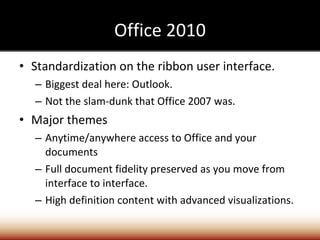
Office 2010 Standardization on the ribbon user interface. Biggest deal here: Outlook. Not the slam-dunk that Office 2007 was. Major themes Anytime/anywhere access to Office and your documents Full document fidelity preserved as you move from interface to interface. High definition content with advanced visualizations.
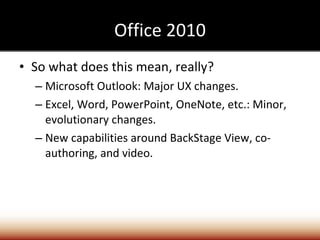
Office 2010 So what does this mean, really? Microsoft Outlook: Major UX changes. Excel, Word, PowerPoint, OneNote, etc.: Minor, evolutionary changes. New capabilities around BackStage View, co-authoring, and video.
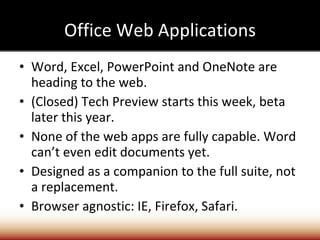
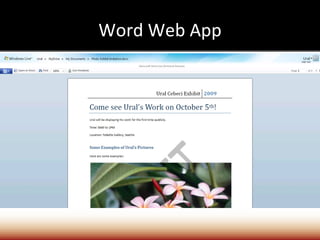
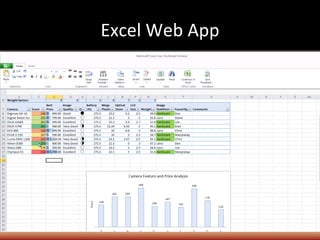
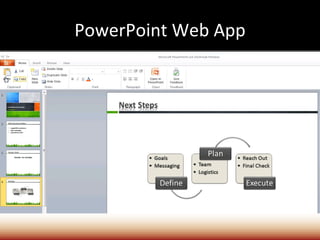
Office Web Applications Word, Excel, PowerPoint and OneNote are heading to the web. (Closed) Tech Preview starts this week, beta later this year. None of the web apps are fully capable. Word can’t even edit documents yet. Designed as a companion to the full suite, not a replacement. Browser agnostic: IE, Firefox, Safari.
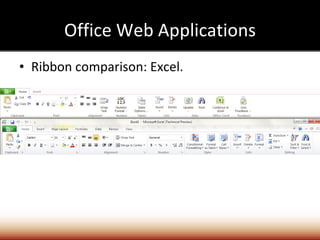
Office Web Applications Ribbon comparison: Excel.
Word Web App
Excel Web App
PowerPoint Web App

PowerPoint Presentation

  • 1.
    Windows 7 SecretsPaul Thurrott Technology Analyst, Penton Media
  • 2.
    Topics Where we’reat from an industry perspective Windows 7 – the impact on end users Windows 7 – the impact on businesses “ Windows 7 Secrets” – About the book, and why I must hate myself
  • 3.
    Optional topics Office2010 and the Office Web Applications Microsoft’s cloud computing strategy
  • 4.
  • 5.
    2006-2009 Windows Vistadidn’t exactly get a positive reception. That said, it delivered on Microsoft’s promise to update the foundation of Windows to something more modern. That foundation is used in Windows 7.
  • 6.
    Windows 7 Windows7 is all about delivering on the failures of Vista, real or imagined. Real: Better performance, simpler and more efficient UI, more cohesiveness, etc. Perception: Microsoft is finally fighting back with “I’m a PC” and other ads.
  • 7.
    Windows 7 forend users (the fun stuff)
  • 8.
    “ Windows Vistadone right” We’ve all heard this. Ironic? People universally embrace Windows 7. Which is really just Windows Vista R2. Low-level improvements: Smaller memory footprint, better performance, 100s of tiny usability tweaks. The whole is greater than the parts.
  • 9.
    Picking the rightversion Virtually any home user: Windows 7 Home Premium. Managed small businesses: Windows 7 Professional. Adds domain support, network-based backup, EFS, Remote Desktop host. Enterprises: Windows 7 Enterprise. The full meal deal: BitLocker, BitLocker-To-Go
  • 10.
    Setup Setup hasbeen simplified. Clean install in 15-20 minutes. Upgrade: Averages a couple of hours. (Or, as IDG News reported, “Microsoft: Windows 7 upgrades to take 20 hours” Sigh.) Windows XP users: No upgrade for you. Don’t forget the Upgrade Advisor.
  • 11.
    User experience Biggestend user changes are in the UI... Personalization with Aero Themes and slideshows. Major changes to the Taskbar – Pinning, Jump Lists, Live Previews, and more. Notification area clean-up. Libraries and Windows Explorer. Windows Aero desktop effects: Aero Peek, Aero Snaps, Aero Shake.
  • 12.
    User experience Bundledapps Calculator Paint WordPad Sticky Notes, etc. Missing apps Windows Live Essentials fills the gaps You can also remove more apps than in Vista.
  • 13.
    User experience WindowsTouch Multi-touch now a full-fledged interface paradigm, alongside mouse, keyboard, stylus/tablet. Really does change the way you interact with the PC. Windows Search 4.0 Near-instantaneous search results. Harder to find thanks to Google.
  • 14.
    Security Vista alreadygot this mostly right. UAC has been overhauled, user gets fine-grained control. Windows 7 still doesn’t ship with an AV solution. The good news: Microsoft’s Security Essentials is free and appears to be decent.
  • 15.
    Networking and sharingAgain, Vista already got this mostly right. Simpler Network and Sharing Center. HomeGroup sharing makes sharing documents and digital media much easier. You can actually access a media library over the Internet. (Watch as I fail to get this to work!) Traditional sharing interfaces are still there.
  • 16.
    Digital media Majorupdates to... Windows Media Player Windows Media Center No meaningful update to Windows DVD Maker. Windows Live Photo Gallery and Windows Live Movie Maker are part of Windows Live Essentials. Library views of digital media are also nice. Zune is the future. (Yes, really.)
  • 17.
    Mobility Lots ofwork under the covers to improve efficiencies and battery life on the go. Power management simplification and improvement. Windows Mobility Center largely unchanged from Vista. Connect to a Projector. Netbooks and Tablet PCs.
  • 18.
    Internet Internet Explorer8 Big usability gains Questions about performance Email, contacts, and calendaring moved out of the base OS: Now supplied by Windows Live Mail in Windows Live Essentials. Windows Live Services complete the picture for consumers.
  • 19.
    Reliability Windows Backupgets evolutionary update. Now offers image-based system backup on all SKUs. Network-based backups only on premium SKUs.
  • 20.
    Compatibility Evolution ofcompatibility mode work from XP, Vista. Works surprisingly well. Windows Virtual PC and XP Mode for small businesses – that last mile solution for compatibility.
  • 21.
    Windows 7 forbusinesses
  • 22.
    Windows 7 atwork It’s all about easing the pain. Simpler, more efficient environment for end users and IT administrators. Some of these features require Windows Server 2008 R2 as well. (“Better together”)
  • 23.
    Remote access/Branch officeVPN Reconnect. DirectAccess – replace VPNs with HTTPS. Branch Cache.
  • 24.
    Security and reliabilityAppLocker. BitLocker. BitLocker To Go. Problem Steps Recorder.
  • 25.
    Taking it tothe next level PowerShell 2 built-into Windows 7/R2. Microsoft Desktop Optimization Pack A benefit of Software Assurance. App-V 4.5 R2 – Windows 7 integration. Several other high-value tools. Microsoft Deployment Toolkit 2010 Get up and running with Windows 7/R2 deployments. Available now.
  • 26.
    Making the casefor Windows 7 Spending money vs. investing. Windows 7 (and R2) come with real-world TCO benefits and savings.* Overall savings of deploying Windows 7 over XP averages about $115 per desktop per year. You can use the same hardware (unlike w/Vista). Additional benefits to going with R2 around virtualization density, power savings, DA, etc. * According to a Microsoft-sponsored Forrester study
  • 27.
  • 28.
    Windows 7 SecretsAn absolute time-suck with no obvious benefit to the author(s). 1081 pages. Several months of work. Based on Windows Vista Secrets SP1 Edition where possible. Most beneficial to consumers coming from XP. Less beneficial for Vista users, businesses, developers.
  • 29.
    Thank you! Youcan reach me most easily online at: [email_address] Web sites and other resources: SuperSite for Windows www.winsupersite.com WinInfo Daily News www.wininformant.com Windows Weekly podcast www.twit.tv/ww
  • 30.
  • 31.
    Office 2010 componentsTraditional Office suite and individual applications as before. Office Servers (i.e. SharePoint.) Office Mobile for Windows Mobile and Nokia Symbian. Office Web Applications.
  • 32.
    Office 2010 Standardizationon the ribbon user interface. Biggest deal here: Outlook. Not the slam-dunk that Office 2007 was. Major themes Anytime/anywhere access to Office and your documents Full document fidelity preserved as you move from interface to interface. High definition content with advanced visualizations.
  • 33.
    Office 2010 Sowhat does this mean, really? Microsoft Outlook: Major UX changes. Excel, Word, PowerPoint, OneNote, etc.: Minor, evolutionary changes. New capabilities around BackStage View, co-authoring, and video.
  • 34.
    Office Web ApplicationsWord, Excel, PowerPoint and OneNote are heading to the web. (Closed) Tech Preview starts this week, beta later this year. None of the web apps are fully capable. Word can’t even edit documents yet. Designed as a companion to the full suite, not a replacement. Browser agnostic: IE, Firefox, Safari.
  • 35.
    Office Web ApplicationsRibbon comparison: Excel.
  • 36.
  • 37.
  • 38.