What is Multimedia?
What is Multimedia?
Multimedia means that computer
information can be represented
through audio, video, and animation
in addition to traditional media (i e
in addition to traditional media (i.e.,
text, graphics/drawings, images).
For more notes visit https://collegenote.pythonanywhere.com
General Definition
A good general working definition for this
module is:
 Multimedia is the field concerned with the
computer controlled integration of text,
graphics, drawings, still and moving images
g p g g g
(Video), animation, audio, and any other
media where every type of information can
b t d t d t itt d d
be represented, stored, transmitted and
processed digitally.
For more notes visit https://collegenote.pythonanywhere.com
M lti di A li ti D fi iti
Multimedia Application Definition
 A Multimedia Application is an
application which uses a collection of
pp
multiple media sources e.g. text, graphics,
images, sound/audio, animation and/or
g , ,
video
For more notes visit https://collegenote.pythonanywhere.com
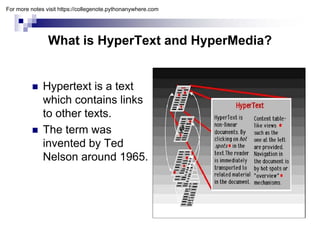
What is HyperText and HyperMedia?
yp yp
 Hypertext is a text
which contains links
to other texts.
 The term was
i t d b T d
invented by Ted
Nelson around 1965.
For more notes visit https://collegenote.pythonanywhere.com
Hypermedia
yp
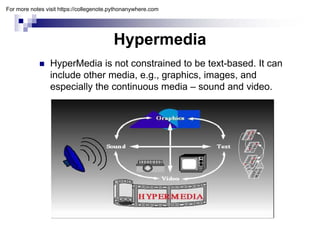
 HyperMedia is not constrained to be text-based. It can
include other media e g graphics images and
include other media, e.g., graphics, images, and
especially the continuous media – sound and video.
For more notes visit https://collegenote.pythonanywhere.com
Example Hypermedia Applications?
 The World Wide Web (WWW) is the best
example of a hypermedia application.
p yp pp
 Powerpoint
 Adobe Acrobat
 Adobe Acrobat
For more notes visit https://collegenote.pythonanywhere.com
M lti di S t
Multimedia Systems
 A Multimedia System is a system
capable of processing multimedia data
p p g
and applications
 A Multimedia System is characterised by
the processing, storage, generation,
manipulation of Multimedia information
manipulation of Multimedia information.
For more notes visit https://collegenote.pythonanywhere.com
Characteristics of a Multimedia System
A Multimedia system has four basic
characteristics:
 Multimedia systems must be computer
controlled.
 Multimedia systems are integrated.
 The information they handle must be
represented digitally.
 The interface to the final presentation of media is
usually interactive.
For more notes visit https://collegenote.pythonanywhere.com
Challenges for Multimedia Systems
 Distributed Networks
 Temporal relationship between data
R d diff t d t t ti
– Render different data at same time -
continuously.
– Sequencing within the media
playing frames in correct order/time
p y g
frame in video
– Synchronisation — inter-media scheduling
Synchronisation inter media scheduling
For more notes visit https://collegenote.pythonanywhere.com
Key Issues for Multimedia Systems
y y
The key issues multimedia systems need to deal
y y
with here are:
 How to represent and store temporal information.
 How to strictly maintain the temporal relationships
on play back/retrieval
Wh t i l d i th b
 What process are involved in the above.
 Data has to represented digitally — Analog–
Digital Conversion Sampling etc
Digital Conversion, Sampling etc.
 Large Data Requirements — bandwidth, storage,
compression
compression
For more notes visit https://collegenote.pythonanywhere.com
Components of a Multimedia System
Now let us consider the Components (Hardware and
S ft ) i d f lti di t
Software) required for a multimedia system:
 Capture devices — Video Camera, Video Recorder,
Audio Microphone, Keyboards, mice, graphics tablets, 3D
i t d i t til VR d i Di iti i
input devices, tactile sensors, VR devices. Digitising
Hardware
 Storage Devices — Hard disks, CD-ROMs, DVD-ROM,
etc
etc
 Communication Networks — Local Networks, Intranets,
Internet, Mulitmedia or other special high speed networks.
C t S t M lti di D kt hi
 Computer Systems — Multimedia Desktop machines,
Workstations, MPEG/VIDEO/DSP Hardware
 Display Devices — CD-quality speakers, HDTV,SVGA,
Hi R l ti it C l i t t
Hi-Resolution monitors, Colour printers etc.
For more notes visit https://collegenote.pythonanywhere.com
Applications
Applications
Examples of Multimedia Applications include:
 World Wide Web
 World Wide Web
 Hypermedia courseware
 Video conferencing
 Video-on-demand
 Interactive TV
 Groupware
 Home shopping
G
 Games
 Virtual reality
 Digital video editing and production systems
For more notes visit https://collegenote.pythonanywhere.com
Practical
Practical
Lab 1 and 2
Adobe Photoshop
 Welcome to Adobe Photoshop, the professional image-editing
standard for photographers, professional designers, and graphics
p g p , p g , g p
producers.
 Photoshop provide a consistent work environment with other Adobe
applications including Adobe Illustrator, Adobe InDesign , Adobe
GoLive Adobe LiveMotion Adobe After Effects and Adobe
GoLive, Adobe LiveMotion, Adobe After Effects, and Adobe
Premiere.
Objectives:
 By doing this Lab student will be able to edit various format of
I d i th i ff t i i
Images and give the various effects in images.
 We can use various exciting tools of Adobe Photoshop to edit
image, which includes
For more notes visit https://collegenote.pythonanywhere.com
Lab 3 and 4
Lab 3 and 4
Macromedia FreeHand
 Macromedia FreeHand is a vector-based drawing application. With
FreeHand, you can create vector graphics that can be scaled and printed at
any resolution, without losing detail or clarity.
y , g y
 We can use FreeHand to create print and web illustrations such as logos
and advertising banners. We can also use FreeHand to turn our artwork into
Macromedia Flash animations.
 The FreeHand user interface contains a workspace and Tools panel that
p p
are consistent with other Macromedia products such as Macromedia
Dreamweaver, Fireworks, and Flash, to give us a true integrated print and
web solution. In addition, now we can view and test our freeHand
documents in a Macromedia Flash Player window without ever leaving the
freeHand environment
freeHand environment.
Objectives:
 By doing this Lab student will able to design a various type of logos using
the different tools of Macromedia freehand.
For more notes visit https://collegenote.pythonanywhere.com
Lab 5 and 6
Macromedia Flash
 Flash is an authoring tool that designers and developers use to create presentations,
applications, and other content that enables user interaction. Flash projects can
include simple animations, video content, complex presentations, applications, and
everything in between In general individual pieces of content made with Flash are
everything in between. In general, individual pieces of content made with Flash are
called applications, even though they might only be a basic animation. You can make
media-rich Flash applications by including pictures, sound, video, and special effects.
 Flash is extremely well suited to creating content for delivery over the Internet
because its files are very small. Flash achieves this through its extensive use of
t hi V t hi i i ifi tl l d t
vector graphics. Vector graphics require significantly less memory and storage space
than bitmap graphics because they are represented by mathematical formulas
instead of large data sets. Bitmap graphics are larger because each individual pixel in
the image requires a separate piece of data to represent it.
Objectives:
j
 By doing this Lab student will able to create different types of animation, use the
action script to control the various objects.
For more notes visit https://collegenote.pythonanywhere.com
Lab 7
Lab 7
Swish Max
 SWiSHmax is a new addition to the SWiSHzone family
of Flash authoring tools If you want to create stunning
of Flash authoring tools. If you want to create stunning
and powerful Flash animations without using Flash, then
SWiSHmax is the tool for you.
Objectives:
 By doing this Lab student will able to create different
t f i ti d i diff t t f ff t t
types of animation and give different type of effect to an
object.
For more notes visit https://collegenote.pythonanywhere.com
Lab 8 and 9
Lab 8 and 9
Adobe Premiere
 Adobe Premiere, a revolutionary nonlinear video-editing
application that delivers a breakthrough render-free
pp g
experience. Its high-performance toolset takes video and
audio production to a new level, giving a professional
edge. Adobe Premiere Pro delivers the power and
i i d t t ll t b tt d f t th
precision you need to tell a story better and faster than
ever before.
Objectives:
B d i thi L b t d t ill bl t dit d bli h th
 By doing this Lab student will able to edit and publish the
movie in various formats.
For more notes visit https://collegenote.pythonanywhere.com
Lab 10 and 11
Lab 10 and 11
Macromedia Director
 Macromedia Director MX is the most popular authoring tool of choice for
legions of web and multimedia developers With Director you can create
legions of web and multimedia developers. With Director, you can create
movies for websites, kiosks, and presentations as well as movies for
education and entertainment. Movies can be as small and simple as an
animated logo or as complex as an online chat room or game. Director
movies can include a variety of media, such as sound, text, graphics,
i ti d di it l id A Di t i li k t t l di
animation, and digital video. A Director movie can link to external media or
be one of a series of movies that refer to one another actions.
Objective:
 This lab should be done after using all the tools of the multimedia. By doing
this lab student will be able to integrate all the multimedia objects like audio,
video , images etc and will able to create different interactive presentations.
For more notes visit https://collegenote.pythonanywhere.com
Project
Project
Multimedia related project
For more notes visit https://collegenote.pythonanywhere.com
References books;
References books;
 Tay Vaughan, Multimedia, Making it work
 Ralf Steinmetz and Klara Nahrstedt , Multimedia:
Computing communication & applications
Computing, communication & applications
 John Villamil-casanova and Louis Molina , Multimedia
production, Planning Delivery
 Lee Allis, Inside Macromedia Director
 John R. Nyquist and Robert Martin, Director 8 and Lingo
Bible
 Gary Rosenzweig and John Thompson, using
Macromedia Director 8
For more notes visit https://collegenote.pythonanywhere.com

1-Introduction-What-is-Multimedia.pdf

  • 1.
    What is Multimedia? Whatis Multimedia? Multimedia means that computer information can be represented information can be represented through audio, video, and animation in addition to traditional media (i e in addition to traditional media (i.e., text, graphics/drawings, images). For more notes visit https://collegenote.pythonanywhere.com
  • 2.
    General Definition A goodgeneral working definition for this A good general working definition for this module is:  Multimedia is the field concerned with the  Multimedia is the field concerned with the computer controlled integration of text, graphics, drawings, still and moving images g p g g g (Video), animation, audio, and any other media where every type of information can b t d t d t itt d d be represented, stored, transmitted and processed digitally. For more notes visit https://collegenote.pythonanywhere.com
  • 3.
    M lti diA li ti D fi iti Multimedia Application Definition  A Multimedia Application is an application which uses a collection of pp multiple media sources e.g. text, graphics, images, sound/audio, animation and/or g , , video For more notes visit https://collegenote.pythonanywhere.com
  • 4.
    What is HyperTextand HyperMedia? yp yp  Hypertext is a text which contains links to other texts.  The term was i t d b T d invented by Ted Nelson around 1965. For more notes visit https://collegenote.pythonanywhere.com
  • 5.
    Hypermedia yp  HyperMedia isnot constrained to be text-based. It can include other media e g graphics images and include other media, e.g., graphics, images, and especially the continuous media – sound and video. For more notes visit https://collegenote.pythonanywhere.com
  • 6.
    Example Hypermedia Applications? The World Wide Web (WWW) is the best example of a hypermedia application. p yp pp  Powerpoint  Adobe Acrobat  Adobe Acrobat For more notes visit https://collegenote.pythonanywhere.com
  • 7.
    M lti diS t Multimedia Systems  A Multimedia System is a system capable of processing multimedia data p p g and applications  A Multimedia System is characterised by  A Multimedia System is characterised by the processing, storage, generation, manipulation of Multimedia information manipulation of Multimedia information. For more notes visit https://collegenote.pythonanywhere.com
  • 8.
    Characteristics of aMultimedia System Characteristics of a Multimedia System A Multimedia system has four basic characteristics:  Multimedia systems must be computer  Multimedia systems must be computer controlled.  Multimedia systems are integrated.  The information they handle must be represented digitally.  The interface to the final presentation of media is  The interface to the final presentation of media is usually interactive. For more notes visit https://collegenote.pythonanywhere.com
  • 9.
    Challenges for MultimediaSystems Challenges for Multimedia Systems  Distributed Networks  Distributed Networks  Temporal relationship between data R d diff t d t t ti – Render different data at same time - continuously. – Sequencing within the media playing frames in correct order/time p y g frame in video – Synchronisation — inter-media scheduling Synchronisation inter media scheduling For more notes visit https://collegenote.pythonanywhere.com
  • 10.
    Key Issues forMultimedia Systems y y The key issues multimedia systems need to deal y y with here are:  How to represent and store temporal information.  How to strictly maintain the temporal relationships on play back/retrieval Wh t i l d i th b  What process are involved in the above.  Data has to represented digitally — Analog– Digital Conversion Sampling etc Digital Conversion, Sampling etc.  Large Data Requirements — bandwidth, storage, compression compression For more notes visit https://collegenote.pythonanywhere.com
  • 11.
    Components of aMultimedia System Components of a Multimedia System Now let us consider the Components (Hardware and S ft ) i d f lti di t Software) required for a multimedia system:  Capture devices — Video Camera, Video Recorder, Audio Microphone, Keyboards, mice, graphics tablets, 3D i t d i t til VR d i Di iti i input devices, tactile sensors, VR devices. Digitising Hardware  Storage Devices — Hard disks, CD-ROMs, DVD-ROM, etc etc  Communication Networks — Local Networks, Intranets, Internet, Mulitmedia or other special high speed networks. C t S t M lti di D kt hi  Computer Systems — Multimedia Desktop machines, Workstations, MPEG/VIDEO/DSP Hardware  Display Devices — CD-quality speakers, HDTV,SVGA, Hi R l ti it C l i t t Hi-Resolution monitors, Colour printers etc. For more notes visit https://collegenote.pythonanywhere.com
  • 12.
    Applications Applications Examples of MultimediaApplications include:  World Wide Web  World Wide Web  Hypermedia courseware  Video conferencing  Video conferencing  Video-on-demand  Interactive TV  Groupware  Home shopping G  Games  Virtual reality  Digital video editing and production systems  Digital video editing and production systems For more notes visit https://collegenote.pythonanywhere.com
  • 13.
    Practical Practical Lab 1 and2 Adobe Photoshop  Welcome to Adobe Photoshop, the professional image-editing standard for photographers, professional designers, and graphics p g p , p g , g p producers.  Photoshop provide a consistent work environment with other Adobe applications including Adobe Illustrator, Adobe InDesign , Adobe GoLive Adobe LiveMotion Adobe After Effects and Adobe GoLive, Adobe LiveMotion, Adobe After Effects, and Adobe Premiere. Objectives:  By doing this Lab student will be able to edit various format of I d i th i ff t i i Images and give the various effects in images.  We can use various exciting tools of Adobe Photoshop to edit image, which includes For more notes visit https://collegenote.pythonanywhere.com
  • 14.
    Lab 3 and4 Lab 3 and 4 Macromedia FreeHand  Macromedia FreeHand is a vector-based drawing application. With FreeHand, you can create vector graphics that can be scaled and printed at any resolution, without losing detail or clarity. y , g y  We can use FreeHand to create print and web illustrations such as logos and advertising banners. We can also use FreeHand to turn our artwork into Macromedia Flash animations.  The FreeHand user interface contains a workspace and Tools panel that p p are consistent with other Macromedia products such as Macromedia Dreamweaver, Fireworks, and Flash, to give us a true integrated print and web solution. In addition, now we can view and test our freeHand documents in a Macromedia Flash Player window without ever leaving the freeHand environment freeHand environment. Objectives:  By doing this Lab student will able to design a various type of logos using the different tools of Macromedia freehand. For more notes visit https://collegenote.pythonanywhere.com
  • 15.
    Lab 5 and6 Macromedia Flash  Flash is an authoring tool that designers and developers use to create presentations, applications, and other content that enables user interaction. Flash projects can include simple animations, video content, complex presentations, applications, and everything in between In general individual pieces of content made with Flash are everything in between. In general, individual pieces of content made with Flash are called applications, even though they might only be a basic animation. You can make media-rich Flash applications by including pictures, sound, video, and special effects.  Flash is extremely well suited to creating content for delivery over the Internet because its files are very small. Flash achieves this through its extensive use of t hi V t hi i i ifi tl l d t vector graphics. Vector graphics require significantly less memory and storage space than bitmap graphics because they are represented by mathematical formulas instead of large data sets. Bitmap graphics are larger because each individual pixel in the image requires a separate piece of data to represent it. Objectives: j  By doing this Lab student will able to create different types of animation, use the action script to control the various objects. For more notes visit https://collegenote.pythonanywhere.com
  • 16.
    Lab 7 Lab 7 SwishMax  SWiSHmax is a new addition to the SWiSHzone family of Flash authoring tools If you want to create stunning of Flash authoring tools. If you want to create stunning and powerful Flash animations without using Flash, then SWiSHmax is the tool for you. Objectives:  By doing this Lab student will able to create different t f i ti d i diff t t f ff t t types of animation and give different type of effect to an object. For more notes visit https://collegenote.pythonanywhere.com
  • 17.
    Lab 8 and9 Lab 8 and 9 Adobe Premiere  Adobe Premiere, a revolutionary nonlinear video-editing application that delivers a breakthrough render-free pp g experience. Its high-performance toolset takes video and audio production to a new level, giving a professional edge. Adobe Premiere Pro delivers the power and i i d t t ll t b tt d f t th precision you need to tell a story better and faster than ever before. Objectives: B d i thi L b t d t ill bl t dit d bli h th  By doing this Lab student will able to edit and publish the movie in various formats. For more notes visit https://collegenote.pythonanywhere.com
  • 18.
    Lab 10 and11 Lab 10 and 11 Macromedia Director  Macromedia Director MX is the most popular authoring tool of choice for legions of web and multimedia developers With Director you can create legions of web and multimedia developers. With Director, you can create movies for websites, kiosks, and presentations as well as movies for education and entertainment. Movies can be as small and simple as an animated logo or as complex as an online chat room or game. Director movies can include a variety of media, such as sound, text, graphics, i ti d di it l id A Di t i li k t t l di animation, and digital video. A Director movie can link to external media or be one of a series of movies that refer to one another actions. Objective:  This lab should be done after using all the tools of the multimedia. By doing this lab student will be able to integrate all the multimedia objects like audio, video , images etc and will able to create different interactive presentations. For more notes visit https://collegenote.pythonanywhere.com
  • 19.
    Project Project Multimedia related project Formore notes visit https://collegenote.pythonanywhere.com
  • 20.
    References books; References books; Tay Vaughan, Multimedia, Making it work  Ralf Steinmetz and Klara Nahrstedt , Multimedia: Computing communication & applications Computing, communication & applications  John Villamil-casanova and Louis Molina , Multimedia production, Planning Delivery  Lee Allis, Inside Macromedia Director  John R. Nyquist and Robert Martin, Director 8 and Lingo Bible  Gary Rosenzweig and John Thompson, using Macromedia Director 8 For more notes visit https://collegenote.pythonanywhere.com