SELinux
1
SELinux
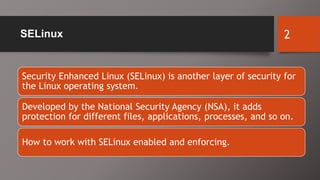
Security Enhanced Linux (SELinux) is another layer of security for
the Linux operating system.
Developed by the National Security Agency (NSA), it adds
protection for different files, applications, processes, and so on.
How to work with SELinux enabled and enforcing.
2
Understanding SELinux Modes 3
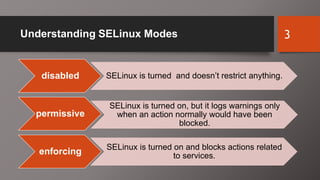
disabled SELinux is turned and doesn’t restrict anything.
permissive
SELinux is turned on, but it logs warnings only
when an action normally would have been
blocked.
enforcing SELinux is turned on and blocks actions related
to services.
Management of SELinux 4
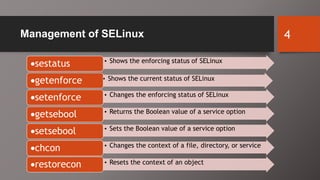
• Shows the current status of SELinux
sestatus • Shows the enforcing status of SELinux
getenforce
• Changes the enforcing status of SELinux
setenforce
• Returns the Boolean value of a service option
getsebool
• Sets the Boolean value of a service option
setsebool
• Changes the context of a file, directory, or service
chcon
• Resets the context of an object
restorecon
sestatus command.
• Syntax: sestatus [options]
• Options:
• -b Displays all Booleans and their statuses
• -v Provides verbose output
5
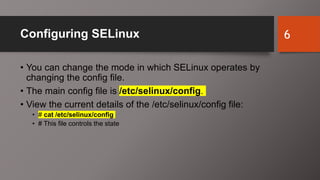
Configuring SELinux
• You can change the mode in which SELinux operates by
changing the config file.
• The main config file is /etc/selinux/config.
• View the current details of the /etc/selinux/config file:
• # cat /etc/selinux/config
• # This file controls the state
6
config file
• Aside from editing the config file, you can also use the setenforce
command to change the status.
• Syntax: setenforce [ Enforcing | Permissive | 1 | 0 ]
• If the current mode is permissive, you can change it to enforcing with
the following:
• # setenforce enforcing
• Regardless of which method you use when changing the mode in
which SELinux runs, you are still required to reboot the system.
7
Service and Boolean Options
• To view the Boolean options, you can use the getsebool command
combined with grep to look for specific options.
• Syntax: getsebool [-a | boolean]
• Although you have not installed a web server yet, let’s look at the
Boolean options from it anyway.
8
Service and Boolean Options
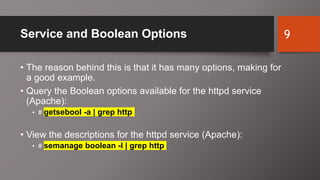
• The reason behind this is that it has many options, making for
a good example.
• Query the Boolean options available for the httpd service
(Apache):
• # getsebool -a | grep http
• View the descriptions for the httpd service (Apache):
• # semanage boolean -l | grep http
9
Service and Boolean Options
• After deciding which Boolean you’d like to change, you need to
enable or disable the value appropriately.
• To enable or disable a Boolean option, you can use the
setsebool command.
• When using the command, you also need to use the -P option
for the change to be persistent.
• Syntax: setsebool [options] [boolean = <on (1) | (0)>]
• options
• -P Makes the changes persistent
10
Service and Boolean Options
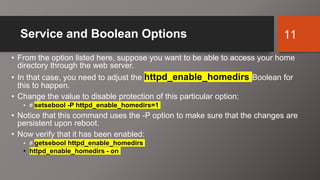
• From the option listed here, suppose you want to be able to access your home
directory through the web server.
• In that case, you need to adjust the httpd_enable_homedirs Boolean for
this to happen.
• Change the value to disable protection of this particular option:
• # setsebool -P httpd_enable_homedirs=1
• Notice that this command uses the -P option to make sure that the changes are
persistent upon reboot.
• Now verify that it has been enabled:
• # getsebool httpd_enable_homedirs
• httpd_enable_homedirs - on
11
SELinux Troubleshooting
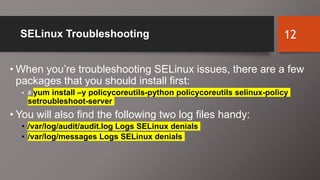
• When you’re troubleshooting SELinux issues, there are a few
packages that you should install first:
• # yum install –y policycoreutils-python policycoreutils selinux-policy
setroubleshoot-server
• You will also find the following two log files handy:
• /var/log/audit/audit.log Logs SELinux denials
• /var/log/messages Logs SELinux denials
12
SELinux Troubleshooting
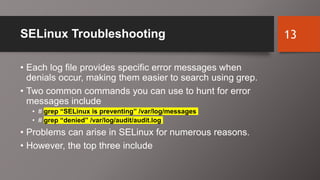
• Each log file provides specific error messages when
denials occur, making them easier to search using grep.
• Two common commands you can use to hunt for error
messages include
• # grep “SELinux is preventing” /var/log/messages
• # grep “denied” /var/log/audit/audit.log
• Problems can arise in SELinux for numerous reasons.
• However, the top three include
13
SELinux Troubleshooting
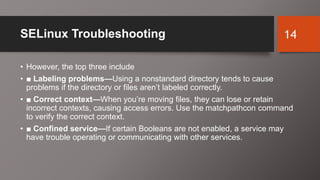
• However, the top three include
• ■ Labeling problems—Using a nonstandard directory tends to cause
problems if the directory or files aren’t labeled correctly.
• ■ Correct context—When you’re moving files, they can lose or retain
incorrect contexts, causing access errors. Use the matchpathcon command
to verify the correct context.
• ■ Confined service—If certain Booleans are not enabled, a service may
have trouble operating or communicating with other services.
14
Policy Violations
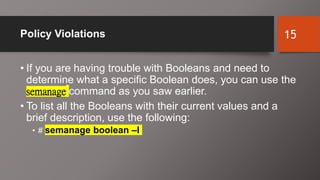
• If you are having trouble with Booleans and need to
determine what a specific Boolean does, you can use the
semanage command as you saw earlier.
• To list all the Booleans with their current values and a
brief description, use the following:
• # semanage boolean –l
15
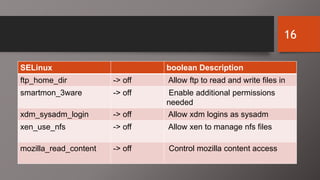
SELinux boolean Description
ftp_home_dir -> off Allow ftp to read and write files in
smartmon_3ware -> off Enable additional permissions
needed
xdm_sysadm_login -> off Allow xdm logins as sysadm
xen_use_nfs -> off Allow xen to manage nfs files
mozilla_read_content -> off Control mozilla content access
16
Policy Violations
• When a denial occurs on the system, you see an ID associated with it in
your log files.
• This ID can be used to determine a more detailed understanding of
what could be causing problems with your files or service.
• Use the sealert command to obtain more information from an ID:
• # sealert –l 0621a8c3-b182-49cf-9116-c78a9dd52199
• You can see that this command should give you enough information to
understand what is going on.
• Aside from Booleans, most of the SELinux issues should be minor.
17

11 - SELinux in Red Hat

  • 1.
  • 2.
    SELinux Security Enhanced Linux(SELinux) is another layer of security for the Linux operating system. Developed by the National Security Agency (NSA), it adds protection for different files, applications, processes, and so on. How to work with SELinux enabled and enforcing. 2
  • 3.
    Understanding SELinux Modes3 disabled SELinux is turned and doesn’t restrict anything. permissive SELinux is turned on, but it logs warnings only when an action normally would have been blocked. enforcing SELinux is turned on and blocks actions related to services.
  • 4.
    Management of SELinux4 • Shows the current status of SELinux sestatus • Shows the enforcing status of SELinux getenforce • Changes the enforcing status of SELinux setenforce • Returns the Boolean value of a service option getsebool • Sets the Boolean value of a service option setsebool • Changes the context of a file, directory, or service chcon • Resets the context of an object restorecon
  • 5.
    sestatus command. • Syntax:sestatus [options] • Options: • -b Displays all Booleans and their statuses • -v Provides verbose output 5
  • 6.
    Configuring SELinux • Youcan change the mode in which SELinux operates by changing the config file. • The main config file is /etc/selinux/config. • View the current details of the /etc/selinux/config file: • # cat /etc/selinux/config • # This file controls the state 6
  • 7.
    config file • Asidefrom editing the config file, you can also use the setenforce command to change the status. • Syntax: setenforce [ Enforcing | Permissive | 1 | 0 ] • If the current mode is permissive, you can change it to enforcing with the following: • # setenforce enforcing • Regardless of which method you use when changing the mode in which SELinux runs, you are still required to reboot the system. 7
  • 8.
    Service and BooleanOptions • To view the Boolean options, you can use the getsebool command combined with grep to look for specific options. • Syntax: getsebool [-a | boolean] • Although you have not installed a web server yet, let’s look at the Boolean options from it anyway. 8
  • 9.
    Service and BooleanOptions • The reason behind this is that it has many options, making for a good example. • Query the Boolean options available for the httpd service (Apache): • # getsebool -a | grep http • View the descriptions for the httpd service (Apache): • # semanage boolean -l | grep http 9
  • 10.
    Service and BooleanOptions • After deciding which Boolean you’d like to change, you need to enable or disable the value appropriately. • To enable or disable a Boolean option, you can use the setsebool command. • When using the command, you also need to use the -P option for the change to be persistent. • Syntax: setsebool [options] [boolean = <on (1) | (0)>] • options • -P Makes the changes persistent 10
  • 11.
    Service and BooleanOptions • From the option listed here, suppose you want to be able to access your home directory through the web server. • In that case, you need to adjust the httpd_enable_homedirs Boolean for this to happen. • Change the value to disable protection of this particular option: • # setsebool -P httpd_enable_homedirs=1 • Notice that this command uses the -P option to make sure that the changes are persistent upon reboot. • Now verify that it has been enabled: • # getsebool httpd_enable_homedirs • httpd_enable_homedirs - on 11
  • 12.
    SELinux Troubleshooting • Whenyou’re troubleshooting SELinux issues, there are a few packages that you should install first: • # yum install –y policycoreutils-python policycoreutils selinux-policy setroubleshoot-server • You will also find the following two log files handy: • /var/log/audit/audit.log Logs SELinux denials • /var/log/messages Logs SELinux denials 12
  • 13.
    SELinux Troubleshooting • Eachlog file provides specific error messages when denials occur, making them easier to search using grep. • Two common commands you can use to hunt for error messages include • # grep “SELinux is preventing” /var/log/messages • # grep “denied” /var/log/audit/audit.log • Problems can arise in SELinux for numerous reasons. • However, the top three include 13
  • 14.
    SELinux Troubleshooting • However,the top three include • ■ Labeling problems—Using a nonstandard directory tends to cause problems if the directory or files aren’t labeled correctly. • ■ Correct context—When you’re moving files, they can lose or retain incorrect contexts, causing access errors. Use the matchpathcon command to verify the correct context. • ■ Confined service—If certain Booleans are not enabled, a service may have trouble operating or communicating with other services. 14
  • 15.
    Policy Violations • Ifyou are having trouble with Booleans and need to determine what a specific Boolean does, you can use the semanage command as you saw earlier. • To list all the Booleans with their current values and a brief description, use the following: • # semanage boolean –l 15
  • 16.
    SELinux boolean Description ftp_home_dir-> off Allow ftp to read and write files in smartmon_3ware -> off Enable additional permissions needed xdm_sysadm_login -> off Allow xdm logins as sysadm xen_use_nfs -> off Allow xen to manage nfs files mozilla_read_content -> off Control mozilla content access 16
  • 17.
    Policy Violations • Whena denial occurs on the system, you see an ID associated with it in your log files. • This ID can be used to determine a more detailed understanding of what could be causing problems with your files or service. • Use the sealert command to obtain more information from an ID: • # sealert –l 0621a8c3-b182-49cf-9116-c78a9dd52199 • You can see that this command should give you enough information to understand what is going on. • Aside from Booleans, most of the SELinux issues should be minor. 17