How to Write a Research PaperSJSJ Middle SchoolMs. Pirtle’s Technology Class
The 11 StepsSelect Topic Narrow the TopicSearch for SourcesRead and take notesCreate an OutlineWrite Rough DraftIn-text CitationsReference PageRevise and Rewrite Write & Proof Final Draft
1. Select a TopicIf your topic has not been assigned, you’ll need to decide on one.Brainstorm!Some questions to ask yourself:What interests me? Where will I find the information?Who else cares about this?
2. Narrow Your TopicDoes your topic address who, what, why, where, when?Example:Cyberbullying is too broadCyberbullyingin schools is still too broadEffects of Cyberbullyngin Middle School
3. Search for SourcesCheck with your teacherGoogle might be too time consuming!Topic-specific search enginesOnline librariesEncyclopediasNEVER cite Wikipedia!ALWAYS cross check your information!
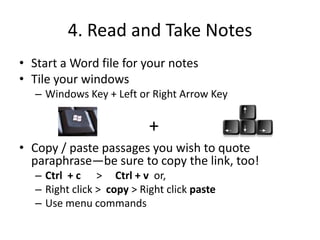
4. Read and Take NotesStart a Word file for your notesTile your windows Windows Key + Left or Right Arrow KeyCopy / paste passages you wish to quote paraphrase—be sure to copy the link, too!Ctrl  + c      >Ctrl + v  or, Right click >  copy > Right click pasteUse menu commands+
5. OutlineAn outline makes your paper much easier to writeAn outline will have:Introduction Tell what paper is aboutPique the reader’s interstBody3 - 5 Main Points with Sub PointsSupport ideas with quotesConclusion Very briefly review your main pointsState your “take away” messageDo NOT include new or detailed information
6. Rough DraftUse your outline to keep organizedBe sure you have downloaded and saved your paper templateTile your windows so you can work between your outline, your sources and your paperIf you have trouble getting started, try free writing.Get as many ideas down as you can Worry about grammar, spelling and punctuation laterUse quotes and paraphrased passages to prove your claimsLearn about paraphrasing here:  http://owl.english.purdue.edu/owl/resource/619/01/
7. In-Text Citations All quotes and paraphrased passages need text citations. Here are some examples of in-line citations:http://owl.english.purdue.edu/owl/resource/560/02/Use a Citation Generator like citationmachine.net/
8. Create Reference PageList all sources you usedExamples here:  http://owl.english.purdue.edu/owl/resource/560/06/Use Citation Generator: citationmachine.net/
9. Write and ReviseProper formatting?Effective introduction?Assertions  are supported with quotes, examples or facts?Citations?For quotes and paraphrased passagesFor images, charts, graphs, etc. Copyright terms?Spelling, grammar and punctuation?Word count requirement?Self check for plagiarism: http://www.plagiarismchecker.com/Effective conclusion?
10 . Write & Proof Final DraftCheck organizationDo a final check of grammar, spelling, punctuation, citations and formattingRead your paper aloudMake sure your title page is complete—including your name!

10 Steps to Writing a Research Paper

  • 1.
    How to Writea Research PaperSJSJ Middle SchoolMs. Pirtle’s Technology Class
  • 2.
    The 11 StepsSelectTopic Narrow the TopicSearch for SourcesRead and take notesCreate an OutlineWrite Rough DraftIn-text CitationsReference PageRevise and Rewrite Write & Proof Final Draft
  • 3.
    1. Select aTopicIf your topic has not been assigned, you’ll need to decide on one.Brainstorm!Some questions to ask yourself:What interests me? Where will I find the information?Who else cares about this?
  • 4.
    2. Narrow YourTopicDoes your topic address who, what, why, where, when?Example:Cyberbullying is too broadCyberbullyingin schools is still too broadEffects of Cyberbullyngin Middle School
  • 5.
    3. Search forSourcesCheck with your teacherGoogle might be too time consuming!Topic-specific search enginesOnline librariesEncyclopediasNEVER cite Wikipedia!ALWAYS cross check your information!
  • 6.
    4. Read andTake NotesStart a Word file for your notesTile your windows Windows Key + Left or Right Arrow KeyCopy / paste passages you wish to quote paraphrase—be sure to copy the link, too!Ctrl + c >Ctrl + v or, Right click > copy > Right click pasteUse menu commands+
  • 7.
    5. OutlineAn outlinemakes your paper much easier to writeAn outline will have:Introduction Tell what paper is aboutPique the reader’s interstBody3 - 5 Main Points with Sub PointsSupport ideas with quotesConclusion Very briefly review your main pointsState your “take away” messageDo NOT include new or detailed information
  • 8.
    6. Rough DraftUseyour outline to keep organizedBe sure you have downloaded and saved your paper templateTile your windows so you can work between your outline, your sources and your paperIf you have trouble getting started, try free writing.Get as many ideas down as you can Worry about grammar, spelling and punctuation laterUse quotes and paraphrased passages to prove your claimsLearn about paraphrasing here: http://owl.english.purdue.edu/owl/resource/619/01/
  • 9.
    7. In-Text CitationsAll quotes and paraphrased passages need text citations. Here are some examples of in-line citations:http://owl.english.purdue.edu/owl/resource/560/02/Use a Citation Generator like citationmachine.net/
  • 10.
    8. Create ReferencePageList all sources you usedExamples here: http://owl.english.purdue.edu/owl/resource/560/06/Use Citation Generator: citationmachine.net/
  • 11.
    9. Write andReviseProper formatting?Effective introduction?Assertions are supported with quotes, examples or facts?Citations?For quotes and paraphrased passagesFor images, charts, graphs, etc. Copyright terms?Spelling, grammar and punctuation?Word count requirement?Self check for plagiarism: http://www.plagiarismchecker.com/Effective conclusion?
  • 12.
    10 . Write& Proof Final DraftCheck organizationDo a final check of grammar, spelling, punctuation, citations and formattingRead your paper aloudMake sure your title page is complete—including your name!