10 Reasons to Use
WordPress
DECEMBER 9, 2011
1. You Need to Get a Site Up Fast

   3 Easy Steps:
   • Install with a click of a button –
     many hosts already have it installed
   • Install theme
   • Add content


   Balance Interactive Inc.   www.BalanceInteractive.com
2. You Have Limited Budget

• WordPress is free
• Hosting is free or low-cost
• Templates free or low-cost – no
  designers needed


Balance Interactive Inc.   www.BalanceInteractive.com
3. You Want to Update Content Yourself

      • If you know Word, you can use
        WordPress to add or update
        content
      • What You See is What You Get
        (WYSIWYG) Editor
      • Other fields for display and SEO


      Balance Interactive Inc.    www.BalanceInteractive.com
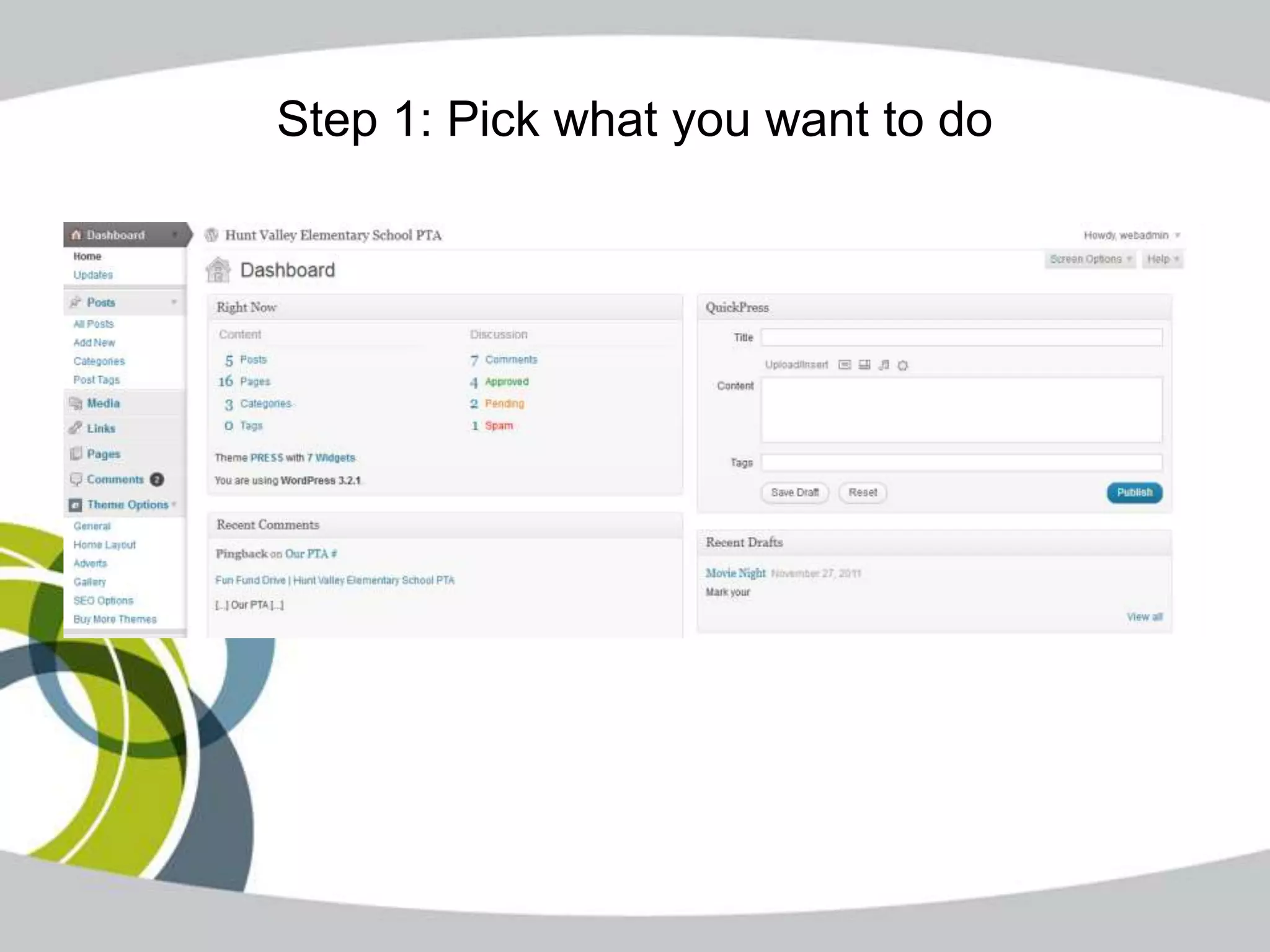
Step 1: Pick what you want to do
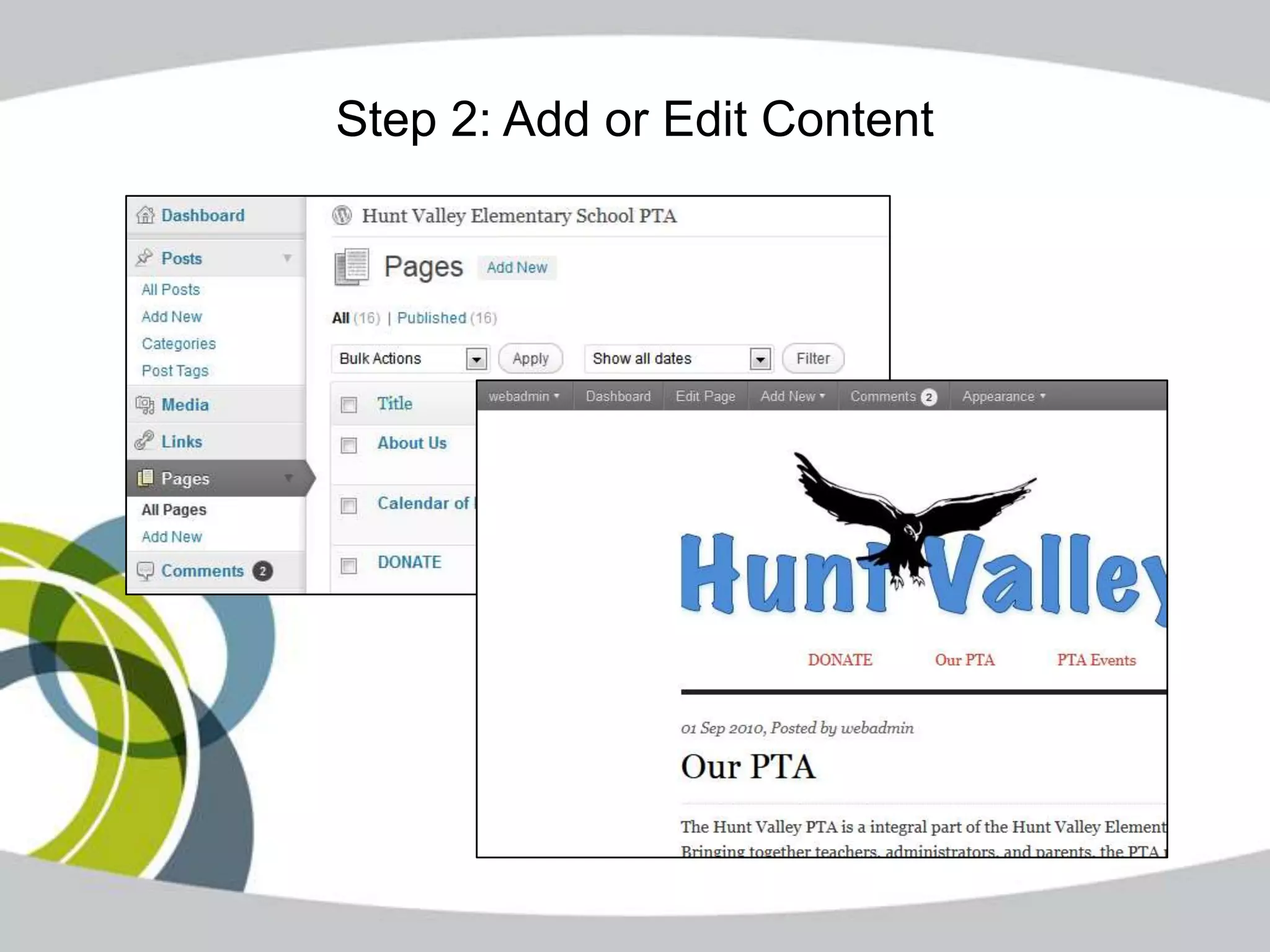
Step 2: Add or Edit Content
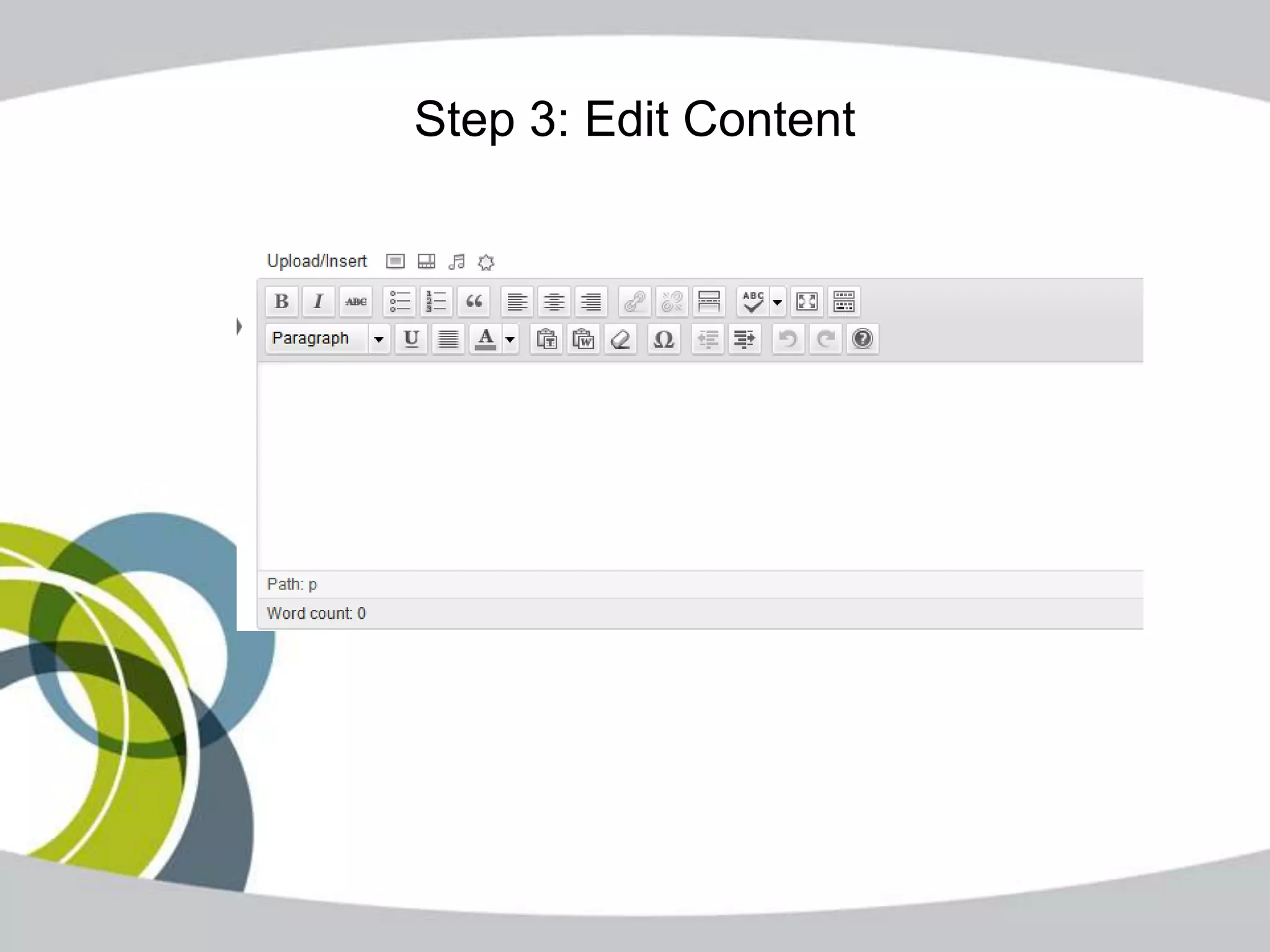
Step 3: Edit Content
4. You Want a Search-Engine Friendly Site

       • Code allows search engines to
         search your content
       • Built-in support of things search
         engines look for – headings,
         page title, page description,
         permalinks, pingbacks
5. You Want to Start a Blog

 • Separate from your main
   website – or part of existing
   WordPress site
 • All the tools you need – see
   reasons #1 (fast), 2 (cheap), & 4
   (SEO)


Balance Interactive Inc.      www.BalanceInteractive.com
6. You Own the Code & Content

   • Open source means no single
     entity owns the code
   • Entire site is portable from one
     host to another


  Balance Interactive Inc.     www.BalanceInteractive.com
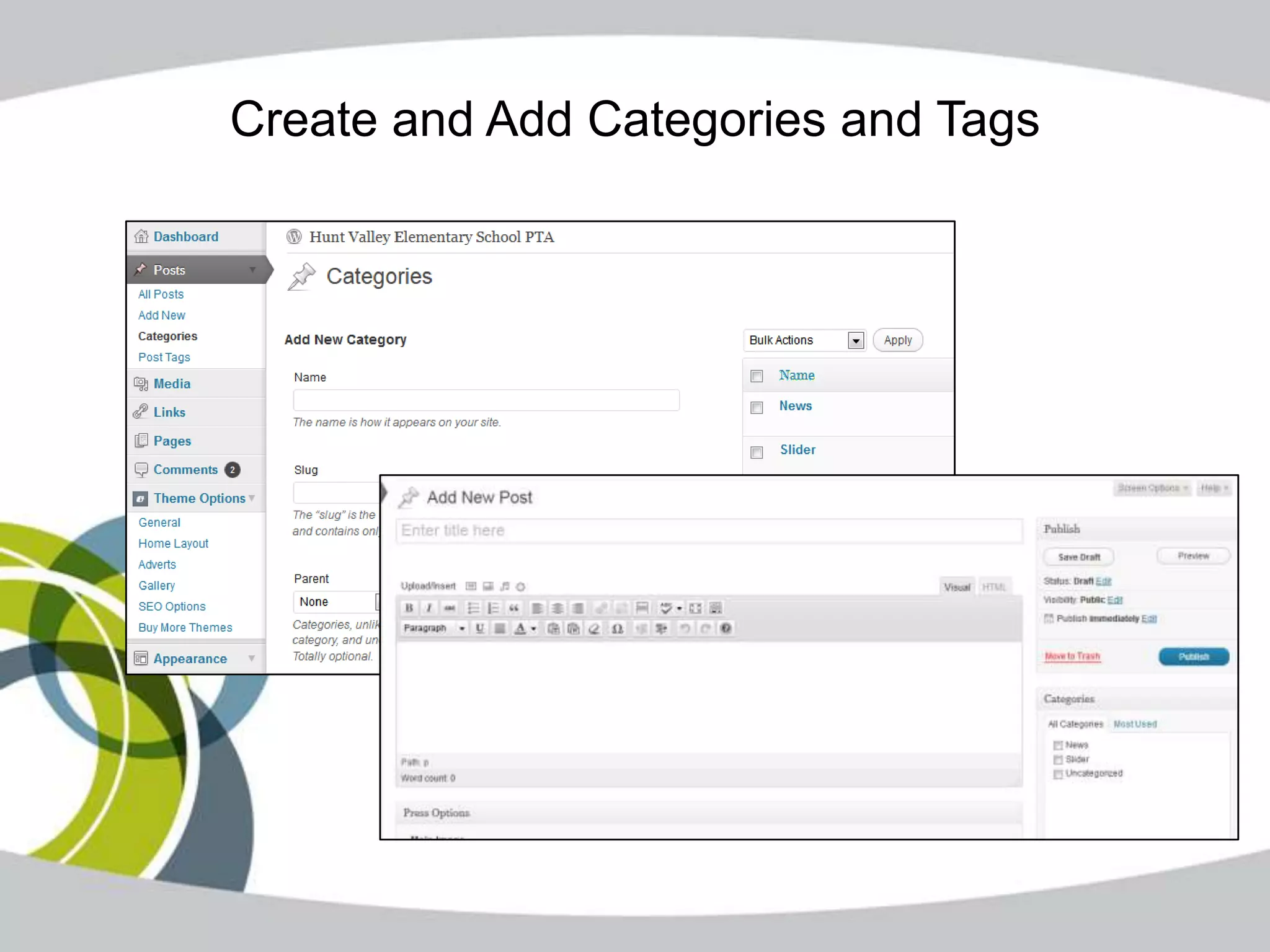
7. You Have Basic Taxonomy

 • Categories and tagging built in –
   like a blog
Create and Add Categories and Tags
8. You Want to Expand Your Site Later

      • More than 17,000 FREE plug-ins
        available – more added all the time
      • http://wordpress.org/extend/plugins/
      • Add functionality or make things easier


     Balance Interactive Inc.       www.BalanceInteractive.com
9. You Have Basic Workflow Requirements

        • Multiple users but limited
          hierarchy
        • Allows authors, editors, publishers,
          administrators


       Balance Interactive Inc.    www.BalanceInteractive.com
10. You Want to Tap Into Larger User
           Community

     • 69 million sites on WordPress
     • Many user groups and forums –
       online and in-person
     • Many vendors to support your
       growth and advanced needs
     • Always being updated
Other Things WordPress Offers

  • W3C standards compliance –
    future-proof your code
  • Constant security updates
  • Frequent upgrades
  • Open source = Always Free
Alternatives to WordPress

• Joomla (free, plug-ins cheap)
• Blogger (free)
• ExpressionEngine (cheap, not free)

10 reasons to choose wordpress

  • 1.
    10 Reasons toUse WordPress DECEMBER 9, 2011
  • 2.
    1. You Needto Get a Site Up Fast 3 Easy Steps: • Install with a click of a button – many hosts already have it installed • Install theme • Add content Balance Interactive Inc. www.BalanceInteractive.com
  • 3.
    2. You HaveLimited Budget • WordPress is free • Hosting is free or low-cost • Templates free or low-cost – no designers needed Balance Interactive Inc. www.BalanceInteractive.com
  • 4.
    3. You Wantto Update Content Yourself • If you know Word, you can use WordPress to add or update content • What You See is What You Get (WYSIWYG) Editor • Other fields for display and SEO Balance Interactive Inc. www.BalanceInteractive.com
  • 5.
    Step 1: Pickwhat you want to do
  • 6.
    Step 2: Addor Edit Content
  • 7.
    Step 3: EditContent
  • 8.
    4. You Wanta Search-Engine Friendly Site • Code allows search engines to search your content • Built-in support of things search engines look for – headings, page title, page description, permalinks, pingbacks
  • 9.
    5. You Wantto Start a Blog • Separate from your main website – or part of existing WordPress site • All the tools you need – see reasons #1 (fast), 2 (cheap), & 4 (SEO) Balance Interactive Inc. www.BalanceInteractive.com
  • 10.
    6. You Ownthe Code & Content • Open source means no single entity owns the code • Entire site is portable from one host to another Balance Interactive Inc. www.BalanceInteractive.com
  • 11.
    7. You HaveBasic Taxonomy • Categories and tagging built in – like a blog
  • 12.
    Create and AddCategories and Tags
  • 13.
    8. You Wantto Expand Your Site Later • More than 17,000 FREE plug-ins available – more added all the time • http://wordpress.org/extend/plugins/ • Add functionality or make things easier Balance Interactive Inc. www.BalanceInteractive.com
  • 14.
    9. You HaveBasic Workflow Requirements • Multiple users but limited hierarchy • Allows authors, editors, publishers, administrators Balance Interactive Inc. www.BalanceInteractive.com
  • 15.
    10. You Wantto Tap Into Larger User Community • 69 million sites on WordPress • Many user groups and forums – online and in-person • Many vendors to support your growth and advanced needs • Always being updated
  • 16.
    Other Things WordPressOffers • W3C standards compliance – future-proof your code • Constant security updates • Frequent upgrades • Open source = Always Free
  • 17.
    Alternatives to WordPress •Joomla (free, plug-ins cheap) • Blogger (free) • ExpressionEngine (cheap, not free)