GUI Applications Development Using .NET Framework
Objectives


                In this session, you will learn to:
                   Identify the functionality of Crystal Reports


     Ver. 1.0                         Session 7                    Slide 1 of 12
GUI Applications Development Using .NET Framework
Introducing Crystal Reports


                Crystal Reports is the standard reporting tool for Visual
                Studio .NET, used to display data in a presentable manner.
                Creating a Crystal Reports requires minimal coding
                because it is created in a designer interface.


     Ver. 1.0                      Session 7                        Slide 2 of 12
GUI Applications Development Using .NET Framework
Data Access Through Crystal Reports


                Crystal Reports requires database drivers to connect to a
                data source for accessing data.
                Crystal Reports in Visual C# support methods to access
                data from a data source. These methods are:
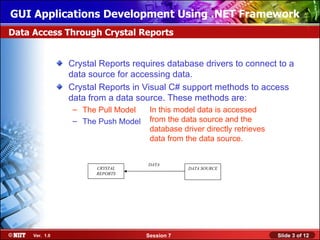
                 – The Pull Model    In this model data is accessed
                 – The Push Model    from the data source and the
                                     database driver directly retrieves
                                     data from the data source.


                                    DATA
                       CRYSTAL                  DATA SOURCE
                       REPORTS


     Ver. 1.0                       Session 7                             Slide 3 of 12
GUI Applications Development Using .NET Framework
Data Access Through Crystal Reports (Contd.)


                Crystal Reports requires database drivers to connect to a
                data source for accessing data.
                Crystal Reports in Visual C# support methods to access
                data from a data source. These methods are:
                 – The Pull Model
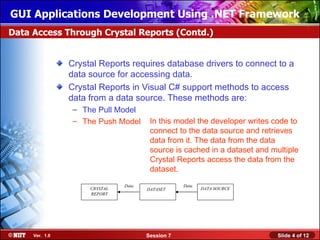
                 – The Push Model      In this model the developer writes code to
                                       connect to the data source and retrieves
                                       data from it. The data from the data
                                       source is cached in a dataset and multiple
                                       Crystal Reports access the data from the
                                       dataset.
                               Data               Data
                     CRYSTAL          DATASET            DATA SOURCE
                     REPORT


     Ver. 1.0                         Session 7                            Slide 4 of 12
GUI Applications Development Using .NET Framework
Just a minute


                Name the reporting model that does not require the
                developer to write code for creating a connection and
                retrieving data from the data source.


                Answer:
                   The Pull Model


     Ver. 1.0                       Session 7                       Slide 5 of 12
GUI Applications Development Using .NET Framework
Creating Crystal Reports


                You can create Crystal Reports by using any one of the
                following methods:
                   Manually
                   Using Standard Report Wizard
                   From an existing report
                Let us see how the reports can be created using these
                methods.


     Ver. 1.0                      Session 7                       Slide 6 of 12
GUI Applications Development Using .NET Framework
Enhance the Crystal Reports


                The presentation quality of a Crystal Reports can be
                enhanced by adding the following components to the
                Crystal Reports:
                   Charts
                   Cross-tab objects


     Ver. 1.0                          Session 7                       Slide 7 of 12
GUI Applications Development Using .NET Framework
Implementing CrystalReportViewer Control in .NET Applications


                The CystalReportViewer is present as a control in the
                Toolbox.
                It can be inserted into a Windows application by dragging
                the CystalReportViewer control from the Toolbox into the
                form.
                Interaction between the CrystalReportViewer control and
                other controls on the Windows Form can be created by
                handling the events of the Windows Form controls and the
                CrystalReportViewer control.


     Ver. 1.0                      Session 7                       Slide 8 of 12
GUI Applications Development Using .NET Framework
Hosting Crystal Report


                After the Crystal Report has been created, it needs to be
                hosted in the Windows application so that the user can view
                the Crystal Reports at run time.
                The two steps for hosting a Crystal Report in a Windows
                application are:
                 1. Adding a Windows Forms Viewer to the Windows Form.
                 2. Binding the CrystalReportViewer control to the created Crystal
                     Reports.
                Let us see how the Crystal Report can be hosted in a
                Windows application.


     Ver. 1.0                        Session 7                            Slide 9 of 12
GUI Applications Development Using .NET Framework
Just a minute


                Name the property which is used to specify the source from
                where the Crystal Reports would be accessed.


                Answer:
                   The ReportSource property


     Ver. 1.0                      Session 7                       Slide 10 of 12
GUI Applications Development Using .NET Framework
Viewing Crystal Report


                To view the Crystal Reports data:
                 1. Select debug from the menu bar.
                 2. Select Start from the Debug menu.
                Let us see how the Crystal Report can be viewed in a
                Windows application.


     Ver. 1.0                       Session 7                      Slide 11 of 12
GUI Applications Development Using .NET Framework
Summary


               In this session, you learned that:
                  Crystal Reports is the standard reporting tool for Visual
                  Studio .NET that is used to display data of presentation quality.
                  Crystal Reports use database drivers to connect with the data
                  source for accessing data.
                  Crystal Reports in VC# .NET supports two methods to access
                  data from a data source:
                    •   The Pull model
                    •   The Push model
                  The presentation quality of a Crystal Reports can be enhanced
                  by adding the following components to the Crystal Reports:
                    •   Chart
                    •   Cross-tab objects
                – Crystal Reports can be hosted in a Windows Form by using the
                  Windows Forms Viewer.

    Ver. 1.0                          Session 7                           Slide 12 of 12

05 gui 07

  • 1.
    GUI Applications DevelopmentUsing .NET Framework Objectives In this session, you will learn to: Identify the functionality of Crystal Reports Ver. 1.0 Session 7 Slide 1 of 12
  • 2.
    GUI Applications DevelopmentUsing .NET Framework Introducing Crystal Reports Crystal Reports is the standard reporting tool for Visual Studio .NET, used to display data in a presentable manner. Creating a Crystal Reports requires minimal coding because it is created in a designer interface. Ver. 1.0 Session 7 Slide 2 of 12
  • 3.
    GUI Applications DevelopmentUsing .NET Framework Data Access Through Crystal Reports Crystal Reports requires database drivers to connect to a data source for accessing data. Crystal Reports in Visual C# support methods to access data from a data source. These methods are: – The Pull Model In this model data is accessed – The Push Model from the data source and the database driver directly retrieves data from the data source. DATA CRYSTAL DATA SOURCE REPORTS Ver. 1.0 Session 7 Slide 3 of 12
  • 4.
    GUI Applications DevelopmentUsing .NET Framework Data Access Through Crystal Reports (Contd.) Crystal Reports requires database drivers to connect to a data source for accessing data. Crystal Reports in Visual C# support methods to access data from a data source. These methods are: – The Pull Model – The Push Model In this model the developer writes code to connect to the data source and retrieves data from it. The data from the data source is cached in a dataset and multiple Crystal Reports access the data from the dataset. Data Data CRYSTAL DATASET DATA SOURCE REPORT Ver. 1.0 Session 7 Slide 4 of 12
  • 5.
    GUI Applications DevelopmentUsing .NET Framework Just a minute Name the reporting model that does not require the developer to write code for creating a connection and retrieving data from the data source. Answer: The Pull Model Ver. 1.0 Session 7 Slide 5 of 12
  • 6.
    GUI Applications DevelopmentUsing .NET Framework Creating Crystal Reports You can create Crystal Reports by using any one of the following methods: Manually Using Standard Report Wizard From an existing report Let us see how the reports can be created using these methods. Ver. 1.0 Session 7 Slide 6 of 12
  • 7.
    GUI Applications DevelopmentUsing .NET Framework Enhance the Crystal Reports The presentation quality of a Crystal Reports can be enhanced by adding the following components to the Crystal Reports: Charts Cross-tab objects Ver. 1.0 Session 7 Slide 7 of 12
  • 8.
    GUI Applications DevelopmentUsing .NET Framework Implementing CrystalReportViewer Control in .NET Applications The CystalReportViewer is present as a control in the Toolbox. It can be inserted into a Windows application by dragging the CystalReportViewer control from the Toolbox into the form. Interaction between the CrystalReportViewer control and other controls on the Windows Form can be created by handling the events of the Windows Form controls and the CrystalReportViewer control. Ver. 1.0 Session 7 Slide 8 of 12
  • 9.
    GUI Applications DevelopmentUsing .NET Framework Hosting Crystal Report After the Crystal Report has been created, it needs to be hosted in the Windows application so that the user can view the Crystal Reports at run time. The two steps for hosting a Crystal Report in a Windows application are: 1. Adding a Windows Forms Viewer to the Windows Form. 2. Binding the CrystalReportViewer control to the created Crystal Reports. Let us see how the Crystal Report can be hosted in a Windows application. Ver. 1.0 Session 7 Slide 9 of 12
  • 10.
    GUI Applications DevelopmentUsing .NET Framework Just a minute Name the property which is used to specify the source from where the Crystal Reports would be accessed. Answer: The ReportSource property Ver. 1.0 Session 7 Slide 10 of 12
  • 11.
    GUI Applications DevelopmentUsing .NET Framework Viewing Crystal Report To view the Crystal Reports data: 1. Select debug from the menu bar. 2. Select Start from the Debug menu. Let us see how the Crystal Report can be viewed in a Windows application. Ver. 1.0 Session 7 Slide 11 of 12
  • 12.
    GUI Applications DevelopmentUsing .NET Framework Summary In this session, you learned that: Crystal Reports is the standard reporting tool for Visual Studio .NET that is used to display data of presentation quality. Crystal Reports use database drivers to connect with the data source for accessing data. Crystal Reports in VC# .NET supports two methods to access data from a data source: • The Pull model • The Push model The presentation quality of a Crystal Reports can be enhanced by adding the following components to the Crystal Reports: • Chart • Cross-tab objects – Crystal Reports can be hosted in a Windows Form by using the Windows Forms Viewer. Ver. 1.0 Session 7 Slide 12 of 12

Editor's Notes

  • #2 Start the session by sharing the session objectives with the students.
  • #3 The faculty can take the same example as given in the SG to discuss the use of crystal report in VC#. In addition, the faculty can take some other example also. Alternatively, the faculty can discuss with the students that they maintain each student’s record and may need to print details for all the students at the end of the month. This detail may include his attendance for the month, the fee detail for the month and any appraisal if it happened. Since all the relevant data is stored in the student’s database, a VC# application is required to extract that data and present that data in a consolidated format. This is done using the Crystal Report tool in Visual Studio .NET. The faculty can discuss the advantages of using this tool. Some of these include: Minimal coding is required. Data can be manipulated as desired, while being presented on the report.
  • #4 Using this and the next slide, discuss with the students that there are 2 different methods for accessing data from the data source – Pull and the Push model. Discuss these models with the students individually with the help of the diagram.
  • #6 Reiterate the concepts taught earlier by asking the given question.
  • #7 The faculty must demonstrate each of these methods for creating crystal reports.
  • #8 The faculty must explain to the students that the presentation quality of crystal reports can be enhanced with the help of Charts and Cross-tab objects.
  • #9 Discuss the steps for inserting and using the CrystalReportViewer control in the Windows application.
  • #10 The faculty must demonstrate the hosting of Crystal Reports in a Windows application. The faculty should also demonstrate the way to view Crystal Report data.
  • #11 Reiterate the concepts taught earlier by asking the given question.
  • #12 The faculty should also demonstrate the way to view Crystal Report data.
  • #13 You can summarize the session by using the summary given in the slides. In addition, you can also ask students summarize what they have learnt in this session.