Lecture 04
Chapter 7: Threads
(35 slides- 2 slots)
Why should you study this chapter?
 This chapter will help you developing a program in
which some tasks executing concurrently.
 Nowadays, in one program, some tasks execute
concurrently. You usually saw them in a web page
including texts, sounds, images, games, …
changing concurrently.
 Nowadays, operating systems (OS) support many
programs running concurrently.
 Open the Task Manager of Windows OS (Ctrl Alt
Delete) to see how many programs are running in
your computer.
2
Review
Previous lecture:
 Introduction to OO Paradigm
 Benefits of OO Implementation
 Hints for class design
 Declaring/ Using classes/ abstract classes/
Interfaces/ Anonymous classes/ Enum types
3
Objectives
 Definitions: Process, thread.
 Multi-Processing System and Multi-Threading
Program.
 What are threads.
 Thread Fundamentals in Java
 Monitors, Waiting and Notifying
Your homework:
Workshop 3 (with report): The producer-consumer
problem and the philosophers problem.
Workshop 4 (with report): Deadlock application. Refer
to the source code in the page 236 of the book
Complete Java 2 Certification. Explain why the
application causes deadlock.
Assessment: the next class.
4
1- Definitions
 Program-chương trình: An executable
file (data + code) stored in secondary
memory(disk).
 Process- tiến trình: A program in
running. It’s data and code are loaded
to RAM in a contiguous memory block.
 Thread- luồng: is a smallest unit code
(function/method) in an application that
performs a special job. An application
can contain some threads. A thread
can be called as lightweight process.
Data
Code
Thread 1
Thread 2
Thread 3
5
7.1- Processes and Multi
Processing System
 A process has a self-contained execution environment. A
process generally has a complete, private set of basic run-
time resources; in particular, each process has its own
memory space.
 Multi Processing/ Multi Tasking System: Almost of operating
systems allows many processes executing concurrently.
 Open the Task Manager of Windows OS ( Ctrl+Alt+Del) to
see current processes in your computer.
 Applications tag contains processes which you start them.
 Processes tag contains processes which automatically run
immediately after the startup of OS.
6
How can OS manage concurrent
processes
Memory
App1
Code
Data
App2
Code
Data
App3
Code
Data
App Code
Addr
Duration
(mili
sec)
CP
U
…
App
1
10320 15 1
App
2
40154 17 2
App
3
80166 22 1
… … … …
… … … …
Process Table maintains information of
processes.
How does OS manage executions of processes?
Time-slicing mechanism. Each process is allocated
resources ( CPU, …) for executing in a time-slot
(such as 30 milliseconds). When the time duration
expires, this process will pause to yield resources to
the next process which will be chosen by the
scheduler of OS.7
7.2- Threads and Multi-Threading
 Threads are sometimes called lightweight processes.
Both processes and threads provide an execution
environment, but creating a new thread requires fewer
resources than creating a new process.
 Threads exist within a process — every process has
at least one thread (main thread). Threads share
the process's resources, including memory and open
files. This makes for efficient, but potentially
problematic, communication.
 Multithreaded execution is an essential feature of the
Java platform. Threads in a program are managed by
the JVM.
8
How can JVM manage threads
Memory of a
multi-thread process
App
Data
Code of thread1
Code of thread2
Code of thread3
 Thread is a smallest unit code
in an application that performs
a special job.
 A program can have several
threads they can be executed
concurrently.
Thread Code
Addr
Duratio
n
(mili
sec)
CPU State
Thread
1
10320 15 1 ready
Thread
2
40154 17 2 ready
Thread
3
80166 22 1 sleep
Thread Table maintains information of
threads
Time-slicing mechanism is used
to schedule thread executions
also.
9
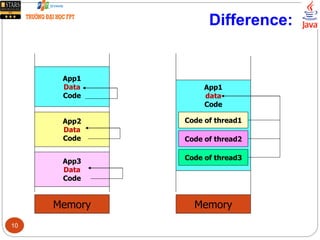
Difference:
Memory
App1
Data
Code
App2
Data
Code
App3
Data
Code
Memory
App1
data
Code
Code of thread1
Code of thread2
Code of thread3
10
Race Conditions
Application
Data 1 (shared
data)
Data 2
Data 3
Thread 1
Thread 2
Thread3
Thread 4 A
race
occur
s
Need
Synchronizatio
n
Suppose that Thread2 and Thread4
concurrently execute.
Time Thread 2 Thread4
1 Data1=10 …
2 …. …
3 …. Data1= 100
4 …. …
5 … …
6 Y= Data1; …
7 …
Y=
?
11
7.3- Thread Fundamentals in Java
 Threading supports in Java:
 The java.lang.Thread class
 The java.lang.Object class
 The Java language and JVM ( Java Virtual Machine)
 How to create a thread in Java?
(1) Create a subclass of the java.lang.Thread class
and override the method run()
(2) Create a class implementing the Runnable
interface and override the run() method.
12
Threa
d
Code
Addr
State …
main 8000 run …
t 10320 run
Create a subclass of the Thread class
Thread table
Every process has
at least one thread
(main thread).
?
The start() method is implemented in the
Thread class. This method calls the
method run().
This process has 2 threads
running concurrently. At a time,
order of their execution is
decided by the scheduler.
13
Class implements the Runnable interface
Threa
d
Code
Addr
State …
main 8000 run …
t 10320 run
14
The java.lang.Thread class
Constructor
Thread()
Thread(Runnable target)
Thread(Runnable target, String name)
Thread(String name)
Thread(ThreadGroup group, Runnable target)
Thread(ThreadGroup group, Runnable target,
String name)
Thread(ThreadGroup group, Runnable target,
String name, long stackSize)
Thread(ThreadGroup group, String name)
Declaration
public class Thread extends Object implements Runnable
Common Methods
start()
join ()
sleep (milisec)
yield()
notify()
notifyAll()
wait()
Properties
id
name
state
threadGroup
daemon
priority
set/get-is
15
Using some methods of the Thread class
16
Thread States
Running
BlockedSleeping
Suspende
d
Ready
Monitor
States
(JVM)
yield()
start()
(Scheduler)
sleep(milisec)
Time expired
or interrupted
Blocking method
(IO)
Blocking condition
changes or
interrupt
wait()
notify()
Ready: As soon as it is created , it can enter the running state when JVM’s
processor is assigned to it.
Running: It get full attention of JVM’s processor which executes the thread’s
run() method
Dead: When the run() method terminates.
Interrupt: A signal is sent to CPU from
IO device just after an IO operation has
terminated.Only ready threads will be
chosen by the JVM scheduler
at a time.
17
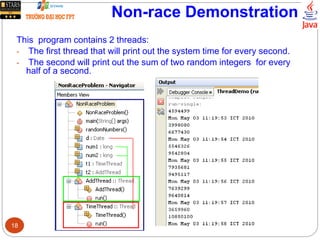
Non-race Demonstration
This program contains 2 threads:
- The first thread that will print out the system time for every second.
- The second will print out the sum of two random integers for every
half of a second.
18
Non-race Demonstration…
19
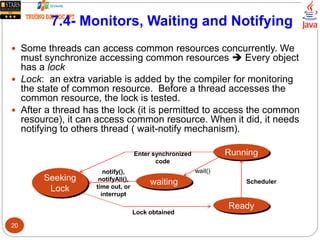
7.4- Monitors, Waiting and Notifying
 Some threads can access common resources concurrently. We
must synchronize accessing common resources  Every object
has a lock
 Lock: an extra variable is added by the compiler for monitoring
the state of common resource. Before a thread accesses the
common resource, the lock is tested.
 After a thread has the lock (it is permitted to access the common
resource), it can access common resource. When it did, it needs
notifying to others thread ( wait-notify mechanism).
Running
Seeking
Lock
waiting
Ready
Scheduler
wait()notify(),
notifyAll(),
time out, or
interrupt
Enter synchronized
code
Lock obtained
20
Monitors, Waiting and Notifying…
 Two ways to mark code as synchronize
 Synchronize an entire method: Let the synchronized
modifier in the method’s declaration.
synchronized Type Method(args){
<code>
}
 Synchronize some method of an object
Type Method ( args){
……
synchronized ( object_var){
object_var.method1(args);
object_var.method2(args);
}
}
A class
contains
synchronized
code is called
monitor.
Monitor: A technique to
encapsulate common
resources to a class.
When a thread wants to
access common
resources, it must call a
public synchronized
method. As a result,
common resources are
accessed in successive
manner.21
Demo:The Producer-Consumer Problem
- Producer makes a product then puts it to a store.
- Consumer buys a product from a store.
- Selling Procedure: First In First Out
Attention!:
Store is common resource of 2 threads: producer and consumer.
 Store is a monitor and it’s activities needs synchronization
Synchronizing:
* After a thread accessed common resource, it should sleep a moment or it
must notify to the next thread ( or all thread) in the thread-pool to awake and
execute.
* Use the synchronized keyword to declare a method that will access
common resource.
Producer
Consume
r
produc
t
produc
t
Put to the tail Get from the
head
Store
22
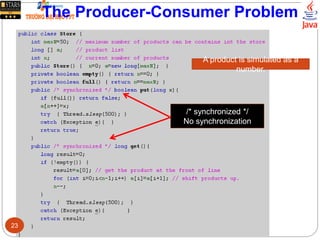
The Producer-Consumer Problem
/* synchronized */
No synchronization
A product is simulated as a
number.
23
The Producer-Consumer Problem
24
The Producer-Consumer Problem
25
The Producer-Consumer Problem
Synchronization is not used Synchronization is used:
26
7.5- Deadlock
What is deadlock?
Deadlock describes a
situation where two or more
threads are blocked forever,
waiting for each other  All
threads in a group halt.
When does deadlock
occur?
There exists a circular wait
the lock that is held by other
thread.
Nothing can ensure that
DEADLOCK do not occur.
27
Deadlock Demo.
28
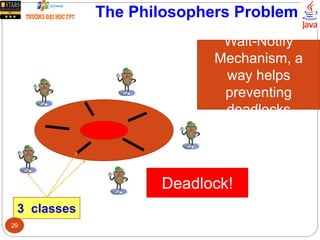
The Philosophers Problem
Wait-Notify
Mechanism, a
way helps
preventing
deadlocks
3 classes
Deadlock!
29
The Philosophers Problem
Threa
d
Code
Addr
Duration
(mili
sec)
CP
U
State
Thread
1
10320 15 1 Suspended
Ready
Thread
2
40154 17 2 Suspended
Thread
3
80166 22 1 Suspended
… … … … ….
Thread pool
30
The Philosophers Problem
31
The Philosophers Problem
32
Summary
Concepts were introduced:
 Definitions: Program, Process, Thread
 Multi-processing system
 Multi-threading programming in Java
 Thread Fundamentals in Java
 Synchronizing access to common resource.
 Monitoring thread states: Wait-notify mechanism.
 If you want some tasks executing concurrently,
multi-threading is a solution.
33
Exercises
Workshop 3 (with report): The
producer-consumer problem and the
philosophers problem.
Workshop 4 (with report): Deadlock
application. Refer to the source code in
the page 236 of the book Complete Java
2 Certification. Explain why the
application causes deadlock.
34
Thank You
35

04 threads-pbl-2-slots

  • 1.
    Lecture 04 Chapter 7:Threads (35 slides- 2 slots)
  • 2.
    Why should youstudy this chapter?  This chapter will help you developing a program in which some tasks executing concurrently.  Nowadays, in one program, some tasks execute concurrently. You usually saw them in a web page including texts, sounds, images, games, … changing concurrently.  Nowadays, operating systems (OS) support many programs running concurrently.  Open the Task Manager of Windows OS (Ctrl Alt Delete) to see how many programs are running in your computer. 2
  • 3.
    Review Previous lecture:  Introductionto OO Paradigm  Benefits of OO Implementation  Hints for class design  Declaring/ Using classes/ abstract classes/ Interfaces/ Anonymous classes/ Enum types 3
  • 4.
    Objectives  Definitions: Process,thread.  Multi-Processing System and Multi-Threading Program.  What are threads.  Thread Fundamentals in Java  Monitors, Waiting and Notifying Your homework: Workshop 3 (with report): The producer-consumer problem and the philosophers problem. Workshop 4 (with report): Deadlock application. Refer to the source code in the page 236 of the book Complete Java 2 Certification. Explain why the application causes deadlock. Assessment: the next class. 4
  • 5.
    1- Definitions  Program-chươngtrình: An executable file (data + code) stored in secondary memory(disk).  Process- tiến trình: A program in running. It’s data and code are loaded to RAM in a contiguous memory block.  Thread- luồng: is a smallest unit code (function/method) in an application that performs a special job. An application can contain some threads. A thread can be called as lightweight process. Data Code Thread 1 Thread 2 Thread 3 5
  • 6.
    7.1- Processes andMulti Processing System  A process has a self-contained execution environment. A process generally has a complete, private set of basic run- time resources; in particular, each process has its own memory space.  Multi Processing/ Multi Tasking System: Almost of operating systems allows many processes executing concurrently.  Open the Task Manager of Windows OS ( Ctrl+Alt+Del) to see current processes in your computer.  Applications tag contains processes which you start them.  Processes tag contains processes which automatically run immediately after the startup of OS. 6
  • 7.
    How can OSmanage concurrent processes Memory App1 Code Data App2 Code Data App3 Code Data App Code Addr Duration (mili sec) CP U … App 1 10320 15 1 App 2 40154 17 2 App 3 80166 22 1 … … … … … … … … Process Table maintains information of processes. How does OS manage executions of processes? Time-slicing mechanism. Each process is allocated resources ( CPU, …) for executing in a time-slot (such as 30 milliseconds). When the time duration expires, this process will pause to yield resources to the next process which will be chosen by the scheduler of OS.7
  • 8.
    7.2- Threads andMulti-Threading  Threads are sometimes called lightweight processes. Both processes and threads provide an execution environment, but creating a new thread requires fewer resources than creating a new process.  Threads exist within a process — every process has at least one thread (main thread). Threads share the process's resources, including memory and open files. This makes for efficient, but potentially problematic, communication.  Multithreaded execution is an essential feature of the Java platform. Threads in a program are managed by the JVM. 8
  • 9.
    How can JVMmanage threads Memory of a multi-thread process App Data Code of thread1 Code of thread2 Code of thread3  Thread is a smallest unit code in an application that performs a special job.  A program can have several threads they can be executed concurrently. Thread Code Addr Duratio n (mili sec) CPU State Thread 1 10320 15 1 ready Thread 2 40154 17 2 ready Thread 3 80166 22 1 sleep Thread Table maintains information of threads Time-slicing mechanism is used to schedule thread executions also. 9
  • 10.
  • 11.
    Race Conditions Application Data 1(shared data) Data 2 Data 3 Thread 1 Thread 2 Thread3 Thread 4 A race occur s Need Synchronizatio n Suppose that Thread2 and Thread4 concurrently execute. Time Thread 2 Thread4 1 Data1=10 … 2 …. … 3 …. Data1= 100 4 …. … 5 … … 6 Y= Data1; … 7 … Y= ? 11
  • 12.
    7.3- Thread Fundamentalsin Java  Threading supports in Java:  The java.lang.Thread class  The java.lang.Object class  The Java language and JVM ( Java Virtual Machine)  How to create a thread in Java? (1) Create a subclass of the java.lang.Thread class and override the method run() (2) Create a class implementing the Runnable interface and override the run() method. 12
  • 13.
    Threa d Code Addr State … main 8000run … t 10320 run Create a subclass of the Thread class Thread table Every process has at least one thread (main thread). ? The start() method is implemented in the Thread class. This method calls the method run(). This process has 2 threads running concurrently. At a time, order of their execution is decided by the scheduler. 13
  • 14.
    Class implements theRunnable interface Threa d Code Addr State … main 8000 run … t 10320 run 14
  • 15.
    The java.lang.Thread class Constructor Thread() Thread(Runnabletarget) Thread(Runnable target, String name) Thread(String name) Thread(ThreadGroup group, Runnable target) Thread(ThreadGroup group, Runnable target, String name) Thread(ThreadGroup group, Runnable target, String name, long stackSize) Thread(ThreadGroup group, String name) Declaration public class Thread extends Object implements Runnable Common Methods start() join () sleep (milisec) yield() notify() notifyAll() wait() Properties id name state threadGroup daemon priority set/get-is 15
  • 16.
    Using some methodsof the Thread class 16
  • 17.
    Thread States Running BlockedSleeping Suspende d Ready Monitor States (JVM) yield() start() (Scheduler) sleep(milisec) Time expired orinterrupted Blocking method (IO) Blocking condition changes or interrupt wait() notify() Ready: As soon as it is created , it can enter the running state when JVM’s processor is assigned to it. Running: It get full attention of JVM’s processor which executes the thread’s run() method Dead: When the run() method terminates. Interrupt: A signal is sent to CPU from IO device just after an IO operation has terminated.Only ready threads will be chosen by the JVM scheduler at a time. 17
  • 18.
    Non-race Demonstration This programcontains 2 threads: - The first thread that will print out the system time for every second. - The second will print out the sum of two random integers for every half of a second. 18
  • 19.
  • 20.
    7.4- Monitors, Waitingand Notifying  Some threads can access common resources concurrently. We must synchronize accessing common resources  Every object has a lock  Lock: an extra variable is added by the compiler for monitoring the state of common resource. Before a thread accesses the common resource, the lock is tested.  After a thread has the lock (it is permitted to access the common resource), it can access common resource. When it did, it needs notifying to others thread ( wait-notify mechanism). Running Seeking Lock waiting Ready Scheduler wait()notify(), notifyAll(), time out, or interrupt Enter synchronized code Lock obtained 20
  • 21.
    Monitors, Waiting andNotifying…  Two ways to mark code as synchronize  Synchronize an entire method: Let the synchronized modifier in the method’s declaration. synchronized Type Method(args){ <code> }  Synchronize some method of an object Type Method ( args){ …… synchronized ( object_var){ object_var.method1(args); object_var.method2(args); } } A class contains synchronized code is called monitor. Monitor: A technique to encapsulate common resources to a class. When a thread wants to access common resources, it must call a public synchronized method. As a result, common resources are accessed in successive manner.21
  • 22.
    Demo:The Producer-Consumer Problem -Producer makes a product then puts it to a store. - Consumer buys a product from a store. - Selling Procedure: First In First Out Attention!: Store is common resource of 2 threads: producer and consumer.  Store is a monitor and it’s activities needs synchronization Synchronizing: * After a thread accessed common resource, it should sleep a moment or it must notify to the next thread ( or all thread) in the thread-pool to awake and execute. * Use the synchronized keyword to declare a method that will access common resource. Producer Consume r produc t produc t Put to the tail Get from the head Store 22
  • 23.
    The Producer-Consumer Problem /*synchronized */ No synchronization A product is simulated as a number. 23
  • 24.
  • 25.
  • 26.
    The Producer-Consumer Problem Synchronizationis not used Synchronization is used: 26
  • 27.
    7.5- Deadlock What isdeadlock? Deadlock describes a situation where two or more threads are blocked forever, waiting for each other  All threads in a group halt. When does deadlock occur? There exists a circular wait the lock that is held by other thread. Nothing can ensure that DEADLOCK do not occur. 27
  • 28.
  • 29.
    The Philosophers Problem Wait-Notify Mechanism,a way helps preventing deadlocks 3 classes Deadlock! 29
  • 30.
    The Philosophers Problem Threa d Code Addr Duration (mili sec) CP U State Thread 1 1032015 1 Suspended Ready Thread 2 40154 17 2 Suspended Thread 3 80166 22 1 Suspended … … … … …. Thread pool 30
  • 31.
  • 32.
  • 33.
    Summary Concepts were introduced: Definitions: Program, Process, Thread  Multi-processing system  Multi-threading programming in Java  Thread Fundamentals in Java  Synchronizing access to common resource.  Monitoring thread states: Wait-notify mechanism.  If you want some tasks executing concurrently, multi-threading is a solution. 33
  • 34.
    Exercises Workshop 3 (withreport): The producer-consumer problem and the philosophers problem. Workshop 4 (with report): Deadlock application. Refer to the source code in the page 236 of the book Complete Java 2 Certification. Explain why the application causes deadlock. 34
  • 35.

Editor's Notes

  • #12 Synchronize –đồng(cùng) bộ(bước chân). Bản chất của sự đồng bộ là chờ nhau. Trong tin học, đồng bộ một nhóm tac vụ là cưỡng bức các tác vụ này phải thực thi tuần tự (không cho phép thực thi đồng thời). Giao tiếp đồng bộ là giao tiếp chỉ có một người nói tại một thời điểm (khi phỏng vấn, giao tiếp hình thức). Giao tiếp không đồng bộ là giao tiếp ở đó mọi người đều có thể nói đồng thời (khi cãi lộn).
  • #16 join(): kết hợp  Luồng hiện hành sẽ chạy cho đến khi luồng kết thúc yield(): nhường  Luồng hiện hành chủ động tạm ngưng, nhường CPU cho luồng khác notify(): Cảnh báo Luồng hiện hành giao tiếp với JVM, yêu cầu JVM cho luồng ở đầu hàng đợi ready để khi lập lịch, luồng này sẽ được thực thi. Hành vi notify() thường được dùng ngay sau hành vi wait()  JVM modifies thread table notifyAll(): cảnh báo tất cả Luồng hiện hành yêu cầu JVM cho tất cả các luồng trong hàng đJVM modifies thread table