Software Visualization
A Task Oriented View
The Papers
 A Task Oriented View of Software Visualization
 Maletic J., Marcus A., Collard M. (2002)
 Strata-Various: Multi-Layer Visualization of
Dynamics in Software System Behavior
 Kimelman D., Rosenburg B., Roth, T. (1994)
 3D Representations for Software Visualization
 Marcus A., Feng L., Maletic J. (2003)
Match the Method to the Task
 The Domain: Understanding and analysis
during development and maintenance of
large-scale software systems.
 The Argument: No single software
visualization tool can address all tasks
simultaneously.
 The Proposal: A framework for identifying the
most appropriate visualization mechanism for
the given task.
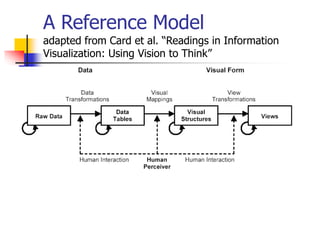
A Reference Model
adapted from Card et al. “Readings in Information
Visualization: Using Vision to Think”
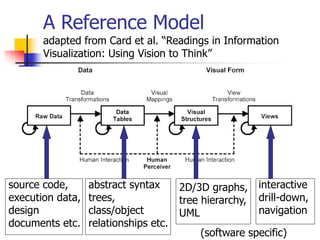
A Reference Model
adapted from Card et al. “Readings in Information
Visualization: Using Vision to Think”
source code,
execution data,
design
documents etc.
abstract syntax
trees,
class/object
relationships etc.
(software specific)
2D/3D graphs,
tree hierarchy,
UML
interactive
drill-down,
navigation
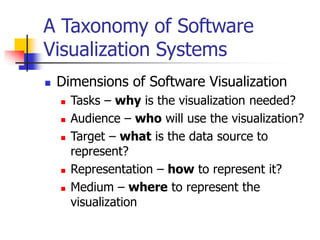
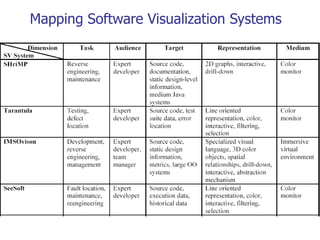
A Taxonomy of Software
Visualization Systems
 Dimensions of Software Visualization
 Tasks – why is the visualization needed?
 Audience – who will use the visualization?
 Target – what is the data source to
represent?
 Representation – how to represent it?
 Medium – where to represent the
visualization
How does this relate to
previous work?
Dimension Roman
[Roman ’93]
Price et all.
[Price ’93,’98]
Task *** Purpose
Audience *** Purpose
Target Scope,
Abstraction
Scope,
Content
Representation Specification
method,
Interface,
Presentation
Form, Method,
Interaction,
Effectiveness
Medium *** Form
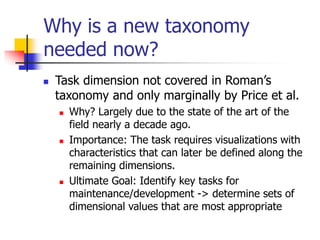
Why is a new taxonomy
needed now?
 Task dimension not covered in Roman’s
taxonomy and only marginally by Price et al.
 Why? Largely due to the state of the art of the
field nearly a decade ago.
 Importance: The task requires visualizations with
characteristics that can later be defined along the
remaining dimensions.
 Ultimate Goal: Identify key tasks for
maintenance/development -> determine sets of
dimensional values that are most appropriate
Mapping Software Visualization Systems
Critique
 What is a Task?
 Granularities of ‘task’ result in overlapping
and imprecision
 Is it what you are using the visualization
for?
 Is it what the designers of the tool had in
mind when they created it?
 Not convinced that we can organize all
software visualization tools by this...
PV: Visualizing Dynamics in
Software System Behavior
 Domain: Visualization tool for debugging or
tuning
 Argument: Current (1994) tools provide only
static structure or dynamics from only a few
of the many layers of a program and its
underlying system.
 Proposal: Multiple views present synchronized
view of behavior from all levels as the
programs behavior unfolds over time.
How does it work?
 Low Level:
 PV is trace driven
 Displays are produced as PV reads through a
trace containing an execution history.
 System is Extensible. Views may be written
as plug-ins.
 The prototype reads trace formats generated
by the AIX system
How does it work?
 High Level:
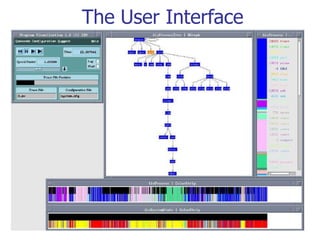
 The user continually replays the execution history
and rearranges the display to discard unnecessary
information or to incorporate more relevant
information.
 During a replay, (although live delivery is possible)
the user watches for trends, anomalies and
interesting correlations.
 If an interesting discovery is made, the user
may zoom in on a view for greater detail. Views
are linked – so context is preserved.
 Behavioral phenomena (perhaps unexpected) may
be revealed.
The User Interface
Mapping PV
Task Audience Target Representation Medium
debugging
tuning
expert
developer
program,
user-level
libraries,
operating-
system,
hardware
multiple 2D
interactive
views – color,
zoom,
animation
color
monitor
Critique
 This tool clearly had great potential – many of
the ideas exist in today’s IDE’s
 something close to case studies were
presented –these acted mainly as a
description of possible features/uses.
 the user interface was barely described – and
appeared to be accessible only to expert
users.
 This was identified as a limitation in the
‘future work’ section – where,
coincidentally, 3D views were discussed...
3D Representations for
Software Visualization
 Domain: Visualizing large scale software
to assist in comprehension and analysis
tasks associated with maintenance and
reengineering.
 Motivation: To explore new mediums
and representations to address
particular software engineering tasks.
 Proposal: A 3D metaphor for software
visualizations.
Mapping Data to a Visual
Metaphor
 A Criteria [MacKinlay 1986]
 Expressiveness
 capability of the metaphor to represent all the
information we desire to visualize
 Effectiveness
 efficiency of the metaphor as a means of
representing the information
Related Works
 SeeSoft [Ball and Eick 1996]
 Expressiveness: 2D pixel bars limits the number
of attributes that can be visualized as well as the
types of relationships.
 Effectiveness: natural and direct mapping from
the visual metaphor to the source code and back.
 Tarantula [Jones et al 2001]
 Expressiveness: built on SeeSoft – uses
brightness to represent an extra attribute.
 Effectiveness: As noted by authors – brightness
is confusing and poorly perceived by users.
Related Works
 Bee/Hive [Reiss 2001]
 Expressiveness
 introduces file maps, which make use of
texture and third dimension.
 supports multiple views of the data and
multiple data sources.
 Effectiveness
 supported user interactions are somewhat
limited for 3D renderings.. thus problems such
as occlusion may occur.
The sv3D Framework
 Builds on the SeeSoft and Bee/Hive metaphors
while making a number of enhancements:
 Expressiveness:
 various artifacts of the software system
and their attributes can be mapped to 3D
metaphors, at different abstraction levels
 currently – container is a file.
 use of height, depth, color, position
 design and implementation are extensible
The sv3D Framework
 Effectiveness:
 displaying data in 3 dimensions instead of 2 can
make it easier for the user to understand
 [Ware, Frank 1994]
 user understanding of 3D structure improves when
they can manipulate structure
 [Hubona et al. 1997]
 3D representations have been shown to better
support spcial memory tasks than 2D
 [Tavanti, Lind 2001]
The User Interface
[Shneiderman ’96]
 Filtering:
 transparency, elevation
 Details on demand:
 interaction: track ball, handle box; information
panel for data values
 Relate:
 height, depth, color, position - arrange in 3D
space
 History:
 snapshots (sequences of snapshots for a path)
 Extract: future (currently focused on visual)
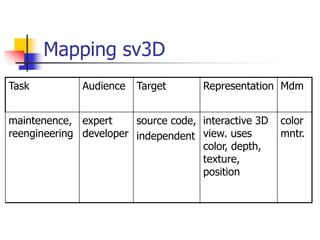
Mapping sv3D
Task Audience Target Representation Mdm
maintenence,
reengineering
expert
developer
source code,
independent
interactive 3D
view. uses
color, depth,
texture,
position
color
mntr.
Critique
 Currently file based, which may not be
that helpful – it’s difficult to relate files
to each other in a meaningful way.
 Examples used height dimension to
indicate nesting level of control
structures.. A better variety of uses
would have been interesting.

0329.emccormi.ppt

  • 1.
  • 2.
    The Papers  ATask Oriented View of Software Visualization  Maletic J., Marcus A., Collard M. (2002)  Strata-Various: Multi-Layer Visualization of Dynamics in Software System Behavior  Kimelman D., Rosenburg B., Roth, T. (1994)  3D Representations for Software Visualization  Marcus A., Feng L., Maletic J. (2003)
  • 3.
    Match the Methodto the Task  The Domain: Understanding and analysis during development and maintenance of large-scale software systems.  The Argument: No single software visualization tool can address all tasks simultaneously.  The Proposal: A framework for identifying the most appropriate visualization mechanism for the given task.
  • 4.
    A Reference Model adaptedfrom Card et al. “Readings in Information Visualization: Using Vision to Think”
  • 5.
    A Reference Model adaptedfrom Card et al. “Readings in Information Visualization: Using Vision to Think” source code, execution data, design documents etc. abstract syntax trees, class/object relationships etc. (software specific) 2D/3D graphs, tree hierarchy, UML interactive drill-down, navigation
  • 6.
    A Taxonomy ofSoftware Visualization Systems  Dimensions of Software Visualization  Tasks – why is the visualization needed?  Audience – who will use the visualization?  Target – what is the data source to represent?  Representation – how to represent it?  Medium – where to represent the visualization
  • 7.
    How does thisrelate to previous work? Dimension Roman [Roman ’93] Price et all. [Price ’93,’98] Task *** Purpose Audience *** Purpose Target Scope, Abstraction Scope, Content Representation Specification method, Interface, Presentation Form, Method, Interaction, Effectiveness Medium *** Form
  • 8.
    Why is anew taxonomy needed now?  Task dimension not covered in Roman’s taxonomy and only marginally by Price et al.  Why? Largely due to the state of the art of the field nearly a decade ago.  Importance: The task requires visualizations with characteristics that can later be defined along the remaining dimensions.  Ultimate Goal: Identify key tasks for maintenance/development -> determine sets of dimensional values that are most appropriate
  • 9.
  • 10.
    Critique  What isa Task?  Granularities of ‘task’ result in overlapping and imprecision  Is it what you are using the visualization for?  Is it what the designers of the tool had in mind when they created it?  Not convinced that we can organize all software visualization tools by this...
  • 11.
    PV: Visualizing Dynamicsin Software System Behavior  Domain: Visualization tool for debugging or tuning  Argument: Current (1994) tools provide only static structure or dynamics from only a few of the many layers of a program and its underlying system.  Proposal: Multiple views present synchronized view of behavior from all levels as the programs behavior unfolds over time.
  • 12.
    How does itwork?  Low Level:  PV is trace driven  Displays are produced as PV reads through a trace containing an execution history.  System is Extensible. Views may be written as plug-ins.  The prototype reads trace formats generated by the AIX system
  • 13.
    How does itwork?  High Level:  The user continually replays the execution history and rearranges the display to discard unnecessary information or to incorporate more relevant information.  During a replay, (although live delivery is possible) the user watches for trends, anomalies and interesting correlations.  If an interesting discovery is made, the user may zoom in on a view for greater detail. Views are linked – so context is preserved.  Behavioral phenomena (perhaps unexpected) may be revealed.
  • 14.
  • 15.
    Mapping PV Task AudienceTarget Representation Medium debugging tuning expert developer program, user-level libraries, operating- system, hardware multiple 2D interactive views – color, zoom, animation color monitor
  • 16.
    Critique  This toolclearly had great potential – many of the ideas exist in today’s IDE’s  something close to case studies were presented –these acted mainly as a description of possible features/uses.  the user interface was barely described – and appeared to be accessible only to expert users.  This was identified as a limitation in the ‘future work’ section – where, coincidentally, 3D views were discussed...
  • 17.
    3D Representations for SoftwareVisualization  Domain: Visualizing large scale software to assist in comprehension and analysis tasks associated with maintenance and reengineering.  Motivation: To explore new mediums and representations to address particular software engineering tasks.  Proposal: A 3D metaphor for software visualizations.
  • 18.
    Mapping Data toa Visual Metaphor  A Criteria [MacKinlay 1986]  Expressiveness  capability of the metaphor to represent all the information we desire to visualize  Effectiveness  efficiency of the metaphor as a means of representing the information
  • 19.
    Related Works  SeeSoft[Ball and Eick 1996]  Expressiveness: 2D pixel bars limits the number of attributes that can be visualized as well as the types of relationships.  Effectiveness: natural and direct mapping from the visual metaphor to the source code and back.  Tarantula [Jones et al 2001]  Expressiveness: built on SeeSoft – uses brightness to represent an extra attribute.  Effectiveness: As noted by authors – brightness is confusing and poorly perceived by users.
  • 20.
    Related Works  Bee/Hive[Reiss 2001]  Expressiveness  introduces file maps, which make use of texture and third dimension.  supports multiple views of the data and multiple data sources.  Effectiveness  supported user interactions are somewhat limited for 3D renderings.. thus problems such as occlusion may occur.
  • 21.
    The sv3D Framework Builds on the SeeSoft and Bee/Hive metaphors while making a number of enhancements:  Expressiveness:  various artifacts of the software system and their attributes can be mapped to 3D metaphors, at different abstraction levels  currently – container is a file.  use of height, depth, color, position  design and implementation are extensible
  • 22.
    The sv3D Framework Effectiveness:  displaying data in 3 dimensions instead of 2 can make it easier for the user to understand  [Ware, Frank 1994]  user understanding of 3D structure improves when they can manipulate structure  [Hubona et al. 1997]  3D representations have been shown to better support spcial memory tasks than 2D  [Tavanti, Lind 2001]
  • 23.
    The User Interface [Shneiderman’96]  Filtering:  transparency, elevation  Details on demand:  interaction: track ball, handle box; information panel for data values  Relate:  height, depth, color, position - arrange in 3D space  History:  snapshots (sequences of snapshots for a path)  Extract: future (currently focused on visual)
  • 24.
    Mapping sv3D Task AudienceTarget Representation Mdm maintenence, reengineering expert developer source code, independent interactive 3D view. uses color, depth, texture, position color mntr.
  • 25.
    Critique  Currently filebased, which may not be that helpful – it’s difficult to relate files to each other in a meaningful way.  Examples used height dimension to indicate nesting level of control structures.. A better variety of uses would have been interesting.