HUAWEI BTS3036  System Structure ISSUE  1.0
Upon completion of this course, you will be able to: Know the functions and features of BTS3036 Master the BTS3036 hardware structure Master the cable connection of BTS3036 Page  Objectives
References BTS3036 Product description BTS3036 Installation Manual BTS3036 Hardware description Page
Page  Chapter 1 Overview Chapter 2 System Components Chapter 3 Typical configuration Contents
Features and Functions 1 It shares the BBU, which is the central processing unit, with the BTS3036 to minimize the number of spare parts and reduce the cost. It can be flexibly installed in a small footprint and can be easily maintained It supports multiple frequency bands, such as PGSM900, EGSM900, and DCS1800 Page
Features and Functions 2 It supports the GPRS It supports multiple network topologies, such as star, tree, chain, ring, and hybrid topologies It supports the cell broadcast SMS and point-to-point SMS. A single cabinet supports up to 12 carriers in the maximum cell configuration of S4/4/4. Page
Page  Chapter 1 Overview Chapter 2 System Components Chapter 3 Signal Processing Chapter 4 Typical configuration Contents
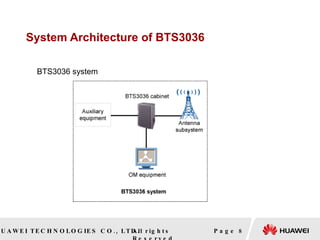
System Architecture of BTS3036 Page    BTS3036 system
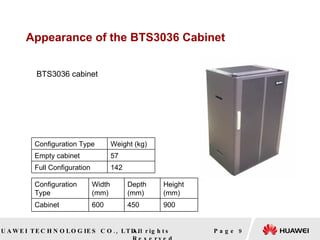
Appearance of the BTS3036 Cabinet   Page    BTS3036 cabinet   Configuration Type Width (mm) Depth (mm) Height (mm) Cabinet 600 450 900 Configuration Type Weight (kg) Empty cabinet 57 Full Configuration 142
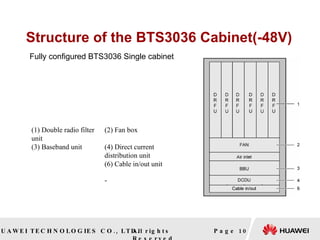
Structure of the BTS3036 Cabinet(-48V) Page  Fully configured BTS3036 Single cabinet  (1) Double radio filter unit (2) Fan box (3) Baseband unit (4) Direct current distribution unit (6) Cable in/out unit -
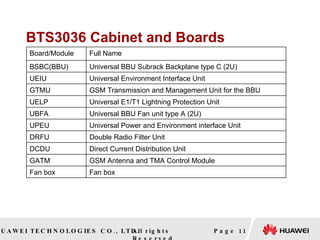
BTS3036 Cabinet and Boards Page  Board/Module Full Name BSBC(BBU) Universal BBU Subrack Backplane type C (2U) UEIU Universal Environment Interface Unit GTMU GSM Transmission and Management Unit for the BBU UELP Universal E1/T1 Lightning Protection Unit UBFA Universal BBU Fan unit type A (2U) UPEU Universal Power and Environment interface Unit DRFU Double Radio Filter Unit DCDU Direct Current Distribution Unit GATM GSM Antenna and TMA Control Module Fan box Fan box
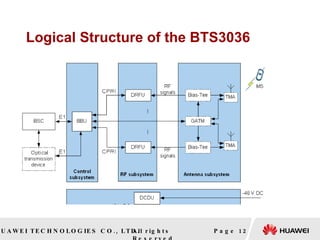
Logical Structure of the BTS3036 Page
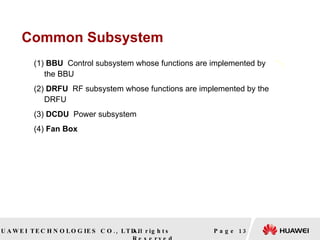
Common Subsystem (1)  BBU   Control subsystem whose functions are implemented by the BBU (2)  DRFU  RF subsystem whose functions are implemented by the DRFU (3)  DCDU  Power subsystem  (4)  Fan Box Page
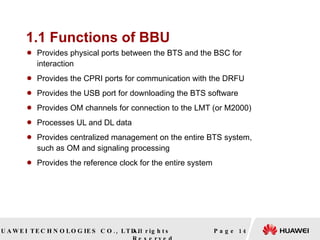
1.1 Functions of BBU Provides physical ports between the BTS and the BSC for interaction  Provides the CPRI ports for communication with the DRFU  Provides the USB port for downloading the BTS software  Provides OM channels for connection to the LMT (or M2000)  Processes UL and DL data  Provides centralized management on the entire BTS system, such as OM and signaling processing  Provides the reference clock for the entire system  Page
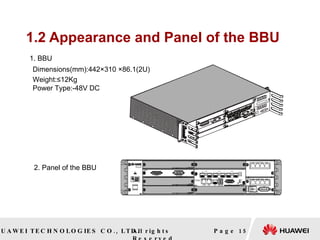
1.2 Appearance and Panel of the BBU Page  1. BBU  2. Panel of the BBU   Dimensions(mm):442×310 ×86.1(2U)   Weight:≤12Kg Power Type:-48V DC
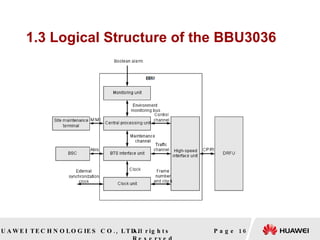
1.3 Logical Structure of the BBU3036 Page
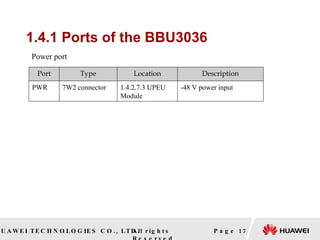
1.4.1 Ports of the BBU3036 Page    Power port Port Type Location Description PWR 7W2 connector 1.4.2.7.3 UPEU Module -48 V power input
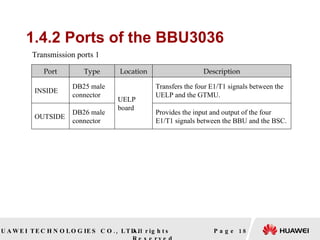
1.4.2 Ports of the BBU3036 Page  Transmission ports 1 Port Type Location Description INSIDE DB25 male connector UELP board Transfers the four E1/T1 signals between the UELP and the GTMU. OUTSIDE DB26 male connector Provides the input and output of the four E1/T1 signals between the BBU and the BSC.
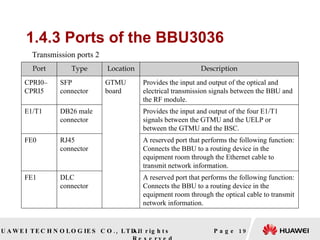
1.4.3 Ports of the BBU3036 Page  Transmission ports 2 Port Type Location Description CPRI0–CPRI5 SFP connector GTMU board Provides the input and output of the optical and electrical transmission signals between the BBU and the RF module. E1/T1 DB26 male connector Provides the input and output of the four E1/T1 signals between the GTMU and the UELP or between the GTMU and the BSC. FE0 RJ45 connector A reserved port that performs the following function: Connects the BBU to a routing device in the equipment room through the Ethernet cable to transmit network information. FE1 DLC connector A reserved port that performs the following function: Connects the BBU to a routing device in the equipment room through the optical cable to transmit network information.
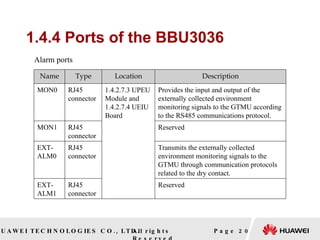
1.4.4 Ports of the BBU3036 Page    Alarm ports Name Type Location Description MON0 RJ45 connector 1.4.2.7.3 UPEU Module and 1.4.2.7.4 UEIU Board Provides the input and output of the externally collected environment monitoring signals to the GTMU according to the RS485 communications protocol. MON1 RJ45 connector Reserved EXT-ALM0 RJ45 connector Transmits the externally collected environment monitoring signals to the GTMU through communication protocols related to the dry contact. EXT-ALM1 RJ45 connector Reserved
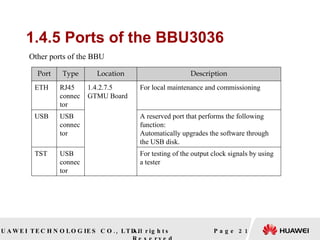
1.4.5 Ports of the BBU3036 Page    Other ports of the BBU Port Type Location Description ETH RJ45 connector 1.4.2.7.5 GTMU Board For local maintenance and commissioning USB USB connector A reserved port that performs the following function: Automatically upgrades the software through the USB disk. TST USB connector For testing of the output clock signals by using a tester
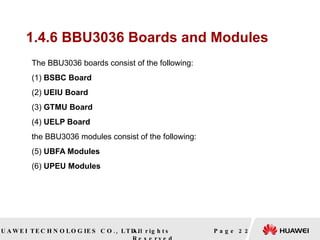
1.4.6 BBU3036 Boards and Modules   The BBU3036 boards consist of the following: (1)  BSBC Board (2)  UEIU Board   (3)  GTMU Board (4)  UELP Board   the BBU3036 modules consist of the following: (5)  UBFA Modules  (6)  UPEU Modules   Page
1.4.6.1 Functions of BSBC Board Clock signal: The BSBC sends the precise clock signals provided by the GTMU to each service processing module as reference clock.  Power input: The BSBC distributes the +12 V DC power input provided by the power module to the boards and modules.  Low-speed signal management: The BSBC provides the interface for the GTMU to monitor and manage the service board, power, backplane, and fan.  High-speed signal management: The BSBC distributes and converges information about data, control, and management of all boards in the baseband unit system  Service signal: The BSBC transfers the UL and DL baseband data of the GTMU.  Page
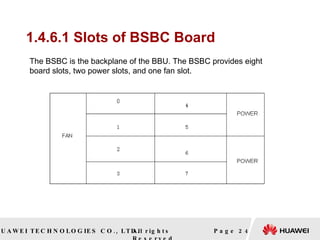
1.4.6.1 Slots of BSBC Board Page  The BSBC is the backplane of the BBU. The BSBC provides eight board slots, two power slots, and one fan slot.
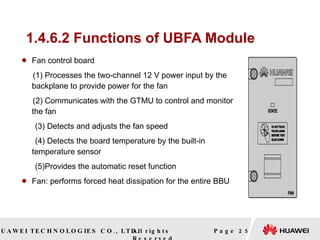
1.4.6.2 Functions of UBFA Module Fan control board  (1) Processes the two-channel 12 V power input by the backplane to provide power for the fan  (2) Communicates with the GTMU to control and monitor the fan  (3) Detects and adjusts the fan speed  (4) Detects the board temperature by the built-in temperature sensor  (5)Provides the automatic reset function  Fan: performs forced heat dissipation for the entire BBU  Page
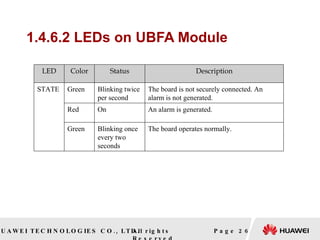
1.4.6.2 LEDs on   UBFA Module Page  LED Color Status Description STATE Green  Blinking twice per second The board is not securely connected. An alarm is not generated. Red  On An alarm is generated. Green Blinking once every two seconds The board operates normally.
1.4.6.3 Functions of UPEU Modul Supplies power to the boards, modules, and fans Introduces environment monitoring signals to the BBU Reports fault signals, in-position signals, and version information associated with the boards and modules Page  Structure and working principles of the UPEU
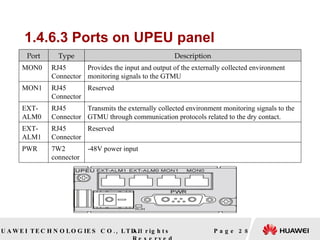
1.4.6.3 Ports on UPEU panel   Page  Port Type Description MON0 RJ45  Connector Provides the input and output of the externally collected environment monitoring signals to the GTMU MON1 RJ45  Connector Reserved EXT- ALM0 RJ45  Connector Transmits the externally collected environment monitoring signals to the GTMU through communication protocols related to the dry contact. EXT- ALM1 RJ45  Connector Reserved PWR 7W2  connector -48V power input
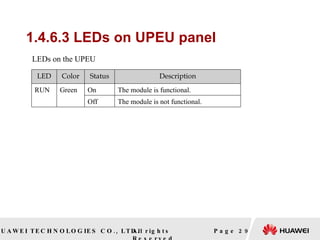
1.4.6.3 LEDs on UPEU panel Page  LEDs on the UPEU LED Color Status Description RUN Green On The module is functional. Off The module is not functional.
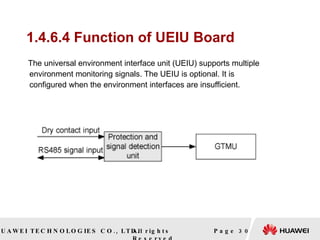
1.4.6.4 Function of UEIU Board The universal environment interface unit (UEIU) supports multiple environment monitoring signals. The UEIU is optional. It is configured when the environment interfaces are insufficient. Page
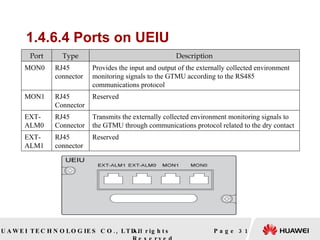
1.4.6.4 Ports on UEIU   Page  Port Type Description MON0 RJ45  connector Provides the input and output of the externally collected environment  monitoring signals to the GTMU according to the RS485 communications protocol MON1 RJ45  Connector Reserved EXT- ALM0 RJ45  Connector Transmits the externally collected environment monitoring signals to  the GTMU through communications protocol related to the dry contact EXT- ALM1 RJ45  connector Reserved
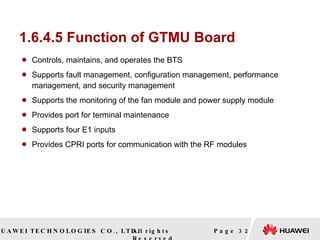
1.6.4.5 Function of GTMU Board Controls, maintains, and operates the BTS Supports fault management, configuration management, performance management, and security management Supports the monitoring of the fan module and power supply module Provides port for terminal maintenance Supports four E1 inputs Provides CPRI ports for communication with the RF modules  Page
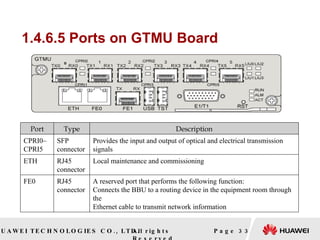
1.4.6.5 Ports on GTMU Board Page  Port Type Description CPRI0– CPRI5 SFP  connector Provides the input and output of optical and electrical transmission signals ETH RJ45  connector Local maintenance and commissioning FE0 RJ45  connector A reserved port that performs the following function:  Connects the BBU to a routing device in the equipment room through the  Ethernet cable to transmit network information
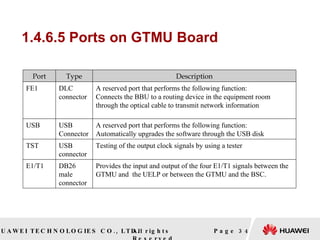
1.4.6.5 Ports on GTMU Board Page  Port Type Description FE1 DLC  connector A reserved port that performs the following function: Connects the BBU to a routing device in the equipment room through the optical cable to transmit network information USB USB  Connector A reserved port that performs the following function: Automatically upgrades the software through the USB disk TST USB  connector Testing of the output clock signals by using a tester E1/T1 DB26 male  connector Provides the input and output of the four E1/T1 signals between the GTMU and  the UELP or between the GTMU and the BSC.
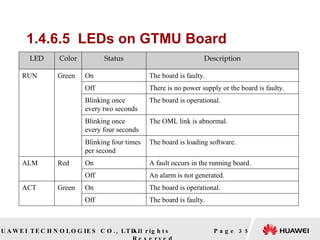
1.4.6.5  LEDs on GTMU Board   Page  LED Color Status Description RUN Green  On The board is faulty. Off There is no power supply or the board is faulty. Blinking once  every two seconds The board is operational. Blinking once  every four seconds The OML link is abnormal. Blinking four times  per second The board is loading software. ALM Red On A fault occurs in the running board. Off An alarm is not generated. ACT Green On The board is operational. Off The board is faulty.
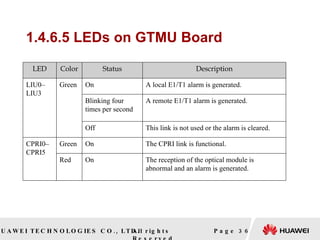
1.4.6.5 LEDs on GTMU Board Page  LED Color Status Description LIU0– LIU3 Green On A local E1/T1 alarm is generated. Blinking four  times per second A remote E1/T1 alarm is generated. Off This link is not used or the alarm is cleared. CPRI0– CPRI5 Green On The CPRI link is functional. Red On The reception of the optical module is  abnormal and an alarm is generated.
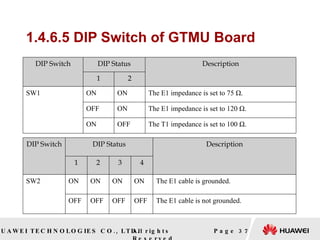
1.4.6.5 DIP Switch of GTMU Board Page  DIP Switch DIP Status Description 1 2 SW1 ON ON The E1 impedance is set to 75 Ω. OFF ON The E1 impedance is set to 120 Ω. ON OFF The T1 impedance is set to 100 Ω. DIP Switch DIP Status Description 1 2 3 4 SW2 ON ON ON ON The E1 cable is grounded. OFF OFF OFF OFF The E1 cable is not grounded.
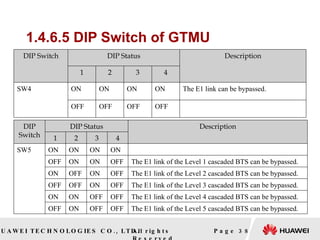
1.4.6.5 DIP Switch of GTMU Page  DIP Switch DIP Status Description 1 2 3 4 SW4 ON ON ON ON The E1 link can be bypassed. OFF OFF OFF OFF DIP Switch DIP Status Description 1 2 3 4 SW5 ON ON ON ON OFF ON ON OFF The E1 link of the Level 1 cascaded BTS can be bypassed. ON OFF ON OFF The E1 link of the Level 2 cascaded BTS can be bypassed. OFF OFF ON OFF The E1 link of the Level 3 cascaded BTS can be bypassed. ON ON OFF OFF The E1 link of the Level 4 cascaded BTS can be bypassed. OFF ON OFF OFF The E1 link of the Level 5 cascaded BTS can be bypassed.
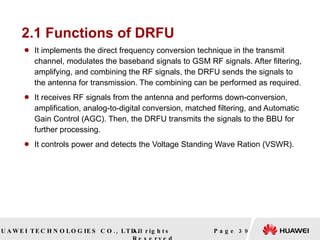
2.1 Functions of DRFU It implements the direct frequency conversion technique in the transmit channel, modulates the baseband signals to GSM RF signals. After filtering, amplifying, and combining the RF signals, the DRFU sends the signals to the antenna for transmission. The combining can be performed as required. It receives RF signals from the antenna and performs down-conversion, amplification, analog-to-digital conversion, matched filtering, and Automatic Gain Control (AGC). Then, the DRFU transmits the signals to the BBU for further processing. It controls power and detects the Voltage Standing Wave Ration (VSWR). Page
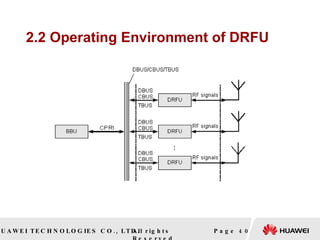
2.2 Operating Environment of DRFU Page
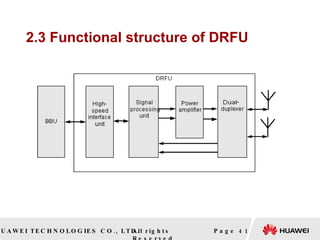
2.3 Functional structure of DRFU   Page
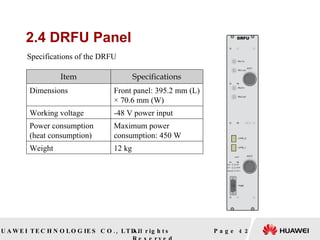
2.4 DRFU Panel Page  Specifications of the DRFU Item Specifications Dimensions Front panel: 395.2 mm (L) × 70.6 mm (W) Working voltage -48 V power input Power consumption (heat consumption) Maximum power consumption: 450 W Weight 12 kg
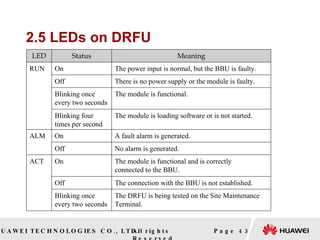
2.5 LEDs on DRFU Page  LED Status Meaning RUN On The power input is normal, but the BBU is faulty. Off There is no power supply or the module is faulty. Blinking once every two seconds The module is functional. Blinking four times per second The module is loading software or is not started. ALM On A fault alarm is generated. Off No alarm is generated. ACT On The module is functional and is correctly  connected to the BBU. Off The connection with the BBU is not established. Blinking once every two seconds The DRFU is being tested on the Site Maintenance  Terminal.
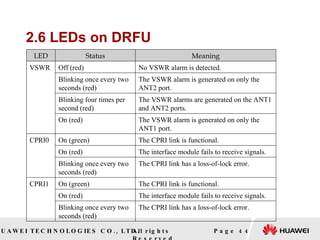
2.6 LEDs on DRFU   Page  LED Status Meaning VSWR Off (red) No VSWR alarm is detected. Blinking once every two  seconds (red) The VSWR alarm is generated on only the ANT2 port. Blinking four times per  second (red) The VSWR alarms are generated on the ANT1 and ANT2 ports. On (red) The VSWR alarm is generated on only the ANT1 port. CPRI0 On (green) The CPRI link is functional. On (red) The interface module fails to receive signals. Blinking once every two  seconds (red) The CPRI link has a loss-of-lock error. CPRI1 On (green) The CPRI link is functional. On (red) The interface module fails to receive signals. Blinking once every two  seconds (red) The CPRI link has a loss-of-lock error.
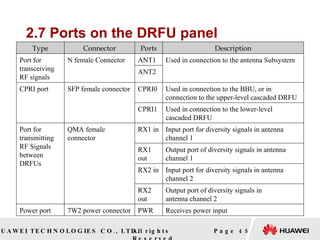
2.7 Ports on the DRFU panel   Page  Type Connector Ports Description Port for transceiving RF signals N female Connector ANT1 Used in connection to the antenna Subsystem ANT2 CPRI port SFP female connector CPRI0 Used in connection to the BBU, or in  connection to the upper-level cascaded DRFU CPRI1 Used in connection to the lower-level  cascaded DRFU Port for transmitting RF Signals between DRFUs QMA female connector RX1 in Input port for diversity signals in antenna channel 1 RX1 out Output port of diversity signals in antenna channel 1 RX2 in Input port for diversity signals in antenna channel 2 RX2 out Output port of diversity signals in  antenna channel 2 Power port 7W2 power connector PWR Receives power input
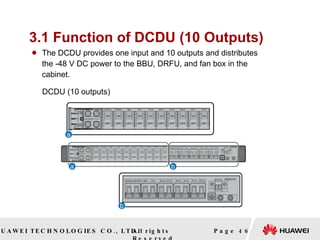
3.1 Function of DCDU (10 Outputs) The DCDU provides one input and 10 outputs and distributes the -48 V DC power to the BBU, DRFU, and fan box in the cabinet.  Page  DCDU (10 outputs)
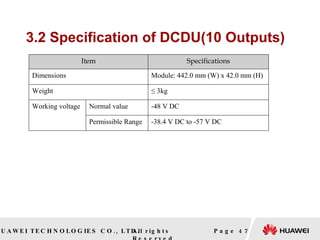
3.2 Specification of DCDU(10 Outputs) Page  Item Specifications Dimensions Module: 442.0 mm (W) x 42.0 mm (H) Weight ≤  3kg Working voltage Normal value -48 V DC Permissible Range -38.4 V DC to -57 V DC
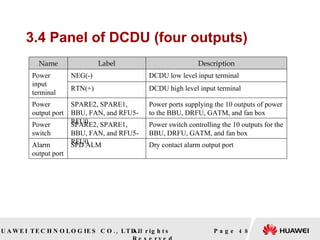
3.4 Panel of DCDU (four outputs)   Page  Name Label Description Power input terminal NEG(-) DCDU low level input terminal RTN(+) DCDU high level input terminal Power output port SPARE2, SPARE1, BBU, FAN, and RFU5-RFU0 Power ports supplying the 10 outputs of power to the BBU, DRFU, GATM, and fan box Power switch SPARE2, SPARE1, BBU, FAN, and RFU5-RFU0 Power switch controlling the 10 outputs for the BBU, DRFU, GATM, and fan box Alarm output port SPD ALM Dry contact alarm output port
 

01 Bts3900 System Structure

  • 1.
    HUAWEI BTS3036 System Structure ISSUE 1.0
  • 2.
    Upon completion ofthis course, you will be able to: Know the functions and features of BTS3036 Master the BTS3036 hardware structure Master the cable connection of BTS3036 Page Objectives
  • 3.
    References BTS3036 Productdescription BTS3036 Installation Manual BTS3036 Hardware description Page
  • 4.
    Page Chapter1 Overview Chapter 2 System Components Chapter 3 Typical configuration Contents
  • 5.
    Features and Functions1 It shares the BBU, which is the central processing unit, with the BTS3036 to minimize the number of spare parts and reduce the cost. It can be flexibly installed in a small footprint and can be easily maintained It supports multiple frequency bands, such as PGSM900, EGSM900, and DCS1800 Page
  • 6.
    Features and Functions2 It supports the GPRS It supports multiple network topologies, such as star, tree, chain, ring, and hybrid topologies It supports the cell broadcast SMS and point-to-point SMS. A single cabinet supports up to 12 carriers in the maximum cell configuration of S4/4/4. Page
  • 7.
    Page Chapter1 Overview Chapter 2 System Components Chapter 3 Signal Processing Chapter 4 Typical configuration Contents
  • 8.
    System Architecture ofBTS3036 Page   BTS3036 system
  • 9.
    Appearance of theBTS3036 Cabinet Page   BTS3036 cabinet Configuration Type Width (mm) Depth (mm) Height (mm) Cabinet 600 450 900 Configuration Type Weight (kg) Empty cabinet 57 Full Configuration 142
  • 10.
    Structure of theBTS3036 Cabinet(-48V) Page Fully configured BTS3036 Single cabinet (1) Double radio filter unit (2) Fan box (3) Baseband unit (4) Direct current distribution unit (6) Cable in/out unit -
  • 11.
    BTS3036 Cabinet andBoards Page Board/Module Full Name BSBC(BBU) Universal BBU Subrack Backplane type C (2U) UEIU Universal Environment Interface Unit GTMU GSM Transmission and Management Unit for the BBU UELP Universal E1/T1 Lightning Protection Unit UBFA Universal BBU Fan unit type A (2U) UPEU Universal Power and Environment interface Unit DRFU Double Radio Filter Unit DCDU Direct Current Distribution Unit GATM GSM Antenna and TMA Control Module Fan box Fan box
  • 12.
    Logical Structure ofthe BTS3036 Page
  • 13.
    Common Subsystem (1) BBU Control subsystem whose functions are implemented by the BBU (2) DRFU RF subsystem whose functions are implemented by the DRFU (3) DCDU Power subsystem (4) Fan Box Page
  • 14.
    1.1 Functions ofBBU Provides physical ports between the BTS and the BSC for interaction Provides the CPRI ports for communication with the DRFU Provides the USB port for downloading the BTS software Provides OM channels for connection to the LMT (or M2000) Processes UL and DL data Provides centralized management on the entire BTS system, such as OM and signaling processing Provides the reference clock for the entire system Page
  • 15.
    1.2 Appearance andPanel of the BBU Page 1. BBU 2. Panel of the BBU Dimensions(mm):442×310 ×86.1(2U) Weight:≤12Kg Power Type:-48V DC
  • 16.
    1.3 Logical Structureof the BBU3036 Page
  • 17.
    1.4.1 Ports ofthe BBU3036 Page   Power port Port Type Location Description PWR 7W2 connector 1.4.2.7.3 UPEU Module -48 V power input
  • 18.
    1.4.2 Ports ofthe BBU3036 Page Transmission ports 1 Port Type Location Description INSIDE DB25 male connector UELP board Transfers the four E1/T1 signals between the UELP and the GTMU. OUTSIDE DB26 male connector Provides the input and output of the four E1/T1 signals between the BBU and the BSC.
  • 19.
    1.4.3 Ports ofthe BBU3036 Page Transmission ports 2 Port Type Location Description CPRI0–CPRI5 SFP connector GTMU board Provides the input and output of the optical and electrical transmission signals between the BBU and the RF module. E1/T1 DB26 male connector Provides the input and output of the four E1/T1 signals between the GTMU and the UELP or between the GTMU and the BSC. FE0 RJ45 connector A reserved port that performs the following function: Connects the BBU to a routing device in the equipment room through the Ethernet cable to transmit network information. FE1 DLC connector A reserved port that performs the following function: Connects the BBU to a routing device in the equipment room through the optical cable to transmit network information.
  • 20.
    1.4.4 Ports ofthe BBU3036 Page   Alarm ports Name Type Location Description MON0 RJ45 connector 1.4.2.7.3 UPEU Module and 1.4.2.7.4 UEIU Board Provides the input and output of the externally collected environment monitoring signals to the GTMU according to the RS485 communications protocol. MON1 RJ45 connector Reserved EXT-ALM0 RJ45 connector Transmits the externally collected environment monitoring signals to the GTMU through communication protocols related to the dry contact. EXT-ALM1 RJ45 connector Reserved
  • 21.
    1.4.5 Ports ofthe BBU3036 Page   Other ports of the BBU Port Type Location Description ETH RJ45 connector 1.4.2.7.5 GTMU Board For local maintenance and commissioning USB USB connector A reserved port that performs the following function: Automatically upgrades the software through the USB disk. TST USB connector For testing of the output clock signals by using a tester
  • 22.
    1.4.6 BBU3036 Boardsand Modules The BBU3036 boards consist of the following: (1) BSBC Board (2) UEIU Board (3) GTMU Board (4) UELP Board the BBU3036 modules consist of the following: (5) UBFA Modules (6) UPEU Modules Page
  • 23.
    1.4.6.1 Functions ofBSBC Board Clock signal: The BSBC sends the precise clock signals provided by the GTMU to each service processing module as reference clock. Power input: The BSBC distributes the +12 V DC power input provided by the power module to the boards and modules. Low-speed signal management: The BSBC provides the interface for the GTMU to monitor and manage the service board, power, backplane, and fan. High-speed signal management: The BSBC distributes and converges information about data, control, and management of all boards in the baseband unit system Service signal: The BSBC transfers the UL and DL baseband data of the GTMU. Page
  • 24.
    1.4.6.1 Slots ofBSBC Board Page The BSBC is the backplane of the BBU. The BSBC provides eight board slots, two power slots, and one fan slot.
  • 25.
    1.4.6.2 Functions ofUBFA Module Fan control board (1) Processes the two-channel 12 V power input by the backplane to provide power for the fan (2) Communicates with the GTMU to control and monitor the fan (3) Detects and adjusts the fan speed (4) Detects the board temperature by the built-in temperature sensor (5)Provides the automatic reset function Fan: performs forced heat dissipation for the entire BBU Page
  • 26.
    1.4.6.2 LEDs on UBFA Module Page LED Color Status Description STATE Green Blinking twice per second The board is not securely connected. An alarm is not generated. Red On An alarm is generated. Green Blinking once every two seconds The board operates normally.
  • 27.
    1.4.6.3 Functions ofUPEU Modul Supplies power to the boards, modules, and fans Introduces environment monitoring signals to the BBU Reports fault signals, in-position signals, and version information associated with the boards and modules Page Structure and working principles of the UPEU
  • 28.
    1.4.6.3 Ports on UPEUpanel Page Port Type Description MON0 RJ45 Connector Provides the input and output of the externally collected environment monitoring signals to the GTMU MON1 RJ45 Connector Reserved EXT- ALM0 RJ45 Connector Transmits the externally collected environment monitoring signals to the GTMU through communication protocols related to the dry contact. EXT- ALM1 RJ45 Connector Reserved PWR 7W2 connector -48V power input
  • 29.
    1.4.6.3 LEDs on UPEUpanel Page LEDs on the UPEU LED Color Status Description RUN Green On The module is functional. Off The module is not functional.
  • 30.
    1.4.6.4 Function ofUEIU Board The universal environment interface unit (UEIU) supports multiple environment monitoring signals. The UEIU is optional. It is configured when the environment interfaces are insufficient. Page
  • 31.
    1.4.6.4 Ports onUEIU Page Port Type Description MON0 RJ45 connector Provides the input and output of the externally collected environment monitoring signals to the GTMU according to the RS485 communications protocol MON1 RJ45 Connector Reserved EXT- ALM0 RJ45 Connector Transmits the externally collected environment monitoring signals to the GTMU through communications protocol related to the dry contact EXT- ALM1 RJ45 connector Reserved
  • 32.
    1.6.4.5 Function ofGTMU Board Controls, maintains, and operates the BTS Supports fault management, configuration management, performance management, and security management Supports the monitoring of the fan module and power supply module Provides port for terminal maintenance Supports four E1 inputs Provides CPRI ports for communication with the RF modules Page
  • 33.
    1.4.6.5 Ports onGTMU Board Page Port Type Description CPRI0– CPRI5 SFP connector Provides the input and output of optical and electrical transmission signals ETH RJ45 connector Local maintenance and commissioning FE0 RJ45 connector A reserved port that performs the following function: Connects the BBU to a routing device in the equipment room through the Ethernet cable to transmit network information
  • 34.
    1.4.6.5 Ports onGTMU Board Page Port Type Description FE1 DLC connector A reserved port that performs the following function: Connects the BBU to a routing device in the equipment room through the optical cable to transmit network information USB USB Connector A reserved port that performs the following function: Automatically upgrades the software through the USB disk TST USB connector Testing of the output clock signals by using a tester E1/T1 DB26 male connector Provides the input and output of the four E1/T1 signals between the GTMU and the UELP or between the GTMU and the BSC.
  • 35.
    1.4.6.5  LEDs onGTMU Board Page LED Color Status Description RUN Green On The board is faulty. Off There is no power supply or the board is faulty. Blinking once every two seconds The board is operational. Blinking once every four seconds The OML link is abnormal. Blinking four times per second The board is loading software. ALM Red On A fault occurs in the running board. Off An alarm is not generated. ACT Green On The board is operational. Off The board is faulty.
  • 36.
    1.4.6.5 LEDs onGTMU Board Page LED Color Status Description LIU0– LIU3 Green On A local E1/T1 alarm is generated. Blinking four times per second A remote E1/T1 alarm is generated. Off This link is not used or the alarm is cleared. CPRI0– CPRI5 Green On The CPRI link is functional. Red On The reception of the optical module is abnormal and an alarm is generated.
  • 37.
    1.4.6.5 DIP Switchof GTMU Board Page DIP Switch DIP Status Description 1 2 SW1 ON ON The E1 impedance is set to 75 Ω. OFF ON The E1 impedance is set to 120 Ω. ON OFF The T1 impedance is set to 100 Ω. DIP Switch DIP Status Description 1 2 3 4 SW2 ON ON ON ON The E1 cable is grounded. OFF OFF OFF OFF The E1 cable is not grounded.
  • 38.
    1.4.6.5 DIP Switchof GTMU Page DIP Switch DIP Status Description 1 2 3 4 SW4 ON ON ON ON The E1 link can be bypassed. OFF OFF OFF OFF DIP Switch DIP Status Description 1 2 3 4 SW5 ON ON ON ON OFF ON ON OFF The E1 link of the Level 1 cascaded BTS can be bypassed. ON OFF ON OFF The E1 link of the Level 2 cascaded BTS can be bypassed. OFF OFF ON OFF The E1 link of the Level 3 cascaded BTS can be bypassed. ON ON OFF OFF The E1 link of the Level 4 cascaded BTS can be bypassed. OFF ON OFF OFF The E1 link of the Level 5 cascaded BTS can be bypassed.
  • 39.
    2.1 Functions ofDRFU It implements the direct frequency conversion technique in the transmit channel, modulates the baseband signals to GSM RF signals. After filtering, amplifying, and combining the RF signals, the DRFU sends the signals to the antenna for transmission. The combining can be performed as required. It receives RF signals from the antenna and performs down-conversion, amplification, analog-to-digital conversion, matched filtering, and Automatic Gain Control (AGC). Then, the DRFU transmits the signals to the BBU for further processing. It controls power and detects the Voltage Standing Wave Ration (VSWR). Page
  • 40.
  • 41.
  • 42.
    2.4 DRFU PanelPage Specifications of the DRFU Item Specifications Dimensions Front panel: 395.2 mm (L) × 70.6 mm (W) Working voltage -48 V power input Power consumption (heat consumption) Maximum power consumption: 450 W Weight 12 kg
  • 43.
    2.5 LEDs onDRFU Page LED Status Meaning RUN On The power input is normal, but the BBU is faulty. Off There is no power supply or the module is faulty. Blinking once every two seconds The module is functional. Blinking four times per second The module is loading software or is not started. ALM On A fault alarm is generated. Off No alarm is generated. ACT On The module is functional and is correctly connected to the BBU. Off The connection with the BBU is not established. Blinking once every two seconds The DRFU is being tested on the Site Maintenance Terminal.
  • 44.
    2.6 LEDs onDRFU Page LED Status Meaning VSWR Off (red) No VSWR alarm is detected. Blinking once every two seconds (red) The VSWR alarm is generated on only the ANT2 port. Blinking four times per second (red) The VSWR alarms are generated on the ANT1 and ANT2 ports. On (red) The VSWR alarm is generated on only the ANT1 port. CPRI0 On (green) The CPRI link is functional. On (red) The interface module fails to receive signals. Blinking once every two seconds (red) The CPRI link has a loss-of-lock error. CPRI1 On (green) The CPRI link is functional. On (red) The interface module fails to receive signals. Blinking once every two seconds (red) The CPRI link has a loss-of-lock error.
  • 45.
    2.7 Ports onthe DRFU panel Page Type Connector Ports Description Port for transceiving RF signals N female Connector ANT1 Used in connection to the antenna Subsystem ANT2 CPRI port SFP female connector CPRI0 Used in connection to the BBU, or in connection to the upper-level cascaded DRFU CPRI1 Used in connection to the lower-level cascaded DRFU Port for transmitting RF Signals between DRFUs QMA female connector RX1 in Input port for diversity signals in antenna channel 1 RX1 out Output port of diversity signals in antenna channel 1 RX2 in Input port for diversity signals in antenna channel 2 RX2 out Output port of diversity signals in antenna channel 2 Power port 7W2 power connector PWR Receives power input
  • 46.
    3.1 Function ofDCDU (10 Outputs) The DCDU provides one input and 10 outputs and distributes the -48 V DC power to the BBU, DRFU, and fan box in the cabinet. Page DCDU (10 outputs)
  • 47.
    3.2 Specification ofDCDU(10 Outputs) Page Item Specifications Dimensions Module: 442.0 mm (W) x 42.0 mm (H) Weight ≤ 3kg Working voltage Normal value -48 V DC Permissible Range -38.4 V DC to -57 V DC
  • 48.
    3.4 Panel ofDCDU (four outputs) Page Name Label Description Power input terminal NEG(-) DCDU low level input terminal RTN(+) DCDU high level input terminal Power output port SPARE2, SPARE1, BBU, FAN, and RFU5-RFU0 Power ports supplying the 10 outputs of power to the BBU, DRFU, GATM, and fan box Power switch SPARE2, SPARE1, BBU, FAN, and RFU5-RFU0 Power switch controlling the 10 outputs for the BBU, DRFU, GATM, and fan box Alarm output port SPD ALM Dry contact alarm output port
  • 49.

Editor's Notes